

Understand transport behavior before choosing or exposing a network service
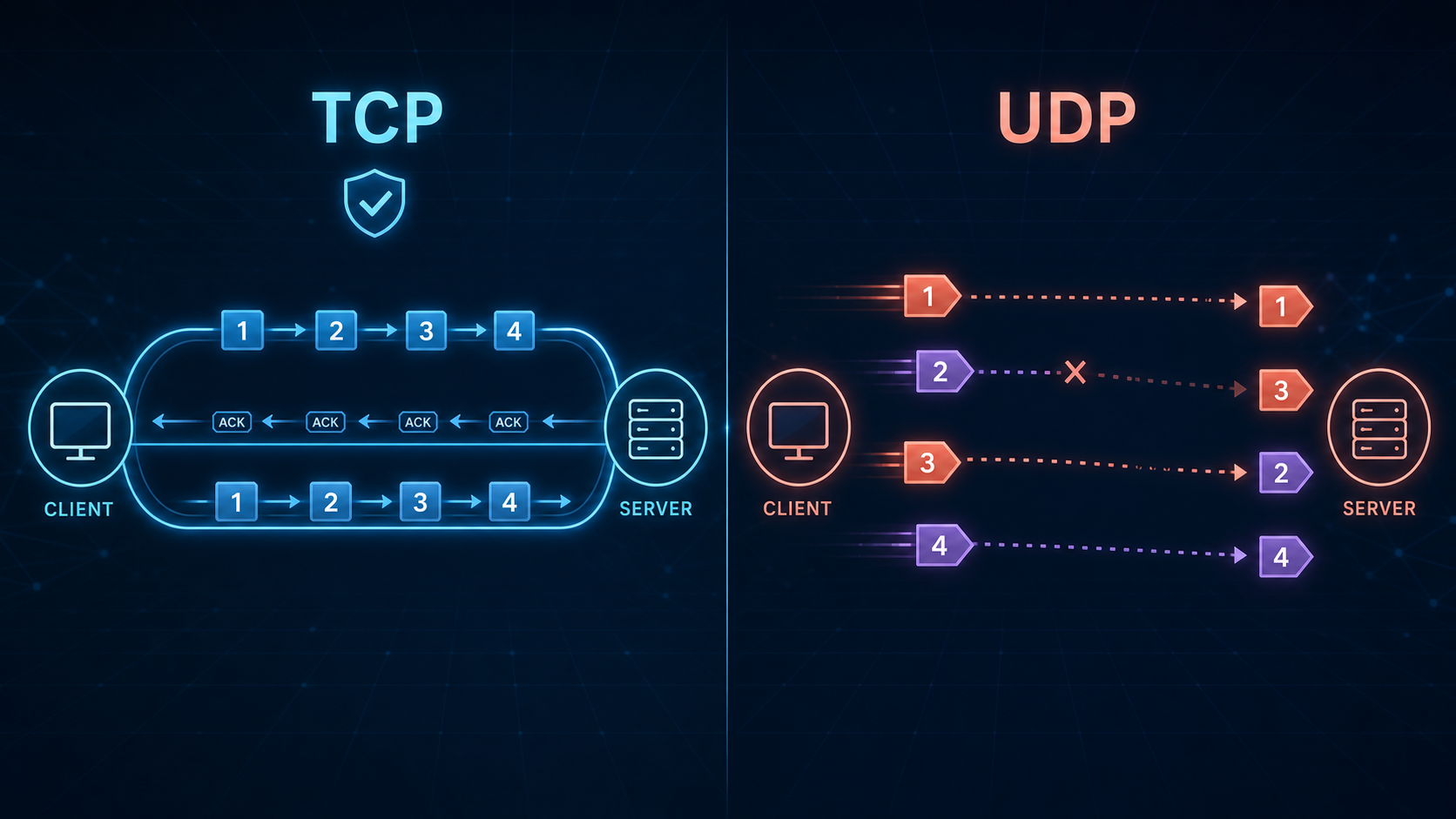
TCP and UDP provide different transport semantics rather than a simple choice between reliability and speed. TCP presents applications with a reliable, ordered byte stream and includes flow control, retransmission, and congestion control. UDP preserves datagram boundaries but leaves delivery recovery, ordering, pacing, and congestion response to the application or a higher-level protocol. This guide explains both protocols, corrects common misconceptions, covers DNS, QUIC, WebRTC, and SCTP, and shows how to publish a local TCP, UDP, or combined UDP/TCP service safely with Localtonet.
📋 What's in this guide
TCP vs UDP: the quick answer
The practical difference
TCP, the Transmission Control Protocol, establishes a connection and gives an application a reliable, ordered stream of bytes. It retransmits missing data, suppresses duplicate data, applies receiver flow control, and participates in congestion control. TCP does not preserve application message boundaries, and it cannot promise that a connection will survive every network or endpoint failure.
UDP, the User Datagram Protocol, sends independent datagrams without establishing a transport connection. It preserves datagram boundaries but does not itself retransmit lost data, restore order, suppress duplicates, or provide flow and congestion control. An application that needs those properties must implement them or use a protocol, such as QUIC, that supplies them above UDP.
UDP is not inherently faster for every workload. Its header and base protocol are simpler, and it avoids TCP connection establishment, but useful performance depends on the complete design. A poorly paced UDP application can cause loss or congestion, while a well-tuned TCP implementation can efficiently transfer large amounts of data. Choose according to the semantics the application requires, not according to a universal claim that one protocol is faster.
| Property | TCP | UDP |
|---|---|---|
| Application interface | Ordered byte stream | Individual datagrams |
| Connection setup | Normally begins with a three-way handshake | No transport handshake |
| Loss recovery | Built-in retransmission and acknowledgment machinery | Not provided by UDP |
| Ordering | Delivers stream bytes in order | Datagrams can arrive out of order |
| Message boundaries | Not preserved | Preserved |
| Flow control | Built in | Application responsibility |
| Congestion control | Required TCP behavior, with implementation-specific algorithms | Application or higher-level protocol responsibility |
| Minimum transport header | 20 bytes without options | 8 bytes |
| Current base specification | RFC 9293 | RFC 768 |
How TCP works
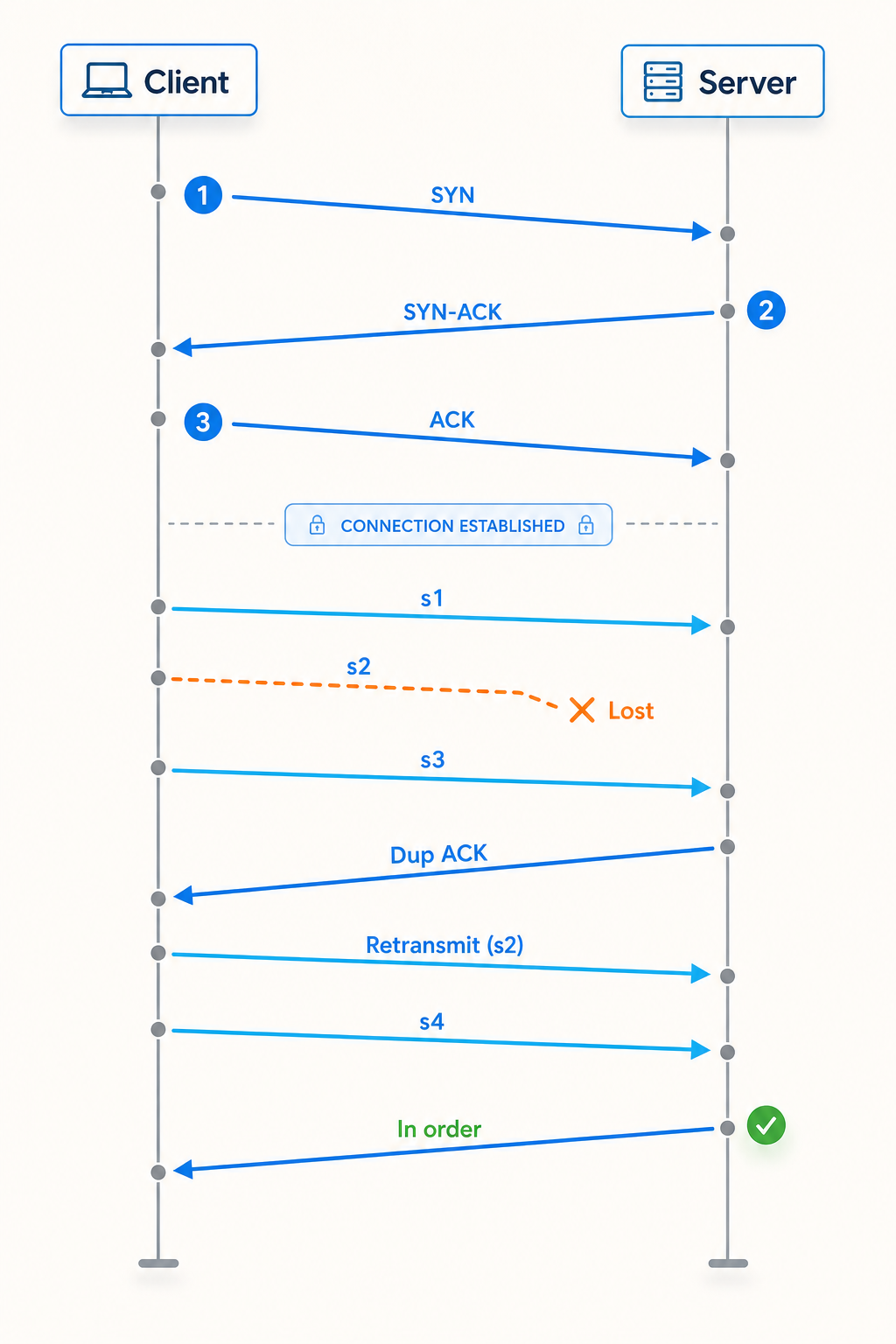
TCP is currently specified by RFC 9293, published in 2022 as the modern base specification that superseded RFC 793. Additional RFCs define congestion control, selective acknowledgments, loss recovery, and extensions. TCP runs above IP and identifies endpoints using IP addresses and transport ports.
The service TCP provides to an application is a full-duplex byte stream. If an application writes two buffers, the receiving application might read them as one larger block, several smaller blocks, or another grouping. Applications therefore need their own framing, such as a length field, delimiter, or protocol-defined record format.
Connection establishment
A normal active TCP connection begins with a three-way handshake. The handshake confirms that both endpoints can exchange traffic and synchronizes their initial sequence-number spaces. TCP options, when supported, are also negotiated during this process.
SYN
The initiating endpoint sends a segment with the SYN control flag and an initial sequence number.
SYN and ACK
The listening endpoint acknowledges the first SYN and supplies its own SYN and initial sequence number.
ACK
The initiator acknowledges the peer's sequence number. Once the required state transitions complete, the connection can carry the application's byte stream.
This is the usual sequence, not a claim that all possible TCP state transitions look identical. TCP also defines behavior for cases such as simultaneous open. Implementations may carry data in connection-establishment segments when supported by relevant extensions, so it is better to understand the handshake as state and sequence synchronization than as an absolute prohibition on data.
Reliability and ordering
When a healthy TCP connection makes progress, the receiving application sees the byte stream in order and without duplicate bytes. TCP does not guarantee that the network delivers every transmitted IP packet. Packets may be lost and replaced by retransmitted data. A machine crash, path failure, timeout, reset, or application error can still terminate the connection before all intended data is delivered. Applications that need transactional certainty must add their own acknowledgments, durable storage, idempotency, or resume logic.
Head-of-line blocking
If a TCP segment carrying an earlier part of the stream is missing, later bytes cannot be delivered past that gap as part of the ordered stream, even if those later bytes have arrived. This transport-level head-of-line blocking is important when unrelated logical operations are multiplexed over one TCP connection.
HTTP/2 multiplexes application streams over one TCP connection, but a missing TCP byte can temporarily hold up delivery for all HTTP/2 streams whose later bytes sit behind that gap. This behavior helped motivate QUIC's stream-aware transport design. TCP remains appropriate whenever a single ordered stream is exactly what the application needs.
Connection shutdown
TCP supports independent shutdown in each direction. A common graceful close includes a FIN and acknowledgment for one direction followed by a FIN and acknowledgment for the other. That is often illustrated as four segments, but it is not a fixed four-message requirement. An ACK can be combined with a FIN, one direction can remain open for a half-close, and an abortive shutdown can use a reset. The observed exchange depends on endpoint behavior and timing.
How UDP works
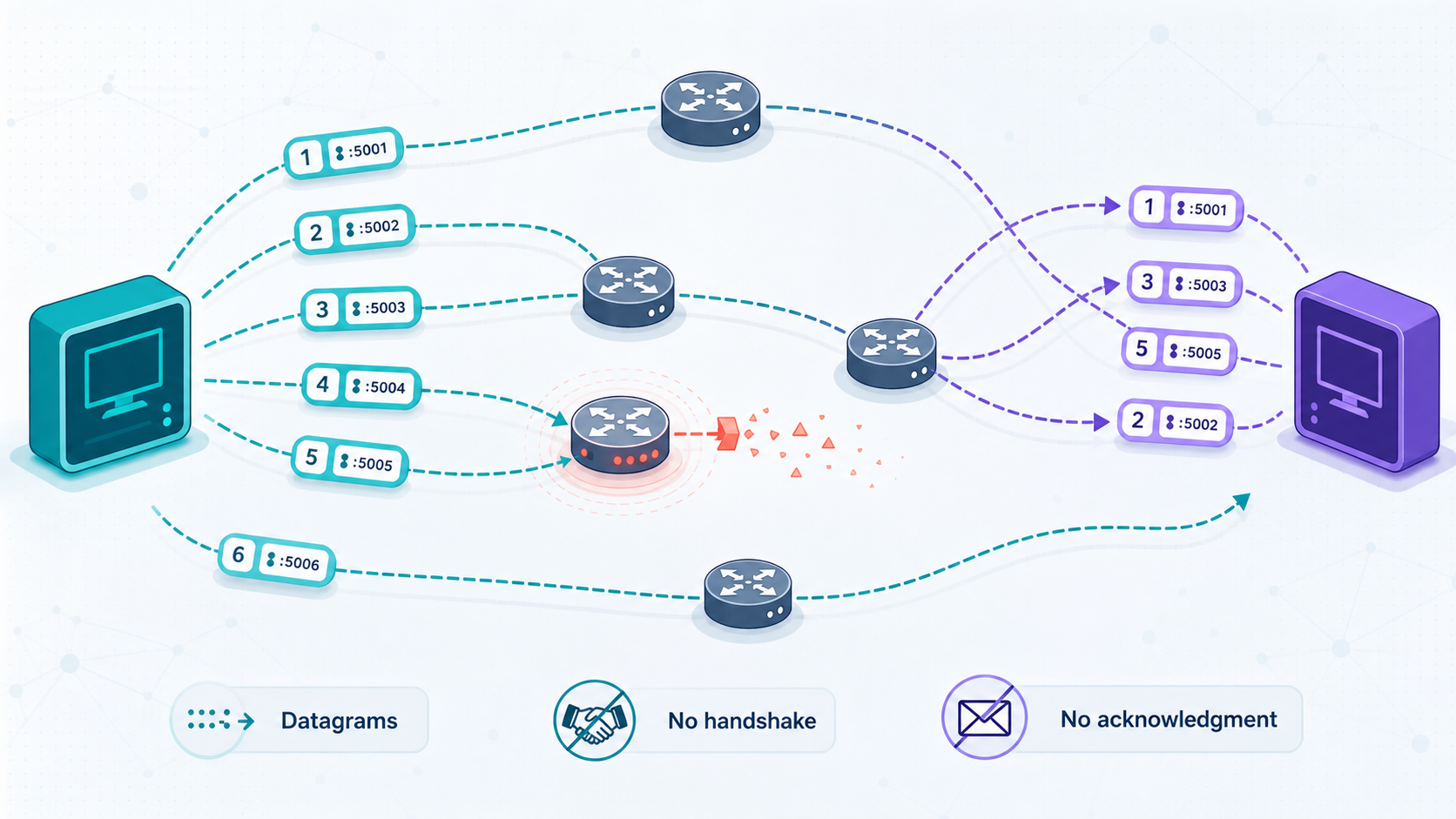
UDP is defined by RFC 768. Its header has four fields: source port, destination port, length, and checksum. Unlike TCP, UDP preserves message boundaries. One application send creates one UDP datagram, although the underlying IP packet may be fragmented along the path. One successful receive obtains a datagram rather than part of a continuous byte stream.
UDP does not establish a transport connection before sending. That avoids TCP's connection-state machinery, but it does not make delivery immediate or assured. IP routing, queues, firewalls, network address translation, radio conditions, and receiver load still affect latency and loss. Datagrams can be dropped, duplicated, delayed, or reordered.
UDP checksum behavior on IPv4 and IPv6
The UDP checksum covers the UDP header and payload plus an IP-derived pseudo-header. The rules differ by IP version. With IPv4, a transmitted UDP checksum value of zero indicates that the sender omitted the checksum. With IPv6, UDP normally requires a nonzero checksum. Narrow exceptions exist for specifically defined IPv6 tunnel uses, but ordinary IPv6 UDP applications should not assume that the checksum is optional.
Like the TCP checksum, a UDP checksum is an error-detection mechanism rather than encryption or authentication. An application carrying sensitive or security-critical traffic still needs a secure protocol with peer authentication and integrity protection.
Datagram size, fragmentation, and loss
A large UDP datagram can exceed the path's usable packet size and require IP fragmentation, or fail when fragmentation is unavailable. Losing one fragment prevents reconstruction of the whole datagram. Robust UDP protocols therefore control payload size and use path-aware strategies rather than assuming that every network accepts the same large datagrams.
UDP also has no built-in congestion control. Internet applications using UDP should pace traffic and respond to congestion. QUIC, for example, runs over UDP but defines acknowledgments, loss detection, flow control, and congestion control above it. Using UDP is not permission to transmit without regard for network capacity.
When to use TCP, UDP, or both
Start with application semantics. If the application consumes a reliable ordered stream and stale data remains useful, TCP is often the straightforward choice. If messages are independently useful, old messages become worthless quickly, or the application requires one-to-many IP delivery, UDP may fit better. A sophisticated application can use UDP while implementing selected reliability features, but doing that safely is more involved than merely sending datagrams.
| Requirement | Likely starting point | Reason |
|---|---|---|
| Reliable ordered byte stream | TCP | Ordering, retransmission, flow control, and congestion control are built in. |
| Independent time-sensitive messages | UDP or a UDP-based protocol | The application can discard stale updates rather than waiting for stream recovery. |
| Reliable multiplexed encrypted streams | QUIC where the application protocol supports it | QUIC supplies transport features above UDP and isolates stream delivery from gaps in other streams. |
| Simple request and response with protocol-defined retry | Often UDP, depending on the protocol | The protocol can retry the complete transaction and may also define TCP or encrypted alternatives. |
| Bulk transfer where every byte matters | TCP or a reliable protocol above UDP | The transfer needs recovery, congestion control, and completion validation. |
| Local multicast or broadcast discovery | UDP | TCP does not provide broadcast or multicast transport sessions. |
Common TCP-oriented workloads
Traditional remote shells, many database wire protocols, mail transfer, file transfer, and HTTP/1.1 or HTTP/2 usually expect TCP semantics. Their records, requests, and responses must arrive in the correct byte order. TLS can secure these protocols over TCP, but TCP alone does not encrypt them.
Common UDP-oriented workloads
Interactive media, some game-state updates, telemetry, discovery, and certain request-response protocols can benefit from independent datagrams. That does not mean every game, media system, or sensor protocol always uses UDP. Application designs vary, and many combine reliable control traffic with time-sensitive media or state traffic.
Using both protocols
A product may use TCP and UDP for different functions, but those functions do not necessarily share a port. For example, an application might use a reliable control channel on one port and media datagrams on another. Other protocols are specifically designed to accept both TCP and UDP on the same numeric port.
Localtonet supports TCP, UDP, and combined UDP/TCP tunnel categories. Use a combined tunnel only when the service actually listens for both protocols at the same local IP address and port. If an application uses different local ports, create configurations that match its real protocol and port arrangement rather than assuming a combined tunnel can merge unrelated endpoints.
DNS, QUIC, WebRTC, and SCTP
Modern DNS transport behavior
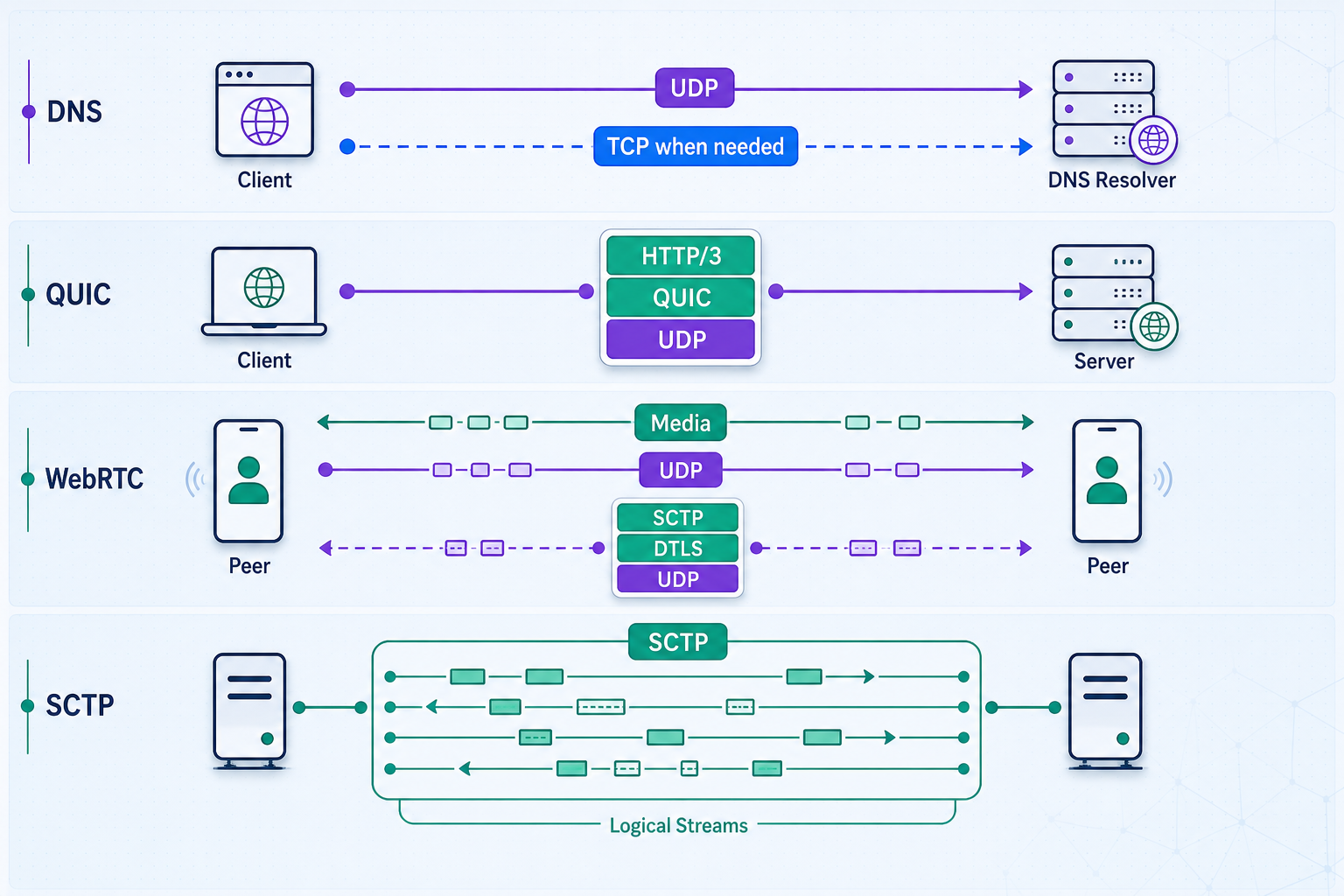
DNS is not accurately described as “UDP until a response exceeds 512 bytes.” Traditional DNS commonly uses UDP, but EDNS extends DNS so that endpoints can advertise a larger UDP payload size. Operators often choose conservative sizes because large fragmented responses can be unreliable across real networks.
If a UDP DNS response is truncated, the resolver can retry using TCP. TCP is also used for protocol operations that require it, including conventional full zone transfers. DNS security and privacy transports add more choices:
- DNS over TLS, or DoT, carries DNS in a TLS-protected connection, conventionally over TCP.
- DNS over HTTPS, or DoH, carries DNS through HTTP. Depending on the negotiated HTTP version, the underlying transport can be TCP with TLS or QUIC.
- DNS over QUIC, or DoQ, carries DNS directly over QUIC, which itself runs over UDP.
When exposing a DNS implementation for testing, verify every transport the implementation claims to support. A UDP-only tunnel cannot validate TCP fallback, DoT, or an HTTPS endpoint. Public recursive DNS service also creates significant abuse risk and should not be exposed without strict access controls and an intentional security design.
QUIC and HTTP/3 are separate standards
QUIC is a secure, multiplexed transport protocol standardized in RFC 9000 in May 2021. Its TLS integration is specified separately, including in RFC 9001. HTTP/3 is the mapping of HTTP semantics onto QUIC and was standardized in RFC 9114 in June 2022. QUIC is therefore not another name for HTTP/3, and RFC 9000 is not the HTTP/3 specification.
QUIC uses UDP as its substrate but adds connection establishment, encryption, acknowledgments, loss detection, reliable streams, flow control, and congestion control. A loss affecting one QUIC stream does not prevent another stream from delivering already available data merely because the first stream has a gap. The full behavior is more nuanced than saying that one lost packet affects only one stream: a packet can contain frames from multiple streams, and loss can also affect connection-level control data. Congestion response applies to the connection and can influence all streams sharing it.
WebRTC, RTP, DTLS, and signaling
WebRTC defines browser and real-time communication APIs plus a collection of media, security, connectivity, and data-channel mechanisms. Interactive media commonly uses RTP with SRTP protection. DTLS is involved in authenticating peers and establishing keying material for protected media through DTLS-SRTP. WebRTC data channels use SCTP carried over DTLS.
WebRTC does not standardize one universal signaling protocol. Applications exchange offers, answers, and connectivity candidates through an application-defined signaling path, which might use HTTPS, WebSocket, SIP, or another mechanism. DTLS does not automatically encrypt that external signaling channel. The signaling application must secure its own transport and authenticate participants.
ICE coordinates connectivity checks using candidates gathered from local interfaces and services such as STUN and TURN. Direct UDP connectivity may be preferred, but relay or other fallback behavior depends on the deployment. A generic UDP tunnel should not be described as a replacement for WebRTC's complete ICE, TURN, identity, and media-security design.
SIP and RTP have different roles
SIP is a signaling protocol used to establish, modify, and end communication sessions. It is not itself the voice or video media stream. RTP and RTCP commonly carry and monitor media after signaling negotiates the session. A voice deployment may consequently use several transport protocols and ports. Always inspect the specific server configuration before designing tunnels or firewall rules.
SCTP
SCTP is a message-oriented transport protocol that supports reliable delivery, multiple streams within an association, and multihoming capabilities. Its independent streams reduce delivery blocking between streams, although congestion and path behavior still operate at broader scopes. On the public internet, direct SCTP deployment can encounter middlebox compatibility constraints. WebRTC data channels avoid requiring browsers to expose native SCTP directly by carrying SCTP over DTLS within the WebRTC transport stack.
Prerequisites for a Localtonet TCP or UDP tunnel
Localtonet exposes a service reachable from your device through a public host and port. The Localtonet client establishes an outbound connection to our relay, so you do not need inbound router port forwarding, a public IP address, firewall changes, or a separate VPN setup for the tunnel itself.
Before creating anything, collect the following information:
A tunnel cannot repair a service that is stopped, listening on the wrong address, blocked by a host firewall, or configured for a different protocol. Test the local target from the Localtonet client device first. If the target is another LAN device, test it from the Localtonet device rather than only from the target itself.
Install and run the current Localtonet application for your operating system. Installation methods can change, so use the current instructions available through the Localtonet documentation rather than copying an unverified shell command. Once connected, confirm that the intended device appears available before configuring the tunnel.
How to create and run a TCP or UDP tunnel
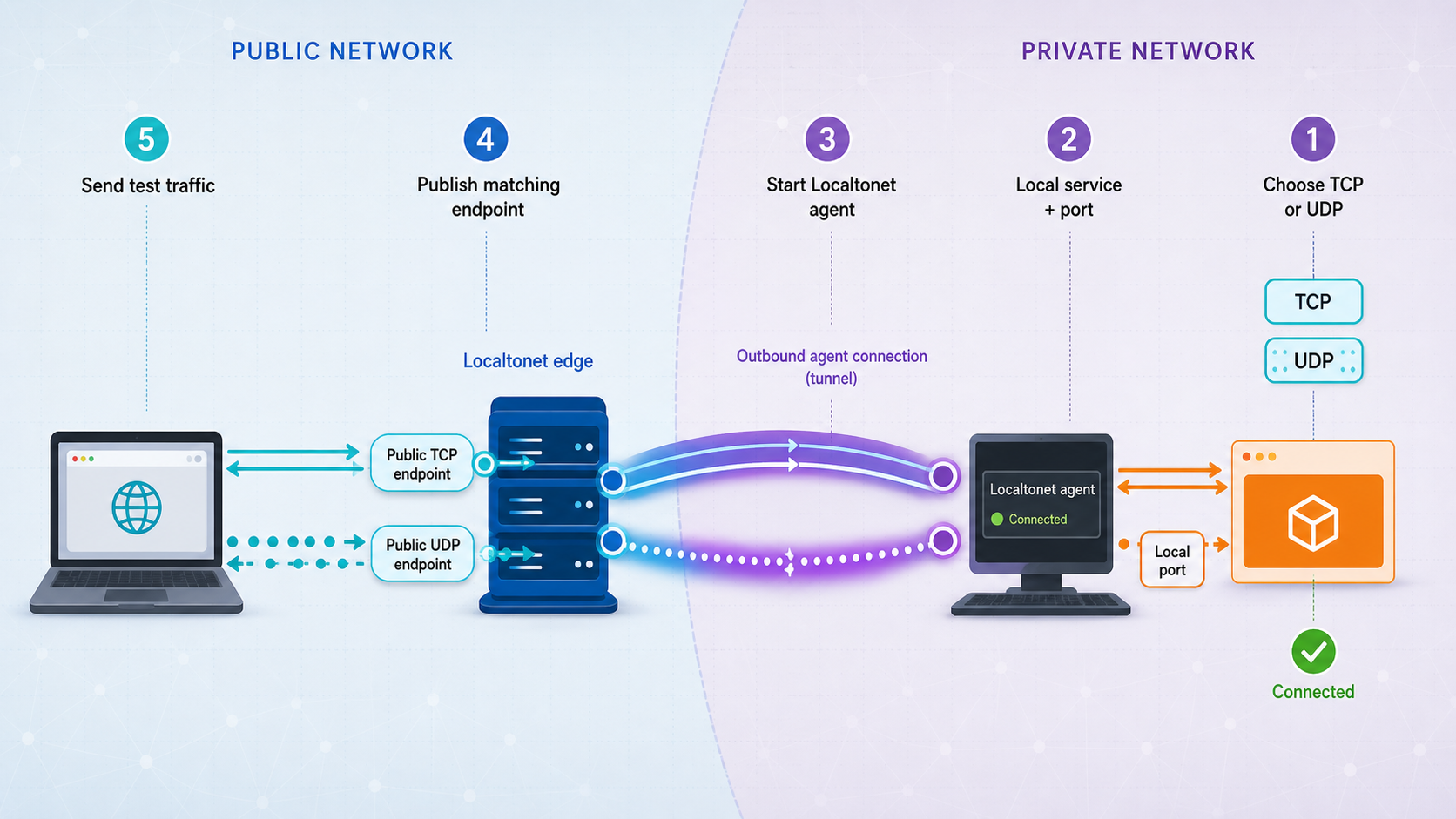
The tunnel type must match what the local application listens for. A TCP client cannot communicate with a UDP-only service simply because both use the same numeric port, and the reverse is also true.
Install and run the Localtonet client
Run the current Localtonet client on a device that can reach the local service. Confirm that the client is connected before continuing.
Select the client device
Choose the device-specific authentication token associated with that connected client. Do not paste the token into documentation, logs, or a public support request.
Select a current relay server
Choose from the relay servers or regions currently offered in the product. Availability can vary, so this guide does not hardcode a server code.
Create the appropriate tunnel configuration
Choose TCP for a TCP listener, UDP for a UDP listener, or combined UDP/TCP when the same service listens for both protocols at the same local IP address and port. Enter the verified local target address and port.
Start the tunnel
Creating a tunnel does not start it. Use the Start action, then wait for the tunnel to report that it is running before testing the assigned public host and port.
Use and later close the public endpoint
Configure the remote application client with the public host and port assigned to the running tunnel. When access is no longer required, stop the tunnel. Delete it if the configuration will not be reused.
The selected Localtonet client must remain connected, and the tunnel must remain started. A saved tunnel configuration alone does not provide a reachable endpoint. Stopping the client, disconnecting the device, or stopping the tunnel interrupts public access.
Choosing a safe local bind address
If the service and Localtonet client run on the same machine, binding the service to loopback can reduce unnecessary exposure on the LAN. If the service runs inside a container, virtual machine, or another local device, the Localtonet client needs a target address it can actually reach. Do not change a service to listen on every interface unless that is necessary and the host firewall and application authentication are configured appropriately.
Container networking deserves particular attention. A loopback address inside one container refers to that container, not automatically to the host or another container. Verify connectivity from the environment in which the Localtonet client runs and use the reachable local address established by your container or virtual-network configuration.
Verify operation and troubleshoot failures
Verify TCP locally and publicly
First connect to the local TCP target from the Localtonet client device using the application's normal client. A successful socket connection is only the first check. Send a valid protocol request, authenticate where required, and confirm that the expected response arrives.
After starting the tunnel, repeat the same application-level test from a separate external network using the assigned public host and port. A generic TCP connection probe can show whether a connection opens, but it cannot prove that the application protocol is healthy. TLS-based services should also be checked for the expected certificate and protocol negotiation.
nc -vz PUBLIC_HOST PUBLIC_PORTThe command above is a generic example for systems with a compatible Netcat implementation. Replace the public host and port with the values assigned to your tunnel. Netcat options differ across operating systems, so use the platform's equivalent connection tester when necessary.
Verify UDP locally and publicly
UDP verification must be protocol-aware because UDP has no connection handshake. A generic sender may report success merely because the operating system accepted a datagram for transmission. It does not prove that the remote application received it or replied.
Use the service's native client to send a valid request and confirm an expected response, state change, log entry, or packet capture. Test locally first, then test the public endpoint from another network. If the protocol is intentionally one-way, use server logs or a packet capture at the receiver to confirm arrival. Do not treat the absence of an immediate error as proof of success.
Verify combined UDP/TCP services
Test TCP and UDP independently. A successful TCP connection does not verify the UDP path, and a UDP response does not verify the TCP listener. Confirm that both local listeners use the same intended IP address and port before attributing a failure to the tunnel.
| Symptom | Likely checks | Corrective action |
|---|---|---|
| Public endpoint refuses or times out | Client connection, tunnel running state, relay selection, local listener | Reconnect the selected client, start the tunnel, and verify the local service independently. |
| TCP opens but application fails | Protocol framing, TLS expectations, authentication, application logs | Test with the native client and confirm that the public client uses the expected protocol. |
| UDP test shows no reply | Whether the service normally replies, local packet arrival, host firewall, target port | Use a valid protocol request and inspect receiver logs or packet captures rather than relying on a connection probe. |
| Local test works only on the service host | Bind address and host firewall | If Localtonet runs elsewhere, bind to an intentionally reachable local interface and restrict access appropriately. |
| Combined tunnel works for one protocol | Separate TCP and UDP listeners on the same target port | Confirm both listeners exist. If the application uses different ports, use matching separate configurations. |
| Service stops after previously working | Application process, Localtonet client, tunnel state, local address changes | Restore the failed component and recheck the current target rather than assuming the saved configuration is active. |
Routine operation
Keep the application, the Localtonet client, and the tunnel under intentional operational control. Monitor the application's own logs for authentication failures, malformed requests, resource exhaustion, and unexpected clients. If the local target changes after a restart or network reconfiguration, update the tunnel target and verify it again.
Stop tunnels when a maintenance task, demonstration, or test ends. Deleting an unused tunnel configuration reduces the chance that someone later starts an obsolete endpoint pointing at the wrong service. If a device token may have been disclosed, treat it as a credential incident and replace or revoke it through the current account workflow.
Security guidance for public TCP and UDP exposure
A public host and port can be discovered, scanned, and tested by arbitrary internet clients. A tunnel changes reachability, not the security model of the application behind it. Raw TCP and UDP services do not automatically gain user authentication or application-level encryption merely because they are tunneled.
SSH, databases, Android Debug Bridge, router interfaces, remote desktops, orchestration APIs, DNS resolvers, and other administrative services can provide powerful access if misconfigured or compromised. Prefer private access designs for administration. If public exposure is necessary, use strong protocol authentication, encryption, least-privilege accounts, current software, and IP restrictions or equivalent access controls where available.
Special risks for UDP services
A publicly reachable UDP service can be abused if it sends a response much larger than an unauthenticated request, particularly when source addresses can be spoofed elsewhere in the network path. DNS and other request-response services require careful anti-abuse configuration. Avoid exposing an unrestricted recursive resolver or reflection-capable service.
UDP applications also need resource controls. Rate limiting, validation, bounded queues, conservative message sizes, and congestion-aware sending help prevent accidental overload and malicious packet floods. Authenticate messages when the protocol supports it and reject malformed input before allocating expensive resources.
Protect the Localtonet device token
A Localtonet authentication token identifies the client device that can run a tunnel. Do not put it in a code block, repository, container image, environment screenshot, chat message, or published tutorial. Select the token through the current product workflow. If it is exposed, rotate or revoke it rather than relying on deletion from one visible location.
Frequently asked questions
What is the main difference between TCP and UDP?
TCP provides applications with a reliable, ordered byte stream and includes retransmission, flow control, and congestion control. UDP transports separate datagrams without built-in delivery recovery, ordering, duplicate suppression, flow control, or congestion control. UDP preserves message boundaries, while TCP does not.
Does TCP guarantee that every packet arrives?
No. Individual IP packets can be lost, duplicated, or reordered. TCP retransmits missing stream data and presents successfully received bytes to the application in order. If recovery becomes impossible because of a failure, reset, or timeout, the connection can terminate before all intended application data is delivered.
Is UDP always faster than TCP?
No. UDP has less transport machinery and does not require TCP connection establishment, but performance depends on the workload, network, implementation, security protocol, recovery strategy, and congestion behavior. TCP can be highly efficient for reliable bulk transfer. UDP is useful when the application benefits from independent datagrams or needs control over which lost data is worth recovering.
Does DNS use TCP or UDP?
DNS uses several transports. Conventional queries commonly begin over UDP with EDNS used to advertise supported UDP payload sizes. A resolver can retry a truncated response over TCP, and zone-transfer operations use TCP. DoT conventionally uses TLS over TCP, DoH uses HTTP over its negotiated transport, and DoQ uses QUIC over UDP.
Is QUIC the same thing as HTTP/3?
No. QUIC is a secure multiplexed transport protocol standardized in RFC 9000. HTTP/3 is an HTTP mapping that runs over QUIC and is standardized in RFC 9114. Other application protocols can also use QUIC.
Can Localtonet tunnel both TCP and UDP?
Yes. Our documented tunnel categories include TCP, UDP, and combined UDP/TCP. The client device establishes an outbound connection to a Localtonet relay and the running tunnel supplies a public host and port. Choose the type that matches the local service, and use a combined configuration only when both protocols target the same local IP address and port.
Why does my UDP port test report success even when the server receives nothing?
UDP has no connection handshake. A sending tool may only confirm that the local operating system accepted a datagram. Verify UDP with a valid application request and an expected reply, receiver log, state change, or packet capture. Test the local target before testing the public endpoint.
Does creating a Localtonet tunnel make it immediately available?
No. Creation saves the tunnel configuration. You must start the tunnel, and the selected Localtonet client must remain connected. Stop the tunnel when access is no longer needed, or delete it if you will not reuse the configuration.
Publish the transport your application actually uses
Run and verify your local service, install the current Localtonet client, then create a TCP, UDP, or combined UDP/TCP tunnel that matches the real listener configuration. Start it only after authentication and access controls are ready, test the assigned public endpoint, and stop or delete the tunnel when the work is complete.
Get Started →

