

Compile a local file management service and make its web interface reachable when you need it
OpenAList is a self-hosted file listing and management application that connects multiple storage systems through a browser-based interface. In this guide, we build the Go application from source, start it with its documented defaults, inspect its configuration, and verify the local web endpoint before introducing remote access. We also distinguish a quick build of the currently checked-out branch from a repeatable build pinned to a reviewed tag or commit. Finally, we connect the working service through a Localtonet HTTP tunnel without requiring inbound router port forwarding, inbound firewall changes, a VPN, or a public IP address.
📋 What's in this guide
Understand what you are building
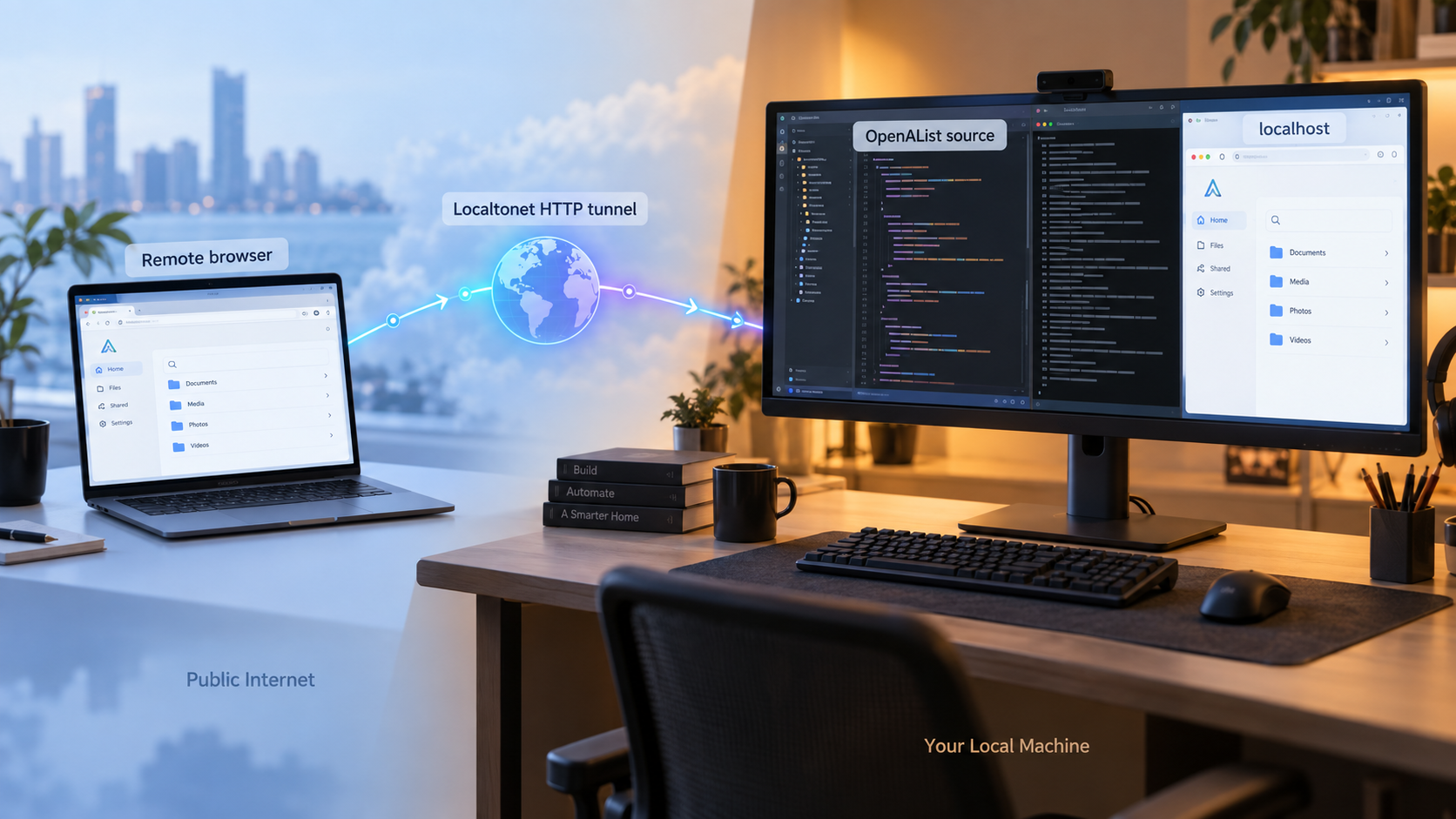
OpenAList is an independently maintained, community-driven fork that originated from Alist v3.45.0. It provides a browser-accessible file listing and management service that can work with local storage, cloud drives, object storage, and virtual storage drivers. The project reports support for more than 60 storage drivers and also advertises WebDAV, FTP, SFTP, and S3-compatible access.
You can inspect the current code and project README in the primary OpenAList repository. Storage-specific and version-sensitive application guidance is available in the OpenAList documentation. Before choosing a revision for a durable deployment, review the project's release history for changes that could affect build requirements, configuration, storage drivers, authentication, or migration behavior.
This article deliberately focuses on the HTTP web interface. The documented default web address is http://localhost:5244, which gives us a specific endpoint that can be built, started, and tested consistently. Although OpenAList supports additional access protocols, the evidence used for this tutorial does not establish all of their ports or complete configuration procedures. We therefore do not guess those details or treat an HTTP tunnel as a substitute for a native WebDAV, FTP, SFTP, or S3-compatible connection.
Building from source is useful when you want to inspect the code you are compiling, test a particular revision, contribute changes, or avoid depending on a prebuilt package. It also places more responsibility on the operator. You must install a compatible Go toolchain and C compiler, retain the application data, manage startup and restarts, decide how updates will be reviewed, and protect any service you expose beyond the local machine.
jsoniter build tag.
http://localhost:5244, which can be tested before any remote tunnel is created.
How the completed workflow fits together
OpenAList runs on the host and listens for web requests on its local endpoint. A browser on that host can use http://localhost:5244 directly. For remote access, the Localtonet client must run on the same device or on another device that can reach the OpenAList IP address and port. The HTTP tunnel then forwards requests arriving at its assigned public HTTPS address to that local target.
These are separate layers. OpenAList remains responsible for its users, storage configuration, file permissions, application behavior, and data. Localtonet provides the network path to the local HTTP service. Creating a tunnel does not install OpenAList, configure storage, replace application authentication, or turn the application into a VPN service.
Keep the service local while installing it. Confirm that OpenAList starts, that its web interface loads, and that administrator access is under your control before creating a public tunnel. This separation makes build failures, application failures, local networking problems, and tunnel problems much easier to diagnose.
Prepare the OpenAList build system
The current OpenAList source instructions identify three tool requirements: Git, Go 1.27.1 or later, and a C compiler for SQLite and CGO. These requirements can change as the project evolves, so check the repository and release information for the revision you intend to build rather than assuming that an older toolchain remains compatible.
You also need enough local storage for the repository, Go module downloads, the compiled executable, the application data directory, and any local files you later connect to OpenAList.
| Requirement | Why it is needed | What to verify |
|---|---|---|
| Git | Clones the OpenAList repository and identifies the revision being built. | The git command is available in the shell used for the build. |
| Go 1.27.1 or later | Compiles the application and resolves its declared Go modules. | go version reports a release that satisfies the selected revision's requirement. |
| C compiler | Supports the SQLite and CGO portions of the documented build. | A compiler suitable for the operating system and Go target is installed and discoverable. |
| Writable working directory | Holds the repository, build output, and default ./data directory. |
The account running OpenAList can write to the selected location. |
| Available TCP port 5244 | The default OpenAList web endpoint uses this port. | No unrelated process is already listening on the required local port. |
Check the versioned command-line tools from the same shell in which you will compile:
git --version
go version
Compiler installation and detection differ by operating system and toolchain. The project requires a C compiler but does not provide one universal compiler package or installation command for every platform. Install the compiler recommended for your operating system and Go environment rather than copying a package-manager command intended for another platform.
Choose a service account and working directory
Decide which operating-system account will own the OpenAList process and data. For a durable installation, avoid building and running the service from a temporary directory. The default data directory is relative to the current working directory, so changing that directory can affect which ./data folder the process uses.
This matters during later restarts. Starting the same executable from a different directory can cause the application to find or create a different relative data directory. Record the executable path, working directory, runtime account, and backup location for the host.
Choose between a quick build and a reproducible checkout
The official quick-start commands clone the repository and build whichever revision is checked out after cloning. That approach is convenient for evaluation, but a repository's default branch can move. Repeating the same clone and build commands later can therefore compile different source code or dependencies.
For a repeatable deployment, select a release tag or exact commit that you have reviewed. Use the OpenAList release history to identify an appropriate revision, read its notes, and record the selected identifier in your deployment documentation. This guide intentionally does not prescribe a specific version because release selection is version-sensitive and should be an explicit operator decision.
A tag provides a useful review boundary, but a commit identifier is the most direct way to identify the exact source tree. If your process relies on a tag, record both the tag and the commit to which it resolved when you built the application.
Compilation only shows that the selected source and dependencies can produce an executable in the current environment. Review the revision you intend to run, keep the build environment trustworthy, and protect the resulting binary and data directory from unauthorized modification.
Build and start OpenAList from source
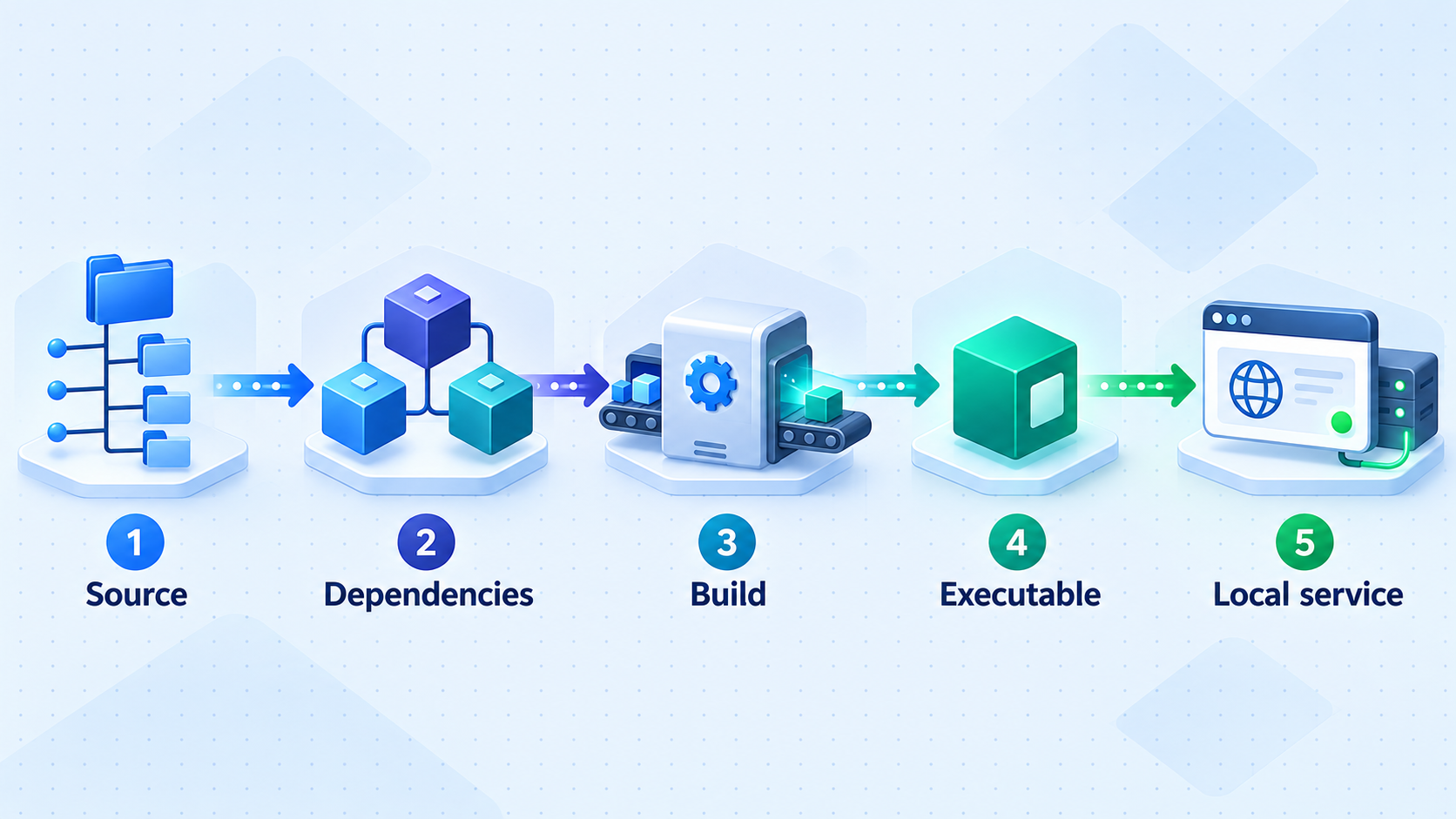
OpenAList documents a concise local build: clone the repository, enter it, build the current package with the required tag, and start the generated executable. The first workflow below is appropriate when you intentionally want to build the branch checked out by the clone operation.
Option 1: Quick build of the checked-out branch
Clone the OpenAList repository
Use Git to obtain the source tree from the maintained repository. This creates an openalist directory beneath the current directory.
git clone https://github.com/AlliotTech/openalist.gitEnter the source directory
Change into the cloned repository so the Go build uses the project module and writes the executable into the expected working directory.
cd openalistCompile the checked-out revision
Build the current package with the documented jsoniter build tag and write the result to an executable named alist.
go build -tags=jsoniter -o alist .Start the OpenAList server
Run the generated executable in server mode. Keep the terminal available during the first verification so startup messages and errors remain visible.
./alist serverThis builds the revision currently checked out by Git. Immediately record it if you need to reproduce or audit the installation:
git rev-parse HEADOption 2: Build a reviewed tag or commit
For a controlled deployment, clone the repository, fetch its tags, and check out the exact tag or commit you selected from the release history or repository. Replace REVIEWED_TAG_OR_COMMIT below with the actual identifier you reviewed. Do not type the placeholder literally.
git clone https://github.com/AlliotTech/openalist.git
cd openalist
git fetch --tags
git checkout --detach REVIEWED_TAG_OR_COMMIT
git rev-parse HEAD
go build -tags=jsoniter -o alist .
./alist server
Detached checkout mode is useful here because it leaves the working tree at the selected revision instead of silently tracking later changes to a branch. Save the output of git rev-parse HEAD with your build records. If you rebuild later, check out that same identifier and recheck the selected revision's toolchain requirements.
The build can download Go modules declared by the project, so the build environment needs access to the dependency locations used by the Go toolchain. If the build stops during dependency resolution, distinguish an internet, proxy, certificate, or module-fetching problem from a compiler error in OpenAList itself.
The command syntax above follows the project-documented source workflow. Executable invocation conventions can differ across operating systems. If your platform names or launches executables differently, use the platform-appropriate form while preserving the same server argument. The project does not provide one source-build command sequence covering every operating system, so this guide does not invent platform-specific variants.
What a successful first start should establish
A successful start should leave the server process running and make the documented web address available at http://localhost:5244. The default data directory is ./data, relative to the process working directory, and the default configuration file is data/config.json.
Do not immediately replace configuration values with examples copied from another release. Preserve a copy, inspect the generated structure, and identify the exact setting you need to change. Configuration formats can evolve, so using the file generated by the revision you built is safer than pasting an old example.
The normal source build produces and starts OpenAList. The separate development workflow uses the backend repository, the openalist-web repository, Node.js 22.22.1 or later, pnpm 11, and ./dev.sh. You do not need the frontend development setup merely to perform the documented Go build.
The repository also contains build.sh. OpenAList identifies that script as a release and CI workflow tool that requires an explicit build mode. It is not the normal local build command used in this tutorial.
Configure credentials, storage, and application behavior
OpenAList stores its default configuration in data/config.json. Configuration can also be supplied through environment variables prefixed with ALIST_. The available evidence does not provide a complete environment-variable reference, so use only variable names documented for the OpenAList revision you are running. Do not infer a variable name by converting a JSON key and assuming it will work.
Establish administrator control
A new installation needs a protected administrator account before it is exposed remotely. The Docker workflow explicitly documents that a random administrator password is printed in container logs, along with Docker-specific commands for setting or resetting that password. Those Docker commands do not automatically apply to a directly source-built process.
Inspect the startup output and administration flow presented by the exact source-built revision. Confirm that you can authenticate as the administrator and replace any temporary or generated credential with a strong, unique password before creating a Localtonet tunnel. If the expected credential information is not present, consult the matching OpenAList documentation and release information rather than applying a Docker-only command without verification.
If you cannot confirm who controls the administrator account, stop the server and resolve that issue locally. A public URL makes the login surface reachable from the internet, so credential ownership must be established first.
Add storage carefully
OpenAList supports local storage and numerous external storage providers. Each provider can have different credentials, permissions, redirect requirements, token lifetimes, and path conventions. Follow the storage-specific OpenAList documentation and use local or provider-approved authorization tools. Do not submit cloud storage tokens, refresh tokens, cookies, or account passwords to untrusted online token generators.
Apply least privilege to every connected storage account. If an OpenAList user only needs to browse or download files, avoid giving the underlying provider credential unnecessary write or administrative permissions. If uploads are required, limit access to the relevant directory or bucket wherever the provider supports that restriction.
OpenAList supports protected routes and authentication for specific paths, but exact administration steps can be version-sensitive. Verify those controls in the interface and documentation for the revision you built. Do not assume that every listed directory is private merely because the administration interface requires a login.
Understand migration behavior
If this is a fresh OpenAList installation, the migration warning from upstream Alist does not apply. If you are reusing an existing Alist data directory, back it up before starting OpenAList. OpenAList uses a different static password salt from upstream Alist, so existing password hashes in that reused data directory will no longer validate.
After switching from Alist, reset the administrator password and then reset the passwords of other local users through the administration interface as needed. Do not expose the migrated service until you have tested account access and confirmed that old credentials are not leaving users unexpectedly locked out.
Verify the local OpenAList service
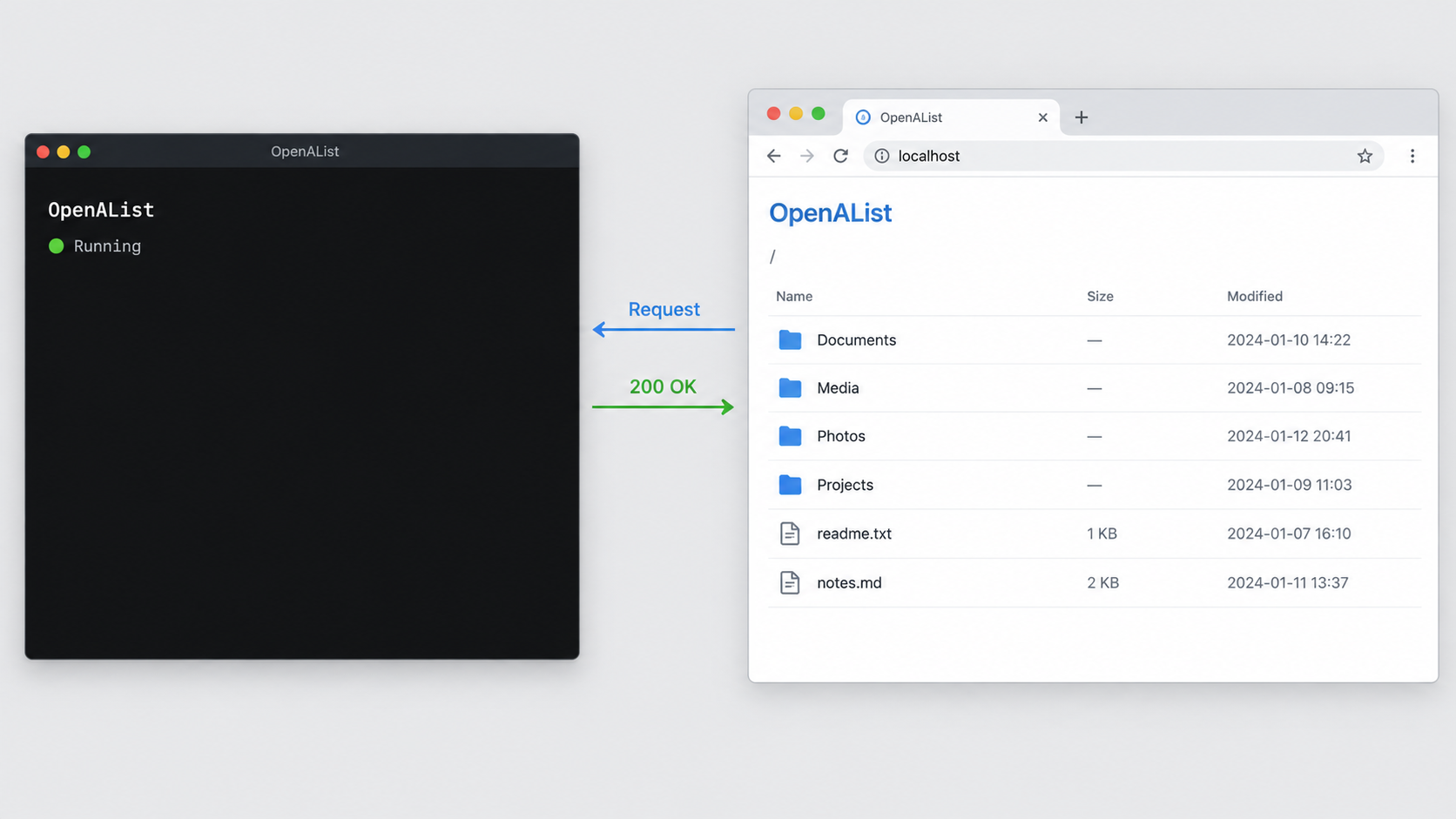
Local verification proves that the application is working independently of Localtonet. Perform these checks from the OpenAList host before diagnosing tunnels, public addresses, or remote browser behavior.
Open the documented local address
On the same machine as the running process, open:
http://localhost:5244The OpenAList web interface should load. Confirm that page assets render correctly, administrator authentication works, and the administration area is accessible only with the intended credentials. Add a limited test storage target or inspect an already configured target, then verify that file listings and intended operations behave correctly.
A page that loads is necessary but not sufficient. Test the workflow you plan to use remotely. For read-only browsing, verify directory navigation and a permitted download. If uploads are intended, test them with a non-sensitive file and confirm where the file is stored. Remove the test file afterward if it is no longer needed.
Confirm the runtime directory
Verify that data/config.json and the rest of the ./data directory are being created or read beneath the intended working directory. Restarting from another directory can change the meaning of a relative path, so record the directory from which ./alist server is launched.
Test from the Localtonet client host if it is different
When the Localtonet client runs on the OpenAList machine, the tunnel can target the loopback service at 127.0.0.1 on port 5244. If the client runs on another device, 127.0.0.1 refers to that other device, not the OpenAList host. In that topology, the client device must be able to reach an appropriate local network address for the OpenAList host.
The OpenAList evidence establishes the default localhost endpoint, but it does not establish the exact listener configuration required for access from another LAN device in every revision. Do not assume the service listens on all network interfaces. Either run the Localtonet client on the same host or verify the relevant OpenAList listener configuration for your installed revision before using a separate tunnel device.
First test localhost:5244 on the OpenAList host. Next, if applicable, test connectivity from the Localtonet client device. Only then start the public tunnel. This sequence reveals whether a failure belongs to the application, the local network path, or the tunnel.
Run, back up, and update the source-built service
The documented command ./alist server runs the application directly. During initial testing, foreground operation is useful because messages remain visible. For unattended operation, use a process supervisor appropriate to your operating system, but define it around the verified executable, working directory, runtime user, and data directory.
OpenAList does not provide one universal service definition for every host platform. Service managers differ across Linux distributions, Windows, macOS, containers, and NAS systems, so this guide does not fabricate one. Whatever supervisor you select should start OpenAList from the same working directory used during testing, retain useful logs, restart it according to your policy, and avoid unnecessary operating-system privileges.
Back up the persistent data
Treat the ./data directory as persistent application state. Before migration, configuration changes, or upgrades, create a recoverable backup using a method appropriate to your filesystem and deployment. Protect backups because configuration data can contain sensitive provider details or references to connected storage.
A backup is only useful if restoration has been tested. On a non-production copy, confirm that the backed-up data can be restored with the expected ownership and permissions. Record the OpenAList tag and commit associated with each backup so you can reason about compatibility during recovery.
Plan controlled source updates
A source installation does not update itself merely because the repository has a newer release. A controlled update should identify the target revision, review its release information, back up the current data, stop the running process cleanly, check out the selected source, build it, and verify the resulting executable locally before restoring remote access.
Retain the previously working executable or another tested rollback path until the update passes local and remote checks. Avoid rebuilding directly over the only known-good binary. If an update changes storage drivers, authentication, migration logic, or configuration behavior, test those areas explicitly rather than relying only on the home page loading.
Know the alternative installation methods
| Installation method | Documented startup | Best fit | Important consideration |
|---|---|---|---|
| Source build | go build -tags=jsoniter -o alist ., then ./alist server |
Code review, development, customization, or controlled builds | You maintain the compiler toolchain, build process, runtime supervision, and updates. |
| Prebuilt binary | Extract a matching release archive, then run ./alist server |
A simpler host installation without local compilation | Select the archive matching the operating system and architecture. |
| Docker image | Run the published alliot/alist image with port and data mappings |
Container-oriented deployment and image-based version selection | Persist /opt/alist/data and use a reviewed version tag when reproducibility matters. |
| Docker Compose example | Review the included file, then use docker compose up -d |
Declarative container configuration | Review its volume path and environment variables before starting it. |
Docker image variants are published with different bundled components. The standard image contains OpenAList, the ffmpeg variant includes FFmpeg, the aria2 variant includes aria2, and the aio variant includes OpenAList, FFmpeg, and aria2. Published Docker images cover Linux AMD64 and ARM64. Those image variants do not change the direct source-build procedure in this article.
Connect OpenAList through a Localtonet HTTP tunnel
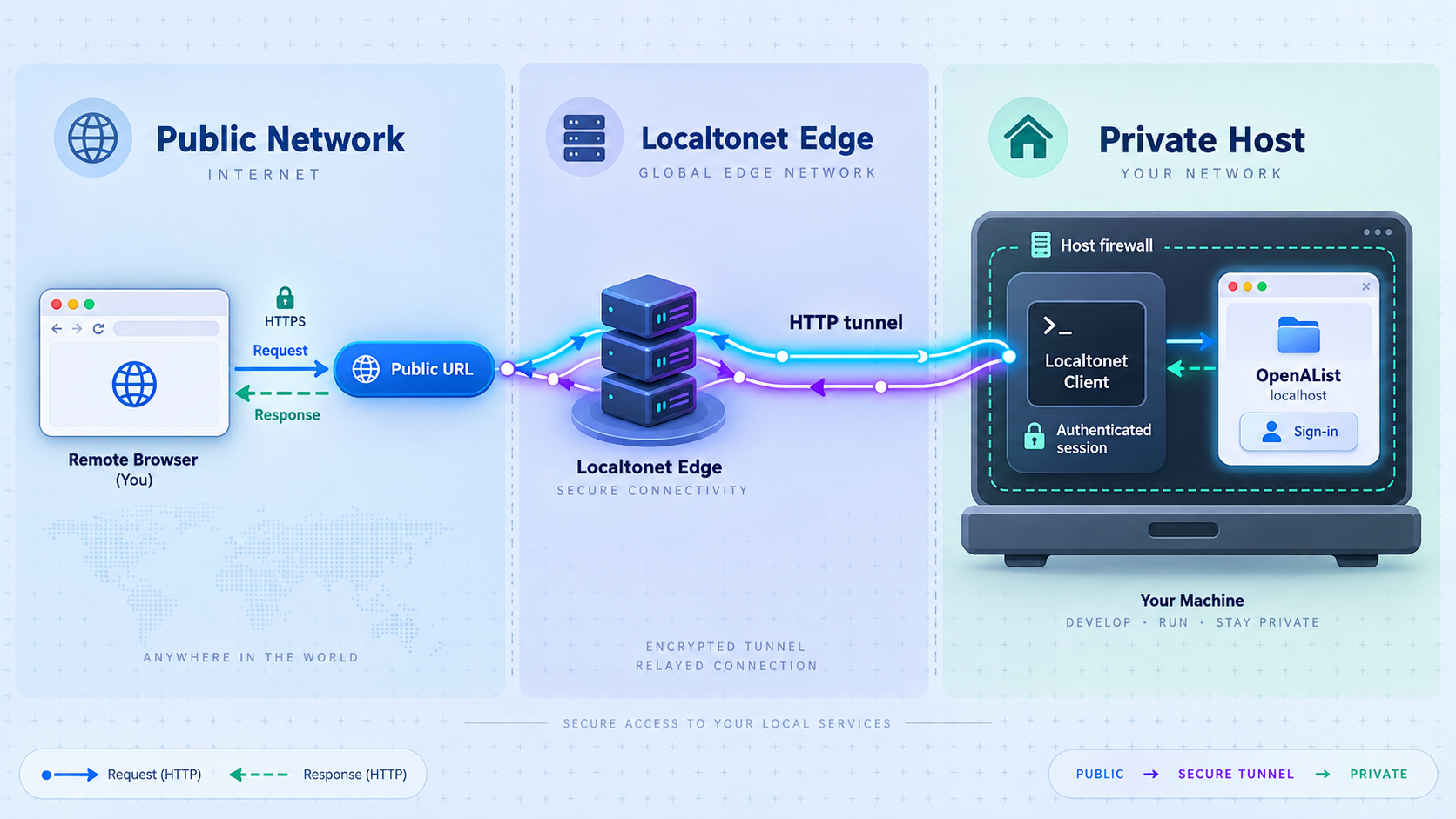
Once http://localhost:5244 works reliably, you can add remote access. With Localtonet, the client application on the selected device establishes an outbound connection to one of our relay servers. This workflow does not require inbound router port forwarding, inbound firewall changes, VPN setup, or a public IP address.
An HTTP tunnel is the appropriate choice for the documented OpenAList browser endpoint. It forwards web traffic to the local IP address and port you configure. It does not automatically expose OpenAList's separate WebDAV, FTP, SFTP, or S3-compatible protocols, and it is not a VPN.
The dashboard sequence below follows our current HTTP tunnel workflow. Product options and availability can vary by plan, client version, or current dashboard configuration, so use the values actually shown in your account.
Install and run the Localtonet client
Install our client on the OpenAList host or on another device that can reach the verified OpenAList service. Keep both OpenAList and the Localtonet client running during setup.
Open the HTTP Tunnel page and select Process Type
Go to the HTTP Tunnel page in the Localtonet dashboard. Select Random Sub Domain, Custom Sub Domain, or Custom Domain as the Process Type. These process types serve the configured HTTP content at a public HTTPS address. Use an option currently available to your account.
Select the AuthToken and relay server
Select the device-specific AuthToken for the client that will run the tunnel, then select an available server from the dashboard. Treat the token as a secret and do not place it in screenshots, articles, public issues, or shared command history. Obtain server choices from the current dashboard rather than copying a hardcoded region or server code.
Enter the OpenAList local IP address and port
When the Localtonet client runs on the same host as OpenAList, enter 127.0.0.1 as the local IP address and 5244 as the local port. If the client runs elsewhere, enter only an OpenAList address and port that you have already verified from the client device.
Start the tunnel
Press the Start button after reviewing the configuration. Creating or saving a tunnel does not mean it is running. The tunnel becomes available only after it is started and while the selected Localtonet client remains connected.
Test the assigned public HTTPS address
Open the assigned address in a separate browser session and repeat the limited workflow you verified locally. Confirm login behavior, route protection, directory browsing, and only the file operations that should be permitted.
Consult the Localtonet HTTP tunnel documentation when checking the current dashboard workflow and available options. Custom-domain DNS requirements can change and must be taken from current Localtonet documentation before you modify DNS records.
Stop the tunnel to remove active remote access while retaining its configuration, or delete it when the configuration is no longer required. The endpoint is available only while the selected client is connected and the tunnel is running.
Anyone who learns or discovers the URL can attempt to reach the OpenAList interface. Require strong application authentication, review anonymous and protected paths, limit storage permissions, keep the selected OpenAList revision maintained, and stop the tunnel when remote access is unnecessary.
Apply a layered security checklist
Remote access should preserve the principle that each layer has a separate responsibility. OpenAList controls application users, paths, storage drivers, and file operations. The operating system controls the process account and local files. Localtonet carries requests between the public endpoint and the configured local target. Securing one layer does not remove the need to secure the others.
Keep tokens and provider credentials out of diagnostics
Troubleshooting information can contain secrets. Before sharing OpenAList logs, configuration excerpts, screenshots, or Localtonet dashboard captures, remove authentication tokens, provider credentials, private URLs, cookies, user names, and sensitive paths. Do not commit generated configuration or secrets to a public source repository.
Use separate accounts for separate people
Avoid sharing the administrator credential for routine file access. Where the installed OpenAList revision supports the required user and path controls, create accounts with permissions aligned to each person's task. Reserve administrative access for configuration and maintenance.
Do not expose development mode as production
The OpenAList development workflow starts a Go backend and frontend development server together. It requires a separate frontend repository, Node.js 22.22.1 or later, pnpm 11, and normally expects the backend and frontend repositories to be sibling directories. That workflow is intended for development and contribution work, not as a shortcut for the source-built service described here.
Troubleshoot build, startup, and tunnel failures
The Go build reports an unsupported version
Run go version in the same shell used for the build. The current OpenAList source instructions require Go 1.27.1 or later. If multiple Go installations exist, verify that the shell resolves the intended executable rather than an older copy earlier in the system path. Recheck the requirements for the exact tag or commit you selected.
The build fails around CGO, SQLite, or a C compiler
Confirm that a compatible C compiler is installed and available to the Go toolchain. A Go-only setup is not sufficient for the documented SQLite and CGO requirement. The exact compiler package varies by operating system, so use the toolchain recommended for the host rather than guessing from another distribution.
Go cannot download modules
Check outbound network access, DNS resolution, proxy settings, certificate trust, and any organization-specific Go module policy. A module-fetching error occurs before or during dependency resolution and is different from a source compilation error. Preserve the exact error text when diagnosing it, but redact private proxy addresses or credentials before sharing it.
The rebuild produced different source than expected
Check git rev-parse HEAD and compare it with the commit recorded for the intended build. A fresh clone of a moving default branch can point to newer source. Check out the reviewed tag or commit explicitly, confirm the resulting commit identifier, and rebuild from that source tree.
./alist server does not start
Confirm that the build completed and that the alist executable exists in the current directory. Verify that the runtime account can execute it and write to the intended working directory. Read the process output for a specific configuration, database, permission, or port error rather than repeatedly restarting it without changing the underlying condition.
The browser cannot open localhost:5244
First confirm that the OpenAList process is still running. Then verify that you are testing from the same host and using the exact HTTP URL and port. If another process already occupies port 5244, inspect the conflict before changing application settings. Follow the configuration documentation for your exact OpenAList revision if a different port is necessary.
OpenAList starts with an unexpected empty configuration
Check the current working directory. Because the default data location is ./data, launching the executable from another directory can point it at a different relative data directory. Stop the process before moving or replacing state, verify your backups, and restart from the intended working directory.
The local interface works but the Localtonet URL does not
Confirm that the Localtonet client is connected, the correct AuthToken was selected, the HTTP tunnel is started, and the local target is correct. If both processes run on the same host, verify 127.0.0.1 and port 5244. If they run on different devices, test the OpenAList address directly from the Localtonet client device before diagnosing the public tunnel.
Also confirm that the intended Process Type was selected. Tunnel creation and tunnel startup are separate actions. A saved configuration does not provide a live public endpoint until it has been started, and the endpoint remains available only while the selected client is connected and the tunnel is running.
The public page loads but login or file operations fail
Compare the same action locally and remotely. If it also fails locally, investigate OpenAList users, route protection, storage credentials, provider permissions, and application logs. If it fails only through the public address, capture the browser behavior and relevant logs while removing secrets. Avoid broadening storage or user permissions merely as a diagnostic shortcut.
Passwords fail after migrating from Alist
This is expected when reusing an upstream Alist data directory because OpenAList uses a different static password salt. Restore from backup if needed, reset the administrator password using the procedure appropriate to the installed OpenAList revision, and reset other local user passwords through the administration interface. Fresh installations are not affected by this migration-specific issue.
Frequently asked questions
What version of Go is required to build OpenAList?
The current documented requirement is Go 1.27.1 or later. The source build also requires Git and a C compiler for SQLite and CGO. Because requirements can change, verify them in the repository for the tag or commit you plan to build.
What command builds OpenAList from source?
After cloning the repository, entering its directory, and checking out the intended revision, run go build -tags=jsoniter -o alist .. Start the resulting application with ./alist server.
How do I make a source build repeatable?
Select and review a release tag or exact commit, check it out explicitly, and record the output of git rev-parse HEAD. Rebuilding an unpinned default branch later can compile different source.
Where does a source-built OpenAList installation store its configuration?
The default data directory is ./data, and the default configuration file is data/config.json. Because the data path is relative, keep the process working directory consistent across restarts.
What local address should I test before creating a tunnel?
Test http://localhost:5244 from the OpenAList host. Confirm that the interface loads, administrator access works, and the intended file operations succeed before adding remote access.
Which Localtonet tunnel type should I use for the OpenAList web interface?
Use an HTTP tunnel for the documented browser endpoint. When the Localtonet client and OpenAList run on the same host, configure the local target as 127.0.0.1 on port 5244.
Which Process Type should I select?
Localtonet HTTP tunnels can use Random Sub Domain, Custom Sub Domain, or Custom Domain. Each serves the configured content at a public HTTPS address. Select an option available in your dashboard and consult current documentation before configuring custom-domain DNS.
Does an HTTP tunnel also expose OpenAList WebDAV, FTP, SFTP, or S3 access?
No. The HTTP tunnel in this guide targets the browser interface on port 5244. OpenAList advertises additional protocols, but they require their own verified configuration and should not be assumed to travel through this HTTP tunnel.
Does Localtonet require router port forwarding or a public IP?
No. Our client establishes an outbound connection to a Localtonet relay server, so this workflow does not require inbound router port forwarding, inbound firewall changes, VPN setup, or a public IP address.
Will creating the tunnel make OpenAList publicly available immediately?
Not by itself. Creating a Localtonet tunnel saves its configuration, but you must press Start. The public endpoint remains available only while the selected Localtonet client is connected and the tunnel is running.
Can the Localtonet client run on a different device?
Yes, if that device can reach the OpenAList host and port. Do not use 127.0.0.1 in that topology because it refers to the Localtonet client device itself. Verify the local network path and OpenAList listener behavior first.
Should I use build.sh for a normal local build?
No. The project identifies build.sh as a release and CI workflow script that requires an explicit build mode. The normal local build documented by the project is go build -tags=jsoniter -o alist ..
Connect your verified OpenAList service with Localtonet
Build a reviewed OpenAList revision, confirm that its web interface works locally, secure the administrator account, and then create an HTTP tunnel to the verified port 5244 target. Stop the tunnel whenever remote access is no longer required.
Get Started Free →

