

Validate Cherry's official single-node chat example locally, then publish only a compatible, verified connector
Cherry is a Go framework for building game services, not a finished server with a universal executable or port. Its official project identifies a single-node chat example that combines an HTTP server, a WebSocket connector, JSON messages, rooms, message sending, and broadcasts. This guide explains what can be reproduced from the current primary documentation, how to inspect and validate that example, and how to publish a separate native TCP connector with Localtonet. The currently available Cherry overview does not expose every chat-example source file, profile, client command, or startup instruction needed to reproduce the application safely inside this article, so we do not invent them or present Cherry's minimal cluster-mode snippet as a working chat server.
📋 What's in this guide
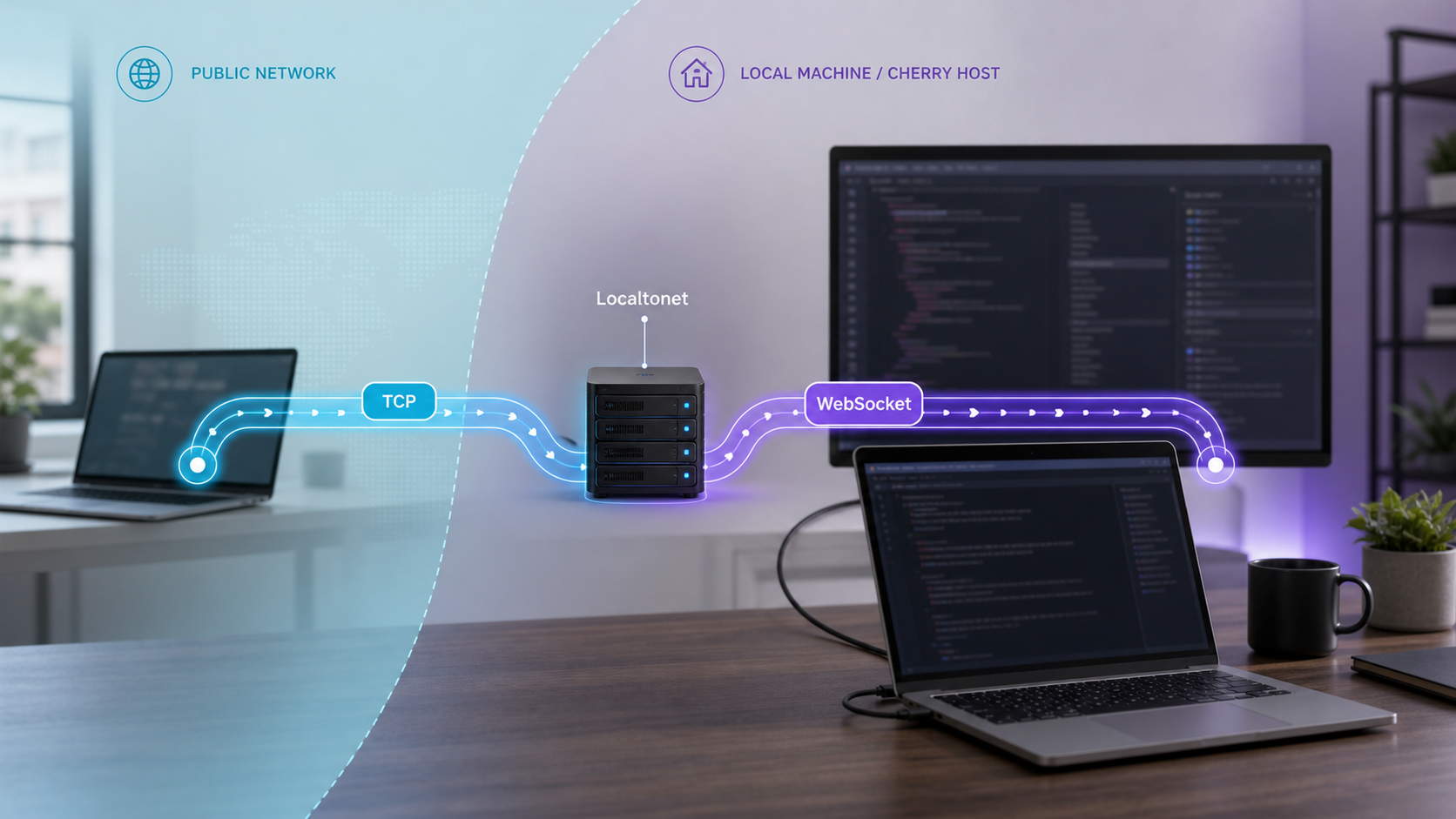
What this tutorial can reproduce reliably
A self-contained game-server tutorial must provide more than a dependency installation command. It needs the application profile, connector configuration, actor registration, request handlers, serializer, client, startup procedure, and an application-level test. Without those pieces, a process might compile while still exposing no useful game behavior.
The current official Cherry repository overview documents the framework installation command and a minimal application-builder shape. It also describes an official single-node chat example named examples/demo_chat. According to that overview, the example uses a web client, builds an HTTP server, uses WebSocket as its connector, communicates with JSON, and implements room creation, message sending, and message broadcasts.
However, the primary evidence available for this revision does not expose the chat example's complete directory contents, profile JSON, actor source, handlers, WebSocket route, browser-client configuration, dependency commands, or exact startup command. The visible top-level repository listing also does not show an examples directory. This may reflect a branch, documentation, or repository-layout change, but the available evidence is not enough to resolve that discrepancy.
This revision selects Cherry's officially described single-node chat application as the reference example, but it does not fabricate the missing implementation files or startup procedure. If examples/demo_chat is not present in the repository revision you check out, stop rather than creating an assumed profile or substituting the minimal cluster-mode snippet. That snippet references a missing profile and does not implement the documented chat behavior.
The practical result is a deployment-readiness tutorial with a strict verification gate. You can install Go, obtain Cherry, determine whether the documented chat example is present, inspect its actual files, identify its real listener, start it only with instructions included in that revision, and validate room and message behavior locally. Remote exposure comes afterward.
This distinction also affects the Localtonet configuration. The selected chat example is documented as WebSocket-based, while the fully supported Localtonet workflow described in detail below is for a native TCP listener. A raw TCP tunnel does not convert a TCP game protocol into WebSocket, and an HTTP tunnel must not be assumed to support a particular WebSocket application without checking the current HTTP tunnel documentation and the application's own path, origin, and TLS requirements.
Understand what Cherry provides
Cherry is a Go game-server framework powered by the Actor Model. Each actor runs in an independent goroutine and handles its mailbox serially. The framework separates local client-to-actor messages, remote actor-to-actor messages, and system events into independent FIFO queues. This gives an application a structured execution model, but it does not define the actors or gameplay operations for you.
Actors can register local request handlers, remote handlers, and event handlers. A local handler processes a request arriving from a connected client. A remote handler participates in communication between actors or nodes. An event handler receives decoupled system notifications. The official overview also documents child actors and actor timers.
Cherry assembles applications through a builder API. Components are registered, serializers are selected, and actors are added before Startup() begins normal operation. The documented lifecycle proceeds through registration, setup, initialization, post-initialization, normal operation, pre-stop, and stop stages. Components stop in reverse registration order. SIGINT, SIGQUIT, and SIGTERM can trigger graceful shutdown.
Cherry also includes utilities for timers, unique IDs, structured logging, message pooling, compression, cryptographic helpers, collections, reflection, regular expressions, and rate limiting. Those facilities can support a game service, but their presence does not automatically apply authentication, authorization, input validation, or abuse controls.
Public connectivity belongs at the frontend connector boundary. A Cherry deployment may also include discovery systems, databases, internal actor communication, administration endpoints, and operational services. Only the intended player-facing connector should become a Localtonet target.
Why the minimal startup snippet is not the project
Cherry's official overview includes this quick-start shape:
package main

import (
	cherry "github.com/cherry-game/cherry"
)

func main() {
	app := cherry.Configure(
		"etc/profile/dev.json",
		"game-1",
		true,
		cherry.Cluster,
	)

	app.Startup()
}
This code demonstrates the application builder, but it is not a complete chat or game service. It references etc/profile/dev.json without supplying that file in the snippet. It selects cherry.Cluster, which can introduce discovery or cross-node communication requirements. It does not show a connector registration, actor, handler, serializer selection, packet parser, browser client, or game operation.
Copying that file into an otherwise empty module cannot establish the endpoint promised by this article. Use it to understand Cherry's API shape, not as a substitute for the selected example.
Prerequisites and environment checks
Cherry requires Go 1.24 or newer. Use the official Go installation instructions to install or upgrade the toolchain for your operating system. After installation, open a new terminal if necessary and verify the active executable:
go version
Continue only when the reported version is Go 1.24 or later. If the shell cannot find go, correct the installation or command search path before troubleshooting Cherry.
To obtain the official source repository, you also need Git. Confirm it is available:
git --versionYou will need outbound network access for Git and Go module downloads, a writable project directory, and a supported web browser if the selected single-node chat example includes the documented web client.
For remote access, install the Localtonet client on the Cherry host or on another device that can reach the Cherry listener over the private network. The selected Localtonet device needs ordinary network reachability to the target even though it does not need inbound router port forwarding or a public IP address.
| Requirement | Why it is needed | Verification |
|---|---|---|
| Go 1.24 or newer | Required by the current Cherry repository overview | Run go version. |
| Git | Obtains the repository revision containing the official source and any bundled examples | Run git --version. |
| Web browser | Required to exercise the web client described for the single-node chat example | Use a current browser supported by your operating system. |
| Local network access | Allows the Localtonet client to reach Cherry if they run on separate devices | Test the exact private listener from the Localtonet device. |
| Localtonet account and client | Creates and runs the outbound tunnel | Confirm the selected device is connected in the dashboard. |
Do not install the dependency and call the server complete
Cherry's documented framework installation command is:
go get github.com/cherry-game/cherryIn a new project, that command would normally be preceded by module initialization:
mkdir cherry-server
cd cherry-server
go mod init example.com/cherry-server
go get github.com/cherry-game/cherry
Replace the example module path with one appropriate to your project. This workflow proves that the Cherry dependency can be resolved. It does not install the official chat application's profile, actors, handlers, client assets, or connector configuration.
For the selected example, obtaining the repository is more appropriate than creating an empty module because an example must be run with the files supplied by its matching repository revision:
git clone https://github.com/cherry-game/cherry.git
cd cherry
Keep the checkout intact while inspecting it. Moving only one Go file out of an example can break relative profile paths, static web assets, generated code, module relationships, or runtime assumptions.
Use the officially documented single-node chat example
The Cherry repository overview names examples/demo_chat as the source location for its beginner-oriented single-node chat. It describes four concrete application characteristics:
- A web client is provided.
- The application builds an HTTP server.
- WebSocket is used as the client connector.
- JSON is used for communication.
- The application implements room creation, message sending, and message broadcasting.
Those details make the chat application a better teaching target than the minimal cluster snippet. It has a real client, a defined transport, a serializer, and observable application operations. It should be possible to distinguish a merely open port from a functioning application by creating or joining a room and exchanging a message.
Obtain the official repository
Clone the Cherry repository from its official GitHub location. Record the branch and commit you use so the example, profile, and dependency files remain from the same revision.
Confirm that the documented example exists
Inspect the checkout for examples/demo_chat. If it is absent, do not create an assumed replacement directory or profile. The current overview and checked-out source are not aligned enough for this tutorial to claim a runnable example.
Read the example's revision-matched instructions
Use only startup and generation instructions included with that exact example or repository revision. Confirm whether it requires generated message code, static assets, a particular working directory, or another local process.
Identify the application components
Locate the actual profile, HTTP server setup, WebSocket connector, actor registration, room and message handlers, JSON serializer selection, and web client configuration before starting the process.
Record the real local endpoints
Read the listener address, port, WebSocket path, and web-client URL from the example files. Do not substitute a port or path copied from an unrelated Cherry application.
The currently supplied primary evidence does not contain the profile schema or complete chat files. Guessing JSON keys, actor names, connector options, paths, or ports would produce an example that may not compile or may silently select the wrong runtime mode. The safe checkpoint is the revision-matched source itself.
What you must find before startup
A complete example checkout should let you answer all of the following questions. If any answer remains unknown, resolve it from that revision before exposing the service:
- Which Go package contains the executable entry point?
- Which profile file does the entry point load?
- Does the application use single-node or cluster mode?
- Which component starts the HTTP server?
- Which component registers the WebSocket connector?
- What local address and port receive HTTP and WebSocket traffic?
- What URL path does the WebSocket client use?
- Where is JSON serialization selected?
- Which actor owns room creation and message handling?
- How are broadcasts sent to connected sessions?
- How is the web client served or opened?
- What exact startup command does the example revision document?
This review is not busywork. It prevents a common deployment error in which an operator exposes a port while assuming the process implements a protocol that was never registered.
Start and verify the example locally
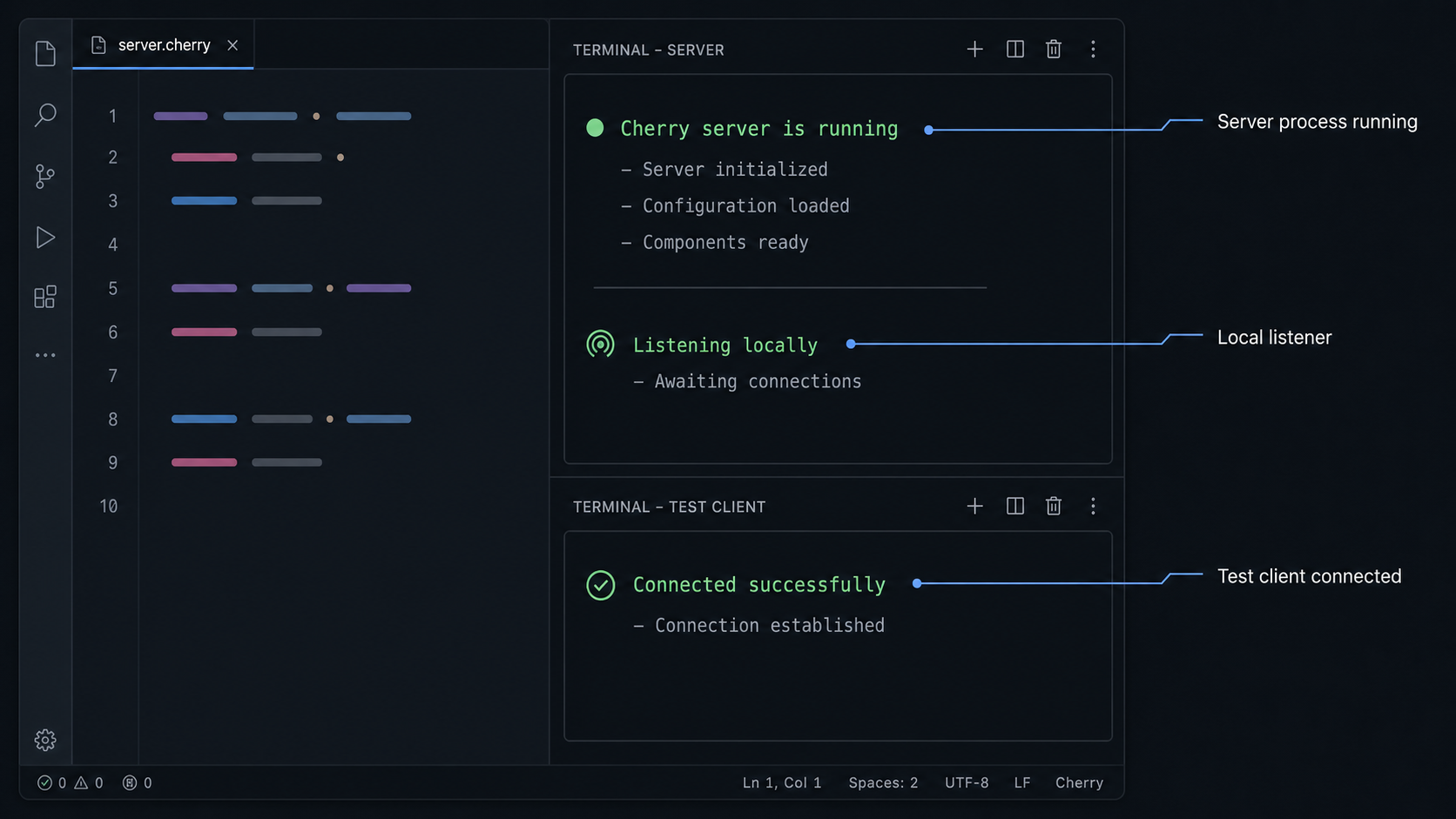
Use the exact startup command shipped with the example revision. The available primary evidence does not expose that command, so this article intentionally does not replace it with an assumed go run path. Run the process from the documented working directory because Cherry profiles and web assets may use relative paths.
Watch the console and configured log outputs during startup. Resolve profile parsing, missing file, code-generation, port-binding, and component-initialization errors before creating a tunnel.
Confirm the listener at the operating-system level
On Linux, inspect listening TCP sockets with:
ss -ltnpOn macOS, use:
lsof -nP -iTCP -sTCP:LISTENOn Windows PowerShell, use:
Get-NetTCPConnection -State Listen
Match the observed port to the value in the example's profile or connector configuration. Record the bind address as well. A listener on 127.0.0.1 is reachable only from the same machine. A listener on a private interface may also be reachable from another device on that network, subject to host firewall and network policy.
Perform an application-level chat test
Open the example's documented local web-client URL. Confirm that the page loads from the intended local HTTP listener and that the browser establishes its WebSocket connection. Use the browser's developer tools if necessary to distinguish an HTTP page error from a failed WebSocket handshake.
Then exercise the application behavior described by Cherry:
- Open one client session and create or enter a room using the controls supplied by the example.
- Open a second client session, preferably in another browser window or profile.
- Join the same room with the second client.
- Send a message from the first client.
- Confirm that the second client receives the broadcast.
- Repeat in the opposite direction to rule out a one-sided client problem.
This test traverses more of the real application than a port probe. It exercises the browser client, HTTP delivery, WebSocket handshake, JSON message handling, actor routing, room state, and broadcast response.
Localtonet cannot repair a missing actor, invalid JSON message, incorrect WebSocket path, unavailable static asset, or broken profile. Keep the service private until two local clients can complete the documented room and broadcast flow.
Record a deployment handoff
Before remote publication, write down the verified facts from your running revision:
- The Cherry repository commit.
- The exact startup command and working directory.
- The profile path used at runtime.
- The HTTP listener address and port.
- The WebSocket listener address, port, and path.
- Whether HTTP and WebSocket share one listener.
- The serializer and packet format expected by the client.
- The successful local room and broadcast test.
These values are the basis for any remote-access decision. They are more reliable than a framework-level default because Cherry does not document one universal connector port or WebSocket path.
Publish a native Cherry TCP connector with Localtonet
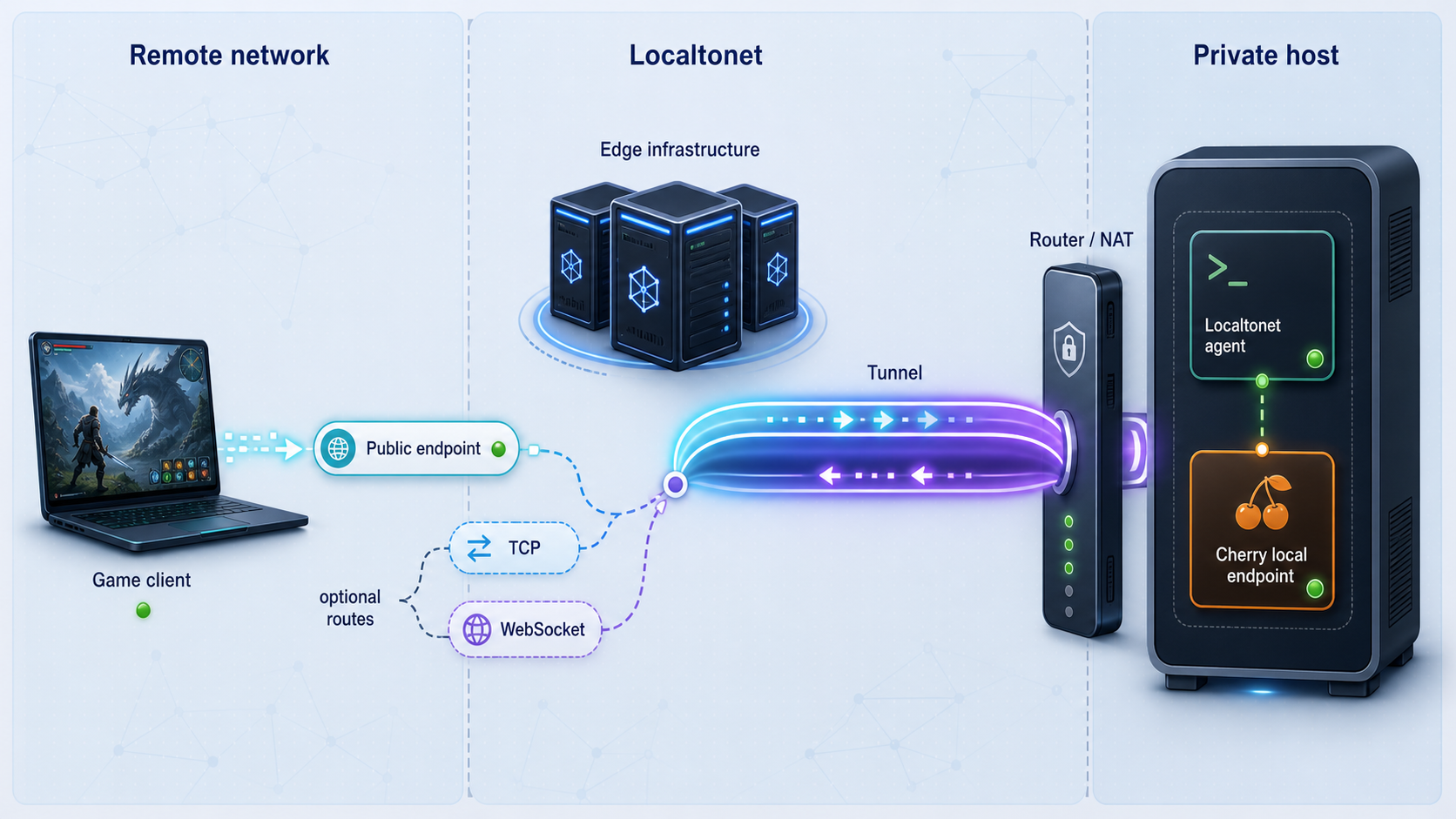
The official chat example selected above is documented as a WebSocket application. The workflow in this section applies when your Cherry application has a separate native TCP connector that has already passed a local protocol test. Do not point a TCP game client at the chat example merely because both ultimately use TCP at the network layer.
A Localtonet TCP tunnel forwards a public host and port to a configured local IP address and port. Our client establishes an outbound connection to a Localtonet relay server, so you do not need inbound router port forwarding, inbound firewall changes for internet traffic, a public IP address, or a separate VPN.
Review the current Localtonet TCP tunnel documentation alongside the dashboard because available relay choices and interface details can vary. The verified product workflow is:
Install and run the Localtonet client
Download the current client for the operating system shown in the Localtonet documentation. Run it on the Cherry host or on a private-network device that can reach the verified TCP listener.
Open the TCP tunnel configuration
In the Localtonet dashboard, choose the TCP tunnel family. A TCP tunnel requires a conventional local IP address and port target.
Select the device and relay server
Select the device-specific AuthToken for the client that will run the tunnel, then select an available server or region shown by the current dashboard. Do not hardcode or guess a server code.
Enter the verified local target
Set the local IP address and port to the Cherry TCP connector tested earlier. Use loopback only when Cherry and the selected Localtonet client run on the same device.
Start the tunnel and test the assigned endpoint
Press Start, wait for the device and tunnel to be connected, and configure the matching remote game client with the assigned public host and port. Complete the same application operation that succeeded locally.
Creating the tunnel configuration does not start it. The public endpoint is available only while the selected Localtonet client is connected and the tunnel is running. Cherry must also remain active and listening at the configured target.
The remote client changes its destination from the private Cherry address to the Localtonet public host and port. Its application protocol remains the same. A TCP tunnel does not transform Simple framing into Pomelo framing, JSON into protobuf, or an unauthenticated request into an authorized game session.
A Localtonet AuthToken identifies a client device. Never commit it to the Cherry repository, embed it in a game client, publish it in a screenshot, or include it in support logs. Before pressing Start, confirm that the target is the intended frontend connector rather than a database, discovery service, internal RPC port, or administration interface.
When Localtonet runs on another device
If the Localtonet client and Cherry run on different machines, 127.0.0.1 refers to the Localtonet device itself. Use the Cherry host's reachable private address instead. Confirm that the Cherry listener is bound to an appropriate interface and that local firewall policy allows the connection from the Localtonet device.
Do not broaden Cherry's bind address automatically. Changing from loopback to a private interface also changes who can reach the service on the local network. Apply the narrowest bind and firewall rules that support the intended topology.
Handle the chat example's WebSocket endpoint separately
Cherry's documented single-node chat is web-oriented. It includes an HTTP server, uses WebSocket as the connector, and communicates with JSON. That architecture is not interchangeable with the native TCP workflow above.
| Local Cherry endpoint | What must be verified | Publication decision |
|---|---|---|
| Native TCP connector | Local IP, port, packet framing, serializer, and a successful game operation | Use a Localtonet TCP tunnel targeting that listener. |
| HTTP server | Local scheme, host behavior, port, routes, and static assets | Review the current Localtonet HTTP tunnel documentation for the matching HTTP endpoint. |
| WebSocket connector | HTTP Upgrade behavior, path, origin checks, host requirements, and whether the browser requires secure WebSocket | Confirm current Localtonet HTTP tunnel compatibility and configuration before publication. |
Localtonet supports HTTP/s and TCP tunnel families, but the evidence available for this revision does not establish a universal Cherry WebSocket path or a single Localtonet configuration that applies to every Cherry WebSocket application. It also does not establish whether the selected chat example serves its web assets and WebSocket connection on the same listener.
For that reason, first compare your verified local application with the current Localtonet HTTP tunnel documentation. Confirm the documented handling of your WebSocket workflow, public HTTPS address, WebSocket scheme, path, host behavior, and any origin checks before exposing it.
WebSocket begins with an HTTP Upgrade handshake and then carries application messages over the upgraded connection. A native TCP tunnel forwards bytes to a TCP target but does not create the browser-facing HTTPS and WebSocket behavior that an application may require. Select the publication method from the verified application listener, not from the fact that WebSocket ultimately runs over TCP.
Browser security also matters. A page loaded over HTTPS will commonly expect a secure WebSocket connection rather than an insecure one. Origin validation, expected hostnames, cookies, session tokens, and application authentication may influence whether a remote browser can connect. These are application and deployment requirements, not values that should be guessed from Cherry's framework overview.
Secure the remotely accessible service
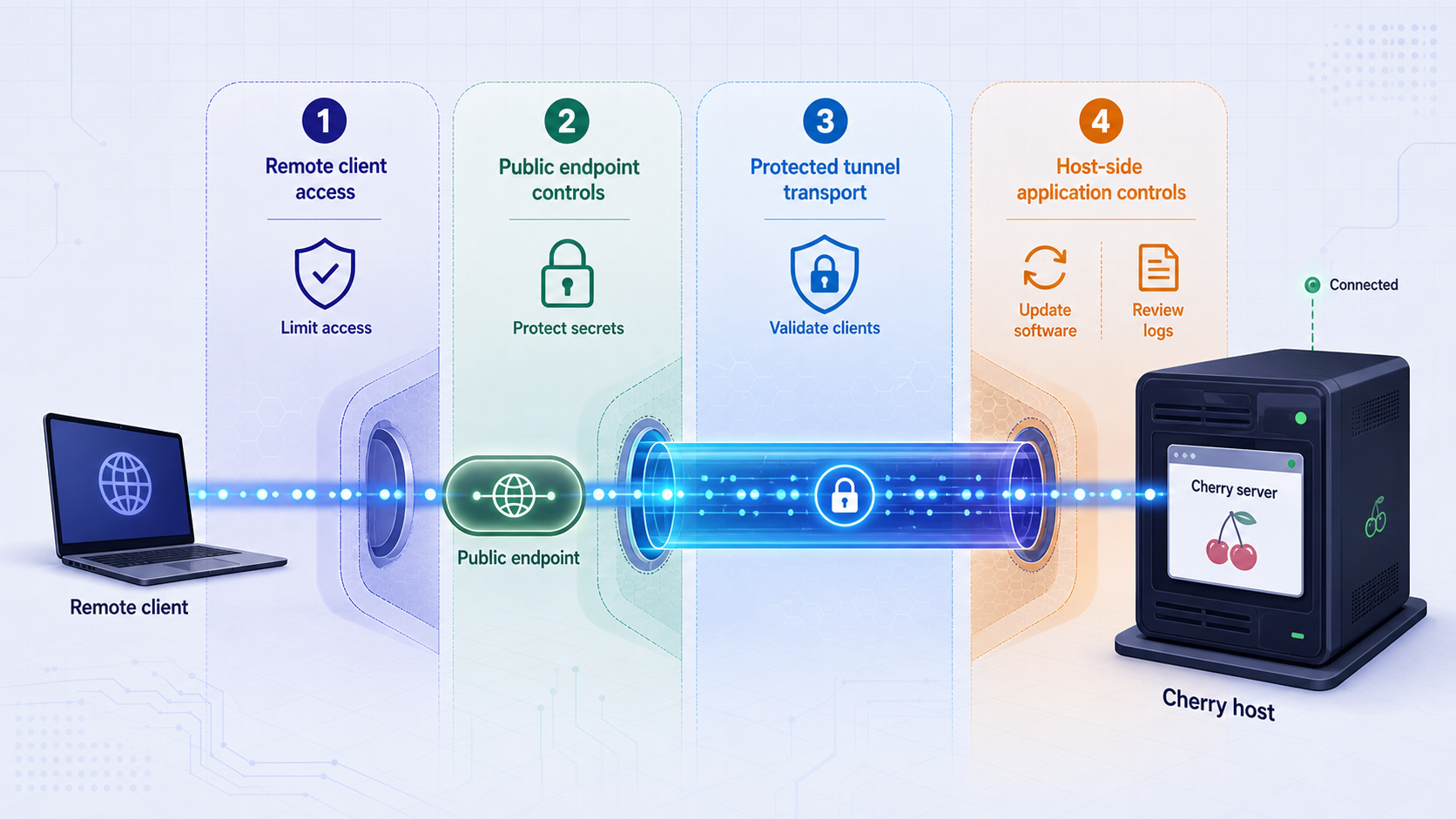
Treat a Cherry connector as internet-facing as soon as its tunnel starts. The absence of router port forwarding does not make the application private while a public endpoint is active.
Validate decoded messages before dispatching sensitive actor operations. Reject unknown message types, invalid lengths, malformed JSON, unauthorized room access, and identifiers that do not belong to the authenticated session. Avoid trusting a client-supplied actor target merely because it passed packet parsing.
Cherry documents structured logging with configurable levels, stack-trace levels, console output, file output, and log rotation capabilities. Use logs to investigate failures without recording passwords, complete session credentials, Localtonet tokens, or sensitive player data.
Keep development and production profiles separate. Review changes that affect listener addresses, ports, discovery modes, log destinations, or dependencies. Do not commit secrets to a public profile. The available Cherry evidence does not prescribe one universal secret-management system, so choose one appropriate to your operating environment.
In a clustered deployment, apply least privilege between nodes as well as at the public connector. Cherry's support for remote actor calls does not imply that every actor or operation should be reachable from every node.
Troubleshooting and routine operations
The documented chat directory is missing
Confirm the repository URL, branch, and commit. Search the checkout for demo_chat and review the official repository overview for changes to the stated example location. Do not create examples/demo_chat manually or fill it with the minimal cluster snippet.
If the example has moved or is unavailable in the current source revision, the reproducible path ends there until the official project supplies aligned source and instructions. You can still install the framework for your own development, but that is different from deploying the documented chat application.
The application cannot find its profile
Check the exact profile path in the example's entry point and the process working directory. Relative paths are resolved from the runtime working directory, which may differ when a binary is started by a service manager.
Confirm filename capitalization, permissions, and repository completeness. Do not fix a missing profile by creating an empty JSON file. A syntactically valid but incomplete profile can still omit the connector and runtime configuration the application needs.
Cherry starts but no port is listening
Inspect startup logs for component initialization failures. Confirm that the intended frontend connector is registered and that the profile matches the example revision. If the application unexpectedly uses cluster mode, determine whether its required discovery or communication dependency is missing.
Use the operating-system listener commands from the local-test section. Match the process, address, and port rather than assuming that any socket owned by the program is the player connector.
The page loads but WebSocket does not connect
Inspect the browser console and network tools. Confirm the WebSocket scheme, host, port, and path generated by the client. Check whether the server rejects the origin or expects an application token. Test locally before involving Localtonet.
If local WebSocket behavior works but remote behavior fails, compare the public page scheme, WebSocket scheme, requested host, path, and origin with the current Localtonet HTTP tunnel behavior. Do not switch blindly to a TCP tunnel because that may not provide the browser-facing publication model the application expects.
The TCP listener works locally but the tunnel is closed
Verify the Cherry process and local listener first. Then confirm that the selected Localtonet device is connected, that the tunnel target matches the verified address and port, and that the tunnel was explicitly started.
If Localtonet runs on another machine, test private-network reachability from that machine. Loopback addresses are local to each device.
The remote connection opens but application messages fail
An open connection shifts the investigation toward protocol compatibility. Confirm that the client uses the same packet format, serializer, message names or IDs, and request sequence as the locally successful client.
Repeat the same operation against the local endpoint. If it fails locally too, troubleshoot Cherry's parser, serializer, actor registration, and handlers. If only the remote path fails, investigate address-sensitive assumptions, WebSocket host or origin checks, and client endpoint configuration.
The service becomes unreachable later
Check the dependency chain in order:
- Confirm that the Cherry process is running.
- Confirm that the expected local listener still exists.
- Perform the local application operation.
- Confirm that the Localtonet client device is connected.
- Confirm that the tunnel is running.
- Repeat the remote application operation.
A Localtonet endpoint remains available only while the selected device is connected and the tunnel is running. Cherry and any application dependencies must also remain healthy.
Start and stop in a controlled order
Start Cherry first and complete its local readiness test before starting the tunnel. During planned maintenance, stop the tunnel first if you want to prevent new remote connections, then gracefully stop Cherry.
Cherry documents shutdown handling for SIGINT, SIGQUIT, and SIGTERM. Allow the application lifecycle to complete so registered components can stop in reverse order.
| Observed result | Likely area | Next action |
|---|---|---|
go version is older than 1.24 |
Go toolchain | Upgrade using the official Go installation instructions. |
examples/demo_chat is absent |
Repository revision or documentation alignment | Confirm the official branch and example location without inventing missing files. |
| Profile loading fails | Working directory, path, permissions, or incomplete checkout | Use the revision-matched profile from the expected working directory. |
| No local listener appears | Connector registration or component startup | Inspect Cherry logs and the actual example configuration. |
| Socket opens but chat fails | WebSocket, JSON, actor, room, or handler behavior | Run the two-client local room and broadcast test. |
| Local TCP works but public TCP does not | Localtonet target or tunnel lifecycle | Confirm the device, target IP, target port, and Start state. |
| Remote WebSocket handshake fails | Publication method, scheme, path, host, or origin | Compare the verified local request with current HTTP tunnel behavior. |
Frequently asked questions
What version of Go does Cherry require?
The current Cherry repository overview requires Go 1.24 or newer. Run go version and use the official Go installation instructions if an upgrade is required.
Does installing the Cherry dependency create a working game server?
No. The installation command adds the framework to a Go module. A functioning service still needs a profile, connector, packet parser, serializer, actors, handlers, client, and application behavior.
Why does this article not provide a complete replacement for demo_chat?
The available primary evidence describes the example but does not expose its complete files, profile, routes, or exact startup command. Printing assumed code would be unreliable. Use only a revision in which the official repository includes the example and its matching instructions.
Is Cherry's single-node chat a native TCP example?
No. The official overview describes it as a web-client example with an HTTP server, a WebSocket connector, and JSON communication. A separate native TCP Cherry application should use a Localtonet TCP tunnel only after its TCP listener and protocol have been verified locally.
Can a Localtonet TCP tunnel convert Cherry TCP traffic into WebSocket?
No. A TCP tunnel forwards connections to a configured local IP address and port. It does not convert a native TCP application protocol into HTTP or WebSocket.
Does Localtonet modify Pomelo, Simple, JSON, or protobuf messages?
A Localtonet TCP tunnel forwards the connection to Cherry's local listener. Cherry and the client remain responsible for packet framing, serialization, authentication, actor routing, and application semantics.
What is Cherry's default TCP or WebSocket port?
The current evidence does not establish one universal default port. Read the actual profile and connector configuration from the application revision you run, then confirm the listener at the operating-system level.
Do I need a public IP address or router port forwarding?
No. The Localtonet client establishes an outbound connection to our relay server. The workflow does not require inbound router port forwarding, inbound firewall changes for internet traffic, VPN setup, or a public IP address.
Can the Localtonet client run on another machine?
Yes, provided that device can reach the Cherry listener over the private network. In that topology, use the Cherry host's reachable private address rather than 127.0.0.1.
Is the public endpoint permanent after creating the tunnel?
No. Creating a tunnel does not start it. The endpoint is available only while the selected Localtonet device is connected, the tunnel is running, and Cherry remains available at the configured local target.
Publish your verified Cherry connector with Localtonet
First prove the real Cherry application locally with its matching client. When you have a verified native TCP listener, run our client, select the correct device and relay server, target that local endpoint, and start remote testing without opening an inbound router port.
Get Started Free →

