

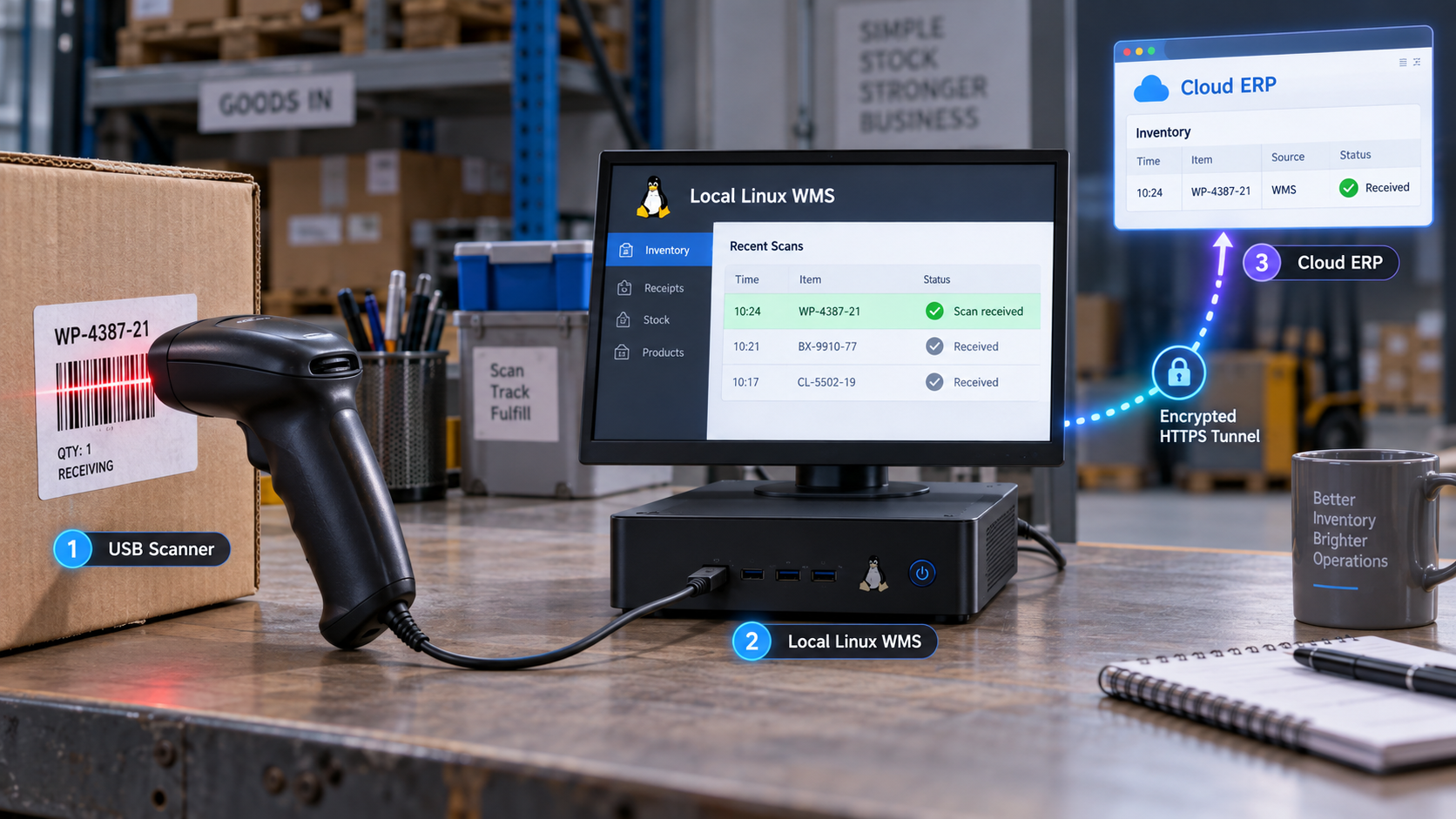
Build a resilient scanner-to-WMS data path, then publish only the authenticated API your cloud system needs
A warehouse scanner usually works best when it continues talking to a local system even if the internet is unavailable. Cloud ERP platforms and remote applications, however, still need a controlled way to query inventory or submit requests. This Linux-focused tutorial builds a small teaching WMS with authenticated endpoints, idempotent scan processing, durable local buffering, production HTTP serving, and optional signed webhook delivery. It then exposes the API through a Localtonet HTTP tunnel without inbound router port forwarding, firewall changes, VPN setup, or a public IP address.
📋 What's in this guide
Architecture, data paths, and project scope
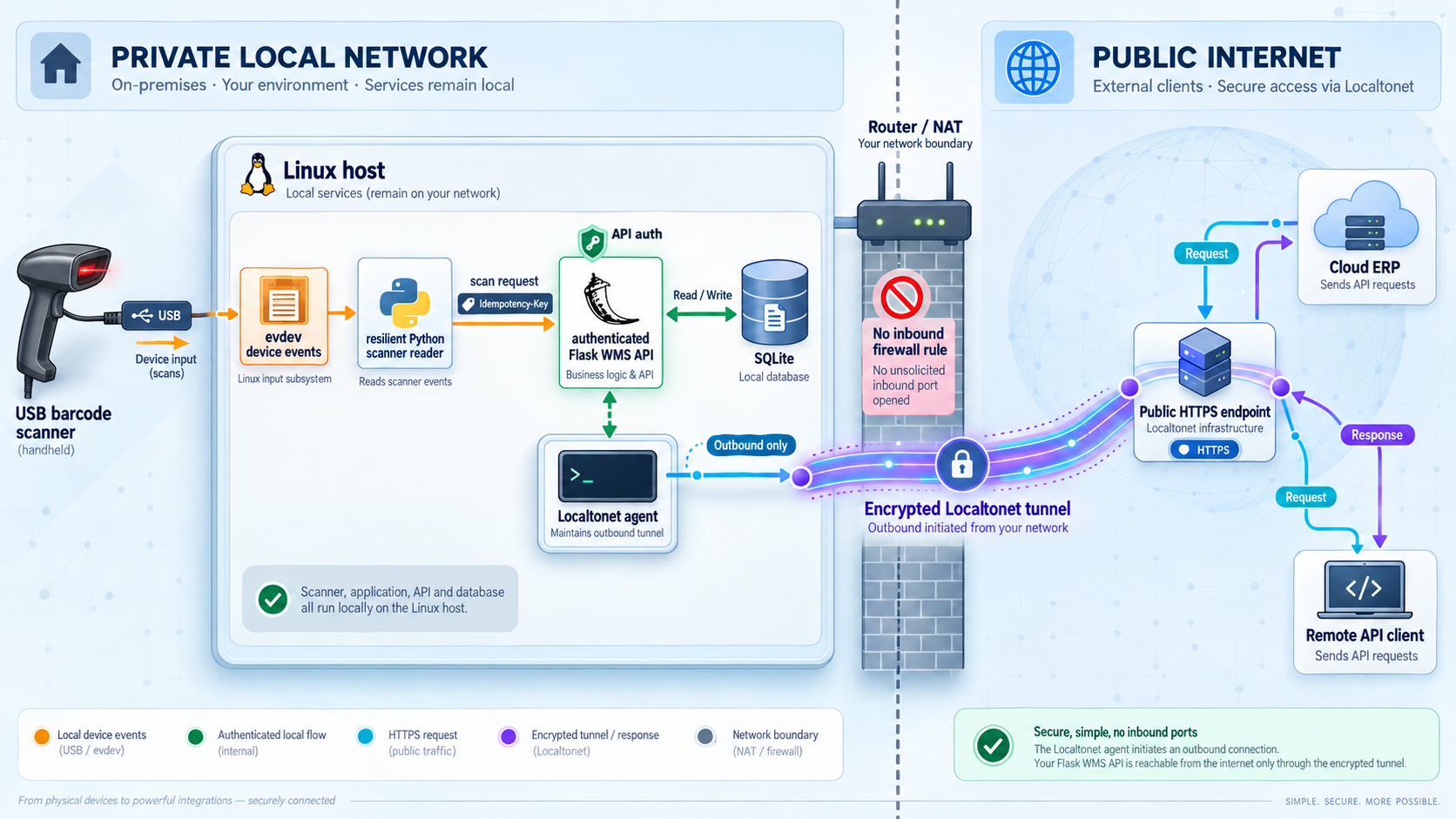
This project has two separate network paths. The first is the local scan path: a scanner sends HID keyboard events to a Linux reader, the reader durably records the decoded scan, and it submits that event to a WMS API on the same machine. The second is the cloud access path: an external client sends an authenticated HTTPS request to the public Localtonet address, the Localtonet relay carries that request over the client-initiated tunnel, and the local WMS processes it.
Optional WMS webhooks form a third, outbound path. The WMS sends those requests directly to a configured cloud webhook URL. They do not travel through the inbound Localtonet HTTP tunnel. Keeping these paths distinct makes failures easier to understand. A tunnel outage should not stop local scanning, and a webhook outage should not erase the locally committed event.
grab().
X-API-Key header. Credentials are not accepted in query strings.
The sample demonstrates integration boundaries, validation, authentication, idempotency, buffering, and recovery. It does not implement purchasing, allocation, lot control, serial tracking, cycle counts, user authorization, audit retention policy, high availability, or every rule required by a production WMS. Validate the design against your operational, regulatory, and data-protection requirements before using it with real inventory.
| Component | Primary role | Failure behavior |
|---|---|---|
| HID scanner | Decodes a supported symbol and emits keyboard events | The reader reconnects after a disconnect, but a scan interrupted mid-stream is discarded |
| Scanner reader | Builds a barcode string and queues an event locally | Unsent events remain in its SQLite spool for retry |
| WMS API | Validates, records, deduplicates, and applies inventory movements | Already committed event IDs return the original result instead of applying twice |
| Webhook dispatcher | Optionally sends committed events to a cloud receiver | Non-success responses and connection failures remain in a durable retry queue |
| Localtonet HTTP tunnel | Provides a public address for the local HTTP API | Public access stops if the selected client disconnects or the tunnel is stopped |
Linux-focused prerequisites
The scanner implementation in this guide uses Linux input devices and the Python evdev package. The API can run on other operating systems, but the reader and service examples below are specifically for a Linux host using systemd and udev.
Scanner mode and suffix configuration
Configure the scanner for USB HID keyboard mode, or pair a Bluetooth scanner that exposes a keyboard-compatible Linux input device. Bluetooth behavior depends on the scanner, its firmware, the pairing profile, and the host Bluetooth stack, so verify that the paired device actually appears under /dev/input before continuing.
Configure the scanner to append either Enter or Tab after every decoded value. The reader treats that suffix as the end of a scan. Scanner configuration barcodes and menu names are vendor-specific, so use the hardware manual for the exact procedure.
HID keyboard scanners send key positions rather than an abstract barcode string. The sample map is intended for common digits, uppercase letters, and several punctuation characters on a US-style layout. Configure the scanner and host consistently. If your labels contain other characters, extend and test the map before operational use. Serial, USB CDC, SDK-driven, and network scanners need a different input adapter.
Host and software requirements
- A Linux machine that can reach the scanner and the local network.
- Python 3 with the
venvmodule andpip. - systemd for the persistent service examples.
- udev for stable scanner naming and least-privilege device permissions.
- Outbound access from the host to Localtonet relay services.
- Outbound HTTPS access if optional cloud webhooks are enabled.
- A Localtonet account and the Localtonet client installed on the device that will run the tunnel.
- An available device authentication token and relay server selected from the current Localtonet dashboard.
Network placement
The simplest arrangement runs the scanner reader, WMS API, and Localtonet client on the same Linux machine. The API can then listen only on 127.0.0.1:5000, reducing exposure on the warehouse LAN.
If the Localtonet client runs on another device, that device must be able to reach the WMS host and port. The API would also have to listen on an appropriate LAN interface instead of loopback. Apply host firewall rules and network segmentation so only approved systems can reach it. The public tunnel does not replace API authentication or local network controls.
Identify the scanner before creating a service
First list the stable input aliases provided by the operating system:
ls -l /dev/input/by-id/
A scanner alias ending in -event-kbd is usually preferable to a raw path such as /dev/input/event2. Raw event numbers can change after a reboot, kernel update, USB move, or reconnection.
If no useful by-id alias exists, list the current input devices:
python3 - <<'PY'
import evdev

for path in evdev.list_devices():
    device = evdev.InputDevice(path)
    print(path, device.name, device.phys)
PY
The command above requires evdev, which is installed in the next section. Run it from the project virtual environment after installation. Once you identify the temporary event path, inspect its vendor and product attributes:
udevadm info --attribute-walk --name=/dev/input/eventX
Record the exact idVendor and idProduct values for your scanner. Some scanners expose multiple input interfaces, so confirm that the selected event device is the keyboard interface by scanning only in a controlled test session.
Create an isolated and reproducible installation
Do not install application packages into the system Python interpreter and do not use --break-system-packages. A virtual environment keeps the application dependencies separate from packages managed by the Linux distribution.
Create a dedicated service identity and directories
The API and scanner reader will run as an unprivileged wms user. Application code belongs under /opt/wms, while writable databases belong under /var/lib/wms.
Build a project virtual environment
Install Flask, Waitress, Requests, and evdev inside the environment. Waitress serves the Flask application persistently instead of using Flask's development server.
Generate an exact dependency lock
Freeze the resolved environment after testing. Deploy another host from that lock file rather than resolving new versions during every installation.
sudo groupadd --system wms
sudo useradd --system --gid wms --home-dir /var/lib/wms \
  --shell /usr/sbin/nologin wms

sudo install -d -o "$USER" -g "$USER" /opt/wms
sudo install -d -o wms -g wms -m 0750 /var/lib/wms
sudo install -d -o root -g wms -m 0750 /etc/wms

cd /opt/wms
python3 -m venv .venv
. .venv/bin/activate

cat > requirements.in <<'EOF'
Flask
waitress
requests
evdev
EOF

python -m pip install --upgrade pip
python -m pip install -r requirements.in
python -m pip freeze > requirements.lock
The direct dependencies are:
Flaskfor routing, request handling, and JSON responses.waitressfor a production-serving approach suitable for this demonstration.requestsfor local API and optional webhook HTTP delivery.evdevfor Linux input event access.sqlite3,hmac,hashlib, and related utilities from the Python standard library.
Preserve requirements.lock with the reviewed application version. To reproduce the tested environment on another compatible Linux host, create a fresh virtual environment and run:
python3 -m venv .venv
. .venv/bin/activate
python -m pip install --requirement requirements.lock
Build the authenticated and idempotent local WMS API
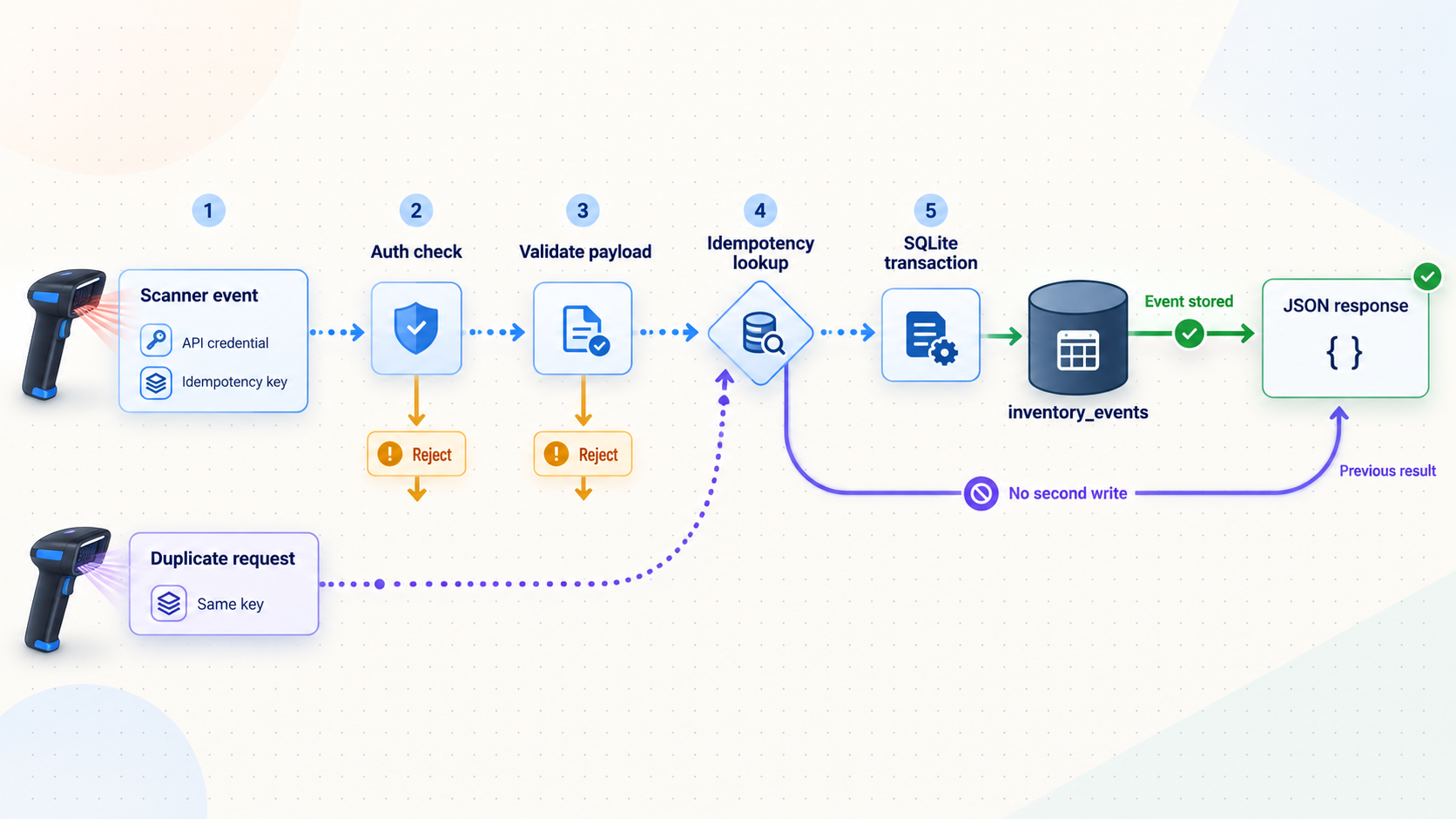
Save the following as /opt/wms/wms_api.py. Authentication is part of the runnable application, not an optional fragment. The application refuses to start without a sufficiently long API key. If a webhook URL is configured, it also requires a webhook signing secret.
The server assigns the authoritative receipt timestamp. Each scanner request carries a UUID event ID, and the database stores that value under a unique constraint. A retry with the same ID returns the original response without changing inventory a second time.
#!/usr/bin/env python3
import hashlib
import hmac
import json
import logging
import os
import re
import sqlite3
import threading
import time
from datetime import datetime, timezone

import requests
from flask import Flask, g, jsonify, request

logging.basicConfig(
    level=logging.INFO,
    format="%(asctime)s %(levelname)s %(message)s",
)
logger = logging.getLogger("wms-api")

app = Flask(__name__)

DB_PATH = os.environ.get("WMS_DB_PATH", "/var/lib/wms/wms.db")
API_KEY = os.environ.get("WMS_API_KEY", "")
WEBHOOK_URL = os.environ.get("WMS_WEBHOOK_URL", "")
WEBHOOK_SECRET = os.environ.get("WMS_WEBHOOK_SECRET", "")

if len(API_KEY) < 32:
    raise RuntimeError("WMS_API_KEY must be set and at least 32 characters")

if WEBHOOK_URL and len(WEBHOOK_SECRET) < 32:
    raise RuntimeError(
        "WMS_WEBHOOK_SECRET must be at least 32 characters when webhooks are enabled"
    )

BARCODE_RE = re.compile(r"^[\x20-\x7E]{1,128}$")
STATION_RE = re.compile(r"^[A-Za-z0-9_.:-]{1,64}$")
EVENT_ID_RE = re.compile(
    r"^[0-9a-f]{8}-[0-9a-f]{4}-[1-5][0-9a-f]{3}-"
    r"[89ab][0-9a-f]{3}-[0-9a-f]{12}$",
    re.IGNORECASE,
)
ALLOWED_ACTIONS = {"scan", "inbound", "outbound"}

def utc_now():
    return datetime.now(timezone.utc).isoformat()

def connect_db():
    db = sqlite3.connect(DB_PATH, timeout=10)
    db.row_factory = sqlite3.Row
    db.execute("PRAGMA foreign_keys = ON")
    db.execute("PRAGMA journal_mode = WAL")
    return db

def get_db():
    if "db" not in g:
        g.db = connect_db()
    return g.db

@app.teardown_appcontext
def close_db(_error):
    db = g.pop("db", None)
    if db is not None:
        db.close()

def init_db():
    os.makedirs(os.path.dirname(DB_PATH), exist_ok=True)
    with connect_db() as db:
        db.executescript(
            """
            CREATE TABLE IF NOT EXISTS items (
                barcode TEXT PRIMARY KEY,
                name TEXT NOT NULL,
                sku TEXT NOT NULL,
                quantity INTEGER NOT NULL DEFAULT 0 CHECK (quantity >= 0),
                location TEXT NOT NULL
            );

            CREATE TABLE IF NOT EXISTS scan_events (
                id INTEGER PRIMARY KEY AUTOINCREMENT,
                event_id TEXT NOT NULL UNIQUE,
                barcode TEXT NOT NULL,
                station_id TEXT NOT NULL,
                action TEXT NOT NULL,
                quantity INTEGER NOT NULL,
                status TEXT NOT NULL,
                received_at TEXT NOT NULL,
                response_json TEXT NOT NULL
            );

            CREATE TABLE IF NOT EXISTS webhook_outbox (
                event_id TEXT PRIMARY KEY,
                payload_json TEXT NOT NULL,
                attempts INTEGER NOT NULL DEFAULT 0,
                next_attempt_at INTEGER NOT NULL DEFAULT 0,
                last_error TEXT,
                delivered_at TEXT,
                FOREIGN KEY (event_id) REFERENCES scan_events(event_id)
            );

            INSERT OR IGNORE INTO items
                (barcode, name, sku, quantity, location)
            VALUES
                ('1234567890128', 'Widget A', 'SKU-001', 100, 'A-01-01'),
                ('9780201379624', 'Component B', 'SKU-002', 50, 'B-03-02'),
                ('5901234123457', 'Assembly Part', 'SKU-003', 75, 'C-02-04');
            """
        )

@app.before_request
def authenticate():
    if not request.path.startswith("/api/"):
        return None

    supplied = request.headers.get("X-API-Key", "")
    if not supplied or not hmac.compare_digest(supplied, API_KEY):
        return jsonify(error="unauthorized"), 401
    return None

def validation_error(message):
    return jsonify(error=message), 400

@app.post("/api/scans")
def receive_scan():
    data = request.get_json(silent=True)
    if not isinstance(data, dict):
        return validation_error("a JSON object is required")

    event_id = str(data.get("event_id", "")).strip().lower()
    barcode = str(data.get("barcode", "")).strip()
    station_id = str(data.get("station_id", "")).strip()
    action = str(data.get("action", "scan")).strip().lower()
    quantity = data.get("quantity", 1)

    if not EVENT_ID_RE.fullmatch(event_id):
        return validation_error("event_id must be a UUID")
    if not BARCODE_RE.fullmatch(barcode):
        return validation_error(
            "barcode must contain 1 to 128 supported printable characters"
        )
    if not STATION_RE.fullmatch(station_id):
        return validation_error("station_id is missing or invalid")
    if action not in ALLOWED_ACTIONS:
        return validation_error("action must be scan, inbound, or outbound")
    if isinstance(quantity, bool) or not isinstance(quantity, int):
        return validation_error("quantity must be an integer")
    if quantity < 1 or quantity > 10000:
        return validation_error("quantity must be between 1 and 10000")

    db = get_db()
    db.execute("BEGIN IMMEDIATE")

    existing = db.execute(
        "SELECT response_json FROM scan_events WHERE event_id = ?",
        (event_id,),
    ).fetchone()

    if existing:
        db.commit()
        result = json.loads(existing["response_json"])
        result["duplicate"] = True
        return jsonify(result), 200

    item = db.execute(
        "SELECT * FROM items WHERE barcode = ?",
        (barcode,),
    ).fetchone()

    received_at = utc_now()

    if item is None:
        result = {
            "status": "unknown_barcode",
            "event_id": event_id,
            "barcode": barcode,
            "station_id": station_id,
            "action": action,
            "quantity": quantity,
            "received_at": received_at,
        }
    else:
        current_quantity = int(item["quantity"])

        if action == "outbound" and quantity > current_quantity:
            db.rollback()
            return jsonify(
                error="insufficient inventory",
                available=current_quantity,
            ), 409

        new_quantity = current_quantity
        if action == "inbound":
            new_quantity += quantity
        elif action == "outbound":
            new_quantity -= quantity

        if new_quantity != current_quantity:
            db.execute(
                "UPDATE items SET quantity = ? WHERE barcode = ?",
                (new_quantity, barcode),
            )

        result = {
            "status": "ok",
            "event_id": event_id,
            "barcode": barcode,
            "station_id": station_id,
            "action": action,
            "quantity": quantity,
            "item_name": item["name"],
            "sku": item["sku"],
            "location": item["location"],
            "inventory_quantity": new_quantity,
            "received_at": received_at,
        }

    payload_json = json.dumps(result, separators=(",", ":"), sort_keys=True)

    db.execute(
        """
        INSERT INTO scan_events
            (event_id, barcode, station_id, action, quantity,
             status, received_at, response_json)
        VALUES (?, ?, ?, ?, ?, ?, ?, ?)
        """,
        (
            event_id,
            barcode,
            station_id,
            action,
            quantity,
            result["status"],
            received_at,
            payload_json,
        ),
    )

    if WEBHOOK_URL:
        db.execute(
            """
            INSERT INTO webhook_outbox
                (event_id, payload_json, next_attempt_at)
            VALUES (?, ?, ?)
            """,
            (event_id, payload_json, int(time.time())),
        )

    db.commit()
    return jsonify(result), 200

@app.get("/api/inventory")
def inventory():
    rows = get_db().execute(
        "SELECT barcode, name, sku, quantity, location "
        "FROM items ORDER BY location, sku"
    ).fetchall()
    return jsonify([dict(row) for row in rows]), 200

@app.get("/api/inventory/<barcode>")
def inventory_item(barcode):
    if not BARCODE_RE.fullmatch(barcode):
        return validation_error("invalid barcode")

    row = get_db().execute(
        "SELECT barcode, name, sku, quantity, location "
        "FROM items WHERE barcode = ?",
        (barcode,),
    ).fetchone()

    if row is None:
        return jsonify(error="not found"), 404
    return jsonify(dict(row)), 200

@app.get("/api/scans/recent")
def recent_scans():
    raw_after_id = request.args.get("after_id", "0")
    raw_limit = request.args.get("limit", "100")

    try:
        after_id = int(raw_after_id)
        limit = int(raw_limit)
    except ValueError:
        return validation_error("after_id and limit must be integers")

    if after_id < 0 or limit < 1 or limit > 500:
        return validation_error(
            "after_id must be non-negative and limit must be between 1 and 500"
        )

    rows = get_db().execute(
        """
        SELECT id, event_id, barcode, station_id, action,
               quantity, status, received_at
        FROM scan_events
        WHERE id > ?
        ORDER BY id ASC
        LIMIT ?
        """,
        (after_id, limit),
    ).fetchall()

    return jsonify([dict(row) for row in rows]), 200

@app.get("/api/webhooks/status")
def webhook_status():
    row = get_db().execute(
        """
        SELECT
            SUM(CASE WHEN delivered_at IS NULL THEN 1 ELSE 0 END) AS pending,
            SUM(CASE WHEN delivered_at IS NOT NULL THEN 1 ELSE 0 END) AS delivered
        FROM webhook_outbox
        """
    ).fetchone()

    return jsonify(
        pending=int(row["pending"] or 0),
        delivered=int(row["delivered"] or 0),
    ), 200

@app.get("/api/health")
def health():
    get_db().execute("SELECT 1").fetchone()
    return jsonify(status="ok", server_time=utc_now()), 200

def sign_webhook(timestamp, body):
    message = timestamp.encode("utf-8") + b"." + body
    return hmac.new(
        WEBHOOK_SECRET.encode("utf-8"),
        message,
        hashlib.sha256,
    ).hexdigest()

def dispatch_webhooks():
    while True:
        if not WEBHOOK_URL:
            time.sleep(30)
            continue

        now = int(time.time())
        with connect_db() as db:
            row = db.execute(
                """
                SELECT event_id, payload_json, attempts
                FROM webhook_outbox
                WHERE delivered_at IS NULL
                  AND next_attempt_at <= ?
                ORDER BY next_attempt_at, rowid
                LIMIT 1
                """,
                (now,),
            ).fetchone()

        if row is None:
            time.sleep(2)
            continue

        body = row["payload_json"].encode("utf-8")
        timestamp = str(int(time.time()))
        signature = sign_webhook(timestamp, body)

        try:
            response = requests.post(
                WEBHOOK_URL,
                data=body,
                headers={
                    "Content-Type": "application/json",
                    "X-WMS-Event-ID": row["event_id"],
                    "X-WMS-Timestamp": timestamp,
                    "X-WMS-Signature": "sha256=" + signature,
                },
                timeout=(3, 10),
            )
            if not 200 <= response.status_code < 300:
                raise RuntimeError(
                    f"webhook returned HTTP {response.status_code}"
                )

            with connect_db() as db:
                db.execute(
                    """
                    UPDATE webhook_outbox
                    SET delivered_at = ?, last_error = NULL
                    WHERE event_id = ?
                    """,
                    (utc_now(), row["event_id"]),
                )
                db.commit()

        except Exception as exc:
            attempts = int(row["attempts"]) + 1
            delay = min(300, 2 ** min(attempts, 8))
            with connect_db() as db:
                db.execute(
                    """
                    UPDATE webhook_outbox
                    SET attempts = ?,
                        next_attempt_at = ?,
                        last_error = ?
                    WHERE event_id = ?
                    """,
                    (
                        attempts,
                        int(time.time()) + delay,
                        str(exc)[:500],
                        row["event_id"],
                    ),
                )
                db.commit()
            logger.warning(
                "Webhook %s failed: %s",
                row["event_id"],
                exc,
            )

init_db()
threading.Thread(
    target=dispatch_webhooks,
    name="webhook-dispatcher",
    daemon=True,
).start()
What the webhook receiver must verify
The cloud receiver should reject stale timestamps according to its replay window, reconstruct the signed value as timestamp + "." + raw_request_body, calculate HMAC-SHA256 with the shared webhook secret, and compare signatures with a constant-time function. It should also store X-WMS-Event-ID under a unique constraint so a retried delivery cannot apply the same operation twice.
The queue survives API restarts because pending payloads and retry state are stored in SQLite. Delivery is still not an absolute guarantee. Disk failure, database corruption, deletion, credential loss, or an application defect can prevent delivery. Use the recent-events endpoint and the receiving system's last accepted ID for periodic reconciliation.
Create a resilient Linux scanner reader
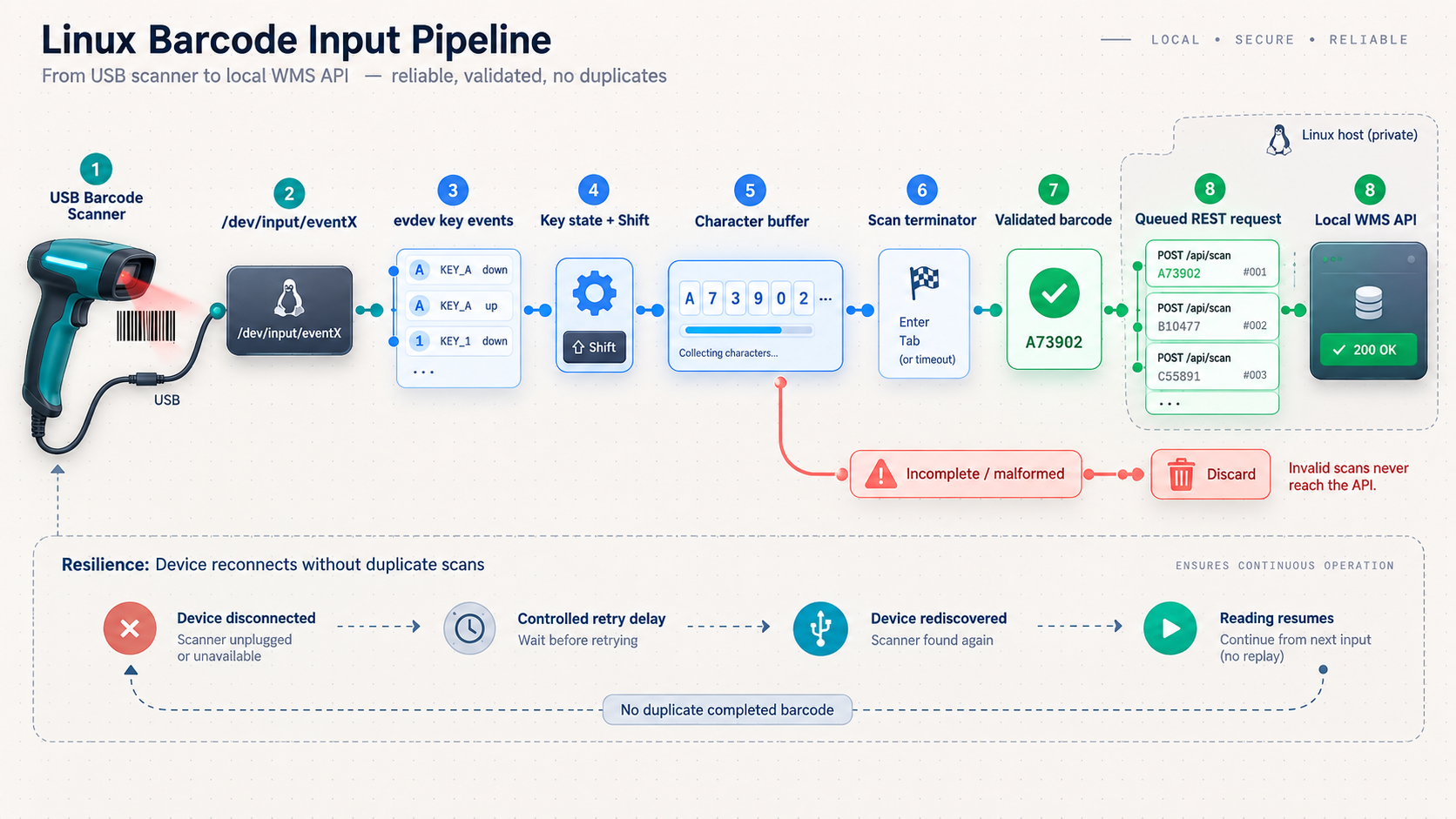
Save the following as /opt/wms/scanner_reader.py. The reader uses a stable path supplied through configuration, recognizes Enter or Tab terminators, handles Shift for common characters, calls grab() for exclusive access, reconnects after device errors, and stores every completed scan in a local SQLite spool before attempting delivery.
#!/usr/bin/env python3
import json
import logging
import os
import sqlite3
import threading
import time
import uuid

import evdev
import requests
from evdev import ecodes

logging.basicConfig(
    level=logging.INFO,
    format="%(asctime)s %(levelname)s %(message)s",
)
logger = logging.getLogger("scanner-reader")

DEVICE_PATH = os.environ.get(
    "WMS_SCANNER_DEVICE",
    "/dev/input/by-id/replace-with-scanner-event-kbd",
)
API_URL = os.environ.get(
    "WMS_API_URL",
    "http://127.0.0.1:5000/api/scans",
)
API_KEY = os.environ.get("WMS_API_KEY", "")
STATION_ID = os.environ.get("WMS_STATION_ID", "station_01")
ACTION = os.environ.get("WMS_ACTION", "scan").lower()
SPOOL_PATH = os.environ.get(
    "WMS_SCANNER_SPOOL",
    "/var/lib/wms/scanner-spool.db",
)
TERMINATORS = {
    value.strip().upper()
    for value in os.environ.get(
        "WMS_SCAN_TERMINATORS",
        "KEY_ENTER,KEY_TAB",
    ).split(",")
    if value.strip()
}

if len(API_KEY) < 32:
    raise RuntimeError("WMS_API_KEY must be set and at least 32 characters")
if ACTION not in {"scan", "inbound", "outbound"}:
    raise RuntimeError("WMS_ACTION must be scan, inbound, or outbound")

BASE_MAP = {
    "KEY_0": "0", "KEY_1": "1", "KEY_2": "2",
    "KEY_3": "3", "KEY_4": "4", "KEY_5": "5",
    "KEY_6": "6", "KEY_7": "7", "KEY_8": "8",
    "KEY_9": "9",
    "KEY_A": "a", "KEY_B": "b", "KEY_C": "c",
    "KEY_D": "d", "KEY_E": "e", "KEY_F": "f",
    "KEY_G": "g", "KEY_H": "h", "KEY_I": "i",
    "KEY_J": "j", "KEY_K": "k", "KEY_L": "l",
    "KEY_M": "m", "KEY_N": "n", "KEY_O": "o",
    "KEY_P": "p", "KEY_Q": "q", "KEY_R": "r",
    "KEY_S": "s", "KEY_T": "t", "KEY_U": "u",
    "KEY_V": "v", "KEY_W": "w", "KEY_X": "x",
    "KEY_Y": "y", "KEY_Z": "z",
    "KEY_MINUS": "-", "KEY_EQUAL": "=",
    "KEY_LEFTBRACE": "[", "KEY_RIGHTBRACE": "]",
    "KEY_SEMICOLON": ";", "KEY_APOSTROPHE": "'",
    "KEY_GRAVE": "`", "KEY_BACKSLASH": "\\",
    "KEY_COMMA": ",", "KEY_DOT": ".", "KEY_SLASH": "/",
    "KEY_SPACE": " ",
    "KEY_KP0": "0", "KEY_KP1": "1", "KEY_KP2": "2",
    "KEY_KP3": "3", "KEY_KP4": "4", "KEY_KP5": "5",
    "KEY_KP6": "6", "KEY_KP7": "7", "KEY_KP8": "8",
    "KEY_KP9": "9", "KEY_KPDOT": ".",
}

SHIFT_MAP = {
    "KEY_0": ")", "KEY_1": "!", "KEY_2": "@",
    "KEY_3": "#", "KEY_4": "$", "KEY_5": "%",
    "KEY_6": "^", "KEY_7": "&", "KEY_8": "*",
    "KEY_9": "(",
    "KEY_MINUS": "_", "KEY_EQUAL": "+",
    "KEY_LEFTBRACE": "{", "KEY_RIGHTBRACE": "}",
    "KEY_SEMICOLON": ":", "KEY_APOSTROPHE": '"',
    "KEY_GRAVE": "~", "KEY_BACKSLASH": "|",
    "KEY_COMMA": "<", "KEY_DOT": ">", "KEY_SLASH": "?",
}

SHIFT_KEYS = {"KEY_LEFTSHIFT", "KEY_RIGHTSHIFT"}

def spool_db():
    db = sqlite3.connect(SPOOL_PATH, timeout=10)
    db.row_factory = sqlite3.Row
    return db

def init_spool():
    os.makedirs(os.path.dirname(SPOOL_PATH), exist_ok=True)
    with spool_db() as db:
        db.execute(
            """
            CREATE TABLE IF NOT EXISTS pending_scans (
                event_id TEXT PRIMARY KEY,
                payload_json TEXT NOT NULL,
                attempts INTEGER NOT NULL DEFAULT 0,
                next_attempt_at INTEGER NOT NULL DEFAULT 0,
                last_error TEXT
            )
            """
        )
        db.commit()

def queue_scan(barcode):
    payload = {
        "event_id": str(uuid.uuid4()),
        "barcode": barcode,
        "station_id": STATION_ID,
        "action": ACTION,
        "quantity": 1,
    }
    payload_json = json.dumps(payload, separators=(",", ":"))

    with spool_db() as db:
        db.execute(
            """
            INSERT INTO pending_scans
                (event_id, payload_json, next_attempt_at)
            VALUES (?, ?, ?)
            """,
            (payload["event_id"], payload_json, int(time.time())),
        )
        db.commit()

    logger.info(
        "Queued scan event %s for barcode %s",
        payload["event_id"],
        barcode,
    )

def delivery_loop():
    session = requests.Session()
    session.headers.update({
        "X-API-Key": API_KEY,
        "Content-Type": "application/json",
    })

    while True:
        with spool_db() as db:
            row = db.execute(
                """
                SELECT event_id, payload_json, attempts
                FROM pending_scans
                WHERE next_attempt_at <= ?
                ORDER BY next_attempt_at, rowid
                LIMIT 1
                """,
                (int(time.time()),),
            ).fetchone()

        if row is None:
            time.sleep(1)
            continue

        try:
            response = session.post(
                API_URL,
                data=row["payload_json"],
                timeout=(2, 5),
            )

            if not 200 <= response.status_code < 300:
                raise RuntimeError(
                    f"local API returned HTTP {response.status_code}: "
                    f"{response.text[:200]}"
                )

            with spool_db() as db:
                db.execute(
                    "DELETE FROM pending_scans WHERE event_id = ?",
                    (row["event_id"],),
                )
                db.commit()

            logger.info("Delivered scan event %s", row["event_id"])

        except Exception as exc:
            attempts = int(row["attempts"]) + 1
            delay = min(60, 2 ** min(attempts, 6))

            with spool_db() as db:
                db.execute(
                    """
                    UPDATE pending_scans
                    SET attempts = ?,
                        next_attempt_at = ?,
                        last_error = ?
                    WHERE event_id = ?
                    """,
                    (
                        attempts,
                        int(time.time()) + delay,
                        str(exc)[:500],
                        row["event_id"],
                    ),
                )
                db.commit()

            logger.warning(
                "Delivery of %s failed: %s",
                row["event_id"],
                exc,
            )
            time.sleep(1)

def key_name(value):
    if isinstance(value, list):
        return value[0]
    return value

def read_scanner():
    while True:
        scanner = None
        try:
            scanner = evdev.InputDevice(DEVICE_PATH)
            scanner.grab()
            logger.info(
                "Listening exclusively on %s at %s",
                scanner.name,
                DEVICE_PATH,
            )

            buffer = []
            malformed = False
            shift_down = False

            for event in scanner.read_loop():
                if event.type != ecodes.EV_KEY:
                    continue

                key_event = evdev.categorize(event)
                name = key_name(key_event.keycode)

                if name in SHIFT_KEYS:
                    shift_down = (
                        key_event.keystate != evdev.KeyEvent.key_up
                    )
                    continue

                if key_event.keystate != evdev.KeyEvent.key_down:
                    continue

                if name in TERMINATORS:
                    if buffer and not malformed:
                        barcode = "".join(buffer)
                        if 1 <= len(barcode) <= 128:
                            queue_scan(barcode)
                        else:
                            logger.warning(
                                "Discarded scan with invalid length"
                            )
                    elif malformed:
                        logger.warning(
                            "Discarded scan containing an unmapped key"
                        )

                    buffer = []
                    malformed = False
                    shift_down = False
                    continue

                if name == "KEY_BACKSPACE":
                    if buffer:
                        buffer.pop()
                    continue

                if name.startswith("KEY_") and len(name) == 5:
                    character = BASE_MAP.get(name)
                    if character and shift_down:
                        character = character.upper()
                else:
                    character = (
                        SHIFT_MAP.get(name)
                        if shift_down
                        else BASE_MAP.get(name)
                    )

                if character is None:
                    malformed = True
                    logger.warning("Unmapped scanner key: %s", name)
                    continue

                if len(buffer) >= 128:
                    malformed = True
                    continue

                buffer.append(character)

        except (FileNotFoundError, PermissionError, OSError) as exc:
            logger.warning(
                "Scanner unavailable at %s: %s; retrying",
                DEVICE_PATH,
                exc,
            )
            time.sleep(3)
        finally:
            if scanner is not None:
                try:
                    scanner.ungrab()
                except OSError:
                    pass
                scanner.close()

def main():
    init_spool()
    threading.Thread(
        target=delivery_loop,
        name="scan-delivery",
        daemon=True,
    ).start()
    read_scanner()

if __name__ == "__main__":
    main()
Merely using evdev does not make access exclusive. The call to scanner.grab() asks the Linux input subsystem to prevent the same events from reaching other consumers. Use a scanner-specific udev rule rather than running this process as root. Selecting the wrong keyboard device and grabbing it can temporarily prevent normal keyboard input until the process exits.
Create a scanner-specific udev rule
Replace the example vendor and product values below with the exact values returned for your device. Do not copy placeholder identifiers into an operational rule.
sudo tee /etc/udev/rules.d/70-wms-scanner.rules >/dev/null <<'EOF'
SUBSYSTEM=="input", KERNEL=="event*", \
ATTRS{idVendor}=="REPLACE_VENDOR", \
ATTRS{idProduct}=="REPLACE_PRODUCT", \
SYMLINK+="wms-scanner", GROUP="wms", MODE="0660"
EOF

sudo udevadm control --reload-rules
sudo udevadm trigger
Disconnect and reconnect the scanner, then verify the alias and ownership:
ls -l /dev/wms-scanner
sudo -u wms test -r /dev/wms-scanner && echo "scanner is readable"
If the rule matches more than one interface, refine it using attributes from udevadm info. A stable existing /dev/input/by-id/...-event-kbd alias can also be used in configuration, but the service user still needs narrowly scoped permission to read that device.
Configure secrets and run both components as persistent services
Create protected environment configuration
Generate separate random values for API authentication and webhook signing. The webhook secret is needed only if WMS_WEBHOOK_URL is set.
python3 -c 'import secrets; print(secrets.token_urlsafe(48))'
python3 -c 'import secrets; print(secrets.token_urlsafe(48))'
Put the generated values in /etc/wms/wms.env. Do not commit this file, paste it into source code, place credentials in a URL, or expose it through support logs.
sudo tee /etc/wms/wms.env >/dev/null <<'EOF'
WMS_API_KEY=REPLACE_WITH_GENERATED_API_KEY
WMS_DB_PATH=/var/lib/wms/wms.db
WMS_API_URL=http://127.0.0.1:5000/api/scans
WMS_STATION_ID=station_01
WMS_ACTION=scan
WMS_SCANNER_DEVICE=/dev/wms-scanner
WMS_SCAN_TERMINATORS=KEY_ENTER,KEY_TAB
WMS_SCANNER_SPOOL=/var/lib/wms/scanner-spool.db
WMS_WEBHOOK_URL=
WMS_WEBHOOK_SECRET=
EOF

sudo chown root:wms /etc/wms/wms.env
sudo chmod 0640 /etc/wms/wms.env
sudo chown -R root:root /opt/wms
sudo chmod -R go-w /opt/wms
Test the API locally before enabling systemd
Run Waitress as the service user. Flask's built-in development server is intentionally not used for persistent operation.
sudo -u wms sh -c '
  set -a
  . /etc/wms/wms.env
  set +a
  cd /opt/wms
  exec .venv/bin/waitress-serve \
    --listen=127.0.0.1:5000 \
    wms_api:app
'
In a separate terminal, read the API key without printing it and verify health, inventory, and an idempotent test event:
read -s -p "WMS API key: " WMS_API_KEY
echo

curl --fail-with-body \
  -H "X-API-Key: $WMS_API_KEY" \
  http://127.0.0.1:5000/api/health

curl --fail-with-body \
  -H "X-API-Key: $WMS_API_KEY" \
  http://127.0.0.1:5000/api/inventory

EVENT_ID="$(python3 -c 'import uuid; print(uuid.uuid4())')"

curl --fail-with-body \
  -X POST \
  -H "X-API-Key: $WMS_API_KEY" \
  -H "Content-Type: application/json" \
  --data "{
    \"event_id\":\"$EVENT_ID\",
    \"barcode\":\"1234567890128\",
    \"station_id\":\"test_station\",
    \"action\":\"scan\",
    \"quantity\":1
  }" \
  http://127.0.0.1:5000/api/scans
Repeat the final request with the same event ID. The response should include "duplicate": true, and the event must not be inserted or applied again.
Create the systemd units
sudo tee /etc/systemd/system/wms-api.service >/dev/null <<'EOF'
[Unit]
Description=Teaching WMS API
After=network.target

[Service]
Type=simple
User=wms
Group=wms
WorkingDirectory=/opt/wms
EnvironmentFile=/etc/wms/wms.env
ExecStart=/opt/wms/.venv/bin/waitress-serve \
  --listen=127.0.0.1:5000 \
  wms_api:app
Restart=on-failure
RestartSec=5
NoNewPrivileges=true
PrivateTmp=true
ProtectSystem=strict
ProtectHome=true
ReadWritePaths=/var/lib/wms

[Install]
WantedBy=multi-user.target
EOF

sudo tee /etc/systemd/system/wms-scanner.service >/dev/null <<'EOF'
[Unit]
Description=Warehouse barcode scanner reader
Requires=wms-api.service
After=wms-api.service
StartLimitIntervalSec=60
StartLimitBurst=10

[Service]
Type=simple
User=wms
Group=wms
WorkingDirectory=/opt/wms
EnvironmentFile=/etc/wms/wms.env
ExecStart=/opt/wms/.venv/bin/python /opt/wms/scanner_reader.py
Restart=on-failure
RestartSec=5
NoNewPrivileges=true
PrivateTmp=true
ProtectSystem=strict
ProtectHome=true
ReadWritePaths=/var/lib/wms
SupplementaryGroups=wms

[Install]
WantedBy=multi-user.target
EOF

sudo systemctl daemon-reload
sudo systemctl enable --now wms-api.service
sudo systemctl enable --now wms-scanner.service
The ordering directive starts the API unit before the reader, but it is not an HTTP readiness guarantee. The reader's durable spool and retry loop handle a short API startup delay. Verify both units rather than assuming that an enabled service is healthy:
systemctl status wms-api.service
systemctl status wms-scanner.service

journalctl -u wms-api.service -n 100 --no-pager
journalctl -u wms-scanner.service -n 100 --no-pager
Reboot the host during a planned test, confirm both services return to an active state, scan a controlled test label, and verify that it appears in /api/scans/recent.
Expose the authenticated WMS API with Localtonet
Localtonet exposes a service running on your machine without inbound router port forwarding, firewall changes, VPN setup, or a public IP address. The Localtonet client establishes an outbound connection to one of our relay servers. An HTTP tunnel then provides a public HTTPS address that forwards to the configured local IP address and port.
Install and run the Localtonet client
Install the current Localtonet application for the operating system on the device that can reach the WMS API. Run the client and confirm that the device appears connected in your dashboard.
Open the HTTP tunnel configuration
Sign in and open the HTTP tunnel page. Select the device-specific authentication token for the client that will carry this tunnel.
Select an available relay server
Choose a currently available server or region from the dashboard. Available values can vary, so use the choices shown in the current product rather than copying a hardcoded server code.
Enter the local WMS target
When the Localtonet client and API share a host, use local IP 127.0.0.1 and port 5000. If they are on separate machines, use an address reachable from the client and update the API listener and local firewall accordingly.
Create the tunnel
Create the HTTP tunnel using the selected process type and target. Creating a tunnel saves its configuration, but does not mean the tunnel is running.
Start the tunnel
Press Start for the new tunnel. Copy the assigned public HTTPS address after the tunnel reports that it is running.
Verify authenticated public access
Call the health and inventory routes through the assigned address with the API key header. Confirm that an unauthenticated request returns HTTP 401.
The authenticated verification can be performed without putting the key in the URL:
read -s -p "WMS API key: " WMS_API_KEY
echo
PUBLIC_URL='https://assigned-address-from-dashboard'

curl --fail-with-body \
  -H "X-API-Key: $WMS_API_KEY" \
  "$PUBLIC_URL/api/health"

curl --fail-with-body \
  -H "X-API-Key: $WMS_API_KEY" \
  "$PUBLIC_URL/api/inventory"

curl -i "$PUBLIC_URL/api/inventory"
The last request intentionally omits the API key and should return 401 Unauthorized. If it succeeds, stop the tunnel and investigate the application configuration before continuing.
Treat the address as internet-accessible. Keep authentication enabled, use a high-entropy secret, rotate it through protected configuration, expose only necessary routes, validate every request, and review logs for repeated failures. Do not rely on an unguessable URL as authorization.
The tunnel is available only while the selected Localtonet client or device is connected and the tunnel itself is running. Creating it is separate from starting it. Stopping the tunnel removes public reachability without deleting its saved configuration. Deleting it removes the tunnel configuration. A client, host, internet, relay, or local API outage can all make the public endpoint unavailable.
Connect a cloud ERP, SaaS application, or remote client
A cloud integration can poll the inventory API, fetch events incrementally for reconciliation, or receive signed outbound webhooks. Which pattern is appropriate depends on the receiving platform's capabilities and the reliability requirements of the warehouse process.
| Pattern | Best fit | Operational requirement |
|---|---|---|
| Inventory polling | Periodic snapshots and systems without webhook receivers | Use timeouts, checked status codes, pagination where needed, and a documented polling interval |
| Incremental event reconciliation | Detecting missed notifications or rebuilding downstream state | Store the last processed local event ID and advance it only after successful cloud processing |
| Signed webhook delivery | Prompt notification when the cloud platform accepts inbound webhooks | Verify HMAC, reject stale requests, deduplicate event IDs, and return a non-2xx response when processing fails |
Cloud-side inventory query
This one-shot Python example uses the already documented requests dependency. In a real cloud job, obtain the URL and key from the platform's protected secret configuration rather than embedding them in code.
import os
import requests

wms_url = os.environ["WMS_PUBLIC_URL"].rstrip("/")
api_key = os.environ["WMS_API_KEY"]

response = requests.get(
    f"{wms_url}/api/inventory",
    headers={"X-API-Key": api_key},
    timeout=(3, 15),
)
response.raise_for_status()

for item in response.json():
    print(
        f'{item["sku"]}: {item["quantity"]} '
        f'at {item["location"]}'
    )
Reconcile recent events
The receiving system can store the highest committed numeric id it has processed, then request subsequent events:
curl --fail-with-body \
  -H "X-API-Key: $WMS_API_KEY" \
  "$PUBLIC_URL/api/scans/recent?after_id=0&limit=100"
Process events in ascending order and advance the cloud checkpoint only after the corresponding cloud transaction commits. Event IDs remain the cross-system deduplication key. The numeric database ID is useful as a local ordered cursor, but should not replace the globally unique event ID.
Use webhooks without confusing them with the tunnel
To enable outbound webhooks, set WMS_WEBHOOK_URL and WMS_WEBHOOK_SECRET in the protected environment file, then restart the API. The dispatcher checks for a 2xx response and retries failed attempts with bounded exponential backoff. It signs the exact JSON request bytes and sends the event ID in a header.
sudo systemctl restart wms-api.service

curl --fail-with-body \
  -H "X-API-Key: $WMS_API_KEY" \
  http://127.0.0.1:5000/api/webhooks/status
This webhook mechanism belongs to the demonstration WMS. It is separate from Localtonet platform-wide Token and Tunnel webhooks, which report Connected and Disconnected status for selected token groups. It is also separate from Localtonet File Server file-event webhooks.
Avoid promising instantaneous or guaranteed delivery. Normal delivery may be prompt, but temporary network errors, receiver throttling, non-2xx responses, restarts, and outages introduce delay. Durable retry and reconciliation make the integration recoverable, not infallible.
Routine operations, backup, recovery, and troubleshooting
Daily and periodic checks
- Confirm the API and scanner services are active.
- Review scanner logs for reconnect loops, unmapped keys, and malformed scans.
- Review API logs for authentication failures, validation errors, database errors, and webhook failures.
- Check the scanner spool for pending rows after an API outage.
- Check
/api/webhooks/statuswhen outbound webhooks are enabled. - Reconcile recent local events against the cloud system's stored event IDs.
- Confirm the Localtonet client is connected and the intended tunnel is running.
- Test recovery after planned host and network maintenance.
Inspect service logs and durable queues
journalctl -u wms-api.service --since today
journalctl -u wms-scanner.service --since today

sudo -u wms sqlite3 /var/lib/wms/scanner-spool.db \
  'SELECT event_id, attempts, next_attempt_at, last_error FROM pending_scans;'

sudo -u wms sqlite3 /var/lib/wms/wms.db \
  'SELECT event_id, attempts, next_attempt_at, last_error
   FROM webhook_outbox
   WHERE delivered_at IS NULL;'
The sqlite3 shell is an optional operating-system tool and is not a Python dependency. If it is unavailable, inspect queue state through a reviewed administrative script or the protected status endpoint. Never edit production queue rows manually without a documented recovery procedure and backup.
Backup and restore safely
Stop both services before making a simple file-level backup so the database files and their associated WAL state are consistent:
sudo systemctl stop wms-scanner.service wms-api.service

sudo install -d -m 0700 /var/backups/wms
sudo cp -a /var/lib/wms/wms.db* /var/backups/wms/
sudo cp -a /var/lib/wms/scanner-spool.db* /var/backups/wms/

sudo systemctl start wms-api.service
sudo systemctl start wms-scanner.service
Store backups according to your retention and access-control policy, and test restoration on an isolated host. A backup that has never been restored is not a verified recovery method. Before restoring, stop the services, preserve the damaged files for investigation, restore the complete tested database set, verify ownership, and run local API and scan tests before starting the public tunnel.
Focused troubleshooting
| Symptom | Likely cause | Safe checks and recovery |
|---|---|---|
| Permission denied for the scanner | The udev rule did not match, ownership is wrong, or the service started before reconnecting the device | Inspect ls -l, verify vendor and product attributes, reload rules, reconnect the scanner, and test readability as the wms user |
| Scanner path disappears or changes | A raw /dev/input/eventX path was used or the device disconnected |
Use a verified by-id alias or scanner-specific udev symlink; the reader will retry while the path is unavailable |
| Scans contain wrong symbols | Scanner and host keyboard layouts differ, or the code map lacks a character | Configure a consistent HID layout, inspect unmapped-key logs, and test every allowed label character before extending the map |
| Several scans merge together | The scanner suffix is disabled or differs from the configured terminators | Configure Enter or Tab on the scanner and make WMS_SCAN_TERMINATORS match |
| API service fails at startup | Missing secret, invalid environment file, dependency error, occupied port, or unwritable database directory | Read journalctl, verify environment-file permissions, test the virtual environment, inspect port 5000, and confirm /var/lib/wms ownership |
| HTTP 401 from local or public API | Missing or mismatched X-API-Key |
Confirm both services and the cloud client use the same rotated value; never move the key into a query string |
| SQLite reports locked or busy | A long transaction, manual database access, storage latency, or unexpected additional processes | Stop unapproved writers, inspect logs, keep transactions short, and evaluate a server database if measured workload exceeds this single-host design |
| Local API works but public URL fails | The Localtonet client is disconnected, the tunnel is stopped, or the target IP and port are wrong | Verify local health first, then device connection, tunnel running state, selected token, relay selection, and the configured local target |
| Webhook queue keeps growing | Receiver outage, wrong URL, invalid signature configuration, timeout, rate limit, or repeated non-2xx response | Inspect last_error, test the receiver separately, verify the shared signing secret, and reconcile events after recovery |
| Inventory changes twice | The sender generated a new event ID for a retry or the cloud receiver lacks deduplication | Reuse the original event ID for retries and enforce unique event IDs in every state-changing system |
Scaling beyond the demonstration
Do not choose a database or worker architecture from an unsupported scans-per-hour rule. Measure transaction duration, lock wait time, queue growth, storage latency, request concurrency, and recovery objectives under a workload representative of your warehouse.
A production design may need a server database, migrations, dedicated background workers, dead-letter handling, queue monitoring, structured logs, metrics, alerting, per-client credentials, authorization scopes, secret rotation, rate limits, high availability, and tested disaster recovery. Multiple scanner stations can submit to one API if the deployment is designed and tested for that concurrency, but the teaching sample does not establish a universal capacity.
Frequently asked questions
Can I use a Bluetooth barcode scanner?
Yes, if the paired scanner exposes a Linux HID keyboard input device and emits characters compatible with the configured map. This is not true of every Bluetooth mode or scanner. Pair it, verify that it appears under /dev/input, identify a stable path, and test disconnect and reconnection behavior before relying on it.
Why not run the scanner reader as root?
Root grants much more access than the reader needs. A scanner-specific udev rule can assign the selected input device to the dedicated wms group while the service runs as an unprivileged user. Avoid granting broad access to every input device because those devices can include keyboards that carry sensitive input.
What happens if the local WMS API stops?
A completed scan is written to the reader's local spool before delivery. Failed requests remain queued with the same event ID and are retried with backoff. This protects against an ordinary process restart or temporary local connection failure, but it does not protect against loss or corruption of the spool disk. Monitor and back up the host appropriately.
What happens if the warehouse internet connection fails?
Local scanning and local API access can continue because they do not require the public tunnel. Remote requests through Localtonet and outbound cloud webhooks will be unavailable until their network paths recover. Webhook attempts remain queued in this sample, and the cloud system can reconcile through the recent-events endpoint after public access returns. Confirm the Localtonet client and tunnel state rather than assuming reconnection behavior.
Can the scanner workstation and WMS API run on different machines?
Yes. Set WMS_API_URL to the WMS server's reachable LAN address, make the API listen on an appropriate interface, and allow only the required source through the local firewall. Keep API-key authentication enabled. The Localtonet client only needs to run on a device that can reach the API target.
Can the reader process QR Code or Data Matrix values?
The reader sees the decoded character sequence, not the original symbol type. It can therefore accept values from a supported 2D imager when the scanner outputs them in compatible HID keyboard mode. The current validation allows 1 to 128 printable ASCII characters, so longer payloads or characters outside that set require deliberate code, schema, and security changes.
Does the Localtonet tunnel authenticate WMS API callers?
This tutorial does not assume a separate tunnel identity feature. The runnable WMS requires its own X-API-Key header on every API route. Keep that application-level control in place and add any further access controls only after verifying their current availability and behavior in your Localtonet dashboard and plan.
Are webhook notifications guaranteed to arrive in real time?
No. The sample durably queues committed events, checks for 2xx responses, applies timeouts, retries with backoff, signs requests, and supports reconciliation. Delivery can still be delayed or prevented by outages, disk loss, configuration errors, or receiver failures. Build monitoring and reconciliation around the event IDs instead of treating a webhook as an infallible real-time channel.
Connect an authenticated local WMS endpoint with Localtonet
Validate the scanner and local API first, preserve events through ordinary failures, then create and start a Localtonet HTTP tunnel for the smallest authenticated interface your cloud integration requires.
Get Started Free →

