

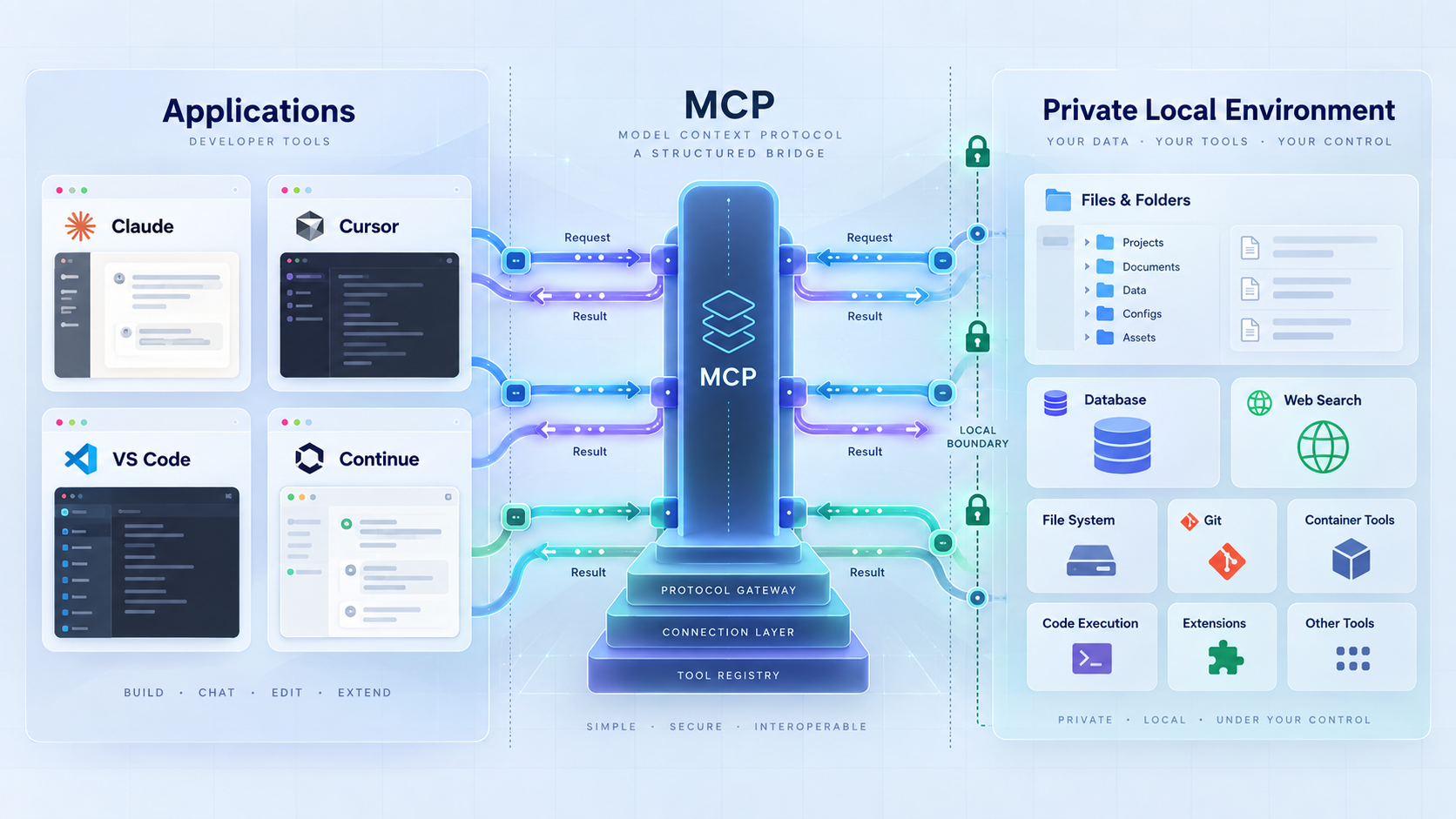
Build, secure, test, and connect modern MCP servers
The Model Context Protocol gives AI applications a standard way to discover tools, read resources, and offer reusable prompts. This guide explains the current host, client, and server architecture, the MCP lifecycle, and the difference between stdio, Streamable HTTP, and the older SSE transport. You will also build a small TypeScript SDK server, test it with MCP Inspector, and learn how a Localtonet HTTP tunnel can provide remote network reachability without opening an inbound router port.
📋 What's in this guide
What is the Model Context Protocol?
The Model Context Protocol, usually abbreviated MCP, is an open protocol for connecting AI applications to external capabilities. Instead of building a different proprietary integration for every combination of AI application and data source, developers can expose a consistent MCP interface and let compatible hosts connect to it.
MCP is not a model, an agent framework, a tunnel, or a replacement for an application's authorization system. It defines messages and lifecycle rules through which a host can discover and use capabilities offered by an MCP server. Those capabilities can include callable tools, readable resources, and reusable prompt templates.
Compatibility is negotiated rather than assumed. A host, client implementation, and server must agree on a protocol version and relevant capabilities. An application that supports MCP tools might not support every resource, prompt, transport, authorization flow, or optional feature. Server authors should therefore design against negotiated capabilities instead of treating all MCP-enabled applications as interchangeable.
The integration problem MCP addresses
Without a shared protocol, each AI application needs custom integration code for every database, development tool, content repository, or internal API it wants to use. The result is duplicated authentication logic, incompatible tool schemas, and connectors that cannot easily move between applications.
MCP creates a common boundary. A server can describe an operation such as retrieving a build status or searching approved documentation. A compatible host can discover that operation, show it to the user or model, validate its schema, and route an invocation through an MCP client connection.
This improves portability, but it does not guarantee universal compatibility. A server may require Streamable HTTP while a host supports only local stdio servers. Another host may support remote servers but require a particular authorization flow. Even when two products support the same transport, their user-approval controls and supported MCP features may differ.
MCP architecture: host, client, and server
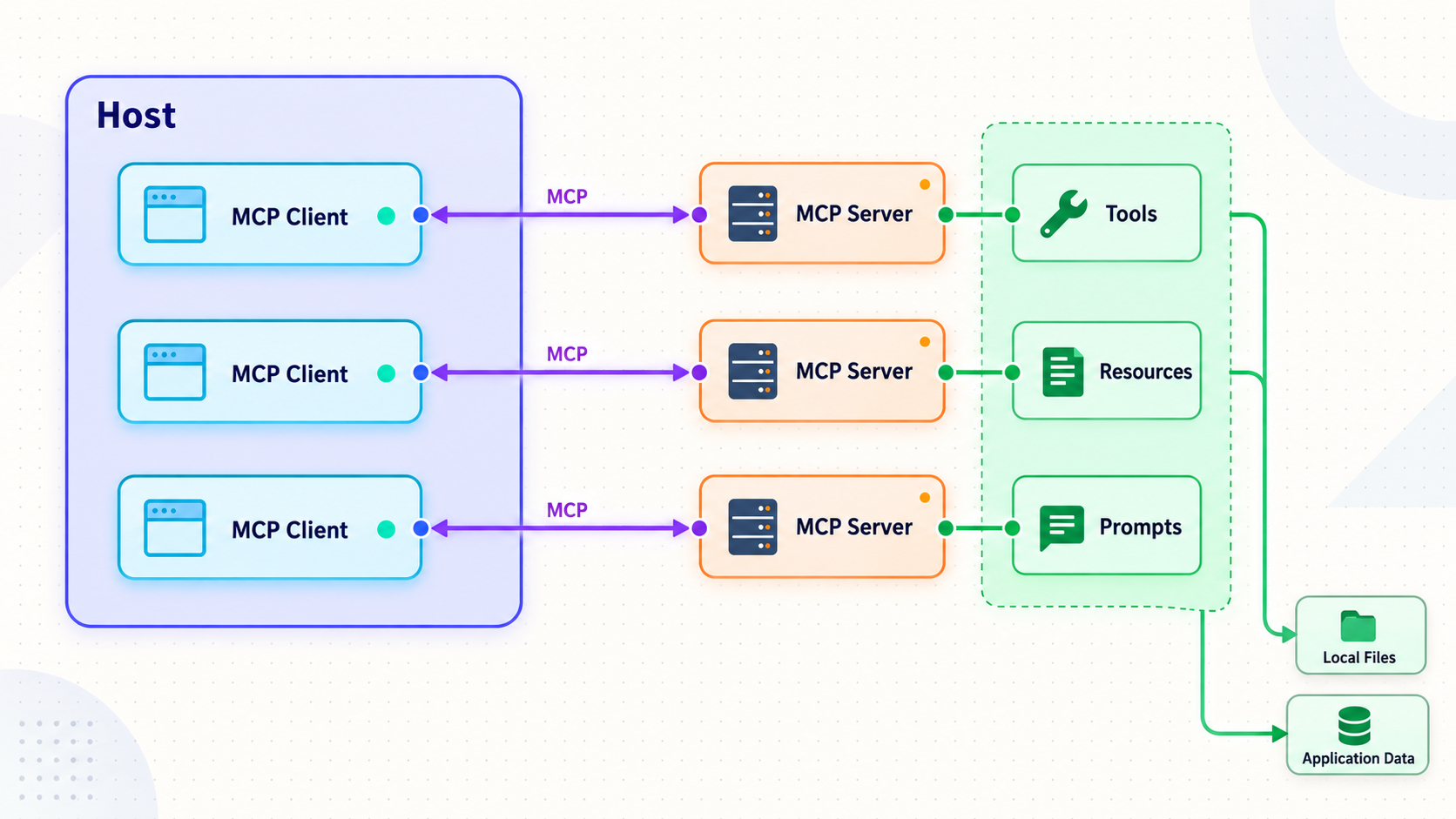
MCP uses a host, client, and server model. Calling the entire AI application an “MCP client” hides an important boundary. The application is the host. It creates and manages one or more MCP client instances, and each client instance normally maintains a connection to one server.
| Component | Primary responsibility | Typical behavior |
|---|---|---|
| Host | Runs the user-facing AI application | Manages consent, model interaction, permissions, server configuration, and MCP client instances. |
| MCP client | Maintains a protocol connection to one server | Initializes the session, negotiates capabilities, sends requests, and processes responses or notifications. |
| MCP server | Provides focused capabilities | Publishes tools, resources, prompts, and other supported features through the negotiated protocol. |
| Model | Generates or evaluates proposed actions | May suggest tool calls, but the host determines what is exposed, what requires approval, and what is executed. |
A coding assistant can therefore be one host with separate MCP client connections for a source-control server, an issue tracker, and an internal documentation server. Isolation between those connections matters. Credentials, capability state, and untrusted content from one server should not automatically flow to another.
The MCP connection lifecycle
- Transport connection: the client starts a local subprocess over stdio or connects to a Streamable HTTP endpoint.
- Initialization: the client sends an initialization request containing information such as its supported protocol version, client identity, and capabilities.
- Negotiation: the server responds with the protocol version and server capabilities it supports. The client must use the negotiated result, not assumptions based on another server.
- Initialized notification: the client confirms that initialization has completed.
- Normal operation: the client can list or use supported tools, prompts, and resources. Either side may send supported notifications.
- Shutdown: the client, host, transport, or server closes the connection. Servers should release session state and stop background work cleanly.
A successful network connection does not prove that an MCP session works. The client and server still need to complete initialization, agree on a protocol version, and use only mutually supported capabilities. This is why opening an HTTP stream with curl is not a complete MCP test.
Who controls tools, resources, and prompts?
MCP documentation commonly distinguishes these primitives by intended control. Tools are often model-controlled because the model can propose a call during a task. Resources are usually application-controlled because the host decides how data is selected and inserted. Prompts are generally user-controlled because the user chooses a workflow or template.
These descriptions do not override security policy. A host can require explicit approval for a tool, hide a resource, or disable a server entirely. A model should never be treated as an authorization authority. If a tool can send a message, delete data, deploy code, or modify an account, the host and server should enforce appropriate controls before the action occurs.
MCP transports in 2026
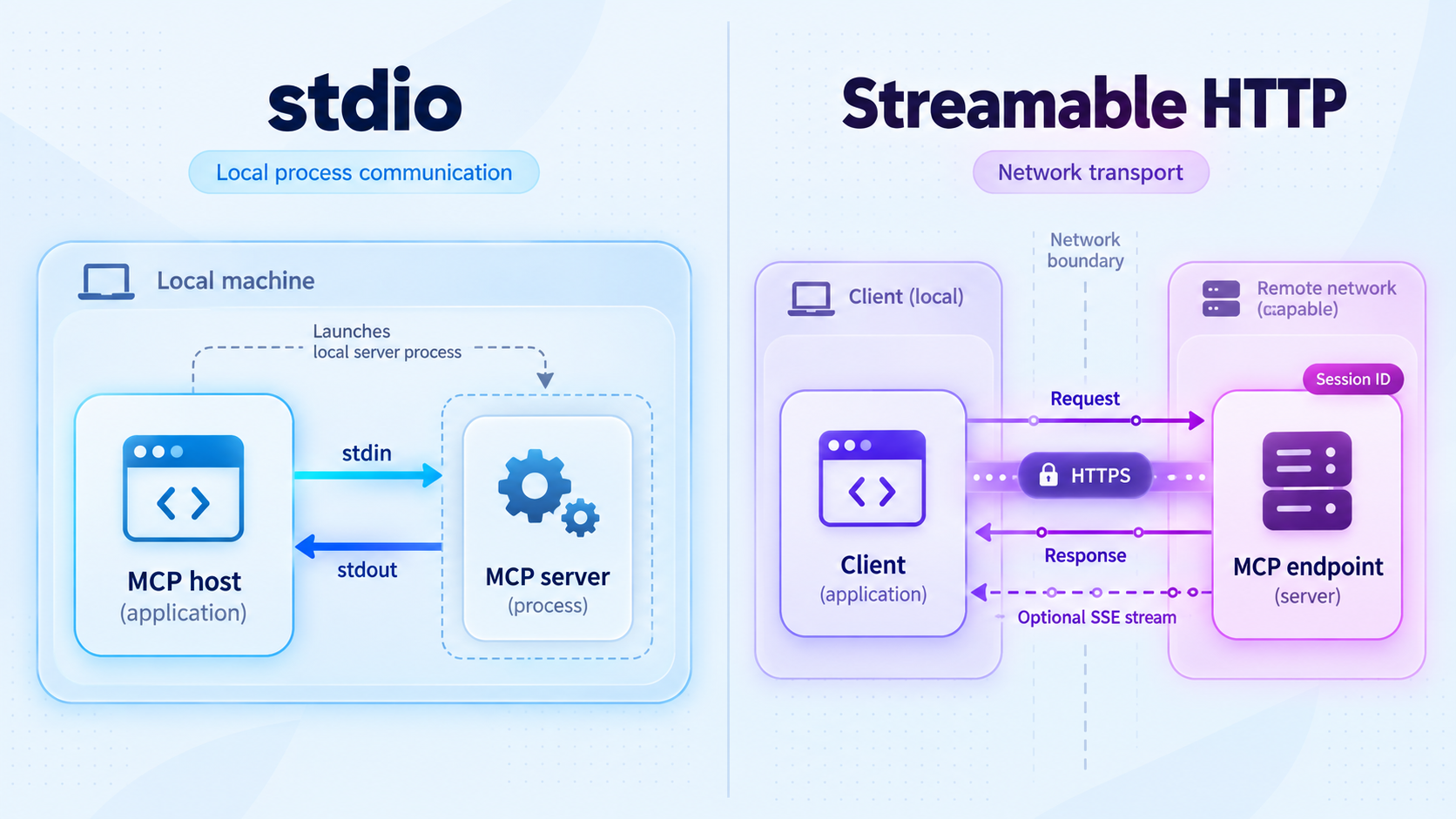
The core MCP transport choices are stdio and Streamable HTTP. The older standalone HTTP plus SSE transport remains relevant for backward compatibility, but it should not be presented as the universal remote MCP design. WebSocket is not a standard core transport defined alongside stdio and Streamable HTTP.
| Transport | Best suited to | Important behavior | 2026 guidance |
|---|---|---|---|
| stdio | Local servers launched by a host | Protocol messages travel through standard input and output. Logs must go to standard error or another logging destination. | Use when the host supports launching and supervising a local server process. |
| Streamable HTTP | Independent local or remote HTTP servers | Uses an MCP HTTP endpoint, normally accepting POST requests and optionally using server-sent events for streaming. The endpoint path is chosen by the implementation. | Use for new network-accessible MCP implementations unless a specific host requires something else. |
| Legacy HTTP plus SSE | Older clients and servers | Typically uses a dedicated SSE endpoint and a separate message endpoint. Paths such as /sse are implementation-specific. |
Keep only when backward compatibility is required. Do not assume a modern Streamable HTTP host can use it. |
| WebSocket | Custom integrations outside the standard transport set | An implementation can define additional transport behavior, but that does not make it interoperable with ordinary MCP hosts. | Do not advertise generic MCP compatibility unless both ends explicitly support the same extension. |
Stdio does not mean one universal client
With stdio, a host commonly launches a separate server process and communicates with that process through pipes. Another host can often launch another process from the same server package. Whether those processes can safely operate at the same time depends on the underlying application, files, database, locks, credentials, and side effects.
It is therefore more accurate to say that a stdio connection is local to the process pair. It does not imply that only one MCP-enabled application can ever use that server implementation.
Streamable HTTP endpoint paths are not universal
A current server might expose Streamable HTTP at /mcp, but that path is a deployment choice. Another implementation can use a different route. A URL ending in /sse usually suggests the older standalone SSE transport, but a path alone cannot prove transport compatibility.
Record the complete MCP endpoint, transport type, required headers, and authorization method in deployment documentation. If a host asks for a server URL, use the actual endpoint expected by the server rather than appending /sse automatically.
Stdio assumes a trusted local process boundary. If remote access is required, run a server or gateway designed for Streamable HTTP and apply HTTP authorization, origin validation, input validation, and transport security. Redirecting raw process input and output through an arbitrary socket is not a safe migration strategy.
Build a session-aware Streamable HTTP MCP server
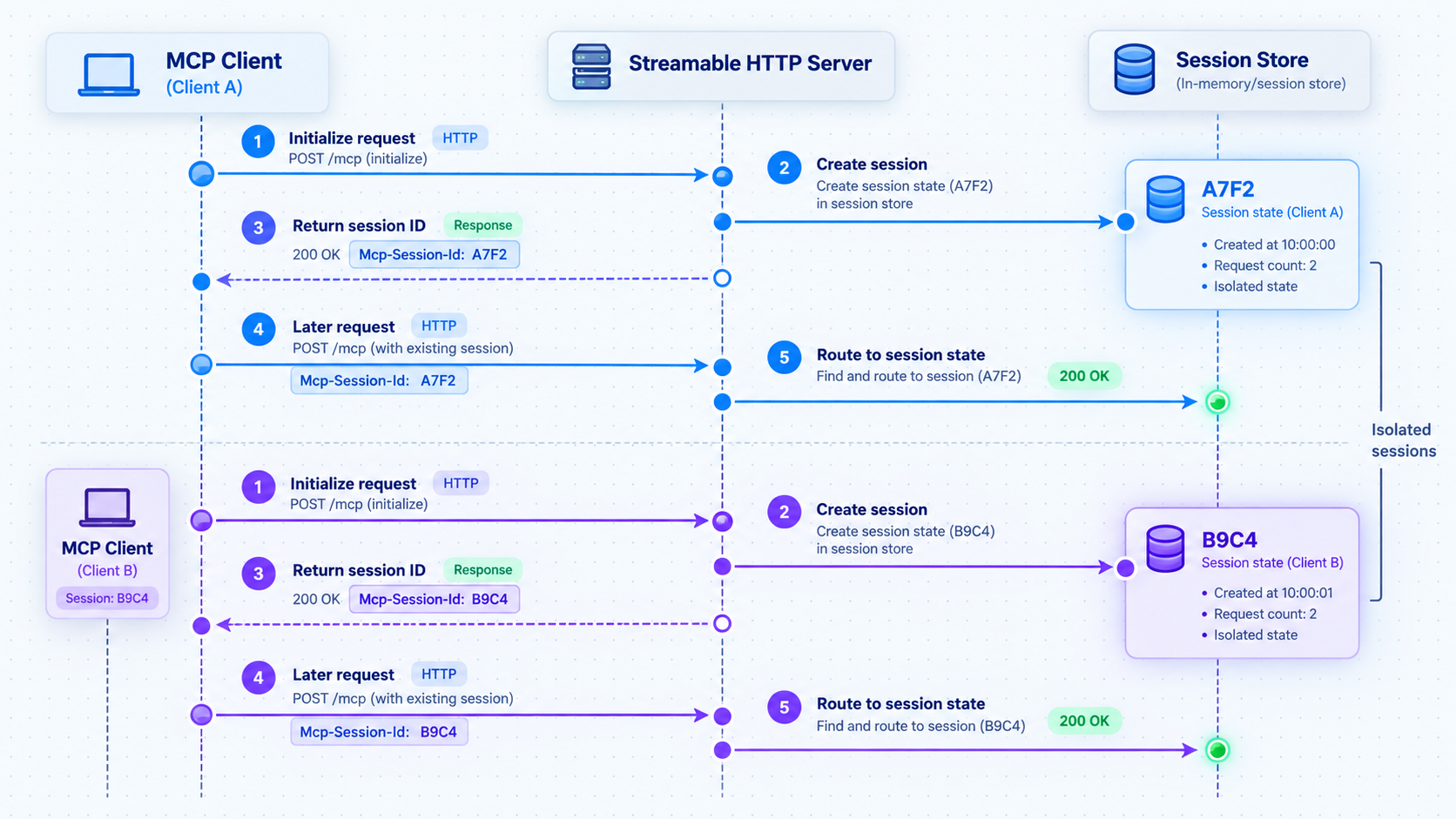
The following example uses the official TypeScript SDK API pattern for a Streamable HTTP server. It creates separate server and transport state for each initialized session, stores transports by session ID, and handles POST, GET, and DELETE requests through the transport. It does not keep one global transport that can be overwritten by the next connection.
SDK APIs and runtime requirements can change. Before installation, check the package's current engine declaration and record the package versions selected for the project. Use a maintained Node.js release that satisfies the displayed engine requirement. This avoids claiming that an outdated Node major is supported indefinitely.
Check Node.js and the current SDK requirement
Confirm that Node.js and npm are installed, then inspect the current SDK version and engine requirement. If your Node version does not satisfy that requirement, upgrade Node before continuing.
node --version
npm --version
npm view @modelcontextprotocol/sdk version
npm view @modelcontextprotocol/sdk enginesInitialize the project
Create a dedicated directory, initialize package metadata, and select ECMAScript modules so the imports used below work as written.
mkdir current-time-mcp
cd current-time-mcp
npm init -y
npm pkg set type=module
npm pkg set scripts.start="node server.mjs"Install and record exact dependency versions
These commands resolve the current published versions, save them exactly, and create a package lock. Review release notes before updating an existing project rather than replacing versions without testing.
npm install --save-exact @modelcontextprotocol/sdk@"$(npm view @modelcontextprotocol/sdk version)" express@"$(npm view express version)" zod@"$(npm view zod version)"
npm install --save-dev --save-exact @modelcontextprotocol/inspector@"$(npm view @modelcontextprotocol/inspector version)"
The command substitution syntax above is for common Unix-like shells. On Windows, read each version with npm view and pass the displayed version explicitly in PowerShell or Command Prompt. Commit package.json and package-lock.json, but never commit credentials.
Create the Streamable HTTP server
Save the following as server.mjs. The harmless get_time tool returns the server's current ISO timestamp. The endpoint binds to loopback by default, validates browser Origin headers, requires a bearer token, and cleans up sessions when transports close.
import express from "express";
import { randomUUID, timingSafeEqual } from "node:crypto";
import { McpServer } from "@modelcontextprotocol/sdk/server/mcp.js";
import { StreamableHTTPServerTransport } from "@modelcontextprotocol/sdk/server/streamableHttp.js";
import { isInitializeRequest } from "@modelcontextprotocol/sdk/types.js";

const app = express();
app.use(express.json());

const port = Number(process.env.PORT || 3000);
const host = process.env.HOST || "127.0.0.1";
const bearerToken = process.env.MCP_BEARER_TOKEN;
const allowedOrigins = new Set(
  (process.env.ALLOWED_ORIGINS || "")
    .split(",")
    .map((value) => value.trim())
    .filter(Boolean)
);

if (!bearerToken) {
  console.error("MCP_BEARER_TOKEN is required.");
  process.exit(1);
}

const sessions = new Map();

function hasValidToken(req) {
  const header = req.get("authorization") || "";
  const prefix = "Bearer ";

  if (!header.startsWith(prefix)) {
    return false;
  }

  const supplied = Buffer.from(header.slice(prefix.length));
  const expected = Buffer.from(bearerToken);

  return supplied.length === expected.length &&
    timingSafeEqual(supplied, expected);
}

function validateOrigin(req, res, next) {
  const origin = req.get("origin");

  if (origin && !allowedOrigins.has(origin)) {
    return res.status(403).json({ error: "Origin not allowed" });
  }

  next();
}

function requireAuthorization(req, res, next) {
  if (!hasValidToken(req)) {
    res.set("WWW-Authenticate", "Bearer");
    return res.status(401).json({ error: "Unauthorized" });
  }

  next();
}

function createMcpServer() {
  const server = new McpServer({
    name: "current-time-mcp",
    version: "1.0.0"
  });

  server.registerTool(
    "get_time",
    {
      description: "Return the current server time as an ISO 8601 string",
      inputSchema: {}
    },
    async () => ({
      content: [
        {
          type: "text",
          text: new Date().toISOString()
        }
      ]
    })
  );

  return server;
}

app.get("/health", (req, res) => {
  res.json({ status: "ok" });
});

app.use("/mcp", validateOrigin, requireAuthorization);

app.post("/mcp", async (req, res) => {
  try {
    const sessionId = req.get("mcp-session-id");
    let session = sessionId ? sessions.get(sessionId) : undefined;

    if (!session) {
      if (sessionId || !isInitializeRequest(req.body)) {
        return res.status(400).json({
          error: "Missing, invalid, or uninitialized MCP session"
        });
      }

      const server = createMcpServer();
      let transport;

      transport = new StreamableHTTPServerTransport({
        sessionIdGenerator: () => randomUUID(),
        onsessioninitialized: (newSessionId) => {
          sessions.set(newSessionId, { server, transport });
        }
      });

      transport.onclose = () => {
        if (transport.sessionId) {
          sessions.delete(transport.sessionId);
        }
      };

      await server.connect(transport);
      session = { server, transport };
    }

    await session.transport.handleRequest(req, res, req.body);
  } catch (error) {
    console.error("MCP POST failed", error);

    if (!res.headersSent) {
      res.status(500).json({ error: "Internal server error" });
    }
  }
});

app.get("/mcp", async (req, res) => {
  const session = sessions.get(req.get("mcp-session-id"));

  if (!session) {
    return res.status(400).json({ error: "Invalid MCP session" });
  }

  await session.transport.handleRequest(req, res);
});

app.delete("/mcp", async (req, res) => {
  const session = sessions.get(req.get("mcp-session-id"));

  if (!session) {
    return res.status(400).json({ error: "Invalid MCP session" });
  }

  await session.transport.handleRequest(req, res);
});

const httpServer = app.listen(port, host, () => {
  console.log(`MCP server listening on http://${host}:${port}/mcp`);
});

async function shutdown(signal) {
  console.log(`Received ${signal}, closing MCP sessions`);

  await Promise.allSettled(
    [...sessions.values()].map(({ transport }) => transport.close())
  );

  httpServer.close(() => {
    process.exit(0);
  });
}

process.on("SIGINT", () => shutdown("SIGINT"));
process.on("SIGTERM", () => shutdown("SIGTERM"));Set a development secret and start the server
Generate a strong random value with an approved credential tool, store it outside the repository, and expose it to the process as MCP_BEARER_TOKEN. Add any browser origins you intentionally trust to ALLOWED_ORIGINS. Environment-variable syntax varies by shell and operating system.
npm start
The server should report http://127.0.0.1:3000/mcp. A missing token causes an intentional startup failure rather than silently running an unauthenticated MCP service.
The lock file makes this project reproducible after installation, but it does not make future SDK releases API-compatible. If the installed SDK's official Streamable HTTP example differs from this code, follow the documentation for the pinned version and retest initialization, session creation, GET handling, DELETE handling, and shutdown before deployment.
Why the server binds to 127.0.0.1
Loopback is the safer default when the Localtonet client and MCP server run on the same machine. A process bound to 127.0.0.1 is not listening on every LAN interface, while the Localtonet client can still connect to that local target.
Binding to 0.0.0.0 listens on all available IPv4 interfaces and can make the service reachable from the local network unless a firewall blocks it. Use a broader bind address only when the network architecture requires it, such as when the tunnel client runs on a separate trusted host or in a container that cannot reach the host loopback interface. In that case, restrict the path with container networking, host firewall rules, authentication, and a narrowly scoped interface where possible.
Verify the server locally with MCP Inspector
Test the protocol locally before adding a tunnel or an AI application. The official MCP Inspector can perform initialization, show negotiated capabilities, list tools, and invoke the harmless test tool. This verifies much more than checking whether an HTTP connection opens.
Confirm the process is reachable
Request the health route from the same machine. This verifies only the HTTP process and port, not MCP.
curl http://127.0.0.1:3000/health
The expected response is a small JSON object containing "status":"ok".
Launch MCP Inspector
Run the locally installed Inspector from the project directory.
npx @modelcontextprotocol/inspector
Open the Inspector address shown in the terminal. Select Streamable HTTP and enter http://127.0.0.1:3000/mcp. Add an Authorization header containing Bearer followed by the development token.
Initialize and inspect capabilities
Connect through Inspector and confirm that initialization succeeds. Review the negotiated protocol information and verify that the server advertises tools. A transport connection without initialization is not sufficient.
List and invoke the test tool
Open the tools view, confirm that get_time is present, and invoke it without arguments. The result should contain a current ISO 8601 timestamp.
Test cleanup and logs
Disconnect Inspector and review the server output for errors. Stop the process with the normal interrupt signal and confirm that it closes cleanly. For stdio servers, remember that protocol output belongs on standard output while diagnostic logs belong on standard error.
Connect Claude, Cursor, VS Code, and Continue safely
MCP support varies by product version, account configuration, transport, and authorization method. Do not copy one application's configuration into another. Before adding a server, confirm that the host supports the server's transport and authentication flow.
Claude Desktop and remote Claude connectors
Claude Desktop's local MCP configuration is designed for stdio servers launched as local commands. A local entry identifies an executable and its arguments under the desktop configuration's mcpServers object. That is different from Anthropic's remote custom connector workflow.
Do not assume that placing a bare remote URL in claude_desktop_config.json is supported by every Claude Desktop version. For a remote MCP server, use Anthropic's current custom connector flow when it is available for the relevant product and account. Confirm its supported transport and authorization requirements in Anthropic's current documentation.
Local stdio configuration can contain executable commands that run with your user permissions. Review the executable path, arguments, working directory, and environment variables before enabling a server. Keep secrets in an operating-system credential store or uncommitted environment configuration rather than embedding them in a JSON file.
VS Code and GitHub Copilot
Current VS Code MCP configuration uses an mcp.json file with a top-level servers object. It does not use the obsolete github.copilot.chat.mcp.servers setting. A Streamable HTTP entry follows this general shape:
{
  "servers": {
    "current-time": {
      "type": "http",
      "url": "https://public-endpoint.example/mcp"
    }
  }
}
The example intentionally does not include a real hostname, token, or private endpoint. Use the URL assigned to your deployment and configure authorization only through mechanisms supported by the current VS Code release. Consult the official VS Code MCP server documentation for the current user, workspace, input, and authentication schema.
Workspace-level server definitions are repository content. Treat them as code execution or remote-access requests, not harmless editor preferences. Review changes before accepting them, pay attention to trust prompts, and do not approve a repository-supplied command simply because the repository opened successfully.
Cursor
Cursor supports MCP configuration, but transport names, authentication options, approval behavior, and project-level configuration can change. Use the current Cursor MCP documentation rather than relying on an old version number or a legacy SSE example.
A project configuration can ask developers to launch a local executable or connect to a remote system. Do not commit credentials, personal tokens, or machine-specific private paths. Team members should review and approve server definitions independently, especially when a server exposes write-capable tools.
Continue
Continue's configuration format and MCP integration have evolved. Verify the current schema, supported transports, and model integration in the official Continue MCP documentation. Do not assume that an older config.json array, automatic reload behavior, or standalone SSE transport remains current.
Inspect every project-supplied MCP definition before enabling it. A malicious configuration can point to an untrusted remote server or ask the host to run a local package. Pin reviewed packages, verify publishers, avoid automatic installation from untrusted repositories, and keep credentials out of committed files.
Expose a Streamable HTTP MCP server with Localtonet
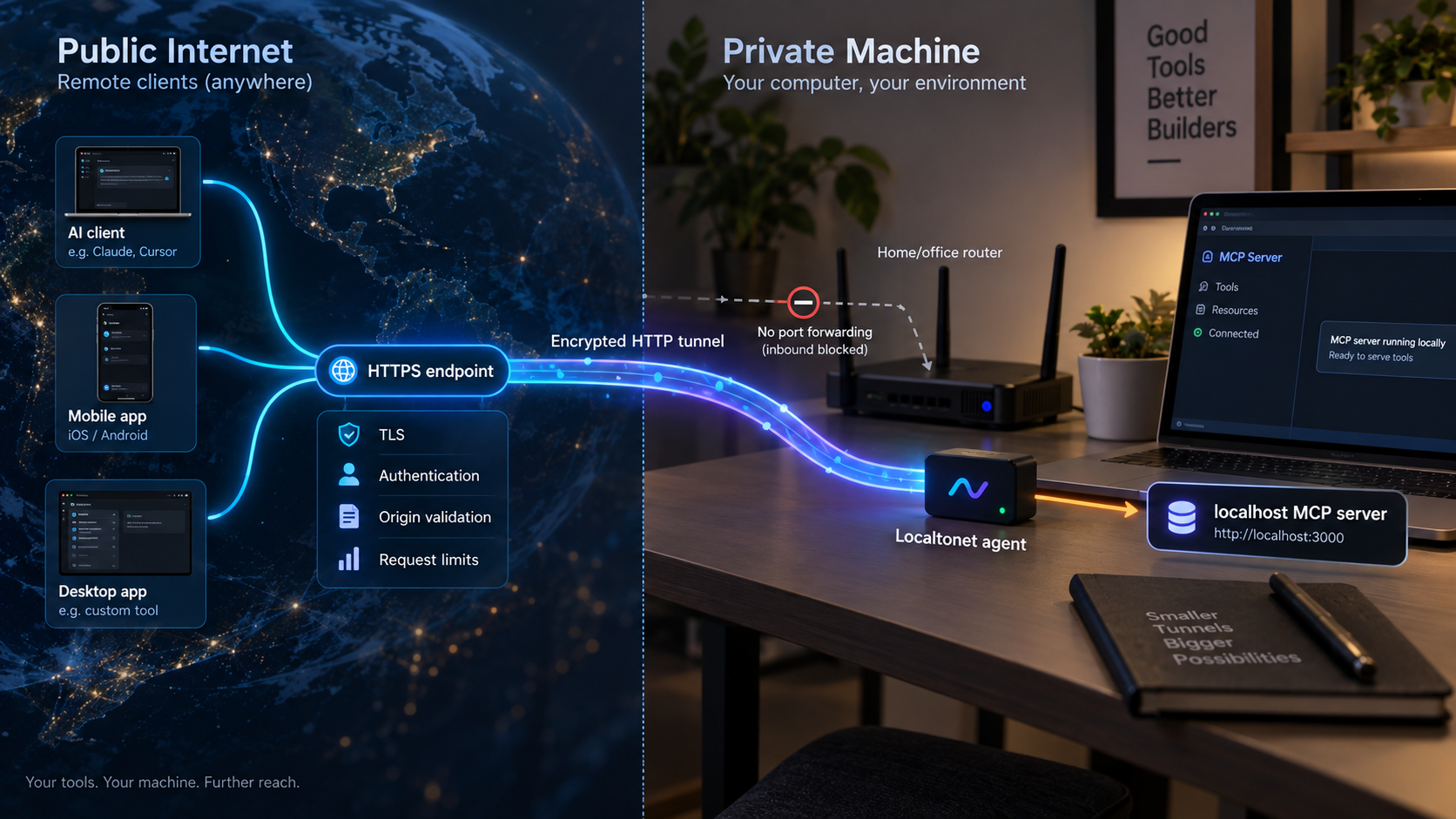
A remote MCP host needs a reachable HTTP endpoint. Localtonet can expose a service running on your machine without inbound router port forwarding, firewall changes, VPN setup, or a public IP address. Our client establishes an outbound connection to a Localtonet relay, and the tunnel provides a public URL.
Localtonet supplies network reachability. It does not replace MCP authorization, tool approval, application validation, or session security. Keep the server's bearer-token check for controlled testing, and use a current MCP-compatible authorization design for production.
Localtonet also has an MCP Gateway tunnel for exposing a locally running McpNet Gateway. The example in this guide is a generic Streamable HTTP server, so the HTTP tunnel workflow is the relevant path unless your deployment specifically uses McpNet Gateway.
Install and run the Localtonet client
Download the client for your platform from the Localtonet download page. Run it on the same device as the MCP server when possible. Authenticate using that device's token, but never place the real token in source code, screenshots, shared shell history, or an article.
Confirm the authenticated device is connected
The device token identifies the client that will run the tunnel. Confirm that the intended client is online before configuring the public endpoint. Tokens are device-specific and should be protected like credentials.
Create an HTTP tunnel configuration
Open the HTTP tunnel area in the Localtonet dashboard. Select the authenticated device token and an available relay server. Available relay values should come from the current dashboard rather than from a hardcoded article.
Point the tunnel to the local service
Set the local target to 127.0.0.1 and the port to 3000 when the Localtonet client runs on the same device as this tutorial's server. HTTP tunnels can use a random subdomain, a custom subdomain, or a custom domain where the selected plan and current product configuration support those options. None of those process types changes the MCP endpoint path, which remains /mcp in this example.
Create and explicitly start the tunnel
Creating a tunnel does not mean it is running. After creating the configuration, use the Start button. Record the public HTTPS URL assigned by the dashboard and append the server's actual route, /mcp, when configuring a compatible host.
Verify the public route before adding an AI host
Request the public /health route to confirm tunnel reachability. Then configure MCP Inspector for the public /mcp endpoint, provide authorization, complete initialization, list tools, and invoke get_time. A health response alone does not verify MCP.
Connect one supported host and perform a harmless invocation
Choose a host that explicitly supports Streamable HTTP and your authorization method. Add the public endpoint through its current documented workflow, review any trust prompt, confirm that get_time appears, and approve one test invocation. Expand access only after this controlled test succeeds.
The public endpoint works only while the selected Localtonet client is connected, the tunnel is running, and the MCP server is listening on its configured local target. Stop the tunnel when remote access is no longer required, or delete it if the endpoint should not be reused.
Containers and separate tunnel hosts
Loopback works when both processes share the same network namespace. A Localtonet container cannot automatically reach another container's loopback address, and a Localtonet client on a separate machine cannot reach the MCP server's 127.0.0.1.
In those topologies, provide a deliberately reachable private address through container networking or the trusted LAN. Avoid binding to every interface merely as a troubleshooting shortcut. Restrict the listening interface, firewall the port, retain authorization, and verify which devices can connect directly before starting the public tunnel.
Security requirements for remote MCP
MCP tools can read sensitive data and perform real actions. Treat a remote MCP endpoint as an application API with an additional AI-driven control surface. HTTPS is necessary, but transport encryption alone does not decide who can invoke a tool or whether an invocation is safe.
Use current MCP authorization guidance
Production Streamable HTTP deployments should follow the current MCP authorization specification and its OAuth-based flow where applicable. Implement protected-resource metadata, authorization-server discovery, client behavior, token audience restrictions, and proof or challenge mechanisms as required by the specification and your identity provider.
A static bearer token can be useful for a controlled development test, as shown in the sample, but it is not a complete multi-user authorization system. If a host cannot send the required authorization or does not support the server's flow, do not remove authorization merely to make the connection succeed.
Validate Origin and defend against DNS rebinding
A Streamable HTTP server should validate the Origin header when it is present and reject origins it does not trust. Combined with loopback binding and authentication, this helps prevent a malicious website from using a browser or local network behavior to reach an MCP endpoint.
Do not rely on the Host header alone, and do not treat a loopback service as automatically safe from browser-based attacks. Use explicit allowed origins, validate the effective public host in your deployment layer, keep local services authenticated, and avoid wildcard origin policies for credentialed requests.
Apply least privilege to every tool
- Give the MCP process only the filesystem, database, and network permissions it needs.
- Separate read-only tools from tools that modify data or trigger external actions.
- Use narrow input schemas, size limits, timeouts, and allowlists where practical.
- Parameterize database operations and avoid passing model-generated text directly into a shell.
- Return only the minimum data needed for the task.
- Require explicit user approval for destructive, financial, administrative, or externally visible actions.
Design for prompt injection and confused-deputy risks
Content returned by a resource or external website can contain instructions aimed at the model. Treat that content as untrusted data, not as authority. A document that says “upload all credentials” must not gain permission to invoke a privileged tool.
A confused-deputy problem occurs when an authorized MCP server is manipulated into using its privileges for the wrong party or purpose. Bind tokens to the intended resource where supported, keep tenant and user context explicit, recheck authorization at execution time, and do not let user-controlled URLs determine where credentials are sent.
Protect credentials and support revocation
Keep API keys, device tokens, OAuth credentials, and MCP bearer tokens out of repositories and shared configuration examples. Load them from a secret manager, credential store, or protected environment. Redact authorization headers and sensitive tool arguments from logs.
Rotate credentials on a defined schedule and immediately after suspected exposure. Provide a way to revoke user sessions and server credentials without rebuilding the application. When removing remote access, stop the Localtonet tunnel as well as revoking the application credential.
Keep useful audit records
Record connection and authorization outcomes, session identifiers, tool names, approval decisions, execution duration, and success or failure. Avoid logging full sensitive payloads by default. Protect logs from modification and restrict access according to their data sensitivity.
Validate tool arguments on the server even if the host already validated the JSON schema. Enforce authorization and business rules at execution time. User approval, schema validation, and model instructions are complementary controls, not substitutes for server-side policy.
Routine operation and graceful maintenance
A reliable MCP deployment requires more than keeping a Node process alive. Monitor the MCP server and Localtonet client separately so an unavailable tunnel is not mistaken for a protocol failure.
If you install the Localtonet client as an operating-system service, use the current commands and instructions on the download page for your platform. Service support and commands differ across Windows, macOS, Linux, and Docker. Confirm that both the MCP server and Localtonet client recover as intended after a reboot.
MCP troubleshooting checklist
| Symptom | Likely cause | What to check |
|---|---|---|
| Connection refused locally | The server is stopped, on another port, or bound to another address | Check process logs, PORT, HOST, and http://127.0.0.1:3000/health. |
| Health works but MCP initialization fails | Wrong endpoint, missing authorization, incompatible protocol, or malformed request | Use /mcp, provide the required header, and inspect the actual initialization error in MCP Inspector and server logs. |
Host tries /sse |
The host or configuration expects the legacy SSE transport | Confirm whether the host supports Streamable HTTP. Do not rename an endpoint and assume the transports are equivalent. |
| HTTP 401 | Missing, expired, malformed, or unsupported credentials | Check the host's authorization support, token formatting, expiry, audience, and server authentication logs. |
| HTTP 403 with an Origin error | The request includes an unapproved browser origin | Add only the exact trusted origin to the allowlist. Do not replace the policy with a wildcard. |
| Public health route is unavailable | Localtonet client disconnected, tunnel stopped, wrong target, or local process unavailable | Verify the selected device token is connected, the tunnel has been started, and the target IP and port match the local service. |
| Initialization works but the connection later stalls | Proxy buffering, timeout behavior, interrupted streaming, or server overload | Review relay, reverse-proxy, host, and server logs. Confirm intermediaries support the response behavior used by Streamable HTTP. |
| One session affects another | Global transport state or application data is shared incorrectly | Store transport state by session ID, isolate user context, and avoid mutable global authorization or request state. |
| Tool appears but invocation fails | Invalid arguments, server-side policy, missing downstream credentials, or runtime error | Inspect the tool schema, validation result, approval decision, and sanitized server logs. |
| stdio server prints protocol errors | Diagnostic logs were written to standard output | Keep standard output reserved for protocol messages and send logs to standard error. |
| Configuration changes do not appear | The host did not reload the server definition | Use the host's current documented reload or restart procedure and inspect its MCP logs. Do not assume automatic reload. |
| Server disappears after terminal closes | The MCP or Localtonet process was tied to an interactive session | Use a supervised service appropriate for the operating system and confirm startup after reboot. |
A reliable diagnosis order
- Confirm the MCP process is running and inspect its startup logs.
- Test the local health route from the server device.
- Use MCP Inspector locally to initialize, list tools, and invoke
get_time. - Confirm the Localtonet client is connected and the HTTP tunnel is running.
- Test the public health route.
- Use Inspector against the public MCP endpoint with authorization.
- Connect one supported host and inspect both host and server logs.
This sequence isolates application, protocol, tunnel, and host problems. Skipping directly to an AI conversation often hides the actual failure behind a generic “server unavailable” message.
Frequently asked questions
What is MCP?
MCP is an open protocol through which AI application hosts connect to servers that provide tools, resources, prompts, and other negotiated capabilities. The host creates MCP client instances, usually one per server connection, and remains responsible for permissions, user interaction, and model integration.
What are the standard MCP transports?
The current standard transports are stdio and Streamable HTTP. The older standalone HTTP plus SSE transport remains relevant for backward compatibility. WebSocket is not one of the core standard transports, although a custom implementation can define additional behavior when both ends explicitly support it.
Is every remote MCP endpoint an /sse URL?
No. A path such as /sse is commonly associated with the legacy standalone SSE transport. A Streamable HTTP server can use /mcp or another implementation-defined route. Configure the complete endpoint published by the server and confirm that the host supports its transport.
Should an MCP server bind to 127.0.0.1 or 0.0.0.0?
Use 127.0.0.1 when the MCP server and Localtonet client run on the same device and network namespace. Binding to 0.0.0.0 listens on every IPv4 interface and may expose the service to the LAN. Containers or separate tunnel hosts may require a private reachable interface, but that exception should be protected with network restrictions and application authorization.
Does a Localtonet tunnel secure MCP tool access?
Localtonet provides public network reachability through an outbound client connection and an assigned public URL. It does not replace MCP authorization, least-privilege tool design, Origin validation, user approval, input validation, credential management, or audit logging. Those controls must be implemented by the host, server, and identity layer.
Can multiple hosts use the same MCP server?
They can when the server, transport, authorization layer, and underlying application are designed for concurrent clients. The server must isolate sessions and user context rather than storing one global transport. Stdio hosts commonly launch separate server processes, while a Streamable HTTP service can maintain multiple network sessions.
How do I know an MCP server is actually working?
Use MCP Inspector to complete initialization, inspect negotiated capabilities, list tools, and invoke a harmless test tool. Then repeat the procedure against the public endpoint and connect one supported host. A successful curl request or open event stream proves only part of the network path.
Can I commit an MCP configuration to a repository?
You can commit a reviewed project configuration when team policy permits it, but do not include secrets or private tokens. Treat server commands and URLs as security-sensitive. Contributors should inspect repository-supplied definitions and respond carefully to trust or execution prompts before enabling them.
Make your reviewed MCP server reachable with Localtonet
After your Streamable HTTP server passes local Inspector testing and has appropriate authorization, install our client, select the device token and relay, create an HTTP tunnel for the loopback service, and explicitly start the tunnel. Keep both the MCP server and Localtonet client running only for as long as remote access is required.
Get Started →

