

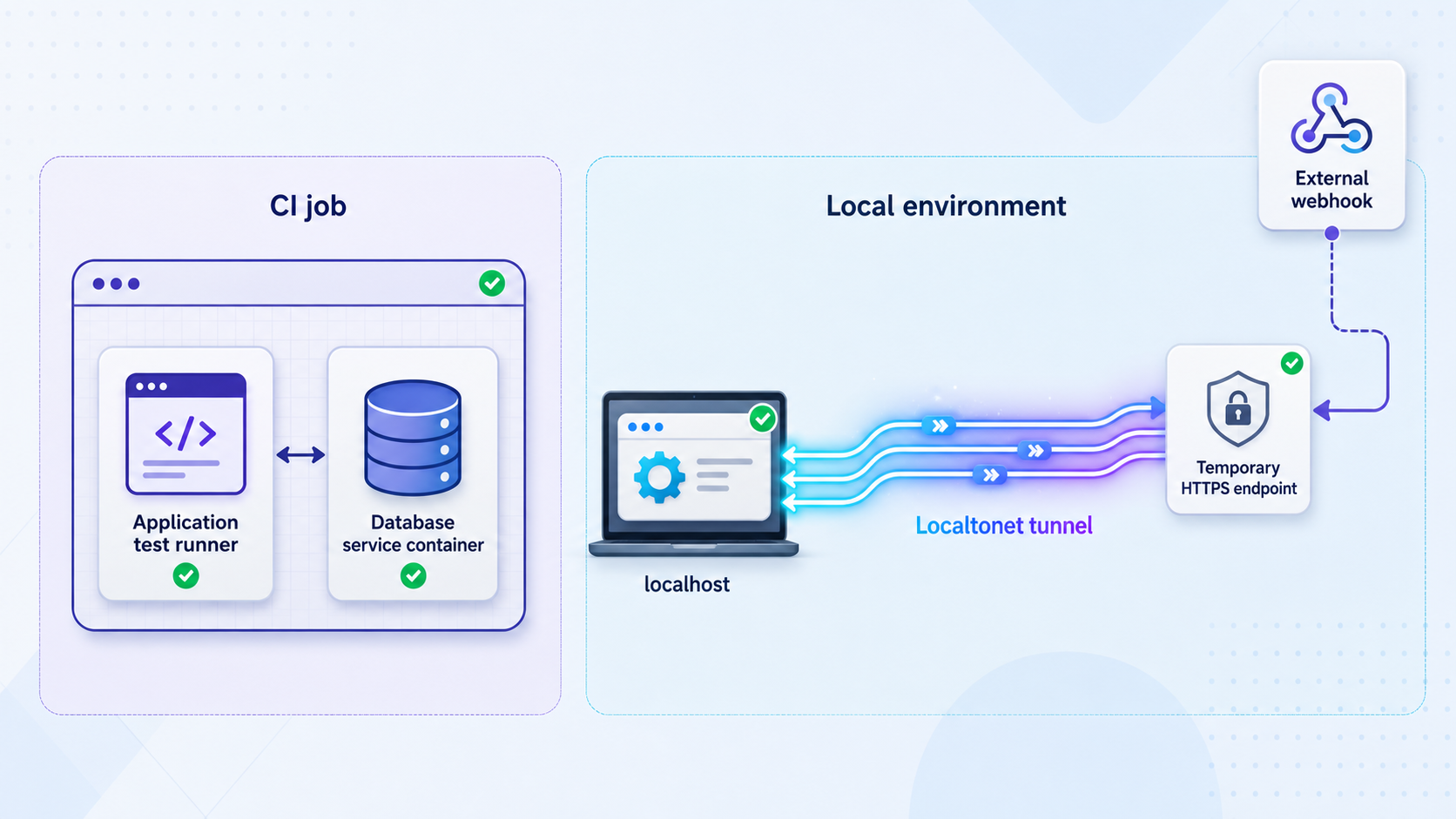
Choose the correct trust boundary before connecting a pipeline to a live test service
Integration tests can either build their dependencies inside a CI runner or call an environment maintained outside the runner. Those architectures have different networking, readiness, security, and cleanup requirements. This guide provides a self-contained GitHub Actions pattern using service containers, then shows how an intentionally controlled job or webhook provider can reach a developer-managed test application through a temporary Localtonet HTTP tunnel. It also covers authentication, isolated test data, webhook verification, timeouts, artifacts, troubleshooting, and tunnel cleanup.
📋 What's in this guide
Two architectures with different trust boundaries
The phrase “test against a live local environment” can describe two fundamentally different systems. In the first, the database, cache, application, and tests all run within a GitHub Actions job. In the second, the application remains on a developer-controlled machine and receives requests from a CI runner or an external provider through a public tunnel.
Keep these models separate when designing the pipeline. A self-contained runner is usually the best default for pull requests because it is repeatable and does not depend on a workstation. A tunnel is appropriate when the test specifically requires an internet-originated request, a provider callback, a device outside the local network, or behavior that only exists in a developer-managed environment.
What a hosted runner can and cannot receive
A third-party service normally cannot initiate a connection to an unexposed GitHub-hosted runner. The runner makes outbound connections, while its application ports are not automatically published as stable internet endpoints. It is technically possible to add a separate inbound exposure mechanism, but that is a different architecture and requires a verified installation, authentication, URL-discovery, lifecycle, and security workflow.
This guide does not claim that the Localtonet client can be installed or automated inside GitHub Actions because no verified Localtonet command sequence or URL-discovery workflow has been supplied for that use case. Instead, the tunnel architecture keeps the Localtonet client on the developer-controlled device and passes the assigned public URL into a deliberately triggered CI job.
| Requirement | Self-contained CI job | Developer-managed tunnel |
|---|---|---|
| Pull request database and API tests | Preferred. The environment is recreated for each job. | Usually unnecessary and introduces workstation availability as a dependency. |
| Internet-originated webhook | Not directly reachable unless a separate inbound mechanism is configured. | Suitable when the provider is configured with the temporary public HTTPS endpoint. |
| OAuth or browser callback | Useful only if the complete callback environment is intentionally exposed. | Suitable when the registered callback URI, application origin, cookies, and proxy behavior are aligned. |
| Test data | Fresh fixtures in an isolated service container or test database. | Dedicated local test database with sanitized fixtures and test accounts. |
| Repeatability | High when dependencies and images are pinned and fixtures are deterministic. | Depends on the developer machine, local state, tunnel URL, and environment availability. |
| Cleanup owner | The workflow and runner lifecycle. | The device operator or an independently verified external orchestrator. |
Neither architecture should use production data merely because it is convenient. Use isolated fixtures, synthetic identities, sandbox provider accounts, and sanitized data. A tunnel to an HTTP application port does not provide direct access to a local database, and the application should not expose database administration functions through the public endpoint.
Prerequisites and repository responsibilities
A pipeline file cannot make an application testable by itself. Before adding either workflow, define the commands, health endpoints, credentials, and expected results that belong to the repository. The examples below use conventional names, but your repository must actually implement them.
Requirements for the self-contained GitHub Actions job
- A GitHub repository with Actions enabled.
- A Linux runner with Docker available. GitHub Actions service containers require a Linux runner and Docker.
- A lockfile compatible with
npm ci, such aspackage-lock.json. - An
npm run migratescript that applies the test schema. - An
npm run start:testscript that starts the application without detaching itself unexpectedly. - An
npm run test:integrationscript that exits nonzero when assertions fail. - An application readiness endpoint, represented below as
/health/ready. - Deterministic fixture or seed logic that never imports production records.
- A test reporter configured to write machine-readable results if you want to upload them as artifacts.
Container image tags should identify a deliberate version. A broad tag can change underneath the pipeline. For stronger supply-chain reproducibility, use the image digest approved by your project. GitHub Actions references can also be pinned to reviewed commit SHAs when your security policy requires immutable dependencies.
Requirements for a tunneled environment
- A dedicated local test application and database, not a production application copied onto a workstation.
- The Localtonet client installed and running on the device that can reach the application.
- A device-specific AuthToken selected without exposing it in logs, screenshots, workflow inputs, or source control.
- A current Localtonet relay server selected from the options available in the product.
- A verified local IP address and port for the HTTP application.
- A protected readiness route and test API, or a provider-signed webhook route.
- A test account or sandbox account for the external provider.
- An operator responsible for starting the environment, monitoring it, and stopping or deleting the tunnel afterward.
When job steps run directly on the Linux runner, publish a service port and connect through localhost. When the job itself runs in a container, service containers share a Docker network and are reached by their service label, such as postgres:5432. Host port mapping is not required for communication between those job and service containers.
Architecture A: build a complete integration-test job
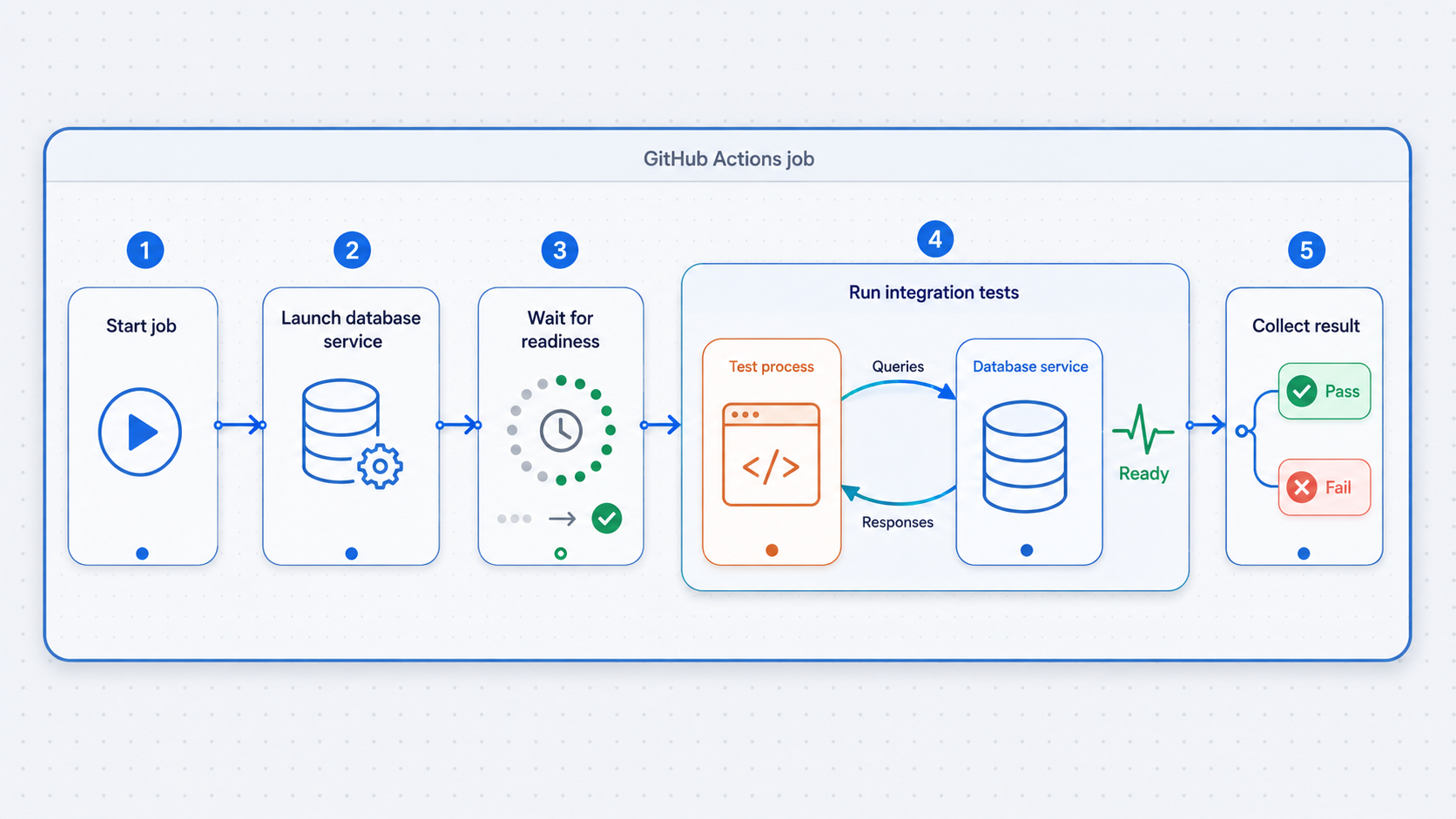
The following Node.js workflow creates an isolated PostgreSQL service, installs locked dependencies, applies migrations, starts the application, waits for application-level readiness, runs integration tests, collects artifacts, and terminates the application during cleanup. It also prevents overlapping runs for the same workflow and branch or pull request.
name: Integration Tests

on:
  push:
    branches: [main, develop]
  pull_request:
    branches: [main]

permissions:
  contents: read

concurrency:
  group: integration-${{ github.workflow }}-${{ github.ref }}
  cancel-in-progress: true

jobs:
  integration:
    runs-on: ubuntu-latest
    timeout-minutes: 20

    services:
      postgres:
        image: postgres:16.4-alpine
        env:
          POSTGRES_USER: testuser
          POSTGRES_PASSWORD: testpassword
          POSTGRES_DB: testdb
        ports:
          - 5432:5432
        options: >-
          --health-cmd pg_isready
          --health-interval 5s
          --health-timeout 5s
          --health-retries 12

    env:
      NODE_ENV: test
      DATABASE_URL: postgresql://testuser:testpassword@localhost:5432/testdb
      TEST_BASE_URL: http://127.0.0.1:3000

    steps:
      - name: Check out repository
        uses: actions/checkout@v4

      - name: Set up Node.js
        uses: actions/setup-node@v4
        with:
          node-version: '20'
          cache: npm

      - name: Install locked dependencies
        run: npm ci

      - name: Apply test database migrations
        run: npm run migrate

      - name: Start test application
        shell: bash
        run: |
          npm run start:test > application.log 2>&1 &
          echo $! > application.pid

      - name: Wait for application readiness
        shell: bash
        run: |
          for attempt in {1..60}; do
            if curl --silent --show-error --fail \
              --max-time 2 \
              "$TEST_BASE_URL/health/ready"; then
              exit 0
            fi
            sleep 2
          done

          echo "Application did not become ready within 120 seconds."
          cat application.log || true
          exit 1

      - name: Run integration assertions
        run: npm run test:integration

      - name: Upload logs and test results
        if: always()
        uses: actions/upload-artifact@v4
        with:
          name: integration-results
          path: |
            application.log
            test-results/
          if-no-files-found: warn
          retention-days: 7

      - name: Stop test application
        if: always()
        shell: bash
        run: |
          if [ -f application.pid ]; then
            kill "$(cat application.pid)" 2>/dev/null || true
          fi
Why both container health and application readiness matter
The PostgreSQL health command reports the health status of the database container. It reduces startup races, but it does not prove that your application has connected successfully, that migrations completed, or that the API can serve a real request. The separate readiness loop tests the application after migrations and startup.
A readiness route should check only the dependencies required for the test and return promptly. Do not place secrets, database contents, stack traces, or administrative controls in its response. If the route is included in production builds, restrict the information it reveals.
Credentials and fixtures
The PostgreSQL credentials in this example exist only inside the disposable CI job. They are not suitable for a shared or production database. If a test requires a third-party sandbox credential, store it as a GitHub Actions secret and expose it only to the step that needs it. Be especially careful with workflows triggered from forks because repository secrets are intentionally restricted in many forked pull-request contexts.
Run migrations before seeding fixtures, give each test an independent record namespace, and clean state between tests. Common application-level strategies include transaction rollback, a schema per suite, or a database per worker. The service container gives isolation between jobs, but tests within one job can still conflict when they share records or run concurrently.
Python variation with PostgreSQL and Redis
The same architecture works for Python when the repository defines its dependency and test commands. The following service configuration is valid for a Linux job whose steps run directly on the runner. The tests connect through mapped localhost ports.
jobs:
  python-integration:
    runs-on: ubuntu-latest
    timeout-minutes: 20

    services:
      postgres:
        image: postgres:16.4-alpine
        env:
          POSTGRES_USER: testuser
          POSTGRES_PASSWORD: testpassword
          POSTGRES_DB: testdb
        ports:
          - 5432:5432
        options: >-
          --health-cmd pg_isready
          --health-interval 5s
          --health-timeout 5s
          --health-retries 12

      redis:
        image: redis:7.2-alpine
        ports:
          - 6379:6379
        options: >-
          --health-cmd "redis-cli ping"
          --health-interval 5s
          --health-timeout 5s
          --health-retries 12

    env:
      DATABASE_URL: postgresql://testuser:testpassword@localhost:5432/testdb
      REDIS_URL: redis://localhost:6379

    steps:
      - uses: actions/checkout@v4

      - uses: actions/setup-python@v5
        with:
          python-version: '3.12'
          cache: pip

      - name: Install dependencies
        run: pip install -r requirements.txt

      - name: Apply migrations
        run: python manage.py migrate

      - name: Run integration tests
        run: pytest tests/integration/ -v --junitxml=test-results/pytest.xml

      - name: Upload test results
        if: always()
        uses: actions/upload-artifact@v4
        with:
          name: python-integration-results
          path: test-results/
          if-no-files-found: warn
          retention-days: 7
Replace python manage.py migrate with the migration command implemented by your project. If these tests also need a running HTTP process, start it, perform a bounded application-readiness check, capture its logs, and stop it using the same lifecycle shown in the Node.js job.
Architecture B: expose the local test application with Localtonet
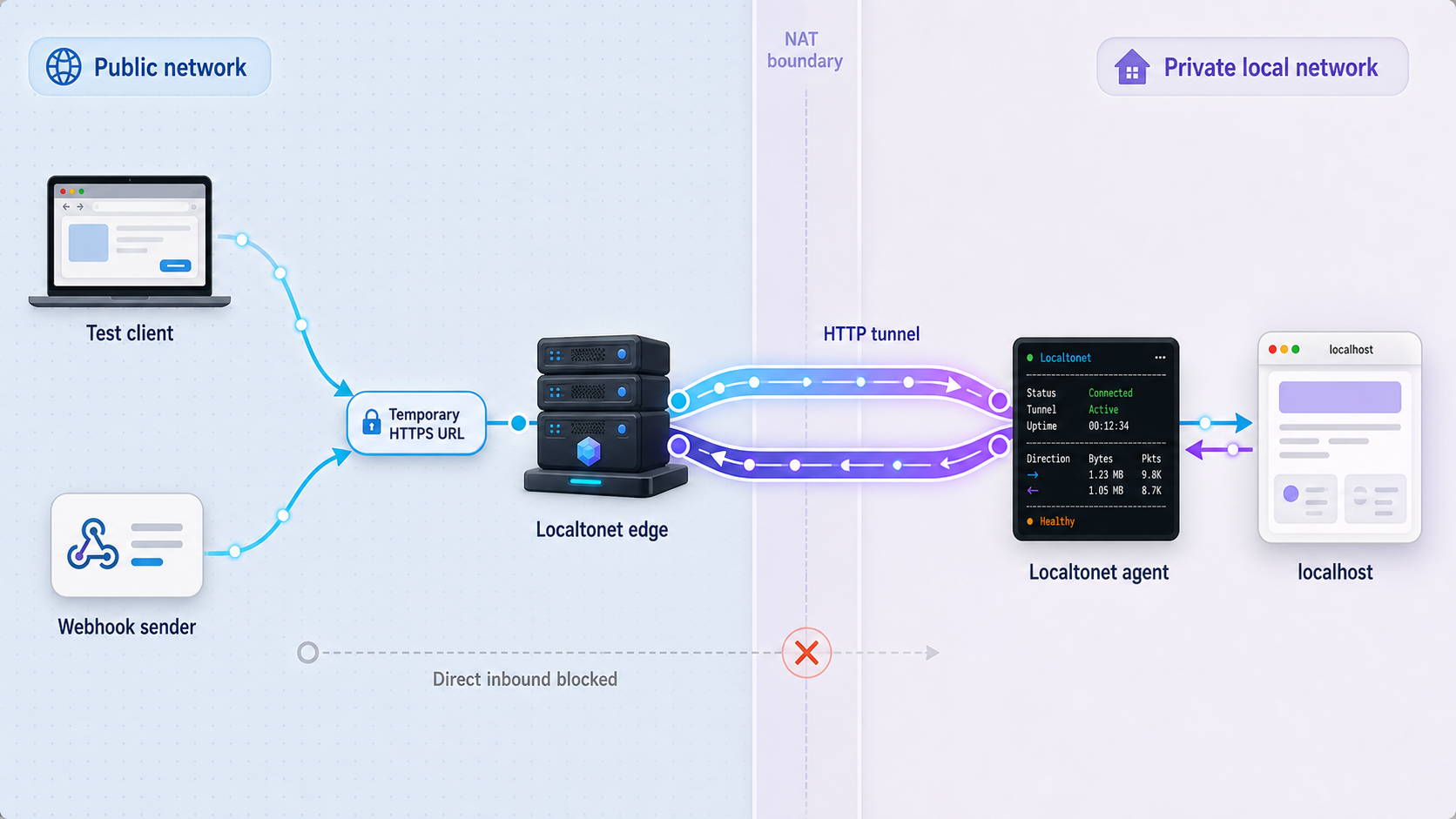
With Localtonet, the client application on your device establishes an outbound connection to our relay. The HTTP tunnel then supplies a public HTTPS address that forwards to the configured local IP address and port. No inbound router port forwarding, public IP address, VPN setup, or inbound firewall change is required for this tunnel workflow.
The public endpoint exists only while the selected client or device is connected and the tunnel is running. Creating a tunnel does not start it. The operator must select Start, verify the assigned URL, and later stop or delete the tunnel.
Install and run the Localtonet client
Install the current Localtonet application for the operating system on the device that can reach the test service. Start the client and keep it connected for the entire test window. Obtain current installation details from the Localtonet application or documentation rather than copying unverified commands.
Start the application and verify it locally
Start the dedicated test application, its database, and required dependencies. From the same device as the Localtonet client, request the readiness route using the exact local IP address and port you plan to configure. Seed only synthetic or sanitized fixtures.
Open the HTTP tunnel configuration
Create an HTTP tunnel using the current Localtonet interface. Consult the Localtonet HTTP tunnel documentation for the current workflow rather than linking directly to an authenticated dashboard route.
Select the Process Type
Choose the HTTP Process Type appropriate for the test from the currently available Random Sub Domain, Custom Sub Domain, or Custom Domain options. All serve the local HTTP content at a public HTTPS address. Availability and domain requirements can vary, so use only options shown for your account and current product configuration.
Select the device and relay server
Select the AuthToken for the device running the Localtonet client, then select an available relay server or region from the current interface. AuthTokens are device-specific secrets and must never be placed in repository files, public workflow inputs, logs, or screenshots.
Configure the local IP address and port
Enter the address that the Localtonet client can use to reach the application. Use 127.0.0.1 only when the application and client share the same network namespace and the service listens there. A containerized or remote LAN service may require a different reachable address. Enter the application’s actual listening port.
Create and start the tunnel
Save or create the configuration, then select Start. Creation alone does not make the endpoint available. Wait until the tunnel is running and note the public HTTPS URL assigned by the current configuration.
Verify the public endpoint before starting CI
Request the public readiness endpoint from a network path outside the local application process. Confirm the expected HTTPS status, response, authentication behavior, and application log entry. Do not begin a paid-provider or state-changing test until this check succeeds.
Anyone who obtains the public URL can attempt to connect while the client and tunnel are running. Protect test APIs with authorization, expose only the required routes, apply least privilege, avoid production data, validate provider signatures, and keep the exposure window short. A hard-to-guess URL is not a substitute for authentication.
Run a controlled CI job against the temporary URL
The evidence available for this guide does not establish a documented Localtonet mechanism for automatically discovering a newly assigned tunnel URL inside GitHub Actions. It also does not establish a verified workflow for installing the Localtonet client in a hosted runner. We therefore should not pretend that URL handoff and tunnel creation are automatic.
A safe, supportable pattern is to start and verify the tunnel on the developer-controlled device, then invoke a restricted workflow_dispatch job with the public base URL. The job receives the URL explicitly, waits for the local application to become ready, authenticates to a dedicated test API, runs assertions, uploads results, and times out if the workstation disappears.
name: Controlled Local Environment Test

on:
  workflow_dispatch:
    inputs:
      public_base_url:
        description: Verified temporary HTTPS base URL
        required: true
        type: string

permissions:
  contents: read

concurrency:
  group: controlled-local-integration
  cancel-in-progress: false

jobs:
  test-local-environment:
    runs-on: ubuntu-latest
    timeout-minutes: 15
    environment: local-integration

    env:
      TEST_BASE_URL: ${{ inputs.public_base_url }}
      TEST_API_TOKEN: ${{ secrets.LOCAL_TEST_API_TOKEN }}

    steps:
      - name: Validate input scheme
        shell: bash
        run: |
          case "$TEST_BASE_URL" in
            https://*) ;;
            *)
              echo "The test URL must use HTTPS."
              exit 1
              ;;
          esac

      - name: Check out repository
        uses: actions/checkout@v4

      - name: Set up Node.js
        uses: actions/setup-node@v4
        with:
          node-version: '20'
          cache: npm

      - name: Install locked dependencies
        run: npm ci

      - name: Wait for remote application readiness
        shell: bash
        run: |
          for attempt in {1..30}; do
            if curl --silent --show-error --fail \
              --max-time 5 \
              --header "Authorization: Bearer $TEST_API_TOKEN" \
              "$TEST_BASE_URL/test/ready" \
              > readiness-response.txt; then
              exit 0
            fi
            sleep 5
          done

          echo "The local environment did not become ready within 150 seconds."
          exit 1

      - name: Run remote integration assertions
        env:
          BASE_URL: ${{ inputs.public_base_url }}
          API_TOKEN: ${{ secrets.LOCAL_TEST_API_TOKEN }}
        run: npm run test:remote-integration

      - name: Upload results
        if: always()
        uses: actions/upload-artifact@v4
        with:
          name: controlled-local-test-results
          path: |
            readiness-response.txt
            test-results/
          if-no-files-found: warn
          retention-days: 7
This workflow assumes the repository implements test:remote-integration and writes reports to test-results/. Tests should use BASE_URL as their origin and send API_TOKEN only to the dedicated test application. Never print the token or include it in the URL.
Configure the local-integration GitHub environment with appropriate reviewers if manual approval is required. Restrict who can dispatch the workflow because an arbitrary URL supplied to a privileged runner can create a server-side request forgery risk. If your organization needs unattended tunnel creation, URL discovery, or teardown, implement it only from current documented Localtonet API behavior and have that automation reviewed separately.
Design assertions around observable outcomes
A remote test should do more than receive HTTP 200. Create a unique run identifier, submit a test request, poll a protected status route for a bounded period, and verify the expected state transition. Make retries safe by using an idempotency key or the unique run identifier. Capture response status, sanitized response bodies, correlation IDs, and application logs without recording credentials or personal data.
Test webhook delivery without weakening verification
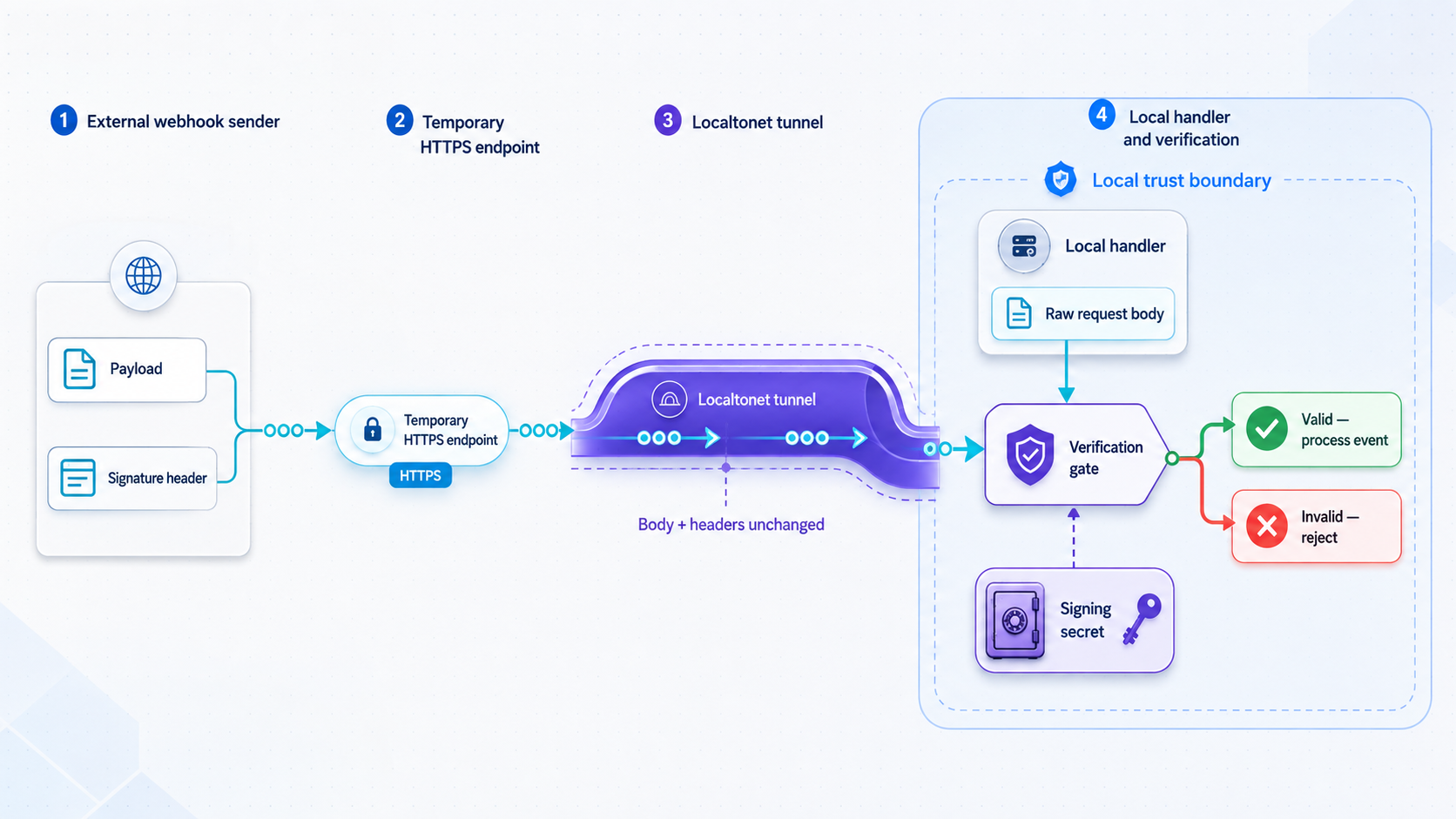
A webhook tunnel changes how the provider reaches your application, but it should not change the provider’s security model. Use the provider’s test or sandbox mode, store the endpoint signing secret outside source control, preserve the exact request body required by the signature algorithm, compare signatures safely, reject stale or invalid messages when the provider’s protocol supports timestamp validation, and make event processing idempotent.
Provider dashboard labels and test-event controls can change. Use the provider’s current first-party documentation and interface to create the endpoint, choose event types, obtain or rotate the signing secret, send a test delivery, and inspect delivery attempts. Do not rely on an old menu path copied from a tutorial.
Stripe webhook handler using the raw request body
const express = require('express');
const Stripe = require('stripe');

const app = express();
const stripe = new Stripe(process.env.STRIPE_SECRET_KEY);

// Register this route before any JSON body parser that would modify the body.
app.post(
  '/webhooks/stripe',
  express.raw({ type: 'application/json' }),
  async (req, res) => {
    const signature = req.headers['stripe-signature'];

    let event;
    try {
      event = stripe.webhooks.constructEvent(
        req.body,
        signature,
        process.env.STRIPE_WEBHOOK_SECRET
      );
    } catch (error) {
      return res.status(400).send('Invalid webhook signature');
    }

    try {
      // hasProcessedEvent and recordProcessedEvent must use durable,
      // atomic storage keyed by the provider event ID.
      if (await hasProcessedEvent(event.id)) {
        return res.status(200).json({ received: true, duplicate: true });
      }

      if (event.type === 'payment_intent.succeeded') {
        const paymentIntent = event.data.object;
        await processTestPayment(paymentIntent);
      }

      await recordProcessedEvent(event.id);
      return res.status(200).json({ received: true });
    } catch (error) {
      console.error('Webhook processing failed', {
        eventId: event.id,
        eventType: event.type
      });
      return res.sendStatus(500);
    }
  }
);
The signing secret belongs in the local environment’s secret store, not in code or a pipeline input. Use the signing secret associated with the exact test endpoint. Rotate it if it is exposed. Stripe can retry deliveries, and delivery can occur more than once, so the event ID must be recorded atomically before a duplicate can repeat a state-changing operation.
Webhook endpoints should respond within the provider’s required time window. For production designs, lengthy processing is commonly handed to a durable queue after signature verification and idempotent acceptance. For a local test, keep processing bounded and inspect the provider’s delivery log alongside local application logs.
GitHub webhook handler with safe payload access
from flask import Flask, request, abort
import hashlib
import hmac
import json
import os

app = Flask(__name__)

@app.post('/webhooks/github')
def github_webhook():
    body = request.get_data(cache=True)
    supplied_signature = request.headers.get('X-Hub-Signature-256', '')
    delivery_id = request.headers.get('X-GitHub-Delivery', '')
    event_name = request.headers.get('X-GitHub-Event', '')

    secret = os.environ['GITHUB_WEBHOOK_SECRET'].encode('utf-8')
    digest = hmac.new(secret, body, hashlib.sha256).hexdigest()
    expected_signature = f'sha256={digest}'

    if not hmac.compare_digest(supplied_signature, expected_signature):
        abort(401)

    if not delivery_id:
        abort(400)

    if delivery_already_processed(delivery_id):
        return '', 200

    payload = json.loads(body.decode('utf-8'))

    if event_name == 'push':
        ref = payload.get('ref')
        head_commit = payload.get('head_commit')
        commit_message = (
            head_commit.get('message')
            if isinstance(head_commit, dict)
            else None
        )

        process_test_push(
            delivery_id=delivery_id,
            ref=ref,
            commit_message=commit_message
        )

    record_processed_delivery(delivery_id)
    return '', 200
The example reads the exact request bytes before parsing JSON, verifies X-Hub-Signature-256, uses a constant-time comparison, and does not assume that head_commit is always present. Implement delivery_already_processed and record_processed_delivery with durable, atomic storage. GitHub can redeliver events, so processing must tolerate duplicates.
Create the webhook in a test repository or another deliberately limited context. Configure only the events required by the test, use a unique random secret, and enter the current Localtonet public URL plus the handler path as the payload URL. After triggering a test event, compare the provider delivery ID, HTTP status, request timestamp, local log correlation ID, and resulting test record.
A CI job can authenticate to a protected test API with a dedicated bearer token. A webhook provider generally will not send that custom bearer token, so the webhook route must use the provider’s documented signature scheme. Do not disable webhook signature verification merely because the endpoint is temporary.
Verify locally, publicly, and end to end
Test each network segment independently. This avoids blaming the tunnel when the application is not listening, or blaming the application when the provider is still configured with an old URL.
Verify the local process
From the Localtonet client device, request the exact local target and readiness path. Confirm the process is listening on the expected interface and port, the database is reachable, migrations are complete, and the response contains no sensitive diagnostics.
Verify the public HTTPS endpoint
Start the tunnel and request the assigned public URL. Check the status code, expected body, authentication rejection for unauthorized requests, application log entry, and external host behavior.
Verify CI-to-local connectivity
Run the bounded readiness step before state-changing tests. If it fails, retain the CI response, timestamps, and local application logs. Confirm that the runner can make outbound HTTPS requests through any organizational proxy or egress policy.
Verify the business outcome
Send a uniquely identified test request, then assert the resulting test-only record, state transition, callback, or queued operation. A successful transport response alone does not prove that the integration worked.
Verify provider delivery details
For webhooks, inspect the provider’s current delivery log. Match its delivery or event ID to the local application record, verify the returned status, and distinguish an initial delivery from a retry or manual redelivery.
Security and operational controls
A public tunnel shifts an application from loopback-only access to internet-reachable access for the duration of the tunnel. Treat that as a temporary deployment, even when the code runs on a laptop.
Origin, host, and HTTPS behavior
The browser or provider sees the public HTTPS origin, while the Localtonet client forwards to a local IP address and port that may use plain HTTP. Applications that generate absolute URLs, enforce allowed hosts, validate callback origins, use secure cookies, or trust forwarded proxy information must be configured for the externally visible origin.
Do not globally disable host validation or TLS-origin checks to make a test pass. Configure the exact test origin using the mechanism supported by the installed framework version. For OAuth, the provider’s registered callback URI must match the public scheme, host, port when present, and callback path expected by the application.
Troubleshooting failed pipeline and tunnel tests
| Symptom | Likely boundary | What to check |
|---|---|---|
| Connection refused locally | Application process | Confirm the process is running, the port is correct, startup did not fail, and the service listens on an address reachable by the Localtonet client. |
| Local URL works but public URL fails | Tunnel configuration | Confirm the selected device is connected, the correct relay is selected, the local IP and port match the verified target, and the tunnel was started after creation. |
| Public URL returns an application 404 | Route or host handling | Check the full path, base-path configuration, virtual-host rules, allowed-host settings, and whether the application expects a different external origin. |
| CI cannot reach a public URL that works in a browser | Runner egress | Check organizational proxies, DNS resolution, outbound firewall rules, URL input errors, tunnel availability, and the workflow timeout. |
| Webhook signature fails | Request verification | Preserve the raw body, use the signing secret for the exact endpoint and mode, read the correct signature header, and verify that middleware did not parse or alter the body first. |
| Webhook is processed twice | Application idempotency | Use the provider event or delivery ID as an atomic idempotency key. Account for retries, delayed delivery, and manual redelivery. |
| Database container is healthy but tests fail at startup | Application readiness | Inspect migrations, fixture loading, application logs, database permissions, and the application readiness endpoint. Container health is not application readiness. |
| Tests intermittently time out | Readiness or shared state | Add bounded polling, avoid fixed sleeps, isolate records, prevent concurrent runs, record timing data, and fail with retained diagnostics. |
| OAuth redirects to localhost or loses its session | External-origin configuration | Align the registered callback URI, application base URL, proxy trust, secure-cookie behavior, callback path, and public HTTPS host. |
| A previously used public URL no longer works | Tunnel lifecycle | Confirm the client and tunnel are running and use the URL currently assigned by the active tunnel. Do not assume a generated URL remains unchanged across sessions. |
| The developer machine becomes unavailable | External environment | Let the CI job fail within its timeout, preserve artifacts, mark the run as an environment failure, and rerun only after the device, application, and tunnel are verified again. |
Container binding mistakes
If the application runs inside Docker on the developer machine, a process bound only to the container’s loopback interface may not be reachable from the host. Publish the application port according to the project’s container configuration and verify it from the host before targeting it with Localtonet. Do not guess a container IP that can change between starts.
Failure artifacts that are worth retaining
Capture application startup logs, migration output, sanitized HTTP status and response data, test reports, correlation IDs, provider delivery IDs, and timestamps. Keep artifact retention proportionate to the test and avoid collecting complete webhook bodies when they contain personal or payment-related data. Never upload environment dumps or authorization headers as debugging artifacts.
Complete the test with explicit cleanup
Cleanup is part of the pipeline design, not an optional task after a successful run. The self-contained GitHub Actions environment is discarded after the job, while its explicit if: always() steps preserve diagnostics and stop the application process even when assertions fail.
In the developer-managed architecture, the CI runner does not own the Localtonet tunnel. The device operator must perform cleanup after success, failure, cancellation, or timeout.
Record the final result
Preserve the CI conclusion, test report, provider delivery ID, and sanitized local logs needed to diagnose a failure. Do not retain secrets or unnecessary payload data.
Remove temporary provider configuration
Delete or disable the temporary webhook endpoint or callback registration when it is no longer required. Rotate its signing secret if it was exposed during debugging.
Stop or delete the Localtonet tunnel
Stop the running tunnel immediately after the test. Delete the tunnel configuration as well when it is no longer needed. Verify that the former public endpoint no longer reaches the application.
Stop the local environment and clear fixtures
Stop the test application and dependencies, revoke temporary test tokens, and remove or reset test records. Preserve only the sanitized evidence required by your development process.
Frequently asked questions
Can every Docker image be used as a GitHub Actions service container?
No. Service containers require a Linux runner with Docker, and the image must operate correctly in the service-container environment. You must supply any required environment variables, ports, volumes, startup options, and health command. Licensing, architecture compatibility, authentication, resource requirements, and image entrypoint behavior can also affect whether an image is suitable.
Does a service-container health check prove my application is ready?
No. It reports the container health defined by that command. A database can accept basic connections while migrations, fixtures, application startup, or another dependency still fails. Add a separate bounded application-level readiness check before running assertions.
Can GitHub Actions automatically discover my Localtonet tunnel URL?
No verified automatic URL-discovery workflow is established by the evidence available for this article. The supported pattern described here is to start and verify the tunnel on the developer-controlled device, then provide the active public HTTPS URL to a restricted manually dispatched job. Do not build automation around guessed commands or undocumented output formats.
Can I assume the same public tunnel URL will be available next time?
Do not assume that. Use the public URL shown for the currently running tunnel and verify it before each test. Process Type options and availability can vary, and exact custom-domain or DNS instructions must be confirmed against current Localtonet documentation and the options shown for your account.
Should a tunneled test use my local copy of production data?
No. Use a dedicated test database with synthetic or sanitized fixtures. Remove production credentials and integrations from the process before publishing it. The tunnel exposes the selected HTTP service while it is running, so the application must not provide routes that reveal production records or administrative capabilities.
Why does a webhook need idempotency if the signature is valid?
A valid signature authenticates the delivery but does not guarantee it will arrive only once. Providers can retry after timeouts or server errors, and operators can initiate redelivery. Record the provider’s event or delivery ID atomically so a repeated request returns success without repeating the state-changing operation.
Which architecture should run on every pull request?
Prefer the self-contained runner for routine pull-request tests because it is reproducible and does not depend on a developer machine. Reserve the tunneled architecture for controlled tests that genuinely require an external callback or a developer-managed environment. Keep those runs manually approved or externally orchestrated until every lifecycle step is documented and reviewed.
Open a temporary path to your local test application
When an integration genuinely requires an internet-originated callback, use Localtonet to publish only the required local HTTP service, verify the assigned HTTPS endpoint, run a bounded test with isolated data, and stop the tunnel as soon as the test finishes.
Get Started Free →

