

Choose a tunneling platform by testing the workload, not the brand
Localtonet and ngrok can both publish services running behind NAT or a firewall, but their protocol coverage, endpoint models, billing rules, and adjacent networking features differ. This guide compares the products using current first-party product information, then shows how to run equivalent HTTP and TCP evaluations. It also explains where UDP, TLS, File Server, proxy, or private mesh requirements change the decision. Pricing and plan details can change, so dated plan information should always be rechecked before purchase.
📋 What's in this guide
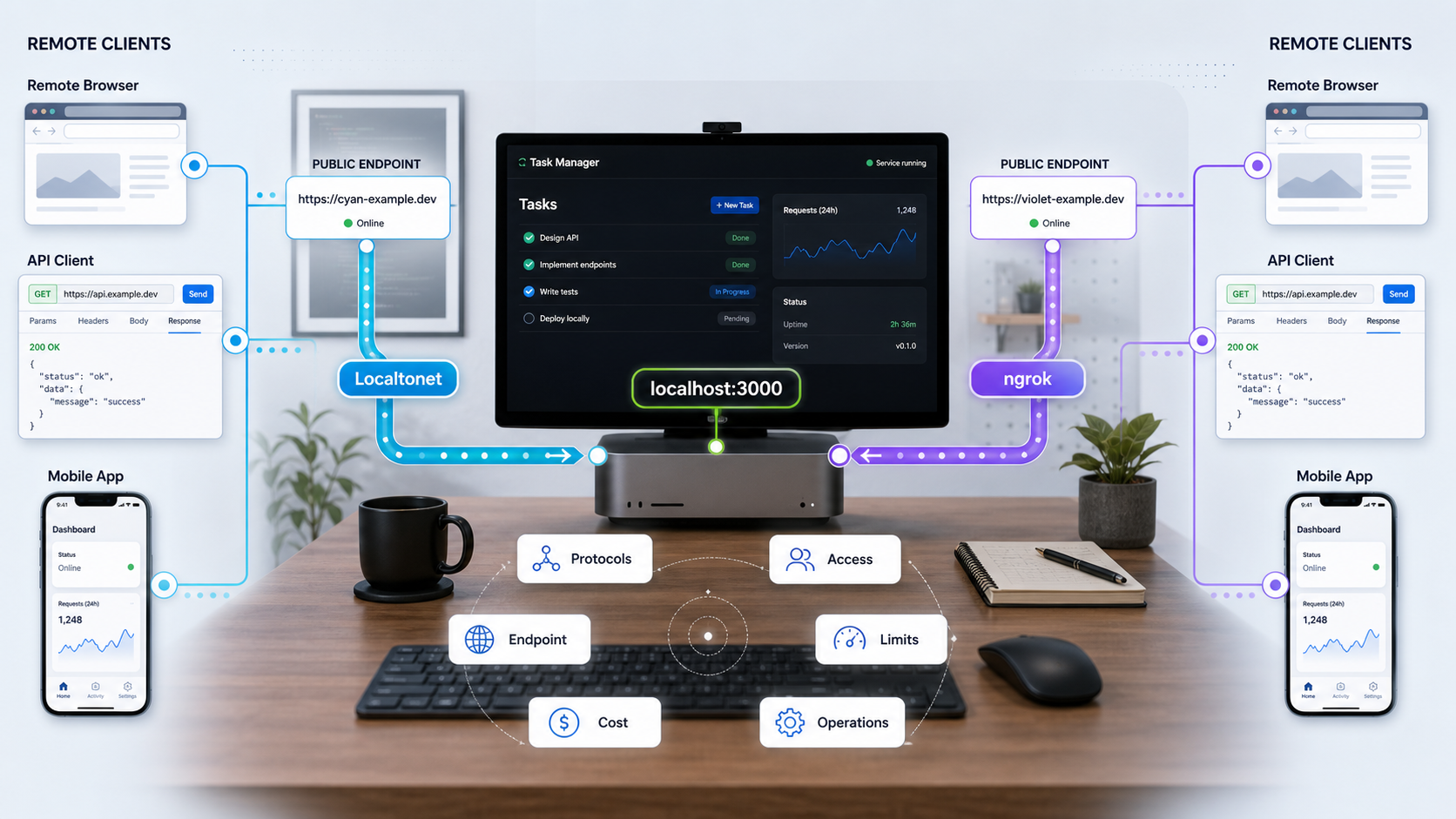
Localtonet vs ngrok at a glance
A public tunnel creates a route from an internet-facing relay or gateway to an application that is otherwise reachable only from a development computer, private server, home lab, device, or internal network. The tunneling client initiates an outbound connection, which means the workflow does not require inbound router port forwarding or a public IP address on the machine hosting the application.
With Localtonet, our client application runs on a device that can reach the target service. The client establishes an outbound connection to a Localtonet relay server. A running tunnel then provides a public URL or public host and port. Creating a tunnel is not the same as starting it: the selected device must be connected and the tunnel must be running before the endpoint can reach the target.
ngrok similarly uses an agent-to-service connectivity model and offers public endpoints for applications behind private networks. Its current documentation emphasizes localhost sharing, API gateways, webhook handling, production APIs, device connectivity, site-to-site connectivity, Kubernetes ingress, Traffic Policy, and integrations with authentication and observability systems.
Start with the required transport. Both platforms support HTTP and TCP endpoints. Localtonet additionally documents UDP, combined UDP/TCP, TLS, File Server, and HTTP or SOCKS5 Proxy Server tunnel families. VPN Manager is our separate private mesh networking product. ngrok's published self-service matrix lists HTTP and TCP on Free and Hobbyist, with HTTP, TCP, and TLS on Pay-as-you-go. After protocol compatibility, compare endpoint identity, security controls, lifecycle behavior, measured usage, and total cost.
| Requirement | Localtonet | ngrok self-service plans | Evaluation question |
|---|---|---|---|
| HTTP and HTTPS | Documented HTTP/S tunnels | HTTP endpoints on Free, Hobbyist, and Pay-as-you-go | Does the app need an internet-accessible URL, HTTP-aware gateway behavior, or both? |
| Raw TCP | Documented TCP tunnels | TCP endpoints, with credit-card verification required for Free TCP | Does the application use a non-HTTP TCP protocol? |
| UDP | Documented UDP tunnels | Not listed as a public endpoint protocol in the current self-service pricing matrix | Will the real client send UDP datagrams? |
| Combined UDP/TCP | Documented combined UDP/TCP tunnel | Not listed as a standard public endpoint type | Must both transports be available to the same workload? |
| TLS endpoint | Documented TLS tunnel family | Listed for Pay-as-you-go, not Free or Hobbyist | Must the target application participate directly in the TLS session? |
| Folder publishing | Default, SFTP, and WebDAV File Server subtypes | Not presented as a dedicated File Server product | Are users accessing files or a conventional network service? |
| Proxy exit node | Documented HTTP and SOCKS5 Proxy Server types | Different product and endpoint model | Should the connected device forward client traffic as a proxy? |
| Private mesh | Separate VPN Manager with firewall rules and LAN bridging | Separate private connectivity offerings should be evaluated for this requirement | Should access remain private rather than use a public endpoint? |
Protocol support is the first compatibility test
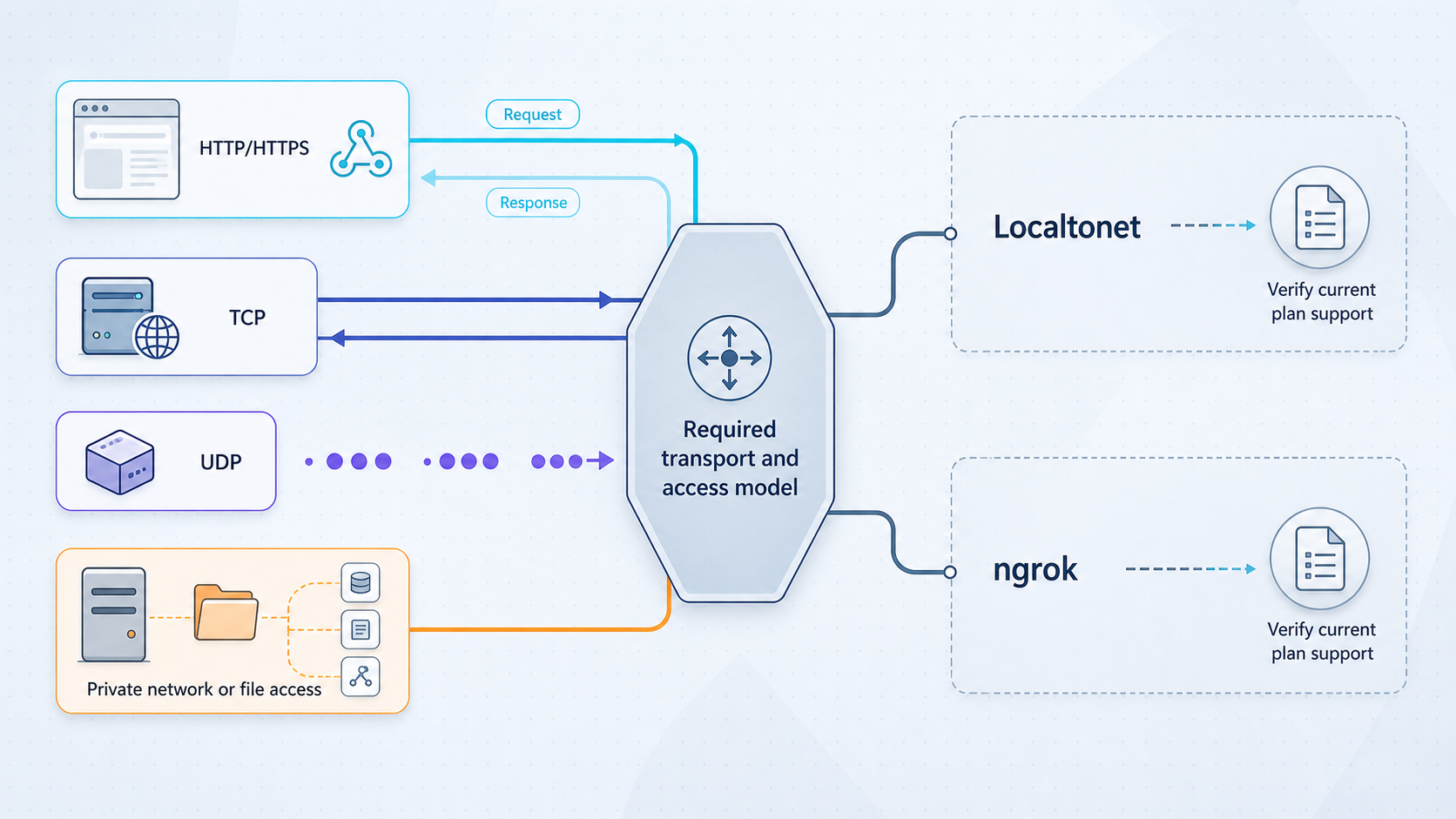
An HTTP application, a database listener, and a UDP game service are not interchangeable simply because each uses a port. HTTP gateways can interpret requests and headers. Raw TCP forwarding carries a byte stream without requiring the relay to understand the application protocol. UDP carries datagrams and does not inherit TCP's connection and delivery semantics. TLS endpoints are relevant when encrypted traffic must reach a service that handles its own TLS session.
HTTP and webhook development
Either platform can give an HTTP application a public endpoint for callbacks or previews. A useful webhook evaluation covers more than receiving one successful request. Confirm that the webhook provider accepts the endpoint URL, validates any required certificate behavior, and can retry after a failure. The receiving application should validate the provider's signature and reject altered, stale, or unauthorized requests according to that provider's rules.
Localtonet HTTP tunnels point to an IP address and port on, or reachable from, the connected client device. HTTP and File Server tunnels can use Random Sub Domain, Custom Sub Domain, or Custom Domain process types. Availability can vary by current plan or configuration. Exact custom-domain DNS instructions should be taken from the current dashboard and documentation rather than copied from an old setup.
ngrok documents HTTP endpoints alongside Traffic Policy for routing, authentication, filtering, and request transformation. Do not assume that every policy action or integration is included at the same cost. Identify each required control and map it to the current plan and usage charges.
TCP workloads
A TCP tunnel is appropriate when the client expects to connect to a host and port using a TCP protocol. Both products support TCP, but a fair test should examine the assigned address, reconnect behavior, connection volume, transfer, authentication, and endpoint stability. On ngrok Free, TCP requires credit-card verification under the current matrix.
Do not expose SSH, a database, a remote administration service, or an internal control port without strong application-level authentication and authorization. Restrict privileges, use test data where possible, protect credentials, and stop the endpoint when it is no longer required.
UDP and mixed-transport applications
Localtonet documents dedicated UDP and combined UDP/TCP tunnels. These are relevant to applications whose real network behavior depends on UDP, including some games, DNS services, real-time systems, telemetry, and custom device protocols. Compatibility must be tested with the actual application client. A generic port check or successful TCP connection does not prove that UDP traffic works correctly.
ngrok's 2026 self-service pricing matrix lists HTTP, TCP, and, on Pay-as-you-go, TLS. It does not list a UDP public endpoint. If UDP is mandatory, verify ngrok's latest product documentation before procurement in case the published product has changed.
HTTP termination and TLS endpoints
A normal web application usually belongs behind an HTTP or HTTPS endpoint. A TLS endpoint is a different choice, used when the target must handle the relevant TLS session itself or when the application protocol is TLS-protected but not ordinary HTTP. Under ngrok's currently published matrix, TLS endpoint protocol availability is a Pay-as-you-go capability.
Localtonet lists TLS as a documented tunnel category. Before adopting it for certificate pinning, mutual TLS, a particular database, or another sensitive deployment, test the exact client, server certificate chain, server-name behavior, and protocol handshake. Those details are application-specific and should not be inferred solely from the presence of a TLS tunnel option.
File Server, proxy, and private networking are different workloads
Three Localtonet File Server subtypes
Localtonet File Server publishes a local folder path rather than forwarding to a conventional local IP address and port. The correct subtype depends on how users need to work with that folder:
| Subtype | Access model | Suitable workflow |
|---|---|---|
| Default | Browser-based file manager with no receiving-side client installation required | Interactive browser access, uploads, downloads, previews, sharing, and other documented web-manager operations |
| SFTP | Standard SFTP clients and automation tools | FileZilla, WinSCP, rsync, CI/CD, and scripted file-transfer workflows |
| WebDAV | Folder mounted through operating-system WebDAV support | Network-drive-style access in Windows File Explorer or macOS Finder |
The Default web manager has extensive documented capabilities, including file operations, permissions, public shares, file-event webhooks, search, a recycle bin, previews, and optional per-folder encryption. Those capabilities must not automatically be attributed to the SFTP or WebDAV subtypes. Current first-party information does not establish that Default-only features such as browser vault encryption, Immich-compatible backup, or Smart Collections apply to every File Server subtype.
For the documented setup flow, install the Localtonet application, open the File Server Tunnel page, select the Process Type, select the device AuthToken and an available server, enter the local folder path, and press Start. Keep the device token private and obtain server choices from the current product rather than hardcoding a region or server code.
Proxy Server
Localtonet's HTTP and SOCKS5 Proxy Server types make the connected device the proxy exit node. They do not forward to a conventional local application target. Evaluate a proxy workflow according to client compatibility, authorization, permitted use, destination policy, and credential ownership. Do not substitute a proxy tunnel for an HTTP application tunnel simply because both can involve HTTP traffic.
VPN Manager
VPN Manager is our free private mesh VPN feature with granular firewall rules and support for bridging local LANs. It is separate from HTTP, TCP, UDP, TLS, and File Server public tunneling. If only authorized devices should reach an internal service, a private mesh may better match the security boundary than a public URL or public host and port.
2026 pricing, limits, and billing behavior
The ngrok details below reflect its official pricing page supplied for this 2026 review. Pricing is particularly time-sensitive, so confirm the live ngrok pricing matrix before purchasing. Included usage is not the same as a hard technical capacity in every plan. Credits, included quantities, endpoint limits, and overage behavior interact.
| ngrok plan | Base price and credit | Endpoints and protocols | Included usage and exhaustion behavior |
|---|---|---|---|
| Free | $0 with $5 of one-time included usage. The one-time credit lasts for one year, applies only while on Free, and cannot be spent on data transfer out. | Up to 3 online endpoints. HTTP and TCP are listed, with credit-card verification required for TCP. One assigned development domain. | Up to 1 GB data transfer, 20,000 HTTP/S requests, and 5,000 TCP/TLS connections under the published usage tables. No additional usage beyond available credit. |
| Hobbyist | $10 monthly, or effectively $8 per month with the advertised annual saving, with $10 of monthly included usage. | Up to 3 online endpoints. HTTP and TCP are listed. One development domain and up to 10 ngrok-branded domains. Bring-your-own custom domains are not included. | 5 GB transfer included, then $0.10 per GB when credit is available; 100,000 HTTP/S requests, then $1 per 100,000; 5,000 TCP/TLS connections, then $2 per 100,000. When monthly credit is exhausted, endpoints stop working until the next billing-cycle reset. |
| Pay-as-you-go | $20 monthly plus additional usage, with $20 of monthly included usage. | Unlimited online endpoints. HTTP, TCP, and TLS are listed. Bring-your-own domains, wildcard endpoints, and unlimited team members with 3 included are listed. | Usage continues after the monthly credit is exhausted and additional usage is billed at cycle end. Includes 5 GB transfer, 100,000 HTTP/S requests, and 5,000 TCP/TLS connections before the published metered rates apply. |
| Enterprise | Contract pricing | Contract, support, compliance, and deployment options depend on the agreement. | ngrok advertises options including SLAs, dedicated support, invoicing, security reviews, HIPAA BAAs, SOC 2 materials, and per-device or per-customer pricing. |
Important ngrok billing details
- Monthly usage credit does not roll over. It resets at the start of each billing cycle.
- Usage credits can apply to active endpoint hours, data transfer out, HTTP/S requests, endpoint connections, Traffic Policy units, Traffic Identities, and exported traffic logs.
- Public endpoints started with the account's development domain do not accrue endpoint-hour charges. Development endpoint hours are listed as unlimited within the account's other limits.
- For applicable non-development endpoints, active endpoint hours are listed at $0.02 per hour. An hour counts when traffic reaches the agent. Traffic blocked by Traffic Policy does not count under the published explanation.
- Bring-your-own custom domains are available on Pay-as-you-go and above, not Free or Hobbyist. The current matrix lists $0.01 per active hour for a custom domain when it is receiving traffic.
- Hobbyist has no automatic billed overage after its credit is exhausted. Its endpoints stop until the billing cycle resets.
- Pay-as-you-go continues serving after included credit is consumed and bills additional usage.
- The published rate limits are 4,000 HTTP requests per minute and 100 TCP connections per minute on Free, 20,000 and 150 per minute on Hobbyist, and 20,000 and 600 per minute on Pay-as-you-go. Higher rates require contacting ngrok.
A workload can consume multiple billing dimensions at once. For example, an HTTP endpoint can involve transfer, requests, connections, active endpoint time, policy processing, and logging. Map the measured workload to every applicable line item and confirm whether a feature is included, consumes credit, or requires an add-on.
Localtonet pricing verification
Localtonet prices and numerical plan limits are intentionally not reproduced here because the supplied first-party pricing evidence does not contain a current official plan matrix that can be safely quoted. Third-party estimates are not authoritative for our product. Before publication or purchase, verify the live Localtonet pricing page and the signed-in dashboard for the applicable tunnel type, limits, and plan availability.
This means the article can make a verified protocol comparison but cannot responsibly claim a particular Localtonet monthly price, bandwidth allowance, tunnel count, timeout, region count, or paid-plan feature without a current official pricing snapshot. Do not infer those values from an unaffiliated comparison page.
A reproducible workload and cost worksheet
| Input | How to measure it | Why it affects the decision |
|---|---|---|
| Protocol and endpoint type | Capture the application's actual HTTP, TCP, UDP, or TLS behavior | An unsupported protocol cannot be solved by a lower price |
| Concurrent online endpoints | Count development, preview, staging, and production endpoints separately | Plan endpoint caps can prevent the intended deployment |
| Endpoint hours | Record when endpoints receive traffic and distinguish development domains | ngrok treats development endpoint hours specially |
| Transfer out | Measure a representative week and multiply only after checking seasonality | Transfer is a metered dimension in ngrok's published model |
| HTTP/S requests | Count successful, failed, retry, health-check, and automated requests | Retries and monitoring can materially increase request volume |
| TCP/TLS connections | Measure new connection creation, not only concurrent sessions | Short-lived clients can produce high connection counts |
| Domains | List development, branded, custom, and wildcard requirements | Custom-domain eligibility and charges vary by plan |
| Policy and identity usage | List authentication, authorization, rate controls, and logged identities | Gateway policy and identity features can add metered dimensions |
| Team and compliance needs | Count operators and document contractual or audit requirements | Self-service functionality may not satisfy enterprise procurement |
For a practical calculation, create one row per chargeable dimension. Multiply measured monthly units by the current unit rate, subtract only the credit that is eligible for that dimension, then add the base fee and required add-ons. Model both a normal month and a high-traffic month. For Hobbyist, also test the operational consequence of exhausting the credit, because the result is service interruption until reset rather than an automatic overage invoice.
Prerequisites for a fair evaluation
Use the same application, machine, client network, traffic, and observation period for both platforms. Testing different applications or different networks produces a product comparison that cannot be reproduced.
- A local HTTP application with a known health or test route.
- A separate TCP test service if raw TCP is part of the requirement.
- Local client software that can send valid requests to each service.
- A second device or network for public verification. A mobile connection is often sufficient for distinguishing public access from LAN-only access.
- Accounts for both platforms and permission to install their client applications or agents.
- A written list of required domains, authentication controls, protocols, regions, and expected monthly usage.
- A safe test dataset with no production secrets or customer information.
- A place to record endpoint identity, timestamps, failures, reconnect behavior, and measured billing dimensions.
A tunnel cannot repair an application that is not listening, is bound to the wrong interface, rejects the request, or expects another protocol. Confirm the local target from the same device that will run the tunnel client before creating a public route.
Run a comparable HTTP tunnel test
Exact installation commands vary by operating system and client version, so use each vendor's current installation workflow. The procedure below focuses on the comparable test sequence and uses only documented Localtonet concepts.
Start and verify the local HTTP application
Start the same application for both tests. From the tunnel-client device, request its local IP address and port. Record the expected status, response body, headers, and any redirect behavior. Resolve local errors before exposure.
Install and authenticate the client
Install the current Localtonet client and ngrok agent through their supported installation paths. Keep the Localtonet device AuthToken and any ngrok credential private. Do not place credentials in screenshots, source control, shell history shared with others, or test reports.
Create equivalent HTTP endpoints
In Localtonet, select the connected device, choose an available relay server from the current product, and configure the HTTP tunnel for the verified local IP and port. Choose the required Process Type. Configure an equivalent ngrok HTTP endpoint for the same target and avoid adding optional policies to only one side of the test.
Start the endpoint
Start the Localtonet tunnel with the Start button. Creation alone does not make it run. Start the ngrok endpoint according to its current agent workflow. Record the assigned URLs and start time.
Verify from outside the local network
Request each public URL from a separate network. Compare status codes, content, redirects, request headers relevant to the application, and end-to-end behavior. For a webhook, send both a valid signed event and an invalid event that the application must reject.
Exercise realistic traffic and failures
Run the same request count and payload profile through each endpoint. Restart the application, disconnect the client network, reconnect it, and restart the tunneling client. Record outage symptoms, recovery steps, endpoint identity, and any lost requests.
Stop the temporary exposure
Stop or delete the test tunnel when evaluation is complete. Revoke credentials that were created only for the test and retain usage measurements without retaining secrets.
Run a comparable raw TCP test
Use a harmless authenticated test service that speaks TCP. Avoid exposing a production database or administrative endpoint simply to test connectivity. The client used for verification must understand the service's real protocol.
Verify the TCP service locally
Connect with the real application client from the Localtonet client device. Confirm the local IP, listening port, authentication result, and expected protocol response.
Configure the same target on each platform
Create a Localtonet TCP tunnel pointing to that reachable local IP and port, using a current available server and the correct device token. Configure an ngrok TCP endpoint for the same target. Complete credit-card verification first if evaluating ngrok Free TCP.
Start and record the public addresses
Start both endpoints and record the public host and port, start time, selected region, and whether the address is expected to remain stable after a restart.
Connect with the real remote client
From another network, connect to each public host and port using the same client configuration and credentials. Confirm authentication, protocol negotiation, payload integrity, and expected application behavior.
Test connection churn and interruption
Repeat short-lived and longer-lived connections in the expected proportions. Stop the target, restart the tunnel client, and interrupt the network. Record error messages, recovery time, address changes, and whether clients reconnect correctly.
Reconcile usage and close the endpoint
Record connection count, transfer, endpoint duration, and any plan-specific usage. Stop or delete the tunnel and verify that the public address no longer reaches the target.
Endpoint lifecycle, monitoring, and credential ownership
A successful first connection does not establish that a tunnel is operable over time. The service depends on the target application, the client process, the device's network, the relay or gateway, endpoint configuration, and valid account credentials. Monitoring should distinguish those failure domains.
Localtonet platform-wide webhooks can report Connected or Disconnected changes for tokens or tunnels in a selected Token Group. Their payload identifies the affected tunnel ID or AuthToken, event date, type, and status. These lifecycle webhooks are different from File Server file-event webhooks, which concern upload, delete, rename, or move operations and can use HMAC signing. Do not merge the two event systems in monitoring logic.
Protect tunnel credentials independently from application credentials. A person who may start a tunnel should not automatically receive database-administrator or server-root access. Use separate accounts where practical, apply least privilege, and define an offboarding process for team members and automated systems.
Security evaluation without assuming uniform controls
Publishing a service changes its reachable attack surface. Neither a public URL nor a random hostname is an authorization mechanism. Keep application authentication enabled, reject unauthorized requests, patch the exposed software, minimize privileges, and publish only the service required for the task.
ngrok documents Traffic Policy and integrations for gateway routing, authentication, filtering, and transformation. Its pricing page also advertises Pay-as-you-go capabilities such as mutual TLS and add-ons for SSO, RBAC, and SCIM. Exact controls and billing should be verified for the intended configuration.
Localtonet security behavior should be described per product rather than as a universal control layer. For example, the Default File Server documents global and per-path permissions, public share-link controls, path-traversal protection, per-IP rate limiting, executable-extension controls, hidden dotfiles, and TLS termination at the tunnel edge. Those statements do not prove that the same controls appear on every HTTP, TCP, UDP, TLS, SFTP, WebDAV, or proxy tunnel.
Preserve application authentication and authorization even when an edge policy is present. Use strong credentials, validate webhook signatures, restrict source access where the selected product and tunnel type support it, avoid production data in temporary tests, and stop temporary tunnels promptly.
Troubleshooting unreachable targets and protocol mismatches
| Symptom | Likely area | Verification |
|---|---|---|
| Public endpoint cannot connect | Target, client, or tunnel lifecycle | Confirm the target works locally, the client device is connected, and the created tunnel has actually been started. |
| Connection refused locally | Application listener | Check that the service is running on the configured IP and port. Correct the application before changing tunnel settings. |
| Local access works only from another interface | Incorrect target address or bind behavior | Test from the exact device running the tunnel client and use an address that device can reach. |
| HTTP endpoint returns an application error | Host handling, redirects, authentication, or app logic | Compare the local and public request, then inspect application logs without recording secrets. |
| TCP port opens but the client fails | Higher-level protocol or TLS expectation | Use the real protocol client and check whether the service expects plain TCP, TLS, or another handshake. |
| UDP client receives nothing | Wrong transport or application behavior | Confirm that a UDP tunnel was selected and test with actual UDP traffic. A TCP probe is not valid evidence. |
| Endpoint fails after restart | Client startup, endpoint identity, or token state | Check whether the client reconnected, whether the tunnel restarted, and whether the public address changed. |
| ngrok Hobbyist endpoint stops mid-cycle | Usage-credit exhaustion | Review current account usage. The published policy says endpoints stop until the monthly credit resets. |
| Custom domain does not route | Eligibility, DNS, or endpoint configuration | Confirm plan eligibility and follow the vendor's current DNS instructions rather than an older cached guide. |
A neutral workload-based decision framework
There is no universal winner for every tunnel deployment. Eliminate any option that does not satisfy a mandatory protocol or security requirement, then compare the remaining choices under identical traffic and failure tests.
| Workload | What makes Localtonet relevant | What makes ngrok relevant |
|---|---|---|
| Webhook or application preview | Documented HTTP/S tunnels with generated, selected, or custom-domain process types where available | HTTP endpoints, development domains, Traffic Policy, request-oriented integrations, and published gateway tooling |
| Raw TCP service | Documented TCP tunnel targeting a reachable local IP and port | TCP across self-service plans, subject to Free credit-card verification and plan limits |
| UDP or combined UDP/TCP | Both are documented tunnel families | UDP is not listed in the current self-service endpoint-protocol matrix |
| Application-controlled TLS | Documented TLS tunnel family, with application compatibility requiring direct testing | TLS endpoint protocol is listed on Pay-as-you-go |
| Folder access | Dedicated Default, SFTP, and WebDAV File Server subtypes | Evaluate another file-serving layer because the pricing page does not present a dedicated File Server product |
| Private device or LAN connectivity | Separate VPN Manager with private mesh, firewall rules, and LAN bridging | Evaluate ngrok's relevant private connectivity products and contract requirements separately from public tunnels |
| Policy-heavy HTTP gateway | Verify the exact Localtonet tunnel-specific controls needed rather than assuming uniform availability | Traffic Policy, identity integrations, observability integrations, and enterprise options are central published capabilities |
The final decision record should state the required protocol, public or private access model, authentication boundary, endpoint count, domain type, measured usage, failure behavior, operating owner, and current monthly cost. This makes the result auditable and prevents a temporary demo configuration from becoming an undocumented production dependency.
Frequently asked questions
What is the main difference between Localtonet and ngrok?
Both can expose private HTTP and TCP services through public endpoints. Localtonet also documents UDP, combined UDP/TCP, TLS, File Server, and HTTP or SOCKS5 Proxy Server families, plus a separate VPN Manager. ngrok emphasizes HTTP and TCP gateway workflows, Traffic Policy, integrations, observability, Kubernetes ingress, and enterprise connectivity.
Does ngrok support TLS endpoints on every self-service plan?
No. The current published matrix lists HTTP and TCP for Free and Hobbyist, while Pay-as-you-go lists HTTP, TCP, and TLS. Free TCP also requires credit-card verification.
What happens when ngrok Hobbyist usage credit runs out?
According to ngrok's published pricing FAQ, Hobbyist endpoints stop working until the end of the billing cycle, when monthly credit resets. Pay-as-you-go endpoints continue working and additional usage is billed.
Do ngrok development endpoints incur endpoint-hour charges?
Public endpoints started with the account's development domain do not accrue endpoint hours under the current pricing explanation. Other plan limits and metered dimensions still apply.
Does Localtonet support UDP?
Yes. Localtonet officially documents dedicated UDP and combined UDP/TCP tunnel families. Test the real application because UDP compatibility cannot be established with a TCP connection test.
Can both products be used for webhook testing?
Yes. Both can provide a public HTTP endpoint for a local webhook receiver. Validate signatures in the application, test retries and invalid events, and account for endpoint identity, request volume, transfer, and authentication requirements.
Is Localtonet File Server one uniform feature set?
No. File Server has Default browser, SFTP, and WebDAV subtypes. Features documented for the Default browser manager should not automatically be attributed to SFTP or WebDAV unless current first-party documentation explicitly confirms that behavior.
Is VPN Manager the same as a public tunnel?
No. HTTP, TCP, UDP, TLS, and File Server tunnels publish specific services or folders. Localtonet VPN Manager is a separate private mesh networking feature with firewall rules and LAN bridging.
Which platform is cheaper?
That depends on the measured workload and required features. Calculate endpoint count, endpoint hours, transfer, requests, TCP or TLS connections, domains, policies, identities, team requirements, and exhaustion behavior. Recheck both official pricing pages before purchasing. This article does not quote Localtonet numerical pricing because a current first-party plan matrix was not present in the supplied evidence.
Test your workload with Localtonet
Start with a locally verified service, choose the matching HTTP, TCP, UDP, combined UDP/TCP, TLS, File Server, proxy, or private-network workflow, and evaluate it with realistic traffic and failure scenarios.
Get Started Free →

