

Validate signed Whop events on localhost before deploying your webhook handler
Whop must deliver webhooks to a publicly reachable HTTPS endpoint, but a development server normally listens only on your local machine. In this guide, we create a Next.js App Router endpoint, verify Whop signatures with the currently documented non-SDK method, expose the listener through a Localtonet HTTP tunnel, and send an authentic Whop test event. We also cover raw-body handling, local probes, secret storage, prompt acknowledgements, idempotency, environment separation, and safe tunnel operation.
📋 What's in this guide
How local Whop webhook testing works
A webhook reverses the direction of a normal API integration. Instead of your application calling Whop, Whop sends an HTTP POST request to a URL that you registered. Each request contains one signed JSON event describing something that happened, such as a successful payment, an activated membership, or an opened dispute.
A server listening at http://localhost:3000 is not directly reachable from Whop. The name localhost always refers to the machine making the request. If a remote service tried to call that address, it would point back to its own environment rather than your computer. Private addressing, router network address translation, host firewalls, and carrier-grade NAT can also prevent unsolicited inbound traffic.
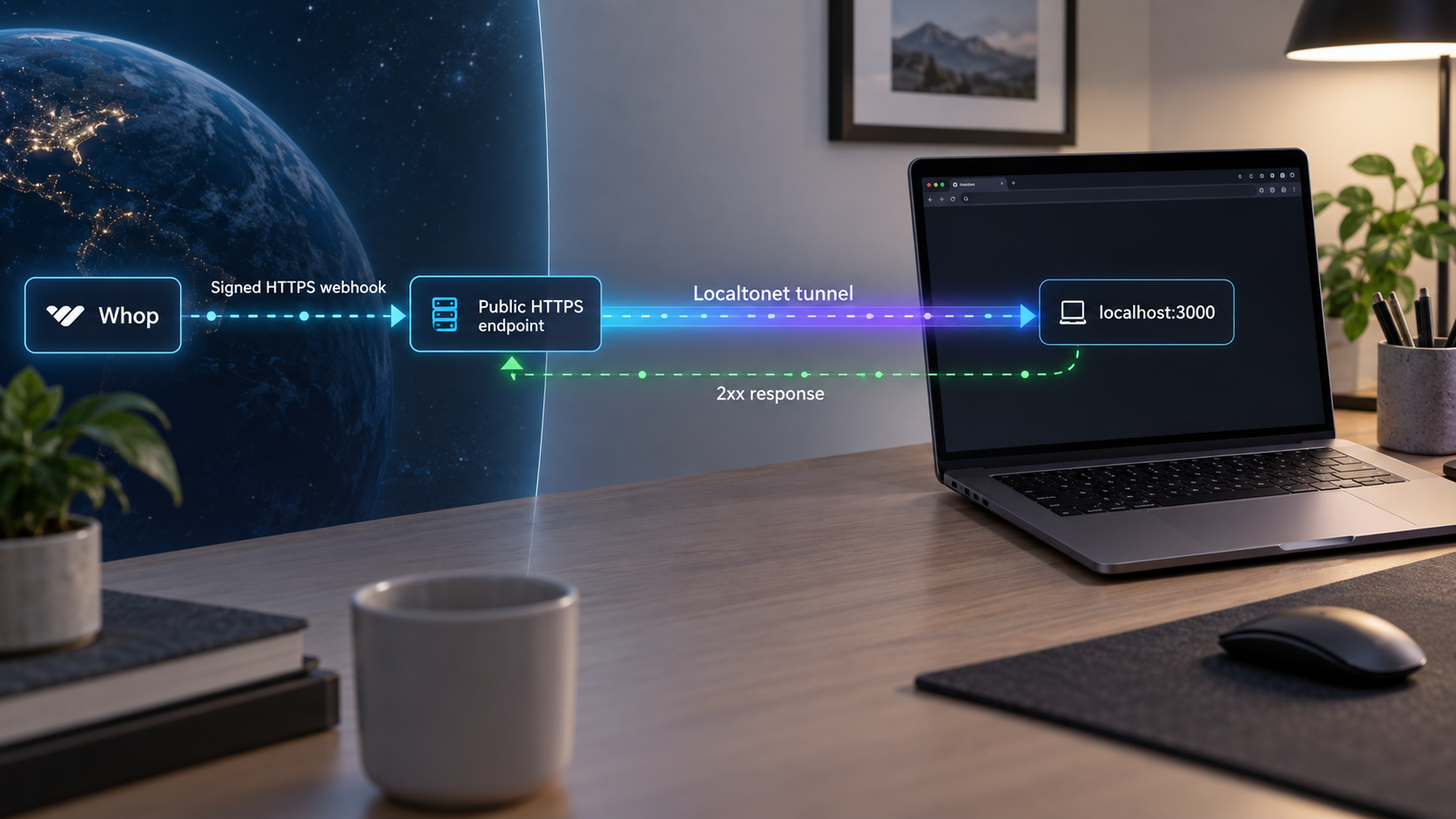
With Localtonet, the client on your development machine establishes an outbound connection to one of our relay servers. An HTTP tunnel provides a public HTTPS address and forwards incoming requests to the local IP address and port that you configure. This does not require inbound router port forwarding, firewall changes, VPN setup, or a public IP address.
The complete path is Whop to the public Localtonet HTTPS address, through the relay and connected client, to the local Next.js route. The response follows that route in reverse. Signature verification occurs inside your application after the request reaches localhost and before the payload is trusted.
Registering https://PUBLIC_HOST/api/webhooks/whop tells Whop which path to call, but the HTTP tunnel targets the local web service and port. Other routes served on that port may also be reachable through the public address. Review development pages, debug tools, administrative routes, source maps, and unauthenticated actions before exposing a complete application. For tighter scoping, run a minimal webhook-only service on a dedicated local port and tunnel that port.
Project assumptions and prerequisites
This tutorial uses a current Next.js application with the App Router, TypeScript, the Node.js runtime, and pnpm. The route relies on Node's Buffer implementation to prepare the Whop signing secret for the Standard Webhooks verifier, so it explicitly selects the Node.js runtime rather than the Edge runtime.
The walkthrough assumes the project already has a working package.json with a standard Next.js development script:
{
  "scripts": {
    "dev": "next dev"
  }
}
You need the following:
- A supported Node.js version for the Next.js release used by your project. A current Node.js 20 LTS installation is an appropriate baseline for this tutorial.
- A current Next.js project using the App Router and TypeScript.
- pnpm available for dependency installation and project startup.
- A Whop account with access to the intended business or app.
- Access to either Whop's sandbox or production developer dashboard.
- The Localtonet client installed and running on a machine that can reach the Next.js server.
- A Localtonet device-specific AuthToken selected securely through our dashboard.
- An available Localtonet server selected from the current dashboard.
- A durable database or queue later, if the endpoint will perform production business operations.
Install the currently required verifier
Whop's current documentation says the standalone helpers shown for @whop/sdk will land in a future package release. That means a new or existing project cannot safely assume that @whop/sdk/helpers exports unwrapWebhook. This tutorial therefore uses Whop's documented non-SDK path with the Standard Webhooks package:
pnpm add standardwebhooksCommit your package manifest and lockfile so the version tested by your project remains reproducible. The Whop SDK is not required for the endpoint in this guide. You can add it separately if your server also needs to make outgoing Whop API calls.
Whop currently documents the standalone SDK helper as a future package release and directs developers to its non-SDK verification procedure until that release is available. Using standardwebhooks avoids a missing export while preserving the signature rules defined by the Standard Webhooks specification. Revisit the official Whop webhook guide before changing to an SDK helper.
Decide which Whop environment to use
Whop provides a separate sandbox with its own dashboard and credentials. Use the sandbox when you need realistic webhook and checkout testing without moving real money. Sandbox and production credentials can look alike, so label them clearly and never reuse the production webhook secret in a shared development environment.
Confirm the selected environment and business before creating the webhook. A test event must come from the same environment and resource that owns the webhook destination and signing secret.
A Whop API key is not required for basic receipt
Receiving and verifying a webhook requires the webhook signing secret. A Whop API key is a separate credential used when your server calls Whop's API. The demonstration handler below verifies an event and logs limited metadata, so it does not require an API key.
If later processing retrieves resources or performs follow-up API actions, keep the appropriate API key on the server and grant only the required permissions. Do not substitute an API key for the webhook signing secret or expose either credential in browser code.
Build the Next.js webhook endpoint
Create the route in the exact App Router location
In a Next.js App Router project without a src directory, create:
app/api/webhooks/whop/route.ts
If the project keeps application source under src, create the equivalent file instead:
src/app/api/webhooks/whop/route.ts
Use one location, not both. Either file maps the exported POST handler to:
/api/webhooks/whopUse the current non-SDK verification implementation
Whop webhooks use the Standard Webhooks specification. Four request headers are contractually stable across webhook API versions: webhook-id, webhook-timestamp, webhook-signature, and content-type.
Verification must use the exact body delivered by Whop. Calling request.json() before verification would parse the payload and discard the original byte representation. Re-serializing the resulting object can change whitespace, escaping, property order, or encoding, which can invalidate the signature even though the JSON still appears equivalent.
Add the following complete route:
import { Webhook } from "standardwebhooks";
import type { NextRequest } from "next/server";

export const runtime = "nodejs";

type WhopWebhookEvent = {
  id: string;
  type: string;
  timestamp: string;
  api_version?: string;
  api_version_date?: string;
  account_id?: string;
  company_id?: string;
  data: unknown;
  previous_attributes?: Record<string, unknown>;
};

export async function POST(request: NextRequest): Promise<Response> {
  const secret = process.env.WHOP_WEBHOOK_SECRET;

  if (!secret) {
    console.error("WHOP_WEBHOOK_SECRET is not configured");
    return new Response("Webhook configuration error", { status: 500 });
  }

  const webhookId = request.headers.get("webhook-id");
  const webhookTimestamp = request.headers.get("webhook-timestamp");
  const webhookSignature = request.headers.get("webhook-signature");

  if (!webhookId || !webhookTimestamp || !webhookSignature) {
    return new Response("Missing webhook headers", { status: 400 });
  }

  try {
    const payload = await request.text();

    // Keep the complete ws_ value. Do not remove its prefix.
    // standardwebhooks expects its secret input in base64 form.
    const verifierSecret = Buffer.from(secret, "utf8").toString("base64");
    const verifier = new Webhook(verifierSecret);

    const event = verifier.verify(payload, {
      "webhook-id": webhookId,
      "webhook-timestamp": webhookTimestamp,
      "webhook-signature": webhookSignature,
    }) as WhopWebhookEvent;

    console.log("Verified Whop webhook", {
      id: event.id,
      type: event.type,
      timestamp: event.timestamp,
    });

    return new Response("OK", { status: 200 });
  } catch {
    console.error("Whop webhook verification failed");
    return new Response("Invalid webhook", { status: 400 });
  }
}
The conversion passed to Webhook does not alter the stored Whop credential. Keep the complete ws_ secret exactly as Whop provides it. The conversion adapts that UTF-8 value to the secret representation expected by the Standard Webhooks verifier. Do not strip the prefix and do not replace this with a guessed HMAC implementation.
The verifier checks the signed content using the raw payload and required headers. It also applies the package's Standard Webhooks verification behavior rather than relying on a handwritten signature comparison. If verification fails, the route returns 400 and never treats the body as a trusted event.
An unsigned local probe is supposed to fail. Avoid branches such as if development then skip verification. Development exceptions often survive into shared or production environments and allow anyone who can reach the endpoint to submit fabricated events.
Store the webhook secret in .env.local
Create or update .env.local in the project root:
WHOP_WEBHOOK_SECRET=replace_with_the_complete_ws_secret_from_whop
The placeholder is intentionally not a working credential. Keep the entire secret, including its ws_ prefix, on one line. Do not quote, trim, decode, or base64-encode it in the environment file.
Next.js commonly excludes .env.local from version control in generated projects, but verify the repository's ignore rules rather than assuming. Never commit the webhook secret, paste it into source code, expose it through a NEXT_PUBLIC_ variable, include it in screenshots, or print it in logs.
Restart the Next.js development process after adding or changing the value. Environment files are normally loaded when the server starts, so an already running process may continue using an old or missing value.
Understand what the demonstration handler does
This route is intentionally minimal. It proves that the request reached the application, that the body and headers passed signature verification, and that the endpoint returned a timely success response. It logs only the verified identifier, event type, and event timestamp.
It is not a complete production fulfillment system. It has no durable queue, transactional outbox, database idempotency constraint, retry worker, event-specific authorization logic, or operational alerting. Those responsibilities belong in a durable processing layer after the basic delivery path works.
Start and validate the listener locally
Install project dependencies
From the directory containing package.json, run pnpm install. This installs Next.js and the standardwebhooks dependency recorded by the project.
Add the environment variable
Put the complete signing secret in .env.local as WHOP_WEBHOOK_SECRET. If the webhook has not been created yet, you can start with the placeholder to confirm routing, then replace it and restart before an authentic Whop test.
Start Next.js
Run pnpm dev. Read the startup output and note the actual local address and port. The usual development address is http://localhost:3000, but Next.js may select another port if that one is occupied.
Send an unsigned local probe
Post a harmless JSON body to the route. The probe confirms network reachability and route registration, but it must fail signature verification because it did not come from Whop.
If Next.js reports port 3000, run:
curl -i -X POST http://127.0.0.1:3000/api/webhooks/whop \
  -H "Content-Type: application/json" \
  --data '{"local_probe":true}'
The expected result is an HTTP 400 response. Depending on which validation fails first, its body will report missing webhook headers or an invalid webhook. That result proves that the POST route exists and refuses unsigned input. It does not prove that the secret is correct, because only an authentic Whop test delivery supplies a valid signature.
| Local result | What it indicates | Next action |
|---|---|---|
| Connection refused | No process is listening at the tested address and port. | Start the project and use the port shown by Next.js. |
| 404 Not Found | The server is reachable, but the App Router file or URL path is wrong. | Confirm the route is under app/api/webhooks/whop/route.ts or its src/app equivalent. |
| 405 Method Not Allowed | The route exists but does not export a POST handler. | Confirm the file exports POST and restart the server. |
| 400 Missing webhook headers | The unsigned probe reached the intended route and was rejected early. | This is expected. Continue to tunnel setup and an authentic Whop test. |
| 400 Invalid webhook | The request reached the verifier but did not have a valid Whop signature. | This is also expected for a manually created probe. |
| 500 Configuration error | The server did not load WHOP_WEBHOOK_SECRET. |
Check .env.local and restart pnpm dev. |
Create the Localtonet HTTP tunnel
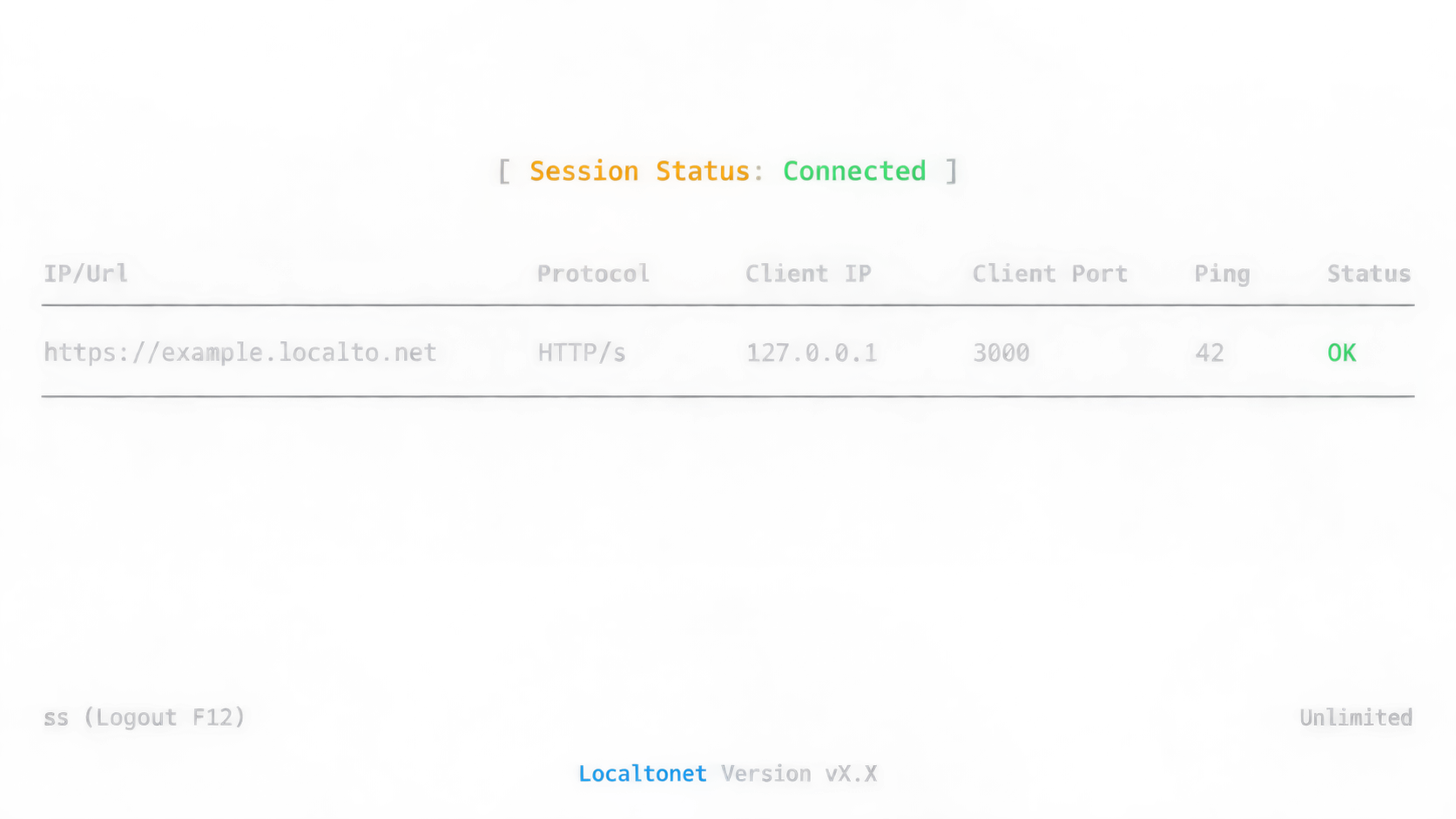
Create the tunnel only after the local route responds. This separates application routing problems from tunnel connectivity problems.
The current Localtonet HTTP tunnel workflow uses Process Type, AuthToken, Server, local IP address, local port, and the Start action. Follow the documented sequence below. You can also keep the Localtonet HTTP tunnel documentation open for the current interface.
Install and run the Localtonet client
Run the client on the development machine or another device that can reach the Next.js listener. The client must establish its outbound connection before the tunnel can carry traffic.
Open the HTTP Tunnel page and select Process Type
Choose Random Sub Domain, Custom Sub Domain, or Custom Domain as appropriate. These HTTP process types serve the configured local content at a public HTTPS address. Availability can vary by current account and configuration.
Select AuthToken
Select the device-specific AuthToken for the client that can reach the local application. Treat the token as a credential and never put it in source code, logs, screenshots, or webhook configuration.
Select Server
Choose an available server from the current dashboard. Do not copy a server code or region from an old tutorial because current availability must come from the product interface.
Enter the local IP address and Port
For Next.js running on the same machine as the Localtonet client, use 127.0.0.1 and the port shown by pnpm dev, such as 3000. If Next.js runs in a container, virtual machine, or another LAN device, use an address that the Localtonet client can actually reach.
Press Start
Creating the configuration does not make it active. Press Start and wait for the selected device and tunnel to be connected. Then copy the public HTTPS address shown for the running tunnel.
Append the Next.js route to the assigned origin:
https://PUBLIC_LOCALTONET_HOST/api/webhooks/whopReplace the placeholder host with the address displayed by Localtonet. Do not append the local port to the public URL unless the assigned public endpoint explicitly contains a port.
A saved tunnel is not automatically running. The tunnel is available only while the selected Localtonet client is connected and the tunnel has been started. Stopping the client, pressing Stop, sleeping the development machine, or losing network connectivity makes the public destination unavailable.
Register the Localtonet URL with Whop
Whop supports creating a webhook through its dashboard or API. The secret-display behavior differs between those workflows, so decide how you will create it before handling the credential.
| Creation method | Where the secret appears | Important behavior |
|---|---|---|
| Whop dashboard | The webhook table exposes the signing secret through its Secret column. | Copy the secret for the correct webhook and store it as WHOP_WEBHOOK_SECRET. |
| Whop API | The create-webhook response contains webhook_secret. |
The API returns this value only once, so store it immediately. |
| Existing environment configuration | Your server-side secret manager or local environment file. | Confirm it belongs to the same webhook, business, and environment that will send the event. |
This tutorial uses the dashboard workflow documented in the Whop webhook guide.
Open the correct environment and business
Confirm whether you are in sandbox or production and select the business or app that should own the webhook.
Open Developer > Webhooks
In the Whop dashboard, open Developer, go to Webhooks, and select Create webhook.
Enter the complete HTTPS destination
Paste the Localtonet HTTPS origin with /api/webhooks/whop appended. Check for stale hostnames, spaces, duplicated path segments, or a missing slash.
Choose the API version and events
Keep the API version on the documented v1 selection and subscribe only to events that the application intends to handle. The dated version pin preserves the event and header contract used by your integration.
Save the webhook and copy its secret
After creating the dashboard webhook, copy its secret from the Secret column in the webhook table. Put the complete value in .env.local as WHOP_WEBHOOK_SECRET, then restart Next.js.
Send a Whop test event
Keep Next.js, the Localtonet client, and the tunnel running. Use the webhook row actions in Whop to send a test event to the configured destination.
Whop versions webhook envelopes by date. Webhooks pinned before the documented 2026-08-14 change, and webhooks without that pin, can receive company_id instead of account_id. The four stable verification headers remain unchanged. Some supported update events can also include previous_attributes, but that field is optional and should not be assumed to exist.
Verify an authentic Whop test delivery
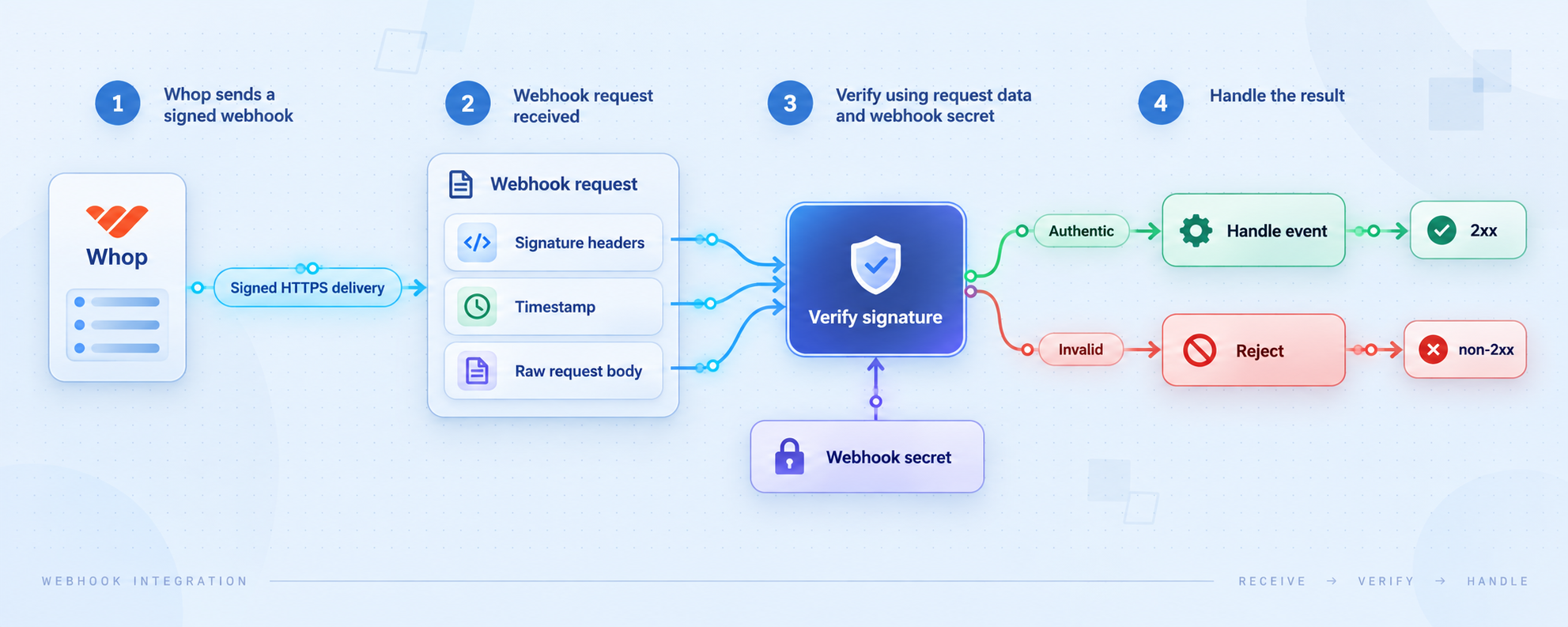
A browser visit to the public address is not a webhook test. Browsers normally send GET requests without the signed headers or JSON body that Whop provides. The meaningful end-to-end test must be initiated through Whop's webhook test action.
Keep the terminal running pnpm dev visible, send the test event, and look for output shaped like:
Verified Whop webhook {
  id: "msg_...",
  type: "payment.succeeded",
  timestamp: "..."
}
The exact event type depends on the test selected in Whop. The important result is that the log appears only after signature verification and that Whop records a successful 2xx response.
Verify all of the following:
- Whop reports that the test request reached the configured HTTPS destination.
- The Localtonet client remains connected and the HTTP tunnel remains started.
- The request reaches
/api/webhooks/whop, not a page route or framework fallback. - The application receives
webhook-id,webhook-timestamp, andwebhook-signature. - The route reads the body once with
request.text(). - The Standard Webhooks verifier accepts the body, headers, and secret.
- The server logs limited verified metadata without logging the signing secret or complete customer data.
- The route returns
200 OKin less than five seconds.
A complete trace has four checkpoints: Whop reports the delivery, the Localtonet tunnel is active, the local application logs the verified event, and Whop receives the successful response. If the test fails, the last confirmed checkpoint identifies the layer to investigate.
Move from a demonstration handler to durable processing
Respond in less than five seconds
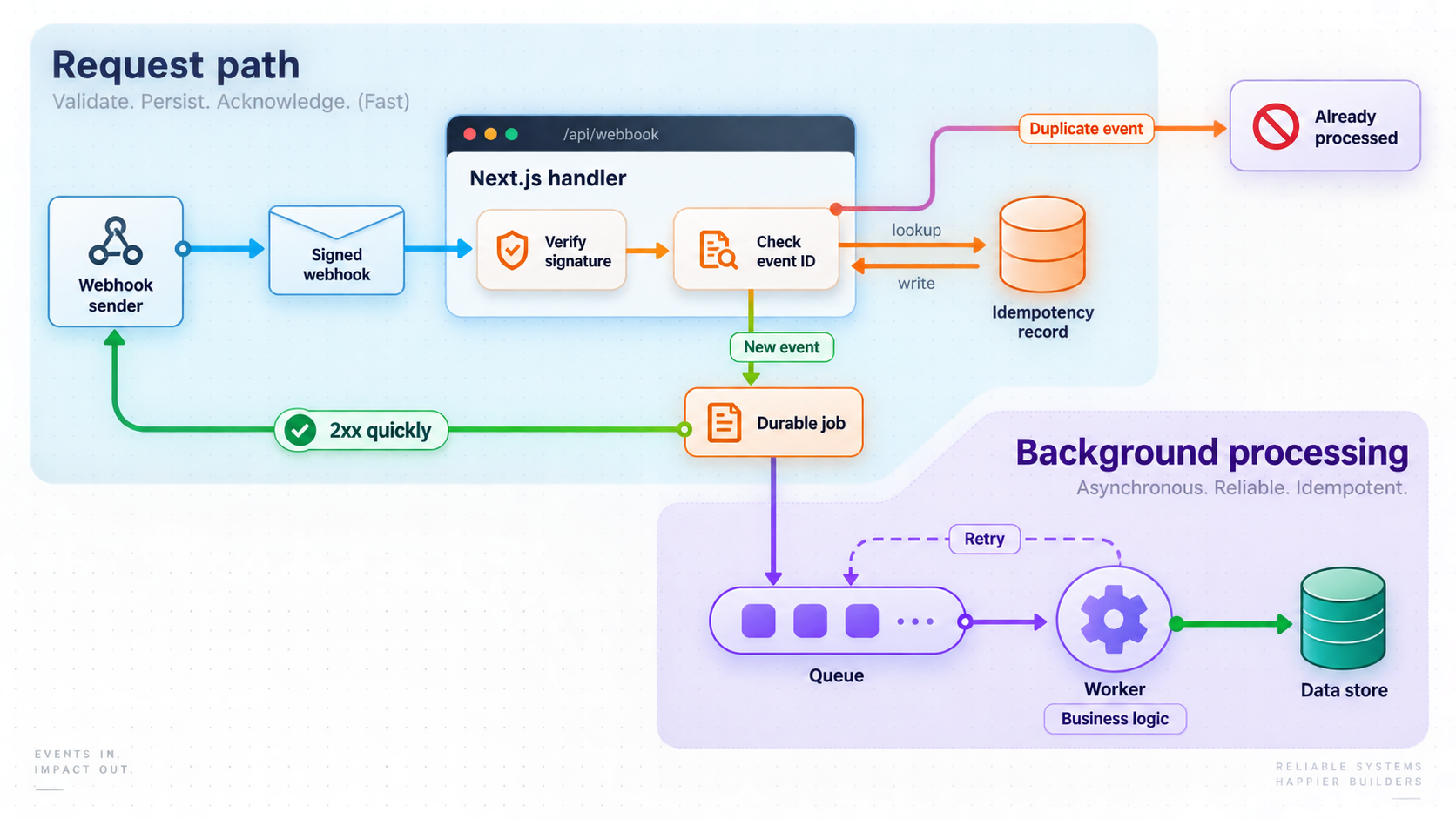
Whop instructs webhook handlers to respond in less than five seconds or delivery may be retried. Do not make the acknowledgement wait for email delivery, account provisioning, several remote API requests, large file generation, or other slow work.
A production-oriented handler should verify the signature, accept the event into a durable queue or transactionally safe store, and then return a successful response. A worker can perform fulfillment afterward.
Do not return success before verification or before the durable system has accepted the event. Otherwise, an invalid request might enter processing, or a valid event could be lost if the process crashes immediately after responding.
Make business operations idempotent
Duplicate webhook delivery is normal. Whop may retry after a timeout or unsuccessful response, and network uncertainty can cause a sender to retry even when your first attempt completed.
Use the verified webhook-id or verified event identifier as an idempotency key. Store it in a database column protected by a uniqueness constraint. The event acceptance and corresponding state transition should be transactional where possible.
receive request
read the unchanged body once
verify the body, signature, identifier, and timestamp
begin a database transaction
  insert the verified webhook identifier using a uniqueness constraint
  if the identifier already exists:
    commit and acknowledge without repeating the business effect
  otherwise:
    record or enqueue the intended business action
commit
return a successful response promptly
An in-memory set can illustrate the idea during a short experiment, but it is not durable. It disappears when the process restarts and cannot coordinate multiple application instances or workers.
Handle event types deliberately
Dispatch only after verification. Each supported event type should have an explicit handler and a defined idempotent business transition. Unknown but valid event types should not trigger unrelated behavior.
A forward-compatible service can record an unsupported verified event, alert the development team, and return success if no retry would make the event processable. The exact policy depends on your operational requirements, but an unrecognized event must never be interpreted as another type.
Keep credentials and logs separate
| Layer | Credential or identifier | Safe handling rule |
|---|---|---|
| Localtonet device | Device-specific AuthToken | Select it securely and never expose it in source code, logs, screenshots, or public documentation. |
| Whop webhook | Webhook signing secret | Keep the complete value server-side and use it only with the corresponding webhook environment. |
| Whop API | Account API key, App API key, or OAuth token | Use the credential type appropriate to the integration and grant only the required permissions. |
| Webhook delivery | Verified message identifier | Persist it as an idempotency key to prevent duplicate business effects. |
Useful logs include the verified message identifier, event type, processing state, response status, duration, and an internal correlation identifier. Avoid logging signing secrets, API keys, authorization headers, full payment details, or complete personal records.
Reduce public exposure
Signature verification protects the Whop route from accepting unsigned event data, but it does not protect unrelated routes hosted on the same local port. Continue applying authentication, authorization, least privilege, input validation, and normal application security to the rest of the server.
Stop the Localtonet tunnel when the public endpoint is no longer needed. Delete obsolete tunnel configurations and webhook destinations when they will not be reused. If the Whop webhook remains enabled while the tunnel is stopped, delivery attempts will fail until the endpoint becomes available again.
Rotate a disclosed secret
If the signing secret appears in a repository, browser bundle, screenshot, public log, shared chat, or support attachment, treat it as compromised. Replace it through Whop's supported workflow, update the server-side environment, restart the application, and send another authentic test event. Deleting the visible copy does not invalidate a credential that someone may already have captured.
Troubleshoot failed webhook deliveries
Whop reports a connection failure
Confirm that the Localtonet client is connected and that the tunnel was started. A saved configuration is not necessarily active. Make sure the development machine is awake, online, and still running Next.js.
Compare the tunnel's local IP and Port fields with the address shown by pnpm dev. If Next.js runs in a container, virtual machine, or another device, 127.0.0.1 from the Localtonet client may refer to the wrong network namespace.
The public destination returns 404
A 404 normally means the request reached a web server but not the intended route. Confirm that the Whop URL ends in /api/webhooks/whop and that the route file is in the correct App Router directory. Check for a configured Next.js base path, an accidental duplicate path segment, or a stale tunnel hostname.
The endpoint returns 405
Whop sends POST requests. Confirm that route.ts exports an uppercase POST function. Also check whether middleware or a reverse-proxy rule rewrites the request to a page that supports only browser navigation.
The endpoint returns 500 Configuration error
The process did not load WHOP_WEBHOOK_SECRET. Confirm that .env.local is in the project root, that the variable name is exact, and that the value is on one line. Restart pnpm dev after making the change.
Authentic signature verification fails
Check these items in order:
- Confirm the request body is read exactly once with
request.text(). - Confirm no middleware parsed, replaced, or re-serialized the request body before the route.
- Confirm the complete Whop secret was stored, including its
ws_prefix. - Confirm the secret belongs to the specific webhook that sent the test.
- Confirm the webhook and secret are both from sandbox or both from production.
- Confirm the required webhook headers reached the application.
- Confirm the route uses the documented
standardwebhooksimplementation rather than the unavailable future SDK export. - Confirm
Buffer.from(secret, "utf8").toString("base64")receives the complete secret without prior transformation. - Restart Next.js after changing the environment file.
- Send a new test through Whop instead of trying to manufacture a signed request manually.
Do not solve a signature failure by disabling verification. The unsigned curl probe should continue returning 400.
Whop times out even though processing eventually finishes
The handler is performing too much work before responding. Measure the complete request duration, including database locks, DNS lookups, API calls, email delivery, file operations, and cold starts. Move slow work behind a durable queue or transactional outbox so the endpoint can respond in less than five seconds.
The same business action happens more than once
Successful acknowledgement does not guarantee exactly-once delivery. Persist the verified webhook message identifier with a uniqueness constraint and make the associated state transition transactional. Do not depend on process memory for production deduplication.
The endpoint worked earlier and then stopped
Check whether the Localtonet client disconnected, the tunnel was stopped, the machine slept, the local server changed ports, or the public hostname changed after a tunnel configuration change. Compare the currently assigned HTTPS address with the destination stored in Whop.
A test event works but a real event does not
Confirm that the real event type is included in the webhook's subscriptions. Verify that the event occurred in the same Whop environment and business that owns the webhook. Then inspect event dispatch logic, because a test can prove transport and signature verification while still exercising a different event type from the real operation.
A version-dependent field is missing
Inspect the webhook's dated API version. Depending on the version pin, the account identifier can appear as company_id or account_id. The optional previous_attributes field appears only for supported update events when change data is available. Code against the selected version rather than assuming every sample payload has the same shape.
Frequently asked questions
Can Whop send a webhook directly to localhost?
No. Localhost refers to the machine making the request and is not a public destination for Whop. A Localtonet HTTP tunnel provides a public HTTPS address and forwards requests through the connected client to your local IP address and port.
Why does this example use standardwebhooks instead of @whop/sdk/helpers?
Whop's current documentation says the standalone SDK helpers will arrive in a future package release and directs developers to the non-SDK procedure in the meantime. Using standardwebhooks provides a presently executable verification path without depending on a potentially missing export.
Where should the Next.js webhook route be created?
Use app/api/webhooks/whop/route.ts in an App Router project, or src/app/api/webhooks/whop/route.ts if the project uses a src directory. Both map to /api/webhooks/whop, but only one location should be used.
Why must the handler use the raw request body?
The signature covers the delivered content. Parsing and re-serializing JSON can change its byte representation even when the resulting object appears equivalent. Read the body once with request.text() and pass that unchanged value to the verifier.
Is a Whop API key the same as the webhook signing secret?
No. The webhook signing secret verifies incoming webhook requests. An API key authorizes outgoing calls from your server to Whop's API. Basic webhook receipt does not require an API key.
Where does Whop show the signing secret?
For a dashboard-created webhook, the webhook table exposes the secret through its Secret column. For an API-created webhook, the create response returns webhook_secret only once, so it must be stored immediately.
What should the unsigned local curl probe return?
It should return 400 because it lacks valid Whop headers and a signature. That failure confirms that the route is reachable and does not trust unsigned payloads. Use Whop's test action for the valid end-to-end check.
How quickly should the webhook endpoint respond?
Whop instructs handlers to respond in less than five seconds. Verify the request, accept it into durable processing, and return success promptly. Perform slow fulfillment or notification work asynchronously.
Does registering a webhook path expose only that path?
Not by itself. The Whop destination specifies which path Whop calls, while the Localtonet HTTP tunnel forwards to the selected local web service. Other routes on that port may also be reachable. Use a dedicated webhook listener when stronger isolation is required.
Does the Localtonet tunnel remain available after the client stops?
No. The endpoint remains available only while the selected client is connected and the tunnel is running. Stopping the tunnel, closing the client, losing connectivity, or sleeping the development machine makes the public endpoint unavailable.
Test your Whop webhook with Localtonet
Start the verified Next.js endpoint, connect the correct development device, and create an HTTP tunnel that gives Whop a public HTTPS destination without inbound router port forwarding or deploying unfinished code.
Get Started Free →

