

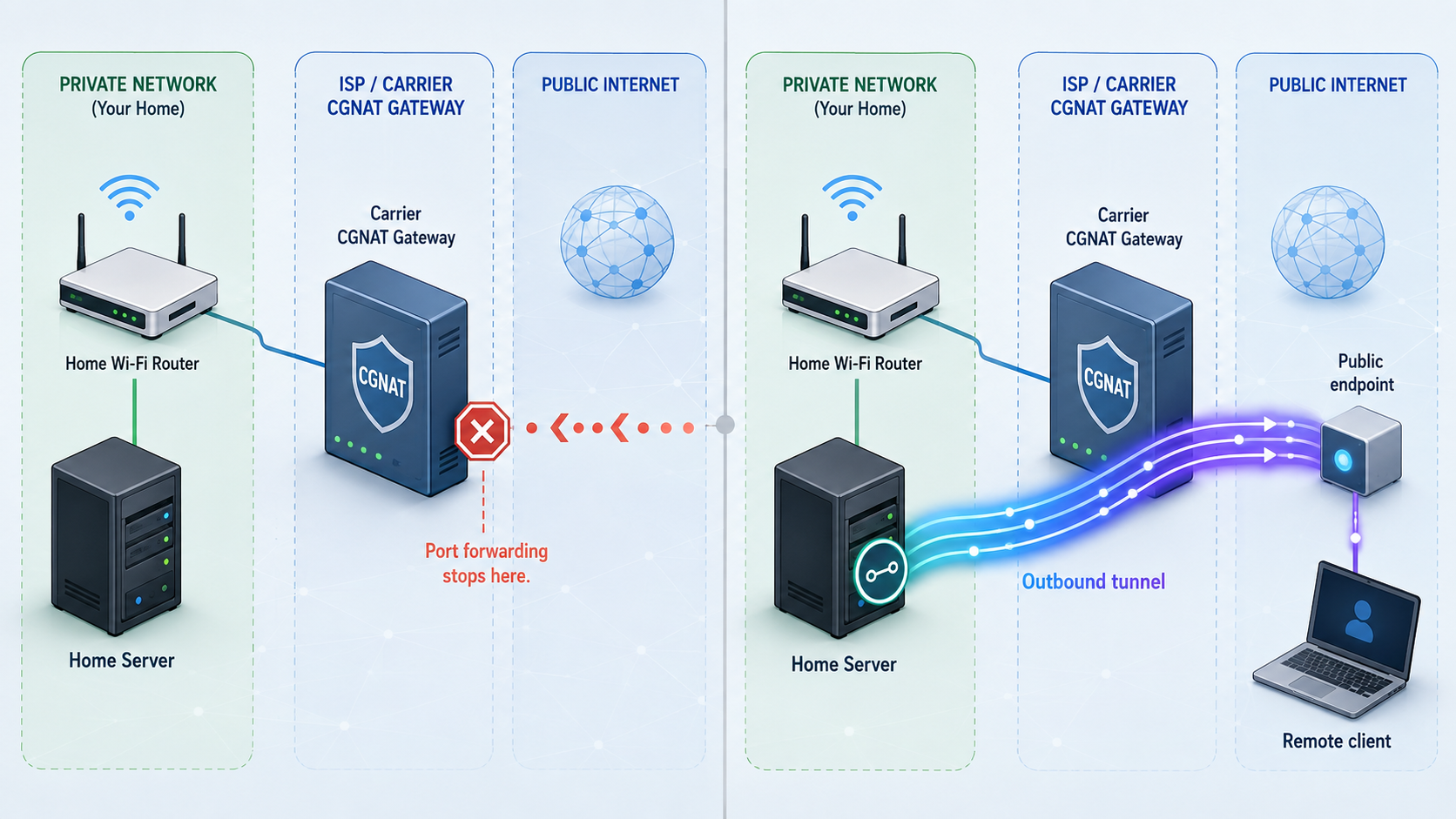
Diagnose the network boundary first, then choose the right way to publish your service
Port forwarding still works when your router receives a reachable public address and every firewall, protocol, and forwarding rule is configured correctly. It fails when traffic stops at another NAT layer, reaches the wrong device, uses the wrong protocol, or cannot reach the application itself. This guide shows how to distinguish CGNAT from ordinary double NAT, verify the complete traffic path, and expose a local service through Localtonet when direct inbound routing is unavailable or undesirable.
📋 What's in this guide
How port forwarding works, and where it can fail
A typical home or small-office router connects a private local network to an internet service provider. Devices on the local network usually receive private IPv4 addresses such as 192.168.1.50. Network Address Translation, or NAT, lets those devices share the address assigned to the router's internet-facing interface.
For an outbound connection, the router observes which local device initiated the traffic and maintains translation state for the returning packets. An unsolicited inbound connection has no matching state. A port-forwarding rule gives the router an explicit destination, such as sending inbound TCP traffic on a selected public port to TCP port 25565 on 192.168.1.50.
That rule only controls the router on which it is configured. If another router, ISP gateway, or provider-operated NAT system exists upstream, the traffic must also pass that boundary. A rule on your own router cannot configure a device controlled by an ISP.
A globally routable IPv4 address on the router is therefore necessary for conventional direct IPv4 port forwarding, but it is not sufficient by itself. A matching WAN and externally observed IPv4 address does not prove that a port will be reachable. Firewall policy, ISP filtering, an incorrect destination, a changing LAN address, a TCP versus UDP mismatch, or a service bound only to loopback can still prevent access.
Why IPv4 scarcity led to more shared addressing
IPv4 has a limited address space. The free pools managed by the regional internet registries reached exhaustion at different times, while usable addresses continued to be transferred and reassigned. It is more accurate to describe this as long-running public IPv4 scarcity than to say that the internet suddenly ran out of every IPv4 address.
Providers can conserve public IPv4 space by sharing addresses among customers. Carrier-grade NAT, commonly shortened to CGNAT, performs address translation in the provider network. Customers behind that system can usually initiate ordinary outbound sessions, but unsolicited inbound traffic cannot be directed to a particular customer unless the provider offers and configures a corresponding mapping.
Double NAT simply means that traffic crosses two address-translation layers. It can be caused by two routers in your home, an ISP gateway in router mode, or provider-operated NAT. CGNAT specifically refers to translation performed at carrier scale in the provider network. Seeing different addresses at two points reveals an upstream translation layer, but does not identify its owner by itself.
Diagnose public IPv4, double NAT, and CGNAT correctly
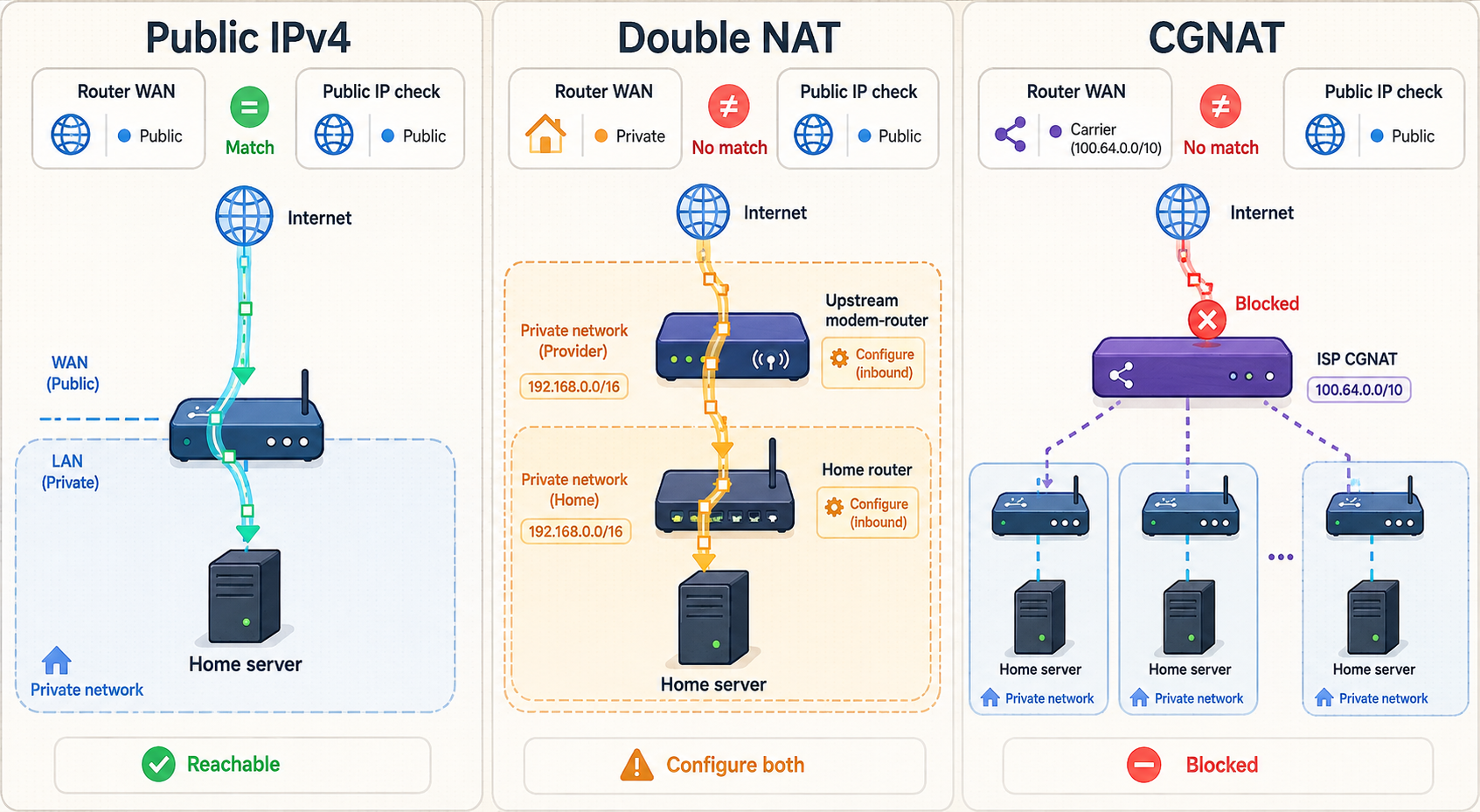
Diagnosis should identify each network boundary rather than relying on one port-scanner result. Start by comparing IPv4 with IPv4. If a lookup site displays IPv6 while the router page displays IPv4, the values describe different address families and cannot be compared directly.
Find the router's internet-facing IPv4 address
Open the administration interface for the router that owns your port-forwarding rule. Use the default gateway reported by your computer rather than assuming a particular router address. In the router's connection status, locate the WAN, internet, or upstream IPv4 address.
Find the IPv4 address visible to an internet service
From a device using the same internet connection, check the IPv4 value shown by a public address lookup such as WhatIsMyIP.com. Record the IPv4 result separately from any IPv6 result.
Classify the router's WAN address
Determine whether the WAN value belongs to RFC 6598 shared address space, RFC 1918 private address space, or globally routable IPv4 space. The table below explains what each result establishes.
Trace any additional router or gateway
If the WAN address is private, identify what assigned it. A modem-router combination, a second local router, a building network, or provider equipment may be the next upstream boundary. Check whether you control that device before concluding that the translation belongs to the carrier.
Test the actual service and protocol externally
Start the destination service, confirm local reachability, and then test from a genuinely separate network. Use an application client that speaks the correct protocol whenever possible. A generic web browser cannot validate an arbitrary game protocol, and a TCP scanner cannot establish that a UDP service is reachable.
| WAN IPv4 range or result | What it establishes | What to investigate next |
|---|---|---|
100.64.0.0/10 |
RFC 6598 shared address space reserved for service-provider NAT | Ask the provider whether the service uses CGNAT and whether a public IPv4 option is available. |
10.0.0.0/8 |
RFC 1918 private space, proving an upstream NAT or private routing boundary | Check for an ISP gateway, second router, managed building network, or provider NAT. The address alone does not distinguish them. |
172.16.0.0/12 |
RFC 1918 private space, not a CGNAT-specific range | Identify the upstream device and determine who can configure it. |
192.168.0.0/16 |
RFC 1918 private space, often associated with another nearby router | Inspect modem-router mode, nested Wi-Fi routers, and forwarding rules on both layers. |
| Globally routable WAN IPv4 matches the public IPv4 lookup | The router appears to hold the externally visible IPv4 address at that time | Check forwarding rules, firewalls, protocol choice, service binding, ISP filtering, and external testing. |
| Globally routable WAN IPv4 differs from the public IPv4 lookup | Another translation or routing boundary exists upstream | Investigate the provider gateway or service configuration. This difference alone does not prove CGNAT. |
Use port scanners carefully
Many online port-checking tools attempt a TCP connection. They only report a TCP port as open when a service is listening and completes enough of the TCP handshake to be recognized. If the destination application is stopped, bound to the wrong address, protected by a firewall, or uses UDP instead, the scanner can report a closed or filtered result even when the router rule looks correct.
UDP has no equivalent connection handshake. A useful UDP test usually requires a client that sends valid application traffic and a server that produces an observable response or log entry. Test the application, not just the port number.
Understand same-network testing
Reaching your own public address from inside the same LAN depends on NAT loopback, also called hairpin NAT. Some routers support it, some do not, and behavior can vary by firmware and configuration. A failed same-Wi-Fi test is therefore inconclusive rather than automatically false. A successful hairpin test also does not prove that an external firewall or provider permits the connection.
The most reliable check comes from a separate network, such as a phone with Wi-Fi disabled or a remote system you control. Confirm that the phone actually uses mobile data before drawing a conclusion.
Prerequisites before using Localtonet
A tunnel changes how traffic reaches the service, but it does not repair a service that is unavailable locally. Complete the local checks first. This separates application problems from router and internet-path problems.
Confirm the local target
For HTTP, TCP, UDP, combined UDP/TCP, and TLS tunnels, the target is an IP address and port on the client device or another system reachable from it. If the service is on a different computer, test that exact LAN address from the Localtonet client computer. Do not assume that reaching the service from a third machine proves the client can reach it.
A service bound only to 127.0.0.1 accepts connections solely from the same computer. That can be appropriate when Localtonet runs on that computer and targets the loopback listener. If Localtonet runs on another device, the application must listen on an appropriate LAN interface and its host firewall must allow that LAN connection.
To inspect listeners, use operating-system tools available on the service host. Exact output and privileges vary:
# Linux: show listening TCP and UDP sockets
ss -lntup

# Test an HTTP service locally
curl http://127.0.0.1:8080
# Windows: list listening sockets
netstat -ano
# Test a TCP listener from another Windows system
Test-NetConnection 192.168.1.50 -Port 8080Replace the example address and port with your real local target. A successful TCP connection proves only that the TCP listener is reachable. For HTTP, inspect the returned status and content. For UDP, use the application's own client or another protocol-aware test.
Temporarily changing a firewall can help isolate a problem, but leaving it disabled expands the attack surface of the entire device. Create the narrowest rule needed for the specific application, source network, protocol, and port, then remove temporary diagnostic exceptions.
Configure a Localtonet tunnel from client to public endpoint
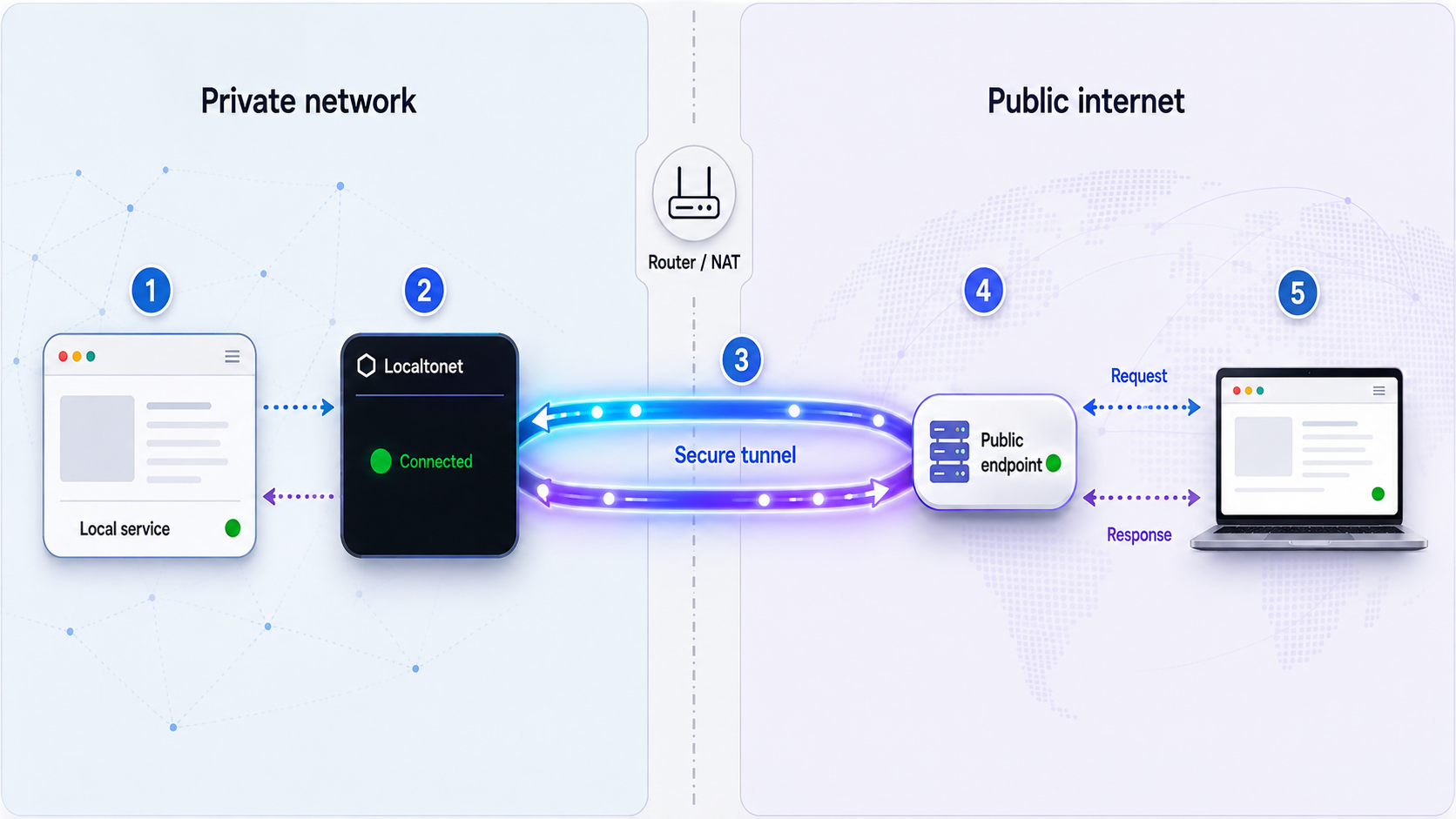
With Localtonet, the client on your device connects outward to one of our relay servers. The running tunnel then supplies a public URL or a public host and port, depending on the selected tunnel family. This avoids relying on unsolicited traffic reaching a port-forwarding rule on your router.
An outbound design is useful behind many NAT arrangements, including networks where you cannot configure the upstream translator. It is not a promise that every network will permit the connection. A workplace firewall, captive portal, outbound proxy, DNS policy, or other restriction can still prevent the client from reaching a relay.
Choose the correct tunnel family
| Tunnel family | Use it for | Public endpoint and target |
|---|---|---|
| HTTP/s | Web applications, development sites, HTTP APIs, and other HTTP-aware services | A public HTTPS address forwards to a local IP address and port. |
| TCP | Services that use raw TCP rather than HTTP | A public host and port forward to the selected local TCP target. |
| UDP | Applications that communicate over UDP | A public host and port forward UDP traffic to the local UDP target. |
| Combined UDP/TCP | Applications that require both transports as part of one service | The tunnel handles both protocol requirements for the configured local target. |
| TLS | A supported service that requires the TLS tunnel family rather than an HTTP-aware tunnel | The configuration points to a local IP address and port. Confirm current options in the dashboard. |
| File Server | Publishing a local folder through the supported File Server modes | The target is a folder path, not a conventional service IP address and port. |
Select the protocol the application actually uses. Choosing TCP for a UDP-only service does not convert the protocol. Likewise, an HTTP tunnel is intended for HTTP traffic and should not be treated as a generic replacement for every TCP application.
Install and run the Localtonet client
Install the current Localtonet application for the operating system on a device that can reach the local service. Start the client and keep it running for as long as the tunnel needs to remain available. We do not include an unverified command here because installation and launch methods can differ by operating system and client release.
Authenticate or select the client device
Use the device-specific authentication token provided by your Localtonet account, then confirm that the intended device appears connected. Never reuse a token from an unknown device or publish the token in a tutorial, repository, support message, or screenshot.
Select a currently available relay server
Choose a relay from the values currently offered in the dashboard. Available server codes, regions, and options can vary, so copy the current selection rather than relying on a hardcoded value from an older guide.
Create the appropriate tunnel configuration
Choose HTTP/s, TCP, UDP, combined UDP/TCP, TLS, File Server, or another currently supported configuration that matches the workload. For a conventional service tunnel, enter the local IP address and port that you already verified. HTTP tunnels also use the available Process Type, such as Random Sub Domain, Custom Sub Domain, or Custom Domain. Check current domain and plan requirements in the dashboard before depending on a specific option.
Start the tunnel and use the assigned endpoint
Creating a tunnel does not mean it is running. Press Start and confirm that the selected client is connected and the tunnel is active. Use the assigned public HTTPS URL for an HTTP tunnel or the assigned public host and port for a raw protocol tunnel.
Stop or delete the tunnel when it is no longer needed
Stop the tunnel to remove active public access while retaining the configuration for later use. Delete it when the configuration is no longer required. The endpoint is available only while the selected client is connected and the tunnel is running.
A saved tunnel can still be offline because it has not been started, the selected device is disconnected, the client application is not running, or the client cannot reach the relay. Always verify both device connectivity and tunnel state.
Verify the tunnel from the service to the public client
Verification should follow the path in order. Testing only the public endpoint makes it difficult to determine whether the failure is in the application, the local network, the Localtonet client, or the external client.
Test on the service host
Connect to the service using its loopback or local interface address. Confirm that it responds with expected application data, not merely that a process owns the port.
Test from the Localtonet client device
If the client runs on another machine, connect from that machine to the exact target IP and port entered in the tunnel. This catches LAN routing, host firewall, and service-binding problems before the relay is involved.
Confirm the device and tunnel are active
Check that the correct authenticated device is connected, the intended relay is selected, and the tunnel has been explicitly started. Recheck the local target for typing errors.
Test from another network
Use a phone on mobile data or another remote network. For HTTP, open the assigned HTTPS URL and exercise a real application route. For TCP or UDP, use the application's normal client with the assigned host and port.
Observe both ends of the connection
Check the local application's own logs or console while generating a test request. If the public request fails and the application records nothing, inspect tunnel state and local reachability. If the request arrives but the application rejects it, troubleshoot the application, authentication, host validation, or protocol behavior.
HTTP-specific verification
A successful browser connection to the public URL proves more than a generic TCP check because it exercises DNS, TLS at the tunnel edge, HTTP forwarding, and the application response. Test more than the home page when the application includes API routes, redirects, cookies, WebSockets, webhooks, or host-name validation.
Some development servers reject unfamiliar public host names even though the tunnel is functioning. If the public URL reaches the application but returns a host-not-allowed message, adjust the application's trusted-host configuration narrowly according to that application's documentation. Do not disable host validation globally unless you understand the effect.
TCP and UDP verification
For raw TCP, use a client that understands the service. A successful TCP connection does not guarantee that authentication, encryption, or the application handshake works. For UDP, send valid protocol traffic and look for an expected response or service-side event. Generic TCP port scanners are not valid UDP tests.
Treat every public endpoint as public attack surface
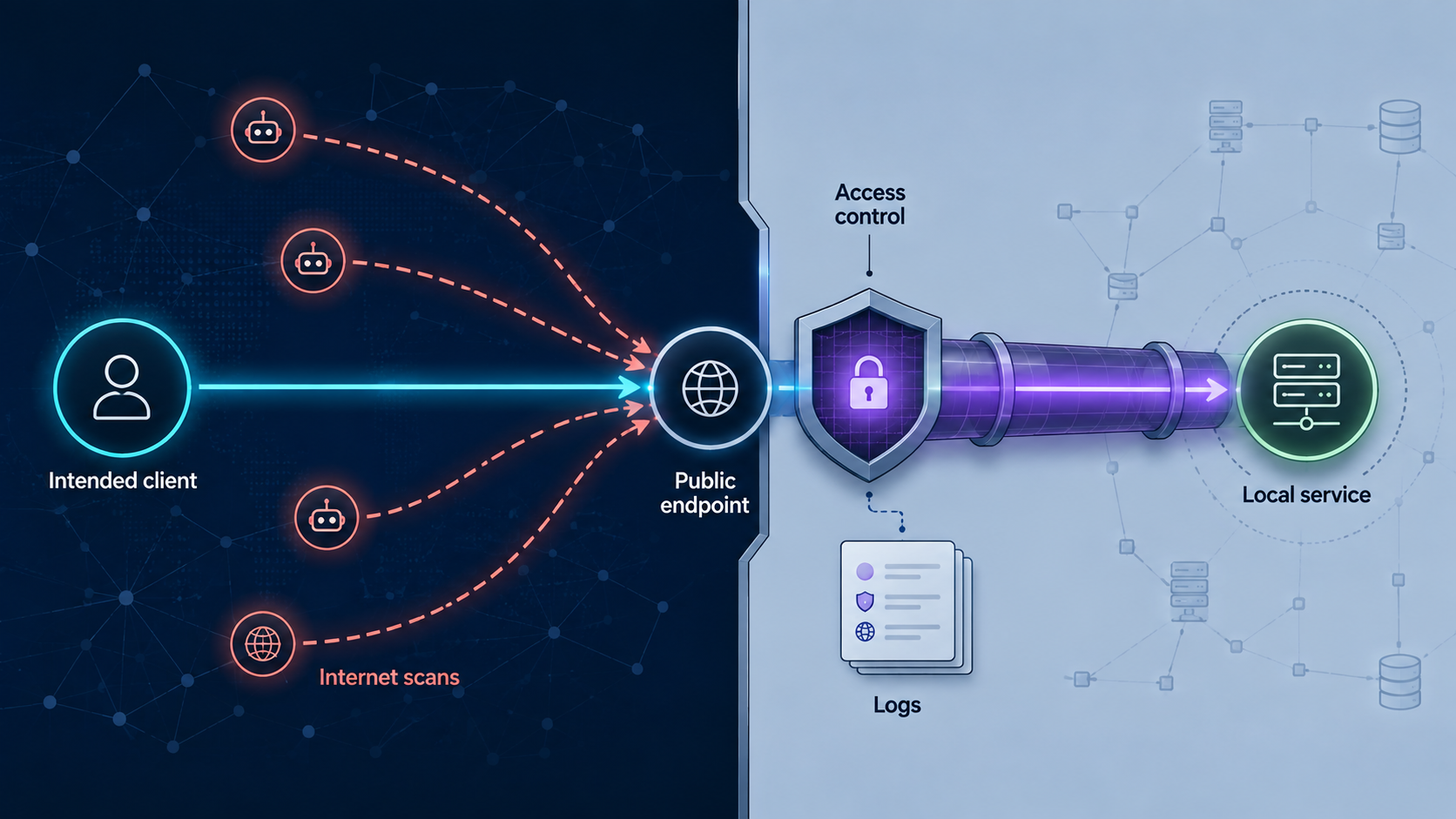
Both direct port forwarding and a public tunnel make a service reachable beyond the local network. Their network paths and trust boundaries differ, but neither approach makes an insecure application safe. A tunnel avoids exposing a router port directly and places a relay in the path, while port forwarding sends traffic through your own internet-facing router. In both cases, an unknown remote client may attempt to connect to the published endpoint.
Database ports, router administration pages, remote desktop services, development debuggers, and unauthenticated internal dashboards can provide powerful access if compromised. Prefer an application-specific interface with strong authentication. For private device-to-device access rather than a public endpoint, consider a private network design such as Localtonet VPN Manager with granular firewall rules.
Apply source restrictions or other access controls when the selected product configuration and application support them. Availability can vary by tunnel type, plan, and client version, so verify current controls in the dashboard rather than assuming that every option is present everywhere.
Operate the endpoint without creating a forgotten exposure
A working test is the beginning of the operational lifecycle, not the end. Record what the tunnel serves, which device owns it, who is authorized to use it, and when it should be stopped. This is especially important when several team members can create tunnels.
Keep the local target predictable
If Localtonet forwards to another LAN device, prevent its local address from changing unexpectedly. A DHCP reservation on the local network is often preferable to manually configuring an address on the server because the router remains aware of the assignment. If the target address changes, update the tunnel configuration and repeat local and external verification.
Plan for client and service availability
The tunnel is available only while the selected client device is connected and the tunnel is running. The local application must also remain running and reachable from that client. A powered-off computer, sleeping laptop, stopped application, changed Wi-Fi network, or restrictive new firewall rule can interrupt access.
Do not assume a specific public address will remain unchanged unless the active Localtonet configuration explicitly provides that behavior. HTTP Process Type and domain options, raw endpoint assignment, plan availability, and lifecycle behavior should be confirmed in the current dashboard before another system is permanently configured to depend on an endpoint.
Make changes one layer at a time
When changing the application port, local IP, tunnel family, authentication policy, or relay selection, retest the path from the beginning. Changing several layers simultaneously makes failures harder to isolate. Keep the old configuration stopped rather than running duplicate public endpoints without a clear reason.
Troubleshoot by locating the first failed boundary
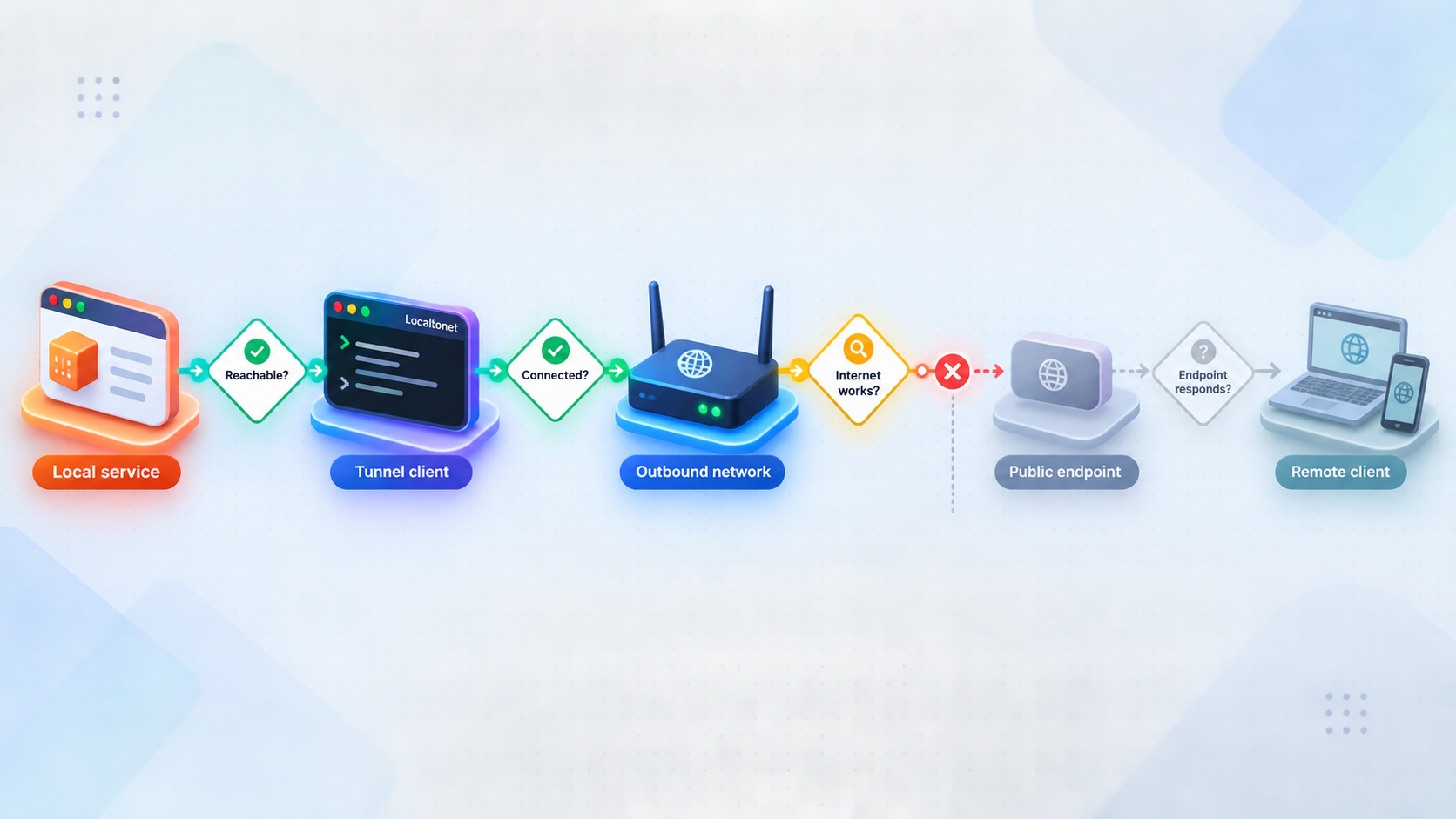
| Symptom | Likely area | What to check |
|---|---|---|
| The service fails on the same computer | Application startup or binding | Confirm the process is running, the port is correct, and the application responds on its local listener. |
| The service works locally but not from the Localtonet client device | LAN route, host firewall, or interface binding | Test the exact target IP and port from the client device. Check whether the application listens only on loopback. |
| The device appears disconnected | Client lifecycle or outbound connectivity | Confirm the Localtonet client is running and authenticated with the intended device token. Check DNS, captive portals, outbound firewall rules, and proxy requirements. |
| The tunnel exists but has no public availability | Tunnel lifecycle | Confirm that the tunnel was explicitly started and that its selected device remains connected. |
| The public endpoint connects but the application rejects the request | Application behavior | Check authentication, allowed hosts, virtual-host configuration, expected URL scheme, application protocol, and service logs. |
| A TCP scanner reports closed for a UDP service | Invalid test method | Use the UDP application's own client and generate valid protocol traffic. |
| Direct forwarding stopped after the server rebooted | Changing LAN address or stopped service | Confirm the destination address, add a DHCP reservation if appropriate, and verify that the service started successfully. |
| Direct forwarding works from outside but not from the same Wi-Fi | NAT loopback behavior | The router may not support hairpin NAT. Use the local address while on the LAN or review the router's DNS and loopback options. |
| WAN IPv4 is private | Upstream NAT | Identify the upstream router or provider boundary. Configure both local routers only if you control them, or use another exposure method. |
Protocol mismatch
TCP and UDP are separate transports. Forwarding TCP port 12345 does not forward UDP port 12345. Some applications use both, sometimes for different functions. Read the application's network requirements and choose TCP, UDP, or combined UDP/TCP accordingly.
Incorrect local target
The tunnel target must be reachable from the device running Localtonet. If an application moves from port 8080 to 3000, or from one LAN host to another, the old target will no longer work. Test the exact new address before updating public access.
Host firewall behavior
A host firewall can classify local loopback, LAN, and other traffic differently. A service may work from its own computer while rejecting the Localtonet client on another LAN machine. Add a narrowly scoped rule for the required local traffic rather than allowing every inbound connection.
ISP filtering and router policy
With direct port forwarding, an ISP or router may filter selected inbound traffic even when the WAN address is globally routable. Router security settings can also place the rule on the wrong interface or limit it to the wrong source. Consult the provider and router documentation for the particular service and account configuration. Avoid broad claims based only on what another customer of the same ISP observed.
Client network restrictions
Localtonet removes the need for inbound router configuration, but it still requires the client to establish and maintain its outbound relay connection. If the client cannot connect, test basic DNS and internet access, complete any captive-portal sign-in, and review local or organizational firewall policy. Do not attempt to bypass a workplace, school, or provider policy without authorization.
Other ways to solve the inbound-access problem
A tunnel is one option, not the only one. The right approach depends on whether the endpoint must be public, whether remote clients support IPv6 or private-network software, and who is responsible for operating the public boundary.
| Approach | When it fits | Important limitations |
|---|---|---|
| Localtonet tunnel | You need a public URL or public host and port without inbound router configuration | The client must be connected, the tunnel must be running, and the network must permit the outbound relay connection. |
| Public IPv4 from the ISP | You want conventional inbound routing and can operate router and host firewall rules | Availability, whether the address is dynamic or static, account requirements, and fees depend on the provider and service. |
| Direct IPv6 | The service, router, ISP, DNS design, and every required remote client support IPv6 | A global IPv6 address does not bypass stateful firewalls. The service must bind to IPv6, firewall rules must permit it, and IPv4-only clients cannot connect directly. |
| Private mesh VPN | Only authorized devices need private access rather than a public endpoint | Remote devices must participate in the private network. With Localtonet, VPN Manager is the VPN feature and is separate from standard tunnels. |
| Self-managed VPS relay | You need full control and have the skills to operate internet-facing infrastructure | A complete design requires routing, forwarding, firewall policy, authentication, key management, persistence, updates, monitoring, and abuse handling. |
Ask the ISP about public IPv4
Contact the provider and ask whether your exact service, location, and account can receive a public IPv4 address. Also ask whether it is dynamic or static and whether inbound service restrictions apply. Do not assume that a provider uses the same addressing policy for mobile, fixed wireless, fiber, and business products.
If the public address is dynamic, the port-forwarding rule can continue to work while the address changes, but remote clients need a way to discover the current address. Dynamic DNS may solve the naming problem. It does not solve CGNAT, firewall policy, or an incorrect forwarding rule.
Use IPv6 with the same security discipline
IPv6 generally does not require IPv4-style port translation when the device receives a globally routable address. That does not make the service automatically reachable. Consumer routers commonly apply stateful inbound firewall rules to IPv6, and the host firewall remains relevant.
The application must listen on an IPv6 address, the router policy must permit the intended inbound traffic, DNS must publish the correct record if a name is used, and the remote client must have working IPv6 connectivity. Exposing a service directly over IPv6 creates public attack surface just as direct IPv4 exposure does.
Keep self-managed relay guidance appropriately scoped
A VPS can act as a public relay through software such as a private tunnel or VPN, but installing one component is not a complete production setup. The operator must configure packet forwarding or an application proxy, firewall the VPS, restrict administrative access, protect credentials, persist configuration across reboots, apply updates, monitor availability, and verify both IPv4 and IPv6 behavior where relevant.
Because provider interfaces, operating systems, and relay designs vary, a partial command sequence can be more dangerous than useful. Choose this route only when you can maintain the complete public server lifecycle.
Frequently asked questions
Does a different router WAN IP and public IP prove that I am behind CGNAT?
No. It proves that another translation or routing boundary exists upstream, provided you compared IPv4 with IPv4 at the same time. The boundary could be an ISP gateway, another local router, a building network, or provider-operated NAT. A WAN address in 100.64.0.0/10 specifically points to RFC 6598 shared provider address space. An RFC 1918 address proves private upstream addressing but does not distinguish CGNAT from ordinary double NAT.
If my WAN and public IPv4 addresses match, should port forwarding work?
The match indicates that your router appears to hold the externally visible IPv4 address at that time, but it does not guarantee reachability. Check the forwarding rule, TCP or UDP selection, destination address, destination port, router and host firewalls, service binding, service state, ISP filtering, and the external test method.
Can I test UDP port forwarding with an online port scanner?
Not reliably with a typical scanner. Many port-checking sites test TCP and require a listening service to complete a recognizable connection. UDP has no TCP-style handshake. Use the real UDP client, send valid application traffic, and confirm the expected response or a service-side event.
Why does port forwarding work from mobile data but not from my own Wi-Fi?
Your router may not support NAT loopback, or its loopback behavior may depend on DNS and firmware settings. In that case, use the service's local address while connected to the LAN and use the public address from outside. Since hairpin NAT support varies, same-network failure does not invalidate a successful external test.
Does Localtonet require a public IP address or router port forwarding?
No inbound router forwarding or public IP address is required for the standard tunnel workflow. The Localtonet client establishes an outbound connection to a relay, which provides the public URL or public host and port. The client must still be able to reach the local service and establish its outbound relay connection.
Why is my Localtonet tunnel offline after I created it?
Creation does not automatically mean the tunnel is running. Confirm that the correct client device is authenticated and connected, then explicitly start the tunnel. If the device remains disconnected, inspect the client application and outbound network connectivity.
Is a tunnel safer than direct port forwarding?
The approaches have different network paths and trust boundaries, but both can create a publicly reachable application endpoint. Security depends on the exposed service and its controls. Require authentication, expose only the necessary protocol, keep software updated, apply least privilege, monitor activity, use restrictions where available, and stop access when it is not needed.
Will IPv6 eliminate the need for port forwarding?
IPv6 can eliminate IPv4-style NAT port translation when a device has a globally routable IPv6 address, but it does not eliminate firewalls or access control. The service must support and bind to IPv6, router and host firewall policies must allow the connection, DNS may need an IPv6 record, and the remote client must have IPv6 connectivity.
Publish the service through the right network path
Verify your local application, install the Localtonet client on a device that can reach it, choose the matching tunnel family, and start the tunnel only when public access is required.
Create a Localtonet Account →

