

Securing a Streamable HTTP MCP Server Behind a Tunnel
Protect a self-hosted Streamable HTTP MCP server on a Localtonet tunnel with OAuth, Origin checks, token audience validation and a verification checklist.
In this article 11 sections
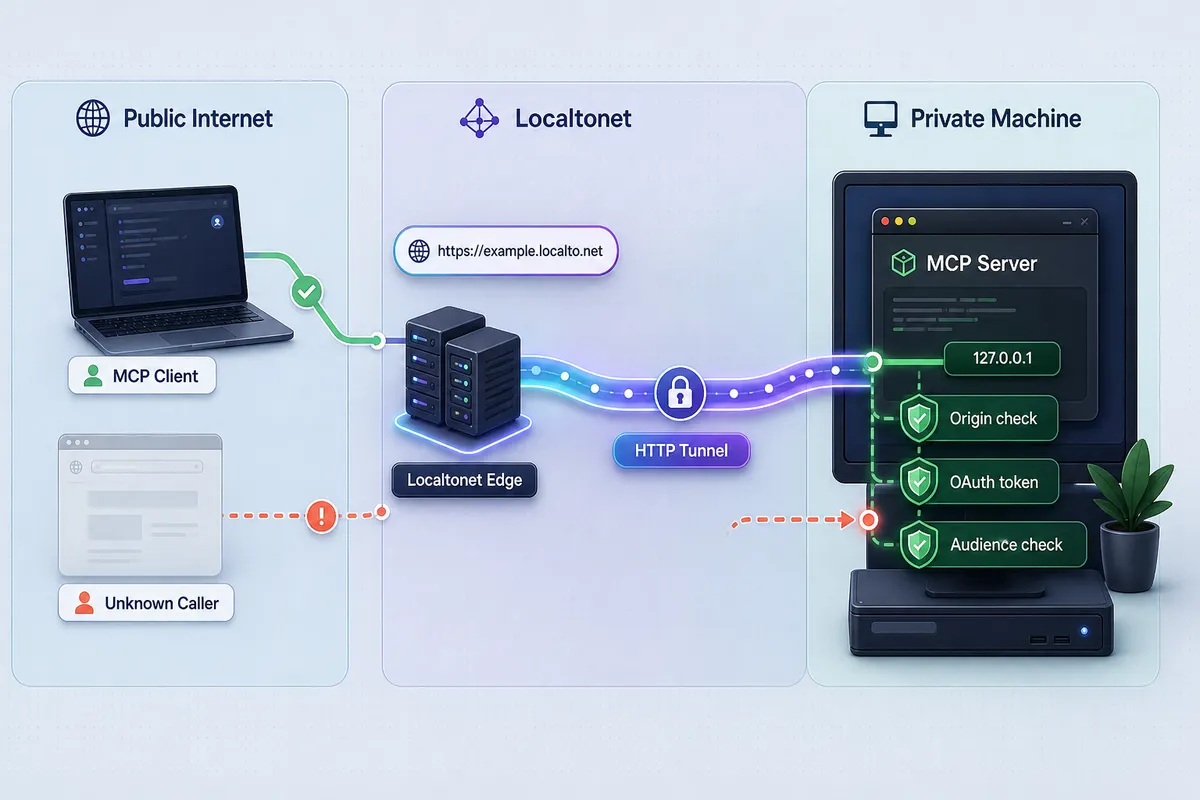
Your local MCP server is safe on localhost. A public URL changes everything. Here is how to secure it with OAuth, Origin checks and audience-bound tokens.
A self-hosted MCP server that only listens on your laptop has a small attack surface. Once you publish it through a tunnel so remote AI clients can reach it over Streamable HTTP, anyone on the internet can send it requests. This guide covers how the Streamable HTTP transport works and which protections the MCP specification asks servers to implement. It explains how to make your server a proper OAuth resource server, with protected resource metadata, audience validation and no token passthrough. We then show where a Localtonet HTTP tunnel fits: it provides an outbound connection and a public HTTPS address that you start and stop. Authorization remains your server's job. The guide ends with a verification checklist you can run with curl.
📋 What's in this guide
Why a public URL changes the MCP threat model
The Model Context Protocol (MCP) defines how AI clients such as coding assistants and chat applications discover and call tools, read resources and use prompts exposed by a server. Many MCP servers start life on the stdio transport. The client launches the server as a child process and exchanges JSON-RPC messages over standard input and output. In that model, the only party that can talk to the server is the process that started it. Credentials usually come from environment variables on the same machine, and nothing listens on a network port.
Streamable HTTP is the MCP transport for servers that run as independent processes and accept connections over HTTP. Run it on 127.0.0.1 and the exposure is still limited: only software on the same machine can connect. Browsers are the exception, because a malicious web page can sometimes reach local services through DNS rebinding. We cover that attack below.
Publishing the server through a tunnel removes the "only my machine" boundary. The tunnel gives the server a public HTTPS address so that a remote client, a teammate's IDE or a cloud-hosted agent can reach it. That is the purpose. It also means the server now receives traffic from everyone who learns or guesses the address. That includes scanners, bots and anyone who finds the URL in a shared config file. An MCP server often wraps powerful capabilities: shell commands, file access, database queries, ticket systems, cloud APIs. An unauthenticated public MCP endpoint is effectively a remote control for whatever those tools can do.
The MCP specification anticipates this. For HTTP-based transports it describes an authorization model built on OAuth 2.1. It includes security requirements for the transport itself, such as Origin validation. It also ships a separate set of security best practices that cover token passthrough, confused deputy problems and session hijacking. The rest of this guide translates those requirements into concrete server behavior you can implement and test.
A Localtonet HTTP tunnel carries requests from a public HTTPS address to your local server. It does not perform OAuth, validate MCP access tokens, inspect JSON-RPC methods or decide which tools a caller may use. Every protection in this guide must be implemented in your MCP server, in a reverse proxy you control, or in an authorization server you trust. Treat the tunnel as the network path, not as the security boundary.
MCP is versioned by date, and the transport and authorization sections have changed between revisions. The original HTTP+SSE transport was replaced by Streamable HTTP. Protected resource metadata became mandatory. Client registration options have also been revised. The behavior described here reflects the current revisions we reviewed while writing. Before you ship, confirm each requirement against the specification revision that your server and your clients actually negotiate.
How the Streamable HTTP transport works
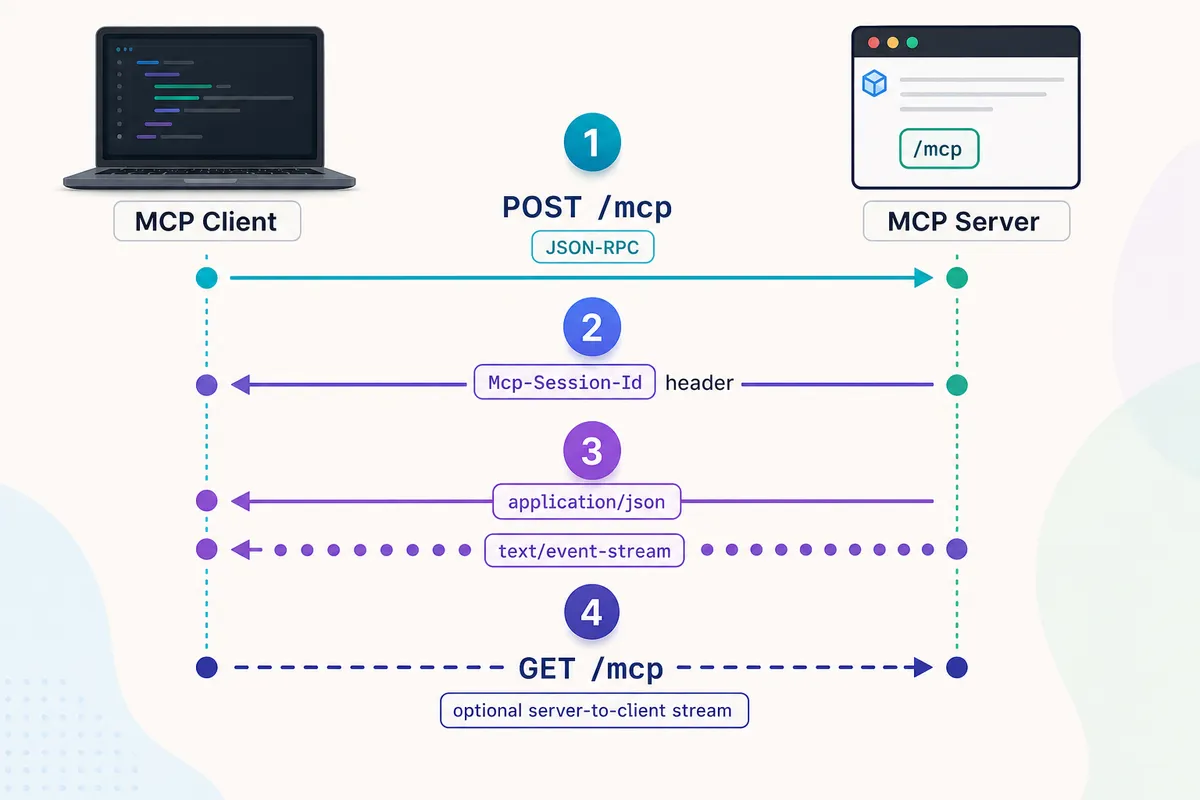
You have to know what legitimate traffic looks like before you can secure it. Streamable HTTP is simpler than many people expect. The server exposes a single HTTP path, called the MCP endpoint. A typical example is https://mcp.example.com/mcp. All protocol traffic goes to that path, and the HTTP method signals intent.
POST: client-to-server messages
Every JSON-RPC message the client sends travels in its own HTTP POST to the MCP endpoint. The client signals that it can accept either a plain JSON response or a Server-Sent Events (SSE) stream by listing both application/json and text/event-stream in the Accept header. What the server does next depends on the message:
- If the POST carries a JSON-RPC notification or a response, the server returns
202 Acceptedwith no body once it accepts the message. - If the POST carries a JSON-RPC request, the server either returns a single JSON response (
Content-Type: application/json) or opens an SSE stream (Content-Type: text/event-stream). An SSE stream lets the server send progress notifications or its own requests to the client before it delivers the final response.
GET: an optional server-to-client stream
A client may issue an HTTP GET to the same endpoint to open a long-lived SSE stream. The server uses this stream for messages that are not tied to a specific client request. A server that does not offer this stream answers the GET with 405 Method Not Allowed. Streams can be resumable. Servers may attach event IDs to SSE events, and a reconnecting client can send the last ID it saw in a Last-Event-ID header.
Sessions and protocol version
During initialization, the server may assign a session ID by returning an Mcp-Session-Id header with the response to the initialize request. If it does, the client must include that header on every later request. A server that requires sessions may reject non-initialization requests without the header using 400 Bad Request. A server that has terminated a session answers requests carrying that ID with 404 Not Found, and the client must then start a new session. A client that is finished can send an HTTP DELETE with the session header to end the session explicitly. Servers may refuse that with 405.
Recent revisions also require clients to send an MCP-Protocol-Version header on requests after initialization, carrying the negotiated protocol version. A server that receives an invalid or unsupported version should respond with 400 Bad Request.
| Client action | Expected server behavior | Security relevance |
|---|---|---|
| POST with JSON-RPC request | application/json response or text/event-stream stream |
Main path for tool calls; must be authenticated on every request |
| POST with notification or response | 202 Accepted, no body |
Still requires a valid token; notifications can change server state |
| GET to MCP endpoint | SSE stream, or 405 if unsupported |
Long-lived connections need the same auth checks as POST |
Request without required Mcp-Session-Id |
400 Bad Request |
Rejects malformed traffic early |
| Request with terminated session ID | 404 Not Found |
Prevents reuse of expired sessions |
| DELETE with session ID | Session ended, or 405 if not allowed |
Lets clients clean up server-side state |
Two consequences matter for security. First, there is one endpoint, so a single middleware layer in front of it can enforce Origin checks and token validation for all traffic. Second, the session ID only routes messages to the right conversation state. It is not a credential. The specification's security guidance says plainly that servers must not use sessions for authentication. We return to this point in the session security section.
Hosted remote MCP services vs a self-hosted endpoint
Most large vendors now ship remote MCP servers. One example is the remote Azure DevOps MCP Server that Microsoft hosts. The client connects to a vendor-run HTTPS endpoint over Streamable HTTP and authenticates with the vendor's identity platform through OAuth. In that design, the vendor owns the hard parts. It runs the authorization server, issues tokens with the right audience, maps OAuth scopes to tools and keeps the server patched. The user adds a URL to the client configuration, signs in and is done.
One detail of that hosted design is worth copying. The Azure DevOps service lets clients send headers to narrow the toolset or force read-only mode. The service documents that these filtering headers only control which tools are exposed. They do not grant OAuth permissions. Access is decided by delegated OAuth scopes, and those scopes never exceed the signed-in user's own permissions. The general lesson applies to any MCP server: tool filtering is a convenience, while authorization is decided by validated tokens and the user's underlying rights. Never let a client-supplied header widen what a caller can do.
A self-hosted MCP server published through one of our HTTP tunnels inverts that ownership. You run the server on your own hardware, against your own data, with your own tools. That is the reason to self-host: no vendor sits in the middle, and you can expose custom or internal capabilities. You also inherit every security responsibility the vendor would normally carry.
| Concern | Vendor-hosted remote MCP | Self-hosted MCP behind a Localtonet tunnel |
|---|---|---|
| Where the server runs | Vendor infrastructure | Your machine or LAN, reached through an outbound tunnel connection |
| Public HTTPS address | Vendor domain | Address assigned by the tunnel: random subdomain, custom subdomain or custom domain |
| Authorization server | Vendor identity platform | One you choose and configure: a self-hosted identity provider or a managed one |
| Token audience validation | Vendor implements it | Your server must implement it |
| Origin and DNS rebinding defenses | Vendor implements them | Your server must implement them |
| Availability window | Always on | Only while the Localtonet client is connected and the tunnel is started |
| Patching and updates | Vendor | You |
The last two rows reveal a useful property of the tunnel model. Your endpoint exists publicly only while you run it. You can stop the tunnel at the end of a session and the public address stops reaching your server. That does not replace authentication, but it shrinks the window in which a misconfiguration can be exploited.
Prerequisites
This guide does not depend on a particular MCP server or SDK. You can apply it to any server you already run over Streamable HTTP, including the servers covered in our single-project MCP tutorials. Before you start, make sure you have:
- An MCP server that supports Streamable HTTP. If your server only speaks stdio, it cannot be published over HTTP without a transport bridge. Check your server's documentation for an HTTP transport option and the address and port it listens on. We do not assume a default port here, because each server chooses its own.
- Control over the server code or a reverse proxy in front of it. Origin validation, bearer token validation and
WWW-Authenticatechallenges have to be implemented somewhere you control. If you cannot modify the server, you can usually place a small authenticating reverse proxy on localhost in front of it and point the tunnel at the proxy. - An OAuth 2.1 capable authorization server. It must issue access tokens whose audience you can tie to your MCP server's public URL, and it must publish authorization server metadata. It can be self-hosted or a managed identity service. Choosing one is outside our scope. What matters is that it supports the resource indicator (
resource) parameter or an equivalent way to set the token audience. - A Localtonet account and the Localtonet client installed on the machine that can reach your MCP server, plus that device's auth token from the dashboard.
- curl or a similar HTTP tool for the verification checklist. A visual MCP debugging tool such as the MCP Inspector is helpful but optional.
Your Localtonet auth token identifies your device, and your MCP access tokens grant tool access. Keep both out of version control, screenshots, issue trackers and chat logs. The MCP authorization model also forbids sending access tokens in the URL query string. Tokens belong in the Authorization header only.
Bind to localhost and validate the Origin header
The Streamable HTTP section of the specification contains a short security warning that is easy to skim past. Servers must validate the Origin header on all incoming connections to prevent DNS rebinding attacks. When running locally, they should bind only to localhost (127.0.0.1) rather than to all interfaces (0.0.0.0). They should also implement proper authentication for all connections. Each of these three measures blocks a different attack, so it is worth understanding why.
Why bind to 127.0.0.1
A server bound to 0.0.0.0 accepts connections on every network interface: your Wi-Fi, a coffee shop network, a VPN adapter, a Docker bridge. That makes it reachable by other devices on those networks without going through the tunnel at all, and so without any protections you placed at the tunnel's front door. Binding to 127.0.0.1 means only processes on the same machine can connect.
This fits the tunnel model well. The Localtonet client runs on the same machine as your server, so the tunnel's local target can simply be 127.0.0.1 and your server's port. The client makes an outbound connection to our relay server, which is why no inbound port forwarding or firewall change is needed. Your server keeps listening only on loopback.
If you run the Localtonet client on a different machine that reaches the MCP server over your LAN, the server must listen on a LAN interface. In that case, restrict it with a host firewall so that only the machine running the tunnel client can connect, and treat the LAN as untrusted.
What DNS rebinding is and why Origin stops it
In a DNS rebinding attack, a victim visits a malicious web page. The attacker controls the page's domain and its DNS server. After the page loads, the attacker changes the DNS record so that the same domain now resolves to 127.0.0.1. JavaScript on the page then makes requests to "its own" origin, which now points at services on the victim's machine. The browser's same-origin policy sees nothing wrong, because the domain never changed. A local MCP server without checks would receive and execute those requests.
The browser cannot hide where a request came from. It sends an Origin header naming the attacker's page, such as http://attacker.example. A server that only accepts requests from an allowlist of known origins rejects the rebinding request. Recent specification revisions state that a server receiving a present but invalid Origin must respond with 403 Forbidden. Validating the Host header against the hostnames you expect (your loopback address and your tunnel hostname) is a complementary, widely used defense against the same attack.
Non-browser MCP clients, such as IDE extensions and command-line agents, often send no Origin header at all. A practical policy therefore looks like this: if Origin is present, it must match the allowlist; if it is absent, continue to authentication, which every request must pass anyway. Only allow a missing Origin because token validation runs after it. Origin validation is not a substitute for authentication.
An illustrative Origin and bind configuration
The snippet below uses Node.js with Express to show the shape of the checks. It is not taken from any MCP SDK. Many SDKs offer their own host and origin validation options, so check your SDK's documentation and prefer built-in protections where they exist. Replace the example hostnames and port with your own values.
import express from "express";

const app = express();

// Public tunnel address plus any browser-based clients you deliberately allow.
const ALLOWED_ORIGINS = new Set([
  "https://mcp.example.com"
]);

// Hostnames this server should be addressed by.
const ALLOWED_HOSTS = new Set([
  "mcp.example.com",
  "127.0.0.1:3000",
  "localhost:3000"
]);

app.use("/mcp", (req, res, next) => {
  const origin = req.headers.origin;
  if (origin !== undefined && !ALLOWED_ORIGINS.has(origin)) {
    return res.status(403).json({ error: "forbidden_origin" });
  }
  const host = req.headers.host;
  if (!host || !ALLOWED_HOSTS.has(host)) {
    return res.status(403).json({ error: "forbidden_host" });
  }
  next();
});

// Bind to loopback only. The Localtonet tunnel targets 127.0.0.1:3000.
app.listen(3000, "127.0.0.1");
Depending on how a request travels through a tunnel or reverse proxy, your server may see the public hostname or a local address in the Host header. Don't guess. Log the incoming Host and Origin headers during your first test through the tunnel, then tighten the allowlist to exactly what you observe.
Treat the MCP server as an OAuth resource server
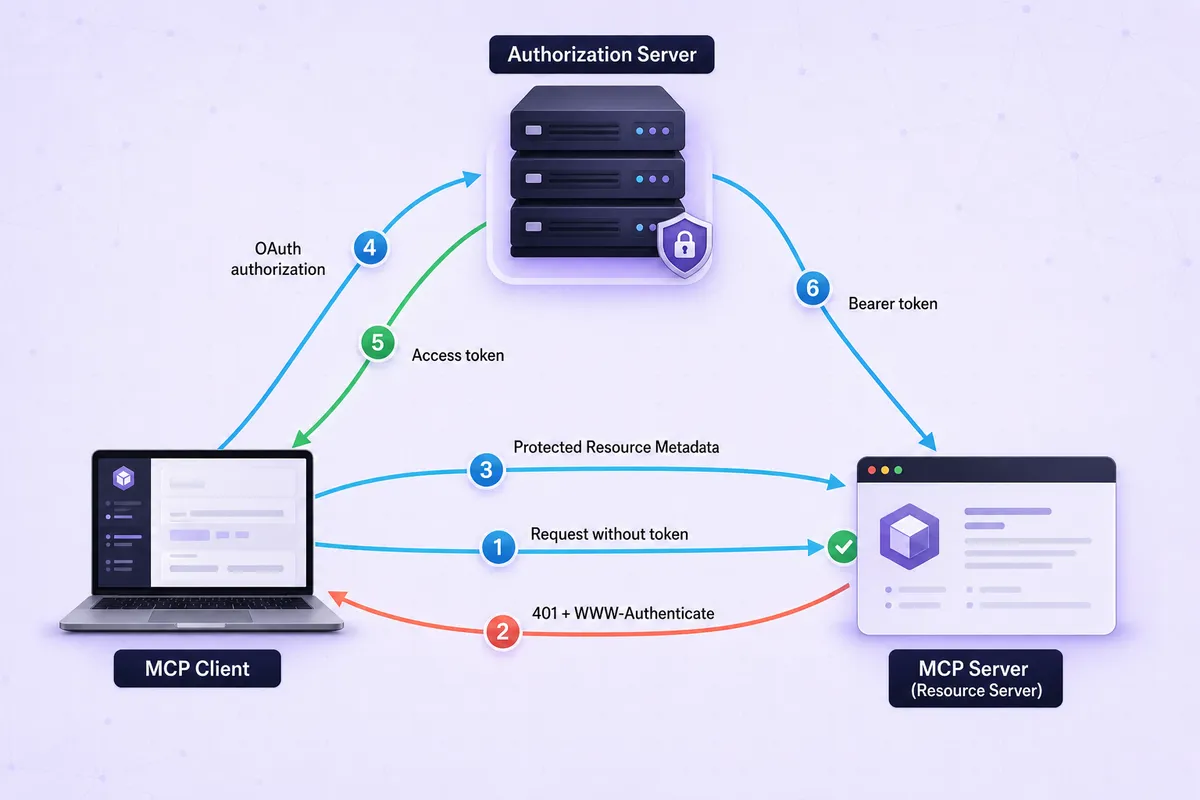
Authorization is technically optional in MCP. A purely local stdio server does not need it and should get credentials from its environment instead. For HTTP transports, the specification says implementations should follow its OAuth-based authorization model. Once your server has a public URL, treat that "should" as a requirement in practice.
The three roles
This separation helps you. Your MCP server does not need login pages, password storage or consent screens. It only needs to answer three questions about each request. Is there a bearer token? Was it issued by an authorization server I trust? Was it issued for me, with enough scope for this operation? Everything else belongs to the authorization server.
The discovery flow a client follows
Here is what happens when a remote client connects to your tunnel URL for the first time:
- The client sends an MCP request to your public endpoint without a token.
- Your server responds with
401 Unauthorizedand aWWW-Authenticateheader that points to your protected resource metadata document. - The client fetches that metadata. It learns your canonical resource identifier and which authorization server or servers protect you.
- The client fetches the authorization server's own metadata to find its authorization and token endpoints.
- The client registers or identifies itself with the authorization server, runs the authorization code flow with PKCE, and includes the
resourceparameter naming your server's canonical URI in both the authorization and token requests. - The client retries the MCP request with
Authorization: Bearer <token>, and your server validates it.
How the client registers with the authorization server has varied between specification revisions. Options include dynamic client registration, pre-registered clients and, in newer revisions, client ID metadata documents. The choice is made between the client and the authorization server, not by your MCP server. Check which methods your authorization server and your target clients support.
Publishing protected resource metadata
The specification requires MCP servers to implement OAuth 2.0 Protected Resource Metadata (RFC 9728). This is a small JSON document, served over HTTPS, that describes your server as an OAuth-protected resource. A minimal document looks like this:
{
  "resource": "https://mcp.example.com/mcp",
  "authorization_servers": ["https://auth.example.com"],
  "scopes_supported": ["tools.read", "tools.write"],
  "bearer_methods_supported": ["header"]
}
Pay attention to each field:
resourceis your server's canonical URI. Clients send it as theresourceparameter, the authorization server binds tokens to it, and your server compares token audiences against it. With a tunnel, this is the public HTTPS URL of your MCP endpoint, nothttp://127.0.0.1:3000.authorization_serverslists the issuers whose tokens you accept. Keep it short. Every entry is an issuer you trust completely.scopes_supportedadvertises scopes clients can request. The scope names above are placeholders; define your own and keep them coarse enough to understand, but fine enough to separate read operations from write and destructive ones.bearer_methods_supportedset toheaderreflects the MCP rule that tokens travel in the Authorization header, never in the query string.
Under RFC 9728, metadata lives at a well-known location derived from the resource URI. For a resource with a path, such as https://mcp.example.com/mcp, the path-specific location is https://mcp.example.com/.well-known/oauth-protected-resource/mcp. Some servers also serve it at the host root, /.well-known/oauth-protected-resource. The most reliable approach is to name the exact URL in your WWW-Authenticate header with the resource_metadata parameter, which is what the MCP specification describes:
HTTP/1.1 401 Unauthorized
WWW-Authenticate: Bearer resource_metadata="https://mcp.example.com/.well-known/oauth-protected-resource/mcp"
The metadata endpoint itself must be reachable without a token, since its purpose is to tell unauthenticated clients where to authenticate. It must not reveal anything sensitive. Recent revisions also let the challenge include a scope parameter that tells the client which scopes to request, and they define step-up behavior when a token lacks a required scope. If your clients support these features, they make least-privilege scopes easier to use.
Your tunnel address is your identity
There is a subtle point for anyone publishing MCP through a tunnel. The canonical resource URI is literally your public URL, so a change in your public URL changes your server's OAuth identity. Tokens issued for the old URL carry the wrong audience. Your metadata document must change. Clients that cached the old address break.
Our HTTP tunnels offer three Process Types for the public address: Random Sub Domain, Custom Sub Domain and Custom Domain. All three serve your service at a public HTTPS address. For an OAuth-protected MCP server, a stable address is strongly preferable, so choose a custom subdomain or a custom domain. Do not assume a random subdomain will stay the same across tunnel recreation. Option availability can depend on your plan, so check the dashboard. Custom-domain DNS setup is covered in our current documentation, and you should follow it there rather than relying on a summary.
Validate token audience and never pass tokens through
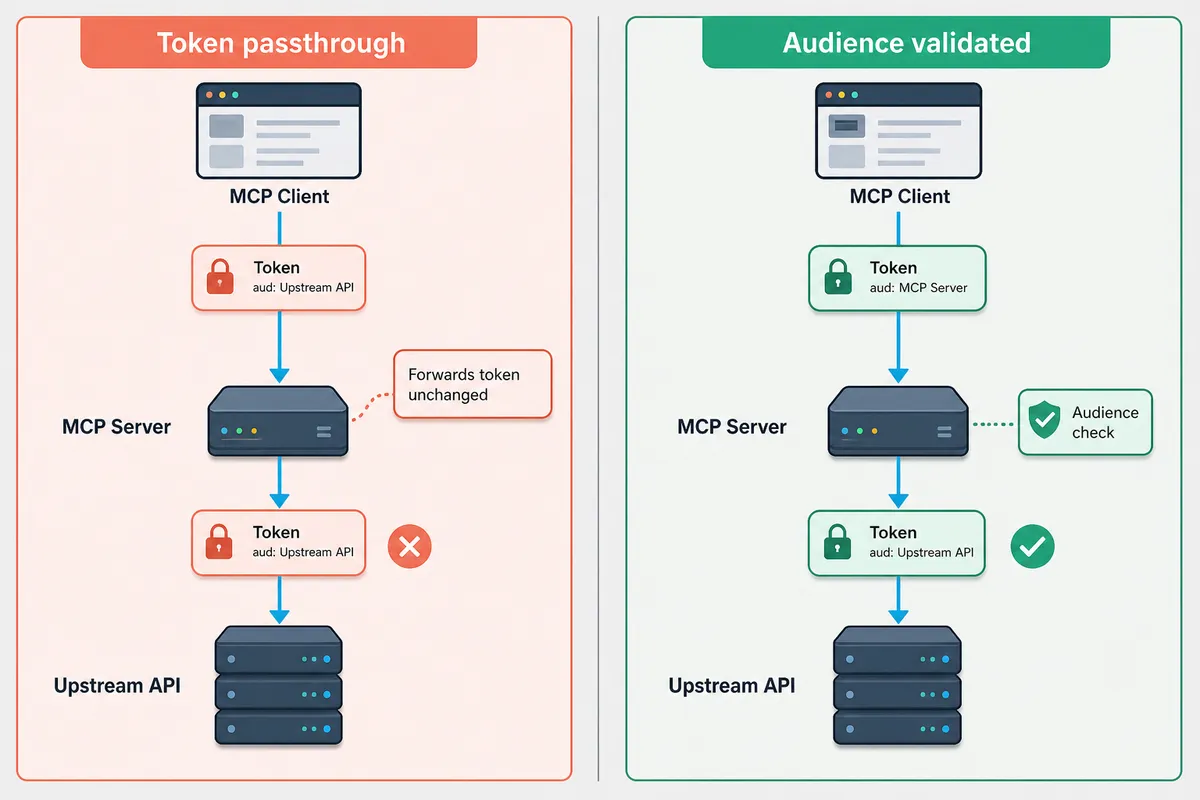
Audience validation
The specification requires MCP servers to validate that access tokens were issued specifically for them as the intended audience. This prevents a simple but serious attack. Suppose a user has a valid token for some other service, say a notes app that trusts the same authorization server. Without audience validation, a malicious party holding that token could present it to your MCP server and be accepted, because the signature and issuer check out. With audience validation, your server rejects it with 401, because the token was minted for a different resource.
Clients are required to send the resource parameter (RFC 8707 resource indicators) naming your canonical URI. The authorization server is expected to bind the token to that resource. With JWT access tokens, the binding usually appears in the aud claim. With opaque tokens, your server learns the audience through token introspection. Either way, your server checks for its own canonical URI and rejects everything else. A complete validation routine checks:
- Signature: the token was signed with a key published by a trusted issuer. For JWTs, fetch the keys from the
jwks_uriin the authorization server's metadata. - Issuer: the
issvalue is one of the servers in yourauthorization_serverslist. - Audience: the audience contains your canonical resource URI, exactly.
- Expiry and not-before: the token is currently valid.
- Scope: the token carries the scope required for the requested operation. Answer insufficient scope with
403, not401.
The following illustrative middleware uses the widely used jose library for JWT verification. The issuer, JWKS URL and audience are placeholders. Read the real JWKS URL from your authorization server's metadata rather than guessing a path.
import { createRemoteJWKSet, jwtVerify } from "jose";

const RESOURCE = "https://mcp.example.com/mcp";
const ISSUER = "https://auth.example.com";
const JWKS = createRemoteJWKSet(new URL("https://auth.example.com/jwks"));
const METADATA_URL =
  "https://mcp.example.com/.well-known/oauth-protected-resource/mcp";

function challenge(res, error) {
  const params = [`resource_metadata="${METADATA_URL}"`];
  if (error) params.push(`error="${error}"`);
  res.set("WWW-Authenticate", `Bearer ${params.join(", ")}`);
  return res.status(401).end();
}

export async function requireToken(req, res, next) {
  // Tokens in the query string are not allowed in MCP.
  if (req.query && req.query.access_token !== undefined) {
    return res.status(400).json({ error: "token_in_query_not_allowed" });
  }
  const header = req.headers.authorization || "";
  const [scheme, token] = header.split(" ");
  if (scheme !== "Bearer" || !token) {
    return challenge(res);
  }
  try {
    const { payload } = await jwtVerify(token, JWKS, {
      issuer: ISSUER,
      audience: RESOURCE
    });
    req.auth = payload;
    return next();
  } catch {
    return challenge(res, "invalid_token");
  }
}
Mount this middleware on the MCP endpoint after the Origin and Host checks, and before any request reaches your MCP handler. That covers POST, GET and DELETE alike. The specification requires the token on every HTTP request, even within an established session, so do not cache an "authenticated" flag against the session ID.
No token passthrough
Many self-hosted MCP servers act as adapters. A tool call arrives and the server calls an upstream API, such as a code host, a ticketing system or a cloud provider. The tempting shortcut is to forward the token the client sent you to that upstream API. The specification forbids this. MCP servers must not pass client tokens through to upstream APIs, and they must not accept tokens that were not issued for them.
Passthrough creates several problems at once:
- It defeats audience validation. If your server accepts tokens meant for the upstream API so it can forward them, it is accepting tokens that were never issued for it.
- It breaks accountability. The upstream API sees a request made with the user's token. It cannot tell that your server made it, and its logs and rate limits attribute the activity to the wrong party.
- It bypasses your controls. Any restriction your server places on tool use becomes meaningless if a stolen token can be replayed straight at the upstream API.
- It widens the blast radius. A token useful against both your server and the upstream API is far more valuable to an attacker than a token bound to one resource.
The correct design treats your MCP server as an OAuth client of the upstream API. It holds its own credentials for that API, obtained through a separate flow or a service account with the narrowest scope that works. Store those credentials on the server machine, outside the MCP request path. If upstream actions must run as the end user, use a token exchange or delegation mechanism the upstream provider supports, so that the upstream token is issued to your server for that API. Never reuse the inbound token.
The specification's security guidance also covers confused deputy problems. These arise when an MCP server acts as a proxy to a third-party authorization server using a single static client ID. If you build that pattern, the server must obtain the user's consent for each dynamically registered client before forwarding them to the third-party authorization flow. Otherwise, an attacker can ride on consent the user granted earlier. If you are not building an OAuth proxy, avoid the pattern entirely.
Session security
The Mcp-Session-Id header is easy to misuse. It identifies conversation state; it proves nothing about who is calling. The security guidance lists session hijacking as a concrete risk. An attacker who obtains or guesses a session ID could inject messages into that session or receive events intended for the user. To defend against it:
- Generate session IDs with a cryptographically secure random generator, and make them globally unique. The transport section restricts session IDs to visible ASCII characters.
- Verify the access token on every request, regardless of session. A valid session ID with a missing or invalid token gets
401. - Bind each session to the authenticated identity, for example by keying internal session state on the token subject plus the session ID. Reject requests where the token's subject does not match the session's owner.
- Expire idle sessions and answer requests for terminated sessions with
404, so clients re-initialize instead of reviving stale state. - Never log full session IDs or tokens. If you need correlation, log a short hash.
Tool-level hardening after authorization
Token validation decides who may talk to your server. It does not decide what an authorized caller may do with each tool. Map scopes to tools so that read-only scopes cannot reach write or destructive operations. Validate tool arguments as untrusted input. Be especially careful with tools that fetch URLs, because the specification's security guidance discusses server-side request forgery risks for MCP components that make outbound requests. Policy controls such as tool allowlists, human approvals, audit trails and rate limits are a separate layer, and they deserve their own design.
Publish the secured server with a Localtonet HTTP tunnel
With Origin checks, token validation and metadata in place locally, you are ready to give the server a public address. Our HTTP tunnel is the right tunnel type for Streamable HTTP, because MCP traffic over this transport is ordinary HTTPS from the client's point of view. Here is how the tunnel fits the picture:
- Outbound connection. The Localtonet client on your machine opens an outbound connection to a Localtonet relay server. You do not need router port forwarding, firewall changes, a VPN or a public IP address, and your MCP server can stay bound to
127.0.0.1. - Public HTTPS address. The tunnel publishes your local target at a public HTTPS address. That address becomes the base of your canonical resource URI.
- Explicit lifecycle. Creating a tunnel does not make it live. It must be started with the Start button, and it is reachable only while the client is connected and the tunnel is running. You can stop it or delete it at any time.
The general workflow on our platform follows the sequence below. The exact fields on the HTTP tunnel page are described in the Localtonet HTTP tunnel documentation; follow that page for the current form layout rather than relying on a summary.
Install and run the Localtonet client
Install the Localtonet client on the machine that can reach your MCP server. If the server is bound to 127.0.0.1, that has to be the same machine.
Authenticate the device with its token
Authenticate the client using the device's auth token from your dashboard, so tunnels can be assigned to this device. Keep the token private.
Select a relay server
Choose one of the relay servers or regions offered in the dashboard. Available options are shown there and can change, so pick from the current list.
Create the HTTP tunnel
Create an HTTP tunnel with a Process Type (Random Sub Domain, Custom Sub Domain or Custom Domain) and set the local target to the IP and port your MCP server, or your authenticating proxy, listens on. For OAuth, prefer a stable custom subdomain or custom domain.
Start the tunnel and use the public URL
Press Start. Use the assigned public HTTPS address plus your MCP path as the canonical resource URI, and update your protected resource metadata, your Origin and Host allowlists and your authorization server's resource configuration to match.
Stop or delete the tunnel when finished
When remote clients no longer need access, stop the tunnel. Delete it if the endpoint is being retired, and revoke any client registrations or tokens tied to that address.
Wiring the public URL into your configuration
Once the tunnel is running, update four places so they agree on the same canonical URI:
- Protected resource metadata: the
resourcefield equals your public MCP endpoint URL. - WWW-Authenticate challenge: the
resource_metadataURL uses the public hostname. - Token validation: the expected audience equals the same canonical URI.
- Authorization server: the resource or API definition that controls token audiences recognizes that URI.
Canonical URIs should use lowercase scheme and host and contain no fragment. Pick one form, with or without a trailing slash, and use it everywhere. Most "valid token rejected" problems come from small mismatches between these four places.
Then point your remote MCP client at the public endpoint. Many clients accept an HTTP-type server entry in their configuration file, made of a URL and a transport type. The exact format varies by client, so use your client's documentation for the syntax. If the client supports MCP authorization, it should discover your metadata from the first 401 response and start the OAuth flow automatically.
Operating the endpoint safely
- Run the tunnel only when needed. The availability window is under your control. An idle endpoint that is stopped cannot be probed through the tunnel.
- Get notified about tunnel state changes. Our platform-wide Token/Tunnel webhooks POST a JSON body when a token or tunnel in a selected Token Group changes to Connected or Disconnected. The body includes
Id,ActionDate,TypeandStatus. You can use this to alert on unexpected connects or to confirm a tunnel actually went down. - Automate lifecycle from your assistant if you like. The Localtonet MCP Server lets AI coding assistants such as Claude Code create, start and stop Localtonet tunnels. That makes it easy to bring an endpoint up for a session and take it down afterwards.
- Consider a gateway for multiple servers. If you aggregate several MCP servers behind a McpNet Gateway, our MCP Gateway tunnel guide covers exposing that gateway. The endpoint-level protections in this article still apply to whatever answers on the public URL. Check that post and your dashboard for the current naming and availability of that tunnel type.
Verification checklist
Don't trust a configuration you haven't tried to break. Run the checks below twice: first against http://127.0.0.1:<port>/mcp to confirm the server logic, then against your public tunnel URL to confirm the protections survive the trip. In the examples, https://mcp.example.com/mcp stands for your public endpoint. $GOOD_TOKEN is a valid token for your server, and $OTHER_TOKEN is a valid token issued by the same authorization server for a different resource.
1. Unauthenticated request is rejected with a discovery challenge
curl -i -X POST https://mcp.example.com/mcp \
  -H "Content-Type: application/json" \
  -H "Accept: application/json, text/event-stream" \
  -d '{"jsonrpc":"2.0","id":1,"method":"initialize","params":{"protocolVersion":"2025-06-18","capabilities":{},"clientInfo":{"name":"curl-check","version":"0.0.1"}}}'
Expect 401 Unauthorized with a WWW-Authenticate: Bearer resource_metadata="..." header. If you get a successful initialize result instead, the endpoint is open to the internet. Stop the tunnel immediately and fix the middleware order. The protocolVersion value shown is an example; use a revision your server supports.
2. Protected resource metadata is reachable and correct
curl -s https://mcp.example.com/.well-known/oauth-protected-resource/mcp
Expect JSON whose resource exactly equals your public endpoint URL and whose authorization_servers lists only issuers you trust. The response should not require a token.
3. Valid token is accepted
curl -i -X POST https://mcp.example.com/mcp \
  -H "Authorization: Bearer $GOOD_TOKEN" \
  -H "Content-Type: application/json" \
  -H "Accept: application/json, text/event-stream" \
  -d '{"jsonrpc":"2.0","id":1,"method":"initialize","params":{"protocolVersion":"2025-06-18","capabilities":{},"clientInfo":{"name":"curl-check","version":"0.0.1"}}}'
Expect a successful initialize response, either as JSON or as an SSE stream. If your server uses sessions, note the Mcp-Session-Id response header for the next checks. If the response is SSE, add -N to curl to disable buffering and confirm events arrive promptly through the tunnel.
4. Wrong-audience token is rejected
curl -i -X POST https://mcp.example.com/mcp \
  -H "Authorization: Bearer $OTHER_TOKEN" \
  -H "Content-Type: application/json" \
  -H "Accept: application/json, text/event-stream" \
  -d '{"jsonrpc":"2.0","id":1,"method":"initialize","params":{"protocolVersion":"2025-06-18","capabilities":{},"clientInfo":{"name":"curl-check","version":"0.0.1"}}}'
Expect 401. This is the most important check in the list, because a token with a valid signature from a trusted issuer is exactly what an attacker reusing a token would present. If it succeeds, your server is not validating the audience.
5. Bad Origin is rejected
curl -i -X POST https://mcp.example.com/mcp \
  -H "Origin: https://attacker.example" \
  -H "Authorization: Bearer $GOOD_TOKEN" \
  -H "Content-Type: application/json" \
  -H "Accept: application/json, text/event-stream" \
  -d '{"jsonrpc":"2.0","id":1,"method":"ping"}'
Expect 403 Forbidden even though the token is valid. Run the same request against 127.0.0.1 locally. Locally exposed servers are the classic DNS rebinding target.
6. Token in query string is refused
curl -i -X POST "https://mcp.example.com/mcp?access_token=$GOOD_TOKEN" \
  -H "Content-Type: application/json" \
  -H "Accept: application/json, text/event-stream" \
  -d '{"jsonrpc":"2.0","id":1,"method":"ping"}'
Expect a rejection: 400 from the illustrative middleware above, or 401 if your server simply ignores query tokens. The request must never succeed. Also check your logs: if full URLs are logged, a token sent this way would end up in them, which is one reason the specification bans the practice.
7. Session ID alone does not authenticate
Using the session ID from check 3, send a request with the Mcp-Session-Id header but no Authorization header. Expect 401. Then send a request with a made-up session ID and a valid token. Expect 400 or 404, depending on your server's session handling.
8. Tunnel stopped when idle
Stop the tunnel in the dashboard and rerun check 1. The public URL should no longer reach your server. If you use Token/Tunnel webhooks, confirm a Disconnected event arrived. Make stopping the tunnel part of your routine whenever remote clients are not actively using it.
| Check | Expected result | Failure means |
|---|---|---|
| No token | 401 with resource_metadata challenge |
Endpoint is publicly open |
| Metadata fetch | JSON with correct resource |
Clients cannot discover authorization |
| Valid token | Successful initialize | Audience, issuer or URI mismatch |
| Wrong-audience token | 401 |
Token reuse across resources possible |
| Bad Origin | 403 |
DNS rebinding exposure |
| Token in query string | Rejected | Tokens may leak into logs and history |
| Session ID without token | 401 |
Session hijacking possible |
| Tunnel stopped | Public URL no longer reaches server | Endpoint exposed longer than intended |
Troubleshooting
Valid tokens are rejected through the tunnel but work locally
This is almost always a canonical URI mismatch. Your local test probably used a token whose audience matched a localhost URI, or your server compares the audience against a value built from the incoming Host header. Hard-code the expected audience to your public canonical URI and confirm the authorization server issues tokens with exactly that value. Check for trailing slashes and casing. Decode a test JWT on your own machine and compare its aud claim character by character.
The client never starts the OAuth flow
Confirm that your 401 response includes the WWW-Authenticate header. Some frameworks strip or overwrite it in error handlers. Confirm the resource_metadata URL uses the public HTTPS hostname, not localhost, and that the metadata endpoint does not itself require a token. If the client still does nothing, it may not support MCP authorization, or it may support only some registration methods. Check the client's documentation.
Legitimate requests get 403 for Origin or Host
Log the raw Origin and Host headers your server receives through the tunnel and compare them with your allowlist. Browser-based clients send their own origin, which you must add deliberately if you want to support them. Never "fix" this by allowing every origin. That removes the DNS rebinding protection entirely.
SSE streams stall or responses arrive all at once
First, test the server directly on 127.0.0.1 with curl -N to rule out buffering in your own code or framework. Compression middleware and some reverse proxies buffer streaming responses. If streams work locally but not through the tunnel, collect the request details and the time of the test, and contact our support with that information. Do not include tokens. As a fallback, many servers can answer requests with a single JSON response instead of SSE, which suits clients that do not need server-initiated messages.
The endpoint is unreachable
Remember the lifecycle: a created tunnel is not live until you start it, and it works only while the Localtonet client on your device is connected. Confirm the tunnel is started, the client is running, and the local target IP and port match where your server actually listens. If your server binds to 127.0.0.1 but the tunnel client runs on another machine, the client cannot reach it.
Clients lose access after you recreate the tunnel
If the public address changed, your server's OAuth identity changed with it. Update the metadata, the expected audience and the authorization server's resource configuration, and have clients reconnect so they obtain tokens for the new URI. Using a custom subdomain or custom domain avoids this whole class of problem.
Frequently asked questions
Does a Localtonet HTTP tunnel add OAuth or MCP authorization to my server?
No. Our HTTP tunnel gives your local server a public HTTPS address through an outbound connection from the Localtonet client. It does not issue or validate MCP access tokens, check audiences, or inspect JSON-RPC traffic. Your MCP server, or an authenticating proxy you run in front of it, must implement the resource-server behavior described in this guide.
Is authorization mandatory for a Streamable HTTP MCP server?
The MCP specification makes authorization optional overall, and says HTTP-based implementations should follow its OAuth-based model. Stdio servers should get credentials from their environment instead. For a server reachable from the public internet, we strongly recommend treating authorization as required, because otherwise anyone who finds the URL can call your tools.
Why validate the Origin header if I already require tokens?
The two checks stop different attacks. Origin validation defends against DNS rebinding, where a malicious web page makes a browser send requests to a local server. The specification requires Origin validation on all incoming connections in addition to authentication. Defense in depth matters most on a server that also listens on localhost during development, sometimes with authentication temporarily relaxed.
What should my canonical resource URI be when using a tunnel?
It should be the public HTTPS URL of your MCP endpoint as clients see it, for example your tunnel hostname followed by your MCP path. It should not be the local address. Use the same exact string in your protected resource metadata, your audience check and your authorization server configuration. A stable address from a custom subdomain or custom domain keeps that identity from changing.
Can my MCP server forward the client's token to the upstream API it wraps?
No. The specification forbids token passthrough. Your server must accept only tokens issued for itself, and it must call upstream APIs with its own credentials, acting as an OAuth client of those APIs. Passthrough defeats audience validation, hides your server's role from upstream logs and lets a stolen token bypass your controls.
Is the Mcp-Session-Id header enough to identify a user?
No. A session ID routes messages to the correct conversation state, and the specification's security guidance says servers must not use sessions for authentication. Validate the access token on every request, bind sessions to the authenticated identity, and generate session IDs with a secure random generator.
Should I use a hosted remote MCP server or self-host one behind a tunnel?
If a vendor offers a hosted remote MCP server for its product and your client can authenticate to it, that is usually the lower-maintenance choice, since the vendor runs authorization and updates. Self-hosting behind a Localtonet tunnel makes sense for custom tools, internal data or servers with no hosted equivalent. You then own authorization, audience validation, Origin checks and patching.
Do I need to keep the tunnel running all the time?
No. A Localtonet tunnel is reachable only while the client is connected and the tunnel is started. Many developers start it for a working session and stop it afterwards, which limits how long the endpoint is exposed. Token/Tunnel webhooks can notify you when a tunnel connects or disconnects.
Publish your MCP server on your terms
Secure your Streamable HTTP endpoint with Origin checks and audience-bound OAuth tokens. Then give it a stable public HTTPS address with a Localtonet HTTP tunnel that you start when remote clients need it and stop when they don't.
Get Started Free →
Localtonet is a secure multi-protocol tunneling and proxy platform designed to expose localhost, devices, private services, and AI agents to the public internet supporting HTTP/HTTPS tunnels, TCP/UDP forwarding, mobile proxy infrastructure, file server publishing, latency-optimized game connectivity, and developer-ready AI agent endpoint exposure from a single unified control plane.

