

Keep Vite host validation enabled while securely sharing your development server
A Localtonet HTTP tunnel can successfully reach your machine while Vite still rejects the request because its public hostname is not trusted by the development server. This guide explains how to distinguish that application-level rejection from tunnel connectivity problems, allow only the required public hostname, verify the change locally and remotely, and avoid weakening Vite's DNS rebinding protection. It also covers changing tunnel hostnames, preview mode, Vite's HTTPS exception, hot module replacement symptoms, and situations where a local reverse proxy creates a cleaner trust boundary.
📋 What's in this guide
Why Vite blocks a public tunnel hostname
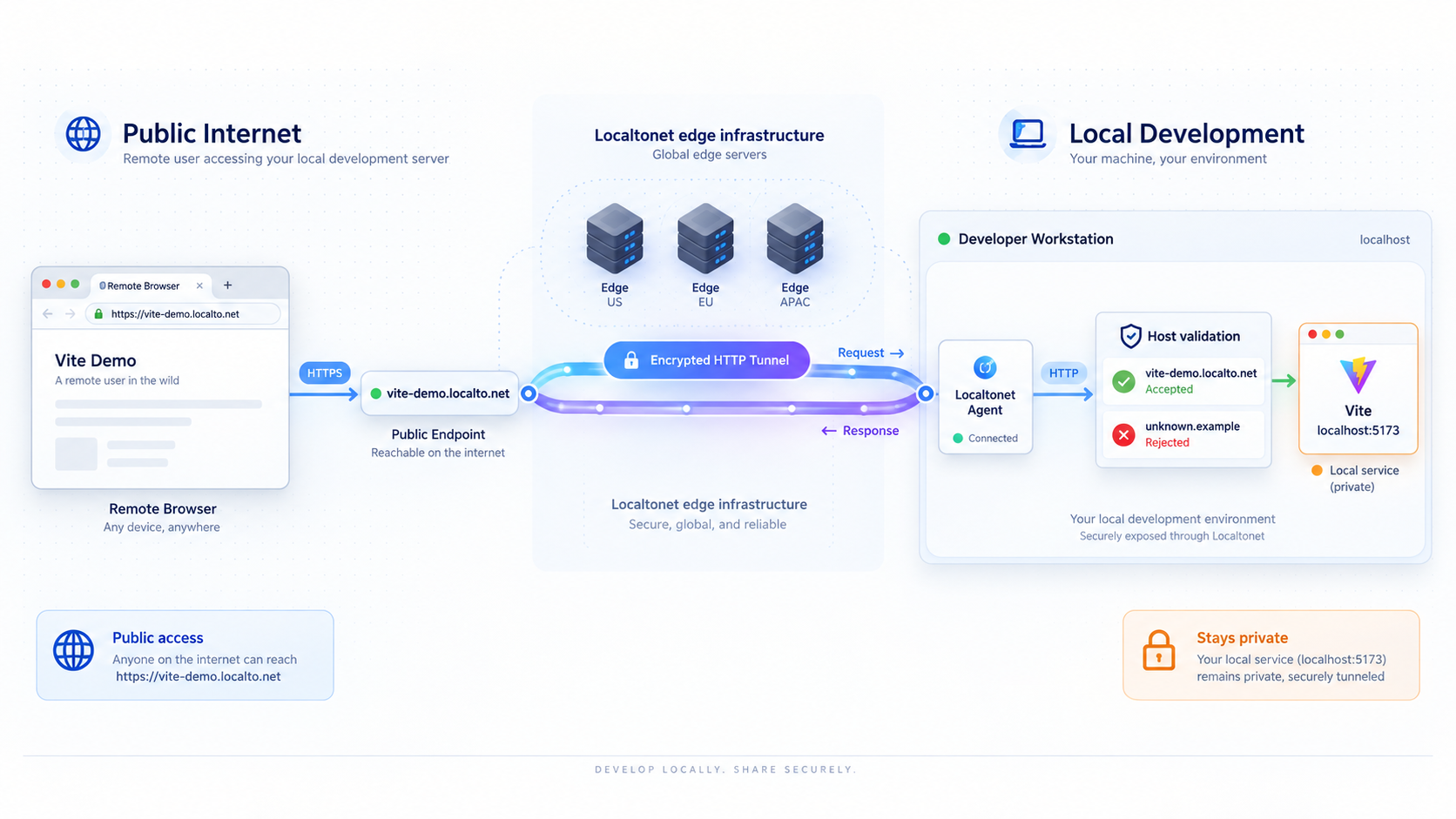
When you open a Vite application locally, the browser normally requests a URL whose hostname is associated with the local machine, such as localhost. Opening the same application through a Localtonet HTTP tunnel changes the browser-facing address. The request now uses the public hostname assigned to the tunnel, while the Vite process still runs on your computer.
That difference matters because HTTP requests include a Host header. For a public address such as https://demo.example.invalid, the hostname presented to the application is conceptually demo.example.invalid, not localhost. If that name is outside Vite's trusted host set, Vite can reject the request before serving the application.
For a Vite development server, the relevant setting is server.allowedHosts in Vite's server configuration documentation. It accepts explicit hostnames and, in documented cases, suffix rules. The safest tunnel configuration is normally one exact hostname rather than a rule that trusts every possible host.
This behavior is separate from whether a tunnel can reach the local port. The Localtonet client establishes an outbound connection to our relay, so inbound router port forwarding, a public IP address, VPN setup, and inbound firewall changes are not required for the normal tunnel workflow. The client forwards traffic to the local IP address and port configured for the HTTP tunnel. Vite remains responsible for deciding whether the resulting application request is acceptable.
Why the restriction exists
Host validation helps reduce exposure to DNS rebinding attacks. In a rebinding scenario, a hostile website can attempt to make a browser contact a service on a private or loopback address while using a hostname controlled by the attacker. Development servers are sensitive because they can expose source files, development-only endpoints, debugging behavior, or browser interactions that were never intended for arbitrary public access.
Vite's DNS rebinding security advisory explains why broad host acceptance can expose development-server content. An allowlist tells Vite which hostnames are expected. Adding the exact Localtonet hostname is therefore materially safer than accepting every possible hostname.
The objective is not to make host validation disappear. It is to extend the trust boundary by one deliberate hostname for as long as remote access is needed.
Vite supports allowedHosts: true, but its documentation warns that this permits any hostname and can expose the development server through DNS rebinding. Avoid that setting for a tunnel-exposed server. Add only the exact public hostname required for the tunnel, or use a narrowly scoped suffix rule only when you control the complete domain boundary and intentionally trust its subdomains.
Determine whether Vite or the tunnel is rejecting the request
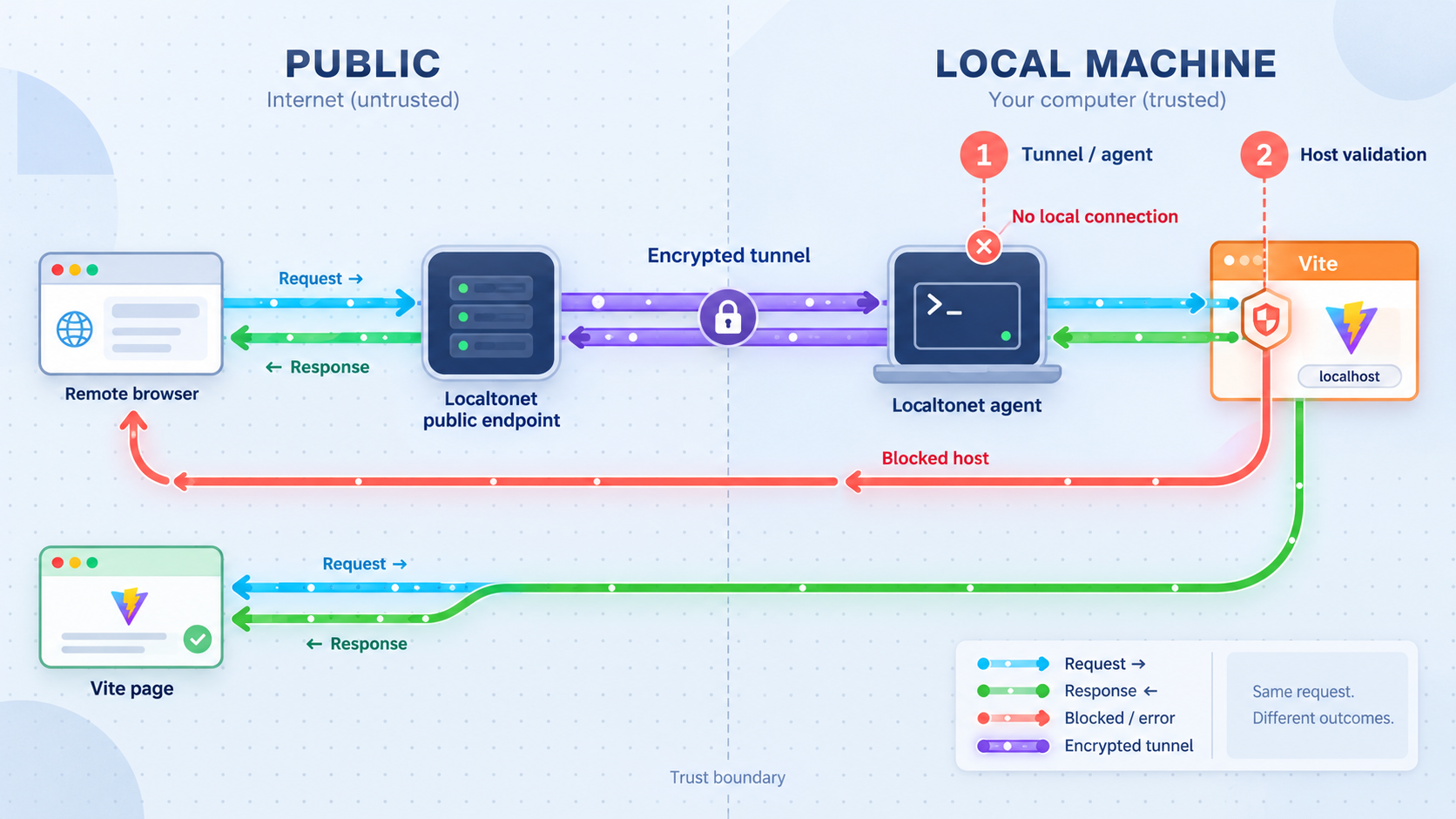
Start by identifying which layer produced the failure. A Vite message saying that a host is blocked or not allowed is strong evidence that the request reached the Vite process. In that case, the tunnel path, client connection, and local target may already be working. The remaining problem is Vite's application-level hostname policy.
A connection timeout, connection refusal, generic upstream error, or public address that never becomes reachable points in a different direction. Those symptoms can occur when the Vite process is stopped, the tunnel targets the wrong port, the Localtonet client is disconnected, or the tunnel was created but not started.
| Symptom | Likely layer | First check |
|---|---|---|
| Vite explicitly says the host is blocked or not allowed | Vite host validation | Compare the public hostname with server.allowedHosts or preview.allowedHosts, depending on the active command |
| The application fails on its local URL | Vite process or project | Confirm the project command is still running and use the exact URL printed by Vite |
| The local URL works, but the public address cannot connect | Tunnel lifecycle or local target | Confirm our client is connected, the tunnel is started, and its target port matches Vite |
| HTML loads, but hot updates do not work | WebSocket or HMR configuration | Inspect the browser console and WebSocket connection separately from host validation |
| The page loads, but API calls fail | Application routing, CORS, cookies, or API configuration | Inspect the failed API request rather than changing Vite's host allowlist again |
| The tunnel previously worked but now appears unavailable | Tunnel or client state | Confirm the selected device is connected and the tunnel is running |
Host validation is not the same as CORS
A host rejection and a Cross-Origin Resource Sharing failure are different controls. Host validation concerns the hostname used to contact the Vite server. CORS concerns whether browser JavaScript running under one origin may read a response from another origin. Adding a public hostname to allowedHosts does not automatically permit cross-origin API requests, repair cookie policies, or change an API server's origin allowlist.
This distinction prevents a common troubleshooting loop. If Vite serves its page successfully but the browser console reports a CORS error for an API request, the Vite host fix has already done its job. The next investigation belongs in the API, Vite proxy configuration, cookie settings, or application environment values.
Host validation is not the same as listening on another interface
Vite's listening address and allowed hostnames answer different questions. A listening option controls which local network interfaces accept connections. The host allowlist controls which HTTP hostnames Vite accepts after a connection reaches it. Broadening the listening address does not authorize a public tunnel hostname, and adding an allowed hostname does not make an otherwise unreachable interface reachable.
When the Localtonet client runs on the same machine as Vite, loopback is usually the narrowest local target. Only change Vite's listening interface when the Localtonet client runs somewhere else and genuinely needs a LAN-reachable address.
Prerequisites and information to collect
Before editing the Vite configuration, collect the exact values used by both sides of the connection. Do not assume the local port from a tutorial or previous session. Use the address printed by the currently running Vite process because project configuration and port conflicts can change it.
You need a Vite-based project that starts successfully, permission to modify its Vite configuration or launch environment, a Localtonet account and authenticated client device, and the public hostname assigned to the HTTP tunnel. The Localtonet client must run on a device that can reach the Vite server's local IP address and port.
Confirm the project command
Inspect the scripts section in the project's package.json. Many Vite projects use a script named dev, but a project can name or wrap that command differently. Run the script through the package manager used by the project. Common examples are shown below, but only use the command that matches the project's lockfile and documented workflow.
npm run devpnpm devyarn devKeep the process running and record the local URL it prints. Open that URL directly on the development machine. If it does not work locally, resolve the Vite startup or project error before creating a public tunnel.
Identify the project-local Vite version without installing another copy
Host configuration and defaults can change between Vite releases, so the project-local dependency matters more than a globally installed executable or a random online example. First inspect the version range in package.json and the resolved version in the project's lockfile. Package-manager inspection commands can also report installed dependencies without intentionally adding a package:
npm ls vite --depth=0pnpm list vite --depth 0yarn why viteUse only the command for the package manager that owns the project. Workspaces and framework integrations can place Vite above the immediate package, so also inspect the lockfile when a top-level command does not show it.
You may see advice to run npx vite --version. Treat that command carefully. Depending on the npm version, project state, and invocation context, npx can resolve an executable outside the intended dependency or offer to download a package when no local copy is available. If you use it, run it from the correct project directory, verify that Vite is already installed for that project, and decline any installation prompt. Do not use a newly downloaded or unrelated Vite version as evidence of what the project actually runs.
The configuration examples in this guide use the current documented server.allowedHosts interface. If an older project does not recognize this option, do not substitute an unrelated flag or disable security checks. Confirm the configuration supported by that exact release, or upgrade through the project's normal dependency review and testing process.
When the Localtonet client runs on the same machine as Vite, the tunnel can normally target Vite through its loopback address. You do not need to expose Vite to the entire local network merely to make the tunnel work. If our client runs on another device, Vite must instead be reachable from that device, and the corresponding LAN binding and firewall implications should be reviewed deliberately.
Allow the exact Localtonet hostname in Vite
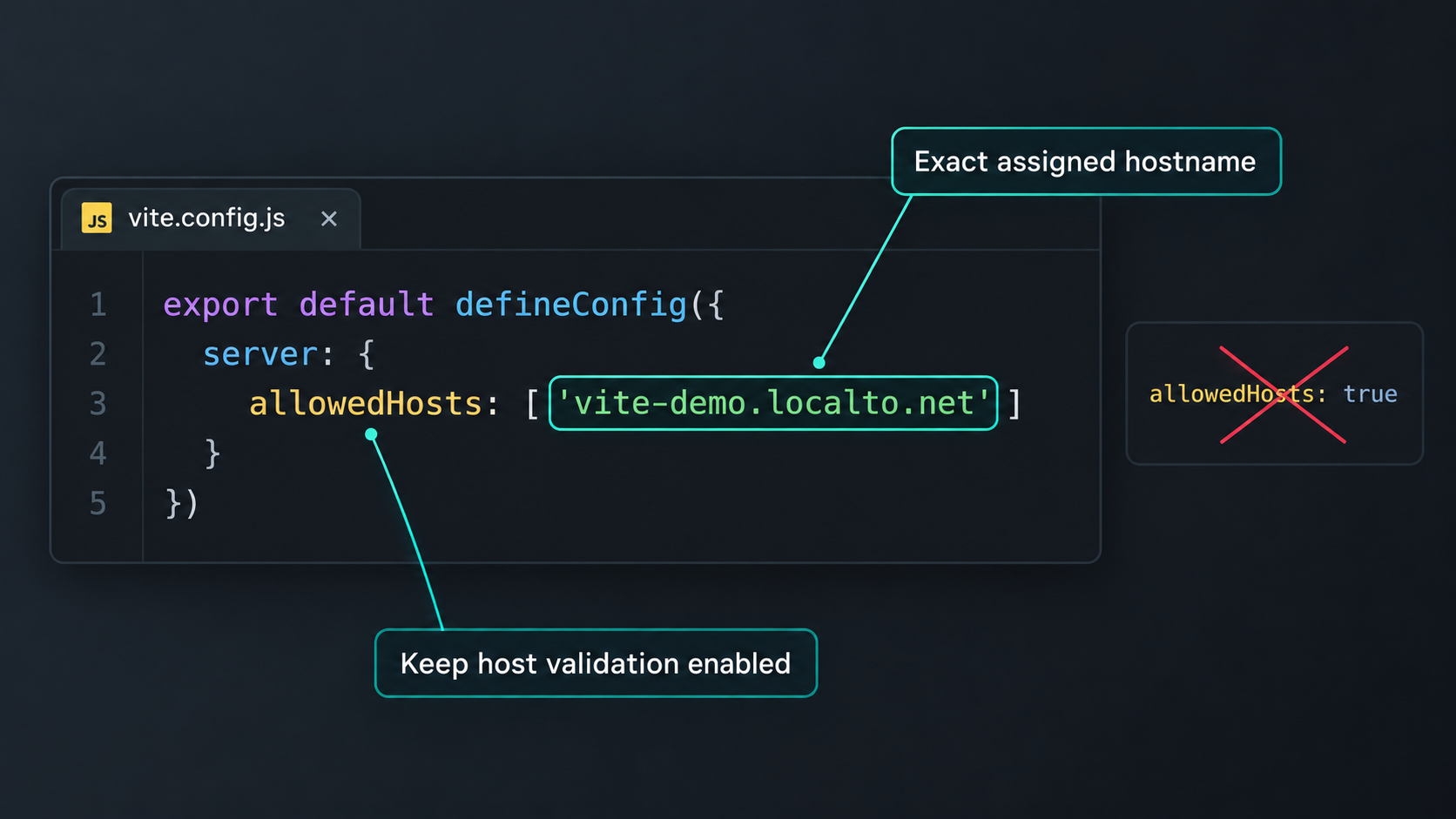
server.allowedHosts instead of allowing every host.
Copy the hostname portion of the public tunnel URL. If the address is https://my-preview.example, the value needed by Vite is my-preview.example. Do not include https://, a path, query parameters, or a trailing slash. A port is also not part of the hostname entry.
Open the project's Vite configuration file. Depending on the project, this can be a JavaScript or TypeScript file. Preserve the existing plugins and options, then add the exact hostname under server.allowedHosts. This setting applies to the Vite development server started by commands such as vite or vite dev.
import { defineConfig } from 'vite'

export default defineConfig({
  server: {
    allowedHosts: ['PUBLIC_TUNNEL_HOSTNAME']
  }
})
Replace PUBLIC_TUNNEL_HOSTNAME with the actual hostname shown in the Localtonet public URL. For example, if the dashboard gives you https://preview-name.example, enter only preview-name.example. The example domain is illustrative and is not a Localtonet hostname to copy.
If the project already has a server object or an allowedHosts array, merge the value instead of creating a duplicate property. JavaScript object keys defined more than once can hide earlier settings and make the configuration misleading.
import { defineConfig } from 'vite'

export default defineConfig({
  server: {
    port: 4178,
    allowedHosts: [
      'existing-development-host.example',
      'PUBLIC_TUNNEL_HOSTNAME'
    ]
  }
})
The port in this second example only illustrates preserving an existing project option. Do not change your project's port to match it. The Localtonet target must use whatever port the active Vite process actually listens on.
Restart Vite after changing the configuration
Stop and restart the development process after saving the configuration. A browser refresh cannot apply a server-side configuration file that the running process has not loaded. Watch the terminal during startup for syntax errors, plugin failures, or a different selected port.
Use Vite's additional-host environment setting when appropriate
Current Vite server documentation also defines __VITE_ADDITIONAL_SERVER_ALLOWED_HOSTS for adding an additional trusted hostname through the process environment. This can be useful when a temporary public hostname should not be committed to shared project configuration, or when each developer receives a different tunnel hostname.
__VITE_ADDITIONAL_SERVER_ALLOWED_HOSTS=PUBLIC_TUNNEL_HOSTNAME npm run devShell syntax differs between operating systems and automation environments. Set the variable using the mechanism appropriate for your shell, terminal, container, or CI runner. The value remains a hostname only, without a URL scheme, port, or path. Confirm that the project's installed Vite version documents this variable before relying on it.
A public tunnel hostname is not a credential, but authentication tokens are. Never put a Localtonet device token, API key, password, or private endpoint into a variable exposed to browser code. Vite variables intentionally exposed to application code can become part of the client bundle. Keep Localtonet authentication in our client or secure server-side configuration.
Avoid unnecessarily broad suffix rules
Vite documents dot-prefixed hostname values as suffix rules. For example, an entry such as .example.com can trust example.com and its subdomains. That is broader than a single-host entry and should be used only when you control the relevant domain boundary and intentionally want Vite to trust all matching names.
Never add a broad suffix for a shared domain that can be used by people outside your control. Another user who can obtain a sibling subdomain may then fall within your Vite trust rule. For one Localtonet tunnel, the exact assigned hostname is the clearest and narrowest configuration.
Do not enable Vite HTTPS merely to skip host checking
Vite's current documentation states that allowed-host checking is skipped when Vite itself is configured to use HTTPS. This compatibility detail can explain why two apparently similar projects behave differently. It is not a recommended workaround for a blocked-host error.
The public Localtonet URL using HTTPS does not necessarily mean that the local Vite process is configured for HTTPS. TLS can terminate at the tunnel edge while Localtonet forwards the request to a local HTTP target. In that common arrangement, Vite is still an HTTP development server and its normal host validation remains relevant.
Enabling HTTPS inside Vite only to avoid an allowlist creates unrelated certificate, trust-store, proxy, and WebSocket considerations. Use the explicit hostname allowlist to solve a hostname trust problem. Configure local Vite HTTPS only when the project independently requires it and you understand the certificate and proxy path.
Create and start the Localtonet HTTP tunnel
Configure the tunnel only after Vite works locally and you know its listening address. An HTTP tunnel is the appropriate tunnel family for a browser-based Vite development server. HTTP tunnels can use a generated subdomain, a selected subdomain where supported, or a custom domain. Availability can vary by account, client version, server, or current product configuration, so use only the options displayed in your dashboard.
The setup sequence below follows the current Localtonet HTTP tunnel workflow: install and run the client, open the HTTP tunnel configuration, choose the process type, select the authenticated device and an available server, provide the local target, and start the tunnel. The dashboard remains authoritative for currently available process types, servers, and account-specific options. You can also review our HTTP tunnel documentation.
Install and run the Localtonet client
Run our client on the Vite machine or on another device that can reach the Vite listening address. The client establishes the outbound connection used by the tunnel. Keep the authenticated client running during the sharing session.
Open the HTTP tunnel configuration and choose the process type
Create an HTTP tunnel and select the process type appropriate for the public address you intend to use. Random Sub Domain, Custom Sub Domain, and Custom Domain serve the same local HTTP content at a public HTTPS address, although availability and domain requirements can vary.
Select the authenticated client device
Select the device or AuthToken associated with the running Localtonet client. Tokens are device-specific. Keep them private and never place one in Vite source code, screenshots, logs, browser-visible environment files, or a public repository.
Select an available Localtonet server
Choose from the relay server or region values currently offered in the dashboard. Do not copy or hardcode a server code from another person's setup because available choices can vary.
Enter Vite's local IP address and port
Set the local target to the exact address and port where Vite is listening. If Vite and our client run on the same machine, use the loopback address that works from that machine. If they run in different devices, containers, or virtual machines, use an address genuinely reachable from the client environment and review the resulting LAN exposure.
Start the tunnel and record its public hostname
Use the Start button after completing the configuration. Creating a tunnel does not mean it is running. Copy the hostname from the assigned public HTTPS address, add that exact hostname to the appropriate Vite allowlist, restart Vite if needed, and keep both the selected device and tunnel connected.
If you need to change the public hostname after creating the tunnel, update Vite's allowlist as a separate trust decision. A previously allowed exact hostname does not automatically authorize a newly assigned hostname.
Treat the public URL as sensitive even when it is temporary. Do not expose projects containing private data, unrestricted administrative functions, development-only secrets, or destructive actions without suitable application authentication and authorization. Stop the tunnel when remote access is no longer required, and apply least-privilege controls wherever the application supports them.
Verify the complete path locally and remotely
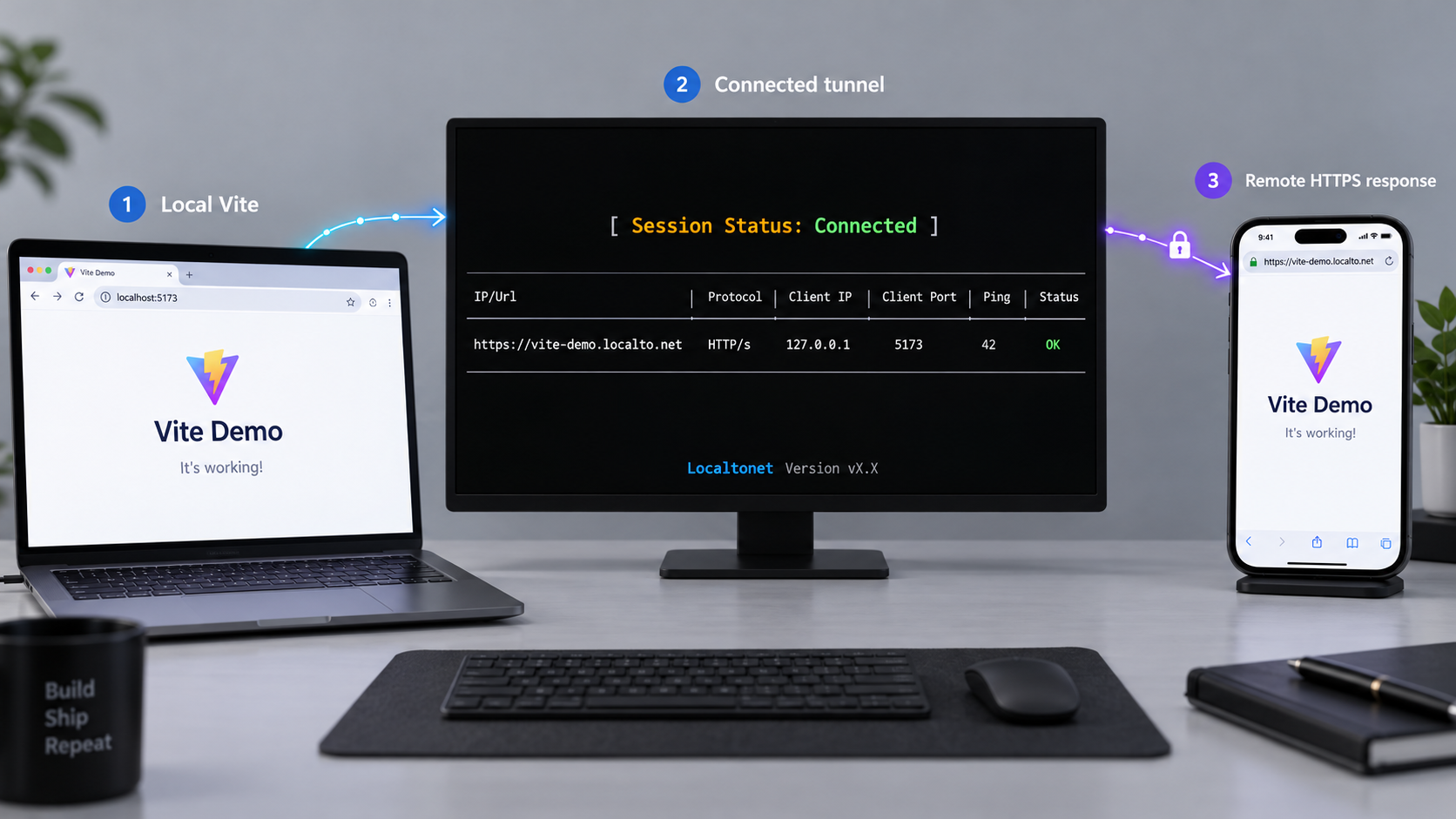
Verification should progress one layer at a time. This makes each result easier to interpret and avoids changing several unrelated settings at once.
1. Verify the ordinary local URL
Open the exact local address printed by Vite. Confirm that the page renders and that the terminal shows no startup failure. If the browser cannot open this address, the tunnel cannot repair the underlying application problem.
2. Simulate the public Host header locally
A local request with a custom Host header can test Vite's hostname decision without depending on the public relay path. Replace PORT with the actual Vite port and PUBLIC_TUNNEL_HOSTNAME with the hostname from the tunnel URL:
curl -i http://127.0.0.1:PORT/ -H "Host: PUBLIC_TUNNEL_HOSTNAME"
If Vite listens on a different local address, use that address instead of 127.0.0.1. A successful application response indicates that Vite accepts the hostname. A Vite-generated blocked-host response means the allowlist value is absent, malformed, unsupported by the installed version, placed under the wrong configuration section, or not loaded by the current process.
This command tests HTTP host handling at the local server. It does not test Localtonet connectivity, public DNS, edge TLS, browser behavior, hot module replacement, or application authentication.
3. Open the public HTTPS URL
Start the Localtonet tunnel and open its assigned HTTPS address in a browser. Test from a device or network outside the development machine when practical. This confirms that the public URL resolves, reaches our relay, traverses the outbound client connection, and arrives at the configured local target.
You can also inspect the initial public response from a terminal after replacing the placeholder:
curl -i https://PUBLIC_TUNNEL_HOSTNAME/
Do not add a manual Host override to this public test. The objective is to reproduce the hostname a normal remote browser sends.
4. Test application behavior, not only the first page
Navigate between routes, refresh a nested client-side route, trigger representative API calls, and edit a source file to observe hot updates. Initial HTML success proves only part of the workflow. A Vite application can pass host validation while API origins, WebSocket behavior, callback URLs, cookie rules, or client-side environment settings remain incorrect.
5. Recheck the security boundary
Confirm that the allowlist contains only expected hosts, remove temporary debugging changes, and make sure no token or credential was added to a client-visible file. When the sharing session ends, stop or delete the tunnel and remove temporary hostname entries that are no longer needed.
Handle changing hostnames, preview mode, HTTPS, and team workflows
When the public hostname changes
Vite compares the incoming hostname with the configured trust list. If you create a different tunnel or otherwise receive a different public hostname, the previous exact entry will not authorize the new one. Update server.allowedHosts, restart Vite, and repeat the local custom-host test.
For developer-specific or temporary addresses, Vite's additional-host environment variable can keep personal tunnel names out of shared source control. A team can store non-sensitive configuration guidance in its repository while each developer supplies the assigned hostname at launch time.
Do not automatically scrape a public URL from untrusted output and inject it into the allowlist. Treat allowlist modification as a trust decision. The person starting the environment should be able to see which hostname is being authorized.
Development server versus preview server
Vite's development server and preview server are separate operating modes. server.allowedHosts applies to the development server. The server started by vite preview uses the preview-specific setting documented as preview.allowedHosts.
If you expose the preview server instead of the development server, configure the exact hostname in the preview section:
import { defineConfig } from 'vite'

export default defineConfig({
  preview: {
    allowedHosts: ['PUBLIC_TUNNEL_HOSTNAME']
  }
})
Placing the hostname under server.allowedHosts does not authorize a request handled by vite preview. Likewise, a preview setting should not be assumed to configure the development server. Check the actual script in package.json when you are unsure which process is running.
Use the port printed by the active preview process as the Localtonet target. Do not assume it matches the development server port. Vite preview is intended for locally previewing a built application, not as a production application server. A successful tunnel test does not convert it into a production deployment architecture.
Understand the HTTPS host-check exception
Vite documents that host checking is skipped when Vite itself uses HTTPS. This does not mean every request arriving through a public HTTPS tunnel skips the check. What matters is the protocol configuration of the Vite server itself, not only the browser-facing URL.
If the Localtonet edge accepts HTTPS and forwards to a local HTTP Vite target, Vite is still operating as an HTTP server. Configure the appropriate explicit allowlist. Do not enable local HTTPS merely to avoid adding a hostname because that trades a clear trust rule for certificate and transport complexity.
Hot module replacement requires a separate check
Vite's hot module replacement channel commonly uses a WebSocket connection. If the page loads but edits no longer update, inspect the browser developer console and Network panel. Determine which WebSocket URL the browser attempts, whether it uses the correct public scheme and hostname, and whether the connection is rejected.
Do not respond to an HMR-only failure by broadening allowedHosts if ordinary page requests are already accepted. Depending on the Vite version and deployment shape, HMR can require separate client or server configuration. Use the options in Vite's official server.hmr documentation for the installed release rather than guessing a public port, protocol, or client hostname.
HMR configuration should reflect the actual path. The browser connects from outside your machine, while Vite remains local behind the tunnel. A value that works for a browser on the development machine can be wrong for a remote browser because localhost on that remote device refers to the remote device itself.
When a local reverse proxy creates a cleaner trust boundary
Directly targeting Vite is the simplest setup for a short sharing session. A local reverse proxy can be useful when several local services need one entry point, when the team already maintains proxy configuration, or when Vite should accept requests only from a controlled local intermediary.
In that architecture, the flow becomes public browser to Localtonet HTTP tunnel, then to a local reverse proxy, then to Vite. The tunnel targets the proxy's local address and port instead of Vite directly. The proxy can apply local routing, authentication, header policy, request limits, or path separation before forwarding traffic.
| Architecture | Best fit | Trade-off |
|---|---|---|
| Localtonet directly to Vite | Short-lived previews and a single development service | Vite must directly recognize the public hostname |
| Localtonet to a local reverse proxy to Vite | Multiple services, centralized authentication, or managed header policy | Adds another configuration and diagnostic layer |
| Built application on a production server | Persistent public access and production workloads | Requires a production deployment workflow rather than a Vite development tunnel |
Choose a deliberate Host header policy
A reverse proxy can preserve the original public Host header or replace it with a controlled upstream value. Both are architectural decisions. Preserving the public host means Vite still needs to trust that hostname. Replacing it can keep Vite's accepted hostname local to the proxy, but the proxy then becomes responsible for validating the public hostname before forwarding the request.
Never rewrite every incoming host to an accepted local value without first restricting which public hosts the proxy serves. That would merely move the missing validation from Vite to the proxy. Configure an explicit virtual host, reject unknown names, and forward only to the intended Vite endpoint.
Do not add a proxy without a concrete need
A proxy introduces more places for WebSocket upgrades, forwarded headers, path handling, and ports to be misconfigured. If the only issue is one blocked public hostname, adding that exact hostname to Vite is usually easier to understand. Use a proxy when it provides a real boundary or shared operational benefit, not as a way to hide an unexplained error.
Troubleshooting Vite and Localtonet tunnel errors
Vite still says the host is blocked
Recopy the hostname directly from the public URL. Remove the scheme, slash, path, and port. Confirm that you edited the configuration file used by the running project, not a similarly named file in another directory. Restart Vite and watch for configuration errors.
Confirm that the setting matches the running mode. Use server.allowedHosts for the development server and preview.allowedHosts for vite preview. If the project uses a function-based configuration, modes, a framework wrapper, or configuration merging, inspect the branch selected by the current command. A correct entry in an inactive configuration branch has no effect.
Framework integrations can own or transform Vite configuration. If a framework provides its own documented host setting, use that supported integration rather than assuming a newly created root configuration file will be loaded.
The local custom-host test works, but the public URL fails
Check our client and tunnel state. The device must be connected, and the tunnel must be running. Verify that the local target port still matches the port printed by Vite. If Vite selected another port after a restart, update the tunnel target or configure the project to use an intentionally fixed available port.
If our client runs in a container, virtual machine, or another physical device, 127.0.0.1 refers to that environment itself. It does not automatically refer to the host machine running Vite. Use an address genuinely reachable from the client environment, and apply only the minimum local network exposure required.
The public URL returns a Vite block, but Vite uses HTTPS locally
First verify which process generated the response. Current Vite documentation says allowed-host checking is skipped when Vite itself uses HTTPS, so an apparent Vite host block in that arrangement can indicate that another HTTP Vite process, a framework wrapper, a reverse proxy, or a different target is answering the request.
Do not disable more controls to make the symptom disappear. Compare the target address with the process logs, test the local endpoint directly, and confirm whether the tunnel targets HTTP or HTTPS.
The public page loads, but assets return errors
Inspect the failed asset URLs. Absolute base paths, framework adapters, development plugins, and environment-defined public origins can produce URLs that still point to localhost or another hostname. Host validation is already passing if Vite serves the main page. Correct the application's URL construction or Vite base configuration using the documentation for the installed version and framework integration.
API calls still target localhost
Browser code runs on the remote user's device. From that browser, localhost means the remote device, not your development computer. Use an intentional public API route, a Vite development proxy, or another separately secured tunnel according to the application's architecture. Do not expose a database or privileged internal service merely to repair a browser URL.
Authentication cookies do not work remotely
Cookies can depend on domain, path, Secure, and SameSite attributes. Moving from a local URL to a public HTTPS origin changes the browser context. Inspect the browser's cookie diagnostics and the server's Set-Cookie response. Adding a hostname to Vite does not rewrite application cookie policy.
Hot reload connects to the wrong address
Check the attempted WebSocket URL in developer tools. If it references a local hostname from a remote browser, review the HMR options documented by the installed Vite release. Avoid copying a configuration that assumes a particular public port, edge protocol, or proxy behavior without validating it against the current setup.
If the HMR WebSocket is the only failed request, do not change the host allowlist again. The successful page response already shows that ordinary HTTP hostname validation passed.
The tunnel works only while a terminal or device stays online
This is expected lifecycle behavior. A Localtonet tunnel is available only while the selected client device is connected and the tunnel is running. Creating the tunnel in the dashboard is not sufficient by itself. For a sharing session, keep Vite, our client, and the tunnel active. Stop the tunnel when the session is complete.
Test the Vite local URL, then a local request with the public Host header, then the public HTTPS URL, and finally browser features such as API requests and HMR. This sequence reveals whether the failure belongs to Vite startup, hostname validation, the tunnel target, or application behavior.
Frequently asked questions
Why does Vite work on localhost but fail through the Localtonet URL?
The public request uses the hostname from the Localtonet HTTPS URL rather than localhost. If Vite does not trust that hostname, it can reject the request even though our tunnel successfully reached the local process. Add the exact public hostname to the allowlist for the active Vite mode, restart Vite, and retest.
Should I set Vite allowedHosts to accept every host?
No. Using allowedHosts: true weakens Vite's DNS rebinding protection. Add only the exact tunnel hostname you intend to use. If a suffix rule is operationally necessary, use it only for a domain boundary you control and intentionally trust.
Do I include https:// in Vite allowedHosts?
No. Enter only the hostname. Do not include the URL scheme, port, path, query string, or trailing slash. For a URL such as https://preview.example/path, the hostname value is preview.example.
Does a Vite blocked-host message mean the Localtonet tunnel is broken?
Usually it means the request reached Vite and Vite rejected the hostname. Confirm this with the local custom Host header test. Investigate tunnel connectivity separately when the result is a timeout, connection failure, or upstream reachability error.
Do I need to bind Vite to every network interface?
Not when our client runs on the same machine and can reach Vite through loopback. Binding to all interfaces can expose the development server to the local network and should not be done without a reason. A different binding may be required when the client runs on another device or inside an isolated environment, but that decision should include firewall and LAN exposure review.
Can I keep a temporary tunnel hostname out of vite.config?
Current Vite documentation provides __VITE_ADDITIONAL_SERVER_ALLOWED_HOSTS for adding an additional trusted hostname through the process environment. Verify that your installed version supports it, use the shell syntax appropriate for your environment, and set only the hostname. Never expose Localtonet tokens or other credentials to browser code.
What is the difference between server.allowedHosts and preview.allowedHosts?
server.allowedHosts configures Vite's development server. preview.allowedHosts configures the server started by vite preview. Adding the hostname under the wrong section does not authorize the process handling the request.
Should I enable Vite HTTPS to avoid the allowed-host check?
No. Vite documents that host checking is skipped when Vite itself uses HTTPS, but enabling local HTTPS solely to bypass the allowlist is not the recommended fix. It introduces certificate, proxy, and HMR considerations. Keep the existing transport configuration and explicitly allow the one public hostname you trust.
Why does the page work while hot module replacement fails?
Page delivery and the HMR WebSocket are related but separate connections. Host validation may already be fixed while the HMR client still attempts the wrong scheme, hostname, or port. Inspect the browser's WebSocket request and apply only the HMR configuration documented for the installed Vite version.
Should I tunnel Vite preview for production traffic?
No. Vite preview is intended to inspect a built application locally, not to serve as a production deployment server. It can be useful for controlled remote review, but persistent production access should use an appropriate production build, server, authentication model, and deployment architecture.
Share your Vite server with a narrow trust policy
Start Vite locally, allow only the assigned public hostname, then create and start a Localtonet HTTP tunnel to the verified local port. Keep host validation enabled, protect the application itself, test each layer separately, and stop the tunnel when the remote review is complete.
Get Started Free →

