

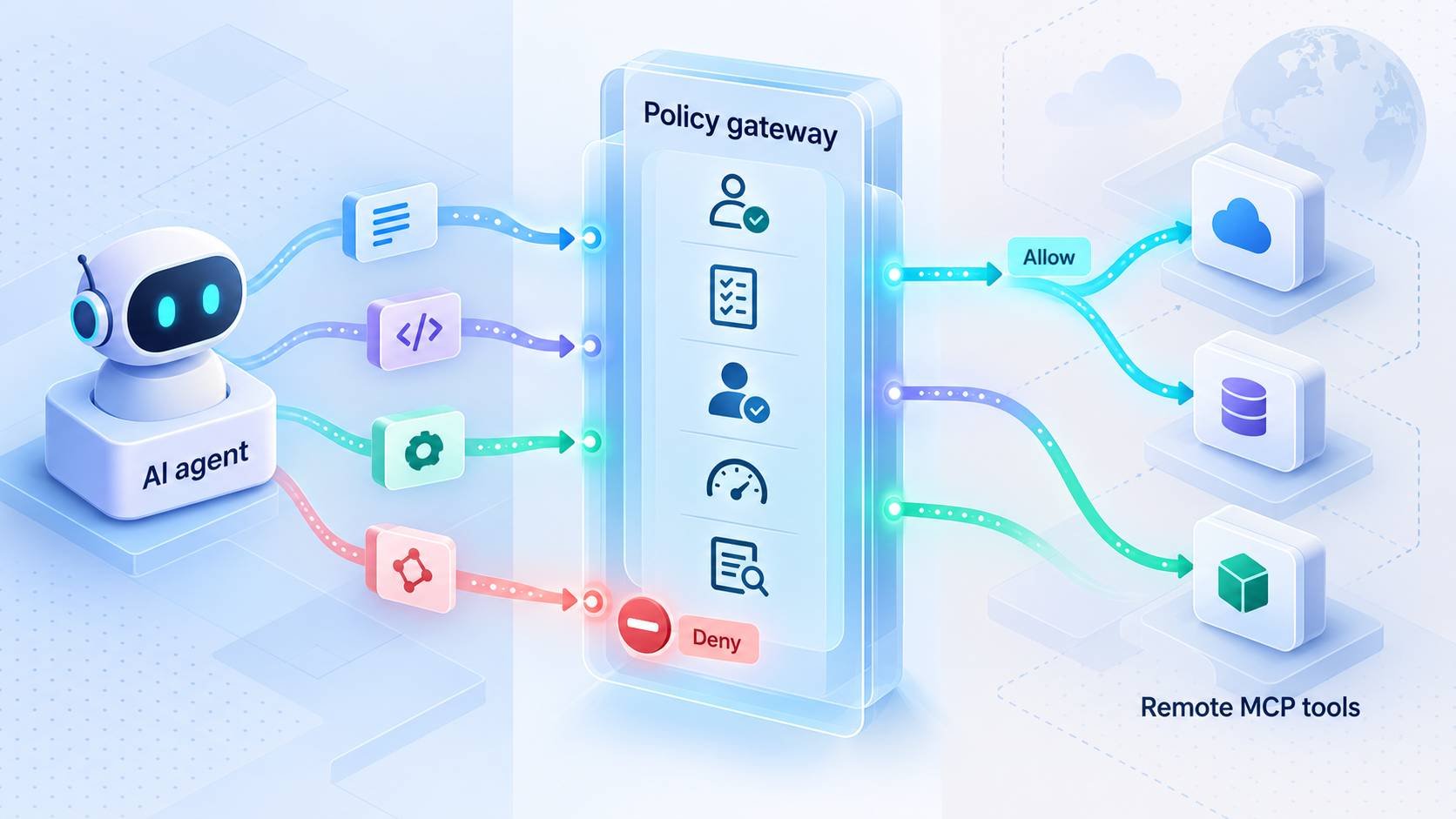
Put enforceable policy between autonomous clients and sensitive tools
Remote MCP access creates a boundary where an AI client can request actions that read data, modify systems, or trigger operational workflows. A policy gateway gives us one place to authenticate clients, restrict tools, validate arguments, request human approval, enforce limits, and record decisions before traffic reaches an MCP server. This guide develops that architecture from first principles, compares practical deployment models, and defines a thorough verification plan. It then explains how a locally running gateway can be connected through Localtonet without confusing secure connectivity with tool-level authorization.
📋 What's in this guide
Start with the MCP threat and trust model
An MCP policy gateway is an enforcement layer positioned between MCP clients and one or more MCP servers. Instead of allowing a remote client to call every tool exposed by a server, the gateway evaluates each relevant request against explicit policy. It can permit the request, deny it, require approval, transform narrowly defined fields, or stop processing because a required security dependency is unavailable.
The gateway matters because network reachability and permission to perform an action are different decisions. A firewall, reverse proxy, or tunnel can decide whether a connection may reach an endpoint. It usually cannot determine whether a particular client should be allowed to invoke a specific tool with particular arguments against a particular resource. That second question belongs at an application-aware policy boundary.
Begin by documenting the participants in the system. A client may be a desktop assistant, coding environment, automated agent, orchestration service, or another approved application. The MCP server exposes capabilities that may include tools, resources, or prompts. Behind that server are the actual systems of record, such as repositories, ticketing services, databases, file stores, build systems, and administrative APIs. The gateway sits on the path and evaluates the information needed to make a decision.
Classify tools by effect, not by friendly description
A useful inventory records more than a tool name. For each tool, identify whether it only reads information, changes reversible state, changes difficult-to-recover state, accesses secrets, affects production, communicates externally, or delegates to another privileged system. Record the argument fields that control scope, such as repository, path, database, environment, account, destination, branch, or command.
A label such as “read-only” should be verified against actual behavior. A query tool might appear read-only while still allowing expensive operations or access to restricted records. A file-reading tool could expose credentials if its path is unconstrained. A deployment tool might have a harmless preview mode and a high-impact apply mode under the same tool name. Policy therefore needs to consider arguments and context, not only the tool identifier.
Define trust boundaries before selecting a gateway topology
Separate systems when they have different owners, data classifications, credential sets, availability requirements, or incident-response procedures. A development source-control server and a production database should not automatically share one broad authorization domain merely because both speak MCP. Likewise, two teams should not be forced into a common policy lifecycle if neither team is authorized to approve changes for the other.
Publishing an endpoint through a tunnel solves connectivity. It does not by itself create per-client identity, tool allowlists, argument validation, human approval, or application audit policy. Implement those controls in the gateway or in another application layer that can reliably inspect and govern the MCP operation.
Controls an MCP policy gateway should enforce
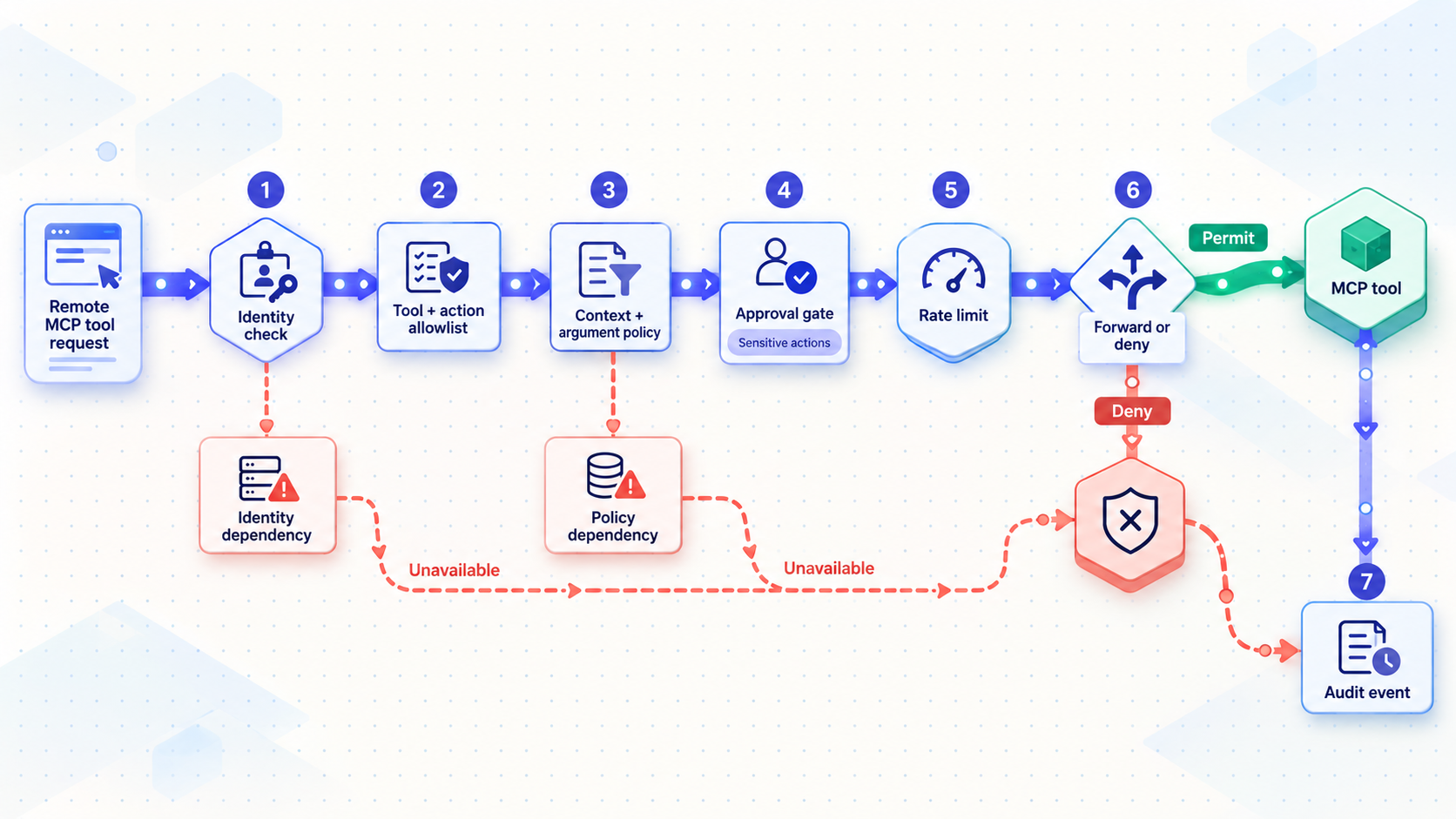
The strongest design uses several independent controls. Authentication answers who or what is making the request. Authorization answers whether that identity may invoke the requested capability. Validation constrains how an allowed capability may be used. Approval introduces a separate decision maker for selected actions. Rate limiting bounds frequency and resource use. Audit events preserve evidence. Credential isolation limits what can be stolen or misused if a client or model session is compromised.
Establish client identity before policy evaluation
Do not authorize a request based solely on a client name, model-generated field, or unverified header. Identity must be derived from a mechanism trusted by the deployment. The exact mechanism depends on the client, transport, gateway implementation, and identity platform. It could represent an individual user, an automation workload, a managed device, or a combination of these attributes.
Normalize the verified result into a stable internal principal. Keep the original authentication context available for audit, but write policy against durable identifiers rather than mutable display names. If a human user delegates work to an agent, consider recording both the initiating user and the executing workload. This makes it possible to express rules such as “this automation may read repositories selected for its project, but production deployment still requires approval from an authorized operator.”
Use default-deny tool allowlists
A default-deny allowlist makes the gateway reject tools unless a policy explicitly grants access. This avoids accidental permission expansion when a server adds a tool or changes its tool catalog. Grants should name the server, tool, permitted principal or group, environment, and any additional conditions.
Avoid rules that allow every tool with a wildcard unless the boundary is intentionally low risk and the exception is reviewed. Broad patterns can cause a newly introduced administrative tool to become immediately available to an agent. If a server uses aliases, normalize them before evaluation and reject names that cannot be mapped unambiguously.
Validate arguments against semantic constraints
Schema validation is necessary, but it is not always sufficient. A string can be syntactically valid while naming a forbidden directory, account, database, branch, host, or environment. Combine structural validation with semantic rules that reflect the tool’s real effects.
For a file operation, canonicalize the path and verify that it remains under an approved root. For a repository action, check the repository and branch against the caller’s assigned scope. For a deployment tool, require an enumerated environment rather than accepting arbitrary destination text. For a numeric limit, enforce a safe range. For a URL or network destination, compare the normalized destination with an approved set and account for redirects or alternate representations in the downstream implementation.
Reject unknown fields when they could alter behavior. Apply size and nesting limits before expensive parsing. Preserve the original request for investigation only when doing so complies with the organization’s data-handling rules, because arguments can contain sensitive data.
Add approval gates for high-impact actions
Some valid requests should not execute immediately. A policy decision can return “approval required” for actions such as production changes, destructive database operations, secret access, external publication, account administration, or unusually broad file modifications.
An approval object should be bound to the exact normalized action. Include the principal, server, tool, validated argument digest, intended environment, policy version, creation time, expiration time, and approver. If the request changes after approval, the approval must no longer match. A generic approval such as “allow this agent for the next hour” is easier to misuse than approval of a specific operation.
Design the workflow to prevent self-approval. The client requesting an action should not be able to assert that approval occurred. Approval state must come from a trusted component, and the gateway must re-evaluate policy when execution resumes. This catches revocation, expiration, policy changes, and altered request data.
Apply rate limits at more than one dimension
A single global request limit is rarely enough. Useful dimensions include client identity, user, tool, server, session, destination, and organization. Destructive or expensive tools should have tighter limits than inexpensive reads. Concurrency controls can prevent a client from starting many long-running actions at once.
Define what happens when the limiter is unavailable. If the limit protects a critical system, silently allowing unlimited traffic is not a safe fallback. Also decide whether denied requests consume a quota, how retries are communicated, and whether queued or approved operations count at request time or execution time.
Create structured, privacy-aware audit events
Every policy decision should produce enough context to reconstruct what happened without requiring unrestricted storage of sensitive payloads. A useful event includes a timestamp, correlation identifier, authenticated principal, client or workload identifier, target server, canonical tool, decision, reason code, policy version, approval reference where applicable, and execution outcome when known.
Be deliberate about arguments and results. Full payload logging can leak credentials, personal information, source code, database values, or confidential prompts. Prefer field-level classification, selective redaction, hashes for exact approved payload binding, and metadata that supports investigation. Audit storage should have controlled access, retention rules, and protection against unauthorized alteration.
| Control | Decision question | Safe failure behavior |
|---|---|---|
| Authentication | Can the gateway verify the client or workload identity? | Reject requests with missing, expired, revoked, or unverifiable identity. |
| Tool authorization | May this principal invoke this canonical tool on this server? | Deny unless an applicable grant exists. |
| Argument validation | Are the structure, values, and requested scope permitted? | Reject malformed, ambiguous, unknown, or out-of-scope input. |
| Approval | Does this exact high-impact request have valid independent approval? | Do not execute while approval is absent, expired, or mismatched. |
| Rate limiting | Is the request within identity, tool, and destination limits? | Reject or defer according to an explicit policy, never silently remove the limit. |
| Audit pipeline | Can the required decision evidence be recorded? | For critical actions, block when mandatory audit evidence cannot be retained. |
| Downstream access | Can the gateway obtain only the credential scope required for this action? | Reject rather than substituting a broader shared credential. |
Reference architecture for policy-aware MCP ingress
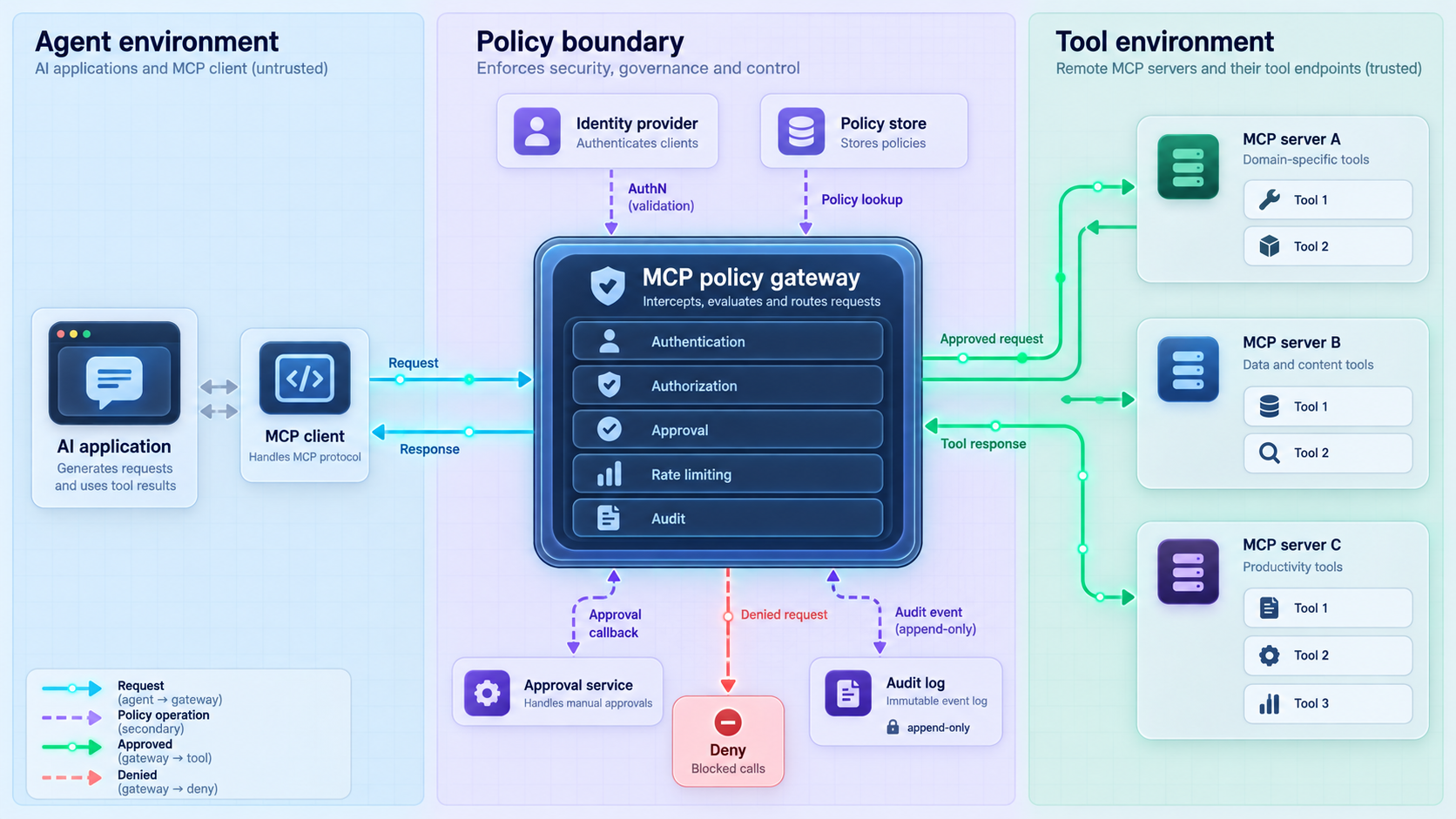
A clean design separates transport termination, identity verification, protocol handling, policy decisions, approval state, downstream routing, credential access, and audit delivery. These responsibilities may run in one deployable service at first, but their interfaces should remain explicit. That makes policy behavior testable and allows sensitive functions to be isolated later.
Request processing sequence
When a request arrives, the gateway should establish the authenticated principal before trusting application metadata. It then parses the MCP message using bounded input handling, identifies the operation, resolves the target server and canonical tool, validates the arguments, and builds a policy decision input. If policy denies the operation, the gateway returns a controlled error without forwarding the call.
If approval is required, the gateway records a pending request and returns or emits the state expected by the chosen workflow. It must not hold broad downstream credentials inside an unbounded waiting process. Once approval is supplied through a trusted channel, the gateway verifies that the approval is unexpired and bound to the unchanged action, then evaluates current policy again.
Only after a final allow decision should the gateway obtain or select downstream authorization, route the call to the designated MCP server, and record the result. Responses should also be bounded and handled as untrusted data. If a response is later placed in an AI model’s context, content-level safeguards remain important because policy enforcement does not make returned text inherently trustworthy.
Keep policy decisions deterministic and explainable
The authorization decision should not be delegated to the same language model requesting the action. Models can help users compose a request or explain a denial, but allow or deny outcomes should come from deterministic rules and trusted attributes. Policies should produce machine-readable reason codes so tests and operations do not depend on parsing a natural-language message.
The following example is an illustrative decision input, not a required MCP message and not a Localtonet configuration format:
{
  "principal": {
    "id": "workload:build-assistant",
    "user": "user:approved-operator",
    "groups": ["engineering"]
  },
  "request": {
    "server": "source-control",
    "tool": "create_change_request",
    "arguments": {
      "repository": "approved-project",
      "targetBranch": "main"
    }
  },
  "context": {
    "environment": "production",
    "sessionId": "redacted",
    "approvalId": null
  }
}
A decision response might contain an outcome such as allow, deny, or require approval, plus a reason code, matched policy version, expiry, and obligations. Obligations are additional requirements the gateway must enforce, such as redacting a result field, limiting response size, selecting a restricted credential, or writing an audit event before forwarding.
Prevent policy bypasses
The protected MCP servers should not remain independently reachable by the same untrusted clients through another route. Otherwise, the client can simply bypass the gateway. Bind backends to private interfaces where appropriate, use host firewall or network policy controls, and restrict backend authentication so only the gateway or an approved administrative path can connect.
Also account for internal delegation. A permitted tool that accepts an arbitrary command, URL, query, plugin, or nested tool name can become a policy bypass. Inventory what each tool can cause indirectly. If one broad tool can reproduce every denied capability, the allowlist provides little protection.
Blocklists can miss alternate encodings, aliases, path normalization, nested inputs, redirects, and semantically equivalent operations. Parse requests according to their expected structure, canonicalize values, allow known-safe scopes, and reject ambiguity.
Isolate credentials from models and clients
The model should not need to see a repository token, database password, cloud credential, or administrative API secret in order to request an approved tool action. Keep downstream credentials in a protected service context and release access only after authorization.
Prefer separate credentials for separate trust boundaries and permission levels. A read operation should not automatically run under the same authority as a production administration operation. Where the downstream system supports narrow or short-lived credentials, the gateway can select the least privileged option appropriate for the allowed action. Exact mechanisms depend on the protected system and should be validated against its official security model.
Choose the right gateway deployment pattern
There is no single topology for every environment. The right pattern depends on the sensitivity of tools, number of teams, need for centralized policy, failure isolation, credential boundaries, and operational maturity. Three common patterns are direct exposure, one gateway per trust boundary, and a shared policy gateway.
| Pattern | Best fit | Main advantage | Main concern |
|---|---|---|---|
| Direct MCP exposure | Low-risk, narrowly scoped development where the server itself enforces every required control | Fewer components and a short request path | No independent policy boundary; server mistakes or broad tools become directly reachable |
| Gateway per trust boundary | Teams or environments with distinct credentials, owners, and risk levels | Strong isolation and smaller failure impact | More gateways, policy deployments, monitoring, and lifecycle work |
| Shared gateway | Organizations needing consistent identity, policy, approval, and audit integration | Central governance and a common enforcement model | Greater blast radius and capacity requirements if isolation is weak |
| Hybrid model | Organizations with central standards but separate high-risk environments | Shared policy conventions with dedicated sensitive gateways | Requires clear ownership so controls do not diverge silently |
Direct exposure
Direct exposure can be reasonable when an MCP server provides robust authentication, granular authorization, strict validation, appropriate auditing, and tightly scoped tools. It can also be useful in a disposable local test environment with no sensitive data or credentials. The key is to make this an explicit risk decision, not an accidental default.
Direct exposure becomes unsuitable when several clients need different permissions, high-impact tools require external approval, one server aggregates multiple credential domains, or security teams need consistent audit decisions across servers. Adding network access does not fill those gaps.
One gateway per trust boundary
A dedicated gateway for each important boundary limits credential mixing and reduces the consequences of a policy or routing defect. Production can have stricter rules than development. A finance automation boundary can remain separate from engineering. Different teams can deploy policy changes according to their own review processes.
The tradeoff is operational duplication. Each gateway needs updates, monitoring, certificates or other transport configuration where applicable, policy distribution, backups for required state, and incident procedures. Standardized policy libraries and deployment automation can reduce drift without collapsing the boundaries.
Shared gateway
A shared gateway can centralize identity verification, approval integration, decision logging, and policy administration. It is attractive when many MCP servers need the same organizational controls. It also creates a high-value service whose outage or compromise affects multiple tools.
A shared design should isolate tenants, teams, environments, and credentials internally. Routing should be explicit rather than derived from arbitrary caller input. Capacity controls should prevent one noisy tool or client from exhausting the gateway. Policy administration should be divided so one team cannot silently authorize itself for another team’s systems.
Hybrid deployment
Many environments benefit from a hybrid. A common control framework defines identity attributes, event formats, reason codes, and review requirements, while separate gateway instances protect production, regulated, or otherwise sensitive systems. Lower-risk internal tools may use a shared gateway. This preserves central visibility without making every resource part of one runtime failure domain.
Implementation workflow for an MCP policy gateway
Gateway implementation should begin with inventory and policy, not with public exposure. The steps below describe an implementation sequence rather than commands for a particular gateway product. Exact startup commands, configuration paths, supported transports, and authentication integrations depend on the gateway software selected for the deployment.
Inventory servers, tools, effects, and owners
Record each MCP server, its owner, exposed capabilities, backend systems, credential requirements, data classification, and expected clients. Classify every tool by side effects and identify argument fields that determine resource scope. Remove or disable tools that should never be remotely callable.
Define identities and trust boundaries
Decide how clients, workloads, and users will be authenticated. Define stable principal identifiers and determine where separate gateways or policies are required because of different owners, credentials, environments, or risk levels.
Write default-deny authorization rules
Grant named principals access to named servers and tools. Add conditions for environments, repositories, paths, accounts, or other resource boundaries. Treat new tools as denied until they have been reviewed and explicitly added.
Implement parsing and argument validation
Enforce message size, structure, required fields, permitted values, and semantic scope. Canonicalize identifiers before policy evaluation. Reject unknown or ambiguous targets and ensure validation occurs before any downstream side effect.
Connect approval, rate-limit, and audit services
Bind approvals to exact normalized requests, define expiration and re-evaluation behavior, apply limits across appropriate identity and tool dimensions, and emit structured decision events with sensitive fields redacted.
Isolate backends and downstream credentials
Prevent untrusted clients from reaching MCP servers around the gateway. Store backend credentials outside the model context, separate credentials by permission and trust boundary, and ensure the gateway uses only the authority needed for an allowed action.
Test locally with safe fixtures
Verify allowed, denied, malformed, approval-required, rate-limited, revoked, and dependency-failure cases against non-production fixtures. Confirm that denied operations never reach the backend and that audit events do not disclose prohibited secrets.
Expose the gateway only after controls pass
Add remote connectivity after local policy behavior is correct. Keep backend MCP servers private, publish only the intended gateway listener, and repeat the same tests through the remote path before approving wider use.
Design explicit failure modes
“Fail closed” should be translated into component-specific behavior. If identity verification is unavailable, reject new authenticated operations. If policy cannot be evaluated, deny protected calls rather than using an indefinite stale allow decision. If approval state cannot be verified, do not execute the waiting action. If a required audit event cannot be retained for a critical operation, block that operation.
Not every dependency failure needs to disable every capability. A carefully designed gateway might continue to serve low-risk operations from a short-lived, signed policy snapshot while blocking high-risk actions. Such behavior must be intentionally specified and tested. It should never emerge accidentally from broad exception handling.
“MCP policy gateway” describes an architectural role, not one universal package with standard commands, ports, file paths, or environment variables. Use the official documentation for the gateway implementation and MCP transport you select. Do not assume that examples from a different proxy or server are compatible.
Verify controls with adversarial scenarios
A successful request proves only that one path works. Security verification must demonstrate that forbidden and malformed requests fail safely, that the backend receives nothing when the gateway denies a call, and that operational evidence accurately describes the decision. Run the suite locally first and repeat it through the remote access path.
Baseline allowed request
Use a test principal with one narrow permission and call a safe fixture tool using approved arguments. Confirm the gateway resolves the expected canonical server and tool, selects the intended policy version, forwards exactly one request, and returns the expected result. Verify that the audit event contains the correct principal and correlation identifier without storing secrets unnecessarily.
Denied tool
Ask the same principal to invoke a real but unauthorized tool. The gateway should return a controlled denial, identify a non-sensitive reason code, and avoid forwarding the request. Backend telemetry should show no invocation. Repeat the test with spelling variations, aliases, letter-case changes where relevant, and encoded representations to make sure normalization cannot bypass the allowlist.
Unknown tool introduced by a server
Add a new test tool to the backend catalog without adding a policy grant. A default-deny system should keep it unavailable. This scenario catches gateways that authorize an entire server and inadvertently allow future capabilities. If clients cache tool catalogs, verify that stale metadata cannot create an authorization grant.
Malformed and out-of-scope arguments
Test missing required fields, unexpected fields, wrong data types, oversized values, excessive nesting, invalid enumerations, and duplicate or ambiguous identifiers. Then test structurally valid but forbidden values, such as an unapproved repository, production environment, parent-directory path, overly broad query, or destination outside the allowlist.
Confirm rejection happens before downstream credential acquisition and before any side effect. The audit record should indicate validation failure without echoing sensitive payload content.
Approval-required action
Submit a high-impact action and verify that the backend is not called while approval is pending. Approve the exact test request using an identity authorized to approve it. Confirm that execution succeeds only after the gateway validates the approval and re-evaluates current policy.
Then modify one argument after approval, reuse the approval for another tool, attempt self-approval, and retry after expiration. Every variation should fail. If approvals are designed for one-time use, verify that replaying the approved request does not execute it twice.
Unavailable policy or approval service
Make the policy service unreachable and verify the documented fallback. High-risk calls should not pass because of a timeout, exception, or empty response. Repeat the exercise with the approval store, identity verifier, rate limiter, credential service, and mandatory audit destination. Observe whether failures produce bounded retries rather than a resource-exhausting loop.
Revoked client
Authenticate a test client, confirm a permitted operation, then revoke its authorization or identity according to the chosen system. Verify how quickly new requests are rejected and whether existing sessions are terminated or revalidated. The expected timing depends on the identity mechanism and caching configuration, so define it explicitly rather than assuming immediate revocation.
Rate and concurrency limits
Send requests up to the permitted threshold, then exceed it. Check that limits apply to the intended principal and tool and cannot be evaded by creating many sessions or changing cosmetic request fields. Test simultaneous expensive operations. Confirm that one noisy client does not prevent unrelated authorized clients from using their own allocation unless that shared behavior is intentional.
Backend bypass
Attempt to connect directly to each protected MCP server from the untrusted client network. The connection should fail or require separate approved administration credentials. Also verify that alternate addresses, legacy listeners, development ports, and container-published ports do not expose a route around the gateway.
| Scenario | Expected gateway result | Backend evidence |
|---|---|---|
| Allowed tool and scope | Allow under the expected policy version | One matching invocation |
| Denied or newly added tool | Explicit denial | No invocation |
| Malformed arguments | Validation error before routing | No invocation |
| Out-of-scope resource | Authorization or validation denial | No invocation |
| Missing or mismatched approval | Pending or denied, never executed | No invocation |
| Unavailable policy service | Fail according to the documented closed-state policy | No protected invocation |
| Revoked identity | Reject within the defined revocation window | No new invocation |
| Rate limit exceeded | Reject or defer with a stable reason | No excess invocation |
Operate the gateway as a security control
A gateway is not finished after deployment. Tool catalogs change, client identities are added and revoked, backend permissions evolve, and new argument combinations reveal policy gaps. Operations should detect these changes before they become silent privilege expansion.
Review tool-catalog drift
Compare the current backend tool inventory with the reviewed inventory. New, removed, or changed tools should generate a review event. Changes to descriptions and schemas deserve attention because they can alter model behavior or request structure even when the tool name stays the same. Default-deny policy should prevent a new tool from becoming executable merely because it appears in discovery results.
Version and review policy
Store policy as controlled configuration with an owner, reviewer, version, test suite, and rollback procedure. Test both positive and negative cases before release. A policy change that grants access should identify the requesting owner, business purpose, affected principals, tools, environments, and expiration where temporary access is appropriate.
Emergency rules should not become permanent through neglect. Assign expiration to temporary grants and approval exceptions. Alert before expiration when continuity is required, but do not silently convert a temporary rule into an indefinite one.
Monitor decisions and outcomes
Useful signals include repeated denied tools, validation failures, approval requests outside normal patterns, high denial rates from one identity, attempts to access many servers, unusual execution frequency, and policy-service errors. A denial spike can indicate malicious behavior, a broken client, a stale tool catalog, or an incorrectly deployed policy. The event should support investigation without assuming every denial is an attack.
Correlate the gateway’s allow decision with the downstream result where possible. “Allowed” means policy permitted an attempt, not that the backend completed it. Record distinct outcomes for allowed and completed, allowed and failed, denied, pending approval, expired, and rate-limited.
Prepare incident actions
Define how operators revoke a client, disable one tool, isolate one backend, stop remote connectivity, invalidate pending approvals, rotate downstream credentials, and preserve audit evidence. These controls should be granular. A problem with one high-risk tool should not require deleting unrelated evidence or disabling every low-risk integration unless the situation warrants it.
Test incident procedures. Confirm that revocation reaches all gateway instances, caches expire as intended, and queued requests do not execute after a principal loses access. After an incident, compare gateway events with backend records to identify actions that completed and those that were only requested.
Tool arguments and responses can contain credentials, personal data, proprietary code, and sensitive operational details. Redact or omit unnecessary values, tightly control access to event storage, and define retention according to the organization’s requirements.
Connect a local MCP gateway with Localtonet
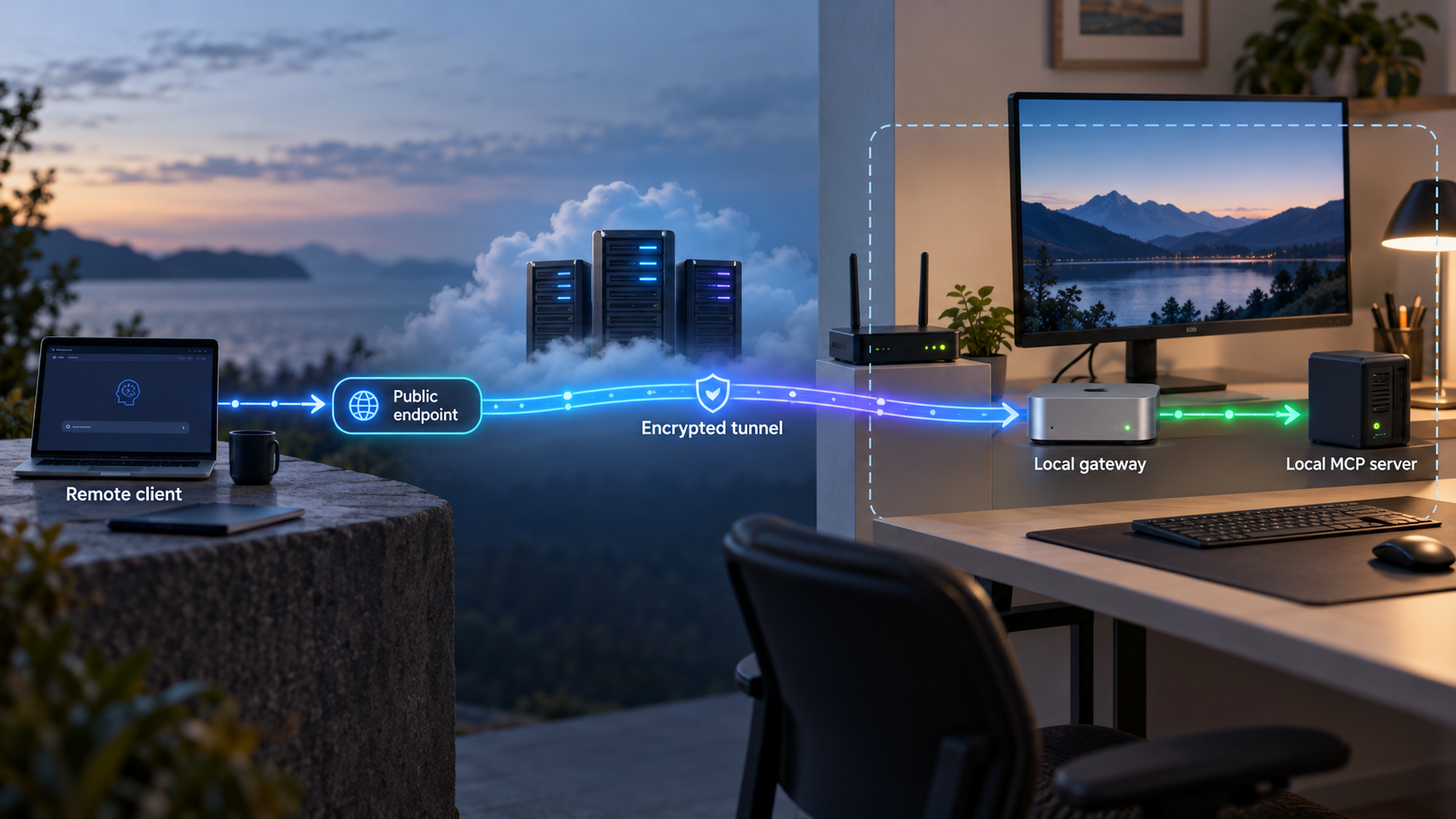
Once the gateway works locally, Localtonet can provide the public connection to the endpoint without inbound router port forwarding, firewall changes, VPN setup, or a public IP address. Our client application establishes an outbound connection from the device to a Localtonet relay server. The resulting tunnel provides a public URL or public host and port, depending on the selected tunnel type.
Localtonet supports an MCP Gateway tunnel for exposing a locally running McpNet Gateway. An HTTP tunnel may also be relevant when the selected gateway presents a compatible local HTTP endpoint. Confirm the current naming and availability in our dashboard before documenting or automating a specific deployment, because MCP Gateway naming is not yet listed in the main Localtonet documents navigation.
The Localtonet integration should remain downstream of the policy design. The public path should terminate at the gateway’s intended listener, not at each protected MCP server. The device running our client must be able to reach that listener. Keep backend services inaccessible through separate public routes unless those routes are deliberately governed.
Install and run the Localtonet client
Run our client on the device that hosts the policy gateway or on a device that can reach the gateway’s local listener. Use the current Localtonet installation instructions for the operating system rather than copying unverified commands.
Authenticate or select the device
Use the device-specific Localtonet authentication token through the supported product workflow. Treat the token as a secret. Never place it in article examples, source control, client-visible configuration, or shared logs.
Select an available relay server
Choose a current server or region from the Localtonet product interface. Available server codes and regions must be obtained from the current dashboard and should not be hardcoded from an old tutorial.
Create the appropriate tunnel configuration
Select the currently available MCP Gateway tunnel for a locally running McpNet Gateway, or use the suitable HTTP configuration when the gateway implementation and transport require an HTTP target. Point the tunnel only to the local IP address and port on which the reviewed policy gateway listens. Do not publish backend MCP servers as a shortcut around policy.
Start the tunnel
Creating a Localtonet tunnel does not mean it is running. Start it with the Start control, then confirm that the selected device is connected and the tunnel is active.
Verify the assigned public endpoint
Configure only an approved client to use the assigned public endpoint and repeat the gateway verification suite through that route. Stop or delete the tunnel when public connectivity is no longer required.
Our documented common workflow establishes the sequence above, but exact gateway fields, supported MCP transports, local ports, and client configuration depend on the selected MCP gateway implementation. This guide does not invent those values. Determine the local listener from the gateway’s verified configuration, test it locally, and then use that same local IP address and port as the tunnel target where the selected Localtonet tunnel type requires one.
The public endpoint remains available only while the selected Localtonet client or device is connected and the tunnel is running. That lifecycle can be useful during development or controlled access windows, but it should not be confused with an application authorization decision. A stopped tunnel removes that connectivity path. A running tunnel still requires the gateway to enforce identity and policy on every relevant operation.
With Localtonet, we can connect an approved remote client to a locally running gateway without opening an inbound router port. The gateway remains responsible for client identity, per-tool authorization, argument controls, approvals, rate limits, downstream credentials, and audit events.
For current product-specific setup information, review our guide to exposing an MCP Gateway with Localtonet. If operators want supported AI coding assistants to create, start, and stop Localtonet tunnels, the Localtonet MCP Server workflow is a separate capability. Do not confuse that tunnel-management integration with the policy gateway protecting application tools.
Frequently asked questions
What is an MCP policy gateway?
An MCP policy gateway is an application-aware enforcement point between MCP clients and MCP servers. It authenticates or receives verified client identity, evaluates tool and resource access, validates arguments, applies approval and rate-limit requirements, routes allowed requests, and records decision evidence. It is an architectural role, so exact commands and configuration depend on the software used to implement it.
Does an MCP tunnel provide per-tool authorization?
No. A tunnel provides network connectivity to the configured local endpoint. Tool-level authorization requires an application layer that understands the relevant operation, verified principal, arguments, resource scope, and policy. Place that enforcement in the gateway or in an equivalently capable server-side control.
Should we use one shared MCP gateway or several gateways?
Use separate gateways where systems have materially different owners, credentials, data classifications, risk levels, or failure requirements. A shared gateway can simplify consistent identity, policy, approvals, and auditing, but it needs strong internal isolation and becomes a larger failure domain. A hybrid model often provides central standards with dedicated gateways for sensitive boundaries.
Why is a tool allowlist not enough?
A permitted tool can still be dangerous when arguments select an unauthorized repository, path, database, environment, account, or destination. Some tools also expose multiple operating modes with different effects. Combine tool allowlists with semantic argument validation, resource scope, approval requirements, rate limits, and least-privileged downstream credentials.
What should happen when the policy service is unavailable?
Protected actions should not become allowed merely because policy evaluation failed. Define an explicit fail-closed behavior. Some deployments may permit carefully classified low-risk operations using a short-lived trusted policy snapshot, while blocking high-risk actions. That exception must be intentional, bounded, observable, and tested.
How should approval gates be bound to a request?
Bind approval to the authenticated principal, canonical server and tool, normalized arguments or their cryptographic digest, target environment, policy context, creation time, expiry, and approver. Re-evaluate policy before execution. If an argument changes, the approval should no longer authorize the operation.
Should MCP tool arguments and results be logged in full?
Usually not by default. Arguments and results may contain secrets, source code, personal data, or operational details. Record enough structured metadata to explain and correlate the decision, then redact, hash, or omit sensitive fields according to the organization’s investigation and retention requirements.
Can Localtonet expose every backend MCP server through one tunnel?
The recommended policy-gateway design exposes the reviewed gateway listener and keeps backend servers private. Whether one gateway routes to several servers depends on that gateway’s verified capabilities and policy design. Do not create separate public routes to protected backends if doing so would let clients bypass the gateway.
When is the Localtonet public endpoint available?
The tunnel is available only while the selected Localtonet client or device is connected and the tunnel is running. Creating a tunnel does not start it automatically. Start it through the supported workflow, and stop or delete it when remote connectivity is no longer needed.
Connect your reviewed MCP gateway with Localtonet
Build and verify the policy boundary locally first, then use Localtonet to provide the approved remote connection without inbound router port forwarding or a public IP address.
Get Started Free →

