

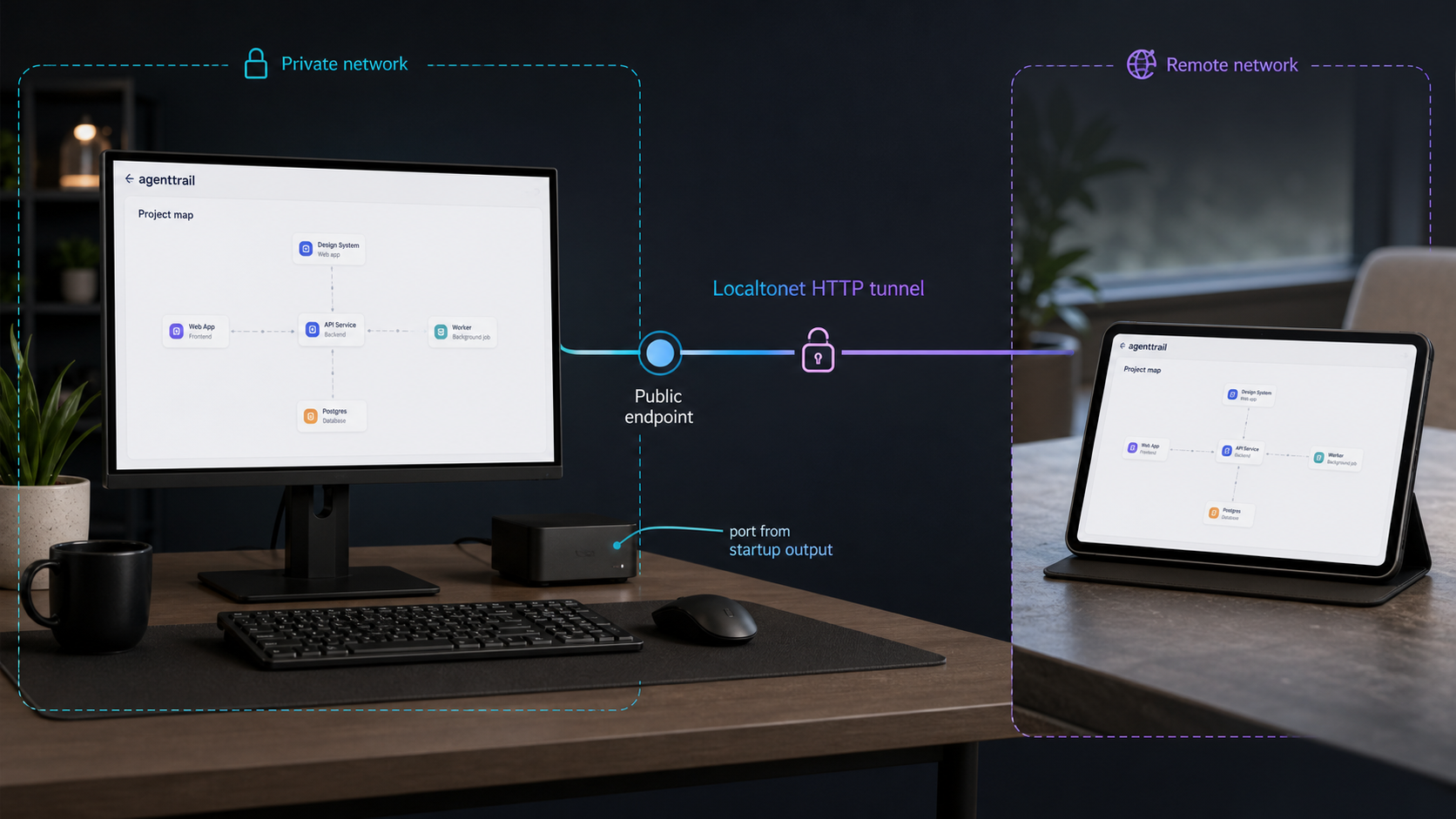
Run a live coding-agent project map locally, verify it on loopback, and expose it only when remote access is appropriate
agenttrail is a local, open-source observability dashboard that maps plans, tool activity, file changes, and progress across AI-assisted coding work. This guide installs the project with its documented npx workflow, explains the optional repository initialization, verifies the browser dashboard without guessing its port, and covers routine startup and troubleshooting. After the local board works, we configure a Localtonet HTTP tunnel as a separate remote-access step. Because the dashboard can reveal repository structure and agent activity, we also explain the security decisions that should come before public exposure.
📋 What's in this guide
What this agenttrail project does
Several unrelated projects use names such as agenttrail or AgentTrail. This tutorial covers the sodiumsun/agenttrail project: an infinite-canvas project map for AI coding agents. It is not the similarly named multi-profile conversation-history viewer, Python audit-logging package, or an agent audit-trail specification. Confirm that the repository documentation describes a live project map and the command npx agenttrail before following the instructions below.
The project focuses on repository-level coding-agent observability. Rather than presenting only a transcript, it combines declared work with observed filesystem activity. A plan represents what an agent says it intends to do, while the repository watcher shows which files are actually changing. Comparing those signals can help a developer notice that an agent has moved to another component, revisited work marked complete, or stopped making visible progress.
PLAN.md convention connects tasks and statuses to concrete repository components.
127.0.0.1, and do not require an agenttrail account or cloud service.
The dashboard can work without a plan file. In that state, the live repository tree, activity signals, and supported run cards remain useful. The component map becomes richer after a coding agent creates and maintains the project plan. This means it is reasonable to start the dashboard first, inspect its basic behavior, and decide later whether to initialize the full convention.
agenttrail helps you inspect work that is happening in a repository. It does not approve commands, block unsafe actions, replace code review, or enforce repository permissions. Continue using normal source-control review, sandboxing, least privilege, and coding-agent permission controls.
Prerequisites and deployment decisions
Run agenttrail on the computer that contains the repository you want to observe. The process needs to read that repository and watch local file activity. Running it on an unrelated server would not provide access to files that exist only on a developer workstation unless those files were separately made available, which is outside this guide.
The documented launch path uses npx. You therefore need a functioning Node.js toolchain that includes npx, plus terminal access to the repository. The available project evidence does not specify a minimum Node.js version, so this guide does not invent one. If npx is absent or rejects the package because of a runtime requirement, install a currently supported Node.js release using the method appropriate for your operating system, then follow any explicit version message printed by the package.
Before starting, confirm the following:
- You know the exact local path of the repository to monitor.
- You can open a terminal and change into that repository.
npxis available in the same shell that will run agenttrail.- You understand that optional initialization changes repository-local files.
- You can keep the terminal process running while using the board.
- For remote access, you can install and run our Localtonet client on the same device as agenttrail.
Keeping the Localtonet client on the same computer is important in this workflow. agenttrail binds to 127.0.0.1, which is the loopback interface. A Localtonet client on another computer cannot reach the first computer's loopback address merely because the computers share a LAN. Running both processes on the same host lets our client connect to the exact loopback endpoint displayed by agenttrail.
Decide whether you need initialization
A basic launch and a repository initialization solve different problems. The launch command starts the local board and repository watcher. The optional initialization command adds conventions and integrations that provide a fuller component map. Start with the least invasive option when evaluating the project, especially in a repository with strict controls around instruction files and local hooks.
| Action | Use it when | Documented effect |
|---|---|---|
npx agenttrail |
You want to start observing a repository | Starts the local board, opens it in a browser, and watches the current repository. |
Use the board without PLAN.md |
You want file activity and available run information without adopting the planning convention | The live tree and activity information work, while the full component map waits for a plan. |
npx agenttrail init |
You want the documented plan convention and optional local integration | Creates a starter plan, updates agent instruction files, adds a local ignore entry, and installs local Claude Code hooks. |
npx agenttrail up |
You have previously run boards and want to relaunch them after a reboot | Relaunches the boards agenttrail knows from prior use. |
npx agenttrail autostart |
You intentionally want a repository board to start at login | Configures that repository's board for login startup and self-healing behavior. |
The documented initialization can create PLAN.md, append conventions to CLAUDE.md and AGENTS.md, add .agenttrail/ to .gitignore, and install repository-local Claude Code hooks. Review these changes with your normal version-control tools. Do not initialize an important repository blindly or commit generated changes without understanding them.
Install and start agenttrail
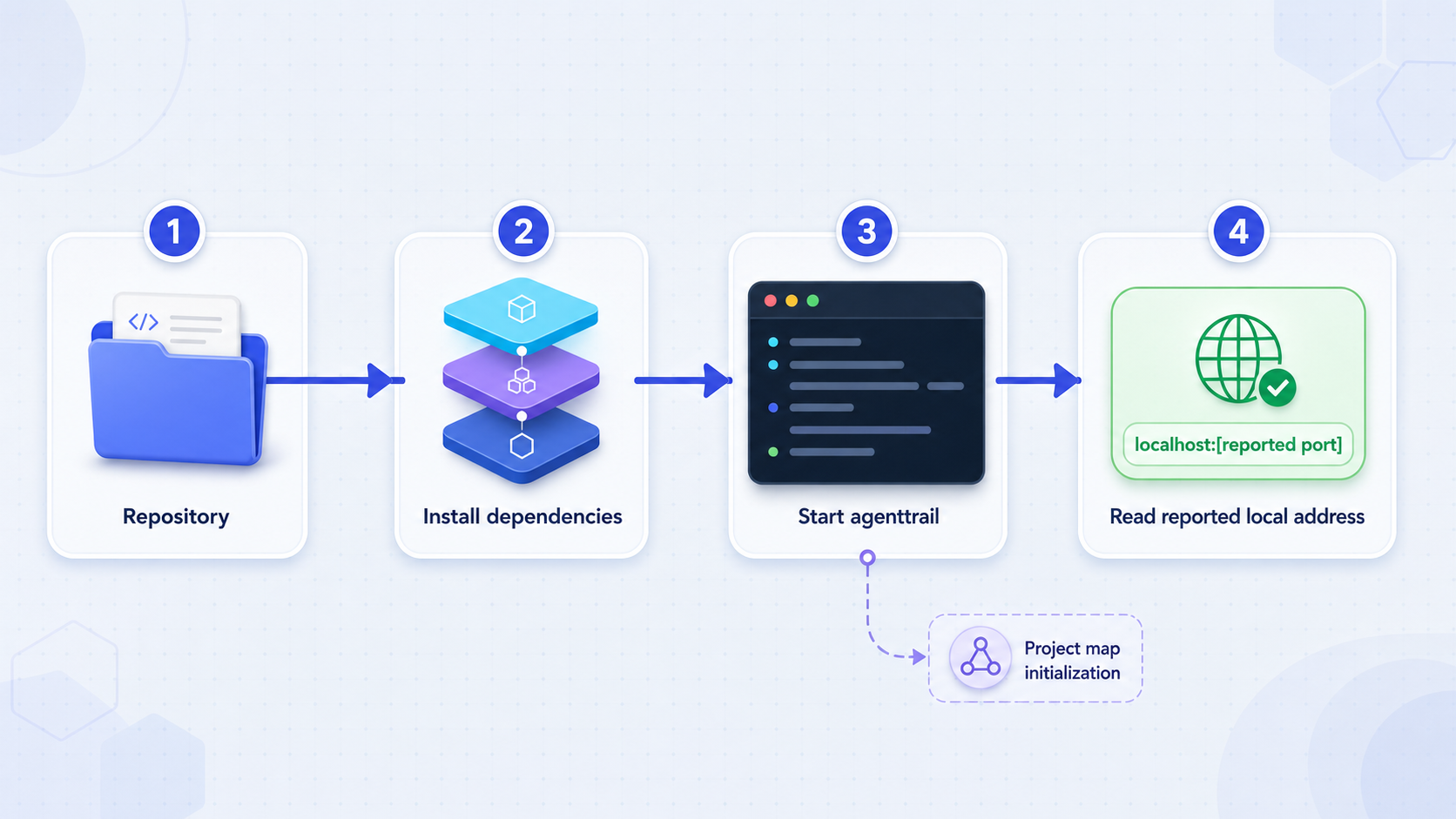
The primary workflow does not require a global agenttrail installation. Run the package through npx from the repository you want to observe. The working directory matters because agenttrail starts watching that repository.
Open a terminal on the repository host
Use the computer that stores the project and will run the coding agent. Do not begin with a Localtonet tunnel. The dashboard should be installed and verified locally first.
Change into the repository
Replace the example path with the real project directory. Check the working directory before continuing so agenttrail watches the intended repository rather than its parent, your home directory, or another project.
Launch agenttrail with npx
Run the documented launch command. Allow the package process to start, keep the terminal open, and read its output instead of assuming a port.
Use the browser board
agenttrail should open the live board in a browser. If automatic opening is unavailable, copy the complete local URL printed in the terminal and open it manually on the same computer.
A typical shell sequence is:
cd /path/to/your-repository
npx agenttrail
The repository path above is intentionally a placeholder. Use an existing project directory. Do not copy it literally unless that path actually exists on your machine.
On the first run, npx may need to retrieve the package before executing it. Read any package-manager confirmation and verify that it names the expected agenttrail package. Once started, leave the process running. Closing its terminal, ending the process, logging out without an autostart arrangement, or shutting down the host can make the board unavailable.
The evidence for this exact agenttrail project confirms a browser dashboard on 127.0.0.1, but it does not establish a fixed port in the documented launch excerpt. Use the complete URL shown by the running process or opened by agenttrail. Record the scheme, host, and port exactly. A port associated with another similarly named project is not valid evidence for this one.
Initialize the optional project map
If the uninitialized board provides enough visibility, you can stop here and continue to local verification. Initialization is optional. Use it when you want agenttrail's component map, stable task identifiers, dependencies, statuses, and agent-maintained planning convention.
From the same repository, run:
npx agenttrail init
The documented initialization performs several repository-local actions. It creates a starter PLAN.md, appends the convention to the project's agent instruction files, adds .agenttrail/ to .gitignore, and installs additive local Claude Code hooks. The hooks are stored in the repository-local .claude/settings.local.json file. They relay supported events to the local daemon.
After initialization, the board can offer a backfill prompt. Use the board's Copy backfill prompt action and paste that prompt into your coding agent only after reviewing it. The intended workflow asks the agent to study the code, then Git history, then planning prose, and use that information to describe the repository as a manageable set of real components with dependencies and verifiable task states.
The plan convention uses Markdown. Components can have stable identifiers, file patterns, dependency relationships, links, owner information, and task states. The documented task markers include working, done, and stuck states. File patterns connect observed writes to the relevant component, allowing the map to compare the declared plan with current repository activity.
Inspect what initialization changed
Use your normal source-control status and diff workflow immediately after initialization. The exact version-control commands depend on the repository's tooling, but for a Git repository the standard inspection commands are:
git status
git diff
Review the new plan, changes to instruction files, the ignore rule, and any local hook configuration. A repository-local settings file may be intentionally untracked, but that does not remove the need to understand it. If your organization restricts coding-agent hooks or changes to instruction files, obtain approval before retaining those changes.
If you decide not to initialize, agenttrail can still show its live file tree, repository activity, and available run cards. The map appears when an agent writes the plan. Avoid adopting repository conventions merely to complete a tutorial.
Verify the local dashboard before tunneling it
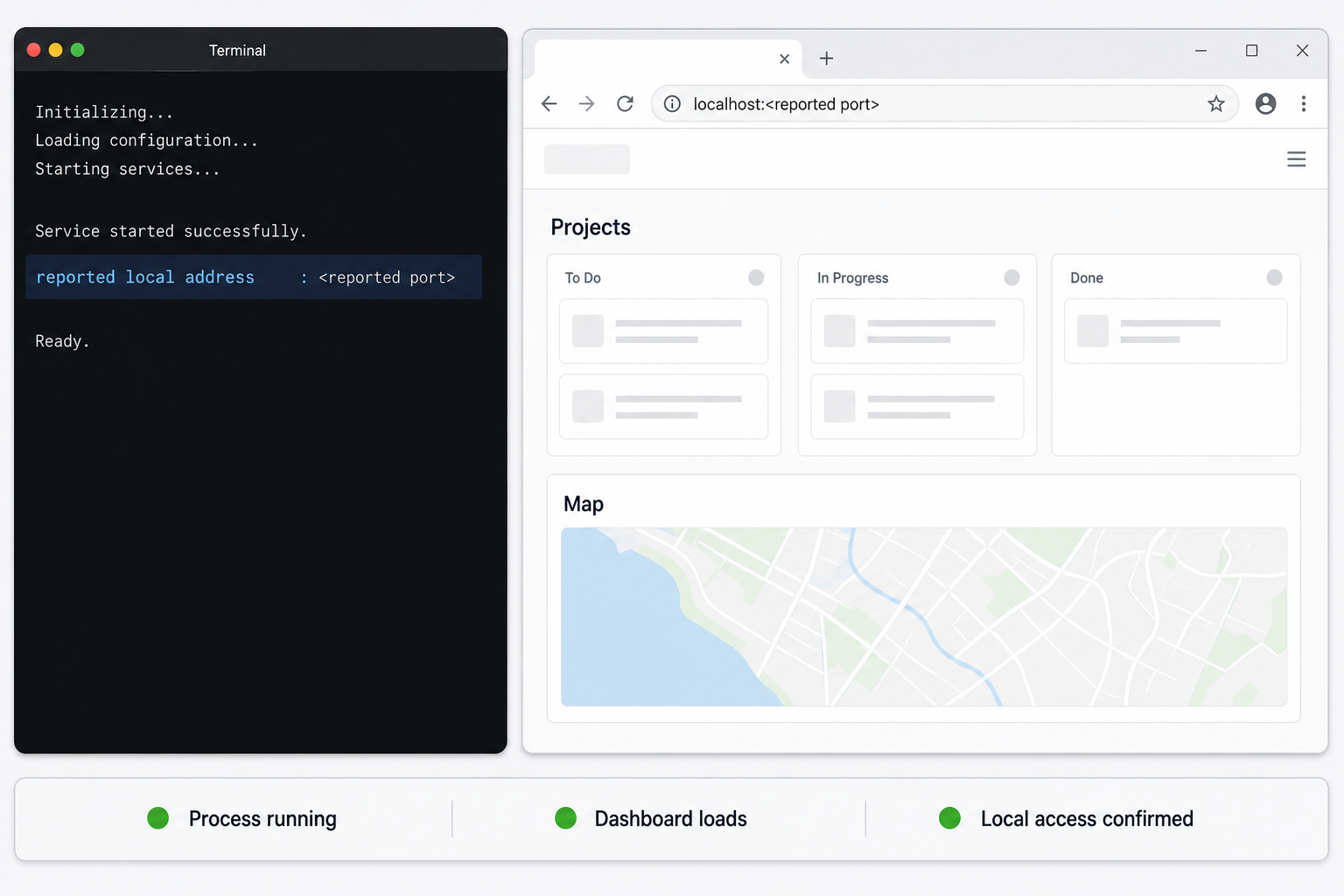
Local verification separates agenttrail problems from tunnel problems. Do not configure remote access until the board loads directly on the host. If the local endpoint is unhealthy, a tunnel can only forward that unhealthy result.
Capture the exact local URL
Read the terminal output or browser address bar. Confirm that the host is 127.0.0.1 or its loopback equivalent, and record the actual port. For the HTTP workflow in this guide, also confirm that the displayed URL uses http://.
Load the board on the same host
Open the exact URL locally. Confirm that the interface renders rather than showing a refused connection, blank page, or package error.
Confirm the intended repository
Check the project name, file tree, and visible components. If the board represents the wrong folder, stop it and relaunch from the correct repository.
Generate a harmless local change
Use an ordinary development action in a safe test repository or wait for normal coding-agent activity. Confirm that the board updates its file activity or run information. Do not modify production code solely to create a dashboard signal.
Verification should cover both initial rendering and live behavior. The board uses current repository events rather than functioning only as a static report. Depending on the coding agent, the available detail differs. Claude Code can provide richer run cards and todos through local hooks. Other agents that edit files can still produce watcher-based activity, but they should not be expected to expose the same hook-derived information.
If a plan is present, inspect whether components and file patterns correspond to the actual codebase. A generated map is an aid, not an authoritative architecture specification. Incorrect file patterns or stale plan statuses can create misleading relationships. Ask the agent to correct the plan or edit it through your approved workflow, then verify the result on the board.
Routine startup, shutdown, and repository operations
For a single active repository, the simplest operating model is to enter the project and run npx agenttrail when monitoring is needed. Keep the process attached to a terminal while evaluating the software. Stop it using the normal terminal interrupt for your environment when the board is no longer required.
After a reboot, the documented command for relaunching boards previously run with agenttrail is:
npx agenttrail upThe project also documents:
npx agenttrail autostartThis makes a repository's board start at login and provides self-healing behavior. Treat autostart as an operational choice, not a mandatory installation step. A process that starts automatically may continue observing a repository and may become reachable again if its Localtonet tunnel is also configured and started. Review startup behavior on shared workstations and sensitive development hosts.
agenttrail uses one daemon per repository and can display live boards through a shared tab switcher. Starting it in another repository adds that board to the available view, and stopping that repository's daemon removes it. This is useful for developers working across multiple codebases, but it also increases the amount of potentially sensitive project metadata visible through the interface.
What agenttrail reads and displays
The documented model is built from PLAN.md and local events. The interface can expose component names, dependencies, task status, file paths, agent identity indicators, recent tool activity, elapsed run information, and evidence that completed work is being changed again. Even when source file contents are not the main presentation, names and activity patterns can reveal internal architecture, planned features, debugging work, and development priorities.
Keep repository permissions narrow. Run the process as the ordinary developer account that already needs the project, not as a broadly privileged system account. Do not point the watcher at a parent directory containing unrelated repositories or secrets. If a board is no longer required, stop its process and stop or delete its tunnel.
Expose the verified board with a Localtonet HTTP tunnel
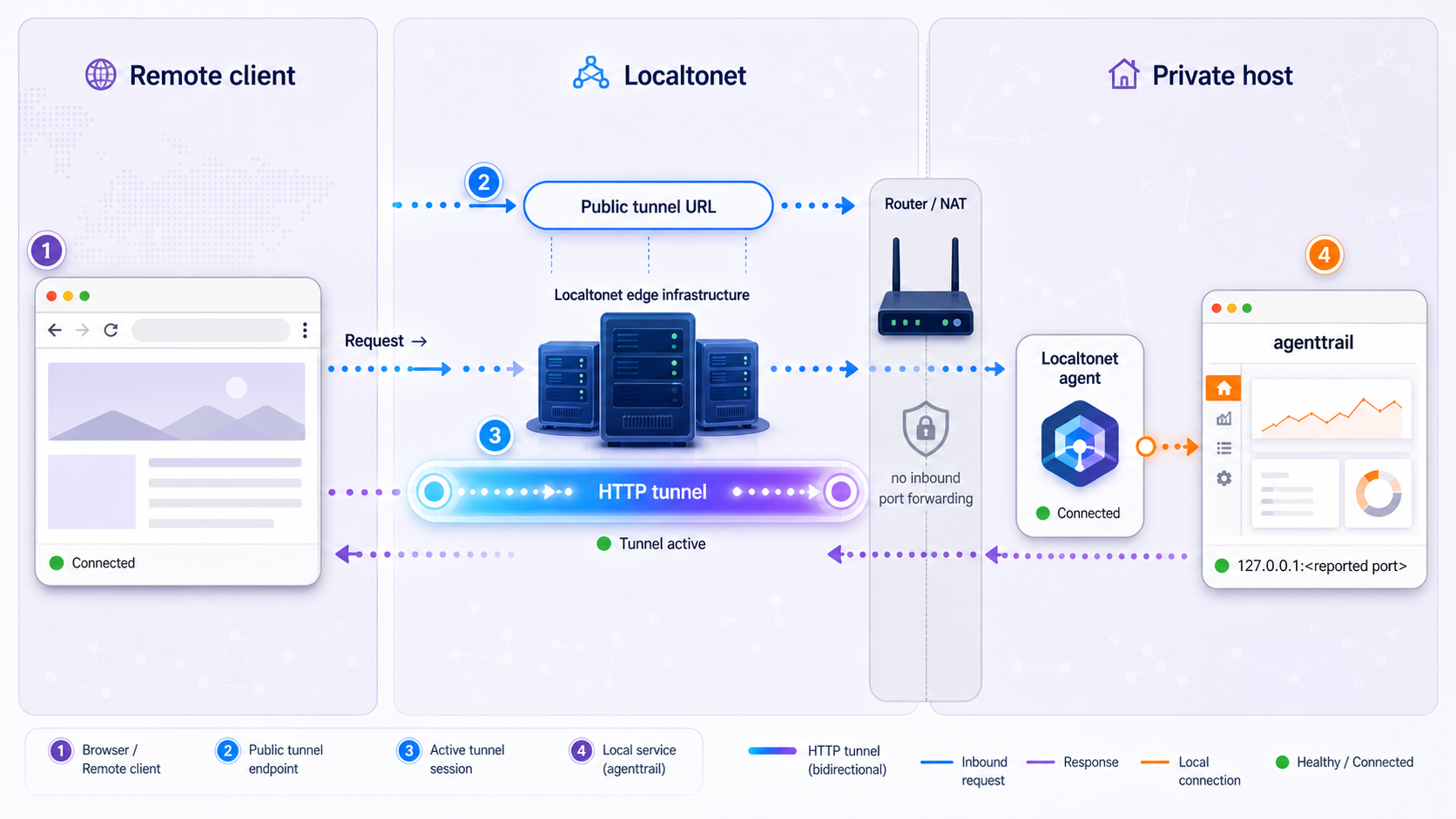
Once the board works locally and its URL begins with http://, an HTTP tunnel is the natural Localtonet tunnel family for browser access. Our client establishes an outbound connection to a Localtonet relay server, so this workflow does not require inbound router port forwarding, firewall changes, VPN setup, or a public IP address.
The Localtonet client should run on the agenttrail host because the target is bound to loopback. You will use 127.0.0.1 as the local IP and the port observed from agenttrail's actual URL. Never copy a port from a different AgentTrail project or from an unrelated tutorial.
Install and run our client on the agenttrail host
Install the Localtonet client for the host operating system and run it on the same device that is serving the loopback dashboard. Use the current installation guidance available through our platform rather than an unverified command copied from another environment.
Authenticate or select the device
Use the device-specific authentication token associated with this client. Keep the token secret, do not paste it into the article's commands, and do not reuse a guessed value.
Select an available relay server
Choose a server or region offered in the current Localtonet dashboard. Available server codes and regions can change or vary, so this guide does not hardcode one.
Create an HTTP tunnel configuration
Choose the HTTP tunnel family and set the local target to 127.0.0.1 plus the exact port printed by the running agenttrail process. Select the current HTTP process type that suits your deployment, such as a generated subdomain or another option available to your account.
Start the tunnel
Creating a tunnel does not start it. Use the dashboard's Start action and wait until the selected client is connected and the tunnel is running.
Test the assigned public URL
Open the public URL assigned by Localtonet from an authorized remote device. Confirm that the expected agenttrail board loads and that live updates continue to work. Stop the tunnel after testing if continuous access is unnecessary.
For current interface details, consult our Localtonet HTTP tunnel documentation. Exact account options, relay choices, and process types should always be taken from the current dashboard.
| Value | What to use | Why |
|---|---|---|
| Tunnel family | HTTP | The verified local URL should be a browser endpoint using http://. |
| Local IP | 127.0.0.1 |
agenttrail binds to the host's loopback interface. |
| Local port | The port printed or opened by agenttrail | The supplied evidence does not establish a fixed port for this project. |
| Client location | The same host as agenttrail | Another device cannot directly use this host's loopback endpoint. |
| Public endpoint | The URL assigned after the tunnel starts | HTTP process types serve the local content at a public HTTPS address. |
The public URL works only while agenttrail is running, the selected Localtonet client is connected, and the tunnel is started. Creating the tunnel configuration alone does not make the dashboard reachable.
Security guidance for remote dashboard access
Local-first software has a smaller network exposure when it listens only on 127.0.0.1. An HTTP tunnel intentionally changes who can reach that service. It does not change agenttrail's internal authorization model, redact project information, or turn the dashboard into a security control.
The available agenttrail documentation does not establish built-in user authentication for this dashboard. It also does not establish role-based permissions for remote viewers. Do not assume that possession of an obscure public URL is sufficient authorization. Before creating a tunnel, assess whether your current Localtonet configuration and surrounding access controls are appropriate for the repository data that will be visible.
The interface may reveal repository names, paths, components, dependencies, planned tasks, agent progress, tool activity, and recent file changes. Do not expose it publicly for convenience when the same objective can be met through temporary, authorized access. Never post its public URL in a public issue, chat room, screenshot, or documentation page.
Apply these practices:
- Use the tunnel only for people who are authorized to inspect the underlying repository activity.
- Prefer temporary access. Start the tunnel when needed and stop it after the remote session.
- Keep the Localtonet device token private and rotate or replace credentials according to your operational policy if exposure is suspected.
- Run agenttrail and our client with the minimum host privileges they need.
- Verify the repository before sharing the endpoint so a similarly named or neighboring project is not exposed accidentally.
- Do not treat HTTPS delivery at the tunnel edge as a substitute for application authorization.
- Review agenttrail initialization changes and local hooks before using the board with confidential code.
- Stop or delete obsolete tunnel configurations rather than leaving forgotten entry points.
If your organization requires authenticated access, centralized authorization, audit controls, or strict restrictions on source-code metadata, validate those requirements before exposing this dashboard. The evidence supplied for this tutorial does not establish that agenttrail itself satisfies such controls, and we should not imply that an HTTP tunnel adds application features the local service does not have.
Troubleshooting agenttrail and the tunnel
npx is not found
The documented quick start depends on npx. Confirm that Node.js and its package tooling are installed and available in the current shell. Open a new terminal after installation if your environment path changed. Because the project evidence does not state a minimum Node.js version, rely on a package error or the current project documentation for any exact version requirement.
The wrong repository appears
Stop the process, change into the exact repository directory, and run npx agenttrail again. The launch location determines what agenttrail watches. Avoid starting it from a broad directory containing several unrelated projects.
The browser does not open automatically
Automatic browser launch may not work on a headless host, remote shell, or constrained desktop session. Read the terminal output and open the complete local URL manually on the same host. Do not substitute an assumed port. If no URL appears, inspect the terminal for startup or package errors before configuring Localtonet.
The board loads but has no component map
This is expected when the repository has no PLAN.md following the agenttrail convention. The live tree and activity features can work without it. If you want the richer map, run npx agenttrail init, review its repository changes, and use the board's backfill prompt with an approved coding agent.
File changes do not appear
Confirm that the daemon is still running and watching the intended repository. Generate or wait for a normal change inside that repository, then inspect the board. Hook-rich run information is not identical across agents. Claude Code has documented local hooks, while Codex, Cursor, and other editors may primarily appear through file-watcher activity.
The local board works but the public URL fails
Verify the chain from the inside out:
- Reload the exact loopback URL on the agenttrail host.
- Confirm that agenttrail is still running.
- Confirm that the Localtonet client on that same host is connected.
- Check that the tunnel target uses
127.0.0.1and the currently observed port. - Confirm that the tunnel was started, not merely created.
- Use the currently assigned public URL.
If agenttrail chose a different port after restart, update the tunnel's local target to match the new URL before testing again. The evidence does not guarantee that the port remains fixed, so verification after each relevant restart is safer than assuming persistence.
The public page opens but live information is stale
Compare the public page with the local page. If both are stale, investigate agenttrail, its repository watcher, and the coding-agent integration. If the local board updates but the public board does not, restart the remote browser session and recheck that it is using the active tunnel URL. Avoid changing multiple components at once because that makes it harder to isolate the failure.
The tunnel stopped after a reboot
agenttrail, the Localtonet client, and the tunnel each have their own lifecycle. The documented npx agenttrail up command relaunches known boards, while npx agenttrail autostart configures a repository board for login startup. Those commands do not themselves prove that our client is connected or that a Localtonet tunnel has been started. Verify each layer separately after reboot.
Frequently asked questions
Does agenttrail require a global installation?
No global agenttrail installation is required for the documented workflow. Change into the repository and run npx agenttrail. You still need a working Node.js toolchain that provides npx.
What port does agenttrail use?
The evidence for the agenttrail project covered here does not establish a fixed port. Use the complete local URL printed by the running process or opened in the browser. Do not borrow a port from another project with the same or a similar name.
Does agenttrail work without PLAN.md?
Yes. The live file tree, activity state, and available run cards work without a plan. The richer component map appears when a coding agent writes a plan using the project convention.
What does agenttrail init change?
The documented initialization creates a starter PLAN.md, appends the convention to CLAUDE.md and AGENTS.md, adds .agenttrail/ to .gitignore, and installs repository-local Claude Code hooks. Review all resulting changes before retaining or committing them.
Can I run the Localtonet client on another device?
Not for the loopback target described here. agenttrail binds to 127.0.0.1, and loopback is local to each device. Run our client on the same host so it can reach agenttrail at 127.0.0.1 and the observed port.
Does a Localtonet HTTP tunnel make agenttrail authenticated?
A tunnel publishes the reachable local HTTP service through a public URL. It does not create application-level accounts, roles, or authorization inside agenttrail. The available project evidence does not establish built-in dashboard authentication, so assess access controls carefully before exposure.
Will the public URL work when agenttrail is stopped?
No. agenttrail must be running, the Localtonet client must be connected, and the tunnel must be started. Stopping any required layer makes the board unavailable through the tunnel.
Does agenttrail control or send prompts to my coding agent?
No. Its documented role is to observe and draw the project map. Initialization can provide an optional backfill prompt for you to review and paste into an agent, but the running dashboard does not independently send prompts or edit your source code.
Access your verified agenttrail board with Localtonet
Start agenttrail locally, capture its real loopback port, and verify the board before creating an HTTP tunnel. When remote access is justified, run our client on the same host, start the tunnel, and keep the endpoint available only as long as authorized users need it.
Get Started Free →

