

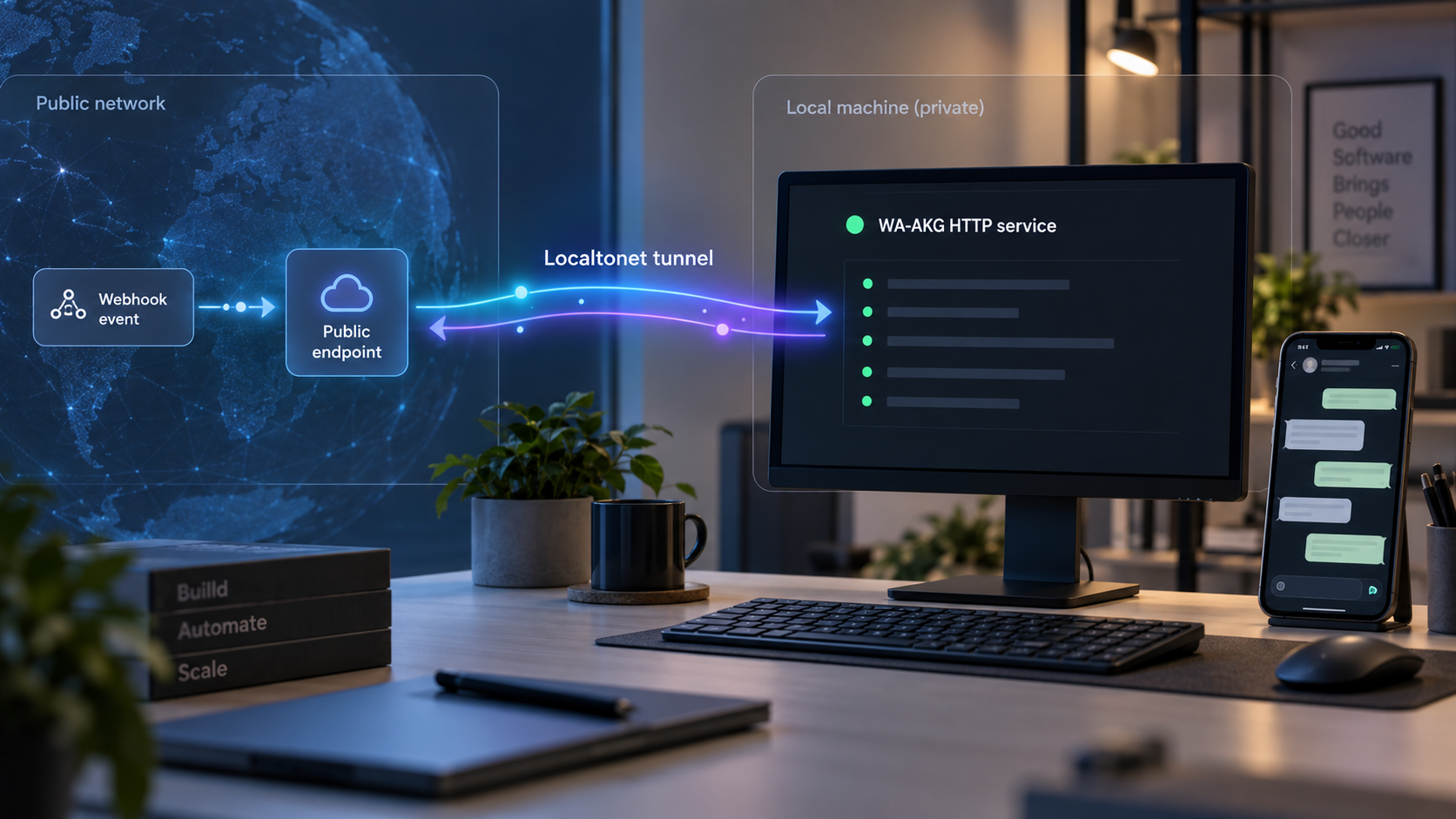
Build a working WhatsApp gateway locally, verify its API, and then make only the required HTTP service reachable
WA-AKG is a self-hosted WhatsApp gateway, dashboard, and automation application built with Next.js, Baileys, and Prisma. This guide walks through its documented Node.js installation, production operation with PM2, the alternative Docker Compose approach, local verification, and webhook concepts. After WA-AKG works on the host, we show how to connect its configured HTTP port to a public HTTPS address with Localtonet, without inbound router port forwarding, firewall changes, a VPN, or a public IP address.
📋 What's in this guide
Understand the WA-AKG and Localtonet workflow
WA-AKG turns a self-hosted application into a programmable WhatsApp gateway. Its documented capabilities include a browser dashboard, multiple WhatsApp sessions, a REST API, Swagger UI, scheduled messaging, auto-replies, broadcast workflows, contact management, and event forwarding through webhooks. The application uses Prisma for database access and supports MySQL or PostgreSQL in its standard installation.
The important deployment boundary is the WA-AKG HTTP listener. The dashboard, API routes, and Swagger interface are served through that listener. WA-AKG's documentation includes examples using http://localhost:3000, but the application's port is controlled by its PORT environment variable. Port 3000 is therefore an example, not a production value that should be assumed for every installation.
We recommend treating installation and remote connectivity as two separate stages. First, install WA-AKG, connect it to its database, create an administrator, start the process, and confirm that the dashboard and /docs route work locally. Only then should you create a Localtonet HTTP tunnel targeting the verified local IP address and port.
Localtonet does not need an inbound router rule. Our client runs on a device that can reach WA-AKG and establishes an outbound connection to a Localtonet relay server. Once the HTTP tunnel is started, requests to its assigned public HTTPS address are forwarded to the configured local target. The tunnel remains available only while the selected Localtonet client is connected and the tunnel is running.
WA-AKG can forward WhatsApp events to an external webhook receiver. Exposing WA-AKG with Localtonet makes the WA-AKG dashboard and API reachable from outside the local network. If the webhook receiver is a different local application, that receiver may need its own HTTP tunnel. Pointing a tunnel at WA-AKG does not automatically expose another process listening on a different port.
Prerequisites and deployment decisions
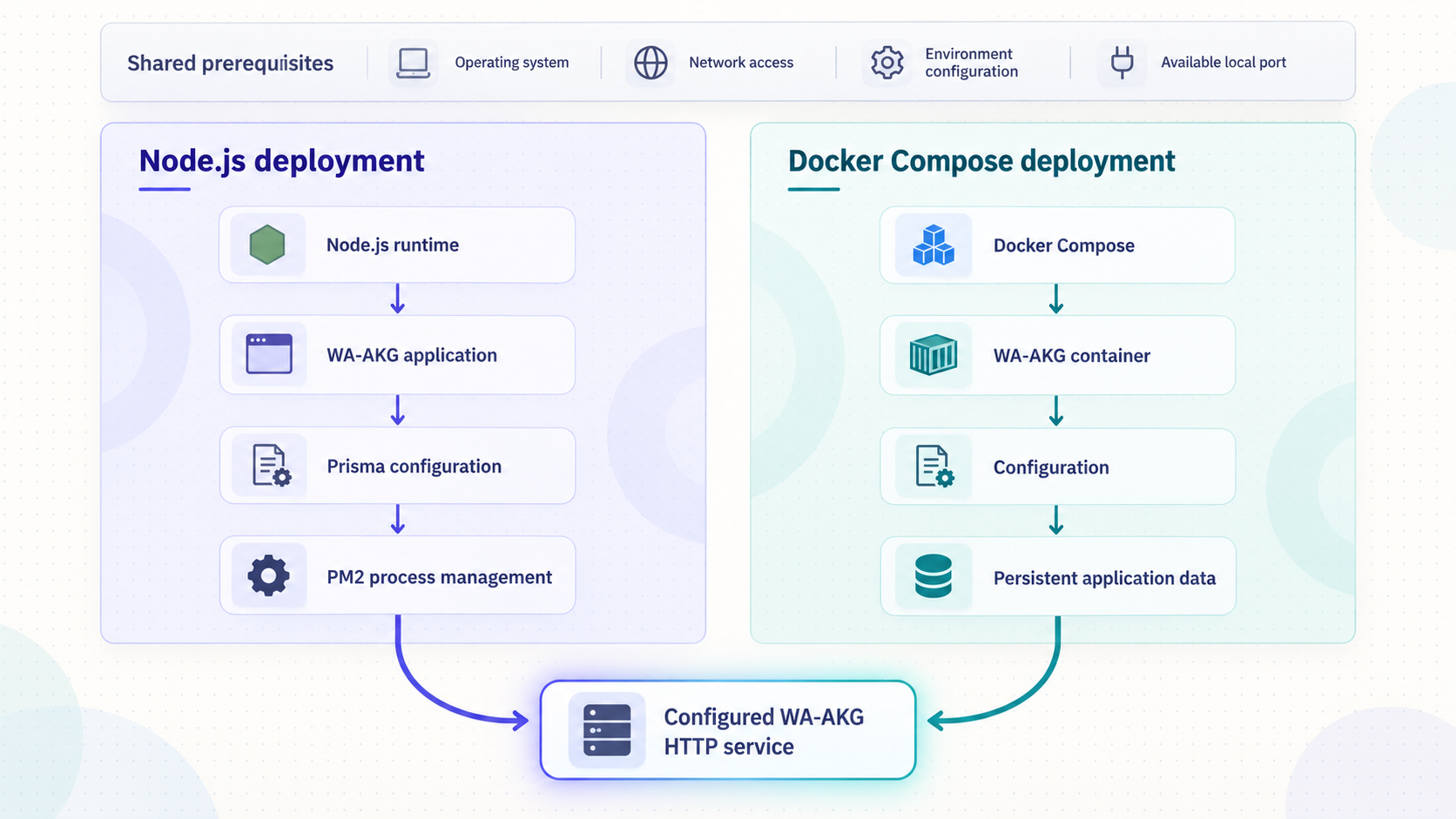
For the standard installation, the WA-AKG project documents Node.js 20 or newer, with Node.js 22 recommended, Git, and either MySQL or PostgreSQL. Its recommended production workflow also uses PM2, installed globally with npm. You need shell access to the host, permission to install packages, and a database account capable of using the database identified by DATABASE_URL.
Before beginning, decide where each component will run. A straightforward deployment places WA-AKG and the Localtonet client on the same machine, with the database either local or reachable over a private network. Localtonet can also run on another device, provided that device can reach WA-AKG's listening IP address and port. In that arrangement, do not configure the tunnel target as 127.0.0.1 unless WA-AKG actually runs on the Localtonet client device.
| Component | Documented requirement or role | What to verify |
|---|---|---|
| Node.js | Version 20 or newer; version 22 is recommended by the project | The active shell resolves the intended Node.js and npm versions |
| Git | Clones the official WA-AKG repository | The git command is available |
| MySQL or PostgreSQL | Provides the database used through Prisma | The database exists and the configured account can connect |
| PM2 | Recommended production process manager | Install it globally before using the PM2 production path |
| Docker and Docker Compose | Required only for the alternative container deployment | The Compose command is available and the host has adequate resources |
| Localtonet client | Creates the outbound connection for the public HTTP tunnel | The client device can reach the configured WA-AKG listener |
Also choose the WA-AKG listening port before production deployment. Check whether another service already occupies that port, and make sure the same value appears in the environment configuration, your local verification URL, and the Localtonet tunnel target. The WA-AKG v1.6.3 release specifically removed a hardcoded port from its PM2 configuration so that the environment configuration takes priority.
Do not deploy copied example passwords, placeholder database credentials, a predictable authentication secret, or an exposed API key. Generate deployment-specific values, store them outside source control, and restrict access to the environment file. If you used a temporary administrator password during setup, replace it before starting a public tunnel.
Install and configure WA-AKG with Node.js and Prisma
The standard installation gives you direct control over the Node.js process and database connection. Run the following steps from a shell on the intended WA-AKG host. Commands that modify the database should be run only after the environment file points to the correct database.
Clone the official repository
Clone the current WA-AKG source and enter its project directory.
git clone https://github.com/mrifqidaffaaditya/WA-AKG.git
cd WA-AKGInstall the project dependencies
Use npm in the repository directory so that dependencies are resolved from the project's committed package metadata.
npm installCreate the environment file
Copy the supplied example and edit the resulting .env file. At minimum, review the documented database URL, authentication secret, and port settings. The repository may add or revise environment variables, so inspect the supplied example from the exact version you cloned rather than copying an old environment file blindly.
cp .env.example .envSynchronize the Prisma schema
After confirming that DATABASE_URL identifies the intended MySQL or PostgreSQL database, push the project schema and generate the required Prisma client artifacts.
npm run db:pushCreate the SuperAdmin account
Run the documented account creation command with your own administrator email address and a strong, unique password. The placeholders below are intentional and must be replaced. Do not paste real credentials into logs, tickets, or shared shell transcripts.
npm run make-admin YOUR_ADMIN_EMAIL YOUR_STRONG_PASSWORDStart the development server for an initial check
Use the documented development command while validating the configuration. Keep the terminal open and review startup output for database, environment, or port errors.
npm run dev
When editing .env, treat DATABASE_URL, AUTH_SECRET, and PORT as deployment-specific settings. Do not assume the values from a tutorial match your database engine, credentials, network layout, or chosen port. The project publishes an environment example precisely so that the supported variables can remain aligned with the checked-out application version.
A successful npm run db:push confirms more than package installation. It shows that Prisma can interpret the connection string, reach the database service, authenticate, and apply the project's schema. If this command fails, fix the database problem before attempting to create the administrator or expose WA-AKG.
The documented setup uses npm run db:push. Point it at the database intended for this WA-AKG deployment, not an unrelated production database. Maintain backups appropriate to your environment before upgrades or schema-changing operations.
Run WA-AKG in production with PM2
The project recommends PM2 for production so the application can run in the background and be restarted after a crash or server reboot. WA-AKG provides both an automated script and a manual PM2 workflow. Use one production path deliberately rather than mixing commands without understanding which process PM2 is managing.
Option A: use the automated deployment script
WA-AKG includes start.sh. The documented script checks configuration, installs dependencies, synchronizes the database schema, builds production assets, and starts or reloads the application with PM2. Release v1.6.3 also documents early port-conflict checks, existing administrator verification, PM2 startup configuration, and security warnings for default environment credentials.
./start.shRun the script from the WA-AKG repository directory. Read its output rather than assuming every action succeeded. If the shell reports that the script is not executable, inspect the checked-out file and your platform's execution permissions before changing anything. The available evidence establishes the script invocation but does not define a universal permission command for every operating system and checkout method.
Option B: build and start manually
The manual path makes each production action explicit. First install PM2 globally if it is not already available:
npm install -g pm2Build WA-AKG and start it through the repository's supplied PM2 ecosystem configuration:
npm run build
pm2 start ecosystem.config.js
The project documents these routine PM2 operations:
pm2 status
pm2 logs wa-akg
pm2 stop wa-akg
pm2 restart wa-akg
To configure PM2 for startup on server boot, run:
pm2 startupPM2 prints a platform-specific command. Copy and run the command it outputs, then save the current PM2 process list:
pm2 save
Do not copy a startup command from another machine. PM2 generates it for the current operating system, user, home directory, and service manager. After configuring startup, reboot testing should include both pm2 status and a local HTTP request to WA-AKG. A process marked online is useful evidence, but the HTTP check confirms that the application is actually serving requests.
Use the Docker Compose deployment as an alternative
WA-AKG also provides a Docker Compose deployment that starts the application together with a MySQL container. This can simplify service packaging and database orchestration, but it does not remove the need to inspect credentials, secrets, persistent storage, port mappings, or the current Compose file.
The documented preparation begins by creating the environment file:
cp .env.example .env
Review the resulting configuration and the repository's current docker-compose.yml before starting containers. The supplied evidence confirms the Compose deployment and its bundled MySQL service, but it does not provide the complete current environment and startup sequence from the canonical README. For that reason, this guide does not invent additional Compose flags, container names, volumes, health checks, default administrator credentials, or port mappings.
Use the Node.js and PM2 workflow when you want the project's recommended process-manager deployment. Use the repository's current Docker Compose definition when you want WA-AKG and MySQL managed as containers. Do not run both against the same host port unless you intentionally assign different ports, and do not point two independently initialized instances at the same data without understanding the consequences.
| Deployment path | Best fit | Operational responsibility |
|---|---|---|
| Development server | Initial configuration and local testing | Keep the terminal running and do not treat the development command as the recommended production process |
| Node.js with PM2 | Recommended production workflow documented by WA-AKG | Manage Node.js, PM2, the database, updates, logs, backups, and startup behavior |
| Docker Compose | Containerized WA-AKG and MySQL deployment | Review Compose configuration, credentials, mapped ports, persistent data, container health, and upgrades |
Verify WA-AKG locally before remote access
Local verification prevents tunnel troubleshooting from masking an application problem. Confirm the configured value of PORT, then open the application from the WA-AKG host. If your configured port is 3000, the project's documented example base URL is:
http://localhost:3000
Swagger UI is documented at /docs, so the corresponding example is:
http://localhost:3000/docs
Replace 3000 in both examples if your PORT value differs. A fixed production port is not independently documented because the application honors the environment setting. If the browser does not load, check the process output or PM2 logs, confirm the port, and determine whether the application is still building, failed to connect to the database, or exited.
Verify the deployment in layers:
- Confirm the Node.js process or container remains running.
- Confirm the database service is available and WA-AKG completed its initialization.
- Open the dashboard using the configured local port.
- Open
/docsand confirm that Swagger UI loads. - Sign in with the administrator account you created.
- Create or connect a WhatsApp session through the dashboard according to the project's interface.
- Use an authenticated API operation appropriate to your test environment only after reviewing its parameters in Swagger.
Swagger is particularly useful because it reflects the API exposed by the running version. WA-AKG documents routes for messaging, sessions, groups, webhooks, auto-replies, and authentication. Use the live API definition instead of assuming that an endpoint copied from an older release still has identical parameters.
Use a controlled WhatsApp account and recipient when validating message operations. Review the request in Swagger before sending it, keep API keys private, and avoid broadcast, scheduling, status, or automation tests until basic session and single-recipient behavior is understood.
Configure and test WA-AKG webhooks correctly
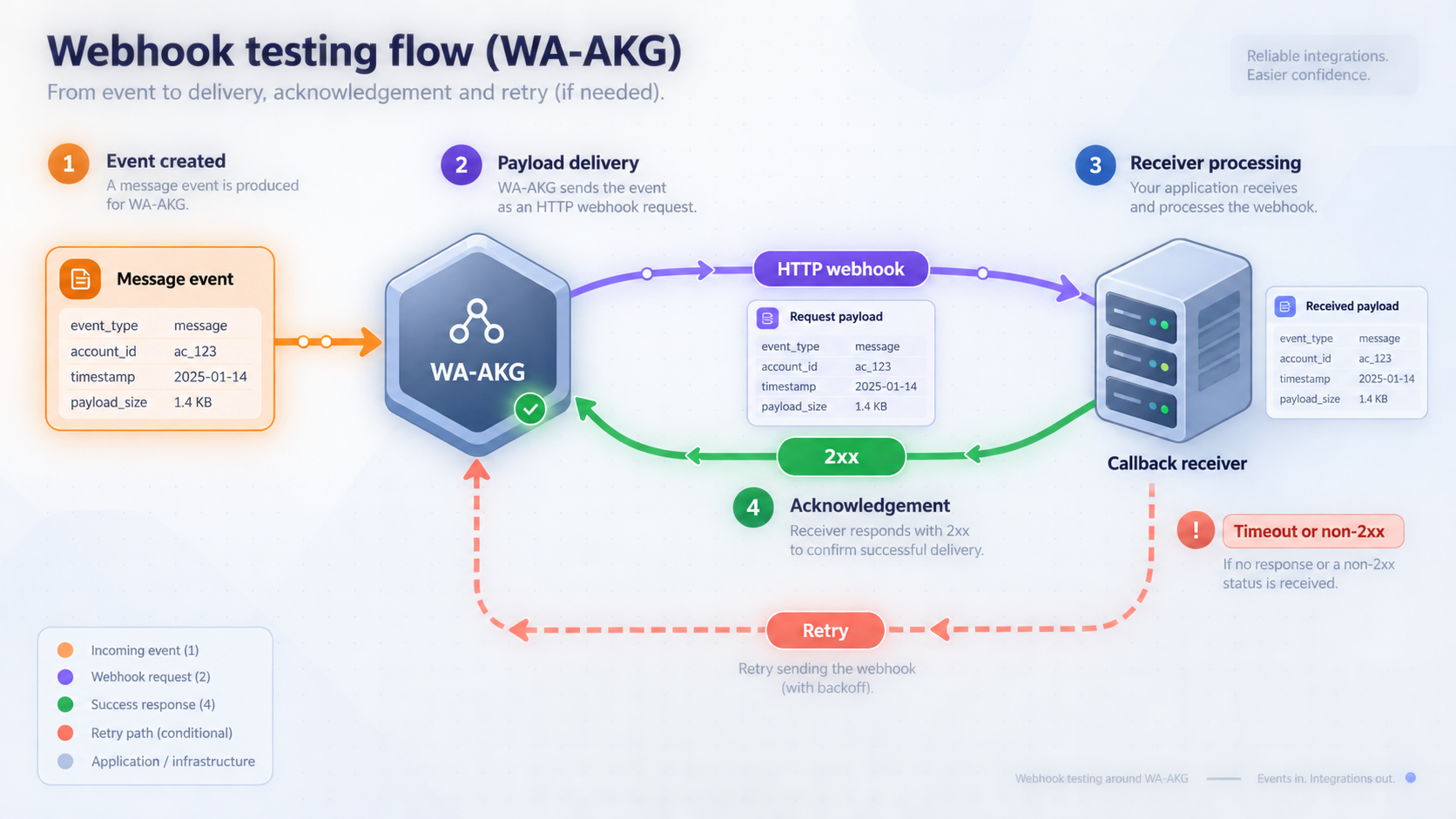
WA-AKG webhooks forward real-time events such as received messages, connection changes, status changes, and group updates to an external HTTP service. Its API documentation identifies POST /api/webhooks/{sessionId} as the route for registering event listeners. Use the Swagger interface served by your installed release to inspect the required request body, authorization, supported event names, response format, and update or deletion operations.
A typical documented event payload includes an event name, session identifier, timestamp, and event-specific data. Message events can contain identifiers, sender information, message type, content, group status, and quoted-message details. Your receiver should not assume that every event has message fields or that optional nested values are always present.
Decide which service needs the public URL
There are two common integration patterns:
| Goal | Public target | Localtonet placement |
|---|---|---|
| Access the WA-AKG dashboard or REST API remotely | The WA-AKG HTTP listener | Create an HTTP tunnel targeting WA-AKG's configured port |
| Allow an external platform to call a WA-AKG API route | The WA-AKG HTTP listener | Use the WA-AKG tunnel URL plus the required API path |
| Let WA-AKG send events to a webhook receiver running locally | The separate receiver's HTTP listener | Create a tunnel targeting the receiver's own port, then register that public callback URL in WA-AKG |
For example, suppose WA-AKG listens on one local port and an automation receiver listens on another. A Localtonet tunnel targeting WA-AKG publishes only WA-AKG. It does not route requests to the automation receiver automatically. To receive WA-AKG event callbacks at that receiver from a network where WA-AKG cannot reach it directly, create an HTTP tunnel for the receiver and use the assigned public URL as the webhook destination.
Test the receiver before registering it
A webhook receiver should accept the expected HTTP method, parse JSON, return a successful response promptly, and record enough metadata to diagnose failures without logging secrets or sensitive message content unnecessarily. Test its local route first. Then start its tunnel, test the public callback URL with a controlled request, and only after that register the callback in WA-AKG through the documented API or dashboard.
Handle duplicate delivery safely. Networked webhook systems can retry after timeouts or ambiguous failures, and a receiver should avoid turning the same event into repeated irreversible work. Where the payload provides stable event or message identifiers, use them as part of deduplication logic. Validate payload shape and event type before processing nested fields.
A secret URL alone is not a sufficient authorization design. Use the validation or authentication capabilities documented by the sending and receiving applications. Restrict accepted methods and content types, validate input, reject oversized or malformed bodies, and keep the receiver patched. The supplied evidence does not establish a specific WA-AKG webhook-signature scheme, so we do not claim or invent one here.
Expose the verified WA-AKG service with Localtonet
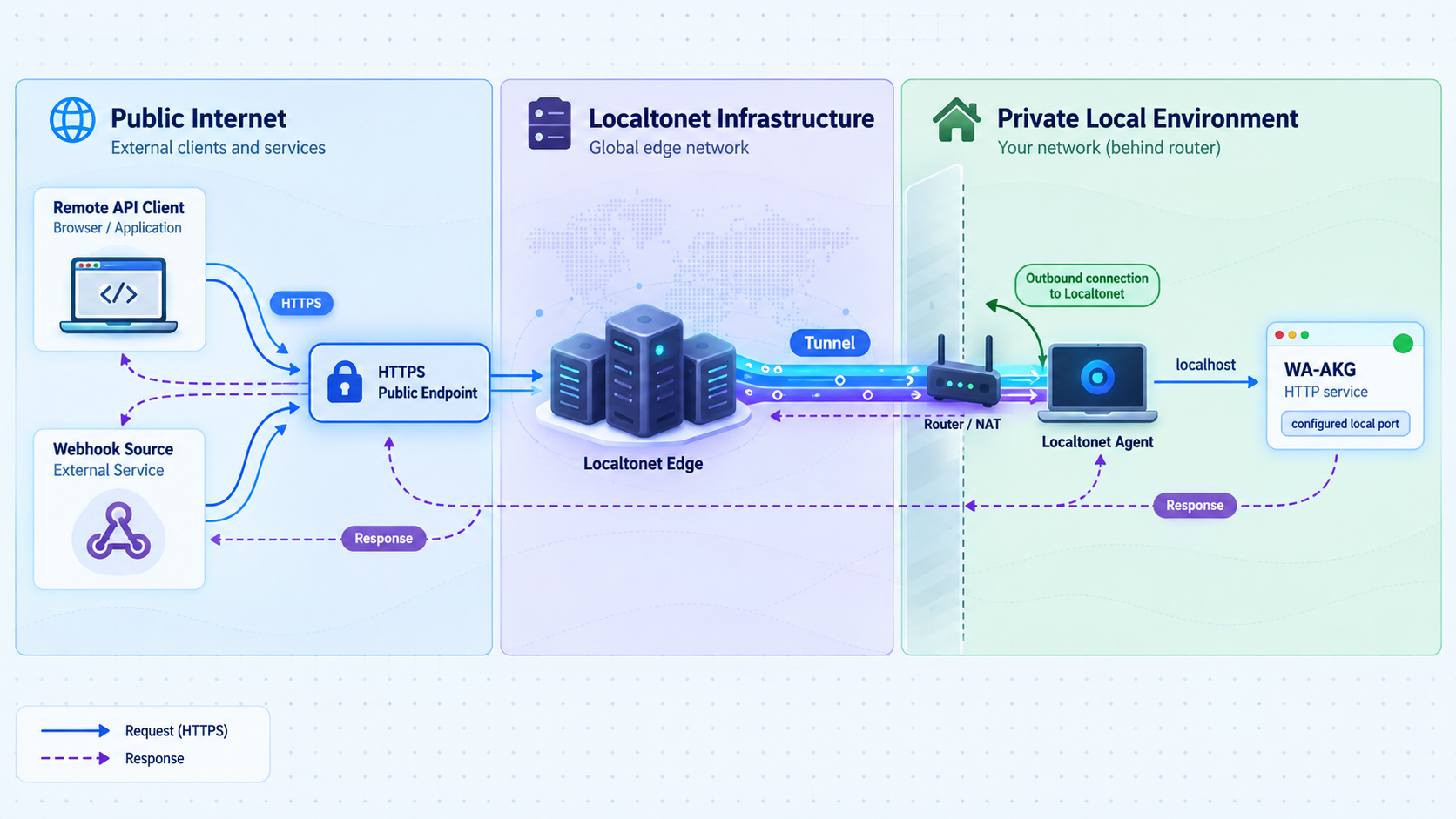
Once WA-AKG works locally, an HTTP tunnel can provide a public HTTPS address for its web service. The Localtonet client must run on the WA-AKG host or on another device that can reach it. Our client makes an outbound connection to the selected relay, so this workflow does not require inbound router port forwarding, firewall changes, VPN setup, or a public IP address.
Before creating the tunnel, write down the verified local target. If Localtonet and WA-AKG run on the same machine, this may be a loopback address plus the configured port. If they run on different devices, use an address reachable from the Localtonet client. Do not publish a guessed port merely because the WA-AKG API examples show port 3000.
Install and run the Localtonet client
Install the current Localtonet application for the operating system on the device that can reach WA-AKG. Use the current download and dashboard instructions rather than copying an unverified installation command from another release.
Authenticate the client device
Authenticate or select the device using its Localtonet token. Tokens identify client devices and must be kept private. Do not place a real token in documentation, source code, screenshots, or shared command history.
Select an available relay server
Choose a currently available server or region from the dashboard. Available values can vary, so obtain the selection from the current product interface rather than using a hardcoded server code from a tutorial.
Create an HTTP tunnel for WA-AKG
Select an HTTP tunnel and set its local target to the IP address and port where WA-AKG was verified. For HTTP tunnels, the process type can use a random subdomain, a custom subdomain where supported, or a custom domain. These options serve the target through a public HTTPS address.
Start the tunnel
Creating a tunnel does not start it. Use the Start button, confirm that the selected client is connected, and wait for the tunnel to enter its running state.
Test the assigned public address
Open the assigned public URL and test the dashboard or append /docs to verify the Swagger route. Sign-in and API authorization requirements still apply. Stop or delete the tunnel when public access is no longer required.
For the current dashboard workflow, consult our Localtonet HTTP tunnel documentation. Exact client installation commands, relay choices, domain requirements, and subscription availability can change, so the current dashboard and documentation are authoritative for those time-sensitive details.
The public URL works only while the selected Localtonet client remains connected and the tunnel is running. WA-AKG must also remain healthy on the configured target. PM2 can manage the WA-AKG process, but it does not start or supervise the Localtonet tunnel unless you have separately configured the Localtonet client through supported product controls.
Harden WA-AKG before sustained remote use
A tunnel changes reachability, not trust. Once WA-AKG has a public address, automated scanners and unauthorized users may attempt to reach it. Keep the dashboard login enabled, require API authentication on protected routes, and expose only the service that genuinely needs remote access.
Protect application and database secrets
Restrict access to .env and never commit it to source control. Use a strong AUTH_SECRET, unique database credentials, and unique administrator credentials. API keys must be handled as secrets and should not appear in browser bookmarks, query strings, public examples, frontend code, or webhook logs.
The database usually does not need its own public tunnel for this workflow. WA-AKG needs database connectivity, but remote browser and API clients need only the WA-AKG HTTP service. Keeping the database on a local or private network reduces the exposed surface.
Use least privilege for remote access
Avoid sharing administrator credentials among integrations. Use the application's documented authorization model and issue only the access needed by each workflow. Where your environment provides network restrictions, access controls, or IP filtering, combine them with application authentication rather than treating either layer as a complete replacement for the other.
Limit what webhook receivers do
Treat webhook payloads as untrusted input. Validate event types, identifiers, URLs, and nested data before using them. Do not execute commands from message content, interpolate untrusted fields into shell commands, or automatically fetch arbitrary URLs without controls. Keep event processing separate from the HTTP response path when long-running work could cause timeouts.
Plan updates and backups
Back up the database and any persistent WA-AKG session or media data relevant to your deployment before upgrades. Review release notes for schema, environment, and API changes. After an update, repeat local verification before restarting public traffic. If you use Docker, confirm that persistent data resides in the locations defined by the current Compose configuration before replacing containers.
Swagger is valuable for verification and development, but it also describes available API operations. Authentication must protect sensitive actions regardless of whether the documentation route is reachable. If WA-AKG provides a supported way to restrict documentation access in your installed release, evaluate it for production. This guide does not claim a specific switch because no such setting is established by the supplied evidence.
Troubleshoot installation, ports, tunnels, and webhook delivery
npm install fails
Confirm that the active Node.js version is 20 or newer and that npm belongs to that installation. Run the command from the cloned WA-AKG directory. Review the first meaningful error rather than only the final npm summary. Native dependency failures may also depend on the host operating system and build tools, which are not specified universally by the project evidence supplied for this guide.
npm run db:push cannot connect
Recheck DATABASE_URL, the selected database engine, hostname, port, database name, username, and password. Confirm that MySQL or PostgreSQL is running and reachable from the WA-AKG host. If the database is in a container, remember that container networking names and host networking addresses are not interchangeable.
The administrator command fails
Run it after successful database schema synchronization and from the repository directory. Use the documented argument order, with the administrator email followed by the password. If the automated script reports an existing administrator, inspect the account state rather than repeatedly creating duplicate credentials.
The configured port is already in use
Stop the conflicting process or choose another appropriate value for PORT. Restart WA-AKG after changing the environment. Then update every local test URL and the Localtonet tunnel target. The automated start.sh workflow in v1.6.3 includes an early port-conflict check, but manual deployments still require the operator to resolve the conflict.
PM2 says WA-AKG is online, but the page does not load
Review:
pm2 logs wa-akg
pm2 status
Confirm that the application completed its build and initialization, then test the configured local URL from the same host. An online process can still be waiting on a dependency, listening on a different port, or returning an application error.
The local site works, but the Localtonet URL does not
Check that the Localtonet client is connected, the tunnel is running, and the selected device is the one that can reach WA-AKG. Verify the target IP and configured port. If Localtonet is on another machine, test WA-AKG from that machine directly. A service bound only to loopback may be reachable on the WA-AKG host but not from another device.
The public dashboard works, but an API request is rejected
Connectivity and authorization are separate. Confirm the route, method, content type, request body, and current authentication requirement in the running Swagger UI. Do not disable authorization to work around an invalid request. Also check whether a reverse-proxy-aware application setting must reflect the public URL, but change such a setting only when it is documented by the WA-AKG version you installed.
WA-AKG cannot deliver a webhook
Test whether the WA-AKG host can resolve and connect to the callback URL. Confirm the receiver route, HTTP method, TLS URL, content type, and response status. If the receiver runs locally behind Localtonet, make sure its own tunnel is started and targets the receiver's port, not the WA-AKG port. Review receiver logs while triggering one controlled event.
Webhook requests arrive more than once
Make the receiver idempotent. Record a stable event or message identifier where available, detect duplicates, and avoid repeating irreversible actions. Respond promptly after validation, then move slow processing to a queue or background task if your architecture supports it.
The tunnel stops after a reboot
Check WA-AKG and Localtonet independently. For the documented PM2 path, confirm that pm2 startup was completed using its generated command and that pm2 save stored the process list. Separately verify that the Localtonet client is connected and that the tunnel is running. A saved PM2 process does not itself guarantee the Localtonet client lifecycle.
Operate the deployment reliably
Routine operation should include application health, database health, Localtonet client connectivity, and webhook delivery. Start with simple checks rather than relying on a single process indicator. Verify the local dashboard, verify /docs, inspect PM2 or container logs, and then test the public URL.
When changing the WA-AKG port, update the environment file, restart the process, verify the new local address, and then update the Localtonet tunnel target. When rotating API keys or administrator credentials, update dependent integrations securely and remove the previous credentials as soon as the migration is complete.
Stop the tunnel during maintenance if public requests could modify data while a migration or restore is in progress. Creating a Localtonet tunnel and starting it are separate actions, and a running tunnel can later be stopped or deleted. This gives you a clear connectivity control without changing router rules.
Keep development, staging, and production credentials separate. If you test a new WA-AKG release, use an appropriate backup and a controlled environment before applying it to an active gateway. Recheck environment changes and Swagger after upgrades because routes, request models, and deployment scripts can evolve.
Frequently asked questions
Does WA-AKG always run on port 3000?
No. WA-AKG's API examples use http://localhost:3000, but the listening port is configured through the PORT environment variable. Verify your active configuration and startup output, then use that same port for local tests and the Localtonet tunnel target.
Should I use PM2 or Docker Compose?
WA-AKG recommends its PM2 production workflow and provides an automated start.sh script plus a manual ecosystem configuration. Docker Compose is an alternative that packages WA-AKG with MySQL. Choose according to your operational model, then follow the files and environment settings supplied by the exact project version you install.
Do I need router port forwarding to access WA-AKG remotely?
No. With Localtonet, the client device establishes an outbound connection to our relay server. The HTTP tunnel supplies a public URL without inbound router port forwarding, firewall changes, VPN setup, or a public IP address.
Does a Localtonet tunnel replace WA-AKG authentication?
No. The tunnel provides network connectivity to the configured local service. WA-AKG must still enforce dashboard authentication and API authorization. Keep administrator credentials, API keys, database credentials, Localtonet device tokens, and application secrets private.
Can I use the public URL to open WA-AKG Swagger UI?
Yes. If the HTTP tunnel targets the working WA-AKG listener, append /docs to the assigned public base URL. Sensitive API operations must remain protected even when Swagger is reachable.
Which service should I tunnel for incoming webhook events?
Tunnel the service that must receive the incoming HTTP request. If an external platform calls WA-AKG, target WA-AKG. If WA-AKG sends events to a separate receiver running on your machine, target that receiver's IP address and port and register its public URL as the callback.
Will the public URL remain available if WA-AKG stops?
The URL can route successfully only while WA-AKG is serving the configured target, the selected Localtonet client is connected, and the tunnel is running. PM2 can restart WA-AKG, but application health and tunnel health should be monitored separately.
Can the Localtonet client run on a different device?
Yes, provided that device can reach WA-AKG over the local network. Configure the tunnel with WA-AKG's reachable local address, not the Localtonet device's loopback address. Test the WA-AKG URL from the Localtonet device before starting the tunnel.
Connect your verified WA-AKG service with Localtonet
Install WA-AKG, confirm its configured HTTP port and Swagger route locally, then use an HTTP tunnel to provide the remote access or callback URL your workflow actually needs.
Get Started Free →

