

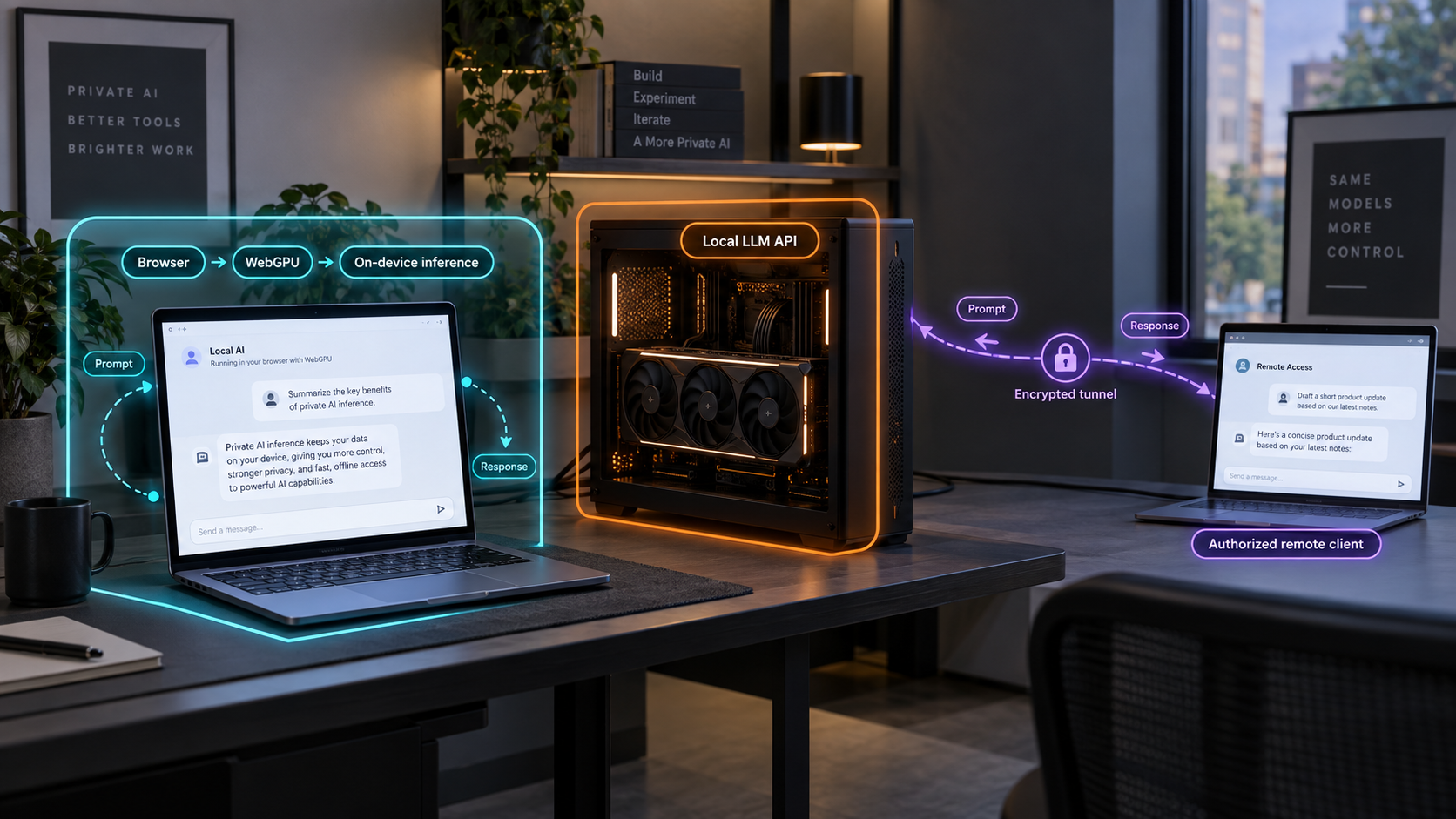
Decide where private inference should run before deciding how users should connect
A private web AI application can execute a model inside each user's browser with WebGPU, or send requests to a model server running on hardware you control. Both approaches can reduce dependence on hosted AI providers, but they create very different requirements for model distribution, client hardware, networking, updates, API security, and remote access. This guide compares those tradeoffs, explains where a local model server such as Ollama fits, and shows when an authorized remote endpoint can be published with a Localtonet HTTP tunnel. It also covers a hybrid design in which the browser handles lightweight work while a local server processes larger or specialized workloads.
📋 What's in this guide
Start with the location of inference
The most important architectural question is not which user interface or model name to choose. It is where the model's computation and state should live. In a WebGPU design, each compatible browser downloads the required model artifacts and performs inference on the user's device. In a local server design, a service running on a workstation, server, or other controlled machine loads the model and answers requests from clients over an API.
The word local can be misleading because it describes two different boundaries. Browser-local inference is local to the person using the web page. Server-local inference is local to the organization or operator running the model server, even when an authorized user reaches that server remotely. These designs should not be treated as interchangeable simply because neither requires sending prompts to a conventional hosted model provider.
Browser execution is attractive when the task fits on ordinary client hardware, offline behavior matters, and distributing the model to every user is acceptable. A local server is attractive when users need a shared model, larger hardware resources, centralized updates, consistent behavior, or access from devices that cannot run the desired model themselves.
Connectivity follows from that decision. A browser-only feature normally needs no tunnel for inference because there is no inference API to reach. It may still need a web server to deliver application files and model assets, but generated prompts and responses do not have to leave the tab. A local LLM server needs a network path whenever its clients are not on the same machine or local network. With Localtonet, we can provide that path without requiring inbound router port forwarding, firewall changes, VPN setup, or a public IP address.
A browser model may need an initial network connection to download application code and model files. A server-backed application may keep inference on hardware you control while still transmitting prompts across a network. Document the full path instead of using “local” as a complete privacy claim.
Map the complete privacy and data flow
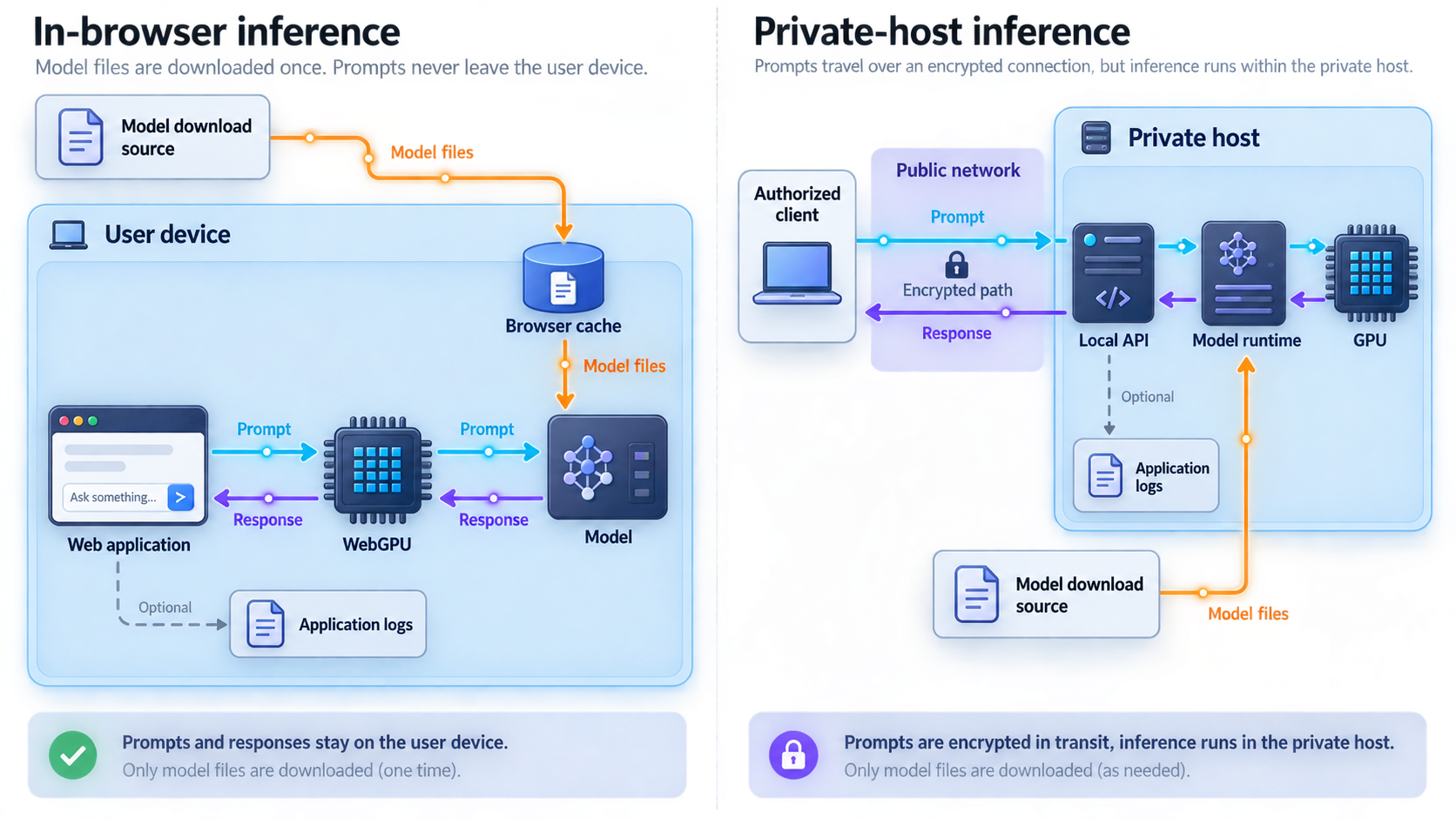
Privacy depends on every component that can observe, store, transform, or forward a request. Before choosing an architecture, draw a data-flow diagram that begins with user input and ends with generated output. Include model downloads, browser storage, application telemetry, API gateways, logs, conversation databases, retrieval systems, and backup processes. The model runtime is only one part of that path.
Data flow for browser inference
In a browser-only design, the web application delivers JavaScript or another browser runtime, model configuration, and model weights to the client. The browser loads those resources and executes inference locally. After the assets are available, the application can process prompts without sending them to a model API. Whether the application actually remains private depends on its implementation. Analytics, crash reporting, remote retrieval, synchronization, or custom logging can still transmit information.
Model artifacts may also be stored by the browser so they do not need to be fetched on every visit. The exact storage mechanism, quota behavior, eviction policy, and update process depend on the runtime and browser. Do not promise permanent offline availability merely because a model worked during an earlier session. Test what happens after browser storage is cleared, the application is updated, or the device has limited free space.
Data flow for a local model server
In a server-backed design, the client sends a request to an API. The API may pass that request directly to an inference runtime or through authentication middleware, a reverse proxy, a queue, retrieval components, and audit logging. The model executes on the server's hardware and returns a response over the same network path.
This can still be a private AI architecture because the model and application data remain under the operator's control rather than being submitted to a hosted model vendor. However, the request is not confined to the user's browser. It crosses the client-server connection and may be visible to application components that handle it. Retention rules and logging behavior must therefore be explicit.
Data flow through a Localtonet HTTP tunnel
When remote users need the local model API, the Localtonet client runs on a device that can reach that service. The client establishes an outbound connection to a Localtonet relay server. The resulting HTTP tunnel provides a public HTTPS address that forwards requests to the configured local IP address and port. The tunnel is available only while the selected client or device is connected and the tunnel is running.
This removes the need to open an inbound router port or obtain a public IP address. It does not remove the need to protect the application. A public address creates an internet-reachable entry point, so the model API should authenticate callers, authorize permitted actions, validate inputs, and limit abuse.
A working tunnel proves that traffic can reach the local service. It does not prove that a caller should be allowed to use the model, retrieve conversations, invoke tools, or consume hardware resources. Keep application-level access controls in front of the inference API.
When in-browser WebGPU inference is the better fit
WebGPU gives web applications access to general-purpose GPU compute through a browser API. AI runtimes can use it for operations such as the matrix calculations required by transformer models. This makes it possible to run suitably packaged and optimized models without maintaining a separate inference server.
Compatibility should be treated as a tested capability, not an assumption. Browser engine, browser version, operating system, graphics hardware, driver support, security policy, and execution context can all affect whether WebGPU is available. WebGPU also requires a secure context, normally an HTTPS page or a loopback development origin such as localhost. A production application should perform feature detection and offer a clear fallback rather than failing after a large download.
Advantages of browser inference
The strongest privacy property is that prompts do not need to leave the client device for inference. This is useful for sensitive drafting, local classification, redaction, summarization of modest inputs, and assistive interfaces that should continue working without an inference connection. It also eliminates a central inference service that every request must reach.
Compute is distributed across user devices. The application operator does not have to provision a GPU server for every generation request, and one user's inference does not directly occupy a shared server queue. A temporary loss of network connectivity may not interrupt generation after the required assets have loaded.
Browser execution can also simplify deployment for small, self-contained features. The user opens a web application and the runtime handles the model locally. There is no remote model API to publish, no inference host to keep online, and no tunnel to create solely for model traffic.
Costs and constraints of browser inference
Model distribution becomes part of page delivery. Even compressed or quantized model files can be large relative to normal web assets. First use may therefore involve a noticeable download, and every client must store its own copy. Organizations should consider metered connections, shared workstations, browser storage policies, cache eviction, and the effect of releasing a new model build.
The client also needs enough usable memory and supported compute capacity. A model that works smoothly on a recent laptop may fail, load slowly, or generate too slowly on a phone, an older desktop, a virtual machine, or a device with restricted graphics access. Advertised device memory is not the only constraint because the browser, operating system, model runtime, context data, and other tabs also consume resources.
Model confidentiality is another architectural concern. If the browser must execute a model, its artifacts must be delivered to the browser. Access controls can restrict who is permitted to download them, but client-side delivery is not appropriate when model weights must remain only on a controlled server. Obfuscating application code is not a substitute for protecting a model that should never be distributed.
Browser environments also limit centralized control. Users may run different browser versions and hardware combinations. They can clear storage, interrupt downloads, suspend tabs, or close the page during generation. Diagnosing failures requires client-side capability reporting without collecting more data than the privacy policy allows.
Good WebGPU workloads
- Short-form generation that fits within a compact model's capabilities.
- Local classification, tagging, redaction, or structured extraction.
- Embeddings or semantic features that a selected browser runtime supports.
- Private drafting where prompt text should remain on the user's device.
- Offline-capable experiences after application and model assets are available.
- Interactive features where avoiding a network round trip is valuable.
Browser inference is less suitable when the required model exceeds common client resources, model weights cannot be distributed, every user must receive identical server-controlled behavior, or the workload depends on protected server-side tools and data.
When a local LLM server is the better fit
A local LLM server centralizes model loading and inference on a machine you control. That machine might be a developer workstation, a dedicated GPU system, a home server, or an internal host. Ollama is one example of a local model server, but the architectural analysis also applies to other services that expose an HTTP API.
Centralization lets multiple clients use the same model installation. Users do not each download model weights or need compatible WebGPU hardware. Thin clients, mobile browsers, command-line tools, internal applications, and automation can all call the same API if the server supports their request format and they are authorized.
Advantages of server-side local inference
The operator chooses the hardware and can select it according to the workload rather than the weakest client device. Larger memory capacity, a suitable accelerator, and stable cooling or power can make workloads practical that would not fit in an ordinary browser. The exact model requirements still depend on model size, quantization, context length, runtime, and concurrency, so capacity should be measured with the intended workload.
Updates are centralized. Changing a model, runtime, system prompt, retrieval index, or safety policy can happen on the server instead of forcing every browser to download a replacement package. Centralization also makes it easier to provide consistent model behavior across different client devices.
Server-side execution can keep model weights and protected integrations away from the browser. Credentials for databases, internal tools, or retrieval systems should remain on the server and should never be embedded in front-end code. The server can enforce which tools each user may invoke and which data each identity may access.
Costs and constraints of a local server
A server introduces availability and operations responsibilities. The host must remain powered on, the model service must be running, sufficient resources must be available, and remote clients need a working network path. If the host sleeps or the Localtonet client disconnects, the public tunnel cannot deliver requests.
Concurrency is shared. Several simultaneous generations can compete for memory and compute, causing queueing or failures. The operator needs realistic limits for request size, context length, parallel work, and timeouts. These limits must be based on the selected runtime and hardware rather than copied from an unrelated deployment.
The API also becomes a security boundary. An unauthenticated generation endpoint can consume expensive local resources, reveal system behavior, or reach tools that were intended only for trusted users. If conversation history, retrieval, uploads, or tool execution are added, authorization needs to protect each operation and resource, not merely the login page.
Confirm that the selected runtime starts correctly, the intended model can be loaded, and an authorized local client can complete a representative request. Use the host and port shown by the installed runtime's current documentation or configuration. This article does not hardcode an Ollama port, command, API path, or bind address because those details must match the installed version and deployment.
WebGPU vs a local LLM server
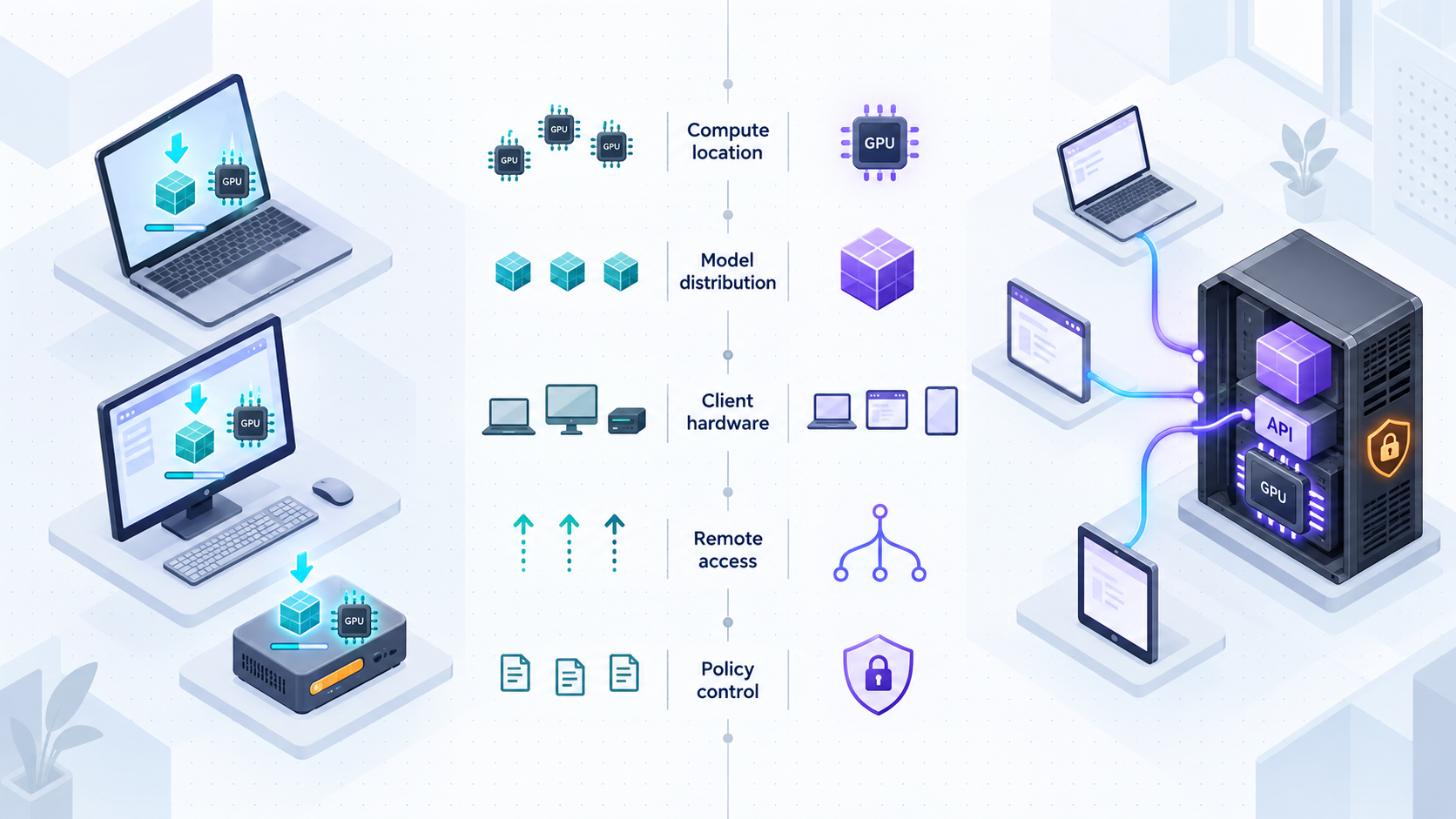
There is no universal winner. The correct choice follows from the sensitivity of the data, the capability of client devices, the size and ownership of the model, operational capacity, and the locations from which users need access.
| Decision area | Browser WebGPU inference | Local LLM server |
|---|---|---|
| Inference location | Runs on each user's browser device. | Runs on a central machine controlled by the operator. |
| Prompt path | Can remain inside the client after assets load, unless the application transmits it. | Travels from the client to the model server and through any application components in between. |
| Model distribution | Model artifacts must be delivered to every participating browser. | Model artifacts remain on the server unless separately distributed. |
| Hardware dependency | Depends on each client's browser, GPU support, memory, storage, and device performance. | Depends primarily on the server's hardware; clients can remain relatively lightweight. |
| Network dependency | May work without an inference connection after required assets are available. | Requires connectivity between every client and the server. |
| Updates | New model artifacts may need to be downloaded and cached by each client. | The operator can update the central model and runtime once. |
| Consistency | Performance and support vary across client environments. | The model environment is centralized, although load and network conditions still vary. |
| API exposure | No separate inference API is required for a purely browser-local design. | An API is normally required and must be authenticated and authorized. |
| Model confidentiality | Unsuitable when model artifacts must never be delivered to clients. | Model files can remain on controlled server storage. |
| Scaling model | Compute is distributed among client devices. | All callers share server capacity and may require queueing or limits. |
| Remote access | No inference tunnel is needed when all inference remains in the tab. | A controlled network path is needed for clients outside the host or LAN. |
| Best fit | Compact models, local privacy, offline-capable features, and capable client devices. | Larger models, shared services, protected integrations, centralized updates, and thin clients. |
A practical selection checklist
- Choose browser inference when client-side data isolation is the primary requirement and the workload fits the expected devices.
- Choose a local server when models or credentials must remain centrally controlled.
- Choose a local server when users lack the memory, storage, browser support, or GPU capability needed for browser execution.
- Choose browser inference when temporary network loss should not interrupt an already-loaded model.
- Choose a local server when several applications need one stable API and centrally managed model version.
- Choose a hybrid design when lightweight work fits the browser but demanding requests require stronger shared hardware.
Designing a hybrid private AI application
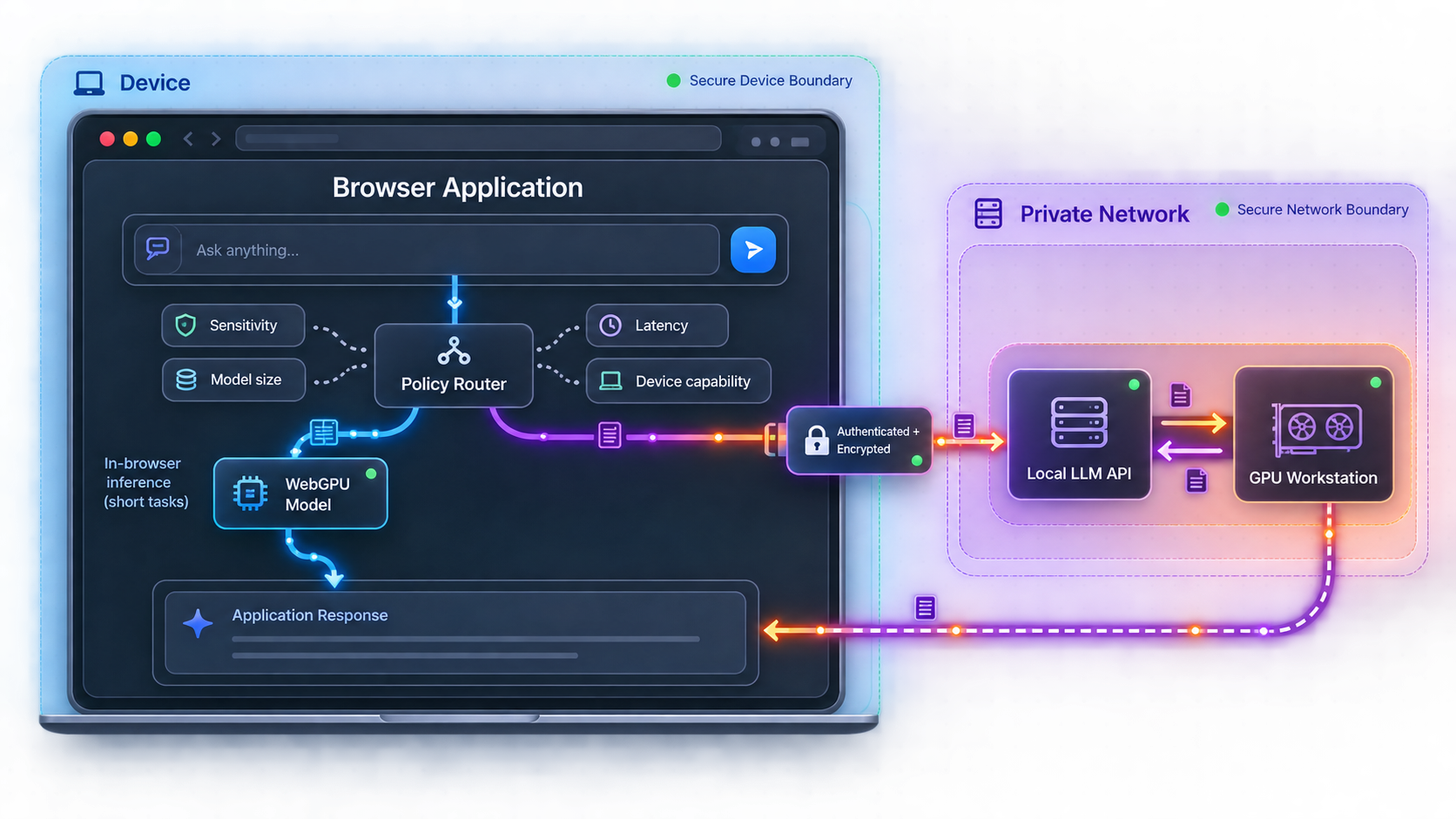
A hybrid architecture avoids forcing every task through the same execution environment. The browser can handle fast, lightweight, or especially sensitive transformations, while the local server handles requests that exceed the client's capabilities. This is often more useful than treating WebGPU and a local model server as mutually exclusive options.
Suitable browser-side responsibilities
Browser inference can classify a request, detect sensitive text, extract simple structure, create a short summary, or decide whether a server call is necessary. It can also provide a reduced-capability mode when the server is unavailable. The application should make this behavior visible so users know whether a given task stays on their device or is sent to the server.
Suitable server-side responsibilities
The server can handle larger models, longer contexts, centralized retrieval, controlled tool execution, shared indexes, or workloads that need hardware unavailable to the client. It can also apply organization-wide policies and maintain a consistent model version.
Routing policy
A robust hybrid application makes routing deterministic and auditable. Useful routing inputs include whether WebGPU is available, whether the model is already stored locally, approximate input size, required model capability, network availability, user preference, and the sensitivity classification of the request. Avoid silently transmitting a prompt merely because local inference failed.
Do not use client-side classification as the only security control. A modified client can bypass browser logic and call an exposed endpoint directly. The server must independently authenticate the caller, validate the request, and enforce authorization for models, tools, files, and data sources.
The hybrid application's user interface should identify its current execution mode. Labels such as “On this device” and “Private server” are more informative than a single generic “local” label. If server-side requests can be logged or retained, explain that before the request is submitted.
Publish an authorized local model endpoint with Localtonet
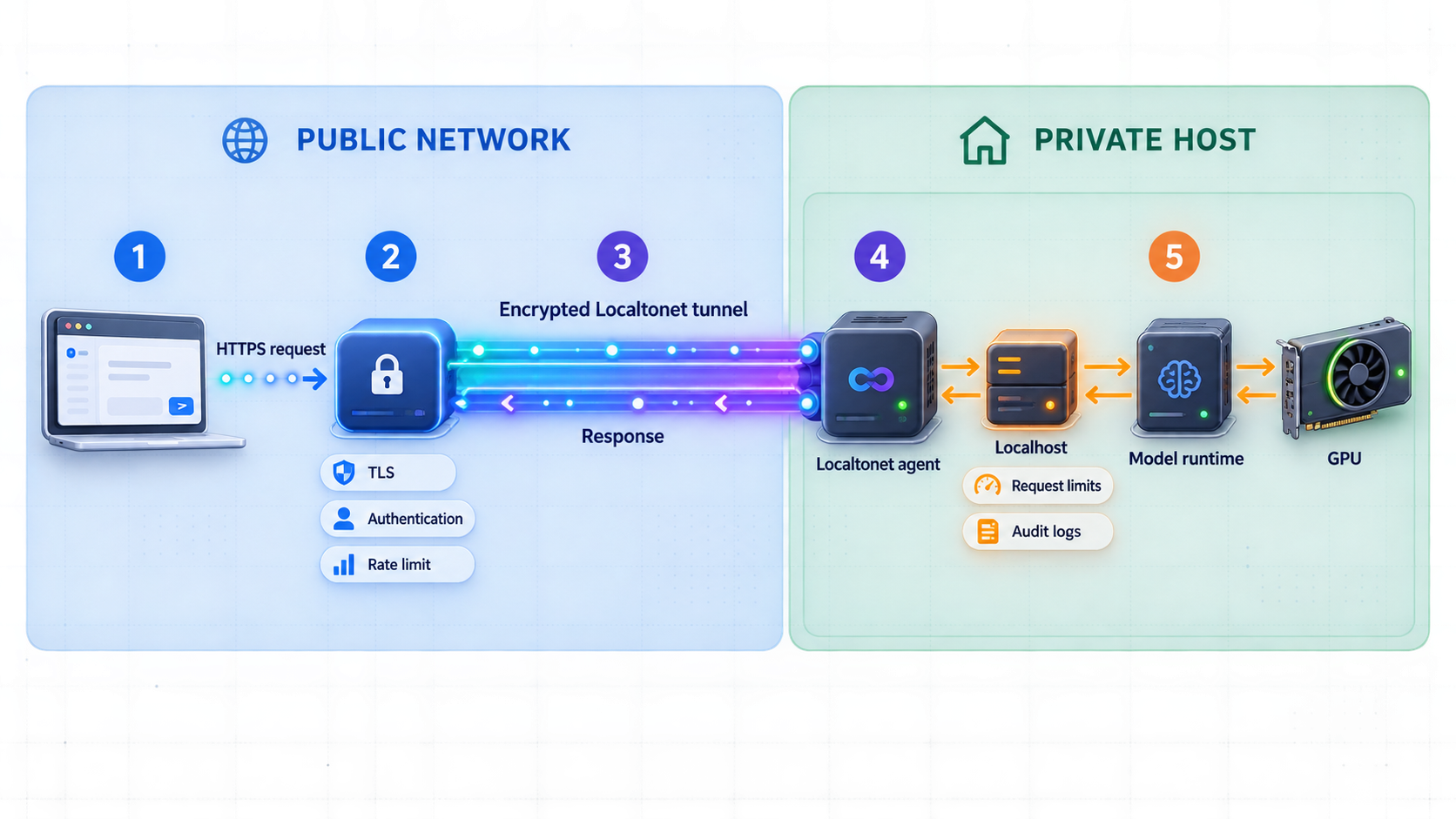
Use a tunnel only after the local server works correctly and remote access is genuinely required. A developer using an inference server on the same machine can normally connect directly. Users on the same trusted LAN may be able to use an internal address, subject to the service's bind configuration and network policy. Localtonet becomes relevant when authorized clients outside that network need to reach the service.
An HTTP tunnel points to a local IP address and port on, or reachable from, the device running our client. HTTP tunnels can use a Random Sub Domain, Custom Sub Domain, or Custom Domain process type, and these process types serve the content at a public HTTPS address. Availability of individual options can vary, so use the choices currently shown in the dashboard. Custom-domain DNS requirements should be checked against current documentation before configuration.
Do not expose an unrestricted model server merely to make testing convenient. Put authentication and authorization in place first. If the inference runtime does not provide controls appropriate to your deployment, place a properly configured application or reverse proxy in front of it and tunnel that protected service instead.
Install and run the Localtonet client
Run our client on the machine hosting the model service or on another device that can reach the service's local IP address and port. The client establishes the required outbound connection, so inbound router port forwarding and a public IP address are not required.
Authenticate and select the client device
Use the device-specific authentication token associated with the client that will run the tunnel. Treat this token as a secret. Do not place it in source code, screenshots, browser JavaScript, public logs, or tutorial examples.
Select an available relay server
Choose an available server or region from the current Localtonet dashboard. Do not hardcode a server code from another deployment because available values can change and may vary by configuration or plan.
Create the HTTP tunnel configuration
Select the appropriate HTTP process type and configure the local IP address and port of the protected web application or model API. Use the exact host and port on which your local service is reachable. If a reverse proxy or authentication gateway protects the model server, target that protected layer rather than bypassing it.
Start the tunnel and test the assigned address
Creating a tunnel does not start it. Press Start, then test the assigned public URL with an authorized client. Confirm both successful access and expected rejection of missing, invalid, expired, or insufficient credentials. The tunnel remains available only while the selected client is connected and the tunnel is running.
The current dashboard is the authority for device tokens, available relay choices, and configuration values. For the maintained product workflow, consult the Localtonet HTTP tunnel documentation.
After testing, update the browser application to use the assigned endpoint only if browser-to-server inference is part of the design. Keep credentials out of downloadable front-end bundles. If a browser must call the API, use an authentication flow designed for untrusted clients and configure the application server's cross-origin policy for the specific approved origin or origins.
Security controls for an exposed AI API
AI endpoints deserve the same protections as other privileged application APIs, plus controls for resource-intensive generation and any tools the model can invoke. A tunnel solves connectivity. The surrounding application must solve identity, authorization, abuse prevention, data handling, and model-specific risk.
Authenticate every non-public operation
Require a verifiable identity before accepting generation requests, retrieving history, uploading documents, or invoking tools. Avoid placing a permanent shared secret in browser code because anyone who receives the application can inspect and reuse it. Prefer short-lived credentials and a login flow appropriate to the client architecture.
Authorize by action and resource
Authentication answers who the caller is. Authorization determines what that identity may do. Separate permissions for model use, administrative operations, conversation access, retrieval collections, file uploads, and tool execution. A user allowed to generate text should not automatically gain access to every indexed document or privileged integration.
Apply least privilege to tools
A model that can call tools can affect systems beyond text generation. Restrict available operations, validate arguments outside the model, require confirmation for consequential actions, and use narrowly scoped service credentials. Prompt instructions alone are not an authorization mechanism.
Control cost and resource abuse
Even when there is no external per-token bill, inference consumes compute, memory, electricity, and availability. Apply request-size limits, concurrency limits, timeouts, and rate controls that match the server's measured capacity. Reject malformed requests before they reach the model runtime.
Minimize logs and retention
Decide whether prompts, outputs, identifiers, timing data, and errors need to be retained. Logs useful for diagnosing performance can still contain sensitive information. Redact where possible, limit access, establish retention periods, and avoid logging authorization credentials. Make the user-facing privacy statement match actual behavior.
Restrict browser origins carefully
Cross-Origin Resource Sharing controls which browser origins can read responses, but it is not a replacement for authentication. Non-browser clients are not bound by browser CORS enforcement. Configure only the origins that need browser access and continue to validate every request on the server.
Plan for tunnel lifecycle
Stop the tunnel when remote access is no longer needed and delete obsolete configurations. If a device token or application credential may have been exposed, replace it through the appropriate management workflow. Do not publish tokens in issue reports or support screenshots.
Localtonet provides the public connectivity path to the configured local target. Your application or gateway should enforce user identity, authorization, request limits, model permissions, and data-retention policy. Keeping these responsibilities explicit makes the architecture easier to review and test.
Verification, operations, and troubleshooting
Test the system in layers. Starting with the public URL makes it difficult to distinguish a model failure from a local bind problem, tunnel configuration error, authentication rejection, browser policy, or overloaded host.
1. Verify local inference
Start the model runtime using the instructions for the installed version. Confirm that the intended model loads and answers a representative request locally. Record the actual bind address, port, API path, request format, and authentication behavior from the active configuration. Do not assume values from another installation.
Test both a minimal prompt and a realistic workload. Watch memory consumption and response behavior. A health check that succeeds does not prove that the host can complete a long generation or serve multiple users.
2. Verify access from the Localtonet client device
If our client runs on a different machine from the model server, test the target from that client device before creating the tunnel. A service bound only to the model host's loopback interface will not be reachable from another machine. Change bind behavior only when required and protect any broader listener according to local network policy.
3. Verify the tunnel lifecycle
Confirm that the correct Localtonet device is connected, the selected tunnel is running, and the target IP address and port match the protected local service. Remember that a saved tunnel configuration is not automatically active. If the host sleeps, shuts down, loses connectivity, or stops our client, the public endpoint cannot reach the service.
4. Verify authorization failures
A successful authorized request is only half of a security test. Try requests with no credentials, invalid credentials, expired credentials, and an identity lacking permission. Confirm that the application rejects each case without disclosing model details, internal paths, stack traces, or secrets.
5. Verify browser integration
If the caller is a web application, test the exact production origin. Browser failures may result from an insecure page context, an incorrect CORS policy, blocked authentication flow, mixed-content restrictions, or a client runtime that lacks WebGPU. Display these conditions separately so users are not told that the model is offline when the real issue is browser compatibility.
6. Measure hybrid routing
In a hybrid application, log the routing decision without unnecessarily recording prompt contents. Confirm which requests stay on-device, which requests use the server, and what happens when either path fails. Test a device without WebGPU, a cleared browser cache, a disconnected server, an unavailable tunnel, and a request too large for the browser model.
| Symptom | Likely area | What to check |
|---|---|---|
| WebGPU is unavailable | Browser or device capability | Secure context, browser support, operating system, graphics hardware, drivers, and organizational browser policy. |
| Browser model downloads repeatedly | Client storage | Runtime caching behavior, browser storage limits, private-browsing mode, eviction, and model version changes. |
| Local model API does not respond | Model runtime | Service process, model loading, actual bind address, configured port, API path, and host resource exhaustion. |
| Local access works but tunnel access fails | Tunnel configuration | Selected client device, connected status, tunnel running state, relay selection, target IP, target port, and local reachability from the client device. |
| Direct client works but browser fails | Browser security policy | Allowed origin, authentication handling, preflight response, secure context, and mixed-content behavior. |
| Responses become slow with several users | Server capacity | Concurrency, queueing, memory pressure, context sizes, model choice, generation limits, and host utilization. |
| Public URL becomes unavailable | Tunnel lifecycle | Whether the host is awake, our client is connected, the tunnel is running, and the local service remains reachable. |
Routine operation should include model and runtime update testing, credential review, tunnel cleanup, capacity observation, and checks that privacy notices still reflect actual logging and routing. Browser model changes should be tested as carefully as server upgrades because a new artifact can change download size, memory demand, output behavior, and device compatibility.
Frequently asked questions
Is WebGPU inference more private than a local LLM server?
It can provide a stronger device-local boundary because prompts do not need to leave the browser for inference. That does not guarantee privacy by itself. Application telemetry, remote retrieval, synchronization, error reporting, or other code can still transmit data. A local server can also be privacy-oriented, but prompts must travel to the server and may pass through authentication, logging, retrieval, or gateway components.
Does browser-based AI need a Localtonet tunnel?
Not for inference when the complete model runs inside the browser. The application and model files still need to reach the browser initially unless they are already installed or cached, but there is no separate inference server to expose. A tunnel becomes relevant when the browser must call a model API or another service running on a private machine.
Can I expose Ollama with a Localtonet HTTP tunnel?
You can point an HTTP tunnel at a reachable local HTTP service, including a protected application or gateway in front of a model server such as Ollama. Verify the active local host, port, API path, and version-specific behavior first. Do not publish an unrestricted inference API. Add authentication, authorization, request limits, and any required browser-origin policy before remote use.
Does Localtonet require router port forwarding or a public IP address?
No. Our client establishes an outbound connection to a Localtonet relay server, so the workflow does not require inbound router port forwarding, firewall changes, VPN setup, or a public IP address. The tunnel works only while the selected client is connected and the tunnel is running.
Is the public tunnel URL enough to secure the model API?
No. The URL provides reachability to the configured service. The application still needs to authenticate callers, authorize operations, validate inputs, control resource use, and protect credentials and stored data. CORS can restrict approved browser origins, but it is not an authentication system and does not constrain non-browser clients.
Can a private AI application use both WebGPU and a local server?
Yes. A hybrid application can run compact or sensitive tasks in the browser and route larger, longer, or tool-enabled workloads to an authorized local server. The interface should disclose where each request will run, and the server must enforce its own security controls because browser-side routing can be modified or bypassed.
What happens when the Localtonet client or model host goes offline?
Remote requests cannot reach the local service when the selected client is disconnected, the tunnel is stopped, or the target model service is unavailable. A hybrid application can continue offering browser-local functions that do not depend on the server, but it should report the server route as unavailable rather than silently changing the privacy behavior.
Which architecture should I choose for a private AI web application?
Choose browser inference when the model fits expected client devices, model distribution is acceptable, and prompts should remain on each device. Choose a local server when you need larger shared hardware, centrally managed models, protected integrations, thin clients, or consistent behavior. Choose a hybrid design when different tasks have materially different privacy and compute requirements.
Connect authorized users to your private AI server
Once your local model endpoint works and has appropriate application-level protection, use Localtonet to provide remote connectivity without opening an inbound router port or requiring a public IP address.
Get Started Free →

