

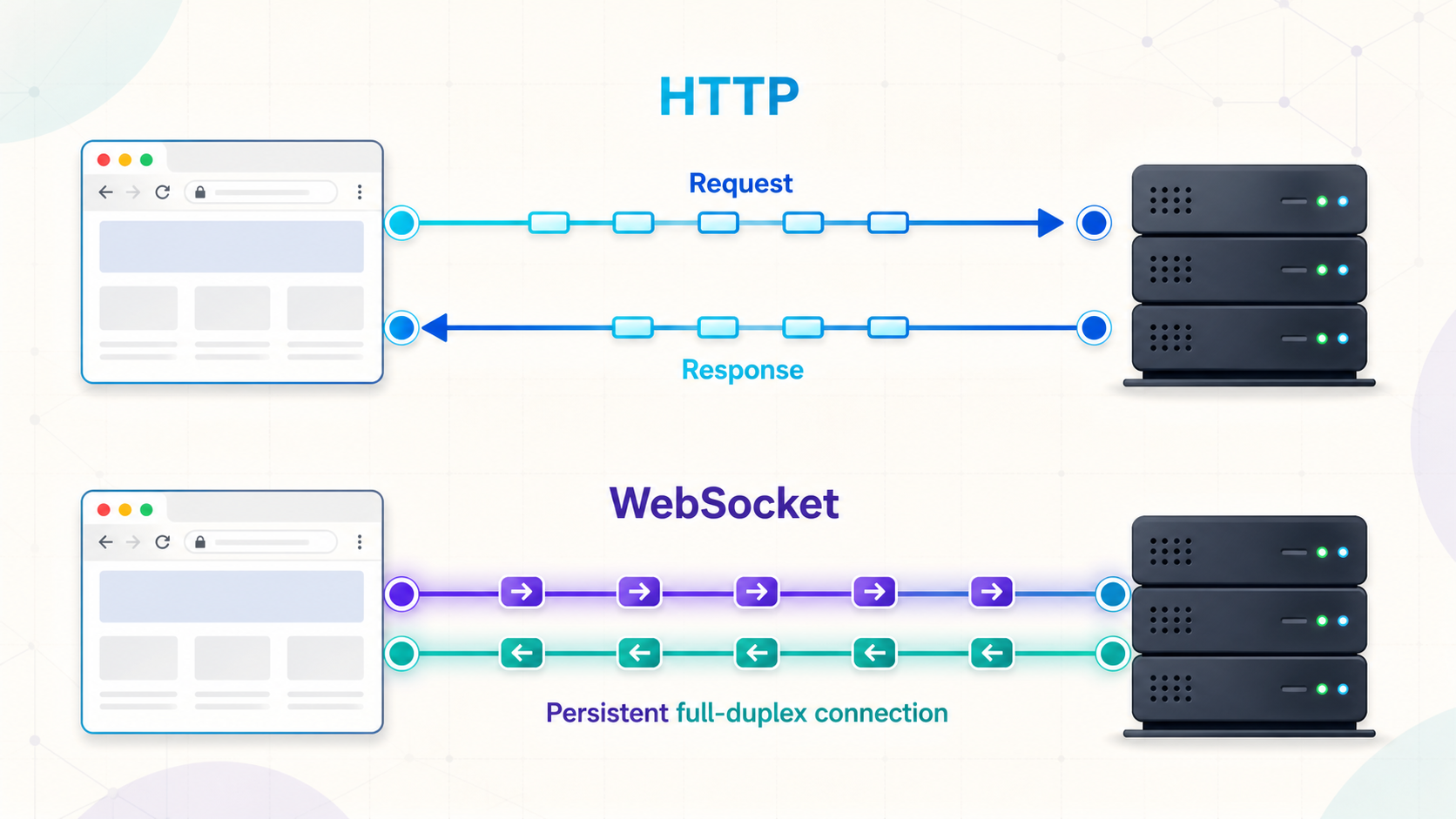
Choose the right transport for request-response APIs, live updates, and bidirectional applications
HTTP connections do not necessarily close after every response, and WebSocket is not the only way to deliver live data. Modern HTTP versions reuse connections, multiplex requests, and support techniques such as streaming responses, Server-Sent Events, polling, and long polling. WebSocket is distinct because it provides a persistent, message-oriented, full-duplex channel after a negotiated handshake. This guide explains that distinction, shows how to build and secure a locally verifiable Node.js WebSocket project, and outlines how to evaluate public access through Localtonet without assuming unsupported tunnel behavior.
📋 What's in this guide
How the modern HTTP request-response model works
HTTP is an application protocol built around requests and responses. A client initiates a request, and a server returns a response associated with that request. That semantic pattern does not mean the underlying transport connection must close after every response. Connection reuse has been normal for many years, and the exact behavior depends on the HTTP version, the client, the server, and any intermediaries between them.
HTTP/1.1 persistent connections
HTTP/1.1 commonly keeps a TCP connection open so the client can send additional requests without repeating a TCP handshake for every interaction. Requests and responses still follow HTTP semantics, but several exchanges can share one transport connection. Pipelining exists in the protocol, although practical deployments have generally favored a limited number of reusable connections instead of relying heavily on pipelining.
HTTP/2 multiplexing
HTTP/2 can carry multiple concurrent request-response streams over one TCP connection. Headers are compressed, and responses do not have to complete strictly one at a time. A delayed application response therefore does not automatically prevent another HTTP stream from making progress, although packet loss at the TCP layer can still affect the connection.
HTTP/3 over QUIC
HTTP/3 runs over QUIC rather than TCP. It also multiplexes requests, but QUIC provides independent streams at the transport layer. Packet loss affecting one stream does not impose TCP-style connection-wide ordering on every other stream. HTTP/3 changes transport behavior, but it retains HTTP request and response semantics.
HTTP is described as stateless because one request does not automatically carry application session state into the next. Applications can still maintain state through cookies, authorization credentials, server-side sessions, URLs, or request bodies. A reused HTTP connection is a transport optimization, not proof that HTTP application state is being maintained.
HTTP can also deliver live or incremental information. A client can poll repeatedly, hold a long-polling request open, consume a streaming response, or subscribe to Server-Sent Events. In all of these cases, the browser still works within an HTTP-oriented model. What WebSocket adds is a standardized, message-oriented channel in which either endpoint can send after the connection has been established.
What is a WebSocket?
WebSocket is a protocol for persistent, bidirectional communication between two endpoints. The original protocol is standardized by RFC 6455. In its conventional form, it starts with an HTTP/1.1 handshake and then switches the connection from HTTP to WebSocket framing. After that switch, either side can send text or binary messages without creating a new HTTP request for each message.
A WebSocket connection is full duplex. The client can send while the server is also sending, and neither direction is inherently tied to a request-response pair. Messages are divided into frames for transport, but applications usually work with complete text or binary messages through their WebSocket library or browser API.
WebSocket is useful when both client and server need to exchange frequent, unpredictable messages. Common examples include chat, collaborative editing, interactive control panels, multiplayer coordination, and systems that combine commands with live status updates.
It is not automatically the best choice for every live interface. A dashboard that only receives updates may be simpler with Server-Sent Events. An API that returns occasional results may need only ordinary HTTP. A media application may need WebRTC, while an application requiring multiple independent streams or unreliable datagrams may need a different transport design.
How a WebSocket connection is established
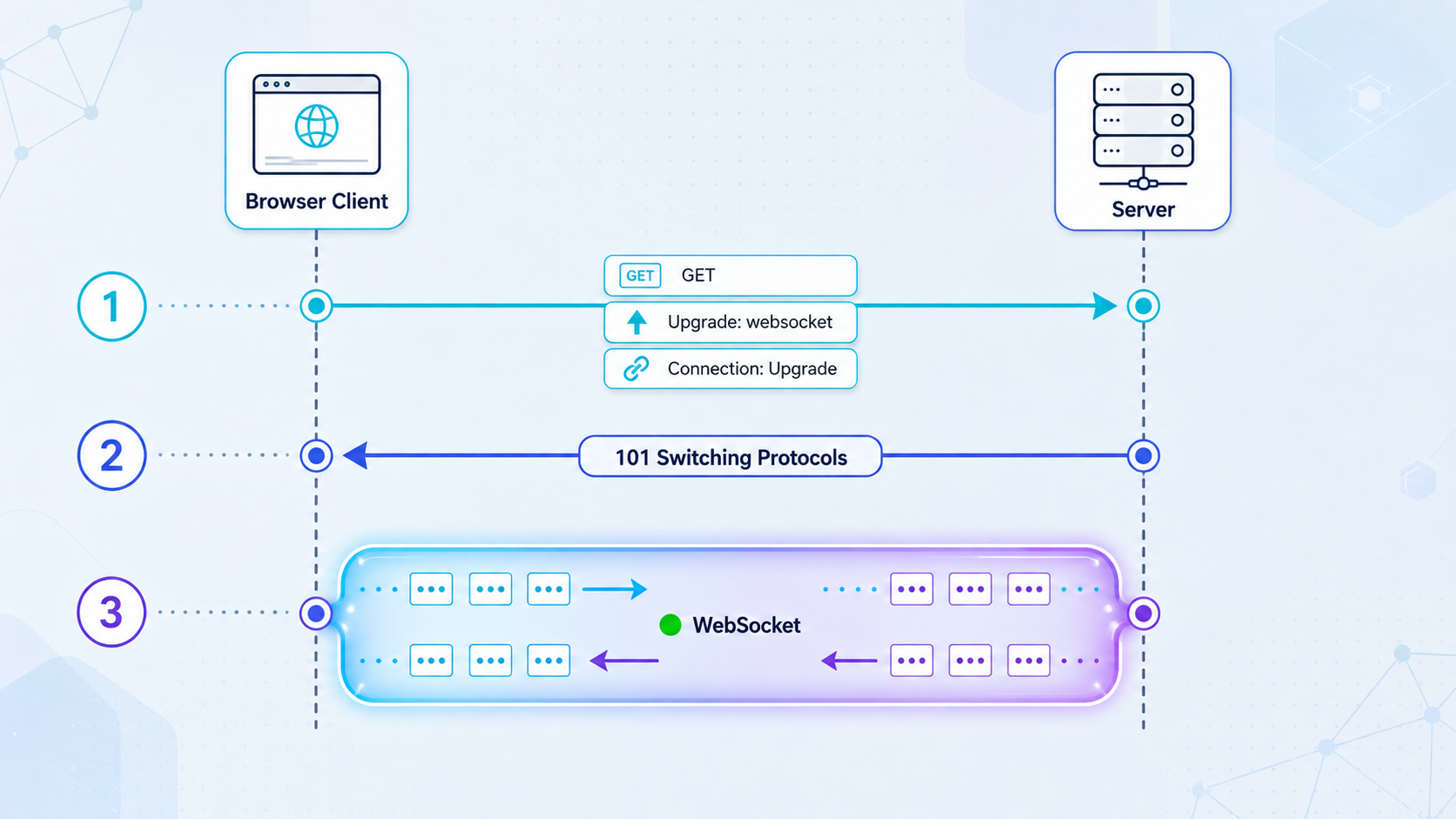
The RFC 6455 HTTP/1.1 Upgrade flow
The classic WebSocket handshake uses an HTTP/1.1 GET request. The client includes an Upgrade: websocket header, a Connection: Upgrade header, a version, and a randomly generated key. A browser also sends an Origin header. The server decides whether to accept the connection and proves that it understood the handshake by deriving the expected accept value from the client's key.
GET /chat HTTP/1.1
Host: app.example.invalid
Upgrade: websocket
Connection: Upgrade
Sec-WebSocket-Version: 13
Sec-WebSocket-Key: example-generated-key
Origin: https://app.example.invalid
A successful HTTP/1.1 handshake returns status 101 Switching Protocols and the appropriate WebSocket headers:
HTTP/1.1 101 Switching Protocols
Upgrade: websocket
Connection: Upgrade
Sec-WebSocket-Accept: example-derived-value
The values above are illustrative and the host uses the reserved .invalid domain. A real client generates its key automatically, and a compliant server library calculates the response. Application developers should use a maintained WebSocket implementation rather than building this cryptographic handshake calculation manually.
Open the underlying transport
The client reaches the server directly or through compatible intermediaries. With wss://, TLS is established for the client-facing connection before WebSocket messages are exchanged.
Negotiate WebSocket
With RFC 6455 over HTTP/1.1, the client requests an Upgrade and the server accepts with status 101. The server should validate the path, Origin, authentication context, and any requested subprotocol before accepting.
Exchange framed messages
The HTTP/1.1 request-response phase ends for that connection. The endpoints exchange WebSocket data and control frames until the session closes.
Close cleanly or recover from failure
A normal endpoint sends a close frame with an appropriate status code. Abrupt network failures may produce no close frame, so applications also need heartbeat, timeout, and reconnection behavior.
WebSocket over HTTP/2 and HTTP/3
The familiar 101 Switching Protocols flow is specifically associated with HTTP/1.1. HTTP/2 does not use the same connection-wide Upgrade mechanism. RFC 8441 defines an extended CONNECT method that can establish WebSocket within an HTTP/2 stream. RFC 9220 defines a corresponding approach for HTTP/3.
Support for these mechanisms depends on the browser, client library, server, reverse proxy, gateway, and negotiated protocol. An application should not infer HTTP/2 or HTTP/3 WebSocket support merely because every component supports ordinary HTTP/2 or HTTP/3 traffic. In many deployments, WebSocket still reaches an intermediary through the RFC 6455 HTTP/1.1 Upgrade path.
Using wss:// on the standard HTTPS port often fits existing network policy, but proxies, firewalls, content filters, and load balancers must still support the applicable Upgrade or extended CONNECT flow. They also need timeouts suitable for long-lived connections. An intermediary can allow normal HTTPS requests while rejecting a WebSocket handshake or closing an idle WebSocket later.
HTTP vs WebSocket: an accurate comparison
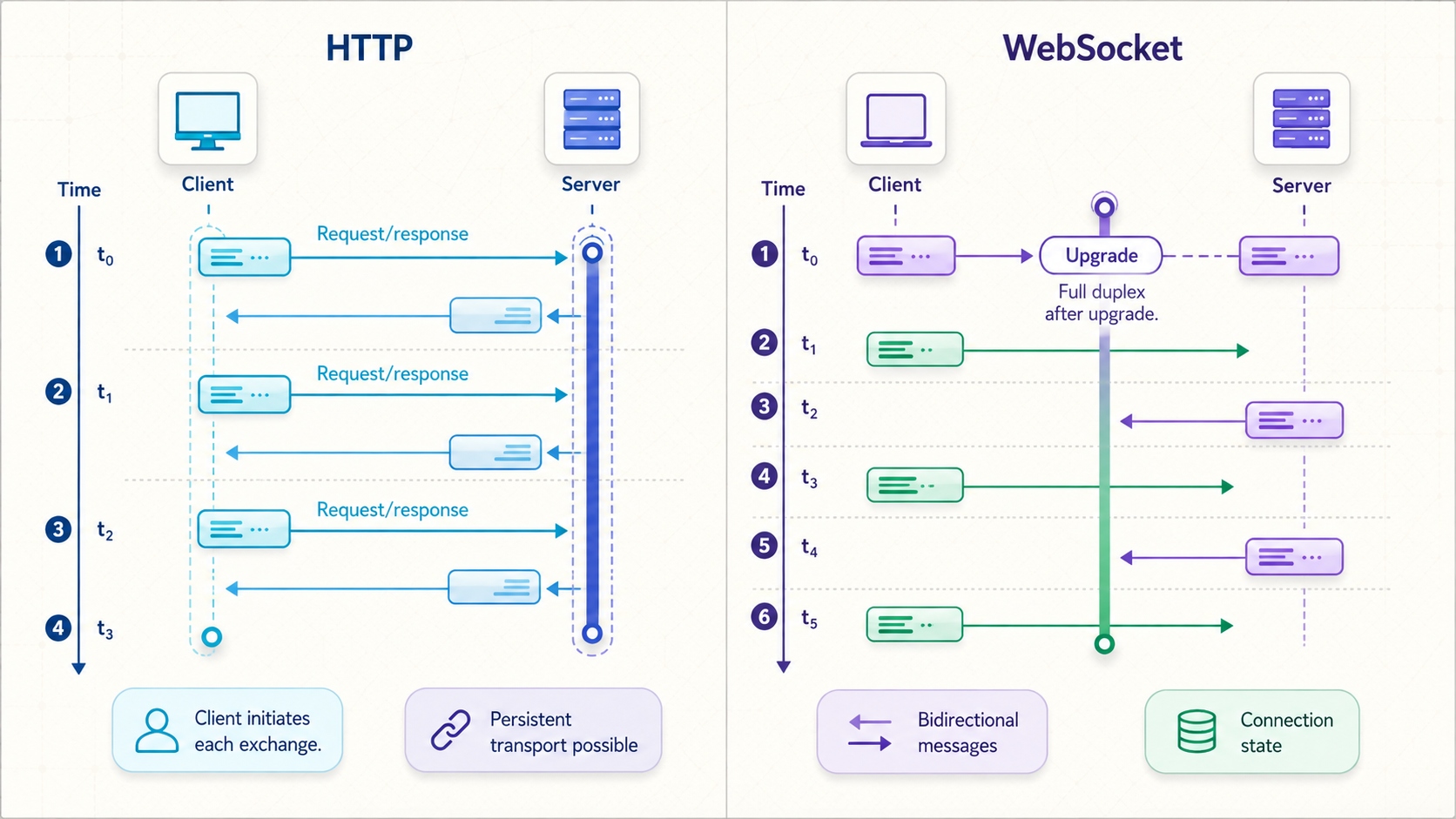
| Characteristic | HTTP | WebSocket |
|---|---|---|
| Application model | Client-initiated requests with associated responses | Persistent message channel in which either endpoint can send |
| Connection behavior | Connections are commonly reused; HTTP/2 and HTTP/3 multiplex streams | One logical WebSocket session normally remains open across many messages |
| Message direction | The client initiates requests; servers can stream a response or publish through mechanisms such as SSE | Both endpoints can initiate application messages after connection establishment |
| Per-message metadata | Each request and response carries HTTP semantics and headers, with compression available in modern versions | Data frames have compact framing, while application metadata must be designed into the message format |
| Concurrency | HTTP/2 and HTTP/3 can multiplex many request streams on one connection | RFC 6455 provides one ordered byte stream carrying WebSocket frames, not independent multiplexed application streams |
| Latency | Can be low with connection reuse, multiplexing, streaming, and nearby infrastructure | A ready connection avoids creating a new HTTP exchange for every application message, but network and processing latency still apply |
| Delivery | Depends on the HTTP version and streaming technique; request-response boundaries remain explicit | Reliable and ordered on its underlying stream; stale messages are not automatically discarded |
| State | HTTP semantics are stateless, although applications commonly maintain sessions | The application can associate session state with the live connection |
| Caching and intermediaries | Rich standardized behavior for caching, methods, status codes, and content negotiation | After negotiation, generic HTTP caching and request routing no longer apply to individual messages |
| Typical fit | Pages, APIs, uploads, downloads, commands, queries, and one-way streaming | Chat, collaboration, interactive sessions, live control, and frequent two-way events |
WebSocket framing is usually smaller than repeating a complete HTTP request for every tiny message. That does not justify a universal claim that WebSocket is always faster. HTTP header compression, connection reuse, multiplexing, batching, payload size, network distance, server architecture, and update frequency can matter more than the framing difference.
The practical design question is therefore not “Which protocol is faster?” It is “Which communication pattern matches this feature?” If the client asks for a resource and receives a finite answer, HTTP is usually a natural fit. If the server emits a one-way stream, SSE or a streaming HTTP response may be enough. If both endpoints send frequent independent events, WebSocket becomes more compelling.
WebSocket alternatives for live applications
| Technique | Communication pattern | Good fit | Main trade-off |
|---|---|---|---|
| Regular polling | The client sends requests at an interval | Infrequent updates and simple infrastructure | Updates can be delayed until the next poll, and unchanged responses still consume work |
| Long polling | The server holds a request until data or a timeout, then the client issues another request | Server-driven updates where WebSocket is unavailable | Every update cycle creates another HTTP request, but not necessarily another transport connection because HTTP connections can be reused |
| Server-Sent Events | A long-lived HTTP response sends server-to-browser events | Notifications, progress, logs, dashboards, and streamed generated text | Primarily server to client; client commands use separate HTTP requests |
| Streaming HTTP response | The client consumes response data incrementally | Large results, generated output, and progressive processing | Usually remains tied to a request and its response rather than becoming a general two-way message channel |
| WebSocket | Persistent full-duplex message exchange | Frequent, independent events in both directions | Requires connection lifecycle, backpressure, heartbeat, and stateful scaling design |
| WebRTC | Real-time peer communication using media, data channels, or both | Voice, video, and peer-oriented interactive data | Signaling and network traversal add complexity |
| WebTransport | Multiple streams and datagrams over HTTP/3 | Applications that need transport capabilities beyond one reliable ordered channel | Deployment and implementation support must be verified for the target environment |
Choose SSE when updates are one-way
Server-Sent Events use the browser's EventSource API and an HTTP response with an event stream media type. SSE offers named events, event identifiers, and browser reconnection behavior. It is often a strong choice for build logs, notifications, progress indicators, monitoring data, and generated text where the browser can send occasional commands through normal HTTP requests.
Choose polling when simplicity matters more than immediacy
Polling is not inherently wrong. If data changes every few minutes, keeping a connection open for every user may provide little value. Polling can work well with ordinary authentication, caching, observability, and stateless infrastructure. Add randomized intervals where appropriate so many clients do not poll at exactly the same instant.
Choose WebSocket for genuine two-way interaction
WebSocket is most useful when both directions are active and timing is unpredictable. A collaborative editor may send local operations while receiving remote operations. A control dashboard may issue commands while receiving acknowledgements and state changes. A game may exchange input and synchronized state continuously. These patterns are awkward to represent as independent polling requests.
How to secure a WebSocket service
A WebSocket endpoint is a long-lived public input surface. The initial handshake uses HTTP, but ordinary HTTP middleware does not automatically protect every message sent after the connection is accepted. Security controls must cover both connection establishment and the complete message lifecycle.
Do not rely on CORS as WebSocket authorization
Browsers attach an Origin header to a WebSocket handshake, but WebSocket does not use the normal fetch CORS permission model. A server that accepts any Origin can become vulnerable to cross-site WebSocket hijacking when browser credentials such as cookies are attached automatically. Compare the Origin against an explicit allowlist before upgrading the connection.
Origin validation is a browser-focused control, not a replacement for authentication. Non-browser clients can create or omit Origin headers. The server still needs a trustworthy identity and authorization model.
Keep credentials out of URLs and source code
Query strings can appear in browser history, reverse-proxy logs, analytics, and monitoring tools. Avoid placing long-lived API keys or session secrets in a WebSocket URL. Prefer secure cookies with suitable protections, short-lived purpose-specific credentials, or an authentication message sent immediately after the encrypted connection opens. Never commit a real credential to client JavaScript.
Plan for resource exhaustion
A client can open connections and then remain silent, send oversized payloads, send messages faster than the application can process them, or subscribe to excessive data. Apply connection quotas, handshake deadlines, per-message limits, rate limits, idle policies, and backpressure. Close clients whose outbound queues grow beyond a safe bound rather than allowing memory usage to increase indefinitely.
Use heartbeat carefully
Protocol-level ping and pong frames can identify connections that no longer reach the peer. An application can also use its own heartbeat when it needs application-level liveness information. Heartbeat intervals must fit the expected network and intermediary idle timeouts. Aggressive heartbeat traffic wastes resources, while an interval longer than a proxy timeout will not keep the connection alive.
Do not expose the unauthenticated version of a development server. Before making a WebSocket endpoint public, add authentication, authorization, Origin restrictions, payload limits, connection limits, rate limiting, safe logging, and a deliberate shutdown policy. Treat every message as untrusted input.
Build a locally verifiable Node.js WebSocket project
The following mini-project serves a browser client and a WebSocket endpoint from the same local HTTP server. It requires Node.js and npm. It includes JSON validation, a first-message authentication step, an Origin allowlist, message and connection limits, heartbeat handling, retrying browser connections, and graceful server shutdown.
This is an educational baseline, not a complete production identity system. The temporary demo token remains only in server environment configuration and browser memory. For a real application, integrate your normal identity provider and issue short-lived credentials with narrowly scoped permissions.
1. Initialize the project
mkdir websocket-demo
cd websocket-demo
npm init -y
npm install ws
npm pkg set scripts.start="node server.js"
Create two files in the project directory: server.js and index.html.
2. Create the server
// server.js
const http = require('http');
const fs = require('fs');
const path = require('path');
const crypto = require('crypto');
const { WebSocketServer, WebSocket } = require('ws');

const HOST = '127.0.0.1';
const PORT = Number(process.env.PORT || 8080);
const DEMO_TOKEN = process.env.DEMO_TOKEN;
const MAX_CONNECTIONS = 100;
const AUTH_TIMEOUT_MS = 5000;
const RATE_WINDOW_MS = 10000;
const MAX_MESSAGES_PER_WINDOW = 20;

if (!DEMO_TOKEN) {
  console.error('Set DEMO_TOKEN before starting the server.');
  process.exit(1);
}

const defaultOrigins = [
  `http://127.0.0.1:${PORT}`,
  `http://localhost:${PORT}`
];

const allowedOrigins = new Set(
  (process.env.ALLOWED_ORIGINS || defaultOrigins.join(','))
    .split(',')
    .map((value) => value.trim())
    .filter(Boolean)
);

const indexPath = path.join(__dirname, 'index.html');

const server = http.createServer((request, response) => {
  if (request.method !== 'GET' || request.url !== '/') {
    response.writeHead(404, { 'Content-Type': 'text/plain; charset=utf-8' });
    response.end('Not found');
    return;
  }

  fs.readFile(indexPath, (error, content) => {
    if (error) {
      response.writeHead(500, { 'Content-Type': 'text/plain; charset=utf-8' });
      response.end('Unable to load the browser client');
      return;
    }

    response.writeHead(200, {
      'Content-Type': 'text/html; charset=utf-8',
      'Cache-Control': 'no-store',
      'X-Content-Type-Options': 'nosniff',
      'X-Frame-Options': 'DENY'
    });
    response.end(content);
  });
});

const wss = new WebSocketServer({
  noServer: true,
  maxPayload: 16 * 1024
});

function rejectUpgrade(socket, status, message) {
  socket.write(
    `HTTP/1.1 ${status}\r\n` +
    'Connection: close\r\n' +
    'Content-Type: text/plain; charset=utf-8\r\n' +
    `Content-Length: ${Buffer.byteLength(message)}\r\n\r\n` +
    message
  );
  socket.destroy();
}

server.on('upgrade', (request, socket, head) => {
  const origin = request.headers.origin;

  if (request.url !== '/socket') {
    rejectUpgrade(socket, '404 Not Found', 'Unknown WebSocket path');
    return;
  }

  if (!origin || !allowedOrigins.has(origin)) {
    rejectUpgrade(socket, '403 Forbidden', 'Origin not allowed');
    return;
  }

  if (wss.clients.size >= MAX_CONNECTIONS) {
    rejectUpgrade(socket, '503 Service Unavailable', 'Connection limit reached');
    return;
  }

  wss.handleUpgrade(request, socket, head, (webSocket) => {
    wss.emit('connection', webSocket, request);
  });
});

function equalSecret(candidate, expected) {
  const left = Buffer.from(String(candidate));
  const right = Buffer.from(String(expected));

  return left.length === right.length && crypto.timingSafeEqual(left, right);
}

function sendJson(socket, value) {
  if (socket.readyState === WebSocket.OPEN) {
    socket.send(JSON.stringify(value));
  }
}

function broadcast(value) {
  const payload = JSON.stringify(value);

  for (const client of wss.clients) {
    if (client.readyState === WebSocket.OPEN && client.authenticated) {
      if (client.bufferedAmount > 64 * 1024) {
        client.close(1013, 'Client is not keeping up');
        continue;
      }
      client.send(payload);
    }
  }
}

wss.on('connection', (socket) => {
  socket.isAlive = true;
  socket.authenticated = false;
  socket.rateWindowStarted = Date.now();
  socket.messagesInWindow = 0;

  const authTimer = setTimeout(() => {
    if (!socket.authenticated) {
      socket.close(4001, 'Authentication timeout');
    }
  }, AUTH_TIMEOUT_MS);

  socket.on('pong', () => {
    socket.isAlive = true;
  });

  socket.on('message', (data, isBinary) => {
    if (isBinary) {
      socket.close(1003, 'Binary messages are not supported');
      return;
    }

    const now = Date.now();
    if (now - socket.rateWindowStarted >= RATE_WINDOW_MS) {
      socket.rateWindowStarted = now;
      socket.messagesInWindow = 0;
    }

    socket.messagesInWindow += 1;
    if (socket.messagesInWindow > MAX_MESSAGES_PER_WINDOW) {
      socket.close(1008, 'Message rate exceeded');
      return;
    }

    let message;
    try {
      message = JSON.parse(data.toString('utf8'));
    } catch {
      sendJson(socket, { type: 'error', error: 'Malformed JSON' });
      return;
    }

    if (!message || typeof message !== 'object' || Array.isArray(message)) {
      sendJson(socket, { type: 'error', error: 'Message must be an object' });
      return;
    }

    if (!socket.authenticated) {
      if (
        message.type !== 'authenticate' ||
        typeof message.token !== 'string' ||
        !equalSecret(message.token, DEMO_TOKEN)
      ) {
        socket.close(4001, 'Authentication failed');
        return;
      }

      socket.authenticated = true;
      clearTimeout(authTimer);
      sendJson(socket, { type: 'authenticated' });
      return;
    }

    if (
      message.type !== 'message' ||
      typeof message.text !== 'string' ||
      message.text.length === 0 ||
      message.text.length > 1000
    ) {
      sendJson(socket, {
        type: 'error',
        error: 'Expected non-empty text of at most 1000 characters'
      });
      return;
    }

    broadcast({
      type: 'broadcast',
      text: message.text,
      timestamp: new Date().toISOString()
    });
  });

  socket.on('close', () => {
    clearTimeout(authTimer);
  });

  socket.on('error', (error) => {
    console.error('WebSocket error:', error.message);
  });
});

const heartbeat = setInterval(() => {
  for (const socket of wss.clients) {
    if (!socket.isAlive) {
      socket.terminate();
      continue;
    }

    socket.isAlive = false;
    socket.ping();
  }
}, 30000);

function shutdown(signal) {
  console.log(`${signal} received, closing connections`);
  clearInterval(heartbeat);

  for (const socket of wss.clients) {
    socket.close(1001, 'Server shutting down');
  }

  server.close(() => {
    process.exit(0);
  });

  setTimeout(() => {
    for (const socket of wss.clients) {
      socket.terminate();
    }
    process.exit(1);
  }, 5000).unref();
}

process.on('SIGINT', () => shutdown('SIGINT'));
process.on('SIGTERM', () => shutdown('SIGTERM'));

server.listen(PORT, HOST, () => {
  console.log(`Open http://${HOST}:${PORT}`);
  console.log(`Allowed origins: ${Array.from(allowedOrigins).join(', ')}`);
});
3. Create the browser client
<!doctype html>
<html lang="en">
<head>
  <meta charset="utf-8">
  <meta name="viewport" content="width=device-width, initial-scale=1">
  <title>WebSocket Demo</title>
</head>
<body>
  <h1>WebSocket Demo</h1>

  <label>
    Temporary demo token
    <input id="token" type="password" autocomplete="off">
  </label>
  <button id="connect" type="button">Connect</button>

  <form id="message-form">
    <label>
      Message
      <input id="message" maxlength="1000" disabled>
    </label>
    <button id="send" type="submit" disabled>Send</button>
  </form>

  <pre id="log" aria-live="polite"></pre>

  <script>
    const tokenInput = document.querySelector('#token');
    const connectButton = document.querySelector('#connect');
    const form = document.querySelector('#message-form');
    const messageInput = document.querySelector('#message');
    const sendButton = document.querySelector('#send');
    const logElement = document.querySelector('#log');

    let socket;
    let retryCount = 0;
    let retryTimer;
    let shouldReconnect = false;

    function log(message) {
      logElement.textContent += `${message}\n`;
    }

    function socketUrl() {
      const scheme = location.protocol === 'https:' ? 'wss:' : 'ws:';
      return `${scheme}//${location.host}/socket`;
    }

    function scheduleReconnect() {
      if (!shouldReconnect) return;

      const baseDelay = Math.min(1000 * (2 ** retryCount), 30000);
      const delay = baseDelay + Math.floor(Math.random() * 500);
      retryCount += 1;

      log(`Reconnecting in ${delay} ms`);
      clearTimeout(retryTimer);
      retryTimer = setTimeout(connect, delay);
    }

    function connect() {
      const token = tokenInput.value;
      if (!token) {
        log('Enter the temporary demo token first.');
        return;
      }

      clearTimeout(retryTimer);
      shouldReconnect = true;
      connectButton.disabled = true;
      log(`Connecting to ${socketUrl()}`);

      socket = new WebSocket(socketUrl());

      socket.addEventListener('open', () => {
        socket.send(JSON.stringify({
          type: 'authenticate',
          token
        }));
      });

      socket.addEventListener('message', (event) => {
        let message;

        try {
          message = JSON.parse(event.data);
        } catch {
          log('Server returned malformed JSON.');
          return;
        }

        if (message.type === 'authenticated') {
          retryCount = 0;
          messageInput.disabled = false;
          sendButton.disabled = false;
          log('Authenticated.');
          return;
        }

        if (message.type === 'broadcast') {
          log(`${message.timestamp}: ${message.text}`);
          return;
        }

        if (message.type === 'error') {
          log(`Server error: ${message.error}`);
          return;
        }

        log('Received an unsupported message type.');
      });

      socket.addEventListener('close', (event) => {
        messageInput.disabled = true;
        sendButton.disabled = true;
        connectButton.disabled = false;
        log(`Closed with code ${event.code}: ${event.reason || 'no reason'}`);

        if (event.code === 4001) {
          shouldReconnect = false;
          log('Authentication failed. Check the token before reconnecting.');
          return;
        }

        scheduleReconnect();
      });

      socket.addEventListener('error', () => {
        log('A WebSocket transport error occurred.');
      });
    }

    connectButton.addEventListener('click', connect);

    form.addEventListener('submit', (event) => {
      event.preventDefault();
      const text = messageInput.value.trim();

      if (!text || !socket || socket.readyState !== WebSocket.OPEN) {
        return;
      }

      socket.send(JSON.stringify({ type: 'message', text }));
      messageInput.value = '';
    });

    window.addEventListener('beforeunload', () => {
      shouldReconnect = false;
      clearTimeout(retryTimer);

      if (socket && socket.readyState === WebSocket.OPEN) {
        socket.close(1000, 'Page closed');
      }
    });
  </script>
</body>
</html>
4. Start and verify locally
Set a temporary value for DEMO_TOKEN in your shell or development secret manager, then start the server. The following syntax is for shells that support command-scoped environment variables:
DEMO_TOKEN='replace-with-a-random-temporary-value' npm start
Open http://127.0.0.1:8080 in two browser tabs. Enter the same temporary token in both tabs and connect. Send a message from one tab. Both authenticated tabs should display the broadcast. This verifies the HTTP page, WebSocket handshake, authentication message, and bidirectional delivery locally.
To test malformed input, use a WebSocket-capable development client and send invalid JSON after authenticating. The server should return a structured error rather than crash. To test graceful shutdown, press Ctrl+C in the terminal. Connected browsers should receive close code 1001, and their retry logic should begin attempting to reconnect.
The client uses location.host instead of a production-looking sample hostname. Locally, it connects to ws://127.0.0.1:8080/socket. If the same page is later served from an assigned HTTPS endpoint that supports WebSocket, it attempts wss:// on that actual host.
Evaluate public WebSocket access with Localtonet
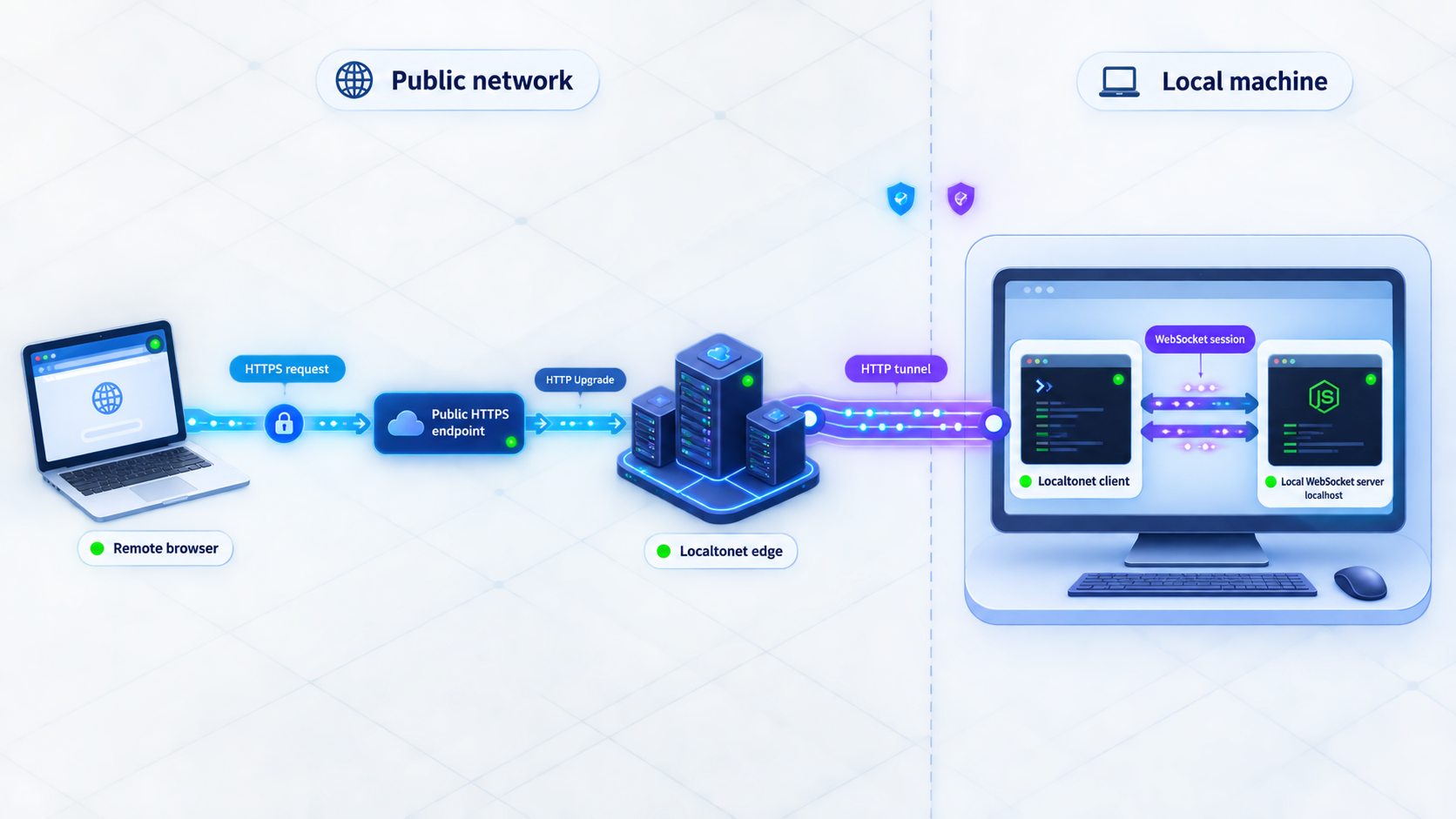
Localtonet exposes services running on your machine without inbound router port forwarding, firewall changes, VPN setup, or a public IP address. Our client on the device establishes an outbound connection to a Localtonet relay. A configured tunnel provides a public URL or public host and port while the selected client is connected and the tunnel is running.
Localtonet supports HTTP/s, TCP, UDP, TLS, combined UDP/TCP, File Server, proxy, and VPN-related product families. However, the supplied product evidence does not confirm the exact WebSocket behavior of an HTTP tunnel, the public URL format, backend TLS behavior, or support for particular WebSocket frameworks. For that reason, do not assume that an HTTP tunnel preserves RFC 6455 Upgrade or modern extended CONNECT traffic until the current dashboard and public documentation confirm it for your selected tunnel type.
Start from the public Localtonet documentation, not the account-only tunnel management URL. Check the current HTTP, TCP, and TLS tunnel guidance and select the option whose documented behavior matches your client, server, and encryption requirements.
WSS protects the TLS connection between a client and the endpoint presenting the certificate. If a relay or gateway terminates TLS, the next leg is a separate security boundary. The evidence supplied for this article does not establish Localtonet's exact TLS boundary for WebSocket traffic, so verify the current tunnel documentation and configuration rather than claiming end-to-end encryption.
Install and run the Localtonet client
Install the current Localtonet application for the operating system hosting the service. Run it on the same device as the Node.js server, or on a device that can reach the server's local address and port.
Verify the application locally first
Open http://127.0.0.1:8080, authenticate, and exchange messages between two tabs. A public tunnel cannot correct a server that is not listening, a rejected Origin, an incorrect path, or an application error.
Select the device authentication token
In the Localtonet dashboard, select the device-specific authentication token belonging to the client that will run the tunnel. Keep that token private and never place it in source code, screenshots, browser messages, or article examples.
Select an available relay server
Choose from the relay servers or regions currently available in your dashboard. Availability can vary, so this guide does not hardcode a server code or region.
Create the appropriate tunnel configuration
Point the documented tunnel type at local IP 127.0.0.1 and port 8080. For a browser application, confirm that the selected type explicitly supports the required WebSocket handshake and public TLS behavior. Creating the configuration does not start it.
Update the allowed Origin
Once Localtonet assigns the real public page origin, add that exact HTTPS origin to ALLOWED_ORIGINS and restart the Node.js process. Do not use a wildcard merely to make the handshake succeed.
Start the tunnel
Use the dashboard's Start action after the configuration is complete. The endpoint is available only while the selected Localtonet client remains connected and the tunnel is running.
Verify the assigned endpoint
Use the exact public URL or host and port displayed for your running tunnel. Confirm page loading, handshake success, authentication, two-way messages, heartbeat survival, and reconnection from a device outside the local network.
Stop or delete the tunnel when finished
Stop the tunnel when public access is no longer needed. Delete it if the configuration is no longer required. Stopping and deleting are separate lifecycle actions.
If the public documentation does not explicitly describe the WebSocket path you require, treat support as unconfirmed. A raw TCP tunnel may transport a TCP-based protocol, but that alone does not guarantee a browser-trusted certificate, an HTTPS page, or the WSS behavior your browser client expects. Validate the complete client-to-endpoint and endpoint-to-local-service path before relying on it.
Lifecycle, scaling, and troubleshooting
Design reconnection as a state recovery process
A reconnect creates a new WebSocket session. The server may no longer know the client's subscriptions, room membership, last acknowledged event, or outstanding commands. After reconnecting, authenticate again and deliberately restore required state. If events cannot be lost, assign event identifiers and let clients request data after their last confirmed identifier.
Use exponential backoff with jitter rather than reconnecting in a tight loop. Jitter prevents many clients from reconnecting simultaneously after a shared outage. Stop automatic retries after permanent failures such as invalid credentials, revoked access, or a client version that the server no longer supports.
Handle backpressure
A server can generate data faster than a slow client can receive it. Monitor queued bytes or library-specific buffered amounts. Decide whether to pause production, combine replaceable updates, discard stale values, or close the slow client. Never let an unbounded outbound queue consume server memory.
Scale connection state deliberately
With multiple server instances, a connection belongs to one process at a time. If any instance can generate an event for that user, the system needs a way to route or publish the event to the process holding the connection. Load-balancer affinity can help with reconnection patterns, but it does not replace a shared authorization model, event distribution mechanism, or durable state where the application requires one.
Deployments also need connection-aware draining. Stop accepting new upgrades, notify existing clients, allow a reasonable reconnection window, and then close remaining sessions. Abruptly killing every process at once can create a reconnect surge.
Observe connections and messages without leaking secrets
Useful operational signals include accepted and rejected handshakes, active connection count, authentication failures, close codes, connection duration, inbound and outbound message rates, malformed payloads, rate-limit actions, heartbeat failures, queue depth, and reconnect frequency. Do not log authentication tokens, cookies, complete sensitive payloads, or private endpoint values.
| Symptom | Likely area | Checks |
|---|---|---|
| Browser receives 403 during handshake | Origin validation | Compare the browser's exact Origin with ALLOWED_ORIGINS, including scheme and port |
| 404 on the WebSocket request | Incorrect path | Confirm that the client uses /socket and that an intermediary preserves the path |
| HTTP page works but WebSocket fails | Upgrade or extended CONNECT handling | Verify every proxy, relay, and load balancer supports the negotiated WebSocket mechanism |
| Connection closes after a fixed interval | Idle or maximum-duration timeout | Compare the exact interval with proxy, relay, firewall, and server timeout settings |
| Close code 4001 | Authentication | Check the temporary token and ensure authentication arrives within five seconds |
| Close code 1008 | Policy or rate limit | Reduce the send rate and inspect the server's validation rules |
| Close code 1009 | Oversized message | Keep payloads below the configured maximum or redesign large transfers |
| Close code 1013 | Slow receiver or overload | Inspect client processing speed, queued bytes, server load, and event frequency |
| Repeated abnormal close code 1006 | Transport interruption | Check network changes, process crashes, intermediary resets, and heartbeat failures |
| Local test passes but public test fails | Tunnel or public-edge configuration | Confirm the tunnel is started, the Localtonet client is connected, the assigned endpoint is correct, and WebSocket behavior is documented for the selected tunnel type |
Frequently asked questions
Does HTTP close the connection after every response?
No. HTTP/1.1 commonly reuses persistent TCP connections. HTTP/2 multiplexes many request streams over one TCP connection, and HTTP/3 multiplexes streams over QUIC. HTTP request-response semantics are separate from whether the transport connection is reused.
Can HTTP deliver real-time server updates without WebSocket?
Yes. Options include regular polling, long polling, Server-Sent Events, and streaming HTTP responses. WebSocket is most distinctive when the application needs frequent independent messages in both directions.
Does long polling open a new TCP connection for every update?
Not necessarily. Each long-poll cycle creates another HTTP request, but the client may reuse an existing persistent transport connection. Reconnection depends on the HTTP version, client, server, timeout behavior, and intermediaries.
What is the difference between ws:// and wss://?
ws:// is WebSocket without TLS on that connection. wss:// is WebSocket protected by TLS between the client and the certificate-terminating endpoint. Public browser applications should use WSS and must still authenticate and authorize users.
Does browser CORS protect a WebSocket endpoint?
Not in the same way as fetch. Browsers send an Origin header during a WebSocket handshake, but the server must validate it. Origin checking complements authentication and authorization; it does not replace either control.
Will WebSocket always work through an HTTPS proxy or firewall?
No. The intermediary must support the applicable HTTP/1.1 Upgrade or HTTP/2 or HTTP/3 extended CONNECT mechanism. It must also permit the connection and use compatible idle and maximum-duration timeouts.
Is WebSocket always faster than HTTP?
No. A ready WebSocket avoids creating a separate HTTP exchange for every application message, but modern HTTP reuses connections, compresses headers, and multiplexes streams. Payload size, batching, server design, network conditions, and communication pattern determine actual performance.
Can I assume a Localtonet HTTP tunnel supports my WebSocket stack?
Do not assume it from the word HTTP alone. Check the current public Localtonet documentation and dashboard for the selected tunnel type, verify the required handshake and TLS behavior, and test the assigned endpoint. The tunnel is available only while its selected client is connected and the tunnel is running.
Test your local real-time application carefully
Build and verify the WebSocket service locally, apply authentication and connection limits, then consult our current documentation before selecting a Localtonet tunnel for public testing. Keep the tunnel running only while access is required.
Get Started Free →

