

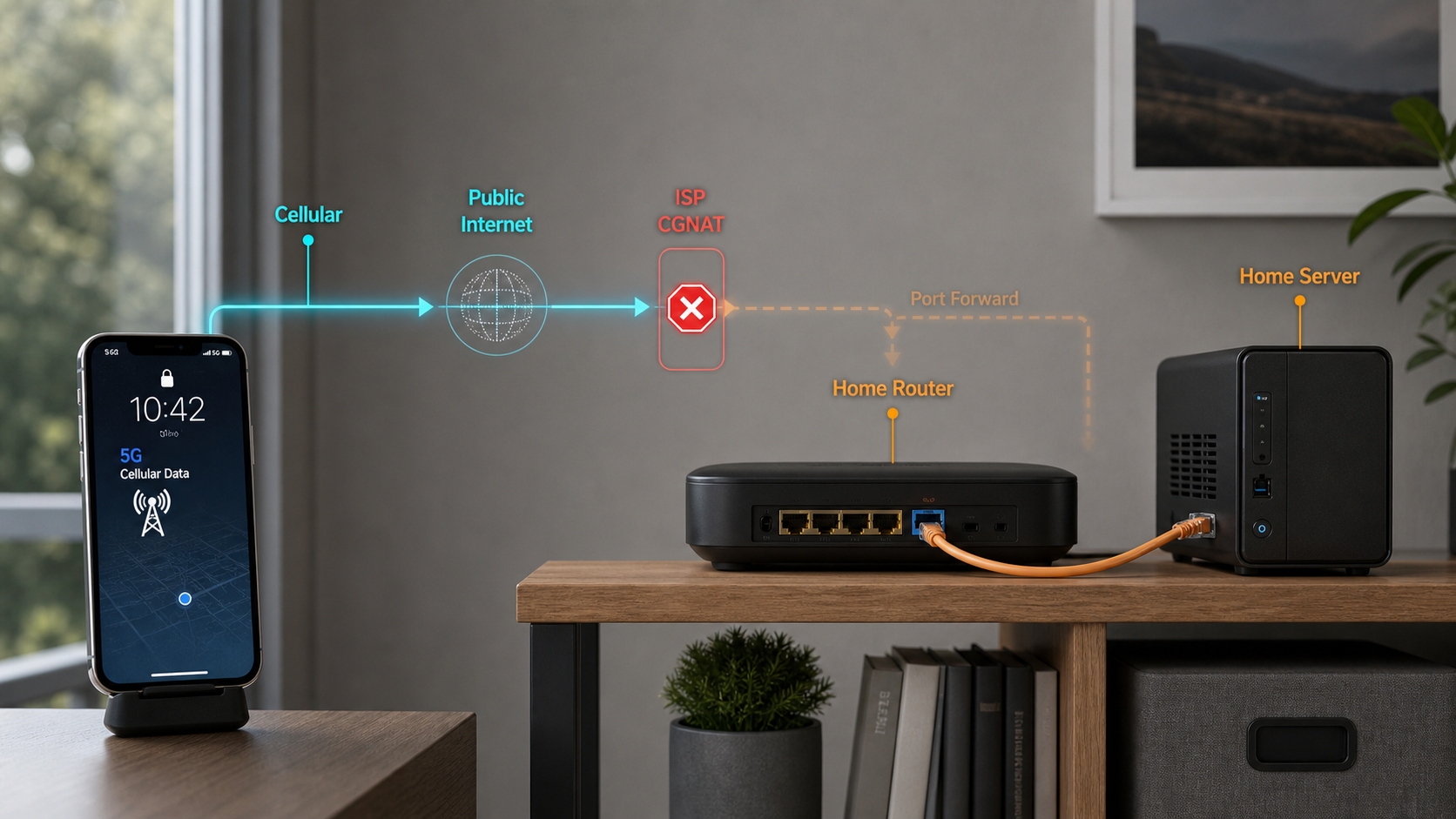
Understand the translation layers between your server and the public internet
A correctly configured home server can still be unreachable when traffic never reaches your router. This guide explains ordinary NAT, ISP-level CGNAT, double NAT, IPv6, and the diagnostic signals that help identify each situation. It also provides a complete Localtonet workflow for publishing a specific local service through an outbound tunnel, without inbound router port forwarding.
📋 What's in this guide
Why NAT exists: the IPv4 address problem
IPv4 addresses are 32 bits long, which provides 4,294,967,296 possible values. Not all of those values are available as ordinary public unicast addresses because portions of the address space serve purposes such as private networking, loopback, multicast, link-local communication, documentation, and protocol-specific reservations.
Internet growth made it impractical to give every device a unique public IPv4 address. Network Address Translation, or NAT, helped extend the useful life of IPv4 by allowing many privately addressed devices to share one public address. IPv6 was developed as the long-term addressing solution, but IPv4 remains widely used and many networks operate both protocols.
IPv4 exhaustion is better understood as a series of policy milestones than as one worldwide date. The central IANA pool and the pools managed by the Regional Internet Registries did not all reach their final allocation phases at the same time.
| Period | Milestone | Why it matters |
|---|---|---|
| 1981 | RFC 791 specifies IPv4 | IPv4 establishes the 32-bit address format still widely used today. |
| 1994 | RFC 1631 describes an early NAT architecture | NAT is proposed as a short-term response to address depletion and routing-table growth. |
| 1996 | RFC 1918 reserves private IPv4 address blocks | Private networks can reuse the same address ranges without advertising them on the public internet. |
| 1998 | IPv6 is initially standardized in RFC 2460 | IPv6 introduces 128-bit addressing. RFC 8200 later replaces RFC 2460 as the current base IPv6 specification. |
| February 2011 | IANA allocates its remaining ordinary /8 blocks to the five RIRs | This exhausts the central IANA free pool, but it does not mean every regional registry immediately stops making allocations. |
| 2011 onward | Regional registries enter different final-allocation or depletion phases | APNIC, RIPE NCC, LACNIC, ARIN, and AFRINIC follow different policies and timelines. “IPv4 exhaustion” therefore refers to several related milestones. |
| 2012 | RFC 6598 reserves 100.64.0.0/10 as shared address space | Providers can use a range intended for service-provider NAT deployments without reusing a subscriber's RFC 1918 range. |
Public IPv4 addresses can still be reassigned, transferred under applicable registry policies, or provided from an operator's existing inventory. The important operational point for a home-server owner is not whether all IPv4 allocation has stopped. It is whether the internet connection receives a directly reachable public address, a translated upstream address, IPv6 connectivity, or some combination of these.
What NAT does on a home network
NAT changes addressing information as packets pass through a gateway. In a typical home network, computers, phones, servers, and smart devices receive private IPv4 addresses. The router translates their outbound traffic to an address used on its internet-facing interface.
RFC 1918 private IPv4 ranges
RFC 1918 defines three private address blocks. These addresses can be reused independently by homes, offices, laboratories, and cloud networks. They are not ordinary public internet destinations.
| Address range | CIDR | Number of addresses | Common context |
|---|---|---|---|
| 10.0.0.0 to 10.255.255.255 | 10.0.0.0/8 | 16,777,216 | Large private networks, laboratories, and virtual networks |
| 172.16.0.0 to 172.31.255.255 | 172.16.0.0/12 | 1,048,576 | Private networks and virtualized environments |
| 192.168.0.0 to 192.168.255.255 | 192.168.0.0/16 | 65,536 | Frequently used by home and small-office routers |
A device at 192.168.1.50 can communicate with other devices on the same routed private network, but an internet host cannot route a packet directly to that private address. For internet communication, the edge router commonly uses Network Address and Port Translation, also called NAPT or PAT.
How address and port translation handles an outbound connection
Consider a laptop at 192.168.1.50:54321 opening a TCP connection to a public web service. The values below use documentation address space and are examples rather than real endpoints.
The device initiates a connection
The laptop sends a packet from its private address and temporary source port to the destination server and service port.
The router creates a translation
The router replaces the private source with its internet-facing IPv4 address and an available source port. It records enough state to associate return traffic with the laptop.
The public service sends its response
The destination responds to the translated address and port presented by the router. It does not send the response to 192.168.1.50.
The router reverses the translation
The router matches the response to its existing state, rewrites the destination information, and forwards the packet to the laptop.
The state eventually expires
When the flow ends or becomes inactive, the gateway can remove the mapping according to its implementation and protocol-specific timeouts.
This process allows many internal devices to share an external IPv4 address. Exact mapping behavior, port selection, filtering behavior, and timeouts vary among routers and carrier systems. It is not safe to assume that every NAT implementation allocates a fixed port range or treats every outbound protocol identically.
NAT, stateful filtering, and firewall policy are related but different
NAT translates addresses or ports. A firewall applies allow and deny policy. Stateful packet handling tracks flows so that replies associated with an allowed connection can return. Consumer routers often perform all three jobs, which makes them look like one feature even though they are separate mechanisms.
An unsolicited inbound packet may fail because there is no applicable translation, because a stateful firewall rejects it, because the ISP filters the destination port, or because the server's host firewall blocks it. A port-forwarding rule creates a translation path on the router, but it does not automatically correct every firewall, application, or provider policy.
A dynamic public IPv4 address can support port forwarding while that address is assigned and inbound traffic is permitted. Dynamic DNS can keep a hostname updated when a dynamic address changes. A genuinely static address remains fixed under the provider's service terms and does not need DDNS merely because it changes.
Why an ordinary NAT connection rejects unsolicited inbound traffic
When a connection starts inside the network, the gateway can create state and associate the replies with the initiating device. A new packet arriving from the internet has no such context. The router cannot infer whether it should go to a web server, a laptop, a game console, or another internal system.
Port forwarding addresses that ambiguity by configuring a specific mapping. For example, a TCP connection arriving at one external port can be translated to 192.168.1.100 on a chosen internal port. The rule applies only at the gateway where it is configured.
Port forwarding or tunneling makes the selected application reachable beyond the private LAN. Translation is not authentication. Before enabling access, update the service, require strong authentication, remove default credentials, apply least privilege, and restrict who can connect wherever the service or platform supports it.
Port forwarding can work when the router holds a suitable public IPv4 address, even if that address changes periodically. It can fail when the provider filters inbound traffic, when another router performs upstream NAT, when the service uses the wrong protocol, or when the host is not listening on the configured local address and port.
What CGNAT changes
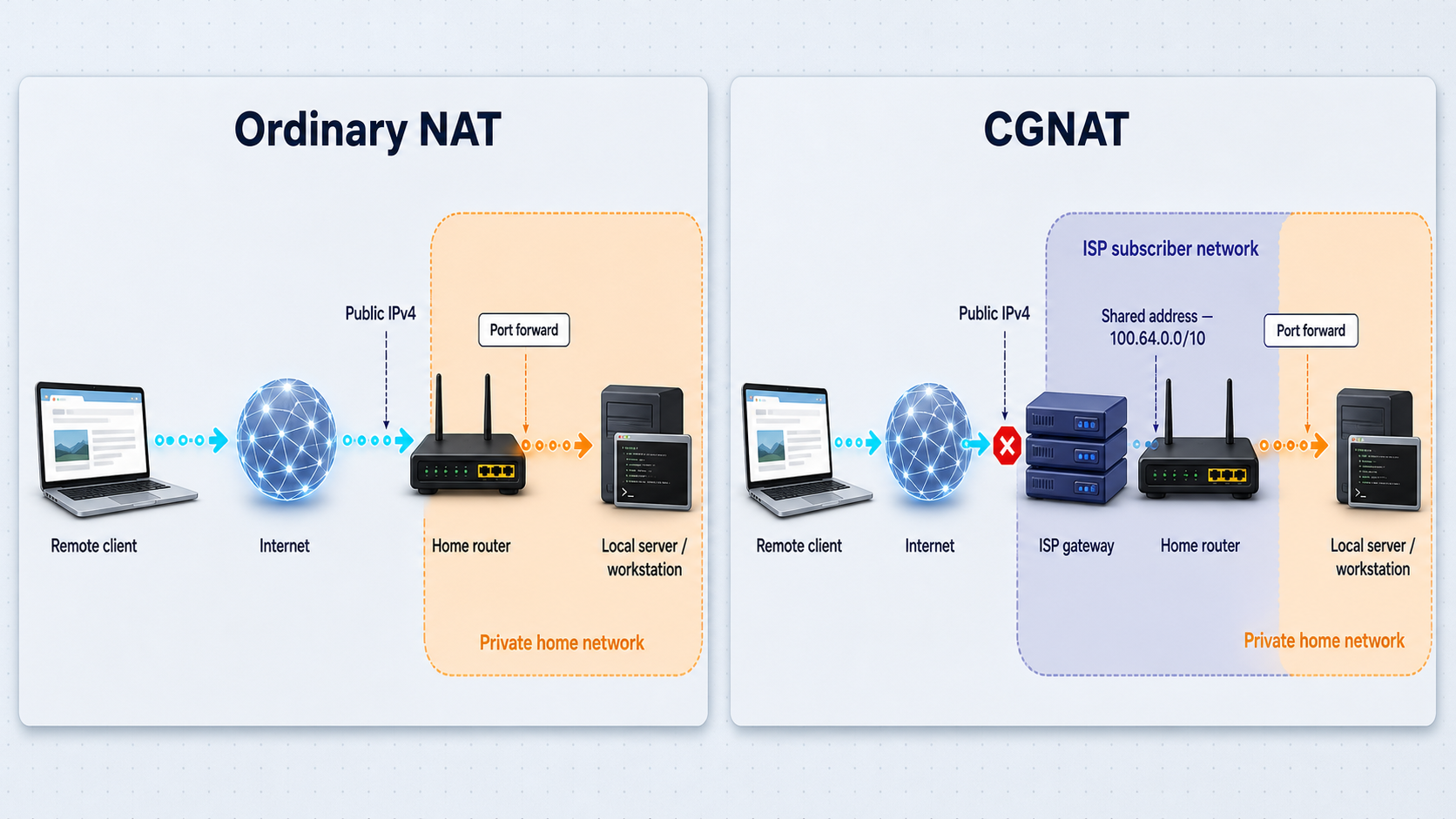
Carrier Grade NAT, also called carrier-scale NAT or large-scale NAT, performs address translation within a provider's network. A subscriber router may receive an address that is not a directly routed public IPv4 address. The provider translates traffic again before it reaches the public internet.
A common arrangement is NAT444, named for the three IPv4 realms involved: a private subscriber LAN, an addressing realm between the subscriber and provider translation system, and the public IPv4 internet.
192.168.1.100, and your router performs the first translation.
100.64.0.0/10 or, in some deployments, another non-public address. The provider performs another translation.
RFC 6598 reserves 100.64.0.0/10, covering 100.64.0.0 through 100.127.255.255, as shared address space. It is not part of RFC 1918, but it is also not ordinary globally routable subscriber address space. Its dedicated purpose helps providers avoid collisions between their translation network and private address ranges used by customers.
Some upstream NAT arrangements instead expose an RFC 1918 address on the home router's WAN interface. This can happen with an ISP-managed gateway, a modem operating as a router, a second household router, a building network, or a provider network. Therefore, a WAN address in 10.0.0.0/8, 172.16.0.0/12, or 192.168.0.0/16 is an important sign of upstream translation, but it does not identify CGNAT by itself.
Why forwarding only on the home router is insufficient
An external client contacts the observed public address
The packet first reaches the provider-controlled or upstream device associated with that address.
The outer translation layer evaluates the packet
Without an applicable mapping or provider-supported inbound rule, the outer layer cannot deliver the new flow to the subscriber router.
The packet never reaches the inner forwarding rule
A correct port-forwarding entry on the home router cannot process traffic that was already discarded or diverted upstream.
This does not mean CGNAT has one universal effect on performance or applications. Capacity, path design, translation state, logging requirements, protocol handling, and congestion differ by provider. CGNAT can affect inbound hosting and some peer-to-peer connection patterns, but no general bandwidth or latency figure applies to every deployment.
How to diagnose CGNAT, double NAT, and other upstream translation
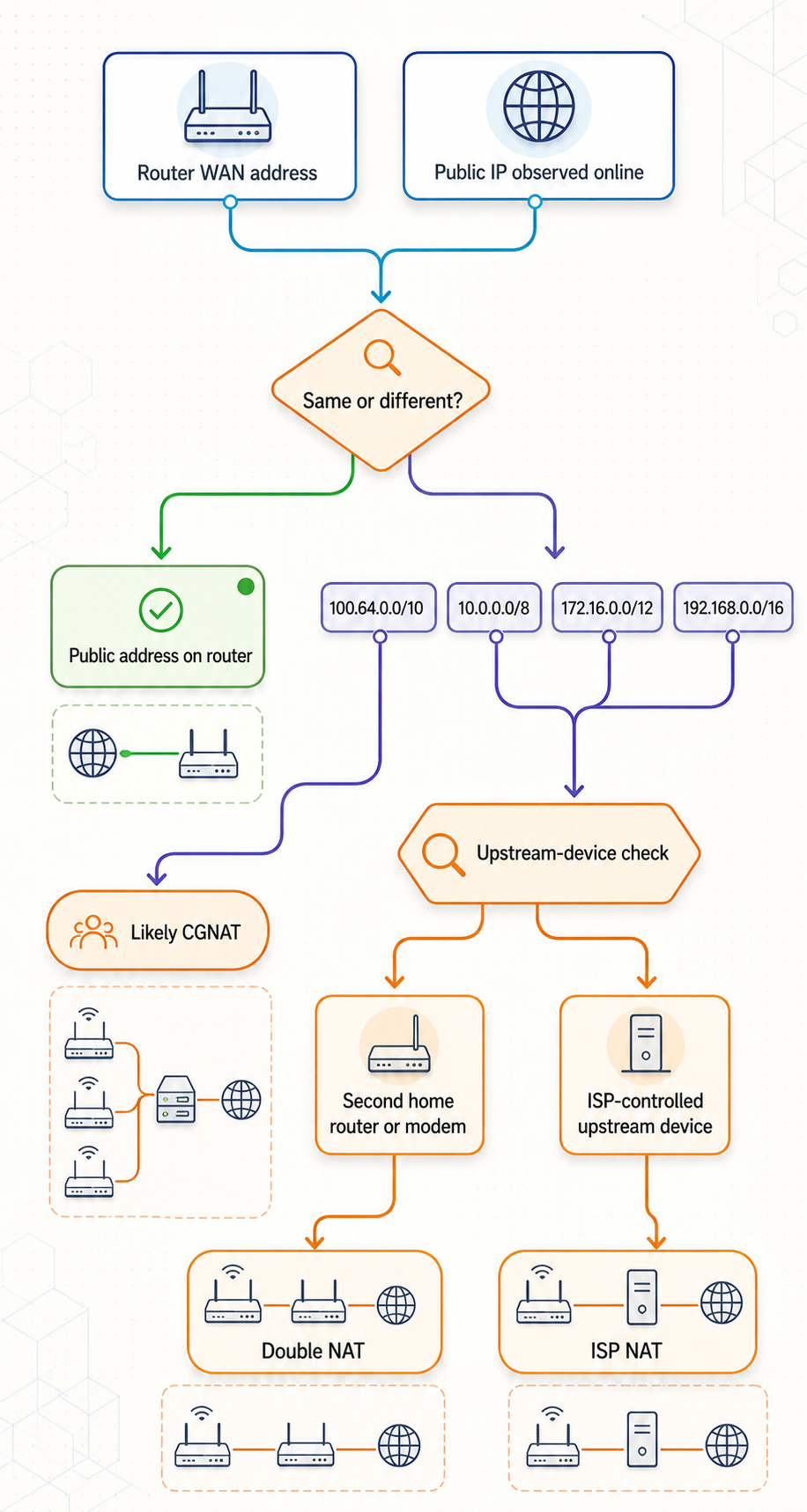
No single browser result proves the complete topology. Use several observations together, then ask the provider to confirm whether the connection receives a public IPv4 address and whether inbound traffic is allowed.
Step 1: Record the router's actual WAN address
Open the router or gateway status interface and find the address assigned to its WAN or internet-facing connection. Do not confuse this with the router's LAN management address, which is often something such as 192.168.1.1.
Router interfaces and default gateway addresses vary, so use the device manual or the gateway address reported by your operating system. Record whether the WAN address falls into one of these categories:
| Observed WAN address | What it suggests | What it does not prove |
|---|---|---|
100.64.0.0/10 |
Strong evidence that the WAN link uses RFC 6598 shared address space associated with provider NAT. | It does not reveal every provider policy, mapping behavior, or available opt-out option. |
| RFC 1918 private address | An upstream router or translation layer exists. | It does not distinguish ISP CGNAT from a routed modem, second home router, apartment network, or enterprise gateway. |
| Public-looking IPv4 address | The router may hold a public address. | It does not guarantee that the provider permits inbound traffic or that local forwarding and firewall rules are correct. |
Step 2: Compare the WAN address with the observed public IPv4 address
From a device using the same home connection, view the address reported by a public IP lookup service such as WhatIsMyIP. Make sure you compare IPv4 with IPv4. A browser may also display an IPv6 address when IPv6 is available.
- If the WAN IPv4 address and observed public IPv4 address match, the router may have a public IPv4 address. Port forwarding can still be blocked by firewall rules, ISP filtering, or application configuration.
- If the addresses differ, some upstream translation, proxy, VPN, routed modem, or other network layer may be present. The mismatch is a diagnostic signal, not conclusive proof of CGNAT.
- If the router WAN address is in
100.64.0.0/10and the public lookup reports a different public IPv4 address, the combined evidence strongly indicates provider NAT using shared address space. - If the WAN address is RFC 1918, inspect whether an ISP gateway or modem has its own routing interface before concluding that the carrier operates CGNAT.
Step 3: Inspect the physical and logical gateway chain
A common double-NAT setup has an ISP modem-router connected to a separate Wi-Fi router. The inner router receives a private WAN address from the modem-router. In that situation, inbound forwarding may require compatible rules on both devices, or a supported bridge or passthrough configuration on the upstream unit.
Do not change modem operating modes without understanding how the provider authenticates and supports the connection. If the upstream device is provider-managed, ask the provider whether it operates as a router, whether bridge mode is supported, and whether your service includes public IPv4.
Step 4: Treat traceroute as supporting evidence only
A route trace can reveal private or shared-address hops near the beginning of a path:
# Linux or macOS
traceroute 8.8.8.8

# Windows
tracert 8.8.8.8
However, routers may hide hops, rate-limit responses, reply from an interface unrelated to forwarding, or use shared address space internally even when the subscriber edge behaves differently. Seeing 100.64.0.0/10 in an intermediate hop is not definitive proof that the subscriber connection itself is behind CGNAT. Use the WAN address, public-address comparison, gateway topology, and provider confirmation together.
Step 5: Ask the provider precise questions
Instead of asking only whether the ISP “uses NAT,” ask whether your specific connection receives a public IPv4 address, whether it is dynamic or static, whether unsolicited inbound IPv4 traffic is filtered, whether opting out of CGNAT is available, and whether native IPv6 is supplied. Availability and terms vary by provider, region, and service.
Can IPv6 make the home server reachable?
IPv6 provides a much larger address space and normally does not require the IPv4-style address sharing described above. That does not automatically make a service reachable. IPv6 addressing, routing, service binding, DNS, client support, and firewall policy must all align.
fe80:: is not an internet-reachable service address.
127.0.0.1 or an IPv4 socket is insufficient.
You can use the Test IPv6 connectivity check to inspect the browser's IPv4, IPv6, and dual-stack reachability. A successful browser test confirms useful client connectivity, not that a server is listening or that inbound firewall rules are open.
Permit only the required destination, protocol, and port. Keep administrative services private unless there is a clear operational need and strong access control. IPv6 restores end-to-end addressing potential, but firewall policy remains essential.
Options for reaching a home server
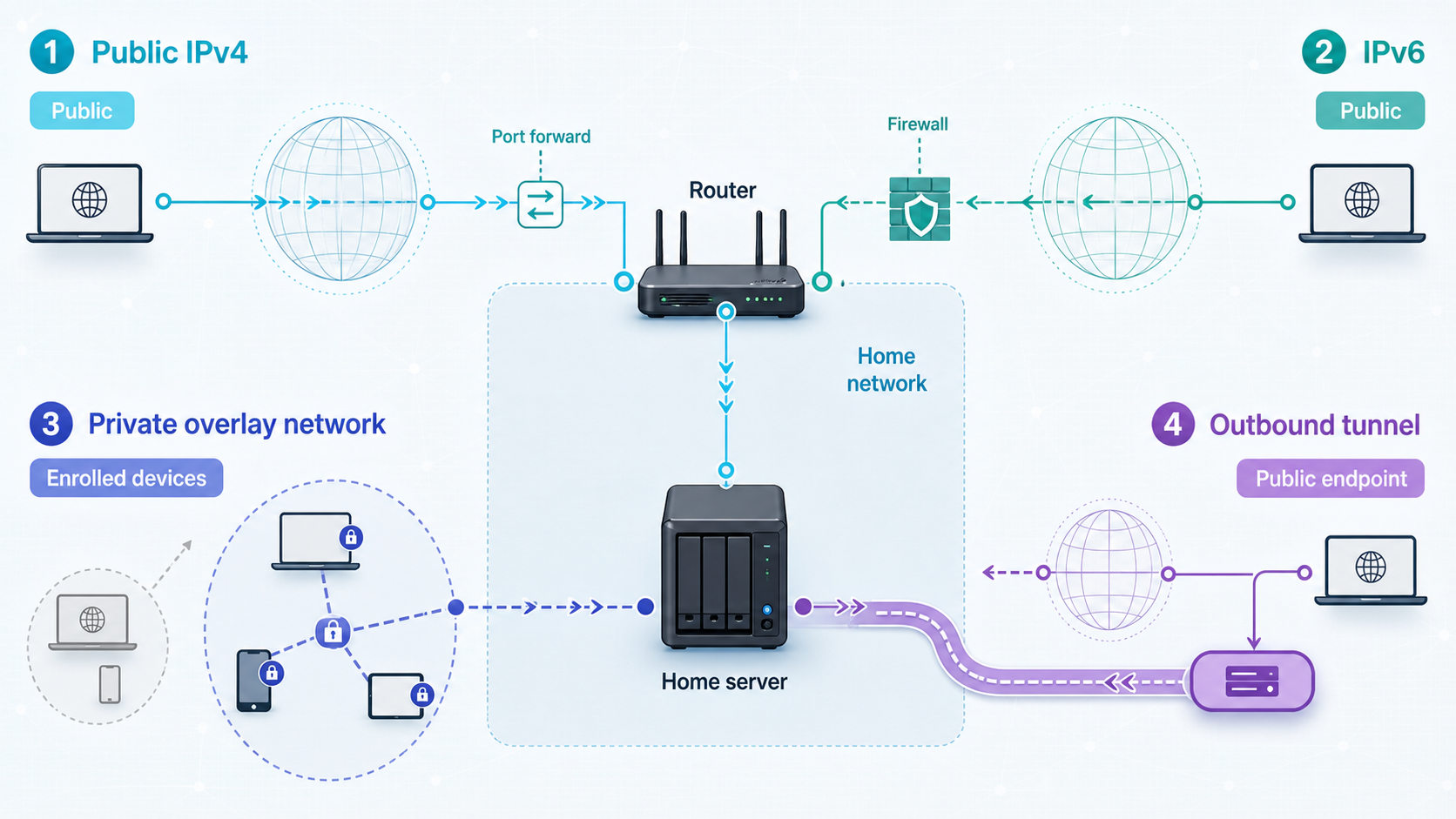
The right connectivity model depends on whether access should be public, limited to your own devices, compatible with a specific protocol, or managed entirely by you. It also depends on ISP policy and the outbound connectivity allowed by the local network.
| Option | When it can work | Important considerations |
|---|---|---|
| Port forwarding with dynamic public IPv4 | The router receives a public address and the provider permits inbound traffic. | DDNS can track address changes. Router and host firewall rules, service security, and correct protocol mapping are still required. |
| Port forwarding with static public IPv4 | The provider assigns a fixed public address and permits inbound traffic. | Availability and terms vary. A static address does not remove the need for service authentication or firewall policy. |
| Direct IPv6 access | The server and external client have usable IPv6 connectivity. | The service must bind to IPv6, DNS may need an AAAA record, and inbound firewall policy must allow the connection. |
| Self-managed public relay | A public server and suitable forwarding or overlay software are available. | You are responsible for server maintenance, routing, authentication, updates, logging, and bandwidth policy. |
| Localtonet tunnel | The Localtonet client can establish the required outbound connection to our relay infrastructure. | The selected device must stay connected and the tunnel must be running. Protocols, relay choices, and capabilities can vary by plan, client version, or current dashboard availability. |
| Localtonet VPN Manager | You need a private mesh network between authorized devices or LANs rather than a public service endpoint. | VPN Manager is our actual VPN feature. Standard HTTP, TCP, UDP, and File Server tunnels should not be described as VPN connections. |
Dynamic DNS solves name-to-address changes. It does not create a missing inbound mapping through CGNAT. Similarly, configuring a port forward on the inner router cannot control a provider's outer translation layer.
How Localtonet publishes a service through an outbound tunnel
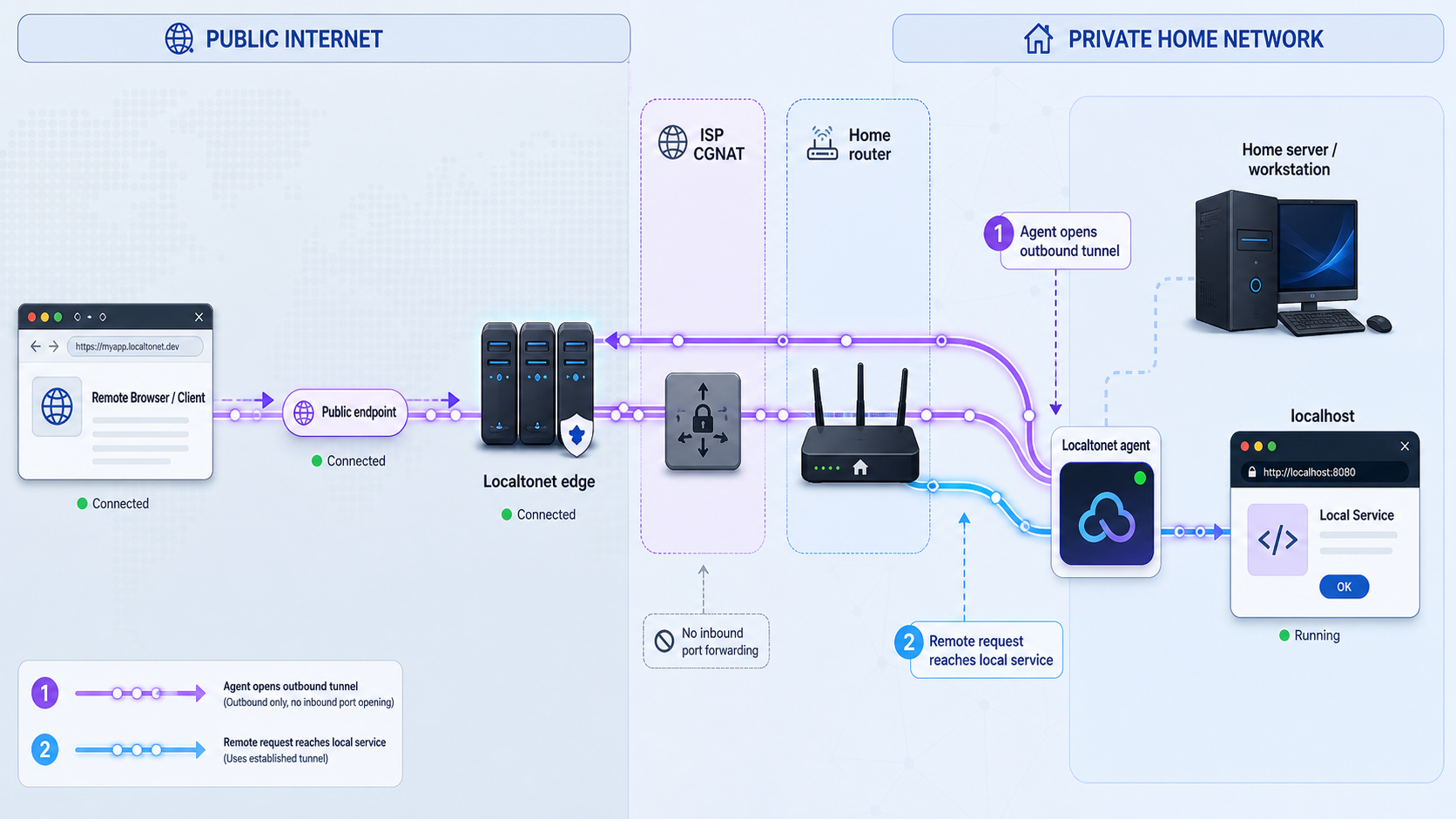
With Localtonet, the client application runs on a device that can reach the local service. The client establishes an outbound connection to a Localtonet relay. The resulting tunnel provides a public URL or a public host and port, depending on the tunnel type.
This avoids requiring an unsolicited connection to enter through the subscriber router. It does not disable, reconfigure, or take control of the ISP's NAT. The workflow depends on the local network permitting the required outbound connectivity. Restrictive corporate, school, guest, or managed networks may block or inspect outbound connections, so authorization and network policy still apply.
Creating a tunnel does not start it. The selected client must be connected and the tunnel must be explicitly started. The public endpoint is available only while that client remains connected and the tunnel is running.
Prerequisites
- A local service that already works from the Localtonet client device or is reachable from that device over the LAN.
- The service's exact local IP address, port, and transport protocol.
- A supported Localtonet client installed on a device that can remain online while access is required.
- A device-specific Localtonet authentication token obtained from your account. Never guess, publish, log, or embed this token in shared instructions.
- Permission to run the service and establish the outbound connection on the network.
- Strong application authentication and current security updates before public testing.
Choose the tunnel family that matches the application
| Tunnel type | Use it for | Local target |
|---|---|---|
| HTTP/s | A local website, API, dashboard, development server, or webhook receiver that speaks HTTP. | The local IP address and HTTP service port. HTTP process types provide a public HTTPS address. |
| TCP | An application that uses a raw TCP connection rather than browser HTTP. | The local IP address and TCP port. |
| UDP | An application whose traffic uses UDP. | The local IP address and UDP port. |
| Combined UDP/TCP | An application that requires both transports under the supported tunnel configuration. | The local IP address and port reachable from the client device. |
| TLS | A compatible TLS-oriented service when that tunnel family matches the application. | The local IP address and port. |
Do not select HTTP merely because the service has a port number. SSH and other raw TCP applications need TCP behavior, while UDP software needs UDP forwarding. Confirm the application's actual transport documentation. Not every protocol, relay, region, or option is necessarily included in every subscription plan, so use the values currently offered in your dashboard.
Complete configuration workflow
Verify the service locally
From the device that will run Localtonet, connect to the service using its local IP address and port. For an HTTP application, open its local URL. For a TCP or UDP service, use the application's normal client. Resolve local application errors before creating a tunnel.
Install and run the Localtonet client
Install the Localtonet application for the operating system on a device that can reach the target service. The client can run on the server itself or another permitted LAN device with network access to it.
Select the correct device token
Authenticate or select the client using its device-specific token. Treat the token as a secret because it identifies the device that will run the tunnel. Do not paste it into screenshots, public tickets, repositories, or shell history shared with others.
Select a currently available relay
Choose an available relay server or region from the current dashboard. Server codes and availability can change, so obtain the value from the product rather than copying a hardcoded code from an old tutorial.
Choose HTTP, TCP, UDP, or the matching tunnel family
Use HTTP/s for a web application, TCP for a raw TCP service, and UDP for a UDP application. If the application needs both UDP and TCP, use the combined family when it is available for your configuration.
Enter the local target
Set the local IP address and port that worked during local verification. Use 127.0.0.1 only when the target service runs on the same device as the Localtonet client and intentionally listens on loopback. For another LAN device, use that device's reachable LAN address.
Create and explicitly start the tunnel
Create the configuration, then press Start. Creation alone does not make the endpoint active. Confirm that both the selected device and tunnel show a connected or running state in the current interface.
Test the assigned public endpoint externally
Use the assigned public HTTPS URL or public host and port from a network outside the home LAN, such as a phone with Wi-Fi disabled. Test with the correct application protocol and verify authentication, not merely whether a port accepts a connection.
Stop or delete the tunnel when it is no longer needed
Use Stop to make a retained configuration inactive. Delete a tunnel when the configuration is no longer required. Also remove obsolete application accounts, temporary access rules, and shared endpoint information as appropriate.
Verify the result from both sides
Testing only from inside the home network can produce misleading results. Some routers do not support NAT loopback consistently, local DNS may resolve a hostname differently, and an application may work over its LAN address while failing through a public hostname.
Local verification
- Confirm that the service process is running.
- Connect from the Localtonet client device to the configured local IP and port.
- If the target is on another device, confirm that the server's host firewall permits connections from the client device.
- For HTTP, test the application path needed by the external user, not only the root page.
- Confirm that login, authorization, and logout behavior work before publishing the endpoint.
External verification
- Move the test client to an independent network. Disabling Wi-Fi on a phone is a simple way to avoid testing through the same LAN.
- Use the exact public URL or public host and port assigned to the running tunnel.
- Use an HTTP client for HTTP, the application's TCP client for TCP, and a suitable application-level test for UDP.
- Verify that unauthorized users cannot access protected resources.
- Check redirects, generated links, callbacks, cookies, and host validation for web applications.
UDP has no TCP-style connection handshake. A generic port check may report an ambiguous result even when forwarding is correct. Test with the actual application protocol and inspect both client and server behavior.
Security requirements before exposing a home service
A tunnel changes reachability, not the trustworthiness of the application behind it. Internet-accessible services can receive automated scans, malformed requests, password attempts, and traffic from users you did not invite. Apply layered controls before sharing the endpoint.
SSH, remote desktop, infrastructure dashboards, home-automation administration, password managers, and network-control interfaces require especially careful review. Prefer private access where public availability is unnecessary. If exposure is required, enforce strong authentication, least privilege, updates, access restrictions, and application-specific hardening. A tunnel is not a substitute for those controls.
Also consider what the application reveals before login. Product names, version strings, usernames, file paths, internal hostnames, and detailed errors can help an attacker. Disable development diagnostics, remove sample content, and avoid publishing applications configured for local-only trust assumptions.
Tunnel lifecycle and routine operation
A Localtonet tunnel remains usable only while the selected client device is connected and the tunnel is running. Restarting the home server, closing the client, losing internet connectivity, sleeping the host, or stopping the tunnel interrupts public access.
- Verify the client state after operating-system updates, power failures, or network changes.
- Recheck the target if the server receives a different LAN address. A local DHCP reservation can help keep the service address stable, subject to router support.
- Stop temporary tunnels as soon as testing or remote work ends.
- Delete obsolete tunnel configurations instead of leaving unused public endpoints associated with old services.
- Rotate any application credentials shared for temporary access.
- Review application logs for failed authentication, unexpected requests, and authorization errors.
- Confirm that the local service still receives security updates and that its exposure remains necessary.
If you need event monitoring for Localtonet device or tunnel state, our platform-wide Token/Tunnel webhooks can report Connected and Disconnected changes for a selected Token Group. These are separate from File Server file-event webhooks and should not be treated as the same event system.
Troubleshooting an unreachable tunnel or home server
The service works only on the server itself
The application may be bound only to loopback, such as 127.0.0.1. That is valid when the Localtonet client runs on the same machine and targets loopback. If the client runs on another LAN device, the service must listen on a reachable LAN interface and the host firewall must permit that connection.
The local IP address or port is wrong
Confirm the current address of the server and the port on which the process is actually listening. Do not assume the application's default port is still in use. DHCP may also assign a different LAN address after a reboot unless the network provides a stable reservation.
The tunnel was created but never started
Creation saves the configuration. It does not activate the public endpoint. Press Start and confirm the tunnel is running. Also confirm that the selected token corresponds to the connected client device.
The Localtonet client is offline
The client device must remain powered on, connected to the network, and running the client. Sleep modes, power-saving policies, operating-system restarts, and internet outages can interrupt the connection.
Outbound connectivity is blocked
Localtonet depends on the client being able to establish its outbound connection. Managed networks may restrict outbound traffic through firewall, proxy, inspection, or application-control policy. Do not attempt to evade those controls. Ask the network administrator whether the connection is permitted.
A host firewall blocks the local leg
The tunnel can be running while the client cannot reach the target. Test the exact local IP and port from the client device. Permit only the required traffic in the server firewall rather than disabling the firewall entirely.
The tunnel protocol does not match the application
An HTTP tunnel expects an HTTP application. Raw TCP software needs a TCP tunnel, and UDP software needs a UDP tunnel. Some applications use more than one port or transport. Identify the required flow before creating the configuration and expose only what is necessary.
The external test uses only IPv6 or only IPv4
Make sure you are testing the assigned Localtonet endpoint rather than the home's direct address. If diagnosing direct access, compare IPv4 and IPv6 separately. A successful IPv6 browser test does not prove IPv4 reachability, and an IPv4-only client cannot directly test an IPv6-only server.
The web application redirects to localhost or a private address
Applications sometimes generate absolute URLs from local configuration. A redirect to localhost, 127.0.0.1, or a private LAN hostname will fail for an external visitor. Configure the application's public base URL, redirect URI, or trusted proxy behavior according to that application's documentation.
The application rejects the public hostname
Development servers and security-conscious frameworks may allow only approved Host headers or origins. Add the assigned public hostname to the application's supported host or origin configuration when appropriate. Do not disable host validation globally unless the application documentation explicitly requires it and you understand the risk.
The page opens but authentication or callbacks fail
Check cookie security settings, callback URLs, allowed origins, cross-site request protections, and identity-provider redirect registrations. The network path may be correct while the application still treats the public URL as untrusted.
Traditional port forwarding still fails with matching public and WAN IPv4 addresses
A matching address pair does not guarantee reachability. Check router firewall rules, the forwarding destination, protocol selection, host firewall policy, server binding, ISP inbound filtering, and whether the test came from a genuinely external network. Some routers also handle hairpin or loopback testing differently.
Frequently asked questions
Does a different router WAN IP and public IP prove CGNAT?
No. A mismatch shows that another translation, proxy, VPN, routed modem, or network layer may exist. Double NAT inside the home can produce the same observation. A WAN address in 100.64.0.0/10 combined with a different observed public IPv4 address is strong evidence of provider NAT, but provider confirmation remains useful.
What does a 100.64.x.x WAN address mean?
If the complete WAN address falls between 100.64.0.0 and 100.127.255.255, it belongs to the RFC 6598 shared address block. This is strong evidence that the provider-facing connection uses shared address space and an upstream translation system. The address is not an ordinary public IPv4 destination for direct internet port forwarding.
Can port forwarding work with a dynamic public IP address?
Yes. Port forwarding can work while the router holds a dynamic public IPv4 address and the ISP permits inbound traffic. Dynamic DNS can update a hostname when that address changes. DDNS does not solve CGNAT because it cannot create a mapping through the provider's outer translation layer.
Is CGNAT the same as a firewall?
No. NAT translates addresses and ports. Stateful filtering tracks connections, and a firewall applies traffic policy. Provider and home gateways may combine these functions, so the practical result can look similar when an unsolicited inbound packet is not delivered.
Does CGNAT always reduce speed or add a specific amount of latency?
No universal figure applies. The effect depends on the provider's path, equipment, capacity, translation state, and congestion. The clearest functional limitation for self-hosting is that the subscriber generally cannot configure the provider-controlled inbound mapping needed by traditional router port forwarding.
Does IPv6 automatically expose my server?
No. The host needs suitable IPv6 addressing and routing, the application must listen on IPv6, the router and host firewalls must permit the inbound connection, and DNS may need an AAAA record. External clients also need IPv6 connectivity. A globally addressed host should still be protected by restrictive firewall and application policy.
Can Localtonet work when the home connection is behind CGNAT?
It can when the Localtonet client is permitted to establish the required outbound connection to our relay infrastructure. The client must be connected, the tunnel must be running, and the local target must be reachable from that client. Localtonet provides a public URL or host and port instead of relying on an inbound mapping at the home router.
Should I expose SSH, remote desktop, or an administration dashboard publicly?
Only when public reachability is genuinely required and the service has been hardened for it. Prefer private access for administrative systems. If exposure is necessary, use strong authentication, least privilege, current updates, access restrictions where available, and careful monitoring. Never rely on NAT or a tunnel as the only security control.
Publish the service you need without changing inbound router rules
Run the Localtonet client on a device that can reach your application, select the matching HTTP, TCP, or UDP tunnel type, start the tunnel, and verify the assigned public endpoint from an external network. Keep the service authenticated and stop the tunnel when access is no longer required.
Get Started →

