

Build a verified Airbyte deployment first, then make an evidence-based remote-access decision
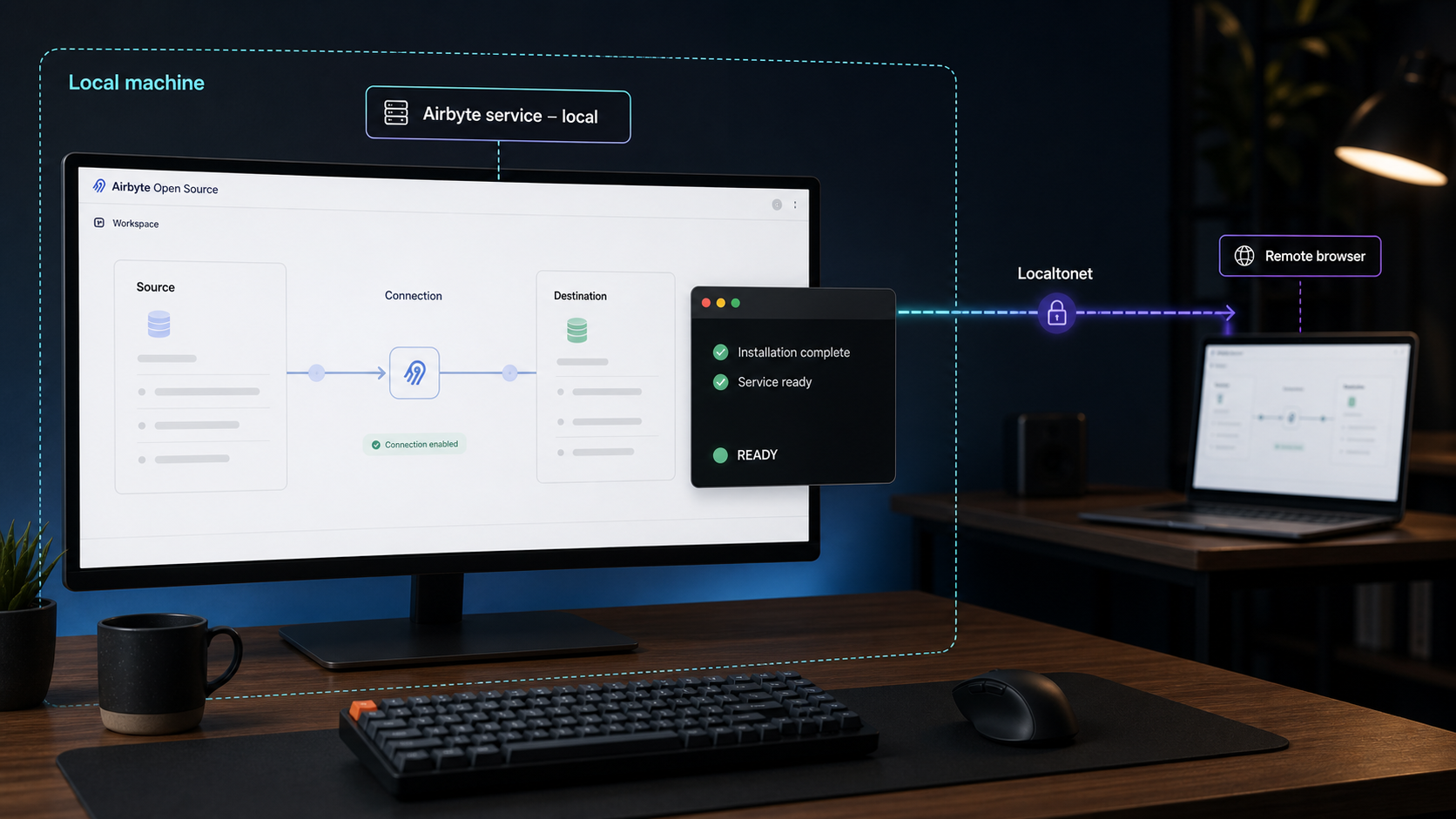
Airbyte Open Source is a self-hosted data-movement platform for building ELT and ETL workflows across APIs, databases, files, warehouses, lakes, and other systems. This guide explains how to approach the official Airbyte deployment quickstart without guessing commands, prerequisites, ports, or runtime details that can change between releases. We will establish a reliable installation and verification workflow, show how to record the confirmed local endpoint, and then explain how that endpoint determines the appropriate Localtonet tunnel. Remote access is deliberately treated as a separate step after Airbyte works locally.
📋 What's in this guide
What Airbyte Open Source does
Airbyte describes its open-source platform as a data-movement system for ELT and ETL pipelines. Its purpose is to move data from sources such as APIs, databases, and files into destinations such as databases, data warehouses, data lakes, and AI applications. The project repository reports a catalog of more than 600 connectors covering these categories, while also supporting the development of customized connectors.
A typical Airbyte workflow has three conceptual parts. A source connector reads from the system that owns the original data. A destination connector writes to the target system. A connection brings the two sides together and defines how data should be synchronized. The exact configuration choices depend on the selected connectors, the Airbyte release, and the capabilities exposed by those connectors.
Self-hosting means that the Airbyte control components and related workloads run in infrastructure you manage. That gives you responsibility for deployment, capacity, credentials, network access, upgrades, backups, and troubleshooting. It also means that exposing the administrative interface is a security decision, not merely a connectivity task.
Why installation and remote access should be separate phases
A tunnel cannot correct a failed application deployment. If Airbyte does not start, cannot reach its internal dependencies, or does not expose a working local endpoint, adding public connectivity only introduces another variable. The reliable sequence is to deploy Airbyte, verify its components, confirm the local interface from the deployment itself, and only then configure remote access.
This separation also prevents an easy but consequential mistake: assuming a port or protocol from an old tutorial. Airbyte deployment architecture and supported tooling can change between versions. For example, the Airbyte 2.0 release notes state that deployments using abctl needed version 0.30.2 before upgrading to Airbyte 2.0. The same release also stated that version 2.0 was the final version supporting Helm chart V1 and that new deployments should start with Helm chart V2. These version-specific instructions illustrate why current official deployment documentation must control the installation.
The supplied project evidence identifies the official “Deploy Airbyte Open Source” quickstart as the installation path, but it does not include that guide's current commands, runtime prerequisites, supported host platforms, local URL, listening port, or bind address. We will not invent those details. Use the current quickstart linked by the Airbyte repository and treat its displayed version requirements and generated endpoint as authoritative for your installation.
Prerequisites and planning checklist
Start by deciding whether the official quickstart matches your intended environment. A quickstart is generally best for evaluation, development, or an initial self-hosted deployment. Production operation may require a more deliberate architecture, persistent storage strategy, access model, monitoring plan, and upgrade procedure.
The evidence available for this article does not establish a universal operating-system list, CPU allocation, memory requirement, disk requirement, container runtime, Kubernetes version, or firewall rule for the current quickstart. Those values must be taken from the current official Airbyte deployment guide rather than inferred from an older release or another installation method.
| Item to confirm | Why it matters | Safe source of truth |
|---|---|---|
| Supported host environment | The quickstart tooling may depend on a particular operating system, virtualization feature, or architecture. | The current Airbyte deployment quickstart |
| Required deployment tool and version | Incompatible tooling can prevent installation or make upgrades unsafe. | The quickstart and release-specific upgrade notes |
| CPU, memory, and storage | Connector jobs and platform components need enough capacity to start and complete syncs. | The requirements stated for the selected deployment method |
| Local endpoint and protocol | This determines how you verify the interface and which remote-access method can be considered. | The installation output and current deployment documentation |
| Authentication behavior | An administrative interface should not be exposed before its access controls are understood and configured. | The documentation for the installed Airbyte version |
| Persistent data locations | You need to know what must be protected, backed up, and retained during maintenance. | The architecture and operations documentation for the selected method |
| Upgrade path | Skipping prerequisites or migration steps can make an otherwise routine upgrade fail. | Release notes and the official upgrade guide for both versions |
Prepare credentials without embedding them in commands
Airbyte connections commonly require credentials for source and destination systems. Create dedicated service accounts where the external systems support them, grant only the permissions needed for the intended data movement, and keep secrets out of shell history, screenshots, source-control repositories, and public issue reports.
Before configuring a connector, determine whether it needs read access, write access, schema discovery, replication metadata, or object creation rights. Connector-specific requirements cannot safely be generalized. Follow the documentation presented for the exact connector and verify the permissions against the source or destination system's own controls.
Plan the host network boundary
Decide who should be able to administer Airbyte before installation. If access is only needed on the host, retain local-only reachability. If administrators will connect from another device, document where they connect from, whether Airbyte provides the required authentication in the installed version, and whether an additional access control layer is needed.
Avoid changing router port-forwarding or opening inbound firewall rules merely to complete the installation. Airbyte should first be reachable through the local endpoint established by its own deployment method. With Localtonet, remote access can later be provided through an outbound connection from the device that can reach that endpoint, without requiring inbound router port forwarding, a public IP address, VPN setup, or firewall changes.
Deploy Airbyte with the official quickstart
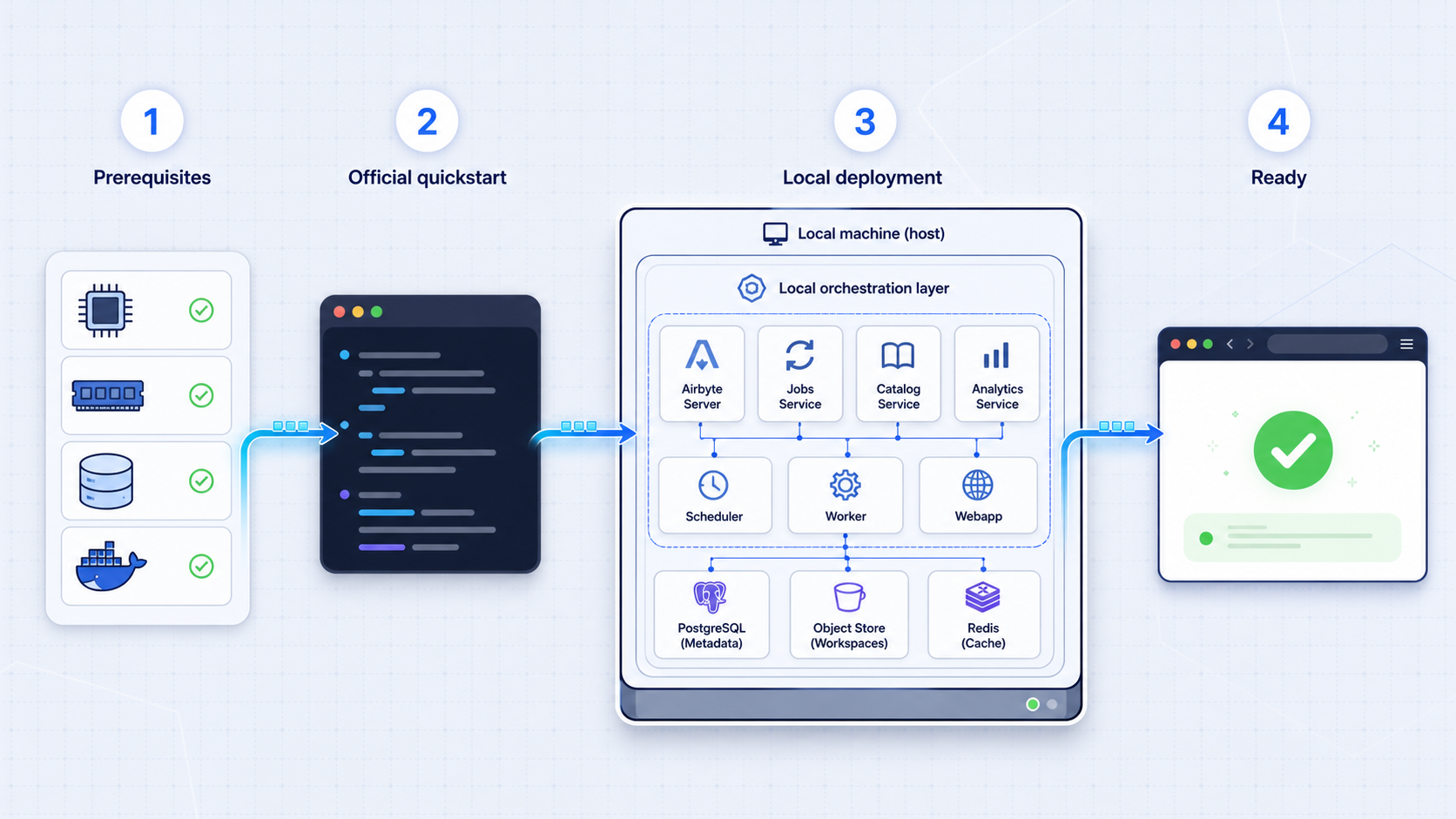
Open the Airbyte project repository and follow its “Deploy Airbyte Open Source” path. That link is the project's declared starting point for a self-hosted data-movement deployment. Do not substitute the separate Agent SDK installation command shown elsewhere in the repository. The Agent SDK serves a different AI-agent development workflow and is not evidence of how to deploy the Airbyte Open Source platform.
The available evidence does not contain the current quickstart command or its prerequisite checks. Printing a command from memory would risk mixing deployment generations or recommending an obsolete tool version. Copy the command only from the current official quickstart, verify what it downloads or installs, and preserve the resulting output for local verification.
1. Select the documented deployment path
Use the installation method explicitly presented for a new Airbyte Open Source deployment. If the documentation offers multiple paths, choose based on the environment you actually operate rather than combining commands across methods. A command, configuration value, or upgrade procedure for one deployment architecture should not be assumed to apply to another.
Pay particular attention to whether the instructions are for a fresh installation or an upgrade. Airbyte 2.0, for example, carried explicit requirements for abctl deployments and a Helm chart transition. Those facts do not establish the current requirement for a later version, but they show why release-specific instructions must be read before installation or migration.
2. Complete every prerequisite check shown by the quickstart
Confirm that the host satisfies the current requirements before launching the installer. Check free storage as well as total storage, because data movement can create logs, temporary files, connector artifacts, and replicated data. Confirm that required virtualization or orchestration services are running if the selected method depends on them.
If a prerequisite check fails, resolve that failure rather than bypassing it. Record the exact error, the host platform, the deployment tool version, and the Airbyte version being requested. This information is much more useful than reporting only that Airbyte did not start.
3. Run the exact quickstart command
Execute the official command in the context required by the guide. Do not add flags copied from unrelated tutorials unless they are documented for the current version. Watch the output for failed downloads, permission errors, resource warnings, unavailable dependencies, and partial component startup.
Installation output can contain environment-specific information. Review it before sharing logs and redact credentials, tokens, private hostnames, and private endpoints. Do not redact component names, version numbers, timestamps, or non-sensitive error messages needed for diagnosis.
4. Save the generated deployment details
When installation completes, record the deployed Airbyte version, deployment-tool version, local address, protocol, port, and any initial authentication instructions displayed by the official process. The endpoint must come from the actual deployment output or current guide. Do not assume that another machine's endpoint will match yours.
Also record the documented commands or procedures for status, stop, start, uninstall, and upgrade. These operational actions depend on the deployment method, so this article cannot safely supply generic commands. Keeping them with your internal runbook reduces the risk of using the wrong tool during an incident.
5. Do not configure connectors until the platform is stable
First establish that the platform interface loads consistently and that its required components remain healthy. A connector configuration cannot fix a platform component that repeatedly restarts or fails to initialize. Separating platform verification from connector testing also makes troubleshooting more precise.
An Airbyte administrator may be able to configure systems that contain database credentials, API tokens, and operational data. Before enabling remote access, confirm the authentication and authorization behavior of the installed version. Use least-privilege accounts for connected systems, and do not publish an unauthenticated administrative interface.
Verify the Airbyte deployment locally
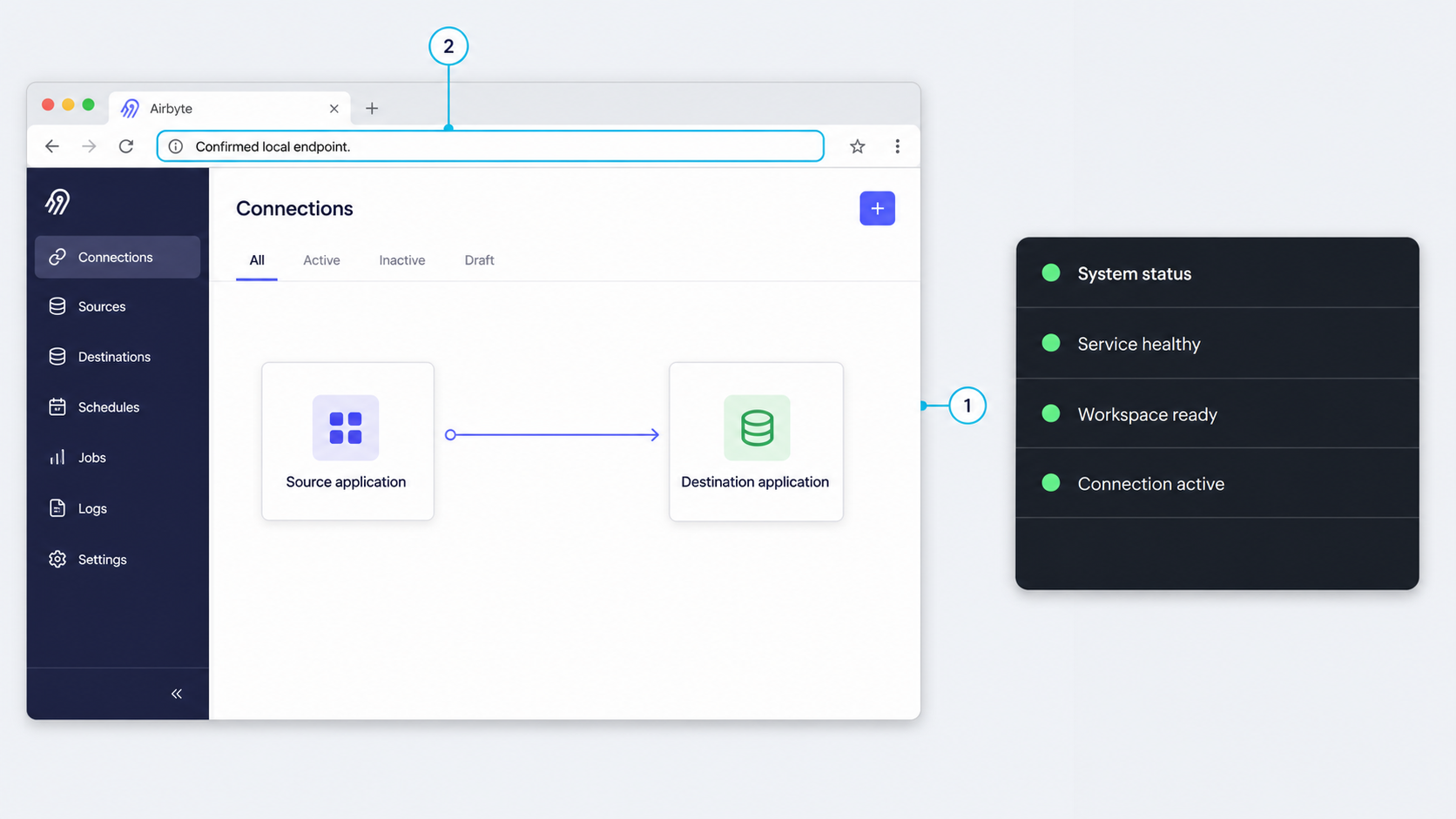
Local verification should happen on the Airbyte host, or from a device already authorized to reach it on the private network. The objective is to prove that the Airbyte deployment works independently of Localtonet or any other remote-access layer.
Confirm platform status
Use the status mechanism documented for the selected deployment method. All required components should reach the state identified as healthy or ready by Airbyte's current documentation. If a component is still initializing, wait for the documented completion condition rather than repeatedly reinstalling.
A process existing is not enough to prove readiness. Review the official status result and relevant logs for repeated restarts, dependency failures, resource exhaustion, storage errors, or unsuccessful migrations. If the quickstart reports a failed component, resolve it before proceeding.
Open the confirmed local endpoint
Use the exact address emitted by the installation or specified for the current deployment. The supplied evidence does not confirm a universal local URL, port, protocol, or bind address, so none should be inferred here. Open that endpoint locally and confirm that the Airbyte interface completes loading rather than showing a connection error or a partially initialized page.
Record the endpoint in separate fields:
- Protocol: The scheme or transport actually documented by the deployment.
- Host or IP: The address on which the service is listening.
- Port: The confirmed listening port, if the protocol uses one.
- Path: Any required URL path, if documented.
- Authentication: The access-control behavior observed and documented for the installed version.
Create a minimal functional test
After the interface is stable, test a small, non-sensitive connection appropriate for your environment. Use dedicated test credentials and a limited data set. Confirm that the source configuration can be validated, the destination can be reached, and a small synchronization can complete.
Connector behavior is specific to the source, destination, and selected sync configuration. Do not interpret successful interface access as proof that every connector can reach its external system. DNS resolution, outbound firewall policy, service credentials, TLS validation, and source-specific permissions can all affect a sync independently of the Airbyte interface.
Define a clear acceptance result
A useful local acceptance checklist is:
- The official deployment status reports the required components as ready.
- The confirmed local endpoint loads from an authorized local location.
- The installed authentication behavior is understood and configured appropriately.
- A limited test source and destination can be configured using least-privilege credentials.
- A small test sync completes and its result can be reviewed in Airbyte.
- The documented stop, start, status, and upgrade procedures have been saved in an internal runbook.
Only after these checks pass should remote access be introduced. If the deployment stops working after a tunnel is created, temporarily stop the tunnel and repeat the local tests. This quickly distinguishes an Airbyte problem from a connectivity configuration problem.
Routine operations, connector safety, and upgrades
Starting and stopping the deployment
Use the lifecycle procedures associated with the installation method chosen in the official quickstart. Do not use process-level termination as a normal shutdown method unless Airbyte's documentation explicitly calls for it. A controlled stop gives platform components the opportunity to close work safely.
After a host restart, verify whether the deployment is expected to start automatically. This behavior is not established by the supplied evidence and may vary by architecture. Confirm the actual status before assuming that the interface or scheduled syncs are available.
Monitor more than the web interface
A responsive administrative interface does not guarantee successful data movement. Review connection outcomes, failed jobs, connector errors, resource consumption, and storage growth. Establish an operational process for investigating repeated sync failures and for rotating source or destination credentials.
Distinguish platform failures from connector failures. A platform failure affects Airbyte components broadly. A connector failure may be isolated to one integration, credential set, schema, or external service. Keeping this distinction in incident notes reduces unnecessary reinstalls.
Protect credentials and configuration
Use service-specific credentials with the minimum permissions required. Avoid reusing personal administrator accounts for automated data movement. Rotate credentials according to the connected system's policy, and test a rotation in a controlled window so that failed authentication does not silently interrupt expected syncs.
Do not publish raw Airbyte logs without review. Logs can contain connection details, object names, hostnames, query context, or other sensitive operational information even when passwords are masked. Airbyte asks that security vulnerabilities not be posted as public GitHub issues or public forum messages. Follow the project's private security-reporting process when the problem is a suspected vulnerability rather than an ordinary support question.
Approach upgrades as migrations
Read the release notes for every relevant version between the installed release and the target release. Check for required deployment-tool upgrades, chart migrations, changed configuration fields, connector changes, and altered authentication behavior. The Airbyte 2.0 notes demonstrate why this matters: they required abctl 0.30.2 before an Airbyte 2.0 upgrade and identified 2.0 as the final release with Helm chart V1 support.
Before upgrading, identify the persistent state and configuration that must survive, follow the documented backup procedure for the selected architecture, and define a rollback decision. After the upgrade, repeat the same local acceptance checks used during initial deployment before reopening remote access.
Add remote access with Localtonet after local verification
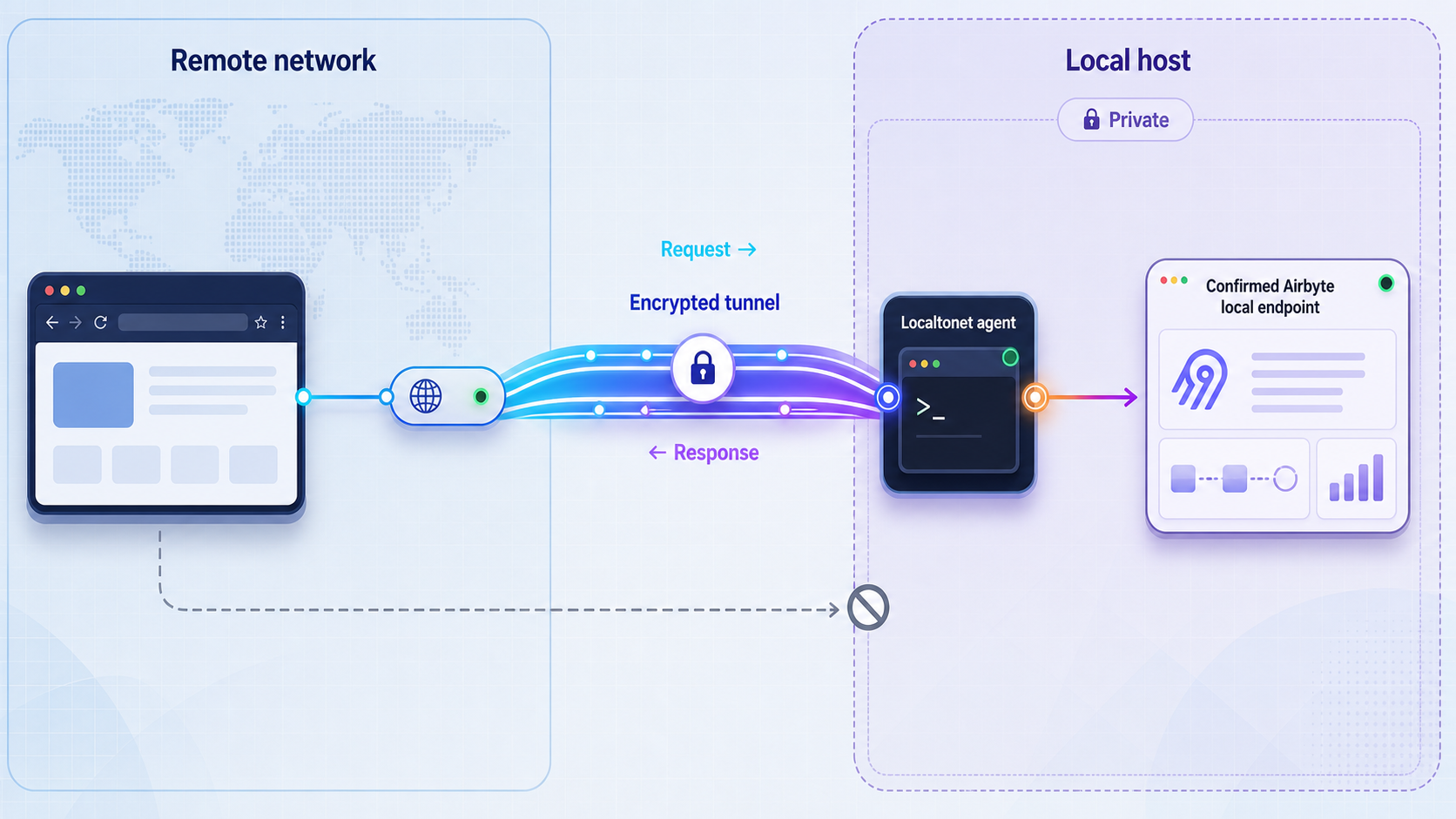
Once Airbyte works locally, our platform can expose a service reachable from the Localtonet client device through an outbound connection to a Localtonet relay server. This avoids inbound router port forwarding, firewall changes, VPN setup, and the need for a public IP address. The tunnel remains available only while the selected client device is connected and the tunnel is running.
The essential prerequisite is a confirmed local target. For an HTTP, TCP, UDP, combined UDP/TCP, or TLS tunnel, that target consists of a local IP address and port on, or reachable from, the device running our client. Airbyte's supplied project evidence does not establish which protocol, port, or bind address its current quickstart uses. Therefore, this guide does not prescribe a specific Localtonet tunnel type for Airbyte.
If the current Airbyte deployment documentation and your local test establish an HTTP or HTTPS web endpoint, review the corresponding HTTP/s option in our dashboard. If the deployment instead exposes a raw TCP service for the access you need, evaluate a TCP or TLS tunnel according to the service's documented transport. Do not choose a tunnel merely because an older tutorial used a familiar port.
Install and run the Localtonet client
Install our client on the Airbyte host or on another device that can reach the confirmed Airbyte local endpoint. Keep Airbyte locally verified before adding the tunnel.
Authenticate or select the client device
Use the device-specific authentication token associated with the client that will run the tunnel. Never place the token in an article, screenshot, shared command transcript, or public support request.
Select an available relay server
Choose from the relay servers or regions currently available in the dashboard. Availability can vary, so a server code should be obtained from the current product rather than hardcoded.
Create the tunnel that matches the verified transport
Select the appropriate tunnel family only after recording Airbyte's actual local protocol, IP address, and port. Enter the local target reachable from the Localtonet client device. Do not use an assumed default port.
Start the tunnel and test the assigned public endpoint
Creating a tunnel does not start it. Use the Start button, then test the assigned public URL or public host and port from an authorized remote network. Confirm that Airbyte authentication still protects the interface.
Stop or delete access when it is no longer required
Stop the tunnel to make the public endpoint unavailable while retaining the configuration, or delete the tunnel when the configuration is no longer needed. The tunnel also becomes unavailable when the selected client device disconnects.
Understand the two layers of verification
Test the public endpoint only after the local endpoint works. If local access succeeds but remote access fails, check whether the Localtonet client is connected, whether the tunnel has been started, whether the selected device can reach the local Airbyte address, and whether the target protocol and port match the verified deployment.
If the public endpoint loads but Airbyte rejects authentication, the tunnel is carrying traffic successfully and the remaining problem is at the application access layer. Do not weaken authentication to make the test pass. Correct the Airbyte account or authorization configuration instead.
Remote connectivity does not replace Airbyte authentication, connector credential controls, or least-privilege access. Limit who receives the public endpoint, preserve the application's security controls, and stop the tunnel outside approved access windows when continuous remote administration is unnecessary.
Troubleshooting the complete workflow
The official installer does not complete
Return to the first failing prerequisite or component instead of repeatedly rerunning the entire process. Confirm the exact deployment tool version, Airbyte version, host platform, available capacity, and error timestamp. Compare those facts with the current official quickstart and release notes.
Do not mix an old quickstart command with a current upgrade guide. If an installation method has been superseded, follow the migration or new-deployment direction given for the target release. A partial deployment may also need a documented cleanup procedure before retrying, so avoid manually deleting unknown state.
The interface does not open locally
Verify that the installation reported success and that required components are ready. Recheck the local endpoint exactly as printed by the deployment. A mismatch in protocol, hostname, port, or path can look like a failed installation even when the components are running.
Also check whether the interface is bound only to a particular address. Bind behavior is not established by the supplied evidence and should not be altered speculatively. Use the deployment documentation to determine whether access from another local device is expected or whether the initial test must occur on the host.
The interface works, but a connector check fails
Treat this as a connector or external-system problem unless platform logs show otherwise. Verify DNS resolution, outbound reachability, credentials, TLS requirements, and permissions for the selected source or destination. Confirm that the credential can perform the exact operations required by that connector, not merely sign in to the external system.
Use a small test data set to reduce ambiguity. Record connector names and versions where available, because behavior can change independently of the core platform release.
The tunnel exists, but the public endpoint is unavailable
Confirm that the selected Localtonet client is connected and that the tunnel is running. Creating a tunnel alone does not make it active. Then verify that the client device can reach the same local IP address and port entered as the target.
Recheck the protocol choice against the confirmed Airbyte endpoint. An HTTP endpoint should not be treated as an arbitrary raw service without a documented reason, and a raw protocol should not be assumed to be a browser application. If the endpoint changed after an Airbyte reinstall or upgrade, update the tunnel target only after verifying the new local address.
The tunnel works until the host restarts
Check both application layers independently. First verify that Airbyte has restarted and is healthy. Then confirm that the Localtonet client is connected and the tunnel is running. Automatic startup behavior for Airbyte depends on the selected deployment method, while a Localtonet tunnel is available only while its chosen client is connected and the tunnel is active.
Remote access works, but it should no longer be public
Stop the tunnel immediately. If the configuration will not be reused, delete it. Then review Airbyte access logs or available operational records according to the installed version, rotate any credential that may have been exposed, and verify that Airbyte remains available only through intended paths.
Frequently asked questions
What is the official way to start an Airbyte Open Source deployment?
The Airbyte repository directs self-hosting users to its “Deploy Airbyte Open Source” quickstart. Use the current version of that linked guide. The evidence supplied for this article does not contain its current command or prerequisite list, so commands from older tutorials should not be substituted.
Is the Airbyte Agent SDK command the same as installing Airbyte Open Source?
No. The repository presents the open-source Agent SDK as a separate option for embedding connectors into AI-agent workflows. It is not evidence of the deployment procedure for the Airbyte Open Source data-movement platform.
What local port does Airbyte use?
A universal local port is not established by the supplied evidence. Obtain the protocol, host, port, and any required path from the current quickstart and the output of your own deployment. Do not configure a firewall rule or tunnel using a port copied from an unrelated release.
Which Localtonet tunnel type should I use for Airbyte?
Choose only after verifying Airbyte's actual local transport. A confirmed HTTP or HTTPS interface points toward the corresponding HTTP/s workflow, while a documented raw TCP service may require a TCP or TLS configuration. The available Airbyte evidence does not confirm a protocol or endpoint, so this article does not prescribe one.
Does Localtonet require router port forwarding for this setup?
No. Our client establishes an outbound connection to a Localtonet relay server, so the workflow does not require inbound router port forwarding, firewall changes, VPN setup, or a public IP address. The selected client must remain connected and the tunnel must be running.
Does a Localtonet tunnel secure Airbyte accounts and connector credentials?
A tunnel provides network reachability to the configured local target. It does not replace Airbyte authentication, authorization, credential management, or least-privilege controls. Configure and verify those application protections before exposing the interface.
Can I upgrade Airbyte without checking intermediate release notes?
That is not a safe assumption. Releases can introduce deployment-tool requirements and architecture migrations. Airbyte 2.0, for example, required abctl 0.30.2 before an Airbyte 2.0 upgrade and was the final version supporting Helm chart V1. Review the documented path from your installed version to the target version.
Should I expose Airbyte before testing a connection locally?
No. First verify platform health, local interface access, authentication, and a limited test sync. Remote access should be added only after the underlying deployment works consistently, making later troubleshooting safer and more precise.
Connect to your verified Airbyte deployment with Localtonet
Once the official Airbyte quickstart has produced a working local endpoint, use our dashboard to select the client device, choose an available relay server, and create the tunnel that matches the endpoint's confirmed protocol. Keep authentication enabled and stop the tunnel whenever remote administration is no longer required.
Get Started Free →

