

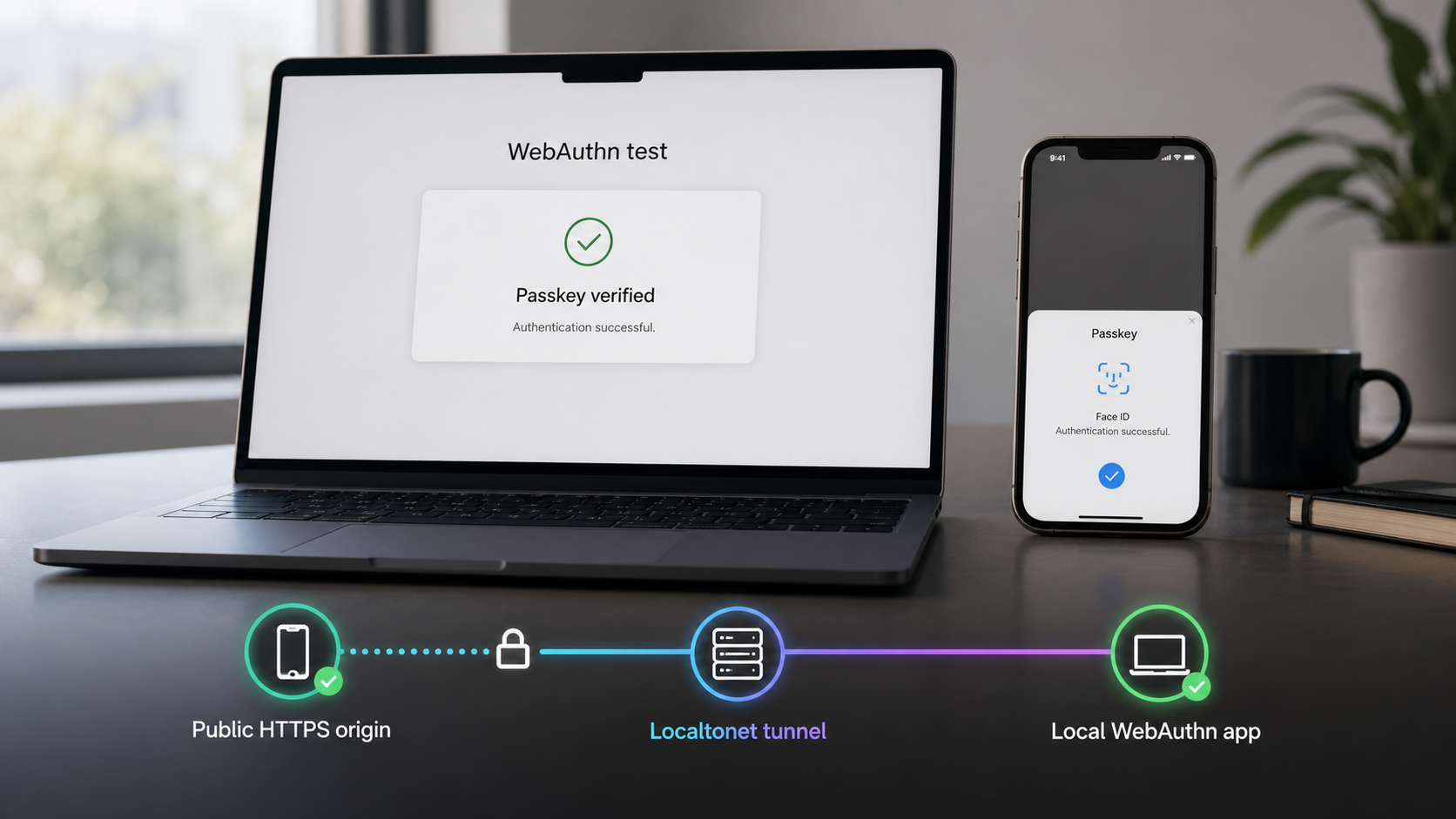
Validate WebAuthn ceremonies where users will actually perform them
A passkey flow can succeed on a developer workstation or in a CI virtual authenticator and still fail on a physical phone, tablet, or external authenticator. Real-device testing introduces browser security rules, public HTTPS origins, relying-party identifiers, callback URLs, and platform-specific user interfaces that automated tests may not reproduce. In this guide, we explain how to prepare a local WebAuthn application, verify its configuration, and expose it through an outbound Localtonet HTTP tunnel for controlled testing on real devices. The tunnel provides reachability, but your application must still enforce every WebAuthn security requirement correctly.
Why real-device passkey testing matters
WebAuthn coordinates several independent components: browser JavaScript, server-generated challenges, relying-party configuration, authenticator behavior, credential storage, and server-side verification. A successful automated test confirms important parts of this ceremony, but it does not necessarily show what will happen when a user reaches the application from a physical device.
A virtual authenticator is a software implementation controlled by browser automation. It can let a test suite create credentials, request assertions, exercise verification logic, and test expected failures without requiring a person to touch a biometric sensor or insert a security key. This makes virtual authenticators valuable for repeatable tests on every code change.
Physical devices add another layer. A phone may use its platform authenticator, display operating-system account prompts, offer a synced passkey, or present a different browser interface. An external authenticator may communicate through USB, NFC, or another transport supported by the test environment. Cross-device authentication can also involve interaction patterns that a headless test does not reproduce.
Real-device testing is therefore complementary to CI testing rather than a replacement for it. Automated tests provide fast regression coverage. Physical-device sessions validate the browser, operating system, authenticator, public origin, and network path that a user actually encounters.
Understand the WebAuthn origin and relying-party boundary
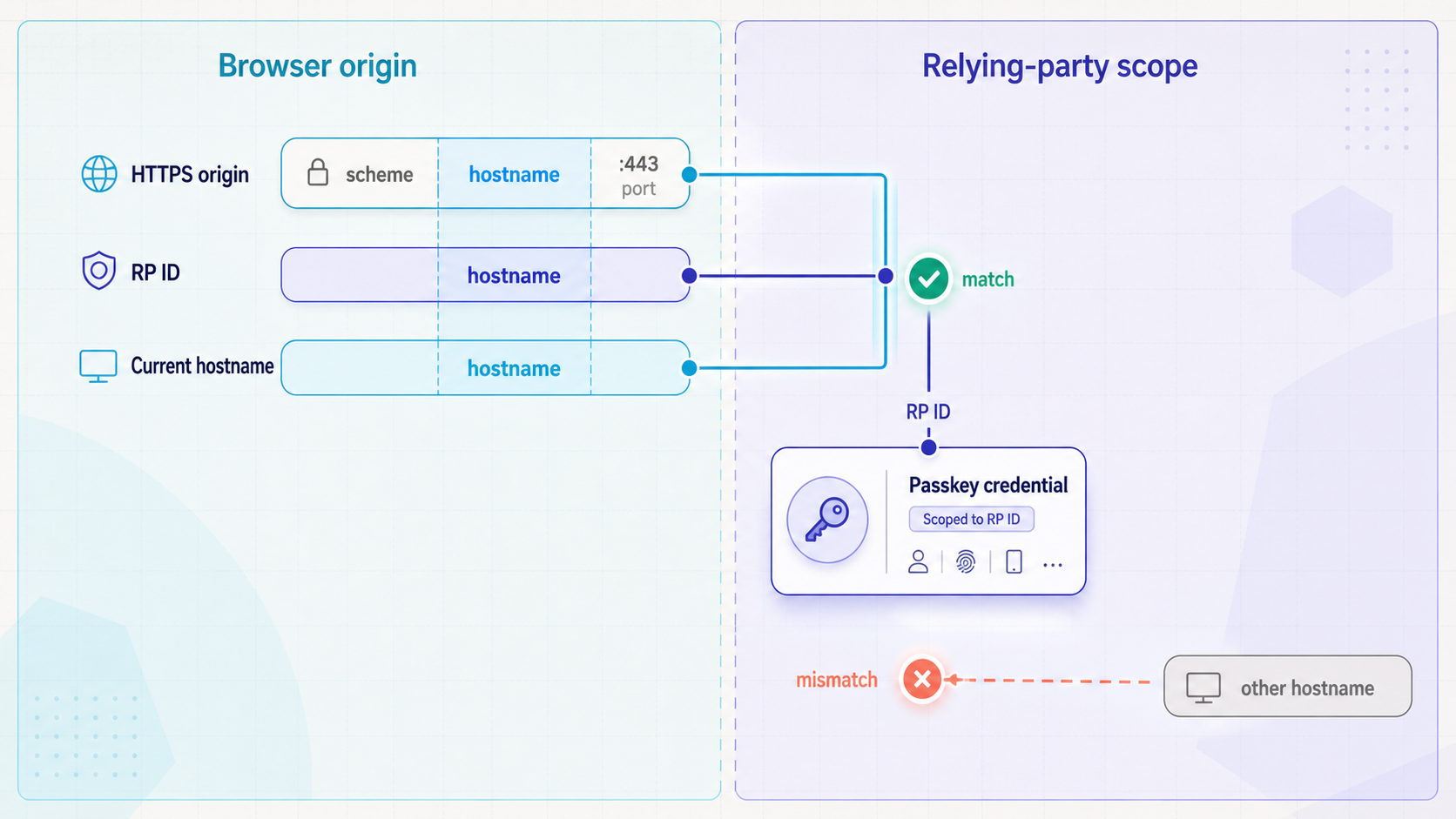
WebAuthn credentials are not general credentials that can be replayed on any website. Registration and authentication are scoped to a relying party. The browser evaluates the page origin and the relying-party ID involved in the ceremony, while the server must validate the returned client data and authenticator response against the values expected for that request.
Secure context
WebAuthn browser APIs are intended for trustworthy contexts. Local development can receive special treatment from browsers, but a phone opening an address on another computer is not visiting the phone's own localhost. A public HTTPS URL gives the device a secure origin it can reach and lets you test the application closer to its deployed origin model.
With Localtonet, the client running on a device that can reach your application establishes an outbound connection to our relay server. An HTTP tunnel can then provide a public HTTPS address for the local web service. This does not require an inbound public IP address, router port forwarding, firewall changes, or VPN setup.
Origin
An origin includes the URL scheme, hostname, and port. Your WebAuthn backend should compare the client-reported origin with the origin or explicitly permitted set of origins configured for the test environment. If the browser loads the page from a Localtonet HTTPS address while the backend expects only a local development origin, correct validation should reject the ceremony.
Relying-party ID
The relying-party ID is a domain identifier rather than a full URL. It does not contain an HTTPS scheme, path, query string, or port. It must be valid for the domain context in which the WebAuthn ceremony runs. Registration under one relying-party scope should not be expected to behave like a credential registered for an unrelated hostname.
Localtonet makes the local application reachable through a public endpoint. It does not automatically correct an invalid relying-party ID, add the endpoint to your allowed-origin configuration, modify identity-provider callbacks, or weaken browser validation. Configure the testing origin deliberately and keep strict server-side verification enabled.
Prepare the local WebAuthn application first
Before introducing remote access, confirm that the application works on the development machine. Start the web application using the project's documented procedure and visit its local address. Test the pages involved in account creation, passkey registration, authentication, logout, and account recovery where those features exist.
Record the exact local IP address and port on which the application is listening. Do not infer a port from a framework convention. The Localtonet HTTP tunnel must point to the service that is actually reachable from the machine running our client.
Inspect the application's WebAuthn configuration and identify where it defines the allowed origin and relying-party ID. The exact names of configuration files, settings, or environment variables depend on the application and WebAuthn library, so follow that project's documentation rather than guessing them.
If an external identity provider participates in sign-in, also identify the redirect or callback URL configuration. The callback may need to use the same public hostname that the browser uses during the test. Providers commonly compare callbacks against registered values, so a callback pointing to a local address or a different public hostname can interrupt the flow before the WebAuthn ceremony completes.
| Configuration element | What it represents | What to verify |
|---|---|---|
| Public origin | The scheme, hostname, and port used by the browser | The server accepts the exact testing origin intentionally |
| Relying-party ID | The domain scope to which the WebAuthn credential belongs | The value is valid for the hostname used in the ceremony |
| Identity callback | The URL to which an identity provider returns the browser | The registered callback and application-generated callback agree |
| Application base URL | The public address used when generating links or redirects | Generated navigation does not unexpectedly return users to localhost |
| Session cookies | The browser state connecting registration or login requests | Cookie domain, security, and same-site behavior fit the HTTPS test origin |
Expose the local WebAuthn app with Localtonet
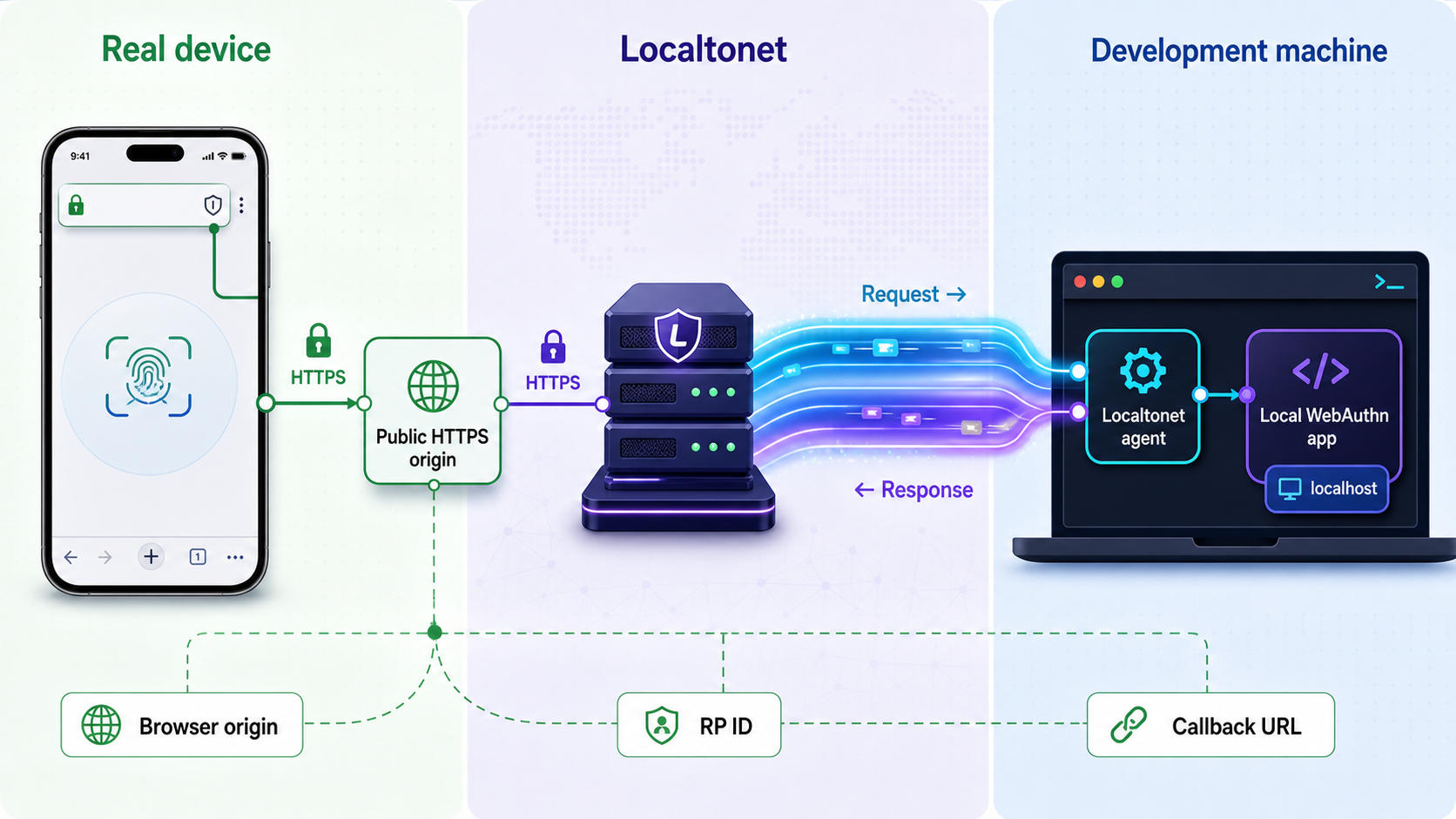
Once the application works locally and you understand its public-origin requirements, create an HTTP tunnel. Keep application installation and WebAuthn configuration separate from tunnel configuration. This makes failures easier to diagnose because each layer can be tested independently.
Install and run the Localtonet client
Install our client on the device that can reach the local WebAuthn application. Run the client while testing. The tunnel is available only while the selected client is connected and the tunnel is running.
Authenticate and select the device
Use the device-specific authentication token through the supported Localtonet workflow, then select the corresponding device for the tunnel. Treat the token as a secret and never place it in source code, screenshots, browser pages, logs, or test instructions.
Select an available relay server
Choose an available server or region from the current dashboard. Do not hardcode a server code from an old tutorial because available values can change and may vary by deployment or plan.
Create the HTTP tunnel
Configure an HTTP tunnel that points to the local IP address and port where the WebAuthn application is listening. HTTP tunnels support Random Sub Domain, Custom Sub Domain, and Custom Domain process types, but availability and any domain requirements should be confirmed in the current dashboard and documentation.
Start the tunnel and copy its public URL
Creating a tunnel does not start it. Press Start, confirm that the tunnel is running, and use the assigned public HTTPS URL. Open that URL on the development machine before moving to a phone so basic routing errors can be isolated quickly.
Stop or delete the tunnel after testing
When the test session is complete, stop the tunnel so the endpoint is no longer active. Delete temporary tunnel configurations when they are no longer required. Lifecycle management is part of limiting unnecessary exposure.
For the current dashboard workflow and product behavior, consult the Localtonet HTTP tunnel documentation .
A saved Localtonet tunnel configuration is not automatically available. The selected client must be connected, and the tunnel must be started. If a device cannot open the public URL, verify both conditions before changing the WebAuthn configuration.
Align the application with the public testing URL
After the tunnel assigns a public HTTPS URL, update the test environment using the configuration mechanisms supported by your application. Add the exact public origin to the allowed-origin set, and configure a valid relying-party ID for that hostname. If the application generates absolute links, redirects, or callback addresses, make sure they remain on the public testing origin.
Restart or reload the application if its documented configuration process requires it. Then open the public URL in a fresh browser session and inspect the complete navigation sequence. A page that initially loads over HTTPS can still redirect to a local address or another hostname later in the flow.
If your assigned endpoint changes between test sessions, recheck every origin-dependent setting before attempting to use a previously registered test passkey. WebAuthn credentials are scoped, so a credential created for one relying-party context should not be treated as portable to an unrelated endpoint. For repeatable long-running tests, evaluate the available subdomain or custom-domain options in the current dashboard, and confirm current DNS requirements before configuring a custom domain.
Run a focused real-device test matrix
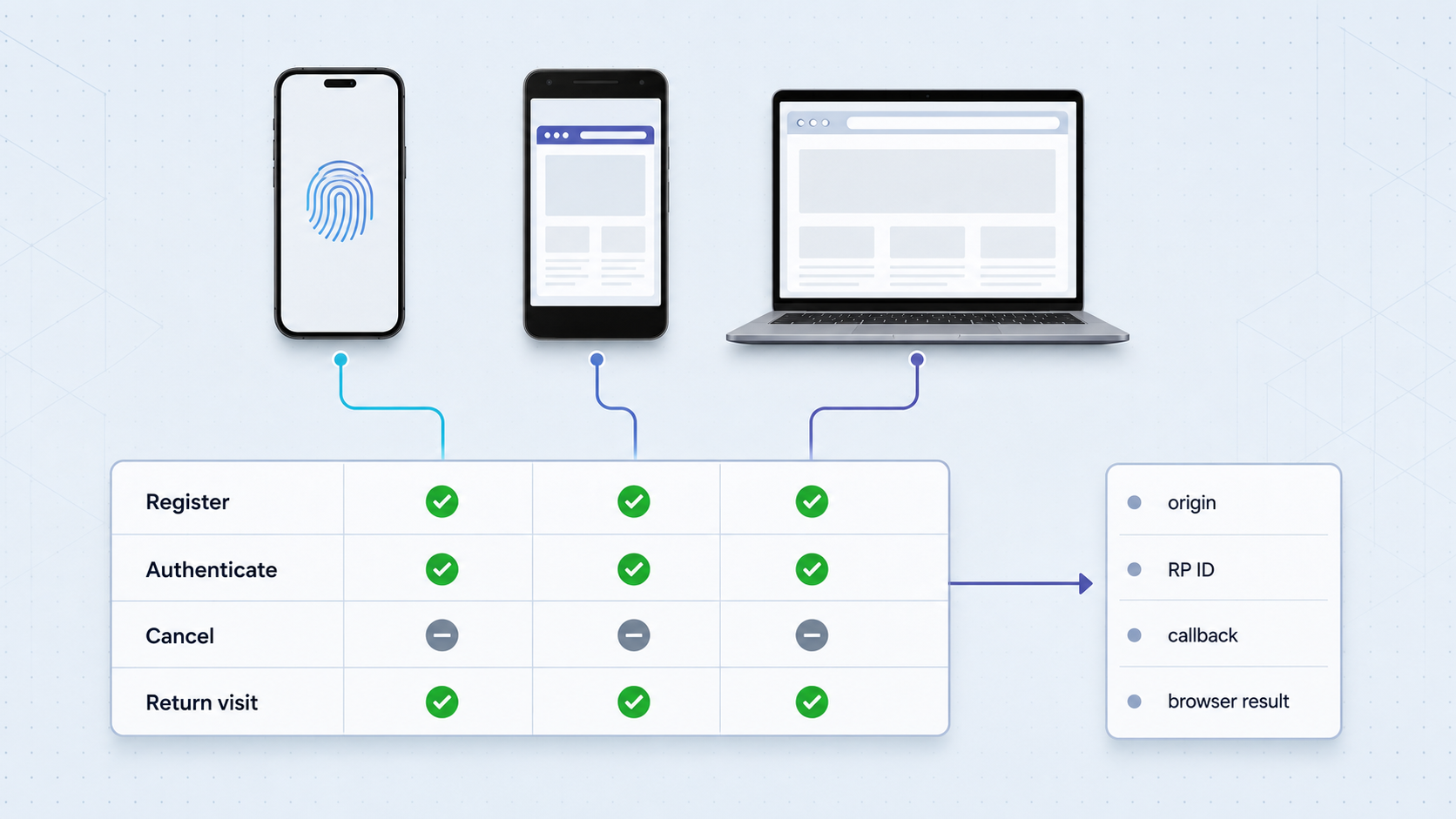
Start with one controlled account and one device. Visit the public HTTPS URL directly on the physical device, register a new test passkey, sign out, and authenticate again. Record the browser, operating system, authenticator type, public hostname, and expected user-verification policy for each result.
Next, test the failure paths your application claims to handle. Cancel the platform prompt, let a challenge expire if your application defines an expiration policy, attempt authentication with an account that has no applicable credential, and confirm that the interface returns a safe and understandable error. Do not weaken production verification rules merely to make a test pass.
Cross-device scenarios should be tested separately from same-device authentication. A passkey created and used on one phone validates a different path from a desktop flow that asks the user to continue with another device. Likewise, an external security key is a different scenario from an integrated platform authenticator. Keep these results distinct instead of treating one successful ceremony as proof of all authenticator paths.
| Test layer | Primary value | What it cannot establish alone |
|---|---|---|
| Unit and integration tests | Challenge storage, account logic, and validation components | Actual browser and authenticator interaction |
| CI virtual authenticator | Repeatable browser-level registration and assertion flows | Real biometric prompts, physical transports, and platform UI |
| Real device through an HTTPS tunnel | Public-origin, browser, operating-system, and platform-authenticator behavior | Coverage across every browser, device, account state, or deployment configuration |
| Staging or production-like environment | Deployed routing, domain, identity-provider, and operational behavior | Safe experimentation unless the environment is properly isolated |
Protect the temporary test environment
A public URL changes the exposure boundary of a development service. Use synthetic accounts and non-sensitive test data. Do not expose production credentials, production databases, administrative tools, unrestricted enrollment endpoints, debugging consoles, or secrets embedded in client-side code.
Apply authentication and least privilege at the application layer. Restrict who can create test accounts and register passkeys. If your application supports IP restrictions, access controls, or narrowly scoped test permissions, use them where appropriate. Remove temporary users and credentials after the session.
Device authentication tokens identify Localtonet clients and must remain private. They should never be copied into a public issue, committed to a repository, included in test fixtures, or shared with the people opening the public application URL.
Point the HTTP tunnel at the intended WebAuthn web application, not an unrestricted development host containing unrelated services. Stop the tunnel after testing, review test data, and remove temporary registrations that are no longer needed.
Troubleshoot failures by layer
If the public page does not load, first verify the local application, then the Localtonet client connection, tunnel status, local target, and public URL. If the page loads but WebAuthn is unavailable, inspect whether the browser considers the page a secure context and whether embedded frames or browser policy affect the call.
If registration begins but the server rejects the result, compare the expected challenge, origin, relying-party ID, ceremony type, and user-verification policy with the received response. Do not bypass these checks. A rejection may demonstrate that validation is working correctly against a mismatched configuration.
If an identity-provider login fails before reaching the passkey screen, examine the generated redirect and registered callback. If registration succeeds but later authentication reports that no suitable credential exists, confirm that the test uses the expected hostname and relying-party scope and that the device or authenticator containing the credential is available.
Frequently asked questions
Why does a passkey work on localhost but fail on my phone?
The phone's localhost refers to the phone, not your development computer. A physical-device test also uses a different origin and may expose relying-party ID, callback, cookie, or browser-policy differences. A public HTTPS tunnel provides reachability, but the application still needs correct WebAuthn configuration.
Does Localtonet automatically configure my WebAuthn relying-party ID?
No. Our HTTP tunnel provides a public HTTPS address and forwards requests to the configured local service. Your application must explicitly use a valid relying-party ID and accept the intended public origin according to its own WebAuthn library and security policy.
Can real-device testing replace virtual authenticators in CI?
They serve different purposes. Virtual authenticators provide repeatable automated coverage without human interaction. Real-device tests validate physical platform behavior, authenticator prompts, public-origin configuration, and user experience. A robust test strategy uses both layers.
Can I reuse a passkey after the public testing hostname changes?
Not automatically. WebAuthn credentials are scoped to a relying party, and a different hostname can represent a different relying-party context. Recheck the origin and relying-party configuration and register a new test credential when the new endpoint is outside the previous valid scope.
Does creating a Localtonet tunnel make it immediately available?
No. The selected Localtonet client must be connected, and the tunnel must be started. The public endpoint remains available only while the client is connected and the tunnel is running.
Should I expose production accounts for realistic passkey testing?
No. Use isolated test accounts, synthetic data, restricted registration, and least-privilege access. Do not expose production credentials, sensitive user information, administrative interfaces, or Localtonet device tokens through the test application.
Test your local passkey flow on a real device
Run your WebAuthn application locally, align its testing origin and relying-party configuration, then use a Localtonet HTTP tunnel to reach it through a public HTTPS URL without inbound router port forwarding.
Get Started Free →

