

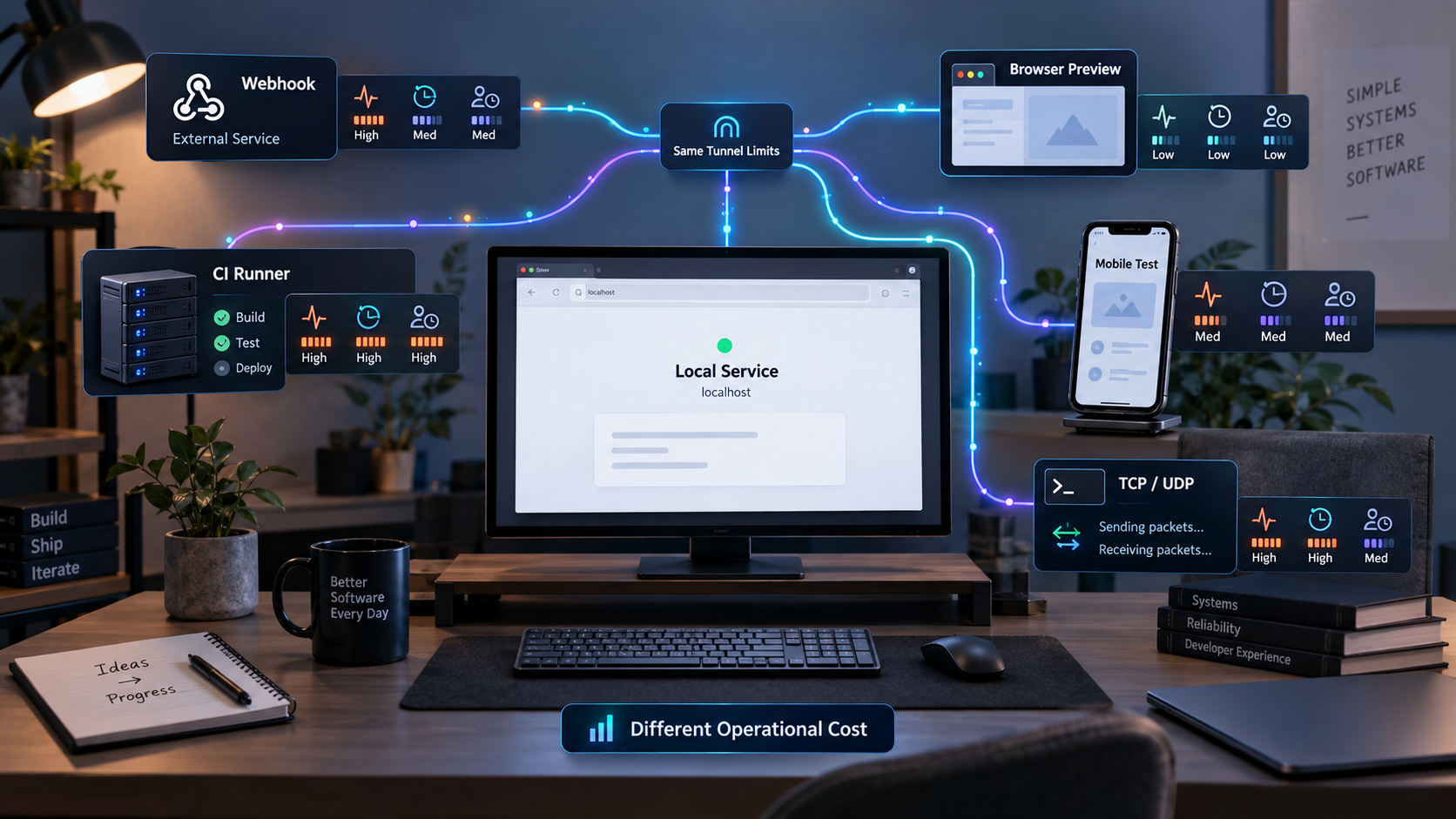
Measure tunnel plans by interrupted work, recovery effort, and workflow fit
A localhost tunnel can be inexpensive on paper while still creating costly interruptions during webhook testing, mobile QA, client previews, raw port access, or automated jobs. The useful question is not simply whether a plan is free or paid. It is whether its documented limits match the traffic pattern, protocol, stability, concurrency, and operational controls your workflow requires. This guide provides a repeatable framework for evaluating those limits, testing uncertain behavior, and checking how the available Localtonet tunnel families fit the result.
📋 What's in this guide
Quick answer: evaluate workflow cost, not plan price alone
The practical cost of a localhost tunnel is the subscription price plus the engineering time, coordination, and risk created by its limits. A low-cost plan may be completely suitable for occasional manual testing. The same plan may become expensive if an address change forces repeated webhook reconfiguration, a connection cap blocks a multi-service test environment, or a protocol restriction prevents the application from being tested accurately.
Begin with the workflow rather than a provider comparison. Identify what must connect, which protocol it uses, how long the endpoint must remain available, whether its public address must remain stable, how many services and developers operate concurrently, and what happens when the tunnel stops. Then verify each requirement against current documentation, dashboard options, subscription details, and a controlled test.
A useful decision can be summarized with four questions:
A free plan can be the correct choice when its verified protocol, traffic, session, address, concurrency, and access behavior meet the workflow. Conversely, paying for a plan does not prove that it supports a required protocol or operating model. Evaluate documented capabilities and measured behavior rather than using price as a proxy for suitability.
The tunnel limits that affect engineering work
Tunnel plans are often compared using one headline number, but real workflows depend on several interacting constraints. A plan with sufficient bandwidth may still fail because it does not support UDP. A tunnel with no obvious session deadline may still stop when its client process exits, its host sleeps, or its network changes. A reusable public address may solve webhook registration but not team access or automation.
Session duration and lifecycle
Determine whether the provider imposes a maximum session duration, an inactivity timeout, or another lifecycle rule. Also separate provider-enforced expiration from ordinary operational dependencies. Even without a published timeout, a tunnel generally depends on its client, host, power, and network connection remaining available.
With Localtonet, creating a tunnel does not mean it is running. The selected client or device must be connected, and the tunnel must be started. The public endpoint remains available only while that client is connected and the tunnel is running. A stopped client, sleeping development laptop, interrupted outbound connection, or stopped tunnel can therefore affect availability independently of subscription limits.
Public address stability
Address stability matters when another system stores the endpoint. Typical examples include webhook registrations, OAuth callback allowlists, mobile builds containing a test API address, client bookmarks, DNS records, and configuration held by a remote QA team.
Do not reduce this requirement to a checkbox labeled “custom domain.” There are several distinct questions:
- Does the address survive a tunnel restart?
- Does it survive a client restart or network reconnection?
- Is it assigned to an account, device, tunnel, or individual session?
- Can the address be selected, reserved, or connected to a custom domain?
- Do the same rules apply to HTTP URLs and raw TCP or UDP endpoints?
- Does the required option depend on the current subscription?
For Localtonet HTTP and File Server tunnels, the documented Process Type choices are Random Sub Domain, Custom Sub Domain, and Custom Domain. They serve content through a public HTTPS address. Availability can vary, and exact custom-domain DNS requirements should be checked against current Localtonet documentation and dashboard options. Do not assume that an option is included in every plan or that raw port endpoints use the same address behavior.
Concurrent tunnels, agents, and connections
These limits describe different resources. A concurrent tunnel limit can restrict how many services are published. An agent or device limit can restrict how many machines connect. A connection limit can restrict simultaneous visitors, sockets, streams, or application requests. A team limit can restrict who is allowed to administer the environment.
Map each limit to the actual topology. A full-stack test could require a browser frontend, an API, a callback receiver, and a raw service at the same time. Two developers may each need an isolated version of that topology. Counting “one application” would hide the true requirement.
Protocol availability
An HTTPS tunnel is appropriate for many websites, APIs, webhooks, and browser previews, but it is not a substitute for every network protocol. A raw TCP application needs TCP forwarding. A UDP-based service needs UDP behavior. Some applications require both. File publication, proxy exit behavior, and private network access are also different architectures rather than interchangeable labels.
Our documented categories include HTTP/s, TCP, UDP, TLS, combined UDP/TCP, File Server, Proxy Server using HTTP or SOCKS5, and VPN Manager. Availability can vary by plan, client version, region, or deployment, so the current dashboard and subscription details remain authoritative for a specific purchase decision.
Bandwidth, requests, payloads, and connection handling
Traffic limits should be evaluated using realistic payloads. Request count alone can underestimate media-heavy previews, while transfer volume alone can underestimate a webhook load made of many small requests. Relevant dimensions can include inbound and outbound transfer, request totals, maximum request or response size, upload size, connection duration, concurrent connections, idle handling, and rate limits.
The supplied Localtonet product information does not establish universal plan quotas for bandwidth, request count, payload size, connection count, or session duration. We therefore do not state values here. Check the current dashboard and subscription terms, then measure the behavior important to your application.
| Limit category | What to verify | Typical failure symptom | Recovery work |
|---|---|---|---|
| Session lifecycle | Maximum duration, inactivity behavior, restart behavior | Endpoint becomes unreachable during a test | Reconnect, restart, verify, and replay failed work |
| Address stability | Persistence across tunnel, client, and host restarts | Stored callback or bookmark points to an old endpoint | Update external configuration and retest |
| Concurrency | Tunnels, devices, users, connections, and streams | A new service or developer cannot connect | Stop another resource or change the topology |
| Protocol support | HTTP/s, TCP, UDP, combined traffic, or another exact need | The application cannot communicate correctly | Select a compatible tunnel type and repeat testing |
| Traffic and request quotas | Transfer, requests, payload size, rate, and reset period | Requests are rejected, throttled, or interrupted | Wait for reset, reduce traffic, or change the plan |
| Automation | Supported API behavior, credentials, lifecycle controls | A CI job requires manual setup or cleanup | Intervene manually and rerun the job |
| Team administration | User access, ownership, audit needs, and offboarding | Shared credentials or unclear responsibility | Coordinate access and restore accountable ownership |
Translate limits into workflow requirements
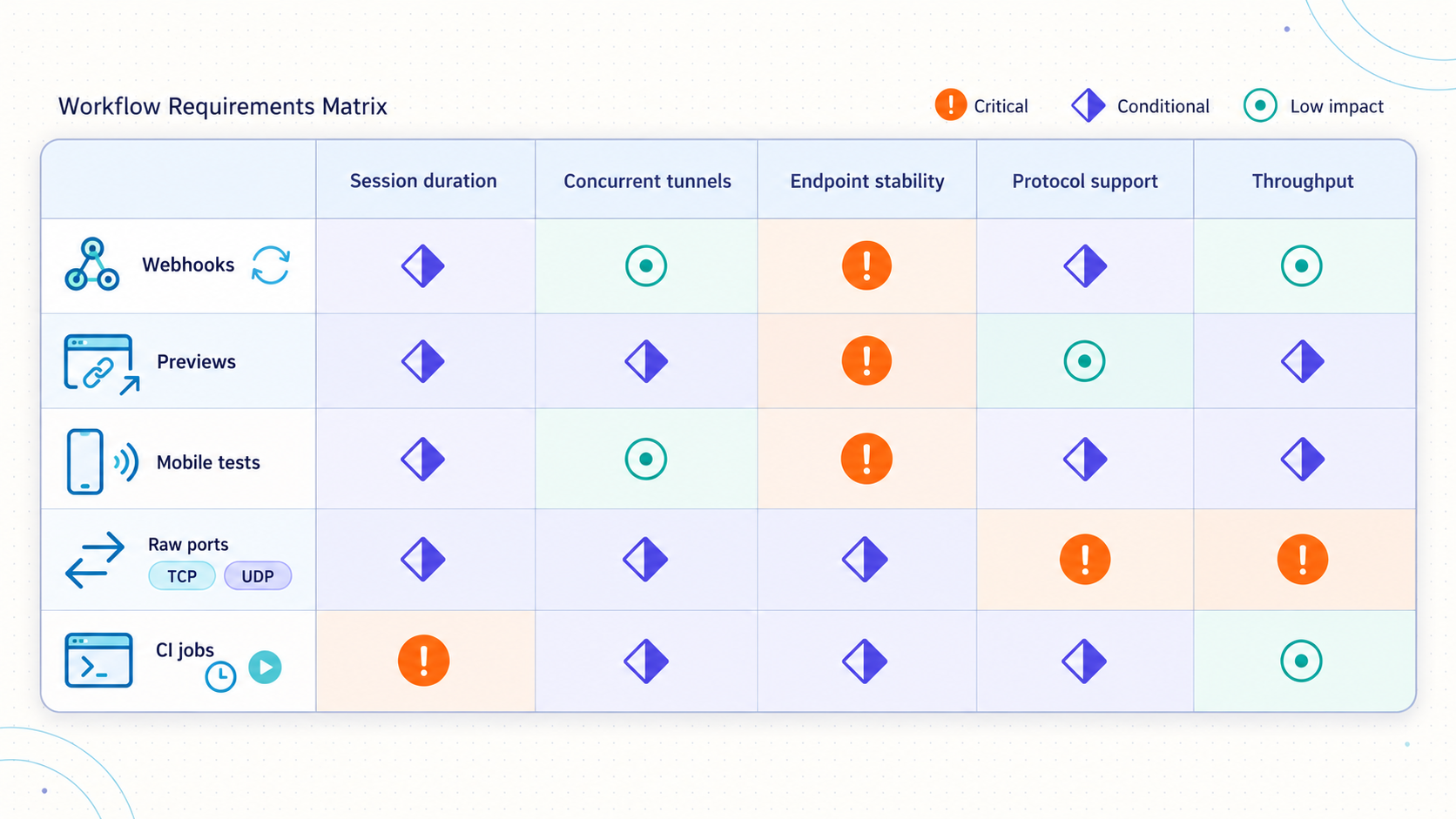
The same limit has different consequences in different workflows. A changing URL may be acceptable for a ten-minute personal test and unacceptable for a webhook endpoint registered across several systems. The following profiles show how to translate technical limits into operational impact.
Webhook development and asynchronous callbacks
A webhook sender initiates the connection, so it must be able to reach the receiver. For a handler running on localhost, that usually means providing a publicly reachable HTTP or HTTPS endpoint and forwarding traffic to the local service.
Address stability is often the first requirement because callback URLs are registered outside the development machine. Availability is equally important when the sender retries on its own schedule. If the tunnel is unavailable, the developer may need to identify missed events, replay them using the sender's supported controls, and verify that local state is consistent. Never assume that all webhook providers use the same retry duration, signature format, or replay mechanism.
The test should also cover the real request method, headers, signature verification, body size, duplicate delivery handling, delayed delivery, and non-success responses. A tunnel proving that a browser can load a page does not prove that the full webhook workflow is correct.
Mobile and physical-device testing
A phone may be able to reach a development machine directly when both devices share a usable local network, but that path is not always available. Guest Wi-Fi isolation, cellular testing, remote devices, and distributed QA can make a public endpoint useful.
Measure address persistence if the endpoint is compiled into a test build or stored in a mobile configuration. Measure response behavior under the expected mobile payloads. Also test device transitions such as Wi-Fi to cellular, because a successful desktop browser request does not validate the mobile path.
Keep application security in scope. A public tunnel exposes the reachable service beyond the phone. Development endpoints should require appropriate authentication, use test data, and avoid administrative interfaces that were designed only for trusted local access.
Client previews and stakeholder reviews
A preview has a small technical footprint but a high coordination cost. A broken endpoint during a scheduled review consumes time from every attendee. A changed URL can also create confusion if an older link remains in email or chat.
Evaluate startup preparation, first-visit behavior, browser compatibility, asset transfer, and the effect of host sleep or network changes. Test from a device and network that are not part of the developer's LAN. If the preview includes uploads, video, large images, or downloadable artifacts, use representative content rather than a minimal home page.
For long-lived reviews, staging may be more suitable than a developer laptop. A tunnel is useful for controlled access to work in progress, but it does not convert an ephemeral development process into production infrastructure.
Raw TCP and UDP services
Raw port workflows must be classified by protocol before comparing plans. Examples may use persistent TCP sessions, short TCP connections, UDP datagrams, or both. HTTP-specific features such as subdomains and browser behavior do not answer whether a raw service will work.
Validate the assigned public host and port with the actual client software. Test connection duration, reconnect behavior, concurrent clients, latency sensitivity, packet size, and the effect of tunnel restarts. For UDP, test realistic traffic rather than relying on a TCP reachability check. If the application uses both protocols, verify combined UDP/TCP support and behavior explicitly.
Continuous integration and automated jobs
CI adds lifecycle and cleanup requirements. A job may need to create or select a tunnel, start it, discover the public endpoint, wait until it is ready, run tests, and stop or delete it. Parallel jobs can increase concurrency quickly, while failed jobs can leave resources running unless cleanup is reliable.
Confirm current automation support before designing around it. Localtonet can be managed from a dashboard or REST API, but this article does not invent API endpoints, request bodies, credentials, or command-line flags. Use current official API information for implementation, protect credentials in the CI secret store, and avoid printing tokens or private endpoints in logs.
Folder publication and file workflows
Publishing a folder is different from forwarding a web application port. With Localtonet File Server, the target is a local folder path. The documented sub-types are Default, SFTP, and WebDAV. Default provides a browser-based file manager, SFTP supports standard SFTP clients and automation, and WebDAV is intended for mounting the folder as a network drive.
Evaluate the workflow based on its intended client, file sizes, permissions, share duration, and consequences of exposing the selected directory. Do not assume that every feature of the Default web manager also applies to SFTP or WebDAV. The supplied evidence does not establish that features such as folder encryption, Immich backup, and Smart Collections apply to those two sub-types.
Private access versus public exposure
Some workflows do not need a public endpoint at all. If every participant and service should be part of a controlled private network, a private mesh architecture may be a better fit. Localtonet VPN Manager is our private mesh VPN feature with granular firewall rules and the ability to bridge local LANs.
Standard HTTP, TCP, UDP, TLS, and File Server tunnels should not be described as VPN functionality. Choose VPN Manager when the requirement is private mesh connectivity. Choose a public tunnel when an external sender or user genuinely needs a public URL or public host and port.
| Workflow | Primary requirement | Most expensive interruption | Evidence to collect |
|---|---|---|---|
| Webhook testing | Reachable HTTPS callback and reliable delivery window | Missed events and inconsistent local state | Endpoint persistence, signed request success, replay result |
| Mobile QA | Reachability from the actual device and network | Rebuilding or redistributing configuration after an address change | Wi-Fi and cellular tests, authentication, representative payloads |
| Client preview | Predictable access during a scheduled review | Lost meeting time across several participants | External browser test, asset load, restart rehearsal |
| Raw TCP or UDP | Exact transport compatibility | Invalid test results caused by the wrong network model | Native client test, reconnect behavior, concurrent traffic |
| CI job | Repeatable startup, discovery, teardown, and parallel capacity | Blocked pipelines and manual cleanup | Cold-start timing, parallel runs, failure cleanup |
| File access | Correct file protocol, path, and permissions | Unintended data exposure or failed automation | Authorized operations, denied operations, large-file test |
Build a simple workflow cost model
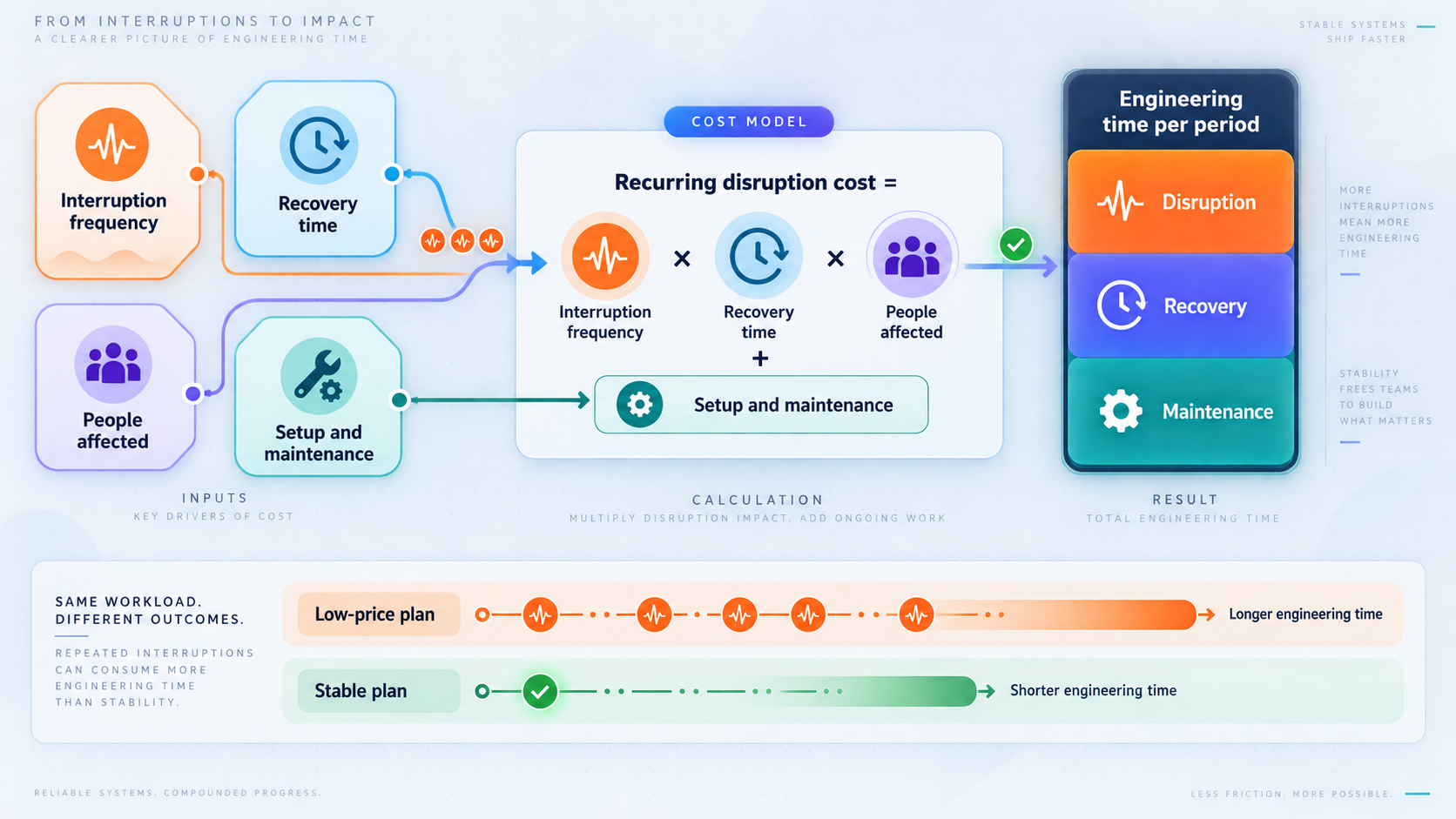
A useful model does not need to predict every interruption perfectly. It needs to make hidden labor and risk visible enough to compare options consistently. Use the same observation period for every candidate, such as a month, a release cycle, or a representative project.
Start with direct spend, then add interruption cost, coordination cost, and expected risk cost:
Total workflow cost =
  subscription and usage cost
  + interruption frequency × recovery time × loaded engineering rate
  + coordination time × participant cost
  + expected incident cost
The loaded engineering rate can be an internal planning rate rather than an employee's salary. Recovery time should include the complete sequence from detection to restored confidence. If a tunnel stops during webhook testing, recovery may include determining whether the application or tunnel failed, restoring the endpoint, updating a callback address, replaying an event, and checking resulting state.
Coordination cost is especially important for previews and shared test environments. Ten minutes spent by one developer is not equivalent to ten minutes spent by a developer, tester, product manager, and client. Multiply the delay by the affected participants or use the organization's preferred meeting-cost method.
Expected incident cost handles failures that are uncommon but consequential. Estimate the probability during the observation period and multiply it by the cost if it occurs. Keep this estimate separate from routine interruptions so that assumptions remain visible.
Example using illustrative values
Suppose a team observes four address-related interruptions in one month. Each takes 12 minutes of developer work to diagnose, update, and verify. One also delays a 30-minute review attended by four people. At a hypothetical loaded planning rate of 60 currency units per person-hour, the operational calculation is:
Developer recovery:
4 × 0.2 hours × 60 = 48

Review delay:
4 participants × 0.5 hours × 60 = 120

Observed workflow cost:
48 + 120 = 168 currency units
These figures are illustrative, not Localtonet pricing or a universal productivity benchmark. Replace them with your own observed interruption count, elapsed recovery time, number of affected people, and planning rate. The example demonstrates why a seemingly minor tunnel limitation can cost more through coordination than through technical recovery.
Measure severity as well as frequency
A frequent but harmless restart may be tolerable for an individual developer. A rare interruption may be unacceptable during a client demonstration or automated release gate. Record severity using categories that your team can apply consistently:
- Low: one person notices the issue and restores service without changing external configuration.
- Moderate: external configuration, event replay, or a test rerun is required.
- High: several people are blocked, a scheduled event is disrupted, or a shared environment becomes unavailable.
- Critical: sensitive data is exposed, access controls fail, or the workflow creates unacceptable operational risk.
A critical security concern should not be traded against a small subscription saving. Treat security requirements as decision gates, not merely another weighted preference.
Run a repeatable tunnel evaluation
Documentation establishes intended limits, while testing shows how those limits interact with your environment. Use both. Record the product version, client version, plan, test date, operating system, network, tunnel type, and local application so that later comparisons remain meaningful.
Describe the workflow and consequence of failure
Write one sentence defining who connects, from where, to which local service, through which protocol, and for how long. Then state what must be repeated if access fails. Keep separate rows for webhook testing, previews, mobile QA, raw ports, file access, and CI because their consequences differ.
Inventory required resources
Count local services, tunnels, client devices, team members, simultaneous external clients, expected requests, transfer volume, payload sizes, and required protocols. Include peak usage and parallel jobs rather than only the average.
Collect current documented limits
Check current plan and dashboard information for lifecycle, concurrency, protocol, address, bandwidth, request, connection, team, and automation constraints. Mark unavailable information as unknown. Do not fill gaps using old articles, memory, or limits published for a different provider.
Create a representative local service
Use the real application when safe, or a test instance with equivalent routes, payload sizes, connection behavior, and authentication. Confirm that it works locally before introducing the tunnel. This prevents local application failures from being misclassified as tunnel failures.
Test the normal path externally
Connect from outside the development LAN using the actual client type. Send representative webhook requests, load the full preview, use the physical phone, open the native TCP or UDP client, or run the CI job. Record success, timing, transfer, and connection behavior.
Exercise lifecycle and failure cases
Restart the tunnel, restart the client, interrupt connectivity, and reconnect only within a controlled test. Observe whether the public endpoint changes, how quickly failure becomes visible, what external configuration breaks, and whether long-lived connections recover. Never perform disruptive tests during a live demonstration or shared critical workflow.
Test concurrency and realistic traffic
Start the number of services and parallel jobs expected at peak. Send realistic request counts and payloads without exceeding authorized testing boundaries. For raw services, exercise representative connection duration and client count. Record the first constraint encountered.
Time complete recovery
Measure from initial detection until the workflow is trustworthy again. Include URL changes, callback updates, event replay, test reruns, cleanup, and stakeholder communication. Record who participated and whether manual privileges or credentials were needed.
Calculate cost and apply decision gates
Insert observed frequency and recovery time into the cost model. Reject candidates that fail mandatory protocol, security, access, or policy requirements. Compare the remaining options by total workflow cost and operational fit rather than advertised price alone.
Concurrency and traffic testing must stay within your account terms, plan limits, organizational policy, and applicable authorization. Prefer a bounded representative test. The goal is to discover whether the workflow fits, not to stress relay infrastructure or generate uncontrolled public traffic.
A reusable test matrix
| Test | Method | Pass criterion | Record |
|---|---|---|---|
| Initial reachability | Connect externally with the real client | Expected application response is received | Endpoint, protocol, time, and result |
| Tunnel restart | Stop and start the tunnel in a controlled window | Behavior matches the workflow's address and recovery requirement | Address before and after, recovery duration |
| Client reconnect | Restart or reconnect the client safely | Endpoint resumes within the accepted procedure | Downtime, manual actions, address behavior |
| Host interruption | Reboot or suspend only a disposable test host | Documented restoration process succeeds | Startup dependencies and total recovery |
| Peak concurrency | Run expected services, users, or jobs in parallel | Required peak completes without resource conflict | Counts, failures, and first observed constraint |
| Representative payload | Send realistic requests or files | Application receives complete valid content | Payload size, duration, status, and errors |
| Security controls | Attempt permitted and intentionally denied actions | Authorized access works and denied access remains blocked | Identity, action, expected result, actual result |
| Cleanup | Stop or delete test resources after completion | No unintended endpoint remains active | Owner, time, and confirmation |
Evaluate the workflow with Localtonet
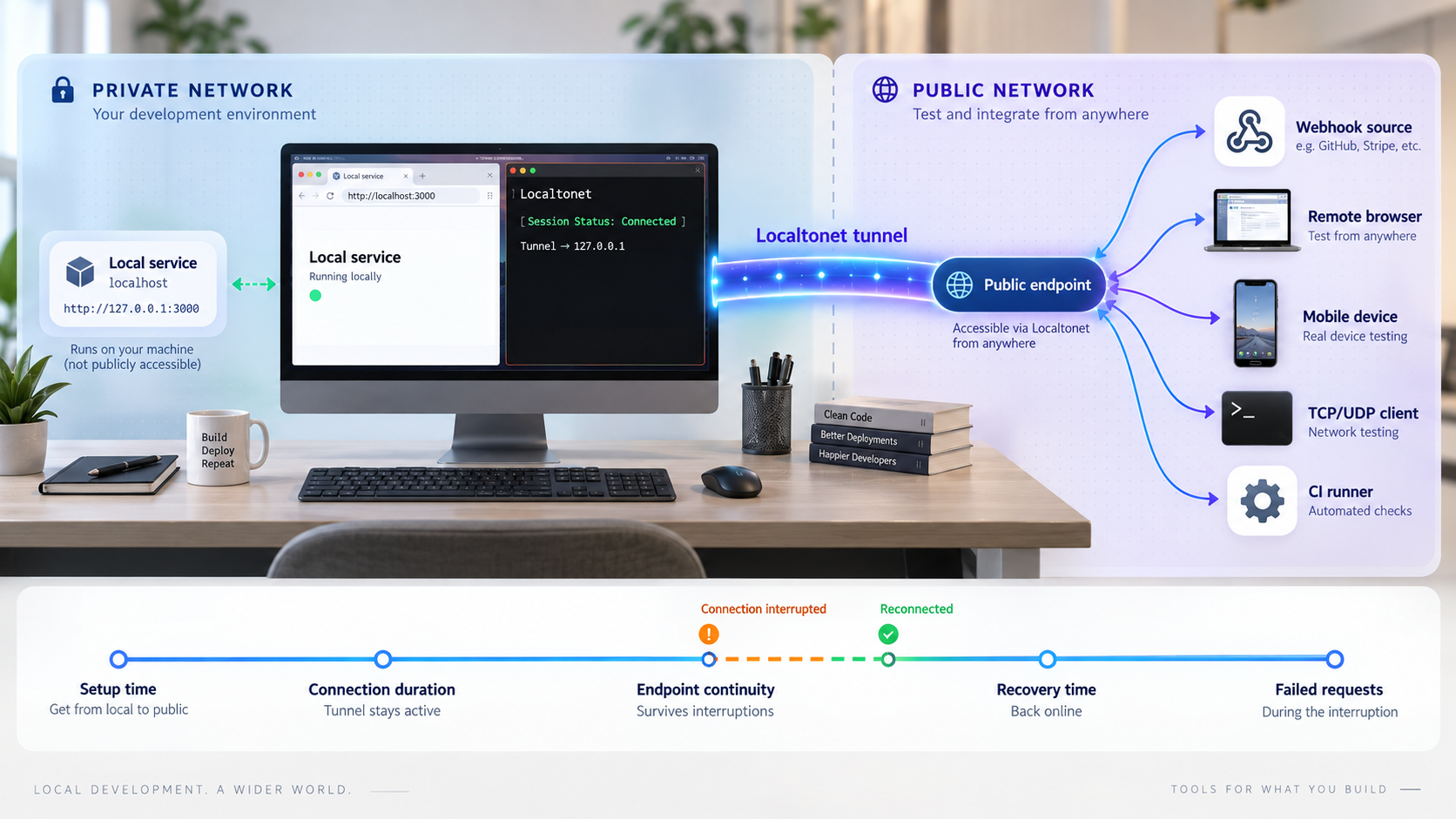
After defining the requirement and test matrix, map it to the correct Localtonet category. Our client establishes an outbound connection to a Localtonet relay server, so inbound router port forwarding, firewall changes, VPN setup, and a public IP address are not required for standard tunnel use. The result is a public URL or a public host and port, depending on the tunnel type.
The client must run on the device that hosts or can reach the local service. A device-specific authentication token identifies that client. Tokens must not be guessed, embedded in an article, copied into logs, or shared as ordinary configuration. The relay server or server code must be selected from currently available dashboard values rather than hardcoded from an example.
Standard Localtonet tunnel evaluation sequence
The following sequence reflects the documented common workflow. It intentionally does not include fabricated installation commands, dashboard fields, server codes, plan quotas, or API calls.
Install and run the Localtonet client
Install the appropriate client on the device that hosts the service or can reach it over the local network. Use the current Localtonet installation information for that operating system because this article does not have verified universal installation commands.
Authenticate or select the device
Use the device-specific authentication token through the supported product workflow. Treat it as a secret. Do not paste it into source control, screenshots, build output, or shared troubleshooting notes.
Select an available relay server or region
Choose from the values currently shown in the product or dashboard. Availability may vary, so do not reuse a hardcoded server code from an old guide or another account.
Create the appropriate configuration
Choose HTTP, a raw port tunnel, File Server, proxy, or VPN configuration according to the network model. HTTP, TCP, UDP, combined UDP/TCP, and TLS targets use a reachable local IP address and port. File Server uses a local folder path. Proxy tunnel types use the connected device as the exit node.
Start and verify the tunnel
Creating the tunnel is not sufficient. Start it, then test the assigned public URL or public host and port from an external client. Verify application behavior, not merely that the endpoint accepts a connection.
Stop or delete it when finished
Stop the tunnel when public access is no longer required, or delete configurations that should not be reused. Include cleanup ownership in team and CI workflows so test endpoints are not left running unintentionally.
During evaluation, check current Localtonet plan details for every requirement your workflow treats as mandatory. We do not claim here that every protocol, region, custom address option, API capability, or concurrency level is included in every subscription. We also do not publish unverified universal values for session duration, traffic, request size, connection handling, or team seats.
If a requirement is not stated clearly in the current product information, treat it as unknown and test it before adoption. An unknown item should not receive the same confidence score as a documented or repeatedly measured item.
A Localtonet configuration can exist while its tunnel is stopped. Availability requires the selected client or device to be connected and the tunnel to be running. Monitoring and recovery procedures should therefore distinguish configuration existence, device connectivity, tunnel status, and application health.
Include security and governance in the cost calculation
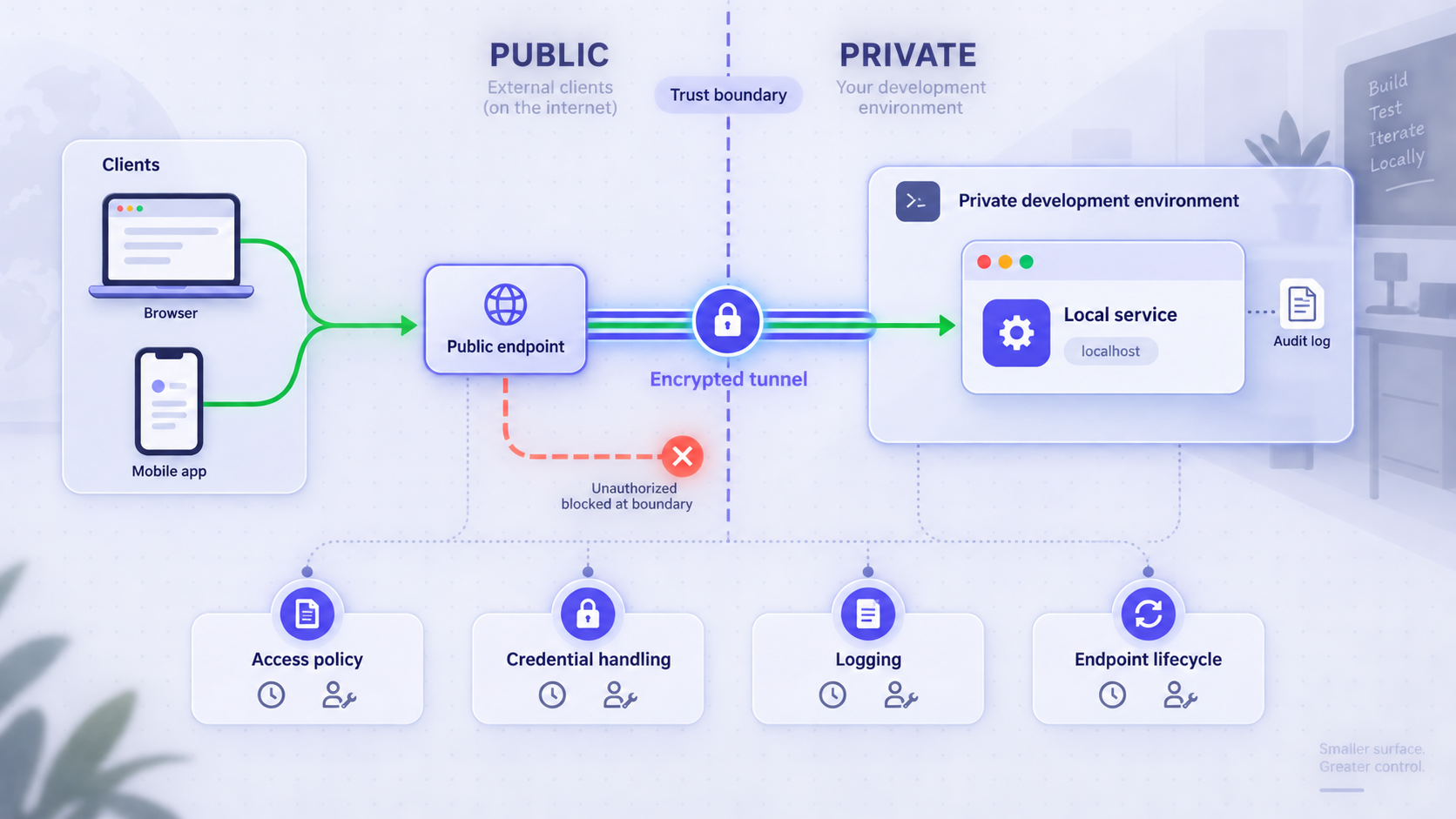
Publishing a development service changes its exposure. A server that previously accepted connections only from the local machine may become reachable through a public endpoint. The tunnel solves connectivity, but application authorization, data handling, least privilege, and safe operational ownership remain the team's responsibility.
Reduce the exposed surface
Point the tunnel only at the intended service. Do not expose a development dashboard, database administration interface, debugger, or broad file path merely because it is convenient. Disable unused routes and avoid binding unrelated services to the same public path.
Require appropriate application access controls
Use authentication and authorization suitable for the application. If the workflow supports IP restrictions or other access controls, apply them according to current product and application capabilities. A hard-to-guess URL is not a substitute for authentication.
Protect secrets and test data
Device tokens, API credentials, webhook signing secrets, and private endpoints should be stored using the platform or CI system's secret-management mechanism. Avoid production customer data in ad hoc previews. Scrub secrets from request logs, screenshots, terminal output, and support bundles before sharing them.
Verify webhook authenticity at the application
A public HTTPS route only provides reachability. The local application should still perform the sender's documented signature or authenticity checks, validate expected event types, handle duplicates safely, and return intentional status codes. Do not weaken verification merely to make a tunnel test pass.
Assign ownership and cleanup
Record who owns each persistent endpoint, what it exposes, why it exists, and when it should be reviewed. Stop or delete unused tunnels. For team workflows, avoid unaccountable shared credentials and include access removal in offboarding.
Use tunnels only for systems and networks you are authorized to expose. Keep authentication, least privilege, access restrictions, data protection, and organizational policy in force. If the service cannot be exposed safely, choose a private design or a controlled deployment environment instead.
Turn the evidence into a plan decision
A weighted score is useful after mandatory requirements have been applied. First reject any option that lacks the required protocol, violates policy, cannot enforce necessary access controls, or cannot support the workload's minimum lifecycle. Then score the viable candidates.
Assign each remaining criterion an importance weight, such as 1 to 5. Score each candidate using evidence from current documentation and your test matrix. Multiply weight by score, then record confidence separately. A high score based on an assumption should not outrank a slightly lower score supported by documented and observed behavior.
| Criterion | Suggested question | Evidence type | Decision role |
|---|---|---|---|
| Protocol fit | Does it support the exact transport and client behavior? | Documentation plus native client test | Mandatory gate |
| Security and policy | Can the workflow meet authentication, access, and data rules? | Policy review plus control test | Mandatory gate |
| Endpoint lifecycle | Does availability and address behavior fit the registration window? | Current plan details plus restart tests | Gate or weighted criterion |
| Peak capacity | Can required tunnels, users, jobs, and traffic run together? | Documented limits plus bounded test | Gate or weighted criterion |
| Recovery effort | How long until the workflow is trustworthy after failure? | Timed failure rehearsal | Cost input |
| Automation | Can startup, verification, and cleanup be made repeatable? | Official API information plus test job | Weighted criterion |
| Direct price | What are the current subscription and usage costs? | Current account and pricing information | Cost input |
| Evidence confidence | Is the result documented, measured, assumed, or unknown? | Evaluation record | Confidence modifier |
Revisit the decision when the workflow changes. A plan selected for one webhook receiver may no longer fit a team running multiple parallel environments. A public preview workflow may later become a private mesh requirement. An occasional manual test may become a CI dependency with stronger lifecycle and automation needs.
Also repeat time-sensitive checks before renewal or a major release. Plan names, quotas, options, and regional availability can change. Preserve the test matrix and cost model so reevaluation is a short evidence update rather than a new debate based on memory.
Frequently asked questions
Are free localhost tunnel plans unsuitable for professional development?
Not necessarily. A free plan can be suitable when its current documented limits satisfy the required protocol, session, address, concurrency, traffic, security, and team model. The correct decision depends on the workflow's measured recovery cost and risk, not the free label by itself.
What is the most important limit for webhook testing?
There is no universal single limit, but endpoint reachability and address lifecycle are usually central because the sender stores and calls the callback URL. Also verify availability during the sender's delivery window, request size, signature handling, duplicate processing, and the ability to replay failed events using that sender's supported process.
Does creating a Localtonet tunnel make it immediately available?
No. Creating a tunnel does not mean it is running. The selected Localtonet client or device must be connected, and the tunnel must be started. It can later be stopped or deleted. Availability depends on both device connectivity and tunnel status.
Does Localtonet publish fixed bandwidth, request, or session limits for every plan?
This article does not have verified universal values for those limits, and we do not guess them. Check the current dashboard, subscription information, and applicable documentation for your account. Then run a representative bounded test for the workload that matters to you.
Should a TCP or UDP service use an HTTP tunnel?
Use the tunnel type that matches the application's transport. An HTTP tunnel is designed for HTTP applications and does not replace raw TCP or UDP forwarding. Localtonet documents TCP, UDP, TLS, and combined UDP/TCP categories for corresponding workflows, subject to current availability.
When should we use VPN Manager instead of a public tunnel?
Use VPN Manager when authorized users, devices, and services should communicate through a private mesh network rather than a public endpoint. Use an HTTP or raw port tunnel when an external system genuinely needs a public URL or public host and port. Standard tunneling and VPN Manager are distinct network models.
How should we value a stable public URL?
Estimate how often an address change would occur, how many external systems would need updating, how long validation and replay would take, and how many people would be blocked. The value is low for a disposable individual test and potentially high for registered webhooks, distributed mobile builds, shared previews, or recurring automation.
Can Localtonet tunnels be automated?
Our platform can be managed from a dashboard or REST API. Before making automation part of a CI dependency, verify current API documentation, authentication requirements, plan availability, lifecycle behavior, and cleanup handling. Never invent an endpoint or place authentication tokens in build logs.
Evaluate your workflow with Localtonet
Define the protocol, stability, concurrency, security, and recovery requirements first. Then create the appropriate Localtonet configuration, test it with realistic traffic, and compare its measured workflow cost against your alternatives.
Get Started Free →

