

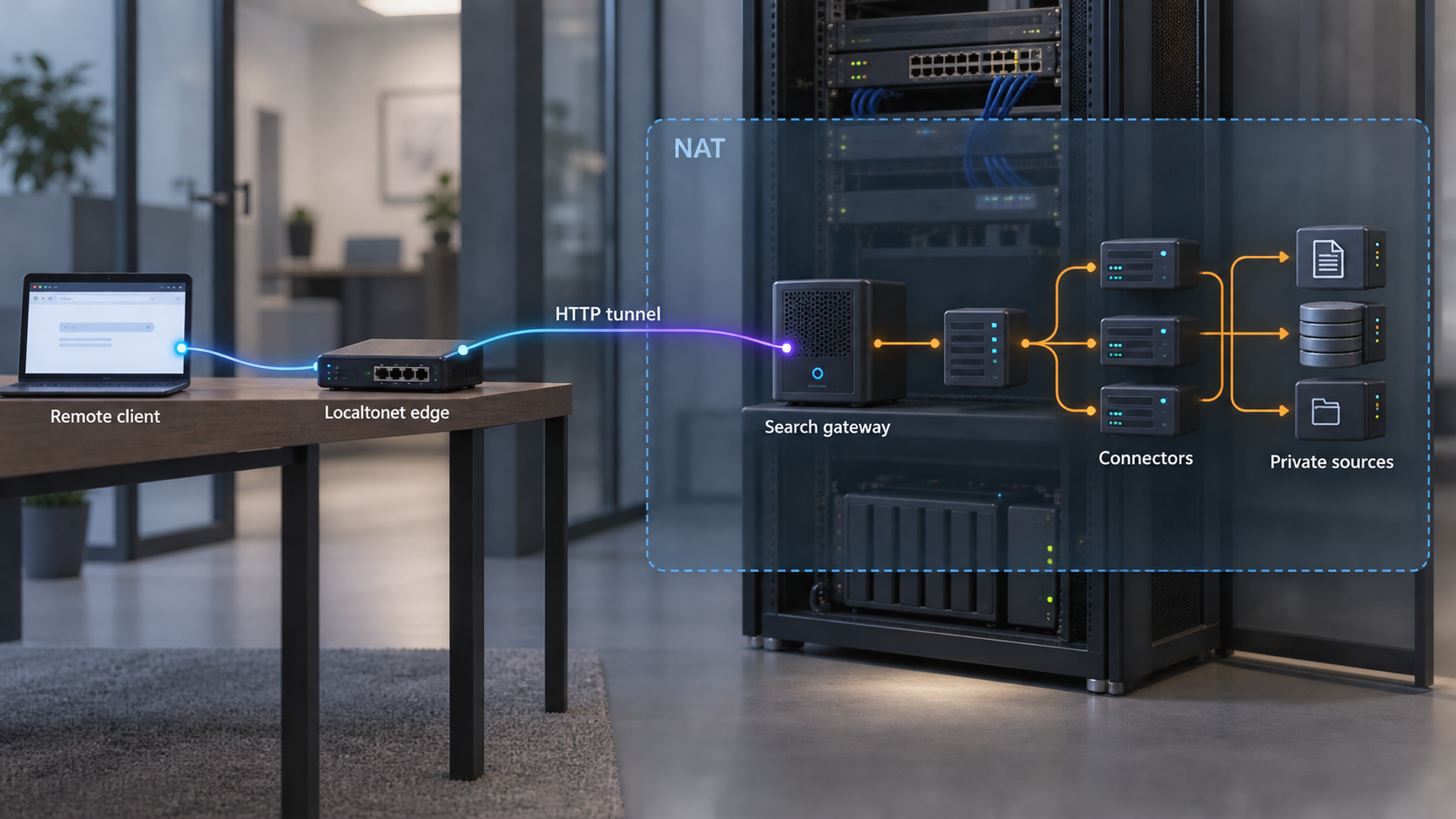
Publish one controlled gateway while keeping indexes, connectors, document stores, and action tools private
A self-hosted enterprise search agent may need to accept requests from remote employees, approved AI clients, or callback providers even when it runs behind NAT. The safe design is not to expose every component. It is to create one deliberately constrained ingress path, authenticate each caller, preserve source-system permissions during retrieval, and keep all connector and action traffic on private networks. This guide maps those boundaries and shows how an outbound Localtonet HTTP tunnel can provide the public HTTPS address without inbound router port forwarding, firewall changes, VPN setup, or a public IP address.
📋 What's in this guide
Architecture for a self-hosted enterprise search agent behind NAT
Enterprise search agents combine several systems that have very different security properties. A typical deployment has connectors that read internal knowledge sources, an index or retrieval service, an identity layer, an application gateway, an LLM or inference component, and tools that can write back to ticketing, messaging, document, or workflow systems. Treating that entire stack as one web application creates an unnecessarily broad public attack surface.
The safer pattern is to expose only an application gateway designed for remote requests. That gateway becomes the boundary between untrusted network input and the private search environment. The index, connector workers, databases, model services, administrative interfaces, and write-capable tools remain reachable only from the hosts or private networks that need them.
In this design, the public path is intentionally narrow:
- An authorized remote client connects to a public HTTPS address.
- The request reaches a reverse proxy or application gateway running on the same machine as the agent, or on a private machine that can reach it.
- The gateway authenticates the caller, validates the request, applies limits, and establishes the caller's identity.
- The enterprise search application performs retrieval using that identity and the source permissions associated with it.
- The response is filtered, formatted, and returned through the same gateway.
- If an action is requested, a separate policy and approval path decides whether that action may run.
With Localtonet, our client runs on a device that can reach the gateway and establishes an outbound connection to a Localtonet relay server. The HTTP tunnel provides a public HTTPS address for the selected local IP address and port. It does not require an inbound router rule, a public IP address, a VPN, or a firewall change. The tunnel remains available only while the selected client device is connected and the tunnel is running.
NAT changes how a remote client reaches the service, but it does not solve application security. A tunnel supplies connectivity to the target you configure. Authentication, tenant separation, source-level permissions, request validation, content safety, approval controls, and auditability remain responsibilities of the gateway and enterprise search application.
Search administration, connector configuration, index management, observability dashboards, model consoles, and database ports should remain private. Configure the tunnel for the deliberately exposed gateway listener only. Binding a service to a local interface is not a substitute for application authentication when that service is reachable through a tunnel.
Define the threat model before creating public ingress
A useful threat model begins with assets and trust boundaries, not with tunnel configuration. Enterprise search systems often handle confidential documents, internal conversations, source ACLs, connector credentials, identity mappings, prompts, model outputs, and credentials for write-capable tools. An attacker does not need direct database access if a search endpoint can be manipulated into returning the same protected content.
Identify every caller
List the entities that need remote access. These may include employees using a web interface, an approved desktop assistant, a service integration, a webhook provider, or an automation platform. Each caller type should have an explicit authentication method, allowed operations, request limits, and revocation path. Avoid one shared secret for unrelated people and systems because it weakens attribution and complicates revocation.
Classify the operations
Separate operations into risk classes. A readiness check is different from a search query. A search query is different from document export. Drafting a ticket is different from creating one, and updating a knowledge article is different from merely recommending an edit. Route and authorize these operations separately whenever the application supports that separation.
Model indirect attacks
Enterprise search agents process content that may not be trustworthy. A document, ticket, chat message, or uploaded file can contain instructions intended to influence an agent. Retrieved text must be treated as data, not as authorization. A statement inside a document cannot grant the agent permission to disclose another document, invoke an administrative tool, or send data to a new destination.
The threat model should cover at least:
- Unauthenticated or incorrectly authenticated requests.
- Broken mapping between the external identity and source-system identity.
- Stale ACLs or delayed revocation in a local index.
- Overprivileged connector accounts.
- Prompt injection or malicious instructions embedded in indexed content.
- Cross-user cache leakage and conversation-state confusion.
- Oversized requests, expensive queries, and resource exhaustion.
- Tool calls that exceed the user's authority.
- Secrets, protected text, or personal data appearing in logs.
- Callbacks that are accepted without verifying authenticity or replay conditions.
| Component | Network exposure | Primary security responsibility |
|---|---|---|
| Public application gateway | Reachable through the public HTTPS endpoint | Authentication, validation, routing, limits, and safe error handling |
| Identity service | Private or reached through a tightly defined authentication flow | Principal verification, session handling, claims, and revocation |
| Retrieval and index service | Private | Permission filtering, freshness, ranking, and result boundaries |
| Connector workers | Private, with outbound access to approved sources | Credential protection, scoped collection, ACL synchronization, and source isolation |
| Document stores and databases | Private | Durable storage, access controls, encryption policy, and backup policy |
| Action tools | Private | Independent authorization, scoped credentials, approval, and audit records |
| Localtonet client | Establishes an outbound relay connection | Connecting the selected device and local gateway target to the configured tunnel |
Preserve permission-aware retrieval from source to response
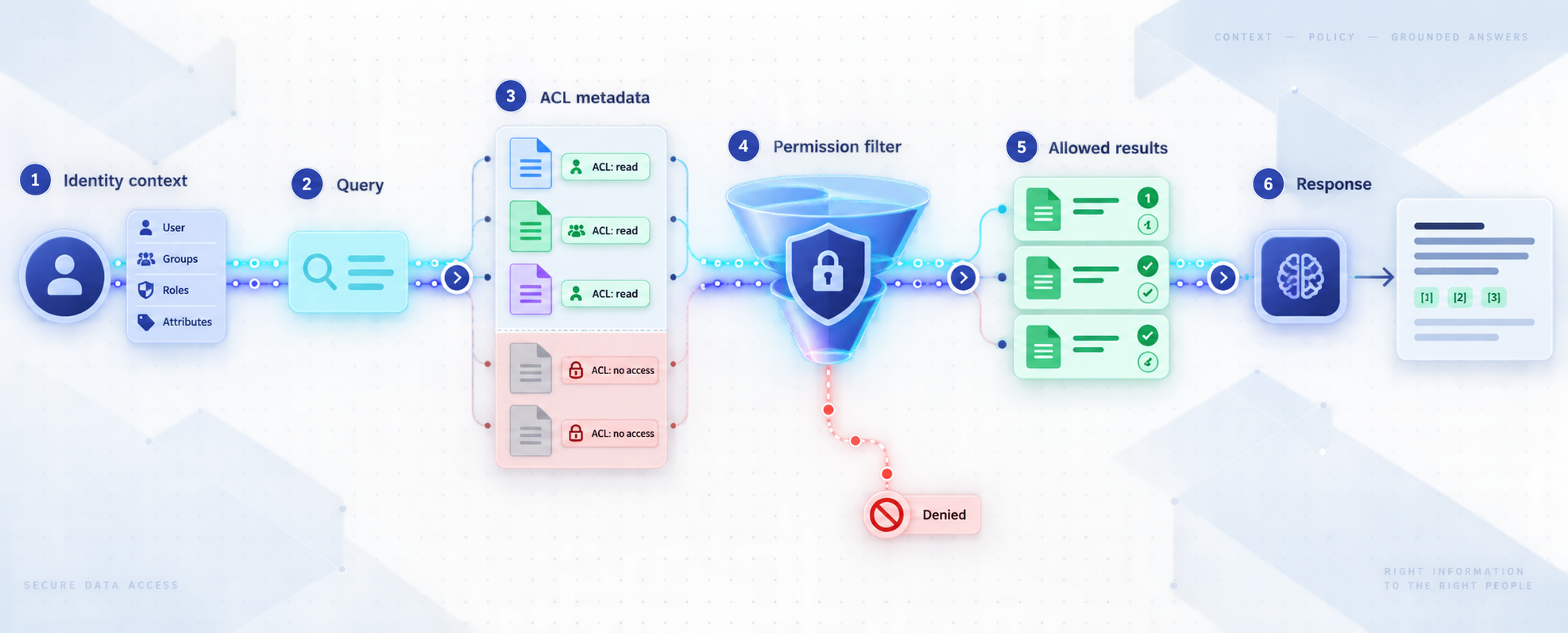
Permission-aware search means the answer is constrained by what the authenticated caller is allowed to access. It is not enough for a connector to have permission to read a document. Connector access answers whether the indexing process can collect an object. Query authorization answers whether the current person or service may receive that object or any facts derived from it.
Carry an authenticated principal into retrieval
The gateway should pass a trusted identity context to the search application only after authentication succeeds. The application must not accept an arbitrary user identifier from an untrusted request and treat it as proven identity. If identity information is forwarded in headers, configure the application so those headers are accepted only from the trusted gateway, and ensure the gateway removes conflicting client-supplied values before adding its own.
The mapping from gateway identity to source identity deserves explicit testing. Email addresses, usernames, directory object IDs, group IDs, aliases, and service identities can diverge. Account renames and duplicate identifiers can also cause incorrect matches. Prefer stable identifiers when the source and identity architecture support them, and define what happens when no reliable mapping exists. Failing closed is safer than assigning broad default access.
Store enough authorization metadata
If the application uses a local index, each indexed object needs sufficient authorization metadata for query-time filtering. Depending on the source, that may include direct users, groups, inherited restrictions, space or project membership, channel visibility, tenant boundaries, and object-specific exceptions. Flattening a complex source permission model into a simplistic public-or-private flag can create disclosure paths.
Permission changes must propagate alongside content changes. Deleting access at the source should eventually remove access through search, cached snippets, generated summaries, and conversation context. The exact synchronization schedule depends on the search project and connector configuration, so it must be established from that project's verified documentation and tested in the deployed environment rather than assumed.
Apply authorization before generation
Permission filtering should occur before protected records enter the model context. Filtering only the final text is fragile because the model has already received unauthorized information. The safer sequence is authenticate, resolve effective permissions, retrieve eligible records, construct a bounded context, generate an answer, and return citations or provenance that the user may also access.
Apply the same rule to follow-up questions. Conversation memory can retain snippets from previous queries, and a shared cache can mix results between users if its key does not include the security context. Cache design should account for identity, tenant, groups, permission version, and any other attributes that affect visibility.
A local index is a copy with its own synchronization behavior. Test how quickly grants, revocations, deletions, group changes, and object moves are reflected. Where immediate revocation is required, consider a source-time authorization check or another fail-closed control supported by the selected search project.
Build a permission regression suite
Use test identities that represent meaningful access combinations. Include a user with no access, a user with direct access, a group member, a former group member, an administrator, and a service identity if services can query the agent. Test private documents, inherited permissions, restricted channels, moved objects, deleted objects, and similarly named public and private records.
Validate both positive and negative cases. A positive test proves that authorized content remains useful. A negative test proves that titles, snippets, citations, metadata, autocomplete suggestions, counts, and generated summaries do not reveal inaccessible material. Repeat these tests after connector, identity, index, or model changes.
Harden the reverse proxy or application gateway
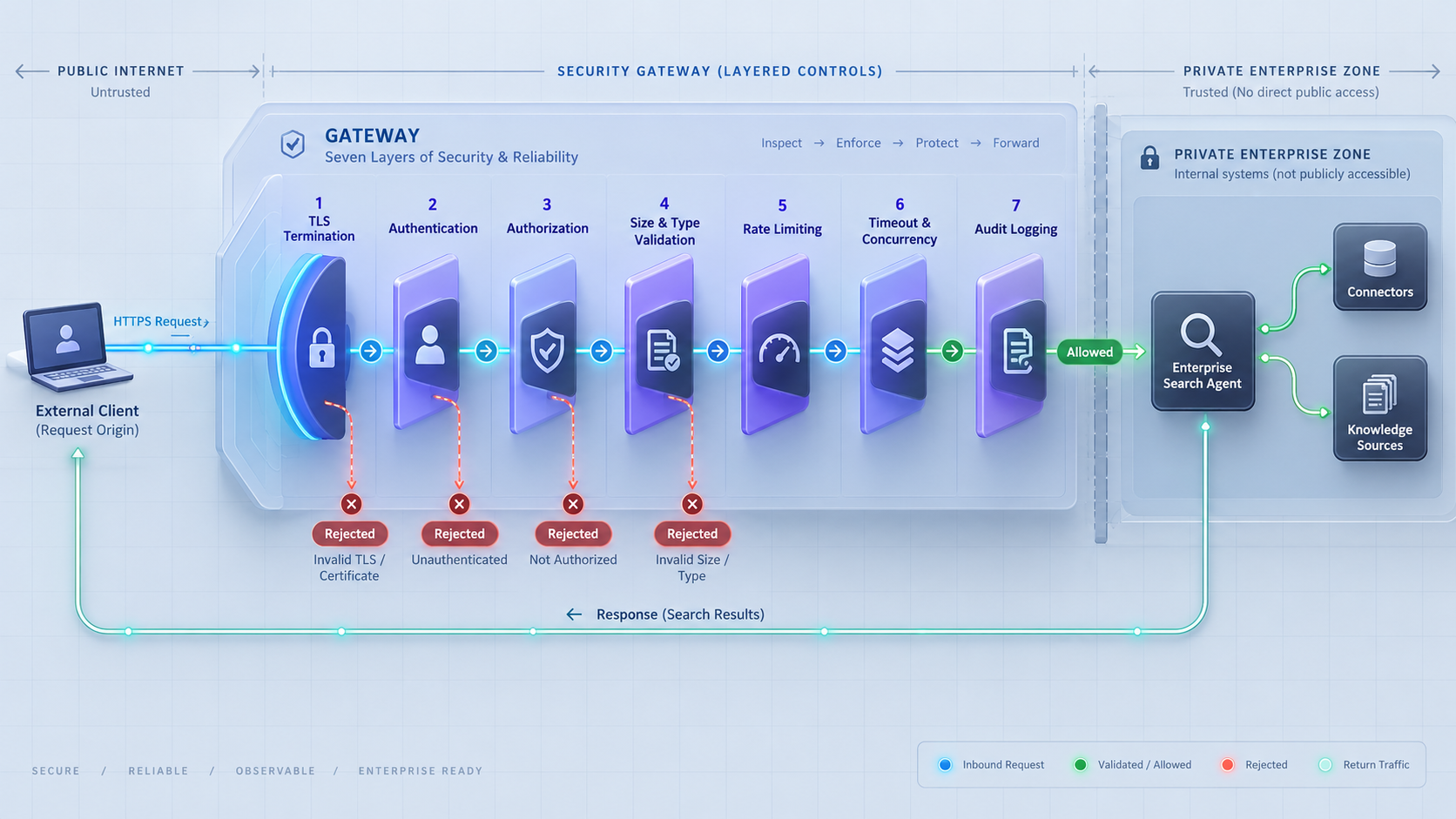
The gateway is the appropriate public target because it can enforce controls before requests reach expensive or sensitive agent components. It may be a reverse proxy integrated with an identity-aware layer, an API gateway, or a hardened endpoint built into the application. The exact software is deployment-specific, but its responsibilities should be explicit.
Authenticate every sensitive route
Public reachability should not imply anonymous access. Require an authentication method suitable for each caller. Human sessions, machine credentials, and signed callbacks have different lifecycle and replay concerns, so they should not automatically share one path or one credential type. Ensure failed authentication does not fall through to an unprotected upstream route.
Authorize routes and methods
Authentication says who is calling. Authorization determines what that caller may do. Restrict HTTP methods, API routes, tool names, source scopes, and action types. If a remote integration needs to submit one callback type, it should not inherit access to interactive search, administrative operations, or tool execution.
Validate request structure
Set reasonable limits for body size, header size, accepted content types, query length, attachment types, and processing time according to the application's documented behavior and workload. Parse structured inputs with a strict schema. Reject unknown or conflicting fields when silently accepting them could alter authorization or tool behavior.
Control cost and concurrency
Search and agent requests can trigger embedding lookups, reranking, model inference, connector calls, and multiple tool operations. Apply per-principal and per-route controls rather than relying only on a global threshold. Queue limits, execution deadlines, cancellation, and bounded agent iterations help prevent one request from consuming all available capacity.
Return safe errors
Public responses should not reveal stack traces, private hostnames, internal ports, connector credentials, database details, raw model prompts, or protected document excerpts. Assign a request or correlation identifier and retain detailed diagnostics in appropriately protected logs. Differentiate authentication failures, policy denials, validation errors, and internal failures without exposing unnecessary implementation details.
Separate callback ingress from interactive search
Callback providers often require a public URL, but a callback endpoint usually needs much less authority than an interactive agent. Give callbacks a dedicated route and verification procedure. Validate the provider's documented signature or credential mechanism, verify timestamps or replay protections where supported, constrain accepted event types, and process callbacks idempotently.
A callback should normally enqueue or record an event rather than inherit a user session and execute broad agent actions immediately. If the callback triggers indexing, scope it to the relevant source and validate every referenced object before fetching it. Do not assume a request is trustworthy solely because it reached a difficult-to-guess URL.
Keep connectors and knowledge sources private
Connectors typically need outbound access to knowledge sources such as collaboration spaces, ticketing systems, file repositories, source control, chat platforms, or internal databases. They generally do not need public inbound access. Place connector workers on a private network segment or host where they can reach only the systems required for their jobs.
Use separate connector identities
Avoid one all-powerful credential shared by every connector. Separate credentials reduce the effect of compromise and make rotation, auditing, and revocation more precise. Scope each connector to the organizations, workspaces, repositories, projects, folders, or APIs that it must read. If a connector only performs indexing, it should not also receive write permissions.
Protect connector configuration
Connector secrets should not be embedded in public URLs, client-side code, prompts, indexed documents, or ordinary application logs. Use the secret-management mechanism supported by the selected project and deployment platform. Limit access to configuration files, environment configuration, and administrative interfaces. The exact variable names, paths, and storage behavior differ by project and must come from that project's official documentation.
Restrict network paths
Define outbound destinations for each connector when the surrounding infrastructure supports it. A connector for one source should not automatically have unrestricted access to every internal host. Also consider name resolution, redirects, user-supplied URLs, attachment fetches, and preview features that could turn the application into a path for server-side request forgery.
Separate ingestion from serving
Ingestion is often asynchronous and privileged. Public query workers should not need connector administration rights. A useful separation is for private connector workers to collect content and permission metadata, for a private indexing layer to process it, and for the query service to receive only the retrieval capabilities needed to answer authorized requests.
| Asset | Recommended placement | Reason |
|---|---|---|
| Application gateway | Local host or private network reachable by the Localtonet client | This is the intentionally exposed and hardened entry point |
| Connector management interface | Private administrative network | It may reveal credentials, source scopes, or synchronization controls |
| Search index | Private network or local-only listener | Direct queries could bypass permission and response controls |
| Relational or document database | Private network or local-only listener | It is a storage dependency, not a public application endpoint |
| Model or inference endpoint | Private unless independently designed and authorized for public use | Direct access could bypass retrieval policy, limits, and audit context |
| Action executor | Private and policy-gated | Write-capable operations need tighter authority than search |
Separate search from action execution
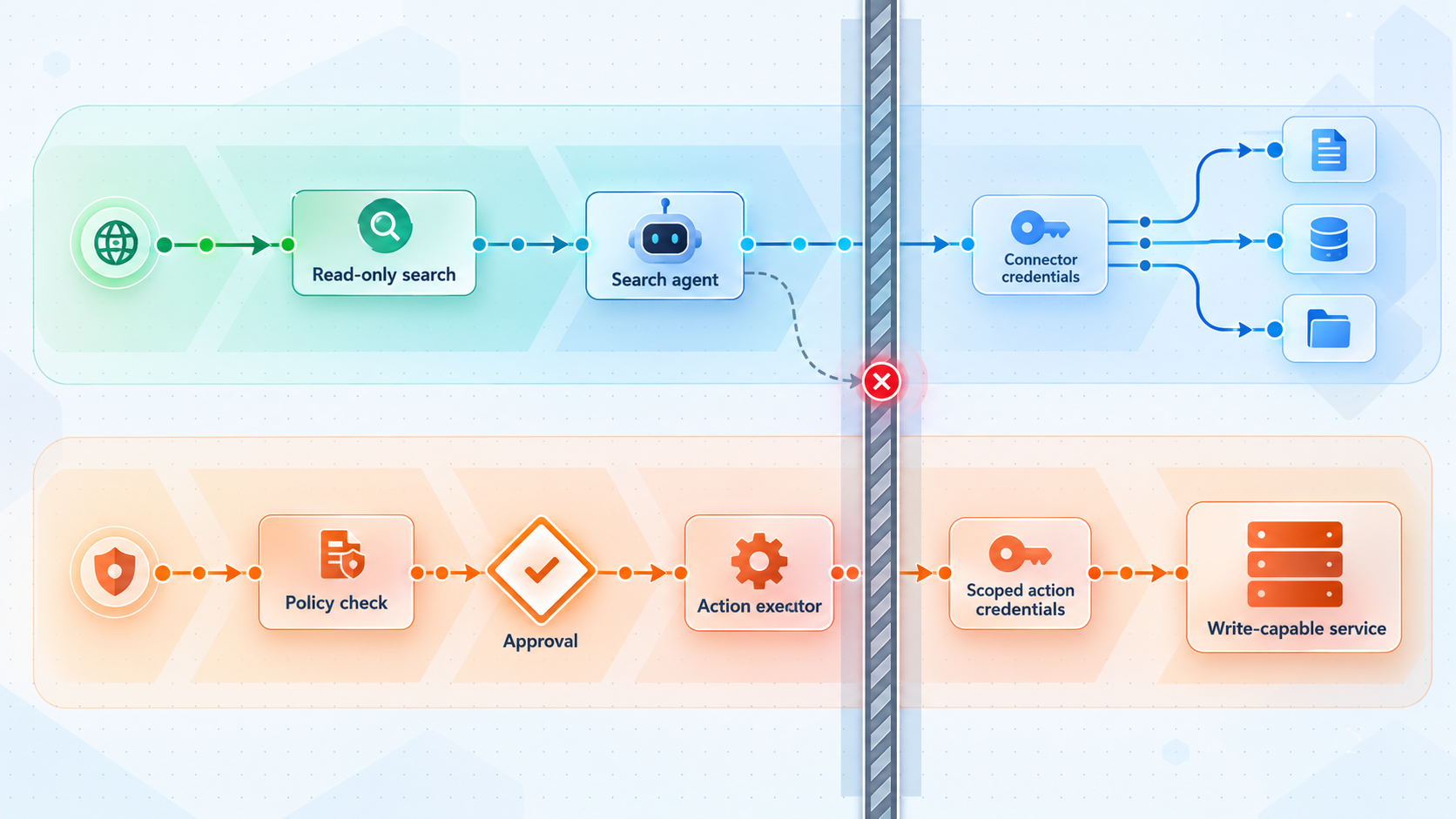
An enterprise search agent becomes materially more sensitive when it can create tickets, send messages, modify documents, trigger deployments, or call internal APIs. A useful answer is not evidence that the agent should be allowed to perform the next suggested action. Retrieval authority and action authority should be evaluated independently.
Use different credentials for reading and writing
A read-only connector credential should not become the credential used for write operations. Give each action tool the narrowest available scope and restrict it to the relevant target. If the source platform supports acting as the current user, preserve that identity. If it does not, make the service identity visible in audit records and apply explicit policy to compensate.
Require structured action proposals
Before execution, convert the model's suggestion into a structured proposal containing the tool, target, operation, relevant parameters, initiating principal, evidence, and expected effect. Validate that proposal outside the model. Reject unknown tools, unsupported fields, ambiguous targets, and values outside policy.
Add approval where consequences justify it
Human confirmation is especially useful for destructive changes, external communications, access-control modifications, financial operations, production changes, bulk updates, and actions involving sensitive records. The approval display should show the actual normalized operation, not merely the model's friendly summary.
Make retries safe
Network interruptions and callback retries can repeat requests. Use idempotency controls where the target or application supports them, and record whether an operation was proposed, approved, attempted, completed, or failed. Never assume that an unknown response means an action did not occur.
A runbook, chat message, ticket, or document can tell an agent to invoke a tool, disclose data, or alter policy. Treat that material as untrusted content. Only the authenticated caller, application policy, and any required approval process can authorize an action.
Verify the complete workflow locally before exposing it
Remote ingress should be the final connectivity step, not the first diagnostic step. Start every required application component according to the enterprise search project's verified documentation. Confirm that the gateway can reach its private dependencies and that no internal administration or storage port is accidentally included in the public target.
This article does not prescribe a universal installation command, port, configuration path, environment variable, or health endpoint because those details depend on the selected enterprise search project. Use its current official documentation for those project-specific values. Do not infer a common port or copy settings from another product.
Start the private stack
Start the identity integration, retrieval service, index, connector workers, model dependency, and application gateway using the documented procedure for your project. Record which listener belongs to the public-facing gateway and which listeners must remain private.
Test the gateway from the Localtonet client device
From the device that will run our client, request the gateway using its actual local IP address and documented port. A service bound only to another container or network namespace may work internally while remaining unreachable from the client host.
Confirm authentication failures
Send an unauthenticated request and an invalidly authenticated request. Both should fail without returning protected content, internal diagnostics, or a usable session.
Run permission tests
Query with test identities that have different source permissions. Verify documents, titles, snippets, citations, counts, caches, and follow-up answers. Revoke access at a source and measure when the local result stops appearing.
Exercise action policy
Test allowed, denied, approval-required, duplicated, timed-out, and partially failed actions. Confirm that a search-only principal cannot invoke a write tool.
Inspect logs and responses
Check that logs provide useful correlation without recording credentials or unnecessary protected content. Confirm that public-facing errors do not disclose private hosts, ports, stack traces, prompts, or connector configuration.
If a simple command-line request is appropriate for the gateway, use the actual local URL established by your deployment rather than assuming a port:
curl --include "$LOCAL_GATEWAY_URL"
Set LOCAL_GATEWAY_URL to the documented local gateway address in your own shell. The expected response depends on the application. A protected endpoint may correctly return an authentication challenge, while a documented readiness endpoint may return a success response. Do not weaken authentication merely to make a test request return a successful status.
Expose only the gateway with a Localtonet HTTP tunnel
Once the gateway works locally and the authorization tests pass, add remote connectivity as a separate step. Our HTTP tunnel points to the local gateway's IP address and port. The Localtonet client establishes the outbound relay connection, and authorized remote clients use the assigned public HTTPS address.
HTTP tunnels can use a Random Sub Domain, Custom Sub Domain, or Custom Domain process type. These options serve the same local content through a public HTTPS address. Availability and domain requirements can vary, so select from the current dashboard rather than assuming that a particular option is included in every plan. Exact custom-domain DNS instructions should be taken from current Localtonet documentation.
Follow this documented Localtonet workflow:
Install and run the Localtonet client
Install our client on the device that can reach the hardened local gateway. Keep the client running for as long as remote access is required. Current installation details depend on the operating system and client version, so use the current Localtonet download and documentation flow rather than an unverified command.
Authenticate or select the device
Use the device-specific authentication token through the supported product flow and select the device that will run the tunnel. Treat the token as a secret. Do not place it in this article's commands, application logs, screenshots, source repositories, or client-side configuration.
Select an available relay server
Choose a currently available server or region from the dashboard. Server codes and available locations can change and may vary by plan, so do not hardcode a value from an older example.
Create the HTTP tunnel for the gateway target
Select the required HTTP tunnel process type and enter the local IP address and port of the application gateway. Do not enter the address of the search index, database, connector console, model endpoint, or action executor.
Start the tunnel
Creating the tunnel does not start it. Use the Start button, then obtain the assigned public HTTPS address from the current dashboard. Test it with a deliberately low-privilege identity before distributing it to other users or registering it with a callback provider.
Stop or delete the tunnel when no longer required
Stop the tunnel to remove active remote reachability, or delete it when the configuration is no longer needed. A tunnel is available only while the selected client device is connected and the tunnel is running.
The current HTTP tunnel workflow is also described in the Localtonet HTTP tunnel documentation. Check the live interface for currently available process types, relay choices, and account-specific options.
A Localtonet HTTP tunnel makes the configured gateway reachable. It does not decide which documents a user may retrieve, verify source ACL freshness, sanitize prompts, approve tool calls, or restrict application routes. Keep those controls in the gateway, identity layer, retrieval service, and action-policy layer.
Test the public path separately
After starting the tunnel, repeat the relevant local tests through the assigned public HTTPS address. Confirm that authentication redirects or API challenges behave correctly with the public origin. If the application validates allowed origins, callback URLs, redirect URLs, or trusted proxy information, configure those values according to the project's documentation rather than disabling the validation.
Verify that the public path exposes only intended routes. Test a representative search, a denied search, a callback with valid verification, a callback with invalid verification, an oversized request, and a disallowed action. Confirm that administrative and dependency endpoints remain unreachable through the public URL.
Operate the deployment as a security-sensitive service
A secure launch state can drift as connectors, source permissions, models, prompts, users, and tools change. Operational checks should cover the complete request path rather than only whether the public URL responds.
Monitor availability in layers
Distinguish among gateway availability, tunnel availability, retrieval health, connector freshness, identity health, model availability, and action-tool health. A successful gateway response does not prove that permissions are fresh, and a connected tunnel does not prove that the local target is healthy.
Localtonet also has platform-wide Token/Tunnel webhooks that report when a token or tunnel in a selected Token Group changes to Connected or Disconnected. Those webhooks send a WebHookRequest JSON body containing Id, ActionDate, Type, and Status. They report connectivity state. They do not report document changes, agent actions, connector freshness, or application authorization outcomes.
Rotate and revoke deliberately
Maintain an inventory of Localtonet device tokens, identity credentials, connector credentials, action credentials, callback secrets, and model-provider credentials used by the deployment. Assign owners, define rotation procedures, and test revocation. Device authentication tokens are device-specific and must not be exposed.
Audit without over-collecting
Useful audit records may include the authenticated principal, request identifier, route, selected source scopes, authorization outcome, cited object identifiers, action proposal, approver, tool result, and timestamps. Avoid logging full credentials, raw authorization headers, unnecessary document bodies, or unrestricted prompts and outputs. Apply retention and access policies appropriate to the sensitivity of the records.
Review permission drift
Compare source permissions with indexed authorization metadata on a schedule appropriate to the risk. Investigate connector errors that prevent ACL updates even if content queries still appear to work. Permission regressions should be treated as security incidents, not merely ranking defects.
Plan for tunnel and client lifecycle
The public endpoint depends on the Localtonet client being connected and the tunnel being started. Account for operating-system restarts, application restarts, client updates, local address changes, and gateway port changes. After maintenance, verify the local target first and then the public path.
| Operational signal | What it establishes | What it does not establish |
|---|---|---|
| Localtonet token connected | The selected client device is connected | That a specific tunnel or local application is healthy |
| Localtonet tunnel connected | The configured tunnel is running | That authentication, retrieval, or actions are correct |
| Gateway readiness success | The gateway's documented readiness criteria pass | That connector ACLs are current |
| Connector synchronization success | A connector completed its defined synchronization work | That every source permission maps correctly at query time |
| Permission regression success | Test identities received and were denied expected results | That every untested source and permission edge case is safe |
| Action audit success | The tested tool followed policy and recorded its outcome | That every future model-generated proposal is safe |
Troubleshoot by following the request path
The gateway works locally but not through the public address
Confirm that the Localtonet client is connected, the correct device is selected, and the tunnel has been started. Verify that the HTTP tunnel points to the exact local IP address and port that worked from the client device. If the application listens inside a container or isolated network, confirm that the client host can reach the published gateway listener. Do not fix the problem by exposing all container or database ports.
The public address responds, but authentication redirects fail
Check the application's configured public origin, redirect URL, callback URL, trusted proxy behavior, cookie settings, and forwarded-header handling using the project's official documentation. Do not accept arbitrary forwarded identity headers from public clients. Register only the required public HTTPS URL with the identity provider.
Authorized users receive no results
Verify identity mapping, group synchronization, source scope, index freshness, and query-time filters. Test whether the source object was ingested and whether its permission metadata matches the current principal. Avoid resolving the issue by globally disabling permission filtering.
Users can see content they should not see
Stop remote access if necessary while investigating. Determine whether the leak comes from incorrect source ACL collection, stale permissions, identity mapping, result caching, conversation memory, snippets, citations, or a tool response. Correct the underlying permission path, invalidate affected caches, and rerun negative permission tests before restarting the tunnel.
Callbacks arrive more than once
Duplicate delivery can be normal for callback systems. Verify the provider's documented retry behavior and use an event identifier or another supported idempotency mechanism. Record completed processing so the same event does not create duplicate tickets, reindex repeatedly, or execute the same action twice.
Requests time out during complex searches
Measure the gateway, retrieval, model, and tool stages separately. A longer public timeout is not always the right fix. Bound agent iterations, optimize retrieval, move long-running work to an asynchronous job where the application supports it, and return an operation identifier instead of holding a public request indefinitely.
The public endpoint exposes unexpected routes
Review the gateway routing configuration and the local target. A broad pass-through configuration may publish administrative paths alongside the intended API. Replace broad forwarding with an allowlist of required routes and methods where supported, then retest common path variations and encoded requests.
Test the application dependency, then the local gateway, then access from the Localtonet client device, and finally the public HTTPS address. This sequence separates application, container-network, gateway, identity, and tunnel problems without weakening controls.
Frequently asked questions
Does a Localtonet HTTP tunnel make an enterprise search agent secure?
The tunnel provides connectivity from a public HTTPS address to the configured local gateway without inbound router port forwarding, firewall changes, VPN setup, or a public IP. Application security remains separate. The gateway and search application must authenticate callers, enforce source permissions, validate requests, constrain tools, and maintain audit records.
Which component should the HTTP tunnel target?
Target the deliberately hardened reverse proxy or application gateway that accepts authorized remote requests. Do not target the index, database, connector administration interface, model server, observability dashboard, or write-capable tool executor.
Can the search agent use one service account for every user?
A connector may need a service identity to collect content, but that identity must not automatically define what every user can retrieve. Query-time authorization should apply the authenticated caller's effective source permissions. Write actions should use separately scoped authority and an independent policy decision.
Should connectors be exposed through the same public URL?
Normally, no. Connector workers usually make outbound connections to approved knowledge sources. Their credentials, management interfaces, and synchronization controls should remain private. If a source needs to send callbacks, expose only the specific verified callback route through the gateway.
How should permission revocation be tested?
Remove a test user's source access and measure when the object disappears from search results, snippets, citations, caches, and conversation context. Repeat the test for direct permissions, group membership, inherited restrictions, object moves, and deletion. The expected delay depends on the selected search project's documented synchronization behavior.
Can a callback endpoint share the interactive search route?
A dedicated callback route is safer because it can use provider-specific verification, accept only defined event types, apply separate limits, and process retries idempotently. A callback identity should not inherit an employee session or broad search and action permissions.
Does creating a Localtonet tunnel start it automatically?
No. Creating a tunnel does not mean it is running. Use the Start button after configuration. The tunnel is available only while the selected client device is connected and the tunnel is running. It can later be stopped or deleted.
Do all Localtonet plans include every process type, region, and option?
Do not assume that every option is included in every plan. Available relay servers, regions, domain choices, and capabilities should be checked in the current dashboard and current Localtonet documentation when the tunnel is configured.
Publish the gateway, not the private search stack
Verify your enterprise search agent locally, preserve source permissions, isolate connector and action services, and then use a Localtonet HTTP tunnel to provide controlled remote access to the hardened gateway.
Get Started Free →

