

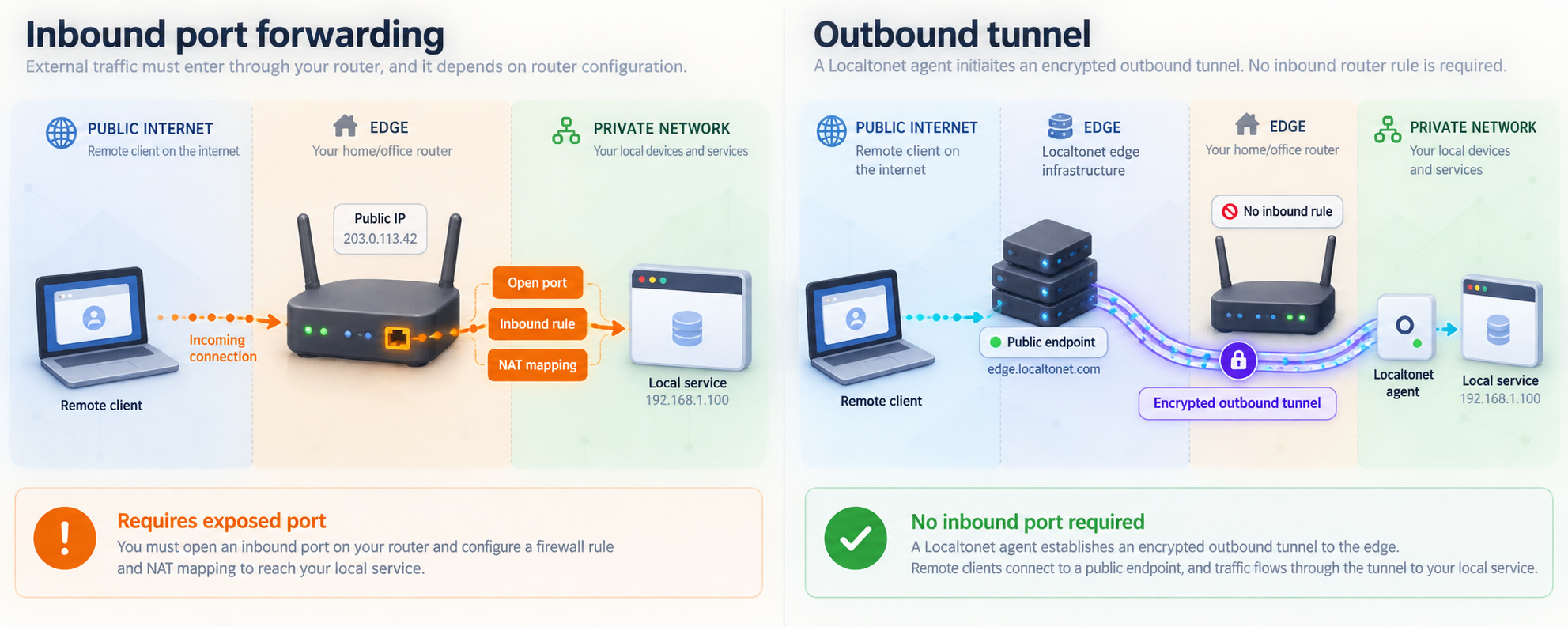
Replace inbound exposure with a staged, protocol-aware migration
Traditional port forwarding ties service availability to inbound router rules, reachable public addresses, and firewall configuration at every deployment site. This runbook explains how to inventory those dependencies, classify each workload by protocol, map it to the appropriate Localtonet tunnel, validate it in parallel, and retire the old ingress path safely. It covers HTTP, TCP, UDP, combined UDP/TCP, and TLS workloads while preserving rollback options throughout the migration. It also explains when a public tunnel is the wrong model and our private mesh VPN is the better fit.
📋 What's in this guide
How outbound tunnels change the connectivity model
An inbound port-forwarding design begins at the network perimeter. A router or firewall listens on a public address and port, translates incoming traffic, and delivers it to an internal address and port. The application depends not only on its own listener, but also on the public address, network address translation rules, firewall policy, and any upstream provider restrictions.
With Localtonet, the client application runs on a device that can reach the local service and establishes an outbound connection to a Localtonet relay server. A running tunnel then provides a public URL or a public host and port, depending on the selected tunnel type. This removes the need to expose the service by opening an inbound router port, changing the firewall for inbound forwarding, configuring a VPN for public access, or assigning the service host its own public IP address.
This is an architectural change rather than a one-for-one firewall syntax conversion. The public destination changes, the connection depends on the Localtonet client and tunnel lifecycle, and monitoring must account for both the application and the tunnel. A successful migration therefore requires more than creating a new endpoint. It requires identifying every consumer, testing protocol behavior, updating dependencies, and removing the old path only after the new path is proven.
The local application still needs to listen on an address and port reachable from the device running our client. Its own authentication, authorization, session handling, protocol behavior, and data protection requirements remain application responsibilities.
Inventory every listener before changing the network
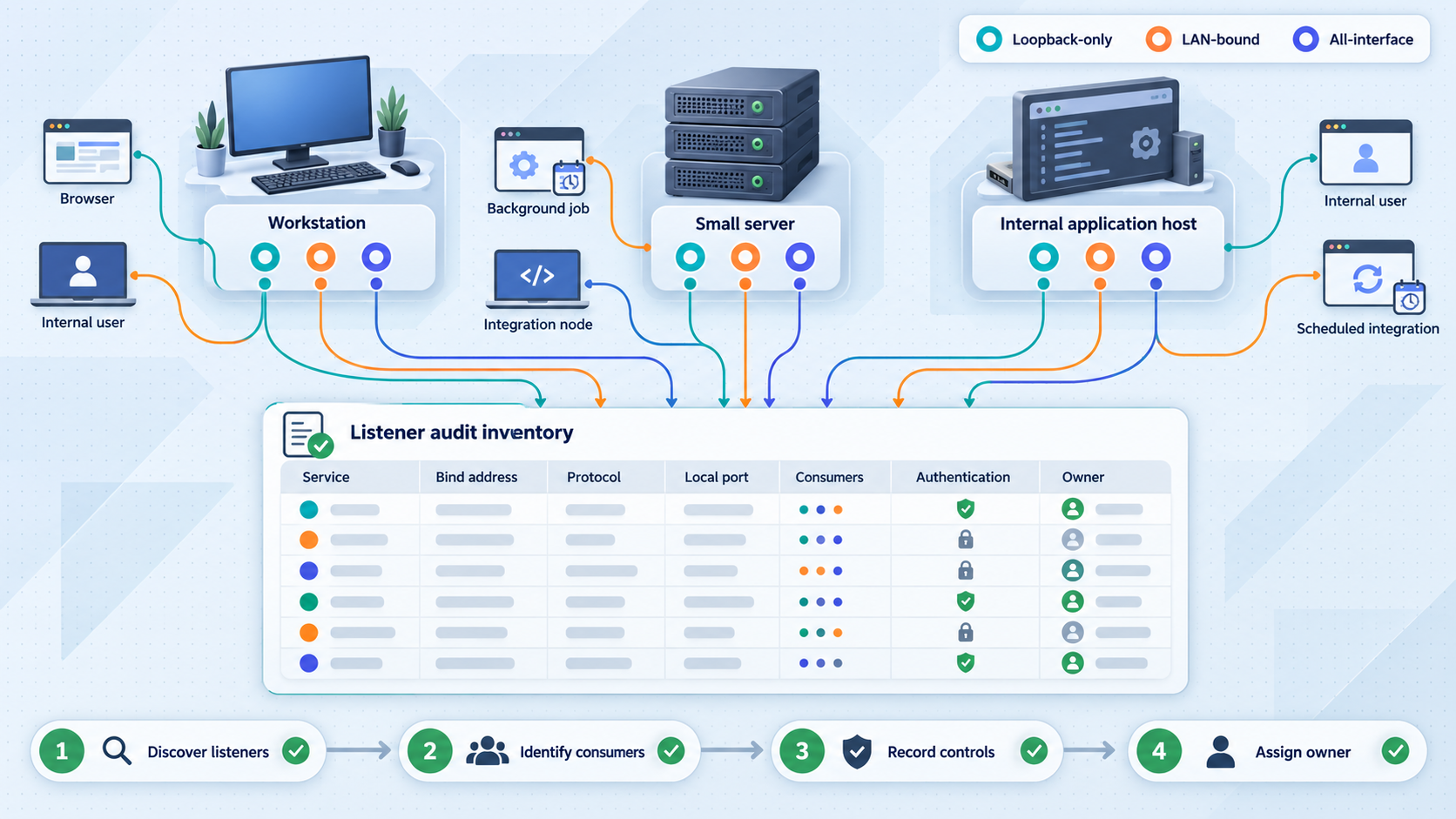
Begin with the current ingress configuration rather than with a list of known applications. Router rules and firewall objects often reveal forgotten development systems, temporary vendor access, duplicated ports, and services whose original owner has left the team. Treat each forwarding rule as an item that must be explained, migrated, intentionally retained, or removed.
Build a migration register with one row per externally reachable service. At minimum, record the current public address and port, transport protocol, translated internal address and port, application owner, technical owner, expected users, authentication method, availability requirement, and rollback contact. If one rule covers a range of ports, split it into the individual application dependencies wherever possible. A broad range should not automatically become a broad tunnel design.
Confirm the real local destination
A firewall rule can outlive the service it once forwarded. Verify that the destination process is actually listening and that an authorized local client can complete a meaningful transaction. A successful TCP connection alone does not prove that the application is healthy. For a web application, retrieve a representative page or health endpoint. For a database or message broker, perform a safe authenticated query or protocol handshake. For UDP, generate a request that should produce an observable response or application event.
Record whether the service listens only on loopback, on a specific LAN address, or on all interfaces. The relevant requirement for Localtonet is reachability from the device running the client. If the client runs on the same host, a loopback target may be appropriate. If the client runs on another machine, the service must be reachable from that machine over the local network. Do not broaden a service listener merely for convenience without reviewing the resulting LAN exposure.
Discover hidden dependencies
Search configuration repositories, deployment variables, monitoring systems, webhook settings, partner documentation, DNS records, mobile applications, desktop clients, and automation scripts for the old public address or hostname. Include allowlists that reference the old source or destination, health checks that probe the forwarded port, and certificates bound to a hostname. A port-forwarding rule may look simple while supporting many downstream assumptions.
Identify protocols that embed addresses or open secondary connections. The existence of a TCP or UDP tunnel does not automatically make every application-layer protocol compatible with a single forwarded endpoint. If an application advertises its internal address, negotiates dynamic ports, requires a port range, or expects peer-to-peer reachability, test those behaviors explicitly. Do not assume that migrating the initial control connection migrates every related data flow.
| Inventory field | Why it matters | Acceptance evidence |
|---|---|---|
| Transport protocol | Determines whether the workload needs HTTP, TCP, UDP, combined UDP/TCP, or TLS handling. | Listener configuration, application documentation, and a captured successful transaction. |
| Local IP and port | Defines the target our client must be able to reach. | A successful local connection from the intended client device. |
| Consumers | Shows who must be moved and who can validate behavior. | A named list of users, systems, partners, or devices. |
| Authentication | Prevents a public endpoint from becoming unauthenticated exposure. | A documented login, key, token, certificate, or other application control. |
| Address dependencies | Reveals DNS, certificate, allowlist, and hardcoded endpoint changes. | Repository and configuration searches with owners assigned to updates. |
| Rollback method | Allows restoration if the new path fails after consumer changes begin. | A tested procedure with a decision owner and time limit. |
Map each workload to the correct tunnel family
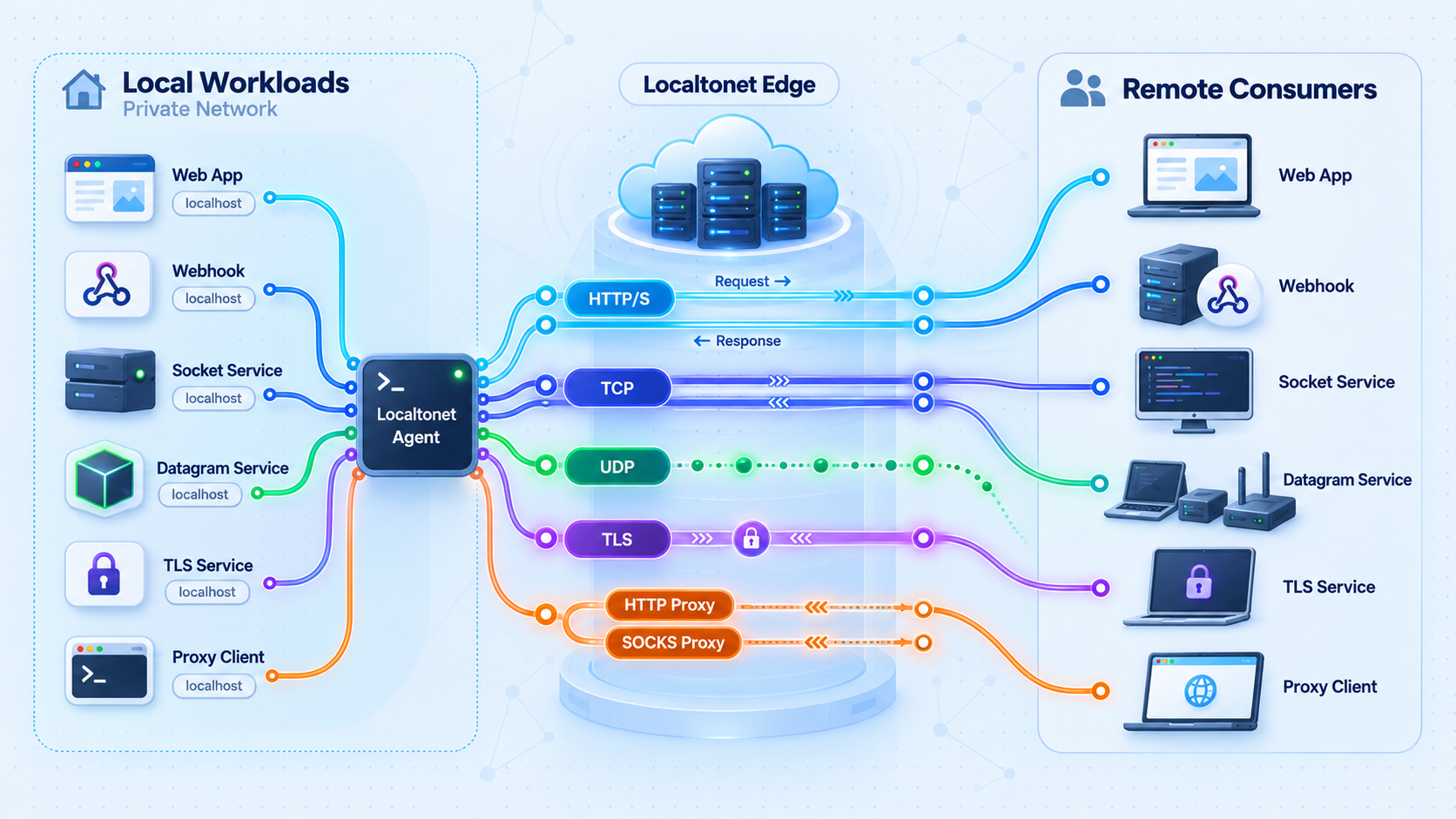
Choose the tunnel type from observed protocol behavior, not from the number written in the existing firewall rule. A familiar port can carry an unexpected protocol, and custom applications often use nonstandard ports. Confirm whether the service is an HTTP application, a raw TCP stream, a datagram service, a workload requiring both TCP and UDP, or a TLS-oriented service.
| Tunnel type | Use it for | Local target | Migration acceptance focus |
|---|---|---|---|
| HTTP/s | Web applications and HTTP APIs | Local IP address and port | Host handling, redirects, cookies, authentication, request methods, and application-generated URLs |
| TCP | Services that communicate over a raw TCP connection | Local IP address and port | Connection establishment, protocol handshake, authenticated transaction, idle behavior, and reconnect handling |
| UDP | Datagram-based services | Local IP address and port | Request and response flow, packet size assumptions, loss sensitivity, client addressing behavior, and application timeouts |
| Combined UDP/TCP | One application that genuinely requires both transports | Local IP address and port | Independent validation of both paths, including fallback behavior between transports |
| TLS | TLS-oriented services that fit the documented TLS tunnel model | Local IP address and port | Certificate expectations, server name behavior, trust validation, and full application handshake |
HTTP and HTTPS applications
Select an HTTP tunnel when the local workload is a web application or HTTP API. HTTP and File Server tunnels support Random Sub Domain, Custom Sub Domain, and Custom Domain process types, and each serves content at a public HTTPS address. For a migration, a generated address is useful for isolated validation because it does not require immediate replacement of the production hostname.
Test more than the home page. Verify login, logout, redirects, callback URLs, API methods, uploads, downloads, streaming responses if used, and any browser security assumptions tied to the original hostname. Applications frequently generate absolute links or enforce an allowed-host list. Those settings may need deliberate changes before users can adopt the new public address.
Custom-domain DNS requirements can change with current product behavior, so this runbook does not invent DNS records or validation steps. If retaining an existing production hostname is a requirement, check the current Localtonet documentation and dashboard instructions before planning that part of the cutover.
Raw TCP services
A TCP tunnel is appropriate when clients need a continuous byte stream to a local TCP listener and the workload is not being handled as an HTTP application. Examples can include administrative tools, databases, development services, and custom protocols, but suitability depends on the application's own behavior and security controls.
Validate the real client protocol rather than relying only on a generic port-open test. A successful socket connection proves basic reachability but not authentication, negotiation, queries, file transfer, or long-lived session stability. Test with the supported application client and a least-privileged account.
UDP services
UDP migration requires application-level evidence because there is no TCP-style session establishment to use as a health signal. Confirm that requests reach the application, responses return to the client, timeouts remain appropriate, and the application tolerates the characteristics of its network path. If the service produces no response by design, use server-side logs, metrics, or another observable effect to confirm delivery.
Avoid translating a broad UDP port range into assumptions about one tunnel. Inventory every port and determine whether it is fixed, dynamically negotiated, or advertised inside the protocol. When official project or protocol documentation does not establish compatibility, use a controlled test and retain the original path until representative clients pass.
Combined UDP/TCP workloads
Some applications use the same service through both TCP and UDP. Localtonet provides a combined UDP/TCP tunnel category for this requirement. Use it only after confirming that both transports belong to the same application workflow. Two unrelated services that happen to share a port number should remain separate migration items with separate owners and acceptance criteria.
Test the TCP and UDP paths independently. Then test any fallback behavior in which a client tries one transport and switches to the other. A passing TCP test must never be treated as proof that UDP works, or the reverse.
TLS workloads
Localtonet supports TLS tunnels that point to a local IP address and port. Before choosing this type, document where TLS is expected in the application flow, which hostname clients use, what certificate they expect, and how trust is validated. A generic statement that a service “uses SSL” is not enough for migration planning.
Perform a full client handshake and application transaction. Confirm certificate-name expectations and automated client behavior, especially when a hostname changes. Exact TLS handling should follow the current Localtonet documentation and the application's own requirements. Do not infer certificate provisioning or termination behavior that is not established for the selected configuration.
Design authentication and least privilege before exposure
Removing an inbound firewall rule does not remove the need for security controls. A public tunnel still creates a public route to a service. Before starting it, decide who should be able to connect, how the application authenticates them, what permissions they receive, and how access can be revoked.
Prefer application accounts with the minimum necessary privileges. Replace shared administrative credentials where practical, remove default passwords, and disable unused accounts. For machine integrations, use narrowly scoped credentials and define a rotation owner. Secrets must not be embedded in tunnel names, documentation screenshots, public URLs, or test commands committed to a repository.
The Localtonet device/auth token identifies the client device that runs a tunnel. Treat it as a secret. Never paste it into a ticket, article, shared shell history, or public configuration example. Tokens are device-specific and must be obtained through the authorized Localtonet workflow rather than guessed or copied from another environment without approval.
Do not expose an unauthenticated administrative console, database, remote shell, or internal API merely because the old port-forwarding rule is being removed. Keep application authentication enabled, use least-privileged identities, and apply appropriate access restrictions. If a service should be reachable only by members of private networks rather than by public clients, evaluate VPN Manager instead of publishing it as a public tunnel.
Separate control-plane and application ownership
Assign at least two clear responsibilities. A tunnel owner manages the Localtonet device, relay selection, tunnel configuration, and lifecycle. An application owner validates local health, authentication, authorization, and protocol behavior. In smaller teams, one person may hold both roles, but the responsibilities should still be recorded separately so troubleshooting does not stop at “the port is open.”
Minimize the reachable local target
Point the tunnel at the exact local address and port required by the service. Do not widen a local firewall rule or bind an application to every interface unless that is necessary and reviewed. If the Localtonet client and application run on the same device, evaluate whether a loopback listener is sufficient. If they run on separate devices, limit LAN access to the client device wherever the surrounding network controls allow it.
Define exposure windows
Since a tunnel is available only while the selected client is connected and the tunnel is running, teams can make lifecycle state part of their operating procedure. A permanent production endpoint needs continuous client supervision and clear incident ownership. A temporary development or maintenance endpoint should have an owner, purpose, and shutdown time. Stop or delete tunnels that are no longer required.
Configure the Localtonet side of the migration
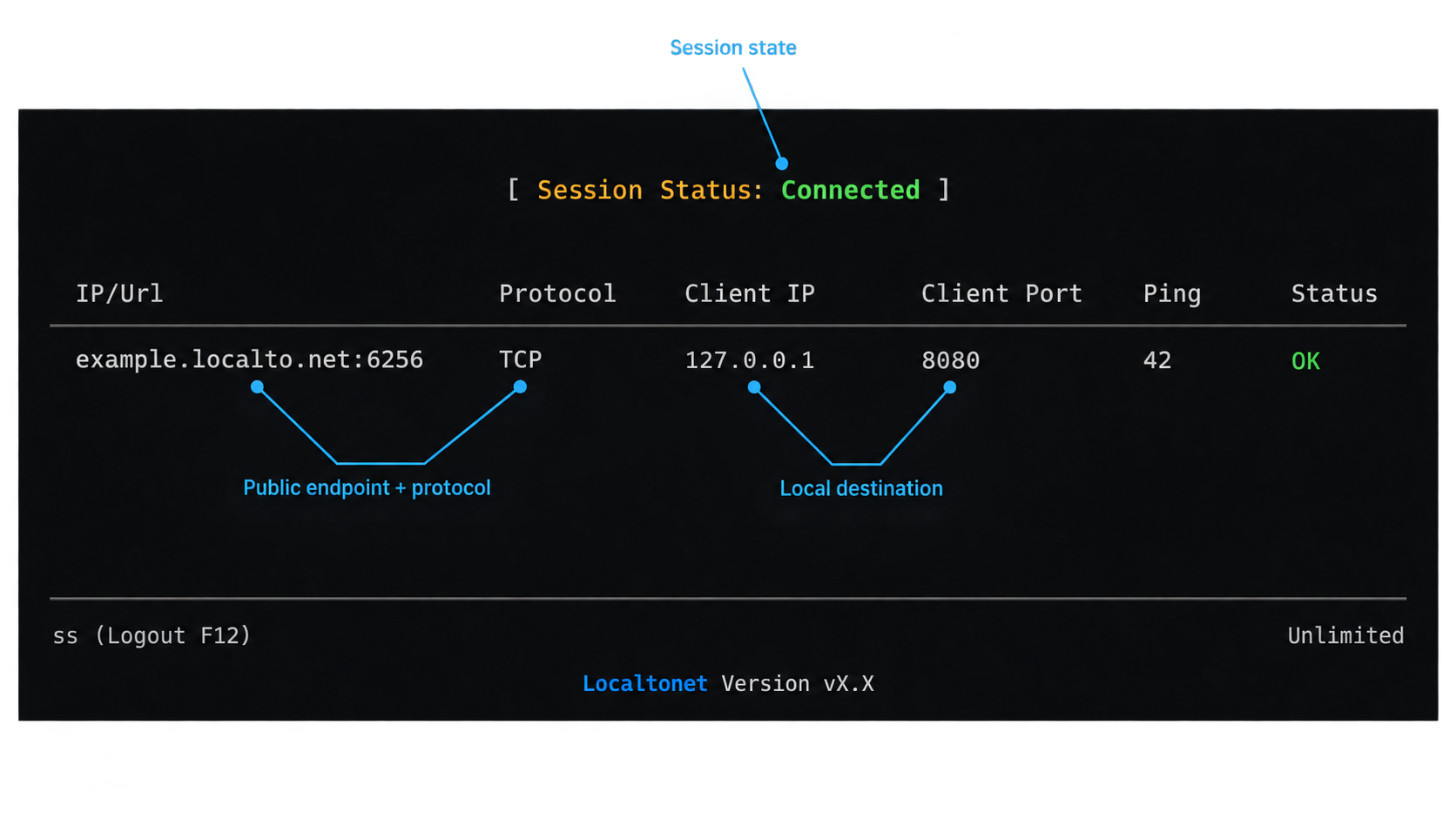
Complete local verification and security review before creating public access. The device running our client must be able to reach the exact local target. Install the Localtonet application for that device's operating system using the current official installation workflow. We do not include an unverified package command here because installation commands and supported packaging methods can vary by operating system and client version.
The documented Localtonet workflow follows the six stages below. Keep the old forwarding rule in place during this phase unless policy requires otherwise. Parallel availability gives the team a controlled way to compare the new and old paths.
Install and run the Localtonet client
Use the device that hosts the application or another authorized device that can reach it over the local network. Confirm the service is reachable from that device before proceeding. Use the current Localtonet installation instructions for its operating system rather than reusing an old command from a previous deployment.
Authenticate and select the device
Authenticate the client with its device-specific token and select that device for the tunnel. Keep the token confidential. Do not place it in migration documentation, sample configurations, or monitoring output.
Select an available relay server
Choose the server or region from the values currently available in the dashboard. Do not hardcode a server code from another environment or an old runbook because available values can vary.
Create the protocol-appropriate tunnel
Select HTTP, TCP, UDP, combined UDP/TCP, or TLS according to the verified workload classification. Enter the local IP address and port reachable from the client device. For HTTP, select the appropriate process type based on whether the migration uses a generated subdomain, a supported selected subdomain, or a custom domain.
Start the tunnel and record the public endpoint
Creating the configuration does not make it active. Use the Start action, verify that the selected client remains connected, and record the assigned public URL or public host and port in the migration register. Share it only with authorized testers at this stage.
Stop or delete the tunnel when it is no longer needed
After testing or service retirement, stop the tunnel to make it unavailable. Delete configurations that have no continuing operational purpose, following the team's change and retention procedures.
The current Localtonet documentation should be used to confirm version-sensitive installation and dashboard details. The migration register should capture the selected tunnel family, target, device owner, relay choice, assigned public endpoint, creation date, and service owner without recording secret tokens.
A saved tunnel configuration is not proof of service availability. The selected device must be connected, the Localtonet client must be running, the tunnel must be started, and the local application must be healthy and reachable.
Run parallel validation before changing consumers
A parallel validation period is the safest way to migrate a service with active consumers. Keep the existing forwarded endpoint available while a restricted tester group uses the Localtonet endpoint. This separates tunnel validation from the final removal of the old path and preserves a practical rollback option.
Validate from outside the local network
A test from the application host proves only local behavior. Use an authorized client on an external network to exercise the public endpoint. Confirm that the test is not accidentally reaching the old address through cached DNS, split-horizon resolution, a hosts-file override, or an existing private route.
Test the application, not just connectivity
Write acceptance checks in terms of user or system outcomes. “Port responds” is insufficient for most production workloads. An HTTP acceptance test may require sign-in, a state-changing operation, download, and sign-out. A TCP service may require authentication and a representative command. A UDP service needs an observable request and response or a confirmed server-side event.
Include negative tests. Invalid credentials should fail. Unauthorized users should not gain additional access. Requests to nonexistent resources should behave normally. Clients should not silently downgrade to an unintended endpoint. A migration is incomplete if successful traffic works but access controls no longer behave as expected.
Exercise lifecycle failures
Stop the tunnel during a maintenance window and verify that monitoring notices the outage. Start it again and confirm recovery. Restart the client device if that is within the service's intended operating model. These tests reveal whether the runbook explains the actual dependency chain and whether the on-call team can distinguish a stopped tunnel from an unhealthy application.
Localtonet also provides platform-wide Token/Tunnel webhooks for selected Token Groups. These webhooks fire when a token or tunnel changes to Connected or Disconnected and post a body containing the identifier, action date, type, and status. They can support lifecycle automation or alerting, but they do not replace an application-level health check. A connected tunnel can still point to a stopped or unhealthy local service.
Use a protocol-specific acceptance matrix
| Workload | Minimum positive checks | Failure checks |
|---|---|---|
| HTTP application | Page or API response, authentication, redirects, state-changing request, and representative content transfer | Invalid login, unauthorized route, incorrect host behavior, and stopped local application |
| TCP service | Connection, protocol handshake, authenticated operation, response integrity, and reconnect | Invalid credentials, tunnel stop, local listener stop, and client timeout behavior |
| UDP service | Representative datagram, observable application processing, response where applicable, and repeated requests | No-listener behavior, timeout handling, malformed request handling, and tunnel stop |
| Combined UDP/TCP | Separate TCP and UDP transactions plus any documented fallback sequence | One transport unavailable, both unavailable, and incorrect client fallback |
| TLS workload | TLS handshake, hostname and trust validation, authentication, and application transaction | Wrong hostname, untrusted certificate where relevant, stopped target, and expired client assumptions |
Record who performed each test, from which network, with which supported client version, and at what time. Attach application evidence such as transaction identifiers or sanitized logs without exposing credentials or tokens. Require the application owner and tunnel owner to approve the result before cutover.
Cut over consumers and preserve a real rollback path
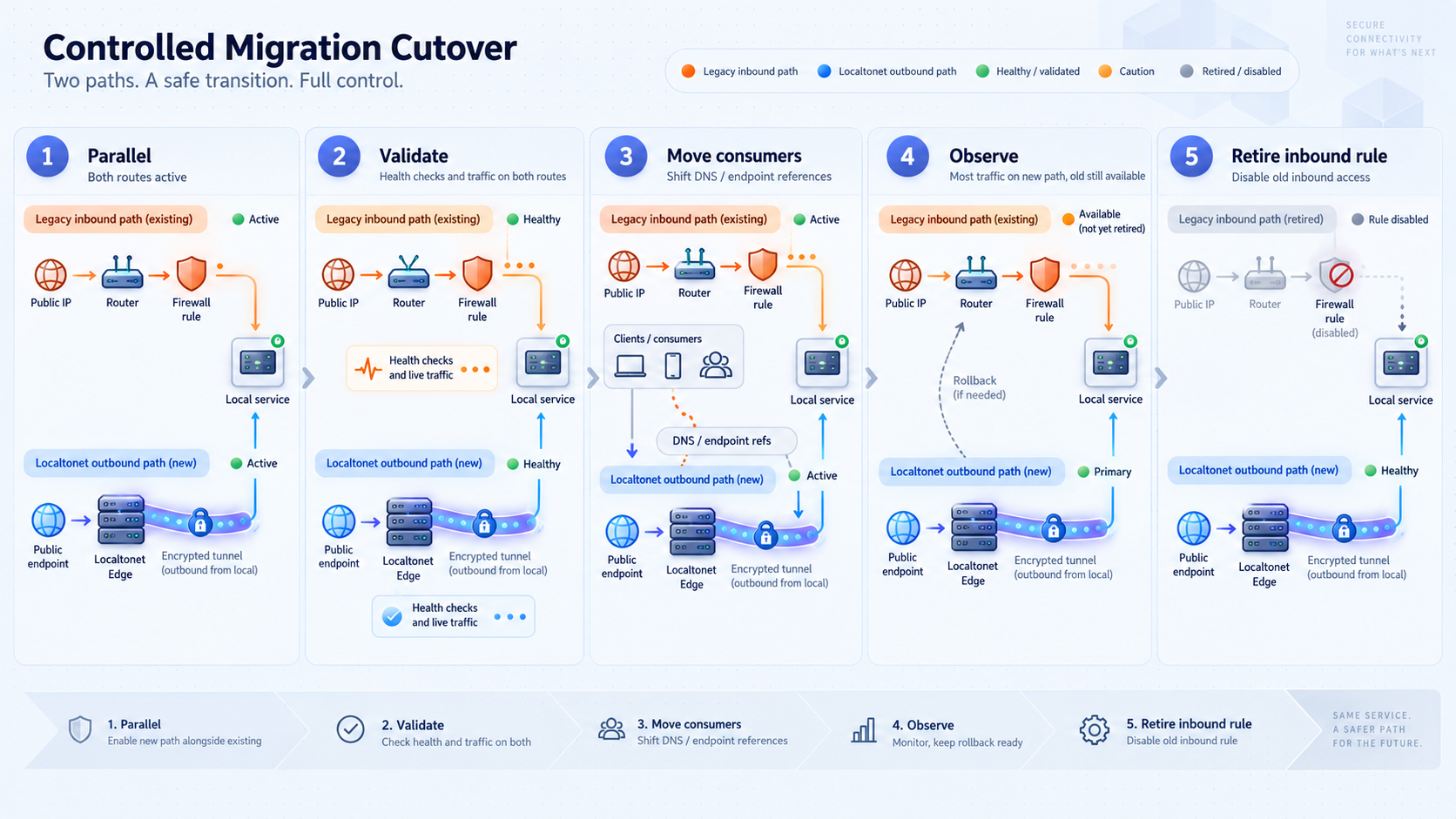
The cutover should change one dependency at a time where practical. Start with internal testers or a low-risk consumer, then move representative automated integrations, and finally move the broader user population. For services with many independent clients, track adoption explicitly rather than assuming that a DNS or documentation update moved everyone.
Define rollback triggers in advance
A rollback plan needs objective triggers. Examples include authentication failure for supported clients, inability to complete a critical transaction, unacceptable error volume, missing UDP responses, certificate validation failure, or monitoring that cannot reliably distinguish tunnel state from application health. Define who can order rollback and how long the team will troubleshoot before restoring the prior path.
During parallel operation, rollback usually means directing affected consumers back to the known working endpoint while keeping the new tunnel available for diagnosis. Avoid changing the old firewall rule during the same window unless that change is essential. Multiple simultaneous network changes make fault isolation harder.
Retire inbound rules only after evidence is complete
Do not remove the port-forwarding rule immediately after the first successful test. Confirm that every known consumer has moved, monitoring targets the new endpoint, operational ownership is assigned, and the rollback window has ended. Search again for references to the old public address, hostname, and port.
Remove or disable the narrowest relevant firewall and network address translation objects under the normal change process. Then test the old endpoint from outside the network and confirm that it no longer reaches the service. Test the Localtonet endpoint again to prove that removing the inbound rule did not affect the local application or an unrelated dependency.
A working tunnel plus an unchanged port-forwarding rule creates two public access paths. The migration is complete only when authorized consumers use the new endpoint, the old ingress path has been disabled or removed, and an external test confirms that the legacy address no longer exposes the service.
Document the final state
Update network diagrams, service records, incident procedures, monitoring targets, and owner information. Mark the old public address and rule as retired rather than simply deleting all historical context. Future responders should be able to determine why the architecture changed and which rollback path was intentionally closed.
Operate tunnels as production dependencies
After migration, availability depends on the local application, its host or network, the Localtonet client, the selected device identity, the running tunnel, and the consumer's path to the public endpoint. Monitoring and incident response should reflect that chain.
Monitor in layers
Use local application health checks to verify the listener and core behavior. Use an external synthetic check to verify the public path and a representative transaction. Track client and tunnel connection state separately. Platform-wide Token/Tunnel webhooks can report Connected and Disconnected transitions, but an application probe is still needed because connection state alone does not prove application correctness.
Assign lifecycle ownership
Every production tunnel should have a service owner, a client-device owner, an escalation path, and a review date. Record whether it is intended to be permanent, scheduled, or temporary. If the underlying service is decommissioned, stop and delete the corresponding tunnel rather than leaving an unused public configuration behind.
Control configuration changes
Treat changes to the local target, tunnel family, relay selection, public endpoint, and application authentication as service changes. Re-run the relevant acceptance tests after each one. A change that appears limited to networking can alter hostnames, certificate expectations, client configuration, or traffic behavior.
Review the device placement
The Localtonet client can target a service on the same machine or another address reachable from its device. Choose placement deliberately. Co-location can reduce LAN dependencies, while a dedicated reachable device can centralize several approved targets. In either case, avoid creating an unreviewed bridge to broad internal network access. Each tunnel should point to the intended service endpoint.
Keep an auditable migration register
Preserve the inventory as an operational record. Update it when a tunnel changes, an owner leaves, a credential rotates, or a service moves. The register should identify the public endpoint and local target, but it must never store the device token or application secrets.
Choose between a public tunnel and VPN Manager
Standard Localtonet tunneling and VPN Manager solve different problems. HTTP, TCP, UDP, combined UDP/TCP, TLS, and File Server configurations expose specific resources through public endpoints. VPN Manager creates a private mesh network with granular firewall rules and can bridge local LANs. Standard tunneling should not be described or operated as if it were a VPN.
| Connectivity need | Preferred model | Reason |
|---|---|---|
| Publish one web application or API | HTTP tunnel | Provides a public HTTPS address for the selected local HTTP target. |
| Expose one protocol-specific port to authorized public clients | TCP, UDP, combined UDP/TCP, or TLS tunnel | Maps a public host and port to the intended local protocol target. |
| Connect approved devices as members of a private network | VPN Manager | Provides private mesh networking and granular firewall rules rather than publishing a conventional public service endpoint. |
| Bridge selected local LANs privately | VPN Manager | This is a private network connectivity requirement, not ordinary public tunneling. |
The choice should follow user intent. If external users or systems need a specific public service, use the corresponding tunnel and protect the application appropriately. If a controlled group of devices needs private network membership or LAN-to-LAN access, evaluate VPN Manager. Do not expose an entire network through a collection of public port tunnels as a substitute for designing private connectivity.
Troubleshoot migration failures systematically
Diagnose the path from the inside out. Starting with the public endpoint can blur application failures, local routing failures, and tunnel lifecycle failures into the same symptom. The following order reduces guesswork.
1. Verify the local application
Confirm that the process is running and listening on the expected IP address and port. Use an application-aware local test. If the service fails locally, repair it before changing the tunnel. Check whether a recent application update changed the listener, port, hostname policy, credentials, or certificate.
2. Test from the Localtonet client device
If the application is on another host, test from the exact device running our client. A successful test from an administrator's workstation does not prove that the client device has the same route or local firewall permission. Verify name resolution if the configuration depends on a local hostname, but prefer recording an unambiguous target according to the team's addressing policy.
3. Confirm device connectivity and tunnel state
Check that the intended device is authenticated and connected. Confirm that the correct tunnel configuration is associated with it and that the tunnel has been started. Remember that creation alone does not make the endpoint available. If the wrong device token or target was selected, correct the configuration through the authorized workflow without disclosing the token.
4. Recheck protocol classification
A TCP listener is not automatically an HTTP application, and an application that uses both TCP and UDP will not be fully validated through only one path. Compare the selected tunnel type with packet behavior and application documentation. If TLS is involved, confirm hostname and trust expectations rather than treating every handshake failure as generic reachability loss.
5. Test externally with the real client
Use a supported client from outside the local network and connect to the assigned public URL or host and port. Check for stale DNS, copied spaces, an incorrect port, cached application configuration, or a client still using the legacy endpoint. For UDP, rely on an expected response or server-side evidence rather than a TCP-style port test.
6. Compare old and new paths carefully
During parallel validation, run the same transaction against both endpoints with equivalent credentials and client settings. If only the new path fails, compare hostnames, certificates, redirects, allowlists, and protocol assumptions. If both fail, investigate the application or a shared local dependency before changing the tunnel.
7. Restore the approved path when limits are reached
If a critical acceptance criterion fails and the troubleshooting window expires, execute the documented rollback. Preserve sanitized diagnostic evidence, return consumers to the known working path, and schedule another controlled test. Avoid improvising broad firewall access or disabling authentication to force a successful connection.
Some applications use dynamic secondary ports, embedded network addresses, unusual TLS assumptions, or undocumented transport behavior. When verified documentation does not establish compatibility, state that limitation and test the exact application in a controlled environment. Do not infer support from a successful basic connection.
Frequently asked questions
Can Localtonet replace router port forwarding when a site is behind CGNAT?
Yes, the Localtonet client establishes an outbound connection to a relay, so the local service does not require inbound router port forwarding or its own public IP address. The selected device must remain connected, the tunnel must be running, and the local target must remain reachable from that device.
Should we remove the old firewall rule as soon as the tunnel starts?
No. First validate the new endpoint from an external network, complete protocol-specific application tests, move known consumers, verify monitoring, and finish the agreed rollback window. Then remove or disable the old rule and test both endpoints again. The new endpoint should work, and the legacy endpoint should no longer expose the service.
Does an outbound tunnel replace application authentication?
No. A public tunnel creates reachability to the configured service. The application still needs appropriate authentication, authorization, account management, and other controls. Use least-privileged credentials, remove defaults, and avoid exposing unauthenticated administrative interfaces.
How do we choose between HTTP and TCP tunnels?
Use an HTTP tunnel for a web application or HTTP API that should be served at a public HTTPS address. Use a TCP tunnel for a raw TCP service. Do not choose solely from the conventional meaning of the port number. Confirm the protocol by examining the application configuration and completing a representative transaction.
When should we select a combined UDP/TCP tunnel?
Select it when one application genuinely requires both UDP and TCP for its documented workflow. Validate both transports independently and then test any client fallback behavior. Do not combine unrelated applications merely because they use the same numerical port.
Is creating a tunnel enough to make it available?
No. The Localtonet client must be running and connected on the selected device, and the tunnel must be started. The local application must also be healthy and reachable at the configured target. A saved configuration by itself is not an availability signal.
Can tunnel connection webhooks replace service monitoring?
No. Platform-wide Token/Tunnel webhooks can report Connected and Disconnected state changes for selected Token Groups, which is useful for lifecycle alerting. They do not prove that the local application can complete a transaction. Pair connection-state monitoring with local health checks and an external application-level probe.
When is VPN Manager more appropriate than a public tunnel?
Use VPN Manager when approved devices need private mesh connectivity or when the requirement is to bridge local LANs with granular firewall rules. Use protocol-specific tunnels when authorized public clients need access to a particular service. Standard HTTP, TCP, UDP, TLS, and File Server tunnels are not VPN connections.
Start a controlled port-forwarding migration
Inventory one existing service, verify its local target, select the correct protocol family, and validate a Localtonet endpoint in parallel before retiring the inbound rule.
Get Started Free →

