

Check the DNS resolver path before a trust-anchor problem becomes an apparent service outage
The DNS root is scheduled to begin using KSK-2024 to sign its DNSKEY record set on October 11, 2026. DNSSEC-validating recursive resolvers need to trust that key before the signing transition. This guide explains the trust chain, the official rollover timeline, the exact conditions behind an RFC 8509 sentinel test, and a reproducible workflow for checking the resolver path used by a real client. It also shows how to separate resolver failures from Localtonet tunnel, local target, and application problems.
📋 What's in this guide
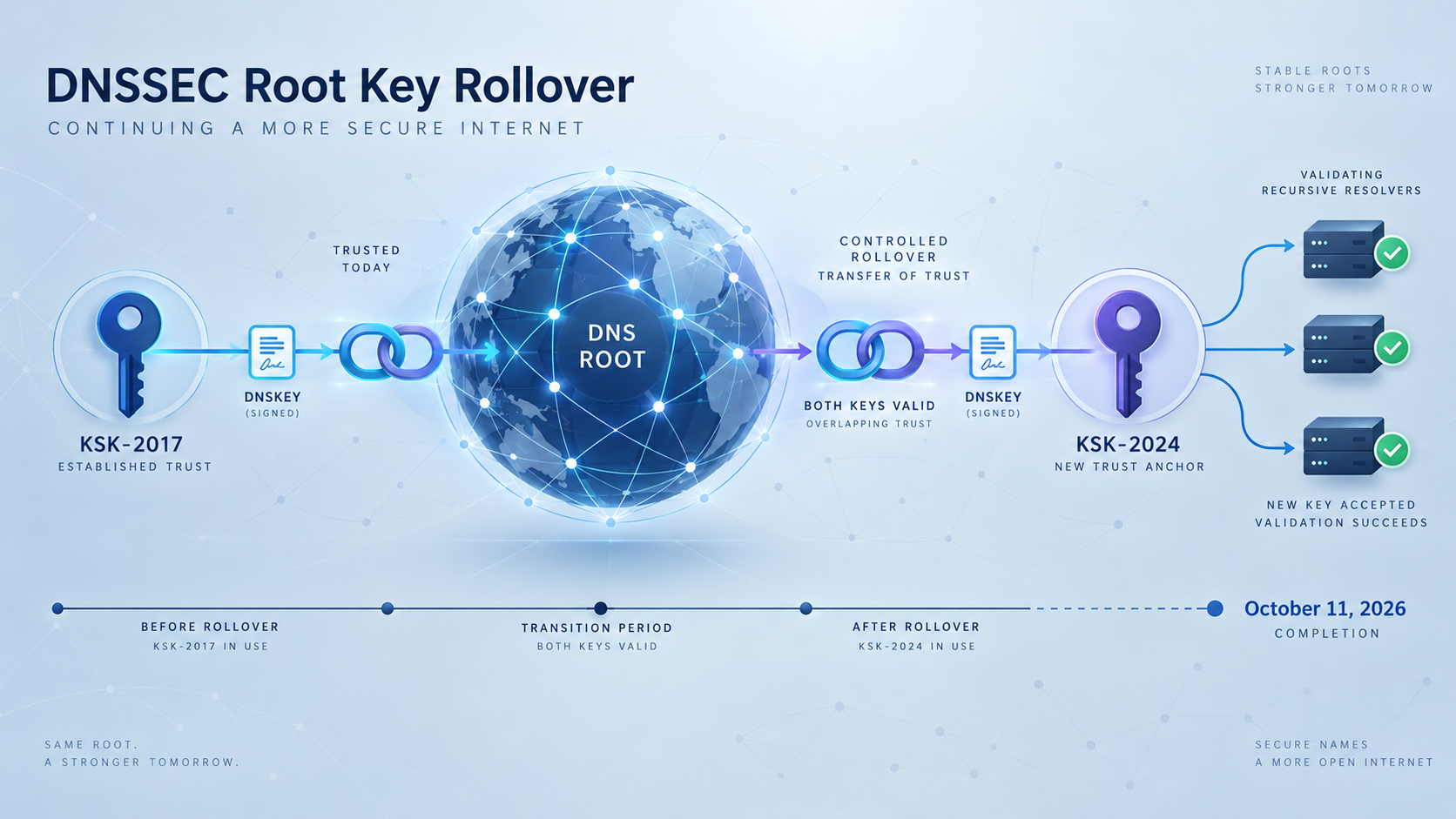
Why the 2026 root KSK rollover matters
DNSSEC allows a validating recursive resolver to authenticate signed DNS data. Instead of accepting an answer solely because it arrived from a DNS server, the resolver verifies digital signatures and follows a chain of trust from a known starting point toward the requested name.
The root zone is the starting point for that hierarchy. Unlike a child zone, the root has no parent that can publish a Delegation Signer record for it. A DNSSEC validator therefore begins with trusted root-key information stored in, supplied to, or securely learned by the resolver. That starting information is its root trust anchor.
KSK-2024 has key tag 38696. It is scheduled to replace KSK-2017, key tag 20326, as the key used to sign the root DNSKEY record set. The planned signing transition is October 11, 2026. These are scheduled milestones, not completed events at the time of writing. Administrators should check the current ICANN root KSK rollover information before an operational change window.
If a recursive resolver validates DNSSEC but cannot establish trust in the root DNSKEY set after the transition, lookups for otherwise healthy signed domains can fail. Users may see only a generic name-resolution error. The authoritative DNS service, application, API, or public tunnel can remain healthy while the resolver refuses to return data that it cannot validate.
Administrators of DNSSEC-validating recursive resolvers are responsible for maintaining their resolver trust anchors. Application operators still benefit from testing the networks, devices, monitoring systems, containers, and remote-access paths used to reach their services.
How DNSSEC trust reaches an application hostname
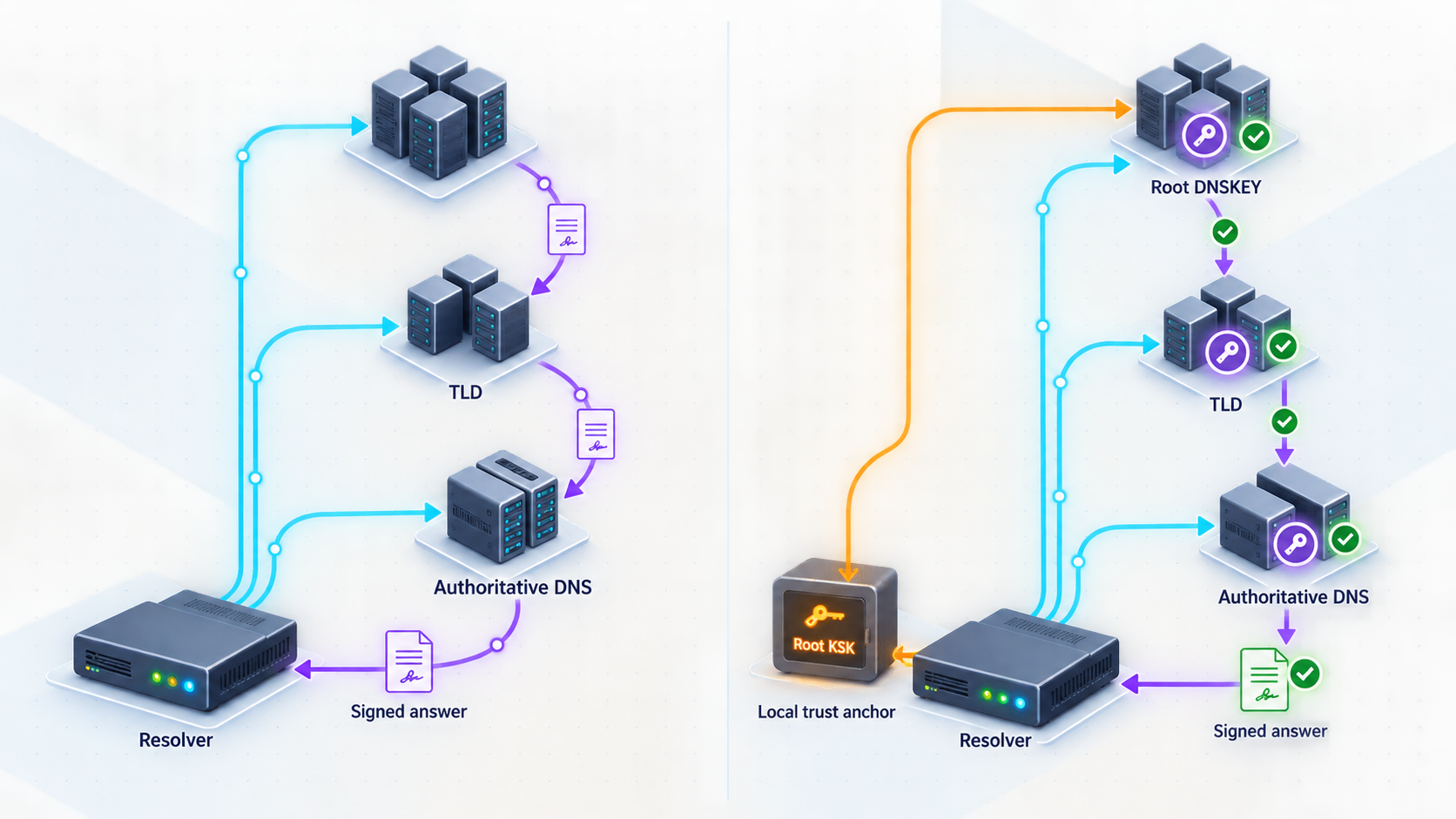
Consider a signed hostname beneath .com. A validator begins with trusted information about the root. It verifies the root DNSKEY record set, uses the authenticated root keys to validate the delegation toward .com, and continues through the relevant child-zone delegation. Each correctly signed link lets the resolver move closer to the requested name.
Two root signing-key roles are relevant. The zone-signing key, or ZSK, signs root-zone data, including DS records for top-level domains. The key-signing key, or KSK, signs the root DNSKEY record set. The resolver authenticates that DNSKEY set from its trust anchor, then uses keys in the authenticated set to validate the records required for the next link.
This is why changing an application hostname's A, AAAA, CNAME, MX, or TXT record is not a repair for a stale root trust anchor. Those records can be perfectly correct while a resolver fails earlier in the validation chain.
| DNS item | Function | Location | Rollover significance |
|---|---|---|---|
| A or AAAA | Maps a hostname to an IPv4 or IPv6 address | Authoritative zone | Does not install or update a resolver trust anchor |
| CNAME | Aliases one hostname to another | Authoritative zone | Can extend the lookup path but does not establish root trust |
| DS | Authenticates a child zone's key from its parent | Parent zone | Builds the trust chain below the root |
| DNSKEY | Publishes public DNSSEC keys for a zone | Signed zone | The root DNSKEY set contains the root KSK and ZSK material |
| Root trust anchor | Provides the validator's trusted starting point | Resolver configuration or managed resolver state | Must support a valid path to KSK-2024 for the planned transition |
RFC 5011 automatic trust-anchor updates
RFC 5011 defines automated updates for DNSSEC trust anchors. In simplified terms, a resolver that already trusts the current root key can authenticate a root DNSKEY set containing a new candidate key. It does not accept the candidate immediately. The key must remain available through the RFC 5011 add hold-down process, which is at least 30 days, and the resolver must continue obtaining authenticated DNSKEY information before promoting the candidate to trusted state.
KSK-2024 has been published in the root DNSKEY set since January 11, 2025. A continuously operating resolver with correctly functioning RFC 5011 processing has therefore had time to learn it. That publication history is helpful, but it is not evidence that every deployed resolver actually retained the state.
A resolver can miss or lose learned state after an image rebuild, migration, snapshot restoration, storage failure, configuration replacement, package change, or deployment of an older appliance. Some resolver products ship root anchors with software or operating-system packages instead of relying exclusively on learned state. The correct inspection and repair method is product-specific.
IANA publishes the official root trust-anchor material through its DNSSEC trust-anchor files page. Administrators should use vendor-supported procedures to consume or verify that material. Copying a trust-anchor file into an undocumented location or editing managed RFC 5011 state manually can make recovery harder.
Publication makes secure learning possible. It does not prove that a particular resolver was online, was validating correctly, saved persistent state, survived an upgrade, or serves every client in a resolver pool with identical configuration.
Official KSK-2024 rollover timeline
The rollover is a sequence, not a single isolated DNS change. The dates below are the principal milestones published for the planned transition. Completed milestones are distinguished from future scheduled events.
| Date | Status at publication | Milestone | Operational meaning |
|---|---|---|---|
| July 2024 | Completed | KSK-2024 trust-anchor information published | Software and resolver vendors could begin distributing the replacement key through supported update channels. |
| January 11, 2025 | Completed | KSK-2024 added to the root DNSKEY record set | RFC 5011-capable validators could securely observe and learn the new key while KSK-2017 remained the active signer. |
| October 11, 2026 | Scheduled | KSK-2024 begins signing the root DNSKEY record set | Validators need a valid trust path to KSK-2024 to continue normal DNSSEC validation. |
| January 11, 2027 | Scheduled | KSK-2017 revocation milestone | RFC 5011-aware validators can process the old key's revocation as the retirement sequence continues. |
| April 11, 2027 | Scheduled | KSK-2017 removal milestone | The former key is scheduled to leave the root DNSKEY set. |
These future dates remain schedule items until they occur. ICANN can publish updates, postponements, or more detailed operational timing, so change-management records should link to the current ICANN schedule rather than copying the dates into an unmaintained runbook.
The reviewed schedule identifies calendar dates for these milestones. This article does not assign an exact intraday UTC cutover time because no such time was confirmed in the evidence used for this revision. Resolver operators who need minute-level coordination should obtain the current UTC timing directly from ICANN's operational notice before scheduling monitoring or maintenance.
What an RFC 8509 sentinel test actually measures
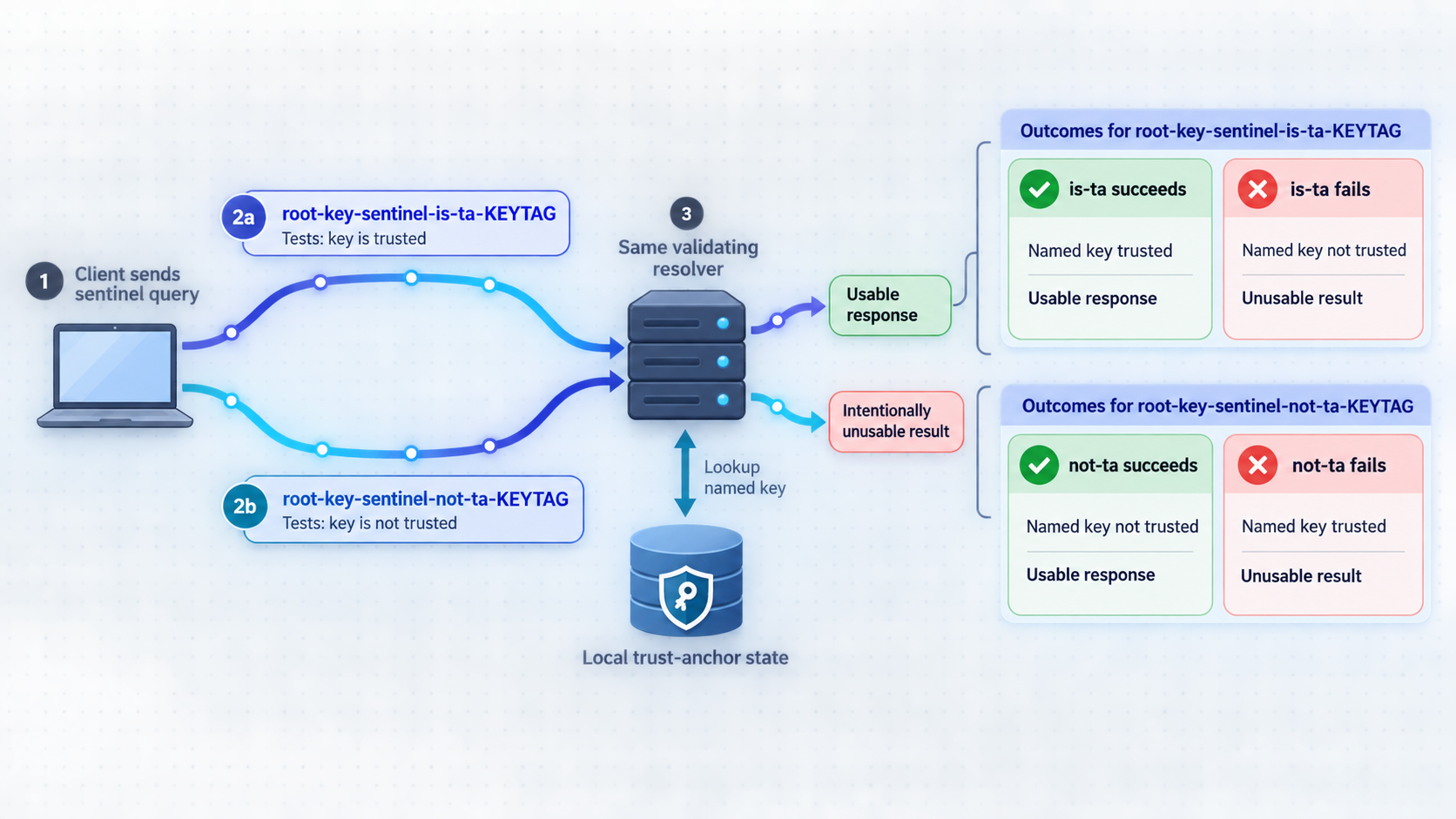
RFC 8509 defines the root key trust anchor sentinel. A sentinel-capable recursive resolver recognizes specially formed labels in ordinary DNS queries and modifies its response according to whether a specified root key tag is trusted.
For KSK-2024, the paired labels are:
root-key-sentinel-is-ta-38696, which tests the proposition that key tag 38696 is trusted.root-key-sentinel-not-ta-38696, which tests the proposition that key tag 38696 is not trusted.
The label must be the leftmost label of the queried name. The query must be for an A or AAAA record, must be processed recursively by the target resolver, and must not disable checking with the DNS CD flag. The underlying name also needs to produce a DNSSEC-authenticated Secure result. Sentinel processing is not a substitute for ordinary validation of the test domain.
If those conditions are not met, the response cannot be interpreted as a reliable statement about trust-anchor state. An Insecure answer, a Bogus answer, a timeout, a blocked query, a non-recursive response, or a query sent with checking disabled falls outside the intended paired test.
| Answering path | is-ta-38696 |
not-ta-38696 |
Conclusion |
|---|---|---|---|
| Validating, sentinel-aware, trusts KSK-2024 | Ordinary valid answer | SERVFAIL |
Expected trusted pattern for that answering resolver path |
| Validating, sentinel-aware, does not trust KSK-2024 | SERVFAIL |
Ordinary valid answer | Expected not-trusted pattern for that answering resolver path |
| No sentinel support or no DNSSEC validation | May return an ordinary answer | May return an ordinary answer | Inconclusive |
| Underlying validation or DNS failure | Failure, timeout, or inconsistent result | Failure, timeout, or inconsistent result | Fix or identify the underlying failure before interpreting trust state |
SERVFAIL is intentionally produced for one member of a valid sentinel pair. Outside that controlled pair, it is a general resolver error and is not uniquely diagnostic of a missing KSK-2024 trust anchor.
What a successful result does not prove
A trusted pattern is evidence about the recursive path that handled those two queries. It does not prove that every resolver behind the same service address has identical trust-anchor state. Anycast services, load-balanced resolver farms, failover nodes, forwarding layers, and separate IPv4 and IPv6 paths can involve different instances.
The two queries can also be answered by different members of a pool. Repeat the pair several times and test through each operationally important client path. Resolver administrators should still inspect the managed state of every instance using product-supported tools.
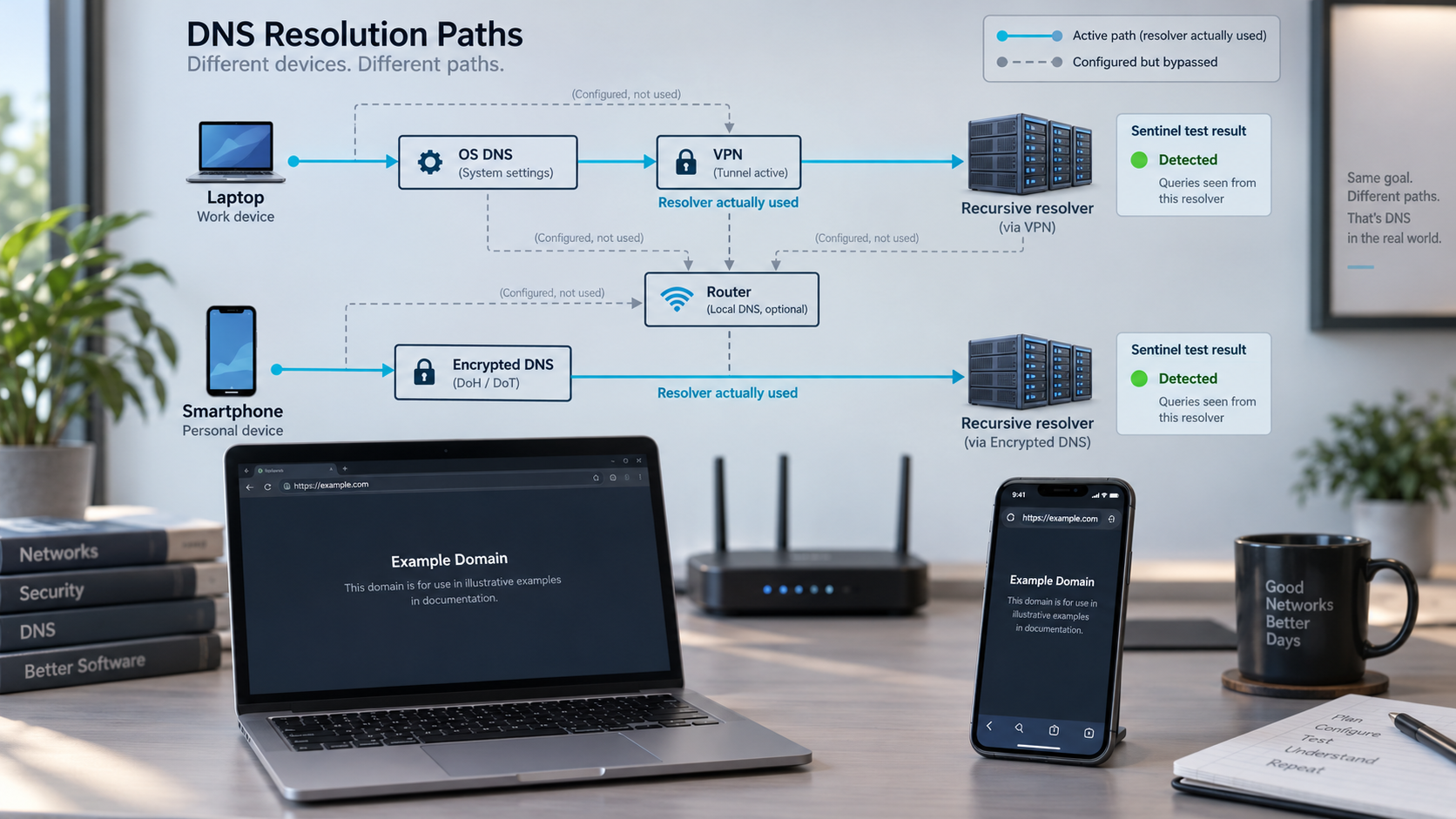
The result also does not prove that a browser used the same resolver. Browser encrypted DNS, an enterprise browser policy, a VPN, a security agent, or application-specific DNS can bypass the operating system's configured path.
Test the resolver used by the affected client
Prerequisites
Before testing, make sure you have:
- Access to the actual client environment, such as the affected workstation, server, container, monitoring agent, remote site, or VPN session.
- A DNS query tool that shows response status, flags, answer records, and the responding server. The examples below use
dig. - Authorization to query any managed recursive resolver directly. Some organizations restrict direct DNS traffic or require all queries to pass through approved forwarders.
- Awareness of alternate resolution paths, including browser DNS over HTTPS, operating-system encrypted DNS, VPN-provided DNS, local forwarding caches, split DNS, containers, virtual machines, and service meshes.
- A way to record UTC time, network location, resolver address, query name, query type, status, flags, answer, and tool version.
Obtaining dig or an equivalent tool
On Debian and Ubuntu systems, dig is commonly provided by the dnsutils package. Fedora and related systems commonly provide it through bind-utils. On macOS, dig is often already available. If it is absent, use a trusted package source approved for that machine. Windows users can run dig from an approved BIND tools package or from a managed Linux environment such as WSL.
Tools such as kdig or drill can also be used if they expose the DNS response code and answering server. A basic GUI lookup or a tool that reports only an address is insufficient because it may hide the distinction between SERVFAIL, timeout, cached failure, and an ordinary answer.
Do not install unapproved packages on production or managed systems. Do not bypass an organization-managed resolver as a permanent workaround. A managed resolver may provide internal names, split-horizon responses, access policy, security filtering, or required audit controls.
Enter the affected execution environment
Run the test where the failure occurs. If a container, monitoring worker, VPN session, or remote office reports the problem, a query from an unrelated administrator laptop is not an equivalent test.
Query the positive sentinel
Request the A record for the is-ta name without disabling DNSSEC checking. Record the status, flags, answer, and server.
Query the negative sentinel through the same path
Request the corresponding not-ta name immediately afterward. Keep the client environment, network, query type, and target resolver unchanged.
Evaluate the paired behavior
An ordinary positive answer plus SERVFAIL for the negative name is the expected trusted pattern. The reverse is the expected not-trusted pattern. Two ordinary answers are inconclusive.
Repeat and compare operational paths
Repeat the pair to detect mixed resolver pools. Test representative office, VPN, production, monitoring, container, and remote-user paths separately.
Run the paired queries
dig root-key-sentinel-is-ta-38696.dnstest.dev A
dig root-key-sentinel-not-ta-38696.dnstest.dev A
In each response, record the status from the DNS header, the flags, the answer section, and the server shown at the end of the output. Do not add +cd, because that requests checking-disabled behavior and defeats the intended validation-dependent test.
For a compact but still auditable result, you can limit the output to comments and answers:
dig root-key-sentinel-is-ta-38696.dnstest.dev A +noall +comments +answer
dig root-key-sentinel-not-ta-38696.dnstest.dev A +noall +comments +answer
Preserve the full output when opening an incident because the server address and timing information are useful. A timeout is not the same as SERVFAIL. It can indicate packet loss, filtering, an unreachable server, or unavailable DNS transport.
Compare a specifically authorized resolver
If policy allows direct queries, dig accepts a resolver address after @. The following comparison uses the public resolver at 1.1.1.1:
dig @1.1.1.1 root-key-sentinel-is-ta-38696.dnstest.dev A
dig @1.1.1.1 root-key-sentinel-not-ta-38696.dnstest.dev A
This comparison can show that two resolver paths behave differently. It cannot identify the precise fault inside the failing path, and it does not prove that changing the client's resolver is safe. Escalate managed-resolver failures to the responsible administrator.
Create a reproducible test record
Record at least the following fields for each pair:
- UTC date and time.
- Device, container, or monitoring environment.
- Physical or logical network, including VPN state.
- Configured resolver and server reported by the query tool.
- Exact QNAME and QTYPE.
- Response status, flags, and answer records.
- Timeout or response latency when relevant.
- Query-tool name and version.
- Number of repetitions and whether results changed.
Avoid publishing internal resolver addresses, split-DNS names, screenshots containing credentials, or other sensitive network details. Share the complete record only through the approved incident channel.
Interpret the results without overclaiming
Positive answer, then SERVFAIL
An ordinary valid answer for root-key-sentinel-is-ta-38696 followed by SERVFAIL for root-key-sentinel-not-ta-38696 is the expected trusted pattern for a validating, sentinel-aware resolver.
This supports the conclusion that the answering resolver path recognized key tag 38696 as trusted when the test ran. It does not certify every node in a resolver cluster, future state after an upgrade, browser-specific DNS, or unrelated client networks.
SERVFAIL, then positive answer
The reverse pattern is the expected indication that a validating, sentinel-aware resolver does not trust key tag 38696. The administrator should verify which resolver instance answered, inspect its trust-anchor state, and follow the current procedure supplied by the resolver software or appliance vendor.
There is no universal trust-anchor repair command. Implementations differ in built-in anchor packaging, RFC 5011 state files, ownership requirements, startup behavior, validation modes, and recovery processes. Applying instructions written for another resolver can damage otherwise recoverable state.
Two ordinary answers
This is inconclusive. The resolver may not implement RFC 8509, DNSSEC validation may be disabled, or another component may have answered without applying sentinel processing. Do not report the resolver as ready based only on two successful address responses.
Confirm validation and sentinel support in the product documentation. Resolver administrators should inspect all members of a pool with vendor-supported status tools.
Both queries fail
Two failures do not uniquely diagnose a missing KSK-2024 trust anchor. Establish whether the resolver can reach authoritative DNS, whether the signed test zone validates normally, and whether DNS transport is available. Forwarding loops, blocked traffic, broken validation, unavailable upstreams, and general network failure can produce similar symptoms.
The same query produces different results
Variable results can indicate a resolver pool with inconsistent state, different IPv4 and IPv6 paths, failover to another server, forwarding through multiple upstreams, or caches populated by different validators. Repeat the pair, capture the answering server, and test individual managed instances where the platform supports it.
The terminal works but the browser does not
First confirm whether the browser uses encrypted DNS or an enterprise DNS policy. A browser can send queries to a different resolver even when it runs on the same machine as dig. VPN clients, endpoint-security products, and browser profiles can also change the path.
This guide does not direct readers to an unverified browser readiness page. If browser behavior matters, use browser diagnostics approved by your organization to identify its active resolver, then compare that path with the operating-system resolver.
Separate DNS failure from a Localtonet tunnel problem
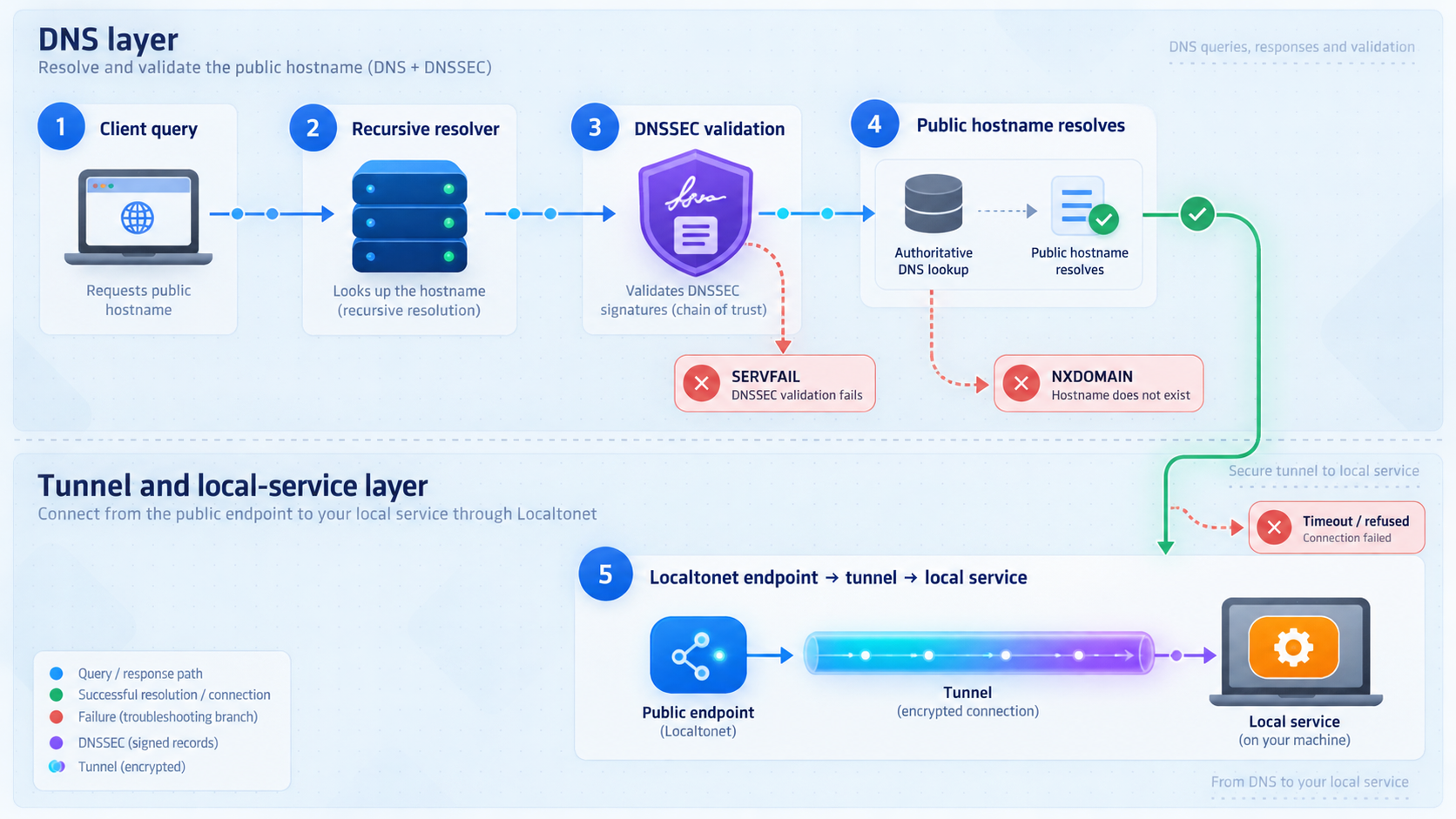
With Localtonet, the client on the selected device establishes an outbound connection to our relay server. A running tunnel provides a public URL or a public host and port, depending on the tunnel type. No inbound router port forwarding, public IP address, VPN setup, or firewall change is required for the standard tunnel workflow.
The tunnel is available only while the selected client is connected and the tunnel is running. Creating a tunnel does not start it automatically. HTTP, TCP, UDP, combined UDP/TCP, and TLS tunnels also require the configured local IP address and port to be reachable from the Localtonet client device.
DNS resolution happens before a hostname-based connection reaches that public endpoint. A failing recursive resolver can therefore make a healthy tunnel appear offline. Our platform does not control trust-anchor state in an ISP resolver, office DNS service, browser encrypted-DNS provider, or customer-operated recursive resolver.
Isolation workflow
Verify the local application
From the Localtonet client device, test the exact IP address and port configured as the local target. Confirm that the service is listening and returns the expected protocol response.
Check the selected device
Confirm that the correct Localtonet client is running and connected. A different connected device does not make a tunnel assigned to an offline device available.
Check the tunnel lifecycle
Verify that the tunnel has been started. A saved or created configuration remains unavailable while it is stopped.
Resolve the assigned public hostname
Query the exact hostname from the affected network. Record the resolver address, response status, flags, and returned records.
Run the KSK-2024 sentinel pair if the failure is path-specific
If resolution fails on one network but works elsewhere, test that network's resolver. Treat the result according to the RFC 8509 limitations described above.
Compare with an authorized working path
Test the same hostname from another permitted network. If DNS fails only through one resolver while the endpoint works elsewhere, focus remediation on the failing DNS path.
Suppose the application works locally, the correct device is connected, the tunnel is running, and users on one network can reach the public hostname. An office resolver returns DNS errors and produces the reverse sentinel pattern. That combination is strong evidence for a resolver-side investigation.
If the hostname resolves consistently but the connection is refused, times out after resolution, or returns an application error, continue with tunnel state, target reachability, protocol, listener, and application diagnostics. A successful sentinel result does not test any of those layers.
Never place Localtonet authentication tokens, credentials, private endpoints, or sensitive configuration into public DNS tools, screenshots, or tickets. A device token identifies the client that runs a tunnel and must remain secret. Public reachability also does not replace authentication, least-privilege permissions, IP restrictions where applicable, or application-level access controls.
Prepare resolver operations for the transition
Resolver readiness should be managed as infrastructure state. Build an inventory of validating recursive resolvers serving offices, production workloads, monitoring systems, remote-access environments, CI/CD workers, branch routers, and customer-support test networks. Include forwarders in the diagram, but identify which component performs validation and stores the effective trust-anchor state.
Resolver pools deserve instance-level attention. A service address can hide several nodes, and only some may have retained KSK-2024. Test through the client-facing address, then inspect each managed instance with the vendor's supported tools. Repeat the checks after failover because standby systems may have older software or persistent state.
| Operational check | Evidence to retain | Repeat trigger |
|---|---|---|
| Sentinel test | Paired result, resolver address, environment, and UTC time | Before the transition and after resolver changes |
| DNSSEC validation mode | Whether validation is enabled and which component performs it | After forwarding, VPN, or policy changes |
| Trust-anchor state | Vendor-supported status for KSK-2024 or key tag 38696 | After upgrades, restores, migrations, and image rebuilds |
| Resolver-pool consistency | Software version and trust state for every active and standby node | After deployment, scaling, or failover |
| Application hostname baseline | Expected response status and records from representative networks | During readiness exercises and incidents |
| Localtonet service state | Connected device, running tunnel, and reachable local target | Whenever DNS succeeds but public access fails |
Use vendor-specific remediation
If KSK-2024 is missing, use the current procedure for that resolver product and release. Depending on the implementation, remediation may involve installing a supported software update, updating a packaged root-anchor bundle, restoring valid RFC 5011 state, or following a documented trust-anchor recovery process.
Do not invent a universal command, copy state from an unrelated resolver, or delete managed files simply to force relearning. Establish the cause first, preserve logs and current state, and confirm that the proposed recovery process is supported by the vendor.
Schedule verification around change events
Test before October 11, 2026, after the planned signing transition, and after every resolver upgrade, migration, rollback, snapshot restoration, image replacement, or failover exercise. Continue monitoring through the scheduled 2027 revocation and removal milestones.
For change windows requiring exact UTC coordination, use the latest ICANN operational schedule rather than assuming that the entire transition occurs at local midnight. The published calendar date alone is not sufficient for minute-level monitoring.
Store the expected sentinel pair, important hostname responses, resolver addresses, and network-path notes in the operational runbook. A baseline helps the incident team identify whether a new failure began in recursive DNS, Localtonet tunnel state, local reachability, or the application itself.
Frequently asked questions
What is KSK-2024?
KSK-2024 is the DNS root key-signing key identified by key tag 38696. It is scheduled to replace KSK-2017, key tag 20326, as the signer of the root DNSKEY record set on October 11, 2026.
Has the October 2026 signing change already happened?
No, it is a scheduled event at the time described by this guide. Verify the current ICANN rollover schedule before relying on the date for an operational change or incident.
Do I need to change my domain's A, AAAA, CNAME, MX, or TXT records?
Normally, no. The rollover concerns root trust-anchor state in DNSSEC-validating recursive resolvers. Ordinary zone records do not install KSK-2024 in a resolver.
What sentinel pattern indicates that KSK-2024 is trusted?
For a DNSSEC-validating, RFC 8509-aware resolver, the expected pattern is an ordinary valid answer for is-ta-38696 and SERVFAIL for not-ta-38696. Both queries must use the same intended resolver path and meet the sentinel applicability conditions.
If both sentinel names resolve, is the resolver ready?
That result is inconclusive. The resolver may not support RFC 8509, may not validate DNSSEC, or may not be the validator you intended to test. Inspect its capabilities and trust-anchor state with supported administrative tools.
Does SERVFAIL prove that the resolver lacks KSK-2024?
No. SERVFAIL has many possible causes. It becomes meaningful for this purpose only as part of the expected paired RFC 8509 behavior after the underlying test name has been securely validated.
Does one successful sentinel test cover an entire resolver pool?
No. It provides evidence about the answering path for those queries. Repeat the test and inspect every managed active and standby resolver because pools can contain inconsistent software or trust-anchor state.
Why might dig and my browser produce different results?
The browser may use DNS over HTTPS or an enterprise browser policy while dig uses the operating system's configured resolver. VPNs, forwarding agents, containers, and split DNS can create additional paths.
Can a Localtonet tunnel be healthy while its hostname fails on one network?
Yes. The selected device can be connected, the tunnel can be running, and the local target can be healthy while one client resolver fails to return a usable DNS answer. Compare the affected resolver path with an authorized working network before changing the tunnel.
Can Localtonet update a user's recursive resolver trust anchor?
No. Trust-anchor maintenance belongs to the recursive resolver operator. With Localtonet, our client establishes the outbound relay connection and provides the public URL or host and port while the selected device is connected and the tunnel is running.
Expose your service with Localtonet, then verify each dependency
Connect the device that can reach your local service, create and start the appropriate tunnel, and use the assigned public URL or host and port. If access differs by network, test the actual resolver path before changing a healthy tunnel or application.
Get Started Free →

