

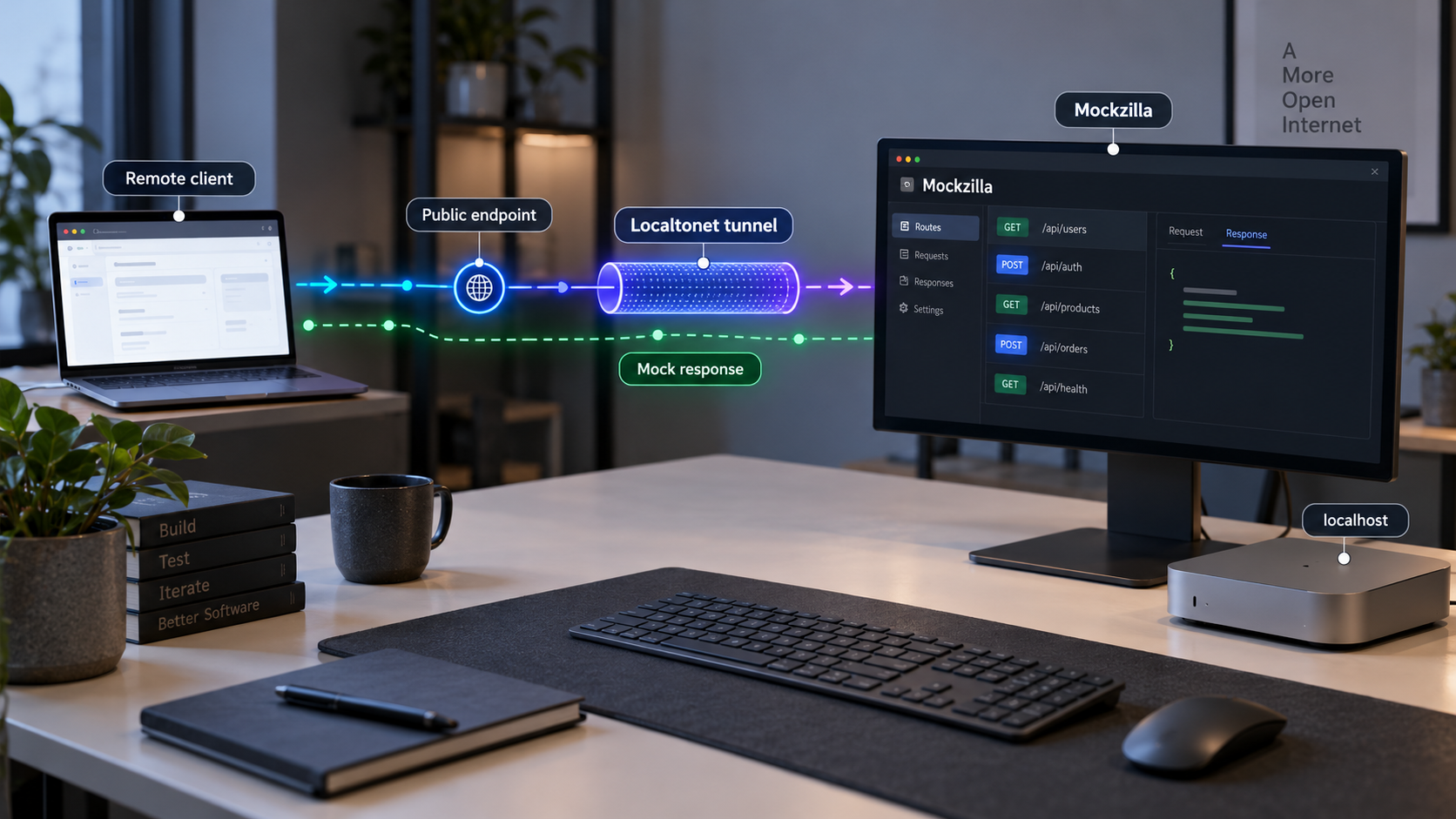
Run realistic OpenAPI mock services locally, verify them, and make selected endpoints available to remote testers
Mockzilla turns OpenAPI specifications into working HTTP mock APIs without requiring application code for every endpoint. In this guide, we install Mockzilla through Homebrew or Go, start a documented example, explain how multiple specifications are organized, and verify the generated service before exposing anything publicly. We then connect the working local HTTP server to Localtonet so authorized developers, test clients, and integration systems can reach it remotely. Where Mockzilla's available documentation does not establish an exact port, bind address, multi-specification command syntax, or generated route, we show how to obtain that value from the running process instead of guessing.
📋 What's in this guide
How Mockzilla and Localtonet fit together
API mocking separates client development from the availability and behavior of a production backend. Instead of waiting for every real endpoint to be deployed, a frontend, mobile application, automated test, or integration client sends requests to a server that follows the API contract and returns generated responses. An OpenAPI-driven mock is especially useful because the mock behavior starts from the same paths, operations, parameters, schemas, and response definitions used to document the intended API.
Mockzilla is an open-source mock server for OpenAPI specifications. In its portable mode, we can point it at an OpenAPI document and start a mock without generating application code. It generates schema-based responses, validates requests against the specification, and supports capabilities such as latency simulation, error injection, upstream proxying with mock fallback, static responses, response caching, middleware, and selective endpoint overrides. Its project documentation also describes a code generation mode for teams that need typed Go handlers and custom logic.
The local Mockzilla process remains the origin service in this tutorial. Localtonet does not replace that process or generate the mock responses. After the mock is working locally, the Localtonet client running on a device that can reach it establishes an outbound connection to one of our relay servers. An HTTP tunnel then provides a public HTTPS address that forwards requests to the selected local IP address and port. This avoids inbound router port forwarding, a public IP requirement, VPN setup, and direct firewall changes.
This architecture is useful when remote frontend developers need a shared development target, a mobile device cannot directly reach a developer's loopback interface, or an external test system needs to call a temporary mock. It can also support demonstrations and controlled integration tests. It should not be treated as an automatic production deployment pattern. A generated mock may intentionally return synthetic data, incomplete business behavior, or simulated failures that would be inappropriate for a production dependency.
First prove that Mockzilla accepts a request directly on the local network interface and port reported by the process. Only then add a Localtonet HTTP tunnel. This isolates specification, route, and mock-server problems from tunnel targeting or connectivity problems.
Prerequisites and planning
Before installing anything, choose the OpenAPI documents that define the services you want to mock. The documented quick-start example uses the public Petstore OpenAPI document, which is useful for confirming that the installation works. For your own project, use a specification from a location the Mockzilla process can read. If the document is fetched over the network, the machine must be able to reach its URL when Mockzilla loads it.
Review the specification before exposing the generated service. Confirm that it contains only contract information suitable for the intended audience. OpenAPI files can include server addresses, examples, descriptions, and security-scheme metadata. A mock should not contain real secrets, live bearer tokens, private customer information, or confidential examples.
Select one of the two installation methods documented by the Mockzilla project:
| Installation path | Requirements | Best fit | Operational consideration |
|---|---|---|---|
| Homebrew formula | A working Homebrew installation and access to the Mockzilla tap | Interactive local development where Homebrew is already used | Installs a reusable mockzilla executable |
| Go module execution | A working Go toolchain and network access to retrieve the module when it is not cached | Developers and CI environments already standardized on Go | @latest resolves the current published module rather than pinning a specific version |
| Portable embedded build | A project-specific build based on Mockzilla's portable template | Offline or air-gapped workflows that need specifications embedded into a binary | The extracted quick start does not contain the full build procedure, so this guide does not invent one |
For remote access, install and run the Localtonet client on the same machine as Mockzilla or on another device that can reach Mockzilla's listening address and port. You will also need a device-specific Localtonet authentication token and an available relay server selected from the current dashboard. Tokens identify client devices and must be treated as secrets.
Decide whether the mock should be reachable only from the host, from a private LAN, or through a temporary public URL. The correct local target depends on where the Localtonet client runs. If both processes run on the same device and Mockzilla listens on loopback, the loopback address reported by Mockzilla may be appropriate. If the client runs on a different machine, Mockzilla must listen on an interface reachable from that machine. The supplied Mockzilla evidence does not establish its default hostname, port, bind address, or a supported flag for changing those values, so do not copy a guessed value from an unrelated tutorial.
A mock endpoint can still accept untrusted traffic, reveal API structure, trigger logging, consume local resources, or reach a configured upstream backend. Use only specifications and configurations approved for sharing, keep secrets out of examples, and apply access controls appropriate to the intended callers.
Install Mockzilla
The project documents Homebrew and direct Go execution as quick-start paths. Use one path, not both, unless you deliberately want to compare installations. Run the commands in a terminal under an account with permission to install or retrieve the required software.
Option 1: Install through Homebrew
Add the Mockzilla Homebrew tap
Add the project-maintained tap so Homebrew can locate the Mockzilla formula.
brew tap mockzilla/tapInstall the Mockzilla formula
Install the reusable command-line executable from the tap.
brew install mockzillaConfirm that the executable can be invoked
Run the documented quick-start command in the next section. If the shell reports that the command cannot be found, open a new terminal and confirm that Homebrew's binary directory is included in the shell path.
Option 2: Run the published Go command directly
The documented Go path uses go run with the published cmd/mockzilla module. It downloads and builds the command as needed, then passes the OpenAPI document URL to it:
go run github.com/mockzilla/mockzilla/v2/cmd/mockzilla@latest \
  https://petstore3.swagger.io/api/v3/openapi.json
The @latest suffix is convenient for an initial evaluation, but it does not pin a fixed release. Reproducible development and CI workflows should deliberately select and review a version rather than silently changing behavior whenever a new release appears. The exact version-pinning policy depends on your dependency-management and release process.
Mockzilla release v2.10.0 removed a service configuration route that had served upstream credentials. Use a currently reviewed version, inspect release notes before upgrading, and never place upstream credentials in a configuration that has not received a security review. Removal of that route is important, but it does not remove the need to protect every other route and configuration value.
Start an OpenAPI mock API
Begin with one specification. This keeps initial verification simple and gives you a known-good baseline before combining services. The documented example starts Mockzilla with the public Petstore OpenAPI document.
Choose the OpenAPI document
For a first run, use the documented Petstore URL. For a project mock, substitute an approved OpenAPI document location that the process can read. Validate that the file is the intended version before sharing the resulting API.
Start Mockzilla
If you installed the Homebrew formula, run the documented executable with the example specification URL.
mockzilla https://petstore3.swagger.io/api/v3/openapi.jsonKeep the process running and inspect its output
Read the startup output for the actual listening hostname, port, and generated service URL or prefix. Record those exact values. They are the authoritative values for local verification and the later Localtonet target.
Identify a documented operation to call
Select an operation that exists in the loaded OpenAPI document. Note its HTTP method, generated service prefix, path, required path parameters, query parameters, headers, and request body. Do not assume the specification root itself is a callable API operation.
Keep the terminal attached during initial testing. If the process exits, the local mock stops, and a Localtonet tunnel pointed at it will no longer have a working origin. Once the workflow is stable, process supervision can be considered, but the supplied evidence does not define an official service-manager configuration for Mockzilla. This guide therefore does not invent a systemd unit, launch agent, container policy, or background flag.
Understand generated responses and validation
Mockzilla generates realistic response values from schemas, but generated data is not the same as production business logic. A syntactically valid payment object, user object, or order response does not prove that real state transitions, authorization decisions, balances, or side effects are represented. Use generated responses to exercise client parsing, contract compatibility, UI states, and integration flows while keeping business-behavior expectations explicit in tests.
Request validation helps identify contract drift. A rejected request may indicate that the client used an undefined path, unsupported method, missing required value, incorrect content type, or body that does not match the schema. When this happens, compare the request with the exact OpenAPI operation before changing the server configuration.
Verify the mock locally before tunneling
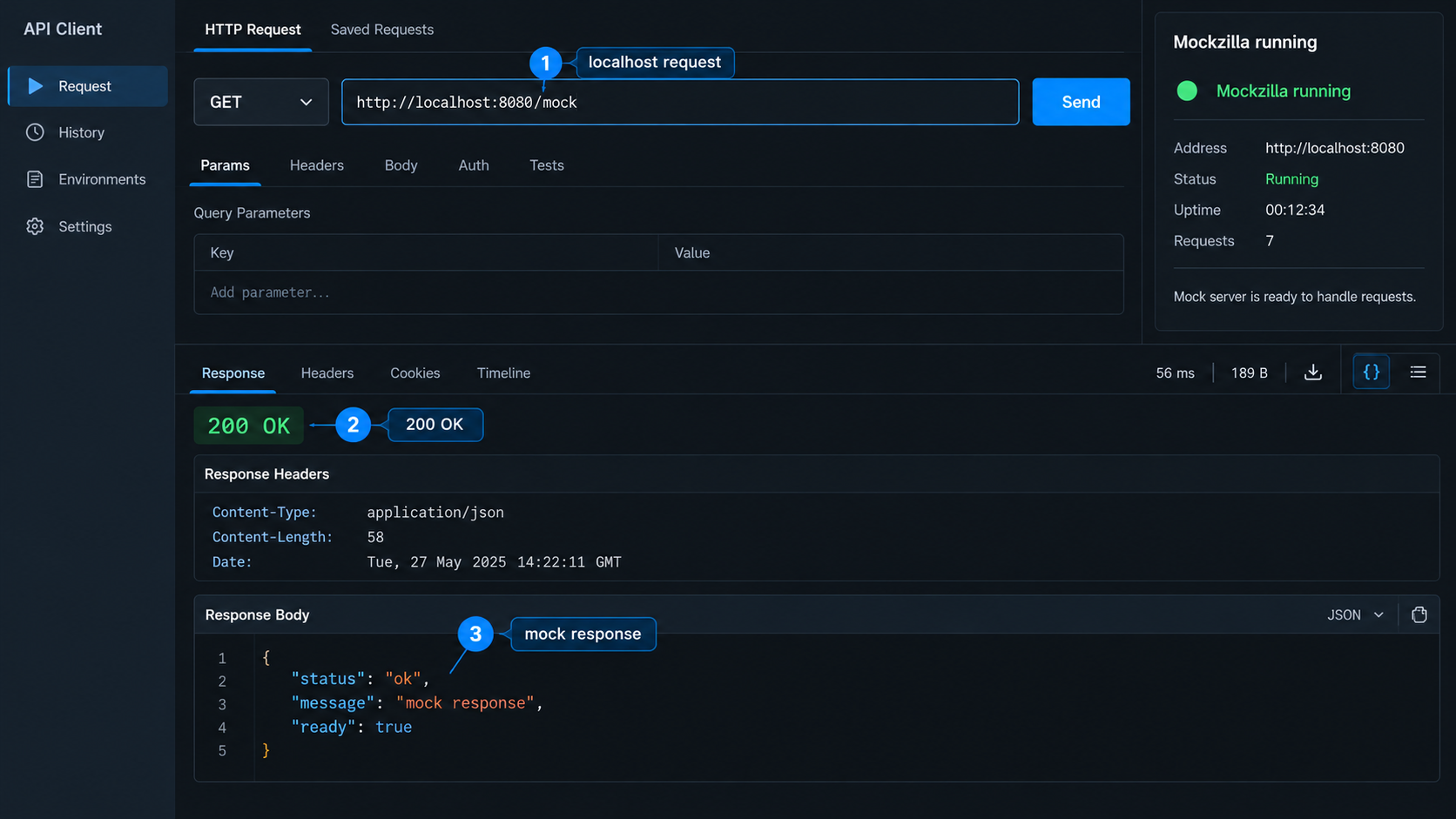
Local verification proves four things: the process is still running, the selected address and port are reachable, the generated service prefix is correct, and the requested operation exists in the specification. Skipping this stage can make a simple route error look like a networking problem.
Copy the runtime URL exactly
Use the hostname, port, and service prefix shown by Mockzilla. The available evidence does not establish a universal default, so avoid assuming values such as localhost or a familiar development port.
Append a real operation path
Build the request from the service URL and an operation listed in the OpenAPI document. Replace every required path parameter and supply required query parameters, headers, or body fields.
Send the request with the correct HTTP method
A browser can be sufficient for a simple GET operation. Use an HTTP client for POST, PUT, PATCH, DELETE, custom headers, or JSON request bodies. Inspect both the response status and body.
Inspect the Mockzilla process output
Check whether the request reached the server and whether validation reported a contract problem. If no request appears, recheck the local address, port, and URL prefix before proceeding.
Repeat with an intentional invalid request
In a disposable test environment, send a request that violates a known requirement in the specification. This confirms that request validation is participating in the workflow and helps the client team recognize validation failures.
Record one known-good request for each service you plan to expose. That request becomes a simple smoke test after adding Localtonet. Preserve the method, route, required headers, and body, but remove any secrets before placing the test in documentation, shell history, or CI logs.
The generated API may require a service prefix and an operation path from the specification. Test a known operation rather than concluding that the process is broken because an assumed root URL does not return the expected response.
Run and organize multiple OpenAPI mock services
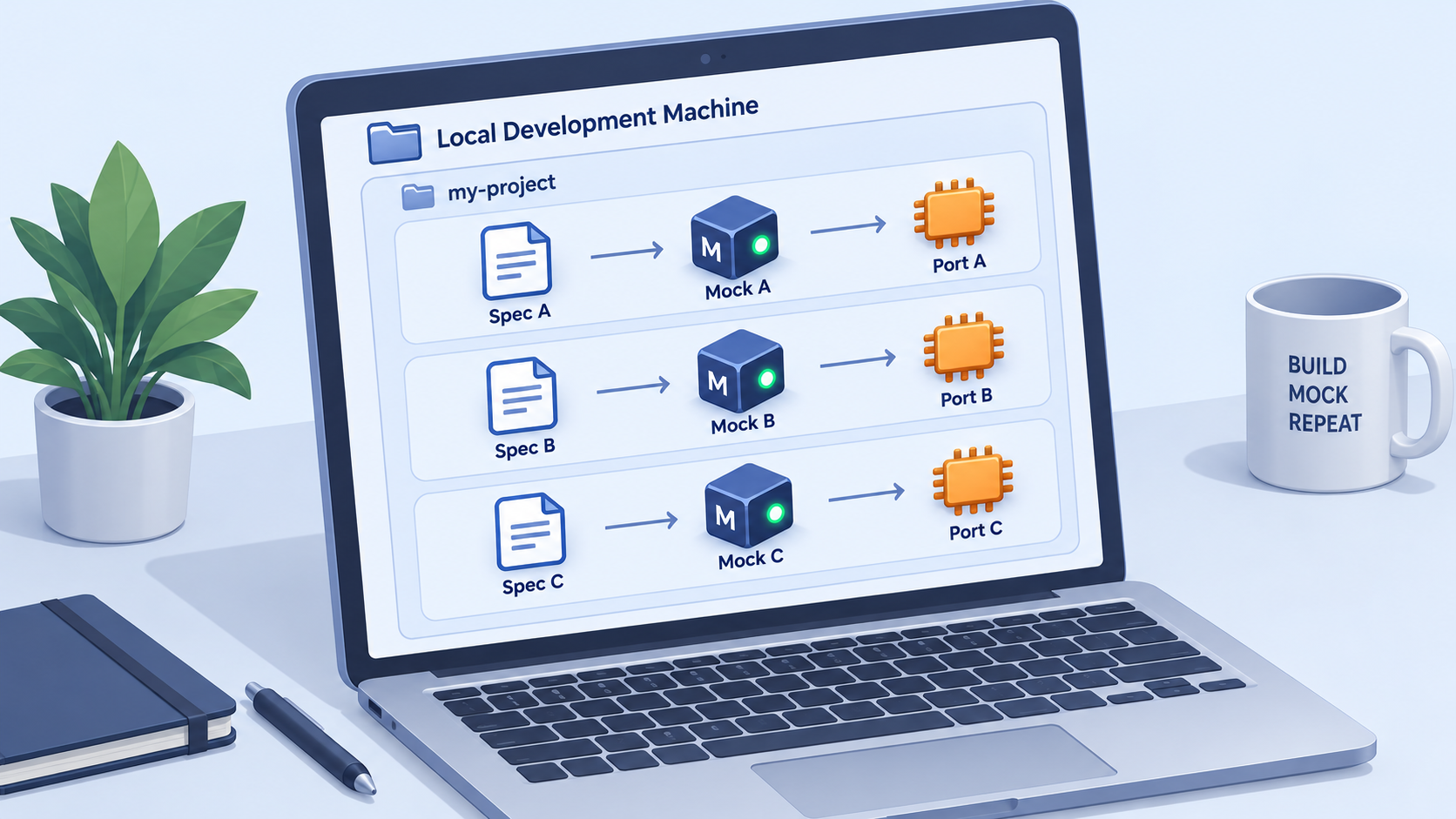
Mockzilla supports multiple APIs on one server, with each specification represented as a service under its own URL prefix. This is useful when an application depends on several providers or internal services. A development environment can, for example, direct different client modules to separate prefixes while keeping one local Mockzilla process and one listening port.
The supplied project extract confirms this capability but does not show the exact current command syntax for passing multiple specifications, how service names are derived, or the exact prefix format. Those values must come from the current Mockzilla command help, complete documentation, or startup output. Presenting an unverified multi-argument command here could cause the wrong documents to load or teach syntax that does not apply to the installed version.
After starting the current Mockzilla version with multiple approved specifications using its documented syntax, record every generated service URL shown by the process. Use those exact prefixes in clients and tests. Do not derive a prefix from a filename unless the installed version explicitly documents that behavior.
Plan client routing
Treat each generated prefix as a separate logical dependency even though all services share one process and port. Configure each client with the full base URL for its assigned service. This reduces accidental calls to another loaded API and makes it easier to replace one mock with a real service later.
| Concern | Recommended practice | Reason |
|---|---|---|
| Service identification | Record the prefix printed for each loaded specification | A shared host and port do not identify which mock API should receive the request |
| Client configuration | Give each integration its complete service base URL | This prevents clients from constructing or guessing prefixes |
| Smoke testing | Maintain one known-good operation per service | A successful request to one prefix does not prove that every specification loaded correctly |
| Failure simulation | Document which service and endpoint receives each test behavior | Broad failure settings can otherwise make unrelated test results difficult to interpret |
| Remote exposure | Assume every prefix on the selected local server may be reachable through the tunnel | An HTTP tunnel targets the local listener, not merely one conceptual API |
That final point is important. If several mock APIs share one local listener, forwarding that listener can make all of its routes available through the same public origin. A URL prefix is routing organization, not automatically an authorization boundary. If different groups must access different mocks, consider separate isolated processes or another architecture with explicit access control. The available evidence does not establish a Mockzilla option for binding each loaded specification to a separate listener, so verify current project capabilities before designing around that assumption.
Use advanced behavior deliberately
Latency simulation is useful for loading states, timeout handling, cancellation, retries, and circuit-breaker tests. Error injection can exercise unsuccessful responses that are difficult to reproduce against a healthy backend. Static responses and selective overrides can make important scenarios deterministic while leaving the remainder of a large specification automatically generated.
Upstream proxying with mock fallback needs stricter review. A remotely reachable mock can become an indirect route to the configured upstream. Confirm what requests can be forwarded, what credentials are attached, what methods can cause side effects, and whether the upstream is a safe test environment. Never point a publicly reachable development mock at a production backend merely for convenience.
Expose the verified Mockzilla server with Localtonet
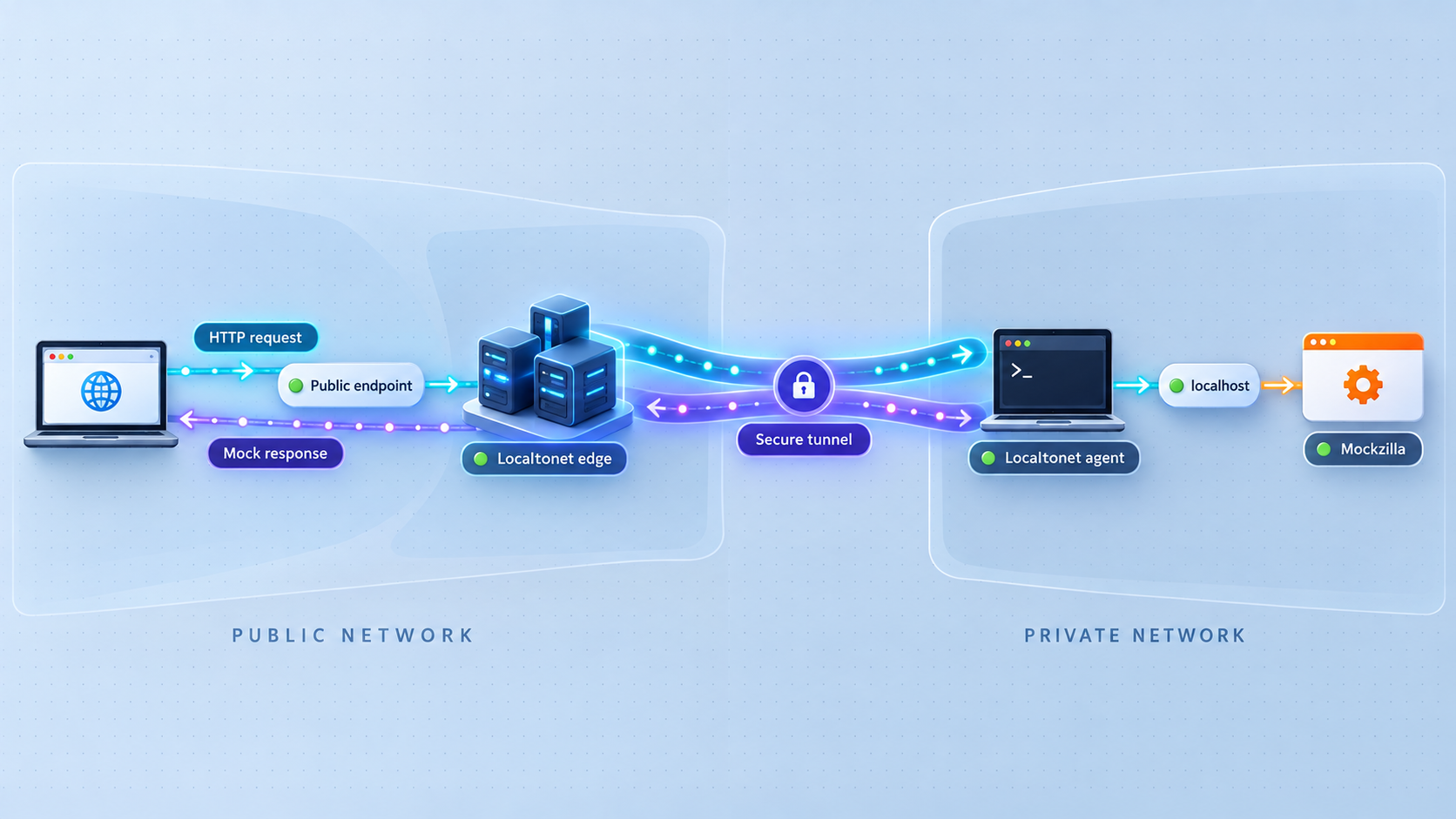
Add remote access only after a known OpenAPI operation works locally. You need the exact local IP address and port reported by Mockzilla, a running Localtonet client on a device that can reach that target, a device-specific authentication token, and an available relay server selected from the current Localtonet dashboard.
An HTTP tunnel is the appropriate family for this workflow because Mockzilla serves HTTP APIs. HTTP and File Server tunnels can use a random subdomain, a supported custom subdomain, or a custom domain, and each process type serves content at a public HTTPS address. The availability of individual options can vary, so use the choices shown for your account and current dashboard. Exact custom-domain DNS instructions should be taken from current Localtonet documentation rather than guessed.
Install and run the Localtonet client
Run our client on the Mockzilla host or on another device that can reach the verified local service. Keep the client active because the tunnel is available only while the selected device is connected and the tunnel is running.
Authenticate or select the client device
Use the device-specific authentication token assigned through Localtonet. Do not place the token in this tutorial, source control, screenshots, terminal transcripts, or shared test output.
Select an available relay server
Choose a server or region from the values currently presented in the Localtonet dashboard. Available server codes and regions must not be hardcoded from an old example.
Create the HTTP tunnel configuration
Select an HTTP tunnel and enter the exact local IP address and port on which the verified Mockzilla process is reachable. Select the available process type appropriate for the workflow. Do not enter an OpenAPI route or service prefix as the port target. Those remain part of the HTTP request path.
Start the tunnel
Creating a Localtonet tunnel does not start it. Use the Start control and wait for the tunnel to be running. The assigned public HTTPS address is the new external origin for the Mockzilla listener.
Repeat the known-good request remotely
Replace only the local scheme, host, and port in the verified request with the assigned public HTTPS origin. Preserve the Mockzilla service prefix, operation path, HTTP method, parameters, headers, and body. Compare the result with the local response.
For current interface details, consult the Localtonet HTTP tunnel documentation. Dashboard labels and available server choices can evolve, so the values displayed in your account should be treated as authoritative.
A saved tunnel is not automatically reachable. It must be started, and it stops being available if the selected client disconnects or the tunnel is stopped. When the testing session ends, stop or delete the tunnel according to your retention needs.
Construct remote service URLs correctly
Suppose the local runtime output gives you a service base URL made from a local origin and a generated prefix. The remote equivalent keeps that prefix and replaces the local origin with the assigned Localtonet origin. Apply the same rule to each loaded service. Do not omit a prefix merely because the public address already looks like a complete URL.
Test one route at a time. A successful Localtonet connection with an application-level 404 response generally means the HTTP request reached a server but the requested path was not recognized. A validation error generally means the route was reached but the request did not satisfy the OpenAPI contract. A connection failure or gateway-style error more often points to the client, tunnel state, target address, target port, or local process. Exact status codes can depend on the running software and configuration, so diagnose using both the client response and server logs rather than relying on one assumed code.
Security and operational guidance
Remote access changes the trust boundary. A service that was previously reachable only from a development machine can now receive requests from the public internet at its assigned address. A hard-to-guess URL is not a substitute for authentication or authorization.
If callers require credentials, place a reviewed authentication layer in the architecture rather than assuming Mockzilla's request validation authenticates users. OpenAPI validation checks request conformance to the contract. It should not be treated as proof that the caller is authorized to use the service.
Apply least privilege to any upstream credentials. Prefer dedicated test accounts with restricted capabilities and no production data. If a test needs destructive methods, isolate it in an environment designed to be reset. Also review retry behavior when simulating timeouts or failures, since an aggressive client can create substantial traffic even when responses are synthetic.
Obtain authorization before exposing a development service. Follow network, data-handling, access-control, and change-management policies. Localtonet provides connectivity to the configured target; it does not replace application authentication, endpoint authorization, or a security review.
Troubleshooting Mockzilla and Localtonet
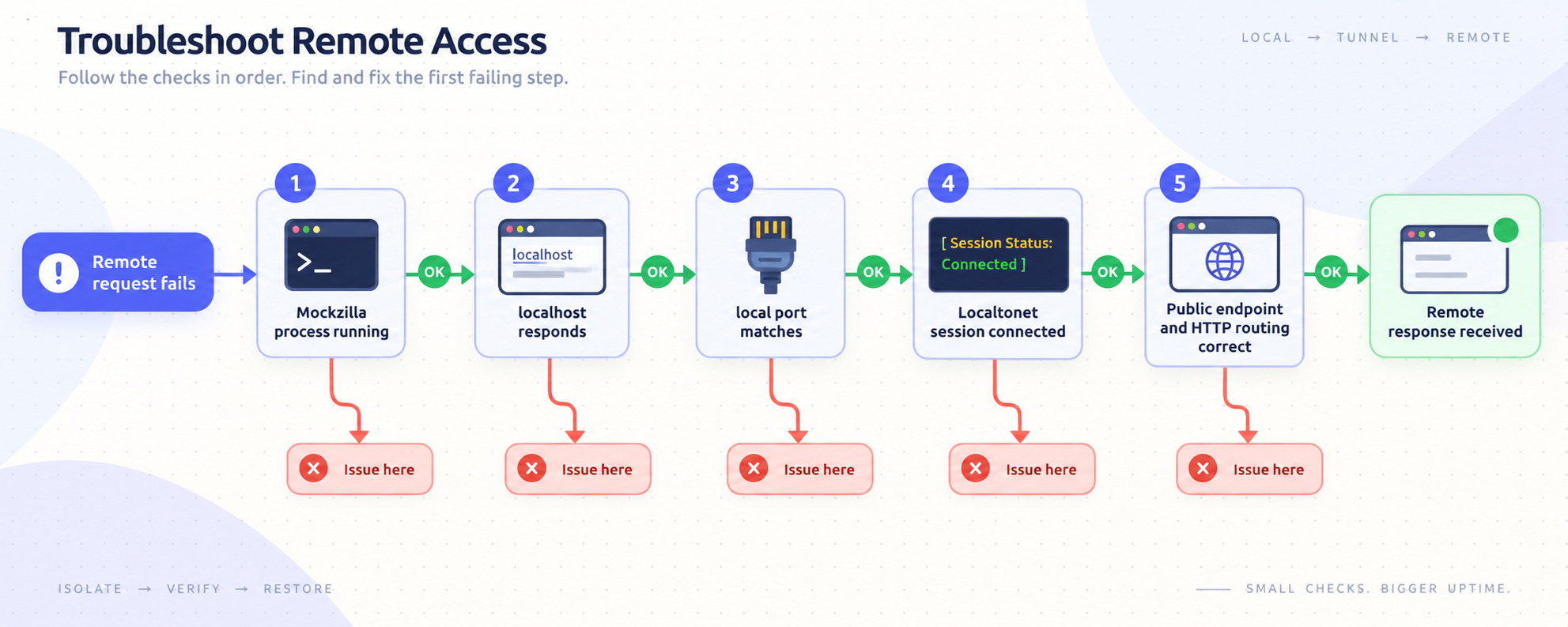
The Mockzilla command is not found
Confirm that the Homebrew installation completed successfully and that the Homebrew binary directory is present in the active shell path. Opening a new terminal may load an updated shell environment. If using the Go method, invoke the full documented go run command rather than expecting a separately installed mockzilla executable.
The OpenAPI document does not load
Check that the URL is reachable from the Mockzilla host and that it returns the intended OpenAPI document rather than an authentication page, redirect target, or HTML error. For private documents, do not put credentials directly into a command that will be stored in shell history. The extracted evidence does not establish an official credential mechanism for private specification URLs, so consult the current Mockzilla documentation for a supported approach.
The process starts, but the expected route returns an error
Recheck the service prefix and operation path. Confirm the HTTP method and every required parameter, header, content type, and request-body field. If multiple specifications are loaded, verify that the route is being sent to the prefix associated with the correct service. Read Mockzilla's output for validation information.
One mock service works, but another does not
A shared listener can be healthy while one specification failed to load or one client uses the wrong prefix. Test a known-good operation under each generated service URL. Revisit the startup output and confirm that all intended documents were accepted by the installed version.
Local requests work, but the public URL does not
Confirm that the Localtonet client is connected and that the tunnel was explicitly started. Then verify that the tunnel target exactly matches the local IP address and port tested from the client device. If the Localtonet client runs on another machine, a loopback address on the Mockzilla host will not refer to that host from the client machine. Use an address that is genuinely reachable from the device running our client, subject to your network policy.
The public origin responds, but a service path returns 404
Preserve the generated Mockzilla service prefix when replacing the local origin with the public origin. Verify that the requested operation is present in the corresponding specification. Do not add or remove path segments merely to make the URL look cleaner.
Requests fail after the terminal is closed
Mockzilla must remain running, and the Localtonet client and tunnel must also remain active. Closing an attached terminal may terminate the foreground Mockzilla process. Use an operationally approved supervision method if the mock must survive interactive sessions, but verify the current project's supported startup behavior before creating service definitions.
Remote tests behave differently from local tests
Compare the complete method, path, query string, headers, content type, and body. Check whether the remote client changes redirects, host-related behavior, TLS handling, or URL encoding. Also determine whether latency or error simulation is active. Repeat the known-good smoke request without changing application behavior so the difference can be isolated.
How to narrow down the failing layer
| Observation | Likely area to inspect | Next check |
|---|---|---|
| The Mockzilla process exits during startup | Installation, specification retrieval, or specification parsing | Read the terminal error and test the document location from the same machine |
| No local request reaches Mockzilla | Listening address, port, or local connectivity | Use the exact runtime address and verify that the process is still running |
| Local request reaches Mockzilla but fails validation | HTTP contract | Compare the request with the selected OpenAPI operation |
| Local request works but the tunnel is unavailable | Localtonet client or tunnel lifecycle | Confirm that the selected device is connected and the tunnel is started |
| Tunnel runs but cannot reach the origin | Configured local target | Test the target from the device running the Localtonet client |
| Public origin works but a particular API does not | Service prefix or operation route | Compare the remote path with the known-good local request |
Frequently asked questions
Can Mockzilla run more than one OpenAPI mock API on the same server?
Yes. Mockzilla supports multiple specifications on one server, and each specification becomes a service with its own URL prefix. The supplied evidence does not establish the exact current multi-specification command syntax or prefix naming rule, so use the syntax documented by your installed version and copy the generated prefixes from its startup output.
What hostname and port does Mockzilla use by default?
The evidence available for this guide does not establish an exact default hostname, port, bind address, or supported option for changing them. Use the values printed by the running Mockzilla process or confirmed by the current official documentation. Do not build a tunnel around a guessed development port.
Which Localtonet tunnel type should I use for Mockzilla?
Use an HTTP tunnel for the Mockzilla HTTP service. Configure its local target with the exact IP address and port verified from the Localtonet client device. Keep the generated Mockzilla service prefix and operation path in the HTTP request URL rather than placing them in the port field.
Does creating a Localtonet tunnel immediately make the mock public?
No. Creating the tunnel and running it are separate lifecycle actions. Start the tunnel after configuration. It remains available only while the selected Localtonet client is connected and the tunnel is running.
Can I expose only one service prefix from a multi-API Mockzilla process?
A Localtonet HTTP tunnel targets the local HTTP listener. If several Mockzilla services share that listener, their routes may all be reachable through the same public origin. A URL prefix organizes routing but is not automatically an authorization boundary. Use explicit access controls or isolated processes when different audiences require different permissions.
Does OpenAPI request validation authenticate remote callers?
No. Request validation checks whether a request conforms to the OpenAPI contract. It should not be treated as caller authentication or endpoint authorization. Add a reviewed access-control layer when the mock must be restricted to particular users or systems.
Can Mockzilla forward requests to a real backend?
Mockzilla supports upstream proxying with automatic mock fallback. Before exposing that configuration remotely, verify the upstream destination, credentials, allowed operations, and potential side effects. Prefer restricted test systems and dedicated credentials rather than production backends.
Can I use this workflow in CI?
Mockzilla is designed for local development and CI integration testing, among other use cases. For reproducibility, pin and review the Mockzilla version, wait until the service is ready before running tests, use a known-good operation as a health check, and guarantee cleanup. Add a Localtonet tunnel only when an external system genuinely needs to initiate requests into that CI environment, and protect all device tokens as CI secrets.
Connect your verified Mockzilla service with Localtonet
Start Mockzilla, confirm a real OpenAPI operation locally, and then create an HTTP tunnel to the exact listening address and port. Keep the tunnel active only for the collaboration or test window that requires remote access.
Get Started Free →

