

Match your public tunnel to the transport protocol your real-time application actually uses
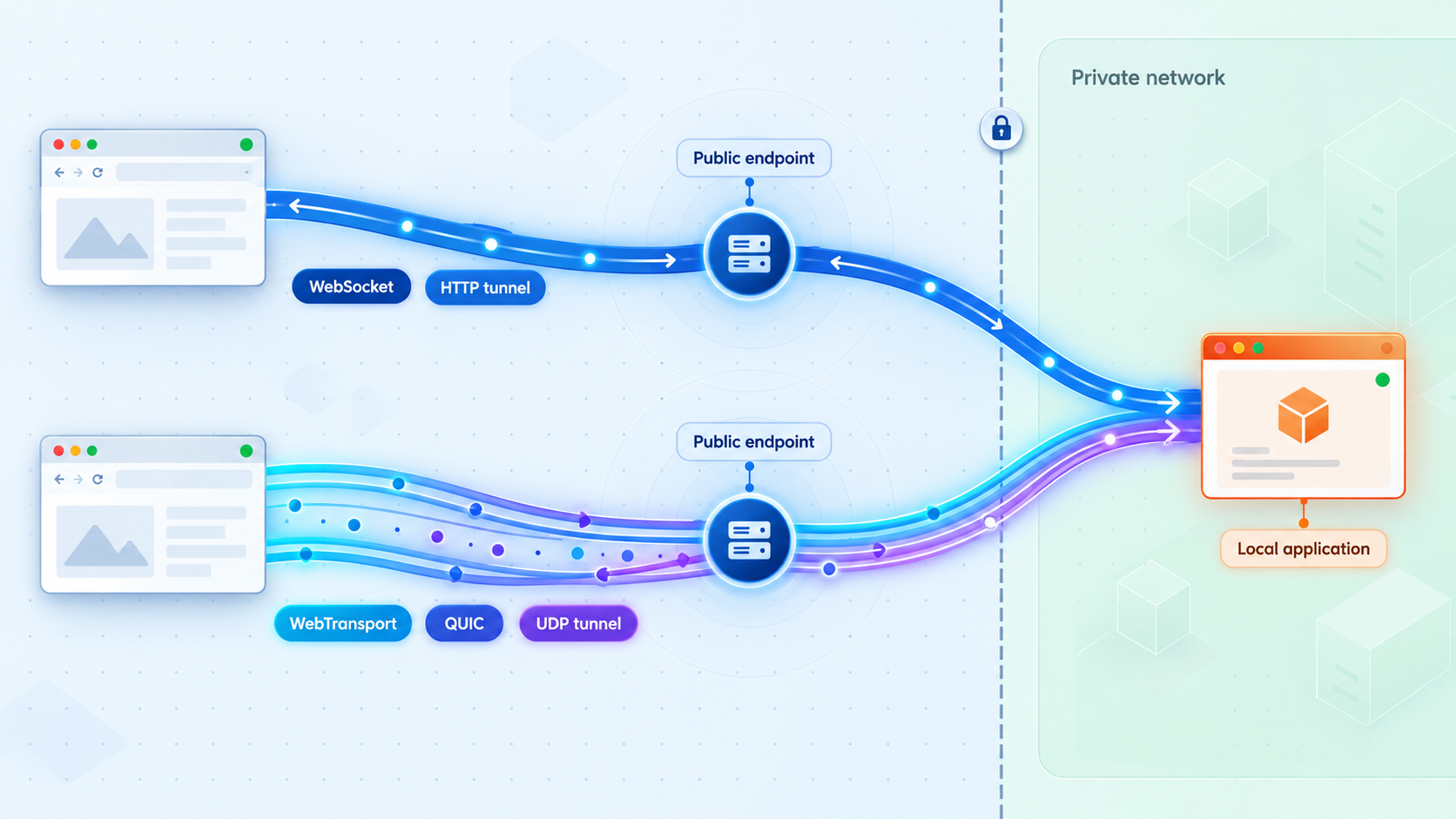
WebSockets and WebTransport both support interactive browser applications, but they depend on fundamentally different network paths. WebSockets normally travel over an HTTP-compatible TCP connection, while WebTransport uses HTTP/3 over QUIC and therefore requires UDP connectivity. This guide compares their delivery models, browser and infrastructure requirements, authentication options, fallback strategies, local verification, and exposure risks. We then show how to map a WebSocket service to a Localtonet HTTP tunnel or a QUIC endpoint to a UDP tunnel without implying that either tunnel translates one application protocol into the other.
📋 What's in this guide
WebTransport vs WebSockets: the quick decision
Choose WebSockets when you need a broadly understood, reliable, ordered, bidirectional connection and your deployment path is built around conventional HTTP reverse proxies, load balancers, and TCP ingress. WebSockets remain a practical fit for chat, collaborative interfaces, notifications, control panels, job progress updates, and many other applications where every message matters and occasional transport-level waiting is acceptable.
Consider WebTransport when the application benefits materially from independent reliable streams, unreliable datagrams, or both. It is especially relevant when stale information is less valuable than fresh information, when unrelated logical streams must not wait for one another, or when a single session needs a mixture of delivery semantics. Candidate workloads include rapidly changing coordinates, interactive media metadata, game state, dense telemetry, remote visualization, and latency-sensitive state synchronization.
That choice cannot be made from the browser API alone. WebTransport requires an HTTP/3 and QUIC-capable path from the client to the endpoint. Because QUIC runs over UDP, every relevant network component must permit and correctly handle UDP. A TCP-only HTTP reverse proxy cannot transparently forward a WebTransport session merely because the public address uses HTTPS.
A Localtonet HTTP tunnel is the natural mapping for an HTTP or WebSocket application. A Localtonet UDP tunnel can carry UDP traffic to a local QUIC endpoint. The UDP tunnel does not create an HTTP/3 server, terminate WebTransport, issue application certificates, or convert WebSocket traffic into WebTransport. Your local application must implement and configure the protocol it intends to serve.
How the two protocols differ
WebSockets provide one ordered byte-stream path
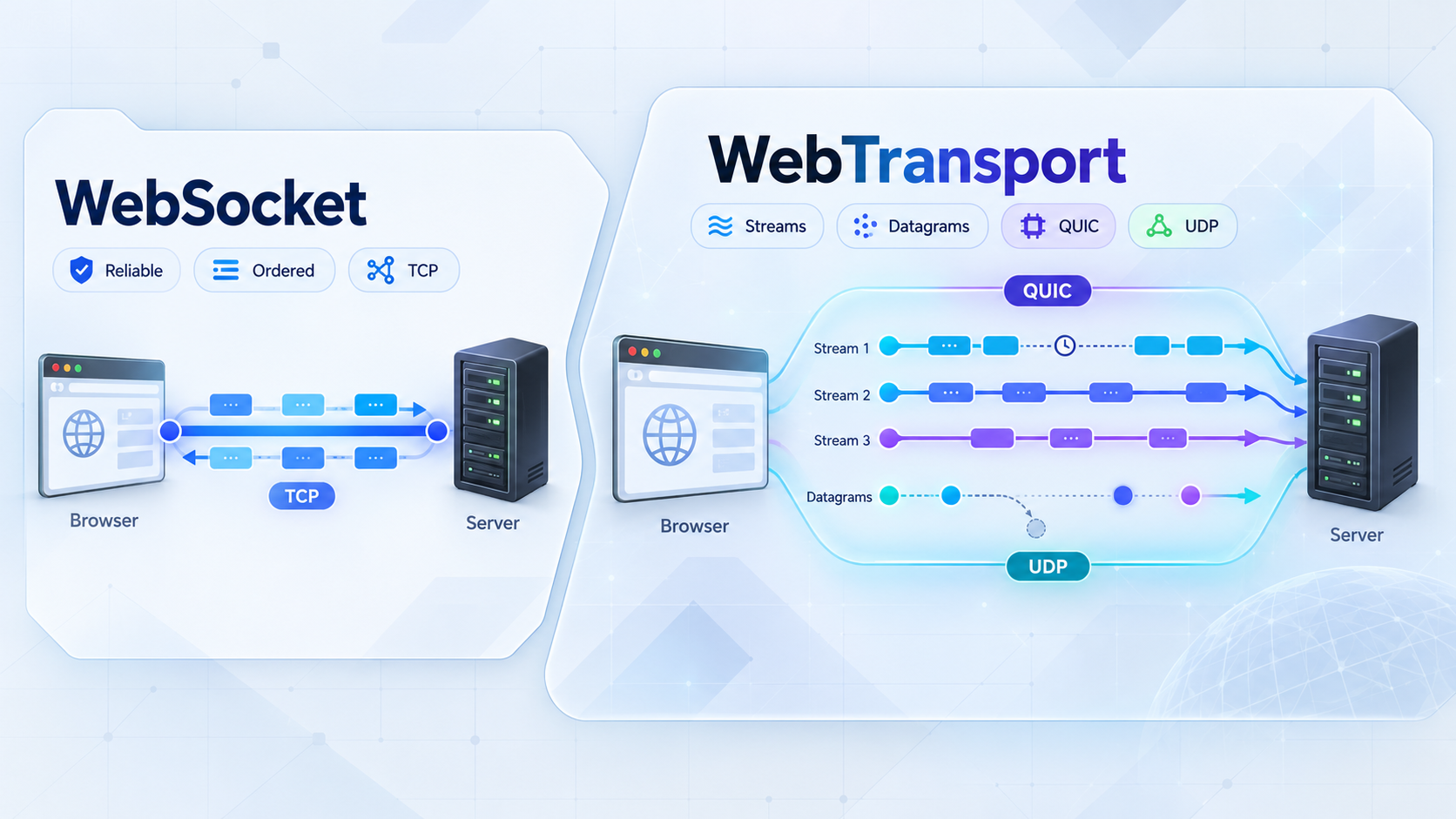
A WebSocket connection begins through HTTP and then switches to the WebSocket protocol. Secure WebSockets use the wss:// scheme and rely on TLS. Once established, the browser and server can send messages in either direction without creating a new HTTP request for every update.
Underneath that connection is TCP. TCP provides reliable, ordered delivery. If data is lost in transit, TCP retransmits it and preserves ordering before making later bytes available to the application. This is valuable for messages that must arrive intact and in sequence, such as commands, document edits, transaction state, or a conversation transcript.
The tradeoff is transport-level head-of-line blocking. If a TCP segment is lost, later bytes on that same connection cannot be delivered to the application as though the missing bytes did not exist. Even when the application considers two messages independent, they still share the ordering constraints of the underlying TCP connection.
Application-level channels can organize messages, prioritize work, and discard obsolete updates after they arrive. They cannot remove TCP's underlying in-order delivery requirement. Opening multiple WebSocket connections can isolate some traffic classes, but that adds connection management, resource consumption, authentication work, and congestion interactions. It is an architectural workaround rather than equivalent QUIC stream multiplexing.
WebTransport combines streams and datagrams over QUIC
WebTransport is a browser-facing transport API designed for HTTP/3 and QUIC. QUIC runs over UDP but implements capabilities such as secure connection establishment, congestion control, loss recovery, and reliable streams above UDP. An application does not receive raw UDP merely because QUIC uses UDP underneath.
A WebTransport session can offer several communication patterns. Bidirectional streams provide reliable, ordered communication in both directions. Unidirectional streams provide reliable, ordered delivery in one direction. Datagrams provide message-oriented delivery without retransmission guarantees. The application can select a different primitive for each class of data while retaining one session.
Stream independence is a major distinction. Packet loss affecting one QUIC stream does not require unrelated streams to wait for the missing stream data. Ordering still applies within an individual reliable stream, so WebTransport does not eliminate every possible delay. It gives the application a way to divide traffic into independent delivery contexts.
Datagrams introduce a different contract. They can be lost, duplicated, delayed, or arrive in an order the application did not expect. A robust datagram protocol therefore needs identifiers such as sequence numbers, timestamps, entity IDs, or state versions. The receiver should be able to reject obsolete state and continue safely after gaps.
| Characteristic | WebSockets | WebTransport |
|---|---|---|
| Underlying path | HTTP-compatible setup followed by WebSocket communication over TCP | HTTP/3 over QUIC, with QUIC running over UDP |
| Delivery model | Reliable and ordered on one connection | Reliable streams plus unreliable datagrams |
| Multiplexing behavior | Application messages share the ordering behavior of one TCP connection | Multiple QUIC streams can progress independently |
| Loss behavior | Missing TCP data delays later data on that connection | Loss on one reliable stream does not block unrelated streams; datagrams are not retransmitted |
| Typical ingress | HTTP reverse proxy or HTTP tunnel with WebSocket support | HTTP/3 and QUIC-capable UDP path to a compatible endpoint |
| Best initial fit | Reliable events, chat, dashboards, collaboration, and control messages | Mixed reliability, independent data flows, rapid state updates, and latency-sensitive telemetry |
Design the application around delivery requirements
Protocol selection should begin with message semantics, not with a general claim that one protocol is newer or faster. Classify each data type according to whether it must arrive, whether order matters, whether old values remain useful, and whether it should be isolated from unrelated work.
Reliable and ordered events
Commands, authorization state, durable edits, billing events, and operations that change server state generally require reliable delivery and explicit application acknowledgement. A WebSocket is often sufficient. WebTransport can also carry this traffic on a reliable stream, but using WebTransport does not remove the need for application-level IDs, acknowledgements, idempotency, and error handling.
Independent reliable workloads
Suppose one browser session transfers a large asset, receives server notifications, and sends interactive commands. Putting everything on one WebSocket means all bytes share one TCP delivery sequence. Separate WebTransport streams can isolate those logical flows. The asset stream can recover from loss while a command stream continues independently.
This advantage depends on good stream design. Placing all data into one WebTransport stream recreates an ordered bottleneck within that stream. At the opposite extreme, opening a stream without bounds for every tiny event may create unnecessary complexity or encounter implementation limits. Group messages according to lifetime, priority, and failure boundaries.
Latest-state data
Player positions, pointer locations, camera orientation, transient telemetry, and live preview state often become obsolete quickly. If update 105 supersedes update 104, waiting to retransmit 104 may be counterproductive. WebTransport datagrams allow the application to send these updates without requiring transport-level retransmission.
The receiver must expect gaps. A useful datagram payload commonly identifies the object, state version, and sampling time. Periodic complete snapshots can restore state if incremental updates are missed. Critical transitions should use a reliable stream rather than assuming a datagram will arrive.
A hybrid design
Many real-time systems should not force all traffic into one delivery model. Within a WebTransport session, reliable streams can carry login completion, control commands, acknowledgements, and durable state. Datagrams can carry rapidly replaceable movement or sensor updates. Separate streams can isolate assets, events, and per-entity synchronization.
A hybrid application may also expose both WebTransport and WebSocket endpoints. The application negotiates the preferred transport, attempts WebTransport where it is usable, and falls back to WebSockets when it is not. Both paths should use the same application-level concepts where practical, but each path must respect its own delivery semantics.
Never send an action only as a datagram if losing it could create an unsafe or irrecoverable state. Safety controls, durable commands, account changes, and authoritative transitions need a reliable path, explicit authorization, validation, and application-level confirmation.
Browser, network, and reverse-proxy compatibility
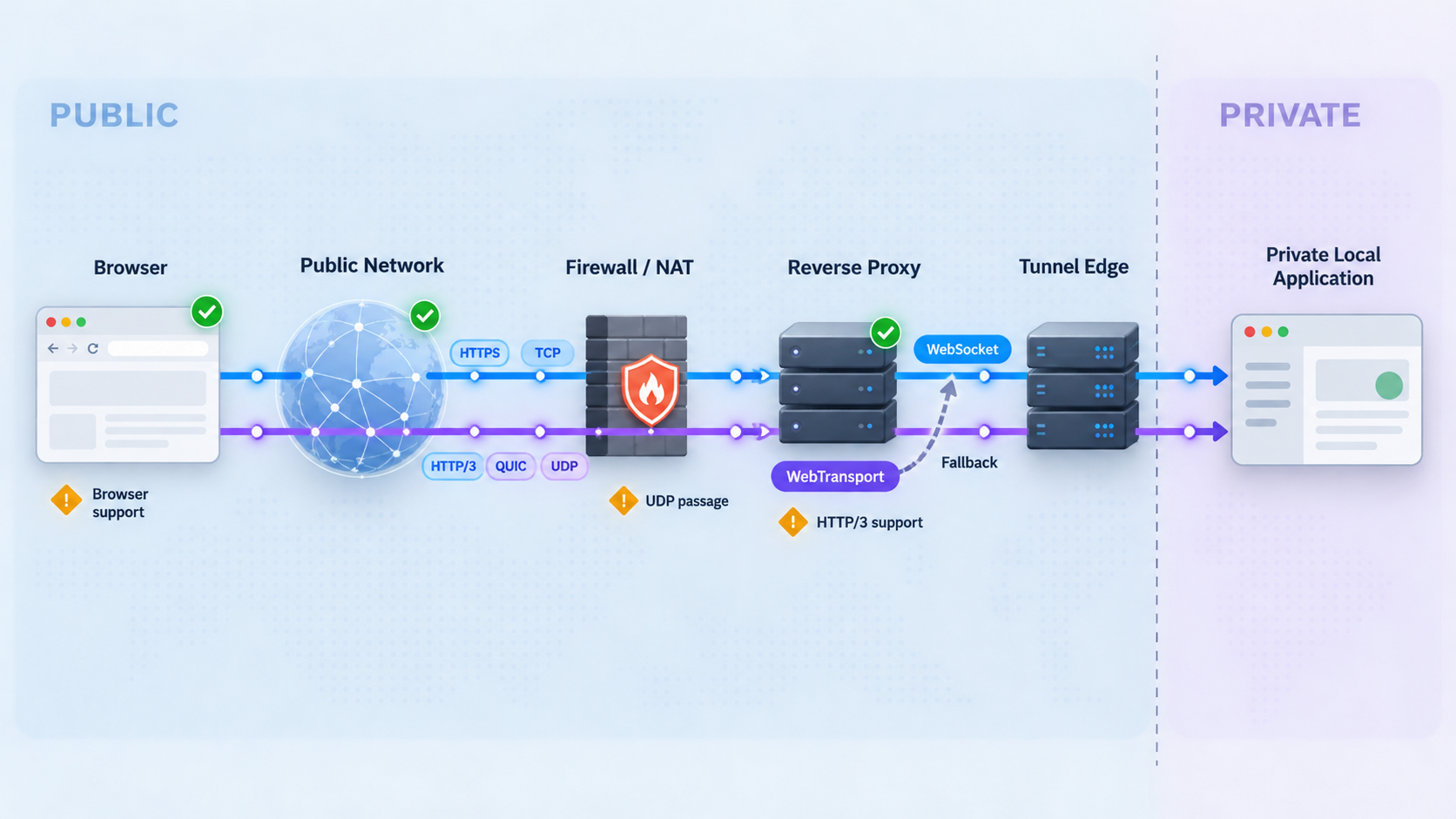
WebSocket deployment is mature across browsers and common HTTP infrastructure, but compatibility is still not automatic. The reverse proxy or tunnel must preserve the WebSocket upgrade and maintain a long-lived connection. Idle timeouts, maximum connection durations, origin policy, and application heartbeat behavior can affect reliability.
WebTransport requires a more specific chain of support. The browser must implement the relevant API. The client network must permit QUIC over UDP. The public ingress must support the intended HTTP/3 and WebTransport behavior. The endpoint must present acceptable security configuration and run a compatible WebTransport server implementation.
Browser support changes over time and may differ by browser version, operating system, enterprise policy, and feature implementation. Before committing to WebTransport-only access, test the exact browser versions and managed environments used by the intended audience. Avoid relying on a generalized compatibility statement for a production decision.
Why a conventional reverse proxy may not be enough
An HTTP reverse proxy designed for TCP traffic may accept HTTP/1.1 or HTTP/2 but have no UDP listener and no QUIC implementation. It cannot forward an HTTP/3 connection as ordinary HTTP merely because the application uses an HTTPS URL. Some infrastructure can terminate HTTP/3 and communicate with an origin using another protocol, but WebTransport support depends on the capabilities and configuration of that specific ingress.
End-to-end UDP forwarding takes a different approach. The tunnel carries UDP packets to the local endpoint, and the local endpoint handles QUIC and WebTransport. In that topology, the application remains responsible for HTTP/3 behavior, certificates, session establishment, origins, and application authentication.
Design a deliberate fallback
A fallback should be part of the protocol architecture, not an untested catch block. The client can attempt the preferred WebTransport endpoint, wait for a bounded connection result, and then establish a WebSocket when the first path is unavailable. The interface should communicate degraded capabilities when the fallback cannot support every feature.
For example, a WebSocket fallback might carry periodic snapshots instead of high-frequency datagrams. It may reduce update frequency, combine messages into batches, or disable a nonessential live preview. Critical operations should behave consistently across both transports.
Avoid simultaneously applying the same command through both connections unless the protocol has a deduplication strategy. During a transition, assign operation IDs and define which transport is authoritative. Close or demote the failed path before replaying pending operations over the fallback.
Authentication and safe public exposure
A successful transport connection is not proof that the user is authorized. Both WebSocket and WebTransport endpoints need application-level authentication and authorization. The server should validate the authenticated identity, requested resource, permitted operations, and relevant origin before accepting sensitive messages.
Browser WebSocket authentication requires planning because the browser API does not provide the same arbitrary header control available to every non-browser client. Applications commonly use an existing authenticated session, a short-lived connection credential, or an authenticated negotiation request. If a credential is placed in a URL, it can be exposed through logs, history, monitoring systems, or error reports. Long-lived secrets should not be embedded in public client code or query strings.
WebTransport also needs an explicit session authentication design. Establishing an encrypted QUIC connection protects transport data in transit, but encryption alone does not decide which user can open a session, create streams, send datagrams, or access a tenant's resources.
Validate origins and message content
Browser-accessible endpoints should validate allowed origins where the protocol and server implementation expose that information. Do not assume that an unguessable URL is an authorization mechanism. Every inbound message should be parsed defensively, size-limited, validated against a schema, and checked against the caller's permissions.
Control resource consumption
Persistent real-time connections consume server resources. Apply limits for concurrent sessions, streams, datagram rates, message sizes, queue depth, and idle duration according to the application's risk model. Bound retry loops and outgoing queues so a slow or disconnected client cannot create unlimited memory growth.
WebTransport introduces additional choices because a peer may create streams and send datagrams. The server should enforce stream-count and traffic limits rather than accepting unlimited work. Datagram processing should avoid expensive unauthenticated operations that an attacker can trigger repeatedly.
Protect Localtonet device tokens
A Localtonet device or authentication token identifies the client device that runs a tunnel. Treat it as a secret. Do not place it in source code, screenshots, browser bundles, issue reports, or public documentation. Relay server values also should be selected from the current dashboard rather than copied from an old tutorial, because available options can vary.
Before starting a tunnel, remove debug-only endpoints, replace default credentials, enforce authentication, restrict authorization to the minimum required actions, and review what the service reveals before login. Stop or delete the tunnel when public access is no longer needed.
Verify the application locally before creating a tunnel
Tunneling cannot repair an application that is not listening, is bound to the wrong interface, rejects the intended origin, or does not actually implement the selected protocol. Establish a clean local baseline first. This separates application failures from tunnel, browser, DNS, and network-path failures.
Local WebSocket verification
Start the web application and confirm that its ordinary HTTP route responds on the expected local IP address and port. Then connect through the application's own browser client or a compatible WebSocket client. Verify that the connection opens, messages travel in both directions, the server detects closure, and reconnection does not duplicate subscriptions or operations.
Exercise the full authentication path. A development page that bypasses authentication is not an adequate test of the public workflow. Confirm that an unauthenticated connection is rejected and an authenticated connection receives only authorized data.
Also test idle behavior. Leave the session open long enough to determine whether the application requires heartbeat messages and whether it cleans up abandoned connections. Record application logs on connection, authorization failure, normal closure, abnormal closure, and reconnection.
Local WebTransport verification
Confirm that the local endpoint is genuinely serving the expected HTTP/3 and WebTransport implementation over UDP. A successful TCP request to the same numeric port does not prove that the QUIC endpoint is working. Verify session establishment with a compatible browser and client page, then test each primitive the application intends to use.
For reliable streams, send enough data to test framing, closure, cancellation, and concurrent stream handling. For datagrams, verify that the application tolerates missing, reordered, and stale updates. Test session closure and reconnection. Ensure the server releases stream and session resources after clients disappear.
Browser security requirements for local and public WebTransport testing depend on the implementation and environment. Use the certificate and secure-context procedure documented by the WebTransport server and browser combination you have selected. We do not recommend bypassing browser security checks as a substitute for a valid deployment configuration.
Record a verification baseline
| Check | WebSocket expectation | WebTransport expectation |
|---|---|---|
| Listener | Application is reachable on its documented local HTTP port | QUIC endpoint is listening through UDP on its configured local port |
| Session establishment | WebSocket opens and reports a successful connection | WebTransport readiness completes in a compatible browser |
| Data exchange | Messages work in both directions | Required streams and datagrams behave as designed |
| Authorization | Unauthorized users and actions are rejected | Session, stream, and operation permissions are enforced |
| Recovery | Reconnect does not duplicate state or subscriptions | Reconnect and fallback handle pending operations safely |
Map the selected protocol to a Localtonet tunnel
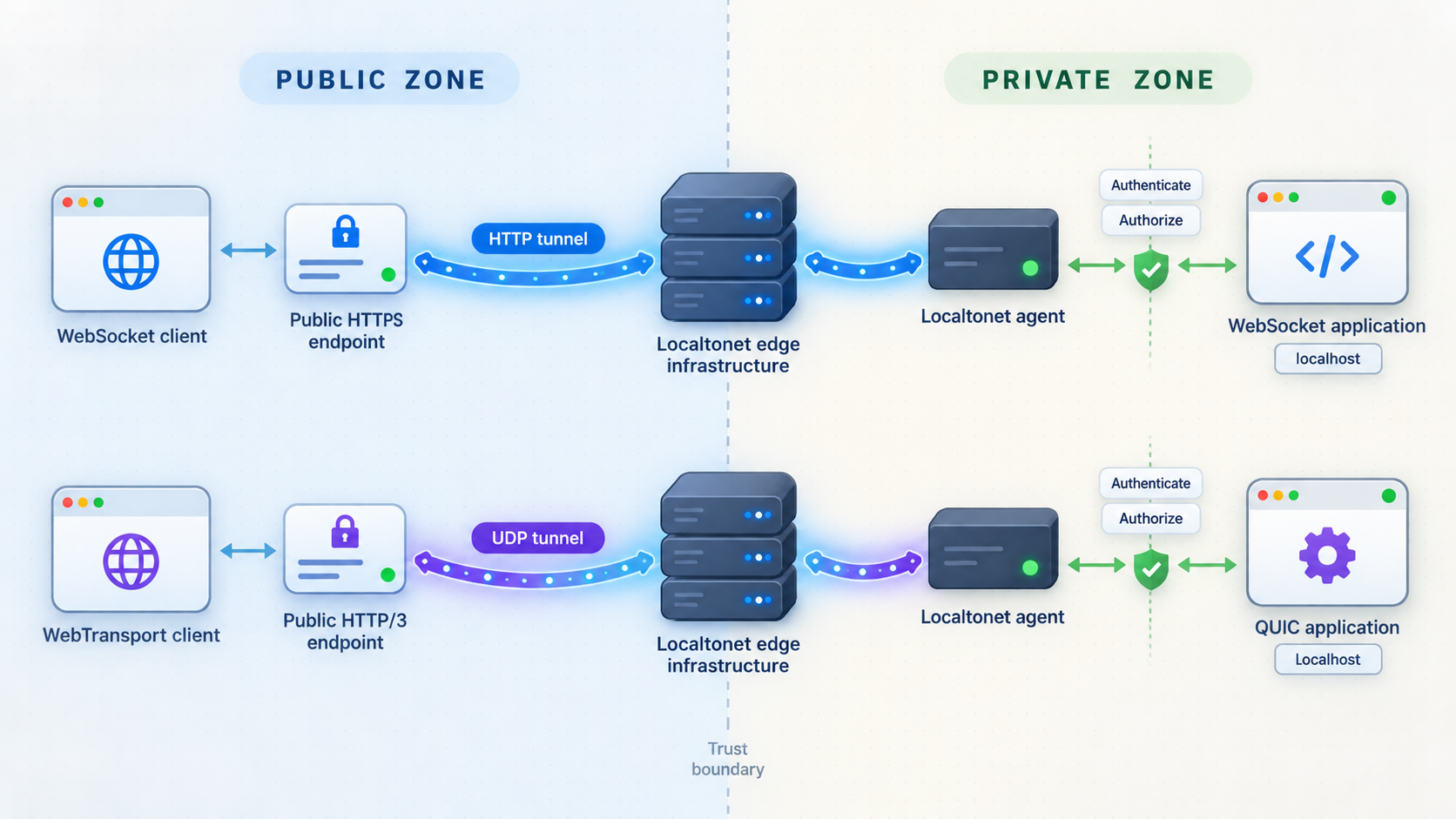
With Localtonet, the client application on the device establishes an outbound connection to our relay. This means you do not need inbound router port forwarding, a public IP address, firewall changes, or VPN setup for a standard tunnel workflow. The resulting tunnel is available only while the selected device is connected and the tunnel is running.
The important architectural choice is the tunnel family. For a WebSocket application served through HTTP, select an HTTP tunnel that points to the application's local IP address and port. For an experimental or production QUIC endpoint that needs end-to-end UDP forwarding, select a UDP tunnel pointing to the local UDP listener.
Do not configure an HTTP tunnel for a UDP-only QUIC listener. Likewise, do not assume that a UDP tunnel understands WebTransport application semantics. It forwards the relevant network traffic to the local target, while the application endpoint remains responsible for its protocol.
Documented Localtonet workflow
Install and run the Localtonet client
Run our client on the device that hosts the real-time service or can reach it over the local network. First verify that this device can connect to the application's local IP address and port.
Authenticate or select the device
Use the device-specific token associated with the client that will run the tunnel. Keep the token private and never copy a placeholder or another device's token from a tutorial.
Select an available relay server
Choose an available server or region from the current Localtonet dashboard. Do not hardcode a server code from an old configuration because available values can vary.
Create the matching tunnel configuration
Select an HTTP tunnel for the HTTP-served WebSocket application or a UDP tunnel for the QUIC endpoint. Set the local target to the IP address and port on which the corresponding application is listening.
Start the tunnel and use its assigned endpoint
Creating a tunnel does not start it automatically. Press Start, wait for the tunnel and selected device to be connected, and then use the assigned public URL for the HTTP path or the assigned public host and port for the UDP path.
Stop or delete access when finished
Stop the tunnel when temporary testing ends. Delete it if the configuration is no longer needed. A tunnel cannot carry traffic while its selected client is disconnected or the tunnel is stopped.
Current Localtonet configuration details are available through our tunnel documentation. Exact dashboard choices, server availability, and plan-dependent options should be confirmed in the current account interface rather than inferred from examples.
Public verification for WebSockets
Update the test client to use the public HTTP tunnel address and the correct WebSocket scheme. A page delivered through HTTPS should normally connect using a secure WebSocket endpoint rather than mixed insecure content. Test the same connection, authentication, bidirectional messaging, idle, closure, and reconnection scenarios used locally.
If the ordinary public HTTP route works but the WebSocket fails, inspect browser developer tools and application logs. This usually narrows the investigation to the upgrade request, origin validation, authentication state, route configuration, or connection lifecycle rather than basic reachability.
Public verification for WebTransport
Configure the WebTransport client with the public endpoint expected by the local server architecture. Verify that UDP reaches the local QUIC listener and that the browser completes WebTransport session establishment. Then test reliable streams and datagrams separately.
A generic UDP reachability indication is not enough to prove WebTransport compatibility. WebTransport also depends on valid HTTP/3 behavior, browser security requirements, endpoint identity, and application session handling. Keep server-side QUIC logs available during testing so transport negotiation failures can be distinguished from authentication or application failures.
Use the HTTP tunnel for a WebSocket service that is already working through HTTP locally. Use the UDP tunnel for a QUIC service that is already working over UDP locally. If one public address must support both as part of a fallback design, treat them as separate ingress paths unless your own architecture explicitly combines them.
Troubleshooting real-time tunnel connections
The WebSocket works locally but not through the public URL
First confirm that the Localtonet device is connected and the HTTP tunnel has been started. Verify the tunnel's local target against the address and port that worked locally. If an ordinary HTTP page responds publicly, inspect the WebSocket handshake, requested path, origin, cookies or connection credential, and server logs.
Check whether the browser is blocking an insecure ws:// connection from an HTTPS page. Review application routing because a health-check path can work even when the WebSocket route is incorrect. Also confirm that the application is not constructing a public WebSocket URL from a hardcoded localhost address.
The WebSocket disconnects after being idle
Determine whether the closure comes from the application, browser, network, or an intermediary. Use protocol-appropriate heartbeat behavior if the application requires it, and remove abandoned sessions promptly. Reconnection logic should use bounded delay and should restore subscriptions without duplicating operations.
Do not respond to every disconnect with an aggressive immediate reconnect loop. That can amplify an outage and overload the service. Use a capped retry strategy with randomized timing, and surface a clear disconnected state to the user.
The QUIC endpoint works locally but WebTransport does not connect publicly
Confirm that the Localtonet configuration is a UDP tunnel and that it targets the actual UDP listener. A TCP listener on the same port is a different socket and does not validate the UDP path. Check that the client uses the assigned public host and port required by the configuration.
Next inspect the QUIC server logs for incoming packets and negotiation failures. If no packets arrive, investigate tunnel state, target selection, client-network UDP policy, and endpoint addressing. If packets arrive but the session fails, investigate HTTP/3 and WebTransport negotiation, certificates, origin handling, and server compatibility.
WebTransport works on one network but not another
The second network may restrict or interfere with UDP. Test from representative residential, mobile, office, and managed networks that matter to the application. If broad availability is a requirement, retain a tested WebSocket fallback and make transport selection visible in diagnostics.
Datagrams arrive but application state jumps backward
Add sequence or version information and reject older updates after a newer state has been applied. Do not assume datagrams arrive in send order. If the receiver needs a recoverable baseline, send periodic snapshots through a reliable stream and use datagrams only for transient updates between snapshots.
One WebTransport stream still stalls
Reliable ordering remains within each stream. If unrelated traffic shares one stream, loss can delay later bytes in that stream. Separate independent workloads into appropriately scoped streams and avoid placing a large transfer ahead of latency-sensitive commands in the same reliable stream.
The tunnel exists but nothing is reachable
In Localtonet, creating a tunnel and running it are distinct lifecycle states. Confirm that the correct device is connected, the tunnel is started, and the local application is still running. Verify the target from the Localtonet client device itself, especially when the application runs on another machine on the local network.
Frequently asked questions
Is WebTransport always faster than WebSockets?
No. Results depend on workload, network conditions, implementation, and architecture. WebTransport can reduce interference between independent reliable streams and can avoid retransmitting obsolete datagrams. A simple reliable message flow may gain little, while adding operational complexity. Measure the actual application under representative loss, latency, and client-network conditions.
Can I run WebTransport through a Localtonet HTTP tunnel?
Do not assume that an HTTP tunnel translates or terminates WebTransport. WebTransport uses HTTP/3 over QUIC, which requires UDP. For an end-to-end local QUIC endpoint, use a UDP tunnel and keep the WebTransport implementation in the local application. Confirm the complete browser, certificate, and application setup independently.
Which Localtonet tunnel should I use for WebSockets?
Use an HTTP tunnel pointed at the local IP address and port serving the WebSocket application. Verify the WebSocket locally first, start the tunnel, and then test the public URL with the correct secure WebSocket scheme and application path.
Which Localtonet tunnel should I use for QUIC?
Use a UDP tunnel pointed at the UDP address and port where the local QUIC server is listening. The local server remains responsible for QUIC, HTTP/3, WebTransport, security configuration, and application authentication.
Does a UDP tunnel convert WebSocket messages into WebTransport datagrams?
No. WebSockets and WebTransport are different application protocols with different transport requirements. A UDP tunnel forwards UDP traffic to the configured local target. Protocol conversion would need to be implemented by a gateway designed for that purpose, including message mapping, reliability semantics, authentication, and error handling.
Should every WebTransport application include a WebSocket fallback?
Not necessarily. A controlled environment may guarantee compatible clients and UDP reachability. A public application serving varied browsers and managed networks benefits more from a fallback. Decide from the supported client matrix and availability requirements, then test the fallback as a first-class production path.
Can WebTransport datagrams replace reliable messages?
Only when loss is acceptable and newer state supersedes older state. Durable commands, authorization changes, safety operations, and transactions should use a reliable stream with application-level validation and acknowledgement. A common design uses datagrams for transient state and reliable streams for authoritative changes.
Does starting a Localtonet tunnel make an unauthenticated application safe?
No. A tunnel creates public reachability to the configured service. The application still needs authentication, authorization, input validation, origin controls where applicable, resource limits, and secure credential handling. Review the service before exposure and stop the tunnel when it is no longer needed.
Test your real-time application with Localtonet
Verify the application locally, choose an HTTP tunnel for WebSockets or a UDP tunnel for your QUIC endpoint, and expose only the authenticated service you intend to test.
Get Started Free →

