

Give automated clients a narrow public API without publishing the controls meant for administrators
AI agents need callable endpoints, but they rarely need the dashboard, configuration pages, debug tools, or privileged controls that accompany a local application. This technology-neutral architecture and deployment guide explains how to separate a machine-facing HTTP API from the human-facing admin interface, apply application authentication and authorization, verify the boundary locally, and expose only the intended listener through a Localtonet HTTP tunnel. It does not prescribe a particular programming framework or reverse proxy. The tunnel supplies public connectivity while your application remains responsible for deciding who may call each operation.
📋 What's in this guide
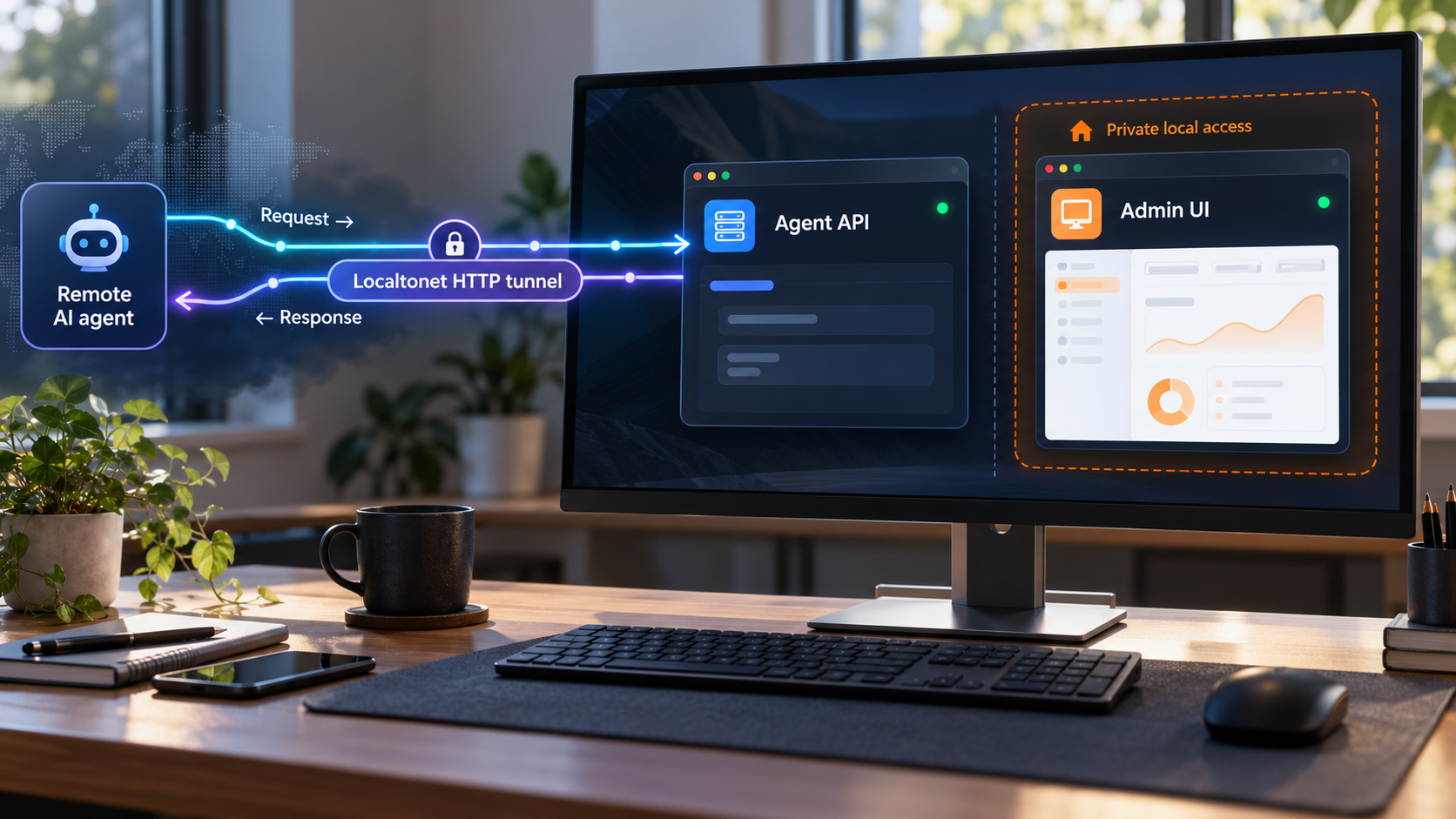
Why agents and administrators need different access boundaries
A local application often combines several surfaces. It may have a browser dashboard, an administrative API, health endpoints, debug pages, generated API documentation, static assets, and business operations. That arrangement can be convenient while every request originates from the same machine. It becomes risky when the entire listener receives a public address merely because an AI agent needs to call one or two operations.
An automated client is not just a faster human user. It can retry requests, invoke operations in an unexpected order, run parallel calls, follow incorrect model-generated instructions, or continue using a credential after the original task has finished. An orchestration system may also store prompts, tool definitions, request traces, and secrets differently from a browser application.
The correct objective is therefore not simply to expose localhost. It is to expose the smallest useful machine interface while leaving administrative functions outside that interface. A public URL is a transport mechanism. It is not proof of identity and does not grant permission to perform an operation.
Prefer separate listeners or services
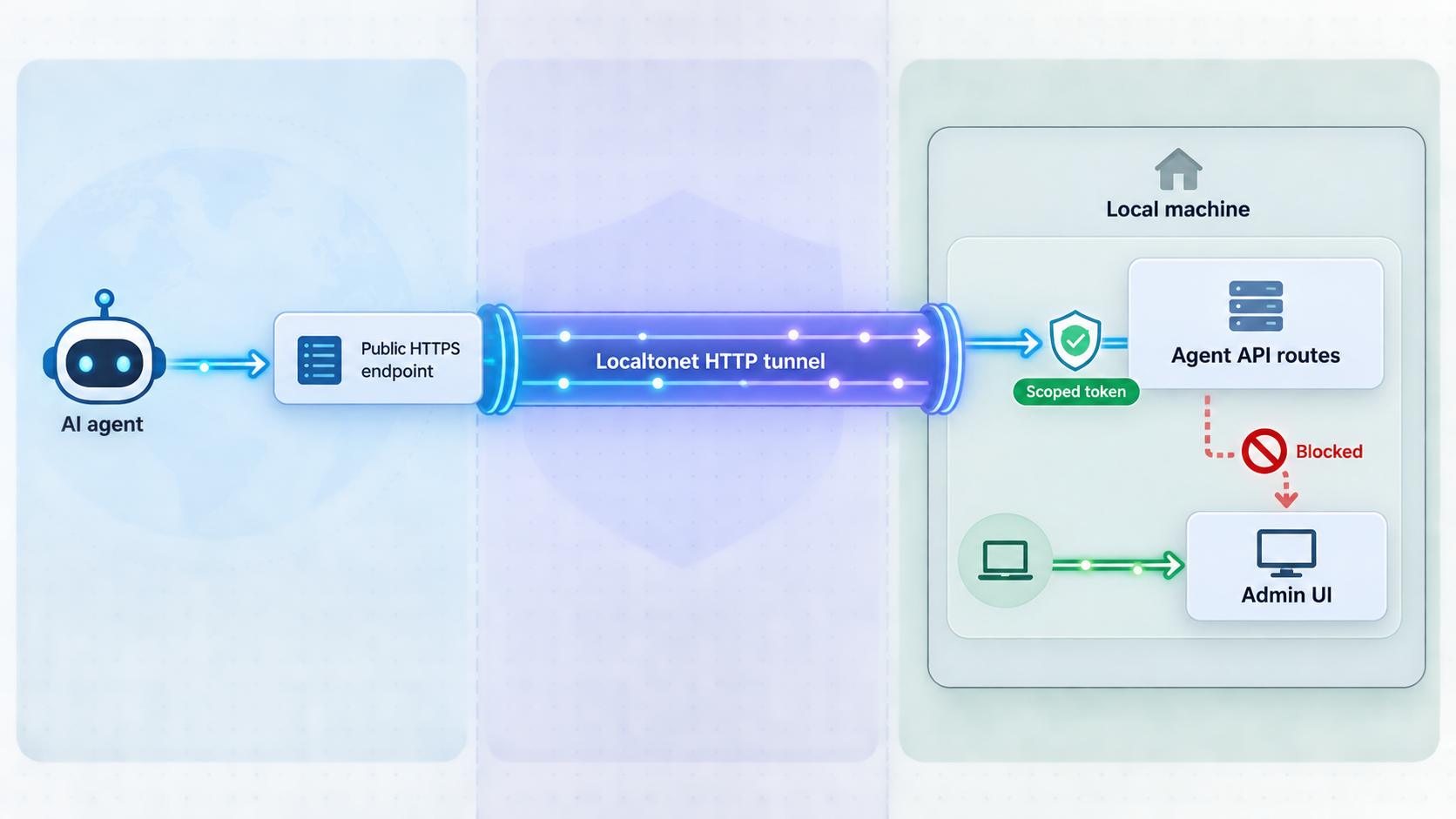
The clearest practical separation is usually two independently reachable listeners or services. One listener serves the narrow agent API. The other serves the admin UI and its privileged routes. The Localtonet tunnel points only to the agent listener. The admin listener remains bound to an interface appropriate to the deployment, such as loopback when administration happens on the same machine.
This guide intentionally remains technology-neutral because listener configuration, middleware ordering, authentication integration, and route registration vary substantially among frameworks. It is an architecture and deployment guide, not a reproducible implementation tutorial for a particular web stack. Use your framework's official documentation to create the separate listener, then apply the concrete verification matrices in this guide to prove that the selected listener cannot serve administrative content.
Understand the alternatives
A second option is to place both surfaces in one application while enforcing a strict listener or frontend boundary. Machine operations may live under a dedicated prefix while a separate listener accepts only those routes. This can be valid if the framework reliably separates listeners and middleware pipelines.
Route prefixes alone provide a weaker boundary. If both route families share the same public listener, requests for admin paths still arrive at that listener. A mistake in routing, middleware order, static-file handling, fallback behavior, or reverse-proxy configuration can expose more than intended.
Exposing the complete application and relying only on an admin login is the least desirable arrangement for agent access. Authentication may prevent successful use, but the page, route behavior, metadata, login mechanism, static assets, and broader attack surface remain publicly reachable.
| Architecture | Isolation | Operational tradeoff |
|---|---|---|
| Separate API and admin listeners | The tunnel targets only the machine API listener | Requires maintaining a clear service or listener boundary |
| One process with separate listeners | Each listener has its own route and middleware policy | Framework configuration must be tested after every relevant change |
| One listener with route filtering | Middleware rejects access outside the agent route allowlist | A routing, fallback, or middleware error can weaken the boundary |
| Entire application behind one public endpoint | Depends mainly on login and route authorization | Publishes unnecessary administrative attack surface |
Localtonet forwards traffic to the local target you configure. Your application must authenticate the caller, validate the request, authorize the requested operation, and reject everything else. Do not treat possession of the public URL as proof of identity or permission.
HTTP APIs and Localtonet MCP features are separate workflows
An ordinary agent-facing HTTP API is any HTTP service whose routes and contracts your application defines. Exposing that service with an HTTP tunnel does not automatically make it an MCP server, gateway, or tool registry.
Localtonet also has separate MCP-related capabilities. An MCP Gateway tunnel exposes a locally running McpNet Gateway. The Localtonet MCP Server lets supported AI coding assistants create, start, and stop Localtonet tunnels from the assistant. Those features solve different problems from the HTTP API architecture described here.
Use this workflow when an agent must call your own application-defined HTTP endpoints. Use an MCP-specific workflow only when your local service and client are actually using MCP and the relevant Localtonet feature matches that design.
Prerequisites and decisions to complete first
Complete the following prerequisites before creating the public tunnel. The most important dependency is not the tunnel itself. It is a locally reachable API listener that has already been separated from the admin interface and protected by application-level controls.
Localtonet installation path
Use the current client installer or package offered by Localtonet for the operating system of the device that will run the tunnel. The approved evidence for this guide does not enumerate current operating-system package names, installer commands, or unattended-installation flags, so this article does not invent them. Obtain the supported option presented by the current Localtonet platform, install it on the target device, authenticate that device, and confirm that it appears connected before continuing.
The device does not have to host the API process itself, but it must be able to reach the configured API IP address and port. If the API runs in a container, virtual machine, or another LAN device, test the connection from the Localtonet client device rather than only from inside the API environment.
The Localtonet device auth token identifies the client device that runs the tunnel. Your application credential identifies and authorizes the AI agent. Keep both secret, never substitute one for the other, and never include either value in screenshots, source code, prompts, or article examples.
Record the intended target before opening the dashboard
Write down the agent API target in a change record or deployment checklist. Include the local IP address, local port, expected readiness route if one exists, owner, approved agent identity, permitted operations, and shutdown contact. Record labels and identifiers, not secret values.
Record the admin listener separately. This makes a consequential targeting mistake easier to spot during review. For example, if the API uses one local port and the dashboard uses another, the reviewer should compare the Localtonet target directly against the API entry.
Define the machine API before making it public
Start by listing the exact tasks the agent must perform. Avoid exposing a generic administrative endpoint when a purpose-built operation can express the task safely. An agent that needs to create a draft record should receive a create-draft operation, not unrestricted database commands or access to a general settings controller.
Build an explicit route inventory
Classify every route served by the application. A useful inventory distinguishes machine operations, private administrative operations, authentication endpoints, readiness checks, static assets, diagnostics, generated documentation, and undocumented framework routes. The public agent listener should serve only the approved machine operations and any deliberately designed minimal readiness endpoint.
Use an allowlist rather than trying to enumerate everything that should be blocked. With an allowlist, a newly added application route remains unavailable until someone intentionally includes it in the agent surface. A denylist can fail in the opposite direction because new routes may become reachable by default.
Illustrative public agent surface
  /agent-api/tasks
  /agent-api/tasks/{task-id}
  /agent-api/actions/{approved-action}

Illustrative private human surface
  /admin
  /settings
  /users
  /credentials
  /debug
  /logs
These paths are architecture examples, not Localtonet requirements. Choose routes that fit your application and inspect the route table generated by your framework. Pay particular attention to wildcard handlers, single-page application fallbacks, automatic API documentation, development exception pages, metrics endpoints, and static-file directories.
Prefer task-oriented operations
Agent tools should have narrow inputs and predictable effects. A broad endpoint such as “execute action” can quietly become equivalent to administrative access if it accepts arbitrary action names or unvalidated parameters. Narrow endpoints make authorization, input validation, logging, and review easier.
Separate read operations from state-changing operations. A credential that only retrieves status should not also be able to delete, approve, publish, or modify data. For sensitive workflows, separate preparation from commitment. An agent can prepare a change and receive a preview while a human or separately authorized service approves the final action.
Return structured, bounded responses
Machine callers benefit from stable HTTP status categories, explicit error objects, documented field types, and bounded response sizes. Avoid returning internal stack traces, source paths, database errors, environment details, or administrative links.
Validate request bodies against a strict schema. Reject unknown fields when practical, constrain string and collection sizes, validate identifiers, and normalize data before it reaches privileged code. Tool descriptions and model instructions are usability aids, not security controls. The server must enforce every rule even when the agent ignores its tool schema.
For structured HTTP errors, the application can adopt a consistent format such as the problem-details model defined by RFC 9457. The exact error schema remains an application decision, but every failure should be bounded and safe to expose.
Keep health information minimal
A readiness route can distinguish an unavailable tunnel from a failed application, but it should reveal as little as possible. A simple ready or not-ready result is often sufficient. Detailed dependency status, software versions, configuration dumps, and internal hostnames belong in private monitoring.
The API and admin UI may run in one process if the framework provides reliable listener and middleware separation. What matters is that the local target selected for the tunnel cannot serve administrative content. Test that property through the exact IP address and port that Localtonet will target.
Security controls for an agent-facing API
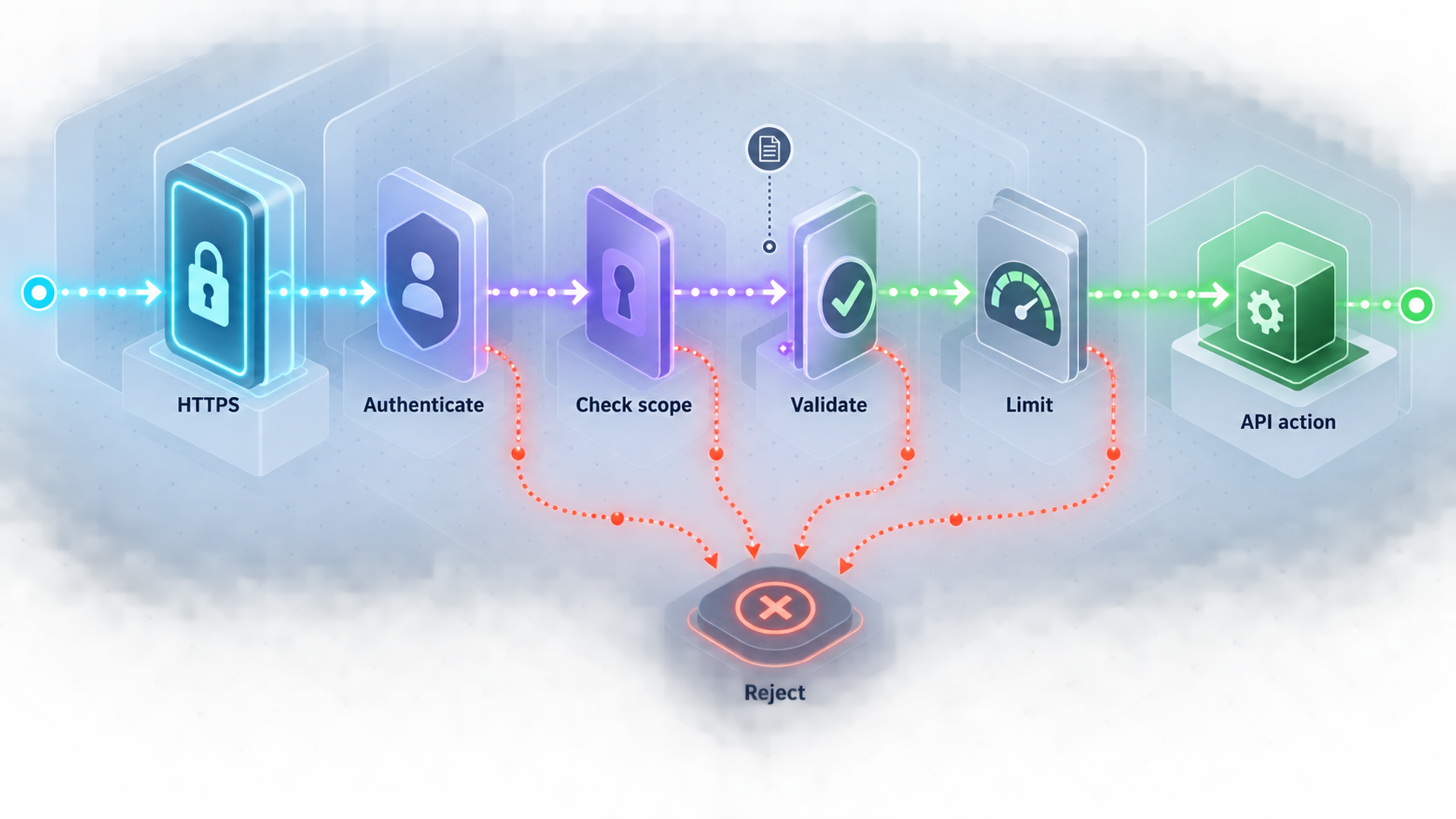
Protect the listener as a machine-to-machine interface. The mechanisms depend on your application and identity system, but the objectives are consistent: establish identity, constrain authority, validate all input, limit abuse, make repeated operations safe, record meaningful events, and provide a fast revocation path.
The OWASP API Security Project is a useful baseline for threats such as broken object-level authorization, broken authentication, unrestricted resource consumption, security misconfiguration, and improper inventory management. The OWASP Authentication Cheat Sheet and OWASP Authorization Cheat Sheet provide additional implementation guidance. These are application-security references, not descriptions of Localtonet behavior.
Use dedicated machine credentials
Do not give an agent an administrator's browser password, session cookie, or personal credential. Create a dedicated identity for each agent, integration, environment, or deployment where practical. Separate identities allow one integration to be disabled without interrupting every caller.
Credentials should be delivered through the runtime's supported secret mechanism rather than embedded in prompts, source files, tool descriptions, URLs, or logs. Never place a bearer credential in a query string. URLs commonly appear in histories, telemetry, proxies, and diagnostics.
If the application uses OAuth bearer tokens, follow the transport and handling requirements in RFC 6750. Bearer possession is sufficient to use the token, so disclosure can allow impersonation within the token's authority. Use HTTPS for the public request, keep tokens out of URLs and logs, issue narrow permissions, and support expiration and revocation.
Authorize capabilities and resources
Authentication answers which identity made the request. Authorization answers whether that identity may perform the requested operation on the selected resource. Both checks are necessary.
Define scopes or capabilities around real tasks, such as reading task status, creating drafts, submitting a specific job type, or canceling jobs created by the same identity. Avoid a single all-powerful agent role if callers perform different work.
Resource-level checks are as important as route-level checks. Permission to retrieve one project should not imply permission to retrieve every project. If an agent acts on behalf of a human, the server should enforce that delegated boundary instead of trusting a user identifier supplied in the request.
Set request and resource limits
Automated callers can produce bursts through retries, loops, parallel tool calls, or malformed plans. Apply controls appropriate to the operation and local service capacity. Relevant controls include request-rate limits, concurrent-operation limits, payload-size limits, execution deadlines, pagination limits, and caps on the number of resources changed by one request.
There is no universal safe threshold. Base limits on expected workload, operation cost, and recovery behavior. Expensive operations may need tighter limits than read-only checks. If the application uses HTTP 429 for rate limiting, its semantics are defined by RFC 6585. Return a stable machine-readable response so the client can stop or back off instead of retrying aggressively.
Design state changes for retries
Network failures create ambiguity. A client may submit a request, lose the response, and retry without knowing whether the first attempt succeeded. For operations that create charges, send messages, modify records, or launch work, support an idempotency mechanism or equivalent application-level deduplication strategy.
Bind the idempotency record to the authenticated identity and normalized operation input. Reusing the same identifier with a different payload should fail instead of applying a different action. Retain deduplication state for a period that matches the client's realistic retry window, and document that behavior for the agent developer.
Record security-relevant events
Audit records should help answer who called which operation, when it happened, which resource was targeted, whether authorization succeeded, and what high-level result occurred. Include a request or correlation identifier so related events can be traced across the application.
Do not record raw credentials, complete authorization headers, private prompt content, or sensitive payload fields. Prefer structured records with deliberate redaction and an established retention policy.
Plan independent revocation paths
Know how to disable an agent identity, rotate its credential, remove a capability, stop the Localtonet tunnel, and invalidate pending work. These controls solve different problems. Stopping the tunnel removes public reachability while it remains stopped, but it does not invalidate a leaked application credential. Revoking a credential blocks that identity, but it does not close an accidentally exposed administrative route.
| Control | Risk addressed | Where it belongs |
|---|---|---|
| Machine authentication | Anonymous or impersonated callers | Application or approved identity layer |
| Scoped authorization | Authenticated callers exceeding their role | Application authorization logic |
| Resource authorization | Access to another user's or tenant's objects | Application business and data-access layers |
| Input validation | Malformed, oversized, or unsafe requests | API boundary before business logic |
| Rate and concurrency limits | Loops, bursts, retries, and resource exhaustion | Application or controlled API layer |
| Idempotency controls | Duplicate effects after retries | State-changing application operations |
| Audit logging | Untraceable access and weak incident investigation | Application and supporting observability systems |
| Tunnel stop or deletion | Continued public reachability | Localtonet tunnel lifecycle |
Verify the isolation locally before creating a tunnel
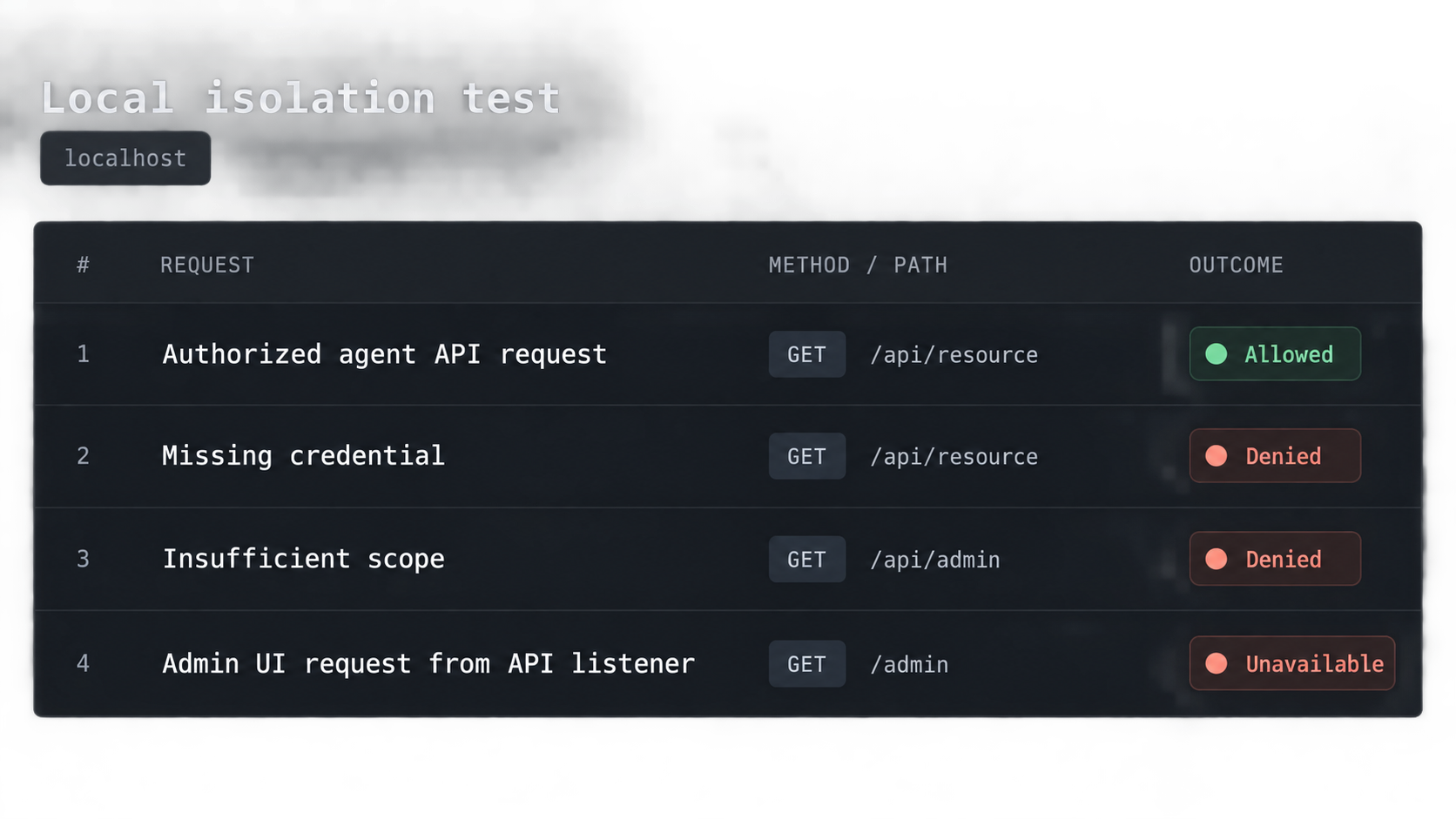
Public exposure should be the final integration step, not the first test. Run the application locally and confirm that the dedicated API listener behaves correctly from the same device that will run the Localtonet client.
Start both application surfaces
Confirm the exact IP address and port for the agent API and the separate address or port for administration. Record them clearly.
Test an approved API route
Send a valid authenticated request directly to the local agent listener. Confirm the response contract, authorization scope, application effect, and audit record.
Test authentication and authorization failures
Verify that missing, invalid, expired, revoked, and insufficiently scoped credentials fail before protected application logic runs.
Request administrative paths through the API listener
Test the real admin, settings, credential, debug, documentation, metrics, and static-asset paths used by the application. They must not return administrative content.
Exercise limits and duplicate handling
Test oversized input, invalid fields, repeated state-changing requests, concurrency behavior, and application-defined limits in a controlled environment.
Review logs for secret leakage
Confirm that credentials and sensitive payload fields are redacted while identity, operation, resource, result, timestamp, and correlation information remain useful.
Supply the test credential at runtime
The following Bash example reads a test token without echoing it or placing the value directly in the command line. An environment variable is still available to the current process and may be visible to sufficiently privileged local users, so use a disposable test credential and unset it when testing finishes. If your agent platform has a dedicated secret manager, prefer that mechanism.
read -r -s -p "Test API token: " AGENT_API_TOKEN
printf '\n'
export AGENT_API_TOKEN

export LOCAL_API_URL="http://127.0.0.1:PORT"

curl -i \
  -H "Authorization: Bearer ${AGENT_API_TOKEN}" \
  -H "Content-Type: application/json" \
  -X POST \
  --data '{"operation":"approved-test-value"}' \
  "${LOCAL_API_URL}/agent-api/tasks"
Replace the address, port, route, body, and authentication scheme with values implemented by your application. The example does not define a Localtonet authentication requirement.
Test a private path through the same listener:
curl -i "${LOCAL_API_URL}/admin"Local verification matrix
| Test | Expected result category | Pass condition |
|---|---|---|
| Approved route with valid scope | Authorized success | The documented operation succeeds and produces the expected audit event |
| Protected route without a credential | Authentication failure | No protected operation runs and no sensitive details are returned |
| Protected route with an invalid, expired, or revoked credential | Authentication failure | The credential is rejected consistently |
| Valid identity without required capability | Authorization failure | The operation and resource access are denied |
| Admin or debug path through the API listener | Surface absent | No admin content, login UI, debug output, or administrative redirect is served |
| Malformed or oversized request | Validation or limit failure | The request is rejected before unsafe processing and the error is bounded |
| Repeated state-changing request | Deduplicated or defined retry result | The application does not create unintended duplicate effects |
The exact status code is an application decision, not a Localtonet requirement. The important result is that each response falls into the intended category and that the agent listener never serves or executes administrative behavior. Avoid redirects that lead machine callers to a working admin login page.
A route may appear private in source code while remaining reachable through a framework fallback, reverse-proxy rule, static-file handler, or development component. Send real requests to sensitive paths through the exact local IP address and port that the tunnel will target.
Configure the Localtonet HTTP tunnel
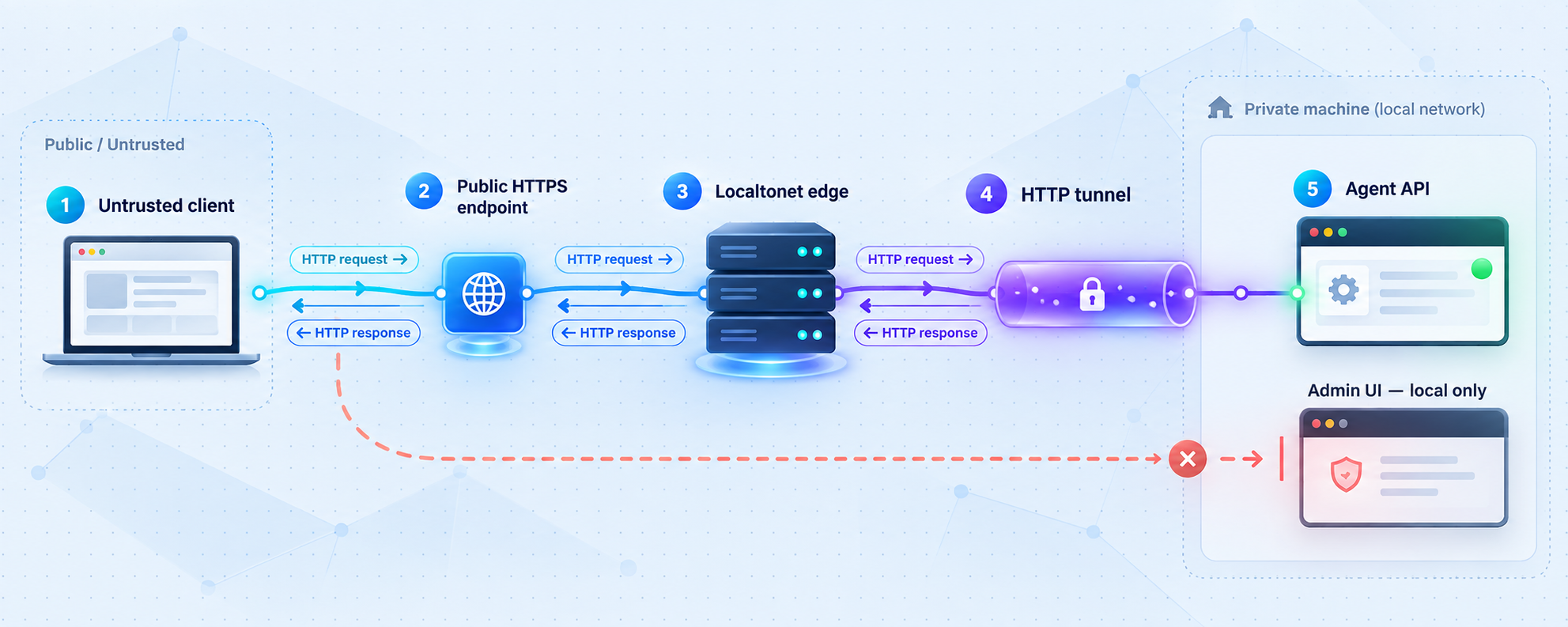
After the local boundary passes testing, use a Localtonet HTTP tunnel to provide remote connectivity. Our client runs on a device that can reach the local API and establishes an outbound connection to a Localtonet relay server. This workflow does not require inbound router port forwarding, inbound firewall changes, VPN setup, or a public IP address.
An HTTP tunnel points to a local IP address and port. Its Process Type can be Random Sub Domain, Custom Sub Domain, or Custom Domain. Each type serves the configured local content at a public HTTPS address. Available options can vary by plan, client version, region, or deployment, so use only the values currently shown in your dashboard. This guide does not hardcode server codes, regions, plan availability, or custom-domain DNS records.
Install and connect the client first
Install the current Localtonet client option supplied for the device's operating system, start it, and authenticate the device using its device-specific auth token. Keep the token private. Confirm in the Localtonet platform that the intended device is connected before creating the tunnel.
Test the API from that device one final time. If the API runs elsewhere on the LAN, use the API address reachable from the client device rather than assuming that 127.0.0.1 refers to the remote API host.
Follow the HTTP tunnel configuration sequence
Open the HTTP Tunnel page and select Process Type
Choose Random Sub Domain, Custom Sub Domain, or Custom Domain from the options currently available to your account. Do not infer custom-domain DNS settings from an unrelated tutorial.
Select the connected device AuthToken
Select the device-specific token for the Localtonet client that can reach the API. Do not enter the agent's application token here, and do not expose the device token in screenshots or logs.
Select an available relay server
Choose a server or region value currently offered in the dashboard. Do not copy a server code from another account or hardcode one into deployment instructions.
Enter the local API IP address and port
Enter the exact target that passed local testing. Compare it with your deployment record and verify that it is the dedicated agent API listener, not the admin UI, debug server, or another service that happens to be reachable.
Press Start and obtain the public address
Review the target, then use the Start control. Creating or saving a tunnel does not mean it is running. Once started, use the assigned public HTTPS address for remote verification.
The tunnel is available only while the selected client device is connected and the tunnel is running. The Localtonet HTTP tunnel documentation is the canonical companion for the current dashboard presentation.
A useful setup screenshot may highlight Process Type, the selected device, relay selection, local API IP and port, and the Start control. Redact device auth tokens, account details, private hostnames, credentials, and other secrets before publishing or sharing it.
Verify the public URL before connecting an agent
Do not add the URL to an autonomous agent immediately. First, request a minimal readiness route if your API deliberately provides one. Then repeat the complete positive and negative test matrix through the public HTTPS address.
Localtonet and your application have separate responsibilities. The tunnel provides the public address and forwards requests to the configured target. Your API remains responsible for machine identity, credentials, scopes, resource authorization, request validation, rate controls, idempotency, business rules, and audit records.
Keep stop and delete outside the creation sequence
Stopping and deleting are later lifecycle operations, not steps required to create and start the tunnel. Use Stop when you want to remove public reachability while retaining the configuration. Delete the tunnel when the configuration is no longer required. Neither action revokes an application credential, so rotate or revoke that credential separately when necessary.
Test the public endpoint as an untrusted client
Local success does not prove that the public route exposes only what you intended. Repeat the tests through the assigned HTTPS address from a separate client or network. This validates the full path from the remote caller through Localtonet to the selected application listener.
Run a controlled authenticated request
Reuse the restricted test credential loaded at runtime. Do not paste the credential into the command or public URL.
export PUBLIC_API_URL="https://PUBLIC_HTTPS_ADDRESS"
export TEST_IDEMPOTENCY_KEY="UNIQUE_NON_SECRET_TEST_VALUE"

curl -i \
  -H "Authorization: Bearer ${AGENT_API_TOKEN}" \
  -H "Content-Type: application/json" \
  -H "Idempotency-Key: ${TEST_IDEMPOTENCY_KEY}" \
  -X POST \
  --data '{"operation":"approved-test-value"}' \
  "${PUBLIC_API_URL}/agent-api/tasks"
The route, payload, authentication scheme, and idempotency header are illustrative application choices. Localtonet does not require this route or header. Your client and server must agree on the mechanism, and the server must enforce it.
Repeat the negative tests
Begin without a credential. Repeat with malformed, expired, and revoked test credentials. Use a valid identity lacking the required capability. Confirm that failures do not execute protected behavior or disclose identity names, authorization rules, stack traces, internal addresses, or configuration details.
Request every known administrative path through the public hostname. Include login pages, settings, user management, credential management, generated API documentation, metrics, detailed health output, debug routes, framework consoles, static bundles, and application-specific fallback paths.
Do not consider an admin redirect harmless. If the public endpoint redirects to a working administrative login page, the admin surface is publicly exposed even if authentication is required. The preferred result is that the agent listener does not serve that surface at all.
Confirm host, origin, retry, and timeout behavior
If the application validates host or origin headers, configure those checks deliberately for the public address instead of disabling them globally. Browser-focused cross-origin controls are not a substitute for machine authentication because non-browser clients are not bound by browser origin enforcement.
Deliberately interrupt or repeat a state-changing request in a safe test environment. Confirm that reusing the same application-defined idempotency value does not cause duplicate effects. Verify that clients cannot hold expensive work indefinitely and that failures produce bounded, actionable responses.
Remote verification matrix
| Remote test | Expected result category | Required observation |
|---|---|---|
| Approved request with restricted credential | Authorized success | Only the intended operation succeeds and an audit event identifies the test identity |
| Protected request without authentication | Authentication failure | No protected work occurs |
| Valid identity without operation or resource permission | Authorization failure | The application denies access without revealing unrelated resources |
| Administrative and debug paths | Surface absent | No admin page, login redirect, static admin asset, debug output, or privileged API is served |
| Oversized, malformed, or excessive requests | Validation or limit failure | The application rejects the request predictably and remains available |
| Repeated state-changing request | Deduplicated or documented retry result | No unintended duplicate effect occurs |
| Unknown route | Not found or controlled application error | No framework diagnostics, route inventory, or admin fallback is exposed |
Start with a test identity, non-sensitive data, restricted permissions, and reversible operations. Validate the endpoint manually before adding it to an autonomous workflow or tool registry.
Operate, revoke, and shut down access safely
Secure publication is an ongoing process. Routes change, agents receive new tools, credentials age, and dependencies behave differently under automated load. Treat the endpoint as a maintained integration rather than a one-time tunnel configuration.
Keep an ownership and exposure record
Record who owns the endpoint, which agent or workflow uses it, which Localtonet tunnel targets it, which application identity is assigned, which permissions are allowed, and how access can be disabled. Do not record secret values in that inventory.
Review route and permission changes
A new route should not become public merely because it shares a prefix. Include route exposure, resource authorization, and response data in code review. Re-run negative tests after framework upgrades, routing changes, authentication middleware changes, reverse-proxy changes, and admin UI deployments.
Rotate and revoke independently
Maintain separate procedures for application credentials and the tunnel lifecycle. If a credential is exposed, revoke or rotate it at the application identity layer. If the endpoint should no longer be reachable, stop or delete the tunnel. During an uncertain incident, doing both can provide immediate containment while the cause is investigated.
Monitor outcomes, not only traffic volume
Useful monitoring distinguishes authentication failures, authorization denials, validation errors, limit rejections, repeated idempotency identifiers, unusual resource access, and successful state changes. A rising request count alone does not explain whether an agent is functioning normally or trapped in a loop.
Keep the Localtonet device under control
The device auth token identifies the client that runs the tunnel and must remain secret. Limit access to the machine and dashboard account, remove unused configurations, and confirm which local process owns the target port. If another process later binds to that port, the tunnel could forward to an unintended service.
Final shutdown and verification sequence
Stop the Localtonet tunnel
Use the Stop control when temporary remote access is complete. Delete the tunnel separately if the configuration will not be used again.
Verify public access has ended
From the separate remote client, request the former public API address. The expected category is unavailable through that tunnel, with no application operation executed.
Revoke or remove test credentials
Revoke disposable test identities or tokens according to your application policy. Stopping the tunnel does not revoke them.
Clear the shell variable
Remove the runtime token from the current shell after testing and close any temporary test session.
Review the audit trail
Confirm that the expected positive, negative, and shutdown tests were recorded without exposing credentials or sensitive request data.
unset AGENT_API_TOKEN
unset LOCAL_API_URL
unset PUBLIC_API_URL
unset TEST_IDEMPOTENCY_KEY
A successful shutdown has two independently verifiable results: the public address no longer reaches the local application through the stopped tunnel, and disposable application credentials can no longer authenticate if they were revoked.
Troubleshooting without weakening the boundary
The public URL does not respond
Confirm that the selected Localtonet client is connected and that the tunnel has been started. Creating the configuration alone does not make it active. Next, verify that the local application is running and reachable from the Localtonet client device at the exact configured IP address and port.
If the service runs in a container, virtual machine, or another LAN device, test from the Localtonet client device rather than only from inside the service environment. Do not change the target to the admin listener merely because that port responds.
The root address returns not found
This may be correct. A machine API does not need a home page. Test an approved agent route or a deliberately minimal readiness route. Avoid adding a dashboard to the API root solely to make browser testing appear successful.
The agent receives an HTML login page
The request may be reaching the human-facing application, an authentication redirect, or a single-page application fallback. Verify the local target and inspect routing behavior. Machine endpoints should return controlled API responses rather than browser login HTML.
Authorized requests fail remotely but work locally
Compare the complete request, including method, path, content type, authorization header, host handling, and payload. Check whether the application has explicit host validation or generates redirects for an internal address. Correct the application configuration deliberately instead of disabling security checks wholesale.
The admin UI is reachable publicly
Stop the tunnel while correcting the architecture. Confirm that it targets the dedicated agent listener. If both surfaces share one listener, establish a reliable listener boundary or separate them before restarting. Review logs to determine whether exposed paths were requested, and rotate credentials if disclosure is possible.
Repeated requests create duplicate work
This is an application-level idempotency problem. Do not rely on the tunnel to deduplicate state changes. Implement and test a server-side mechanism that recognizes retries for the same authenticated caller and normalized operation.
The API becomes unstable under agent use
Inspect concurrency, request cost, payload size, retry behavior, and downstream dependencies. Introduce bounded queues, deadlines, rate controls, or operation-specific limits appropriate to the service. Return retry guidance only when the server can safely support retries.
The tunnel targets the wrong service after a restart
Confirm which process owns the configured port and whether the application's listener assignment changed. A port that previously belonged to the agent API may later be occupied by another process. Stop the tunnel until the target is verified.
Opening an admin port, disabling authentication, accepting every host, or publishing debug routes may make a test appear successful while removing the protections this architecture is designed to provide. Diagnose each layer separately: local service, application security, Localtonet client connection, tunnel state, and remote request.
Frequently asked questions
Does a Localtonet HTTP tunnel authenticate my AI agent?
No. The HTTP tunnel provides public connectivity to the configured local IP address and port. Your application must authenticate the machine identity, validate credentials, enforce operation and resource permissions, and reject unauthorized requests.
Can the API and admin UI run in the same application?
Yes, if the framework provides a reliable separate listener and middleware boundary. The tunnel should target a listener that cannot serve administrative routes. Test the actual listener for admin pages, static assets, debug routes, documentation, redirects, and framework fallbacks.
Is keeping the public URL secret enough?
No. A URL can appear in logs, histories, messages, configuration, or telemetry. Treat the address as reachable by untrusted clients and require dedicated machine authentication and authorization for protected operations.
Should an agent use my administrator account?
No. Give the agent a dedicated machine identity with only the capabilities required for its task. This reduces impact, improves audit clarity, and allows independent rotation or revocation.
Is this the same as exposing an MCP Gateway?
No. This guide covers an application-defined HTTP API. Localtonet's MCP Gateway tunnel is a separate workflow for a locally running McpNet Gateway, and the Localtonet MCP Server separately allows supported coding assistants to manage tunnels.
Does stopping the tunnel revoke an agent credential?
No. Stopping the tunnel removes public reachability through that tunnel while it remains stopped, but the application credential still exists. Revoke or rotate the credential separately if it is compromised or no longer needed.
Why do agent APIs need idempotency controls?
Automated clients may retry after a timeout without knowing whether the first request succeeded. An application-level idempotency or deduplication mechanism helps prevent repeated requests from creating duplicate effects.
Do I need router port forwarding or a public IP address?
No. The Localtonet client establishes an outbound connection to a Localtonet relay server, so this workflow does not require inbound router port forwarding, inbound firewall changes, VPN setup, or a public IP address.
When is the public endpoint available?
The endpoint is available only while the selected Localtonet client device is connected and the tunnel is running. Creating or saving the tunnel configuration does not start it automatically.
Which Localtonet relay server or region should I enter?
Select from the server or region values currently available in your dashboard. Do not hardcode a value from another tutorial because availability can vary by account, plan, client version, region, or deployment.
Publish only the API boundary you intended
Separate the agent API from administrative controls, verify authentication and authorization through the exact local listener, and then use a Localtonet HTTP tunnel to provide the approved endpoint with a public HTTPS address.
Get Started Free →

