

Give capable agents a constrained workspace, then publish only the application interface they need
Tool-using AI agents can execute commands, install packages, modify files, call external systems, and keep processes running. Those capabilities make a personal workstation or broadly trusted server a poor default execution environment. This architecture guide explains how to separate an agent from sensitive systems, minimize its credentials and data, design a narrow authenticated endpoint, and expose that endpoint through Localtonet. It is intentionally runtime-neutral because operating systems and agent frameworks use different installation, authentication, and startup procedures.
📋 What's in this guide
Why tool-using AI agents need an isolation boundary
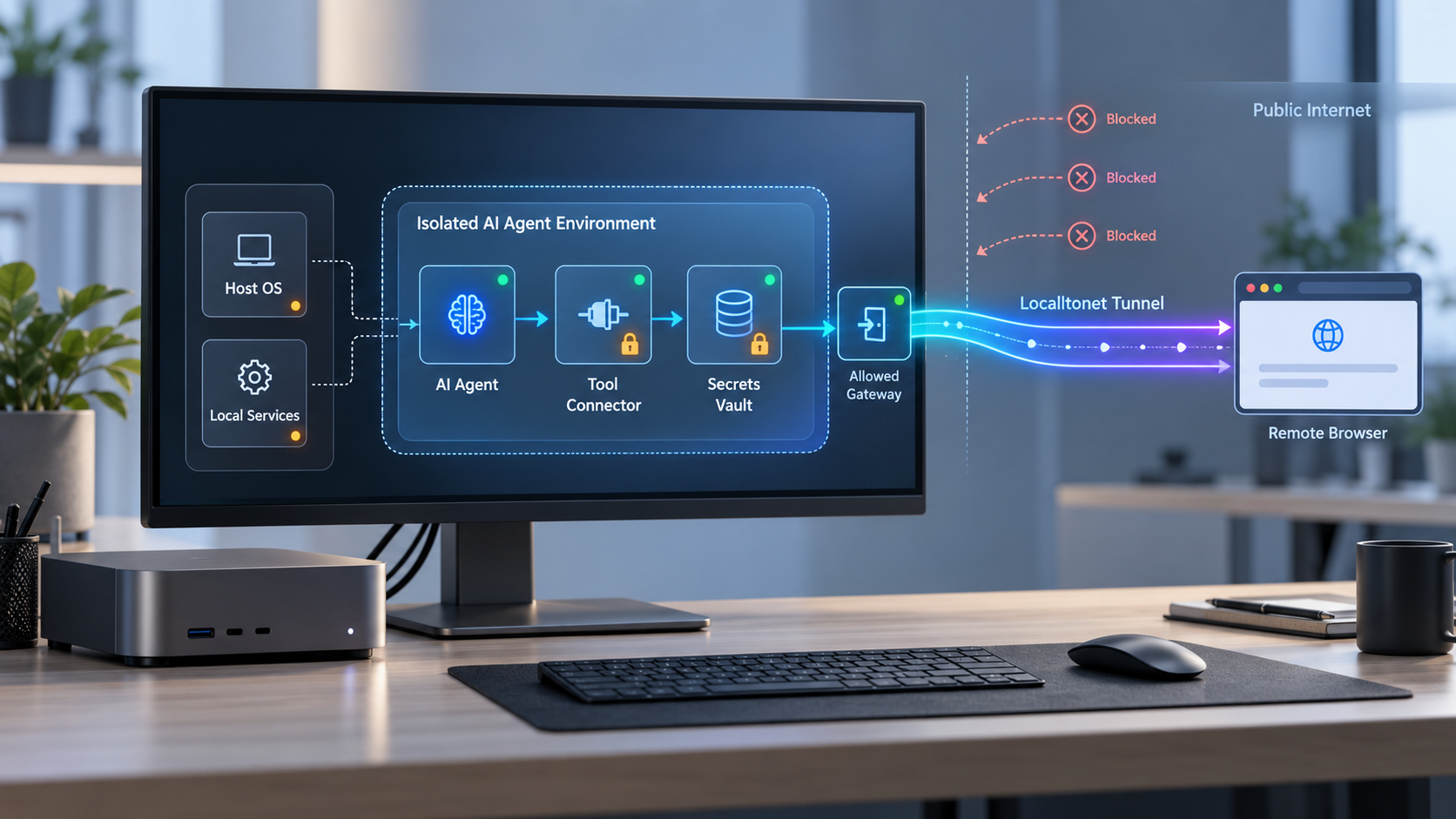
A conversational model that only returns text has a relatively narrow interface. A tool-using agent is different. Depending on its runtime and permissions, it may open files, invoke a shell, install dependencies, clone repositories, run builds, start listeners, call APIs, or continue a task without constant supervision. The security question is therefore not only whether the model will produce a good answer. It is what the surrounding process can reach when a prompt, generated command, dependency, or tool response is malicious or simply wrong.
Running that process directly on a daily workstation can collapse several trust boundaries into one. The agent may execute beside browser profiles, SSH keys, source repositories, cloud credentials, password-manager integrations, personal documents, development databases, package credentials, and authenticated command-line tools. A project-directory instruction does not create an operating-system boundary. If the runtime account can read a file or use a credential, the agent process may be able to do the same.
Isolation places the workload in a separate environment with its own filesystem, accounts, credentials, network policy, and lifecycle. That environment might be a dedicated virtual machine, a disposable sandbox, a container on a separate host, a spare computer, or a cloud machine. The suitable technology depends on the consequences of failure, but the central principle remains the same: the agent should not share an administrative context with unrelated personal or production assets.
Least privilege applies to every layer of this design. The agent should receive only the data, tools, credentials, network access, and execution time needed for its assigned work. The NIST definition of least privilege describes restricting privileges to the minimum necessary to accomplish assigned tasks. A disposable host with an organization-wide token is not low privilege because the token can still affect systems beyond that host.
Isolation does not guarantee that an agent cannot fail or be manipulated. It limits consequences. If the environment contains only an approved repository checkout, non-sensitive test fixtures, a narrowly scoped identity, and a constrained endpoint, then an accidental destructive command or hostile instruction has fewer valuable targets.
Build a threat model before choosing the host
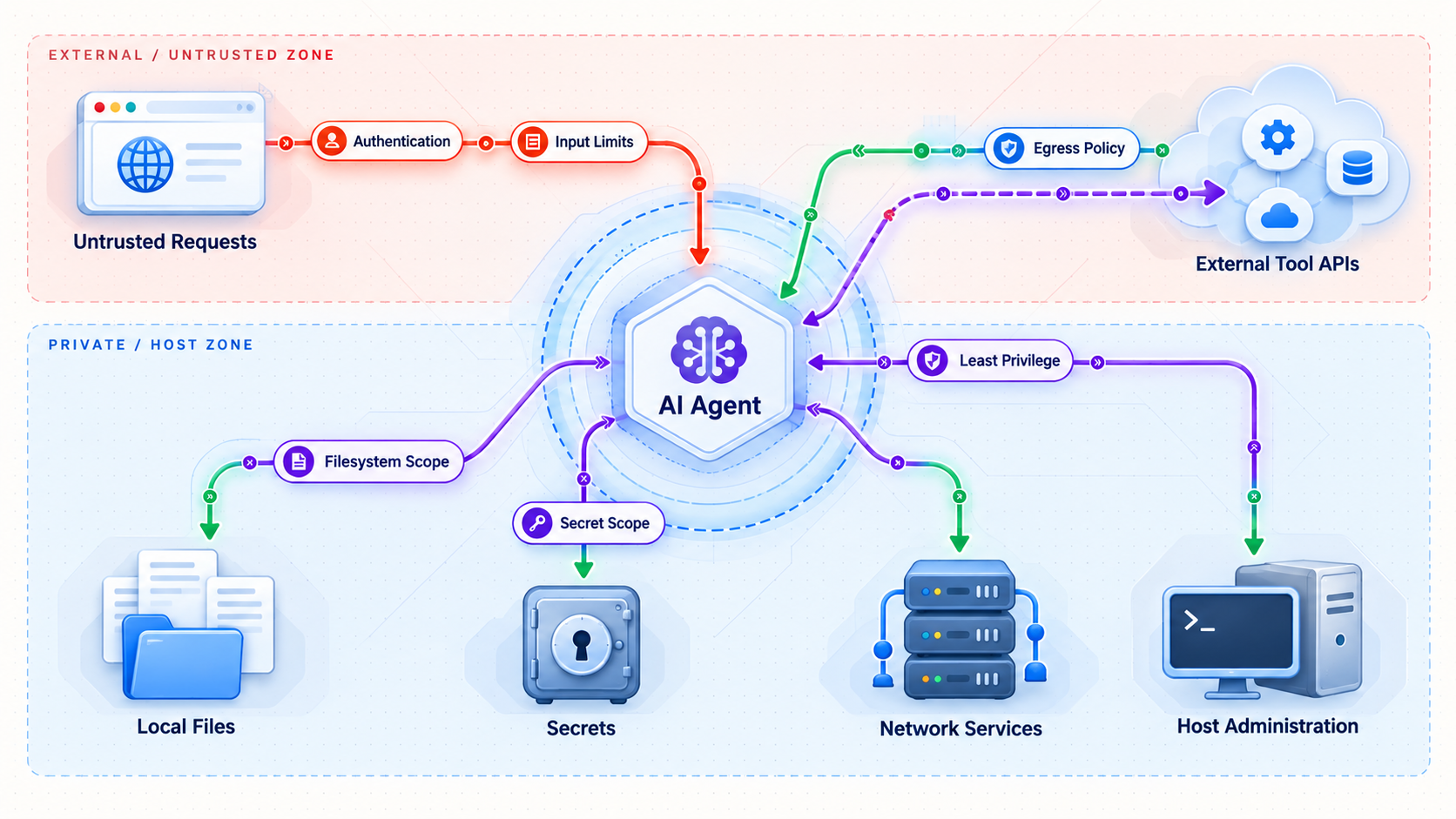
Describe the agent as a process with inputs, tools, identities, data, network connections, and administrative boundaries. Avoid relying on labels such as “sandboxed” without identifying what is actually isolated. Different platforms may isolate processes, filesystems, kernels, networks, hardware, or some combination of them.
Instructions can arrive through indirect channels
An agent may consume repository files, issue descriptions, web pages, email, office documents, logs, package metadata, test output, and tool responses. Any of these inputs can contain text intended to influence the model. This is commonly called indirect prompt injection. The OWASP prompt injection guidance explains why instructions embedded in external content can alter model behavior and why restrictions around tools, privileges, and human approval remain necessary.
Prompt filtering is useful, but it is not a complete security boundary. Untrusted content can be encoded, fragmented, or mixed with legitimate task data. Design the system so that a successful prompt injection still encounters operating-system permissions, scoped credentials, network restrictions, application authorization, and approval requirements for high-impact actions.
Incorrect commands can cause damage without malicious intent
Security planning must also account for ordinary mistakes. A malformed cleanup command can target the wrong path. A package installer can execute lifecycle scripts. A build can consume excessive CPU, memory, disk, or network capacity. A development server can bind more broadly than expected. Logs and error messages can expose credentials or private data. The environment should tolerate these failures without placing unrelated systems at risk.
Credentials can escape the isolation boundary
A credential may authorize actions on repositories, cloud resources, deployment systems, databases, model providers, or artifact stores outside the isolated host. Use separate service identities, choose the smallest practical scope, set expiration where supported, and document revocation before deployment. Do not reuse a personal administrator credential merely because the machine itself is temporary.
Containers and virtual machines provide different boundaries
Containers can be valuable for packaging and process isolation, but conventional containers commonly share the host kernel. Configuration mistakes, excessive capabilities, exposed management sockets, vulnerable runtimes, and host mounts can weaken the intended separation. The NIST Application Container Security Guide describes container-specific risks and recommends treating images, registries, orchestrators, containers, and host operating systems as distinct security concerns.
A dedicated virtual machine or separate physical device creates a different boundary, but it still requires patching, credential control, network policy, and secure administration. Select the boundary according to the workload rather than assuming one technology is always sufficient.
A reachable endpoint creates another trust boundary
An agent may start a dashboard, webhook receiver, API, model endpoint, development preview, or MCP-related service. Publishing that listener makes it reachable beyond the isolated machine. The tunnel controls connectivity to the configured local target, but application authentication and authorization remain the responsibility of the service. A public address must not be treated as a secret.
Exposing SSH, a browser terminal, a container daemon, remote desktop, or an unauthenticated command-execution API gives remote users far more capability than a purpose-built application endpoint. If administrative access is genuinely required, keep it separate, use the protocol's strong authentication, limit permitted identities and sources where supported, and do not confuse it with the public agent service.
| Asset or capability | Typical risk | Safer boundary |
|---|---|---|
| Developer home directory | Exposure of keys, configuration, browser data, and unrelated projects | Use a dedicated account and task-specific directory on another machine |
| Source-control identity | Unauthorized repository reads, writes, or organization-wide changes | Use a separate identity restricted to owned, approved repositories and required operations |
| Cloud credential | Changes to unrelated infrastructure or production resources | Use a restricted service identity for one environment and task |
| Package installation | Execution of installation scripts or unreviewed dependency code | Install during a controlled build phase inside a disposable environment |
| Network listener | Unauthenticated remote access or data disclosure | Publish only the intended service and retain application authentication |
| Long-running process | Unmonitored resource use, stale software, and persistent exposure | Set an owner, review date, shutdown condition, and credential expiration plan |
A safer architecture for remote AI agent workloads
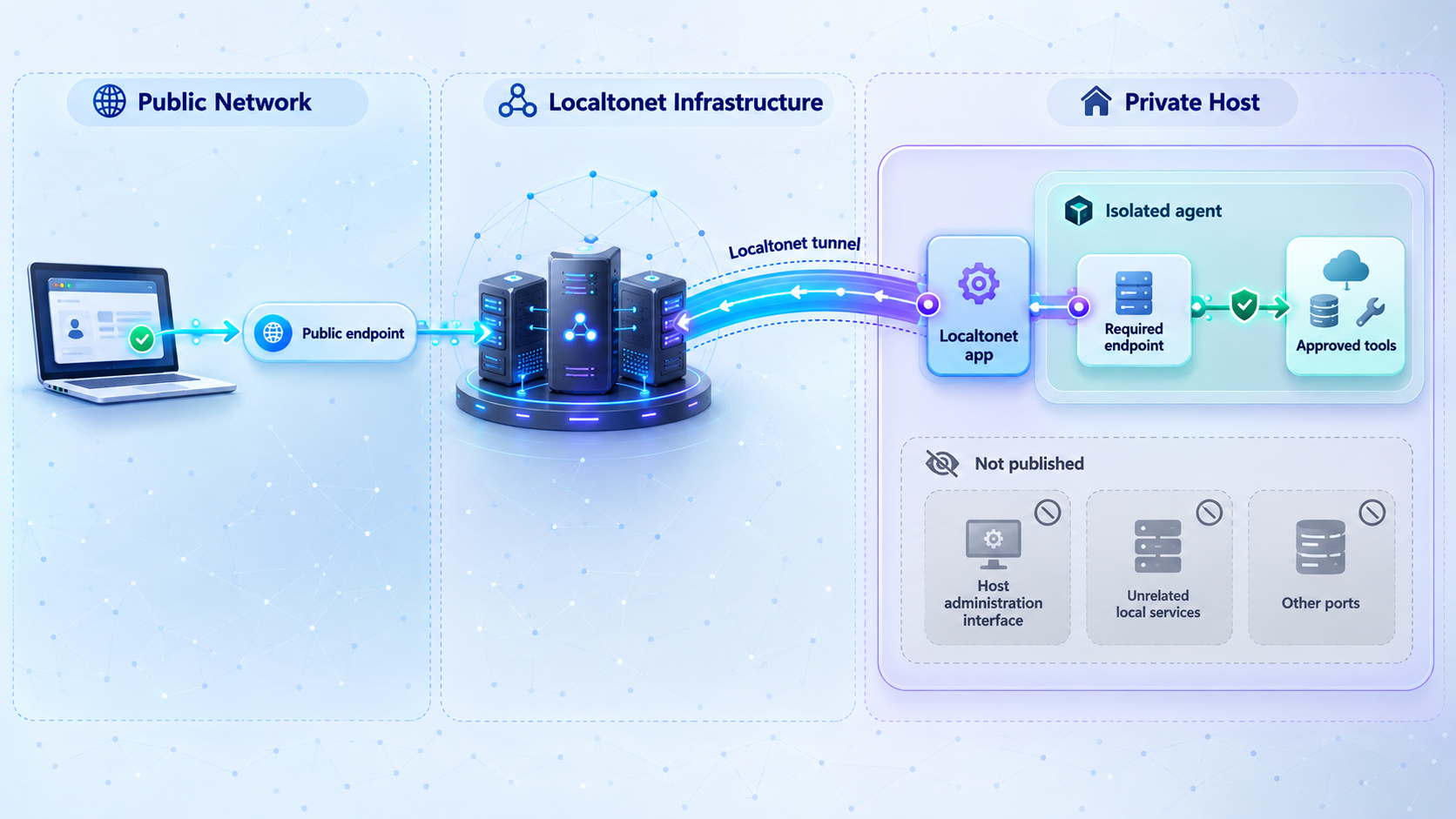
A practical design has four distinct layers: the operator, the isolated execution host, the application endpoint, and the connectivity layer. Keeping these roles separate makes permissions easier to review and makes shutdown responsibilities explicit.
1. The operator defines policy
The operator decides which project the agent may access, what data enters the environment, which credentials it receives, what output may leave, and when human approval is required. Production deployment, irreversible deletion, access-policy changes, credential creation, financial transactions, and publication of sensitive artifacts should not occur merely because generated text requested them.
Runtime confirmation prompts can reduce accidents, but they are not substitutes for operating-system permissions or scoped credentials. A confirmation control may be misunderstood, disabled, bypassed by another tool path, or approved too quickly. Use layered controls.
2. The isolated host contains execution
Use a dedicated operating-system identity and only the packages required by the workload. Do not automatically synchronize personal folders or import workstation credentials. A disposable environment is often easier to clean up for short tasks. A persistent machine can support large working trees and long-running services, but it needs patching, storage management, monitoring, and a deliberate decommissioning process.
3. The application endpoint offers a narrow contract
Prefer an interface that accepts a defined set of requests and returns constrained responses. A dashboard might expose task status, an API might submit approved job types, and a webhook might accept signed events. Avoid generic endpoints that execute arbitrary shell commands. Validate inputs, limit request and payload sizes where supported, enforce authorization for every sensitive action, and prevent error responses from revealing secrets or internal paths.
4. Localtonet publishes the selected service
The Localtonet client runs on the isolated host or on another device that can reach the service. It establishes an outbound connection to a Localtonet relay server. The tunnel then provides a public HTTPS address or a public host and port, depending on the tunnel type. This does not require inbound router port forwarding, firewall changes, VPN setup, or a public IP address.
The tunnel is available only while the selected client is connected and the tunnel is running. Creating a tunnel does not start it. This distinction is useful for agent workloads because public reachability can be limited to an approved work window.
A Localtonet tunnel carries traffic to the configured local service. The service must still authenticate callers, authorize operations, validate input, manage sessions, and protect sensitive responses. Possession of the public address is not sufficient authentication.
Match the tunnel to the application protocol
| Connectivity option | Use it for | Public result |
|---|---|---|
| HTTP/s tunnel | Browser interfaces, HTTP APIs, webhooks, and HTTP-based agent services | A public HTTPS address forwarding to the configured local IP address and port |
| TCP tunnel | A service whose documentation requires a raw TCP connection | A public host and port forwarding to the configured local IP address and port |
| MCP Gateway tunnel | A locally running McpNet Gateway | A gateway-specific public connection created through the documented MCP Gateway workflow |
Use HTTP for a browser dashboard or HTTP API. Use raw TCP only when the application's protocol requires it. If the service is a locally running McpNet Gateway, follow our separate MCP Gateway tunnel guide rather than adapting the HTTP steps by guesswork.
Architecture checklist before you connect anything
This is an architecture guide, not an installation tutorial for a particular agent framework. Agent products differ in supported operating systems, package managers, startup commands, bind addresses, ports, authentication schemes, persistence models, and update procedures. Use the selected runtime's official instructions for those framework-specific details.
Before creating a tunnel, record the decisions below. If any item is unknown, the environment is not ready for public connectivity.
- Isolation host: a virtual machine, dedicated container host, spare device, or cloud computer you are authorized to administer.
- Agent runtime: the exact software responsible for accepting tasks and invoking tools.
- Supported installation path: the runtime's official package, image, or installer for the selected operating system.
- Startup procedure: the documented command or service definition used to start the agent interface.
- Working data: approved repositories, controlled test fixtures, generated artifacts, and a separate canary directory for permission tests.
- Credential set: separately issued credentials for only the required systems and operations.
- Local endpoint: the verified protocol, IP address, and port used by the service.
- Application authentication: the documented mechanism used to identify and authorize remote callers.
- Remote audience: the people or systems allowed to call the endpoint.
- Persistence behavior: which processes, files, and services return after a restart.
- Retention plan: what must be preserved, exported, or securely removed when the task ends.
- Localtonet client: installed on the isolated host or on a device with narrowly controlled reachability to the endpoint.
- Device token and relay selection: obtained from the current dashboard and never copied into public documentation, screenshots, or source control.
A Localtonet device or auth token identifies the client device that runs the tunnel. Tokens are device-specific and must not be exposed. Keep agent credentials and Localtonet credentials out of repositories, image layers, public issue reports, prompts, screenshots, and shared command output.
Build the isolation boundary
Provision the selected host from a known source, apply operating-system updates, and create a dedicated non-administrative account. Prepare a minimal working directory containing only approved data. Do not copy browser profiles, SSH directories, cloud configuration folders, password databases, workstation backups, or unrelated project trees into the environment.
Install the agent through its verified distribution, record the version, and configure only the tools required for the assigned work. If package installation needs elevated access, separate that controlled build action from routine agent execution where possible. For higher-risk untrusted code, select an isolation technology appropriate to the risk rather than assuming a default container is equivalent to a dedicated virtual machine.
Configure and test application authentication locally
Use the authentication feature documented by the selected application. Do not invent a shared-secret header, environment variable, or reverse-proxy rule unless the application officially supports that design. Start the service through its documented procedure and record its actual protocol, bind address, and port.
From the isolated host, perform one valid request with a low-privilege test identity and one invalid request without usable credentials. The valid request should perform only an approved non-destructive action. The invalid request should be rejected according to the application's documented behavior. Resolve authentication failures before adding Localtonet because a tunnel should not be used to compensate for an unauthenticated service.
Plan persistence and cleanup
Determine whether the agent, application, and Localtonet client start automatically after a reboot. Automatic startup can be appropriate for a managed long-running service, but it can also restore an endpoint that the operator expected to remain offline. Document which components persist, who owns them, and how to disable them.
For disposable hosts, export approved artifacts before destruction and revoke external credentials afterward. For persistent hosts, set review dates for operating-system patches, dependencies, credentials, logs, and tunnel necessity.
Configure an HTTP tunnel using the documented Localtonet sequence
Complete local startup and authentication testing first. The following sequence follows the current Localtonet HTTP tunnel documentation for an HTTP-speaking dashboard, API, webhook receiver, or agent service. Operating-system-specific client packaging can change, so use the current installer presented by our documentation or dashboard rather than an unverified command copied from an older article.
Install and run the Localtonet application for your operating system
Install the current Localtonet client on the isolated host, or on a controlled device that can reach the agent service. Run the client and confirm that the intended device appears connected. Do not install it on a broadly trusted workstation merely to avoid configuring the isolated host.
Open the HTTP Tunnel page
In the Localtonet dashboard, go to the HTTP Tunnel page. Use this workflow only for a service that actually speaks HTTP. A browser interface, REST-style API, or HTTP webhook receiver normally belongs here.
Select the Process Type
Choose Random Sub Domain, Custom Sub Domain, or Custom Domain according to the options currently available to you. All three process types serve the configured content at a public HTTPS address. Check the current documentation before configuring custom-domain DNS because those requirements can change.
Select the AuthToken and server
Select the device-specific auth token for the client that will run the tunnel, then select an available relay server from the current dashboard. Do not hardcode a server code from another deployment, and never publish the token.
Enter the verified local IP address and port
Enter the exact local target previously verified on the isolated host. If the client and application run on the same host, use the address on which that application is intentionally listening. Do not guess a default port, and do not substitute an SSH, remote-desktop, container-management, or host-administration listener.
Press Start
Creating the configuration does not make the tunnel run. Use the separate Start control, then test the assigned public HTTPS address. The tunnel remains available only while the selected client is connected and the tunnel is running.
Stop the tunnel when public access is no longer required. Delete it when the configuration should not be reused. Stopping or deleting the tunnel does not automatically terminate the local agent, stop the application, revoke credentials, remove files, or destroy the compute host.
The local target should be the application listener remote users actually need. Publishing a management port can transform a narrow application workflow into administrative access to the isolated host. Isolation reduces exposure to other machines, but it does not make unnecessary remote administration safe.
TCP and MCP Gateway are separate alternatives
If the application requires a raw TCP connection, create a TCP tunnel through its own documented workflow and use the assigned public host and port. Do not use TCP simply to avoid configuring HTTP authentication. The service's native authentication and protocol protections still apply.
A locally running McpNet Gateway should use the dedicated MCP Gateway tunnel workflow described in our MCP Gateway guide. MCP-related naming and availability should be confirmed in the current dashboard because this capability is not yet listed alongside every general tunnel category in the main documents navigation.
Verify both connectivity and containment
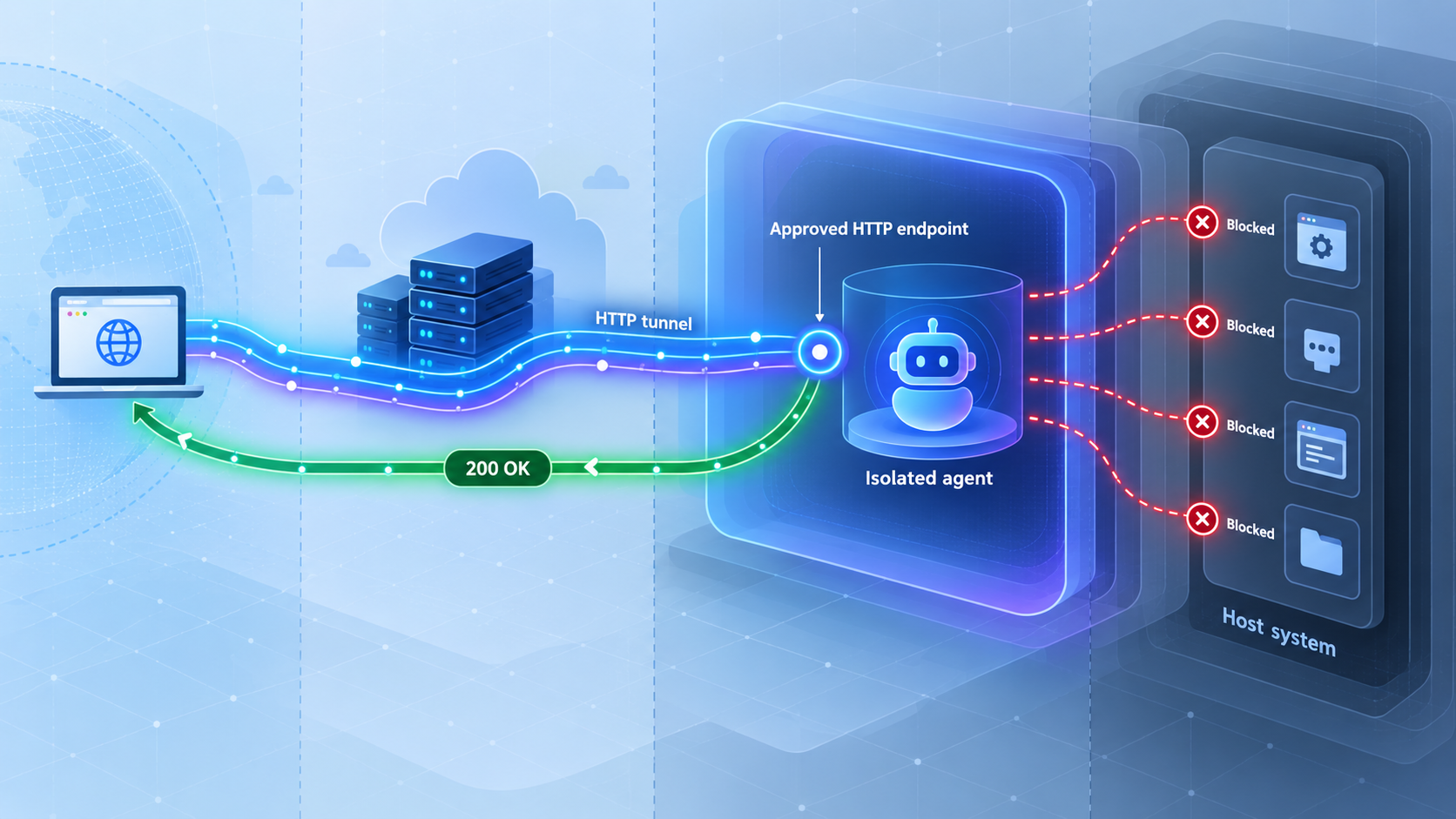
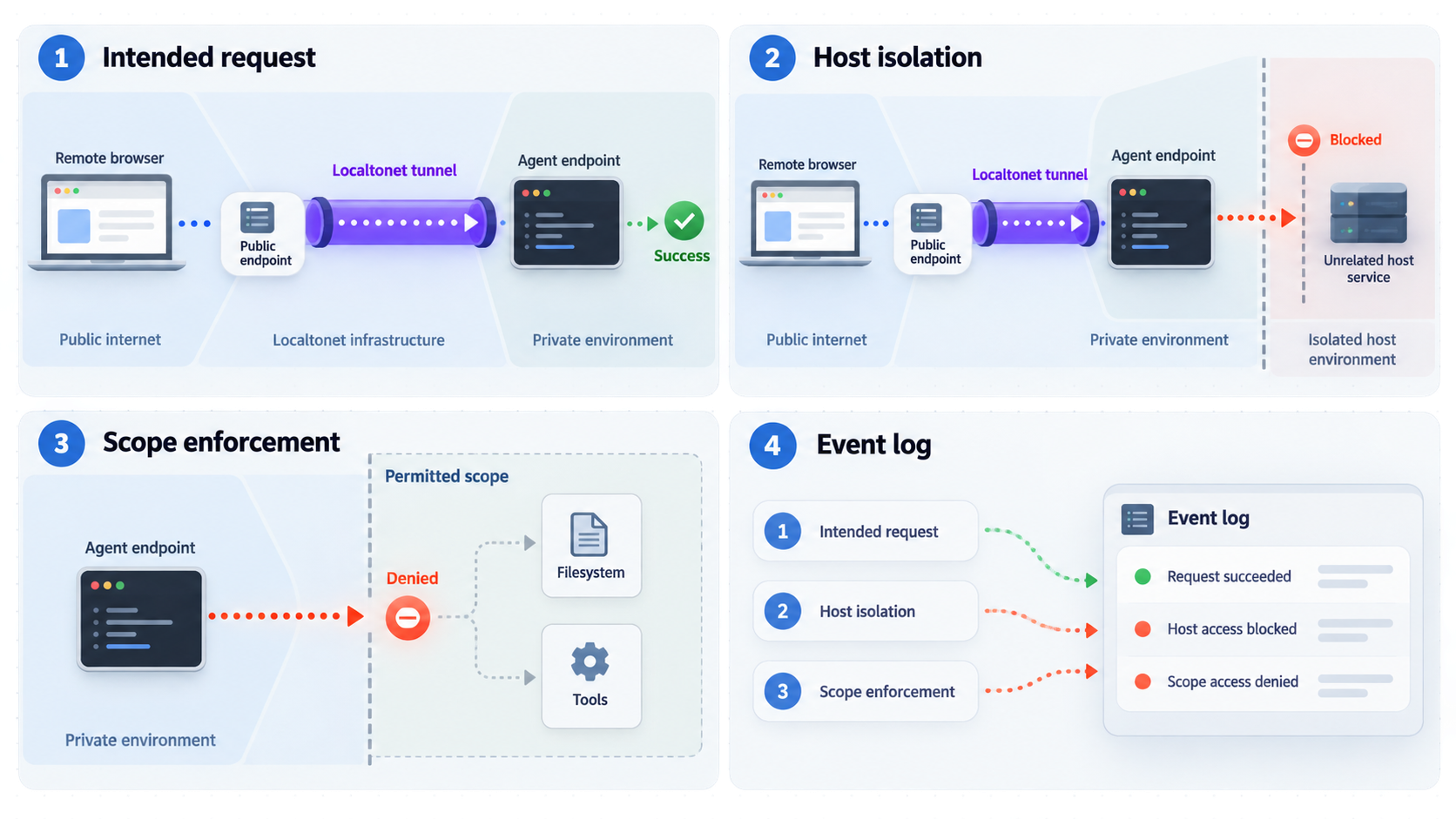
A successful response from the public address proves only that traffic can reach a process. A complete verification checks the local service, the public path, application authorization, filesystem permissions, credential scope, persistence behavior, and shutdown behavior.
Verify the local service first
From the isolated host, use the application's supported client to perform a harmless authenticated request. Confirm that the request reaches the intended process and not an old service on the same port. Repeat the request without valid credentials and confirm that authentication rejects it. Review the resulting logs for exposed secrets, full prompts, private paths, or sensitive response bodies.
Verify the public path
Start the tunnel and connect from a separate device. For HTTP, open the assigned HTTPS address or use an appropriate HTTP client. For raw TCP, use the application's real protocol client with the assigned host and port. A successful socket connection alone does not prove that application authentication or authorization works.
Use controlled negative tests
- Send a request without application credentials and verify that it is denied.
- Use a low-privilege test identity to request an operation outside its role and verify that authorization blocks it.
- Create a non-sensitive canary directory specifically for permission testing, deny the agent account access, and verify that access fails. Do not point this test at personal files or real secrets.
- Inspect source-control permissions through the provider's access settings or API. If an active test is necessary, use only a repository you own and created for authorization testing.
- Place synthetic, non-sensitive fixtures in the work area and verify that approved operations cannot escape into unrelated paths.
- Stop the tunnel and verify that the public endpoint becomes unavailable.
- Disconnect or stop the Localtonet client and confirm that the tunnel becomes unavailable.
- Restart the environment and confirm that only deliberately persistent services and data return.
- Revoke a temporary test credential and verify that the old credential no longer works.
Do not test isolation by asking the agent to read an unrelated personal directory, production secret, or repository you do not own. Use controlled canaries, synthetic credentials, non-sensitive fixtures, and authorized test resources. The goal is to verify enforcement without creating a new disclosure or unauthorized-access event.
Review what the runtime can discover
Inspect the runtime account's readable files, mounted volumes, process environment, network routes, command history, configured tools, and group memberships. Remove temporary archives, copied configuration files, image-building leftovers, package-manager credentials, shell history, and test secrets. Use the operating system's documented administrative tools because these inspection commands differ by platform.
Localtonet platform-wide Token/Tunnel webhooks can report when a token or tunnel in a selected Token Group changes to Connected or Disconnected. The event contains the identifier, action date, type, and status. See the Localtonet webhook documentation for that workflow. These events do not report individual agent requests, authorization decisions, prompts, or tool actions.
Operate the agent and tunnel safely over time
A long-lived agent environment should be managed like another remote service. Assign an owner, record why it exists, define how it is patched, and set a review date. A forgotten test machine can retain vulnerable dependencies, stale tunnels, and valid credentials long after its original task ends.
Coordinate separate lifecycles
The compute host, agent process, application endpoint, Localtonet client, tunnel, credentials, and stored artifacts are distinct components. Stopping one does not necessarily clean up the others.
| Lifecycle component | Start condition | Stop or cleanup action |
|---|---|---|
| Isolated compute | An approved task requires an execution environment | Stop, rebuild, or destroy it according to retention requirements |
| Agent process | Approved work is ready to run | Terminate it and review unfinished actions and logs |
| Application endpoint | A local or remote client needs the service | Stop the listener and clear temporary sessions or queued jobs |
| Localtonet tunnel | Remote connectivity is intentionally required | Stop it after use or delete it when it should not be reused |
| Task credentials | The agent needs an approved external resource | Expire or revoke them and verify that reuse is denied |
| Artifacts and logs | Output is required for review, debugging, or delivery | Export approved material and remove sensitive temporary data |
Rotate and revoke credentials
Rotate a credential when a task changes owners, an environment is cloned, a log may have captured a secret, or compromise is suspected. Test revocation instead of assuming it succeeded. Avoid sharing one identity among several agent hosts because shared credentials make attribution and selective revocation harder.
Patch each layer independently
The operating system, isolation runtime, agent software, language dependencies, application framework, and Localtonet client have separate update cycles. Test changes in a disposable copy where practical. Rebuilding from a documented image is often more reliable than continuing to modify a machine whose state is no longer understood.
Minimize retained context and logs
Agent traces may contain prompts, source fragments, API responses, file paths, command output, and authentication failures. Retain only what is necessary for security, operations, and debugging. Limit access to those records and inspect them before exporting them from the isolated environment.
Handle incidents without destroying evidence
If an agent runs an unexpected command, contacts an unexplained destination, reveals a secret, or modifies data outside its intended scope, follow an established incident response plan. Containment is important, but immediately terminating every process or destroying the host can erase memory, active connections, process state, and other volatile evidence.
Choose containment actions according to the event and your response plan. This may include restricting network access, stopping the public tunnel, isolating the host at the network layer, suspending selected credentials, or preserving a snapshot. When trained responders determine that volatile evidence is required, collect it before powering down or rebuilding. The NIST incident response guidance describes integrating incident response into cybersecurity risk management, while the NIST guide to forensic techniques discusses evidence collection and the importance of handling volatile data deliberately.
Do not apply a universal “kill everything first” rule. Protect people and systems from ongoing harm, preserve evidence that may be needed, record actions and times, revoke exposed credentials when appropriate, inspect affected external systems, and rebuild from a known state after authorized evidence collection is complete.
Troubleshooting common isolation and tunnel problems
The service works locally but not through the tunnel
Confirm that the Localtonet client is connected, the intended tunnel is running, and the configuration targets the exact local IP address and port verified earlier. Creating a tunnel is not the same as starting it. Also confirm that the application is still running and that the client device can reach the target.
The public address opens the wrong application
Recheck the target port and use the operating system's documented tools to identify the process that owns the listener. An old development server may still occupy a familiar port. Stop the unintended process, start the correct service, repeat local verification, and only then test through the tunnel.
The public endpoint is reachable but authorization fails
This usually indicates that connectivity is working while the application is rejecting the request. Review the application's authentication configuration, expected identity, session or header mechanism, credential scope, clock requirements, and server logs. Do not disable authentication merely to make a connectivity test succeed.
The agent can read the canary directory
Stop ordinary task execution and review account permissions, inherited group membership, access-control entries, shared volumes, and mounts. Moving the canary to another path does not repair an account that still has broad filesystem access. Correct the underlying permissions and rebuild the environment if its state cannot be trusted.
The agent cannot install a required tool
Determine whether the task genuinely requires dynamic installation. If it does, install the dependency during a controlled image or host-build phase instead of granting permanent administrative access to the running agent. When dynamic installation is unavoidable, prefer a disposable environment and restrict available credentials and network destinations during package execution.
The tunnel disappears unexpectedly
A Localtonet tunnel is available only while the selected client remains connected and the tunnel is running. Check whether the host stopped, slept, lost outbound connectivity, restarted the client, or stopped the tunnel. Platform-wide Token/Tunnel webhooks can help an operations workflow observe Connected and Disconnected transitions.
A TCP tunnel was created for a browser dashboard
A browser dashboard normally speaks HTTP and should use an HTTP tunnel. Replace the mismatched configuration with the protocol appropriate to the application. Conversely, a native raw TCP protocol should not be assumed to work through HTTP routing.
The service listens only on an unexpected interface
Check the bind address reported by the application and compare it with the Localtonet target. Do not broaden the bind address to every network interface as an automatic fix. If the client is on the same host, a local-only listener may be sufficient. If the client is on another gateway device, configure only the network reachability required between that gateway and the service.
The environment does not recover correctly after restart
Review which components were configured for automatic startup. The host, agent, application, Localtonet client, and tunnel have separate persistence behavior. Record the base image, package versions, configuration schema, service startup procedure, local target, and non-secret credential requirements. Keep secret values outside that deployment record.
Frequently asked questions
Is a container enough to isolate an AI agent?
It depends on the threat model, host, container configuration, and workload. Conventional containers commonly share the host kernel, while a dedicated virtual machine or physical device creates a different boundary. Review mounts, capabilities, management sockets, host permissions, network access, and credentials rather than relying on the word “sandbox.”
Should the Localtonet client run inside the isolated environment?
Running it on the isolated host is often the simplest arrangement because the client can target the local application directly. It may run on another device that can reach the service, but that device and network path then become part of the trusted architecture. Choose the placement that preserves the narrowest practical boundary.
Does a Localtonet tunnel authenticate the agent application?
No. The tunnel provides connectivity to the configured local target. The application must authenticate callers, authorize actions, validate requests, and protect sensitive output. Do not use the public address as a substitute for authentication.
Should I expose an agent dashboard with HTTP or TCP?
Use an HTTP tunnel when the dashboard or API speaks HTTP. Use TCP only when the application's documentation specifies a raw TCP protocol. Identify and test the real protocol, local address, port, and authentication behavior before creating the tunnel.
Can I publish an agent endpoint without a public IP address?
Yes. The Localtonet client establishes an outbound connection to a relay server, so the isolated device does not need its own public IP address. The workflow also avoids inbound router port forwarding, firewall changes, and VPN setup.
Is stopping the tunnel enough when an agent task ends?
No. Stopping the tunnel removes that public connectivity path, but the agent, local service, compute host, credentials, files, and logs may remain active. Stop the relevant processes, preserve approved artifacts, revoke temporary credentials, remove sensitive temporary data, and stop or destroy the host according to the retention plan.
Can Localtonet expose an MCP-based agent service?
Our MCP Gateway tunnel can expose a locally running McpNet Gateway. Follow the dedicated MCP Gateway workflow and confirm current naming and availability in the dashboard rather than treating it as a generic HTTP or TCP configuration.
What is the safest endpoint to expose for a tool-using agent?
Expose a purpose-built authenticated service with a narrow request model and limited actions. A status dashboard, constrained job API, or signed webhook receiver is easier to reason about than a remote shell or arbitrary command API. The endpoint should reveal only the data and operations required by its intended users.
How should I test credential scope safely?
Prefer provider-side permission inspection. If an active test is necessary, use only owned and authorized test resources, such as a repository created specifically for access testing. Never probe an unrelated repository, account, or service to see whether access happens to be denied.
Connect an isolated agent endpoint with Localtonet
Build and verify the agent service inside a separate environment, retain application authentication, and then publish only its required local IP address and port. Start the tunnel only for the approved access window and coordinate cleanup across the tunnel, application, credentials, and compute host.
Get Started Free →

