

Expose Multiple Turborepo Apps with One Tunnel
Route Turborepo apps through one local proxy, then expose the shared origin with a Localtonet HTTP tunnel while preserving paths and HMR.
In this article 10 sections
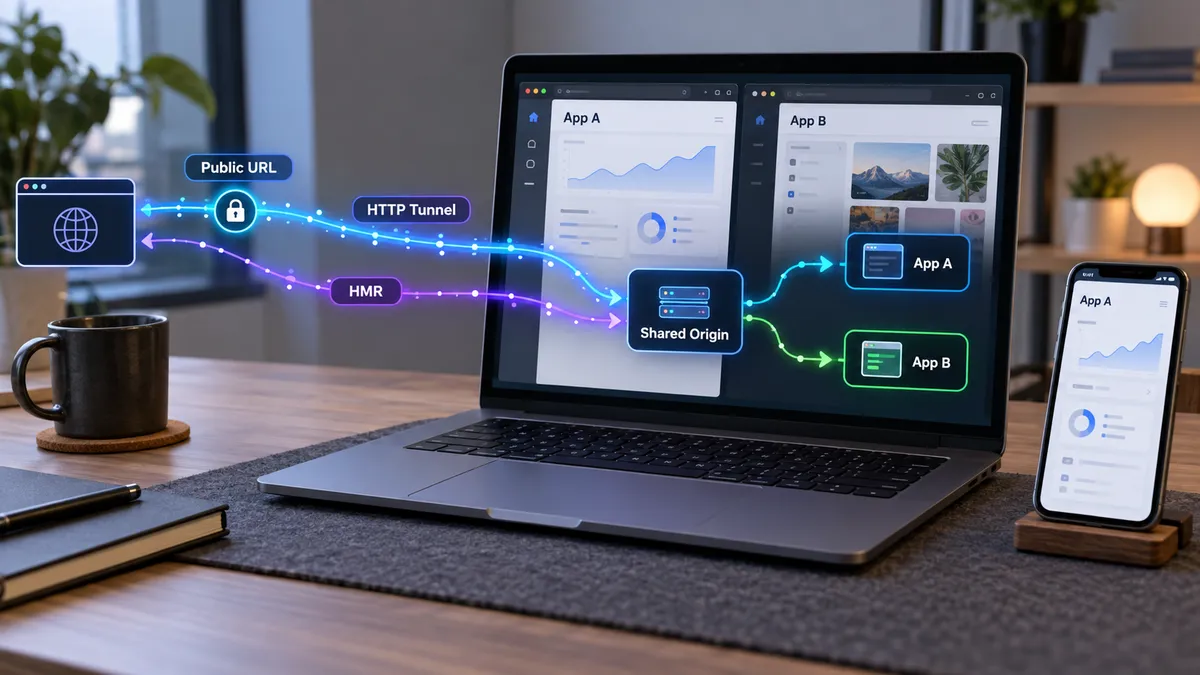
Give several monorepo applications one path-aware public development origin
A Turborepo workspace can run several frontend applications on separate localhost ports while presenting them through one integrated microfrontends proxy. We can then expose that shared proxy port with one Localtonet HTTP tunnel instead of creating a separate public endpoint for every application. This guide explains the complete flow, including route configuration, application base paths, package-to-application matching, local verification, remote testing, and HMR WebSocket troubleshooting. Routing remains the responsibility of Turborepo and the applications, while our tunnel carries traffic to the single local ingress.
📋 What's in this guide
How one tunnel can expose multiple Turborepo applications
The key is to separate two responsibilities that are easy to confuse. Turborepo's integrated microfrontends proxy performs local request routing. A Localtonet HTTP tunnel exposes the proxy's single listening address to the public internet. The tunnel does not need to know which workspace owns /docs, /admin, or an unmatched root route.
Suppose a root application runs on local port 3000, a documentation application runs on 3001, and Turborepo's proxy listens on its default port, 3024. A request for /docs/getting-started first reaches the shared proxy. The proxy matches that path against microfrontends.json and forwards it internally to the documentation server. An unmatched request such as /pricing falls through to the designated default application. With Localtonet, the public HTTP tunnel points only to the proxy at port 3024.
microfrontends.json, matches request paths, and sends each request to the appropriate development application.
Proxying is not redirecting
A reverse proxy handles a request on behalf of another local server while preserving one browser-facing origin. A redirect instead sends an HTTP response instructing the browser to navigate elsewhere. That distinction matters for remote previews. If /docs redirects a visitor to http://localhost:3001, the visitor's browser tries to connect to port 3001 on the visitor's own computer. It does not reach your development machine.
Turborepo's microfrontends proxy is intended to coordinate applications by route, so the browser can remain on the unified origin. Application-generated redirects must still be reviewed. A framework, authentication handler, or custom server can produce an absolute URL that names its original localhost port. The proxy and tunnel cannot automatically reinterpret every application-level URL decision.
Why the original localhost URLs still work
The development servers remain independent processes. If the root app is running at http://localhost:3000, that address can still be opened locally for isolated debugging. The unified proxy at http://localhost:3024 provides an additional path-aware entry point. Creating a tunnel to 3024 does not move, merge, or disable the original ports.
Configure route ownership in microfrontends.json. Configure framework base paths and application redirects inside the relevant applications. Point the Localtonet HTTP tunnel only to the resulting shared proxy port.
| Layer | Example responsibility | What it does not do |
|---|---|---|
| Workspace application | Renders pages, assets, APIs, redirects, and framework-specific HMR endpoints | Does not automatically own the public tunnel |
| Turborepo microfrontends proxy | Routes paths such as /docs/:path* to configured local applications |
Does not replace each application's base-path configuration |
| Localtonet HTTP tunnel | Provides a public HTTP address for the proxy's local IP address and port | Does not decide which monorepo application owns a path |
| Remote browser | Requests pages, assets, and HMR connections from the shared public origin | Cannot use your machine's private localhost:3000 address |
Prerequisites and assumptions
This workflow uses Turborepo's built-in microfrontends support for vertical microfrontends, sometimes called zones. It is appropriate when independently running frontend applications are composed by URL path. It is not the same as Module Federation, which composes JavaScript modules at runtime inside an application.
Before configuring remote access, prepare the following:
- A Turborepo monorepo containing at least two frontend applications with working development scripts.
- A package manager and runtime compatible with the applications in the repository.
- A root or parent application that can serve as the default destination for unmatched routes.
- Known path ownership for each secondary application, such as
/docsor/admin. - Framework configuration that can serve routed applications beneath their intended base paths.
- The Localtonet client installed and running on the computer that can reach the Turborepo proxy.
- A Localtonet device authentication token selected securely through our platform. Do not place the token in source code, committed configuration, screenshots, or logs.
If you want a working reference workspace rather than adapting an existing repository, Turborepo documents a with-microfrontends example that can be selected with create-turbo:
npx create-turbo@latest -e with-microfrontends
The exact package-manager invocation for scripts can vary between repositories. This guide uses the official turbo dev task name because that is the command documented for starting the integrated proxy. If your repository wraps that task in another package script, use the repository's established command while ensuring it ultimately runs the relevant Turborepo development tasks.
First verify every route, asset, redirect, and HMR connection through the local shared origin. A tunnel can make a working local ingress reachable, but it cannot repair an incorrect route pattern, a failed workspace task, a missing base path, or a development server that never started.
Configure Turborepo's integrated microfrontends proxy
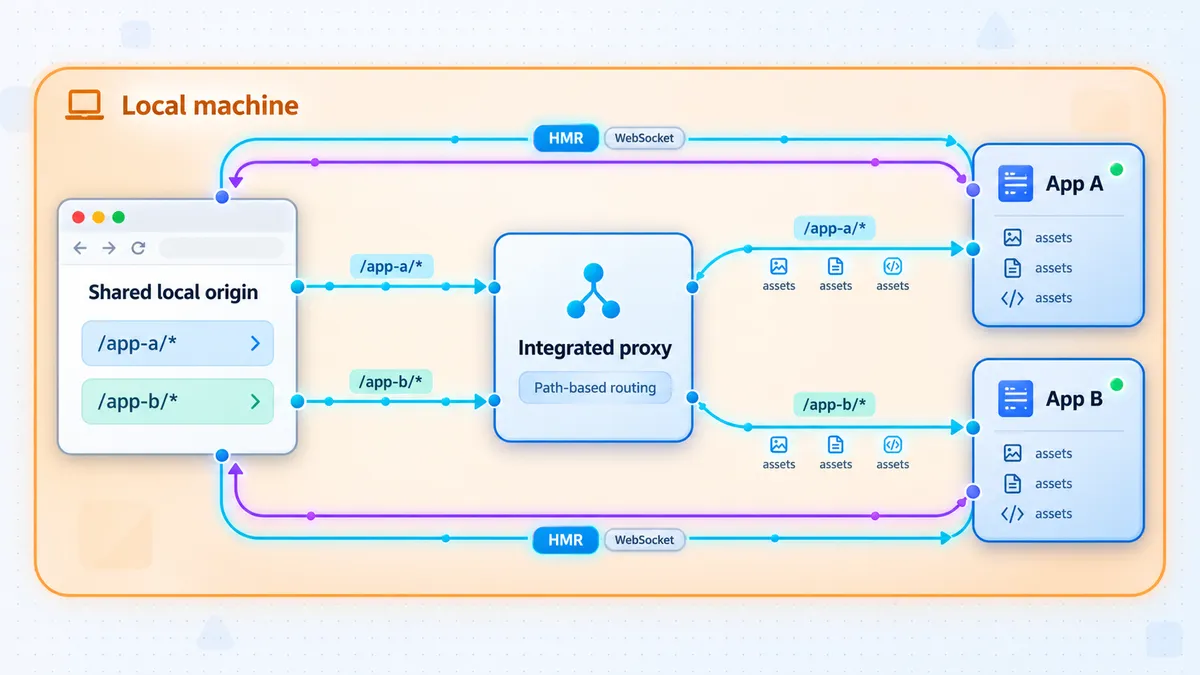
The official setup sequence has four parts: create microfrontends.json, set application development ports, configure framework base paths where required, and run turbo dev. The following example uses a default application named web and a path-routed application named docs.
Create microfrontends.json in the parent application
Place the configuration in the application that should receive all requests not matched by another application's routing rules. Define each application, its local development port, and route patterns for every non-default application. Exactly one application should omit routing; that application becomes the default destination.
Make each development script use its assigned microfrontend port
Configure each application so Turborepo can inject or retrieve the port declared for it. The documented Next.js example uses turbo get-mfe-port, while the documented Vite example reads TURBO_MFE_PORT.
Configure base paths in routed applications
Tell each framework that its browser-facing path begins below the shared origin. For example, an application routed beneath /docs should generate pages and assets for that prefix rather than assuming it is mounted at /.
Run turbo dev
Start the integrated proxy and configured application development tasks. Turborepo starts the proxy on its configured port, injects the application port information, runs development tasks, and routes incoming requests according to the path patterns.
1. Define applications and routes
A minimal configuration for web and docs looks like this:
{
  "$schema": "https://turborepo.dev/microfrontends/schema.json",
  "applications": {
    "web": {
      "development": {
        "local": {
          "port": 3000
        }
      }
    },
    "docs": {
      "development": {
        "local": {
          "port": 3001
        }
      },
      "routing": [
        {
          "paths": [
            "/docs",
            "/docs/:path*"
          ]
        }
      ]
    }
  }
}
Here, docs owns the exact /docs route and all descendant paths. The web application has no routing entry, so it receives every unmatched request. Only one application can be the unmatched-route default.
If an explicit local port is omitted, Turborepo can generate a deterministic port based on the application name in the range from 3000 through 8000. Explicit ports are often easier to inspect while diagnosing a shared-ingress setup, but they must not collide with other processes.
Understand path matching before adding routes
Turborepo route paths are case-sensitive. /Blog and /blog are different routes. Trailing slashes are normalized, so /home and /home/ match the same route.
| Pattern type | Example | Matching behavior |
|---|---|---|
| Exact | /pricing |
Matches that route as written |
| Single-segment parameter | /blog/:slug |
Matches /blog/hello, but not /blog/hello/world |
| Zero-or-more wildcard | /docs/:path* |
Matches /docs, /docs/intro, and deeper descendants |
| One-or-more wildcard | /api/:path+ |
Matches /api/users and deeper paths, but not an empty /api suffix |
| Nested parameters | /api/:version/users/:id |
Matches a structured route containing both parameter segments |
Include both the path root and descendants when the route needs both and the selected pattern does not already cover them as intended. Test exact routes, nested pages, refreshes, asset requests, and error pages. A home page that renders successfully does not prove that every child route is assigned correctly.
Keep application names aligned with package names
By default, an application key in microfrontends.json is used to match the name in that application's package.json. A mismatch can prevent Turborepo from associating a configured application with the expected development task.
Compare the key character for character, including any package scope. Do not assume that the folder name is necessarily the package name. If the workspace lives in apps/docs but its package name is different, verify the actual name field before diagnosing ports or tunnel behavior.
2. Connect development scripts to Turborepo's assigned ports
For a Next.js application, the documented script uses turbo get-mfe-port:
{
  "scripts": {
    "dev": "next dev --port $(turbo get-mfe-port)"
  }
}
That command substitution syntax is shell-dependent. It is shown because it is the documented example, but repositories that must run across different shells should verify compatibility in their actual development environment rather than assuming identical behavior everywhere.
For a Vite application, the documented script reads the injected environment variable:
{
  "scripts": {
    "dev": "vite dev --port $TURBO_MFE_PORT"
  }
}
Again, environment-variable expansion syntax can differ by shell and operating system. The essential requirement is that the application listen on the port Turborepo assigned to it. If startup output reports a different port because the requested one was occupied, routing may still point to the expected port and fail.
3. Set application base paths
Path routing and framework base paths solve related but different problems. The proxy decides that /docs/guide belongs to the docs server. The docs application must also generate navigation, scripts, styles, images, and framework endpoints with the correct browser-facing prefix.
For a Next.js application mounted beneath /docs, the documented configuration is:
import type { NextConfig } from "next";

const nextConfig: NextConfig = {
  basePath: "/docs",
};

export default nextConfig;
For a Vite application mounted beneath /admin, the documented configuration is:
import { defineConfig } from "vite";

export default defineConfig({
  base: "/admin",
});
Do not copy one framework's setting into another framework without checking how that framework handles base URLs, development assets, router history, and HMR. The exact option differs across frameworks. This guide can establish the requirement, but it cannot safely invent configuration for frameworks not represented by verified examples.
Also inspect custom application code. Root-relative URLs such as /logo.svg refer to the shared origin's root, not automatically to /docs/logo.svg. Whether that is correct depends on which application owns the asset. Hard-coded absolute URLs such as http://localhost:3001/api are especially problematic for remote users and should be replaced with path-aware or environment-aware application configuration where appropriate.
4. Start the complete development topology
turbo dev
In the documented default configuration, the integrated proxy listens at http://localhost:3024. Turborepo also runs the configured application development tasks and injects TURBO_MFE_PORT into those tasks. If your configuration changes the proxy port, use the actual configured value throughout local verification and Localtonet setup rather than assuming 3024.
Verify the shared origin locally
Treat local verification as a release gate for the tunnel. Open the proxy origin, not only the individual framework ports. The proxy view is the behavior a remote visitor will receive.
Test the default application
Open http://localhost:3024/ and several unmatched routes owned by the default application. Confirm that HTML, styles, scripts, images, client-side navigation, and full-page refreshes all work. A route may succeed through client-side navigation but fail after refresh if the server or proxy does not recognize it.
Test every path-routed application
Open the exact mount point, such as http://localhost:3024/docs, followed by at least one nested route. Test links between the default application and the routed application in both directions. Watch the browser address bar and ensure navigation remains under the shared localhost:3024 origin rather than switching to localhost:3000 or localhost:3001.
Inspect browser network traffic
Use the browser's network tools to look for failed scripts, styles, image requests, API calls, redirects, and persistent HMR connections. A routed page can appear partially correct while silently requesting assets from the wrong base path. A 404 for a script or stylesheet usually points to route or base-path configuration, not to the future tunnel.
Confirm the original development ports separately
If a routed application fails through the proxy, open its original local port from the development machine. If it fails there too, fix the application task first. If it works directly but not through 3024, focus on application matching, the declared local port, route patterns, and base-path behavior.
Direct app port failure indicates an application or task problem. Direct app success combined with proxy failure indicates a Turborepo routing or base-path problem. Local proxy success combined with public failure indicates that the investigation should move to the tunnel target, public-origin behavior, or remote-only application assumptions.
Expose the Turborepo proxy with one Localtonet HTTP tunnel
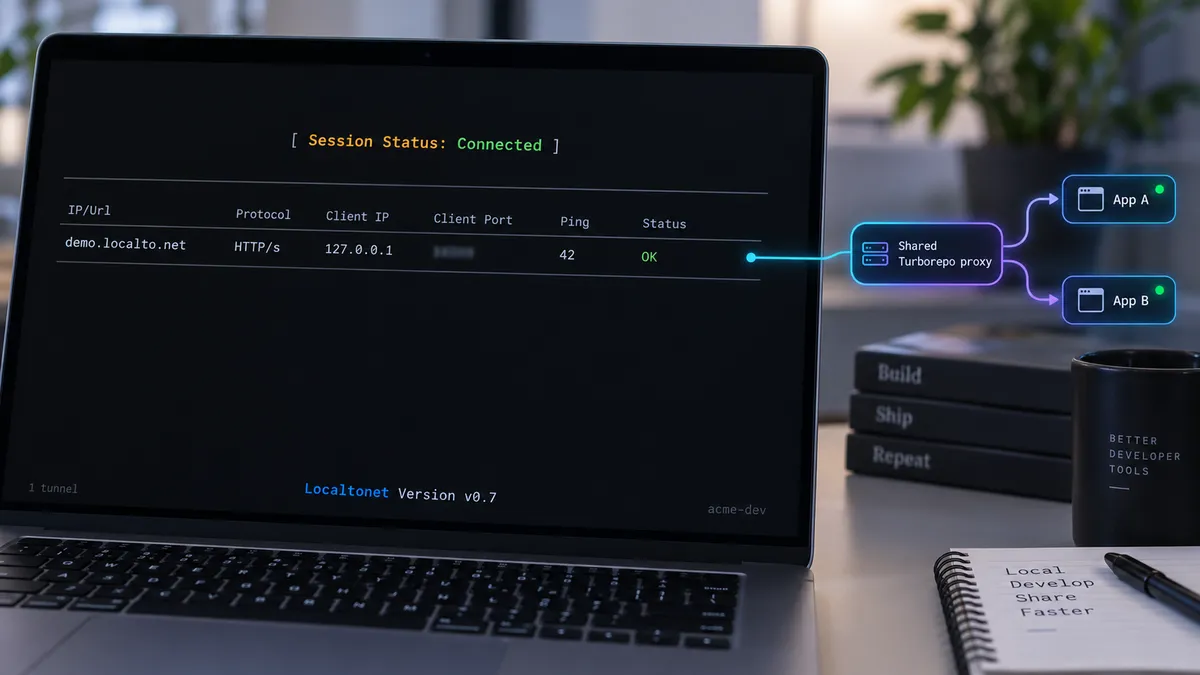
Once the complete workspace works through its shared local origin, add Localtonet as a distinct next step. Our client runs on the computer that can reach the proxy and establishes an outbound connection to a Localtonet relay server. This avoids inbound router port forwarding, firewall changes, VPN setup, and the need for a public IP address.
The maintained workflow for creating and running a tunnel is as follows:
Install and run the Localtonet client
Run the client on the same computer as Turborepo or on a device that can reach the proxy's local listening address. Current installation details vary by operating system and client version, so use the current Localtonet installation interface rather than an unverified command copied into the repository.
Authenticate or select the device
Use the device-specific authentication token through our platform. Keep it secret and do not commit it to the Turborepo workspace. Confirm that the selected device is connected before expecting a tunnel to become available.
Select an available relay server
Choose a currently available server or region from the dashboard. Available values can vary, so this guide intentionally does not hardcode a server code.
Create an HTTP tunnel to the shared proxy
Set the local target to the IP address and port where the Turborepo proxy is reachable. For an unchanged local example, the port is 3024. Do not target 3000 or 3001 if the goal is to expose all configured applications through the integrated proxy.
Start the tunnel
Creating a tunnel does not mean it is running. Use the Start button and wait until the selected client is connected and the tunnel is running. The resulting public HTTPS address may use a random subdomain, a supported selected subdomain, or a custom domain according to the chosen process type and current availability.
Use the assigned public address, then stop or delete it when finished
Open the assigned public URL and test every application route. The endpoint remains available only while the selected client or device is connected and the tunnel is running. Stop the tunnel after the preview session, or delete it if the configuration is no longer needed.
For the current product workflow and interface details, consult our Localtonet HTTP tunnel documentation. Exact server selections, client installation details, domain requirements, and option availability should be taken from the current dashboard rather than guessed.
If the Localtonet client runs on the same machine as the proxy, use a local target that the client can reach. If it runs on another device, the proxy must listen on an address reachable from that device, and local network policy must permit the connection. Do not broaden a development server's bind address unnecessarily, and do not assume that changing it is safe on an untrusted network.
Verify routing, redirects, assets, and HMR remotely
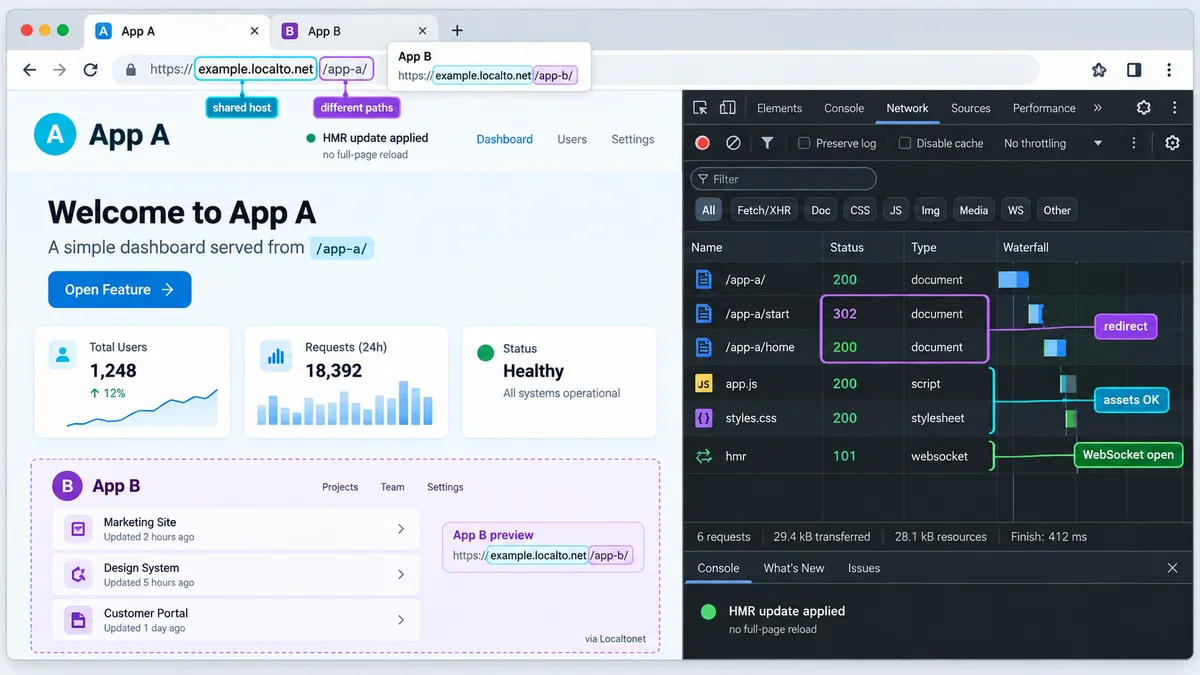
Remote verification should repeat the local test matrix using the assigned public HTTPS origin. Test from a browser that is not relying on your development machine's localhost environment. A separate device or isolated browser session can reveal absolute localhost URLs, cached assets, authentication assumptions, and origin-dependent behavior.
Confirm every route through one hostname
Open the public root, each exact application mount point, and representative nested paths. All should remain on the same public hostname while their paths change. If the address bar changes to a private address, a localhost port, or another unintended host, inspect the application's redirect or URL-generation logic.
Refresh nested pages directly
Paste a nested public URL into a new browser tab instead of reaching it only through client-side navigation. This confirms that a direct HTTP request is routed correctly. Repeat the test with and without a trailing slash where relevant, remembering that Turborepo normalizes trailing slashes for route matching.
Review assets and API requests
Filter the browser network panel for non-successful responses. Check whether routed applications request assets beneath the configured prefix. Also confirm that API calls use an address accessible to the remote browser. An API URL containing localhost points to the remote user's own machine unless that request is intentionally made server-side on your development host.
Verify HMR rather than assuming it works
Turborepo's integrated proxy is designed to support hot module reloading and WebSocket connections during local development. For the remote workflow, edit a visible component in each application and observe whether the remote page updates without a full reload. Inspect the browser network tools for the HMR connection and the development terminal for reconnect loops or rejected upgrades.
The HMR client must derive or receive an origin that is valid from the remote browser. A client that tries to connect to ws://localhost:3001 cannot reach your workstation. A public page loaded over HTTPS may also reject an insecure WebSocket URL as mixed content. Framework-specific HMR host, protocol, path, and client-port controls differ, so use settings documented by the framework and avoid guessing option names.
HTML and ordinary assets can work while the HMR WebSocket fails. Verify an actual source edit in every routed application. Current behavior can depend on the framework, its HMR client configuration, the selected public origin, and the active tunnel implementation, so do not treat remote HMR as guaranteed until this test succeeds.
Operate the shared preview safely
Use a predictable startup order
Start the repository's development workflow and wait until the Turborepo proxy and required applications are ready. Test the shared local origin. Then start the Localtonet tunnel. This order prevents remote reviewers from receiving avoidable connection errors while tasks are still compiling.
At shutdown, stop the public tunnel first when practical, then stop turbo dev. A tunnel with no listening local target cannot serve the preview, even if its dashboard configuration still exists.
Remember that one process failure may affect only one path
Because applications remain independent, one failed development task may break /docs while the default application continues to work. Do not interpret a successful root page as proof that the full monorepo is healthy. Monitor the terminal output for each package and maintain a route checklist for remote review.
Use fallbacks intentionally
Turborepo supports an optional development.fallback target for an application that is not running locally. This is commonly useful when running a subset with a command such as turbo dev --filter=web and routing missing applications elsewhere.
A fallback changes what remote reviewers see, so make that behavior explicit. They may otherwise believe they are testing local code when a route is actually being served by the fallback target. Fallback destinations may also have different cookies, authentication, data, CORS behavior, and deployment versions.
Do not expose every application port by default
The shared proxy is the intended ingress for this design. Separate tunnels to every app add public endpoints and can bypass the path composition being tested. Create additional exposure only when there is a specific debugging requirement, and stop it afterward.
Troubleshooting the complete request path
| Symptom | Likely layer | What to inspect |
|---|---|---|
| An app fails on its original local port | Application task | Workspace script, build error, dependency state, and port conflict |
| App works directly but not through port 3024 | Turborepo proxy | Application key, package name, configured port, and route pattern |
| Page renders but assets return 404 | Application configuration | Framework base path and hard-coded root-relative asset URLs |
| Local proxy works but public URL does not | Localtonet target or lifecycle | Connected device, running tunnel, target IP, target port, and proxy process |
| Remote browser redirects to localhost | Application redirect logic | Absolute URL generation, callback URL, environment variables, and forwarded-origin handling |
| Remote page loads but HMR reconnects repeatedly | HMR origin or WebSocket path | Browser connection URL, secure protocol, host, path prefix, and framework HMR configuration |
The package starts outside Turborepo but not with turbo dev
Verify that the application key in microfrontends.json matches the package's declared name. Then inspect whether the development script can consume the injected port in the shell where it runs. Confirm that the assigned port is available and that the framework does not silently choose another port after a collision.
A route opens the default application instead of the intended app
Check capitalization, the exact mount path, and wildcard semantics. A single-segment parameter does not match multiple nested segments. Confirm that the secondary application actually has a routing array and that only the intended default application omits one.
The page works at the app port but assets fail at the shared origin
This strongly suggests a base-path issue. Inspect the failed request URL. If a docs application mounted at /docs requests a private asset from /assets/app.js, that request may be handled by the default application. Configure the framework's documented base behavior and review custom URL construction.
The public root works, but a nested public path returns an error
First request that same path through http://localhost:3024. If it fails locally, correct the Turborepo route or application handling. If it succeeds locally, compare public and local network traces for redirects, host-sensitive middleware, callback validation, or absolute URLs.
The Localtonet endpoint is unavailable
Confirm all parts of the lifecycle. The selected client must be connected, the Turborepo proxy must still be listening, and the tunnel must have been started after creation. Confirm that the tunnel targets the proxy port rather than an individual application port. The public endpoint is available only while the selected client is connected and the tunnel is running.
HMR requests the wrong host or protocol
Inspect the actual browser connection URL before changing configuration. If it names a local app port, configure the framework so its client uses the browser-facing public origin or an explicitly appropriate HMR endpoint. If an HTTPS page requests an insecure ws:// endpoint, the browser may block it. Use the framework's current documented controls because option names and behavior are not universal.
Also verify the WebSocket path. A base path can affect where the HMR client expects its endpoint. If the browser requests a path owned by the wrong application, adjust the framework and route design so the proxy sends that path to the correct server. Avoid adding broad routing patterns that accidentally capture unrelated applications merely to hide the symptom.
Security boundaries for development previews
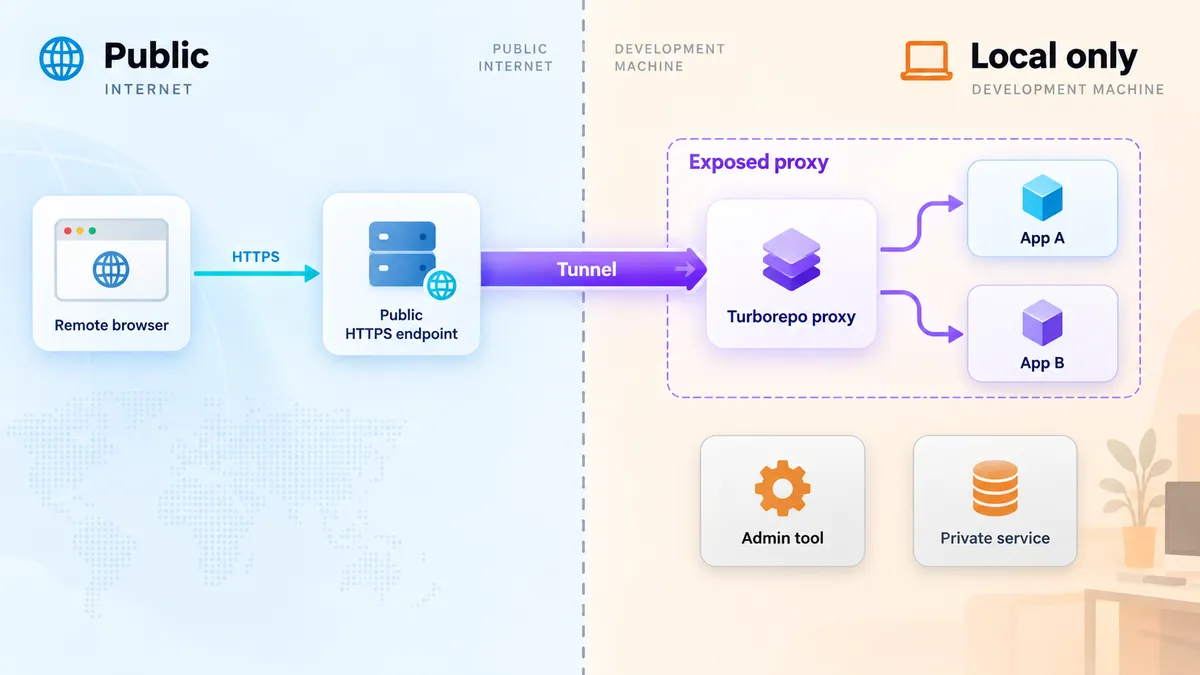
A public development URL can expose more than the visible page. Development servers may provide source maps, stack traces, error overlays, internal route names, test data, or debugging endpoints. Before starting the tunnel, review what every path-routed application serves and remove credentials or sensitive data from the development environment.
- Use authentication and application-level access controls when a preview should not be generally accessible.
- Apply least privilege to test accounts and backend credentials.
- Do not embed the Localtonet device token in package scripts or repository files.
- Do not expose administrative routes merely because they share the proxy.
- Review fallbacks carefully because they may send requests to a non-local environment.
- Stop the tunnel when the review session ends.
- Delete obsolete tunnel configurations when they are no longer needed.
Localtonet removes the requirement for inbound router port forwarding, firewall changes, VPN setup, or a public IP address by having our client establish an outbound relay connection. That connectivity model does not replace application authentication or authorization. The person who receives a working public URL can send requests to whatever the shared local ingress serves.
A route omitted from navigation may still be directly requestable. Inventory sensitive paths, APIs, debug pages, and files before sharing the URL. Path routing is request dispatch, not access control.
Frequently asked questions
Do I need one Localtonet tunnel for every Turborepo application?
No. When Turborepo's integrated microfrontends proxy already routes all applications through one local port, one HTTP tunnel can target that shared proxy. Separate tunnels are only needed if you intentionally want separate public entry points or are not using a shared local ingress.
Does the Localtonet tunnel route /docs and /admin to different localhost ports?
Not in this architecture. Turborepo's local proxy owns those path rules. The Localtonet HTTP tunnel points to the proxy's single IP address and port and exposes the resulting shared origin.
Can I still open each application on its original localhost port?
Yes. The applications remain independent development servers. Their direct local ports are useful for debugging, while the Turborepo proxy provides the composed local origin used by the tunnel.
Why does a remote redirect to localhost fail?
In a browser, localhost always refers to the browser user's own computer. An application redirect to http://localhost:3001 therefore leaves the shared public origin and cannot reach your workstation. Configure application-generated redirects and callback URLs for the browser-facing origin.
Is setting a route in microfrontends.json enough for a path-mounted app?
Not always. The proxy route selects the application, but the framework may still need a base-path setting so it generates correct page, asset, and development endpoint URLs. Next.js and Vite use different configuration options for this purpose.
Does remote HMR automatically work when the page loads?
A successful page load does not prove HMR. Turborepo's local microfrontends proxy supports HMR and WebSocket connections, but remote behavior also depends on the framework's generated HMR host, protocol, port, and path, plus the active public endpoint. Make a source edit and verify the actual browser connection.
What happens if one workspace application stops?
Routes belonging to that application may fail while other routes continue to work. If a development fallback is configured, requests may instead go to that fallback. Monitor each package task and disclose fallback use to reviewers.
Will the public URL remain available after I close the Localtonet client?
No. The tunnel is available only while the selected client or device is connected and the tunnel is running. The Turborepo proxy and required application tasks must also remain active.
Share your Turborepo preview through one controlled ingress
Verify the monorepo through Turborepo's shared local proxy, then use a Localtonet HTTP tunnel to provide one public address for the complete path-routed development experience.
Get Started Free →
Localtonet is a secure multi-protocol tunneling and proxy platform designed to expose localhost, devices, private services, and AI agents to the public internet supporting HTTP/HTTPS tunnels, TCP/UDP forwarding, mobile proxy infrastructure, file server publishing, latency-optimized game connectivity, and developer-ready AI agent endpoint exposure from a single unified control plane.

