

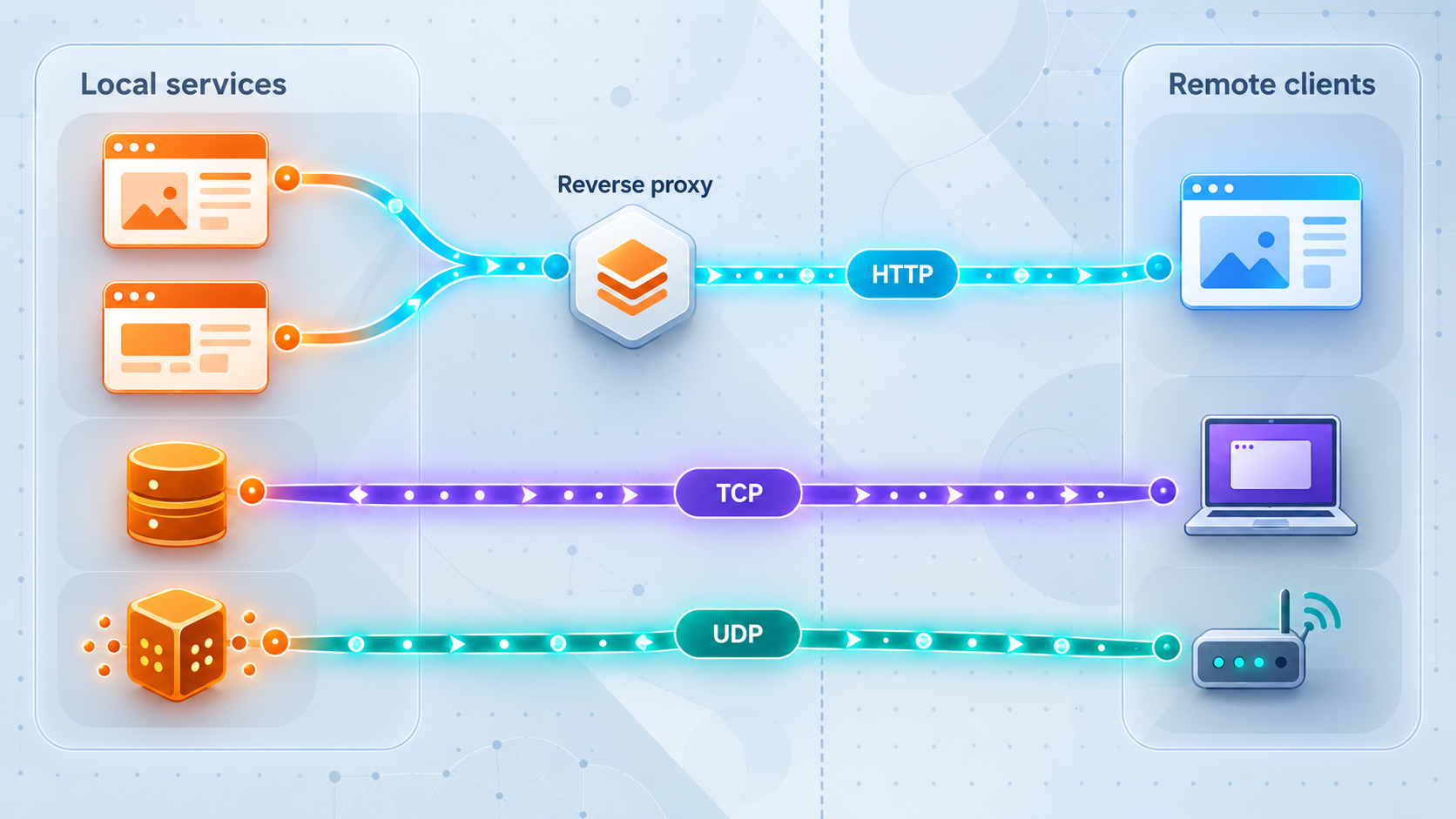
Choose the right boundary for every local service
Publishing several applications from one device or LAN creates an architectural choice: place compatible web applications behind one local reverse proxy and expose that proxy through one HTTP tunnel, or give services separate protocol-appropriate tunnels. This guide explains how to decide using routing needs, protocol compatibility, security boundaries, failure isolation, ownership, observability, and lifecycle requirements. We also show how to inventory services, build either design with Localtonet, verify the public paths, and avoid exposing internal administration surfaces by accident.
📋 What's in this guide
One reverse proxy or multiple tunnels?
The short answer is to use one local reverse proxy when several compatible HTTP applications share an appropriate trust boundary and benefit from centralized host or path routing. Use separate Localtonet tunnels when services require different protocols, independent access policies, distinct owners, separate maintenance windows, clearer fault boundaries, or direct forwarding to different local targets. Many real deployments should use a hybrid design rather than forcing every service into one model.
A reverse proxy and a tunnel solve different parts of the connectivity problem. A local reverse proxy accepts HTTP requests and selects an upstream web application according to rules such as the requested hostname or URL path. A Localtonet tunnel publishes a service reachable by the connected client through a public URL or public host and port. The client establishes an outbound connection to our relay, so the workflow does not require inbound router port forwarding, a public IP address, VPN setup, or inbound firewall changes.
In the consolidated pattern, the Localtonet HTTP tunnel points to the reverse proxy's local IP address and listening port. The reverse proxy then dispatches each request to the appropriate local web application. In the separate pattern, each tunnel points directly to the IP address and port of its own service. TCP, UDP, and combined UDP/TCP tunnels preserve the appropriate port-oriented service model instead of trying to force non-HTTP traffic through HTTP routing.
The number of public tunnel configurations does not establish how connections are implemented inside our platform. This guide does not assume or claim that Localtonet uses QUIC, HTTP/3 Extended CONNECT, a particular stream-multiplexing protocol, or one transport connection per service. Base the decision on service behavior, security, routing, and operations rather than an unsupported assumption about internal transport.
Inventory every service before choosing a design
Start with an inventory rather than a tunnel count. For each service, record the protocol clients actually use, the local target, the intended audience, the authentication mechanism, the data sensitivity, the owner, and whether the service must be available independently. This prevents a common mistake: grouping applications merely because they happen to run on the same computer.
Device location is not a security boundary. A public documentation site, an internal monitoring dashboard, a development webhook receiver, and a database may all run on one host while serving completely different audiences. Publishing all of them through one route simply because they share a machine can make authorization rules harder to understand and increase the impact of a routing mistake.
Identify the real application protocol
A browser interface or HTTP API is a natural candidate for an HTTP tunnel or a reverse proxy placed behind one. A protocol that merely uses a TCP port is not automatically an HTTP application. Database connections, custom binary protocols, game servers, and many remote administration protocols generally need raw port forwarding appropriate to their actual protocol. Datagram-oriented applications need UDP support. A service that genuinely requires both TCP and UDP on the same logical port can be evaluated for a combined UDP/TCP tunnel.
Do not infer the protocol from a port number alone. Confirm it from the service configuration and client documentation. Also confirm whether an application uses more than one port, redirects clients to another hostname, or advertises an internal address in its responses. Those behaviors can affect the final design even when the initial connection succeeds.
Map reachability from the Localtonet client
The Localtonet client must run on a device that can reach each selected local target. A target may be on the same machine or elsewhere on a reachable LAN. Before creating a tunnel, test the service from the client device itself. If the client cannot connect locally because of a host firewall, incorrect bind address, name-resolution problem, or network segmentation rule, creating a public tunnel will not repair that local path.
Classify audience and exposure
Document whether a service is intended for anonymous public use, authenticated customers, employees, automation, a specific partner, or temporary testing. Then record the control that enforces that decision. Application authentication, reverse-proxy policy, source restrictions where available, and narrowly scoped service permissions are more meaningful than relying on an obscure URL or unexpected port.
| Inventory field | Question to answer | Why it affects the architecture |
|---|---|---|
| Protocol | Is the client speaking HTTP, TCP, UDP, or both TCP and UDP? | It determines which tunnel family can correctly carry the service. |
| Local target | Which IP address and port does the service use? | The Localtonet client or local reverse proxy must be able to reach that target. |
| Audience | Who should be able to connect? | Services for different audiences may need separate entry points and access policies. |
| Authentication | Where are identity and authorization enforced? | A shared route must not accidentally weaken a service's existing controls. |
| Owner | Which team approves changes and responds to incidents? | Separate ownership often favors independent configurations and lifecycles. |
| Availability | Can this service be stopped independently? | A shared proxy can couple availability and maintenance if not designed carefully. |
| Sensitivity | What data or administrative capability does the service expose? | Higher-risk services benefit from stronger isolation and a smaller exposed surface. |
| Routing behavior | Does the application require a specific hostname, path prefix, or redirect target? | The reverse proxy and application must agree on externally visible request details. |
Development servers, database consoles, router panels, monitoring dashboards, and reverse-proxy administration pages may be safe only on a trusted local network. Before exposing any target, confirm that it is intentionally public, protected by suitable authentication and authorization, and configured according to the software vendor's production guidance.
Compare the three practical publishing patterns
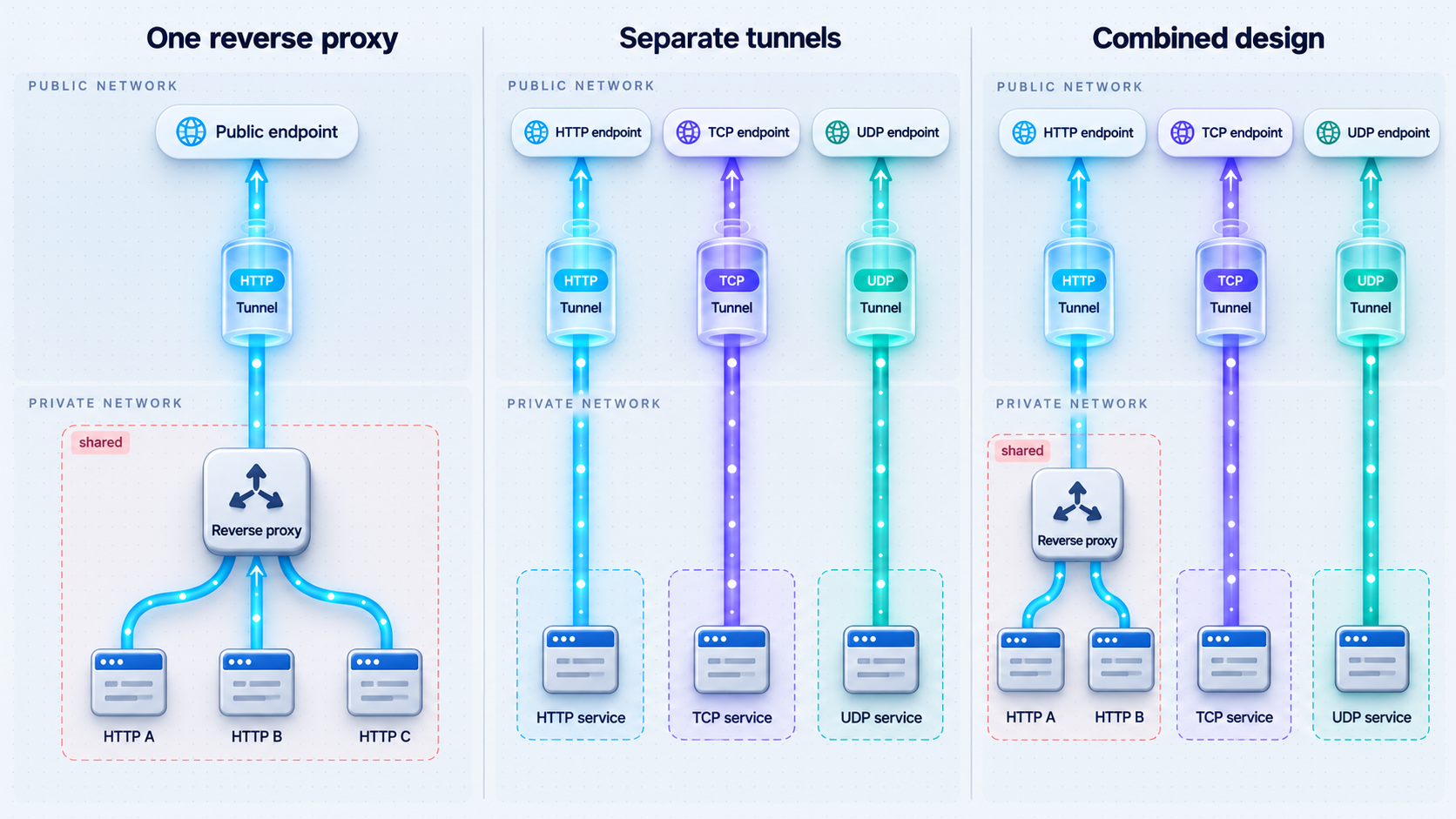
Pattern 1: One HTTP tunnel to one local reverse proxy
In this model, compatible HTTP applications remain on their existing local addresses and ports. A local reverse proxy listens on one target address and routes incoming requests to those applications. One Localtonet HTTP tunnel points to that proxy. Public requests therefore pass through the Localtonet tunnel, then the local reverse proxy, and finally the chosen application.
This pattern is useful when web applications belong to the same operational environment and administrators want one place to manage request routing. For example, a team may want the root path to serve a user interface and a separate path to reach an API. Alternatively, the proxy may route according to hostname. The exact capabilities and syntax depend on the reverse-proxy software, so use its official configuration model and verify how it handles forwarded request information, upgrades, streaming, request sizes, timeouts, and redirects.
Consolidation reduces the number of Localtonet tunnel configurations required for that compatible group. It can also provide a clear local ingress layer where routing policy is reviewed. However, the proxy becomes part of every request path. A broken configuration, unavailable proxy process, or overly broad route can affect multiple applications at once.
Path-based routing deserves particular care. Some applications assume they are hosted at the root path and generate absolute links, callback URLs, cookies, redirects, or static asset paths accordingly. Placing such an application under a prefix may produce a page that loads partially or redirects to the wrong location. Host-based routing often avoids path-prefix rewriting, but it still requires the application to recognize the external hostname and security context correctly.
Pattern 2: Separate tunnels for separate services
In this model, each application receives a tunnel appropriate to its protocol. A web application gets an HTTP tunnel. A raw TCP service gets a TCP tunnel. A datagram service gets a UDP tunnel. A service that genuinely requires both can use the combined UDP/TCP family where appropriate. Each tunnel points to the relevant local IP address and port reachable from the selected client device.
Separate tunnels create explicit service boundaries. One tunnel can be stopped without intentionally stopping the others, and each public endpoint maps more directly to a local target. That clarity is valuable when services have different owners, maintenance schedules, incident procedures, or exposure periods. It also avoids inserting an HTTP reverse proxy in front of traffic that is not HTTP.
The tradeoff is a larger configuration inventory. Operators must name, document, review, start, stop, and monitor multiple tunnels. Public endpoints must be distributed to the correct users and clients. That overhead is usually worthwhile when it reflects genuine security or operational separation, but it can be unnecessary for a tightly integrated set of low-risk web applications managed as one unit.
Pattern 3: A hybrid architecture
A hybrid design is often the most accurate representation of a multi-service environment. Place a related group of public web applications behind one local reverse proxy and expose it through an HTTP tunnel. Give an internal administration application its own HTTP tunnel so its lifecycle and controls remain separate. Publish a non-HTTP service through TCP or UDP according to its protocol. Leave services with no legitimate remote-access requirement unexposed.
Hybrid design avoids false uniformity. It recognizes that sharing a server does not require sharing a public boundary, while also avoiding one tunnel for every small HTTP component when central routing is genuinely helpful.
| Pattern | Best fit | Main advantage | Main caution |
|---|---|---|---|
| One reverse proxy and one HTTP tunnel | Related HTTP applications with shared ownership and policy | Centralized HTTP routing with fewer public tunnel configurations | The proxy is a shared dependency and routing mistakes can affect several applications |
| Separate protocol-appropriate tunnels | Different protocols, owners, audiences, or maintenance schedules | Clear targets, independent lifecycle control, and stronger service separation | More endpoint and configuration inventory to operate |
| Hybrid publishing | Mixed environments containing related web apps and distinct services | Consolidation where useful and isolation where necessary | Requires a documented rule for deciding which boundary each service belongs to |
A practical decision sequence
First, separate HTTP services from non-HTTP services. Non-HTTP traffic should not be placed behind an HTTP reverse proxy unless the application and proxy explicitly support a documented translation or gateway mode. Second, divide the HTTP services by trust boundary and ownership. Third, identify applications that cannot reliably operate behind the proposed hostname or path routing. Fourth, decide whether the remaining compatible services benefit from one shared proxy. Finally, document why every public endpoint exists and who is responsible for it.
If the only argument for consolidation is “fewer things in the dashboard,” reconsider. Configuration count is an operational concern, but it should not override protocol correctness or security separation. Conversely, if every small web component has an identical owner, audience, policy, and lifecycle, separate tunnels may create work without providing meaningful isolation.
Design security boundaries before public exposure
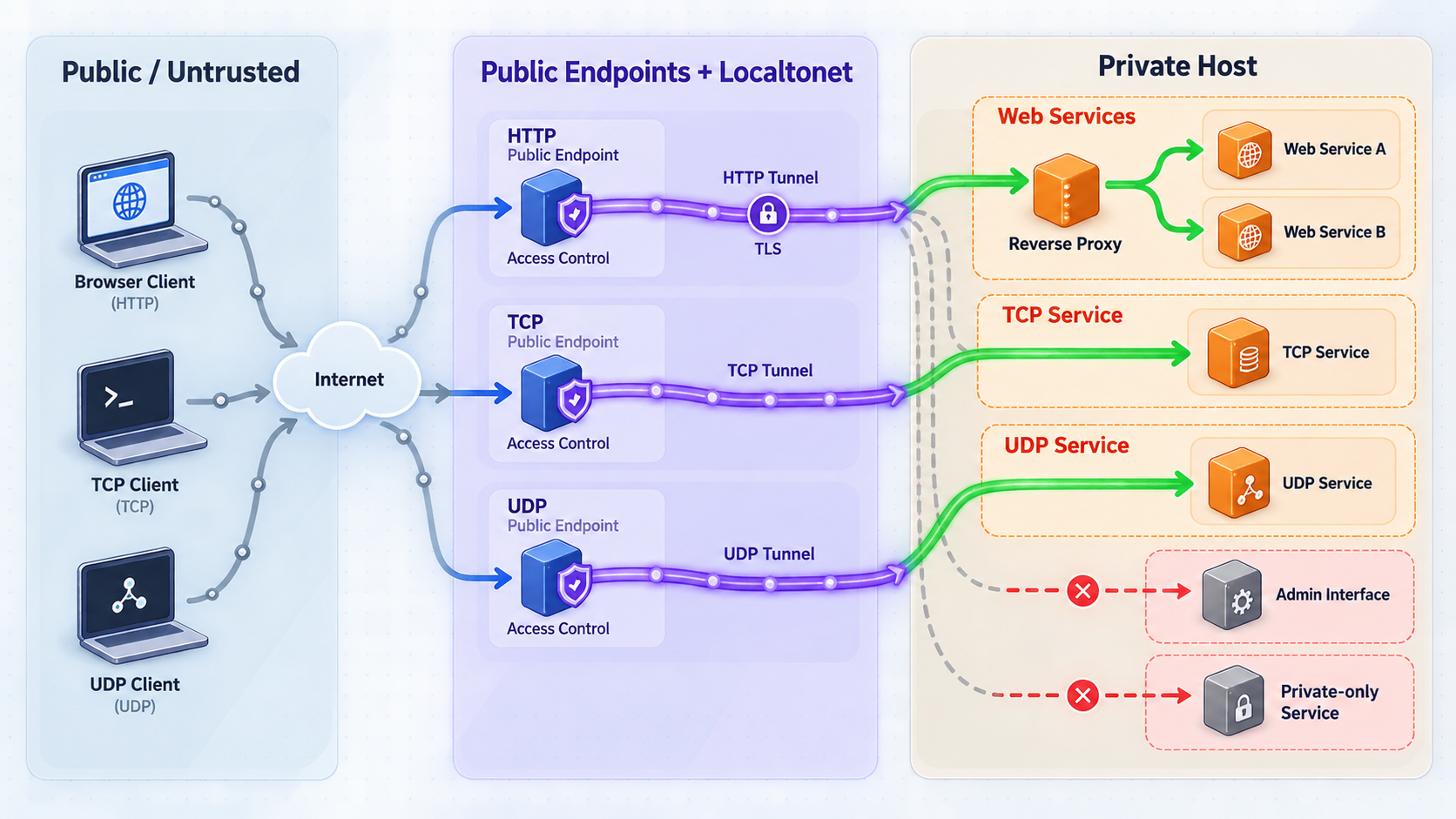
A public route changes who can attempt to reach a service. It does not automatically make the application safe for untrusted clients. Treat tunneling as connectivity and retain authentication, authorization, input validation, rate controls, secure session handling, patching, and application-specific hardening.
Use least privilege at each layer
Expose only the application listener needed for the workflow. Do not publish an entire host, broad administrative interface, or unrelated set of routes when users need only one service. If a reverse proxy fronts several applications, define explicit routes and a safe unmatched-request response rather than a broad fallback that can reach arbitrary upstreams.
Keep application authorization narrow as well. A tunnel endpoint should not turn a local service account into a general administrator. For automation, use credentials scoped to the required operation and rotate them according to the application's own security model. Never place Localtonet device tokens, application secrets, API keys, or private endpoints in public configuration examples, repositories, screenshots, or support messages.
Avoid confusing routing with authorization
Hostnames and paths tell a proxy where to send a request. They do not prove the caller is permitted to use the destination. A route such as an administration path remains public unless an authentication and authorization control protects it. Likewise, a hard-to-guess public address should not be treated as the sole access control for sensitive services.
Separate unlike audiences
Public customer traffic, employee-only tools, partner integrations, and machine-to-machine callbacks often require different policies. Keeping those audiences on distinct public entry points can make access reviews and incident response easier. If they share one reverse proxy, ensure the policy remains explicit per route and that a default route cannot accidentally expose an internal application.
Protect the reverse proxy itself
If you choose consolidation, the proxy configuration becomes security-sensitive infrastructure. Restrict who can modify it, review changes, keep the software updated, and avoid exposing its administration interface unless that access is intentionally designed and strongly protected. Make configuration backups according to the proxy's supported workflow, and test changes locally before relying on the public route.
A catch-all hostname, incorrect path rule, permissive upstream pattern, or exposed proxy dashboard can affect several applications simultaneously. Prefer explicit allowlisted routes, reject unmatched requests, and test both permitted and forbidden paths before sharing the public address.
Configure the selected architecture with Localtonet
The Localtonet portion follows the same core lifecycle whether the target is one reverse proxy or several direct services. Install and run our client on a device that can reach the target, identify that device with its device-specific token, select an available relay server or region from the current product interface, create the appropriate tunnel configuration, and start it. Creating a tunnel does not mean it is running.
The exact available server values, options, and plan-dependent capabilities can change. Obtain them from the current dashboard rather than copying a hardcoded server code from an article. The same caution applies to custom-domain DNS instructions: check current Localtonet documentation before changing DNS because this guide does not assume a particular record or validation workflow.
Install and run the Localtonet client
Use the client on the device that can reach the reverse proxy or direct service targets. Confirm the device remains available for as long as remote access is required. Current installation guidance is available in the Localtonet documentation; this article does not invent operating-system commands that are not supplied in the verified product information.
Authenticate and select the client device
Use the device-specific authentication token through the supported product workflow, then select the device that will run the tunnel. Treat the token as a secret. Do not place it in proxy configuration, source control, public logs, screenshots, or documentation.
Select an available relay server or region
Choose from the values currently presented by the Localtonet product or dashboard. Do not guess a server code or assume that every region is available with every subscription or deployment.
Create the protocol-appropriate configuration
For a consolidated web design, create an HTTP tunnel whose local IP address and port identify the reverse proxy listener. For separate publishing, create an HTTP, TCP, UDP, or combined UDP/TCP configuration for each service according to the protocol inventory, pointing each one to its reachable local address and port. HTTP tunnels can use the available process-type choices for a public HTTPS address, but custom-domain requirements should be confirmed against current documentation.
Start each required tunnel
Use the Start control for the selected tunnel. A saved configuration is not automatically active. In a separate-tunnel design, start only the services that should currently be reachable and confirm that intentionally disabled services remain stopped.
Use, stop, or delete the public endpoint
Connect through the assigned public URL or public host and port, depending on tunnel type. Stop a tunnel when temporary access is no longer needed, or delete configurations that should not be retained. The public route is available only while the selected client device is connected and the tunnel is running.
Targeting a local reverse proxy
Verify the reverse proxy locally before making it the HTTP tunnel target. From the Localtonet client device, send requests that exercise every intended hostname or path and confirm that each reaches the correct upstream. Also test an unknown hostname or path and confirm it is rejected or handled safely. The proxy's listening address must be reachable from the client, but it does not need to be exposed through router port forwarding.
Configure the proxy using its official documentation. Exact directives differ among products, so this guide does not provide a generic configuration snippet that might apply the wrong syntax or defaults. At minimum, confirm upstream addresses, hostname or path matching, external URL handling, forwarded request information, upgrade behavior where required by the application, timeout behavior, request limits, and the default route.
Targeting services directly
For separate tunnels, verify each local IP address and port from the client device. Keep a mapping between the service name, owner, protocol, local target, public endpoint, and intended audience. If two services use the same local port on different LAN hosts, record the IP addresses clearly so an operator does not point a tunnel at the wrong system.
A tunnel configuration must be started, and the selected Localtonet client must remain connected. When diagnosing an unavailable endpoint, check both conditions before changing application or proxy settings.
Verify routing, isolation, and failure behavior
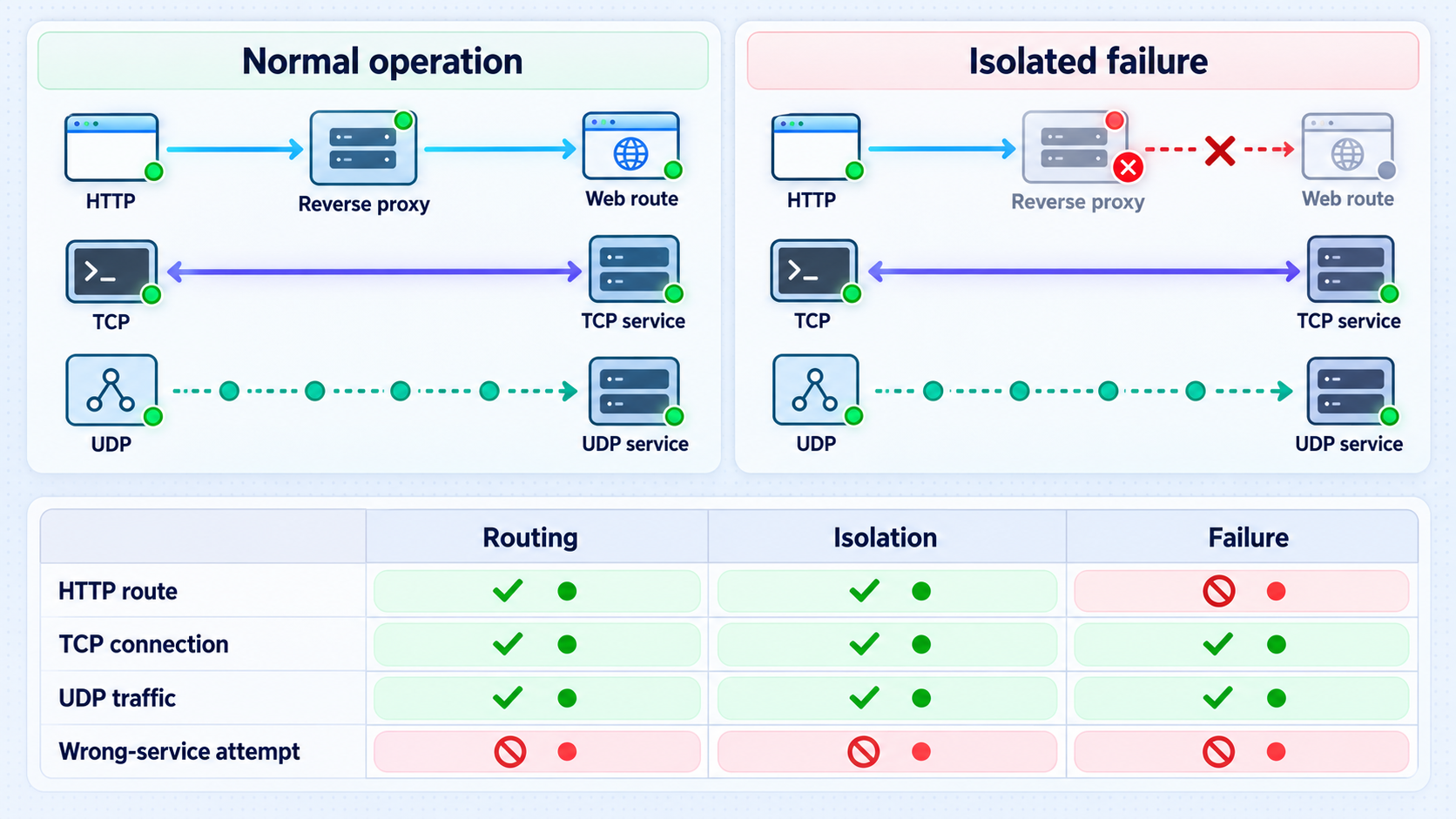
Verification should prove more than “the home page opened once.” Test from a network outside the target LAN so the request follows the intended public route. For every service, exercise a representative request or client action, confirm the expected response, and inspect the application or proxy logs available in your own environment.
Verification for one shared reverse proxy
Test every configured hostname or path independently. Confirm that each route reaches only its intended upstream, preserves the application behavior users need, and does not reveal another application's content. Check static assets, redirects, login and logout flows, callbacks, large requests where relevant, streaming behavior, and connection upgrades if the application depends on them.
Negative tests are especially important. Request an unknown hostname, an unconfigured path, a similar misspelling, and a sensitive local-only route. The proxy should not fall through to an administrative application or a default upstream containing private information. If one application is intended to require authentication, verify that an unauthenticated browser or client cannot retrieve protected content.
Verification for separate tunnels
Use a client that speaks the actual service protocol. Opening a TCP connection proves only that a listener accepted a connection; it does not prove the application completed authentication, exchanged valid messages, or returned correct data. For UDP, use an application-level transaction or documented client behavior because a connection-oriented test is not an adequate substitute.
Confirm lifecycle isolation by stopping one noncritical test tunnel and verifying that unrelated tunnels remain usable. Then restart it through the documented workflow. This demonstrates that operators understand which public endpoint maps to which service and that stopping one exposure does not unintentionally disable another.
Failure tests for both designs
Stop one backend application and observe the result. In a reverse-proxy design, the unavailable application should fail without sending users to the wrong upstream. Stop the reverse proxy and confirm that all routes depending on it become unavailable as expected. In a separate-tunnel design, stop one local service and verify that its tunnel cannot provide a working application session even if the tunnel configuration itself remains active.
Also test the Localtonet lifecycle. If the client disconnects or the tunnel stops, the public route will not remain available. Document how your team recognizes this state and who may restart access. Do not promise availability behavior that has not been tested in your actual deployment.
| Test | Expected result | Problem it can reveal |
|---|---|---|
| Local target from client device | The service responds using its real protocol | Bind-address, firewall, routing, or service-startup problems |
| Known public route | The intended application responds | Incorrect tunnel target or reverse-proxy route |
| Unknown hostname or path | The request is rejected or safely handled | Dangerous catch-all routing or unintended default upstream |
| Unauthenticated request | Protected content remains inaccessible | Missing or bypassed application authorization |
| One backend stopped | Only the expected service fails | Unexpected dependency or misrouting |
| One separate tunnel stopped | Its endpoint becomes unavailable while others continue | Incorrect lifecycle assumptions or endpoint mapping |
| Localtonet client disconnected | Dependent tunnels are unavailable | Missing operational monitoring or incorrect availability expectations |
Operate a multi-service environment safely
Maintain an endpoint register
Keep a current record for every public entry point. Include the service name, business purpose, owner, protocol, local target, Localtonet tunnel identity, public address, audience, authentication method, maintenance window, and retirement date if access is temporary. For a shared proxy, also record the proxy route and upstream application.
This register should distinguish configurations that exist from tunnels that are currently running. Because creation does not start a tunnel, operators need both pieces of information. Remove obsolete entries rather than allowing abandoned public configurations to accumulate.
Define change ownership
In a consolidated design, a reverse-proxy change can affect every routed application. Require review from the appropriate owners, validate the configuration using the proxy's supported tools, test locally, and retain a rollback path. In a separate design, changes are narrower, but teams still need a clear process for creating, starting, stopping, and deleting tunnels.
Use meaningful service boundaries
Revisit the architecture when ownership or sensitivity changes. A web application that began as one component of a public suite may later gain administrative functions and deserve its own tunnel. Several small services with identical policies may mature into a single proxy-managed application group. The initial choice is not permanent.
Plan observability at each layer
Application logs explain business behavior and authorization decisions. Reverse-proxy logs, when supported and enabled in your chosen software, explain local routing behavior. Local network checks establish whether the Localtonet client can reach the target. The Localtonet tunnel state establishes whether the selected device is connected and the tunnel is running.
Avoid relying on one layer to explain everything. A public request can fail because the tunnel is stopped, the client is disconnected, the local route is blocked, the proxy selected no upstream, the backend is unavailable, or the application rejected the caller. A useful incident procedure checks these layers in order rather than changing several configurations at once.
Retire access deliberately
Temporary access should have a defined end. Stop the tunnel when the activity is complete and delete it when the configuration is no longer required. Separately revoke application credentials that were issued for the workflow. Stopping connectivity and revoking authorization solve different problems, so do both when retiring sensitive access.
Troubleshoot multi-service publishing systematically
The public endpoint is unavailable
Confirm that the correct Localtonet client device is connected and that the tunnel has been started. Then test the local target from that same device. If the target does not respond locally, inspect the application process, listening address, local port, host firewall, and LAN route before changing the tunnel.
If a reverse proxy is the target, test its listener first and then each upstream from the proxy host. A healthy backend does not help if the proxy is stopped, listening on another address, or configured for a different hostname.
One hostname or path reaches the wrong application
Review route specificity and ordering in the reverse proxy according to its documentation. Check for catch-all rules, overlapping path prefixes, wildcard hostnames, and an unsafe default upstream. Confirm the request actually carries the hostname expected by the proxy. Test with one route at a time and inspect the proxy's available logs.
The page loads but assets or redirects are broken
This often indicates a mismatch between the application's expected external URL and the route under which it is published. An application mounted below a path prefix may still generate root-relative asset links or redirects. Check whether the application officially supports that base path. Also verify how the proxy communicates the original request context and whether the application is configured to trust that information safely.
Do not solve the problem by blindly trusting all forwarded request metadata. Configure trust according to the application and proxy documentation so untrusted clients cannot spoof security-sensitive request details.
A WebSocket or long-running HTTP operation fails
Confirm that the application works locally through the reverse proxy, not just when contacted directly. Review the chosen proxy's documented support for connection upgrades, streaming, and timeout settings. Because this behavior is proxy-specific, there is no safe universal directive to copy into every configuration.
A TCP service accepts a connection but does not work
Test with the official or expected application client and inspect service-side logs. A successful socket connection does not prove protocol negotiation, credentials, certificates, client compatibility, or application permissions are correct. Confirm that the tunnel points to the correct local service, particularly when several hosts reuse the same port number.
A UDP service appears silent
UDP does not provide the same connection feedback as TCP. Use an application-level request that should produce a known response, verify the service is listening on the expected address and port, and check local firewall behavior. Make sure the service is actually UDP rather than assuming based on a familiar port.
All applications behind the proxy fail together
Check the shared components first: the proxy process, its listener, its configuration, and the HTTP tunnel targeting it. This is the expected tradeoff of consolidation. If the shared failure domain is unacceptable for particular applications, move those applications to separate proxy instances or separate tunnels according to their operational requirements.
Operators cannot tell which endpoint belongs to which service
Treat this as an operational defect. Update the endpoint register, establish a naming convention in the systems you control, assign owners, and remove obsolete configurations. Never identify services by exposing credentials or private target details in public labels.
Verify the application, then local network reachability, then reverse-proxy routing if present, then Localtonet client connectivity, tunnel state, and finally the public client path. This sequence isolates faults without changing several layers simultaneously.
Frequently asked questions
Can I expose multiple local web applications through one Localtonet HTTP tunnel?
Yes, when a local reverse proxy accepts the HTTP traffic and routes requests to the correct applications. The Localtonet HTTP tunnel targets the proxy's reachable local IP address and port. You remain responsible for configuring and securing the proxy, defining explicit routes, protecting applications with authentication and authorization, and verifying that each application works behind the selected hostname or path arrangement.
Should every local service receive its own tunnel?
Not necessarily. Related HTTP applications with the same owner, audience, policy, and lifecycle may be easier to operate behind one reverse proxy. Separate tunnels are usually clearer when protocols, owners, audiences, sensitivity levels, or maintenance schedules differ. A hybrid arrangement is often the best design.
Can a reverse proxy route raw TCP or UDP services by URL path?
Ordinary HTTP path routing applies to HTTP requests, not arbitrary TCP or UDP protocols. Use a Localtonet TCP, UDP, or combined UDP/TCP tunnel as appropriate for the actual service. Some proxy products have separate stream or gateway capabilities, but those are product-specific and should not be confused with normal HTTP reverse-proxy routing.
Does creating a Localtonet tunnel make it immediately available?
No. Creating the configuration and running it are separate lifecycle actions. Start the tunnel using the Start control. The selected client device must also be connected, and the local target must be reachable from that device.
Does one HTTP tunnel automatically provide authentication for every application behind it?
Do not assume so. Routing and connectivity are not substitutes for application authorization. Each application or a deliberately configured access layer must enforce the required identity and permissions. Verify protection with unauthenticated and unauthorized test requests before sharing the public address.
Is a shared reverse proxy less secure than separate tunnels?
It is not inherently secure or insecure. It creates a shared routing and failure boundary, which can be appropriate for closely related applications. Risk increases when unrelated audiences share permissive routes, when the proxy has an unsafe fallback, or when its administration interface is exposed. Separate tunnels can make boundaries clearer, but every exposed service still needs its own security controls.
Can the Localtonet client reach services on another device in the LAN?
A local target may be on or reachable from the client device. Confirm the LAN route, service bind address, and host firewall from the client device before creating the tunnel. The tunnel cannot compensate for a local target that the selected client cannot reach.
Does using multiple tunnels mean Localtonet opens one underlying connection per service?
This guide makes no claim about that internal implementation detail. Public tunnel configuration count and underlying transport connection count are not necessarily the same concept. Choose the architecture according to protocol correctness, security boundaries, ownership, routing, and lifecycle needs.
When should I stop or delete a tunnel?
Stop a tunnel when remote access is temporarily unnecessary. Delete it when the configuration should no longer be retained. For sensitive workflows, also revoke application credentials and remove obsolete reverse-proxy routes because disabling connectivity does not automatically retire application authorization.
Publish each service through the right boundary
Inventory your applications, consolidate compatible HTTP services where a shared reverse proxy makes sense, and use separate Localtonet HTTP, TCP, UDP, or combined UDP/TCP tunnels when protocol or security boundaries require them.
Get Started Free →

