

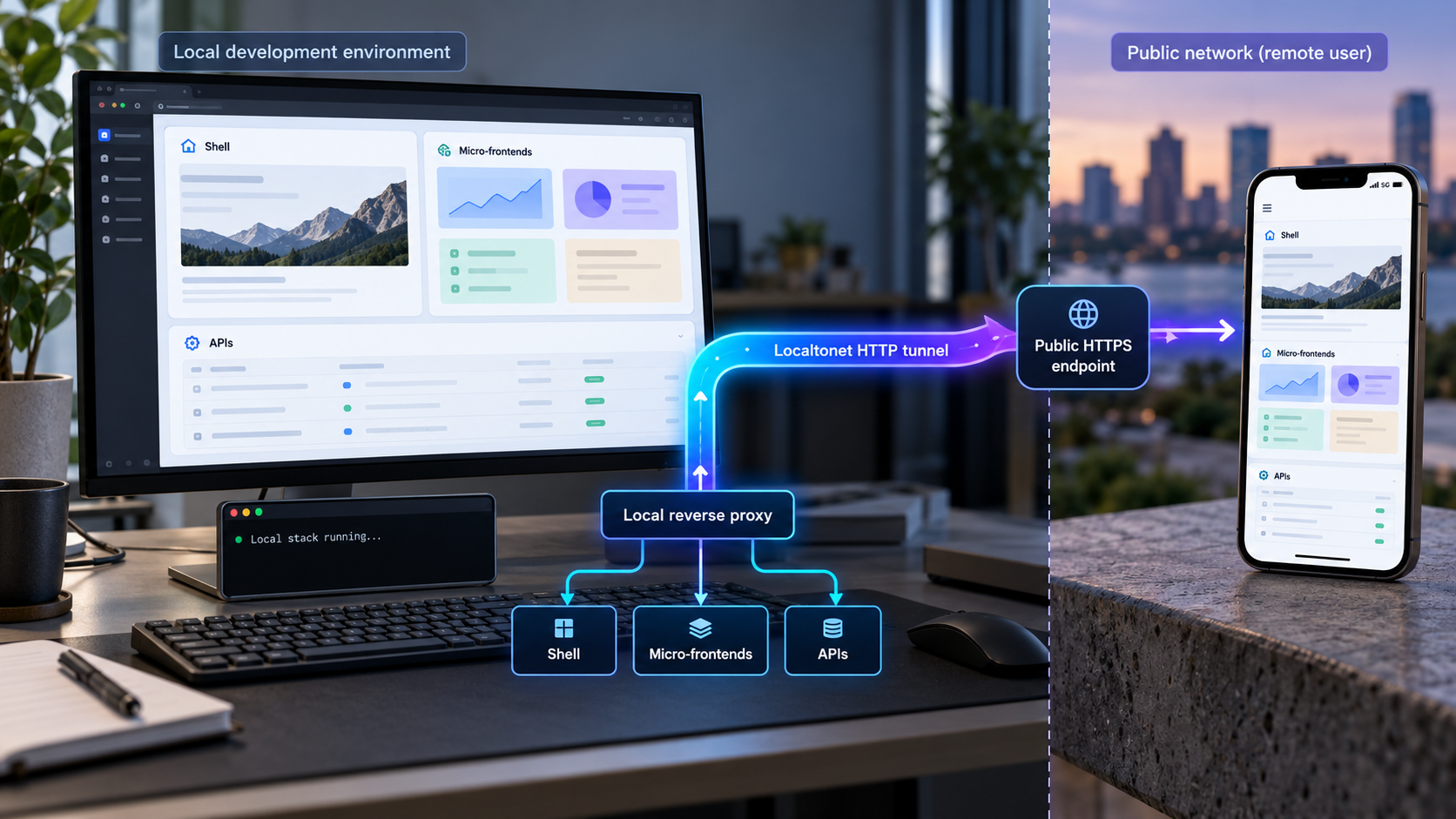
Publish one coherent preview for a shell, independently running frontends, and local APIs
A micro-frontend workspace often runs as several local processes, but remote testers need one stable entry point rather than a collection of unrelated addresses. The practical solution is to place a local reverse proxy in front of the shell, micro-frontends, assets, and APIs, verify that composition on localhost, and then expose only the proxy through a Localtonet HTTP tunnel. This guide explains routing boundaries, same-origin behavior, WebSocket and hot module replacement considerations, cookies, forwarded headers, failure isolation, remote-device verification, and safe teardown. The local reverse proxy remains responsible for application-level composition, while our client publishes the selected local endpoint.
📋 What's in this guide
Why micro-frontends benefit from a single local ingress
A micro-frontend development environment commonly contains a shell application, several independently started frontend applications, static asset servers, and one or more supporting APIs. Each process may listen on a different local port. That arrangement is convenient for independent development, but it creates an awkward testing surface when a browser outside the developer's machine needs to load the complete experience.
Publishing every process separately usually gives each service a different public origin. That can change browser behavior compared with the intended production architecture. Cookies may no longer be shared as expected, relative asset paths can resolve against the wrong host, cross-origin resource sharing rules become relevant, and browser security policies may affect requests that worked during ordinary localhost development. Testers also have to keep track of several addresses and understand which one is the real starting point.
A single-ingress design avoids that fragmentation. A reverse proxy listens on one local address and forwards requests according to a routing contract. The root path might reach the shell, a path such as /catalog/ might reach one micro-frontend, /account/ might reach another, and /api/ might reach an API. The browser sees one origin even though several independent processes answer the requests behind it.
After that local ingress works correctly, a Localtonet HTTP tunnel can point to the reverse proxy's local IP address and port. Our client establishes an outbound connection to a Localtonet relay server, so this workflow does not require inbound router port forwarding, firewall changes, VPN setup, or a public IP address. The tunnel provides a public HTTPS address while it is running and while the selected client device remains connected.
The local reverse proxy owns path matching, host handling, header behavior, WebSocket forwarding, rewrites, and upstream selection. Localtonet forwards public HTTP traffic to the local proxy target you configure. Our HTTP tunnel does not discover micro-frontends or decide which local service should receive an application route.
Prerequisites and decisions to make first
This workflow is reverse-proxy implementation neutral. You can use the proxy already supplied by your development platform, an established standalone reverse proxy, or a small gateway maintained as part of the repository. Exact installation commands and configuration syntax depend on that choice, so they should come from the selected proxy's current documentation rather than being guessed or copied between incompatible products.
Before configuring remote access, collect the concrete details of the local stack. For every process, record its local address, port, health indicator, route ownership, base path, and whether it needs ordinary HTTP, WebSocket connections, or both. Also identify which process generates absolute URLs and which process sets cookies.
- A shell application that can be started and reached locally.
- Each micro-frontend development server, with its actual local IP address and port recorded.
- Any local API or backend-for-frontend needed by the browser experience.
- A reverse proxy capable of forwarding the required HTTP routes.
- WebSocket proxy support if the development runtime or application uses WebSockets.
- A Localtonet account and the Localtonet client installed on the device that can reach the reverse proxy.
- A device-specific authentication token selected through the supported Localtonet workflow. Do not place that token in source code, screenshots, shared configuration, or browser-delivered assets.
- A currently available relay server or region selected from our product or dashboard instead of hardcoding an assumed server code.
Define a route inventory
Write down the intended browser-facing paths before touching proxy configuration. This prevents two services from accidentally claiming the same prefix and makes review easier. A useful inventory distinguishes navigation routes, static assets, runtime manifests, API endpoints, and development-only connections.
| Example public path | Local owner | Questions to resolve |
|---|---|---|
/ |
Shell application | Does client-side routing require fallback to the shell document? |
/catalog/ |
Catalog micro-frontend | Does the remote expect this prefix, or must the proxy remove it? |
/account/ |
Account micro-frontend | Are assets and navigation links generated relative to the assigned base path? |
/api/ |
Local API | Should the API receive the original prefix, host, scheme, and client forwarding information? |
| Development runtime path | Relevant frontend server | Does it use WebSockets, and can its client derive the public host correctly? |
The path names above are illustrative, not required Localtonet settings. Replace them with routes that match your application. Avoid copying a development runtime path from another framework unless your own tooling documents and uses that path.
Choose a testable local bind address
The Localtonet client must be able to reach the reverse proxy on the configured local IP address and port. If the client and proxy run on the same host, a loopback target may be sufficient. If they run in different containers, virtual machines, or devices, loopback may refer to the wrong network namespace. Confirm reachability from the environment where the Localtonet client actually runs.
Do not broaden the proxy's LAN bind address merely as a workaround without considering the security effect. A service bound to all interfaces can become reachable from other devices on the local network. Use the narrowest bind that satisfies the architecture, then verify it directly.
A development shell can reveal source maps, debugging interfaces, test data, internal route names, verbose errors, or unauthenticated API operations. Remove secrets from client bundles, use application authentication and least privilege where appropriate, restrict test data, and stop the tunnel when remote access is no longer required.
Design the local reverse-proxy routing strategy
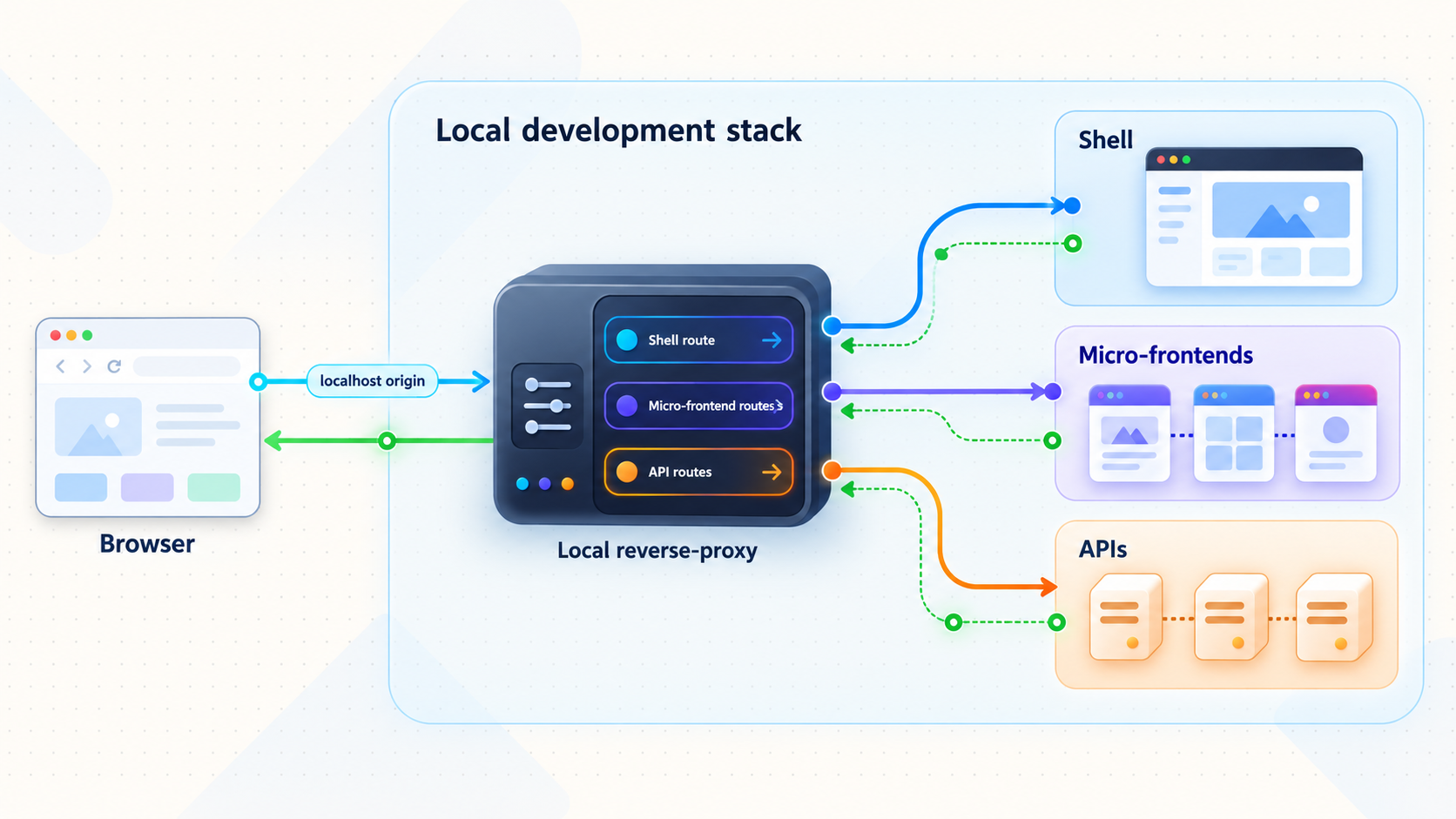
The central design choice is whether the proxy routes primarily by path or by host. A one-tunnel workflow is usually easiest to reason about when all browser-visible resources share one public origin and path prefixes select internal services. Host-based routing can still be useful, but it requires the incoming host to match the proxy's rules and may require additional hostname or DNS planning.
Path-based routing
With path-based routing, the browser loads one origin and the first path segment identifies the upstream. This is well suited to a shell that loads remote modules, manifests, or assets through relative URLs. It can also keep API calls under the same origin, such as /api/, avoiding the need to introduce cross-origin requests solely for the preview.
Decide whether each upstream receives the complete original path or a rewritten path. For example, a browser request to /catalog/assets/app.js might be forwarded unchanged, or the proxy might remove /catalog and send /assets/app.js upstream. Either model can work, but the proxy, frontend base URL, router basename, asset generation, and fallback behavior must agree.
Preserve query strings during forwarding. Applications often use them for feature flags, search parameters, cache busting, OAuth state, or development controls. A route that forwards the path but silently discards its query string can create failures that appear unrelated to proxying.
Host-based routing
Host-based routing selects an upstream using the request's host rather than a path prefix. It can resemble a production system that uses separate subdomains, but it is not automatically compatible with a single public hostname. The reverse proxy must recognize the public host presented through the tunnel, and browser code must know which public hosts to use.
HTTP tunnels can use Random Sub Domain, Custom Sub Domain, or Custom Domain process types, and each serves content at a public HTTPS address. Availability can vary by plan or current product configuration. Exact custom-domain DNS requirements should be checked against current Localtonet documentation before implementation. Do not assume that one HTTP tunnel automatically provisions every hostname required by a host-routed micro-frontend architecture.
If the main goal is one public address and minimal preview-specific DNS work, path routing is usually the more direct model. If host fidelity is itself the subject of the test, document that as a separate requirement and validate current hostname support before choosing the tunnel layout.
Fallbacks and route precedence
A shell using client-side routing often needs unknown navigation paths to return the shell's main document. That fallback must not consume paths owned by remotes, APIs, assets, health endpoints, or WebSocket upgrades. More specific routes should be evaluated before the shell fallback.
API routes should generally fail as API routes instead of returning the shell document. If an API request unexpectedly receives HTML with a successful status, browser code may report a JSON parsing error rather than the actual routing mistake. Similarly, a missing JavaScript file should not be replaced with the shell page merely because the fallback is too broad.
Keep the upstream boundary observable
During development, useful proxy logs include the requested host and path, selected upstream, response status, and upstream connection failure. Avoid logging secrets, full authorization headers, session cookies, or sensitive request bodies. The objective is to identify routing decisions without turning development logs into a credential store.
Account for browser behavior, HMR, cookies, and headers
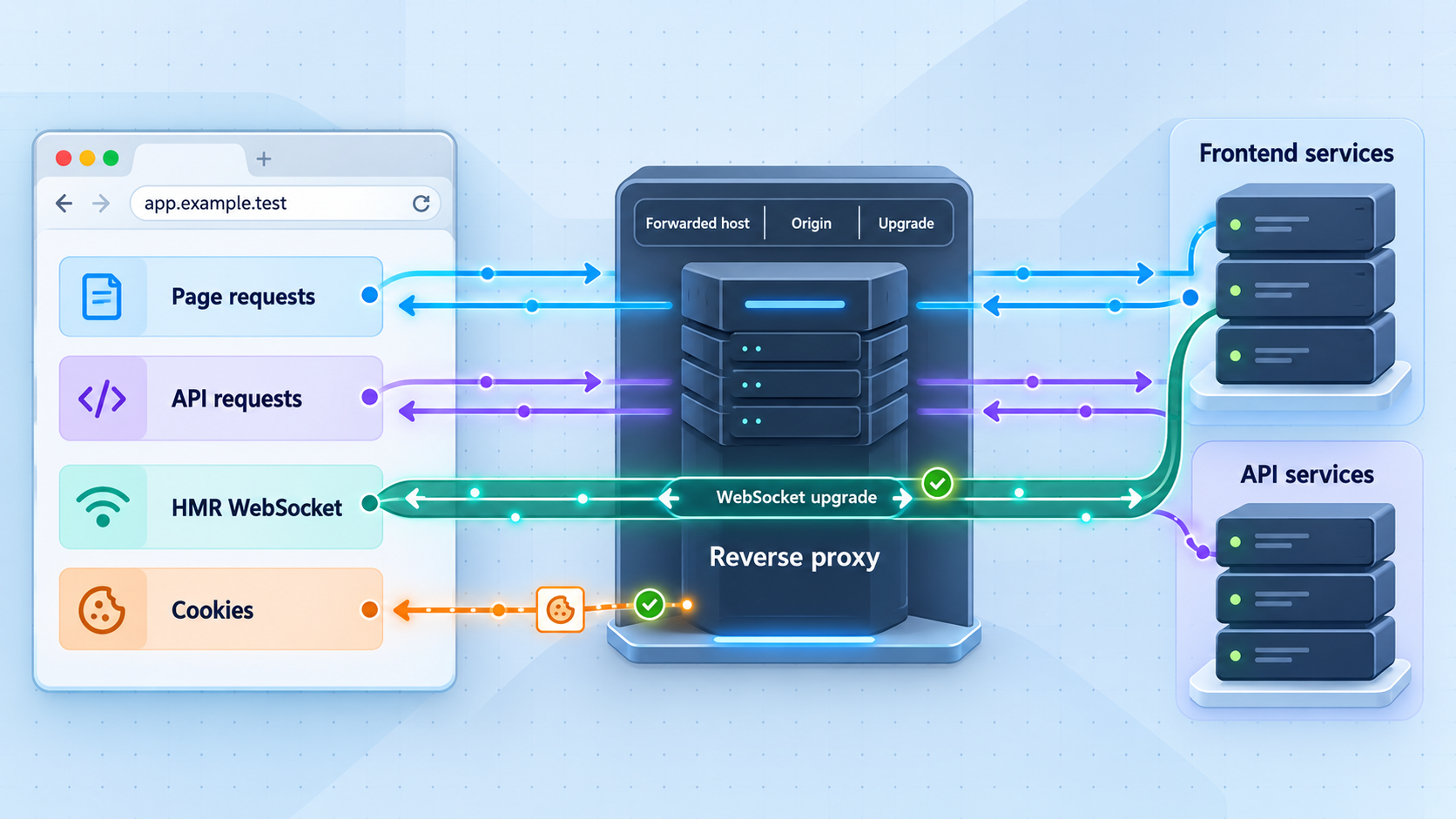
A reverse proxy can make several processes appear under one origin, but that does not guarantee that every development tool will behave correctly through the public address. The browser, proxy, shell, remotes, and APIs must agree on externally visible URLs.
Same-origin behavior
Browsers define an origin using the scheme, host, and port. When the shell, remotes, and API are addressed through the same public HTTPS origin, requests between them are same-origin from the browser's perspective. Path differences do not create separate origins.
This can simplify a remote preview, but it may also hide cross-origin behavior that exists in production. If production deliberately separates services across origins, a same-origin development composition is useful for integration testing but should not be treated as proof that production cross-origin resource sharing, cookie, or security-policy configuration is correct.
Cookies and session scope
Cookie behavior depends on attributes such as domain, path, security requirements, and same-site policy. A cookie scoped to /api/ will not necessarily accompany a request to /catalog/. A cookie generated for a hardcoded local hostname may not apply to the public hostname. A secure cookie is intended for HTTPS delivery, while direct local HTTP testing may exercise a different path.
Review which upstream sets each cookie and what scope the composed application requires. Do not rewrite cookie scope broadly just to make a test pass without understanding the consequences. A shell, remote, and API sharing a public origin can also increase the number of components that receive broadly scoped cookies. Keep authentication and session cookies as narrow as the application permits.
Forwarded host and scheme
Backend applications frequently generate redirects, absolute links, callback URLs, or cookie settings from the host and scheme they believe the client used. Behind a proxy and tunnel, the upstream connection details can differ from the public browser address. The reverse proxy may need to pass conventional forwarding information, and the application may need to trust that information only from the known proxy boundary.
Exact trusted-proxy settings are framework specific. Configure them using the framework's official mechanism rather than accepting forwarding headers from every source. If an application trusts unvalidated client-supplied host or forwarding values, it can generate incorrect or unsafe external URLs.
WebSockets and hot module replacement
Many development servers use a WebSocket connection for hot module replacement, live reload, overlays, or development status. The reverse proxy must support the HTTP upgrade flow for the relevant route. Ordinary page requests can succeed even when this connection fails, so a visually loaded application does not prove that the development loop is healthy.
HMR clients can fail when they construct a WebSocket URL using a hardcoded localhost host or internal port. That address refers to the remote tester's device, not the developer's machine. Prefer a runtime configuration that derives the host and secure transport from the page URL when the development platform supports it. If explicit public HMR settings are required, use the actual assigned public address and the framework's documented options.
Do not guess a universal HMR path, environment variable, or configuration property. Vite, webpack-based tooling, framework-integrated servers, and custom runtimes use different settings. The durable diagnostic method is to inspect the browser's network panel, identify the exact failed connection, and compare it with the development server's documented public-host and WebSocket configuration.
Content security policy and absolute asset URLs
A strict content security policy may allow only known script, connection, image, or frame origins. A generated public hostname can therefore require a preview-specific policy decision. Keep that change narrow and temporary. Do not replace a restrictive policy with an unrestricted one merely to remove browser-console errors.
Absolute asset URLs deserve similar attention. If a remote manifest points to http://localhost, an external browser will try to contact itself. If it points to an internal container hostname, the browser will not resolve it. Browser-visible URLs should use the public origin or paths reachable through the public proxy, while server-side upstream addresses can remain local.
Compose the development stack behind the proxy
Start with local composition and leave tunneling until the complete application works through the proxy. This sequencing separates application routing errors from remote-access errors and gives each failure a smaller search area.
- Start each upstream independently. Confirm that the shell, every participating micro-frontend, and required API starts without relying on the proxy. Record the actual listening address and port from each process rather than assuming a conventional default.
- Test each upstream directly from the proxy host. A successful response proves basic reachability. If an upstream is in a container or virtual machine, verify it from the reverse proxy's network environment, not only from the host browser.
- Add explicit proxy routes. Create specific rules for remotes, APIs, assets, and development connections before adding the shell fallback. Decide whether every route preserves or removes its prefix.
- Align frontend base paths. Configure each frontend using settings supported by its own build tool so that generated scripts, styles, chunks, manifests, and navigation links remain under the assigned route.
- Enable required protocol behavior. If an upstream uses WebSockets, configure the proxy according to its official upgrade-forwarding syntax. Do not assume ordinary HTTP forwarding covers it automatically.
- Set a predictable failure response. An unavailable remote should produce an identifiable upstream error or a deliberately designed shell fallback. It should not silently display stale content or unrelated HTML.
Failure isolation for independently running remotes
Micro-frontends are independently deployable in principle, but local composition still needs an explicit failure model. Decide what the shell should do when a remote manifest, JavaScript chunk, or API cannot be loaded. Possibilities include a visible unavailable state, retry control, development diagnostic panel, or shell-level boundary that preserves navigation to unaffected areas.
Test stopped-process behavior deliberately. Stop one remote while leaving the shell, proxy, and other services running. Confirm that the affected route fails in the intended way and that unrelated areas remain usable. Then restart the remote and verify recovery. This exercise distinguishes genuine failure isolation from a setup that works only when every process is healthy.
Avoid proxying unintended local services
Route only the services needed by the preview. Do not add broad rules that can reach arbitrary localhost ports, administrative panels, databases, container management APIs, or filesystem tools. A single ingress is valuable partly because it creates a narrow, reviewable exposure boundary.
Micro-frontend runtime configuration, JavaScript bundles, source maps, and network requests can be inspected by anyone who can access the preview. Keep Localtonet device tokens, API secrets, private keys, database credentials, and privileged service credentials out of frontend assets and repository examples.
Verify the complete composition on localhost
The reverse proxy should be the only address used during this verification stage. If developers continue opening each upstream directly, path, host, cookie, and fallback problems can remain hidden until remote testing.
Run a route-by-route test
- Open the shell through the reverse proxy and perform a hard refresh.
- Navigate to each micro-frontend from the shell and by entering its deep link directly.
- Confirm that scripts, styles, images, lazy chunks, manifests, and source maps resolve from intended paths.
- Exercise API reads and writes using non-sensitive development data.
- Check redirects and confirm they return to the proxy address rather than an upstream port.
- Inspect response content types so missing scripts do not return an HTML fallback.
- Check cookie domain, path, secure, and same-site attributes in browser developer tools.
- Confirm that refreshes on client-side routes return the correct application document.
Verify the development loop
Keep the browser developer tools open, edit a component in each participating frontend, and observe what happens. A healthy workflow should either apply the supported hot update or perform the development server's expected reload. Look for WebSocket failures, repeated reconnects, mixed-content warnings, requests to localhost from the browser, and chunk URLs that escape the assigned prefix.
Also test startup ordering. Open the shell before one remote starts, then start that remote and attempt recovery. Restart an API while the browser remains open. A resilient development workflow should provide understandable failures rather than requiring a full restart of every process after one component changes.
Use a local acceptance checklist
| Check | Expected result | Common warning sign |
|---|---|---|
| Deep-link refresh | The correct shell or remote route loads | A proxy 404 or unrelated shell document appears |
| Static assets | Assets load under their assigned public path | Requests target an upstream port or lose a prefix |
| API responses | Expected status and content type are returned | JSON parsing fails because HTML was returned |
| HMR or live reload | The documented development update flow works | The browser tries to connect to its own localhost |
| Stopped remote | The affected area fails predictably | The complete shell crashes or hangs indefinitely |
| Redirects | The browser remains on the proxy origin | The response exposes an internal hostname or port |
Do not proceed because the home page alone renders. A tunnel faithfully carrying traffic to a misconfigured proxy still produces a misconfigured public preview. Local verification is the control that proves the routing layer works before the public URL is introduced.
Publish the reverse proxy with a Localtonet HTTP tunnel
Once the composed application works through one local proxy address, expose that address through an HTTP tunnel. The sequence below follows our standard tunnel lifecycle. Current client installation details, available relay choices, and options that vary by plan or client version should be taken from the current product interface and our HTTP tunnel documentation.
Install and run the Localtonet client
Install the supported Localtonet client on the device that can reach the reverse proxy, then run it. We do not provide an installation command here because commands and packages can vary by operating system and client version. Use the current official download and installation flow rather than copying an unverified command.
Authenticate and select the client device
Use the device-specific authentication token through the supported Localtonet workflow and select the device that will run the tunnel. Keep the token private. It identifies the client device and must not be embedded in proxy configuration, application code, browser assets, logs, or shared screenshots.
Select an available relay server
Choose an available Localtonet relay server or region from the current dashboard or product interface. Available values can change and may vary by plan, so do not hardcode a server code taken from an unrelated example.
Create an HTTP tunnel for the proxy target
Create the HTTP tunnel and enter the local IP address and port on which the reverse proxy is listening. Target the proxy, not the shell, individual remote, or API. Select the appropriate HTTP process type from the options currently available to your account. Random Sub Domain, Custom Sub Domain, and Custom Domain all serve content at a public HTTPS address, but availability and custom-domain requirements must be checked in the current product.
Start the tunnel and use the assigned public URL
Creating a tunnel does not mean it is running. Press Start, wait for the tunnel and selected client device to be connected, and then open the assigned public URL. The tunnel remains available only while the selected client is connected and the tunnel is running.
Stop or delete the tunnel after testing
Stop the tunnel when the review session ends. Delete it when the configuration is no longer needed. Stopping remote access does not automatically stop the local proxy or development processes, so shut those down separately according to your team's workflow.
A saved HTTP tunnel is not publicly reachable until it is started, and it depends on the selected Localtonet client remaining connected. If the public address is unavailable, check both the tunnel state and device connection before changing the reverse-proxy configuration.
Test the public preview from a genuinely remote client
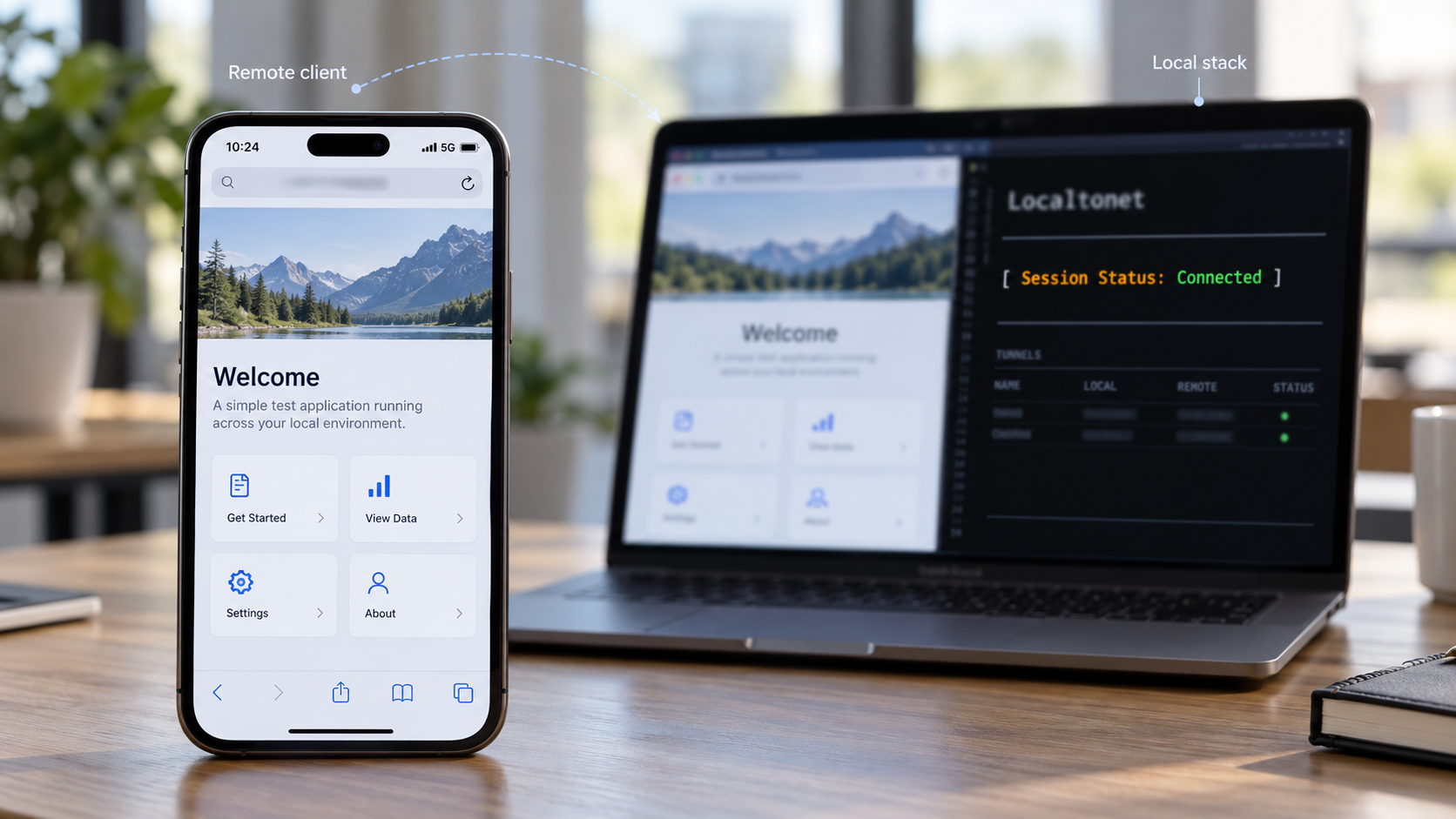
Opening the public URL on the development machine is useful, but it does not reproduce every remote-device condition. Test from a phone on mobile data, a separate network, or another authorized tester's browser. This verifies that no browser-facing resource depends on the developer's localhost, local DNS, LAN address, or cached session.
Begin with a clean browser context
Use a private browsing window or a dedicated test profile where practical. Existing localhost cookies, service workers, cached assets, and authentication state can make a broken public preview appear healthy. A clean context forces the browser to obtain the application through the public HTTPS address.
Inspect the complete request graph
Load the shell, navigate through each micro-frontend, and inspect the network panel. Every browser-required URL should either use the public origin or another intentionally configured public dependency. Requests to localhost, loopback addresses, private LAN addresses, internal container names, or raw upstream ports indicate that application configuration is leaking internal topology.
Verify more than successful status codes. Check content types, redirect locations, cache behavior, cookies, and WebSocket connections. An HTML error document returned with a success status can be mistaken for JavaScript until the browser reports an unexpected token. A redirect to an internal host may work for the developer but fail immediately for everyone else.
Exercise realistic review scenarios
- Open a deep link directly instead of navigating from the home page.
- Refresh on routes owned by different micro-frontends.
- Sign in and sign out using designated test accounts if authentication is in scope.
- Perform API mutations only against safe development data.
- Edit each frontend and observe HMR or live-reload behavior through the public URL.
- Stop one remote and confirm that its failure does not make unrelated routes unusable.
- Restart the reverse proxy and observe the browser's recovery behavior.
- Test viewport, touch, and browser-specific behavior on actual target devices where possible.
Separate correctness from performance
A remote preview adds network distance and relay traversal to a stack normally accessed on localhost. It is useful for functional checks, device behavior, integration, and review, but it should not be treated as a controlled performance benchmark without a carefully defined methodology. Development builds, source maps, HMR clients, logging, and unoptimized assets can also differ significantly from production.
If performance matters, record the test conditions, device, network, build mode, cache state, region selection, and application version. Do not attribute every delay to tunneling. Use request timing to separate browser work, proxy handling, upstream application processing, and network transfer.
Troubleshooting the single-ingress workflow
The public URL does not respond
Confirm that the Localtonet tunnel was started, not merely created. Verify that the selected client device is connected. Then confirm that the local IP address and port configured for the HTTP tunnel match the reverse proxy's actual listening endpoint. Test that endpoint from the same environment in which the Localtonet client runs.
If the client runs in a container or virtual machine, remember that its loopback address belongs to that environment. The proxy may be listening on the host's loopback instead. Correct the network reachability rather than changing unrelated application routes.
The shell loads but a micro-frontend returns 404
Compare the requested browser path with the proxy rule and the path received by the upstream. Look for an incorrect prefix rewrite, missing trailing-path handling, or generated asset base that points outside the remote's assigned route. Test both the remote's entry resource and one lazy-loaded chunk.
Also check route precedence. A broad shell fallback can intercept a remote request and return the shell document. The browser may then report a script parsing or MIME-type error rather than an obvious routing error.
API requests return HTML
This usually indicates that an API path fell through to the frontend fallback. Give API routes higher precedence than the shell fallback and preserve the expected API prefix or rewrite it deliberately. Inspect the response content type and body before debugging JSON parsing code.
Navigation works, but refreshing a deep link fails
Client-side navigation can work because the shell is already loaded, while a direct refresh asks the proxy to resolve the full path. Configure the correct history fallback for the application that owns that route. Do not apply one global fallback if different path prefixes belong to independently served frontends.
HMR connects locally but not through the public URL
Inspect the failed WebSocket URL. If it contains localhost, an internal hostname, a private port, or an insecure scheme under a secure page, correct the development server's documented public HMR configuration. Confirm that the reverse proxy forwards the relevant upgrade request to the right upstream.
Avoid changing several variables at once. First identify the URL generated by the browser, then verify proxy route matching, then verify the upstream's WebSocket listener. Framework-specific property names and defaults differ, so use the exact documentation for the development server in your repository.
Redirects expose a local hostname or port
The upstream probably believes its internal address is the external address. Review how the reverse proxy supplies host and scheme information and how the application validates trusted proxies. Redirect targets, OAuth callback construction, canonical URLs, and secure-cookie decisions can all depend on this configuration.
Authentication works locally but fails remotely
Inspect cookie attributes and callback URLs. A cookie might be scoped to a local host, an unexpected path, or a policy that does not match the remote flow. An identity provider may also require the exact public callback URL to be registered. Do not weaken authentication controls or use broad wildcard callbacks simply to make a temporary preview work.
One stopped remote breaks the entire shell
This is primarily an application resilience issue rather than a tunnel problem. Add an appropriate error boundary or unavailable state around remote loading, bound retry behavior, and prevent one unresolved dependency from blocking unrelated navigation. Keep the proxy's upstream failure explicit so the shell can distinguish an unavailable remote from malformed content.
Changes do not appear for remote testers
Check whether the correct local process rebuilt, whether HMR remains connected, and whether a service worker or browser cache is serving an older response. Test in a clean context and inspect response headers before disabling caching globally. If the development server emits content-addressed chunks, confirm that the shell or remote manifest references the current chunk names.
The proxy works, but only on the developer's machine
Search browser-visible configuration for loopback addresses, private network addresses, internal DNS names, and hardcoded local ports. The local reverse proxy should hide upstream topology from the external browser. Server-to-server forwarding can use local addresses, but scripts delivered to the browser cannot rely on them.
The public preview should no longer be available
Stop the tunnel in Localtonet and verify that it is no longer running. Delete the tunnel if it will not be reused. Then stop the reverse proxy and development processes as appropriate. Rotate any application credentials if they were accidentally exposed, and review logs or shared artifacts for leaked tokens or sensitive data.
Operate the workflow safely as a team
A repeatable preview should have a named owner, a defined lifetime, and a small routing contract committed alongside the application where appropriate. Team documentation should identify which local process owns each route, how to start the stack, which test data is safe, and who is responsible for stopping public access.
Keep environment-specific values outside browser bundles. Device authentication tokens are device-specific and should be handled as secrets. Public URLs may change depending on the chosen process type and configuration, so avoid committing a temporary assigned URL into permanent application code.
For longer review sessions, monitor the health of the shell, remotes, APIs, proxy, Localtonet client, and tunnel separately. A green tunnel state means the tunnel is running, not that every application upstream is healthy. Conversely, a healthy local proxy does not prove that the selected device remains connected.
| Layer | Responsibility | Primary verification |
|---|---|---|
| Shell and micro-frontends | Rendering, navigation, remote loading, and graceful application failures | Browser behavior and application logs |
| Local APIs | Application data, authentication behavior, and API responses | Endpoint results and backend logs |
| Reverse proxy | Route matching, rewrites, headers, upstream selection, and WebSocket forwarding | Proxy access and upstream-error logs |
| Localtonet client | Outbound connection from the selected device to our relay | Device connection state |
| Localtonet HTTP tunnel | Public HTTP entry point forwarding to the configured local proxy target | Tunnel state and public URL test |
This separation makes incidents easier to diagnose. If every local route works but the public URL is unavailable, investigate the client, target reachability, and tunnel lifecycle. If the public shell loads but one remote fails, investigate the proxy rule and that remote. If only authentication fails, focus on cookies, callbacks, host handling, and trusted-proxy configuration.
Frequently asked questions
Why use one tunnel instead of one tunnel for every micro-frontend?
One tunnel preserves a single browser-facing entry point and lets the local reverse proxy apply the application's routing contract. Publishing each process separately creates multiple origins, which can change cookies, cross-origin requests, absolute URLs, and security-policy behavior. Separate tunnels can still be appropriate when independent origins are the explicit subject of the test, but they are not required for a path-composed preview.
Does Localtonet compose or route the micro-frontends?
No. Your local reverse proxy performs application-level route matching, rewrites, upstream selection, header handling, and WebSocket forwarding. Our HTTP tunnel publishes the local proxy IP address and port that you configure.
Do I need router port forwarding or a public IP address?
No. The Localtonet client establishes an outbound connection to a Localtonet relay server. This workflow does not require inbound router port forwarding, firewall changes, VPN setup, or a public IP address.
Will hot module replacement work through the tunnel?
It can work when the development server, reverse proxy, and browser-visible HMR configuration agree. The proxy must forward the required WebSocket upgrade, and the HMR client must not direct remote browsers to localhost or an internal port. Exact settings depend on the development framework, so verify the generated WebSocket URL and use that framework's documented configuration.
Should the tunnel target the shell application or the reverse proxy?
Target the reverse proxy. The proxy is the single ingress that can reach the shell, micro-frontends, APIs, assets, and development-runtime connections according to your route configuration. Targeting only the shell bypasses that composition layer.
Can I use a custom public domain?
HTTP tunnels support Random Sub Domain, Custom Sub Domain, and Custom Domain process types, with all three serving content at a public HTTPS address. Availability can vary by plan or current configuration. Check current Localtonet documentation for exact custom-domain DNS requirements before configuring one.
Does creating a tunnel make the preview immediately available?
No. Creating and starting are separate lifecycle actions. Start the tunnel after creating it. The selected device must also remain connected, and the local proxy must continue listening at the configured target.
Is a public development preview safe for production data?
A development preview should not be assumed safe for production secrets or unrestricted production data. Use application authentication, least privilege, dedicated test accounts, non-sensitive datasets, narrowly scoped routes, and an explicit teardown process. Never expose Localtonet device tokens or backend credentials in frontend code.
How do I know whether a failure belongs to Localtonet or the local stack?
First test the complete application through the local reverse proxy. If local composition fails, fix the application or proxy before investigating the tunnel. If local composition works, verify the Localtonet device connection, tunnel running state, and configured local target. If the public shell works but one route fails, the likely issue is the proxy rule or corresponding upstream.
Publish your composed micro-frontend preview
Put one verified local reverse proxy in front of your shell, remotes, and APIs, then use a Localtonet HTTP tunnel to share that deliberate entry point with authorized remote testers.
Get Started Free →

