

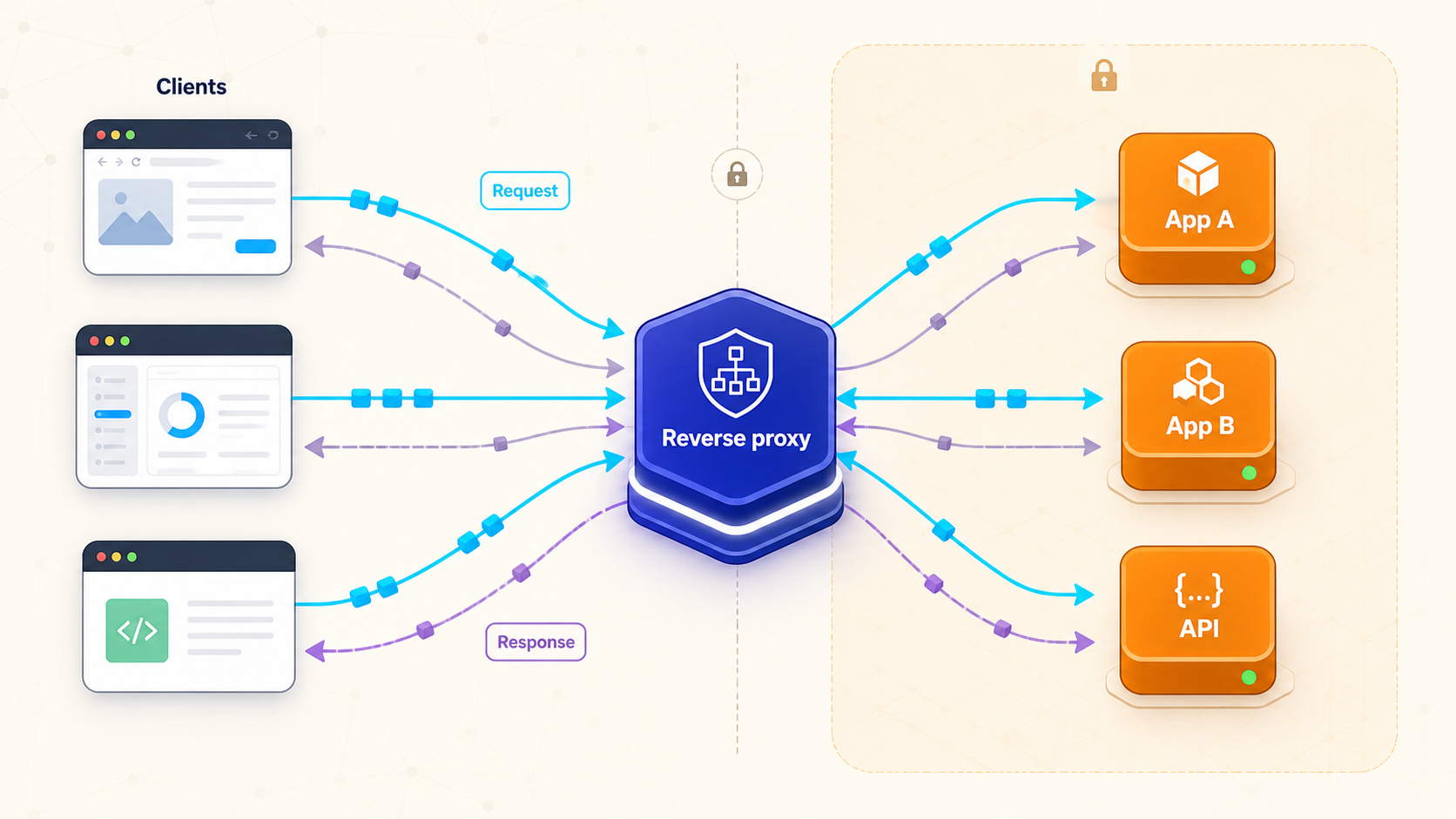
Understand the traffic layer between public clients and private backend services
A reverse proxy accepts requests on behalf of one or more backend services, selects a destination, forwards the request, and returns the backend response. It can centralize routing, TLS handling, load balancing, caching, and selected security controls, but none of those capabilities is automatic. This guide explains the complete request flow, the boundaries of a reverse proxy, safe deployment practices, and how an outbound Localtonet tunnel can provide public reachability without inbound router port forwarding.
📋 What's in this guide
What is a reverse proxy?
A reverse proxy is a network service that receives client traffic on behalf of backend servers. A browser, mobile application, webhook provider, or API consumer connects to the proxy's public address rather than directly to an application server. The proxy examines information such as the destination hostname, URL path, protocol, or configured routing rules, selects an upstream service, forwards the request, and relays the response back to the client.
The word reverse describes which side the proxy represents. A forward proxy represents clients making outbound requests. A reverse proxy represents servers receiving inbound requests. Both are intermediaries, but they occupy different positions and solve different operational problems.
Backends do not have to be on the same host or even the same local network as the proxy. A reverse proxy can connect to a process on 127.0.0.1, another container, a server on a routed private network, or a service reachable through another secured network path. What matters is that the proxy can resolve and connect to the configured upstream destination.
It is common to place a proxy and its backends on one private network, but that is an architecture choice rather than a defining limitation. Latency, trust, routing, firewall policy, and upstream TLS still need to be considered when a backend crosses hosts or networks.
How a reverse proxy handles a request
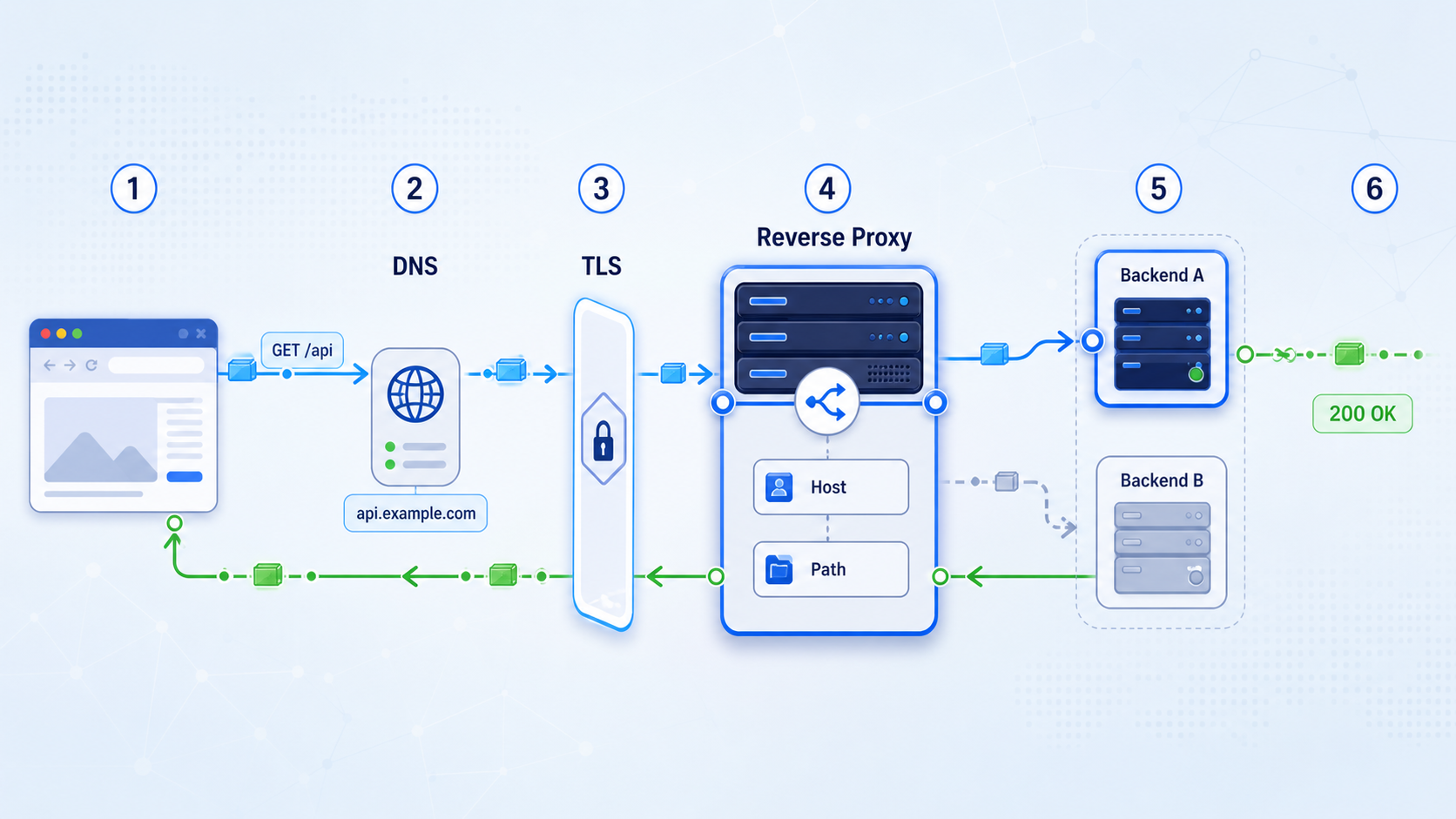
Understanding the complete request path prevents many common configuration and security mistakes. The proxy is not simply redirecting a browser to another URL. In the usual reverse-proxy model, it accepts one connection from the client and establishes a separate connection to the selected backend.
The client resolves the public hostname
The client resolves a hostname such as app.example.com and connects to the address serving the reverse proxy. For HTTPS, the client begins a TLS connection and validates the certificate presented for that hostname.
The proxy accepts and evaluates the request
The proxy receives the method, path, headers, and body. Its configuration may select a route using the HTTP Host header, the URL path, or another supported condition. Unknown hosts and unmatched paths should have an intentional default behavior rather than falling through to a sensitive backend.
The proxy prepares the upstream request
Depending on its configuration, the proxy may preserve or replace the Host header, add forwarding metadata, remove hop-by-hop headers, rewrite a path, or apply authentication and request-size rules. These transformations are implementation-specific and must match the backend's expectations.
The proxy connects to the selected backend
The upstream connection is distinct from the client connection. It might use HTTP or HTTPS and might target a local process, container address, private server, or another routed destination. Connection, response, and idle timeouts determine how long the proxy waits.
The backend generates a response
The application processes the request and sends its status code, response headers, and body to the proxy. The application may use trusted forwarding headers to reconstruct the original client address, hostname, or scheme.
The proxy returns the response
The proxy may modify response headers, apply compression, or serve a cached representation if explicitly configured and valid. It then sends the result over the client-facing connection. To the client, the response appears to come from the public endpoint it contacted.
Host handling and virtual hosts
HTTP/1.1 requests normally include a Host header, while HTTP/2 and HTTP/3 carry the corresponding authority information within their protocol structure. Reverse proxies commonly use this value to host multiple sites on one listening address. For example, api.example.com can select an API backend while docs.example.com selects a documentation service.
The upstream application may also depend on the original host when generating absolute URLs, validating allowed hosts, choosing a tenant, or issuing redirects. Preserving the original host is often useful, but it is not always the correct choice. Some backends expect their own internal hostname instead. Decide deliberately and test redirects, cookies, generated links, and host validation.
Forwarded and X-Forwarded headers
Because the backend connection originates from the proxy, the backend usually sees the proxy's network address as the immediate peer. Proxies can pass the original request context through the standardized Forwarded header or commonly used fields such as X-Forwarded-For, X-Forwarded-Host, and X-Forwarded-Proto.
A public client can send its own forwarding headers. The edge proxy should replace or sanitize untrusted values according to the intended chain, and the application should trust proxy metadata only when the request came through an approved proxy. Otherwise, attackers may spoof client addresses or schemes and interfere with logging, access rules, rate limits, or redirect logic.
WebSockets, streaming, and long-lived responses
WebSockets begin with an HTTP exchange and then switch to a long-lived bidirectional connection. The proxy must support the required protocol behavior and retain the connection for an appropriate period. Server-sent events, streamed downloads, long polling, and chunked responses can also fail when buffering or idle timeouts are unsuitable.
A configuration that works for short web requests is not automatically correct for a terminal, dashboard, live event feed, or large upload. Test the actual traffic pattern. Review upgrade handling, buffering, request and response size limits, idle timeouts, backend timeouts, and any intermediate tunnel or gateway in the path.
Reverse proxies, forward proxies, VPNs, gateways, CDNs, and tunnels
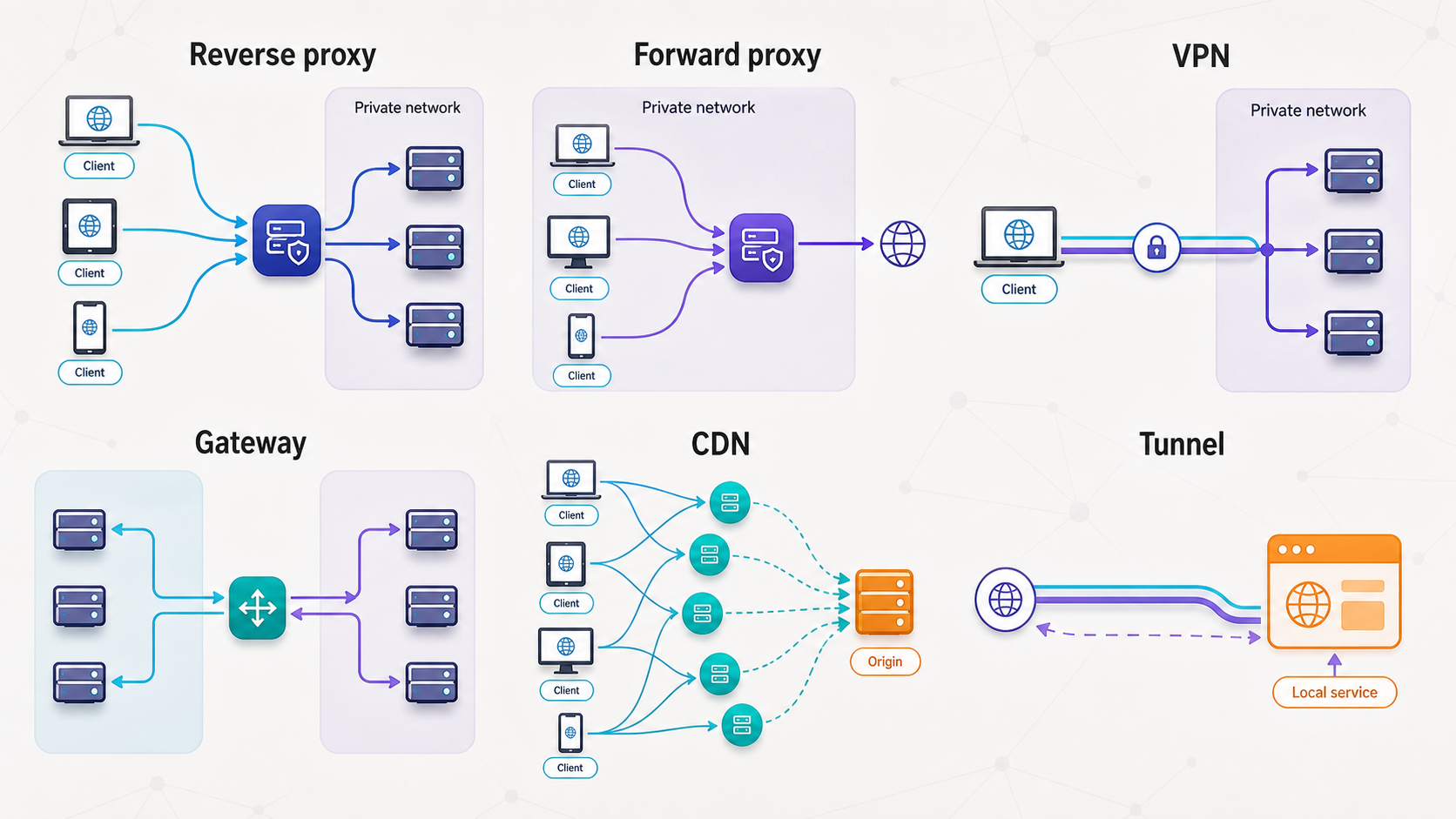
Several technologies sit between endpoints, but they are not interchangeable. The most important distinction is who initiates the connection, which side the intermediary represents, and what policies it applies.
| Technology | Primary position | Main purpose | Important distinction |
|---|---|---|---|
| Reverse proxy | In front of servers | Accept inbound application traffic and forward it to backends | May route by host or path and can apply application-layer policy |
| Forward proxy | In front of clients | Send client-originated requests toward external destinations | Represents the client side and may enforce outbound access policy |
| VPN | Between devices or networks | Create network-layer connectivity across another network | It is not inherently an application-layer forward proxy |
| Load balancer | In front of multiple service instances | Distribute traffic among eligible destinations | Healthy failover requires suitable checks, thresholds, and configuration |
| API gateway | At an API boundary | Route APIs and apply API-focused policy | Often adds authentication, quotas, transformations, or API lifecycle controls |
| CDN | Distributed client-facing edge | Serve eligible content from geographically distributed infrastructure | Caching and edge delivery are central, although products may add proxy features |
| Outbound tunnel | Between a local client and a public relay | Provide reachability through an outbound connection | It creates a network path but does not inherently replace local routing or policy |
A single product can perform more than one role. A reverse proxy may include load balancing, an API gateway may use reverse-proxy mechanics, and a CDN may proxy requests to an origin. The overlapping implementation does not make the concepts identical.
A VPN is particularly important to separate from a forward proxy. A VPN generally provides network connectivity for selected traffic or routes, while an HTTP forward proxy handles application requests from configured clients. Some deployments combine them, but using a VPN does not mean the VPN is technically an HTTP forward proxy.
What a reverse proxy can do, and what it does not do automatically
Reverse proxies are popular because they provide a useful place to centralize cross-cutting concerns. Each capability still depends on the software, enabled modules, version, configuration, and surrounding infrastructure.
Load balancing needs health policy
Merely listing two upstream servers does not guarantee safe failover. The proxy needs a way to determine whether each destination is eligible. A TCP connection check may show that a port is open even when the application cannot serve useful requests. An HTTP health endpoint can provide better application context, but it should be lightweight and should not expose sensitive diagnostics.
Health checks also need thresholds. Removing a backend after one transient timeout can cause unnecessary churn, while waiting too long can continue sending users to a broken instance. Recovery behavior matters too. A newly restarted application may accept connections before it has loaded dependencies or completed migrations.
Caching is selective, not universal
Static assets and explicitly cacheable public responses are common candidates for proxy caching. Personalized pages, authenticated API responses, frequently changing data, and responses containing cookies require much greater care. Cache keys must account for every request characteristic that changes the representation, including relevant query parameters and headers.
A proxy also cannot make an application cache-safe by itself. Incorrect cache directives, an incomplete cache key, or failure to vary on authentication state can leak one user's response to another. Begin with conservative rules and validate invalidation behavior before relying on caching in production.
Security features require explicit configuration
Some reverse proxies can enforce basic authentication, external authorization, IP rules, request-size limits, rate limits, or security headers. Those features are not enabled merely because the proxy exists. A reverse proxy is also not automatically a web application firewall or a distributed denial-of-service mitigation service.
Local rate limiting may reduce accidental overload or simple abuse, but it has finite capacity and depends on trustworthy client identity data. If an attack saturates the connection or exhausts resources before the proxy can apply policy, a local rule cannot restore that upstream capacity.
Security architecture and TLS boundaries
Putting a reverse proxy in front of an application creates a useful control point, but it also creates a security boundary that must be designed deliberately. The proxy becomes public-facing infrastructure and needs patching, restricted administrative access, monitored logs, safe defaults, and a minimal set of enabled features.
Prevent direct backend access
If clients can reach the backend directly, they may bypass authentication, rate limits, request filtering, or logging applied only at the proxy. Bind a same-host backend to loopback when appropriate, use private network addresses for internal services, and restrict backend firewall rules to approved proxy sources. In container environments, publish only the ports that need to be reachable.
Hiding the backend address is not itself an access control. Enforce actual network policy and application authorization. If administrators, monitoring systems, or other services require direct backend access, allow only those necessary paths and identities.
Use authentication and least privilege
A reverse proxy can be a convenient authentication enforcement point, but the application should still protect sensitive actions according to its threat model. Do not assume that every request arriving from a proxy is authorized. Restrict proxy administration, certificate files, configuration files, service accounts, and backend credentials to the minimum required permissions.
IP restrictions can be useful for stable administrative networks or machine integrations, but they are not a universal identity system. Addresses may change, multiple users may share an egress address, and forwarding metadata can be spoofed if proxy trust is configured incorrectly.
Choose TLS termination or re-encryption consciously
With TLS termination, the client establishes HTTPS to the reverse proxy. The proxy decrypts the request before creating the upstream connection. If that upstream uses plain HTTP, the traffic is plaintext on that segment. This can be acceptable only when the segment is inside an explicitly trusted boundary and the risks have been evaluated.
With TLS re-encryption, the proxy establishes a separate HTTPS connection to the backend. This protects the upstream hop in transit, but it also requires backend certificates and correct certificate validation. Encryption without validation does not reliably establish that the proxy reached the intended backend.
| TLS model | Client to proxy | Proxy to backend | Operational consideration |
|---|---|---|---|
| Edge termination | HTTPS | HTTP | Upstream traffic is plaintext and must remain within an accepted trust boundary |
| Re-encryption | HTTPS | HTTPS | The proxy must validate the backend identity and manage upstream trust correctly |
| TLS passthrough | HTTPS through the intermediary | Original TLS reaches the backend | Application-layer inspection and routing options may be more limited |
Logging without collecting unnecessary secrets
Proxy logs are valuable for diagnosing routing failures, latency, status codes, and suspicious traffic. They can also capture sensitive paths, query values, account identifiers, or headers. Avoid recording authorization credentials, session cookies, complete request bodies, or other secrets unless a tightly controlled diagnostic process genuinely requires them.
Define retention, access, redaction, and deletion rules. Keep system clocks synchronized so proxy, application, and tunnel events can be correlated. Monitor repeated authentication failures, unusual status-code changes, backend timeouts, and unexpected hostnames without treating any single signal as proof of an attack.
Continue to patch the backend, validate input, authorize every sensitive operation, protect credentials, limit network reachability, and maintain tested recovery procedures. Proxy controls complement application and infrastructure security rather than replacing them.
When do you need a reverse proxy?
A reverse proxy is valuable when several services need one controlled entry point or when an operational policy should be applied consistently before requests reach applications. It is not mandatory for every web service.
Good reasons to use one
- Multiple services share an endpoint: Route different hostnames or paths to different applications.
- TLS should be managed centrally: Present certificates at one ingress layer while choosing an appropriate upstream TLS model.
- Several backend instances serve one application: Distribute requests and apply properly designed health checks.
- Applications need consistent edge policy: Centralize selected authentication, limits, header handling, or logging.
- Backends should not be directly reachable: Restrict ingress so approved proxy systems are the public path.
- Deployments need controlled transitions: Shift traffic among versions or instances using supported routing features.
When a reverse proxy may be unnecessary
A single application that already handles HTTPS, authentication, logging, and public connectivity may not benefit from another component. Every added layer introduces configuration, upgrades, logs, certificates, timeouts, and another possible failure point.
A temporary development service may need only controlled public reachability rather than multi-backend routing. A raw TCP or UDP service may need port forwarding or a corresponding tunnel rather than an HTTP reverse proxy. Private administrative access may be better served by a private network design, such as an appropriately configured mesh VPN, instead of a public web endpoint.
Avoid deploying a reverse proxy solely because it appears in a sample architecture. Start from concrete requirements: routing, policy, TLS placement, backend isolation, scaling, or observability. If none applies, the simplest correct architecture may be a direct application endpoint or a narrowly scoped tunnel.
Common reverse proxy tools
Nginx, Apache HTTP Server, HAProxy, Caddy, and Traefik are common choices, but the right fit depends on protocol requirements, deployment model, existing operational knowledge, and the exact capabilities available in the version you run. Product behavior changes over time, so use each project's current primary documentation when selecting modules, configuring certificate automation, or relying on provider integrations.
| Tool | Common deployment context | Points to evaluate |
|---|---|---|
| Nginx | Web serving and HTTP reverse proxy deployments | Routing syntax, upstream behavior, buffering, headers, timeouts, and available modules |
| Apache HTTP Server | Existing Apache environments and module-based web stacks | Required proxy modules, virtual-host rules, header behavior, and TLS configuration |
| HAProxy | Proxying and load-balancing deployments | Layer 4 versus Layer 7 mode, health checks, timeouts, persistence, and TLS placement |
| Caddy | HTTP serving and reverse proxy configurations | Certificate automation prerequisites, routing order, upstream transport, and storage permissions |
| Traefik | Dynamic and container-oriented environments | Provider discovery, labels or configuration objects, exposed dashboards, middleware, and certificate storage |
Do not choose solely from broad labels such as “fastest” or “easiest.” A valid comparison needs a defined workload, protocol set, security requirements, operational model, and representative testing. A familiar tool with a small, reviewed configuration is often safer than a feature-rich deployment that the team cannot operate confidently.
How Localtonet fits with a reverse proxy
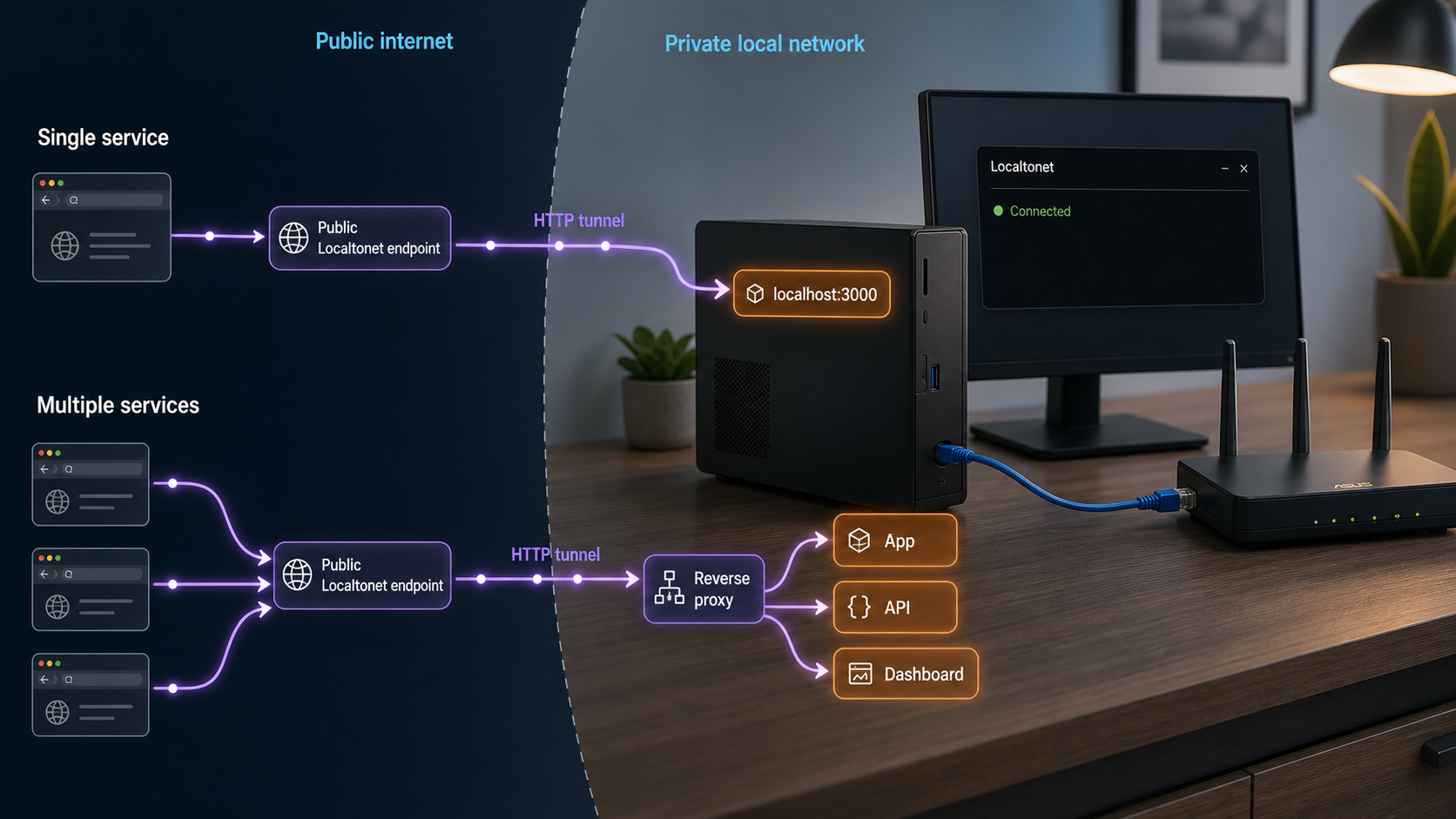
Localtonet is a secure multi-protocol tunneling and proxy platform. For this workflow, the relevant capability is an HTTP tunnel that exposes an HTTP service reachable from the Localtonet client device. The client establishes an outbound connection to a Localtonet relay, so the setup does not require inbound router port forwarding, firewall changes, a public IP address, or VPN setup.
This solves public reachability, not every reverse-proxy function. An HTTP tunnel can point directly to one local application, or it can point to a local reverse proxy that performs multi-service routing and policy. Tunneling and reverse proxying remain separate concepts even when they form one request path.
Creating a tunnel does not start it. The public endpoint is available only while the selected client or device is connected and the tunnel is running. A tunnel can later be stopped or deleted when access is no longer required.
Prerequisites
- A Localtonet account and the Localtonet client installed on the device that can reach the target service.
- A running HTTP application or reverse proxy with a known local IP address and port.
- Local authorization to expose the service and an access-control plan appropriate for its data and users.
- A current device-specific authentication token selected through the product. Do not publish or guess tokens.
- A relay server or region selected from the values currently available in the dashboard. Availability can vary, so this article does not hardcode a server code.
Complete HTTP tunnel workflow
Install and run the Localtonet client
Install the appropriate Localtonet application for the operating system on the device that can reach the web service. Start the client and confirm that the device is connected. Keep its device-specific token private.
Verify the application locally
Before creating public access, open the application from the client device using its local address and port. Confirm that the expected page or API response loads and that authentication works. If this local test fails, fix the application before troubleshooting the tunnel.
Select the connected device token
In Localtonet, select the token belonging to the client device that can reach the target. Tokens identify devices and must not be included in screenshots, logs, source code, or shared instructions.
Select a currently available relay
Choose an available Localtonet relay server or region from the current product interface. Do not copy an old server code from an unrelated tutorial because available values can change by product context.
Create the HTTP tunnel configuration
Create the appropriate HTTP tunnel and choose its supported process type. HTTP process types can provide a random subdomain, a selected subdomain where supported, or a custom domain. Check current documentation before applying custom-domain DNS settings.
Enter the local target
Set the local IP address and port of the application or local reverse proxy. Use the address as seen from the Localtonet client device. A target inside a container may require a container-reachable or host-published address rather than the container's own loopback address.
Start the tunnel
Use the Start action after reviewing the target and exposure policy. Saving or creating the configuration alone does not make the tunnel run.
Verify the assigned public HTTPS address
Open the assigned public address from a different browser context or network. Test the expected host, routes, redirects, authentication, uploads, WebSockets, and streaming behavior that the application actually uses. Confirm that unexpected paths and hosts do not expose another service.
Operate and close access safely
Keep the client running only where ongoing access is intended, review application and proxy logs, and monitor for failures. Stop the tunnel when temporary access ends. Delete it when the configuration is no longer needed.
The Localtonet HTTP tunnel documentation is the appropriate contextual reference for the current interface and supported HTTP options. Exact custom-domain DNS instructions should be taken from current Localtonet documentation rather than copied from a configuration for another DNS or proxy provider.
Direct target versus reverse proxy target
| Design | Local target | Use it when | What remains your responsibility |
|---|---|---|---|
| Tunnel to one application | Application IP and port | One web service needs a public HTTPS address | Application authentication, authorization, safe headers, and service security |
| Tunnel to a reverse proxy | Proxy IP and port | Several routes or shared edge policies are required | Proxy routing, backend isolation, forwarding trust, health checks, and application security |
| Raw port tunnel | TCP, UDP, or combined target as appropriate | The service is not ordinary HTTP | Protocol authentication, authorization, client safety, and service hardening |
Do not publish an unauthenticated administration panel, database console, development debugger, or internal metadata endpoint. Apply application authentication and least privilege, restrict routes where appropriate, and test from outside the local network before sharing the address.
Troubleshooting reverse proxies and Localtonet HTTP tunnels
The local connection is refused
Confirm that the application process is running and listening on the expected port. Test from the same device that runs the Localtonet client or reverse proxy. A refusal usually means no process is accepting connections at that address, the application is bound elsewhere, or a local network policy rejects the connection.
The service uses the wrong bind address
A service bound only to 127.0.0.1 is reachable only from the same network namespace. That is appropriate when the proxy or Localtonet client runs directly on the same host. It is not reachable from a separate container or another machine. Bind only as broadly as required, then use host or network firewall rules to preserve least privilege.
Container networking points to the wrong localhost
Inside a container, 127.0.0.1 refers to that container, not automatically to the host or another container. Determine where the Localtonet client, reverse proxy, and application are running. Use the container platform's intended service address, shared network, or explicitly published host port. Do not solve the problem by exposing every container port publicly.
The backend rejects the Host header
Applications and development servers may allow only known hostnames. Inspect whether the proxy preserves the public host or substitutes an internal host, then configure both sides intentionally. Avoid disabling host validation globally. If several sites share one reverse proxy, verify that each hostname reaches only its assigned backend.
Redirect loops occur
A common loop happens when the client uses HTTPS but the backend sees an HTTP upstream connection and repeatedly redirects to HTTPS. Configure trusted proxy handling so the application recognizes the original scheme from sanitized forwarding metadata. Also review canonical-host rules, trailing-slash redirects, and competing redirect policies at the proxy and application.
The page loads but browsers report mixed content
A public HTTPS page must not load active resources through hardcoded HTTP URLs. Configure the application to generate public HTTPS links, review its external base URL, and check forwarded scheme handling. Search templates, API responses, WebSocket URLs, and asset configuration for absolute http:// references.
WebSockets or streams disconnect
Confirm that every intermediary supports the required protocol and that upgrade handling is correct. Review idle timeouts, response buffering, heartbeat behavior, and maximum connection duration. Test a representative long-lived session rather than relying on a successful page load.
The proxy returns 502 or 504
A 502 Bad Gateway commonly indicates that the proxy could not obtain a valid upstream response. A 504 Gateway Timeout commonly indicates that an upstream operation exceeded a configured time limit. Check backend availability, name resolution, address and port selection, firewall rules, TLS validation, application logs, and timeout values.
Do not increase every timeout without finding the cause. A slow dependency, blocked application thread, failed health check, or unreachable address will remain broken with a larger number and may consume resources for longer.
The Localtonet public endpoint is unavailable
Confirm that the selected Localtonet client is connected and that the correct tunnel is running. Remember that creating a tunnel is separate from starting it. Then repeat the local target test from the client device. Check that the selected token belongs to that device and that the target address is reachable from its network context.
One route works but another does not
Compare the failing path with the reverse proxy's route order and rewrite rules. Verify whether the backend expects the prefix to be preserved or removed. Check case sensitivity, trailing slashes, query parameters, method restrictions, authentication middleware, and request-size limits.
Client addresses in logs are incorrect
Verify which proxy is the immediate trusted peer and which forwarding-header format the application accepts. Sanitize values at the public edge and configure the application with the exact number or range of trusted proxy hops. Never trust arbitrary forwarded addresses from every source.
Frequently asked questions
Does a reverse proxy hide and secure every backend automatically?
No. Backends remain directly reachable unless routing and firewall policy prevent that access. Authentication, authorization, rate limits, header sanitization, patching, and application security also require explicit configuration. A reverse proxy is not automatically a WAF or DDoS mitigation service.
Is a VPN a forward proxy?
No. A VPN creates network connectivity or routes selected traffic through a VPN path. A forward proxy accepts configured application requests on behalf of clients. A deployment can combine both technologies, but they are distinct concepts.
Is a reverse proxy the same as a load balancer?
Not exactly. Load balancing is a function that many reverse proxies can perform. A reverse proxy can route to one backend without balancing, while load balancers may operate at different network layers. Reliable failover requires appropriate health checks and recovery policy.
Does TLS termination encrypt traffic all the way to the backend?
Not necessarily. TLS termination protects the client-to-proxy connection. If the proxy forwards plain HTTP, the upstream segment is plaintext. Use that model only within an accepted trust boundary, or configure TLS re-encryption and validate the backend certificate.
Do I need a reverse proxy to use a Localtonet HTTP tunnel?
No. An HTTP tunnel can target one reachable local web application directly. A local reverse proxy remains useful when you need multi-service host or path routing, load balancing, caching, request transformation, or centralized access policy.
Does creating a Localtonet tunnel start it?
No. After creating the configuration, you must start the tunnel. The endpoint remains available only while the selected client is connected and the tunnel is running. Stop or delete the tunnel when it is no longer needed.
Can a reverse proxy reach a backend on another network?
Yes. The backend can be local, on another private subnet, or reachable through another secured connection. The proxy still needs valid routing, name resolution, firewall permission, suitable latency, and an appropriate TLS and trust model for that upstream path.
Publish the right HTTP entry point with Localtonet
Verify your application locally, decide whether the tunnel should target the application or a local reverse proxy, and expose only the routes intended for public access. Localtonet provides the outbound tunnel path without requiring inbound router port forwarding.
Get Started Free →

