

Choose the right trust boundary before publishing industrial data
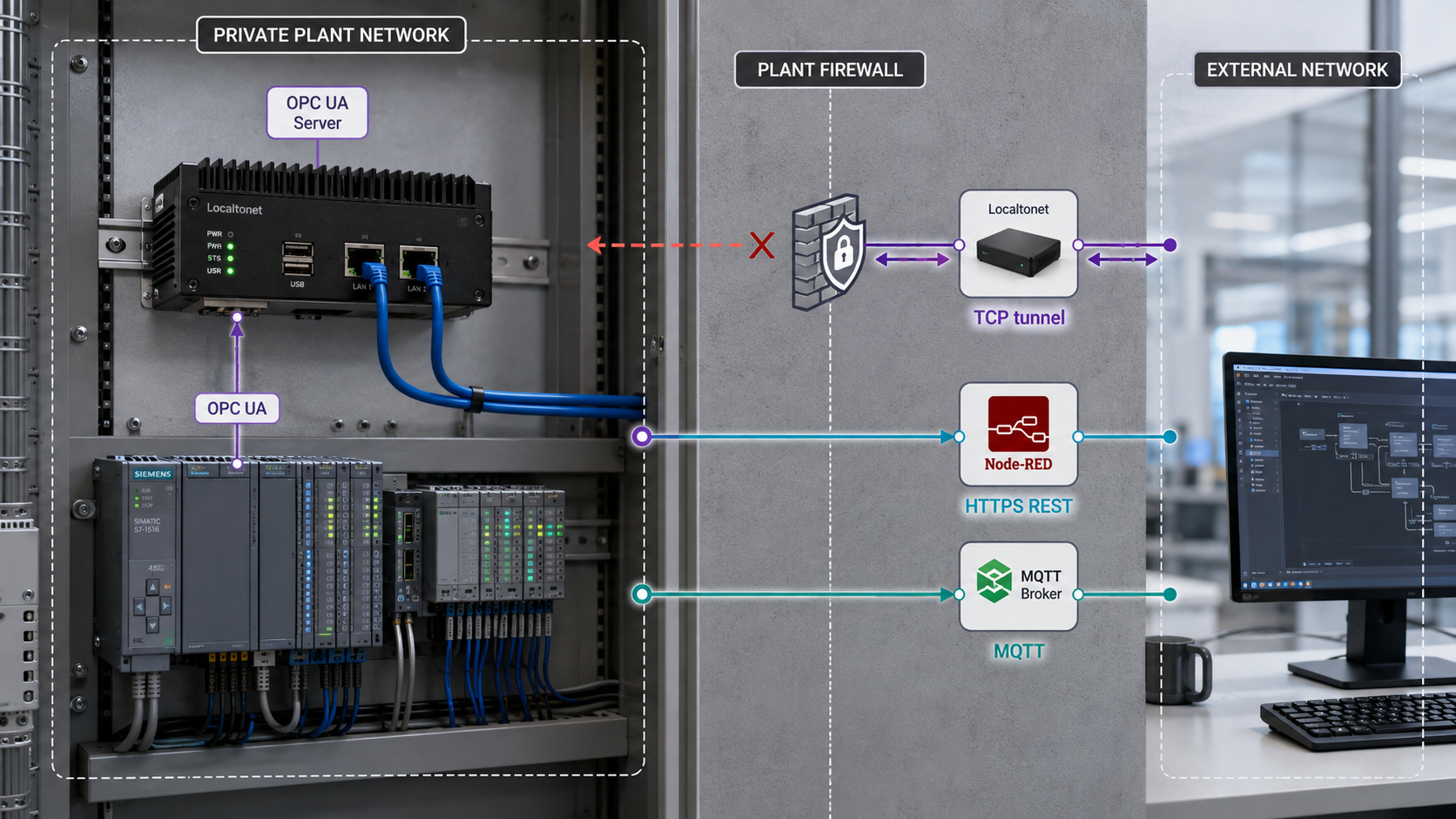
Remote OPC UA access is not simply a matter of forwarding a familiar port. The safe design depends on whether a remote client truly needs the native OPC UA protocol, only a constrained set of read-only values, or a continuous telemetry stream. This guide compares direct TCP access, an HTTP data gateway, and an outbound MQTT pipeline, then explains how to configure and verify the applicable Localtonet tunnel without inbound router port forwarding. It also covers OPC UA certificates, endpoint discovery, Node-RED isolation, troubleshooting, routine operations, rollback, and safe decommissioning.
📋 What's in this guide
Understand the protocol and choose an architecture
OPC Unified Architecture, standardized as IEC 62541, lets industrial clients browse structured address spaces, read and write variables, call methods, and create subscriptions when the server grants those capabilities. An OPC UA value can also carry status and timestamp information that is operationally important. A temperature value without its associated StatusCode and timestamps may look plausible even when it is stale, uncertain, or invalid.
OPC UA commonly uses the opc.tcp:// transport. TCP port 4840 is a registered and widely used convention, but it is not mandatory for every server. Appliances, PLCs, simulators, and gateway products may listen on another port or expose several endpoints. Always use the endpoint and port configured on the actual server rather than assuming 4840.
A Localtonet TCP tunnel preserves the native TCP conversation. Our client runs on a device that can reach the OPC UA server and establishes an outbound connection to a Localtonet relay. A remote OPC UA client then connects to the assigned public host and port. No inbound router port forwarding, public IP address, firewall change, or VPN setup is required for the tunnel itself.
Preserving the protocol also preserves its risk. A direct tunnel exposes whatever browse, read, write, method, history, and subscription permissions the OPC UA server grants to the authenticated session. The tunnel does not convert a write-capable OPC UA account into a read-only account, and it does not replace OPC UA user authentication, certificate trust, secure message mode, authorization, segmentation, or monitoring.
Direct native access
Remote OPC UA client
        |
        | OPC UA security, client identity, server identity
        v
Localtonet public TCP host and port
        |
        | outbound tunnel connection
        v
Gateway host with Localtonet client
        |
        | permitted OT route
        v
OPC UA server in the OT zone

Constrained HTTP data gateway
Remote browser or API client
        |
        | HTTPS and optional Localtonet SSO
        v
Localtonet HTTP tunnel
        |
        v
Node-RED HTTP endpoint on gateway host
        |
        | selected reads or subscriptions only
        v
OPC UA server in the OT zone

Outbound telemetry pipeline
OPC UA server -> gateway collector -> authenticated TLS MQTT connection
                                      -> external broker or broker bridge
No public tunnel to the plant MQTT broker is required.
Three designs that should not be treated as equivalent
| Architecture | Remote interface | Best fit | Main security consequence |
|---|---|---|---|
| Direct Localtonet TCP tunnel | Native OPC UA | Approved commissioning, diagnostics, specialist clients, and temporary maintenance | The remote session receives every OPC UA capability authorized by the server and user account. |
| Node-RED HTTP data gateway | Constrained HTTP endpoint | Read-only dashboards or integrations that need a small, explicitly selected data set | The gateway can filter nodes and operations, but Node-RED itself must be hardened and its editor must remain private. |
| Outbound MQTT publisher or broker bridge | Authenticated MQTT service outside the OT zone | Continuous telemetry and event distribution to multiple authorized consumers | No inbound broker exposure is needed, but TLS validation, credentials, topic authorization, and duplicate handling remain essential. |
A tunnel is a network conduit across a trust boundary. Use it only with written authorization, an approved network placement, a defined access window, named users, and a rollback plan. Do not attach an internet-facing tunnel directly to a safety system or an unsegmented control network. Where policy requires an industrial DMZ or dedicated OPC UA gateway, place the Localtonet client and application gateway in that approved zone.
Prerequisites and information to collect
Do not create the tunnel first and troubleshoot the industrial service through a public endpoint. Establish a known-good local path, record the security settings, and decide exactly what the remote party needs. This separates OPC UA configuration problems from tunnel configuration problems.
Record a local baseline
From the gateway host, connect to the OPC UA server using the same security policy, message mode, client certificate, user identity, and NodeIds planned for remote access. Record the working endpoint URL and the server certificate fingerprint using your organization's approved tooling. Read a known test node and retain the complete DataValue, including the value, StatusCode, source timestamp, and server timestamp when the server supplies them.
Also verify the expected authorization boundary. A read-only maintenance account should not be able to write variables or call control methods. If the account is more powerful than the task requires, correct the server permissions before adding a tunnel.
Prepare Localtonet without inventing installation commands
Install the current Localtonet client application using the installation method presented for the gateway host's operating system in the current Localtonet product or dashboard. Run the client on the device that can reach the approved local target. Do not copy an unverified shell command from an old article, and do not place the device-specific AuthToken in scripts, screenshots, support messages, or source control.
The AuthToken identifies the device that will run the tunnel. Relay server or region choices can change, so select from the values currently available in your dashboard rather than copying a server code from an example. Creating a tunnel configuration does not start it. The selected client must be connected, and the tunnel must be started separately.
Local verification proves that the gateway can reach the service. Remote verification proves that the assigned Localtonet endpoint and the remote client's security configuration work. Keep these tests separate so a certificate or OPC UA endpoint-selection failure is not mistaken for a basic routing failure.
Approach 1: Publish native OPC UA through a TCP tunnel
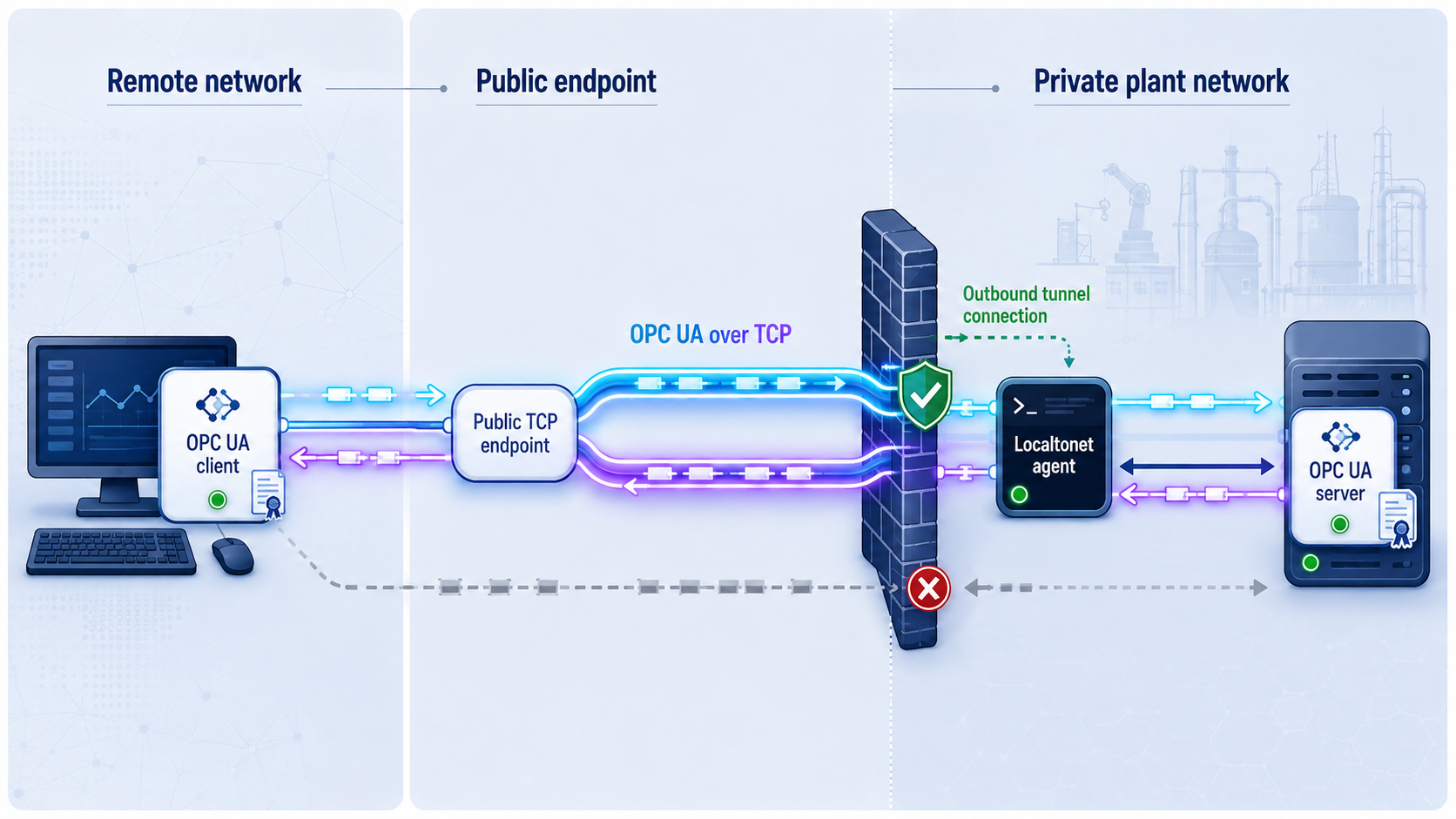
Use direct TCP only when the remote application needs native OPC UA behavior such as browsing, subscriptions, history, or an operation that cannot be represented safely through a constrained gateway. It is most suitable for controlled maintenance and commissioning windows.
Localtonet forwards the TCP connection to the configured local IP address and port. It does not reinterpret OPC UA endpoint descriptions. This matters because OPC UA servers may advertise an internal hostname or IP address in their endpoint URLs. Client behavior varies: some clients continue using the address entered by the operator, some select an endpoint returned by discovery, and some reject a mismatch between the requested URL, the advertised endpoint, the server certificate, hostname, or ApplicationUri.
Manually entering the relay URL can work with some combinations of server and client, but it is not a universal endpoint-rewriting solution. Confirm behavior with the exact server firmware, SDK, client version, endpoint configuration, and certificate rules in your environment. If the implementation cannot validate and connect safely through the public address, use a properly configured OPC UA gateway or the constrained HTTP architecture instead of disabling validation.
Configure the Localtonet TCP tunnel
Install and run the current Localtonet client
Use the installation option provided for the gateway operating system. Start the client on the approved device that already passed the local OPC UA connectivity test.
Select the gateway device by its AuthToken
In the Localtonet dashboard, choose the device-specific AuthToken belonging to this gateway. Treat the token as a credential and never substitute a guessed or example value.
Select an available relay server
Choose a server or region from the current dashboard options. Do not hardcode an example server code because availability can vary.
Create a TCP tunnel to the verified local target
Select TCP and enter the OPC UA server IP address and its actual configured port. Use 4840 only if that is the verified port. The target may be on the gateway itself or reachable from it, subject to your approved segmentation rules.
Start the tunnel
After creating the configuration, press Start. A created tunnel is not automatically running. The public endpoint is available only while the selected client is connected and the tunnel is running.
Record the assigned public host and port
Copy the exact host and port displayed for this tunnel. Provide it only to the authorized remote operator. Do not reuse a sample hostname from documentation.
Verify remotely, then stop or delete the tunnel
Test with the approved OPC UA client and expected identity. When the access window ends, press Stop. Delete the tunnel if the configuration is no longer required.
Perform remote OPC UA verification
Configure the remote client with the assigned host and port while retaining the approved OPC UA security configuration. Select an endpoint offering a policy, message mode, user-token type, and certificate behavior that both sides support. There is no universal production policy that can be selected without checking current OPC Foundation guidance and the capabilities of the server and client.
Do not fall back to an unsecured endpoint merely to make the connection succeed. If the connection fails, inspect endpoint discovery, certificate trust, hostname or ApplicationUri checks, and supported security combinations. When the client connects, verify the server identity before browsing data.
Read the same test node used for the local baseline. Compare its NodeId, data type, value, StatusCode, source timestamp, and server timestamp. If write access was not approved, confirm that the remote identity cannot write or call methods. If writes were approved, use a designated test point and the plant's change procedure rather than changing a live process value as a connectivity test.
Our documented SSO gateway applies to HTTP tunnels. Do not claim or assume that it authenticates native OPC UA TCP connections. Direct TCP access must rely on the server and client's OPC UA certificates, user authentication, secure message mode, authorization, network placement, monitoring, and a tightly controlled tunnel lifecycle.
Approach 2: Expose a constrained Node-RED HTTP data gateway
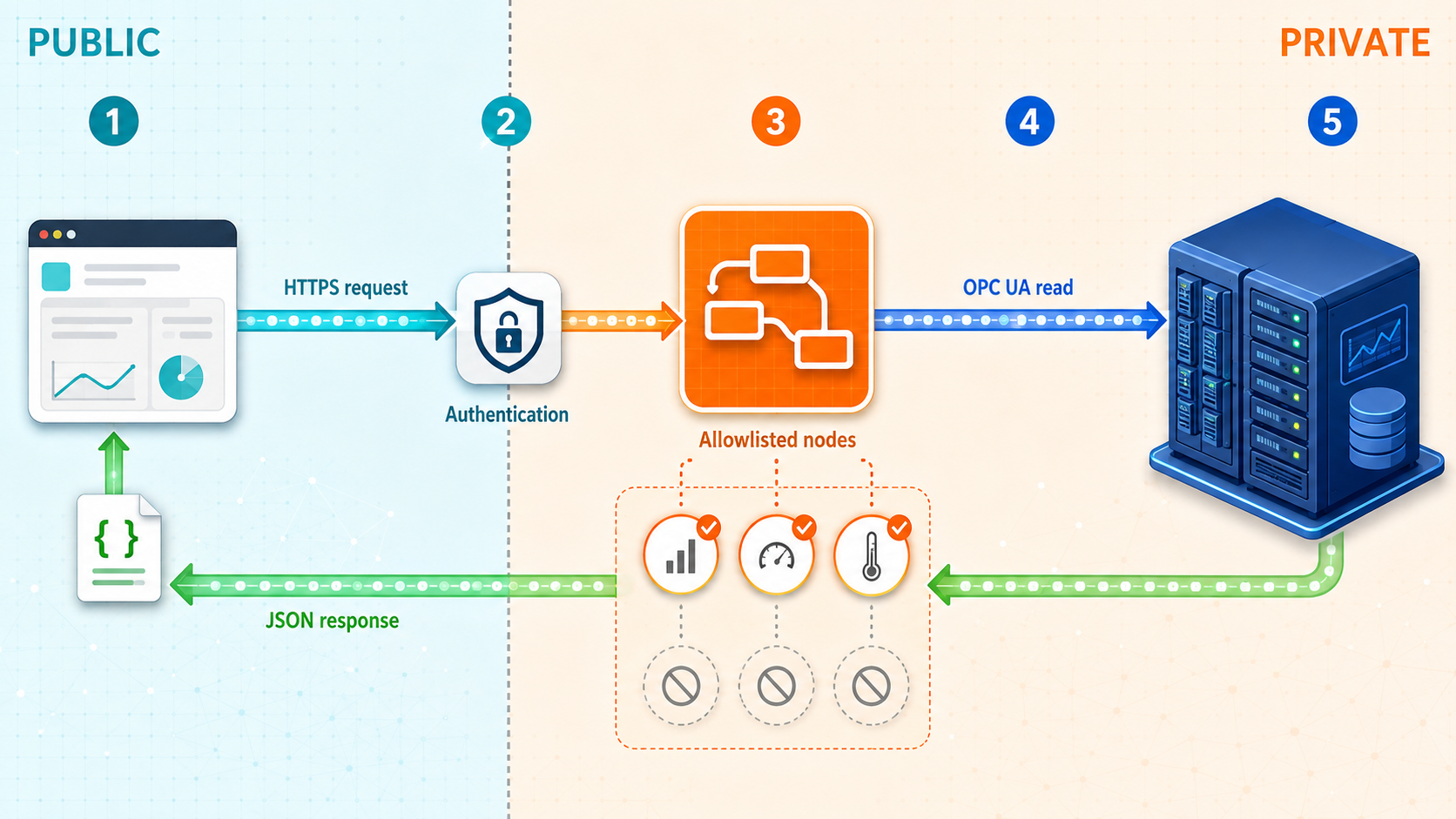
If remote users only need selected measurements, an HTTP gateway can create a smaller application-level interface than native OPC UA. Node-RED runs on the gateway host, connects to the OPC UA server locally, and exposes only explicitly approved data. A Localtonet HTTP tunnel provides the public HTTPS address.
This architecture does not make Node-RED automatically safe. The flow must propagate the original OPC UA quality and timestamps, reject unauthorized operations, and avoid exposing Node-RED's editor or administrative routes. The HTTP API should return only a small allowlist of nodes, not an unrestricted browse, arbitrary NodeId, write, or method-call interface.
Install and isolate Node-RED
Install a currently supported Node.js release, Node-RED, and the current node-red-contrib-opcua package using their maintained installation guidance for your operating system. Package message structures and node settings can change by version, so confirm the output of the installed OPC UA node with a local Debug node before writing the normalization function.
Bind the public data listener only to the interface needed by Localtonet, preferably loopback when the Localtonet client runs on the same host. Keep the Node-RED editor and administration endpoints on a separate private listener or otherwise restrict them according to current Node-RED security guidance. Configure editor authentication, protect credential files, run the service under a dedicated operating-system account, and do not expose the editor through the public tunnel.
Build a quality-preserving read flow
Configure the local OPC UA connection
Point the OPC UA client node at the locally verified endpoint. Configure the approved security policy, message mode, trusted certificates, and least-privilege user identity. Do not use anonymous access or a policy with no message security unless the approved risk assessment explicitly allows it.
Allowlist specific NodeIds
Configure only the approved NodeIds, such as ns=2;s=Temperature when that identifier actually exists on your server. Namespace indexes and NodeIds can change after server configuration or model updates, so verify them against the current address space.
Inspect the package's complete DataValue output
Attach a Debug node temporarily and capture the exact fields emitted by the installed package. Identify the real value, StatusCode, source timestamp, server timestamp, and NodeId or topic. Remove or disable verbose debugging after validation because industrial values and metadata may be sensitive.
Normalize without manufacturing quality data
Map the observed package fields into the response contract below. If a field is absent, return null or an explicit unavailable state. Never replace a missing, Bad, or Uncertain StatusCode with Good, and never substitute the HTTP gateway's current time for the OPC UA source timestamp.
Create a narrow HTTP route
Use a fixed read-only route such as /api/opcua/temperature. Return JSON with an appropriate HTTP content type. Do not accept arbitrary NodeIds, write values, method names, credentials, or endpoint URLs from the public request.
Test the endpoint locally
Call the route from the gateway and compare the response with the OPC UA client's DataValue. Confirm that Bad and Uncertain states remain visible and that timestamps are not rewritten.
The normalized response should preserve this meaning. The exact Node-RED property mapping must come from the installed package's Debug output rather than assumptions copied from another version.
{
  "nodeId": "ns=2;s=Temperature",
  "value": 21.7,
  "statusCode": "Good",
  "sourceTimestamp": "2026-08-20T10:15:21.400Z",
  "serverTimestamp": "2026-08-20T10:15:21.412Z"
}
The example shows the desired API shape, not permission to synthesize those values. If the actual StatusCode is Bad or Uncertain, return that real code. If either timestamp is unavailable, return null or omit it according to your documented API contract.
Create and start the HTTP tunnel
Confirm the Localtonet client is running
Use the same approved gateway device or another approved host that can reach the isolated Node-RED data listener.
Select the device/AuthToken and relay server
Choose the device-specific AuthToken and an available relay server from the current dashboard. Do not expose the token or hardcode a relay code.
Create the HTTP tunnel
Select an HTTP tunnel and its available Process Type, then set the local target to the Node-RED data listener's IP address and port. Generated, selected, and custom-domain options serve content at a public HTTPS address, but exact custom-domain DNS requirements must be checked in the current dashboard and documentation.
Enable SSO for the HTTP tunnel when appropriate
Configure an account-level provider and enable the approved provider for this HTTP tunnel. Localtonet SSO can use configured providers such as Google, GitHub, Microsoft, OpenID Connect, or Basic username and password authentication, with optional domain or email restrictions where configured.
Start and verify the HTTP tunnel
Press Start, open the assigned HTTPS URL, complete the SSO flow when enabled, and request only the intended API route. Confirm that administrative and editor routes are not reachable through the public endpoint.
Stop or delete access after use
Stop the tunnel at the end of the approved window. Delete it if ongoing reuse is not authorized, and remove temporary identities or flow routes created for the task.
For the currently documented HTTP authentication gateway behavior, see the Localtonet SSO documentation. SSO protects the HTTP tunnel before requests reach Node-RED. It does not replace OPC UA security between Node-RED and the industrial server, and it does not authorize access to individual process values by itself.
Node-RED commonly combines runtime, editor, and administrative behavior in one application. Separate or restrict those surfaces before creating the tunnel. Test that only approved data routes are reachable. A login page in front of an unrestricted editor is not equivalent to a constrained read-only industrial API.
Approach 3: Use an outbound MQTT publishing pipeline
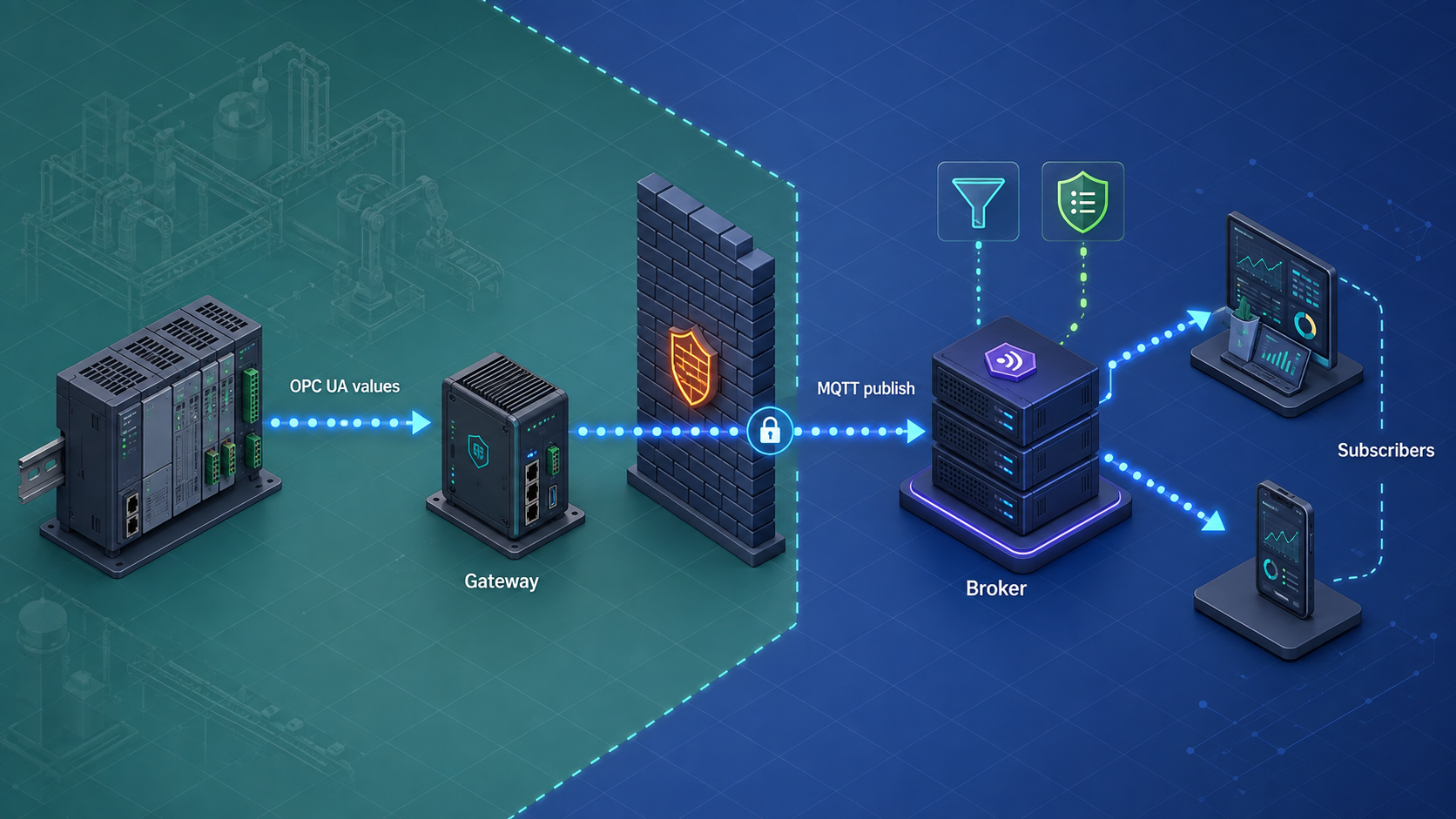
Continuous telemetry normally does not require a public TCP tunnel into a plant MQTT broker. A safer pattern is for the gateway to initiate an outbound, authenticated TLS connection to an approved broker outside the OT zone, or to use a broker bridge that makes the outbound connection. Remote consumers connect to that external broker rather than entering the plant network.
Node-RED can subscribe to selected OPC UA nodes, retain the original DataValue metadata, and publish a normalized payload. The MQTT client must validate the broker certificate, use a dedicated credential or client certificate, and publish only to authorized topic prefixes. Broker access-control rules should prevent the telemetry identity from subscribing broadly, publishing commands, or writing to unrelated assets.
Approve the external broker and outbound route
Select a maintained broker operated by your organization or an approved provider. Confirm the broker hostname, TLS port, issuing CA, authentication method, topic policy, retention requirements, and outage behavior.
Create a publish-only identity
Grant the gateway permission only to publish to its assigned topic prefix. Use separate consumer identities with separate subscriptions. Store secrets in the platform's protected credential facility rather than in function-node source code.
Subscribe to an OPC UA allowlist
Select only required nodes and preserve their value, StatusCode, source timestamp, server timestamp, and stable asset identity. Do not convert an uncertain or bad reading into a healthy value.
Configure TLS and hostname validation
Trust only the approved CA or broker certificate, validate the broker hostname, and reject expired or unexpected certificates. Do not disable TLS verification to work around a certificate error.
Choose delivery semantics deliberately
MQTT QoS 1 means at-least-once delivery, so duplicate messages are possible. Include a stable asset identifier, source timestamp, and sequence or message identifier where available, and make consumers idempotent. Retained messages and persistent sessions also require an explicit operational decision.
Verify publish and consume authorization
Confirm that the gateway can publish to the intended topic, cannot publish to command topics, and cannot subscribe beyond its role. Confirm that an authorized remote consumer receives the real StatusCode and timestamps and handles duplicates safely.
{
  "assetId": "line1-machine1",
  "nodeId": "ns=2;s=Temperature",
  "value": 21.7,
  "statusCode": "Good",
  "sourceTimestamp": "2026-08-20T10:15:21.400Z",
  "serverTimestamp": "2026-08-20T10:15:21.412Z",
  "messageId": "implementation-defined-stable-id"
}
The payload shape should be documented for consumers. The final identifier must come from the implementation rather than the literal placeholder above. If no reliable message identifier is available, consumers can use a documented combination of asset, NodeId, source timestamp, and sequence information, while accounting for devices that repeat timestamps.
Exposing a plant broker safely would require a complete broker design covering installation, listeners, TLS certificates, authentication, topic authorization, persistence, firewall placement, logging, patching, verification, and recovery. For telemetry export, an outbound broker connection or bridge provides a narrower trust boundary and avoids publishing the plant broker through a TCP tunnel.
Security controls for all three designs
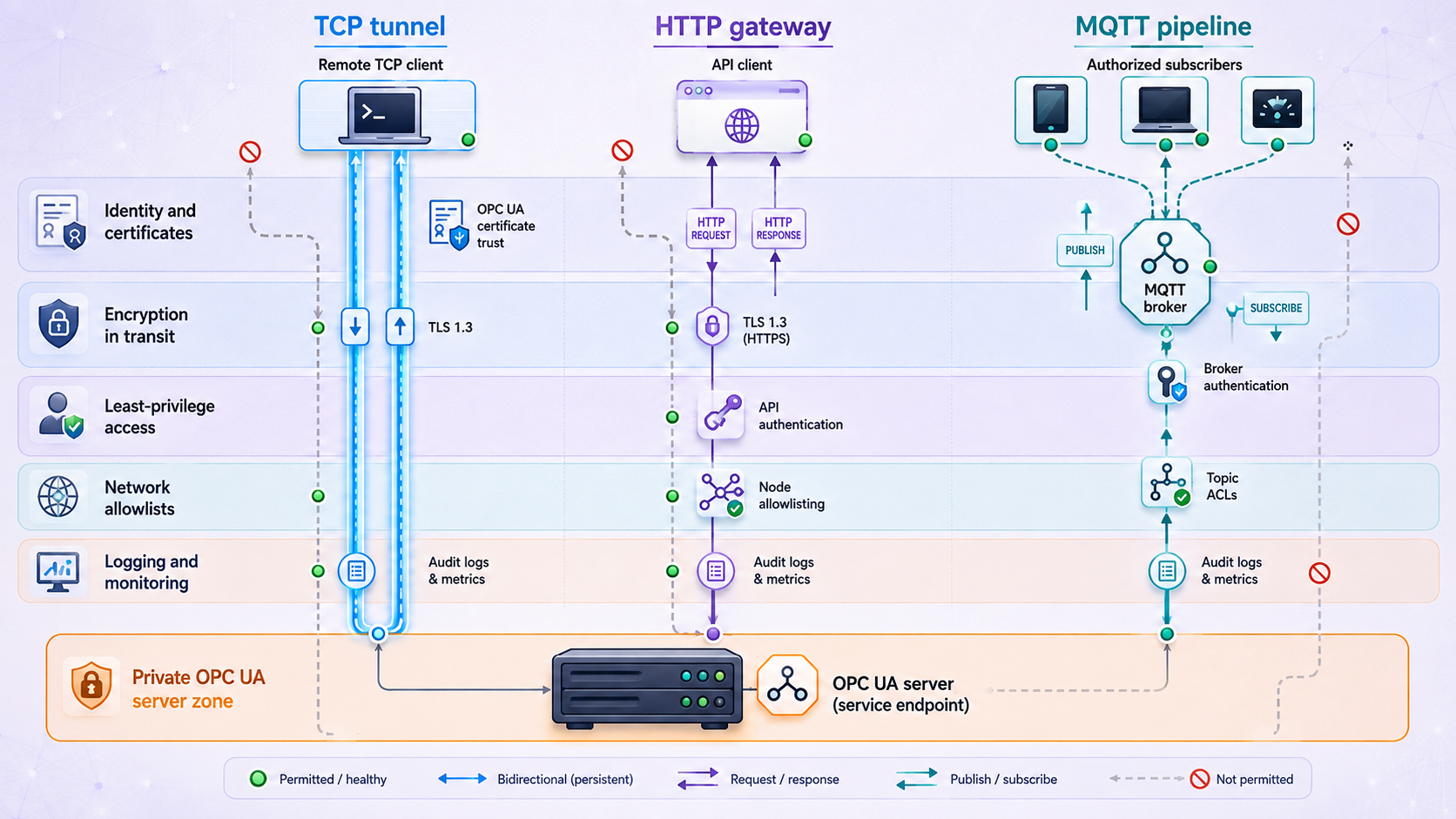
No single setting makes remote industrial access secure. Apply independent controls at the network, tunnel, application, OPC UA, identity, and operational layers. If one layer fails, the others should still limit access and preserve evidence.
Certificate handling
OPC UA certificate enrollment differs among servers and clients. A common workflow is for the client to generate or present an application certificate, for the server to place it in a rejected or pending store, and for an administrator to approve it after verifying its identity. The client must also trust the intended server certificate or issuing chain.
Certificate acceptance is not just file copying. Check validity dates, key use, the application identity, the server certificate fingerprint, ApplicationUri, and any hostname validation performed by the implementation. Synchronize system clocks because a large time error can cause certificate validity and timestamp problems.
Never solve a remote connection failure by permanently trusting all certificates or disabling validation. If a tunnel hostname cannot satisfy the implementation's endpoint or certificate checks, correct the endpoint configuration, use a supported gateway, or choose the HTTP architecture.
Secure client implementation requirements
Whether the remote integration uses Python, another SDK, or a desktop OPC UA client, it should select an approved secure endpoint rather than the first endpoint returned by discovery. It should load a protected client private key, trust or pin the expected server certificate according to organizational policy, supply a dedicated user identity where required, enforce a finite connection timeout, and handle connection, session, read, and certificate failures explicitly.
Version-specific asyncua security calls can change. Validate code against the installed library version and test it first against the local endpoint. A production client should perform the following sequence:
- Load the relay URL, expected server identity, certificate paths, credentials, timeout, and NodeIds from protected configuration.
- Discover or retrieve endpoints without automatically trusting an unexpected certificate.
- Select an endpoint matching the approved security policy, message mode, and user-token type.
- Verify the server certificate and application identity using the organization's trust policy.
- Connect with the client certificate and least-privilege user identity.
- Read complete DataValues and reject or flag Bad and Uncertain StatusCodes.
- Close the session cleanly and report failures without logging passwords, private keys, or the Localtonet AuthToken.
Passing the public relay URL to a client constructor does not guarantee that discovery, session creation, certificate hostname checks, or ApplicationUri checks will succeed. Never disable these checks solely to force a tunneled connection. Test the exact client and server combination or place a supported OPC UA gateway at the boundary.
Troubleshooting remote OPC UA, HTTP, and MQTT access
| Symptom | Likely area | Safe diagnostic action |
|---|---|---|
| The local OPC UA connection fails | Local route, listener, port, server state, or firewall policy | Stop remote testing. Verify the server's configured endpoint and port from the gateway, then restore the local baseline first. |
| The public host and port do not answer | Stopped client, stopped tunnel, wrong relay endpoint, or wrong target | Confirm the selected AuthToken device is connected, the tunnel is running, and the remote client uses the currently assigned host and port. |
| TCP connects but the OPC UA session fails | Advertised endpoint, certificate, ApplicationUri, hostname, or policy mismatch | Compare local and remote endpoint lists and client logs. Do not bypass identity or certificate checks. |
| The certificate is rejected | Untrusted certificate, expired certificate, wrong application identity, or incorrect clock | Verify fingerprints and validity, inspect approved trust and rejection stores, and correct time synchronization before approval. |
| No compatible secure endpoint appears | Security-policy, message-mode, certificate, or user-token incompatibility | Inventory both implementations' supported combinations and select an approved overlap. Do not downgrade silently. |
| A known NodeId no longer resolves | Namespace index or information-model change | Browse locally with an authorized client, compare namespace information, and update the allowlist through change control. |
| The value exists but should not be trusted | Bad or Uncertain StatusCode, stale source timestamp, or conversion error | Inspect the complete DataValue. Preserve the real StatusCode and timestamps through Node-RED, HTTP, and MQTT. |
| The HTTP route returns an error or hangs | Node-RED flow, OPC UA timeout, response path, or authentication | Test the route locally, inspect bounded runtime logs, confirm every request path sends one response, and verify the OPC UA client node remains connected. |
| The Node-RED editor is publicly reachable | Unsafe listener or route exposure | Stop the tunnel immediately. Separate or restrict the editor and expose only the intended data listener before restarting. |
| SSO appears for TCP access | Incorrect architecture assumption | Do not rely on it. Localtonet SSO documentation applies to HTTP tunnels, not native OPC UA TCP tunnels. |
| MQTT authentication or publish fails | Credential, client certificate, ACL, topic, or TLS configuration | Verify the broker hostname and CA, inspect authorization logs, and test the exact publish identity against its assigned topic only. |
| MQTT consumers receive duplicates | Expected QoS 1 redelivery | Use stable identifiers and idempotent consumer logic. Do not interpret duplicate delivery as a second physical event. |
Diagnose in layers
Work from the inside out. First prove that the OPC UA server is healthy. Next prove the gateway's local connection with the approved security settings. Then confirm the Localtonet client is connected and the specific tunnel is running. Finally, test from a genuinely remote network using the exact assigned URL or host and port.
For certificate or endpoint problems, compare the local and remote client logs without publishing sensitive details. Record the URL entered, the endpoints advertised, the selected policy and message mode, the server certificate identity, and the rejection reason. This usually distinguishes transport reachability from OPC UA validation.
For a Node-RED gateway, add temporary Debug nodes only around the OPC UA result and normalization path. Check the actual field names emitted by the installed package. Remove debug output after validation, especially if it contains process values, credentials, endpoint details, or certificate information.
Routine operations, rollback, and decommissioning
Treat remote access as an operated service, even if it exists for only one maintenance window. Assign an owner and monitor the complete chain: OPC UA server, gateway operating system, certificate validity, Node-RED or collector process, Localtonet client, tunnel state, and remote application.
Before each access window
- Confirm the approved ticket, users, purpose, duration, and permitted operations.
- Verify current backups and the rollback procedure for any planned control-system change.
- Confirm gateway and application patches according to the site's maintenance policy.
- Review certificate expiry, user credentials, Localtonet device assignment, and relay selection.
- Test the local baseline before starting the tunnel.
- Confirm logging is active and time is synchronized across relevant systems.
During access
- Monitor OPC UA session creation, authentication failures, rejected certificates, and write or method activity.
- Monitor the Localtonet client and tunnel status without exposing the AuthToken.
- Watch Node-RED errors, request failures, stale values, Bad StatusCodes, and queue growth.
- For MQTT, monitor TLS failures, reconnect loops, authorization denials, duplicate rates, and offline buffering.
- Stop access immediately if the observed activity exceeds the approved scope.
Rotate credentials and certificates
Rotate temporary OPC UA accounts after maintenance and rotate long-lived credentials on the organization's normal schedule. Replace certificates before expiry, verify new fingerprints through a trusted process, and remove obsolete certificates from trust stores. For HTTP access, review enabled SSO providers and permitted identities. For MQTT, rotate publisher and consumer credentials independently and retain least-privilege topic rules.
Rollback and safe shutdown
End remote application sessions
Disconnect OPC UA clients cleanly, complete or cancel approved operations, and stop temporary HTTP or MQTT consumers.
Stop the Localtonet tunnel
Press Stop in the dashboard. The public endpoint is available only while the selected client is connected and the tunnel is running.
Delete temporary tunnel configurations
Delete tunnels that are not approved for reuse. Stopping preserves a configuration for later use, while deleting removes it from the dashboard.
Remove temporary application access
Disable temporary OPC UA users, remove temporary client trust entries where policy requires it, disable test HTTP routes, and revoke temporary MQTT credentials.
Restore the approved steady state
Reapply normal segmentation rules, remove temporary gateway packages or flows if they are no longer needed, and verify that no public endpoint remains reachable.
Close the change record
Record the access period, participants, changes, verification results, anomalies, certificate actions, and final tunnel status.
Frequently asked questions
Does every OPC UA server use TCP port 4840?
No. Port 4840 is a registered and common convention for OPC UA TCP, but servers can be configured on other ports and may expose several endpoints. Use the exact locally verified endpoint and port configured on your server.
Does entering the Localtonet relay URL always fix OPC UA endpoint discovery?
No. Some clients continue using the entered address, while others rely on advertised endpoint URLs or enforce certificate hostname and ApplicationUri checks. Success depends on the server, client, SDK, endpoint configuration, and certificate policy. Do not disable validation merely to force a connection.
Can Localtonet SSO protect a direct OPC UA TCP tunnel?
Our current SSO documentation describes SSO as an authentication gateway for HTTP tunnels. Do not rely on it for a native OPC UA TCP tunnel. Direct access must use OPC UA authentication, certificates, secure message mode, authorization, segmentation, monitoring, and controlled start and stop procedures.
Which OPC UA security policy should I select?
Select a secure policy and message mode supported by the exact server and client and approved under current OPC Foundation and organizational guidance. There is no universal choice that can be prescribed without checking implementation support, certificates, user-token behavior, and current security-profile recommendations.
Can a remote client write values through a direct tunnel?
It can if the OPC UA server grants that identity write or method permissions. The TCP tunnel does not remove those capabilities. Use a read-only identity by default and authorize writes only through a defined change procedure, limited access window, and designated test point.
Why must an HTTP gateway return the real OPC UA StatusCode?
The numeric value alone does not prove that the measurement is healthy. OPC UA StatusCodes can identify Good, Uncertain, or Bad data, while source and server timestamps help consumers identify stale or delayed values. A gateway must propagate the actual metadata and must never manufacture a Good result.
Should I expose a plant MQTT broker through a TCP tunnel?
Not for the telemetry-export pattern described here. Prefer an outbound authenticated TLS connection to an approved external broker or a broker bridge. This avoids publishing the plant broker and allows separate topic permissions for publishers and consumers.
Does MQTT QoS 1 prevent lost and duplicate messages?
QoS 1 provides at-least-once delivery between MQTT peers, so duplicate delivery is possible. Consumers must be idempotent and should use stable identifiers, source timestamps, or sequence information to recognize repeated data.
What happens when the Localtonet client or tunnel stops?
The tunnel is available only while the selected client device is connected and the tunnel is running. Existing access will be interrupted if the client disconnects or the tunnel is stopped. A tunnel can later be restarted, or deleted when it is no longer required.
Create a controlled path to the service you actually need
Use a temporary TCP tunnel for approved native OPC UA access, or place a narrowly scoped HTTP gateway in front of selected read-only data. Verify the local service first, preserve OPC UA status and timestamps, start the tunnel only for the required window, and remove temporary access when the work is complete.
Get Started Free →

