

Publish one authenticated LiteLLM gateway while keeping Ollama and model workers private
This tutorial builds an executable self-hosted LLM routing path with LiteLLM Proxy, an Ollama backend, and a Localtonet HTTP tunnel. You will install the components, register a model alias, generate a gateway credential without placing the secret in shell history, start the router, verify it locally, and repeat the authenticated request through the assigned public HTTPS address. Localtonet provides public connectivity to LiteLLM, while LiteLLM remains responsible for authentication, model mapping, request handling, and backend communication.
📋 What's in this guide
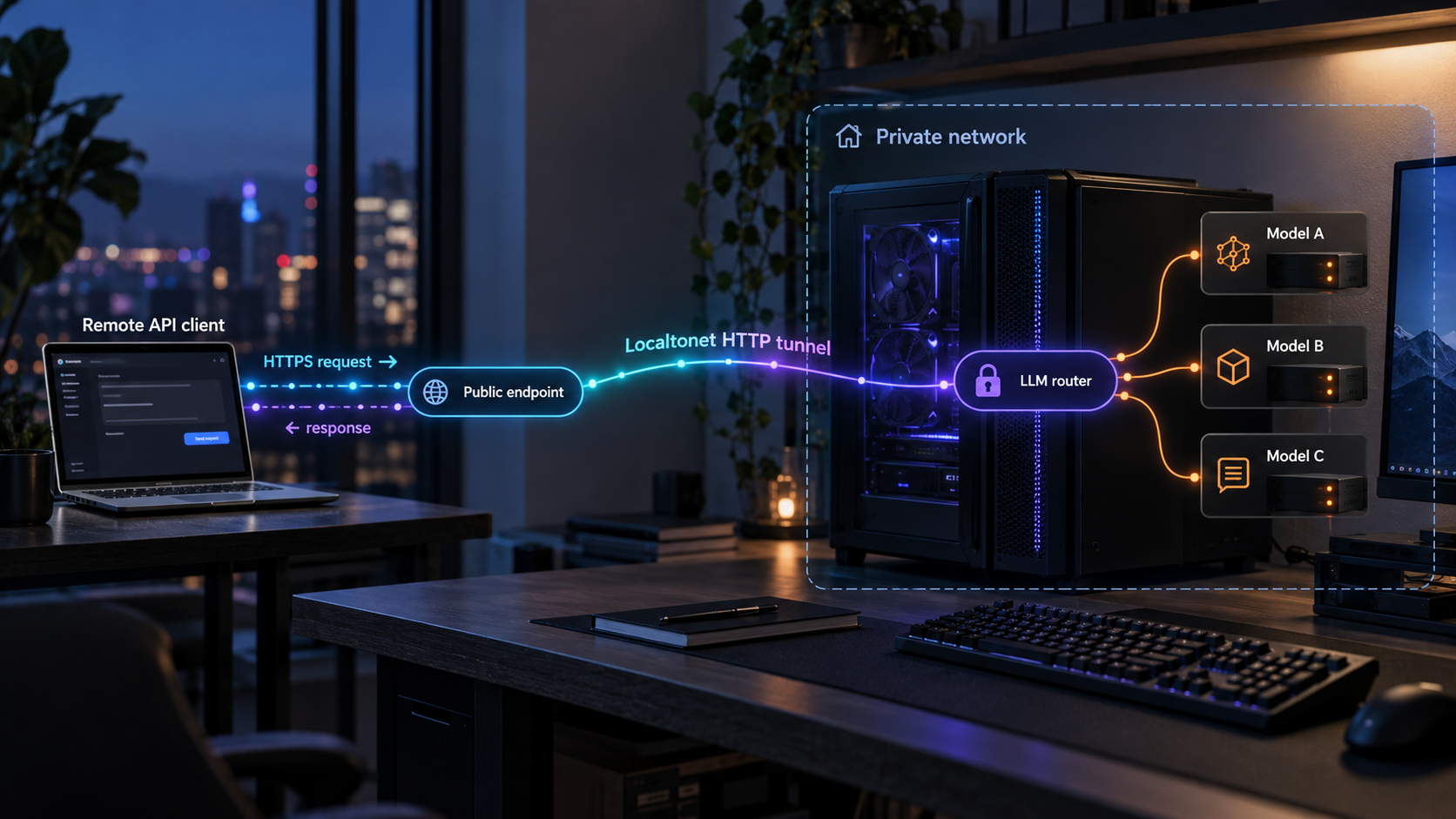
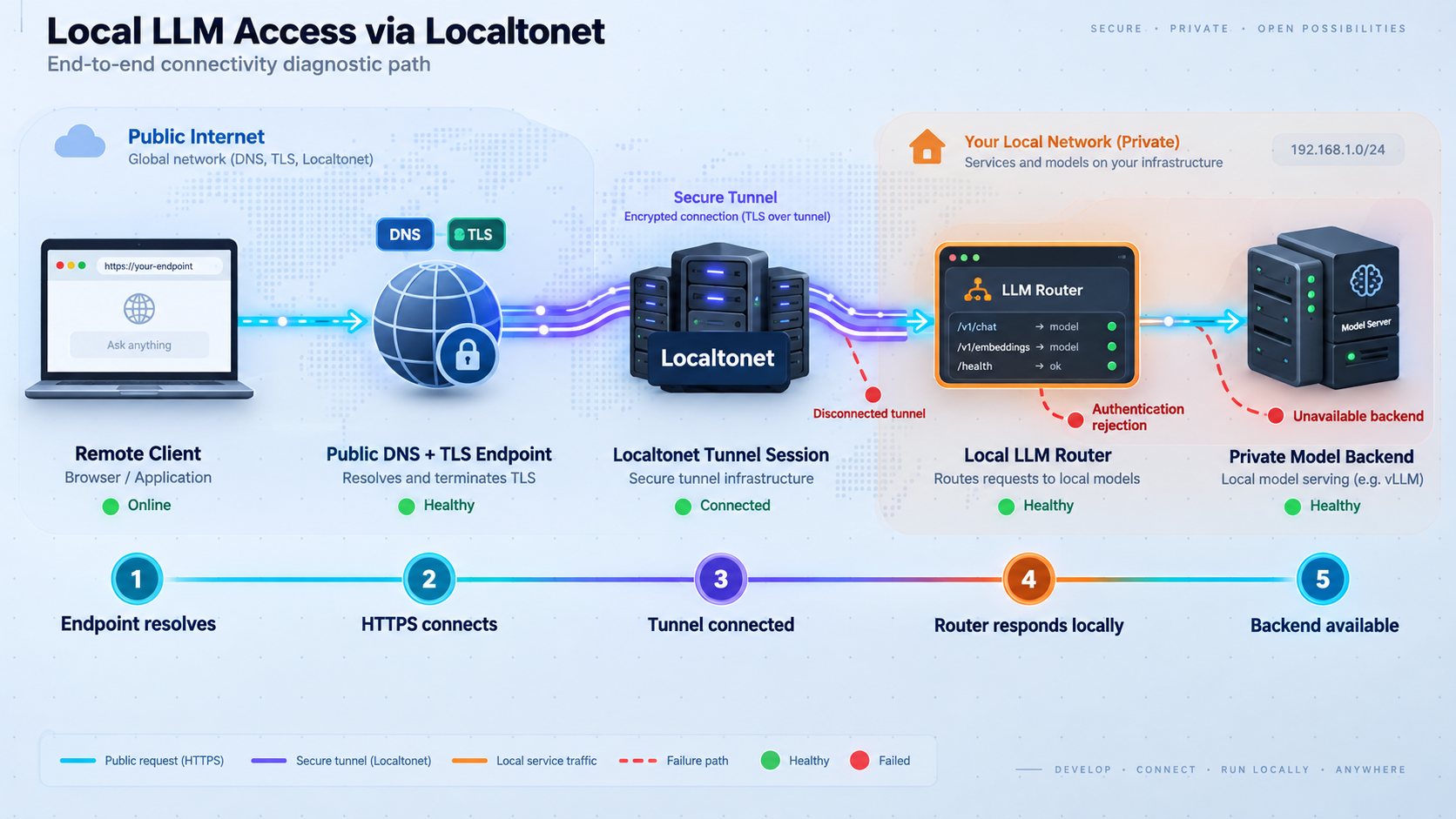
The network boundary we will build
A multi-model deployment becomes difficult to manage when every application connects directly to every inference server. Each client then needs backend addresses, native model identifiers, credentials, timeout behavior, and knowledge of which backend supports a particular request. Publishing those services individually also increases the number of public listeners that must be secured and monitored.
An LLM router places one API in front of those backends. For this implementation, we will use LiteLLM in proxy mode. LiteLLM Proxy accepts an OpenAI-style request, authenticates it using a configured master key, resolves the requested client-facing model name through its model_list, and sends the request to the configured backend. Our backend will be Ollama, running on the same machine and listening only through its local interface.
Localtonet sits outside that application layer. Our client establishes an outbound connection to a Localtonet relay and maps a public HTTPS address to LiteLLM's local HTTP listener. Localtonet does not select a model, load model weights, transform prompts, calculate token cost, or decide whether an Ollama model is healthy. Those are responsibilities of LiteLLM and Ollama.
Remote application
        |
        | HTTPS with LiteLLM bearer credential
        v
Localtonet public HTTPS address
        |
        | HTTP tunnel to 127.0.0.1:4000
        v
LiteLLM Proxy
        |
        | Private HTTP request to 127.0.0.1:11434
        v
Ollama
        |
        v
Local model: llama3.2local-chat name to the configured Ollama model.
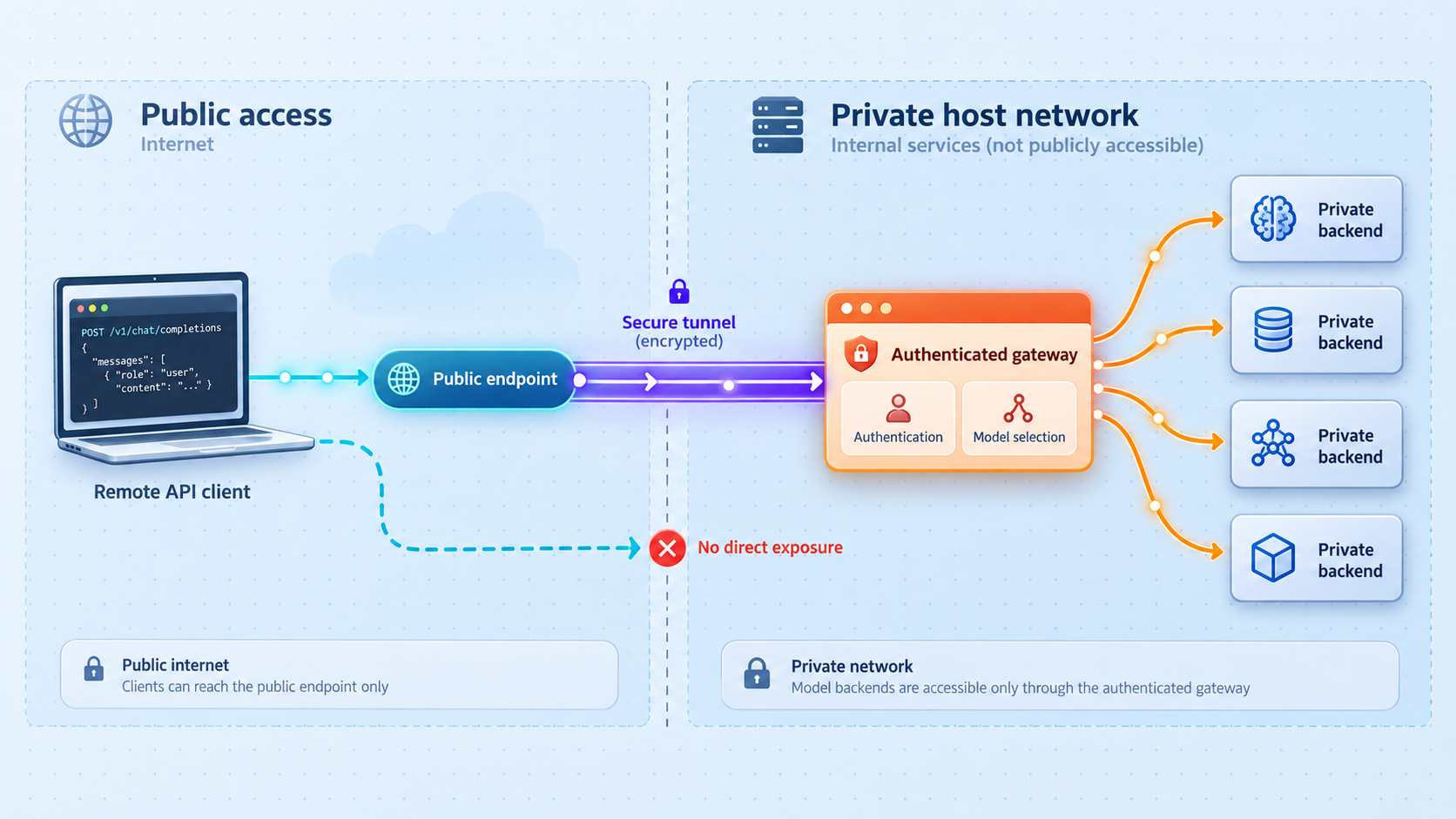
The public contract is the authenticated LiteLLM API. Giving remote clients a direct route to Ollama would let them bypass LiteLLM authentication and model policy. Keep Ollama on loopback or another restricted private interface unless a separate exposure has been specifically reviewed and secured.
Prerequisites and tutorial scope
This walkthrough uses a native Python virtual environment for LiteLLM and a native Ollama installation. The commands are written for a Bash-compatible shell on Linux or macOS. The same architecture can be deployed with containers or another service manager, but container-to-host addressing and persistence differ, so those paths are not mixed into the executable sequence below.
Use Python 3.11 or Python 3.12 for this tutorial, together with pip and the standard venv module. You also need curl, enough storage and memory for the selected Ollama model, a Localtonet account, and the Localtonet client installed on the machine that will run the tunnel. Check the current LiteLLM package documentation before adopting a different Python runtime.
| Component | Role in this tutorial | Required access |
|---|---|---|
| LiteLLM Proxy | Authenticated OpenAI-style gateway and model-name mapping | Listens on 127.0.0.1:4000 |
| Ollama | Runs the local llama3.2 model |
Reachable by LiteLLM at 127.0.0.1:11434 |
| Localtonet client | Connects the LiteLLM listener to a public HTTPS address | Runs on the same host in this walkthrough |
| Remote API client | Sends authenticated chat-completion requests | Receives only the public base URL and LiteLLM credential |
Keep the three credential roles separate
The Localtonet device auth token identifies the device running our client. It belongs only in the Localtonet client or dashboard workflow. The LiteLLM master key authorizes use of the AI gateway and is sent by inference clients as a bearer credential. A backend credential, if a later backend requires one, authorizes LiteLLM to call that backend.
These credentials are not interchangeable. Never send the Localtonet device token in the LiteLLM Authorization header. Never place the LiteLLM key into the Localtonet device-token field. If you later add a hosted model provider, keep that provider key available to LiteLLM but do not distribute it to remote API consumers.
Confirm Python and curl before continuing
python3 --version
python3 -m pip --version
curl --version
If python3 -m venv is unavailable, install the virtual-environment package supplied by your operating system before continuing. Operating-system package names differ, so use the package documentation for your distribution rather than copying a command intended for another platform.
Install Ollama and LiteLLM Proxy
Install Ollama using the maintained path for your operating system from the Ollama download page. Complete that installation before running the commands below. On systems where the Ollama application starts its service automatically, you do not need to start a second server process.
Verify that the Ollama command is installed
Open a new terminal after installation and confirm that the executable is available.
Start Ollama if it is not already running
Run Ollama in a dedicated terminal when your installation does not manage it as a background service.
Download the backend model
Pull llama3.2 and keep the exact model name consistent with the LiteLLM configuration.
Create a dedicated LiteLLM virtual environment
Isolate the router package from system Python packages so upgrades and recovery are easier to control.
Install LiteLLM with proxy dependencies
Install the maintained Python package inside the activated virtual environment and record the installed version.
First verify the Ollama executable:
ollama --versionIf Ollama is not already managed by its desktop application or operating-system service, start it in a dedicated terminal:
ollama serveLeave that process running. In another terminal, download the model used by this tutorial:
ollama pull llama3.2
ollama list
The model must appear in the output of ollama list. You can also check the local Ollama API directly:
OLLAMA_BASE_URL="http://127.0.0.1:11434"
curl --fail-with-body "${OLLAMA_BASE_URL}/api/tags"
Next, create a project directory and install LiteLLM:
mkdir -p "$HOME/llm-router"
cd "$HOME/llm-router"

python3 -m venv .venv
source .venv/bin/activate

python -m pip install --upgrade pip
python -m pip install "litellm[proxy]"
litellm --version
The virtual environment must be activated in every new shell used to start or upgrade LiteLLM. If litellm is not found later, return to $HOME/llm-router and run source .venv/bin/activate.
Configure the authenticated LiteLLM gateway
LiteLLM's model_list registers the backends available through the proxy. The model_name is the stable name clients request. The nested litellm_params.model identifies the provider and native model. For Ollama, the provider prefix is ollama/.
Create $HOME/llm-router/config.yaml with one client-facing alias named local-chat:
model_list:
  - model_name: local-chat
    litellm_params:
      model: ollama/llama3.2
      api_base: http://127.0.0.1:11434

general_settings:
  master_key: os.environ/LITELLM_MASTER_KEY
The configuration does not contain the actual LiteLLM credential. It instructs LiteLLM to read that value from the LITELLM_MASTER_KEY environment variable.
Generate and store the gateway key safely
The following Bash commands generate a random key locally, place it in a user-only environment file, and export it into the current shell. The secret is not written as a literal command, so it does not become part of shell history.
cd "$HOME/llm-router"

ROUTER_SECRET_DIR="$HOME/.config"
ROUTER_SECRET_FILE="$ROUTER_SECRET_DIR/litellm-router.env"

mkdir -p "$ROUTER_SECRET_DIR"
umask 077

LITELLM_MASTER_KEY="sk-$(python3 -c 'import secrets; print(secrets.token_urlsafe(32))')"
printf 'export LITELLM_MASTER_KEY=%q\n' "$LITELLM_MASTER_KEY" > "$ROUTER_SECRET_FILE"
chmod 600 "$ROUTER_SECRET_FILE"
export LITELLM_MASTER_KEY
The environment file contains a powerful gateway credential in plaintext, protected by file permissions. Do not commit it, copy it into screenshots, or send it to users who should not access the API. A production deployment can replace this file with the secret-management mechanism supported by its operating environment.
In a new terminal, load the existing credential instead of generating another one:
source "$HOME/.config/litellm-router.env"
Generating a new LITELLM_MASTER_KEY invalidates the credential held by existing clients. For a normal restart, source the existing protected environment file. Generate a replacement only as a deliberate credential rotation.
Start LiteLLM and define its log location
This command binds LiteLLM to loopback on port 4000. It also writes combined standard output and standard error to $HOME/llm-router/logs/litellm.log while retaining terminal output:
cd "$HOME/llm-router"
source .venv/bin/activate
source "$HOME/.config/litellm-router.env"

mkdir -p logs

litellm \
  --config "$HOME/llm-router/config.yaml" \
  --host 127.0.0.1 \
  --port 4000 \
  2>&1 | tee -a "$HOME/llm-router/logs/litellm.log"
Keep this terminal running. In this tutorial, stopping that process stops the gateway. The explicit loopback binding prevents other LAN devices from reaching LiteLLM directly. The Localtonet client can still reach it because we run the client on the same host.
LiteLLM provides capabilities beyond this one-model configuration, but they must be configured and tested explicitly. This tutorial does not imply that every LLM router supports LiteLLM's configuration format, aliases, authentication behavior, fallback mechanisms, or health routes.
Verify health, authentication, and inference locally
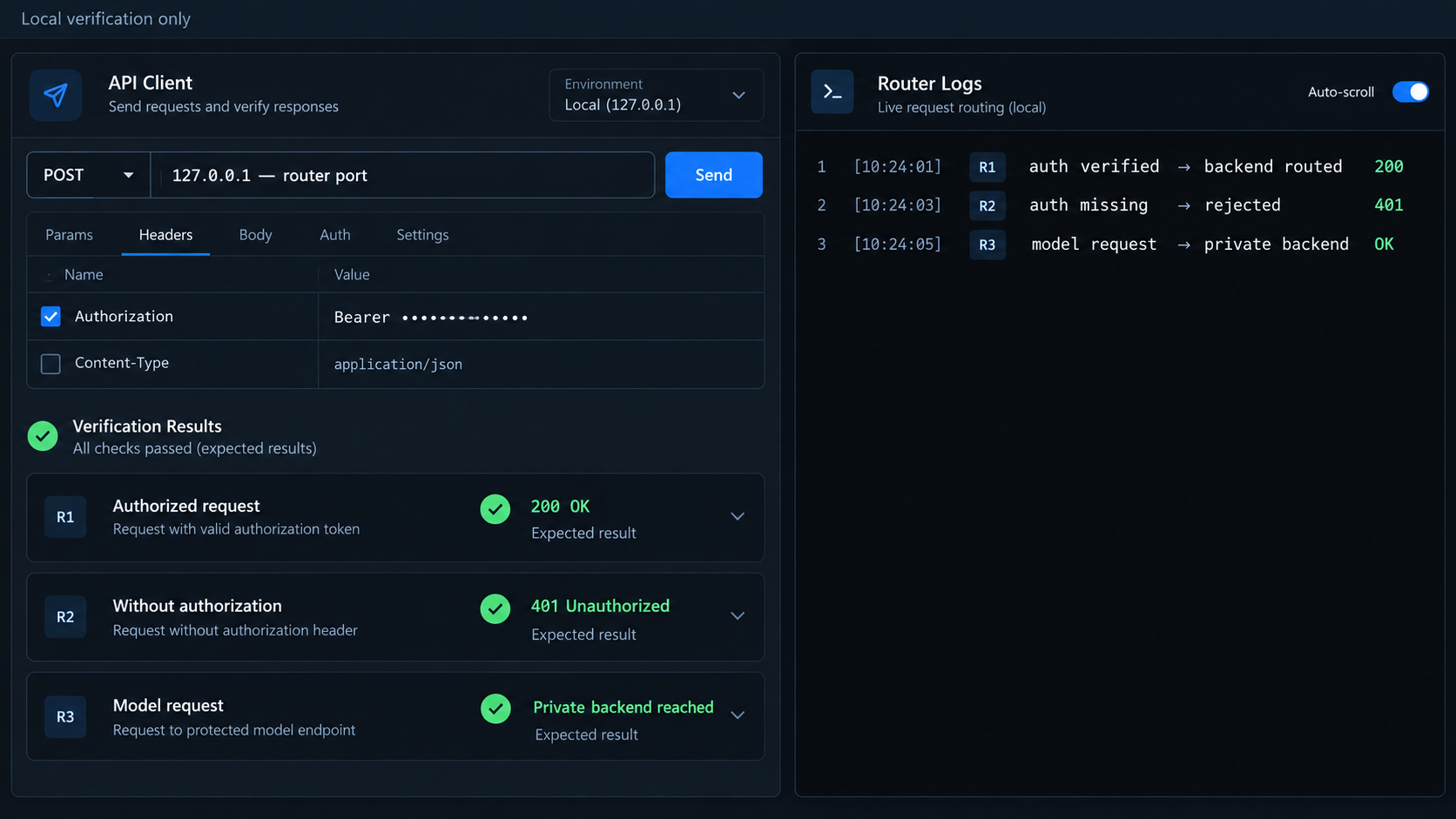
Open another terminal and define every variable used by the tests:
cd "$HOME/llm-router"
source "$HOME/.config/litellm-router.env"

ROUTER_BASE_URL="http://127.0.0.1:4000"
MODEL_ALIAS="local-chat"
Check LiteLLM liveness
LiteLLM exposes a liveness route at /health/liveliness. This checks the proxy process independently from a complete model request:
curl --fail-with-body \
  "${ROUTER_BASE_URL}/health/liveliness"
A live process is not proof that Ollama can generate a response. Complete the authenticated inference request next.
Send an authenticated local inference request
curl --fail-with-body \
  --request POST \
  "${ROUTER_BASE_URL}/v1/chat/completions" \
  --header "Authorization: Bearer ${LITELLM_MASTER_KEY}" \
  --header "Content-Type: application/json" \
  --data "{
    \"model\": \"${MODEL_ALIAS}\",
    \"messages\": [
      {
        \"role\": \"user\",
        \"content\": \"Reply with exactly the word ready.\"
      }
    ],
    \"stream\": false
  }"
The response should contain a chat-completion result produced through the local-chat alias. Model output is probabilistic, so the exact text can vary even with a narrowly worded prompt. The important checks are that LiteLLM accepts the credential, resolves the alias, reaches Ollama, and returns a valid response body.
Confirm that missing authentication is rejected
Run the same endpoint without the authorization header. This command displays the returned HTTP status and stores the body in a temporary file:
UNAUTH_BODY_FILE="$(mktemp)"

UNAUTH_STATUS="$(
  curl --silent \
    --output "$UNAUTH_BODY_FILE" \
    --write-out "%{http_code}" \
    --request POST \
    "${ROUTER_BASE_URL}/v1/chat/completions" \
    --header "Content-Type: application/json" \
    --data "{
      \"model\": \"${MODEL_ALIAS}\",
      \"messages\": [
        {
          \"role\": \"user\",
          \"content\": \"This request must not reach the model.\"
        }
      ]
    }"
)"

printf 'HTTP status: %s\n' "$UNAUTH_STATUS"
cat "$UNAUTH_BODY_FILE"
rm -f "$UNAUTH_BODY_FILE"
The request must be rejected rather than returning a model response. If it succeeds, stop LiteLLM and inspect general_settings.master_key, the loaded environment variable, and the configuration path passed to --config.
| Local check | Expected result | Failure usually indicates |
|---|---|---|
Ollama /api/tags |
Local model inventory is returned | Ollama is stopped or listening elsewhere |
| LiteLLM liveness | The proxy reports that its process is live | LiteLLM failed to start or the address is wrong |
| Authenticated completion | A chat-completion response is returned | Invalid key, alias, configuration, or backend connection |
| Completion without a key | The request is rejected before inference | Gateway authentication is missing or the wrong listener was tested |
| Unknown model alias | A controlled error is returned | The client used a name absent from model_list |
Expose LiteLLM with a Localtonet HTTP tunnel
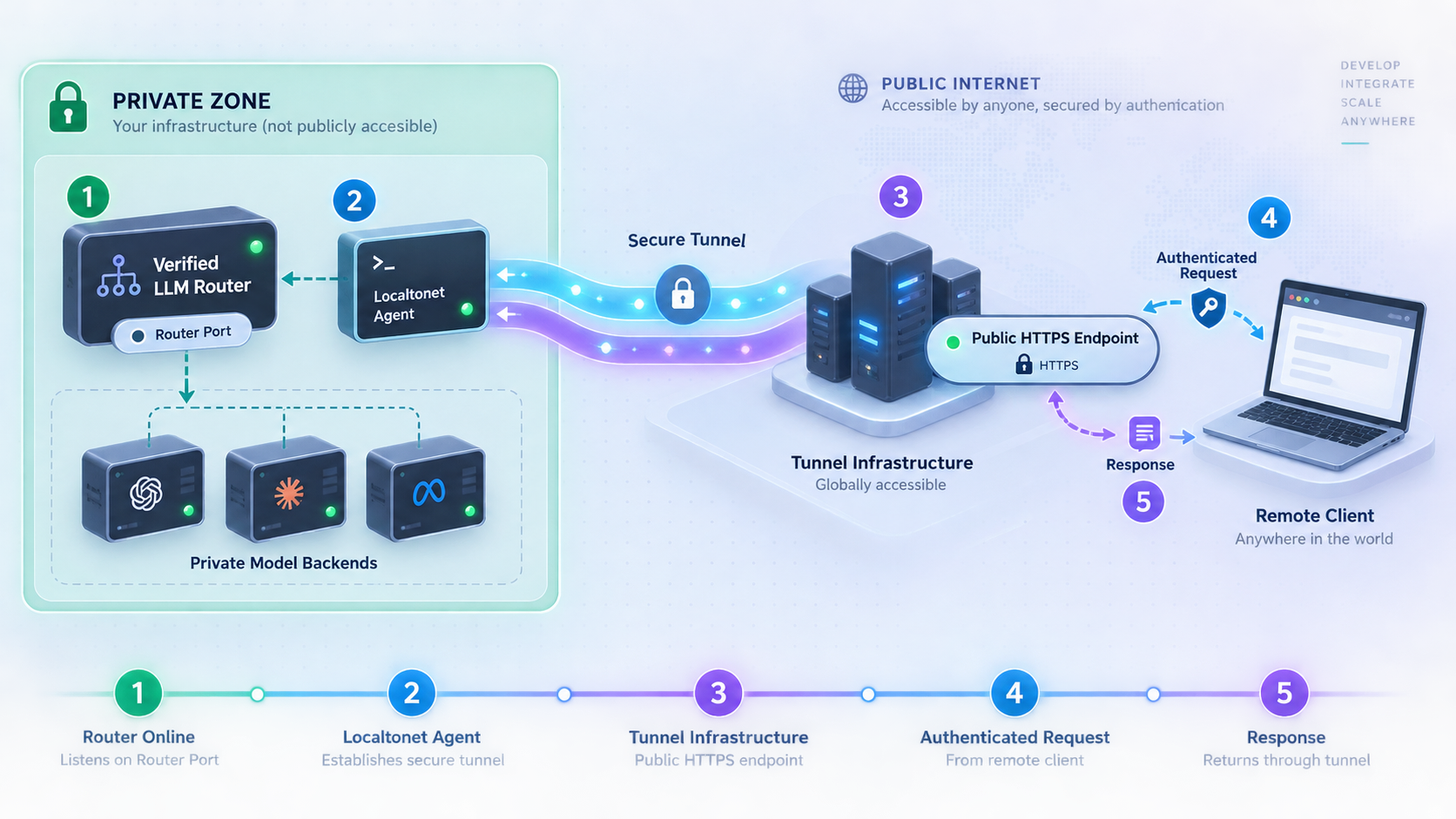
Create the tunnel only after the local authenticated request works. Our HTTP tunnel points to 127.0.0.1:4000, which is LiteLLM's listener. It must not point to Ollama's port 11434.
HTTP tunnels can use Random Sub Domain, Custom Sub Domain, or Custom Domain as the process type. All three serve the selected local content through a public HTTPS address. Availability can vary by the current product configuration or plan, so choose from the options shown in your dashboard. Do not guess custom-domain DNS records from an old example.
Install and run the Localtonet client
Run the client on the same machine as LiteLLM for this walkthrough. The client must remain connected while remote applications use the gateway.
Open the HTTP tunnel configuration
Create an HTTP tunnel in the Localtonet dashboard. This tunnel type is appropriate because LiteLLM provides an HTTP API.
Select the process type
Choose Random Sub Domain, Custom Sub Domain, or Custom Domain from the options currently available to your account.
Select the AuthToken and relay server
Select the device-specific AuthToken for the machine running the Localtonet client, then select an available server or region from the dashboard. Do not hardcode or guess a server code.
Enter LiteLLM's local IP address and port
Set the local target IP address to 127.0.0.1 and the local port to 4000. These values match the LiteLLM startup command in this tutorial.
Start the tunnel
Creating the tunnel does not make it active. Use the Start button, confirm that the selected client is connected, and copy the assigned public HTTPS address.
Review the current field names and workflow in the Localtonet HTTP tunnel documentation. The selected client must be able to reach the exact local target. Because this tutorial runs Localtonet and LiteLLM on the same host, the loopback address is appropriate.
Keep the device token inside the Localtonet workflow. Remote inference clients need the public base URL and an authorized LiteLLM credential, not the Localtonet device token. Publishing either secret in source code, screenshots, browser JavaScript, or a public repository can expose the corresponding resource.
Run authenticated and unauthenticated public tests
Copy the assigned HTTPS base URL from the Localtonet dashboard. Do not append the inference route while defining the variable. The same /v1/chat/completions path used locally will be appended by the test.
The following command prompts for the public URL so you do not accidentally retain an obsolete address in a copied script:
source "$HOME/.config/litellm-router.env"

MODEL_ALIAS="local-chat"
read -r -p "Localtonet public HTTPS base URL: " PUBLIC_BASE_URL
PUBLIC_BASE_URL="${PUBLIC_BASE_URL%/}"
Send the authenticated public request
curl --fail-with-body \
  --request POST \
  "${PUBLIC_BASE_URL}/v1/chat/completions" \
  --header "Authorization: Bearer ${LITELLM_MASTER_KEY}" \
  --header "Content-Type: application/json" \
  --data "{
    \"model\": \"${MODEL_ALIAS}\",
    \"messages\": [
      {
        \"role\": \"user\",
        \"content\": \"Reply with exactly the word public-ready.\"
      }
    ],
    \"stream\": false
  }"
A successful result demonstrates the complete path: public client, Localtonet relay, Localtonet client, LiteLLM authentication, model alias resolution, Ollama, and the local model. It is more useful than checking only whether the public hostname accepts a TCP connection.
Verify public rejection without a credential
PUBLIC_UNAUTH_BODY_FILE="$(mktemp)"

PUBLIC_UNAUTH_STATUS="$(
  curl --silent \
    --output "$PUBLIC_UNAUTH_BODY_FILE" \
    --write-out "%{http_code}" \
    --request POST \
    "${PUBLIC_BASE_URL}/v1/chat/completions" \
    --header "Content-Type: application/json" \
    --data "{
      \"model\": \"${MODEL_ALIAS}\",
      \"messages\": [
        {
          \"role\": \"user\",
          \"content\": \"This unauthenticated public request must be rejected.\"
        }
      ]
    }"
)"

printf 'HTTP status: %s\n' "$PUBLIC_UNAUTH_STATUS"
cat "$PUBLIC_UNAUTH_BODY_FILE"
rm -f "$PUBLIC_UNAUTH_BODY_FILE"
The unauthenticated public request must fail. If it succeeds, stop the Localtonet tunnel immediately and correct LiteLLM authentication locally before restoring public access.
Confirm that Ollama is not the public target
Inspect the tunnel configuration and verify that its local port is 4000, not 11434. Remote client configuration should contain the Localtonet HTTPS base URL and the model alias local-chat. It should not contain the Ollama address or the native llama3.2 backend mapping unless that implementation detail is intentionally documented for operators.
Security controls for the public gateway
An HTTPS address protects the network connection to the public tunnel endpoint, but it does not replace application authorization. LiteLLM must continue to reject invalid credentials. The model backend must remain private, and client privileges should be limited to the models and operations they require.
Protect compute before inference starts
Authenticate requests before they enter an inference queue or trigger model work. A small number of large prompts can consume substantial memory and generation time. Review the controls supported by your LiteLLM version for model access, request limits, concurrency, budgets, or virtual keys before serving multiple users. Do not assume that defining one master key provides tenant-level least privilege.
Avoid exposing administrative interfaces
The public tunnel should support the client-facing inference routes needed by approved applications. Do not deliberately publish backend registration, unrestricted administration, profiling, or secret-management interfaces without a separate security review. If administration must occur remotely, use a distinct authenticated management path with narrower access.
Minimize sensitive logging
Prompts and responses can contain source code, personal information, credentials, internal documents, or tool output. The tutorial log captures LiteLLM's terminal output at $HOME/llm-router/logs/litellm.log. Review its contents and permissions. Do not add full prompt logging by default.
Prefer operational metadata such as timestamps, request identifiers where available, model aliases, durations, statuses, and error categories. If body capture is temporarily required for debugging, restrict access, define a short retention period, and remove the captured data after the incident.
Apply server-side workload boundaries
Client-provided values such as model name, output length, tool definitions, and context size can affect resource usage. Apply only the limits supported by the installed LiteLLM and backend versions, and test those limits before relying on them. Do not trust public clients to submit conservative workloads voluntarily.
Restart, logging, upgrades, and routine operations
This installation runs LiteLLM as a foreground process. That is transparent and useful for an initial deployment, but it has specific restart behavior: closing the terminal or stopping the process makes the gateway unavailable. The Localtonet tunnel may still be marked as running, but requests cannot complete if its local target is absent.
Restart LiteLLM without rotating the key
Stop the foreground LiteLLM process with Ctrl+C. Then run the same startup sequence and source the existing credential file:
cd "$HOME/llm-router"
source .venv/bin/activate
source "$HOME/.config/litellm-router.env"

litellm \
  --config "$HOME/llm-router/config.yaml" \
  --host 127.0.0.1 \
  --port 4000 \
  2>&1 | tee -a "$HOME/llm-router/logs/litellm.log"
After the restart, repeat the liveness check and one authenticated local inference request. If the Localtonet client and tunnel remained active, repeat the public request as well.
Understand host restart behavior
The foreground process does not automatically return after a machine restart. Ollama, LiteLLM, and the Localtonet client must all be running before public inference works. Whether Ollama and Localtonet start automatically depends on how their current clients were installed and configured.
For an unattended production deployment, place the exact verified LiteLLM startup command under a service supervisor appropriate for your operating system. Configure the supervisor to load the protected environment file, use the project virtual environment, start only after networking is ready, and restart on unexpected failure. Test the service using the same local and public requests from this guide. Do not assume that a generic service template has the correct user, paths, or secret permissions for your host.
Inspect the chosen LiteLLM log
tail -n 100 "$HOME/llm-router/logs/litellm.log"Follow new entries while reproducing a request:
tail -f "$HOME/llm-router/logs/litellm.log"
This file location exists because the startup command explicitly sends terminal output through tee. LiteLLM does not discover this path automatically. If a service supervisor replaces the foreground command, use that supervisor's documented logging destination instead.
Upgrade LiteLLM deliberately
Record the current version, stop the router, activate its virtual environment, and upgrade the package:
cd "$HOME/llm-router"
source .venv/bin/activate

litellm --version
python -m pip install --upgrade "litellm[proxy]"
litellm --version
Read the LiteLLM release notes before a production upgrade. Configuration keys, dependencies, endpoint behavior, and compatibility can change. After upgrading, start the router with the existing configuration and credential, then run the liveness, authenticated inference, unauthenticated rejection, and public-path tests again.
For repeatable production changes, pin a tested package version rather than allowing every host to install an unspecified latest release. Validate the new version on a noncritical instance before replacing the working environment.
Upgrade the backend independently
LiteLLM, Ollama, and the model have separate lifecycles. An Ollama application upgrade does not automatically test LiteLLM compatibility. A model replacement can alter memory use, latency, output behavior, context support, and response quality even when the public API remains reachable.
After any backend or model change, verify /api/tags, send a local LiteLLM request, test rejection without authentication, and then send a controlled public request. The public hostname alone cannot prove that model inference is healthy.
Stop public access when it is not needed
Use the Localtonet Stop control when the public gateway is temporarily unnecessary. Delete obsolete tunnels and retire credentials that are no longer used. Remember that creating a tunnel does not start it, and stopping LiteLLM does not automatically delete or stop the tunnel configuration.
Troubleshooting LiteLLM, Ollama, and the tunnel
ollama is not found
Complete the operating-system installation from the Ollama download page and open a new terminal. Confirm ollama --version before continuing. Do not install an unrelated Python package named after Ollama as a substitute for the Ollama runtime.
Ollama reports that its address is already in use
An Ollama desktop application or service may already be running. Check http://127.0.0.1:11434/api/tags. If that request works, use the existing service instead of starting a second ollama serve process.
LiteLLM cannot connect to Ollama
Run the Ollama tags request from the same user and host that runs LiteLLM:
curl --fail-with-body \
  "http://127.0.0.1:11434/api/tags"
Confirm that llama3.2 is installed and that api_base in config.yaml is exactly http://127.0.0.1:11434. If either component was moved into a container, loopback no longer necessarily refers to the other component. Use the private addressing mechanism documented by the container platform.
LiteLLM exits during startup
Read the terminal output and $HOME/llm-router/logs/litellm.log. Confirm that the virtual environment is active, the configuration file is valid YAML, and the secret environment file has been sourced. Verify the variable without printing its value:
if [ -n "${LITELLM_MASTER_KEY:-}" ]; then
  printf 'LITELLM_MASTER_KEY is set\n'
else
  printf 'LITELLM_MASTER_KEY is not set\n'
fi
Do not print the actual key into logs or support messages.
The router returns an unknown model error
The client must request local-chat, which is the configured model_name. The backend value ollama/llama3.2 belongs inside LiteLLM configuration. Restart LiteLLM after changing config.yaml, then test locally before retrying the public address.
Local requests are unauthorized
Load the same environment file used to start LiteLLM:
source "$HOME/.config/litellm-router.env"Then repeat the authenticated request. If the environment file was regenerated after LiteLLM started, the running process still has the old key. Restart LiteLLM with the intended key or deliberately distribute the rotated credential to authorized clients.
Public requests work without credentials
Stop the Localtonet tunnel immediately. Repeat the unauthenticated test against http://127.0.0.1:4000. Confirm that LiteLLM loaded the configuration containing general_settings.master_key and that the tunnel targets the same authenticated listener. Do not solve this problem by relying on an unlisted or secret public URL.
The public URL is unreachable
Confirm that the Localtonet client is connected and that the tunnel was started. A created but stopped tunnel is unavailable. Verify that the tunnel uses the AuthToken for the machine actually running the client and that the assigned relay selection is still valid in the current dashboard.
The public URL returns an upstream or connection error
From the Localtonet client machine, test http://127.0.0.1:4000/health/liveliness. If that fails, restart or repair LiteLLM before changing the tunnel. Confirm that the tunnel target is IP address 127.0.0.1 and port 4000.
Requests time out while the model is loading
A model may need time to load into memory, especially after Ollama or the host restarts. Run the authenticated request locally and observe both the LiteLLM terminal and Ollama process. Check available memory and reduce competing workloads. A timeout does not by itself prove that the Localtonet tunnel failed.
Failures continue after Ollama recovers
First verify Ollama's /api/tags response, then repeat the local LiteLLM inference request. If LiteLLM remains unhealthy, stop and restart LiteLLM using the existing secret file. Restarting the Localtonet tunnel is not a substitute for restoring the failed backend or gateway process.
The tunnel works locally but a browser application fails
Browser applications introduce origin policy, client-side secret exposure, and preflight behavior. Do not place a long-lived LiteLLM master key into public frontend JavaScript. Use a trusted server-side application or an appropriately scoped authentication design between the browser and gateway. Test the public endpoint with curl first to separate browser policy from tunnel and inference behavior.
Frequently asked questions
Does Localtonet choose which model handles the request?
No. Localtonet transports HTTP traffic between the public address and LiteLLM's local listener. LiteLLM resolves the requested model_name through its configuration and sends the request to Ollama.
Why expose LiteLLM instead of Ollama?
LiteLLM is the authenticated client-facing gateway in this design. It provides the stable model alias and API boundary. Keeping Ollama private prevents remote clients from bypassing that gateway and calling the backend directly.
Does the public HTTPS address replace LiteLLM authentication?
No. The public address provides connectivity. LiteLLM must still authenticate API consumers and apply whatever model-access and workload policies the deployment requires.
Which credential should a remote inference client receive?
The client needs the assigned Localtonet public base URL and an authorized LiteLLM credential. It must not receive the Localtonet device auth token or a backend provider credential.
Can the Localtonet client run on another machine?
Yes, if that device can reach LiteLLM's private IP address and port. LiteLLM would need to listen on a permitted private interface instead of loopback, and firewall rules should restrict access to the required client device or network. Test from the Localtonet client machine before creating the tunnel.
Can additional models be added later?
Yes. Add supported entries to LiteLLM's model_list, provide any required backend credentials through protected secret handling, restart LiteLLM, and test each client-facing model name locally before allowing public use. The Localtonet public address can remain pointed at the same LiteLLM listener.
Does creating the Localtonet tunnel make it active immediately?
No. Use the Start button and confirm that the selected Localtonet client is connected. LiteLLM and Ollama must also be running. The public gateway becomes unavailable if the tunnel stops, the client disconnects, or the local services stop.
Where are the LiteLLM logs in this tutorial?
The provided startup command appends terminal output to $HOME/llm-router/logs/litellm.log. This is a location chosen by the tutorial through tee. A service-managed deployment may use a different logging system.
Publish your authenticated LiteLLM gateway with Localtonet
Verify LiteLLM and Ollama locally, keep the backend private, and connect only the gateway listener to a Localtonet HTTP tunnel for remote HTTPS access.
Get Started Free →

