

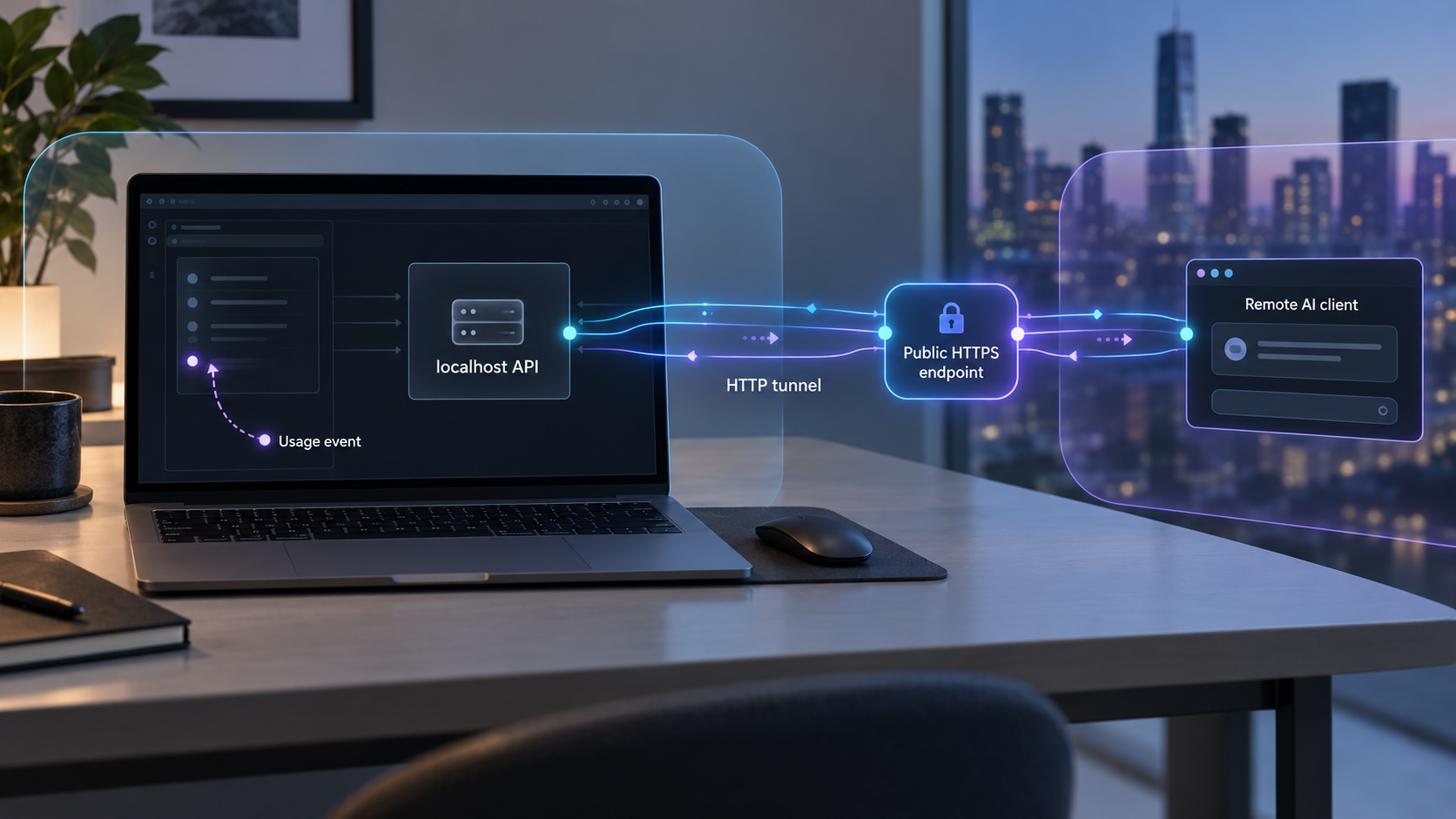
Build a publisher-controlled usage API locally, verify its audit trail, and make it reachable for remote AI client testing
A metered content API needs more than an endpoint that returns an article. It must identify the client, enforce an entitlement, define exactly what counts as billable usage, prevent duplicate charges during retries, and preserve an auditable event record. This guide builds a dependency-free Python prototype backed by SQLite, tests the complete workflow on localhost, and then exposes the development endpoint through a Localtonet HTTP tunnel. The application remains responsible for authorization, pricing, metering, and eventual payment integration, while our tunnel supplies public connectivity without inbound router port forwarding.
📋 What's in this guide
Define what the API is metering
Metering begins with a commercial and technical definition, not with a database counter. A publisher might charge when an AI client retrieves a document, when it quotes a passage, when a document influences an answer, or when the answer is shown to an end user. Those are different events. An origin API can directly observe a successful content delivery, but it cannot independently prove what the client did with that content afterward.
The prototype in this guide therefore meters a clearly observable event: one authorized delivery of a content resource through GET /v1/content/{slug}. A successful response consumes one unit. An unauthorized request, unknown resource, rejected entitlement, or duplicate retry does not consume another unit. If a future commercial agreement pays for citation, summarization, training, recommendation influence, or another downstream use, the client will need a separate reporting API and contractual reporting rules. Do not silently label a download as a downstream use.
In this tutorial, a usage unit means an authorized API delivery. It does not mean that the material was cited, displayed, used for training, or incorporated into an AI answer. That distinction should appear in product terms, API documentation, invoices, and reconciliation reports.
Every metered request will carry two identifiers. X-Request-Id identifies an attempt for tracing and support. Idempotency-Key identifies the logical operation and prevents a network retry from creating a second usage event. The client should reuse the same idempotency key when retrying the same logical fetch, but create a new one for a genuinely new billable retrieval.
Architecture and responsibility boundaries
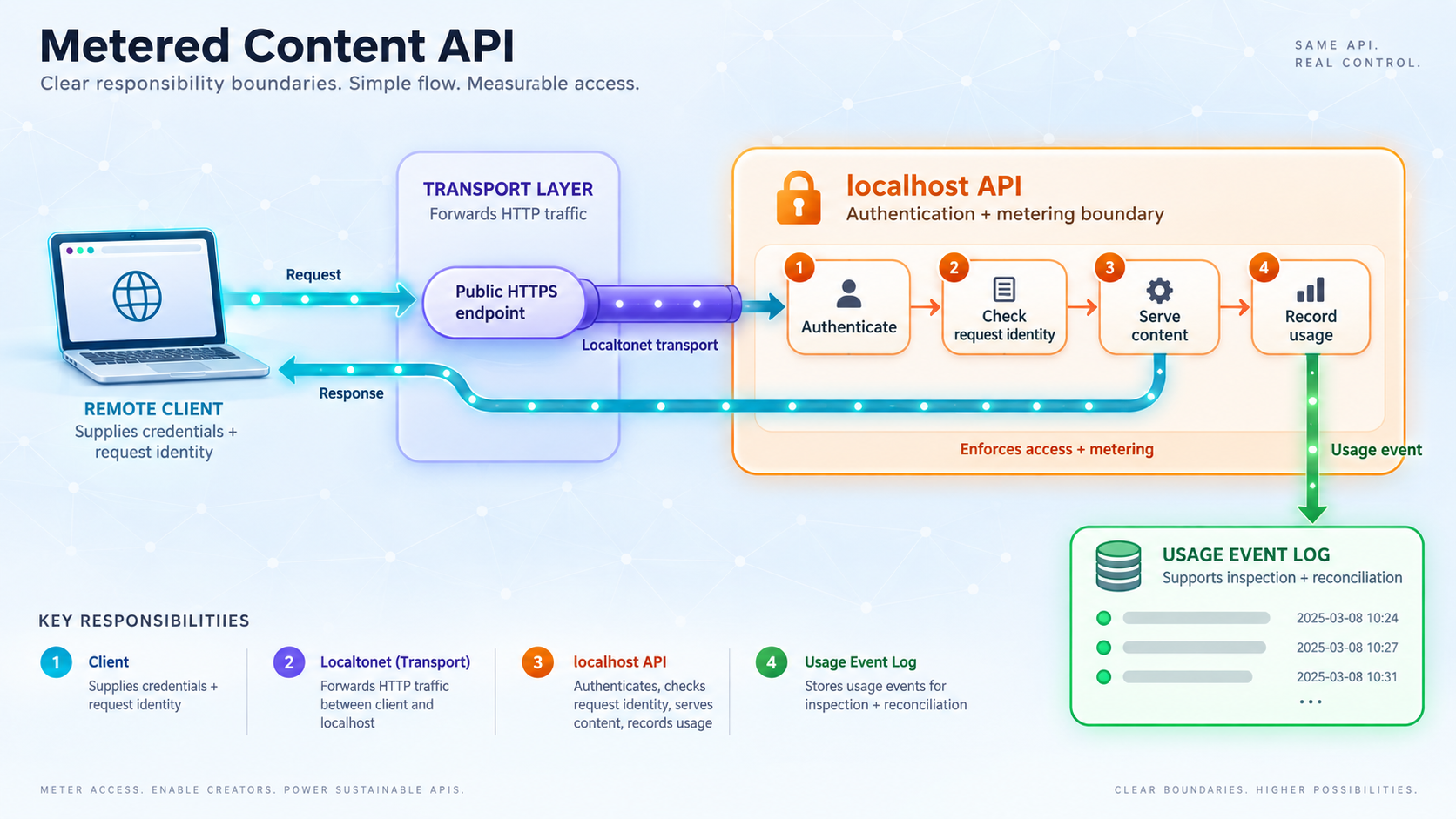
The prototype has four layers. The AI client sends an authenticated HTTP request. The API validates the credential and entitlement. SQLite commits an immutable usage event in the same transaction that reserves the usage unit. During remote testing, the Localtonet client establishes an outbound connection to our relay and gives the tester a public HTTPS address that forwards to the local HTTP service.
Keeping these responsibilities separate prevents a common design mistake. A tunnel can transport a request, but it does not decide whether a particular AI company may use an article, how much that use costs, whether a retry is billable, or whether an invoice has been paid. Those decisions belong to the application and its commercial agreements.
| Concern | Responsible component | Prototype behavior |
|---|---|---|
| Public connectivity | Localtonet HTTP tunnel | Forwards the assigned public HTTPS address to the configured local IP address and port while the client and tunnel are running. |
| Client identity | Application | Validates a bearer credential with a constant-time hash comparison. |
| Content authorization | Application | Checks that the authenticated client has an active entitlement for the requested slug. |
| Usage counting | Application and SQLite | Creates at most one event for each client and idempotency-key pair. |
| Price calculation | Application | Copies an integer unit price into each event so later catalog changes do not rewrite history. |
| Billing and settlement | Future billing integration | Not implemented. Events can later be exported or reconciled with a billing provider. |
| Contractual downstream use | Publisher and AI client | Not inferred from delivery. It requires an agreed definition and, when applicable, separate client reporting. |
The example uses Python's built-in HTTP server and a local SQLite database so the workflow is easy to inspect. It is not presented as a production billing system. Production deployment needs an appropriate application server, protected secret management, database backup and recovery, retention rules, monitoring, abuse controls, credential rotation, concurrency testing, and a reviewed financial reconciliation process.
Prerequisites and project layout
You need Python 3 with the standard-library modules used below, a command-line HTTP client such as curl, and a writable project directory. The implementation deliberately has no package dependencies. It uses http.server for HTTP handling, sqlite3 for storage, hashlib and hmac for credential verification, and uuid for server-generated identifiers.
To test from another network, also install and run the Localtonet client on the same computer as the API, or on a device that can reach the API's local address. You will need a device-specific Localtonet authentication token and an available relay server selected from the current dashboard. Do not copy a real token into source code, terminal screenshots, logs, or this project.
Create a new directory and place the application in a single file:
mkdir metered-content-api
cd metered-content-api
touch app.py
On Windows PowerShell, create the same directory and file with:
New-Item -ItemType Directory -Path metered-content-api
Set-Location metered-content-api
New-Item -ItemType File -Path app.py
The API creates metered.db in the current working directory when it starts. Keep that database out of public repositories because it contains client identifiers, entitlements, request metadata, and usage records. The example stores only a hash of the API credential, but the surrounding usage data can still be commercially sensitive.
Build the authenticated metered content API
Copy the following implementation into app.py. The initial client ID and secret come from environment variables. On first startup, the application hashes the secret and inserts a development client, one content resource, and an entitlement allowing five successful units. Subsequent startup uses the existing database and does not need the original secret to recreate those rows, although callers still need the secret to authenticate.
import hashlib
import hmac
import json
import os
import sqlite3
import uuid
from datetime import datetime, timezone
from http.server import BaseHTTPRequestHandler, ThreadingHTTPServer
from urllib.parse import urlparse
HOST = "127.0.0.1"
PORT = 8000
DB_PATH = os.environ.get("METERED_DB_PATH", "metered.db")
BOOTSTRAP_CLIENT_ID = os.environ.get("METERED_CLIENT_ID")
BOOTSTRAP_CLIENT_KEY = os.environ.get("METERED_CLIENT_KEY")
def utc_now():
return datetime.now(timezone.utc).isoformat()
def key_hash(value):
return hashlib.sha256(value.encode("utf-8")).hexdigest()
def connect():
db = sqlite3.connect(DB_PATH, timeout=10)
db.row_factory = sqlite3.Row
db.execute("PRAGMA foreign_keys = ON")
return db
def initialize_database():
with connect() as db:
db.executescript(
"""
CREATE TABLE IF NOT EXISTS clients (
client_id TEXT PRIMARY KEY,
key_hash TEXT NOT NULL,
active INTEGER NOT NULL CHECK (active IN (0, 1)),
created_at TEXT NOT NULL
);
CREATE TABLE IF NOT EXISTS content (
slug TEXT PRIMARY KEY,
title TEXT NOT NULL,
body TEXT NOT NULL,
updated_at TEXT NOT NULL
);
CREATE TABLE IF NOT EXISTS entitlements (
client_id TEXT NOT NULL,
content_slug TEXT NOT NULL,
active INTEGER NOT NULL CHECK (active IN (0, 1)),
max_units INTEGER NOT NULL CHECK (max_units >= 0),
unit_price_micros INTEGER NOT NULL
CHECK (unit_price_micros >= 0),
currency TEXT NOT NULL,
PRIMARY KEY (client_id, content_slug),
FOREIGN KEY (client_id) REFERENCES clients(client_id),
FOREIGN KEY (content_slug) REFERENCES content(slug)
);
CREATE TABLE IF NOT EXISTS usage_events (
event_id TEXT PRIMARY KEY,
client_id TEXT NOT NULL,
content_slug TEXT NOT NULL,
request_id TEXT NOT NULL,
idempotency_key TEXT NOT NULL,
used_at TEXT NOT NULL,
quantity INTEGER NOT NULL CHECK (quantity = 1),
unit_price_micros INTEGER NOT NULL,
currency TEXT NOT NULL,
UNIQUE (client_id, idempotency_key),
FOREIGN KEY (client_id) REFERENCES clients(client_id),
FOREIGN KEY (content_slug) REFERENCES content(slug)
);
"""
)
db.execute(
"""
INSERT OR IGNORE INTO content
(slug, title, body, updated_at)
VALUES (?, ?, ?, ?)
""",
(
"market-brief",
"Example Market Brief",
"This is publisher-controlled demonstration content.",
utc_now(),
),
)
if BOOTSTRAP_CLIENT_ID and BOOTSTRAP_CLIENT_KEY:
db.execute(
"""
INSERT OR IGNORE INTO clients
(client_id, key_hash, active, created_at)
VALUES (?, ?, 1, ?)
""",
(
BOOTSTRAP_CLIENT_ID,
key_hash(BOOTSTRAP_CLIENT_KEY),
utc_now(),
),
)
db.execute(
"""
INSERT OR IGNORE INTO entitlements
(
client_id,
content_slug,
active,
max_units,
unit_price_micros,
currency
)
VALUES (?, ?, 1, 5, 250000, 'USD')
""",
(BOOTSTRAP_CLIENT_ID, "market-brief"),
)
class ApiHandler(BaseHTTPRequestHandler):
server_version = "MeteredContentPrototype/1.0"
def send_json(self, status, payload, request_id=None):
body = json.dumps(payload, separators=(",", ":")).encode("utf-8")
self.send_response(status)
self.send_header("Content-Type", "application/json")
self.send_header("Content-Length", str(len(body)))
self.send_header("Cache-Control", "no-store")
if request_id:
self.send_header("X-Request-Id", request_id)
self.end_headers()
self.wfile.write(body)
def request_id(self):
supplied = self.headers.get("X-Request-Id", "").strip()
return supplied[:128] if supplied else str(uuid.uuid4())
def authenticate(self, db):
header = self.headers.get("Authorization", "")
if not header.startswith("Bearer "):
return None
presented = header[7:].strip()
if not presented:
return None
presented_hash = key_hash(presented)
rows = db.execute(
"""
SELECT client_id, key_hash
FROM clients
WHERE active = 1
"""
).fetchall()
for row in rows:
if hmac.compare_digest(row["key_hash"], presented_hash):
return row["client_id"]
return None
def do_GET(self):
parsed = urlparse(self.path)
request_id = self.request_id()
if parsed.path == "/health":
self.send_json(
200,
{"status": "ok", "request_id": request_id},
request_id,
)
return
prefix = "/v1/content/"
if not parsed.path.startswith(prefix):
self.send_json(
404,
{"error": "not_found", "request_id": request_id},
request_id,
)
return
slug = parsed.path[len(prefix):].strip("/")
idempotency_key = self.headers.get("Idempotency-Key", "").strip()
if not idempotency_key or len(idempotency_key) > 128:
self.send_json(
400,
{
"error": "valid_idempotency_key_required",
"request_id": request_id,
},
request_id,
)
return
with connect() as db:
client_id = self.authenticate(db)
if not client_id:
self.send_json(
401,
{"error": "unauthorized", "request_id": request_id},
request_id,
)
return
try:
db.execute("BEGIN IMMEDIATE")
previous = db.execute(
"""
SELECT
event_id,
content_slug,
used_at,
quantity,
unit_price_micros,
currency
FROM usage_events
WHERE client_id = ? AND idempotency_key = ?
""",
(client_id, idempotency_key),
).fetchone()
if previous:
if previous["content_slug"] != slug:
db.rollback()
self.send_json(
409,
{
"error": "idempotency_key_reused",
"request_id": request_id,
},
request_id,
)
return
content = db.execute(
"""
SELECT slug, title, body, updated_at
FROM content
WHERE slug = ?
""",
(slug,),
).fetchone()
db.commit()
self.send_json(
200,
{
"request_id": request_id,
"event_id": previous["event_id"],
"duplicate": True,
"usage": {
"quantity": previous["quantity"],
"unit_price_micros":
previous["unit_price_micros"],
"currency": previous["currency"],
"used_at": previous["used_at"],
},
"content": dict(content),
},
request_id,
)
return
row = db.execute(
"""
SELECT
c.slug,
c.title,
c.body,
c.updated_at,
e.max_units,
e.unit_price_micros,
e.currency
FROM content AS c
JOIN entitlements AS e
ON e.content_slug = c.slug
WHERE c.slug = ?
AND e.client_id = ?
AND e.active = 1
""",
(slug, client_id),
).fetchone()
if not row:
db.rollback()
self.send_json(
403,
{
"error": "content_not_entitled",
"request_id": request_id,
},
request_id,
)
return
units_used = db.execute(
"""
SELECT COUNT(*) AS count
FROM usage_events
WHERE client_id = ? AND content_slug = ?
""",
(client_id, slug),
).fetchone()["count"]
if units_used >= row["max_units"]:
db.rollback()
self.send_json(
429,
{
"error": "entitlement_limit_reached",
"request_id": request_id,
},
request_id,
)
return
event_id = str(uuid.uuid4())
used_at = utc_now()
db.execute(
"""
INSERT INTO usage_events
(
event_id,
client_id,
content_slug,
request_id,
idempotency_key,
used_at,
quantity,
unit_price_micros,
currency
)
VALUES (?, ?, ?, ?, ?, ?, 1, ?, ?)
""",
(
event_id,
client_id,
slug,
request_id,
idempotency_key,
used_at,
row["unit_price_micros"],
row["currency"],
),
)
db.commit()
self.send_json(
200,
{
"request_id": request_id,
"event_id": event_id,
"duplicate": False,
"usage": {
"quantity": 1,
"unit_price_micros":
row["unit_price_micros"],
"currency": row["currency"],
"used_at": used_at,
},
"content": {
"slug": row["slug"],
"title": row["title"],
"body": row["body"],
"updated_at": row["updated_at"],
},
},
request_id,
)
except sqlite3.IntegrityError:
db.rollback()
self.send_json(
409,
{
"error": "concurrent_duplicate_request",
"request_id": request_id,
},
request_id,
)
if __name__ == "__main__":
initialize_database()
server = ThreadingHTTPServer((HOST, PORT), ApiHandler)
print(f"Listening on http://{HOST}:{PORT}")
server.serve_forever()Review the data model before running it
The clients table identifies callers. The content table contains publisher-controlled resources. The composite primary key in entitlements permits each client and content pair to have its own status, allowance, price, and currency. The usage_events table stores the committed commercial facts.
The unique constraint on (client_id, idempotency_key) is essential. An in-memory check is insufficient because two requests can arrive at nearly the same time or the process can restart. The database constraint remains authoritative. BEGIN IMMEDIATE also serializes the read, allowance check, and event insert for this SQLite prototype, reducing the chance that concurrent requests both observe the same remaining allowance.
The event stores the price that applied at the time of use. If the entitlement price changes tomorrow, historical records retain the original amount. At 250000 millionths of a dollar, the example unit price is USD 0.25. This representation is illustrative, not a recommendation for a particular currency precision or tax treatment.
Configure the development client
Generate a strong development secret with Python:
python3 -c "import secrets; print(secrets.token_urlsafe(32))"Copy the generated value into your shell environment. The placeholder below must be replaced with your generated value:
export METERED_CLIENT_ID="ai-client-dev"
export METERED_CLIENT_KEY="replace-with-your-generated-development-secret"
python3 app.py
In Windows PowerShell, set the same values and start the application with:
$env:METERED_CLIENT_ID = "ai-client-dev"
$env:METERED_CLIENT_KEY = "replace-with-your-generated-development-secret"
python app.py
Keep the terminal running. The server listens on 127.0.0.1:8000, a value defined directly in this tutorial's source code. Binding to the loopback address limits direct access to the local machine. When Localtonet runs on that same machine, it can forward traffic to this loopback target.
Shell history, screen sharing, copied terminal output, API examples, and source-control files can all disclose a credential. Use a development-only secret here, never reuse it elsewhere, and rotate it if it is exposed. The Localtonet device token is separate from the API bearer secret and must also remain private.
Verify authentication, metering, and retry behavior on localhost
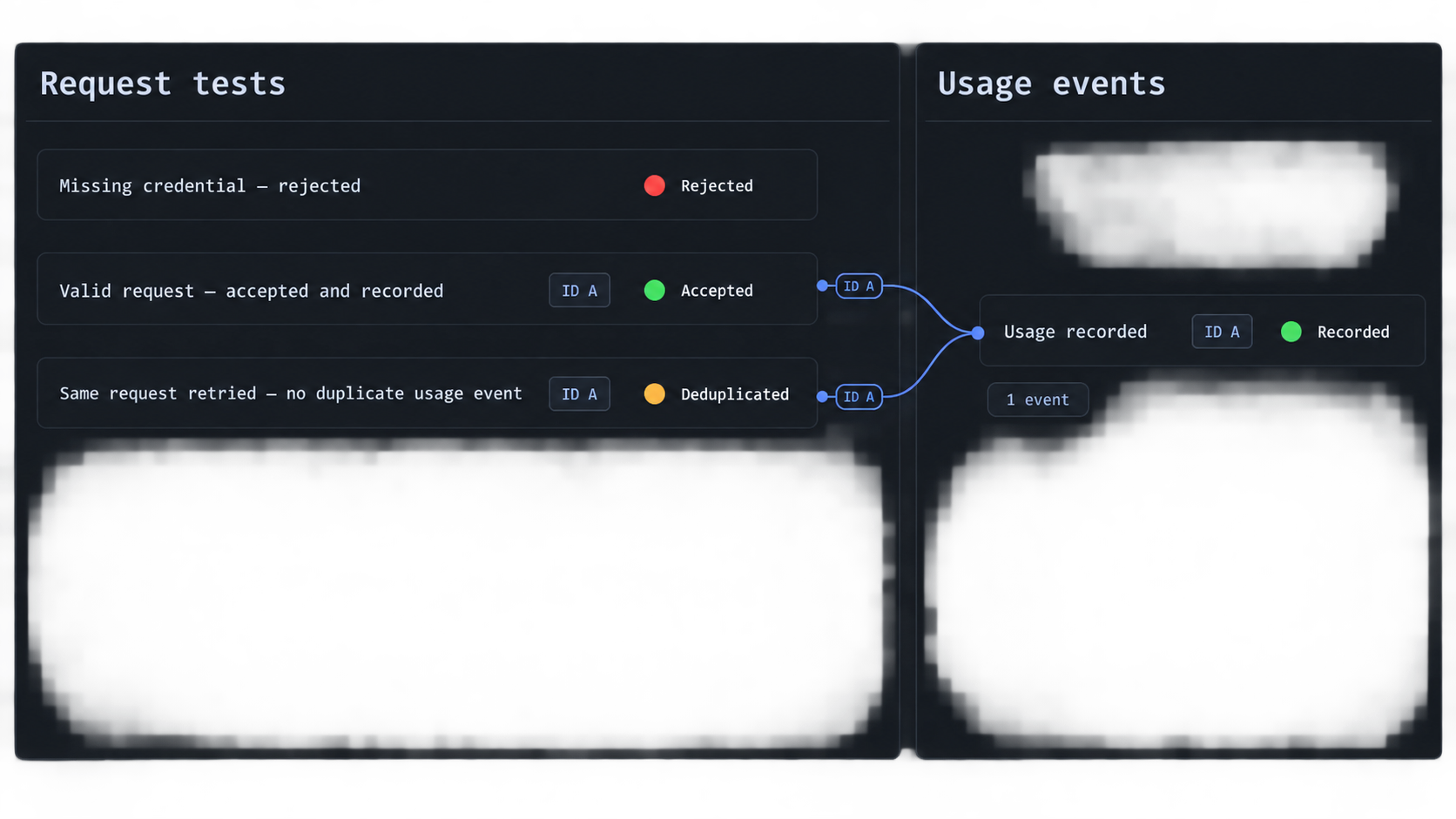
Complete local verification before creating a public endpoint. This isolates application defects from tunnel configuration problems and gives you known-good responses to compare during remote testing.
Check the health endpoint
curl -i http://127.0.0.1:8000/health
A working process returns HTTP 200 with {"status":"ok"} and a request identifier. The health route intentionally does not expose database contents, entitlements, or credentials.
Confirm that anonymous content access is rejected
curl -i \
  -H "Idempotency-Key: fetch-001" \
  http://127.0.0.1:8000/v1/content/market-brief
The expected status is HTTP 401 with unauthorized. This request does not create a usage event. If content is returned without an Authorization header, stop and review the route and authentication logic before continuing.
Make the first authorized request
Use the same development secret that was configured when the database was initialized:
curl -i \
  -H "Authorization: Bearer $METERED_CLIENT_KEY" \
  -H "Idempotency-Key: fetch-001" \
  -H "X-Request-Id: local-test-001" \
  http://127.0.0.1:8000/v1/content/market-brief
A successful response has HTTP 200, returns the content, and includes an event_id. The duplicate field is false. Its usage object records a quantity of one, the price snapshot, currency, and timestamp. The response also returns the request identifier in both the JSON body and X-Request-Id response header.
Retry the same logical operation
Repeat the request with the same idempotency key. You may supply a new request ID because this is a new transport attempt for the same logical operation:
curl -i \
  -H "Authorization: Bearer $METERED_CLIENT_KEY" \
  -H "Idempotency-Key: fetch-001" \
  -H "X-Request-Id: local-retry-001" \
  http://127.0.0.1:8000/v1/content/market-brief
The response should contain the original event ID and "duplicate":true. The retry does not consume a second unit. This behavior matters because clients often retry after a timeout without knowing whether the server committed the first request.
Create a genuinely new usage event
curl -i \
  -H "Authorization: Bearer $METERED_CLIENT_KEY" \
  -H "Idempotency-Key: fetch-002" \
  -H "X-Request-Id: local-test-002" \
  http://127.0.0.1:8000/v1/content/market-brief
This request uses a new idempotency key, so the application records a second event. Continue with unique keys through fetch-005 to consume the five-unit allowance. A sixth unique request receives HTTP 429 with entitlement_limit_reached. Repeating any previously accepted key still retrieves its recorded result without consuming another unit.
| Test | Expected status | Usage effect |
|---|---|---|
| Health request | 200 | No event |
| Missing or incorrect bearer credential | 401 | No event |
| Missing idempotency key | 400 | No event |
| Content without an active entitlement | 403 | No event |
| First accepted logical request | 200 | One new event |
| Retry with the same key and resource | 200 | No additional event |
| Reuse of a key for another resource | 409 | No additional event |
| New request after allowance exhaustion | 429 | No event |
Inspect and reconcile the usage events
During development, query SQLite directly to confirm that the external API result matches the internal ledger. Stop the application first if you want an especially simple inspection workflow, then run:
python3 - <<'PY'
import sqlite3

db = sqlite3.connect("metered.db")
db.row_factory = sqlite3.Row

rows = db.execute("""
    SELECT
        event_id,
        client_id,
        content_slug,
        request_id,
        idempotency_key,
        used_at,
        quantity,
        unit_price_micros,
        currency
    FROM usage_events
    ORDER BY used_at
""").fetchall()

for row in rows:
    print(dict(row))
PY
There should be one row for each unique accepted idempotency key. The repeated fetch-001 request should not produce a second row. Verify the client ID, slug, request ID, timestamp, quantity, price snapshot, and currency. This is the minimum evidence needed to explain why the prototype counted a unit.
You can calculate a simple development subtotal using integer arithmetic:
python3 - <<'PY'
import sqlite3

db = sqlite3.connect("metered.db")
row = db.execute("""
    SELECT
        currency,
        SUM(quantity) AS units,
        SUM(quantity * unit_price_micros) AS total_micros
    FROM usage_events
    GROUP BY currency
""").fetchone()

if row:
    print({
        "currency": row[0],
        "units": row[1],
        "total_micros": row[2],
        "display_total": f"{row[2] / 1_000_000:.6f}",
    })
else:
    print("No usage events")
PY
A production reconciliation process should not rely only on a formatted decimal string. Preserve the integer amount, currency, event ID, client ID, timestamps, and the billing batch that accepted each event. Export jobs should be idempotent too. For example, a billing adapter can use the usage event ID as its own idempotency reference and record the provider's acknowledgement without changing the original event.
Recommended event lifecycle for a later billing integration
Commit the usage event
Record the event transactionally when the authorized delivery is accepted. Preserve the price and entitlement facts that applied at that moment.
Select unexported events
A background process should select a bounded batch without changing the original commercial fields.
Submit with a stable event identifier
Send the original event ID to the billing or reporting system so repeated export attempts can be recognized safely.
Record the acknowledgement
Store the destination, batch identifier, acknowledgement time, and result separately from the immutable usage facts.
Reconcile totals and exceptions
Compare local event totals with accepted billing records. Investigate missing, rejected, duplicated, refunded, or disputed events explicitly.
Financial workflows also need decisions that this prototype intentionally leaves open: tax handling, refunds, credits, expiration, partial failure, currency conversion, invoice periods, minimum charges, and dispute retention. Those rules should be reviewed before event data becomes financially binding.
Expose the development API with a Localtonet HTTP tunnel
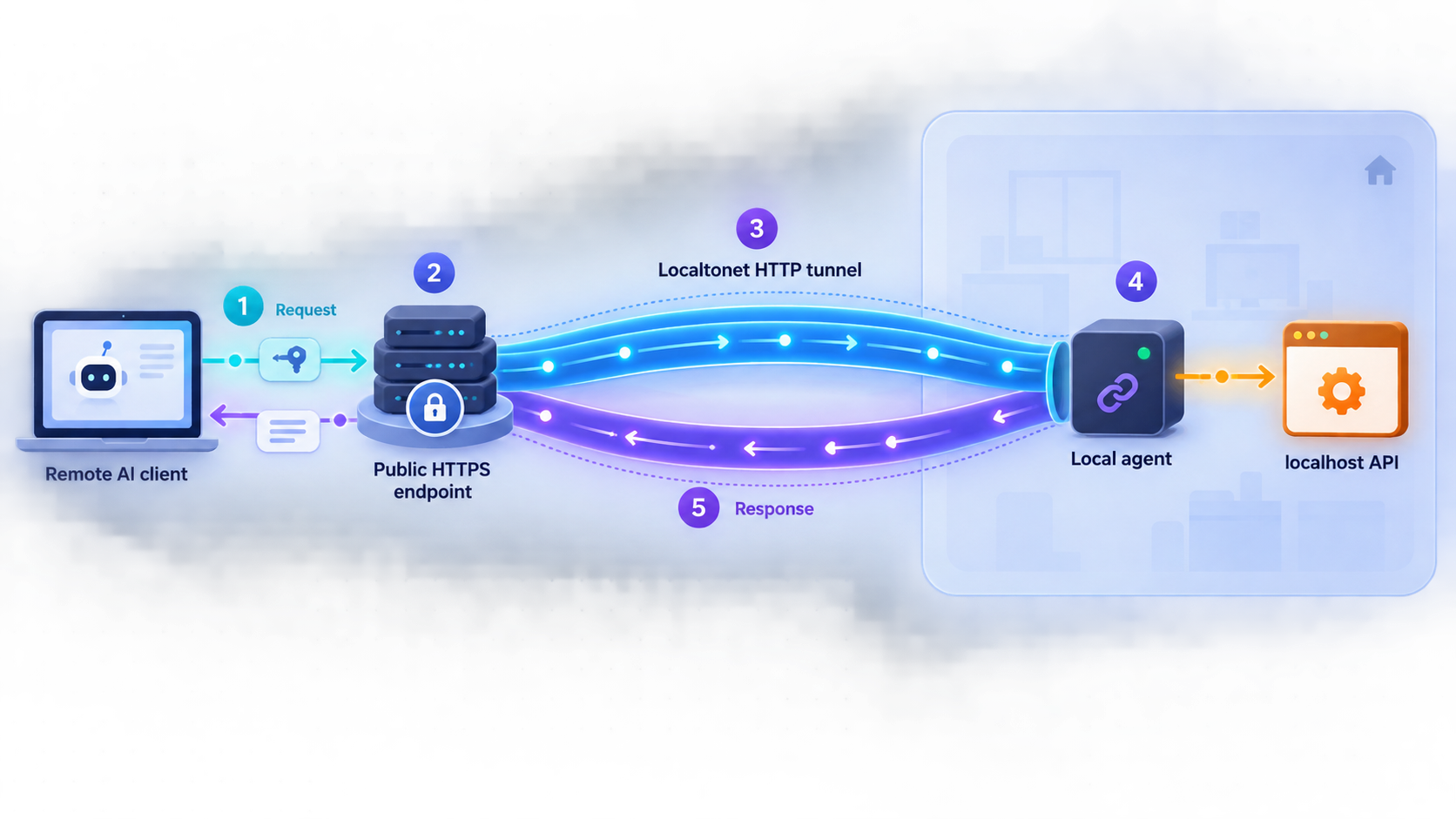
Once every local test passes, the next step is remote integration testing. With Localtonet, the client running on your device establishes an outbound connection to our relay. You do not need an inbound router port-forwarding rule, a public IP address, firewall changes, or VPN setup for this tunnel workflow. The tunnel provides a public address only while the selected client is connected and the tunnel is running.
Use an HTTP tunnel because this application speaks HTTP. The local target is 127.0.0.1 on port 8000, matching the constants in the source code. If the Localtonet client runs on another machine, 127.0.0.1 would refer to that other machine, not the API host. In that topology, the API must listen on an address reachable from the client device, and you must assess the resulting LAN exposure separately.
Available relay values, domain choices, and plan-dependent options must be taken from the current Localtonet dashboard. Do not copy a server code or region value from an unrelated example. The steps below follow the documented Localtonet lifecycle without inventing those values.
Install and run the Localtonet client
Install the Localtonet application for the operating system on the device that can reach the API. Start the client while the Python service remains available on 127.0.0.1:8000.
Authenticate or select the client device
Use the device-specific authentication token associated with the client that will run the tunnel. Keep this token private and do not confuse it with the API bearer credential.
Select an available relay server
Choose a server or region from the values currently offered in the dashboard. Availability can vary, so this guide does not hardcode a server code.
Create the HTTP tunnel configuration
Choose the HTTP tunnel family and set the local target to IP address 127.0.0.1 and port 8000. Select the public-address process type available for your workflow. Random Sub Domain, Custom Sub Domain, and Custom Domain serve content at a public HTTPS address, but availability and custom-domain requirements must be checked in the current dashboard and documentation.
Start the tunnel and copy its public URL
Creating a tunnel does not start it. Press Start, confirm that the selected client remains connected, and use the assigned public HTTPS URL for remote tests.
Test remotely, then stop or delete the tunnel
Repeat the health, authentication, entitlement, and idempotency tests against the assigned URL. When testing is complete, stop the tunnel or delete it if it is no longer needed.
The current product workflow is also described in our Localtonet HTTP tunnel documentation. Consult it for current dashboard presentation and choices, but keep the local target aligned with the application you actually started.
Run a remote health check
Replace the placeholder origin with the exact HTTPS URL assigned to your running tunnel:
export PUBLIC_API_ORIGIN="https://replace-with-your-assigned-host"
curl -i "$PUBLIC_API_ORIGIN/health"
If the local health check succeeds but this request fails, investigate the tunnel state, selected device, and local target before changing application code.
Run an authenticated remote request
curl -i \
  -H "Authorization: Bearer $METERED_CLIENT_KEY" \
  -H "Idempotency-Key: remote-fetch-001" \
  -H "X-Request-Id: remote-test-001" \
  "$PUBLIC_API_ORIGIN/v1/content/market-brief"
The application should create one event just as it did on localhost. Repeat the same command and confirm that duplicate becomes true without adding a second event. Then inspect SQLite again. This proves that remote traffic reached the same local application and that metering behavior remained an application concern.
Treat the assigned URL as internet reachable. Do not depend on an unguessable URL as authorization. Keep application authentication enabled, issue development-only credentials, expose only the routes required for testing, avoid returning sensitive diagnostics, and stop the tunnel when the test window ends.
Security, auditability, and operational hardening
Separate credentials by purpose
The Localtonet device token identifies the client device that runs the tunnel. The API bearer secret identifies the AI client calling the publisher API. A billing provider credential would authorize event export or settlement. These credentials should never be reused or placed in the same public configuration. Rotate and revoke them independently.
The prototype scans active client hashes because it has only one development client. A production system should use a scalable credential format that identifies a key record without exposing the secret, then verifies the secret with a password or API-key hashing strategy appropriate to the risk model. Log a non-secret key identifier, never the bearer value.
Keep authorization server-side
A client-provided slug, price, quantity, or customer label is not an authorization decision. The server should derive entitlements and prices from trusted state. This prototype accepts only the slug from the path, looks up the authenticated client, reads the unit price from the entitlement, and forces the quantity to one.
Real entitlements may also include effective dates, expiration dates, content collections, territory, purpose, model restrictions, training restrictions, daily limits, and contractual use definitions. Add only fields that have enforceable semantics. A field named training_allowed is not meaningful unless request handling or downstream governance actually enforces it.
Make retries safe but do not hide misuse
Idempotency is scoped to the authenticated client. Two clients may use the same key without colliding. Within one client, reusing a key for another resource is rejected because it may indicate a programming error or an attempt to obtain additional content under a prior event.
Production designs should define an idempotency retention period. Deleting keys too early can permit an old retry to become billable again. Retaining all keys forever increases storage and privacy obligations. The correct period depends on retry behavior, contractual dispute windows, and record-retention requirements.
Protect the audit trail
Usage rows should be append-oriented. Corrections, refunds, and reversals are easier to audit when represented as linked adjustment records rather than destructive edits. Restrict who can query or export event data. Back up the database, test restoration, and monitor for gaps in event sequences or unusual changes in volume.
Request IDs help correlate client reports, application logs, usage events, and billing exports. They are not a substitute for idempotency keys. A request ID follows an execution attempt, while an idempotency key follows the business operation across attempts.
Minimize personal and sensitive data
Avoid storing prompts, end-user identities, full authorization headers, or arbitrary query text unless a documented purpose requires them. A usage record generally needs the client, resource, event definition, time, quantity, and applicable commercial terms. More data creates additional security, privacy, and retention obligations.
Plan for production concurrency
SQLite is useful for this inspectable local prototype, but a production service may need a database and transaction strategy designed for its write rate and availability requirements. Whichever database is selected, preserve the unique idempotency constraint and make the allowance check and event reservation atomic. Load-test concurrent requests rather than assuming sequential development behavior will hold.
Control the exposure window
Keep the Localtonet client and tunnel running only for the period in which remote access is needed. Remember that the public endpoint depends on three active components: the Python process, the selected Localtonet client, and the tunnel itself. Stopping any required component makes the endpoint unavailable. Deleting an obsolete tunnel reduces the chance that an old configuration will be restarted accidentally.
Troubleshooting the prototype and tunnel
The local health endpoint refuses the connection
Confirm that app.py is running and that its terminal says it is listening on http://127.0.0.1:8000. Check whether another process already uses port 8000. If you intentionally change the port in the source, update the Localtonet local target to the same value.
Authentication always returns HTTP 401
The database stores the hash created during the first bootstrap. Changing METERED_CLIENT_KEY later does not automatically replace that stored credential. For a disposable test, stop the server, remove metered.db, set the intended client ID and key, and restart. That resets all entitlements and events, so never use this reset technique on records that must be retained.
Also verify that the header begins with Bearer, followed by one space and the exact secret. Do not include quote characters as part of the credential value.
A request returns HTTP 400
The content route requires a non-empty Idempotency-Key no longer than 128 characters. Generate a stable key in the calling application before its first attempt and reuse it only for retries of that logical operation.
A request returns HTTP 403
The authenticated client does not have an active entitlement for that slug, or the slug does not exist in the joined content and entitlement records. The prototype intentionally uses the same response for both situations so the API does not reveal the entire content catalog to an unauthorized caller.
A request returns HTTP 409
The caller reused an idempotency key for a different content slug, or concurrent duplicate attempts collided at the database constraint. For a different logical use, send a new key. For a retry of the same resource, keep the original key and retry after confirming whether the prior response was received.
A request returns HTTP 429
The client has consumed its five-unit development allowance for that content. Inspect the event table before changing the entitlement. In a real service, decide whether exhaustion should return 402, 403, 409, 429, or another contractually documented status. The prototype uses 429 as an explicit limit response, not as a universal billing standard.
Local requests work but the public URL fails
Confirm that the Localtonet client is connected, the correct device token is selected, the HTTP tunnel has been started, and its local target is 127.0.0.1:8000. Creating the configuration alone is not enough. If the tunnel client is on another device, its loopback interface cannot reach the API on your development computer.
The public health endpoint works but content requests fail
Connectivity is working, so inspect the application response status. A 400, 401, 403, 409, or 429 response is generated by the prototype's request rules. Check the bearer credential, idempotency key, entitlement, and remaining allowance rather than recreating the tunnel.
The remote test appears to create duplicate charges
Query usage_events and compare idempotency keys. If each retry used a different key, the server correctly treated each as a new logical operation. The client must persist the key before sending the first attempt and reuse it after timeouts. If identical client and key values produced multiple rows, preserve the database and logs for investigation because the declared unique constraint should prevent that state.
Frequently asked questions
Does the Localtonet tunnel provide API authentication or billing?
No. In this architecture, the tunnel provides public connectivity to the local HTTP service. The application validates the AI client, enforces entitlements, records usage, calculates price snapshots, and integrates with any future billing provider.
Does one content download prove that an AI client used the content in an answer?
No. The API can prove that it delivered content to an authenticated client under a defined entitlement. Citation, summarization, recommendation influence, training, or display are downstream events that require separate definitions and reporting when those are the paid uses.
Why are both request IDs and idempotency keys necessary?
A request ID traces one execution attempt through logs and support records. An idempotency key identifies the logical billable operation across retries. A retry can have a new request ID while retaining the same idempotency key.
Why store prices as integer millionths?
Integer arithmetic avoids binary floating-point rounding in usage totals. Millionths also permit sub-cent test pricing. A production system should choose and document a precision compatible with its currencies, billing provider, accounting rules, and contracts.
Can the prototype be used as a production pay-per-use API?
It should be treated as a development prototype. It demonstrates authentication, entitlement checks, transactional event creation, idempotency, and remote testing. Production use requires a suitable server and database architecture, secret management, monitoring, backups, abuse prevention, data governance, financial reconciliation, and security review.
Why does the server bind to 127.0.0.1?
The loopback binding prevents direct LAN connections in the default tutorial topology. A Localtonet client on the same computer can still reach that address. If the tunnel client runs on another device, the API needs a network-reachable binding and corresponding security review.
Is a tunnel available immediately after it is created?
No. Creating the configuration does not mean it is running. The tunnel must be started, and the selected Localtonet client must remain connected. It can later be stopped or deleted.
Does this workflow require router port forwarding or a public IP address?
No. The Localtonet client establishes an outbound connection to our relay, so the HTTP tunnel does not require inbound router port forwarding, a public IP address, firewall changes, or VPN setup. The application still needs its own authentication and authorization controls.
Test your metered API with a real remote client
Finish the localhost checks first, then use a Localtonet HTTP tunnel to give an approved AI client or integration partner a temporary public HTTPS endpoint. Keep your application in control of identity, entitlements, usage records, and pricing, and stop the tunnel when the test is complete.
Get Started Free →

