

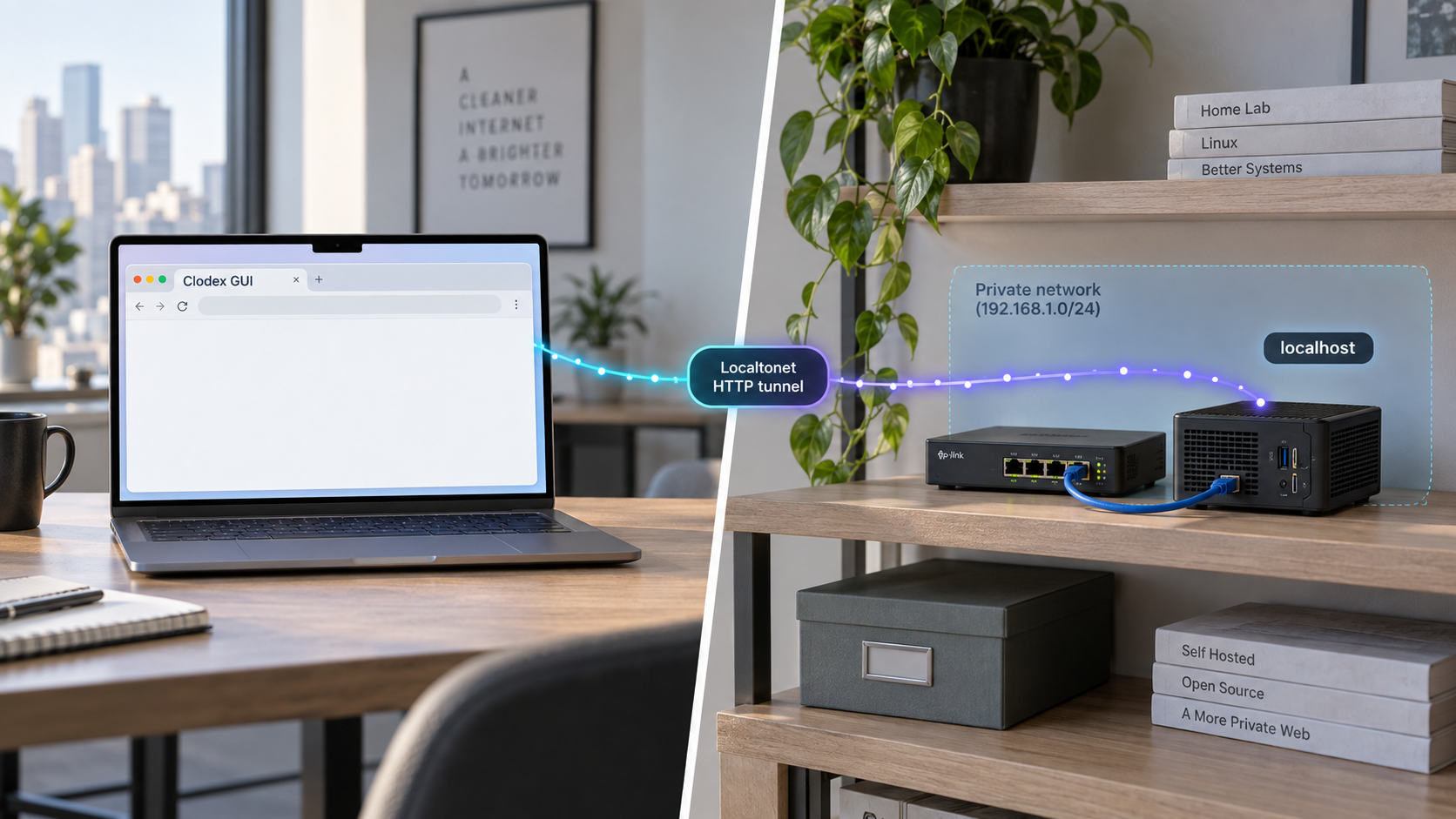
Run your coding-agent workspace on Linux and reach its browser interface from another network
Clodex can run as a headless node on Linux and serve its graphical interface in a browser, making it useful for managing coding-agent sessions on a remote workstation or server. This guide explains the evidenced deployment model, the prerequisites and configuration details you must confirm in the current Clodex documentation, how to verify the node locally, and how to publish the working HTTP endpoint with Localtonet. We keep the browser GUI separate from Clodex peering so that you expose only the service you actually intend to use. Because the available project evidence does not establish a fixed Linux installation command, port, bind address, authentication method, or service definition, we identify those values rather than inventing them.
📋 What's in this guide
Understand the Clodex headless architecture
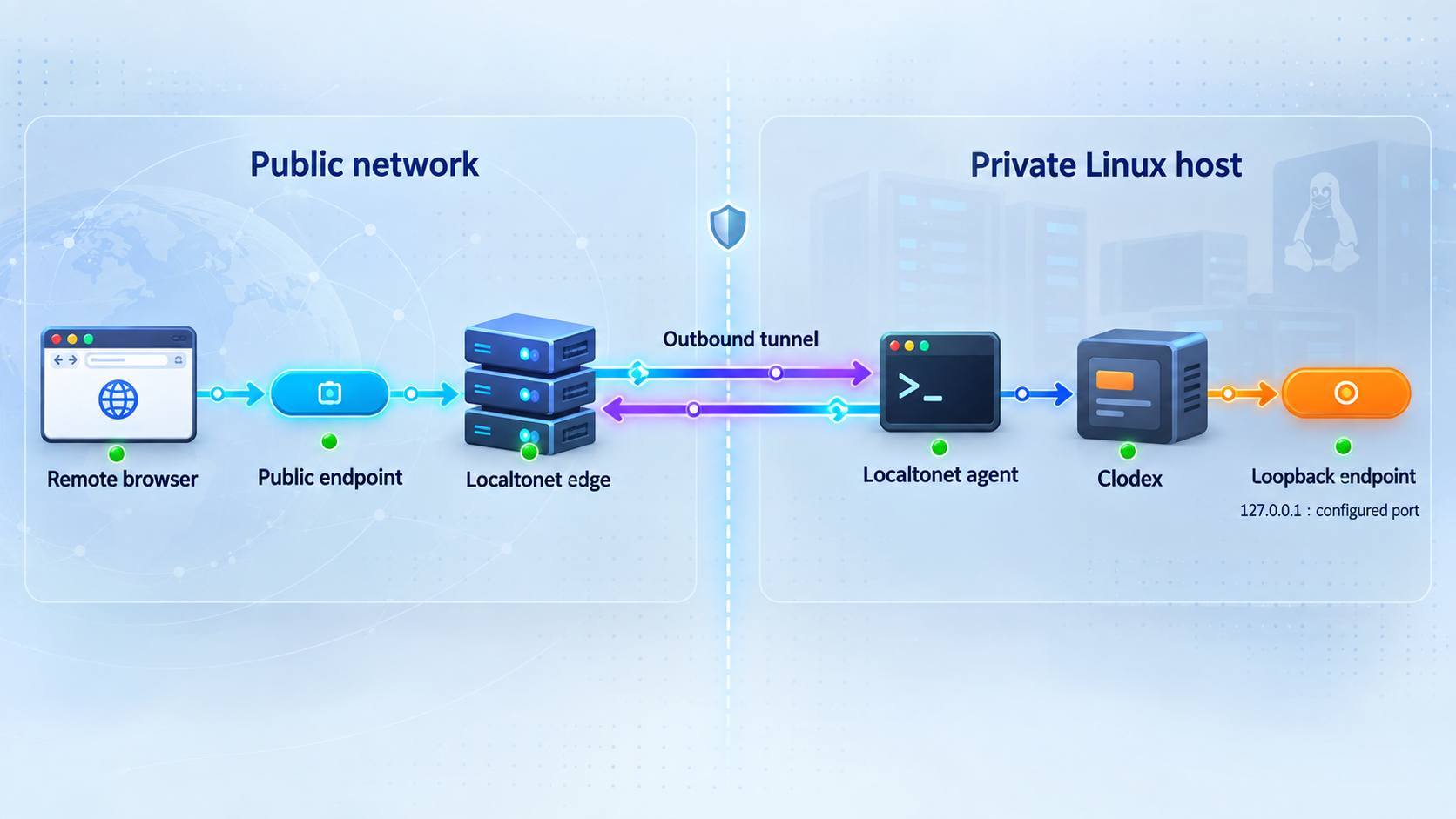
Clodex is a session manager for fleets of coding agents. It can run Claude Code and Codex sessions as terminals while adding a visual session list, agent coordination, session telemetry, and connections between machines. The project uses the term headless node for the Linux deployment that runs without the macOS desktop interface. A headless node can serve the Clodex GUI in a browser.
That browser endpoint is the relevant target for this tutorial. The project describes the browser GUI as being served through an HTTP and WebSocket host. Clodex also has a separate peer service that uses HTTP and server-sent events for peering and phone access. These are different interfaces with different purposes. Publishing the browser GUI does not automatically mean that the peer service should also be exposed.
With Localtonet, the client on the Linux host establishes an outbound connection to one of our relay servers. An HTTP tunnel then maps a public address to the Clodex browser service running on, or reachable from, that host. This removes the need to create an inbound router port-forwarding rule, obtain a public IP address, set up a VPN, or open an inbound firewall port for the application.
The resulting tunnel is available only while the selected Localtonet client is connected and the tunnel is running. Creating a tunnel configuration alone does not start it. This lifecycle is useful for administrative tools because you can stop the public route when remote access is not required.
A Clodex interface that was previously reachable only from the Linux host or local network can become reachable from the public internet after the tunnel starts. Confirm Clodex's current authentication behavior before doing this. Do not assume that an unguessable URL is an access-control mechanism, and never place agent credentials, API keys, repository secrets, or authentication tokens in a URL.
Prepare the Linux host and agent environment
Start with a Linux machine that can remain online for as long as you want the Clodex node to operate. This could be a development workstation, a dedicated server, or another Linux system capable of running the agent command-line tools and the projects they need to access. The host must have sufficient permissions and resources for the sessions you plan to run.
Clodex drives external coding-agent CLIs rather than replacing them. Install and authenticate the CLI or CLIs you intend to use according to their own supported procedures. The Clodex project identifies Claude Code through a claude executable in PATH and Codex through a codex executable in PATH. Verify these executables under the same Linux account that will run the headless node.
command -v claude
command -v codex
Run only the check that applies to the CLI you intend to use. A returned executable path establishes that the shell can find the command. It does not by itself prove that the CLI is authenticated, authorized for the selected model, or able to access a project.
Confirm project access from the service account
The account running Clodex needs appropriate access to every project directory it will manage. Confirm that it can enter the project directory, read the repository, and perform only the file and Git operations required by your workflow. Avoid running the node as a highly privileged account merely to work around ownership problems.
If agent sessions need Git credentials, package-registry credentials, model-provider credentials, or environment variables, configure them for the actual runtime account. An interactive shell and a background service can have different environment variables and different PATH values. A CLI that works in your login shell may therefore be missing when Clodex starts through a service manager.
Obtain the current Clodex requirements
Clodex changes actively, so installation requirements and launch options can change between releases. The project repository points Linux headless, Docker, source-build, server deployment, and everyday clodexctl instructions to its docs/how-to.md document. Use the version of that document corresponding to the release or commit you deploy.
The currently available evidence confirms Node.js 20 or later for the standalone clodexctl client workflow. It does not establish that Node.js 20 is the complete or only prerequisite for every Linux headless deployment path. Likewise, the macOS DMG instructions and macOS source-build command are not valid evidence for a Linux headless installation. Do not adapt those commands by changing platform names or architecture flags.
| Requirement | What to establish | Why it matters |
|---|---|---|
| Linux runtime account | A dedicated or appropriately restricted account can access the intended projects | Agent sessions act with the permissions of the account that launches them |
| Agent CLI | The required claude or codex executable is in the runtime account's PATH |
Clodex needs the external CLI to create and operate that type of session |
| Agent authentication | The selected CLI can start successfully under the runtime account | A discoverable executable can still fail if it has no valid authentication |
| Clodex release documentation | The Linux headless procedure matches the version being installed | Commands and configuration can change between releases |
| Localtonet client | The client runs on the Clodex host or another device that can reach it | The tunnel forwards to a local IP address and port reachable from that client |
| Security policy | Remote publication is permitted and the GUI has suitable access protection | The tunnel can make an administrative application reachable from the internet |
Install the Clodex headless node on Linux
Choose one documented Linux deployment path and follow it consistently. The Clodex project identifies source-build, headless, Docker, and server-deployment instructions as available in its official how-to document. Container and direct-host installations can have different filesystem, process, environment, networking, and upgrade behavior, so commands from one path should not be mixed into another.
The supplied project evidence confirms that official Linux headless and Docker instructions exist, but it does not include their complete commands, package requirements, filenames, environment variables, default port, or launch flags. Reconstructing those details from repository filenames would be unsafe. During editorial review, the commands should be checked against the current docs/how-to.md for the exact Clodex release being documented.
Direct-host installation
For a direct-host installation, use the current Linux headless section to install the required runtime dependencies, obtain the Clodex source or release content, install its dependencies, and invoke the documented headless entry point. Record the release tag or commit used. Pinning the deployed revision makes troubleshooting and rollback more predictable than silently following a moving branch.
Do not use the Apple Silicon DMG installation procedure on Linux. That package is the macOS desktop application. The release notes also show a source-build command for producing an Intel macOS DMG, but that command targets macOS packaging and does not establish a Linux headless build procedure.
Container installation
If you choose the official Docker deployment, follow the project's documented image-build or container-start procedure. Confirm which directories must be persisted, which project paths must be mounted, how agent credentials are supplied, and how the browser endpoint is published to the host. These values are deployment-specific and are not established by the evidence available for this draft.
Treat a container port and a host port as separate values. Clodex may listen on one port inside a container while Docker publishes it on a different host port. Localtonet must target the host-side address and port that are reachable from the Localtonet client, not an isolated container-only address.
Optional standalone control client
The project documents a standalone clodexctl client for Node.js 20 or later. The following commands are evidenced for cloning the repository and installing its CLI package globally:
git clone https://github.com/avirtual/clodex
npm i -g ./clodex/cli
Installing clodexctl is not the same as installing or starting a Linux headless node. The CLI controls a node after an appropriate connection has been configured. Do not treat the successful installation of this package as proof that the browser service is running.
The project also demonstrates verbs such as selecting a configured node and retrieving sessions:
clodexctl use node local
clodexctl get sessions
The name local in that example presumes that a matching node connection already exists. Use the node name created by your documented setup rather than assuming that every deployment provides a connection with that name.
Configure the browser endpoint and runtime safely
Before starting the headless node, identify the exact option or configuration entry that controls the browser GUI host and port. The available evidence does not establish a universal default hostname, bind address, or port. Read the startup output and the release-matched headless documentation rather than assuming common development ports such as 3000, 5173, or 8080.
Choose the narrowest practical bind scope
If Clodex supports binding its browser service to the loopback interface and the Localtonet client runs on the same Linux host, loopback is generally the narrowest network scope. If Localtonet runs on a separate device, the Clodex endpoint must instead listen on an address reachable from that device. Use only a bind configuration explicitly supported by Clodex.
Do not expose the Clodex port directly through a router and then place a tunnel in front of it. That creates two inbound paths and defeats the purpose of using an outbound tunnel as the controlled remote-access route. Review host and cloud firewall rules for older test configurations.
Separate GUI access from peer connectivity
Identify whether the configured listener is the browser GUI host or the peer service. The browser interface is the endpoint intended for this HTTP tunnel. The peer service has its own HTTP and server-sent-event behavior and should not be published merely because the browser GUI needs remote access.
If you later need remote peering, document and assess it as a separate service. Give each endpoint its own access decision, target, and verification process. Avoid sending multiple administrative protocols through one route unless Clodex explicitly documents that architecture.
Protect credentials and repositories
A Clodex node can control agent sessions that read and modify source code. Its browser GUI should therefore be treated as an administrative interface. Before exposing it, determine whether the installed Clodex version provides authentication for the browser endpoint and configure that authentication according to the project documentation. The evidence supplied for this article does not specify its authentication procedure, so we cannot safely provide field names or commands.
Apply least privilege to the Linux runtime account. Limit its repository access to intended projects, keep model-provider credentials out of repositories, and avoid embedding credentials in shell history or service files with overly broad permissions. Review what an authenticated coding agent can execute, not only what the GUI itself displays.
If you cannot confirm an effective authentication mechanism for the installed Clodex browser interface, keep it local until you can place it behind an appropriate access-control layer. Localtonet provides connectivity to the configured target, but connectivity is not a substitute for application authorization.
Start and verify Clodex locally first
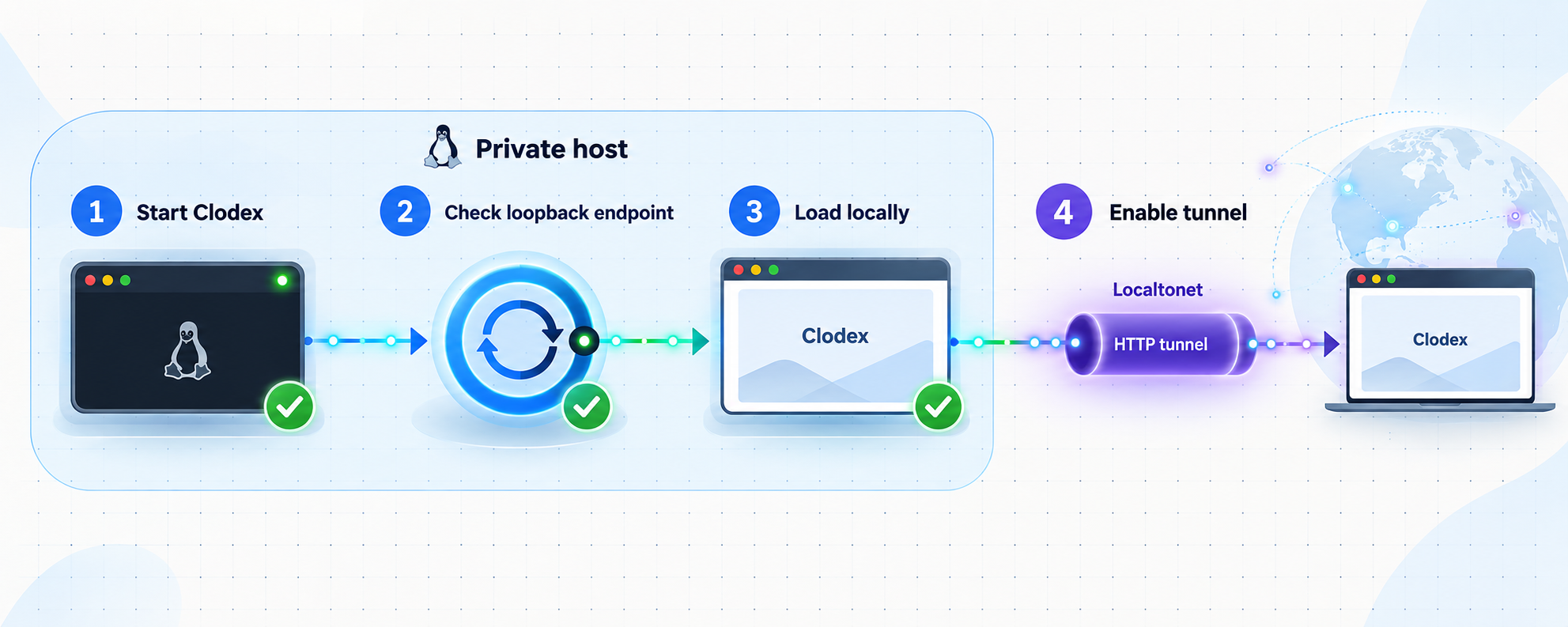
Start the headless node using the exact command or service definition documented for your chosen release and installation path. Keep the first launch in the foreground when practical so that you can inspect startup output. Record the actual listening address, port, configuration location, and any warnings without publishing secrets from the logs.
Verification should proceed from the smallest scope outward. First establish that a Clodex process remains running. Next confirm that the expected port is listening. Then request the browser endpoint from the Linux host. Finally, open it in a browser on the local network if the chosen bind scope permits that.
Inspect the listening socket
On Linux, use the operating system's socket inspection tools and filter the result using the port reported by Clodex. The following command lists listening TCP sockets without assuming a Clodex port:
ss -ltnpConfirm that the process associated with the documented endpoint is Clodex or its expected runtime. Pay attention to the listening address. A loopback address is reachable only from the same host, while an all-interface or LAN address has a broader local exposure. Do not change the bind address solely to make testing easier.
Test the HTTP endpoint
Use the actual URL printed by Clodex or assembled from its documented address and port. A browser is the best final local test because the GUI may rely on more than the initial HTML response. A command-line HTTP request can still help establish whether the base endpoint responds:
curl -i http://ACTUAL_LOCAL_HOST:ACTUAL_PORT/Replace both placeholders with verified values. Do not paste that example unchanged into automation. A successful response confirms only that an HTTP server answered. It does not prove that the browser's WebSocket connection, session loading, terminal interaction, agent CLI authentication, or repository permissions work.
Exercise a minimal Clodex workflow
Open the GUI locally and verify that it loads without repeated connection errors. Confirm that the expected node or sessions appear. If you create a test session, use a disposable project with no sensitive credentials and verify that the chosen agent CLI starts. Check that a page refresh and browser reconnection behave as expected.
If you installed and configured clodexctl, retrieve sessions from the intended node as an additional control-plane check. A CLI connection and a browser connection test different paths, so success in one does not automatically diagnose the other.
Expose the verified browser GUI with Localtonet
Add remote access only after the Clodex GUI works through its local address. This separation prevents application startup failures from being mistaken for tunnel failures. For the browser interface, select an HTTP tunnel because the target is an HTTP service. Do not select a raw TCP, UDP, File Server, proxy, or VPN configuration simply because the node is remote.
HTTP tunnels can use a random subdomain, a custom subdomain where supported, or a custom domain. These process types serve the same target content at a public HTTPS address. Availability can vary by current product configuration or plan, so use the options presented in your dashboard rather than assuming that every option is available.
Install and run the Localtonet client
Run our client on the Linux host that runs Clodex, or on another device that can reach the verified Clodex address and port. The client establishes the outbound connection used by the tunnel.
Authenticate or select the client device
Use the device-specific token associated with the client that will carry this tunnel. Treat the token as a secret. Do not place it in the article, a repository, terminal screenshots, logs, or shared configuration examples.
Select an available relay server
Choose a currently available server or region from the Localtonet dashboard. Server codes and regional availability can change and must be selected from the current product rather than copied from an example.
Create an HTTP tunnel for the Clodex target
Choose the required HTTP process type and enter the exact local IP address and port verified earlier. The target must be reachable from the selected Localtonet client device. Use the Clodex browser GUI endpoint, not an assumed port and not the separate peer endpoint.
Start the tunnel and test the public address
Creating the configuration does not make it active. Press Start, wait for the selected client and tunnel to be connected, and then open the assigned public address in a separate browser session. Test page loading, live browser updates, session selection, and terminal interaction.
Stop or delete access when appropriate
Stop the tunnel when remote access is no longer required. Delete it if the route should not be reused. A configured tunnel is reachable only while the selected client is connected and that tunnel is running.
For the current dashboard workflow and field descriptions, consult our HTTP tunnel documentation while creating the tunnel. Use the values obtained from your running Clodex node rather than values from unrelated examples.
Clodex describes its browser GUI host as using HTTP and WebSocket communication. The supplied Localtonet product context establishes HTTP tunnel support but does not provide a specific compatibility statement for this Clodex implementation. Verify live terminal updates and reconnection through the assigned public address before relying on the deployment.
Operate and maintain the deployment
Once local and remote access both work, decide how Clodex should start after a reboot. Use the process-management approach documented for your selected Clodex deployment. A direct-host process might use a Linux service manager, while a container deployment might use a container restart policy or orchestration system. The current evidence does not establish an official service unit, service name, container name, or restart command, so those details must come from the release-matched project instructions.
Preserve the correct runtime environment
Compare the environment used by the managed process with the environment used during successful interactive testing. Confirm the working directory, PATH, home directory, project paths, and credentials available to the runtime account. If the node starts but cannot launch an agent, a missing CLI path or credential in the background environment is a likely distinction to investigate.
Upgrade deliberately
Review Clodex release notes before upgrading. Stop or quiesce active work according to the project's instructions, preserve required state, install the selected release through the same deployment path, and repeat local verification before restarting the public tunnel.
Avoid combining a Clodex upgrade, a container change, a bind-address change, and a tunnel reconfiguration in one maintenance action. Changing one layer at a time makes failures easier to isolate. Keep enough information to return to the previous working release if the project's supported rollback process permits it.
Review exposure over time
Periodically confirm that the tunnel still targets the intended IP address and port. This is particularly important after container recreation, network changes, or moving the Localtonet client. Review whether remote access is still necessary and stop unused tunnels.
Never include the Localtonet device token, Clodex credentials, model-provider secrets, private repository URLs, or private tunnel details in diagnostic posts. Redact sensitive values before sharing logs. If a token is exposed, replace it through the appropriate account workflow rather than merely deleting the public copy.
Troubleshoot Clodex and tunnel failures by layer
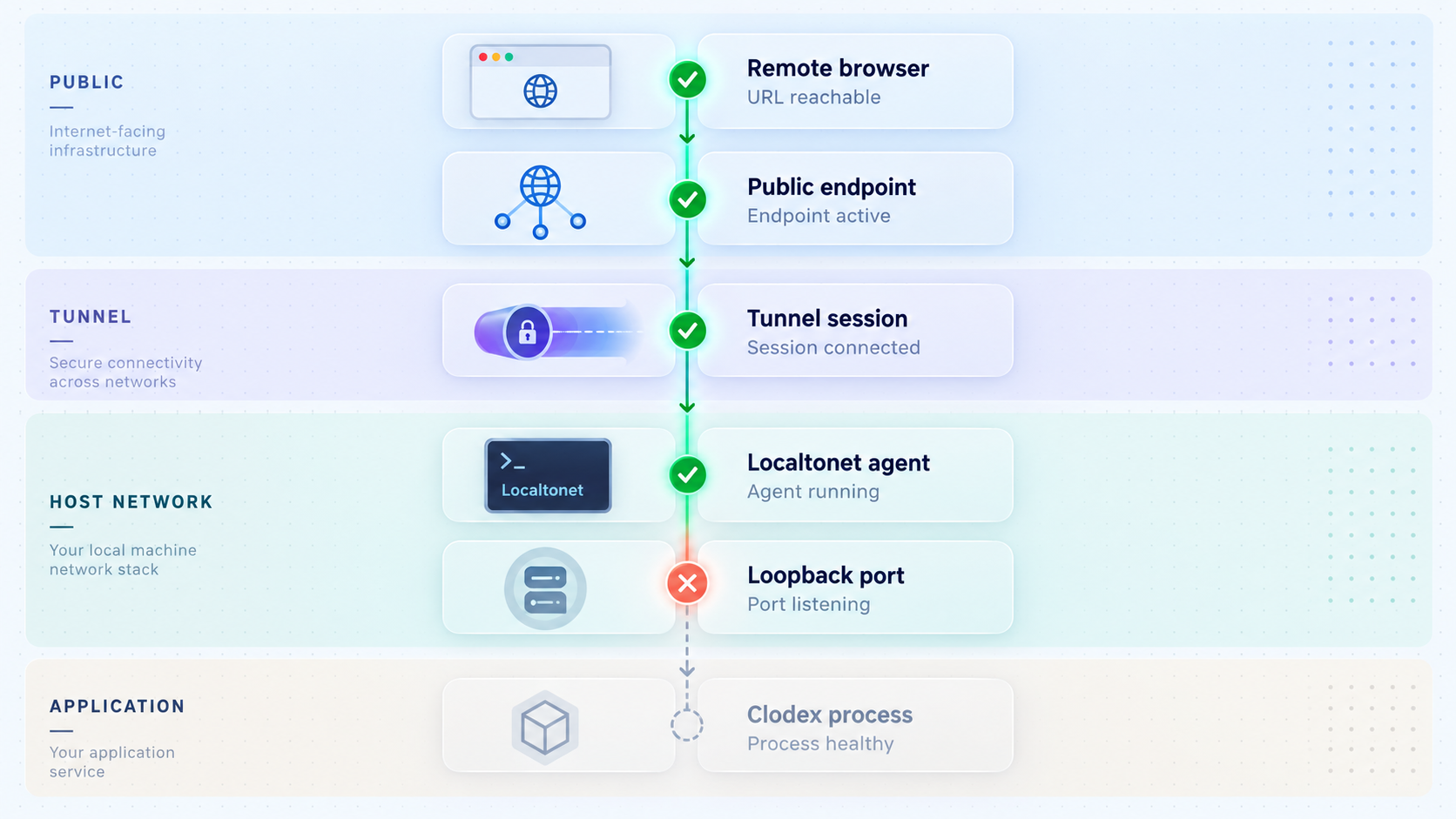
Troubleshooting is faster when you identify the first failing layer. Start with the process, then the local socket, then local HTTP behavior, then the Localtonet client's reachability, and finally the public browser session.
| Symptom | Likely layer | What to check |
|---|---|---|
| No Clodex process remains running | Installation or startup | Use the documented headless command, inspect startup output, and verify dependencies and runtime permissions |
| Process runs but no port listens | Clodex configuration | Confirm that the browser host is enabled and identify its actual bind address and port from current documentation and logs |
| Local HTTP request fails | Application listener | Check the scheme, address, port, process state, and whether the endpoint is the browser GUI rather than the peer service |
| GUI loads but an agent will not start | Agent runtime | Check the CLI executable, authentication, runtime account, project permissions, working directory, and service environment |
| Local GUI works but the tunnel does not | Localtonet target or lifecycle | Confirm the selected device is connected, the tunnel is started, and its local target is reachable from that device |
| Public page opens but live features fail | Browser transport | Inspect browser errors and test Clodex's WebSocket-dependent behavior through the public address |
| Connection stops after a reboot | Process lifecycle | Confirm that both Clodex and the Localtonet client restarted and that the tunnel itself is running |
| Unexpected service appears at the URL | Target selection | Recheck the configured local IP and port and verify the owning process with socket inspection |
Local target is unreachable from the client
If Localtonet runs on the same Linux host, verify the exact Clodex URL from that host. If it runs on another device, test the target from that device rather than from your laptop. A loopback-bound service on the Clodex host is not reachable through another machine's loopback interface.
The browser page loads but appears disconnected
A successful initial HTML response does not guarantee that Clodex's live browser transport is working. Use the browser's developer tools to look for failed network requests or WebSocket connections. Compare the result with the locally verified browser session. Also check whether Clodex needs an externally visible origin or URL setting, but configure one only if the project's current documentation defines it.
The node cannot find Claude Code or Codex
Run the executable check as the same account and within the same process environment used by Clodex. If the CLI exists only through an interactive shell initialization file, a background service may not inherit its location. Correct the runtime environment through the documented deployment method instead of launching the whole node with unnecessary elevated privileges.
The tunnel exists but has no public response
Confirm three separate states: the selected Localtonet device is connected, the tunnel configuration is started, and the Clodex target responds locally. A tunnel can exist in the dashboard without running. It also becomes unavailable when its assigned client disconnects.
Frequently asked questions
Does Clodex officially support a headless Linux node?
Yes. The project describes the same engine as running in a macOS desktop application and as a headless node on Linux. It also states that a headless node can serve the GUI in a browser. The exact Linux installation and launch procedure should be taken from the official documentation matching the release you deploy.
What is the default Clodex headless port?
A default Linux headless port is not established by the evidence available for this article. Use the value documented for your installed release or reported by the running node. Do not assume a common web-development port.
Should I tunnel the Clodex browser GUI or the peer service?
Tunnel the verified browser GUI endpoint when your goal is remote browser access. Clodex's peer service has a separate role involving peering and phone access. Do not expose it automatically as part of the GUI workflow.
Does installing clodexctl install the Linux headless service?
No. The standalone clodexctl package is a client used to control configured nodes. Installing it does not prove that a headless node is installed, configured, listening, or serving its browser GUI.
Does Localtonet require router port forwarding?
No. Our client establishes an outbound connection to a Localtonet relay server. The HTTP tunnel provides the public address without requiring inbound router port forwarding, a public IP address, firewall changes, or VPN setup.
Is creating the HTTP tunnel enough to make Clodex reachable?
No. The selected Localtonet client must be connected, and the tunnel must be started. Clodex must also be running and responding at the configured local IP address and port.
Can I use a Localtonet custom domain for the Clodex GUI?
HTTP tunnels support random subdomains, custom subdomains where available, and custom domains. Current availability and exact DNS requirements must be checked in the dashboard and current Localtonet documentation. Do not create DNS records from an unverified example.
Is the public URL enough to secure the Clodex interface?
No. Treat the public URL as an address, not as authentication. Confirm and configure the access controls supported by your Clodex release before exposing the GUI, protect all credentials, and stop the tunnel when remote access is not required.
Connect your verified Clodex node with Localtonet
Once the headless browser GUI works locally and has suitable access protection, create an HTTP tunnel to its verified address and port. You can then test the interface remotely without configuring inbound router port forwarding.
Get Started Free →

