

Give people, webhooks, and AI clients an endpoint they can depend on
A public URL is more than a convenient way to open a local application. It becomes an identifier stored in webhook settings, AI agent configurations, automation scripts, documentation, and bookmarks. This guide explains how to choose among a generated subdomain, a selected subdomain where supported, and a custom domain for a Localtonet HTTP tunnel. We also cover prerequisites, endpoint lifecycle, verification, authentication, migration, and the operational checks to complete before sharing an address with people or automated clients.
📋 What's in this guide
Why a stable public endpoint is an architectural decision
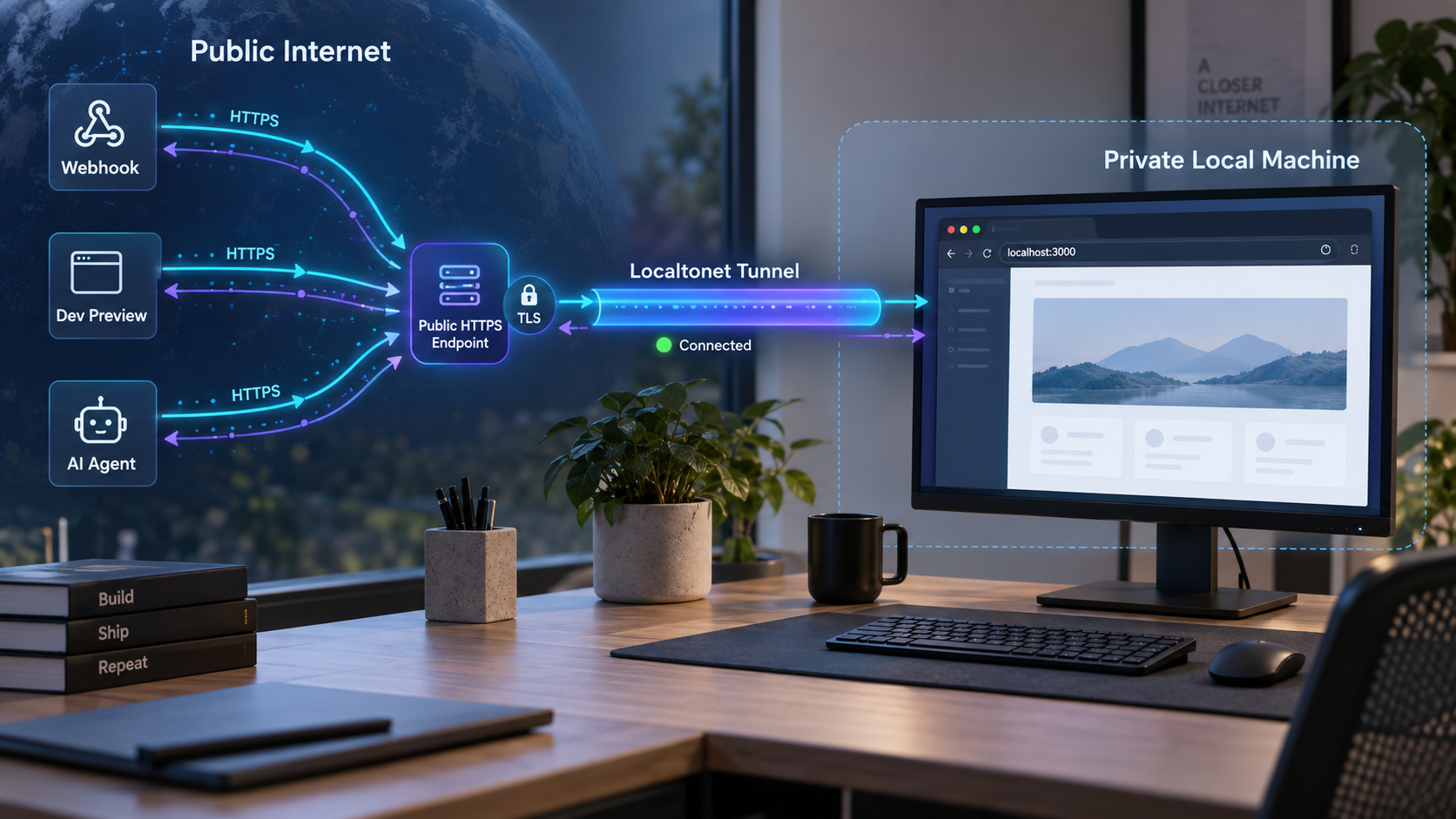
When a local application is exposed for a quick visual check, almost any temporary address can be useful. The requirements change once another system stores that address. A webhook provider may save it as a delivery destination. An AI client may keep it in a configuration file. A mobile application, test environment, or continuous integration job may call it repeatedly without a person present to correct a changed value.
At that point, the endpoint has become part of the service contract. Its name identifies the service, while its path, supported methods, authentication requirements, and response behavior tell clients how to use it. Changing any of those details may require coordinated updates across multiple consumers.
Localtonet HTTP tunnels let the same locally running content be served through three process types: Random Sub Domain, Custom Sub Domain, and Custom Domain. All three provide a public HTTPS address. The important difference for endpoint planning is not the local application behind them. It is how the public name is selected, recognized, documented, and managed.
Stability also has two separate meanings that should not be confused. The first is name stability: whether clients can continue using the same configured address. The second is runtime availability: whether that address can currently reach the local application. A memorable name does not keep an offline computer online, and a running local process is not publicly reachable through Localtonet unless the selected device is connected and its tunnel is running.
Before creating a tunnel, list the systems that will store its address. Include webhook dashboards, application settings, AI tool configurations, environment-specific deployment records, test scripts, team documentation, and any users who may bookmark it. The more consumers there are, the more valuable deliberate endpoint naming and a documented migration process become.
Generated subdomain, selected subdomain, or custom domain
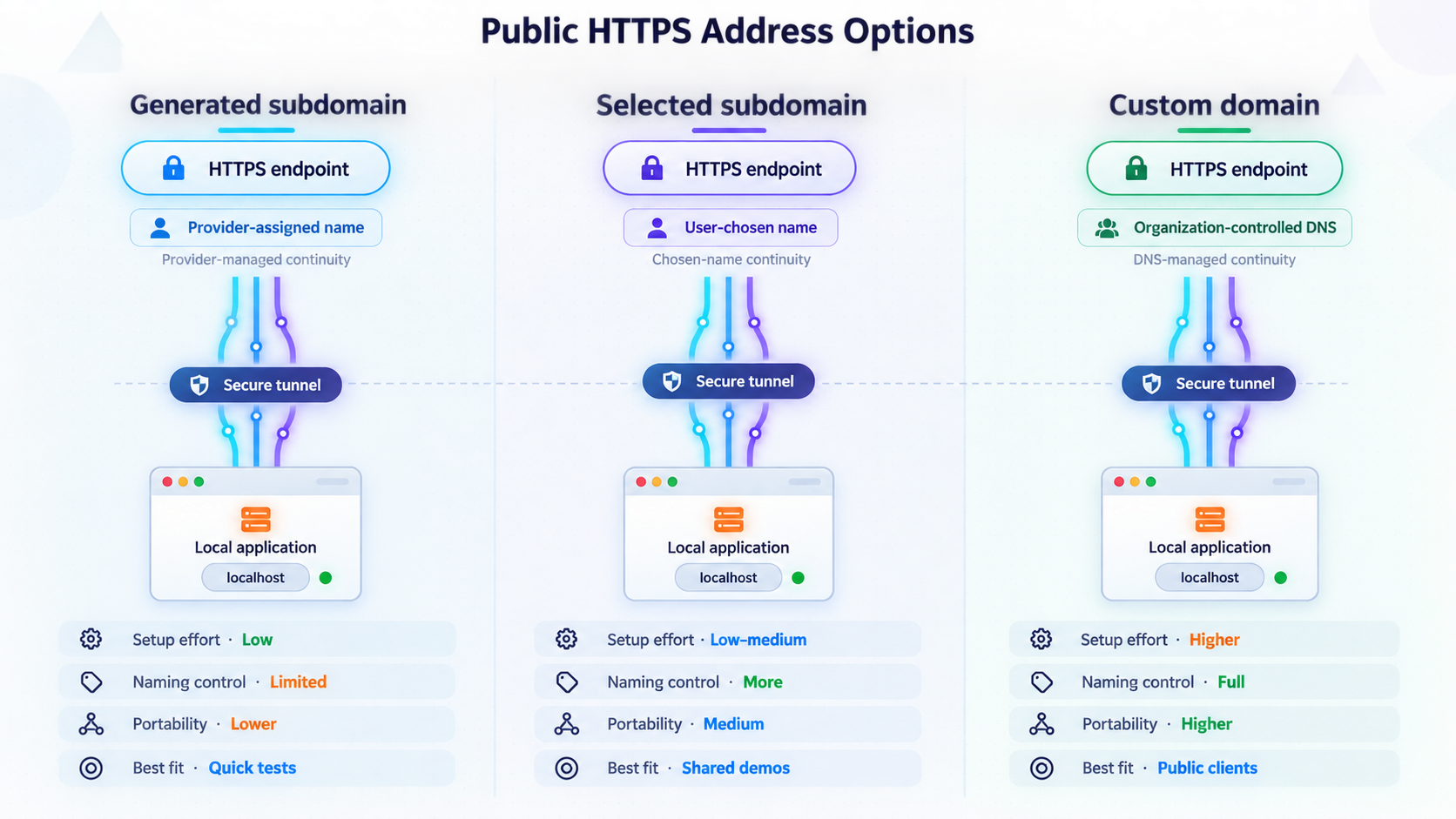
Localtonet labels the three HTTP process types as Random Sub Domain, Custom Sub Domain, and Custom Domain. They can serve the same content from the configured local HTTP target over a public HTTPS address. Choosing among them should therefore begin with the expected lifetime and audience of the endpoint, not with an assumption that one changes the application itself.
| Process type | Useful starting point | Endpoint planning consideration |
|---|---|---|
| Random Sub Domain | Experiments, short reviews, and workflows where an assigned public HTTPS address is acceptable | The public name is generated rather than chosen as a service identity. Confirm its current lifecycle behavior before embedding it in long-lived configurations. |
| Custom Sub Domain | Recognizable project or environment naming where this option is supported | A selected name can be easier for people and configuration owners to recognize. Availability and support must be checked in the current dashboard. |
| Custom Domain | A durable service identity under a domain the operator manages | DNS and domain ownership introduce an additional operational dependency. Follow the current Localtonet instructions for the exact DNS requirements. |
Random Sub Domain
Random Sub Domain is appropriate when speed and separation from a permanent service identity matter more than a memorable name. Examples include an early development preview, a temporary demonstration, or a test receiver that has only one controlled consumer.
Do not infer undocumented persistence guarantees from the word “subdomain.” Before giving any generated address to a long-lived integration, verify how the current tunnel configuration behaves when it is stopped, restarted, edited, or deleted. In particular, deleting a tunnel should be treated as a lifecycle event, not as an ordinary restart. Record the actual assigned URL instead of attempting to predict it.
Custom Sub Domain
A selected subdomain can communicate intent without requiring clients to remember an arbitrary generated label. Names can distinguish a project, service, or environment, provided the option is supported and the desired value is available in the current Localtonet interface.
A recognizable name is useful, but it does not replace an inventory. For example, a test endpoint and a production-like endpoint should not rely on subtle naming differences that are easy to overlook. Keep the environment in the service documentation, and verify the full URL before saving it in an automated client.
Custom Domain
A custom domain is often the clearest choice when the endpoint is intended to act as a durable identity controlled by the service operator. It can decouple the public naming decision from the internal hostname, local IP address, port, or computer that currently runs the application.
Domain ownership and DNS configuration are separate from creating the local service. They must be maintained carefully. Exact Localtonet DNS records and validation instructions can change as the platform evolves. We therefore do not provide speculative record types, targets, or validation values in this guide.
Use the current instructions displayed by Localtonet or the current HTTP tunnel documentation when connecting a custom domain. Copy the exact values provided for your configuration. Do not reuse DNS targets from an old tutorial or assume that another tunneling service uses the same records.
Localtonet is not being presented here as a domain registration service. If you choose the Custom Domain process type, you are responsible for using a domain you are authorized to manage and for protecting access to its DNS configuration.
How to choose the right public address
The best endpoint option depends on who consumes the service, how long the address needs to remain in use, and how costly a future change would be. A short human review and an automated webhook integration have very different failure modes even if both reach the same local application.
Start with the consumer, not the hostname
Identify whether the primary consumer is a person, a machine, or both. People can often recover from an invalid bookmark by asking for a new link. Automated clients usually cannot. They continue sending requests to the configured destination until an operator changes it.
Next, count the configuration locations. One endpoint stored in one webhook dashboard is manageable. The same endpoint copied into several webhook senders, AI clients, development environments, test suites, and internal guides creates a distributed dependency. A more deliberate name and migration plan are justified as that dependency count grows.
Classify the expected lifetime
A useful classification is session, project, or service:
- Session endpoint: needed for a short demonstration or troubleshooting window.
- Project endpoint: reused during a development cycle by a known group or a limited set of integrations.
- Service endpoint: treated as a durable integration address by people and automated clients.
A generated address may be sufficient for a session. A selected subdomain, where supported, can make a project endpoint easier to identify. A custom domain is worth considering when the address is part of a longer-lived service contract. These are planning guidelines, not guarantees about feature availability or persistence. Always confirm the current options in your Localtonet dashboard.
Choose a name that describes the service role
Avoid tying the public name too closely to a laptop, username, temporary framework, or internal port. Clients usually care about the service role, such as a webhook receiver, preview application, or agent endpoint. A role-based identity remains understandable if the application later moves to another device or changes its internal implementation.
Do not put secrets in the hostname or path to make an endpoint appear private. URLs are routinely copied into logs, browser history, screenshots, configuration exports, monitoring systems, and support conversations. A difficult-to-guess URL is not a substitute for application-layer authentication.
Separate the base endpoint from the API contract
The public hostname is only one layer. Automated clients may also depend on a particular path, HTTP method, content type, authentication header, request schema, response schema, and timeout behavior. Document these independently. This allows you to migrate the hostname without accidentally redesigning the application protocol at the same time.
Keeping the same hostname does not protect clients from incompatible path, authentication, or payload changes. Version and test the application interface separately from the Localtonet tunnel configuration.
Understand the complete endpoint lifecycle
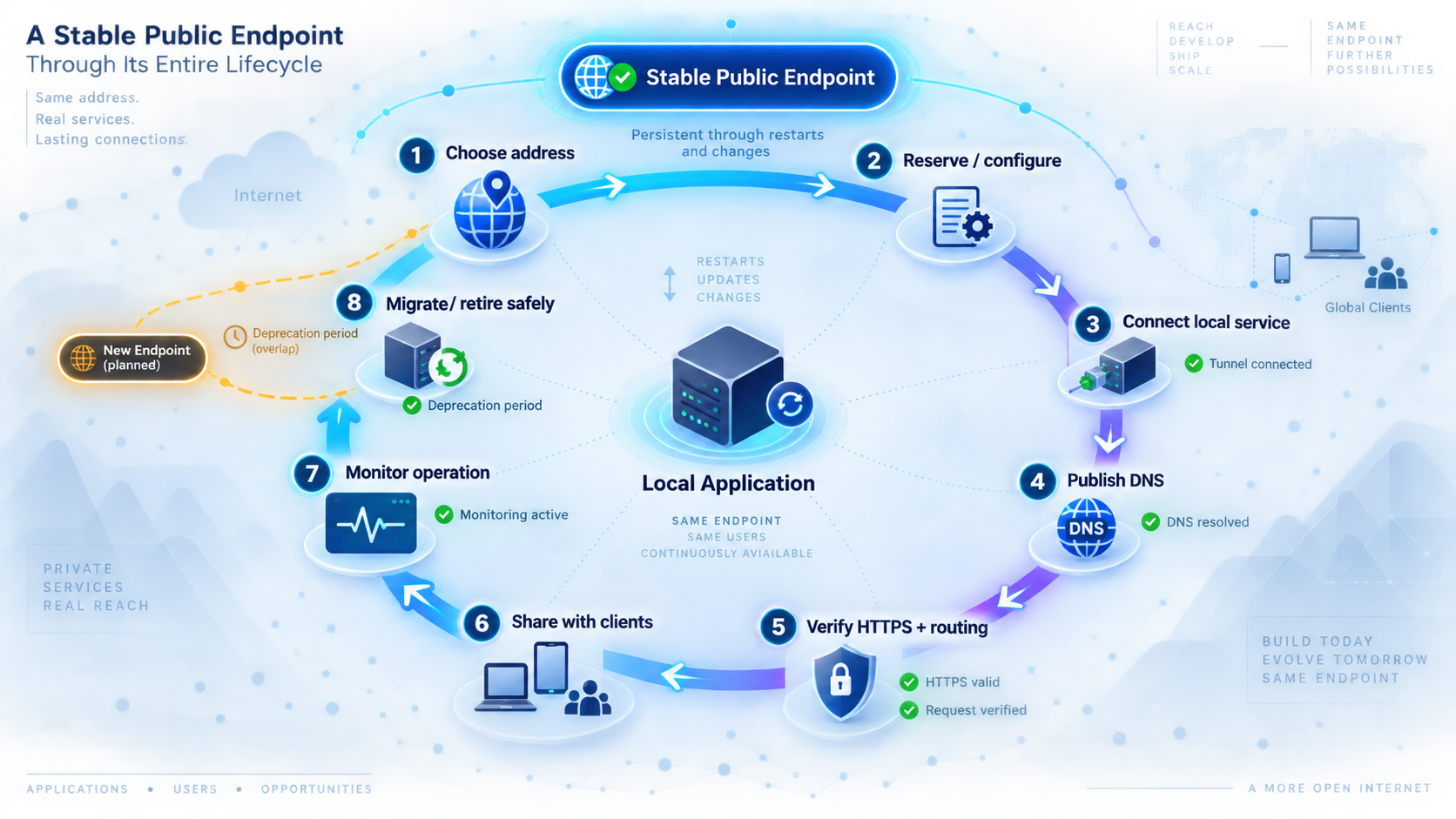
Creating an endpoint configuration is only part of making a local application reachable. With Localtonet, the client application on the selected device establishes an outbound connection to a Localtonet relay server. This avoids requiring inbound router port forwarding, firewall changes, VPN setup, or a public IP address for the local device.
The resulting HTTP tunnel points to a local IP address and port on the client device or to a service reachable from that device. The tunnel provides the public HTTPS address, but it remains available only while the selected Localtonet client is connected and the tunnel is running.
This produces several independent states that operators should distinguish:
- The local application process may be running or stopped.
- The local target IP address and port may be reachable or unreachable from the Localtonet client device.
- The Localtonet client may be connected or disconnected.
- The tunnel configuration may exist but be stopped.
- The tunnel may be running while the application returns an error or rejects a request.
- The public name may resolve while the end-to-end application workflow is still unhealthy.
A failed external request does not, by itself, identify which layer failed. Troubleshooting should move from the local application outward: verify the process, verify the local target, verify the client connection, verify that the tunnel was started, and then test the public address.
After creating the configuration, use the Start button. The endpoint is not available merely because its record appears in the dashboard. It can later be stopped or deleted, and either action affects clients that depend on it.
Stopping versus deleting
Stop a tunnel when public access is temporarily unnecessary and you intend to retain the configuration. Delete a tunnel only when its endpoint and configuration are no longer required. Before deletion, search for dependent webhook senders, agent settings, scripts, test systems, and documentation.
Our current product information does not establish a universal promise that a public name can be recovered after deletion. Treat deletion as potentially destructive to endpoint identity. If an address is operationally important, record its owner, purpose, consumers, and retirement plan before anyone is allowed to remove it.
Prerequisites for a Localtonet HTTP endpoint
Gather the required account, device, application, and tunnel details before beginning configuration. Doing so separates local application problems from tunnel setup and reduces the risk of distributing an endpoint before it is ready.
- A Localtonet account: use an account authorized to create and manage the tunnel.
- An installed Localtonet client: install and run the client on a device that can reach the local application.
- A connected client device: the device must be authenticated and connected whenever the endpoint is expected to work.
- A working local HTTP service: start the web application, webhook receiver, API, or agent-facing HTTP service before creating the public route.
- The correct local IP address and port: identify the target exactly as it is reachable from the Localtonet client device.
- The device-specific authentication token: use it only through the supported Localtonet authentication workflow and keep it private.
- A current relay selection: choose from the server or region values that are currently available in your dashboard.
- An endpoint naming decision: decide whether the workflow calls for Random Sub Domain, Custom Sub Domain where supported, or Custom Domain.
- An application access-control plan: decide how the local application will authenticate and authorize public requests before sharing the URL.
Confirm the service from the client device
Test the application from the same device that will run the Localtonet client. If the application runs on another machine, verify that the client device can reach that machine at the intended local IP address and port. A browser opening the service on a different computer does not prove that the tunnel device can reach it.
Use the real application path and method where possible. A successful request to a home page does not prove that an API route, webhook receiver, or agent endpoint is ready. Resolve local binding, dependency, authorization, and response errors before adding the public tunnel.
The Localtonet auth token identifies the client device. Do not place it in source code, frontend configuration, screenshots, support posts, test records, or instructions sent to endpoint consumers. It is not a credential that webhook providers, users, or AI agents need.
Configure a Localtonet HTTP tunnel for the endpoint
The six-step sequence below follows the current documented Localtonet workflow: install and run the client, authenticate or select the device, select an available relay server, create the appropriate HTTP configuration, start the tunnel, and use the assigned public address. Creating the tunnel and starting it remain separate lifecycle actions.
Dashboard choices, available relay servers, and endpoint options can vary by the current product, plan, client version, region, or deployment. Obtain current values from the product rather than copying identifiers from another installation.
Install and run the Localtonet client
Install the client for the operating system on a device that can reach the local application. Keep that device powered, connected to the network, and able to run the client whenever the public endpoint is expected to be available.
Authenticate and select the device
Use the device-specific authentication token through the supported Localtonet workflow, then select the device that will run the tunnel. Never publish, embed, or paste the token into application code, screenshots, documentation, or public issue reports.
Select an available relay server
Choose from the relay server or region values currently available in the dashboard. Do not hardcode a server code copied from an unrelated tutorial because available values can depend on the current product, plan, or deployment.
Create the HTTP tunnel configuration
Configure an HTTP tunnel with the correct local IP address and port. Select Random Sub Domain, Custom Sub Domain where supported, or Custom Domain according to the endpoint plan. For a custom domain, complete only the current DNS procedure provided by Localtonet.
Start the tunnel
Use the Start button after reviewing the target and process type. Starting the tunnel activates the path through the connected client to the local service. If the selected client disconnects, the public endpoint cannot reach that target.
Record and use the assigned public address
Copy the public HTTPS URL shown for the running tunnel. Record it in the service inventory, verify it from outside the local environment, and only then provide it to users, webhook senders, AI clients, or other automated consumers.
Consult the Localtonet HTTP tunnel documentation alongside the dashboard to confirm the current interface and any exact requirements that can change, especially custom-domain DNS settings and currently available relay selections.
Do not configure the public integration first and hope to troubleshoot the local service through it. Confirm the application locally using its intended path, method, and credentials. If the service does not work from the Localtonet client device, adding a tunnel will not repair the application.
Verify an endpoint before sharing it
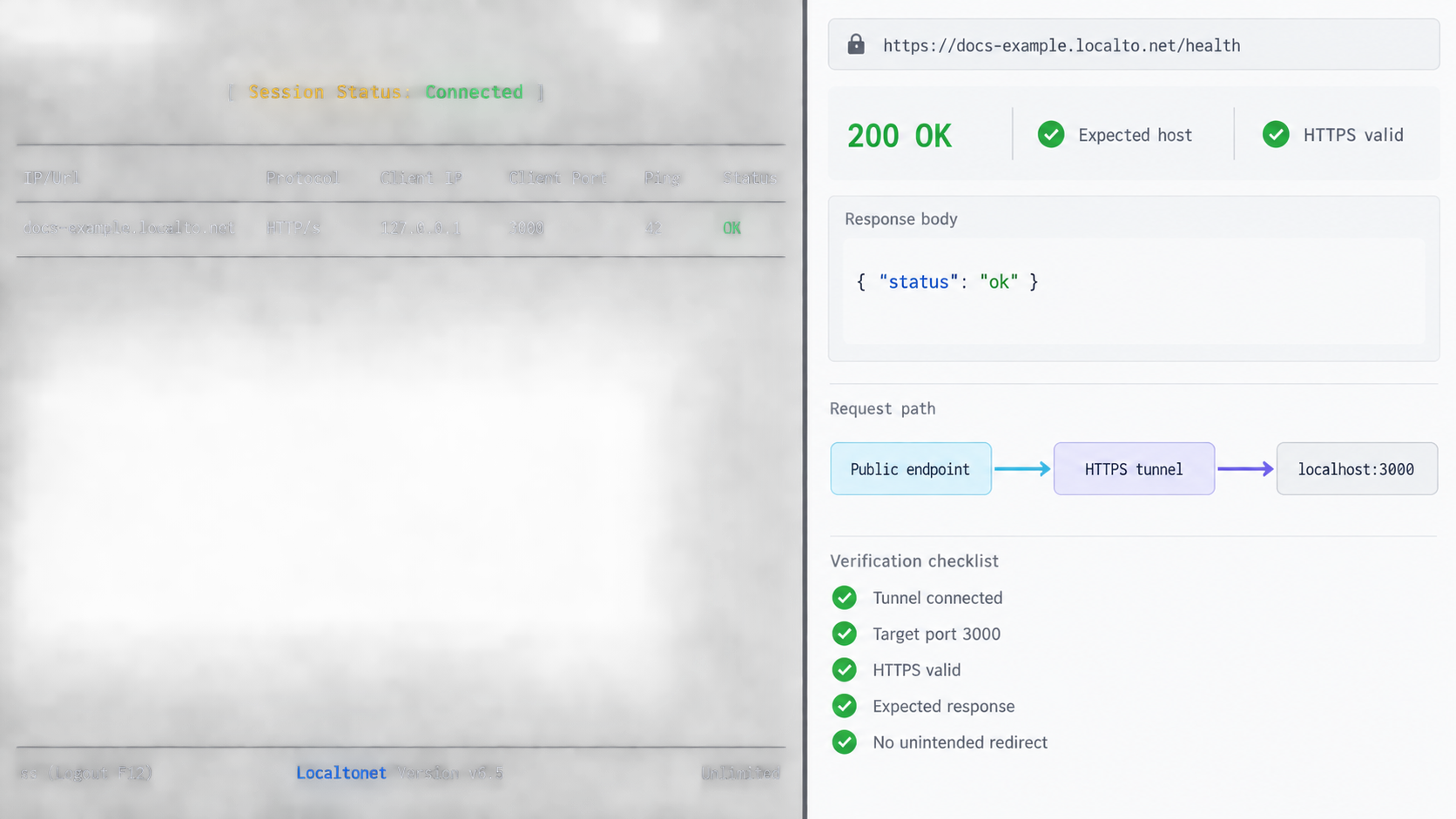
Verification should reproduce the way the real consumer will use the endpoint. Opening the base URL in a browser proves only that a browser can make a request to that location. It does not prove that a webhook POST, an authenticated API call, or an AI client's protocol exchange will succeed.
1. Verify the application locally
From the Localtonet client device, call the local target using the same path and method expected by the consumer. Confirm that the application is listening on the configured port, accepts the intended request, and returns the expected status and response body. If authentication is required, test it without printing secrets into shared terminal output or shell history.
2. Verify the tunnel state
Confirm that the intended device is connected and the intended tunnel is running. Check the local target values carefully. A valid public URL can still lead to the wrong application if the target port or address was entered incorrectly.
3. Test from outside the local network
Use a client that is not relying on the same local routing path as the application. This checks the actual public HTTPS address. For a browser application, test navigation and the important application actions. For an API, send a harmless representative request with the correct method, headers, path, and body.
4. Test the real integration mode
For a webhook, use the sender's supported test-delivery mechanism if one is available. Check that the receiver validates the request as intended, handles duplicate or retried deliveries safely where the integration requires it, and returns the response expected by that sender.
For an AI agent or automated client, test the same configuration format and credential mechanism that the deployed client will use. Do not rely on a successful browser visit as proof that a machine client can authenticate, parse the response, or invoke the correct path.
5. Test a controlled failure
Stop the tunnel briefly during an approved test window, or stop a noncritical test instance of the local service, and confirm that your monitoring or operational process notices the failure. Then restore the service and verify recovery. Do not perform this test against an endpoint with active users unless the interruption has been planned.
| Check | What it establishes | What it does not establish |
|---|---|---|
| Local application request | The service is reachable from the client device and handles the tested request | That the Localtonet client and public tunnel are available |
| Public browser visit | The public HTTPS address can return the tested browser response | That webhook methods, API credentials, or agent calls work |
| Realistic API or webhook test | The tested path, method, headers, payload, and response behavior work together | That every payload variant or future application version is compatible |
| Failure and recovery test | The operational process can detect and recover from the tested outage | That all possible device, network, application, or dependency failures are covered |
Record the verification date, endpoint, local service version, test action, expected result, and actual result. Never place active credentials or authentication tokens in the test record. A short verification record is especially useful when multiple people administer webhook or agent configurations.
Secure a public endpoint without treating its URL as a secret
Publishing a local service changes its threat model. Requests can now arrive from the public internet rather than only from the local machine or private network. Localtonet HTTP process types provide a public HTTPS address, but the application still needs appropriate authentication, authorization, input validation, and exposure controls.
Anyone who obtains the address may be able to send requests to it unless the application enforces access controls. Protect sensitive applications with suitable authentication and least-privilege permissions. Do not depend on an unguessable hostname or path as the only barrier.
Keep Localtonet device tokens private
A Localtonet auth token identifies the client device that runs a tunnel. It is not the public endpoint URL and should never be sent to webhook providers, AI clients, application users, or external callers. Do not commit it to a repository, include it in frontend code, place it in an example configuration, or expose it in a screenshot.
Application credentials are a separate concern. Store them using the secret-management approach appropriate for the application and client. Avoid embedding credentials directly in the public URL because URLs can appear in logs, histories, analytics, screenshots, and referrer data.
Apply least privilege
Expose only the service and port required for the workflow. If a webhook needs one receiver endpoint, it should not automatically gain administrative access to the rest of the application. If an AI client requires a narrow tool interface, do not give it broader application permissions merely because it reaches the same hostname.
Where the application supports roles, scopes, IP restrictions, signed webhook requests, request expiration, or other access controls, configure them according to the integration's security model. The availability of a particular control depends on the local application and should not be assumed to come from the tunnel itself.
Validate requests at the application boundary
Treat all incoming data as untrusted. Validate content type, size, schema, identifiers, and authorization before performing sensitive work. For webhook integrations, follow the sender's documented signature-verification procedure if it offers one. Reject invalid requests without revealing internal details.
AI endpoints deserve the same discipline. Validate tool inputs, limit actions to the intended scope, and require explicit authorization for operations that change data or execute privileged tasks. Endpoint naming improves operability, but it does not make an agent trustworthy.
Limit unnecessary exposure time
Stop the tunnel when public access is no longer required. This is particularly useful for demonstrations, troubleshooting sessions, and temporary previews. Remember that stopping the tunnel makes the endpoint unavailable to every configured consumer, so coordinate the action if automated systems depend on it.
Plan endpoint changes without breaking clients
Endpoint migration is not just a DNS or dashboard task. It is a dependency-management exercise. The safest plan starts with an inventory of every consumer and separates changes that can be tested independently.
Build a consumer inventory
For each endpoint, record its purpose, process type, owner, local target owner, expected availability window, authentication method, and known consumers. A consumer may be a webhook sender, browser user group, AI client, script, mobile application, test job, or documentation page.
Include configuration ownership. Knowing that a webhook exists is not enough if nobody knows who can update the sender's dashboard. For machine-readable configurations, record the repository or secret-management location without copying the secret itself into the inventory.
Do not change every layer simultaneously
If possible, avoid changing the public name, application path, authentication method, payload schema, and host device in one operation. When several variables change together, failures are harder to diagnose. First prove that the new endpoint reaches a compatible service, then move controlled consumers, and only then retire the old configuration.
Test before distributing the replacement
Create and verify the replacement endpoint using a non-destructive request. Confirm local behavior, public reachability, authentication, and integration-specific responses. If custom-domain DNS is involved, follow the current Localtonet values and account for the fact that DNS changes may not appear identically to every resolver at the same moment. This guide does not claim a specific propagation time.
Update consumers systematically
Move consumers from a checklist rather than memory. After each update, trigger a safe test and record the result. For webhook senders, verify actual delivery to the new address. For AI clients, restart or reload the client if its documented configuration process requires that action. Do not assume every client rereads configuration dynamically.
Retire the old endpoint deliberately
Keep the old endpoint only for the approved overlap period, if your configuration and security policy permit one. Monitor for unexpected requests that indicate a missed consumer. Then remove access through the documented process and update the service inventory.
Managing the public name does not automatically migrate application state, credentials, local connectivity, or client configuration. Verify every layer and retain an explicit rollback plan.
Operate the endpoint as a service
Once people or automated clients depend on an endpoint, treat the device, Localtonet client, tunnel configuration, and local application as one operational chain. Each component has to be available for requests to succeed.
Maintain an endpoint record
A practical record should include:
- The public HTTPS address and its intended audience.
- The Localtonet process type used for the endpoint.
- The responsible service owner and tunnel owner.
- The selected client device, recorded without exposing its auth token.
- The local application and target purpose, with sensitive details kept in the appropriate private system.
- Known webhook, agent, script, and human consumers.
- The expected availability window and maintenance contact.
- The latest successful verification date.
- The migration and retirement procedure.
Troubleshoot from the inside out
If the endpoint fails, first verify that the local application is running. Test it from the device that runs the Localtonet client. Next confirm that the configured local IP address and port still match the application. Then verify that the client is connected, the intended relay selection is in use, and the tunnel is running.
After those checks, test the public URL with a request that matches the consumer. A browser test may be useful for a web page, while a webhook or API requires its actual method and authentication. Review the application's own logs carefully, ensuring that secrets and sensitive payloads are not copied into public support channels.
Distinguish common failure patterns
| Observed problem | Checks to perform | Likely ownership area |
|---|---|---|
| The application fails locally | Process state, listening address, configured port, application dependencies, and local authorization | Local application or host |
| The application works locally but not publicly | Selected device, client connection, tunnel running state, and configured local target | Tunnel or client connectivity |
| The public page opens but automation fails | Path, HTTP method, headers, credentials, content type, request body, and response contract | Integration configuration or application API |
| Only a custom domain fails | Current Localtonet custom-domain instructions, exact DNS values, domain control, and whether the tunnel is running | Domain, DNS, or tunnel configuration |
| The endpoint fails after a device restart | Local application state, Localtonet client connection, selected device, and tunnel state | Host startup and tunnel lifecycle |
Review exposure regularly
Periodically ask whether every active tunnel is still needed, whether the local application still has the correct authorization controls, and whether the recorded consumers are current. Remove stale client configurations and stop or delete tunnels that have completed their purpose, following the endpoint retirement plan.
If the service requires availability beyond what one intermittently connected development device can provide, address that requirement explicitly. A stable hostname cannot compensate for a laptop that sleeps, a local process that stops, or a disconnected client. The endpoint architecture and the host's operating model must agree.
Frequently asked questions
Do all Localtonet HTTP process types serve content over HTTPS?
Yes. Random Sub Domain, Custom Sub Domain, and Custom Domain can serve the same configured local content at a public HTTPS address. Their main difference for this guide is how the public endpoint is named and managed.
Is a custom domain always required for a stable public endpoint?
Not necessarily. The right choice depends on the endpoint's lifetime, audience, and number of consumers. A selected subdomain may be suitable where supported, while a generated address may be enough for a controlled short-term workflow. Do not assume undocumented persistence behavior. Confirm current availability and lifecycle details before using any option as a long-lived identifier.
Does the public URL remain reachable if my device disconnects?
No. The tunnel is available only while the selected Localtonet client device is connected and the tunnel is running. The local application must also be running and reachable from that device.
Can I use a Localtonet endpoint as a webhook destination?
Yes, when the local application implements the webhook sender's required HTTP path, method, authentication, payload handling, and response behavior. Test through the sender's own delivery mechanism when possible. Do not confuse an application webhook endpoint with Localtonet's separate platform-wide Token and Tunnel webhook system.
Can an AI agent use the same endpoint as a human user?
It can if the local application supports the protocol and interface the agent expects. A browser page working for a person does not prove that an agent can authenticate, call the correct path, or parse the response. Test the actual agent configuration and limit its permissions to the required operations.
What DNS record should I create for a Localtonet custom domain?
Use the exact current instructions and values provided by Localtonet for your custom-domain configuration. There is no verified universal record type or target supplied for this guide, so we intentionally do not guess those details.
Is the endpoint URL itself a secret?
It should not be treated as the only secret protecting the application. URLs are commonly copied, logged, bookmarked, and shared. Use application-layer authentication and authorization, keep Localtonet device tokens private, and avoid embedding credentials in the URL.
Does creating the tunnel make the endpoint immediately available?
No. Creating the configuration does not mean the tunnel is running. Use the Start button after reviewing the selected device, relay, local target, and process type. The client must remain connected and the local application must remain reachable.
What should I check when a public endpoint stops working?
Verify the local application first, including its listening address, port, and intended request. Then check that the selected Localtonet device is connected, the tunnel points to the correct local target, and the tunnel is running. Finally, test the public address using the same method, path, headers, credentials, and payload as the real client.
Create a public endpoint with Localtonet
Connect the device that can reach your local application, choose the HTTP endpoint type that fits its expected lifetime, start the tunnel, and verify the public HTTPS address before sharing it with people, webhooks, or AI clients.
Get Started Free →

