

Build a protected subtitle coordination service, validate it locally, and expose only the authenticated dashboard
Subarr is a self-hosted coordination layer for subtitle workflows involving services such as Sonarr, Radarr, Bazarr, subgen, Plex, Jellyfin, and Tautulli. This tutorial uses the official Tier 1 Docker Compose template as its worked installation because Tier 1 provides the clearest least-privilege baseline and requires no Docker daemon access. We then complete first-run setup, test authentication and storage locally, and connect the verified HTTP endpoint through Localtonet. The resulting workflow provides remote HTTPS access without inbound router port forwarding, firewall changes, VPN setup, or a public IP address.
📋 What's in this guide
What Subarr does and where Localtonet fits
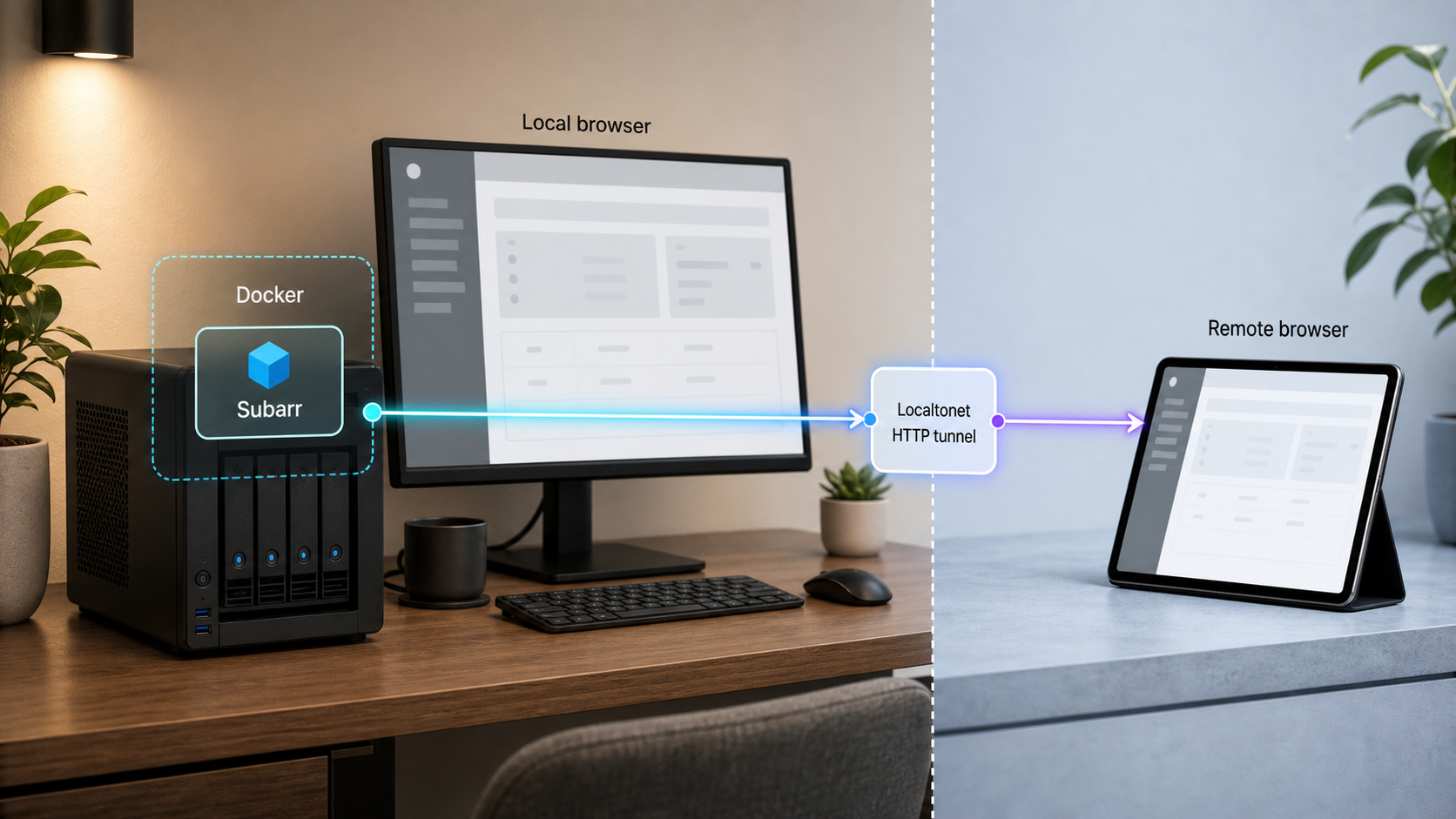
Subarr stands beside the applications in a subtitle stack rather than replacing them. Bazarr remains responsible for finding and downloading subtitles, while subgen handles transcription. Subarr coordinates the wider workflow by evaluating subtitle coverage, identifying actionable gaps, measuring provider results, deciding when transcription is worthwhile, and displaying operational information through its web dashboard.
The current Subarr README documents integrations with Sonarr, Radarr, Bazarr, subgen, and Tautulli, along with media-server support for Plex and Jellyfin. When a subtitle lands, Subarr can request a targeted refresh of the corresponding Plex or Jellyfin item instead of waiting for the media server's next scheduled library scan. Mixed environments can configure both media servers.
Subarr also verifies files before declaring subtitle work actionable. Files that have not yet been examined remain visible in an analyzing state rather than being silently discarded or incorrectly queued. Its documented audio-language workflow samples multiple parts of a file, applies conservative voting and confidence checks, and distinguishes verified audio from potentially inaccurate media metadata.
These capabilities make the dashboard operationally sensitive. Depending on the selected deployment tier and configured integrations, Subarr may store API keys, write subtitle sidecars into the media library, initiate downstream actions, or inspect selected Docker metadata. Remote access should therefore be added only after the application login, persistent storage, media permissions, and integration scope have all been tested.
/data.
A Localtonet HTTP tunnel transports requests to Subarr. It does not replace Subarr's login or make an unauthenticated administrative dashboard safe. The application must reject an unauthenticated private-browser session before the tunnel is started.
Prepare the Docker host and deployment values
The worked procedure in this guide is intentionally scoped to Tier 1. It uses the project's maintained tier1-no-docker.compose.yaml template, requires manual integration URLs and API keys, and gives Subarr no Docker daemon access. Tier 2 and Tier 3 remain valid documented alternatives, but they introduce a socket proxy and, for Tier 3, credential-bearing configuration mounts. Their differences are explained in the next section rather than mixed into the Tier 1 commands.
Before beginning, prepare a machine with Docker Engine and the Docker Compose plugin. The command used by the project templates is docker compose. The host must also have a dedicated persistent location for Subarr's application data and access to the media library when Subarr is expected to inspect media or write subtitle sidecars.
Record the numeric user and group identifiers for the host account that should own Subarr's data and access the media files. The hardened templates use PUID and PGID so the container can run as a non-root identity aligned with host storage permissions.
id -u
id -g
Do not choose arbitrary identifiers or make the media tree globally writable. Use an account or group with only the storage permissions required by the workflow.
You also need the absolute host path to the media library. The maintained environment example calls this MEDIA_ROOT. If the library is mounted from NFS or SMB, verify that the mount is present before starting the stack and that the selected user and group can perform the intended operations.
All three official templates use an internal network for Subarr-related services and a user-owned external network for communication with an existing media stack. The documented external network name is media-stack, but it must be renamed in the Compose configuration if your existing Sonarr, Radarr, Bazarr, or Tautulli containers use another network.
If a shared bridge network does not already exist and adding one fits your architecture, the template documentation gives this example:
docker network create media-stackCreating the network does not automatically attach existing containers. The relevant media containers must also be connected to it before Subarr can resolve them by container name. Inspect a working stack before changing its networking. When services run on another host or cannot join the bridge, use reachable host addresses and published ports instead.
SUBARR_DB_PATH, whose documented default is /data, must refer to a dedicated Subarr volume or directory. The application may reconcile ownership of its own data directory at startup. The media library is a separate mount containing user-owned content and must not be substituted for the application data path.
Values to collect before deployment
- The numeric
PUIDandPGIDfor the non-root service identity. - A valid timezone value for
TZ. - The absolute media-library path for
MEDIA_ROOT. - A dedicated persistent location mapped to Subarr's data directory.
- The name of the existing Docker network used by the media applications.
- Reachable internal URLs for each integration you intend to enable.
- API keys for manually configured Bazarr, Sonarr, Radarr, and Tautulli integrations.
- A specific Subarr image tag selected from the project's current releases.
- A device on which the Localtonet client can run and reach Subarr after local verification.
Choose the appropriate Subarr permission tier
The official hardened deployment templates provide three production-oriented Compose tiers. The difference is primarily what Subarr can inspect during onboarding. Choose the least privilege that supports the setup experience you need.
| Tier | Official template | Access granted | Configuration model |
|---|---|---|---|
| Tier 1 | tier1-no-docker.compose.yaml |
No Docker daemon access | Enter every integration URL and API key manually |
| Tier 2 | tier2-socket-proxy.compose.yaml |
Read-only container metadata through a restricted socket proxy | URLs and versions can be discovered; API keys remain manual |
| Tier 3 | tier3-config-mounts.compose.yaml |
Tier 2 metadata plus selected read-only application configuration mounts | URLs, versions, and supported API keys can be discovered |
Tier 1: the worked deployment in this guide
Tier 1 provides no Docker socket or proxy access. Subarr cannot inspect nearby containers, so the administrator supplies integration addresses and API keys manually. This has the smallest Docker-related blast radius and also works when the media services live on another host.
The template still participates in the documented internal and external network arrangement. The external media network allows Subarr to reach applications by container name when they share a user-defined bridge. No Docker metadata discovery occurs merely because the containers share a network.
Tier 2: restricted metadata discovery
Tier 2 adds a hardened Docker socket proxy rather than mounting the Docker socket directly into Subarr. According to the template documentation, the proxy exposes the metadata endpoints needed for container lists, network lists, image information, and ping. This lets the wizard prefill service URLs and versions by matching known container images.
The documented policy does not permit Subarr to start, stop, restart, kill, or pause containers, execute commands inside them, pull or build images, mount volumes, read container logs, or inspect Docker secrets, configs, or swarm state. API keys still require manual entry.
Tier 3: selected read-only configuration mounts
Tier 3 includes Tier 2 discovery and adds explicit host paths for selected application configuration directories. The maintained environment example names BAZARR_CONFIG, SONARR_CONFIG, RADARR_CONFIG, and TAUTULLI_CONFIG. These mounts allow Subarr to extract supported API keys from configuration files.
Every configuration mount must retain its :ro mode. A compromised process able to read a mounted configuration directory may also read the API key stored there, so enable only the mounts you accept. The template allows per-integration opt-in, and manual key entry remains available for omitted mounts.
Tier 2 and Tier 3 are designed around a restricted proxy policy. Directly mounting the Docker socket would grant a much broader and more dangerous host-control surface and would no longer be the documented hardened deployment.
Deploy the verified Tier 1 configuration
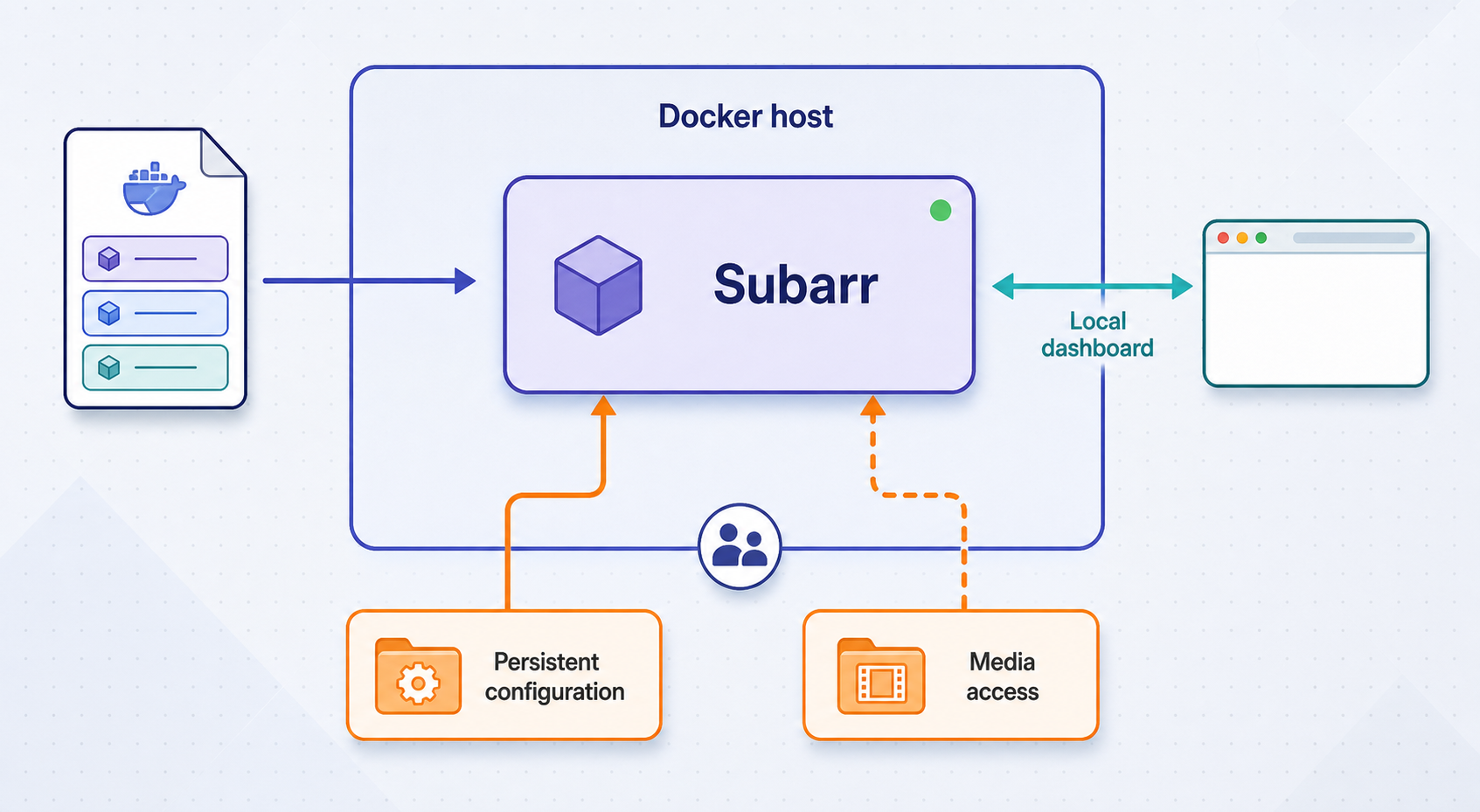
These steps reproduce a self-contained Tier 1 workflow while leaving image definitions, capabilities, health checks, service relationships, and mount destinations in the maintained project template. Do not reconstruct those security-sensitive sections from an abbreviated article example.
Clone the Subarr repository
Download the repository and enter deploy/templates, which contains the maintained production Compose files, environment example, and deployment notes.
Copy the Tier 1 template into a stack directory
Copy tier1-no-docker.compose.yaml as compose.yaml and copy .env.example as .env. Maintain the resulting files outside the cloned template directory.
Fill in host identity, storage, and manual integrations
Set TZ, PUID, PGID, and MEDIA_ROOT. Add the URL and API-key pairs for the services you intend to connect manually.
Review the image, mounts, and network
Pin a tested image version, preserve the template's non-root hardening, confirm that application data and media are separate mounts, and make the external network name match the existing media stack.
Validate the rendered Compose configuration
Run docker compose config and inspect the output for unresolved variables, incorrect host paths, unintended writable mounts, or a missing external network.
Start and inspect the stack
Run docker compose up -d, then use docker compose ps and the service logs to confirm that the expected containers remain running.
Copy the official Tier 1 files
git clone https://github.com/coaxk/subarr.git
cd subarr/deploy/templates
mkdir -p ~/subarr-stack
cp tier1-no-docker.compose.yaml ~/subarr-stack/compose.yaml
cp .env.example ~/subarr-stack/.env
cd ~/subarr-stack
Open .env in your preferred text editor. At minimum, replace the general placeholders with values for your host:
TZ=your_timezone
PUID=your_numeric_user_id
PGID=your_numeric_group_id
MEDIA_ROOT=/absolute/host/path/to/media
The maintained Tier 1 example also provides manual URL and API-key settings for Bazarr, Sonarr, Radarr, and Tautulli. Populate only the integrations you use:
BAZARR_URL=http://bazarr:6767
BAZARR_API_KEY=replace_with_your_key

SONARR_URL=replace_with_reachable_sonarr_url
SONARR_API_KEY=replace_with_your_key

RADARR_URL=replace_with_reachable_radarr_url
RADARR_API_KEY=replace_with_your_key

TAUTULLI_URL=replace_with_reachable_tautulli_url
TAUTULLI_API_KEY=replace_with_your_key
The Bazarr address above illustrates the container-name pattern documented by the templates. It works only when that name and port are correct on the shared Docker network. Use the actual reachable URL for every service. A URL that works in a host browser is not automatically reachable from a container.
Keep the completed .env private. It can contain API keys and internal service addresses. Do not commit it to source control, copy it into a public issue, or include it in an unredacted screenshot.
Pin a tested image version
The hardened template guidance says not to depend on :latest. Select a specific published Subarr image tag, review the matching release notes, and test it before relying on it. Apply the same pinning rule if you later move to Tier 2 or Tier 3 and add a Docker socket proxy image.
Release status is time-sensitive. The v2.5.1 release notes were checked for this revision in 2026 and describe bug fixes, a readability change, refreshed operating-system packages, no configuration changes, and no migration. The release page also reports commits to the main branch after that tag, so this article does not claim that v2.5.1 will remain the newest available version. Check the project's current release list before selecting an image.
Validate before starting
docker compose config
Inspect the rendered configuration, especially the host side of every bind mount. Confirm that the dedicated data mount does not point to the media tree, MEDIA_ROOT resolves to the intended library, and the declared external network already exists under the configured name.
Start and inspect the deployment:
docker compose up -d
docker compose ps
docker compose logs --tail=200
The expected services should remain running rather than repeatedly restarting. Logs can contain host paths, service names, and integration details, so redact sensitive values before sharing them.
Complete first-run onboarding and secure the administrator account
Open the documented local endpoint from the Docker host:
http://localhost:9922The current main Subarr 2.x README says authentication has been enabled by default since version 2.0. On first launch, it documents a one-time login screen where the administrator creates an account. Use a unique password that is not shared with the Docker host, Localtonet account, or any connected media application.
The hardened template README still says authentication is off by default unless SUBARR_USER and SUBARR_PASS are configured. That conflicts with the main 2.x README, which explicitly says authentication is on by default and first launch creates an administrator. Prioritize the current 2.x behavior, but do not rely on either statement without testing the running image. Open a private browser session with no existing cookies and confirm that anonymous access is redirected to login or otherwise rejected before starting any public tunnel.
The main README also says existing installations that already use SUBARR_USER and SUBARR_PASS, or SUBARR_API_KEY, retain that authentication path during a 2.x upgrade. It documents SUBARR_AUTH_DISABLED=1 for an environment where a separate reverse proxy performs authentication.
Do not disable built-in authentication merely because Localtonet supplies an HTTPS endpoint. If authentication is deliberately delegated to a reverse proxy, Localtonet must target that authenticated proxy rather than a route that reaches Subarr directly.
Configure integrations with least privilege
In Tier 1, enter each integration address and API key manually. Confirm every URL from the Subarr container's network perspective. Inside a container, localhost refers to that container, not to the Docker host or another media application.
On a shared user-defined bridge network, a target commonly uses its container or service name and internal port. For an application on another host, use an address reachable from the Subarr container and ensure the remote service accepts that route. Test one integration at a time so an incorrect URL or key is easy to identify.
Configure only the services you use. A Plex-only deployment does not need Jellyfin credentials, and a Jellyfin-only deployment does not need Plex access. The current README documents using Plex, Jellyfin, or both. It also says Subarr can derive library path prefixes from the media-server locations, while explicitly configured environment values continue to take precedence.
Enable automation gradually
Foreign-language forced-subtitle generation is documented as disabled by default. When enabled, it performs local language identification and can generate a forced subtitle for relevant segments rather than transcribing the complete title. Review the applicable rules and test representative media before enabling it broadly.
Subtitle re-timing, scheduled library walks, provider decisions, Tautulli-informed prioritization, and aftercare can all initiate or influence downstream work. Begin with a limited sample. Confirm connectivity, path mapping, subtitle permissions, and media-server refresh behavior before allowing broad automation across a large library.
Verify Subarr locally before remote exposure
A container marked as running is not enough. Verify the HTTP endpoint, authentication boundary, persistent data, storage permissions, and integrations while the dashboard is still local.
Open the local dashboard
Visit http://localhost:9922 on the Docker host. If testing from another LAN device, use the host's LAN address only when the Compose port publication and local policy permit it.
Test an unauthenticated private session
Open a private browser window with no existing Subarr cookies. Confirm that it receives a login screen or another explicit rejection and cannot view dashboard or API content anonymously.
Confirm persistent state
Make a controlled configuration change, restart the stack, and verify that the administrator account and setting remain present. If onboarding restarts, correct the data mount before continuing.
Test health and integrations
Review the Health page and test every configured service. Resolve rejected keys, unreachable URLs, and path mismatches before enabling wider actions.
Run a limited media workflow
Use a small known sample to verify file analysis, subtitle handling, sidecar write permissions, and the intended Plex or Jellyfin refresh behavior.
docker compose restart
docker compose ps
Sign in again after the restart. Confirm that the administrator account and integrations remain configured. Disappearing state usually means the container's data directory is not backed by the intended persistent mount.
The current README says Subarr detects when its SQLite data directory is on NFS or SMB and chooses a journal mode intended to avoid unsafe WAL behavior there. It still recommends keeping the dedicated data directory on local storage. The media library can remain on network storage while /data uses a local persistent volume.
A successful login proves that the web process responds. A meaningful local test also confirms media visibility, subtitle sidecar permissions, integration API access, and the expected targeted refresh behavior.
Connect the verified dashboard through Localtonet
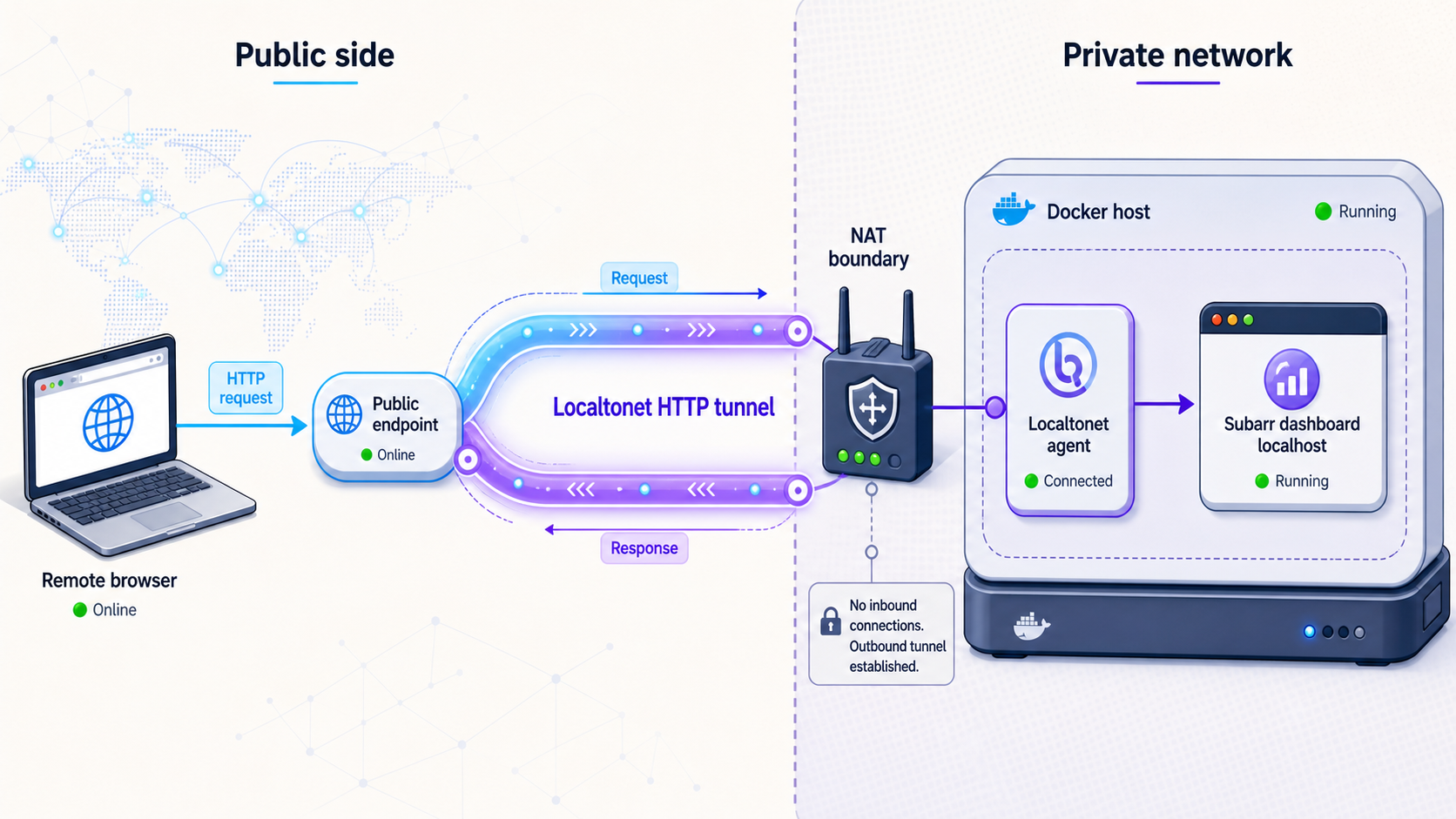
After local verification succeeds, an HTTP tunnel can make the dashboard remotely reachable without opening an inbound router port. Our client runs on the Subarr host or another device that can reach it, then establishes an outbound connection to a Localtonet relay. The public side of the running tunnel provides an HTTPS address for the local HTTP target.
If the Localtonet client runs directly on the Docker host and Subarr is published on its documented endpoint, the target is normally 127.0.0.1 and port 9922. If the client runs on another device, 127.0.0.1 would refer to that other device. Use the Docker host's reachable LAN address instead and test that exact address from the client device first.
The following sequence follows the current Localtonet HTTP tunnel documentation. That page also provides the current client installation or download path for supported operating systems. Use the current installer shown there rather than an old command copied from another machine or article.
Install and run the Localtonet application
Download the current client for the operating system shown in the HTTP tunnel documentation. Install and run it on the Subarr host or another device that can reach the verified Subarr endpoint.
Open the HTTP tunnel page
In the Localtonet dashboard, go to the HTTP tunnel configuration page. This is the appropriate tunnel family for Subarr's web dashboard.
Select the process type
Choose Random Sub Domain, Custom Sub Domain, or Custom Domain according to the options currently available for your account and configuration. These process types serve the same local HTTP content at a public HTTPS address.
Select the device token and relay server
Select the device-specific authentication token for the running client and an available relay server from the current dashboard. Never publish or guess a token, and do not hardcode a server code from an unrelated installation.
Enter the local IP address and port
Use 127.0.0.1 and 9922 when the client runs on the Docker host and that endpoint works locally. Otherwise, enter the exact Subarr host address reachable from the client device and port 9922.
Create, start, and test the tunnel
Save the tunnel configuration, then press Start. Creating the configuration does not make the tunnel active. Open the assigned public URL in a private browser session and confirm that Subarr requires authentication.
Treat the public URL as an administrative endpoint. Use a unique administrator password, keep Subarr authentication enabled, avoid publicly sharing the URL, and stop the tunnel when remote access is not needed. Never expose Localtonet device tokens, Subarr integration keys, or private service URLs.
Test from outside the local network
Use a connection that cannot silently fall back to the LAN, such as a mobile connection with Wi-Fi disabled. Open the assigned HTTPS address in a private browser window and verify all of the following:
- The URL loads only while the Localtonet client is connected and the tunnel is running.
- An anonymous visitor receives the Subarr login challenge rather than dashboard data.
- The administrator can sign in with the expected account.
- Dashboard navigation and API-backed views load through the tunnel.
- Logging out prevents access to protected pages.
- Stopping the tunnel makes the public endpoint unavailable.
An unguessable-looking URL is not an authentication mechanism. URLs may appear in browser history, screenshots, logs, chat messages, or copied bookmarks. Subarr's login remains the primary application access boundary in this setup.
Operate, back up, and update the deployment
Start, stop, and inspect Subarr
docker compose up -d
docker compose stop
docker compose start
docker compose ps
docker compose logs --tail=200
Run these commands from the stack directory containing compose.yaml and .env. Stopping the services preserves persistent state. Deleting the persistent volume or host data directory is a separate operation that can remove configuration and administrator data.
Back up the dedicated data directory
Back up the persistent location mapped to Subarr's data directory. The current README places the LaBSE quality-estimation cache under <data>/.cache/huggingface. Older deployments with a cache mount under /root/.cache should follow the current upgrade guidance because the 2.x container runs as a non-root process.
A recovery plan should protect the database, application settings, administrator state, and any persistent data needed to rebuild the service. Test restoration separately. Do not assume that a backup is usable until it has been restored in a controlled environment.
Update intentionally
Read the matching release notes before changing a pinned image. Back up the data directory, edit the image reference, validate the rendered configuration, and then pull and recreate the services:
docker compose config
docker compose pull
docker compose up -d
docker compose ps
docker compose logs --tail=200
The main README identifies version 2.0 as the release with breaking authentication and non-root-container changes and says later 2.x releases upgrade transparently. That statement does not remove the need for a current backup, release-note review, local login test, and controlled workflow verification.
The hardened configuration grants the capabilities needed for the non-root container to reconcile ownership of its own data directory while otherwise dropping capabilities. Preserve the maintained template's exact capability structure. Do not point that ownership process at the media library, and do not rebuild the security settings from an incomplete snippet.
Control the tunnel independently
The Localtonet tunnel has a lifecycle separate from the Subarr container. Starting Subarr does not automatically start a tunnel. Creating a tunnel in the dashboard also does not mean it is running.
Start the tunnel when remote access is required and stop it when the dashboard should be local-only. Stopping preserves the tunnel configuration for later use. Deleting removes the configuration. The endpoint remains available only while the selected Localtonet client is connected and the tunnel is running.
Troubleshoot setup and remote-access problems
The dashboard does not open on port 9922
Start with docker compose ps. If the service is exited or restarting, inspect docker compose logs --tail=200. Common categories include an invalid environment value, unavailable host mount, data-directory permission failure, missing external network, or host-port conflict.
Review docker compose config and confirm that the effective deployment publishes the expected endpoint. If you intentionally change the host port, update the Localtonet target to match and repeat local verification before restarting the tunnel.
Settings disappear after a restart
The data directory is probably not backed by the intended persistent mount. Inspect the rendered volume mapping and confirm that the host path or named volume remains stable. Correct the dedicated data mount rather than redirecting the database into the media library.
The container reports storage permission errors
Compare the ownership and permissions of the data directory and media library with PUID and PGID. Subarr needs access to its own data, while subtitle-sidecar creation requires appropriate rights in the relevant media directories.
Avoid broad permissions such as making the complete library writable to every local user. Correct the service identity, group membership, ownership, or narrowly scoped access rules instead.
Subarr cannot reach an integration
Verify the URL from the container's perspective. A loopback address inside Subarr does not refer to another container. On a shared bridge, use the appropriate service name and internal port. For a service on another host, use an address routed from the Subarr container.
Confirm that the target accepts the API key and that a stale environment variable is not overriding a value configured in the interface. Test one service at a time.
Tier 2 discovery does not work after switching tiers
Confirm that the socket proxy from the official Tier 2 template is healthy, that Subarr can reach it on the internal network, and that the explicit metadata whitelist remains intact. Do not enable broad Docker API access to make discovery work. Returning to Tier 1 manual configuration is a valid safer alternative.
Tier 3 cannot extract an API key
Check the corresponding BAZARR_CONFIG, SONARR_CONFIG, RADARR_CONFIG, or TAUTULLI_CONFIG host path. Confirm that the maintained mount destination is unchanged, the container can read the files, and the mount still includes :ro. Manual entry is preferable to granting unnecessary write access.
The Localtonet URL is unavailable
- Confirm that Subarr responds at the configured local address and port.
- Confirm that the device running our client can reach that exact address.
- Confirm that the Localtonet client is connected with the intended device token.
- Confirm that the selected relay server is currently available.
- Confirm that the HTTP tunnel was started rather than merely created.
If the client runs on another machine or in a different network namespace, 127.0.0.1 points to that client environment, not the Docker host. Replace it with a reachable host address and test that route locally.
The public URL opens without a login challenge
Stop the tunnel immediately. Repeat the test in a private browser session to exclude an existing login cookie. Check the deployed Subarr version and authentication settings. If a reverse proxy is responsible for authentication, confirm that Localtonet targets the proxy and cannot bypass it.
For administrator lockout, the current README documents SUBARR_AUTH_RESET=1, the existing credential environment pair, and this container command:
docker exec subarr python -m subarr.cli reset-authFollow the guidance for the installed version and remove any temporary reset environment setting after access is restored. Repeat the private-session authentication test before restarting the tunnel.
NFS or SMB storage produces database concerns
Keep the media library and application database separate. Current Subarr 2.x behavior accounts for network filesystems when choosing a SQLite journal mode, but local storage remains the documented recommendation for the application data directory. The media library can stay on NFS or SMB while /data uses local persistent storage.
Frequently asked questions
What local port does Subarr use?
The documented local web endpoint is http://localhost:9922. When our Localtonet client runs on the Docker host, the HTTP tunnel can target 127.0.0.1 and port 9922 after that exact endpoint has been verified locally.
Is Subarr authentication enabled by default?
The current main 2.x README says authentication is enabled by default and first launch presents administrator setup. The deployment-template checklist still says it is off by default, which appears stale or inconsistent. Regardless of documentation, verify the deployed image in a private browser session and require a login before starting a public tunnel.
Why does this tutorial use Tier 1?
Tier 1 gives Subarr no Docker daemon access and makes every integration explicit. This provides a clear least-privilege baseline for a remotely reachable dashboard. Tier 2 and Tier 3 are documented alternatives when metadata discovery or read-only API-key extraction is worth the additional access.
Should I deploy the latest Subarr image tag?
The hardened template guidance says not to depend on :latest. Choose a specific published version, read its release notes, back up the data directory, and test the update. Release status changes over time, so verify the current tag directly in the project releases.
Can Subarr use Plex and Jellyfin together?
Yes. The current README documents Plex, Jellyfin, or both. Subarr can request a targeted item refresh when a subtitle lands so the media server can detect it without waiting for a scheduled scan.
Can the Subarr data directory use NFS or SMB?
Current Subarr versions select a SQLite journal mode intended for network filesystems when needed, but the project still recommends local storage for the dedicated application data directory. The media library can remain on network storage.
Does Localtonet replace Subarr authentication?
No. Localtonet carries HTTP traffic to the local service and provides the public HTTPS address. Subarr must still enforce its own login, or the tunnel must target a separately authenticated reverse proxy that cannot be bypassed.
Does creating a Localtonet tunnel start it automatically?
No. Creating the configuration and starting the tunnel are separate lifecycle actions. The endpoint is available only while the selected Localtonet client device is connected and the tunnel is running.
Connect your verified Subarr dashboard with Localtonet
Deploy the least-privilege configuration that fits your environment, verify persistent storage and authentication locally, and then create an HTTP tunnel to the tested Subarr endpoint. Our outbound tunnel workflow provides remote HTTPS access without opening an inbound router port.
Get Started Free →

