

Run a local AI coding-agent activity board on demand, verify its instance-specific port, and create a controlled remote access path
agenttrail is a local, open-source observability layer that turns coding-agent plans, tool activity, file changes, and progress into a live repository map. This guide explains how to run it with npx, including the current inline setup offered when a repository has no plan and the explicit npx agenttrail init alternative. You will verify the board on localhost before configuring an HTTP tunnel with Localtonet. Because agenttrail does not document a universal dashboard port, every networking step uses the URL printed by your own running instance.
📋 What's in this guide
What agenttrail is and what it monitors
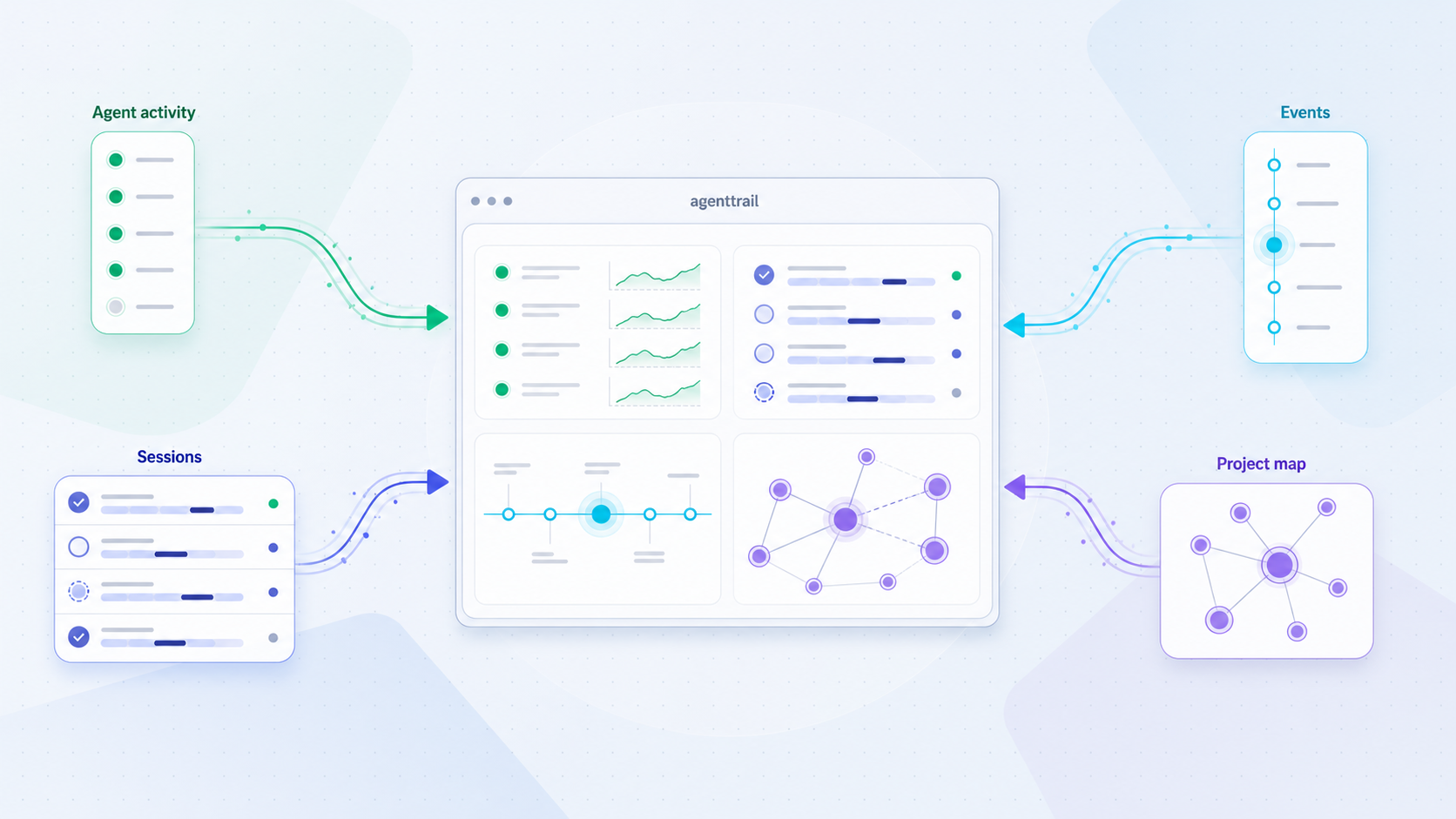
agenttrail addresses a practical problem during long coding-agent runs: how can you tell whether an agent is making progress, working in the expected component, or revisiting code it previously considered complete? Instead of relying only on a transcript, agenttrail presents repository activity as a live browser-based project map. Depending on the available plan and agent integration, the board can show components, dependencies, progress, current work, completed or blocked tasks, file changes, tool activity, and session information.
This tutorial covers the sodiumsun/agenttrail project and its agenttrail package. It should not be confused with the similarly named agent-trail/agent-trail project, which describes a draft interchange format and tooling ecosystem for portable coding-agent session records. The commands here apply to the local live project map launched with npx agenttrail.
Similar project names do not imply compatible packages, commands, or setup procedures. Review the package name shown by npm and confirm that you intend to run the dashboard maintained in the sodiumsun/agenttrail repository.
The map separates declared information from observed information. Declared information comes from the repository plan and represents the component or task an agent says it is working on. Observed information comes from local events, especially the files being changed. A disagreement between those signals can indicate that an agent has moved into an unexpected area, revised a completed component, or stopped making visible progress on its declared task.
127.0.0.1, and does not require an agenttrail account or cloud service.
A repository does not need a PLAN.md file for the initial board to work. The first command can provide the live file tree, activity state, and Claude Code run cards when compatible local hooks are already present. The full component map appears after the repository contains a plan following the agenttrail convention.
That distinction is important for both setup and troubleshooting. A functioning file tree with no component map can mean the base dashboard is healthy but the repository has not completed plan onboarding. It does not automatically mean that the package failed to run.
Prerequisites and preparation
You need the repository you want to observe, a terminal, a browser, and a working Node.js environment that provides npm and npx. The available agenttrail project evidence does not specify a minimum supported Node.js or npm version, so this guide does not invent one. Use a maintained Node.js release and treat any engine or compatibility requirement printed for the resolved package version as authoritative for that run.
According to the npm documentation for npx, the command can run an executable from a package already installed locally or from a package fetched into npm's cache. If the requested package is not present in local project dependencies, npm can prompt before obtaining and executing it. This is why npx agenttrail can start agenttrail without a conventional global installation.
| Requirement | Why it is needed | Preparation check |
|---|---|---|
| Target repository | agenttrail watches the repository from which it is launched. | Open the intended project and verify that you recognize its files before accepting setup changes. |
| Node.js, npm, and npx | npx resolves and executes the package command. |
Confirm that all three executables are available. No exact minimum version is asserted here. |
| Web browser | The monitoring board is served by a local process and viewed in a browser. | Use a browser on the development machine for the first test. |
| Permission to modify the repository | The optional onboarding flow can add project conventions, a starter plan, and local hooks. | Make sure you are authorized to accept those changes and review them before committing. |
| Localtonet client for remote access | Our client establishes the outbound connection after the local board works. | Run it on the agenttrail host when targeting a service bound to 127.0.0.1. |
| Verified protection for sensitive remote use | A public dashboard can disclose repository and agent activity. | Confirm a separate protective control before exposure, or keep the tunnel short-lived and stop it immediately after use. |
Check the Node.js toolchain
These commands report the installed versions without installing agenttrail:
node --version
npm --version
npx --version
If one of the commands is unavailable, install a maintained Node.js distribution appropriate for your operating system. If Node.js was installed while the terminal was already open, start a new terminal before checking again so its executable search path can refresh.
Start in the correct repository
agenttrail uses the current repository as its project context. Launching it from a home directory, parent directory, or unrelated checkout can display the wrong files or monitor a much broader directory than intended. Before running the package, change into the repository root and inspect the directory contents.
If the repository uses Git, checking its current state helps you distinguish existing work from changes accepted during agenttrail onboarding:
git statusYou do not need to discard unrelated work. Record, commit, or preserve it according to your normal development process. The goal is to understand the starting state so that any planning, instruction, or hook changes can be reviewed accurately.
npx may fetch a package that is not already installed locally. Read the package name and npm prompt carefully before approving execution. The package process runs with your user account's permissions within the surrounding operating-system controls.
Run agenttrail with npx
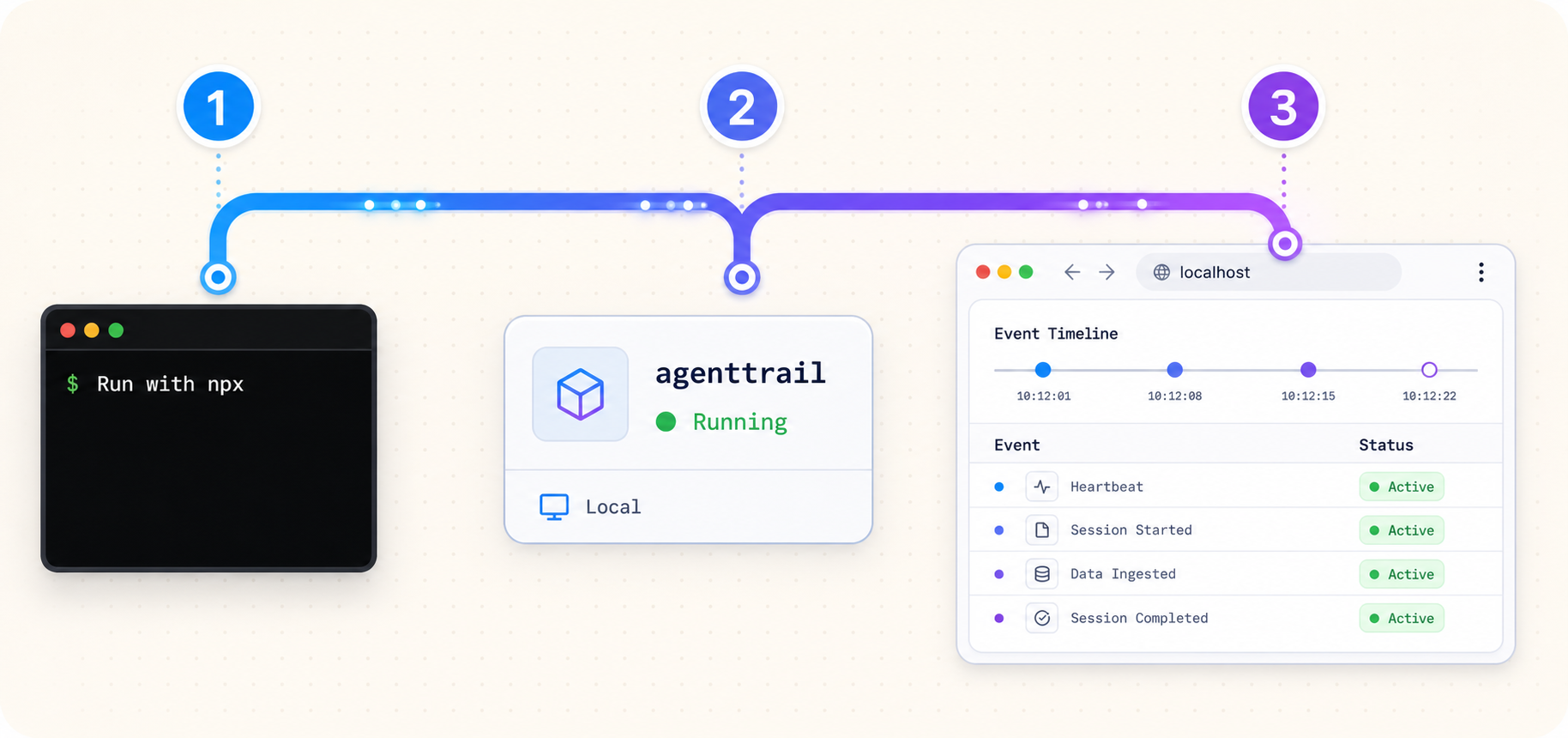
Running agenttrail through npx is on-demand package execution, not a requirement to install the package globally. The primary project workflow is to enter the repository and run one command. If the repository does not yet have an agenttrail plan, the current onboarding flow can offer the full setup inline.
Enter the repository you want to monitor
Change into the repository root. Replace the example path with the real path on your machine, then confirm that the directory contains the project you intend to observe.
Run agenttrail through npx
Execute npx agenttrail. Review any npm package-execution prompt, keep the terminal open, and watch for agenttrail's local dashboard URL and onboarding question.
cd /path/to/your-repository
npx agenttrail
Replace /path/to/your-repository rather than copying it literally. If npm needs to fetch the package, it may request confirmation before executing it. Confirm that the requested name is exactly agenttrail.
When the command starts successfully, agenttrail opens the browser board and watches the repository. If the browser does not open automatically, inspect the terminal and open the displayed local URL manually. A browser-launch failure and a server-startup failure are different problems.
The project documents a 127.0.0.1 bind address but does not establish one universal dashboard port. Preserve the complete URL printed by your instance, including its port. Do not copy a port from another tutorial, another repository, or another machine.
What npx does in this workflow
npm can use a matching package already present in the project or fetch the package into its cache and place the executable in the command environment. That behavior avoids a required global installation, but it also means an unqualified future invocation can resolve according to npm's package rules at that time.
If your organization requires reproducible package execution, establish a reviewed version policy through your own dependency-management process. The primary agenttrail command shown by the project does not include a version specifier, and the supplied evidence does not identify a particular release that we can responsibly recommend pinning here.
Choose the inline onboarding path or explicit initialization
The current primary path begins with npx agenttrail, even in a repository that has no existing plan. When agenttrail detects that state, it offers the full setup inline through a one-question y/n consent flow. If you consent, the backfill prompt is placed on your clipboard. Hooks are wired only with your consent.
The explicit npx agenttrail init command remains available as an alternative. It is useful when you intentionally want to perform initialization as a separate action or when you previously declined or skipped the inline setup.
| Path | When to use it | Documented behavior |
|---|---|---|
npx agenttrail in a repository without a plan |
The normal first-run path | Starts the board, offers full setup inline through one y/n question, and places the backfill prompt on the clipboard when setup is accepted. |
| Decline inline setup | When you want to inspect the base board before repository changes | The first command still works with any repository and can provide the live file tree and activity state without a plan. |
npx agenttrail init |
When you want to initialize explicitly as a separate operation | Adds the documented project conventions, creates a starter plan, and installs additive local Claude Code hooks. |
Primary path: accept or decline inline setup
Read the one-question consent prompt
When a repository has no plan, agenttrail can offer its full setup during the first run. Do not answer automatically. Confirm that you are in the correct repository and authorized to add local planning, instruction, and hook configuration.
Choose whether to initialize
Answer the displayed y/n question according to your intent. Accept if you want the full project-map conventions. Decline if you only want to inspect the base board for now.
Use the clipboard backfill prompt if setup was accepted
The current project workflow places the backfill prompt on your clipboard. Paste it into the coding agent you want to analyze the repository and produce the initial map. Review the resulting plan as project content rather than accepting it blindly.
If you decline setup, you can continue using the base observability view. You can initialize later when you are ready to review repository modifications and ask an agent to create the component map.
Alternative path: run the explicit init command
To perform the setup as a separate operation, run this from the same repository root:
npx agenttrail init
The current agenttrail README establishes that init adds the agenttrail convention to CLAUDE.md and AGENTS.md, creates a starter PLAN.md, and installs additive local Claude Code hooks. It also identifies the repository-local Claude Code hook configuration as .claude/settings.local.json.
Those are the initialization effects supported by the supplied project evidence. This guide does not claim that initialization adds .agenttrail/ to .gitignore, nor does it claim any other exact file creation or modification that is not established by the current project material. Implementations can change, so review the actual diff produced by the package version you run.
The running dashboard is documented as observational, but initialization intentionally creates or updates project files and can install local hooks. Inspect the resulting changes before committing them. Treat hooks and agent instruction files with the same review requirements as other development automation.
After explicit initialization, use the board's Copy backfill prompt action if needed and paste the prompt into your coding agent. The documented workflow asks the agent to study the code first, Git history next, and planning prose last before drawing the repository as a set of real components with dependencies and verifiable statuses.
The plan convention can give components stable identifiers, associate file patterns with components, distinguish working, done, and stuck states, and express dependencies or related links. Your agents maintain the Markdown plan as work proceeds. The board is therefore a visualization of repository-local planning and activity rather than a separate project-management database.
| Coding-agent category | Live activity | Documented map integration |
|---|---|---|
| Claude Code | File watcher and local hooks | Provides the richest documented live view, including run cards and todos, and uses CLAUDE.md for the map convention. |
| OpenAI Codex | File watcher | Can be observed through file changes and can maintain the map through AGENTS.md. Equivalent local-hook run cards are not documented. |
| Cursor or another file-editing agent | File watcher | Repository changes remain observable, and the map convention can be supplied through AGENTS.md. |
Verify agenttrail locally before remote access
Remote access should be a separate second phase. A tunnel cannot repair a local process that failed to start, and configuring both layers at once makes diagnosis harder. First prove that agenttrail is running, that its printed URL works, that it is watching the intended repository, and that the board responds to authorized repository activity.
Confirm that the process remains active
Check the terminal where you ran npx agenttrail. It should remain running rather than exiting with an error. Record the full localhost URL displayed by that process.
Open the exact local URL
Use the printed URL in a browser on the same machine. Preserve its scheme, host, and port exactly. The documented bind address is 127.0.0.1.
Verify the repository identity
Inspect the file tree and project context. If the board represents another directory, stop the process and relaunch it from the intended repository root.
Generate an authorized observable change
Use your normal development workflow or coding agent to make a safe test change. Confirm that the board reflects the repository activity. Avoid unnecessary modifications to production code.
Distinguish the base view from the component map
If file activity works but the richer map is absent, check whether onboarding was accepted and whether PLAN.md contains the agenttrail convention. A missing map in an uninitialized repository is not a watcher failure.
Successful local verification gives you the target values needed for Localtonet: 127.0.0.1 and the actual port printed by agenttrail. This article intentionally avoids showing a sample port because a plausible but incorrect value could forward the tunnel to another process.
If you document the setup for your team, capture the terminal output containing the instance-specific localhost URL beside the live board. Redact usernames, repository secrets, tokens, private URLs, and sensitive project details before storing or sharing the image.
Routine agenttrail operations
During normal development, run agenttrail in each repository you want to observe. The project documents one daemon per repository and a shared tab switcher for live boards. Starting agenttrail in another repository causes its board to join the live view. Stopping that repository's daemon removes it from the shared view.
Relaunch known boards after a reboot
The project documents this command for relaunching boards you have previously run:
npx agenttrail upRun it in an environment where Node.js and npm are available. Verify the resulting boards locally before relying on them remotely. Repositories can move, checkouts can change, and an old board should not be assumed to represent the current intended path.
Configure a repository board to start at login
agenttrail also documents:
npx agenttrail autostartThe project describes this as making a repository's board start at login and self-heal. The supplied evidence does not establish the platform-specific startup mechanism, supported operating-system matrix, generated service path, or an exact removal command. Review the command's current output and proposed changes before enabling persistent startup.
Manage the three separate lifecycles
agenttrail, the Localtonet client, and the Localtonet tunnel are separate running components. The available agenttrail evidence does not specify a dedicated shutdown command, so stop the process using the normal process-control method for the way you launched it.
A Localtonet tunnel is available only while its selected client or device is connected and the tunnel is running. If agenttrail stops while the tunnel remains active, the public endpoint has no healthy local dashboard to reach. If the tunnel stops while agenttrail continues running, the board remains available locally but is no longer reachable through that public endpoint.
Persistent agenttrail startup does not prove that a Localtonet tunnel is running, and restarting a Localtonet tunnel does not launch agenttrail. Check each layer independently after reboots, maintenance, or network changes.
Expose the verified dashboard with Localtonet
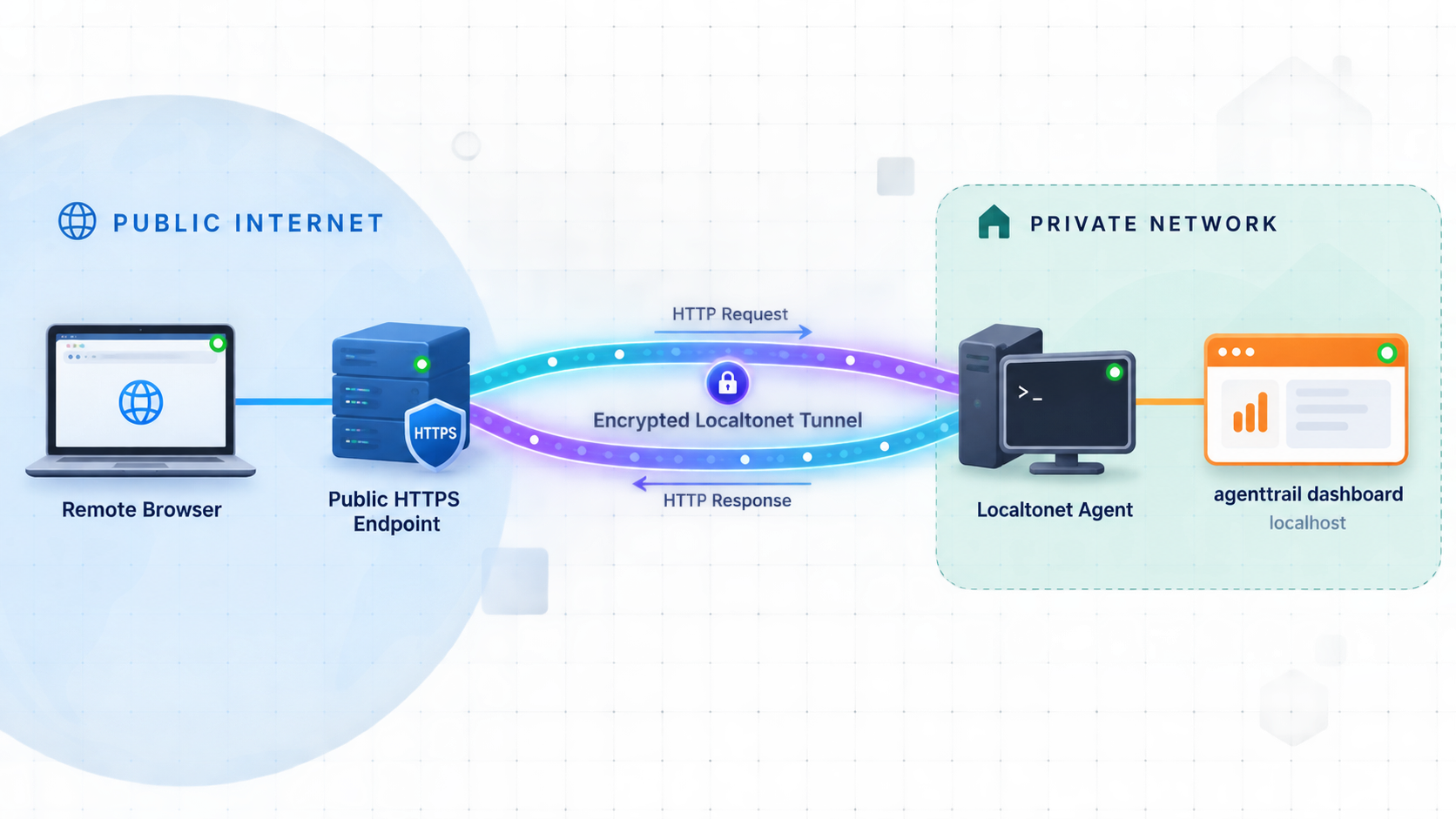
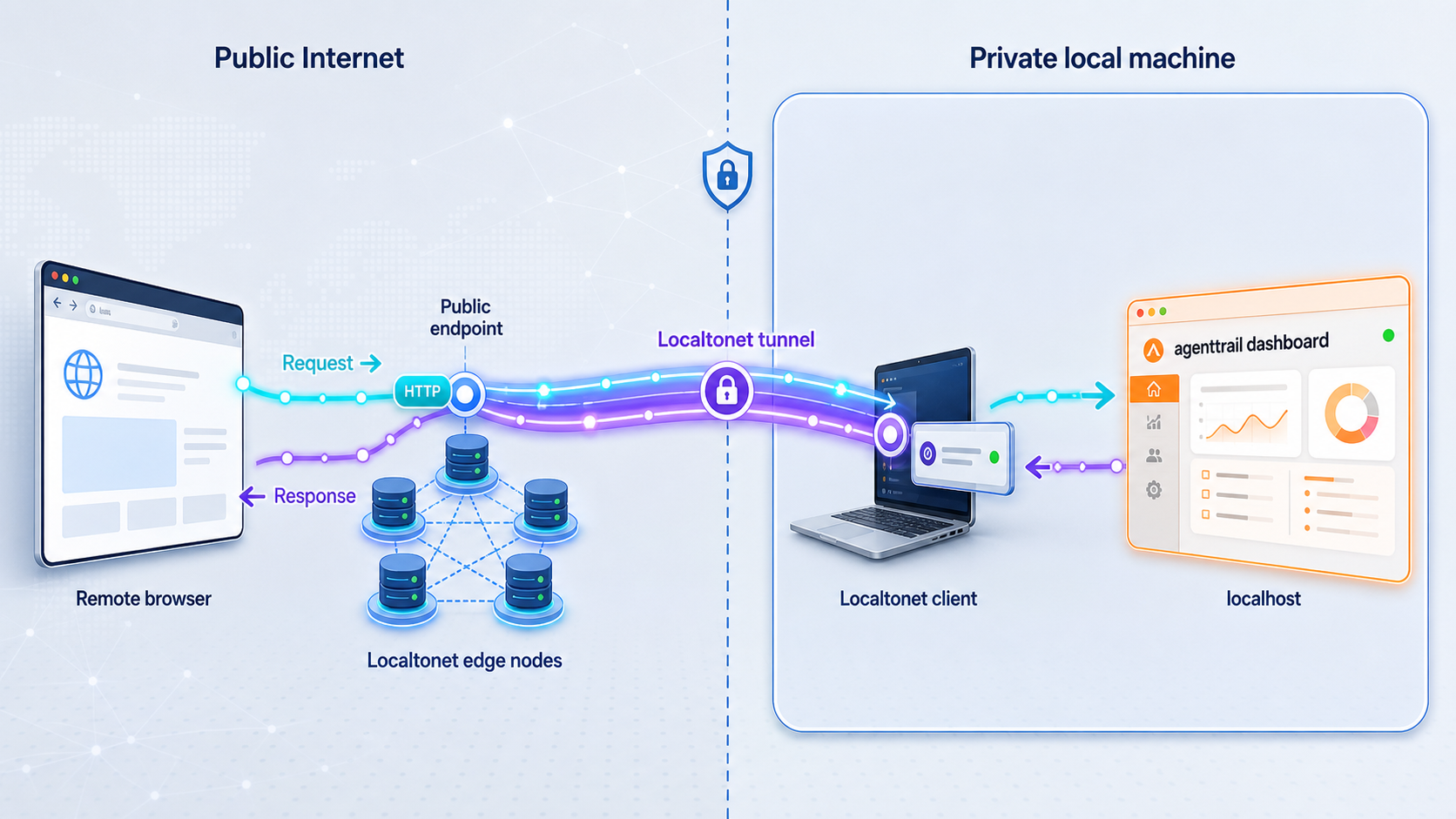
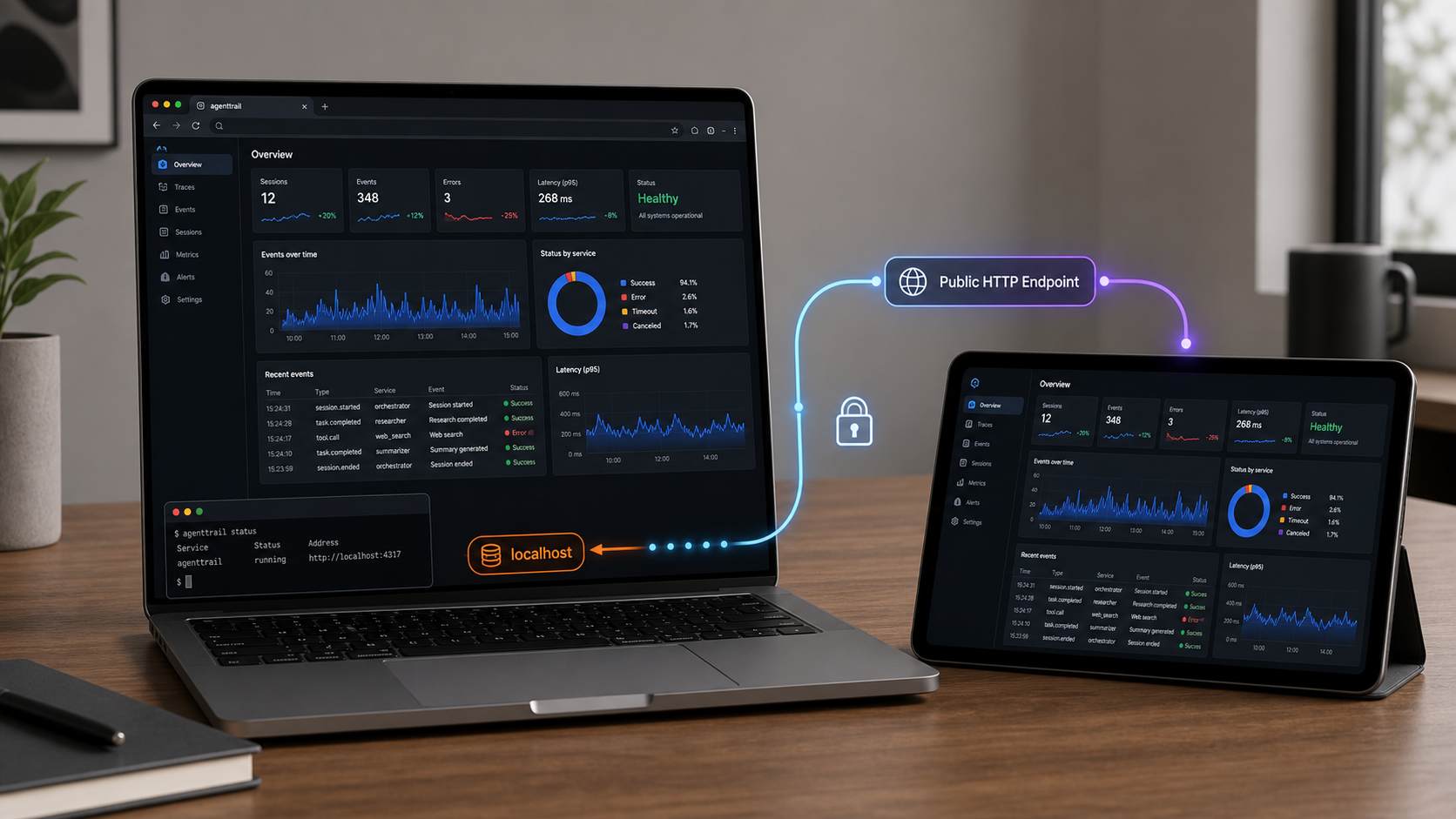
agenttrail binds to 127.0.0.1, so direct connections are limited to the host machine. With Localtonet, our client on that machine establishes an outbound connection to a Localtonet relay server. The resulting HTTP tunnel can provide a public HTTPS URL without inbound router port forwarding, firewall changes, VPN setup, or a public IP address.
An HTTP tunnel is the relevant Localtonet family because agenttrail is a browser application. The local target is the loopback address and exact port printed by agenttrail. Do not choose UDP, and do not describe this standard HTTP tunnel as a VPN. Localtonet VPN Manager is our separate private mesh VPN feature.
Neither the supplied agenttrail evidence nor the supplied Localtonet product context establishes built-in dashboard authentication for this exact configuration. A public URL must not be treated as authorization or adequate protection through obscurity. For sensitive repositories, expose the board only after you have separately verified a suitable protective control for the complete configuration. If you cannot confirm such protection, use a short-lived tunnel only when necessary, do not share its URL, and stop it immediately after the remote session.
The board can reveal repository names, component structure, filenames, plans, task status, agent activity, tool calls, and recent work. Decide whether that information is appropriate for remote exposure before creating the tunnel. If your security requirements demand authenticated private access and you cannot verify that requirement for this HTTP publishing path, do not expose the dashboard publicly.
Install and run the Localtonet client on the agenttrail host
Run our client on the same development machine as agenttrail. Because agenttrail binds to 127.0.0.1, this avoids assuming that another LAN device can reach the loopback-only service.
Select the device with its authentication token
Use the device-specific token associated with the client that will run the tunnel. Treat it as a credential. Never place it in repository files, screenshots, examples, public issues, or support messages.
Select an available relay server or region
Choose from the values currently available in your Localtonet dashboard. Do not copy a server code from another account or an older article because availability can vary by plan, client version, region, or deployment.
Create an HTTP tunnel for the verified target
Set the local IP to 127.0.0.1 when our client runs on the same host. Enter the exact port from the URL printed by agenttrail. Do not guess the port or substitute a public tunnel port.
Start the tunnel
Creating a Localtonet tunnel does not mean it is running. Use the Start action, confirm that the selected client is connected, and obtain the public HTTPS URL assigned to the active tunnel.
Test remotely and stop access when finished
Open the public URL from the intended remote browser and confirm that it displays the same repository board. When remote access is no longer required, stop the tunnel. Delete it if you do not intend to reuse the configuration.
Consult our Localtonet HTTP tunnel documentation while configuring the current dashboard fields. The agenttrail process remains the authoritative source for the local target port.
| Configuration value | Where it comes from | Mistake to avoid |
|---|---|---|
| Local IP | 127.0.0.1 when agenttrail and our client run on the same host |
Do not replace it with a router or public address without evidence that agenttrail listens there. |
| Local port | The complete local URL printed by the current agenttrail process | Do not assume a default port or reuse a value from another board. |
| Tunnel family | HTTP for the browser-based dashboard | Do not select UDP or describe an HTTP tunnel as VPN functionality. |
| Device token | Your Localtonet account and selected client device | Do not guess, publish, or store it in the monitored repository. |
| Relay server or region | The current choices displayed in your dashboard | Do not hardcode a value from an old guide or another account. |
| Public URL | Assigned to the configured HTTP tunnel | Do not confuse it with the local target or treat the URL itself as authentication. |
Verify the complete remote path
Test from a separate network when possible, such as a mobile connection. Confirm that the correct board loads and that expected activity updates. A successful page load proves the basic path from the remote browser to the Localtonet relay, through the connected client, and into the local agenttrail process.
Test lifecycle behavior as well. Stop the Localtonet tunnel and confirm that the public endpoint becomes unavailable. Restart it only if remote access is still authorized. Separately, stop agenttrail while the tunnel is running and confirm that the dashboard can no longer load correctly. These checks make it easier to identify the failed layer during an outage.
Security considerations for remote agent monitoring
Remote observability is useful because it exposes operational detail, but the same information can be sensitive. A map may disclose architecture, dependencies, filenames, current tasks, agent identities, decisions, recent changes, or work that has not yet been committed. Run a tunnel only for repositories and environments that you are authorized to expose.
Require verified protection for sensitive use
This article cannot claim built-in agenttrail dashboard authentication or a Localtonet authentication option for this configuration because neither is established by the supplied evidence. If sensitive access requires authentication, identity checks, an allowlist, or another control, verify that control separately and test it before making the dashboard reachable.
If you cannot verify an appropriate protective control, the safer recommendation is not to expose sensitive content. For lower-risk temporary use, minimize the exposure window, keep the URL private, monitor the tunnel state, and stop the tunnel immediately after the task. A random-looking or unadvertised URL is still a public endpoint and is not a security boundary.
Protect device tokens and URLs
A Localtonet device token identifies the client that runs the tunnel and must remain secret. Do not place it in PLAN.md, CLAUDE.md, AGENTS.md, shell scripts committed to the repository, screenshots, public issue reports, or agent prompts. Redact tokens and private URLs from operational evidence.
Review onboarding changes
The running agenttrail dashboard is documented as observational, but accepted onboarding and explicit initialization change repository-local files. Review modifications to PLAN.md, CLAUDE.md, AGENTS.md, and local Claude Code hook configuration before committing or sharing them. Confirm that generated planning material does not include credentials or confidential information copied from source files, history, or internal documentation.
Use least exposure
Prefer an on-demand tunnel instead of leaving the board public continuously. Creating a tunnel and starting it are separate actions, so confirm its actual state. Stop it after use and delete the configuration when it is no longer needed.
Troubleshooting agenttrail and Localtonet
npx agenttrail is not recognized
Confirm that Node.js, npm, and npx are available in the current terminal. If Node.js was installed recently, open a new terminal. The project evidence does not define a minimum Node.js version, so follow any engine or compatibility message shown for the package version npm resolves.
npm asks to install the package
This can be normal when the package is not already present in local dependencies. npm can fetch it into its cache and prompt before running it. Verify that the package name is exactly agenttrail. If your organization requires dependency review, an approved registry, or a pinned version, follow that policy rather than bypassing it.
The browser did not open automatically
Inspect the terminal for the URL printed by agenttrail and open it manually. If the process remains active and the URL works, the problem was limited to automatic browser launch. If no URL appears and the process exits, use the displayed error as the starting point instead of probing guessed ports.
The board shows the wrong repository
Check the terminal's current directory. Stop the process using the normal control for your shell, enter the intended repository root, and run npx agenttrail again. Do not expose the board until its project context and file tree are correct.
No inline setup question appears
The current project describes inline setup for a repository with no plan. If no question appears, the repository may already contain planning configuration, the setup may already have been completed, or the resolved package behavior may differ. Inspect the board and repository state. If you intentionally need initialization, use the documented alternative:
npx agenttrail initThe file tree works, but there is no component map
The base dashboard works without PLAN.md. The full map depends on a plan following the agenttrail convention. Accept inline onboarding or run explicit initialization, then use the clipboard backfill prompt with your coding agent. Review the generated plan before relying on it.
The backfill prompt is not available on the clipboard
First check the terminal and board for the current setup result and the Copy backfill prompt action. Clipboard integration can also be affected by the operating environment. The project establishes that the inline flow places the prompt on the clipboard and that the board can copy it, but the supplied evidence does not provide platform-specific clipboard troubleshooting commands.
Claude Code activity is less detailed than expected
Claude Code's richer view depends on local hooks. Confirm that you consented to their installation and review the repository-local .claude/settings.local.json configuration. A file watcher can still show repository modifications when run-card or todo detail is unavailable.
The local board works, but the public URL does not
Check the path in this order:
- Confirm that the agenttrail process is still running.
- Open the exact printed local URL on the host.
- Confirm that the Localtonet client associated with the selected device token is connected.
- Verify that the HTTP tunnel targets
127.0.0.1and the exact agenttrail port. - Confirm that the tunnel was started, because creation alone does not make it run.
- Review available status information without exposing tokens or private URLs.
The public URL reaches the wrong local application
Compare the tunnel's local target with the complete URL printed by agenttrail. A different local process may be using the configured port. Correct the target and repeat both local and remote verification.
The public dashboard stopped after a reboot
Check every lifecycle separately. agenttrail may need npx agenttrail up, or the repository may require a reviewed npx agenttrail autostart setup. The Localtonet client must also reconnect, and the tunnel must be running. Starting one component does not establish that the others are available.
Another LAN device cannot connect directly
The project documents binding to 127.0.0.1, which is the loopback interface. Direct LAN access is therefore not expected. This guide does not invent a command-line flag to alter the bind address. Run our Localtonet client on the same host and target the verified loopback service.
Verify the agenttrail process, printed local URL, repository identity, Localtonet client connection, HTTP target, tunnel state, and remote browser in that order. This prevents a local application failure from being mistaken for a tunnel problem.
Frequently asked questions
Is running agenttrail with npx a permanent installation?
Not in the conventional global-install sense. npx can use a matching local package or fetch it into npm's cache and execute its command. The documented agenttrail workflow does not require a global installation.
What is the primary first-run setup path?
Run npx agenttrail in the repository. If it has no plan, the current project workflow offers full setup inline through one y/n consent question and places the backfill prompt on your clipboard when accepted.
Can I initialize agenttrail separately?
Yes. Run npx agenttrail init from the repository root. It is the explicit alternative to accepting setup during the first npx agenttrail run.
What repository files does explicit initialization affect?
The current project README establishes that initialization adds the convention to CLAUDE.md and AGENTS.md, creates a starter PLAN.md, and installs additive local Claude Code hooks. The hook configuration is identified as .claude/settings.local.json. Review the actual diff because this guide does not claim additional file changes that are not established by the current evidence.
What port does agenttrail use?
The project evidence does not state a universal port. Use the complete local URL printed by your running instance. The documented bind address is 127.0.0.1, but the port must not be guessed.
Does agenttrail work without PLAN.md?
Yes. The live tree, activity feed, and available run cards do not require a plan. The full component map appears when the repository has a plan following the agenttrail convention.
Does agenttrail control my coding agent?
The project states that the running dashboard observes and draws. It does not send prompts or edit your code. The onboarding process provides a backfill prompt for you to submit to your agent.
Which coding agents can agenttrail monitor?
Claude Code has the richest documented live integration through local hooks. OpenAI Codex, Cursor, and other agents that edit files can be observed through the repository watcher and can maintain the map through AGENTS.md.
Why use a Localtonet HTTP tunnel?
agenttrail provides a browser dashboard, so an HTTP tunnel maps naturally to the local web service. Configure it with 127.0.0.1 and the exact port printed by agenttrail.
Does this setup include verified dashboard authentication?
This article cannot claim that it does. The supplied agenttrail evidence and Localtonet context do not establish built-in dashboard authentication for this exact configuration. Verify a separate protective control before sensitive use. If you cannot do that, avoid public exposure or keep the tunnel strictly short-lived and stop it immediately afterward.
Will the public board remain available if agenttrail stops?
No. The agenttrail process must remain available, the selected Localtonet client must be connected, and the tunnel must be running. If any layer stops, the remote board will not remain usable.
Is an HTTP tunnel the same as a VPN?
No. The HTTP tunnel exposes one selected local web service. It does not create general private network membership. Localtonet VPN Manager is our separate private mesh VPN feature.
Access a verified agenttrail board with Localtonet
Run agenttrail from the intended repository, complete or decline its consent-based onboarding, and verify the exact localhost URL first. Then create an HTTP tunnel for the printed 127.0.0.1 port only after deciding how the dashboard will be protected, and stop the tunnel as soon as remote monitoring is complete.


