

Compile a reproducible WotLK server, prove it works locally, and publish only its verified game listeners
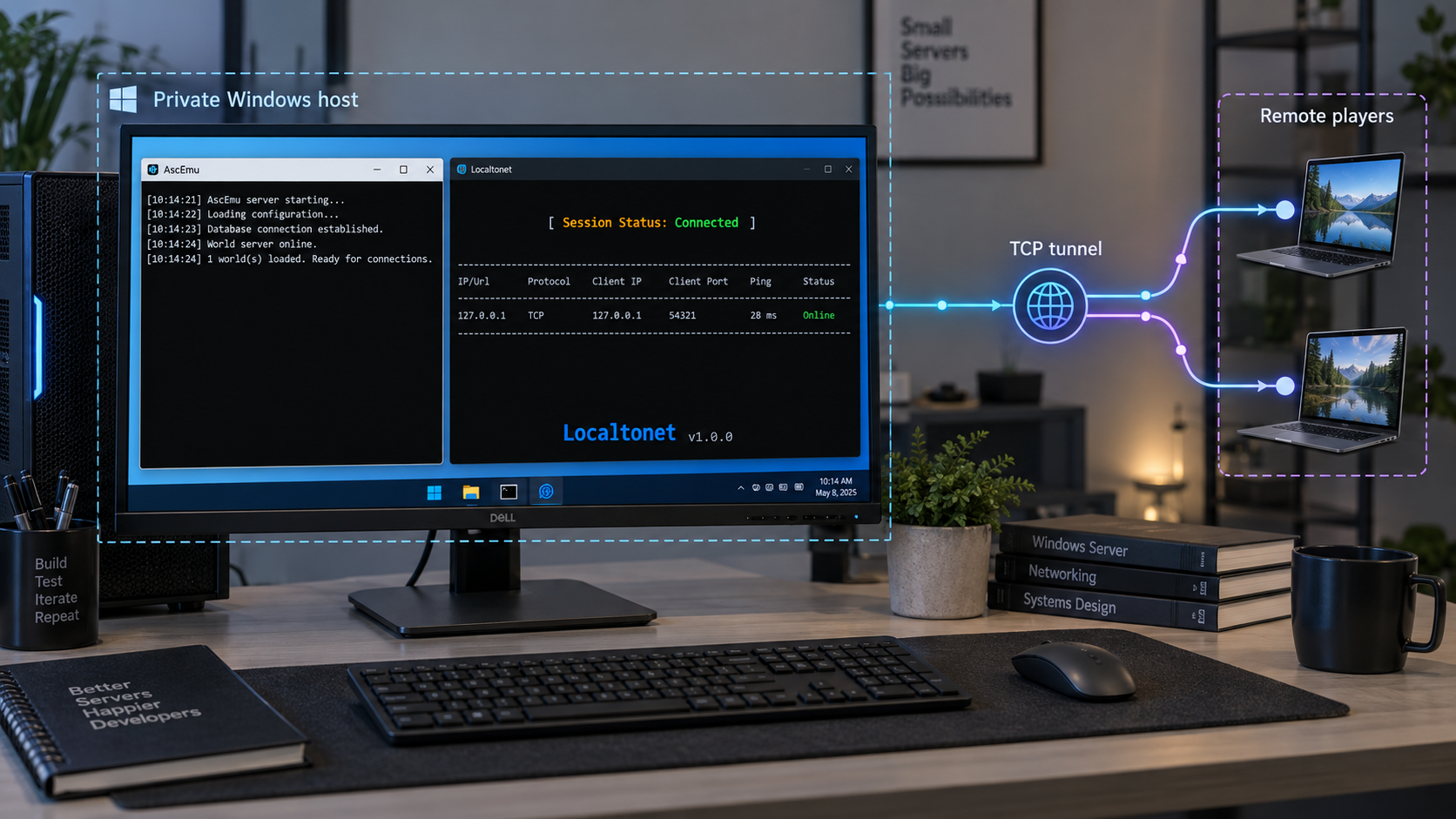
This walkthrough pins the server source to AscEmu release D.6809, commit 214f063, and targets a lawfully obtained WotLK 3.3.5a client. You will prepare Visual Studio and CMake, build the core, initialize MySQL, process compatible client data, configure and start the server, create an account, and verify an actual local login before adding remote access. After that local baseline works, we show how to identify the required TCP listeners and map each verified listener through Localtonet without inbound router port forwarding, firewall changes, VPN setup, or a public IP address.
📋 What's in this guide
Use a pinned AscEmu release and matching game client
AscEmu is an open-source C++ server-emulator framework derived from ArcEmu. It is a development project, not a ready-made bundle of server files. A complete Windows installation includes source retrieval, C++ compilation, MySQL schemas, game-data extraction, server configuration, account creation, client configuration, and local testing.
This guide uses the official AscEmu repository at release D.6809, whose recorded commit is 214f063. The selected game target is WotLK 3.3.5a. Pinning both values prevents an update to the active master branch from silently changing source code, build options, configuration templates, SQL updates, or client compatibility midway through the installation.
Release D.6809 is an identifiable stable checkpoint, but it is not the repository's current development head. The release history reports later commits on master. If you intentionally use a newer commit, record its complete commit hash and follow the files shipped by that revision. Do not combine executables from one revision with configuration templates, SQL updates, or extraction tools from another.
The detailed path below is for the pinned D.6809 source and a WotLK 3.3.5a client. AscEmu is a multiversion project, but newer targets do not all use the same login architecture. MoP 5.4.8 is under active development, WoD 6.2.4 is currently paused after reaching character selection, Legion 7.3.5 uses a newer Battle.net-based path and remains an early implementation, and Forever development uses its own branch and evolving infrastructure. Do not apply this WotLK listener model to those targets without checking their current source and startup output.
AscEmu identifies itself as an educational open-source project. Its source license does not grant rights to proprietary clients, copyrighted assets, trademarks, or public operation. Use a lawfully obtained compatible client, review the project's license and terms, and comply with the rules that apply in your jurisdiction.
Prepare Windows and the required development tools
AscEmu's current Windows installation guide organizes setup around OpenSSL, the Visual C++ redistributable, MySQL, GitHub Desktop, Visual Studio, CMake, core compilation, database setup, extractors, configuration, automatic database updating, and account creation. Install these dependencies before generating the build so CMake can discover them consistently.
| Requirement | Purpose | Installation decision |
|---|---|---|
| 64-bit Windows | Hosts the compiler, database, server, and optional tunnel client | Keep the server, OpenSSL, and generated Visual Studio platform on the same architecture. This walkthrough uses a 64-bit build. |
| OpenSSL 3.x | Required cryptographic build dependency | Use OpenSSL 3.0 or later, not the light package. Select the installer option that places DLLs in the OpenSSL binaries /bin directory. |
| Visual C++ redistributable | Provides runtime libraries used by compiled Windows applications | Install the redistributable linked by the current AscEmu Windows guide and match its architecture to the generated server build. |
| MySQL | Stores account, character, and world data | Use a MySQL version supported by the pinned source and keep the service private. Record its hostname, port, restricted username, and password. |
| Git or GitHub Desktop | Retrieves the repository and checks out the pinned revision | The Windows guide names GitHub Desktop. Standard Git is also suitable when used to clone the official repository and check out the selected tag. |
| Visual Studio | Provides the Microsoft C++ compiler and Windows SDK | Install the Desktop development with C++ workload, its MSVC compiler tools, and a compatible Windows SDK. Retain CMake support if offered by the installer. |
| CMake | Generates the Visual Studio solution | Use the Windows x64 CMake installer or the CMake included with Visual Studio. Add it to the current user's or system's PATH when the installer offers that option. |
| WotLK 3.3.5a client | Supplies compatible data for extraction and performs the local test | Use only a lawfully obtained, clean client. Do not run extraction against a different expansion or patched client build. |
| Localtonet client | Provides optional public TCP connectivity after local verification | Install it on the AscEmu host or another trusted device that can reach the selected listeners. |
Install the required Visual Studio components
Open Visual Studio Installer, select your installed Visual Studio edition, and choose Modify. Enable Desktop development with C++. In the individual components associated with that workload, retain the current MSVC C++ build tools, a compatible Windows SDK, and CMake tools for Windows. You do not need unrelated web, mobile, .NET desktop, or game-engine workloads merely to compile AscEmu.
Restart any terminals opened before installing Git, CMake, or compiler tools. Then confirm that Git and CMake are visible:
git --version
cmake --version
These commands verify tool discovery, not AscEmu compatibility. CMake still needs to complete its own configure stage without unresolved required dependencies.
Create a repeatable directory layout
Use separate source, build, and runtime directories. For example, keep the repository under C:\AscEmu\source, generated files under C:\AscEmu\build, and the runnable deployment under C:\AscEmu\server. These are organizational examples rather than mandatory AscEmu paths. The important rule is not to generate build files directly into the source checkout and not to mix output from different revisions.
Check out D.6809, generate the solution, and compile
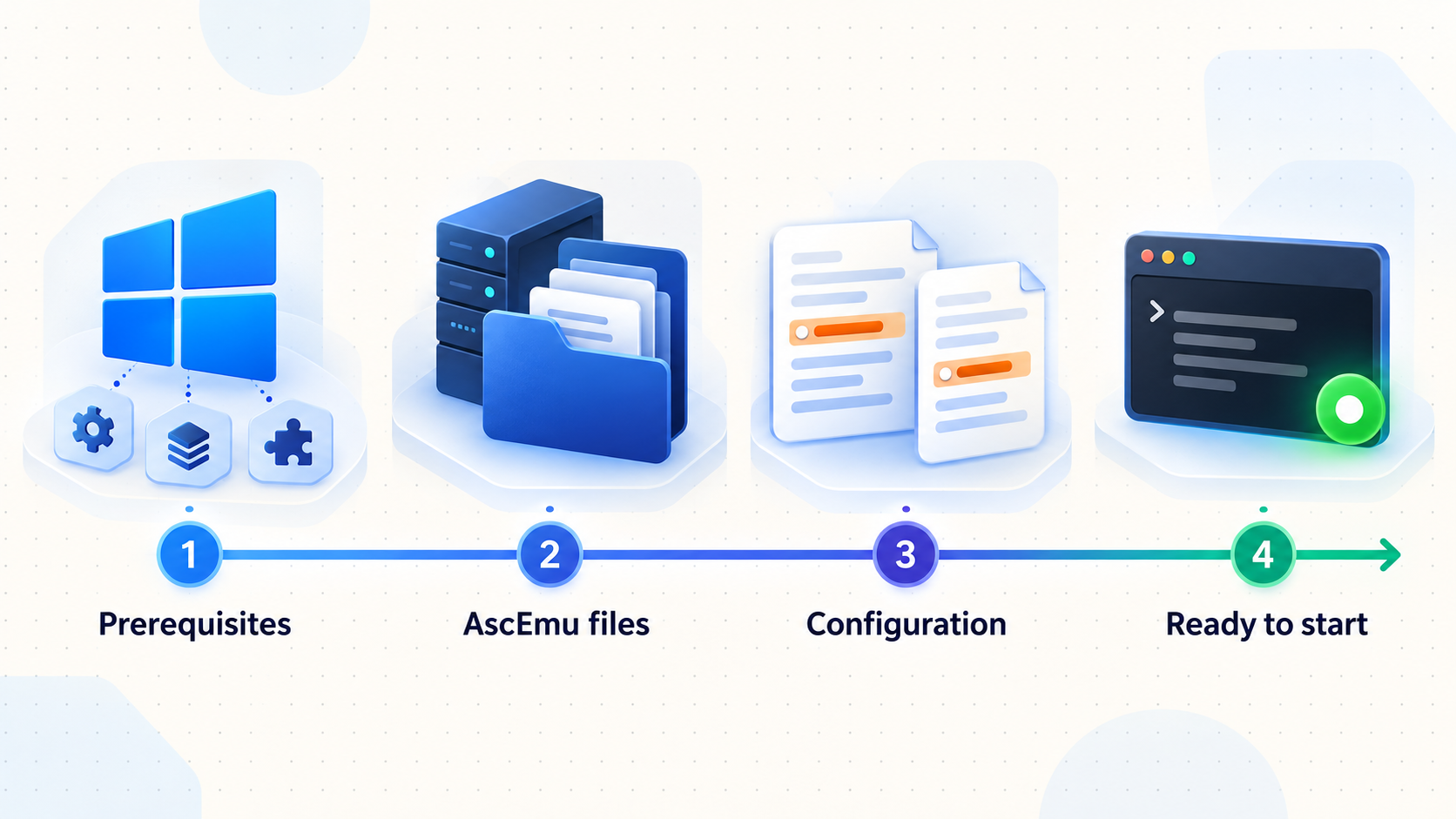
The following process produces a build tied to the selected release. If you use GitHub Desktop, clone the same official repository, fetch the tags, and check out D.6809 through its branch or tag controls. The command-line equivalent is shown because it makes the selected revision directly observable.
Clone the official repository
Open PowerShell in C:\AscEmu and clone the repository into the source directory.
git clone https://github.com/AscEmu/AscEmu.git C:\AscEmu\sourceCheck out the pinned release and verify its commit
Fetch tags, check out D.6809, and print the current commit. The output must begin with the release commit 214f063. A detached HEAD is expected when checking out a tag for a reproducible build.
Set-Location C:\AscEmu\source
git fetch --tags
git checkout D.6809
git rev-parse HEADCreate a clean out-of-source build directory
Keep generated CMake state outside the checkout. If dependency discovery later changes, remove and regenerate this directory rather than reusing stale cache entries.
New-Item -ItemType Directory -Force C:\AscEmu\buildConfigure the project with CMake
Use C:\AscEmu\source as the source tree and C:\AscEmu\build as the binary tree. Select the Visual Studio generator installed on your computer and the x64 platform. In CMake GUI, this means choosing the source and build paths, pressing Configure, selecting the installed Visual Studio generator and x64, resolving any red dependency entries, and pressing Generate. The command below expresses the same source and build separation, but the generator name must match the Visual Studio release actually installed.
cmake -S C:\AscEmu\source -B C:\AscEmu\build -A x64Review the generated target options
Confirm that configuration completed without a missing OpenSSL or compiler error. Use the WotLK target offered by this revision rather than enabling a different expansion. CMake option names can change between revisions, so the authoritative names are the options displayed from the checked-out CMakeLists.txt and its generated CMake cache. Do not copy an option name from a current master build into D.6809.
Build the Release configuration
Build the generated solution as Release for x64. You can open the generated solution in Visual Studio and build ALL_BUILD, or ask CMake to invoke the selected build system. Review the first real compiler or linker error if the build fails.
cmake --build C:\AscEmu\build --config ReleaseInstall or collect the generated runtime files
If the generated solution includes an INSTALL target, set the CMake install prefix to C:\AscEmu\server and build that target. Otherwise, use the exact executable and runtime output paths printed by the successful Release build. Keep the logon component, world component, extractor tools, required DLLs, and revision-matched configuration templates together according to the generated layout. Do not guess a binary location when Visual Studio's output reports the actual path.
A final executable appearing in an output folder does not prove that every required target succeeded. Confirm that the Release build completes without failed projects and that the expected logon, world, and extraction targets exist. Never resolve a DLL error by downloading random DLL files from third-party sites.
Initialize MySQL and align the AscEmu databases
AscEmu needs persistent data for authentication, characters, and world content. Release-specific SQL and the separate AscEmu world database must remain aligned with the compiled core. The official AscEmu organization publishes OneDB as the world database project.
Start the MySQL Windows service and connect with a local administration tool such as MySQL Workbench, HeidiSQL, or the MySQL command-line client. Create the schemas required by the SQL files and configuration templates shipped with D.6809. The exact schema identifiers are not universal configuration values. Read them from the revision's SQL directory and its distributed server templates, then use the same names in both MySQL and AscEmu.
Confirm that MySQL accepts a local connection
Connect over the Windows host's private or loopback interface before involving AscEmu. Resolve service startup, authentication, and storage problems at the database layer first.
Create the required empty schemas
Inspect C:\AscEmu\source\sql and the revision-matched configuration templates. Create one schema for each authentication, character, and world role named by those files. Use a character set and collation compatible with the SQL bundled with the release.
Create a restricted AscEmu database account
Grant the server account access only to the AscEmu schemas it needs. Do not place MySQL's root credentials in the server configuration. Restrict the account to the server host or private address used by AscEmu.
Import the base schemas in their documented roles
Import the release's base authentication and character SQL into their corresponding empty schemas. Import the compatible OneDB world data into the world schema. Do not import a SQL file merely because its filename looks familiar. Confirm its intended schema from the directory and comments associated with the pinned revision.
Configure automatic database updating
Point the server's database-update settings at the update material included with D.6809. Back up all three data roles before the first updater run. Release D.6809 includes a database-updater fix, but updater output must still be monitored for rejected statements, missing permissions, or a schema that started at the wrong base revision.
Verify the resulting database state
Confirm that each schema contains its expected tables and that the restricted account can connect. When the server later starts, treat its updater output as the final authority on whether the core and database revisions align.
Players do not need a direct database connection. Keep MySQL on a private interface, use a restricted server account, and do not create a Localtonet tunnel for its listener. Back up the databases before imports, updates, or core upgrades.
Run the WotLK extractors and prepare configuration files
AscEmu's extraction phase converts data from the compatible client into the formats expected by the server. Use the tools produced by the same D.6809 build. Do not reuse extracted data from another emulator, expansion, client build, or AscEmu revision unless the pinned project's documentation explicitly confirms compatibility.
Execute every extractor produced for the selected target
- Close the WotLK client and make a backup of any client file that your workflow may modify.
- Locate the extractor executables in the successful Release build output. Visual Studio or CMake prints the exact output directory.
- Copy the required extractor executables and their runtime DLLs into the root of the compatible WotLK 3.3.5a client, as directed by the generated tools and the pinned Windows guide.
- Run each extractor target generated for WotLK. Let one stage finish before starting the next, and retain its console output.
- Confirm that every required output directory contains data and that no extractor reports an unsupported client build, unreadable archive, missing dependency, or incomplete result.
- Move or copy the resulting data directories into the location expected by the server's revision-matched configuration.
Extractor names and the exact set of generated data folders can change between AscEmu revisions and targets. For D.6809, obtain the definitive tool names from the successful WotLK build output and the corresponding source under the repository's tool targets. This is more reliable than copying names from a tutorial for another expansion.
Prepare configuration files from the distributed templates
In the runtime configuration directory, identify the templates distributed for the logon and world components. Copy each template to the active filename indicated by the template, startup message, or Windows guide, leaving the original untouched. Configure these functional groups:
- Database connections: use the private MySQL host, schema names, restricted username, and password prepared above.
- Data paths: point the world service at the WotLK data produced by the extractors.
- Logon and world communication: use the shared values and local addresses required by the templates so the world component can register with the logon component.
- Realm identity: assign a recognizable realm name and select the WotLK target represented by this build.
- Listener bindings: begin with loopback or a trusted LAN interface suitable for local testing.
- Advertised endpoint: initially use an address reachable by the local test client. This value may later need to become a public endpoint for remote players.
The exact active filenames and key names are established by the templates bundled with the checked-out revision. If startup reports that it cannot find a configuration file, use the path and filename printed by the executable rather than renaming unrelated files until the error disappears.
Record the active configuration filenames, realm entry, local listener addresses, and database schema names. These values determine what must be tested and, later, which listener may be published. They are more reliable than a generic port list because AscEmu targets and login architectures differ.
Start AscEmu, create an account, and prove local play
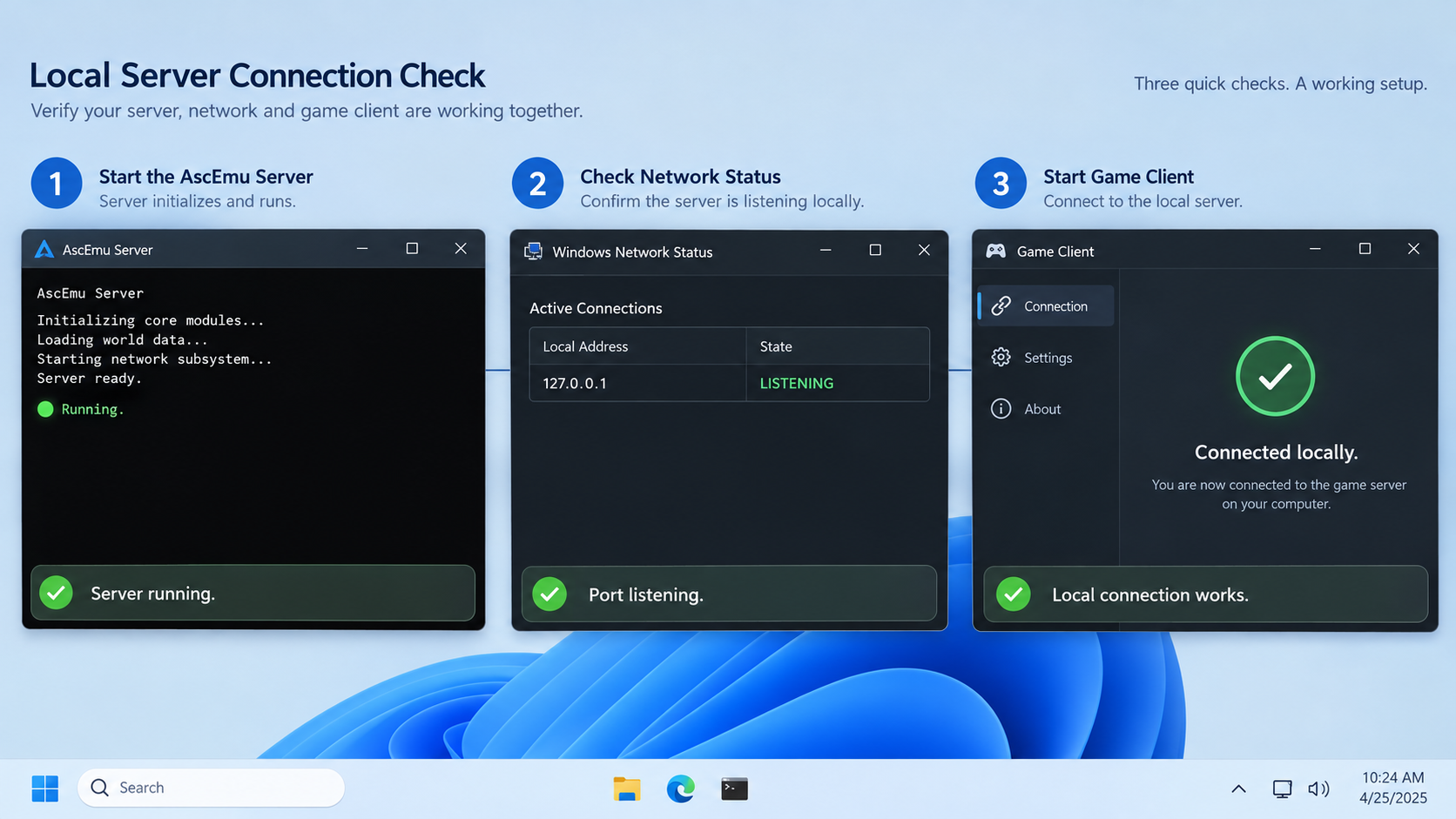
A reproducible successful result is not merely two console windows staying open. The logon service must connect to its database, the world service must load its schemas and extracted data, the world must register correctly, the client must authenticate, and a character must enter the world.
Start MySQL and confirm readiness
Verify that the Windows MySQL service is running and accepts the restricted AscEmu account. Keep MySQL private.
Start the logon component
Launch the logon executable from its generated runtime directory so relative configuration paths resolve correctly. Read the full console output. Resolve missing configuration, database authentication, updater, or socket-binding errors before continuing.
Start the world component
Launch the world executable from the same revision's runtime layout. Confirm successful database initialization, extracted-data loading, realm registration, and listener binding. Warnings about missing required data are not a successful startup.
Create a test account in the logon console
Use AscEmu's documented account create console command. Follow the syntax or prompts printed by the running D.6809 console rather than placing a password in a script or article.
account createConfigure the WotLK client for the private endpoint
Use the WotLK 3.3.5a client configuration mechanism appropriate to that client to point it at the local or private realm endpoint defined in AscEmu. Preserve a backup before editing. Do not use a public Localtonet endpoint yet.
Complete an end-to-end local session
Sign in with the new account, confirm that the realm appears, enumerate or create a character, enter the world, move, log out, and reconnect. Keep both server consoles visible so you can correlate each client stage with server activity.
Inspect every listening TCP socket on Windows
AscEmu's console can report application-level network status, while Windows shows the sockets that are actually listening. The official AscEmu console reference documents help, info, netstatus, reload, rehash, and shutdown or exit.
help
info
netstatus
In an elevated PowerShell window, list listening TCP sockets and their owning processes:
Get-NetTCPConnection -State Listen |
  Sort-Object LocalPort |
  Select-Object LocalAddress, LocalPort, OwningProcess

Get-Process -Id <OwningProcessId>
Replace <OwningProcessId> with an ID shown by the first command. Repeat this for every candidate game-facing listener. An alternative built into Windows is:
netstat -ano -p tcp | findstr LISTENINGRecord the local address, port, process ID, executable, and purpose of each listener. Then test the exact local target from the machine that will run the Localtonet client:
Test-NetConnection -ComputerName <local-address> -Port <verified-port>
A TcpTestSucceeded result of True proves that the socket accepted a TCP connection from that machine. It does not prove authentication, realm redirection, or world entry. The successful WotLK client session remains the application-level acceptance test.
MySQL, local component-to-component communication, debugging interfaces, and the optional AscEmu remote administrative console are not player endpoints. Publish only listeners observed in the successful player connection path. Leave the remote console disabled unless you have a separately designed and secured administrative requirement.
Map verified AscEmu listeners through Localtonet
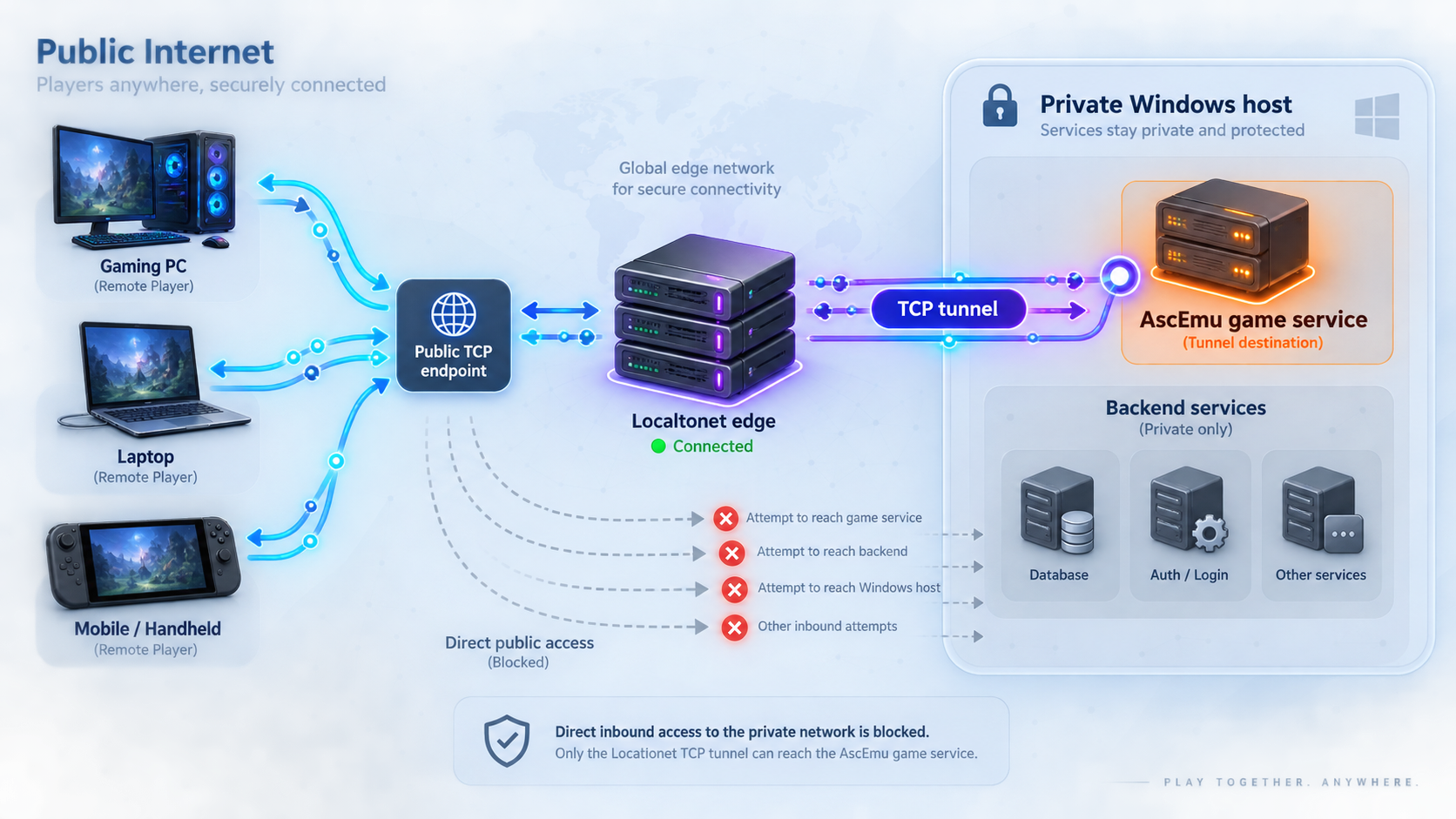
Once the private client test succeeds, Localtonet can make a verified TCP listener reachable without inbound router port forwarding, firewall changes, VPN setup, or a public IP address. Our client establishes an outbound connection to a Localtonet relay server. A running TCP tunnel supplies a public host and port that forwards to the selected local IP address and port.
Review the current Localtonet documentation alongside the workflow below. Exact relay regions and server codes must come from the current dashboard, not from a static article.
Install and run the Localtonet client
Run our client on the AscEmu Windows host or another trusted device that can reach the exact local listener tested above. The selected device must remain connected while players use the tunnel.
Select the correct device token
Authenticate the device with its assigned token. The token identifies the client device and must remain secret. Redact it from screenshots, logs, support posts, and configuration repositories.
Select an available relay server
Choose a relay server or region currently offered in the dashboard. Availability can vary, so use the values shown in your account rather than a hardcoded example.
Create a TCP tunnel for one verified listener
Enter the local IP address and port whose socket, owning AscEmu process, and role you verified. Do not enter the MySQL port, remote-console port, or a port copied from another emulator deployment.
Start the tunnel and record its public endpoint
Creating the tunnel does not start it. Use the Start button, verify that the device and tunnel report a connected state, and record the assigned public host and port. Never disclose the device token with the endpoint.
Test the public socket from an external network
From a Windows computer outside the AscEmu host's LAN, test the assigned public host and port. Mobile tethering is one way to ensure the test does not remain on the same private network.
Test-NetConnection -ComputerName <public-host> -Port <public-port>Complete a remote client login
Configure one authorized external WotLK client with the application endpoint required by AscEmu, then authenticate, view the realm, enumerate characters, enter the world, move, disconnect, and reconnect. Watch AscEmu and Localtonet status throughout the test.
Account for advertised realm and world endpoints
Localtonet transports a connection to a local target. It does not rewrite AscEmu realm rows, application configuration, client files, or addresses contained inside protocol messages. If authentication succeeds but world entry fails, AscEmu may be advertising a private address or a local port that an external player cannot use.
Compare the public Localtonet endpoint with the endpoint advertised by the realm configuration or database associated with D.6809. Obtain the exact field from the active configuration templates, realm data, and startup output. If the application requires the public hostname and port to be recorded there, update that application-level value, restart or rehash as supported, and repeat the local and external tests.
If the client flow reaches a second independently listening game service, create a separate TCP tunnel only after proving that the listener belongs to AscEmu and is required. One successful authentication socket does not prove that the world path uses the same endpoint. Conversely, separate logon and world processes do not automatically prove that both must be exposed publicly. Observe the actual connection sequence.
| Endpoint or secret | Publish? | Decision rule |
|---|---|---|
| Verified game authentication endpoint | When required | Publish only if an external client must reach it and the owning process has been verified. |
| Verified world endpoint | When independently required | Publish only if the WotLK connection flow uses a separate public listener. |
| MySQL listener | No | It is a private backend dependency, not a player service. |
| AscEmu remote console | No | It is an administrative interface and is unnecessary for ordinary play. |
| Localtonet device token | No | It authenticates the client device and must remain secret. |
| Public Localtonet host and port | To authorized players | Share only the endpoint required by their compatible client configuration. |
Operate, update, and secure the deployment
Use a predictable startup and shutdown order
Start MySQL first and confirm that it accepts the restricted server account. Start the logon component, then the world component in the order expected by the pinned build. Confirm clean initialization and active game listeners before starting Localtonet. This avoids presenting a public socket that forwards to an incomplete server startup.
For shutdown, stop accepting new remote sessions, stop the Localtonet tunnel, and use AscEmu's documented shutdown or exit console operation. Stop supporting services afterward if maintenance requires it. Avoid abruptly terminating database-writing processes.
Back up before changing any layer
Back up the authentication, character, and world databases, active configuration files, extracted-data version, and local customizations. Record the current Git tag and commit. Keep database passwords, account credentials, and Localtonet tokens out of source control and shared archives.
When moving beyond D.6809, read the AscEmu release history, check out the intended revision, regenerate the build directory, compile cleanly, compare new templates with your active configuration, and apply only the database updates intended for that revision. Complete the local acceptance test before making the tunnel available again.
Do not generalize WotLK instructions to active-development targets
AscEmu's repository lists authentication, Worldsocket, character enumeration, and world login across multiple targets, but a feature-matrix checkmark does not mean identical configuration or maturity. Current project updates describe MoP 5.4.8 as actively developed, WoD 6.2.4 as paused after character selection, Legion 7.3.5 as an early implementation using a newer bnetserver path, and Forever as branch-based development with infrastructure and gameplay at different stages.
For Legion and other Battle.net-based targets, expect components and client preparation that are not part of this WotLK walkthrough. Identify their listeners from those builds' configuration and runtime output. Never assume that WotLK logon and world endpoints apply to bnetserver.
Troubleshoot the build, server, and public connection
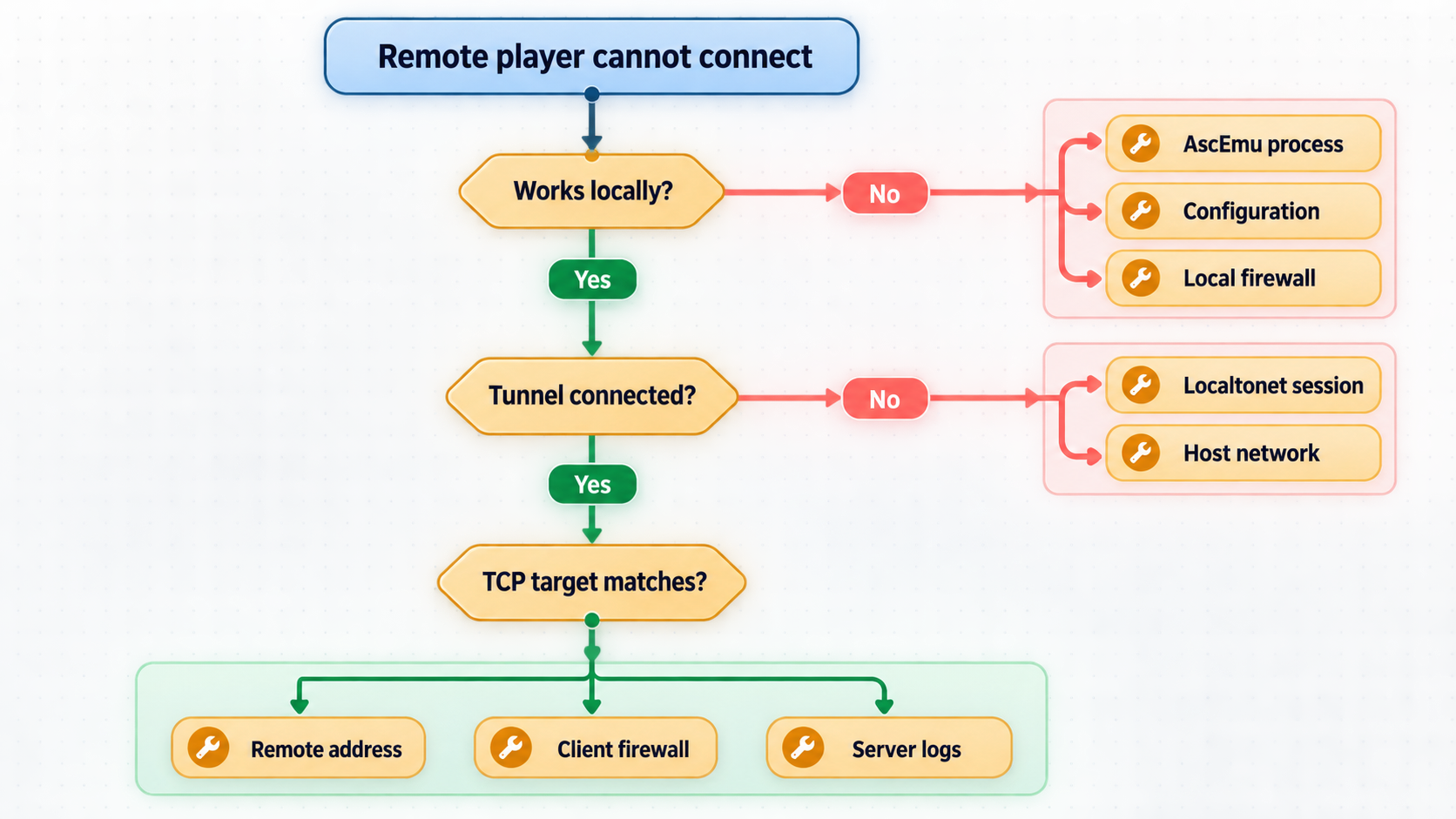
CMake cannot find OpenSSL
Confirm that you installed full OpenSSL 3.0 or later rather than the light package. Verify that the installer placed binaries in the OpenSSL /bin directory and that OpenSSL, Visual Studio, and the generated platform are all 64-bit. Delete the CMake build directory and configure again after correcting discovery so stale cache values do not hide the change.
Visual Studio compilation fails
Read the first meaningful compiler or linker error, not the final cascade. Confirm that git rev-parse HEAD identifies the expected release commit, CMake configuration completed successfully, Desktop development with C++ is installed, and the Windows SDK and dependency architectures agree. Do not combine generated projects from one source revision with another checkout.
The server closes immediately
Launch the executable from PowerShell or Command Prompt in its expected runtime directory so the error remains visible. Check the exact configuration path printed by the program, required DLL discovery, database credentials, schema existence, updater output, and extracted-data paths. Executables, DLLs, templates, and SQL updates must come from the same revision.
The database updater fails
Restore the pre-update backup before repeatedly rerunning a partially applied update. Verify that the base schema matches the update chain expected by D.6809 and that the restricted database account has the permissions required for schema changes. Read the first failed SQL statement and its target schema.
Authentication fails on the local machine
Check the logon console, confirm that the account exists, and verify its database connection. Use reload if the running console indicates that accounts need reloading. Confirm that the client is WotLK 3.3.5a and points to the private test endpoint. Localtonet cannot affect or repair a local-only authentication test.
The realm appears, but entering the world fails
Confirm that the world process loaded successfully, registered with the logon component, and owns an active TCP listener. Check the realm's advertised address and port. If the failure occurs only externally, determine whether AscEmu is returning a private endpoint or whether the world listener needs its own verified tunnel.
The tunnel is running, but its public port fails
Compare the tunnel target with Get-NetTCPConnection. Confirm that the owning process is the intended AscEmu executable and that Test-NetConnection succeeds against the exact local target from the Localtonet client device. Also confirm that the selected device is connected and the tunnel was started, not merely created.
The public port test passes, but the game still fails
A successful TCP test proves only that something accepted a socket. It does not verify the game protocol, account, client version, realm record, follow-up endpoint, or world state. Compare the external attempt with the known-good local sequence and watch both AscEmu consoles for the last completed stage.
Remote access stops intermittently
Check whether Windows sleeps, reboots, changes network state, or stops MySQL. Confirm that the AscEmu processes remain healthy and that the Localtonet client and tunnel stay connected. Correlate timestamps across the database service, AscEmu consoles, Windows events, and Localtonet status.
Frequently asked questions
Which AscEmu version does this guide install?
It pins the official D.6809 release at commit 214f063 and targets WotLK 3.3.5a. If you select another tag or commit, use that revision's CMake options, configuration templates, SQL updates, extraction tools, and runtime output.
Can I use these WotLK instructions for Legion or Forever?
No. Legion uses newer Battle.net-based components and remains an early implementation. Forever uses its own active-development branch and evolving infrastructure. Build and identify listeners from the exact target rather than assuming the WotLK model applies.
Which AscEmu ports should I enter in Localtonet?
Use the local address and port shown by the active D.6809 configuration, confirmed in startup output, matched to the owning AscEmu process with Get-NetTCPConnection, and tested with Test-NetConnection. Do not assume a universal port.
Do I need more than one Localtonet TCP tunnel?
Only if the verified client connection flow requires multiple independently reachable TCP listeners. Authentication and world processing are distinct concepts, but component names alone do not establish how many public endpoints are required. Observe the sockets and advertised realm endpoint.
Should MySQL be exposed through Localtonet?
No. MySQL is a backend dependency and is not needed by players. Keep it private, use a restricted database account, and publish only verified game-facing services.
Does Localtonet rewrite AscEmu's realm address?
No. A Localtonet tunnel maps a public host and port to a reachable local target. AscEmu's realm or advertised endpoint and the game client must still be configured for the public connection path.
What proves that the installation succeeded?
The logon and world components must start without fatal database, updater, data, registration, or listener errors. A compatible local client must authenticate, display the realm, enumerate or create a character, enter the world, move, log out, and reconnect.
Will the public endpoint remain online after Localtonet closes?
No. The endpoint is available only while the selected Localtonet device is connected and the tunnel is running. Windows, MySQL, and the required AscEmu processes must also remain operational.
Publish your verified AscEmu listener with Localtonet
After the pinned WotLK build completes a full local login and world-entry test, create a TCP tunnel for each independently verified game-facing listener, start the tunnel, and validate the public endpoint with one trusted external player.
Get Started Free →

