

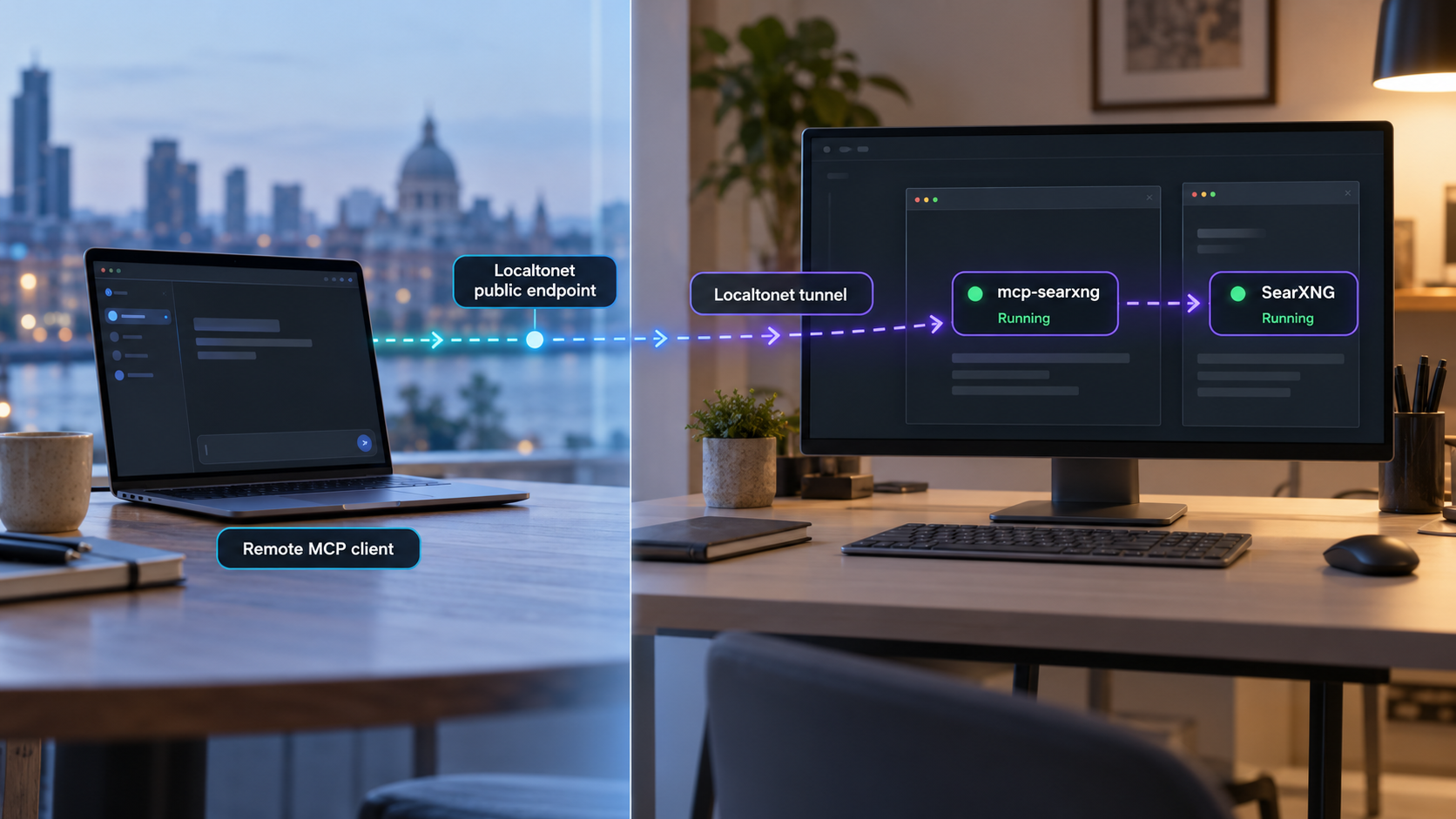
Run a private-search MCP endpoint locally, verify it, and make it reachable by remote MCP clients
mcp-searxng connects MCP-compatible AI applications to an existing SearXNG search service. This guide installs the executable globally with npm, configures its Streamable HTTP transport, verifies the complete search path, and then exposes the working local endpoint through a Localtonet HTTP tunnel. We also explain the important distinction between the default STDIO transport and HTTP mode, along with authentication, lifecycle, and troubleshooting considerations for a remotely reachable MCP server.
📋 What's in this guide
Understand the mcp-searxng architecture first
mcp-searxng is an MCP server that gives compatible AI clients access to web search and URL-reading tools. It does not provide its own search index, and it does not install SearXNG. Instead, it sends searches to a separately running SearXNG instance whose JSON search interface is enabled.
The complete request path has several independent components:
SEARXNG_URL.
It is important not to confuse the two URLs in this architecture. SEARXNG_URL points from mcp-searxng to the search service. The MCP endpoint points from an MCP client to mcp-searxng and ends in /mcp. They serve different purposes and should not be substituted for one another.
| Component or value | Used by | Purpose |
|---|---|---|
SEARXNG_URL |
mcp-searxng | Identifies the existing SearXNG service that will process searches. |
http://127.0.0.1:8080/mcp |
Local MCP client | Example local Streamable HTTP endpoint used throughout this guide. |
Localtonet public URL plus /mcp |
Remote MCP client | Routes a remote MCP connection through the tunnel to the local HTTP server. |
STDIO and Streamable HTTP solve different connection problems
mcp-searxng uses STDIO by default when MCP_HTTP_PORT is not set. In STDIO mode, an MCP client starts the executable as a child process and exchanges protocol messages through standard input and output. This is a good fit when the client and server run on the same computer, but it does not create a listening network port.
A Localtonet HTTP tunnel needs a local HTTP service identified by an IP address and port. Therefore, the default STDIO process cannot be tunneled as an HTTP endpoint. To serve remote clients, mcp-searxng must first be placed in its documented Streamable HTTP mode by setting the HTTP host and port.
A tunnel does not convert STDIO into HTTP and does not repair an unavailable SearXNG service. First make sure mcp-searxng is listening locally, that an MCP client can initialize against /mcp, and that a real search tool call succeeds. Add the tunnel only after that local workflow is working.
Prerequisites for the npm installation
Prepare the following components before installing the package:
- Node.js 22 or later: The project requires Node.js 22 or later for npm and NPX installations.
- npm: A working npm installation is required for the global package installation shown here.
- An existing SearXNG instance: mcp-searxng connects to SearXNG but does not install it.
- JSON search enabled in SearXNG: The MCP integration requires the SearXNG JSON search interface.
- An MCP client with Streamable HTTP support: The remote client must be able to connect using the full HTTP endpoint ending in
/mcp. - The Localtonet client: Install and run it on the same machine as mcp-searxng, or on a machine that can reach the configured local target.
Check the Node.js and npm versions
Open a terminal and inspect the installed versions:
node --version
npm --version
The Node.js result must indicate version 22 or later. If the command is missing or reports an older release, install or upgrade Node.js before continuing. The exact installation procedure depends on the operating system and the Node.js distribution method selected by the administrator.
Confirm the SearXNG requirement
You need the base URL of a SearXNG deployment that you operate or trust. This could be an operator-controlled instance on your own infrastructure or another deliberately selected deployment. Do not assume that mcp-searxng creates or bundles the search service.
Privacy depends on the chosen SearXNG deployment. Operating your own instance can reduce reliance on an external search operator, but SearXNG and this MCP integration do not provide anonymity by themselves. A public SearXNG operator receives the submitted queries and may log them.
Keep authentication values, Localtonet device tokens, private endpoint details, and credentials out of shell history, screenshots, source repositories, and shared configuration examples. This article uses placeholder URLs only. Replace them locally without publishing the resulting sensitive configuration.
Install mcp-searxng globally with npm
The global npm installation provides the mcp-searxng executable. This tutorial uses that supported executable workflow rather than importing the package into JavaScript or TypeScript application code. Package imports are not a supported integration method for the documented release.
Confirm Node.js 22 or later
Run node --version and verify that the installed major version is at least 22. Also confirm that npm --version returns successfully.
Install the global package
Use npm to install the published mcp-searxng executable globally.
Confirm the executable is available
Verify that your shell can locate the installed command. If it cannot, inspect the npm global executable path and the current user’s PATH configuration before proceeding.
Install the package:
npm install -g mcp-searxngOn macOS or Linux, a common way to confirm that the executable is on the current PATH is:
command -v mcp-searxngIn PowerShell, use:
Get-Command mcp-searxngA successful lookup confirms that the shell can locate the global executable. It does not yet test the SearXNG connection or start an HTTP server.
Why this guide does not use only NPX
The project also supports NPX, and a local desktop client can launch it in default STDIO mode with npx -y mcp-searxng. That is useful when the MCP client is responsible for starting the process. This guide uses a global installation because the goal is to operate an independently running HTTP service and then connect remote clients to it.
Other officially documented installation paths
The project also documents a pre-built Docker image, a locally built Docker image, and Docker Compose. The pre-built image includes its own Node.js runtime. Those paths can be appropriate for containerized deployments, but they have different environment-forwarding, networking, storage, update, and process-management considerations. To keep the workflow precise, the commands below assume the global npm installation.
Configure and start the Streamable HTTP server
Three values are central to the setup:
SEARXNG_URLidentifies the SearXNG base URL.MCP_HTTP_HOSTcontrols the address on which mcp-searxng listens.MCP_HTTP_PORTenables HTTP mode and selects the listening port.
The example binds the service to 127.0.0.1 on port 8080. This creates the local MCP endpoint http://127.0.0.1:8080/mcp. A loopback binding limits direct network access to the local computer while still allowing a Localtonet client on that computer to reach it.
Binding to all interfaces can make the service reachable from other devices on the local network, depending on host firewall and network policy. For the same-machine Localtonet workflow, use 127.0.0.1. If the Localtonet client runs on a different device, the target must instead be reachable from that device, and the network exposure must be reviewed deliberately.
Start the service on macOS or Linux
Replace the placeholder with the base URL of the SearXNG instance you operate or trust:
export SEARXNG_URL="https://search.example.com"
export MCP_HTTP_HOST="127.0.0.1"
export MCP_HTTP_PORT="8080"
mcp-searxng
Start the service in PowerShell
$env:SEARXNG_URL = "https://search.example.com"
$env:MCP_HTTP_HOST = "127.0.0.1"
$env:MCP_HTTP_PORT = "8080"
mcp-searxng
Keep the process running while testing. The terminal output should be reviewed for startup failures, an invalid SearXNG URL, a port conflict, or configuration errors. The exact log presentation can vary between project versions, so do not depend on a particular log phrase as the sole readiness check.
The server address is not only http://127.0.0.1:8080. MCP clients must use the full documented route: http://127.0.0.1:8080/mcp. Later, the same /mcp path must be appended to the public Localtonet URL.
Authentication must be planned before internet exposure
mcp-searxng supports static bearer protection and optional OAuth protection for HTTP deployments. The exact choice and configuration should follow the project documentation for the version you install and the capabilities of your MCP client. The available evidence for this article does not establish a complete hardened authentication configuration, so we do not invent environment variables or token-generation commands.
Do not treat an unguessable public URL as authentication. Before making the endpoint available beyond a controlled test, configure an authentication mode supported by mcp-searxng, verify that the selected MCP client can send the required credentials, and use least-privilege operational practices. Never place bearer values in public examples or commit them to a repository.
Verify the local MCP endpoint and search path
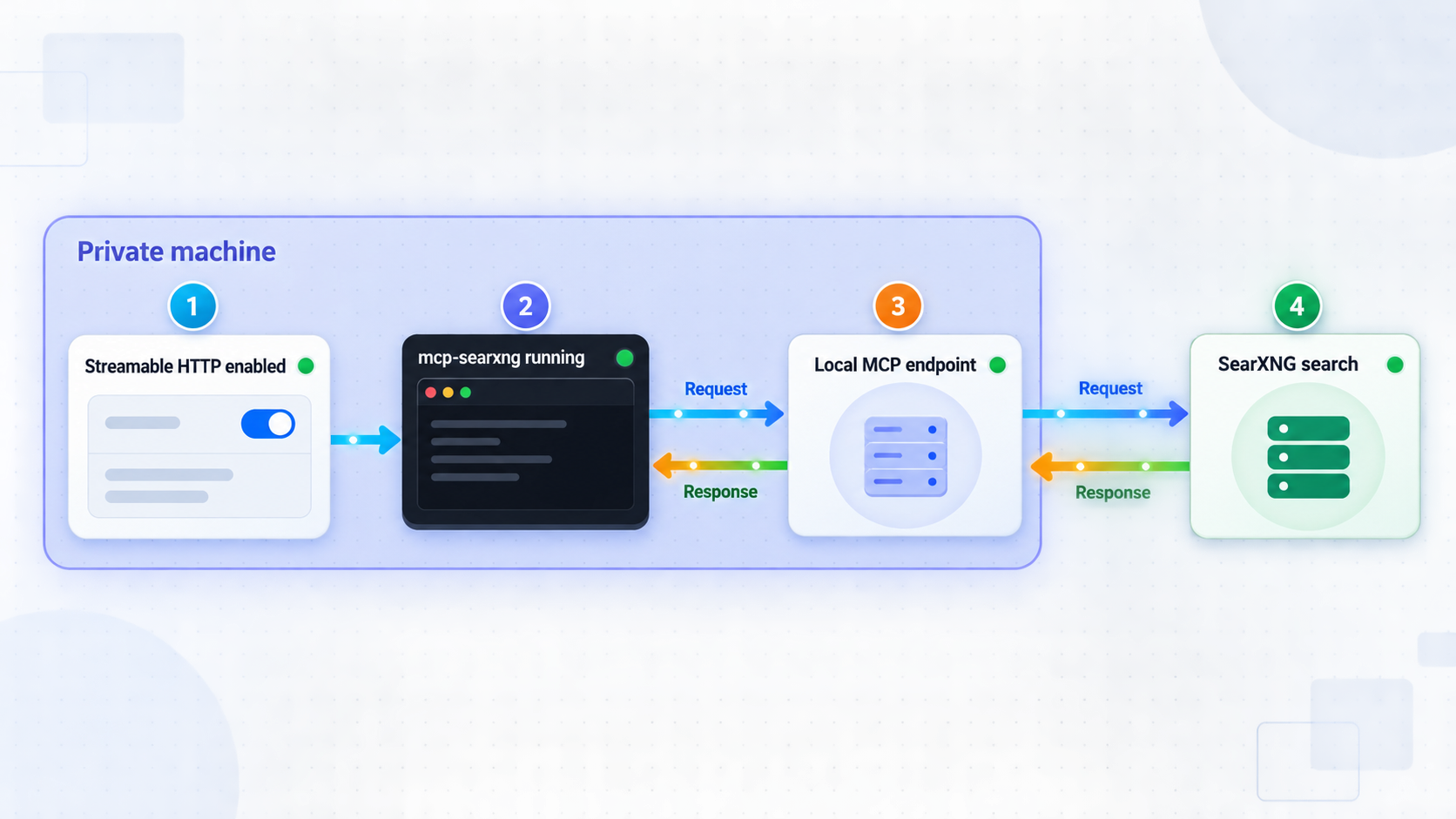
Verification should proceed in layers. First check that a process is listening on the selected port. Then verify MCP initialization and tool discovery. Finally, invoke a search tool to confirm that mcp-searxng can reach SearXNG.
1. Confirm that port 8080 is listening
On macOS or Linux, one available check is:
lsof -nP -iTCP:8080 -sTCP:LISTENOn Windows, PowerShell can inspect the local TCP listener:
Get-NetTCPConnection -LocalPort 8080 -State Listen
If the command reports no listener, return to the mcp-searxng terminal and inspect the startup error. Also confirm that MCP_HTTP_PORT was present in the environment inherited by the process.
2. Configure a compatible MCP client
Add an HTTP MCP connection using this full local URL:
http://127.0.0.1:8080/mcp
MCP clients use different names and configuration structures for remote or Streamable HTTP servers. Select the client’s Streamable HTTP connection type and provide the full URL. Do not copy a STDIO configuration containing command and args into an HTTP connection because the transport and process ownership are different.
3. Inspect the available tools
After the client initializes, inspect its MCP tool inventory. The project documents tools including:
searxng_web_searchfor searches, pagination, filters, and supported output formats.searxng_search_suggestionsfor query suggestions.searxng_instance_infofor discovering instance capabilities such as categories and engines.web_url_readfor reading a known URL as text or Markdown.
Tool discovery proves that the client and MCP server can communicate. It does not prove that the configured SearXNG instance can perform a search.
4. Run a real search tool call
Invoke searxng_web_search with this simple input:
{
  "query": "SearXNG"
}
A successful result tests the full local path from the MCP client to mcp-searxng and then to SearXNG. If tool discovery works but this call fails, focus on SEARXNG_URL, SearXNG JSON output, connectivity between the two services, and any errors returned by the search deployment.
Opening /mcp in a browser or sending an arbitrary HTTP request may produce a method, session, initialization, or protocol-related response. Streamable HTTP is an MCP transport, not an ordinary web page. Use a compatible MCP client to validate initialization, tool discovery, and a real tool call.
Connect the working HTTP service with Localtonet
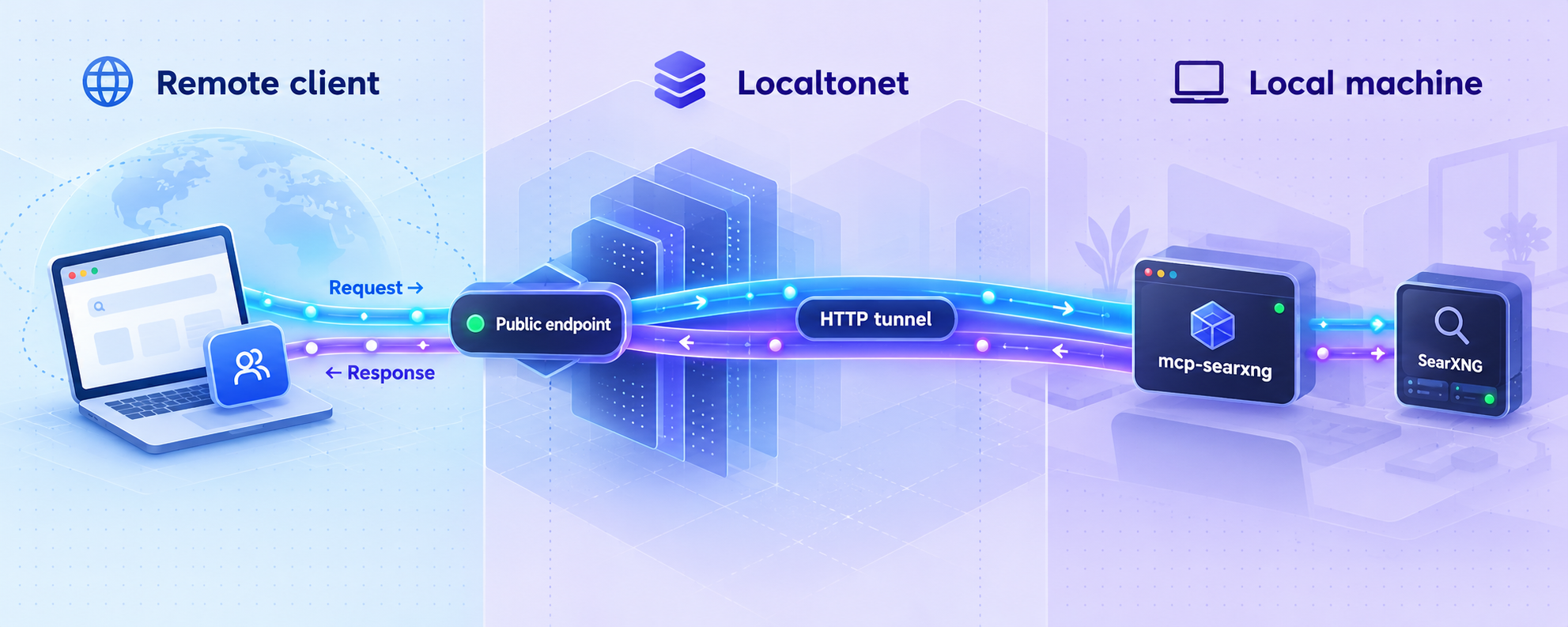
Once http://127.0.0.1:8080/mcp works locally, create an HTTP tunnel. Our client establishes an outbound connection to a Localtonet relay server, so this workflow does not require inbound router port forwarding, a public IP address, VPN setup, or firewall changes for an inbound listener.
The tunnel target is the local HTTP service at IP address 127.0.0.1 and port 8080. The /mcp route belongs to the application URL. If Localtonet assigns a base address such as https://assigned-host.example, the MCP client uses https://assigned-host.example/mcp. The displayed address in your dashboard is authoritative, so do not substitute the illustrative hostname shown here.
Install and run the Localtonet client
Run our client on the computer hosting mcp-searxng, or on a device that can reach its configured HTTP address and port. For a 127.0.0.1 target, both processes must run on the same computer.
Authenticate or select the client device
Use the device-specific authentication token through the supported client workflow, then select the connected device that will carry the tunnel. Never publish or reuse an exposed token.
Select an available relay server
Choose an available server or region from the current dashboard. Available server codes and regions can vary, so obtain the value from the product rather than copying a hardcoded example.
Create an HTTP tunnel to the local service
Select an HTTP tunnel and set its local target to IP address 127.0.0.1 and port 8080. Select the required process type from the currently available generated subdomain, selected subdomain, or custom-domain choices.
Start the tunnel
Creating the tunnel does not start it. Use the Start button and wait until the selected Localtonet client and tunnel are connected. Copy the public HTTPS URL shown for the running tunnel.
Connect the remote MCP client
Append /mcp to the assigned public URL, configure that complete address in the remote MCP client, and repeat tool discovery and the real search test. Stop or delete the tunnel when remote access is no longer required.
For the current dashboard workflow, consult our Localtonet HTTP tunnel documentation. Exact server choices and account-dependent options should always be taken from the current dashboard rather than from static examples.
Confirm mcp-searxng authentication before sharing the URL. Restrict knowledge of the address and credentials, grant access only to intended clients, monitor the local process, and stop the tunnel when it is not needed. Localtonet transports requests to the configured service, but application-level authorization remains an important part of the deployment.
Retest through the public endpoint
Successful local tests do not automatically prove that the remote path is correct. Configure the remote client with the exact public URL ending in /mcp. Verify initialization, inspect the tool inventory, and invoke searxng_web_search. This checks the remote client, public URL, Localtonet tunnel, local MCP server, and SearXNG connection together.
Operate and maintain the deployment
Keep both processes running
Remote access depends on two processes: mcp-searxng and the selected Localtonet client. The HTTP endpoint disappears if mcp-searxng stops. The public route becomes unavailable if the Localtonet client disconnects or the tunnel is stopped. Creating a tunnel configuration alone does not make it active.
A terminal session is appropriate for initial testing. For a longer-running deployment, use an operating-system or container process manager suitable for your environment. Ensure that it starts the process with the required environment values and does not print secrets into shared logs. This article does not prescribe a specific service manager because its configuration differs between operating systems and deployment policies.
Understand HTTP session behavior
The project distinguishes modern HTTP requests, legacy stateless HTTP, and retained stateful legacy sessions. Legacy Streamable HTTP sessions are stateful by default. A client using that behavior should send DELETE /mcp when finished. If it later receives HTTP 404 for a terminated session, it should initialize a new session.
Modern HTTP requests and the project’s documented stateless legacy mode are sessionless. In most cases, this behavior should be handled by a compatible MCP client rather than manually reproduced with generic HTTP commands.
Recognize concurrency limits
The documented v2.6.0 release added configurable concurrency limits for retained stateful HTTP requests. Its defaults allow 16 POST requests and 4 standalone GET streams per session, with process-wide limits of 256 for each category. Excess work returns HTTP 503 with Retry-After: 1, while DELETE remains available.
Do not interpret every HTTP 503 as a Localtonet tunnel failure. If the tunnel connects and lighter requests succeed, review mcp-searxng concurrency, session cleanup, and server workload. The project documents MCP_HTTP_MAX_* settings for tuning, but the exact names and safe values should be taken from the configuration documentation for the installed version rather than guessed.
Update deliberately
A global npm package can be updated through npm, but an update may change runtime behavior or configuration. Review release notes, test the local endpoint, and then retest the public endpoint before returning the service to regular use. Record the installed version as part of your operational inventory.
After an update, verify all four layers again:
- The executable starts with the expected environment.
- The local
/mcpendpoint initializes. - A search tool call reaches SearXNG successfully.
- The remote endpoint works through the running Localtonet tunnel.
Stop access cleanly
Disconnect MCP clients cleanly when possible, stop the Localtonet tunnel, and then stop the local service. A tunnel can also be deleted if its configuration is no longer needed. Remember that stopping the tunnel removes the public route but does not stop the local mcp-searxng process.
Troubleshoot common installation and connection failures
| Symptom | Likely area | What to check |
|---|---|---|
| npm rejects the runtime | Node.js version | Confirm that node --version reports Node.js 22 or later. |
mcp-searxng is not found |
Global npm PATH | Confirm that installation succeeded and that npm's global executable directory is on the current user's PATH. |
| No service listens on port 8080 | HTTP startup | Confirm that MCP_HTTP_PORT was set before process startup and inspect the terminal for port or configuration errors. |
| The client cannot initialize | Endpoint or transport | Use Streamable HTTP and the full URL ending in /mcp, not only the host and port. |
| Tools appear but searches fail | SearXNG connectivity | Check SEARXNG_URL, JSON search support, network reachability, and SearXNG errors. |
| The public URL fails but localhost works | Localtonet tunnel | Confirm that the client is connected, the tunnel is started, and its local target is 127.0.0.1:8080. |
| The remote client reaches the host but not MCP | Missing route | Append /mcp to the exact public URL assigned to the tunnel. |
| HTTP 404 follows a closed stateful session | Session lifecycle | Initialize a new session. A terminated legacy stateful session cannot be reused. |
HTTP 503 with Retry-After: 1 |
Server concurrency | Retry as directed, check for leaked stateful sessions, and review the project's documented HTTP concurrency controls. |
The command works interactively but not as a service
This usually indicates that the service process receives a different environment from the interactive shell. Confirm that SEARXNG_URL, MCP_HTTP_HOST, and MCP_HTTP_PORT are defined in the service manager’s environment. Also confirm that the service account can locate the globally installed executable.
Port 8080 is already in use
Stop the conflicting application or choose another available local port. If the port changes, update MCP_HTTP_PORT, the local verification URL, and the Localtonet target together. The endpoint path remains /mcp.
Local access works from one machine but not another
A process bound to 127.0.0.1 accepts connections only from the same machine. This is intentional in the workflow shown here. If the Localtonet client is installed elsewhere, it cannot reach another machine’s loopback address. Either run our client on the mcp-searxng host or deliberately configure a reachable address after reviewing firewall, network, and access-control implications.
The remote client uses a STDIO configuration
STDIO recipes normally specify a command such as mcp-searxng or npx because the client launches the server itself. A remote HTTP client should instead receive the complete HTTPS endpoint. Do not combine a command-based STDIO recipe with the tunneled HTTP URL unless the specific client explicitly documents such an arrangement.
The endpoint responds but the client reports authorization errors
Confirm that the client is configured for the authentication method enabled by mcp-searxng. A bearer-protected endpoint requires the client to send the expected credential. OAuth requires compatible client and server configuration. Do not disable protection merely to make the public test pass. Return to local-only access while correcting the authentication setup.
Frequently asked questions
Does mcp-searxng install SearXNG?
No. mcp-searxng is an MCP integration for an existing SearXNG deployment. You must provide a SearXNG base URL and ensure that JSON search is enabled.
Why can’t I tunnel the default STDIO mode?
STDIO exchanges protocol messages through a child process's standard input and output. It does not open an HTTP port. A Localtonet HTTP tunnel needs a reachable local IP address and port, so mcp-searxng must first run in Streamable HTTP mode.
What is the local MCP URL in this setup?
With MCP_HTTP_HOST set to 127.0.0.1 and MCP_HTTP_PORT set to 8080, the complete local endpoint is http://127.0.0.1:8080/mcp.
What URL should a remote MCP client use?
Use the public HTTPS address assigned to the running Localtonet HTTP tunnel and append /mcp. Copy the base address from your dashboard rather than guessing it.
Does successful tool discovery prove that SearXNG works?
No. Discovery proves that the MCP client can communicate with mcp-searxng. Run a real searxng_web_search call to test connectivity from mcp-searxng to the configured SearXNG service.
Is the public Localtonet URL enough to secure the server?
No. Treat the URL as an address, not as an authentication mechanism. mcp-searxng supports static bearer and optional OAuth protection for HTTP deployments. Configure a supported method for the installed version and verify client compatibility before exposing the service.
Must the Localtonet client run on the same computer?
It must run on the same computer when the target is 127.0.0.1. Our client can also target a service reachable from its device, but that requires a non-loopback address and deliberate network access configuration.
Will the tunnel remain available after I close mcp-searxng?
The tunnel may still be running, but it will have no working local HTTP service to forward requests to. Remote access requires both mcp-searxng and the selected Localtonet client and tunnel to remain active.
Connect your local mcp-searxng endpoint with Localtonet
After the local /mcp endpoint initializes and completes a real search, create an HTTP tunnel to 127.0.0.1:8080 and give your authorized remote MCP client the assigned HTTPS URL with /mcp appended.


