

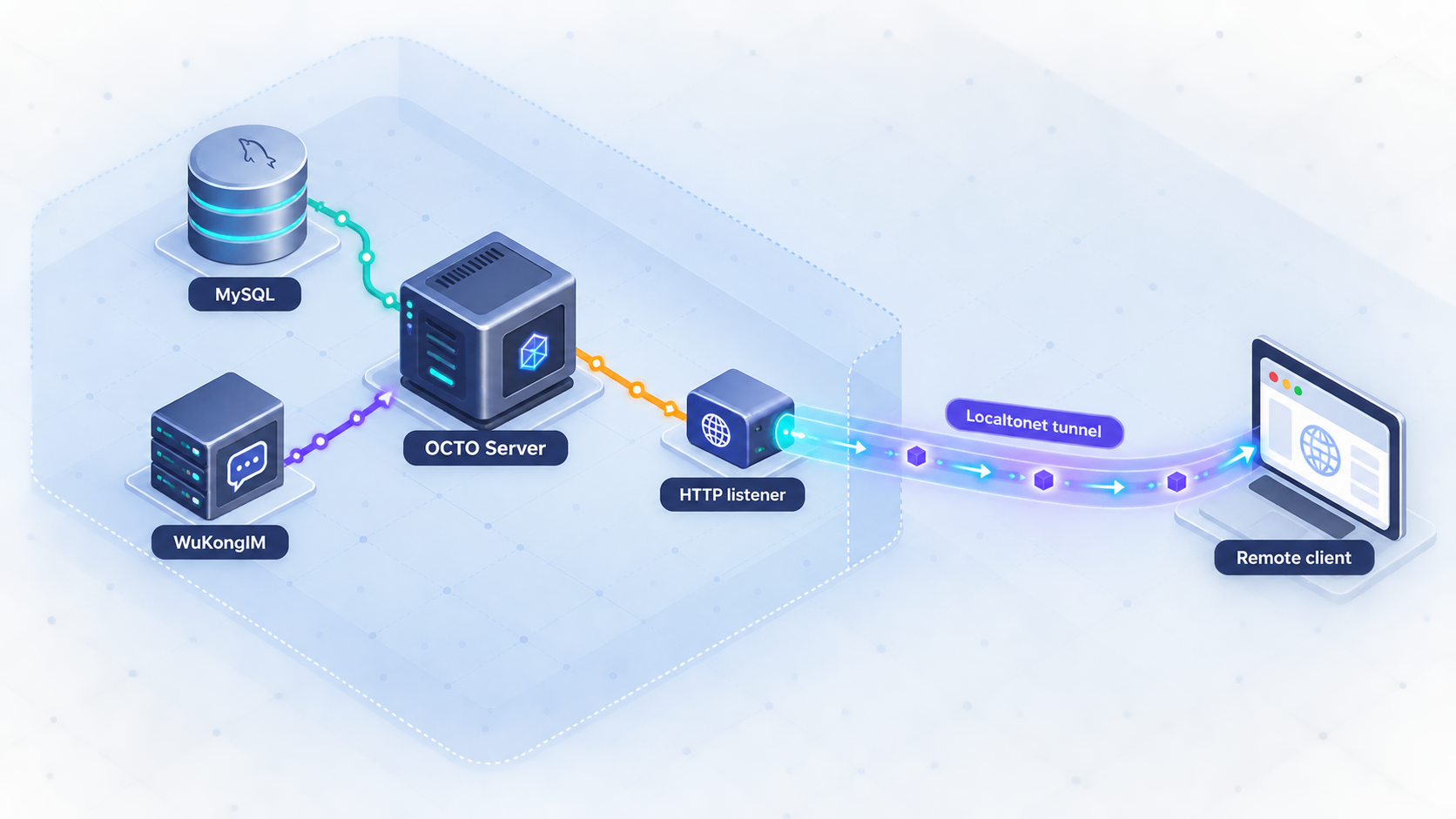
Build the OCTO backend locally, connect its required services, and expose only the intended HTTP API
OCTO Server is the Go backend at the center of the OCTO collaboration platform. It provides REST and WebSocket APIs, coordinates application business logic and AI-agent workflows, and controls real-time messaging through WuKongIM. In this guide, we build OCTO Server from source, prepare its MySQL-compatible database and WuKongIM dependencies, verify the running process locally, and then add remote HTTP access with Localtonet. Because the project does not publish a universal REST port in the available installation instructions, we will identify the correct address and port from the configuration actually used by your installation rather than assume a default.
📋 What's in this guide
What OCTO Server does and where it fits
OCTO is an open-source collaboration platform designed for people and AI agents to work through shared spaces, channels, threads, and related collaboration services. OCTO Server is the central Go backend. Web, administration, and mobile clients communicate with it through REST and WebSocket interfaces, while the server coordinates business operations, access control, agent scheduling, adapters, storage, and messaging.
The server is not a complete standalone collaboration stack by itself. A source installation using the bundled development configuration expects a MySQL-compatible database and a locally reachable WuKongIM instance. The wider OCTO ecosystem can also include the web client, admin console, task or matter service, smart-summary service, Redis, MinIO, adapters, and a reverse proxy. Those additional components are relevant to a complete platform deployment, but they are not all required merely to compile the OCTO Server binary.
A normal request enters OCTO Server, is authenticated and authorized, invokes the appropriate business operation, and may cause a message to be sent through WuKongIM or an agent session to be created or resumed. The response is then returned as JSON or a WebSocket frame. This separation matters when troubleshooting: a listening HTTP process proves only that the API socket opened. It does not prove that database queries, messaging, authentication, or agent operations are healthy.
OCTO documents port 6979 as the default for its WuKongIM gRPC callback listener configured through grpcAddr. That does not establish port 6979 as the REST or WebSocket API port. Use the HTTP listener defined by your active configuration when testing OCTO or creating a Localtonet HTTP tunnel.
Prerequisites for a source installation
Prepare the build host and both required services before compiling the backend. The host can be a development machine or a server, but it must be able to reach the configured database and WuKongIM endpoints. The Localtonet client is not needed until the local installation works.
| Requirement | Why it is needed | How to validate it |
|---|---|---|
| Git | Clones the OCTO Server source repository. | Run git --version and confirm that Git returns a version. |
| Go toolchain | Downloads Go modules and compiles the server binary. | Run go version, then compare the installed toolchain with the requirement declared by the repository's go.mod. |
| MySQL-compatible database | Provides persistent SQL storage for the server repositories and migrations. | Confirm that the database is running and reachable from the OCTO host using the exact host, port, database, and account you plan to place in the OCTO configuration. |
| WuKongIM | Provides the real-time messaging core controlled by OCTO Server. | Confirm that the WuKongIM service is running and reachable using the endpoint required by the OCTO configuration. |
| Writable build directory | Stores the cloned repository, downloaded modules, and compiled binary. | Clone and build as a non-privileged user that can write to the selected directory. |
| Localtonet client | Creates outbound connectivity to our relay after local verification. | Install it later on the OCTO host or another device that can reach the OCTO HTTP listener. |
Choose a deployment scope before continuing
This guide follows the standalone source-build path documented by OCTO Server. It is appropriate when you want direct control over the Go binary and its YAML configuration, or when you are developing the backend. It does not silently install every service in the broader OCTO ecosystem.
If you need the complete multi-service OCTO environment, the project directs users to its official deployment repository rather than the older Compose directories that once lived in the server repository. That full stack can include the server, web client, admin interface, matter and smart-summary services, WuKongIM, MySQL, Redis, MinIO, and nginx. Deployment definitions change independently, so use the deployment repository associated with the OCTO revision you select rather than copying an obsolete Compose file from an older article.
Determine the required Go version safely
The available source-installation evidence does not establish one timeless Go version for every OCTO release. After cloning, inspect the go and any toolchain declarations in go.mod. Install a compatible Go toolchain before building. This is more reliable than hardcoding a version that may become incorrect as the repository evolves.
Prepare private service credentials
Create or select a MySQL-compatible database and a database account suitable for OCTO. The supplied evidence does not establish a universal database name, username, password, SQL bootstrap command, or grant set, so this guide does not invent them. Use values that match the current configuration template and follow least privilege. Likewise, obtain the actual WuKongIM endpoint and any authentication material from your WuKongIM deployment.
The configuration may contain database credentials, messaging credentials, callback authentication material, internal service addresses, or other sensitive values. Do not commit a populated local or production configuration to a public repository. Restrict file permissions and use your deployment environment's supported secret-management method where possible.
Clone and build OCTO Server from source
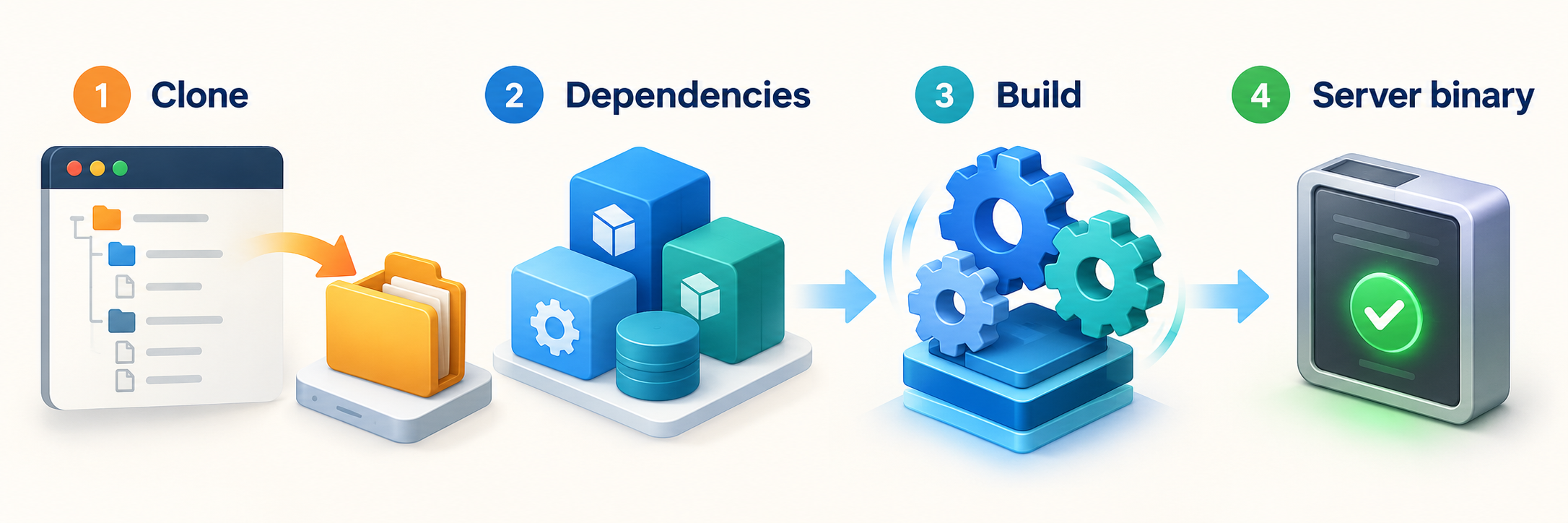
The documented quickstart uses four shell commands: clone the repository, enter the checkout, compile the current source into an octo-server executable, and launch that executable with the bundled configs/tsdd.yaml configuration. Before the final command, review and update the configuration as described in the next section.
Clone the OCTO Server repository
Download the source from the official repository. Run this from the parent directory where you want the checkout to be created.
git clone https://github.com/Mininglamp-OSS/octo-server.gitEnter the repository
Change into the cloned project directory so that Go can find go.mod, the source tree, and the bundled configuration.
cd octo-serverBuild the server binary
Compile the package in the repository root and write the executable as octo-server. Go may download the modules declared by the project during the first build.
go build -o octo-server .Run the binary with the bundled configuration
After configuring MySQL and WuKongIM, start the executable with the documented standalone configuration path.
./octo-server --config ./configs/tsdd.yaml
A successful go build proves that the checked-out source compiled with the installed toolchain. It does not prove that runtime dependencies are available. Database connectivity, schema compatibility, WuKongIM connectivity, callback authentication, bind addresses, and other runtime settings are evaluated when the process starts or when affected operations are used.
For a repeatable deployment, choose a deliberate OCTO release or commit instead of allowing an unattended production build to follow a moving development branch. Record the selected revision alongside your deployment configuration. Release v1.21.0 is present in the supplied project evidence, but you should still confirm that the server revision is compatible with the clients, deployment definitions, migrations, and companion services you intend to run.
The command uses the relative configuration path ./configs/tsdd.yaml. It therefore assumes the current working directory is the repository root. If a service manager starts the binary from another directory, use an appropriate working directory or an explicit configuration path supported by your deployment. Do not assume an interactive-shell path will remain valid under automation.
Configure MySQL, WuKongIM, and the OCTO listeners
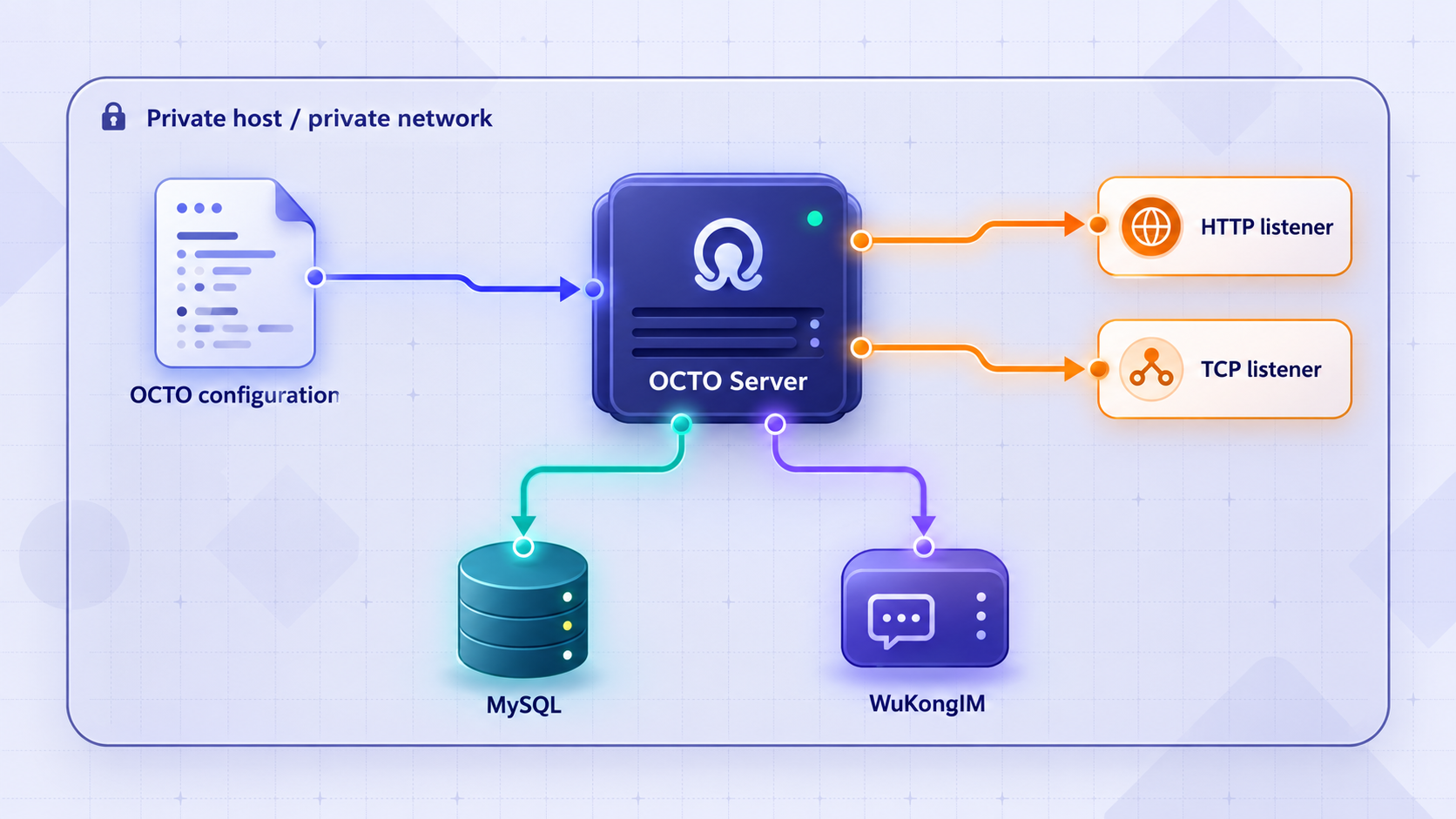
Open configs/tsdd.yaml and treat it as the authoritative template for the checked-out revision. Configuration schemas can change between releases, so retain the existing key names and structure. Replace only values you understand, and keep a backup of the original template for comparison.
The available evidence confirms that the default development configuration expects local WuKongIM and a MySQL-compatible database. It does not provide enough detail to reproduce every YAML key and accepted value safely in this article. Rather than publish guessed field names, use the comments and examples in the bundled template to identify the database, WuKongIM, API listener, callback listener, and authentication settings for your exact revision.
MySQL-compatible database settings
Locate the SQL or database section in the YAML template and set it to the database you prepared. Confirm the hostname from the OCTO process's point of view. If MySQL runs on the same host as a directly executed OCTO binary, that may be a loopback address. If OCTO runs in a container, 127.0.0.1 refers to that container itself, not automatically to the database container or host.
Verify the configured port, database name, account, password, and any transport options represented by the current template. Do not expose the MySQL listener through Localtonet for this HTTP workflow. OCTO Server should connect to MySQL privately, and remote users should interact with the authenticated application API rather than the database protocol.
The repository includes SQL migrations, but the supplied quickstart excerpt does not establish whether every selected revision applies them automatically, requires a command, or expects an external deployment process to manage them. Watch startup output for migration messages and errors. Do not manually mark migrations complete or modify migration state unless the documentation for your selected revision explicitly requires it.
WuKongIM settings
Find the WuKongIM or IM section in the same template and configure the endpoint that OCTO Server can reach. The control-plane relationship is separate from the public OCTO client API. Validate network reachability from the OCTO host and ensure that any required WuKongIM credentials or tokens match on both sides.
OCTO also has a gRPC callback listener represented by grpcAddr. Its documented default port is 6979. Callback authentication is controlled by TS_GRPC_AUTH_TOKEN and TS_GRPC_AUTH_REQUIRED. If TS_GRPC_AUTH_REQUIRED=true is set without a token, OCTO Server refuses to start. This fail-closed behavior is important when diagnosing an immediate startup failure.
Port 6979 belongs to the documented WuKongIM callback path, not the main REST interface. Keep callback traffic on a trusted network unless your architecture explicitly requires otherwise and has suitable authentication and access restrictions. The Localtonet configuration later in this guide must target the actual OCTO HTTP listener.
Find the REST and WebSocket bind address
Identify the HTTP-related listener in the active YAML rather than relying on a port from another deployment. You can inspect likely listener terms with the following read-only search on systems that provide grep:
grep -nE 'listen|addr|address|port|http|websocket|ws' configs/tsdd.yaml
Review matches in context. A search result may refer to a dependency, callback service, metrics endpoint, or another internal listener, so do not select a port solely because it contains the word port. Correlate the setting with startup logs and the configuration comments. Record the final HTTP host and port because they become the Localtonet tunnel's local target.
If remote devices on your LAN must reach OCTO directly, its bind address must permit that according to the project's configuration. If only the Localtonet client on the same machine needs access, a loopback-bound service can reduce unnecessary LAN exposure. Do not change a loopback binding to all interfaces merely to make tunneling work when our client runs on the same host.
Review authentication and authorization
OCTO request processing supports authentication and organization-aware authorization, including role and channel controls. The presence of authentication code does not guarantee that your selected development configuration is hardened for internet use. Confirm how users are provisioned, how sessions or tokens are issued, which origins are allowed, and which API surfaces are enabled before remote exposure.
WebSocket authentication deserves separate testing because a successful REST request does not prove that a WebSocket client can authenticate, upgrade, and exchange frames correctly. Use the actual OCTO client or a WebSocket tool with the authentication method expected by your selected server revision. Never place real session tokens in screenshots, shell history, issue reports, or shared logs.
Start OCTO Server and verify it locally
Start MySQL and WuKongIM first, then run OCTO Server from the repository root:
./octo-server --config ./configs/tsdd.yamlKeep the terminal visible during the first startup. Read the earliest error rather than focusing only on the final process exit. A database authentication error, unreachable WuKongIM endpoint, invalid YAML value, occupied port, or missing callback token can cause later messages that obscure the original problem.
Verify the process and listening socket
Confirm that the process remains running after initialization. On Linux systems with the ss utility, the following command lists listening TCP sockets and their associated processes when permissions allow:
ss -ltnp
On macOS or other systems with lsof, you can inspect TCP listeners with:
lsof -nP -iTCP -sTCP:LISTEN
Find the OCTO process and compare its listener with the address and port in configs/tsdd.yaml. Do not use 6979 unless you are intentionally checking the gRPC callback listener.
Exercise a documented REST route
Use a route documented by the exact OCTO revision or used by its official client. The supplied evidence does not establish a universal unauthenticated health path, so this guide does not invent one. Send the request to the local HTTP origin and include valid authentication when the route requires it.
A response such as 401 Unauthorized or 403 Forbidden can still prove that the HTTP server is reachable and that authorization is active, although it does not prove the intended user flow works. A successful functional check should use an expected route and verify its response body, status, and resulting behavior.
Test a real database-backed operation
A socket check alone cannot validate MySQL. Perform an operation that requires stored application data, such as an authenticated read through an officially supported client or API route. Then review the OCTO logs and MySQL logs for connection, permission, migration, or query errors.
Test messaging and WebSocket behavior
Connect through an OCTO client or a documented WebSocket workflow, authenticate, and perform a messaging action that reaches WuKongIM. Confirm that the connection remains open and that messages or presence behavior work as expected. This validates more of the chain than a simple HTTP response:
client to OCTO HTTP or WebSocket listener, OCTO authentication and authorization, OCTO business logic, OCTO to WuKongIM connectivity, and the return path to the client.
| Endpoint or service | Port source | Remote-access decision |
|---|---|---|
| OCTO REST API | Read from the active OCTO configuration and confirm in startup output. | This is the intended Localtonet HTTP target when remote API access is required. |
| OCTO WebSocket API | Determine from the active configuration and client setup. Do not assume a separate port. | Validate the upgrade and authentication path through the public HTTP address before relying on it. |
| WuKongIM gRPC callback | grpcAddr, with documented default port 6979. |
Keep private for this workflow. It is not the main HTTP API. |
| MySQL-compatible database | Read from the database configuration. | Keep private and permit access only from trusted application hosts. |
| WuKongIM service endpoint | Read from the OCTO and WuKongIM configurations. | Keep private unless a separately designed client architecture requires exposure. |
Expose the verified OCTO HTTP service with Localtonet
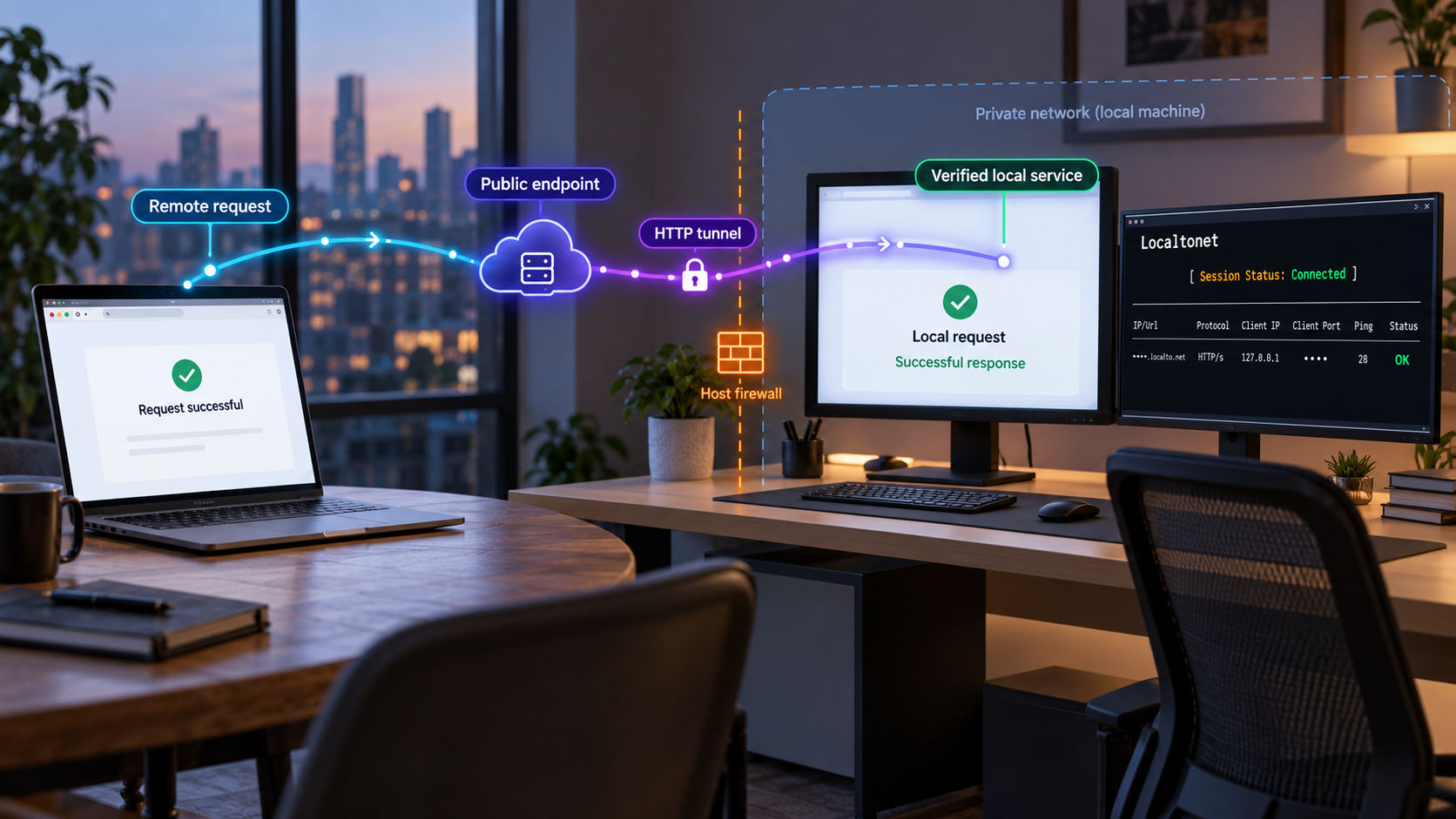
Add remote access only after local REST and WebSocket behavior is understood. With Localtonet, the client on your device establishes an outbound connection to one of our relay servers. This lets you publish a local service without inbound router port forwarding, firewall changes, VPN setup, or a public IP address.
For this workflow, create an HTTP tunnel pointing to the verified OCTO API address and port. The public endpoint remains available only while the selected Localtonet device is connected and the tunnel is running.
Install and run the Localtonet client
Install our client on the OCTO host or on another device that can reach the OCTO HTTP listener. When using a different device, test connectivity from that device before creating the tunnel.
Authenticate or select the client device
Use the device-specific authentication token supplied through your Localtonet account and select the device that will run the tunnel. Keep the token private and never place it in application configuration, article examples, or public logs.
Select an available relay server
Choose a server or region currently offered in the dashboard. Available server codes can vary, so obtain the value from the current product interface rather than copying a hardcoded code from a tutorial.
Create the HTTP tunnel configuration
Select an HTTP tunnel and enter the local IP address and the verified OCTO HTTP port. If our client runs on the same host and OCTO listens on loopback, use the corresponding loopback target. Do not enter the MySQL, WuKongIM, or port 6979 callback endpoint.
Start the tunnel and test the assigned address
Creating a tunnel does not start it. Press Start, then use the assigned public URL to test an expected OCTO REST request. Test the authenticated WebSocket workflow separately if your OCTO client depends on it.
Stop or delete access when it is no longer needed
Stop the tunnel to remove active public reachability while retaining its configuration, or delete it when the endpoint should no longer exist. Also stop the local OCTO process if the environment is no longer in use.
HTTP tunnels can use a generated subdomain, a selected subdomain where supported, or a custom domain. Domain availability and DNS requirements can vary, so check the current dashboard and documentation before planning an exact hostname. Do not assume that every domain option, region, or capability is included in every subscription plan.
For the current product workflow, consult our Localtonet HTTP tunnel documentation. The tunnel configuration should contain only the local OCTO target. Database and messaging service credentials remain in their protected application environment.
Saving a Localtonet tunnel is not the same as running it. The selected client must remain connected, and the tunnel must be started. If the public URL stops responding, check the OCTO process, local connectivity, Localtonet client status, and tunnel status as separate layers.
Security practices before internet access
A public tunnel makes the selected application listener reachable from the internet. It does not replace OCTO's application authentication or authorization. Before sharing the URL, confirm that anonymous requests cannot access protected users, organizations, channels, files, messages, administration functions, or agent actions.
Expose one intended listener
Point the tunnel only to the OCTO HTTP service. Keep MySQL, WuKongIM internals, Redis, MinIO administration surfaces, and gRPC callbacks on private networks unless a separately reviewed architecture requires them. A broad host-level exposure is unnecessary when the actual requirement is remote access to one HTTP application.
Use least-privilege identities
Give the OCTO database account only the access required by the server and its supported migration process. Give users, administrators, adapters, and agents only the roles and channel permissions they need. Review organization isolation, channel access rules, and agent identity controls using realistic accounts rather than testing only with an administrator.
Protect tokens and sessions
Keep OCTO API credentials, cookies, WebSocket authentication material, WuKongIM credentials, database passwords, callback tokens, and the Localtonet device token out of source control. Redact them from command output and support bundles. If a secret is exposed, rotate it rather than merely deleting the visible copy.
Validate browser-origin behavior
A public hostname can change how browser clients evaluate origins, cookies, redirects, and WebSocket URLs. Test sign-in, sign-out, session expiry, API requests, file operations, and WebSocket reconnection through the public address. Avoid permissive cross-origin settings unless the OCTO deployment documentation for your revision explicitly requires them and you understand the consequences.
Use supported release combinations
OCTO Server works with multiple clients and companion services. Keep their revisions compatible and review release changes before upgrades. Back up the database and relevant object data before applying migrations or changing deployment definitions. Test an upgrade in a non-production environment when possible.
The bundled configuration is intended to support the standalone development path. Review every listener, credential, authentication mode, allowed origin, dependency address, and log setting before treating the installation as production-ready. Do not expose the service merely because it compiled and returned a local response.
Routine operation and troubleshooting
Starting the service
Start the database and WuKongIM before OCTO Server. Then start the OCTO binary with its intended configuration. Finally, start the Localtonet client and tunnel if remote access is required. This dependency order makes failures easier to interpret.
For unattended use, run each component under the service-management system appropriate to your operating system or deployment platform. The supplied OCTO quickstart does not prescribe one universal service-manager unit, working directory, restart policy, or operating-system account, so this guide does not invent those definitions. Whatever manager you choose should use an unprivileged account, a stable configuration path, protected secrets, controlled restart behavior, and persistent logs.
Stopping the service safely
Stop public access first if you want to prevent new remote requests. Allow active work to finish where your operational environment supports graceful shutdown, then stop OCTO Server. Stop shared dependencies only after confirming that no other services use them.
Updating the source build
Before updating, record the currently deployed revision and back up the database and other persistent data. Review release notes and migration requirements for the target version. Build the new revision separately, validate its configuration, and test it against a safe environment before replacing the running binary. A source pull followed by an immediate production restart is difficult to roll back safely.
The Go build fails
Confirm that you are in the repository root and that go.mod is present. Compare go version with the declarations in that file. Read the first compiler or module-download error. Network failures, incompatible Go versions, missing private network access, or a partially changed source tree require different fixes.
The server exits immediately
Check YAML syntax, database reachability, WuKongIM reachability, occupied listener addresses, and required authentication values. Specifically verify the callback configuration: when TS_GRPC_AUTH_REQUIRED=true, a callback token must be configured or the server refuses to start.
The database connection fails
Test from the OCTO host, not only from the database host. Verify the configured hostname, port, database, username, password, network policy, and transport requirements. In a containerized environment, reconsider any use of localhost. Also check whether the selected account is permitted to connect from the OCTO host identity.
The server listens locally but the tunnel fails
First test the OCTO target from the exact device running our client. If Localtonet runs on another machine, its 127.0.0.1 is not the OCTO host. Use an address reachable from that client device and permit the connection through local network controls.
Next, confirm that the device is connected in Localtonet, the tunnel is started, and the local target contains the OCTO HTTP port rather than port 6979 or the database port. A timeout usually indicates that some layer cannot establish a connection. An HTTP authorization response usually means the network path works and application authentication needs attention.
REST works but WebSocket does not
Verify that the client uses the public HTTP origin consistently when constructing its WebSocket URL. Check authentication during the upgrade, allowed origins, proxy-aware settings represented by the OCTO configuration, and server logs at connection time. A successful ordinary GET request does not validate WebSocket framing, session propagation, or long-lived connection behavior.
Messaging operations fail
Separate the client-to-OCTO path from the OCTO-to-WuKongIM path. If the API accepts a request but messaging does not complete, inspect OCTO and WuKongIM logs, endpoint configuration, credentials, callback connectivity, and callback authentication. Do not respond by exposing WuKongIM or the callback listener publicly unless the documented architecture specifically calls for it.
The public URL stopped working
Check the layers in order: OCTO process, local HTTP request, Localtonet client connection, tunnel running state, and public request. The public endpoint is available only while the selected device is connected and the tunnel is running. Also verify that the OCTO listener did not change after a configuration edit or restart.
Frequently asked questions
What port does OCTO Server use for its REST API?
The supplied installation evidence does not establish a universal REST port. Read the HTTP listener from the active configs/tsdd.yaml file and confirm it in startup output or the operating system's listening-socket list. Do not assume port 6979, because that is documented as the default WuKongIM gRPC callback port.
Does OCTO Server require MySQL and WuKongIM?
The documented default development configuration expects a MySQL-compatible database and a local WuKongIM instance. MySQL supplies persistent application storage, while WuKongIM provides the real-time messaging core controlled by OCTO Server.
Can I run OCTO Server without the full OCTO stack?
You can build and launch the standalone server from source using the documented quickstart, but its configured dependencies must still be available. A usable end-user platform may require web or mobile clients and other companion services. For the complete multi-service environment, use the official OCTO deployment project that matches your selected revisions.
Should I expose MySQL or WuKongIM through the same tunnel?
No. This workflow publishes only the intended OCTO HTTP API. Keep MySQL, WuKongIM internals, and the gRPC callback listener private. If a separate architecture genuinely requires remote access to another protocol, design and secure that exposure independently rather than adding it to the HTTP tunnel.
Why does OCTO Server refuse to start when gRPC authentication is enabled?
OCTO documents that setting TS_GRPC_AUTH_REQUIRED=true without a TS_GRPC_AUTH_TOKEN causes the server to refuse startup. Configure a protected matching token according to the callback documentation, or review whether that authentication mode is configured correctly for your environment. Do not disable protection merely to hide the error.
Does creating a Localtonet tunnel immediately make OCTO public?
No. Creating the configuration does not mean the tunnel is running. The selected Localtonet device must be connected and the tunnel must be started. The public URL remains available only while those conditions continue to be met.
Does a Localtonet HTTP tunnel replace OCTO authentication?
No. The tunnel provides network reachability to the selected local service. OCTO must still enforce suitable authentication, organization-aware authorization, channel permissions, agent identity restrictions, session handling, and any other application controls required by your deployment.
Can the Localtonet client run on a different device from OCTO Server?
Yes, provided that the client device can reach the OCTO HTTP address and port. Remember that 127.0.0.1 always refers to the device on which the connection originates. When our client runs elsewhere, use a private address reachable from that client and apply appropriate local firewall restrictions.
Give your verified OCTO API a controlled public endpoint
Once OCTO Server, MySQL, and WuKongIM work locally, install our client, create an HTTP tunnel to the confirmed OCTO listener, and start the tunnel when remote access is needed.
Get Started Free →

