

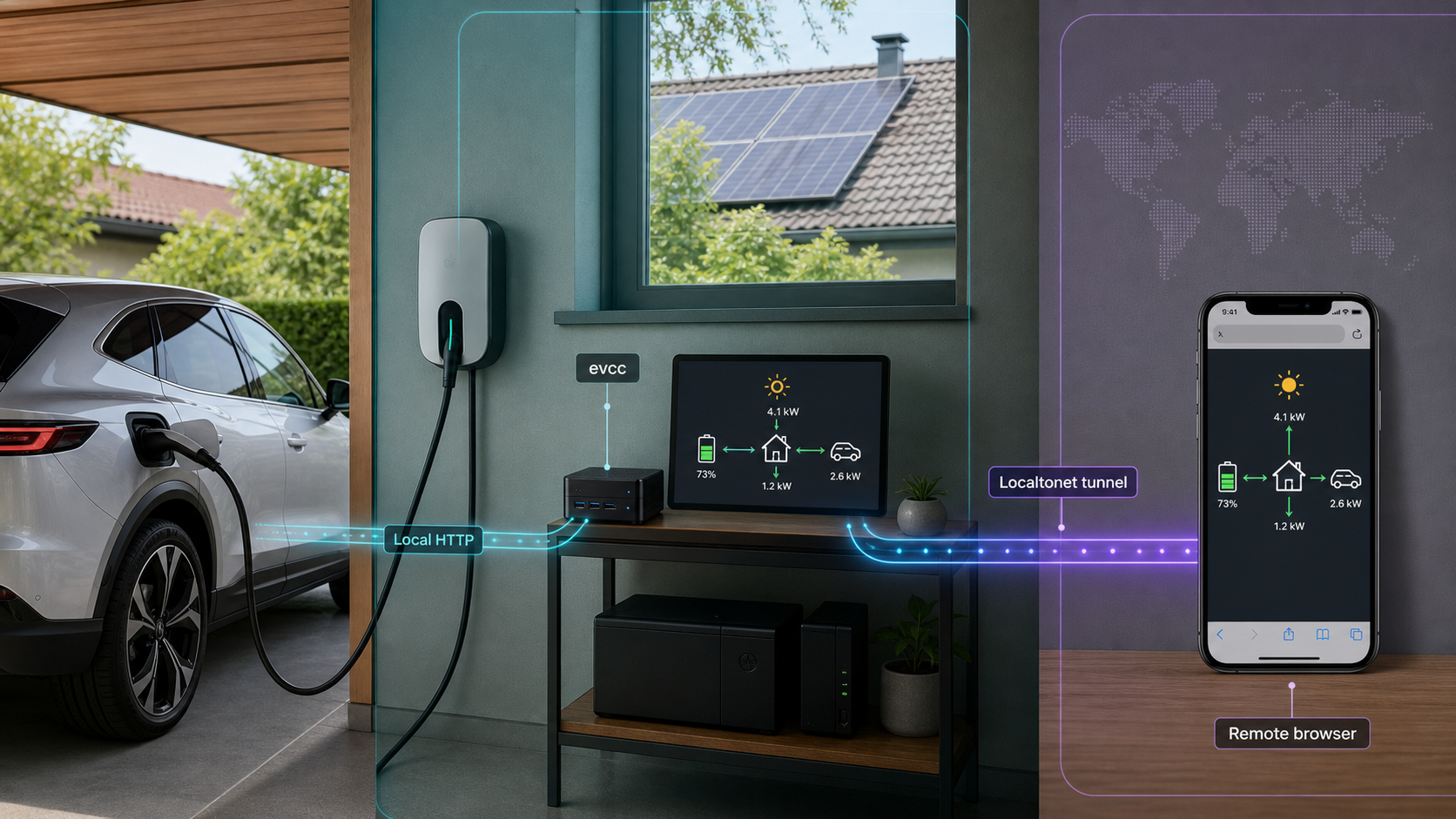
Run EV charging and home energy management locally, then make the verified web interface available when you are away
evcc is an open-source EV charge controller and home energy management system designed to run on hardware you control. This guide explains how to plan an evcc installation, configure the devices in your energy system, verify the browser interface locally, and operate the service safely. Once the local installation works, we show how to expose its HTTP interface with Localtonet without inbound router port forwarding, firewall changes, VPN setup, or a public IP address. Exact evcc installation commands, paths, ports, and credentials are deliberately not guessed because those details are not established by the available official evidence and may depend on the installation method you select.
📋 What's in this guide
What evcc does and where Localtonet fits
evcc is an extensible EV charge controller and home energy management system. Its stated goal is to provide local energy management without depending on cloud services. It runs on hardware at your property, gathers information from compatible energy devices, and uses that information to coordinate charging and other controllable loads.
A typical deployment can combine grid import and export measurements, solar production, household consumption, a home battery, an EV charger, and vehicle state information. Depending on the equipment and configuration, evcc can use these inputs for solar-surplus charging, dynamic electricity tariffs, charging plans, load management, battery coordination, and control of supported heat pumps or electric heaters.
evcc provides a responsive browser-based interface for monitoring and control. It also documents REST and MQTT APIs for integration with home automation systems. The browser interface is the relevant part of this Localtonet workflow: first we establish that the evcc HTTP service works on the local network, and only then do we create an HTTP tunnel pointing to that same local service.
Why local verification comes first
A tunnel forwards traffic to an existing service. It does not install evcc, generate a working evcc configuration, connect a charger, or repair communication between evcc and an energy meter. If the local page is unavailable, incomplete, or returning errors, the public URL normally cannot correct the underlying condition.
This separation gives the setup a clear boundary. Everything through local startup and browser verification belongs to the evcc installation. Localtonet is a distinct remote-access step performed only after the local target address is known and tested.
The supplied release information for evcc 0.315.0 says that its Remote Access feature was no longer experimental in that release. The evidence available for this guide does not establish that feature's setup procedure, access controls, or relationship to every installation method. This article therefore documents the separate Localtonet HTTP-tunnel workflow rather than attempting an unsupported feature comparison.
Prerequisites and deployment planning
An evcc deployment is more than a web application installation. The host must be able to communicate with the chargers, meters, inverters, batteries, heat pumps, vehicles, or online services referenced by the configuration. Before installing software, identify the components you expect evcc to read or control and determine how each one is reachable.
The official evcc site identifies Raspberry Pi, Docker, and other environments as ways to get started. The project repository also contains packaging material and a Dockerfile. Those facts confirm that multiple deployment approaches exist, but they do not establish one universal command sequence, image invocation, compose file, operating-system package, service name, data path, configuration path, or default network port.
The evidence supplied for this draft points readers to the official evcc documentation but does not include its platform-specific installation pages. It would be unsafe to infer a Docker command from a repository badge or to invent package commands, volume mappings, ports, file paths, service names, environment variables, or startup flags. Select a currently documented evcc installation path for your platform and preserve the exact commands and paths shown there.
Host requirements to establish before installation
- A continuously available host: choose hardware that can remain powered while charging automation is expected to operate.
- Network reachability: the host must be able to reach locally connected energy devices and any external services required by the chosen integrations.
- Stable addressing: devices referenced by network address should not unexpectedly move to another address. Use an appropriate reservation or static-addressing strategy supported by your network.
- Administrative access: you need enough access to install the officially supported evcc package or runtime and to review its logs.
- Device documentation: collect connection details for the charger, meter, inverter, battery, vehicle, or heating system you intend to configure.
- A browser for testing: local verification must happen before configuring the public tunnel.
- A Localtonet client location: the client must run either on the evcc host or on another device that can reach the evcc HTTP service over the local network.
Choose an installation model intentionally
| Installation model | What to confirm in current evcc documentation | Remote-access implication |
|---|---|---|
| Raspberry Pi or similar dedicated host | Supported operating system, package procedure, configuration location, service management, and update process | The Localtonet client can run on the same host if a compatible client is available, or on another local device that can reach evcc |
| Docker-based deployment | Official image reference, required mappings, network mode, persistent storage, startup arguments, and upgrade procedure | The tunnel must target an address and port actually reachable from the Localtonet client, not an unexposed container-only endpoint |
| Other documented package or service | Platform compatibility, exact installation command, service identity, permissions, paths, and listening behavior | The same local target used successfully in a browser becomes the Localtonet HTTP target |
| Source build | Current compiler and frontend prerequisites, build commands, generated artifacts, and runtime procedure | Building from source does not change the need to verify a stable local HTTP endpoint before tunneling |
For most operators, the best installation model is the current officially documented path that fits the existing host and that they can maintain confidently. A source build is usually more appropriate for contributors or operators with a specific reason to compile the project. The existence of source code should not be treated as evidence that a source build is the recommended production route.
Install and start evcc without guessing platform details
Because the available official extract does not establish exact platform commands, this guide cannot responsibly provide a copy-and-paste installer. It can, however, define the complete installation outcome and the checks that apply to any supported method. Use the current evcc getting-started documentation for the selected platform, then complete the following installation sequence using the exact package names, commands, paths, and service controls shown for that method.
Select one current official installation path
Choose the documented method for the host you will operate, such as the appropriate Raspberry Pi, Docker, or other supported deployment path. Do not combine commands or configuration conventions from different methods.
Install the documented release and dependencies
Follow the selected evcc procedure exactly. Preserve its package source, image name, architecture requirements, permissions, persistent-storage instructions, and dependency versions. If the documented procedure differs from an older community tutorial, prefer the current official procedure.
Create or initialize the evcc configuration
Use the configuration mechanism documented for the selected installation. Do not assume a configuration filename or directory. Ensure that the account running evcc can read the configuration and any required local resources without granting broader permissions than necessary.
Start evcc using the documented service mechanism
Start the package, container, or service according to the chosen method. Record how to inspect status and logs, because those are the first diagnostic tools if the browser interface does not become available.
Confirm that the process stays healthy
Check the documented status output and startup logs. Resolve syntax errors, missing permissions, unsupported options, or device-connection failures before enabling automatic startup or remote access.
A successful installation has four observable results: the evcc process remains running, its configuration can be loaded, its local web interface opens at the documented address, and the expected devices either report data or produce a specific diagnostic message that can be investigated. Merely seeing a process in a task list is not enough.
Version awareness
The supplied release evidence identifies evcc 0.315.0 as a release containing new features, breaking changes, and many device-specific updates. This demonstrates why installation and upgrade procedures should be tied to the version actually being deployed. Do not assume that examples written for another release have identical configuration keys or behavior.
Before an upgrade, review the intervening release notes for breaking changes that affect your configuration or integrations. Preserve a recoverable copy of the working configuration and any persistent state according to the official instructions for your installation method. After upgrading, repeat local verification before relying on remote access or unattended charging behavior.
Configure the energy system methodically
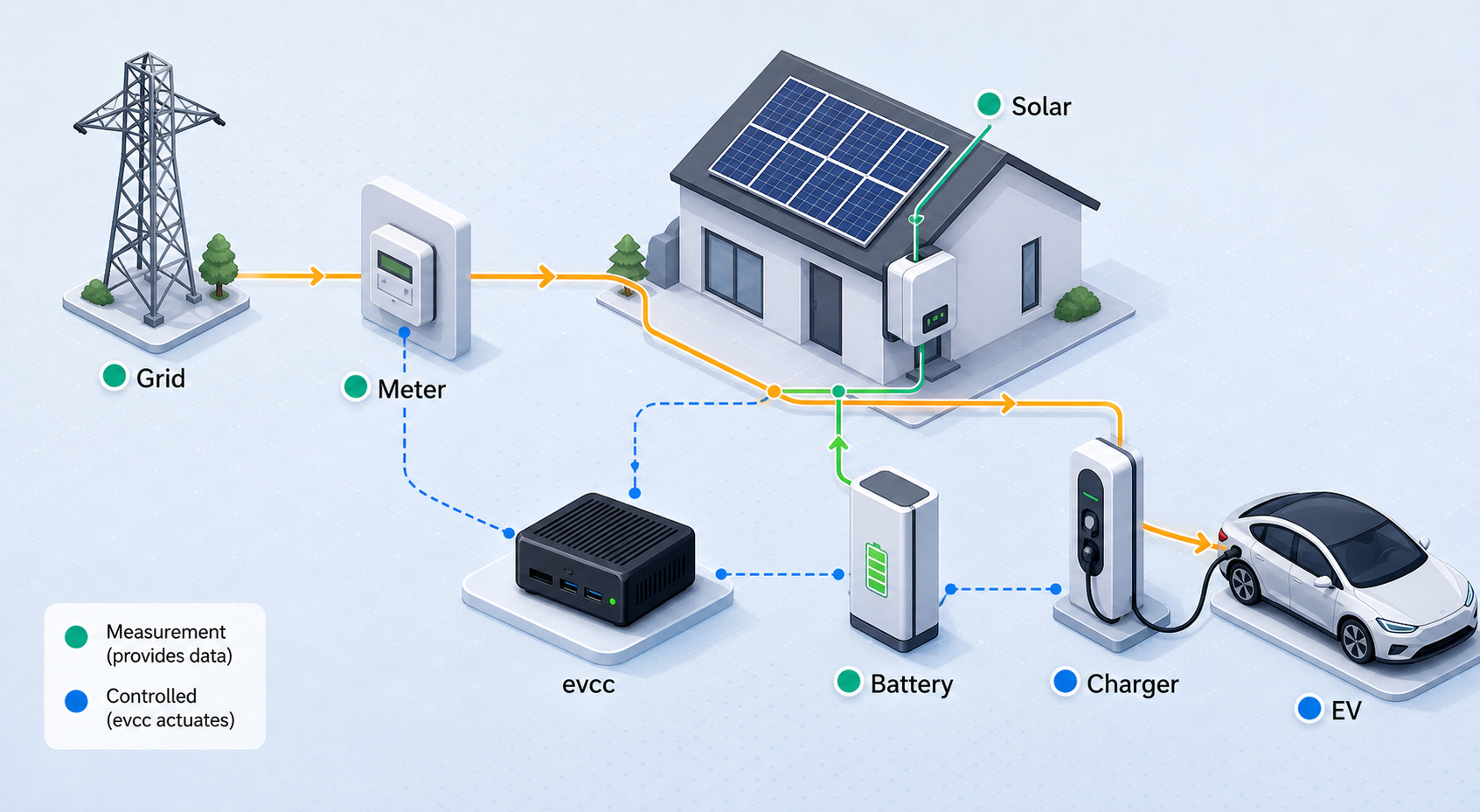
evcc supports a broad set of chargers, meters, solar inverters, battery systems, vehicles, smart switches, heat pumps, and related integrations. Support for a manufacturer does not mean every model offers the same readings or control functions. Configuration should therefore be based on the exact device model, firmware, connection method, and evcc integration template.
Start with the minimum useful topology
Avoid configuring every optional integration at once. Begin with the components required to represent one functioning charging path. Depending on the property, that may include the site-level energy measurement and one charger. Add vehicle state, tariffs, a battery, heating equipment, messaging, or home automation only after the foundational measurements and controls behave correctly.
| Component | Purpose in evcc | What to verify |
|---|---|---|
| Grid or site meter | Represents import or export at the relevant site boundary | Direction, units, update frequency, and whether values match the physical installation |
| Solar meter or inverter | Provides production information used by energy-management decisions | Current production, sign convention, and behavior when generation is zero |
| EV charger | Reports charger state and accepts supported charging controls | Connectivity, charging state, current limits, phase behavior, and safe response to commands |
| Vehicle integration | May provide state of charge and other vehicle-specific information | Account or local integration requirements, data freshness, and the exact capabilities offered by that vehicle |
| Home battery | Allows charging decisions to account for household storage | Charge and discharge direction, state of charge, and supported control behavior |
| Tariff or forecast | Can inform scheduled charging based on price or energy conditions | Region, currency, time zone, forecast horizon, and whether current data is being received |
Treat credentials and device controls carefully
Some integrations can require local device credentials, service accounts, API credentials, or network identifiers. Store them only through mechanisms documented by evcc for the selected installation. Do not embed secrets in screenshots, public repositories, support posts, browser bookmarks, or a Localtonet tunnel definition.
Use an account with only the permissions needed for the integration where the device or service supports that model. Remember that charger, battery, and heating controls affect physical equipment. Validate commands while physically present and able to stop the test safely.
Software configuration must not replace correctly rated wiring, breakers, residual-current protection, charger safeguards, grid requirements, or qualified electrical work. Confirm load-management behavior cautiously and retain the protection required by the equipment manufacturer and applicable rules.
Review the web interface before adding integrations
Once the basic system works, use the evcc interface to inspect whether values are plausible rather than merely present. A reversed meter sign, stale vehicle state, or incorrect site model can produce a polished dashboard while still leading to incorrect decisions. Compare displayed values against the charger, inverter, utility meter, or another trusted local reading.
Add one optional integration at a time and observe the system after each change. This creates a useful rollback point and makes log messages easier to attribute to the most recent modification.
Verify evcc locally before exposing it
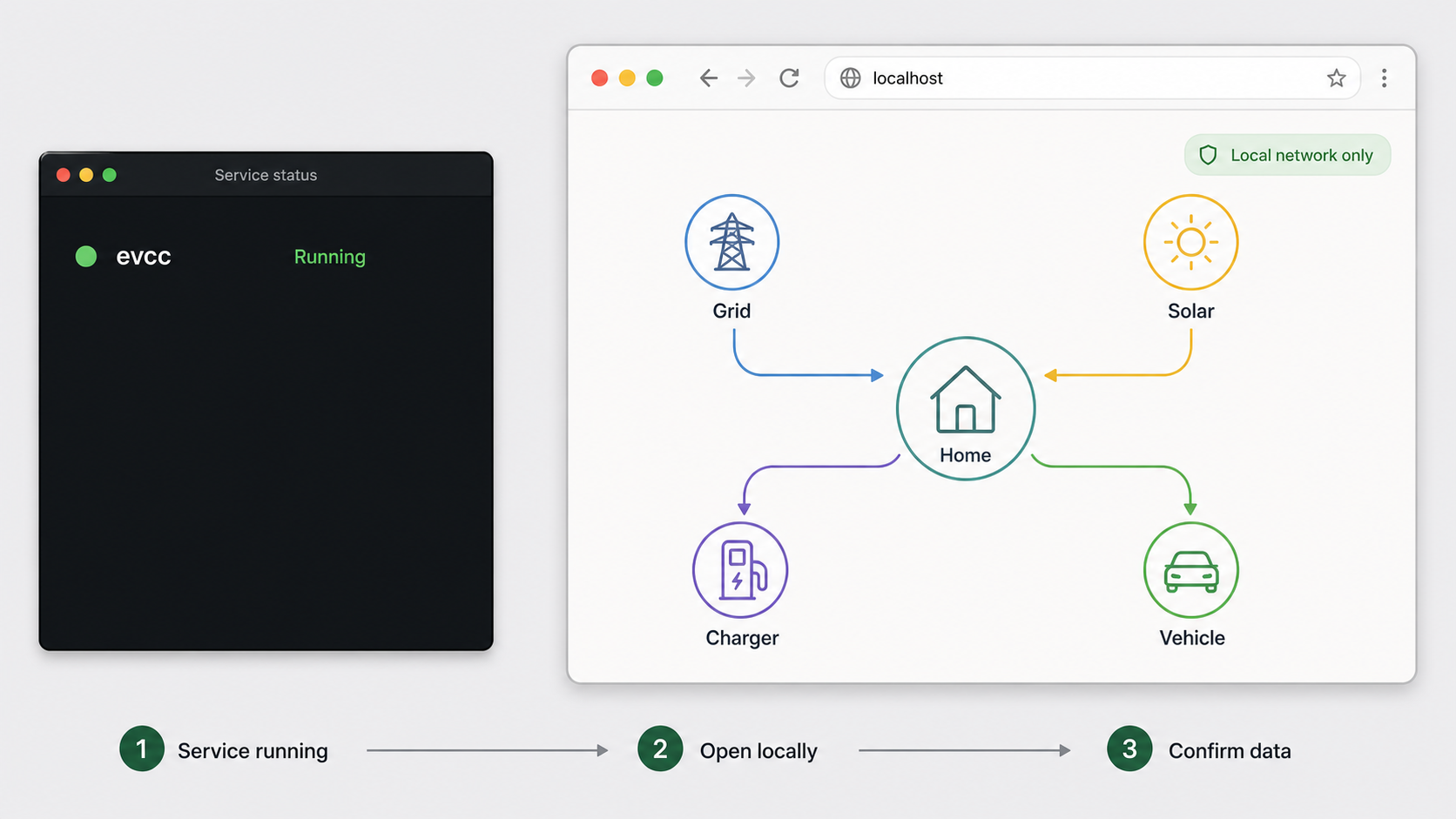
The available evidence confirms that evcc has a web interface and REST API, but it does not establish a universal URL, listening port, bind address, authentication default, or HTTPS mode. Use the local address explicitly reported by the installation method or evcc startup output. Do not assume a common port from an unofficial example.
Local verification checklist
- Open the documented evcc URL from a browser on the host or local network, as permitted by the configured bind address.
- Confirm that the complete interface loads rather than only an empty page or partial static assets.
- Refresh the page and verify that live values continue updating.
- Check that configured devices appear and that obvious readings are plausible.
- Exercise only low-risk controls at first and confirm that the physical device responds as expected.
- Review evcc logs for repeated communication failures, authentication errors, configuration warnings, or restart loops.
- Restart evcc using the documented service mechanism and confirm that the same interface returns.
- If unattended operation is required, reboot the host during a safe maintenance window and verify documented automatic startup.
Determine the correct Localtonet target
The local target has two parts: an IP address and a port. Use the same endpoint that successfully serves evcc to a browser from the Localtonet client device.
- If Localtonet runs on the same host as evcc and evcc accepts loopback connections, the verified loopback address can be appropriate.
- If Localtonet runs on another device, use an evcc host address reachable from that client over the local network.
- If evcc runs in a container, use an endpoint published or routed to the Localtonet client. A container-internal address that the client cannot reach will not work.
- If the browser reaches evcc through an existing reverse proxy, decide whether Localtonet should target that proxy or the evcc service directly. Preserve any routing behavior the chosen endpoint requires.
Write down the exact local IP address and port that worked during verification. Those are the values to enter as the Localtonet HTTP target. The public URL assigned by our platform is separate and should never be entered as the local target.
Expose the verified evcc HTTP service with Localtonet
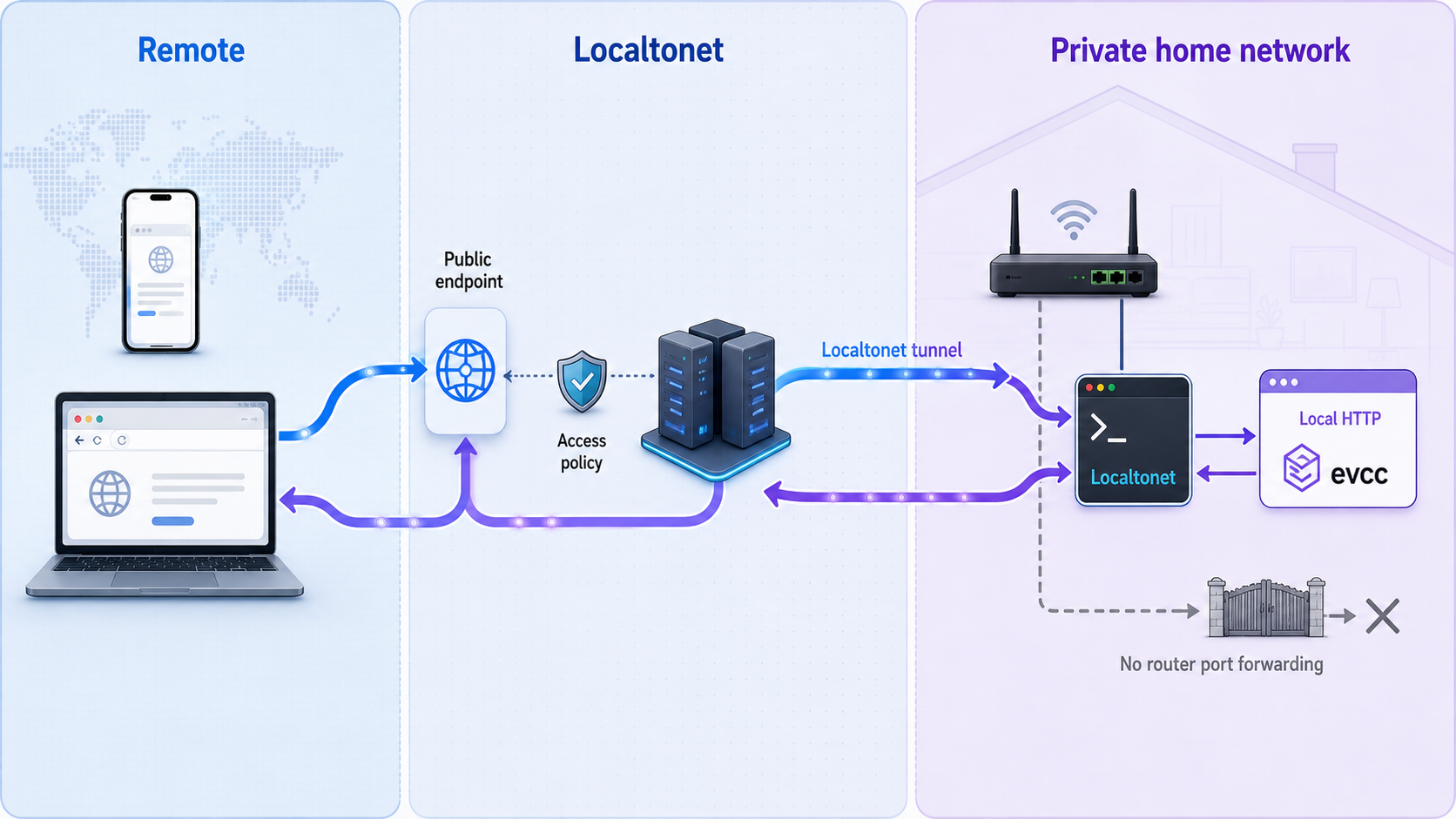
After evcc works locally, Localtonet can provide a public HTTPS address that forwards to its local HTTP service. The Localtonet client makes an outbound connection to our relay server, so this workflow does not require inbound router port forwarding, firewall changes, VPN setup, or a public IP address.
The client must run on a device that can reach the verified evcc endpoint. A tunnel remains available only while the selected client device is connected and the tunnel itself is running.
Install and run the Localtonet client
Install our client on the evcc host or another device that can reach the verified local service. Keep the device running whenever remote access is required. Use the current Localtonet installation information for that operating system rather than an unverified command.
Authenticate or select the client device
Use the device-specific authentication token associated with the client. Treat that token as a secret, never place it in an article, screenshot, configuration shared publicly, or command history that other users can read.
Select an available relay server
Choose a currently available server or region from the dashboard. Available values can vary, so obtain the server selection from the current product interface instead of copying a hardcoded server code from a tutorial.
Create an HTTP tunnel to evcc
Select the HTTP tunnel family and enter the local IP address and port proven during local verification. HTTP tunnels can use Random Sub Domain, Custom Sub Domain, or Custom Domain as the Process Type. These options serve the same local content at a public HTTPS address. Use only options currently available to your account, and consult current documentation before configuring custom-domain DNS.
Start the tunnel
Creating the tunnel does not start it. Use the Start button and wait for the selected client and tunnel to be connected. Our platform then provides the public URL associated with the running HTTP tunnel.
Test the public URL and stop it when unnecessary
Open the assigned URL from a network outside the evcc site, confirm the expected interface, and test conservatively. Stop the tunnel when remote access is not required, or delete it when the configuration is no longer needed.
Manage the tunnel from the Localtonet dashboard or REST API. For the regular interactive setup above, the dashboard keeps the local target, device selection, relay selection, lifecycle state, and public endpoint visible in one place.
Why HTTP is the appropriate tunnel family
This workflow publishes a browser-based HTTP service, so an HTTP tunnel matches the application layer. Raw TCP forwarding is intended for services that need a public host and port rather than a public web URL. UDP, combined UDP/TCP, TLS, File Server, proxy, and VPN Manager solve different networking problems and should not be substituted merely because they are available on our platform.
| Localtonet option | Use in this evcc workflow | Reason |
|---|---|---|
| HTTP tunnel | Recommended for the verified evcc browser endpoint | Maps a local IP address and port to a public HTTPS URL |
| TCP tunnel | Not the default choice for this guide | Publishes a raw port and does not provide the same URL-oriented HTTP workflow |
| File Server | Not appropriate for the evcc application | Publishes a local folder rather than forwarding the evcc web service |
| Proxy Server | Not appropriate for publishing evcc | Makes the connected device a proxy exit node instead of forwarding to a conventional local application target |
| VPN Manager | A different private-network workflow | Provides private mesh networking and should not be confused with a standard HTTP tunnel |
Secure the remote-access boundary
A public URL changes the threat model. A service previously reachable only from the host or local network can receive internet traffic through the tunnel. The tunnel solves connectivity, but it does not automatically make every application action appropriate for anonymous public access.
The supplied evcc evidence does not establish a universal authentication default for the local interface or API. Verify the behavior of the version and configuration you actually run. If adequate application authentication is unavailable for your intended exposure, place a properly configured authentication layer in front of evcc or avoid public exposure. Do not claim that an endpoint is protected simply because its public URL is difficult to guess.
evcc can interact with charging and home-energy equipment. Expose only what is necessary, use strong authentication where supported, apply least privilege, keep credentials private, and stop the tunnel when remote access is not needed. Do not expose a newly installed instance before reviewing its current authentication and authorization behavior.
Practical hardening checklist
- Update before exposure: use a maintained evcc release and review release notes for security changes and breaking configuration updates.
- Verify authentication: test the public URL in a private browser session that has no existing cookies. Confirm whether an unauthenticated visitor can view data or issue controls.
- Protect APIs: assume that API routes deserve at least the same protection as the visible interface. A hidden link is not an authorization mechanism.
- Minimize credentials: use restricted device or service accounts where integrations support them.
- Protect the Localtonet token: the device authentication token is device-specific and must not appear in logs, screenshots, repositories, or support messages.
- Limit availability: start the tunnel only when it is required if continuous public access is unnecessary.
- Monitor behavior: review evcc and Localtonet status when unexpected access, control changes, or connection interruptions occur.
- Retain local safeguards: remote control must not weaken the physical and electrical protections around the charger and energy system.
HTTPS at the public edge
HTTP Process Types on Localtonet serve the tunneled content at a public HTTPS address. This describes the public-facing connection to the tunnel edge. It does not establish that the local hop to evcc uses HTTPS, nor does the supplied evcc evidence establish universal local HTTPS support. Configure the local target according to the protocol actually served by the verified evcc endpoint.
Do not represent edge TLS as application authorization. Encryption in transit and permission to use an energy-management control are separate concerns, and both need deliberate treatment.
Routine operation, updates, and troubleshooting
Normal operating sequence
During ordinary use, keep evcc, its host, relevant network equipment, and required device integrations operational. If remote access is needed, the Localtonet client must also be connected and the HTTP tunnel must be running. A public URL can stop responding even while evcc remains healthy if the client device shuts down or loses connectivity.
When making a configuration change, validate it locally first. Watch the evcc logs, verify the browser interface, and confirm that physical behavior remains correct. Test the public URL only after the local service has returned to a known-good state.
Updating evcc safely
- Identify the version currently installed and the version you plan to install.
- Read the intervening release notes, paying particular attention to breaking changes and device-specific updates.
- Preserve the configuration and persistent state through the backup method applicable to the selected installation.
- Apply the official update procedure for that same installation model.
- Review startup status and logs before changing the tunnel.
- Verify device data and controls locally.
- Confirm remote access only after local verification succeeds.
Updating a container, package, or source build may require different commands and rollback procedures. Do not substitute one method's update instructions for another.
The local evcc page does not open
- Confirm that the evcc process or container remains running.
- Review the startup logs for a rejected configuration, missing file, permission failure, or occupied listening address.
- Use the address and port reported by the current installation rather than an assumed default.
- If testing from another device, confirm that evcc is listening on an interface reachable from the local network.
- For a container deployment, confirm that the official procedure publishes or routes the web service appropriately.
- Temporarily separate device-integration errors from web-server startup. A failing device should produce a diagnosable error, but the exact effect depends on the integration and configuration.
The local page works but the public URL does not
- Confirm that the Localtonet client is connected on the selected device.
- Confirm that the tunnel was started. Creation alone does not make it run.
- Verify that the selected tunnel is associated with the intended device token and current relay selection.
- Retest the target from the Localtonet client device itself.
- Check for a mismatch between the target IP address, port, and the endpoint verified locally.
- If evcc is containerized, avoid targeting an isolated container address that is inaccessible from the Localtonet client.
- Confirm that the evcc service did not restart on a different or unavailable endpoint.
The interface opens but controls or live values fail
This usually narrows the problem to the application or one of its integrations rather than basic tunnel connectivity. Inspect browser-visible errors and evcc logs, then test the same action through the local URL. If local behavior also fails, troubleshoot evcc, the device integration, credentials, firmware, or network path. If only the public URL fails, review whether the application expects a particular host, origin, proxy behavior, or session context. The supplied evidence does not establish universal settings for those behaviors, so use the documentation for the deployed evcc version.
The tunnel disconnects intermittently
Check whether the Localtonet client device is sleeping, rebooting, losing internet access, or being stopped by host service management. Also distinguish a disconnected tunnel from a connected tunnel whose local evcc target is unavailable. These conditions can look similar in a browser but require different fixes.
Use status notifications without confusing webhook systems
If operational automation is required, Localtonet has platform-wide Token/Tunnel webhooks that report Connected and Disconnected changes for tokens or tunnels in a selected Token Group. Their JSON request identifies the relevant tunnel ID or authentication token, the action date, the type as Token or Tunnel, and the status as Connected or Disconnected.
These lifecycle webhooks do not report evcc charger events or energy data. They also differ from Localtonet File Server file-event webhooks. Keep these systems conceptually separate when building monitoring.
Frequently asked questions
What is evcc?
evcc is an open-source EV charge controller and home energy management system. It runs locally and can integrate compatible chargers, meters, solar systems, batteries, vehicles, heat pumps, smart switches, tariffs, and home automation systems.
Can I install evcc with Docker?
The official evcc site identifies Docker as a getting-started option, and the repository contains a Dockerfile. However, the evidence available for this guide does not establish the official image command, network mode, port mapping, volume paths, or persistent-storage procedure. Use the current official Docker instructions and do not infer deployment commands solely from repository badges or files.
What port does evcc use?
A universal evcc port is not established by the supplied official evidence. Use the address and port shown by the current installation documentation, configuration, or startup output. Verify that endpoint in a browser and then use the same reachable port as the Localtonet target.
Does Localtonet install or configure evcc?
No. Install, configure, start, and verify evcc first. Localtonet then forwards public HTTP requests to the existing local service. A tunnel cannot correct an evcc configuration error or a failed charger or meter connection.
Do I need router port forwarding or a public IP address?
No. The Localtonet client establishes an outbound connection to our relay server. That lets the tunnel provide a public URL without inbound router port forwarding, firewall changes, VPN setup, or a public IP address.
Does creating a Localtonet tunnel make it available immediately?
No. Creating and starting are separate lifecycle actions. Select the client and relay, create the HTTP tunnel with the verified local target, and then use the Start button. The tunnel is available only while the selected client is connected and the tunnel is running.
Is the public evcc URL automatically safe without authentication?
No. A public HTTPS URL provides connectivity and public-edge transport protection, but that is not the same as user authentication or authorization. Verify the access controls supported by the deployed evcc version and configuration. If the available controls are insufficient, add an appropriate authentication layer or do not expose the service publicly.
Can the Localtonet client run on a different device from evcc?
Yes, provided the client device can reach the evcc host at the configured local IP address and port. Test that endpoint from the client device before creating the tunnel. If evcc listens only on loopback, a client on another device will not be able to reach it until the local deployment is configured appropriately.
Connect your verified evcc interface with Localtonet
Finish the evcc installation, confirm the exact local HTTP endpoint, review its access controls, and then create an HTTP tunnel with Localtonet for remote monitoring and administration without inbound router port forwarding.
Get Started Free →

