

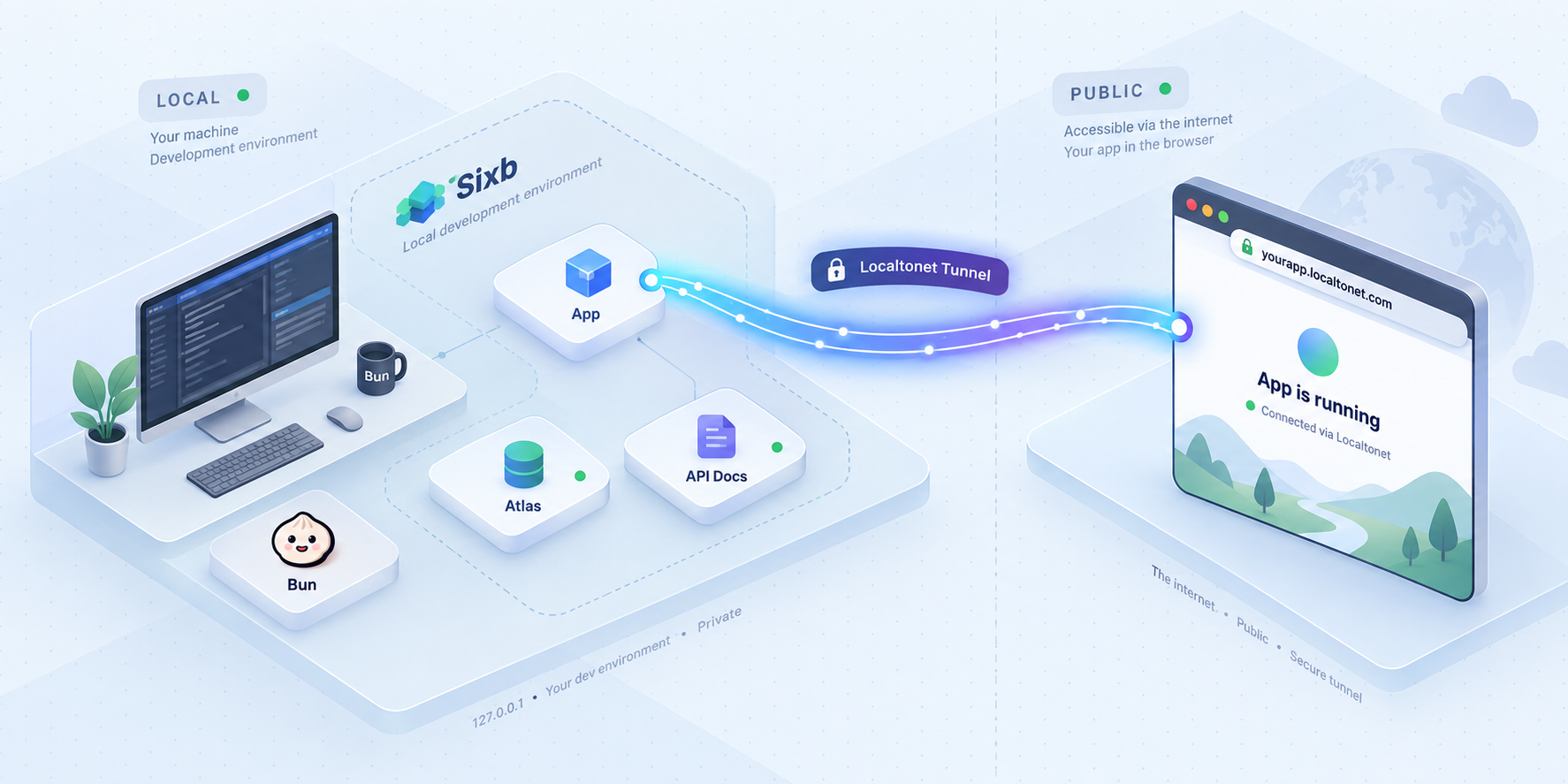
Build a local Sixb workspace, verify its three web interfaces, and make only the endpoint you need remotely accessible
Sixb is an open-source TypeScript framework for building ontology-powered applications, workflows, and AI features around a shared domain model. Its documented Bun quickstart starts a user-facing application, Atlas, and interactive API documentation as separate local HTTP services. In this guide, we install that development environment, verify each endpoint locally, explain routine startup and upgrade considerations, and troubleshoot the most common setup problems. After the local environment works, we configure a separate Localtonet HTTP tunnel so an explicitly selected service can be reached remotely without inbound router port forwarding, firewall changes, VPN setup, or a public IP address.
📋 What's in this guide
What Sixb starts and why the endpoints are separate
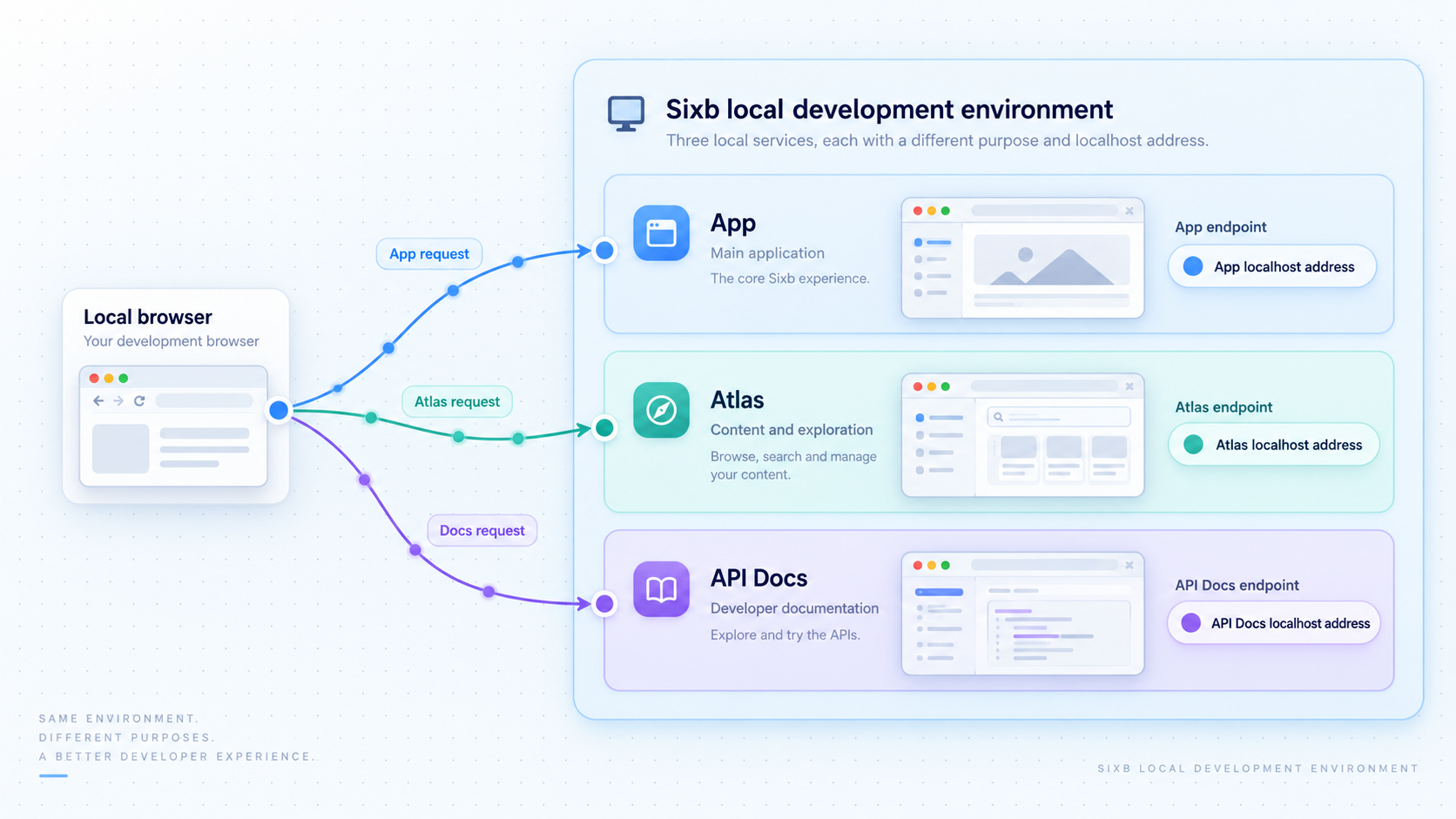
Sixb describes itself as a TypeScript framework for ontology-powered applications and AI. The central idea is to define a domain model in TypeScript and use that model across application interfaces, typed queries, permissions, workflows, automation, and AI-assisted operations. Instead of treating a browser application, an automation engine, and an AI agent as unrelated systems, a Sixb project can organize them around the same modeled objects, relationships, and actions.
The documented development quickstart is particularly useful for evaluation because it does not require database setup or API keys before the generated project can be started. That statement applies to the quickstart itself. A project that later connects external services, selects AI providers, or moves to a different storage architecture can introduce additional credentials and operational requirements.
Running bun run dev in the generated project starts multiple browser-accessible services. They have different roles and listen on different local ports, so verifying one does not prove that all of them are available.
http://localhost:3001. This is normally the first endpoint to open when evaluating the user-facing project.
http://localhost:3000. It provides a way to explore the model, inspect data, and follow activity such as workflow execution.
http://localhost:3002/docs. The /docs path is part of the documented address and should not be omitted during verification.
This separation is also important when remote access is added. A tunnel forwards traffic to one local target address and port. A tunnel targeting port 3001 does not automatically publish Atlas on port 3000 or the API documentation service on port 3002. If more than one endpoint genuinely needs remote access, configure and review each tunnel separately.
| Sixb service | Documented local address | Typical reason to open it | Remote exposure consideration |
|---|---|---|---|
| Application | http://localhost:3001 |
Use and test the generated browser application | Usually the most appropriate endpoint for an intentional application preview |
| Atlas | http://localhost:3000 |
Explore the domain model, data, and execution activity | May reveal operational or model details, so avoid public exposure unless it is required and access is protected |
| API documentation | http://localhost:3002/docs |
Inspect and test the available HTTP API | Documentation can reveal API structure and may allow interactive requests, so treat it as a sensitive developer interface |
The procedure below starts Sixb with bun run dev. It is suitable for local development and evaluation, but it is not evidence of a production-ready deployment. Sixb also documents build and production API commands, but a complete production deployment requires application-specific decisions about storage, secrets, process supervision, HTTPS, authorization, backups, migration handling, and infrastructure. Those decisions are outside this local quickstart.
Prerequisites for the Sixb and Localtonet workflow
Begin with the smallest supported environment. The official Sixb quickstart requires Bun version 1.4.2 or later. Use a supported Bun installation method for your operating system, then confirm the installed version before scaffolding a project. This guide does not substitute an unverified package-manager command because Bun installation methods can differ by operating system and can change over time.
You also need a terminal, permission to create files in the chosen project location, and a browser on the development machine. The generated quickstart does not require you to configure a database or supply API keys before its first local start.
For the remote-access stage, install and run the Localtonet client on the same device as Sixb, or on a device that can reach the selected Sixb address and port. You also need a Localtonet account and a device-specific authentication token associated with that client. Treat this token as a secret. Do not paste it into project source files, commit it to version control, include it in screenshots, or publish it in logs.
Check the Bun version
Open a terminal and ask Bun to print its installed version:
bun --version
Continue only if the result is 1.4.2 or later. If the command is not found, Bun is either not installed or its executable is not available through the terminal's command search path. Resolve that installation issue before creating the Sixb project.
Choose a project location and name
The quickstart uses my-app as the project name. You may replace that argument with a suitable name for your own project, but the directory created by the scaffolder will normally correspond to the name you provide. Avoid running the command in a location where an existing directory with the same name contains files you need.
Check the three local ports
The documented development services use ports 3000, 3001, and 3002. Another process already using one of those ports can prevent the corresponding service from starting normally. The supplied project evidence does not establish a supported command-line flag or configuration field for changing these defaults, so this guide does not invent one. If a conflict appears, first identify and stop the conflicting process when it is safe to do so, then restart Sixb.
A tunnel cannot repair an application that failed to install, did not start, or is listening somewhere other than the configured target. Complete the local checks for the exact endpoint first. This keeps project troubleshooting separate from tunnel troubleshooting and reduces the chance of unintentionally publishing the wrong interface.
Install Sixb with Bun
The official quickstart contains four commands in a defined order: scaffold the project, enter its directory, install dependencies, and start development mode. Run them from a normal terminal under the user account that should own the project files.
Create a Sixb project
Run the Bun project creator with the documented template name and a project name. The example below creates a directory named my-app. If you choose another project name, use that same directory name in the next command.
Enter the generated directory
Change the terminal's working directory to the project that the scaffolding command created. Subsequent dependency and startup commands must run from this project directory.
Install the project dependencies
Run bun install inside the generated project. Allow the command to complete and review any reported error before moving on. Do not treat a partially completed dependency installation as a successful setup.
Start the development environment
Run bun run dev from the project directory. Keep this terminal open while testing. The local services are expected to remain available only while the development process is running successfully.
Here is the complete documented sequence:
bun create sixb my-app
cd my-app
bun install
bun run dev
Read the terminal output after startup rather than immediately opening a tunnel. Startup messages and errors provide the most direct indication of whether the generated services initialized correctly. If the command exits and returns control to the shell, the development environment is no longer running, even if a browser tab still shows a previously loaded page.
What the commands do
bun create sixb my-app invokes the Sixb project scaffolder and asks it to generate a new project called my-app. The cd command moves into that generated project. bun install installs the dependency set declared by the project and records the resolved dependency state using Bun's normal project mechanisms. Finally, bun run dev executes the generated development script.
Keep the generated project instructions and files intact for the first run. Making broad configuration changes before proving that the baseline starts makes failures harder to isolate. Once the default project works, make one meaningful change at a time and verify the relevant endpoint again.
Scaffolding and dependency installation create files and obtain packages needed by the project. Use a dedicated development directory, inspect the generated project, and keep secrets outside committed source. The quickstart requires no API keys, so a request for an unexpected credential during the initial baseline setup deserves investigation.
Verify the app, Atlas, and API documentation locally
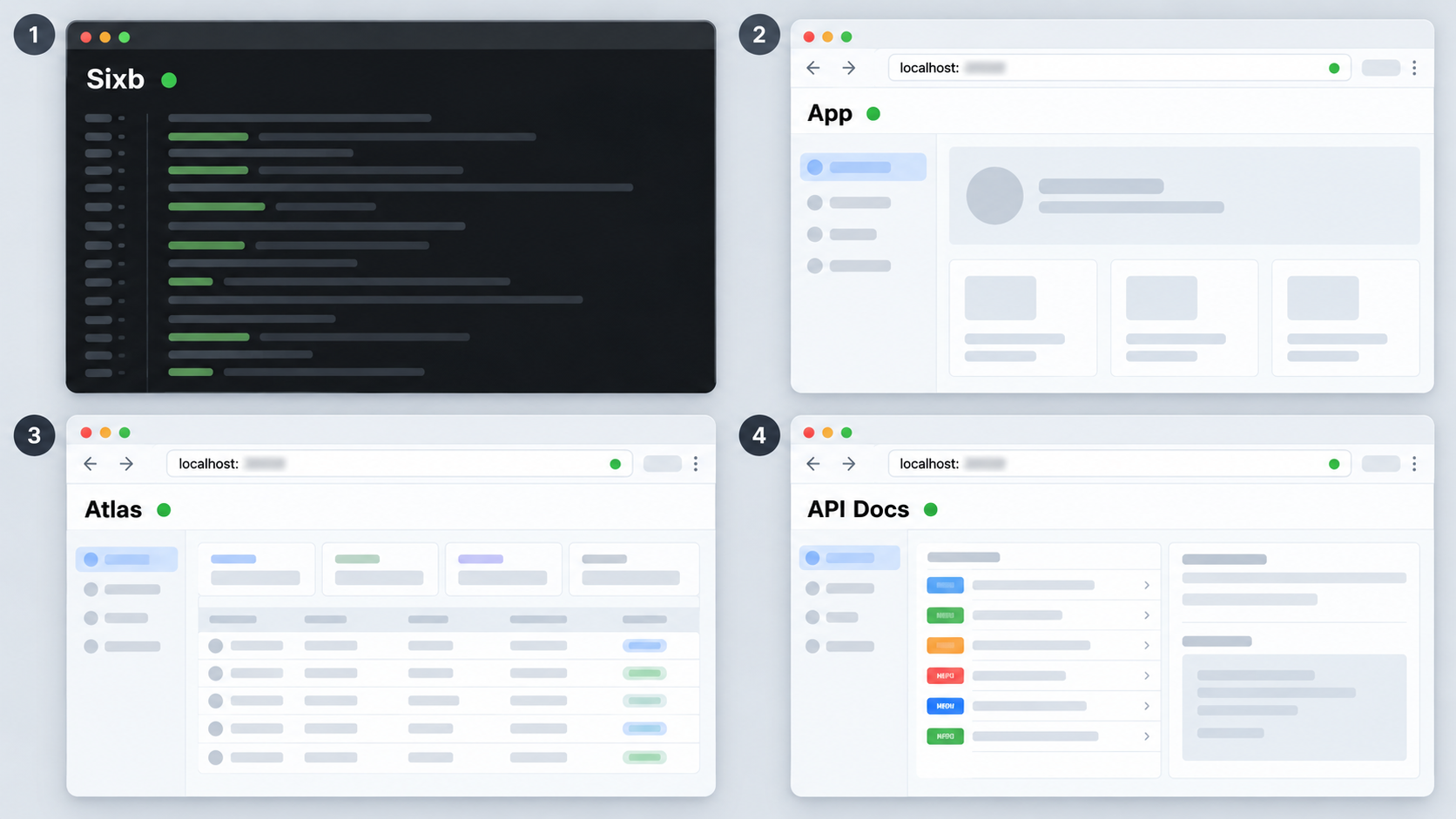
Leave bun run dev running and perform local verification from a browser on the same machine. Test all three documented addresses independently. A successful page at one port does not establish that another service started.
Open the application
Visit http://localhost:3001. Confirm that the page loads as an active application rather than displaying a browser connection error or only a stale cached page.
Open Atlas
Visit http://localhost:3000. Confirm that Atlas loads and that its interface is distinct from the application on port 3001.
Open the API documentation
Visit http://localhost:3002/docs. Include the /docs path. Confirm that the documentation interface loads before considering that endpoint ready for a tunnel.
Record the endpoint you actually need
Decide whether remote users need the application, Atlas, or API documentation. Record its port and path. This decision determines the Localtonet target and prevents accidental publication of an administrative or developer-facing interface.
When checking the API documentation, distinguish the service port from the browser path. Localtonet's HTTP local target is the local IP address and port, such as the loopback interface and port 3002. The public request path is then /docs. The path is not a separate local port and should not be entered as one.
If the browser displays an old page after the development process has stopped, perform a fresh reload. A cached document is not proof that the server can handle a new request. A reliable check is to start from a new browser tab, request the documented URL, and observe both the browser response and the active development terminal.
Use an endpoint-specific verification checklist
- The
bun run devprocess remains active. - The browser URL contains the intended port.
- API documentation checks include
/docs. - The page loads without a connection-refused or unreachable message.
- The interface shown is the expected Sixb service, not another process using that port.
- The endpoint is tested locally before a Localtonet tunnel is started.
In a browser running on the Sixb machine, localhost points back to that machine. In a browser on another device, localhost points to the other device instead. Localtonet solves the remote reachability problem by having our client establish an outbound connection to a relay and provide a public endpoint for the selected local service.
Operate the development project and update it carefully
For routine local work, enter the generated project directory and run bun run dev. Keep the process attached to a terminal where its output can be monitored. Stop the development process using the normal interrupt mechanism of your terminal when work is complete. Once the process stops, the three development endpoints should no longer be treated as available.
A Localtonet tunnel has a separate lifecycle. Sixb can be running while its tunnel is stopped, and a tunnel can remain configured even when Sixb is unavailable. Creating a tunnel also does not start it automatically. Remote access requires all of the following conditions at the same time:
- The Sixb development process is running successfully.
- The selected Sixb service is reachable from the device running our client.
- The Localtonet client is connected using the intended device token.
- The tunnel is configured for the correct local IP address and port.
- The tunnel has been started.
Keep dependencies and generated instructions aligned
Use the package versions installed for the project rather than guessing APIs from unrelated examples. If a generated project contains instructions for its specific version, follow those instructions when making changes. Sixb is under active development, and examples written for a different release may not match the packages in the current project.
Treat 0.1.x upgrades as potentially disruptive
Sixb explicitly warns that releases in the 0.1.x line can include breaking changes and database migrations. Review the changelog and release notes before upgrading. Do not assume that changing dependency versions and restarting is sufficient.
For example, the documented 0.1.15 release coordinates multiple package versions and includes PostgreSQL and SQLite migrations. Its upgrade guidance calls for matching core and related runtime consumers, rebuilding application assets, stopping old runtime roles for migration, rehearsing against a representative backup, and verifying projections after migration. It also warns that rollback requires a database backup and matching binaries rather than only checking out an older application commit.
Those details matter for established deployments, but they should not be applied blindly to every generated quickstart. The safe general practice is to identify the version currently installed, read the release-specific upgrade notes, back up applicable persistent data, coordinate package versions, account for migrations, and validate the application after the upgrade.
Source rollback and data rollback are different operations. If an upgrade includes a migration, prepare a tested data recovery plan before applying it. This is particularly important once a local evaluation becomes a persistent or production system.
Understand the boundary of this tutorial
Sixb documentation also identifies CLI operations for building a deployment and starting a production API. However, merely running a production-oriented command does not supply all the surrounding controls required for a dependable public deployment. This article therefore keeps the setup scope explicit: it establishes the documented Bun development environment and adds controlled remote access to a selected development endpoint.
Do not expose bun run dev as though it were a production deployment. For production use, design authentication, least-privilege permissions, data storage, migration procedures, process supervision, logging, recovery, secret handling, and infrastructure around the project's actual requirements.
Expose one Sixb HTTP endpoint with Localtonet
Once the chosen Sixb page works locally, Localtonet can provide a public HTTPS address that forwards to that HTTP service. Our client establishes an outbound connection to a Localtonet relay server, so this workflow does not require inbound router port forwarding, firewall changes, VPN setup, or a public IP address.
Select the endpoint before opening the dashboard. For the user-facing application, use local port 3001. For Atlas, use 3000. For API documentation, use port 3002 and open the resulting public URL with the /docs path. Do not create three tunnels simply because three services exist. Publish only what the remote workflow requires.
The available relay servers, regions, process types, and plan-dependent options must be read from the current Localtonet dashboard. They should not be hardcoded from an old tutorial. The HTTP setup sequence below follows our documented platform concepts without guessing values that depend on the account or current interface.
Install and run the Localtonet client
Install the current Localtonet client for the operating system on the device that runs Sixb, or on a device that can reach the Sixb service. Start the client and keep it connected during remote testing. Use the current installation guidance for the selected operating system rather than an unverified command copied from an older article.
Authenticate or select the intended device
Use the device-specific authentication token associated with the client that can reach Sixb. Confirm that the intended device appears connected. Keep the token private and do not store it in the Sixb repository.
Select an available relay server
Choose a currently available server or region from the dashboard. Availability can vary, so use the values shown for the account instead of entering a server code from this or another tutorial.
Create an HTTP tunnel for the selected Sixb service
Choose the HTTP tunnel family and point its local target to the IP address and port where the chosen Sixb service is reachable from the Localtonet client. Use port 3001 for the application, 3000 for Atlas, or 3002 for API documentation. HTTP tunnels can use Random Sub Domain, Custom Sub Domain, or Custom Domain process types where the current dashboard supports them. All serve the configured content at a public HTTPS address.
Start the tunnel
Creating the configuration does not make it active. Use the Start button and wait for the tunnel to run. Keep both the Localtonet client and the Sixb development process active.
Test the assigned public address
Open the assigned public URL from a separate browser session or remote device. For the application or Atlas, begin at the assigned URL. For API documentation, append /docs. Stop or delete the tunnel when remote access is no longer required.
For the current dashboard workflow and field names, consult the Localtonet HTTP tunnel documentation. The assigned hostname and available relay choices should always come from the current dashboard. Do not guess a public URL or reuse another user's endpoint.
Choose the correct target
| Remote-access goal | Local target port | Public path to test | Recommended scope |
|---|---|---|---|
| Share the generated application | 3001 |
/ |
Create one HTTP tunnel for the application |
| Inspect Atlas remotely | 3000 |
/ |
Expose only when remote Atlas access is necessary and protected |
| Open API documentation remotely | 3002 |
/docs |
Limit access because documentation can reveal and exercise API capabilities |
When the Localtonet client runs on the same machine as Sixb, target the local interface through which the service is reachable. When the client runs on another machine, localhost on that client refers to the client machine, not the Sixb host. In that topology, enter a local network address that the client can actually reach and verify it from the client device before starting the tunnel.
A service that was previously reachable only through the development machine becomes reachable through the assigned public endpoint while the client is connected and the tunnel is running. Sixb permissions and application authentication remain important. A tunnel provides connectivity and does not replace authorization inside the application.
Secure a remotely accessible Sixb development service
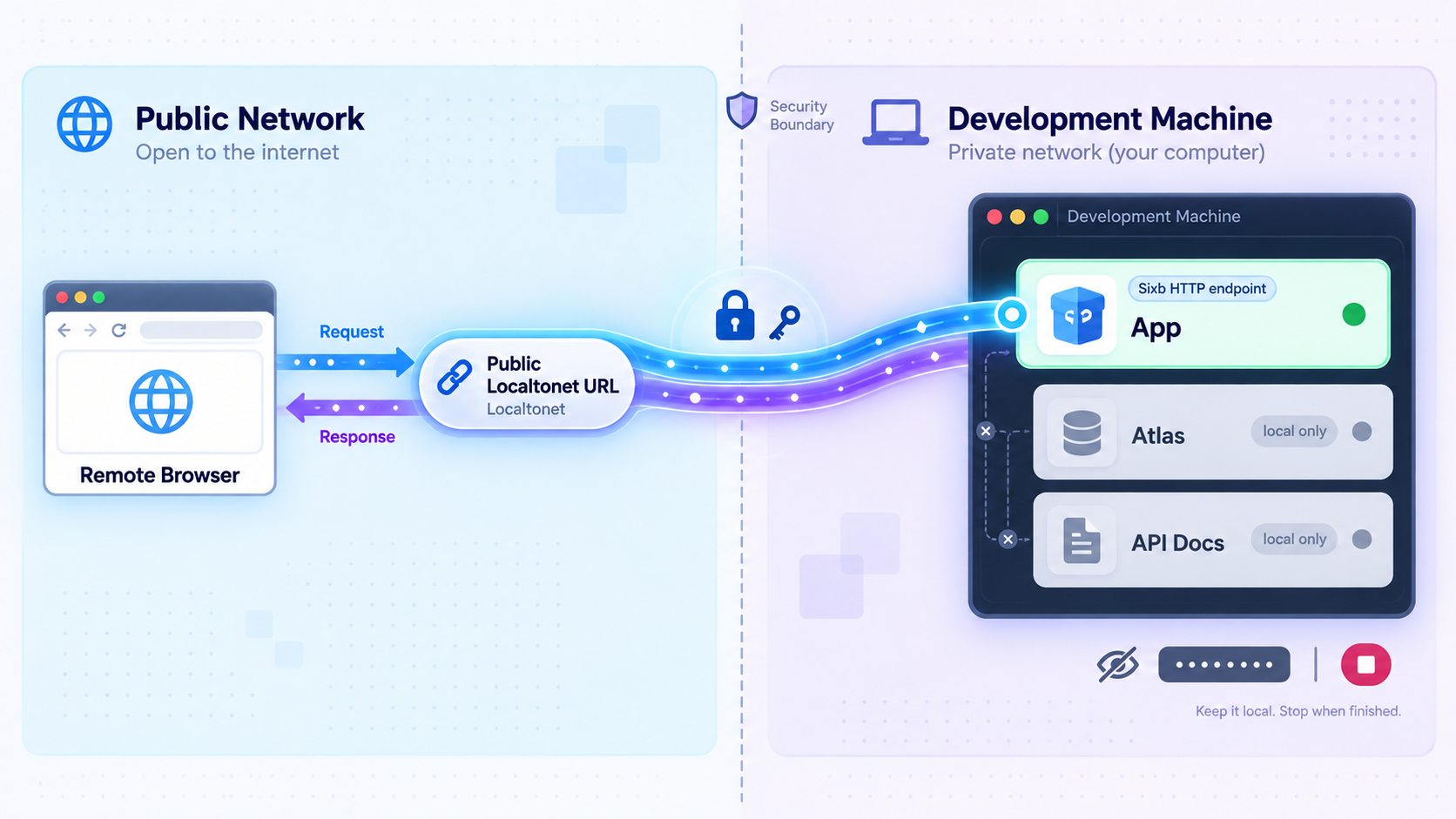
Remote access should be deliberate and temporary when it targets a development process. Start by exposing the least sensitive endpoint that satisfies the task. A collaborator reviewing the application normally does not need Atlas or interactive API documentation. Separating the services by port makes that least-privilege decision straightforward.
3001 does not require publishing ports 3000 and 3002.
0.1.x releases can include breaking changes and database migrations.
Be particularly cautious with Atlas
Atlas is designed for exploring the model, inspecting data, and following work through the system. Those capabilities make it useful to developers and operators, but they can also expose information that a normal application user does not need. Do not assume that because the application is suitable for a remote demonstration, Atlas is equally suitable for the same audience.
Treat interactive API documentation as an operational interface
API documentation communicates more than prose. Depending on the generated interface and project behavior, it may describe routes, request shapes, response structures, and operations that can be invoked. Confirm the project's authentication and permissions before exposing it. If the remote task only requires viewing the application, leave port 3002 local.
Keep credentials out of the repository
The baseline quickstart needs no API keys. Later integrations may require tokens, OAuth configuration, database credentials, or provider-specific secrets. Store those through the project's documented secret-handling mechanism and keep them out of committed files. A Localtonet device token belongs to the tunnel client configuration, not to the Sixb application source.
Review tunnel state after testing
A tunnel remains available only while the selected client is connected and the tunnel is running. That lifecycle is useful for temporary development access, but it still requires an intentional shutdown step. Stop the tunnel when testing finishes. If the configuration will not be used again, delete it from the dashboard.
This workflow exposes one selected HTTP service through a public URL. It does not join the remote device to the local network and should not be described as a VPN. Localtonet VPN Manager is the separate feature for private mesh VPN use cases.
Troubleshoot installation, startup, and tunnel failures
Troubleshoot in layers. First confirm Bun, then the generated project, then the local Sixb endpoint, then the Localtonet client, and finally the public tunnel. This order identifies the first failing boundary and avoids changing multiple systems at once.
bun is not recognized
Run bun --version. If the terminal cannot find the command, install Bun through a currently supported method for the operating system or correct the command search path. Open a new terminal after installation if the environment has not refreshed. Confirm version 1.4.2 or later before retrying the Sixb scaffolder.
The project creation command fails
Confirm that the command is exactly bun create sixb my-app, unless my-app was intentionally replaced with another project name. Verify that the current directory is writable and that an existing directory with the chosen name is not causing a conflict. Review the command's actual error output rather than repeatedly running it.
bun install reports errors
Make sure the terminal is inside the generated project directory. The expected sequence enters my-app before installation. Check the Bun version again and preserve the complete installation error for diagnosis. Do not proceed to startup until dependency installation completes successfully.
bun run dev cannot find the script
This commonly indicates that the command is running from the wrong directory or that project generation did not complete. Confirm that the current directory is the generated Sixb project and inspect its generated instructions. Avoid adding a guessed script name to the project merely to silence the error.
One or more browser pages do not load
Confirm that bun run dev is still active. Then test the exact documented addresses:
http://localhost:3001for the applicationhttp://localhost:3000for Atlashttp://localhost:3002/docsfor API documentation
Check the development terminal for startup errors and port conflicts. If another process already uses a required port, identify that process and stop it only if doing so is safe. The evidence for this guide does not establish a supported Sixb option for remapping these ports, so no speculative configuration is provided.
API documentation returns an unexpected page
Verify both parts of the address. Port 3002 selects the API documentation service, while /docs selects the documented route. Opening only http://localhost:3002 is not the documented verification URL.
The Localtonet tunnel exists but is not reachable
Confirm that creating the tunnel was followed by pressing Start. Then verify that the Localtonet client is connected using the selected device token and that Sixb remains running. A saved configuration alone does not create an active tunnel.
The public URL opens the wrong Sixb interface
Check the configured local target port. The application uses 3001, Atlas uses 3000, and API documentation uses 3002. Stop the incorrect tunnel before changing its target, then test the corrected configuration.
The public API documentation URL returns a not-found response
Append /docs to the assigned public URL. The tunnel targets the service on port 3002, but the documented browser route still includes that path.
The client and Sixb run on different devices
Do not configure the Localtonet client to use its own localhost unless Sixb also runs on that device. Use an IP address through which the client device can reach the Sixb host. Test that address and port from the client device first. If the service listens only on the Sixb host's loopback interface, it may not accept connections from another device. The supplied Sixb quickstart evidence does not establish a supported bind-address override, so consult the generated version-specific instructions instead of guessing a flag.
The public endpoint worked and then stopped
Check both lifecycles. Sixb must still be running, and the Localtonet client and tunnel must still be connected and active. Closing the development terminal, stopping the tunnel, disconnecting the selected device, restarting the host, or losing its outbound connection can interrupt access.
An upgrade causes project or data problems
Stop and review the release notes for the exact versions involved. Sixb warns that 0.1.x releases can contain breaking changes and migrations. Do not assume that reverting source code restores migrated data. Recover using the upgrade and rollback plan prepared for that deployment, including an applicable database backup and matching binaries where required.
If the local URL fails, fix Sixb before changing the tunnel. If the local URL works but the public URL fails, inspect the client connection, selected device, local target, relay selection, and tunnel running state. Keeping these layers separate is the fastest route to a reliable diagnosis.
Frequently asked questions
Which Bun version does the Sixb quickstart require?
The documented quickstart requires Bun 1.4.2 or later. Check the installed version with bun --version before creating the project.
Does the initial Sixb quickstart require a database or API key?
No database setup or API keys are required for the documented initial quickstart. A project can introduce those requirements later when it adds persistent deployment choices, external connectors, AI providers, or other integrations.
What commands install and start a new Sixb project?
Run bun create sixb my-app, enter the project with cd my-app, install dependencies with bun install, and start development mode with bun run dev.
Which local ports does Sixb use in the documented development setup?
The application is at http://localhost:3001, Atlas is at http://localhost:3000, and API documentation is at http://localhost:3002/docs.
Can one Localtonet HTTP tunnel expose all three Sixb ports?
A standard HTTP tunnel points to one local IP address and port. A tunnel targeting the application on port 3001 does not automatically expose Atlas on 3000 or API documentation on 3002. Create separate configurations only when separate endpoints genuinely need remote access.
What URL should I use for API documentation through the tunnel?
Configure the HTTP tunnel to target the Sixb service on local port 3002, then append /docs to the public URL assigned by Localtonet. The exact public hostname comes from the current dashboard and should not be guessed.
Does Localtonet require router port forwarding for this setup?
No. Our client establishes an outbound connection to a Localtonet relay server. The workflow does not require inbound router port forwarding, firewall changes, VPN setup, or a public IP address.
Does the tunnel remain available when Bun or the Localtonet client stops?
No. Remote access depends on the selected Sixb service running, the Localtonet client remaining connected, and the tunnel being started. If any of those conditions stops, the public endpoint cannot continue serving the selected local application normally.
Is bun run dev a production deployment?
No. It is the documented development quickstart. A production deployment needs application-specific planning for storage, authentication, permissions, secrets, process supervision, HTTPS, migrations, backups, monitoring, and recovery.
What should I review before upgrading a Sixb 0.1.x project?
Review the changelog and exact release notes because 0.1.x releases can contain breaking changes and database migrations. Identify coordinated package versions, back up applicable data, understand migration and downtime requirements, and prepare a rollback process that accounts for data as well as source code.
Make your verified Sixb endpoint available with Localtonet
Start Sixb locally, confirm the exact application, Atlas, or API documentation endpoint you need, then create a focused HTTP tunnel from the connected device. Keep the tunnel active only for the required workflow and stop it when remote access is complete.
Get Started Free →

