

Evaluate a tunnel companion for your Compose development environment
This guide covers Localtonet in Dev Containers: tunnel companion architecture and feasibility. Separating a tunnel client from an application can clarify process ownership, credentials, and public access. It does not, by itself, establish a supported container implementation. We explain the network model, Dev Container configuration responsibilities, HTTP tunnel requirements, and validation plan without presenting an unverified image or startup command as a runnable recipe.
📋 What's in this guide
Evidence boundary: an architecture guide, not an installation tutorial
The product information available for this revision does not establish an official Localtonet container image, supported container installation path, noninteractive authentication method, startup invocation, or automatic tunnel provisioning command. It also does not establish whether an HTTP local target accepts a Docker DNS name such as app. This is a limit of the evidence for this guide, not a claim that these capabilities do not exist.
With Localtonet, a client establishes an outbound connection to our relay server. A running tunnel supplies a public URL or host and port for a service reachable from that client, without inbound router port forwarding, firewall changes, VPN setup, or a public IP address. The selected client must remain connected and the tunnel must remain running.
Those properties make a container companion worth evaluating. A reproducible implementation, however, also needs a supported client runtime, secure authentication, predictable process management, a reachable target, and tested rebuild behavior. This article supplies a design and diagnostic framework, not the missing installation instructions.
Before approving a runnable project, confirm the following against our current Localtonet documentation, the applicable client release, and the dashboard:
- The supported container environment, base distribution, CPU architecture, package or image, and runtime dependencies.
- The documented authentication input and startup invocation, including how secrets are kept out of command lines and logs.
- The accepted local target format, especially whether Docker service names are supported.
- Whether provisioning and starting tunnels can be automated through a supported interface, with verified request details.
- How device identity and client state survive container replacement, and what state must persist.
- How reconnection, tunnel activation, and endpoint addressing behave after restart or rebuild.
Installation, authentication, startup, and lifecycle tests must be supplied before this design can become an implementation tutorial. Do not fill those gaps by renaming another tunnel product's image, token variable, or command.
What a companion service changes
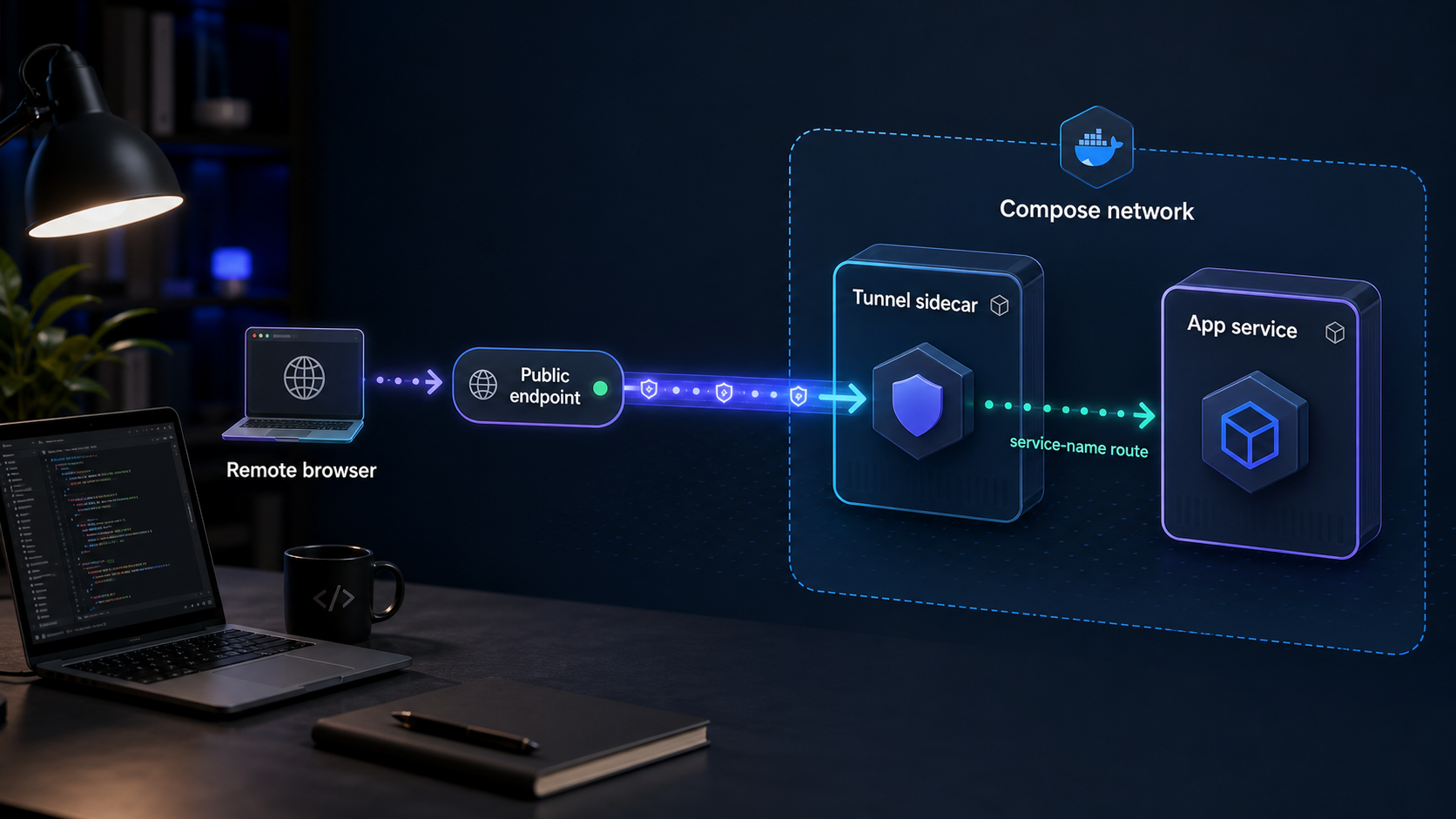
The application service owns the web server, API, webhook receiver, or callback handler. A proposed second service owns the Localtonet client process and its outbound relay connection. Application code does not need tunnel-management logic, and the companion should not receive the source tree or application credentials unless a verified requirement makes that necessary.
This separation creates a review boundary, not an automatic security guarantee. The team still needs to decide which listener becomes public, which identity runs the client, who owns the credential, and when exposure ends. Containers are not a substitute for application authentication or network policy.
Compose companions are not Kubernetes native sidecars
“Sidecar” is often used informally for both patterns. Ordinary Compose services have separate network namespaces. Kubernetes containers in the same Pod share the Pod network namespace. Kubernetes native sidecars are restartable init containers with their own lifecycle rules, described in the Kubernetes sidecar documentation.
| Property | Compose companion | Kubernetes native sidecar |
|---|---|---|
| Placement | Separate Compose service | Container in the application's Pod |
| Network namespace | Normally separate | Shared at Pod level |
| Localhost | Refers to the companion itself | Can reach another container's listener in the same Pod |
| Application destination | Normally a service name or network address and container port | Often a loopback address and application port |
| Lifecycle | Compose and editor configuration | Kubernetes Pod and native sidecar rules |
This guide concerns the Compose model. Do not mechanically translate it into Kubernetes manifests: addressing, readiness, startup, and termination assumptions differ.
Prerequisites for evaluating the design
Start with a working application environment, not a speculative tunnel service. You need Docker, Docker Compose, a Dev Container capable editor or CLI, and permission to inspect containers and logs. Check the tools from a host terminal:
docker version
docker compose version
The application must start independently, use a known container port, and provide a non-mutating test route. A lightweight health endpoint is useful. Record the real startup command, listen-host setting, expected response, and readiness behavior in the project README.
A development server bound only to 127.0.0.1 inside its container can respond locally while rejecting connections from a companion. Use the framework's documented configuration to listen on an appropriate container-reachable interface. Do not borrow a binding flag from an unrelated framework.
You also need a Localtonet account, an appropriately owned device-specific token, and an available relay server selected from the current dashboard. Do not hardcode historical server codes. Protocols, regions, and options can vary by plan or deployment.
Finally, resolve the client-runtime questions in the evidence boundary before creating the companion image. A working Docker installation does not establish that an arbitrary executable, base image, or authentication method is supported.
Dev Container settings and command context
A possible project layout is shown below. It describes responsibilities, not files supplied by this guide:
project/
├── .devcontainer/
│   ├── devcontainer.json
│   ├── docker-compose.yml
│   └── Dockerfile
├── src/
├── .gitignore
└── README.md
Compose defines services, images, mounts, networks, and health checks. The Dev Container configuration tells the editor how to use those services. A Dockerfile is needed only when a custom image is required. The README should document startup, verification, shutdown, credentials, and rebuild behavior once tested.
What the editor configuration actually controls
The Dev Container JSON reference defines the Compose-related properties. Their roles are distinct:
dockerComposeFileselects one Compose file or an ordered list of files. Relative paths are resolved relative todevcontainer.json. Later files can override earlier configuration.servicenames the service the editor connects to, normally the development application environment. It does not define that service or start the application server inside it.workspaceFolderselects the folder opened inside that service. It must match the repository location provided by the container's mount configuration; the property does not itself mount the repository.runServicesselects the Compose services the Dev Container tool starts. When omitted, all services are started by default. Dependencies and Compose configuration still matter.shutdownActioncontrols editor-triggered shutdown. For Compose configurations,stopComposeis the default;noneleaves the services running. Neither value is a Localtonet tunnel deletion instruction.
A container kept alive by a command such as sleep infinity is not necessarily running a web server. If the developer starts the application later in a terminal, an application health check may remain unhealthy until then. A companion waiting for application health cannot make that missing server start.
Compose can wait for a dependency marked service_healthy when a suitable health check is defined. Simple startup ordering only establishes container startup, not readiness. The health-check executable must exist in the image and test the actual application route and port. See Docker's explanation of Compose startup order and health dependencies.
Editor environment is not Compose interpolation
remoteEnv supplies environment values to the editor's remote processes and their subprocesses, such as integrated terminals and tasks. It does not populate the environment of a sibling Compose service, and it does not feed Compose's earlier configuration interpolation step. A ${localEnv:NAME} reference inside remoteEnv does not change that boundary.
Compose resolves its own ${NAME} expressions using inputs such as the invoking shell environment, .env, and explicitly selected environment files. Service-level environment or env_file settings then control values passed into a container. Interpolation and container environment injection are related but different operations; Docker documents them in its Compose interpolation guide.
These mechanisms do not establish how our client accepts authentication. A mounted secret file is useful only if the supported client integration can consume it safely. An environment variable is useful only if that authentication input is documented. Keep tokens out of committed files, build arguments, Dockerfile environment instructions, image layers, shell history, and screenshots. Ignoring a secret file in Git does not encrypt it or prevent other local processes from reading it.
Use one command context
They assume you already have a tested Compose project containing services named app and tunnel. This article does not create those services. Run the commands from a host terminal in the project's .devcontainer directory, and replace names, ports, and paths with the actual configuration.
# From the repository root:
cd .devcontainer

# Inspect the base configuration before changing running services:
docker compose -f docker-compose.yml config --services
Subsequent examples use the explicit -f docker-compose.yml selection. From the repository root, the equivalent file selection would be -f .devcontainer/docker-compose.yml, but keep the working directory consistent when resolving environment files and other launch inputs.
A Dev Container editor may add generated override files and use a particular Compose project name. A manual command using only the base file may therefore inspect a different project or recreate services without the editor's mounts, labels, or other overrides. Check the Dev Container startup log for the actual project name, ordered file list, and launch environment. Match those inputs for commands against the editor-managed stack, or use the editor's lifecycle controls. Do not run up or down against an uncertain project.
Loopback, Docker DNS, and the actual target port
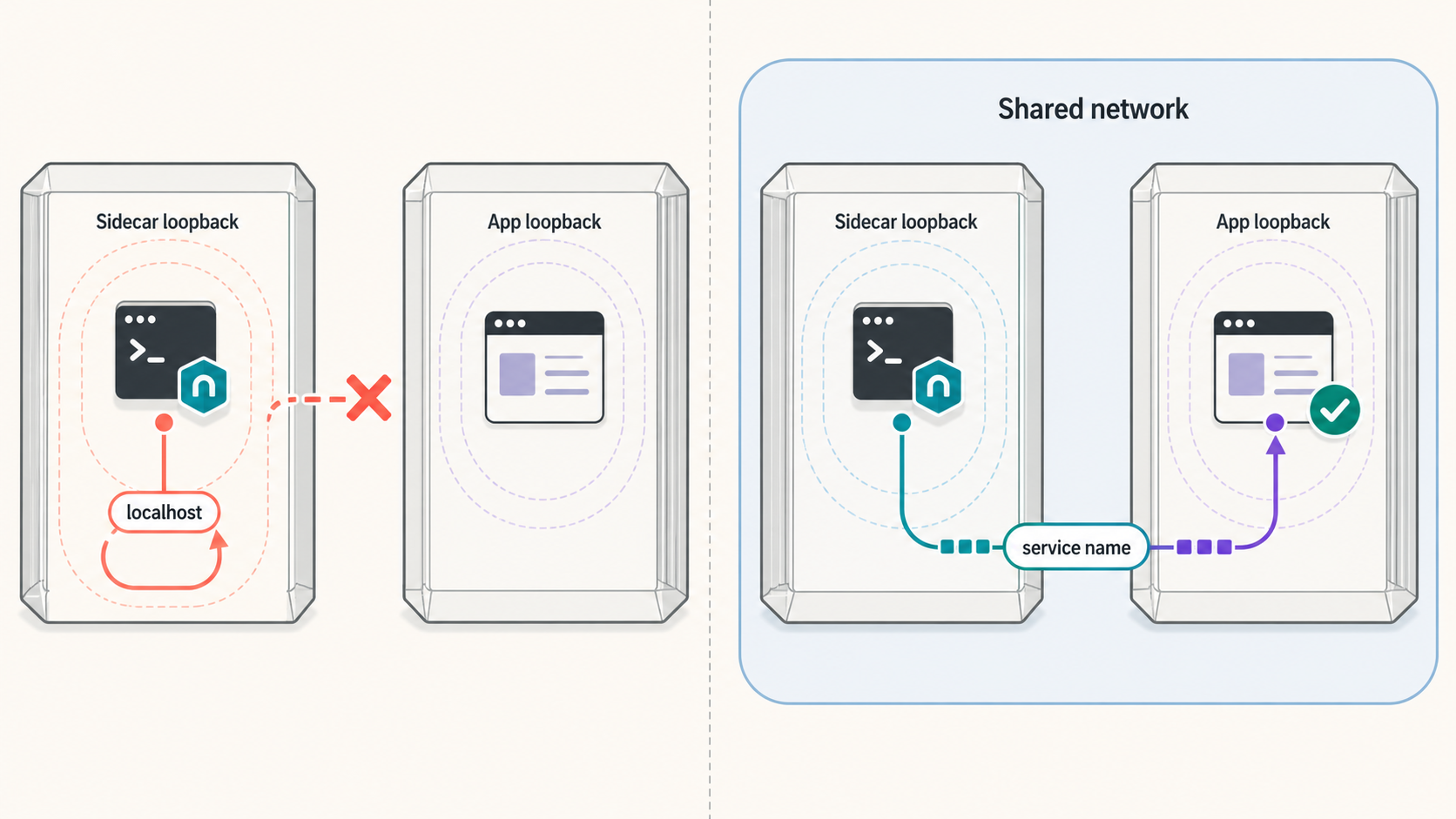
Inside the application container, 127.0.0.1:3000 points to that container. Inside the companion, the same address points to the companion. A successful loopback request in the application container therefore proves only local application reachability.
Services on a shared Compose network normally discover one another by service name. At the Docker layer, app:3000 can identify an application service listening on port 3000. The Docker Compose networking documentation explains service discovery and why service names are preferable to transient container addresses.
Our verified HTTP target model is a local IP address and port reachable from the client. A successful curl http://app:3000/health test proves Docker-level connectivity, not that the Localtonet target field accepts app. Confirm that distinction before implementing the integration.
Do not capture a container's current IP and assume it is durable. Recreating a service can change its address. Static addressing adds network-management requirements and is not evidence of supported client behavior.
Container-to-container requests use the container listener port. With a host mapping of 8080:3000, the companion would normally reach the application on port 3000, not 8080. Host port publication is not ordinarily required for two services on a shared network.
Use a narrow network and avoid unnecessary host ports, privileged mode, Docker socket mounts, and source mounts in the companion. However, a bridge network is not an absolute barrier to host or outbound access. An isolated network that blocks outbound connectivity can also prevent the client from reaching our relay. Review the actual routing and organizational policy rather than relying on a network name as a security guarantee.
HTTP configuration requirements, not an exact setup recipe
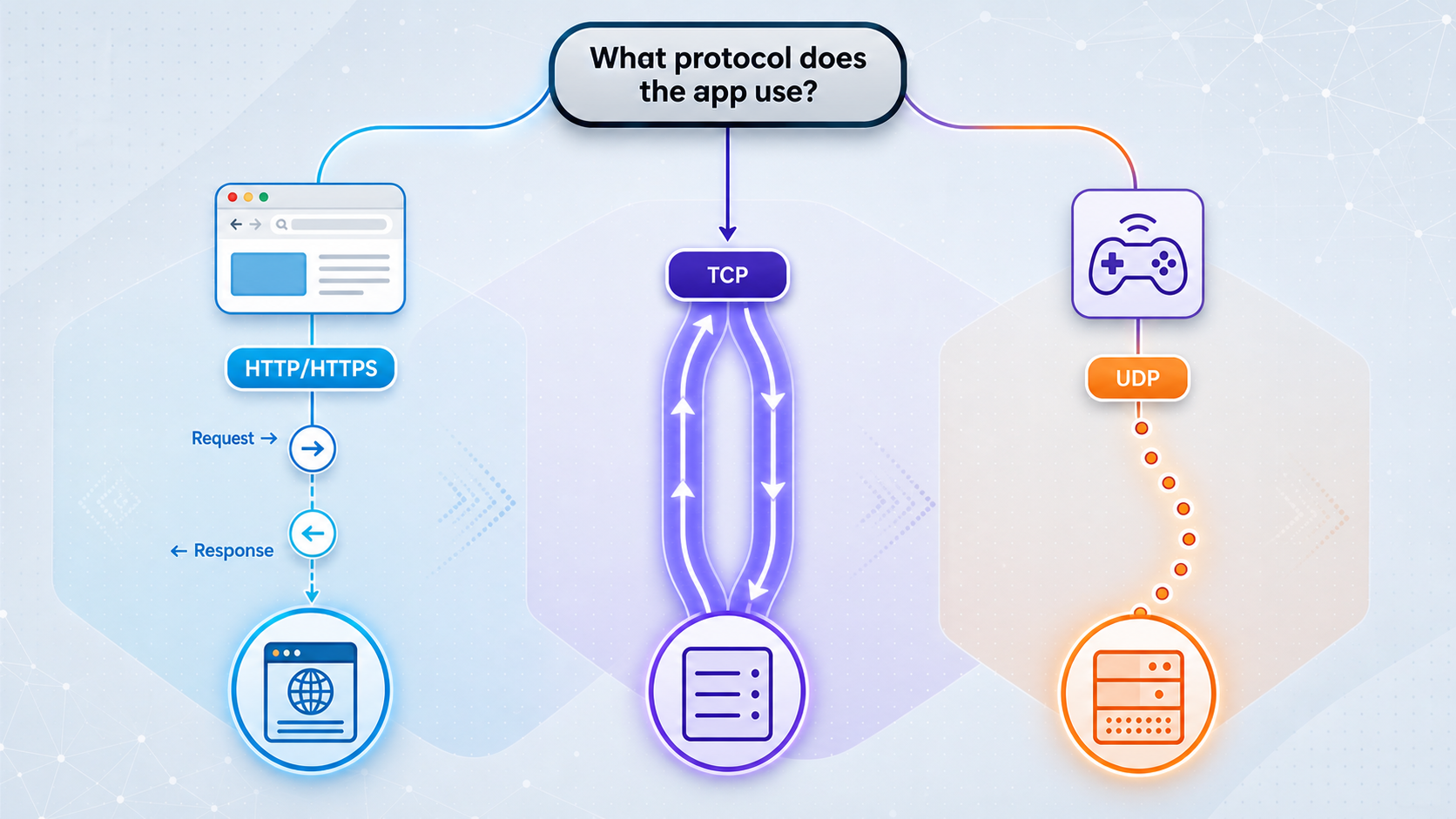
A browser-facing application or HTTP API calls for an HTTP/s tunnel. File Server publishes a folder, proxy tunnels make a connected device an exit node, and VPN Manager provides private mesh networking. These are different workflows.
Use our official HTTP tunnel documentation for the current setup procedure. The evidence supplied for this revision does not establish that page's exact numbered sequence, so the following is a configuration checklist rather than a claimed reproduction of its steps.
- Client prerequisite: install and run the client in a supported environment that can reach the application.
- Process Type: choose Random Sub Domain, Custom Sub Domain, or Custom Domain as available for the configuration. These options serve the same content through a public HTTPS address. Resolve this choice during HTTP configuration, before starting the tunnel.
- Device and relay: select the intended device/auth token and a currently available server. Keep the token private.
- Local target: configure the application's reachable address and container listener port, after confirming the accepted target format.
- Activation: creating a tunnel is not starting it. Use Start and confirm that the selected client is connected and the tunnel is running.
Custom-domain DNS instructions and endpoint persistence must be checked against current documentation before depending on a fixed callback URL. This guide does not specify DNS records or guarantee address persistence. Stopping and deleting tunnels are teardown actions, covered separately below.
An HTTP tunnel can expose all reachable routes served by its target. Testing or sharing only /health does not restrict public access to that path. Protect or remove administration panels, debug consoles, metrics, and sensitive API routes through application controls or separately verified access controls before starting the tunnel.
Validate from the application outward
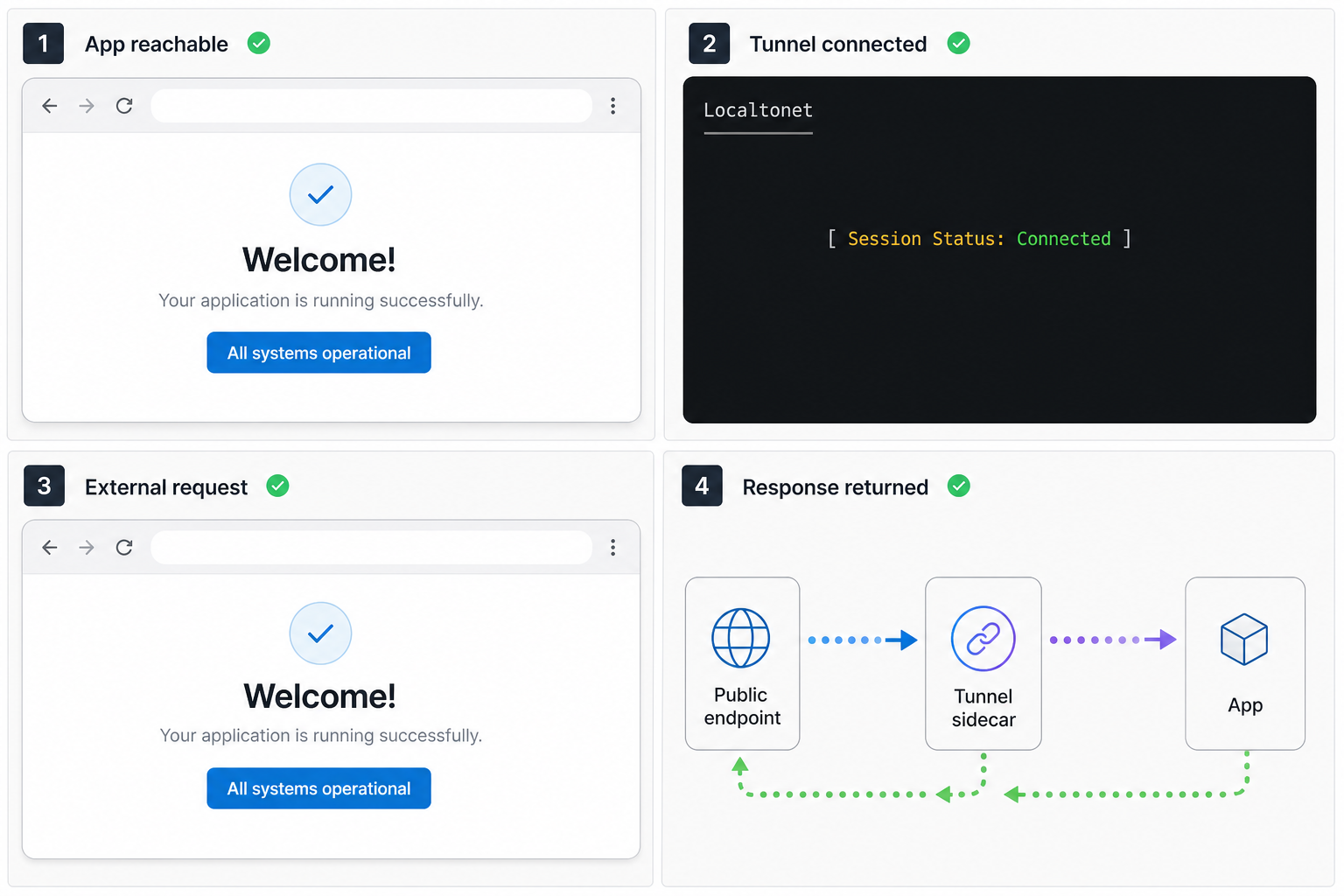
Application state and local response
After establishing the correct Compose command context, inspect the existing application service. Start it independently only if that matches the project's tested startup process:
docker compose -f docker-compose.yml up -d app
docker compose -f docker-compose.yml ps
docker compose -f docker-compose.yml logs --tail=200 app
docker compose -f docker-compose.yml exec app curl -fsS http://127.0.0.1:3000/health
The request assumes that curl exists and that port 3000 and /health are correct. Otherwise use the runtime's available HTTP client and the application's documented test route. Inspect the expected body as well as the status code.
Reachability from the companion
Only after a supported companion has been implemented and is running, test from its network perspective:
docker compose -f docker-compose.yml exec tunnel getent hosts app
docker compose -f docker-compose.yml exec tunnel curl -fsS http://app:3000/health
These commands require getent and curl in that image. Missing utilities are not network failures. Use an available diagnostic tool or an approved temporary container on the same network, recognizing that a temporary container does not prove every detail of the companion's environment.
Client and tunnel status
Confirm the device is connected in our dashboard, then separately confirm the intended HTTP tunnel is running. Inspect the companion logs without sharing secrets:
docker compose -f docker-compose.yml logs --tail=200 tunnel
docker compose -f docker-compose.yml logs -f tunnel
Successful log messages depend on the client version. Do not infer tunnel activation solely from a running container or a client connection message.
External delivery and access controls
Request the assigned public HTTPS URL from outside the Compose network. Check the expected response, application log entry, path, and method. A distinctive version response helps avoid mistaking a cached page for a successful live request.
Also test a route that should be denied. An unauthenticated request must not reveal protected content. For webhooks, verify signatures, replay handling, duplicate delivery, and response status. For OAuth, register the exact callback and retain state validation. For WebSockets, exercise the upgrade and message flow rather than treating a page load as sufficient.
Operate, rebuild, and shut down deliberately
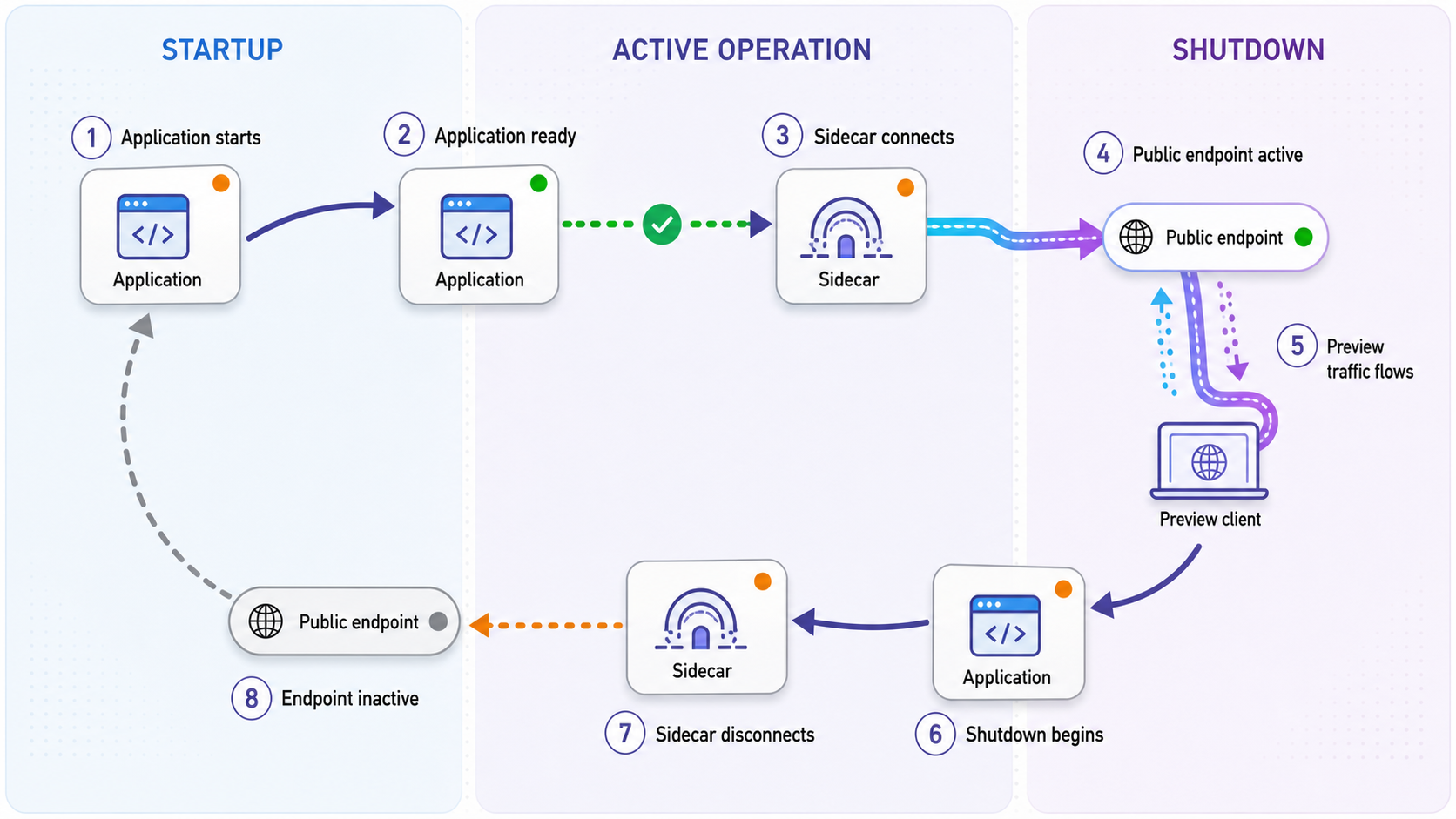
Review configuration and restart carefully
For an approved manual Compose workflow, review the effective configuration before startup. Its output can include expanded secrets, so keep it out of public logs and tickets:
docker compose -f docker-compose.yml config
docker compose -f docker-compose.yml up -d
docker compose -f docker-compose.yml ps
If the application remains healthy but the client process needs restarting, restart only the existing companion:
docker compose -f docker-compose.yml restart tunnel
docker compose -f docker-compose.yml logs --tail=200 tunnel
Recheck dashboard device and tunnel state afterward. A restart does not apply changed Compose environment configuration; a credential change normally requires container recreation through the approved project workflow. Neither operation should be assumed to start a saved tunnel automatically.
Rebuild and endpoint changes
Before rebuilding, record the intended tunnel identifier and public endpoint, not the token. After rebuilding, repeat application, network, device, tunnel, and external checks. If the endpoint changes, update webhook destinations, OAuth registrations, test clients, CORS allowlists, cookies, and frontend configuration that embeds the origin.
Check editor shutdown behavior as well. With shutdownAction: "none", services can remain running after the editor closes. Even when Compose services stop, saved tunnel configuration may remain in the dashboard.
Stop exposure before teardown
Stop the tunnel through the product control when public access is no longer required. Then stop the correct Compose project through the editor or the matching manual invocation:
docker compose -f docker-compose.yml downDelete the tunnel separately if its configuration should not be retained. A disconnected client makes the tunnel unavailable, but container teardown is not a dashboard deletion operation.
Credentials and least privilege
Require appropriate application authentication and authorization, validate webhook signatures, and use suitable IP restrictions where available. Keep exposure short and do not bypass organizational network policies. Avoid reusing one device identity across unrelated developers or projects.
If a token appears in source control, an image, shell history, logs, screenshots, or a support bundle, treat it as exposed. Use the available account controls to replace or revoke it, remove leaked copies under your incident process, update the approved runtime secret mechanism, and verify the old credential can no longer connect. Assign explicit ownership for rotation and offboarding.
Troubleshoot the failing layer
Use the established directory, file selection, project name, and overrides for every diagnostic. An unexpected empty service list may mean you selected the wrong project rather than that the application stopped.
| Symptom | Likely investigation | Next check |
|---|---|---|
| Service name does not resolve | Wrong service name or network attachment | Compare effective configuration, running services, and DNS from the companion. |
| Loopback works, companion connection is refused | Loopback-only binding, wrong port, or application not ready | Check the listen address and container port in application logs. |
| Connection times out | Routing, filtering, network mismatch, or stalled application | Check network attachments and test the application locally again. |
| Dependency stays unhealthy | Incorrect health command or server not started | Run the health command manually and verify its utility, path, and startup timing. |
| Client is disconnected | Startup, authentication, runtime, or outbound connectivity failure | Inspect companion logs and device identity in the dashboard. |
| Client connected, public endpoint fails | Stopped tunnel or unreachable local target | Check tunnel state separately, then repeat the internal request. |
| Callbacks fail after rebuild | Changed endpoint or application origin configuration | Compare the assigned URL with the provider's exact registration. |
To inspect network attachments, obtain actual container names from the correct Compose project:
docker compose -f docker-compose.yml ps
docker network ls
docker inspect <app-container-name>
docker inspect <tunnel-container-name>
Replace the placeholders with the observed names. Inspection output can contain environment credentials. Review locally and redact before sharing. If the HTTP route works but authentication, redirects, or cookies fail, inspect application-level origin and proxy handling rather than repeatedly restarting the tunnel.
Frequently asked questions
Does this guide establish an official Localtonet container image?
No. The available evidence does not identify one. That does not prove an image or container support is unavailable; it means this guide cannot provide a verified image reference.
Why is there no complete Dockerfile or Compose configuration?
A runnable implementation needs confirmed installation, authentication, startup, target addressing, and lifecycle behavior. This article evaluates the architecture without inventing those interfaces.
Why does localhost fail between Compose services?
Ordinary Compose containers have separate network namespaces. Localhost in the companion points to the companion, not the application. Docker service-name routing is a separate capability from Localtonet target-field hostname support.
Is a Compose companion the same as a Kubernetes native sidecar?
No. Containers in one Kubernetes Pod share its network namespace, and native sidecars follow Kubernetes-specific lifecycle rules. Ordinary Compose companion services do not share those assumptions.
Does remoteEnv pass a token into the companion service?
No. It configures the editor's remote environment and subprocesses, not a sibling service or Compose interpolation. Any runtime secret mechanism must also match a documented Localtonet authentication input.
Does creating an HTTP tunnel automatically make it available?
No. The selected client must be connected and the tunnel must be started. A saved tunnel, connected client, and running tunnel are separate states.
Will the public address survive a rebuild?
Do not assume it will. Verify the selected Process Type, client identity, saved configuration, and current endpoint behavior before relying on a fixed webhook destination or OAuth callback.
Is an HTTP tunnel a VPN or a restriction to one URL path?
Neither. It exposes an HTTP target and can make all reachable routes on that target public unless access controls restrict them. VPN Manager is our separate private mesh VPN feature.
Validate the client integration before building the companion
Map the application listener, network, device identity, secret boundary, endpoint requirements, and shutdown policy. Then confirm the supported Localtonet runtime and test its lifecycle before turning this architecture into a reusable Dev Container project.
Review the HTTP tunnel documentation →

