

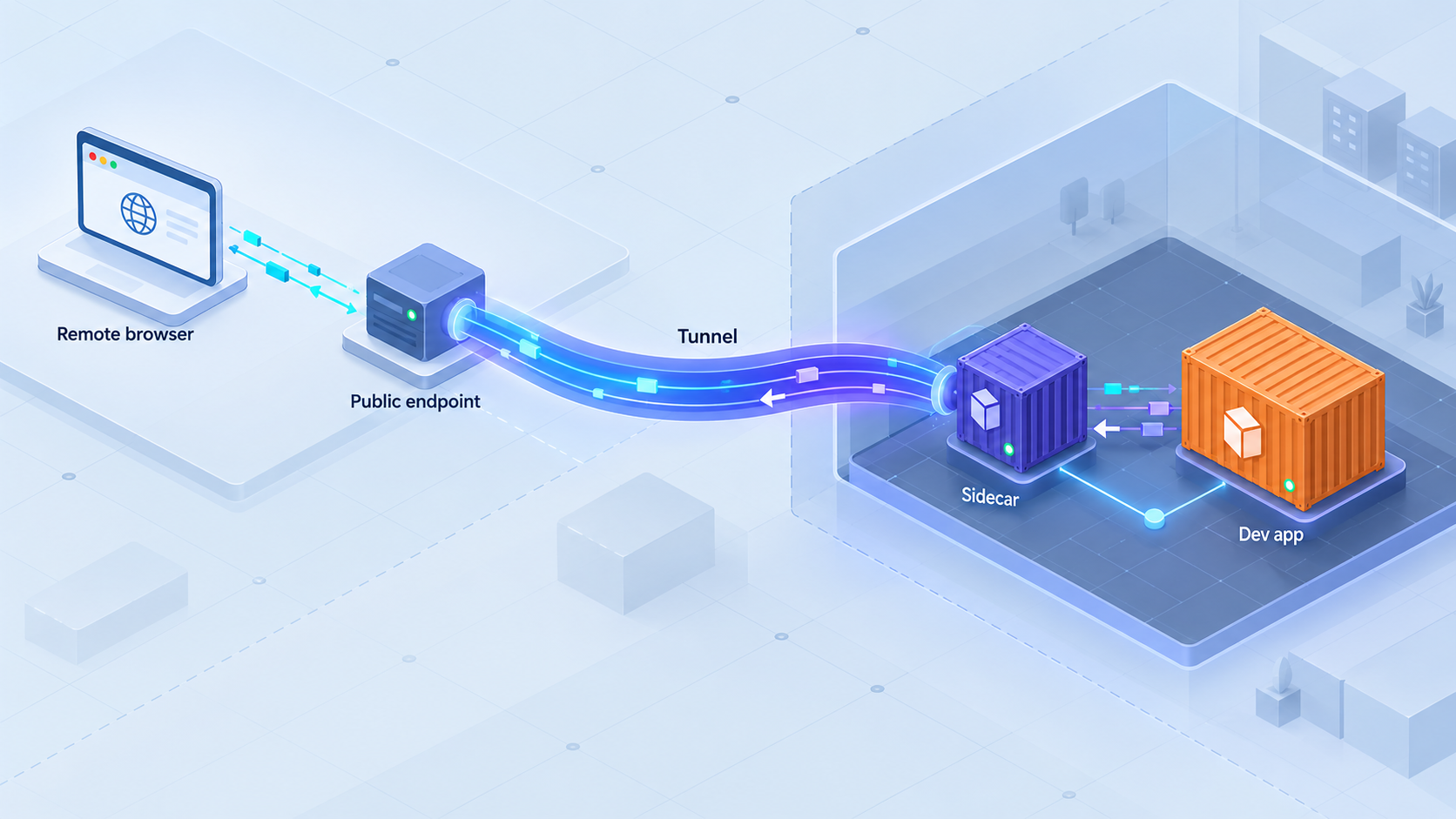
Design a restart-aware public preview without coupling tunnel management to application code
A tunnel companion can separate a development application from its public ingress, but a reliable design requires more than adding another container to Docker Compose. This guide explains container reachability, application binding, Localtonet tunnel lifecycle, device-token safety, rebuild behavior, WebSocket validation, and controlled shutdown. Verified product information does not currently establish an official Localtonet container image, container startup command, or noninteractive authentication interface, so this is an architecture and feasibility guide rather than a copy-and-run Compose recipe.
📋 What's in this guide
Support status and the boundary of this guide
The intended design is straightforward: run a development application in one container and run our client as a companion process in another container on a shared network. The application owns its web server, API, callback handler, or webhook receiver. The companion owns the outbound Localtonet connection and makes the selected application endpoint available through a public HTTP address.
Localtonet is a multi-protocol tunneling and proxy platform. Our client runs on a device that can reach the local service and establishes an outbound connection to a Localtonet relay server. A configured and running tunnel provides a public URL or public host and port without requiring inbound router port forwarding, firewall changes, VPN setup, or a public IP address.
Those verified properties make a container companion architecture technically plausible. They do not, by themselves, establish that an arbitrary container deployment is officially supported. The verified information available for this guide does not identify an official Localtonet container image, a supported installation command for an arbitrary Linux container base, a noninteractive client startup command, or a documented environment variable for authentication. It also does not confirm that the local target field for an HTTP tunnel accepts a Compose DNS name such as app instead of a literal local IP address.
We do not provide a Dockerfile, image name, Compose service definition, authentication variable, command line, or API payload here because those details are not established by the verified product information available for this revision. Copying syntax from another tunnel service would create an unsupported and potentially insecure deployment.
Before approving a real implementation, verify the current Localtonet client release, dashboard, and documentation for the selected environment. In particular, confirm container support, compatible base distributions and CPU architectures, the supported installation path, noninteractive authentication behavior, token delivery options, target-address rules, restart behavior, and any supported automation interface.
This limitation does not prevent useful design work. Teams can still define the network boundary, application listener, secret-management policy, lifecycle expectations, validation sequence, and failure behavior. Doing that work before writing Compose configuration reduces the chance that an apparently convenient preview service accidentally exposes the wrong process or depends on undocumented behavior.
What a tunnel companion changes
A companion architecture separates two responsibilities that are often combined during development. The application container serves the application. The proposed Localtonet container runs our client and maintains the outbound relay connection. Public traffic follows a chain from the Localtonet relay to the client and then across the container network to the application listener.
This separation keeps tunnel concerns out of the application image. The application does not need to create tunnels, hold a Localtonet device token, or know its public URL unless the application itself needs that URL for callback generation or origin configuration. The companion should not need application source code merely to forward traffic.
Companion service is more precise than universal sidecar
The term sidecar is frequently used for any helper container, but Docker Compose and Kubernetes do not provide the same network and lifecycle model. A Compose companion normally runs as a separate container with its own network namespace. A Kubernetes container in the same Pod normally shares the Pod network namespace with its peer containers. That difference directly affects the meaning of localhost.
| Deployment relationship | Network implication | Design consequence |
|---|---|---|
| Application and client in one operating-system process context | Loopback may refer to the same host network namespace | A loopback target can work if both processes truly share that namespace and the application listens on the expected port. |
| Separate Docker Compose services | Each container normally has its own loopback interface | The companion cannot reach the application through its own 127.0.0.1. It needs a route across a shared container network. |
| Containers in the same Kubernetes Pod | Pod containers normally share a network namespace | Loopback can represent the shared Pod network, but Localtonet support and the client installation method still require confirmation. |
| Client on the Docker host | The client reaches a host-published application port | This avoids putting the Localtonet client in a container, but the application port must be deliberately published to the host. |
The distinction matters because an architecture diagram that labels the target as localhost can conceal a broken route. Always define whose loopback interface is being discussed and test from the exact network context where our client runs.
Prerequisites and decisions to make first
A reliable preview starts with an inventory. Record the application process, its listener interface, its internal port, the container or host where the Localtonet client will run, and the expected public audience. Do not begin with a public URL and work backward. First prove that the proposed client location can reach the private application endpoint.
Application prerequisites
The development server must listen on an interface reachable from the Localtonet client. If the application and client are in separate Compose services, an application bound only to its own loopback interface will generally not accept traffic arriving through the container network. Many frameworks can bind to an all-interface address such as 0.0.0.0, but the exact configuration key or command is framework-specific and must come from that framework's documentation.
Binding to all container interfaces is not the same as publishing the port to every external network. Container network attachment and host port publication are separate decisions. A service can listen on a container-reachable interface while remaining available only to other containers on its private network. Verify this behavior in the actual container runtime rather than relying on assumptions.
The internal application port must also be known. This guide deliberately does not assign a default port because development frameworks vary and projects frequently override their defaults. Use the port reported by the running application and confirm it from inside the relevant network context.
Localtonet prerequisites
The normal Localtonet workflow requires a client on the device that can reach the service, a device-specific authentication token, an available relay server or region selected from the current product, and an HTTP tunnel that points to the local target. Creating a tunnel does not mean that it is running. It must be started, and it can later be stopped or deleted.
Available relay server codes and regions must come from the current dashboard. Do not hardcode a value copied from an old example. Likewise, never guess a device token or place a real token in example configuration.
Questions that must be resolved before containerization
- Is the current Localtonet client supported inside the chosen Linux container environment?
- Is there a supported image or installation method for the selected distribution and processor architecture?
- Can authentication occur noninteractively without exposing the token in an image layer, process listing, or build log?
- Does the HTTP tunnel target accept a container DNS name, or must it be an IP address?
- Can an existing device identity be retained safely when the container is recreated?
- Does reconnecting the client restart an existing tunnel, or must the tunnel still be started separately?
- Which public process type is appropriate: Random Sub Domain, Custom Sub Domain, or Custom Domain?
- What application configuration is needed for its public host, scheme, redirects, cookies, callback URLs, and origin checks?
A reusable public address, where supported by the selected process type and current configuration, does not guarantee uninterrupted availability. The public endpoint can serve traffic only while the selected Localtonet client is connected and the tunnel is running.
Design the container network before the tunnel
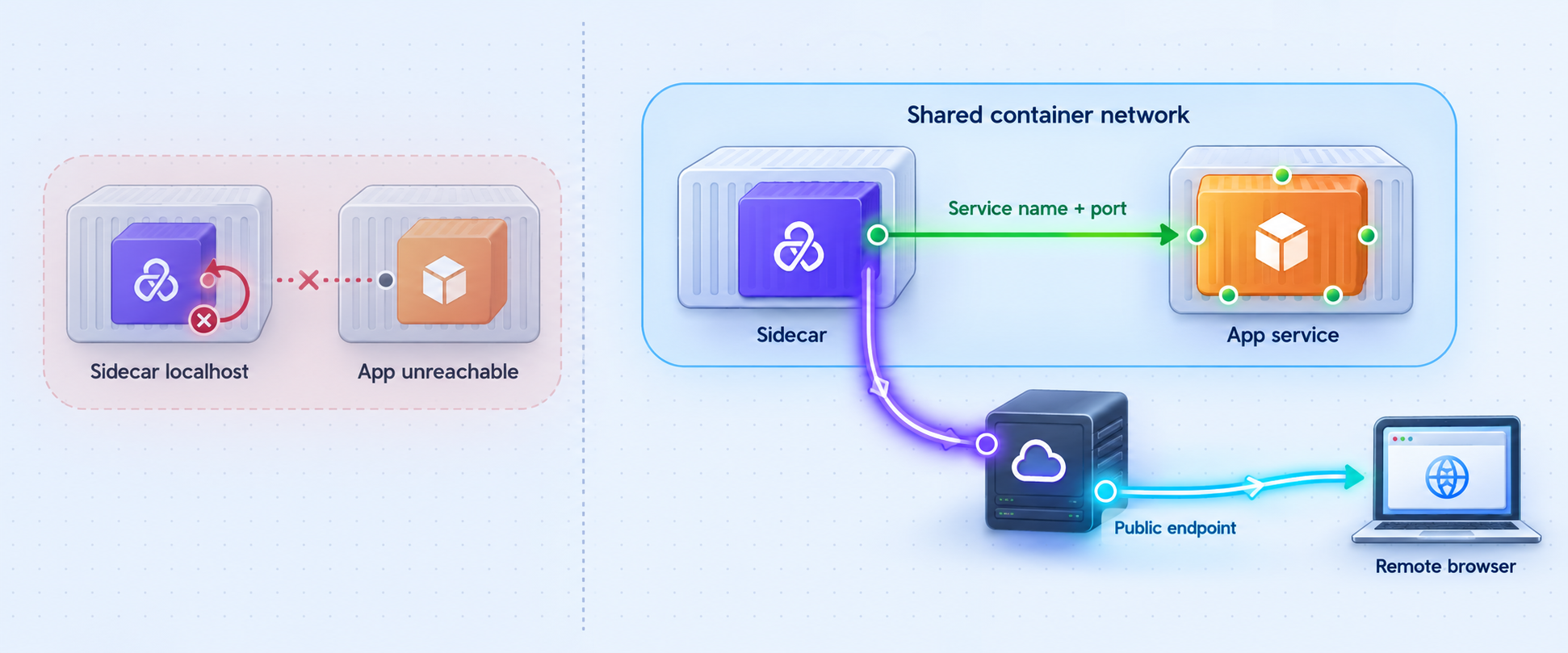
The most important local test is not whether the application responds inside its own container. It is whether the application responds from the environment where the Localtonet client will run. A server can pass a self-test over its own loopback interface and still be unreachable from a neighboring container.
Why localhost commonly fails
In separate Compose services, 127.0.0.1 inside the proposed tunnel companion refers to that companion. It does not refer to the application service. If the companion targets its own loopback address and no application is listening there, the tunnel may be connected while requests still fail at the final hop.
The correct target must be an address that resolves or routes to the application container from the client container. Compose commonly provides service discovery on shared networks, but the current verified Localtonet information does not confirm that the HTTP target field accepts a service-name hostname. Do not assume that entering a service name will work. Confirm the accepted target format in the current dashboard or documentation before relying on it.
A literal container IP address may appear to solve this problem, but container addresses can change after recreation. If Localtonet requires a literal IP target, the design needs an approved and repeatable way to discover or stabilize that target. This is one reason the exact target rules must be verified before calling the architecture restart-resilient.
Listener scope
The application must accept connections on the interface used by the container network. A loopback-only listener is intentionally private to its own namespace. An all-interface listener is often suitable inside an isolated development network, but it broadens reachability within every network attached to the container. Attach only the networks the application needs and avoid unnecessary host port publication.
Publishing an application port on every host interface may make a local test pass while creating an unintended LAN exposure. Prefer the narrowest network path that lets the Localtonet client reach the application. If a host-published port is necessary, bind and firewall it according to the development environment's security policy.
Readiness is not startup order
Starting the application container before the companion does not prove that the application is ready to accept requests. Development servers may install dependencies, compile assets, run migrations, or wait for another service before opening their listener. The tunnel can therefore become externally reachable before the target is ready.
Treat this as normal transient behavior and define how the team will recognize readiness. The application should provide a lightweight verification endpoint if the project supports one, or the team should identify another harmless request that confirms the server is ready. Do not expose administrative state or sensitive diagnostics merely to create a health check.
Apply the documented Localtonet workflow
The Localtonet portion should begin only after local reachability has been proven. The following sequence preserves our documented general workflow without inventing a container image, command, environment variable, or dashboard field. Exact client installation inside a container remains a prerequisite that must be confirmed.
Install and run the Localtonet client where it can reach the application
The client must run on the device or runtime that has a valid route to the development service. For the proposed companion design, first confirm that the current Localtonet client officially supports the selected container environment and installation method. If that cannot be confirmed, run the supported client on the host or another supported device that can reach the application.
Authenticate or select the intended device
Use the device-specific token through a currently documented and secure method. Tokens identify client devices and must not be guessed, committed to source control, baked into an image, printed in logs, or included in screenshots. Container-safe noninteractive token delivery must be confirmed before automating this step.
Select an available relay server or region
Choose from the values currently offered in our product or dashboard. Availability can vary, so an article or Compose file should not hardcode an unverified server code.
Create the HTTP tunnel for the reachable application target
Configure an HTTP tunnel that points to the application IP address and port reachable from the client. HTTP tunnels can use Random Sub Domain, Custom Sub Domain, or Custom Domain process types, which serve content at a public HTTPS address. Confirm current availability and any domain requirements in the dashboard before selecting an option.
Start the tunnel and record the assigned public address
Tunnel creation and tunnel execution are separate states. Use the Start action after creating the configuration, then verify that both the selected client and the tunnel show the expected connected state. Do not treat the existence of a dashboard record as proof that the preview is available.
Stop or delete the tunnel when access is no longer needed
Stop the tunnel to end public availability, or delete it when the configuration should no longer exist. Stopping the application container alone should not be treated as the complete access-revocation procedure.
The current Localtonet HTTP tunnel documentation should be checked during implementation for the latest supported fields and workflow. It should supplement, not replace, the network and lifecycle validation described here.
Choosing the public address type
Random Sub Domain, Custom Sub Domain, and Custom Domain process types all serve the same HTTP content at a public HTTPS address. The practical difference is endpoint naming and ownership rather than a different application target. Exact availability may vary, and custom-domain DNS requirements must be checked against current documentation before they are automated.
A generated address is often sufficient for short-lived manual review. A selected or custom address may be useful when an identity provider, webhook sender, or application allowlist expects a predictable callback. However, address predictability does not preserve runtime availability. The client still has to be connected and the tunnel still has to be running.
Validate the preview one layer at a time
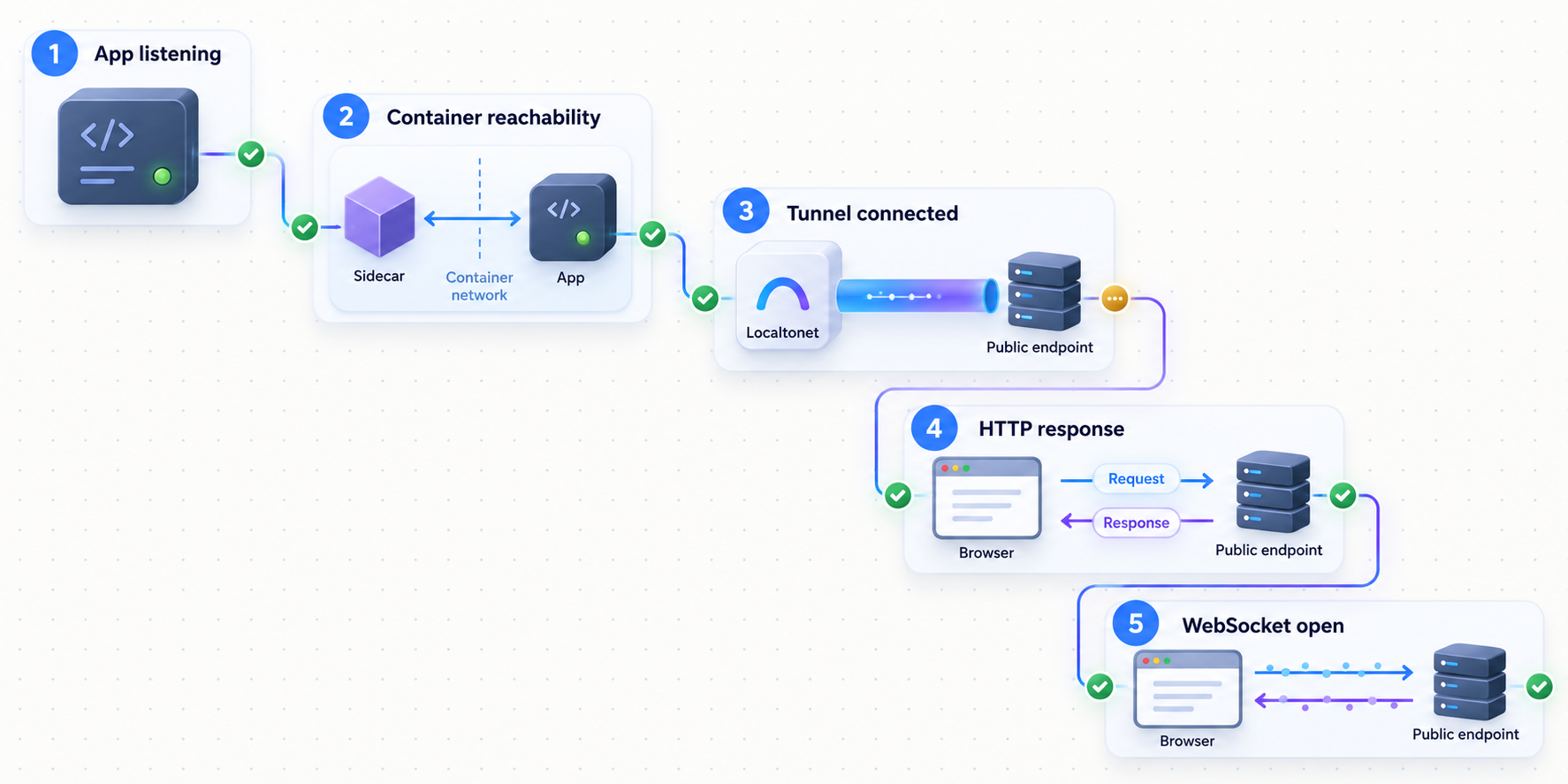
Testing only the public URL makes failures hard to classify. A better plan starts at the application and moves outward. Record the result at each layer before continuing. This identifies whether a failure belongs to the application, the container network, the Localtonet client, the tunnel state, or the browser-facing application configuration.
Verify the application in its own runtime
Confirm that the development process is running, has finished startup, and responds on the intended internal port. Use a harmless application route. A successful response here proves only that the process works locally.
Verify reachability from the proposed client runtime
Test the same target from the companion container or supported host where the Localtonet client will execute. This verifies listener scope, name resolution, routing, network membership, and port selection.
Verify Localtonet client connectivity
Confirm that the intended device is connected. A disconnected client cannot carry traffic even when the tunnel configuration and public address still exist.
Verify that the HTTP tunnel is running
Confirm the tunnel has been started and has the expected status. Creating it is not enough. Recheck the configured local IP address and port against the target proven in the previous network test.
Test the public address from an external network
Open the assigned HTTPS address from a device that is not relying on the same local development route. Verify status, content, redirects, asset loading, forms, API calls, and any authentication flow relevant to the preview.
Test long-lived development behavior
If the framework uses WebSockets or another persistent browser connection for hot reload, open browser developer tools and verify that the connection is established and remains usable after a source change. Do not infer support from the initial HTML response alone.
WebSocket hot reload requires an end-to-end test
Many development servers return the initial page over ordinary HTTP and then establish a persistent connection for hot reload. A preview can therefore appear healthy while automatic reload remains broken. The browser may display the page correctly but fail to receive rebuild notifications.
The verified product information supplied for this article does not establish specific WebSocket behavior, timeout values, or configuration controls for this exact container workflow. Treat WebSocket operation as a validation requirement rather than an assumed capability. Check the browser's network panel, trigger a source change, and observe whether the page receives the expected update.
If the connection fails, inspect application origin checks, host validation, generated WebSocket URLs, secure-scheme expectations, and the framework's public development-server configuration. Do not disable all protections simply to make hot reload work. Add only the exact public origin or host required by the temporary preview.
Host and origin validation
Development servers often protect against unexpected host headers or cross-origin browser connections. Once the application is opened through a public HTTPS address, the browser-visible host and scheme differ from a direct local request. The application may reject the host, generate a redirect to a private address, create an insecure WebSocket URL, or refuse an origin that has not been approved.
Configure these controls according to the framework's own documented settings. Prefer a narrow allowlist containing the intended preview origin. A blanket accept-any-host or accept-any-origin setting is risky for a publicly reachable development server and can conceal configuration errors.
Plan for restarts, rebuilds, and shutdown
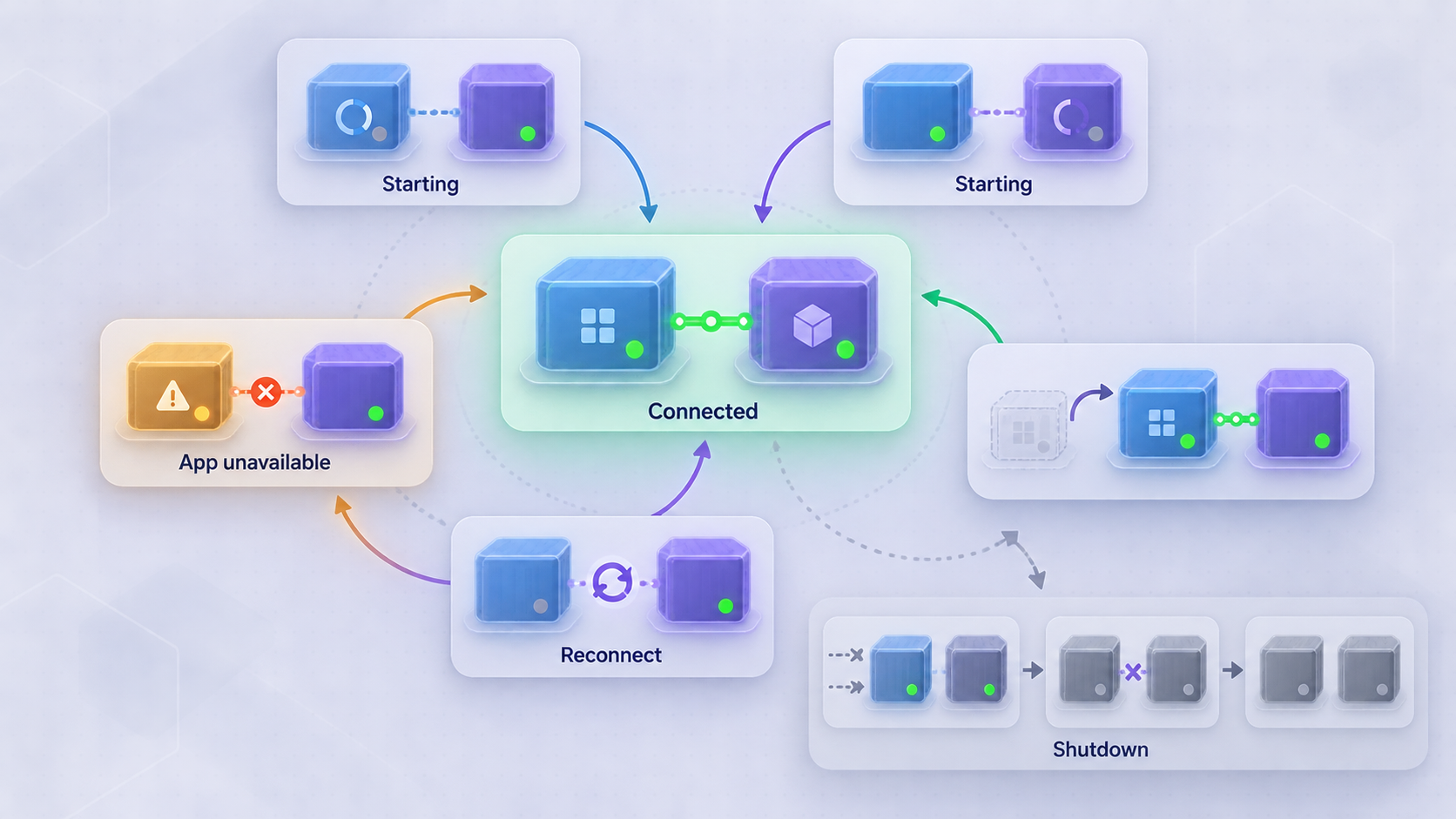
Restart resilience does not mean that every component restarts automatically or that the preview has uninterrupted availability. It means the team understands which identities and states survive each event, how failures are detected, and which recovery actions are supported.
| Event | Likely effect to evaluate | Required check |
|---|---|---|
| Application process restart | The tunnel may remain running while its local target is temporarily unavailable. | Confirm the application reopens the same listener and that the public preview recovers after readiness. |
| Application container recreation | The container address can change and the application may rejoin a recreated network. | Confirm that the tunnel target remains valid and that the companion can resolve or reach the replacement container. |
| Companion process restart | The selected client becomes disconnected during the restart. | Confirm documented authentication, reconnection, and tunnel-start behavior rather than assuming automatic recovery. |
| Full Compose project shutdown | Both services stop, but the tunnel configuration may still exist in the dashboard. | Stop the tunnel deliberately and confirm its status when public access must end. |
| Dev Container rebuild | Containers, writable layers, networks, and unpersisted identity material may be replaced. | Confirm whether the client identity is safely retained and whether the existing tunnel can be associated with the recreated runtime. |
| Tunnel stop or deletion | The public route becomes unavailable even if the application and client remain healthy. | Distinguish intentional tunnel shutdown from an application or network failure. |
Do not confuse restart policy with readiness
A container restart policy can relaunch a failed process, but it cannot prove that authentication succeeded, that the selected device identity is correct, that the target is reachable, or that the tunnel was started. It also cannot guarantee that a public address remains the same after recreation. Those behaviors require explicit product support and testing.
Avoid creating a restart loop that repeatedly submits invalid credentials or rapidly retries an unreachable service. Until current client behavior is documented for the selected container design, monitor restart behavior manually in a disposable environment and record what survives.
Use a deliberate shutdown sequence
When a preview is finished, stop the public tunnel first if immediate access revocation is important. Then stop the Localtonet client and the application services. Delete the tunnel if the configuration should not be reused. Finally, remove or rotate any development secret that was created only for the preview.
Stopping the application before the tunnel merely changes the public result from a working preview to an unavailable backend. It does not necessarily remove the tunnel configuration. Likewise, deleting a container does not prove that an associated device credential has been revoked or that a tunnel record has been deleted.
Localtonet platform-wide Token/Tunnel webhooks can report Connected or Disconnected changes for a token or tunnel in a selected Token Group. They post a WebHookRequest containing Id, ActionDate, Type, and Status. This monitoring feature must not be confused with File Server file-event webhooks, which cover upload, delete, rename, and move events.
Protect credentials and limit preview exposure
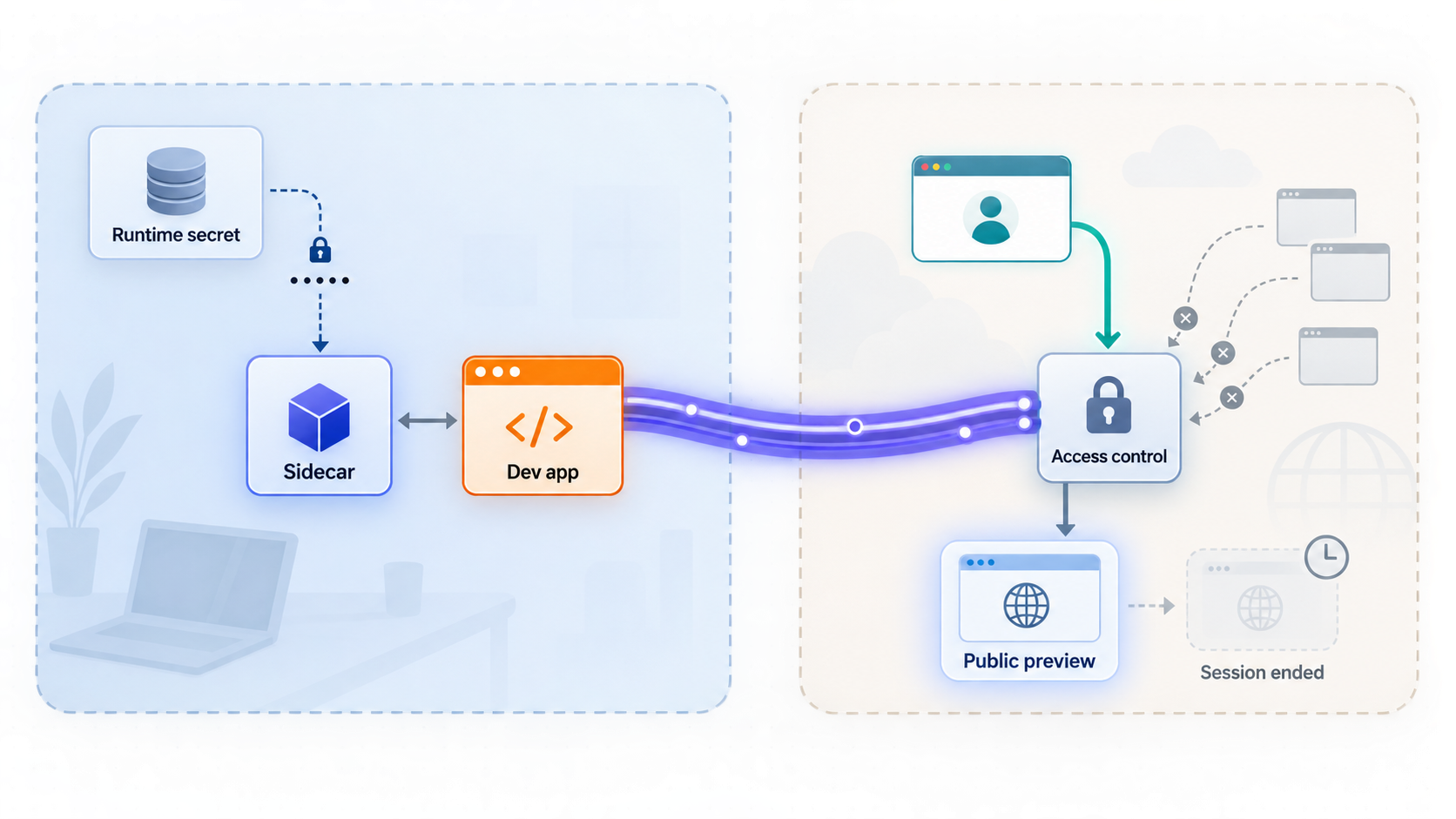
Development applications often contain debugging pages, test data, permissive cookies, incomplete authorization, or administrative helpers that were never intended for a public audience. A tunnel changes reachability, not the application's security posture. Review the application as an internet-reachable service before starting the tunnel.
Keep the device token out of build artifacts
A Localtonet authentication token identifies a client device. It must not be copied into a Dockerfile, image layer, Compose file committed to source control, shell history, issue tracker, browser bundle, screenshot, or example log. Redacting the value in the final repository does not remove it from earlier image layers or version-control history.
The verified information available here does not define a supported Localtonet environment variable or secret-file interface for container authentication. Do not invent one. First identify the documented client authentication mechanism, then choose a secret delivery method compatible with that mechanism and the team's container platform.
Apply least exposure
- Expose only the application port required for the preview.
- Do not attach the companion to unrelated container networks.
- Avoid publishing the application port to the host unless the architecture requires it.
- Keep production credentials and production data out of development previews.
- Require application authentication when the content is not intended for unrestricted public viewing.
- Use narrow host and origin allowlists instead of disabling validation globally.
- Stop or delete the tunnel promptly when the review session ends.
- Never publish device tokens, private endpoints, or credentials in logs and troubleshooting reports.
The absence of router port forwarding does not make the application private. Anyone who can reach the public endpoint can attempt to access the service unless the application or another verified control requires authorization. Do not expose an unauthenticated administrative console, development database browser, debugger, or secret-bearing diagnostics page.
Troubleshoot by following the traffic path
The application works in its own container but not from the companion
This usually indicates a local network problem rather than a public tunnel problem. Confirm that the application listens on a container-reachable interface, both services share the intended network, the target port is correct, and the chosen address resolves from the companion. Remember that the companion's localhost is not the application container.
The client is connected but the public URL fails
Client connectivity and tunnel execution are separate states. Confirm that the tunnel has been started. Then check that its target exactly matches the address and port already proven reachable from the client runtime. If the target uses a container name, verify that the current Localtonet target field supports that format. Do not assume DNS-name support.
The page opens but assets or API requests fail
Inspect browser requests for private hostnames, loopback addresses, incorrect schemes, blocked origins, and redirects. Applications sometimes generate absolute URLs from their local configuration. Configure the framework's public base URL, trusted proxy behavior, or origin allowlist only through settings documented by that framework.
The page loads but hot reload does not work
Find the browser's persistent connection and inspect its URL and status. A generated connection may point to a local hostname, use an insecure scheme from an HTTPS page, or fail an origin check. Verify behavior after an actual source edit. Because exact WebSocket support details are not established for this workflow, keep the result as an explicit acceptance test.
The preview stops after a rebuild
Determine whether the application target changed, the companion lost its client identity, the token was not available, the client did not reconnect, or the tunnel remained stopped. Test these layers separately. Do not solve the issue by embedding the token in the image or by creating a new tunnel on every startup without a documented lifecycle plan.
The endpoint exists but appears offline
A saved endpoint does not imply availability. Verify that the selected client is connected and that the tunnel is running. Then verify application readiness. Endpoint identity, client connectivity, tunnel execution, and backend health are four distinct conditions.
The application rejects the public hostname
Add the exact preview host or origin using the application's documented allowlist mechanism. Avoid disabling host validation for all requests. If a custom domain is involved, check current Localtonet domain and DNS instructions rather than guessing records or propagation behavior.
Container IP changes break the tunnel target
This exposes a dependency on an unstable address. Confirm whether the current HTTP target accepts a Compose-resolvable service name. If it does not, redesign around a supported stable target, run the client in another supported network context, or implement only a documented method of updating the tunnel. Do not invent an API payload or automation command.
Frequently asked questions
Is there an official Localtonet Docker image for this sidecar design?
An official Localtonet container image is not established by the verified product information available for this guide. We therefore do not provide an image name, tag, Dockerfile, installation command, or Compose service. Confirm current container support and installation instructions before implementing the design.
Can the Localtonet companion target localhost?
Not when localhost belongs to a separate Compose container and the application runs in another container. Each container normally has its own loopback interface. The client needs an address and port that reach the application across the shared network. A shared-network-namespace deployment has different behavior and must be evaluated separately.
Can an HTTP tunnel target use a Docker Compose service name?
The verified Localtonet information for this revision does not confirm that the HTTP target accepts a Docker DNS name such as app. Confirm the accepted target format in the current dashboard or documentation. Do not build restart behavior around service-name resolution until that support is verified.
Does a stable public URL guarantee that the preview stays online?
No. Public endpoint identity and runtime availability are separate. The selected Localtonet client must be connected, the tunnel must be running, the local target must be reachable, and the development application must be ready.
Does creating a tunnel automatically start it?
No. Creating a Localtonet tunnel does not mean it is running. It must be started using the supported Start action and can later be stopped or deleted.
Will WebSocket hot reload work through the preview?
It must be tested for the exact framework and configuration. The evidence available for this guide does not establish specific WebSocket behavior for the proposed container workflow. Verify the persistent browser connection, public scheme, generated host, origin checks, and actual reload behavior after a source change.
Should the application bind to 0.0.0.0?
In a separate-container design, the application must listen on an interface reachable through the container network rather than only its own loopback interface. Many frameworks use 0.0.0.0 for this purpose, but the exact setting is framework-specific. Restrict network attachments and avoid unnecessary host publication because a broader listener increases reachability within attached networks.
Where should the Localtonet device token be stored?
Keep it out of source control, image layers, application configuration, browser code, and logs. Use only a secret-delivery mechanism compatible with the currently documented Localtonet authentication method. This guide does not invent an environment variable or secret-file interface because none is established by the verified information supplied for this workflow.
Is stopping Docker Compose enough to remove public access?
Do not rely on that assumption. Container shutdown, client disconnection, tunnel stopping, and tunnel deletion are separate events. Stop the tunnel deliberately when access must end, delete it if it should not be reused, and confirm the resulting status.
Plan your development preview with Localtonet
Start by proving application reachability from a supported Localtonet client environment. Then create and start an HTTP tunnel, validate the public application layer by layer, and document how your team will protect the device token and shut the preview down.
Get Started Free →

