

Match the Connection Model to the People, Devices, and Protocols That Actually Need Access
Private mesh access and public tunneling can both make a local service reachable without conventional inbound router port forwarding, but they solve different access problems. VPN Manager is appropriate when participating devices should communicate through a controlled private network. A public tunnel is designed for clients that need an internet-routable endpoint, including webhook providers, external reviewers, and users who cannot join the private mesh. This guide explains how to choose, prepare, configure, verify, operate, and troubleshoot each path without treating a public tunnel as a VPN or a private mesh as a folder-publishing service.
📋 What's in this guide
The Core Difference Is the Exposure Boundary
A private mesh VPN and a public tunnel may appear interchangeable because each can connect a remote client to a service behind NAT, carrier-grade NAT, or a router. The important distinction is not merely how packets travel. It is who can initiate a connection, what endpoint the caller uses, and which network boundary contains the service.
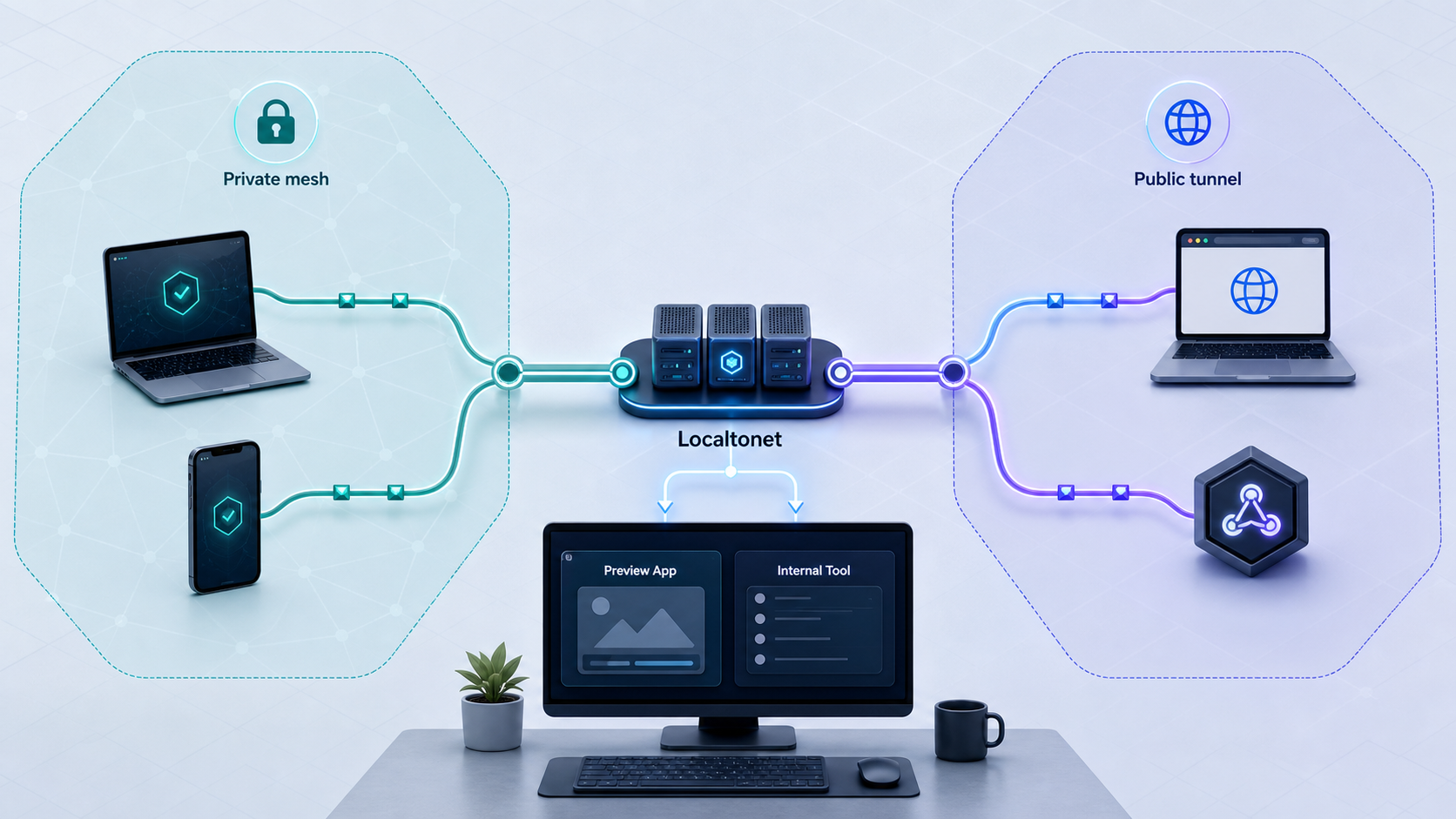
In a private mesh model, participating devices communicate inside a private network. This is a strong fit for internal dashboards, administration interfaces, self-hosted tools, development databases, and services intended only for a known team or device group. Localtonet VPN Manager provides a free private mesh VPN, supports granular firewall rules, and can bridge local LANs. VPN Manager is the actual VPN feature in Localtonet. Standard HTTP, TCP, UDP, TLS, combined UDP/TCP, and File Server tunnels are not VPN connections.
A public tunnel solves a different problem. The Localtonet client application on the device establishes an outbound connection to a Localtonet relay server. The resulting tunnel provides a public URL or a public host and port, depending on its family. An external client connects to that endpoint, and traffic is forwarded through the running tunnel to the configured local target. This does not require inbound router port forwarding, firewall changes, VPN setup, or a public IP address on the local connection.
Public reachability is useful when the caller cannot join a private mesh. A third-party webhook provider, an external browser, a customer reviewing a preview, or an internet client connecting to a TCP or UDP application usually needs a publicly routable destination. That convenience expands the exposure boundary. Application authentication, narrow permissions, request validation, IP restrictions where available, and short tunnel lifetimes should therefore be part of the design rather than afterthoughts.
A Practical Decision Framework
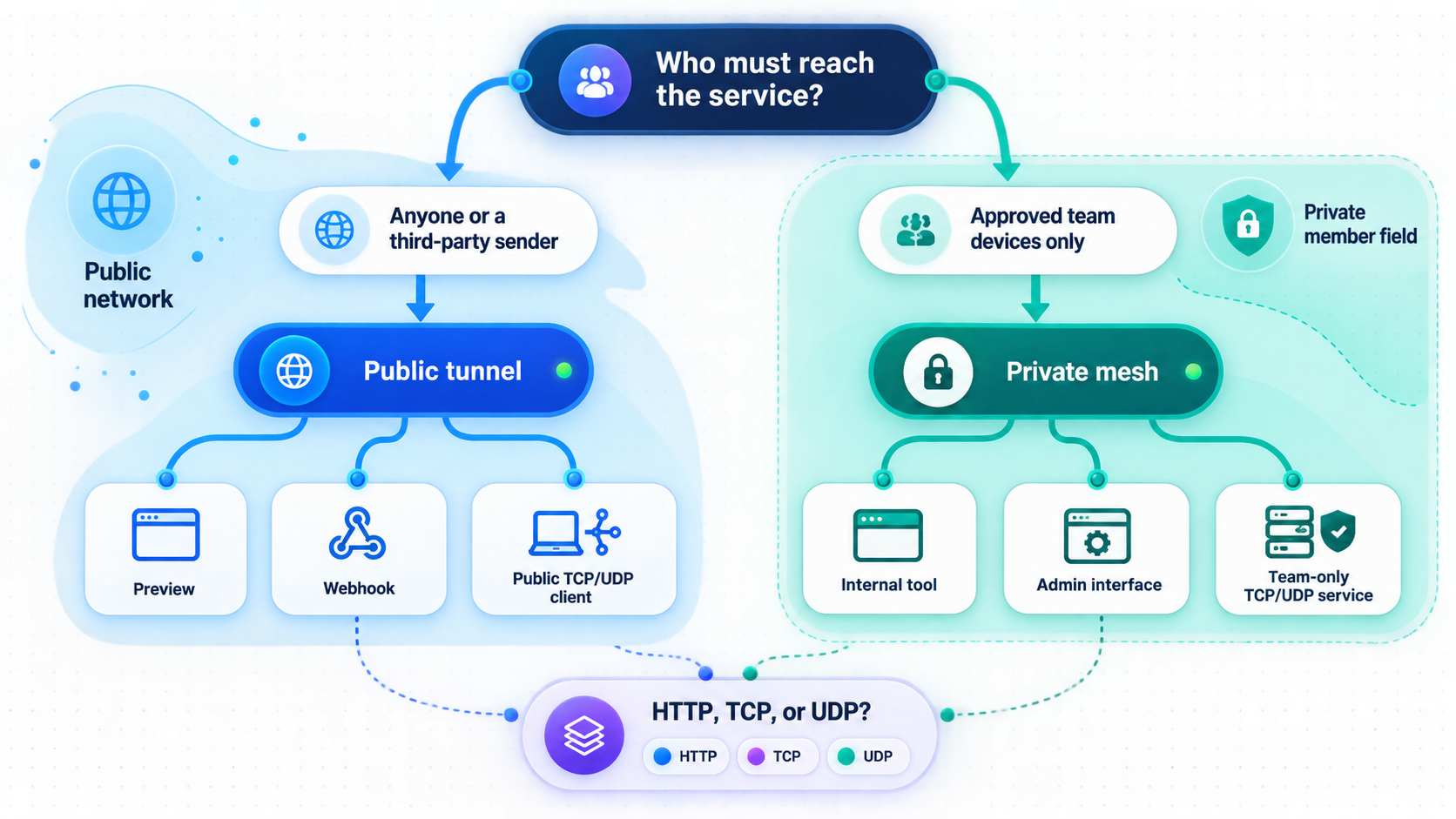
Begin with the caller, not the technology name. Ask whether every legitimate caller can participate in the private mesh. If the answer is yes, private networking offers the narrower starting boundary. If the answer is no because the caller is a webhook provider, an external customer, a public browser, or another internet system, a public tunnel is usually the applicable path.
Next, identify the protocol. Browser applications and HTTP APIs normally map to an HTTP tunnel. A non-HTTP application may require TCP, UDP, TLS, or combined UDP/TCP forwarding. A folder-sharing workflow can use File Server. Private communication among managed devices or across selected LANs belongs in VPN Manager rather than being forced through several unrelated public endpoints.
Finally, decide how long the path should exist. A temporary preview can be started for a review session and stopped immediately afterward. A webhook endpoint may need to remain available throughout a test window. A persistent internal operations tool may be better placed behind private mesh access with narrowly scoped firewall rules and recurring access review.
| Workload | Starting model | Important qualification |
|---|---|---|
| Internal team dashboard | VPN Manager | Use private mesh access when all intended users and devices can participate, then allow only the required service path. |
| External development preview | HTTP tunnel | The reviewer receives a public HTTPS address, so the application still needs suitable authentication and authorization. |
| Third-party webhook testing | HTTP tunnel | The provider needs a public callback URL. The receiver must validate the provider's signature, secret, timestamp, or other documented authenticity mechanism. |
| Private administrative service | VPN Manager | A sensitive interface intended only for controlled devices should not become public merely for convenience. |
| Internet-facing TCP or UDP workload | Matching public tunnel family | Select TCP, UDP, TLS, or combined UDP/TCP according to the application protocol and current dashboard availability. |
| Browser-based folder access | File Server Default | File Server targets a local folder directly and provides a browser-based file manager. |
| Private access to an existing SMB, NFS, or other file service | VPN Manager plus the file-sharing service | VPN Manager supplies private network connectivity. It does not publish a folder by itself, so the host must run and secure a separate file-sharing service. |
VPN Manager can make a device or LAN privately reachable, but it does not turn a folder into a share. On the private path, configure an appropriate file-sharing service on the host and permit only its required network path. If the objective is to publish a local folder directly, use File Server and choose Default, SFTP, or WebDAV according to how recipients need to access it.
Prerequisites and Target Preparation
A tunnel or mesh path cannot repair a service that is not running, listening on the wrong interface, using a different protocol, or blocked on the host. Prepare and verify the target before changing remote connectivity. This separates application failures from Localtonet configuration failures and greatly reduces troubleshooting time.
Inputs to collect before configuration
- The people, devices, or external systems that must connect.
- Whether every legitimate caller can install and participate in private mesh access.
- The service protocol, such as HTTP, TCP, UDP, TLS, or a protocol requiring both TCP and UDP.
- The local IP address and port for a network service, or the folder path for File Server.
- Whether the target runs on the Localtonet client device or another host reachable from that device.
- The authentication and authorization method protecting the application or file workflow.
- The intended access window and the person responsible for stopping or removing access.
- For VPN Manager, the precise source device or network, destination host or LAN, protocol, and port that each firewall rule should permit.
Install on an appropriate device
Install and run the Localtonet client on a device that can reach the target. For a service bound to the same machine, that is usually the service host. For a service on another LAN device, the Localtonet client device must already be able to reach the target IP and port across the local network.
Supported installation packages and installation details can vary by operating system and client version. Use the current Localtonet application or installation guidance for the operating system involved rather than copying an unverified command. Keep each device-specific auth token private. Tokens identify client devices and must not be placed in source repositories, shared screenshots, examples, or logs.
Verify an HTTP target locally
Start the web application and open its local address from the Localtonet client device. Confirm that the expected page or API response appears. Exercise the actual route that remote users will need, not only a generic home page. If the target is another LAN host, perform the same test from the machine running the Localtonet client.
Pay attention to the listening interface. An application restricted to loopback is reachable only from the same host. That is suitable when Localtonet runs on that host and the tunnel targets the loopback address. If Localtonet runs on a separate device, the application must listen on an appropriate LAN interface and the host must permit that local connection. Do not broaden the bind address unless the architecture requires it.
Verify TCP, UDP, and TLS targets
Use a client appropriate to the application protocol from the Localtonet client device. Confirm that the correct destination port is listening and that a real application exchange succeeds. A successful TCP connection alone may not prove that the application protocol is healthy. For UDP, use an application-aware test because UDP has no connection handshake that independently confirms end-to-end service health.
For TLS, establish where encryption is terminated and choose the tunnel family that matches the intended design. Do not select HTTP merely because a client displays web-like content, and do not select TCP when the application requires UDP. The transport selected in Localtonet must match the service and the remote client.
Prepare a private mesh target
Start the internal service and test it from the host itself. If it should be reachable through a bridged LAN, test it from the intended Localtonet VPN-side device or gateway before relying on remote mesh access. Record the exact destination IP, protocol, and port. These values form the basis of least-privilege VPN firewall rules.
If the target cannot be reached locally, opening a public tunnel or permitting an entire private LAN will not safely solve it. Correct the application bind address, local routing, protocol, service state, or host firewall first. Expand access only when the broader path is genuinely required.
Choose the Correct Localtonet Target
Once the exposure model is settled, the target must match the service. HTTP, TCP, UDP, combined UDP/TCP, and TLS tunnels point to a local IP address and port on, or reachable from, the selected client device. Using a private LAN address as the local target does not make the resulting public tunnel private. The assigned endpoint remains publicly routable while the tunnel is running.
File Server is different because its target is a local folder path. Default mode provides a browser-based file manager without requiring recipients to install a client. SFTP works with standard SFTP clients and automation tools such as FileZilla, WinSCP, and rsync. WebDAV can mount the folder as a native operating-system network drive through Windows File Explorer or macOS Finder.
Proxy tunnel types are different again. They make the connected device the proxy exit node and do not forward to a conventional local IP address and port. A proxy, a public service tunnel, a published folder, and a private mesh create different traffic paths and should be reviewed separately.
Protocol options, relay servers, regions, process types, custom-domain behavior, and subscription availability can differ by plan, client version, region, or dashboard state. Obtain current server codes and available values from the Localtonet dashboard. Check current documentation before applying exact DNS instructions for a custom domain.
Public Tunnel Setup Path
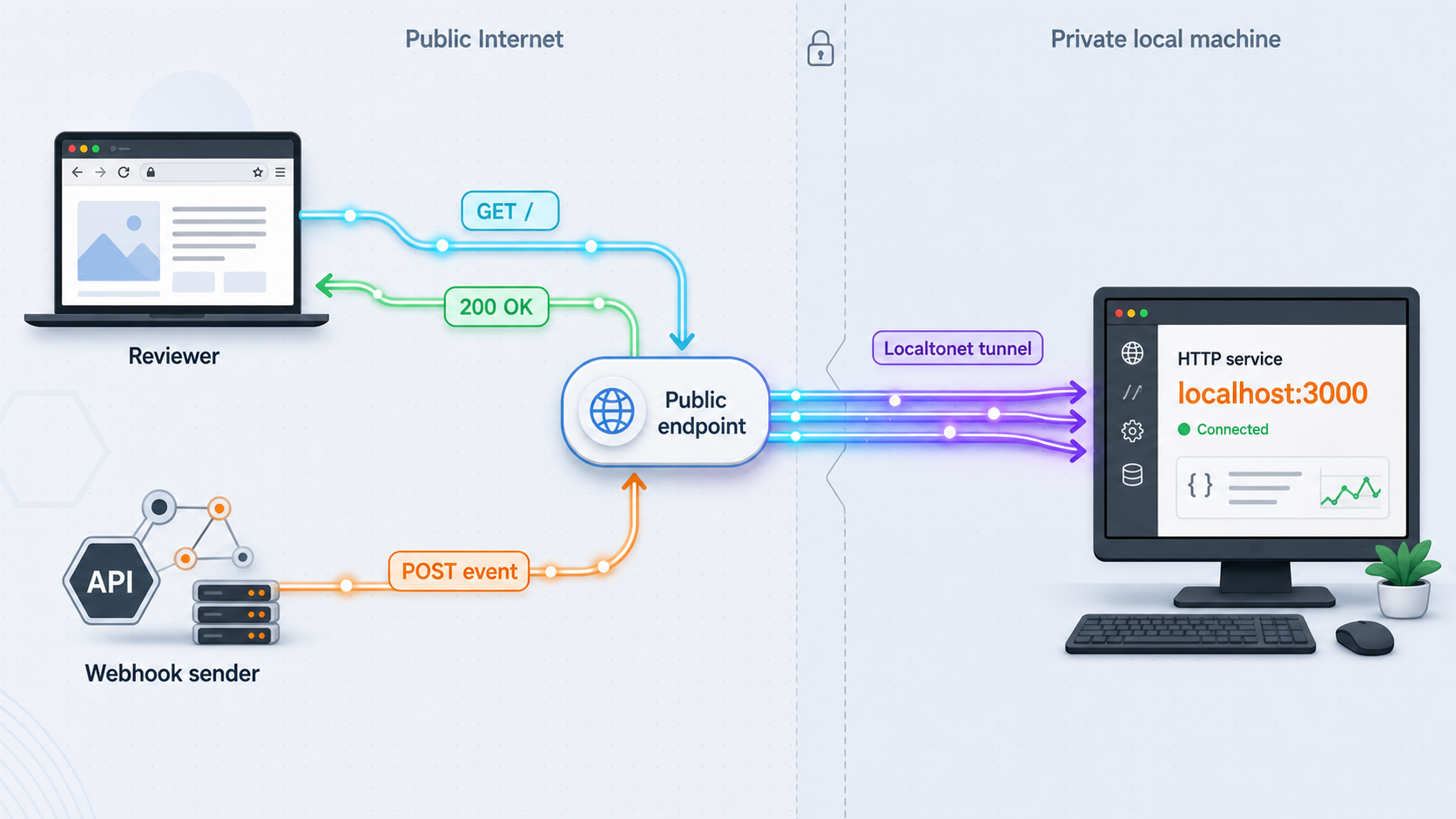
The following sequence follows Localtonet's documented common tunnel workflow. The exact configuration fields depend on the selected tunnel family. File Server uses a folder path, proxy types use the connected device as an exit node, and network-service tunnels use a local IP address and port.
Install and run the Localtonet client
Use the device that can reach the intended local service or folder. Keep the client running because it establishes the outbound connection used by the tunnel.
Authenticate or select the device
Select the device through its device-specific auth token. Never guess, publish, embed, or expose that token.
Select an available relay server or region
Choose from the values currently offered by the dashboard. Do not copy or hardcode a server code from an old tutorial.
Create the appropriate public tunnel configuration
Choose HTTP, TCP, UDP, TLS, combined UDP/TCP, File Server, or another currently available public configuration according to the target and protocol. Enter the locally verified IP address and port, or the folder path required by File Server.
Start the tunnel and use its assigned endpoint
Creating a tunnel does not make it active. Press Start, then use the assigned public URL or public host and port while the selected client remains connected.
Stop or delete the tunnel when finished
Stop the tunnel to end public reachability while retaining its configuration, or delete it when the configuration is no longer needed.
HTTP process types
HTTP and File Server tunnels can use Random Sub Domain, Custom Sub Domain, or Custom Domain process types. Each serves the configured content at a public HTTPS address. Availability may vary. For custom domains, consult the current Localtonet documentation for the exact DNS requirements rather than relying on instructions copied from another service or an older dashboard version.
Development previews and webhook receivers
A development preview is a common HTTP-tunnel workload. The application continues running on the developer's machine while the tunnel supplies a public HTTPS address. Before sharing it, test the exact routes a reviewer needs and remove test data or development-only controls that should not be internet-accessible.
Webhook testing has a similar routing requirement but a different security profile. The sender must reach the callback without joining a private network. The receiving application should validate the signature, secret, timestamp, replay protection, or other authenticity mechanism defined by that provider. Avoid putting credentials in URL paths or query strings, and do not expose an unrelated administration interface through the same local service.
Localtonet also has two webhook systems of its own, but neither changes the public-tunnel setup above. Platform-wide Token/Tunnel webhooks report Connected or Disconnected state changes for tokens or tunnels in a selected Token Group. File Server webhooks separately report upload, delete, rename, and move events, with optional path filters and HMAC signing. These should not be confused with exposing an application so it can receive a third-party webhook.
Do not rely on an unguessable hostname as the only protection for a local application. Enable application authentication, use least-privilege permissions, apply IP restrictions or other access controls where supported, expose only the required service, and stop the tunnel when public access is no longer needed.
VPN Manager Setup Path
VPN Manager is a separate private-network workflow, not another public tunnel type. It creates a private mesh, supports granular firewall rules, and can bridge local LANs. Remote clients use private network connectivity rather than an assigned public URL or public host and port.
The verified product information available for this guide does not establish a stable, field-by-field VPN Manager dashboard sequence or operating-system-specific installation command. Those details can change with the client and dashboard. We therefore do not invent network names, enrollment fields, addresses, buttons, or commands. Use the current Localtonet VPN Manager guide for the current interface while applying the preparation, rule design, verification, and operating controls below.
Prepare all participating sides
Identify the devices or LANs that need to communicate and install the current supported Localtonet client where required by the current VPN Manager workflow. Each participating device must be correctly associated with its own credentials or device identity. Do not reuse or expose device auth tokens.
If the destination is a service on a bridged LAN rather than on a participating device itself, confirm that the Localtonet-connected device responsible for that LAN can already reach the destination. Record any existing local routes and host firewall restrictions. VPN Manager can provide the private path, but the destination service and its local network still have to accept the connection.
Define the minimum required communication
Write the access rule in plain language before translating it into the current VPN Manager interface. A useful rule specification identifies the source device or network, destination device or LAN address, transport protocol, destination port, and business purpose. Avoid a rule that permits every participant to reach every destination when only one application is needed.
For example, access to a private dashboard should permit the intended source devices to reach only the dashboard host and service port. Access to a database should be limited to the application or administration devices that require it. Bridging two LANs does not mean all traffic between those LANs must be permitted.
Apply granular firewall rules
Configure the required paths using VPN Manager's current granular firewall-rule controls. Begin with the narrowest source, destination, and protocol definition that supports the use case. If the rule blocks a legitimate test, inspect the exact traffic and adjust only the missing element rather than replacing it with unrestricted access.
Connect the required devices and validate status
Ensure the participating Localtonet clients are running and connected according to the current VPN Manager interface. Private reachability depends on the relevant devices and network paths being available. A configured device that is offline cannot provide access to its local service or bridged LAN.
Use the private service address
Connect from an authorized remote participant using the private address or route assigned by the current VPN Manager configuration. VPN Manager does not produce a public URL for the internal service. If users require a browser-friendly name, identity integration, or another naming layer, confirm current support before designing around it.
A private mesh narrows who can participate, but every participating device should not automatically receive universal access. Maintain device governance, service authentication, narrow firewall rules, credential protection, and a process for removing devices and obsolete permissions.
Verify Public and Private Reachability
Verification should prove both that intended access works and that unintended access does not. Test from the kind of remote client that will actually use the service. Testing only from the host can confirm the application, but it cannot confirm the external path.
Verify a public HTTP tunnel
- Confirm that the application still works locally on the target address and port.
- Confirm that the selected Localtonet client shows as connected.
- Confirm that the tunnel is running, not merely created.
- Open the assigned public HTTPS address from a device using a different network where practical.
- Test the exact page, API route, HTTP method, request body, and authentication flow needed by the external caller.
- For webhooks, send a test event from the provider and confirm that the application validates it before processing it.
- Attempt an unauthenticated or unauthorized request and confirm that the application rejects it as designed.
Verify a public TCP, UDP, or TLS tunnel
Use a remote client that speaks the actual application protocol and connect to the assigned public host and port. Confirm a meaningful transaction, not merely name resolution or a socket-opening attempt. For UDP, use application-level confirmation because a sender may transmit packets without learning whether a listener processed them.
Verify VPN Manager access
- Confirm that the destination service works on its host and, when applicable, from the LAN-side Localtonet device.
- Confirm that the required VPN Manager participants are connected.
- From an authorized remote participant, connect to the service through its configured private path.
- Verify the expected application operation, including authentication and authorization.
- From a participant that should not have access, attempt the same connection and confirm that the firewall policy blocks it.
- Test other sensitive ports on the destination only when authorized, confirming that they remain unavailable unless explicitly required.
- If a LAN is bridged, verify only the intended destination routes rather than assuming the entire LAN should be reachable.
A permissive rule can make the intended service work while also exposing unrelated systems. Always perform a negative test from an unauthorized device or toward a non-permitted port. Record the expected result so future rule changes can be checked against it.
Lifecycle Management and Routine Access Review
Connectivity changes over time. Devices are replaced, developers leave projects, service ports move, previews expire, and temporary firewall exceptions outlive their original purpose. Treat both public tunnels and private mesh rules as managed access rather than permanent background configuration.
Operating a public tunnel
- Keep the target application patched and use its own authentication and authorization.
- Expose only the service and protocol required by the external caller.
- Keep the selected Localtonet client connected for the duration of the access window.
- Monitor whether the tunnel is running and whether the local service has restarted or changed ports.
- Share public endpoints only with intended recipients, while recognizing that the endpoint remains public.
- Stop the tunnel when a review, demonstration, or webhook test window ends.
- Delete configurations that are no longer expected to be reused.
Operating VPN Manager
- Review participating devices and remove those that no longer require private connectivity.
- Review firewall rules by source, destination, protocol, port, owner, and purpose.
- Remove temporary rules after the related task or incident has ended.
- Test important permitted and denied paths after rule changes.
- Review bridged LAN access carefully because one gateway can make multiple local systems reachable.
- Retain service-level authentication even when the network path is private.
Platform-wide Token/Tunnel webhooks can report Connected or Disconnected changes for tokens or tunnels in a selected Token Group. Their JSON body includes the relevant tunnel ID or auth token in Id, the ActionDate, a Type of Token or Tunnel, and a Status of Connected or Disconnected. These notifications can support lifecycle awareness, but they do not replace service health checks or access-policy review. See the Localtonet webhook documentation for the current platform-wide webhook workflow.
Troubleshooting Unreachable or Overexposed Services
The local target is unreachable
Stop at the local layer. Confirm that the application is running, that the configured IP address and port are correct, and that the selected Localtonet client device can reach them. If the target is on another LAN host, test from the Localtonet device rather than only from your workstation. Check the application bind address, host firewall, local routing, and protocol.
The Localtonet client is disconnected
A public tunnel depends on its selected client, and private paths depend on the relevant participating devices. Confirm that the client application is running, authenticated with the intended device identity, and able to establish its outbound connection. Review ordinary device issues such as sleep, network loss, restarts, or switching to another network.
The tunnel exists but the endpoint does not work
Creating a tunnel does not start it. Check that the tunnel is running and that the selected client remains connected. Then compare the tunnel's target with the address and port that passed the local test. If the service restarted on another port, update the configuration only after verifying the new local target.
The wrong protocol was selected
HTTP, TCP, UDP, TLS, and combined UDP/TCP are not interchangeable labels. Match the Localtonet family to the application. A UDP-native workload will not work through a TCP-only configuration. A browser-based service normally requires HTTP semantics, while a raw TCP protocol should be tested with its native client.
The public endpoint connects but the application fails
Inspect the application behavior rather than assuming the tunnel is down. Check the requested path, HTTP method, host expectations, authentication, payload format, and application logs available in your environment. For webhook failures, confirm that the provider is using the current public URL and that signature validation uses the exact raw payload and headers required by that provider.
A VPN Manager rule blocks legitimate traffic
Compare the attempted flow with the rule specification. Check the actual source participant, destination address, protocol, and port. If a bridged LAN is involved, confirm that the destination is reachable from the bridge-side device and that return routing works. Adjust only the mismatched field rather than granting broad access.
A VPN Manager rule permits too much
Narrow the source device or network, destination host or subnet, protocol, and port. Re-run both positive and negative tests. If the application uses additional dynamic ports, confirm those requirements from the application's own documentation instead of opening an unrestricted range by guesswork.
A folder is reachable over VPN but cannot be opened
VPN Manager provides network connectivity, not a folder-sharing protocol. Confirm that the destination host is running an appropriate file-sharing service, that the remote client supports it, that the service is listening on the intended private interface and port, and that both the VPN rule and file-service permissions allow the user. If direct folder publishing is the objective, evaluate Localtonet File Server instead.
A relay server, region, or option shown elsewhere is missing
Available values can vary by plan, region, client version, or current product configuration. Use the values currently shown in your dashboard. Do not paste server codes, process types, or DNS instructions from an unrelated tutorial.
Frequently Asked Questions
Is a Localtonet public tunnel the same as a VPN?
No. HTTP, TCP, UDP, TLS, combined UDP/TCP, and File Server tunnels expose a selected service or folder through an assigned endpoint. Localtonet VPN Manager is the private mesh VPN feature.
Which path fits third-party webhook testing?
A public HTTP tunnel is generally applicable because an external webhook provider needs an internet-routable callback URL. The receiving application must still verify the provider's documented signature, secret, timestamp, or replay-protection mechanism.
Should an internal dashboard use a public tunnel?
If all intended users and devices can participate in a controlled private network, VPN Manager provides the private-mesh path. Public exposure may be necessary for external users, but it should be a deliberate decision protected by appropriate application authorization.
Can Localtonet expose both TCP and UDP services?
Localtonet documents TCP, UDP, and combined UDP/TCP tunnel families. Select the family that matches the application protocol and confirm current option and plan availability in the dashboard.
Does creating a public tunnel immediately make the service reachable?
No. The tunnel must be started, and the selected Localtonet client device must remain connected. The local target must also be running and reachable from that device.
Does a random public subdomain make an application private?
No. It remains a public endpoint. Protect the application with suitable authentication, least privilege, access restrictions where supported, and a limited exposure window.
Does VPN Manager publish a local folder?
No. VPN Manager provides private network connectivity. To access a folder over that path, the host needs a separate file-sharing service with its own permissions. Localtonet File Server directly targets a folder and offers Default browser access, SFTP, and WebDAV modes.
Can VPN firewall rules replace application authentication?
No. Firewall rules control network paths, while application authentication and authorization control who may use the service and what they may do. Use both where the workload requires them.
Choose the Narrowest Path That Meets the Requirement
The architecture decision becomes clearer when framed as an exposure question. If controlled devices need private access to internal services or selected LANs, use VPN Manager's private mesh and granular firewall rules. If an external system needs an internet-routable endpoint, choose the public tunnel family that matches the application protocol. For a browser preview or webhook callback, that will commonly be HTTP. For non-HTTP workloads, evaluate TCP, UDP, TLS, or combined UDP/TCP. For direct folder publishing, use the dedicated File Server modes.
Neither pattern removes the need for security design. Private mesh access still requires device governance, narrow rules, service authentication, negative testing, and lifecycle management. Public tunneling still requires authentication, authorization, service isolation, remote verification, and prompt shutdown when exposure is no longer necessary. The correct path reaches the required callers without making additional systems reachable by accident.
Build the Required Connection with Localtonet
Create a public endpoint for an external caller or configure VPN Manager for private mesh access, then apply the protocol, permissions, verification, and lifecycle controls appropriate to your service.
Get Started Free →

