

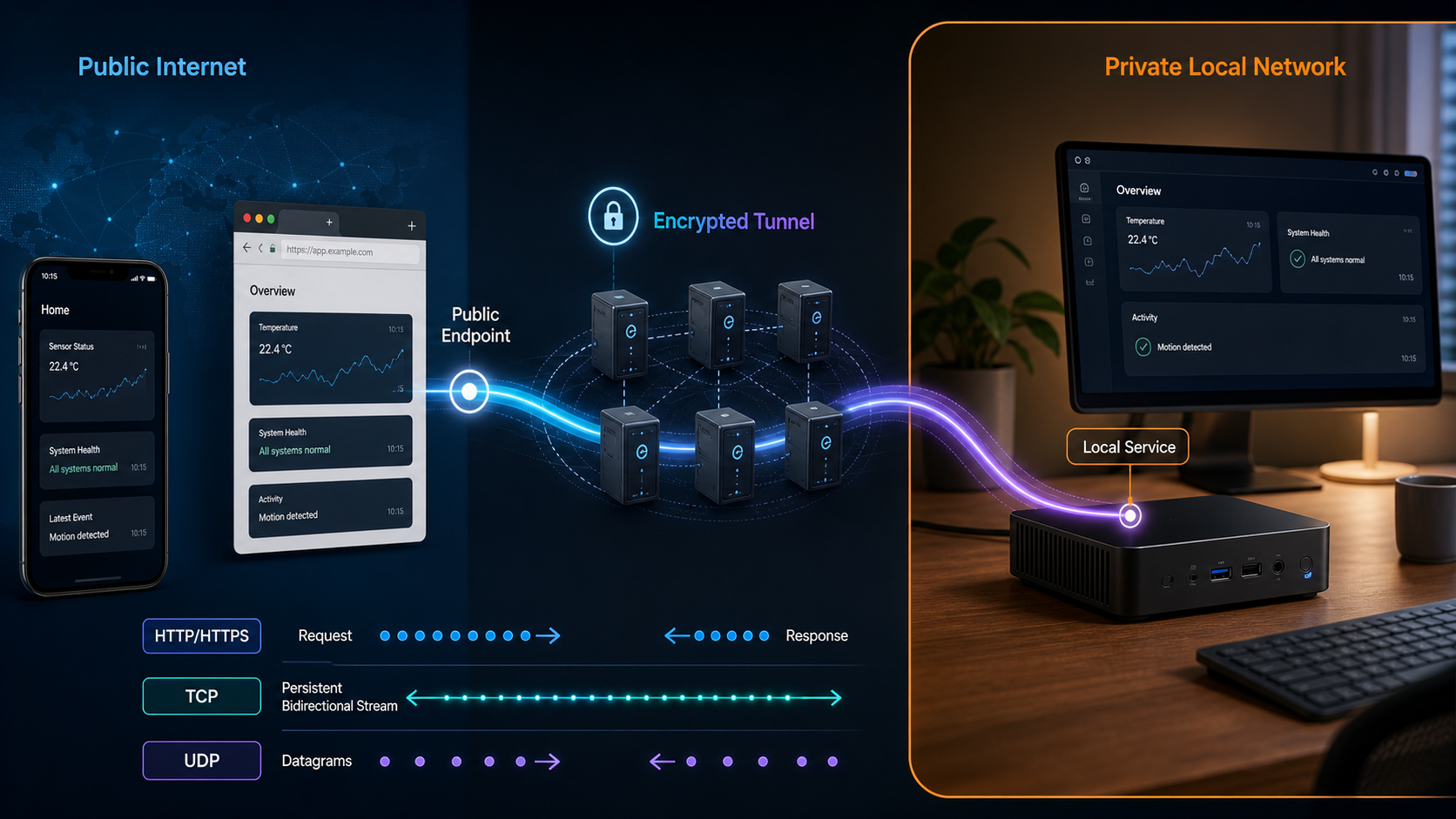
Choose the right public tunnel, proxy, or private network for your workload
Localtonet connects services, folders, devices, and selected networks without requiring inbound router port forwarding, a public IP address, or a conventional VPN for public exposure. The Localtonet client establishes an outbound connection to a relay, which provides the public URL or host and port associated with a running tunnel. This guide explains the supported connectivity families, how their targets differ, how to configure and verify a tunnel, and how to reduce the risks of exposing services to remote users.
📋 What's in this guide
How Localtonet connectivity works
Most services on a home, office, laboratory, or mobile network listen on a private address. A remote user cannot normally initiate a connection to that address because it is not routed on the public internet. Network address translation, carrier-grade NAT, dynamic public addresses, and inbound firewall rules can add further barriers.
With Localtonet, a client application runs on a device that can reach the intended local target. The client establishes an outbound connection to a selected Localtonet relay server. When the corresponding tunnel is running, a remote user connects to the public URL or public host and port, and traffic is relayed to the configured target.
This outbound-client model means you do not need to configure inbound router port forwarding or possess a public IP address. It does not mean Localtonet circumvents network policy. The client must still be permitted to establish its required outbound connection. A corporate firewall, filtered guest network, endpoint security product, or restrictive service provider can block that connectivity.
A conventional tunnel publishes the configured service, not the entire local network. If the requirement is private device-to-device or LAN-to-LAN connectivity, use VPN Manager rather than describing a collection of public tunnels as a VPN.
Four target models that should not be confused
| Model | Local side | Remote side | Primary purpose |
|---|---|---|---|
| Local-target tunnel | An IP address and port reachable by the client device | A public URL or public host and port | Publish one HTTP, TCP, UDP, combined UDP/TCP, or TLS service |
| File Server | A local folder path | Default browser interface, SFTP access, or WebDAV access | Provide controlled remote access to files stored on the client device |
| Proxy Server | The connected device acts as the exit node | An HTTP or SOCKS5 proxy endpoint | Route supported client traffic out through the connected device |
| VPN Manager | Participating devices or local LANs | A private mesh network | Private device and network connectivity governed by firewall rules |
Choose the appropriate tunnel or connectivity family
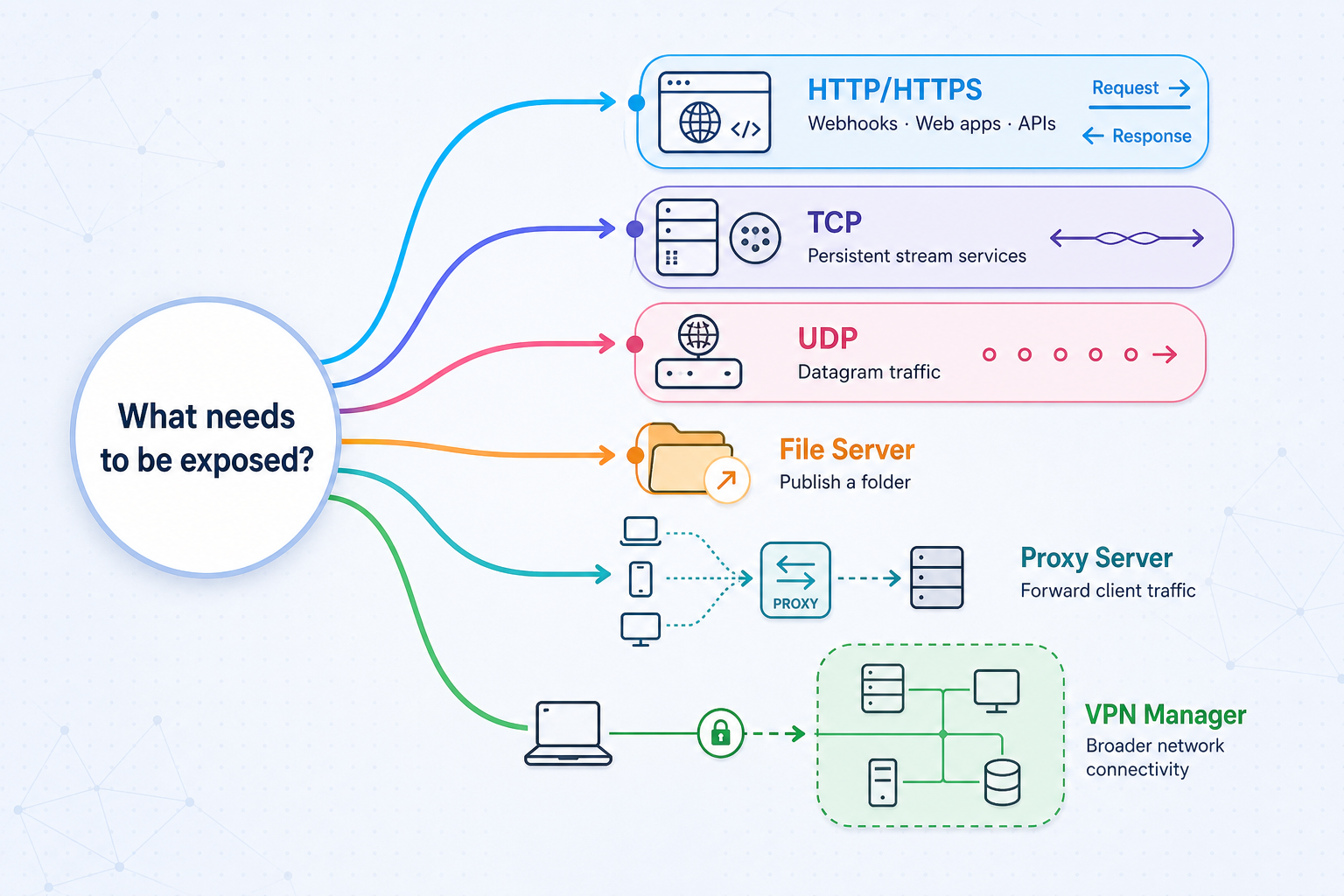
“Any protocol” is too broad because no networking platform literally supports every application protocol and transport combination. The useful question is whether Localtonet provides a tunnel family that matches the transport and access model required by your application.
Begin with the protocol on which the service actually listens. Do not select UDP merely because an application is time-sensitive, or HTTP merely because a client has a graphical interface. Check the service documentation, listening socket, and client configuration. Some applications require both TCP and UDP on the same port, while others use several independent ports that may require separate configurations.
| Localtonet family | Select it when | Target or behavior | Typical workload |
|---|---|---|---|
| HTTP/s | The local service speaks HTTP and should be reached through a public web address | Local IP and port; Process Type determines the public HTTPS address | Web applications, APIs, webhook receivers, dashboards, and HTTP-based agent endpoints |
| TCP | The application uses a raw TCP connection rather than an HTTP URL | Local IP and TCP port | SSH, remote desktop services, databases, message brokers, and custom TCP servers |
| UDP | The application sends UDP datagrams | Local IP and UDP port | Selected game servers, telemetry services, voice systems, and custom UDP applications |
| TLS | The current Localtonet tunnel configuration and the service require the documented TLS tunnel family | A local IP and port target | TLS-oriented services supported by the current product configuration |
| Combined UDP/TCP | The same workload requires both transports as one combined configuration | Local IP and port used by the combined service | Applications that depend on coordinated TCP and UDP connectivity |
| File Server | You want to publish a folder rather than run a separate local network service | A local folder path | Browser file management, SFTP automation, or WebDAV drive mounting |
| HTTP or SOCKS5 proxy | Remote software should use the connected device as its proxy exit node | No conventional local IP and port target | Controlled outbound routing through a device you operate |
| VPN Manager | Authorized devices or LANs need private mesh connectivity | Private network membership and firewall rules | Private access between devices and bridging local networks |
HTTP, TLS, TCP, UDP, and proxy modes have different protocol behavior. A public HTTPS address for an HTTP workflow does not establish that every raw TCP, UDP, proxy, or application-layer connection has the same transport security. Use application-native encryption where the service supports it, such as SSH for shell access or the database vendor's authenticated TLS mode, and verify current Localtonet behavior for the selected tunnel type.
HTTP Process Type
HTTP and File Server configurations can use Random Sub Domain, Custom Sub Domain, or Custom Domain as their Process Type. These choices determine the public HTTPS address, not the content being served. Exact custom-domain DNS requirements can change, so follow the current dashboard and public documentation rather than copying nameserver or record instructions from an older article.
Specialized AI and MCP workflows
Localtonet also has shipping MCP-related workflows. An MCP Gateway tunnel can expose a locally running McpNet Gateway, while the Localtonet MCP Server lets compatible AI coding assistants create, start, and stop Localtonet tunnels. These are specialized integrations. Confirm their current dashboard naming and availability before treating them as a general tunnel category.
Prerequisites and pre-exposure checks
A tunnel cannot repair a local service that is stopped, bound to the wrong interface, listening on a different port, or rejecting the intended client protocol. Confirm the local side first. This separates application problems from tunnel configuration problems and makes later diagnosis much faster.
Verify an HTTP service locally
Open the local URL from the Localtonet client device, using the same host and port that you intend to configure. Check a meaningful application route rather than relying only on the home page. If the application uses virtual hosts, redirects, cookies, or an expected base URL, confirm those settings before public testing.
Verify a raw port locally
Use the actual application client wherever possible. For example, test an SSH service with an SSH client, a database with its supported database client, and a game server with the matching game client. A successful socket connection alone does not prove that authentication, application negotiation, or authorization works.
Verify a File Server path locally
Confirm that the path exists and that the client process can list and, where required, modify its contents. Windows paths may look like C:\Users\Work. Linux and macOS paths may look like /root or /usr/share. Share the narrowest folder that satisfies the use case rather than an entire user profile or system root.
Anyone who can reach a public endpoint can attempt to interact with it. A hard-to-guess URL or port is not a security control. Do not publish an unauthenticated administration panel, database, remote desktop service, file store, proxy, development debugger, or AI tool endpoint.
Configure and start a conventional tunnel
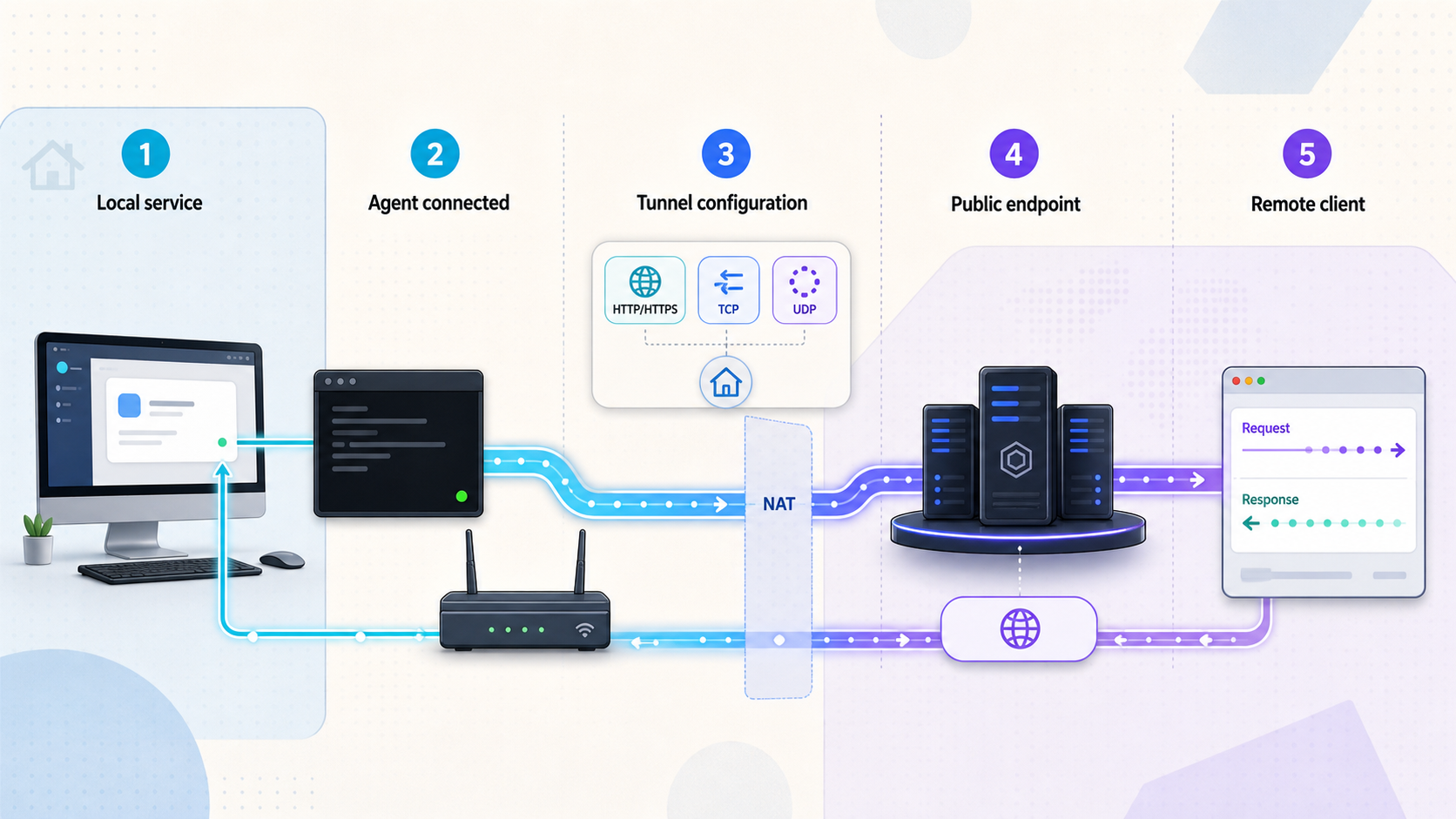
HTTP, TCP, UDP, combined UDP/TCP, and TLS tunnels share the same underlying target concept: the client device forwards traffic to a local IP address and port that it can reach. The fields visible in the dashboard can vary by tunnel family, client version, plan, and current product release. Use the options currently presented in your account, and do not substitute hardcoded server codes or region names from an old tutorial.
Install and run the Localtonet client
Install the current Localtonet application for the operating system on a device that can reach the intended local service. Keep the client running throughout configuration and testing.
Authenticate or select the client device
Use the device-specific authentication token for that client. Treat the token as a credential and do not copy it into documentation, source code, command history shared with others, or public screenshots.
Select the matching tunnel family
Choose HTTP/s, TCP, UDP, TLS, or combined UDP/TCP based on the protocol verified locally. For HTTP, also select Random Sub Domain, Custom Sub Domain, or Custom Domain as the Process Type.
Select the device token and an available server
Associate the tunnel with the connected client and select a relay from the currently available dashboard choices. Do not guess a server code or assume that every region is available on every plan.
Enter the local IP address and port
Enter the target that was verified from the client device. If the service is on another LAN device, use an address the client device can actually reach and confirm that the destination device accepts the connection.
Create, then start the tunnel
Save or create the configuration, then use the Start button. Creation alone does not make the endpoint active. Record the assigned public URL or public host and port without exposing credentials embedded in a client configuration.
The public endpoint remains dependent on both sides of the lifecycle. The selected Localtonet client must remain connected, and the tunnel must remain in its running state. Sleeping the host, stopping the client, losing outbound connectivity, or stopping the tunnel makes the endpoint unavailable.
HTTP tunnel considerations
Use an HTTP tunnel when the target is an HTTP application. The public endpoint is an HTTPS address, while the target is the local IP and port entered in the configuration. Test redirects and absolute URLs carefully. A local application that redirects visitors back to localhost or to a private hostname will still produce an unusable remote experience until its public base URL or proxy-awareness settings are corrected.
If you choose Custom Domain, consult the current Localtonet instructions shown for that domain. This guide intentionally does not prescribe DNS records or nameservers because those requirements are not established by the supplied current public evidence.
TCP, UDP, TLS, and combined UDP/TCP considerations
Raw port tunnels are consumed using the assigned public host and port rather than an HTTP URL. Configure the remote application with both values. Ensure the client uses the same transport selected for the tunnel. A TCP client cannot validate a UDP service, and an HTTP browser is not an appropriate test for a database or game protocol.
Choose combined UDP/TCP only when the application requires both transports in the supported combined configuration. Do not call this mode “mixed TCP-UDP” in product instructions. If an application needs several unrelated ports, inspect its requirements and create only the configurations supported by the current dashboard.
Publish a folder with File Server
File Server is different from forwarding a file-sharing application that you installed separately. Its target is a local folder path. It offers three subtypes for different access patterns: Default, SFTP, and WebDAV.
| File Server subtype | Best fit | How the remote user works |
|---|---|---|
| Default | Interactive browser access and rich file management | Uses the browser-based file manager without installing a separate client on the receiving side |
| SFTP | Standard clients, scripts, automation, and CI/CD workflows | Connects with an SFTP-compatible tool such as FileZilla, WinSCP, rsync, or similar software |
| WebDAV | Desktop-style access to a remote folder | Mounts the folder as a network drive through File Explorer on Windows or Finder on macOS |
Documented File Server setup sequence
Install the Localtonet application
Install and run the Localtonet application for the operating system on the device that stores the folder.
Open the File Server Tunnel page
Go to the File Server Tunnel area in Localtonet. The public File Server documentation provides the canonical workflow.
Select the Process Type
Choose Random Sub Domain, Custom Sub Domain, or Custom Domain according to the public address required for the File Server.
Select the authentication token and server
Select the token for the connected device and choose a server from the currently available options.
Enter the local folder path
Enter the exact folder to publish, such as C:\Users\Work on Windows or /root or /usr/share on Linux or macOS.
Press Start
Start the File Server and test the resulting access method using a browser, SFTP client, or WebDAV mount as appropriate for the selected subtype.
Verified capabilities of the Default browser manager
The Default subtype is more than a basic directory listing. Its browser interface supports upload, download, rename, move, copy, delete, folder creation, search, preview, tags, archives, and sharing. It also supports cut, copy, and paste keyboard shortcuts, and the documented implementation has no upload size limit.
Folder encryption stores only a salt and verification hash in a hidden .fsvault file. There is no administrator override or password recovery, and unlock tokens last 30 minutes. Losing the folder password therefore has permanent consequences. Store it in an appropriate credential manager and test recovery procedures before relying on encrypted folders.
The photo gallery groups files by date, corrects EXIF orientation, and can derive video thumbnails from cover art, an embedded JPEG frame, or an FFmpeg fallback. The Immich-compatible backup API does not require Postgres or Redis. The built-in backup engine performs a full scan every 30 minutes, applies a 45-second debounce to file changes, and retries failed operations with exponential backoff.
Additional Default manager capabilities include a document viewer, an integrated code editor for more than 20 languages, file version history with diffs, real-time interface updates, file-event webhooks, and customization of the title, favicon, and logo. A favicon.ico or logo.png can be placed in the shared folder, and customization is also available through the Settings modal.
The available evidence documents these rich capabilities for the Default browser manager. It does not establish whether folder encryption, Immich backup, Smart Collections, or every other Default feature also applies to SFTP and WebDAV. Do not assume cross-subtype parity without checking the current product documentation.
Avoid exposing an entire drive, home directory, source tree containing secrets, or system directory when a smaller project folder will work. Review file permissions, hidden data, executable-file policy, share-link settings, and backup destinations before starting the File Server.
Understand Proxy Server and VPN Manager
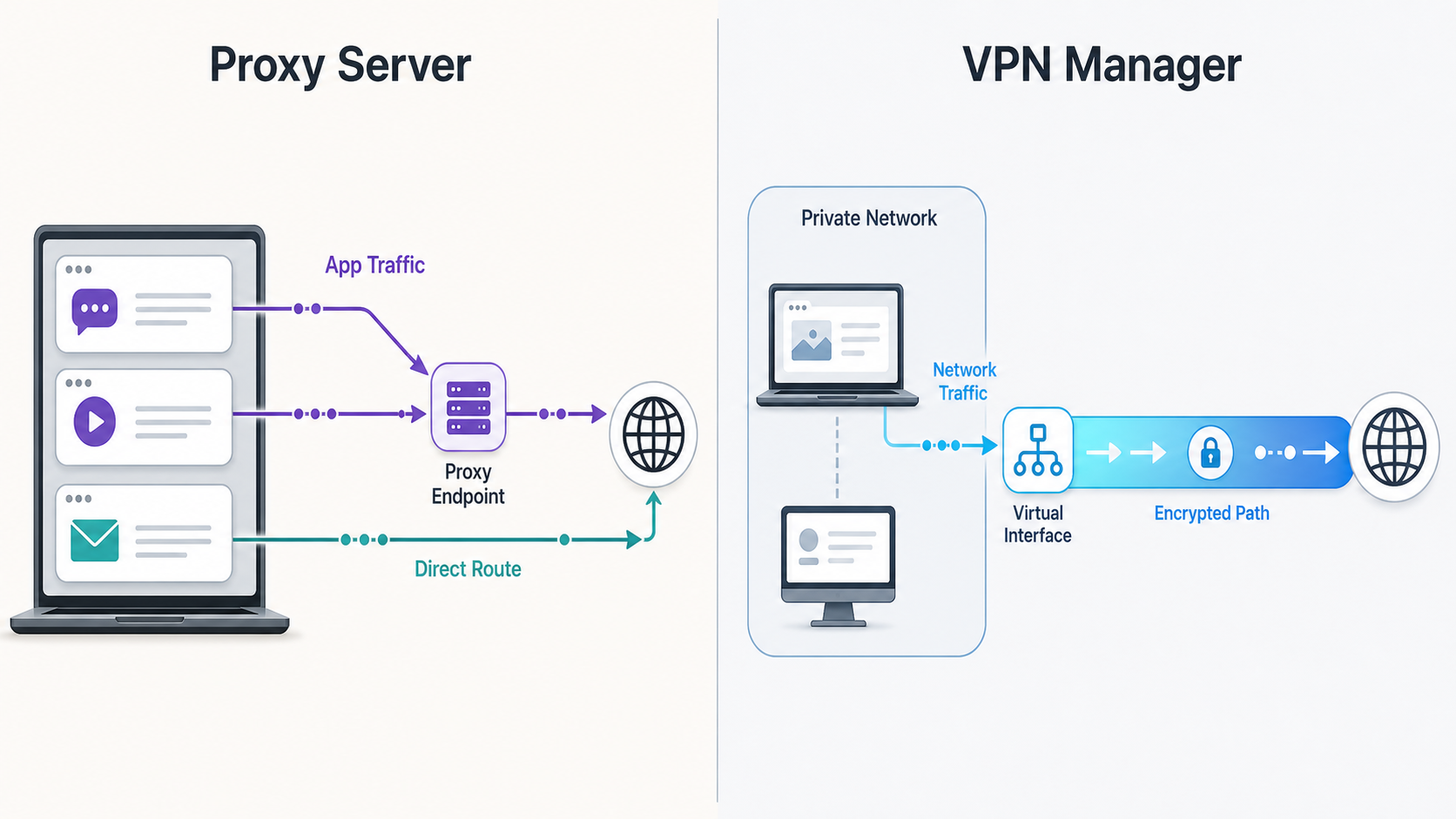
HTTP and SOCKS5 Proxy Server modes
A Localtonet proxy configuration does not forward a public endpoint to an ordinary local IP address and port. The connected device itself becomes the proxy exit node. Software configured to use the assigned HTTP or SOCKS5 proxy sends supported traffic through that device, and destination services see traffic leaving from the device's network connection.
This model can support device-backed proxy and rotating-proxy workflows, including Wi-Fi Split scenarios where a mobile device is used as an exit node. Current availability, device compatibility, rotation behavior, and plan limits must be confirmed in the dashboard. Do not assume that every operating system, mobile configuration, or subscription includes identical proxy capabilities.
Restrict proxy credentials and endpoint details to authorized users. Monitor the exit device, follow the policies of its network provider, and stop the proxy when it is not required. Do not use proxy routing to evade authorization, geographic restrictions, acceptable-use rules, or organizational security controls.
VPN Manager
VPN Manager is Localtonet's free private mesh VPN feature. It connects participating devices and can bridge local LANs while applying granular firewall rules. This is the appropriate family when the goal is private connectivity between authorized devices or networks rather than a public endpoint that any internet client can reach.
Keep the distinction explicit: HTTP, TCP, UDP, TLS, combined UDP/TCP, and File Server are tunneling features. They are not VPN features. A TCP tunnel can provide narrow access to one service, but it does not make the remote computer a member of the private network. VPN Manager addresses that broader private-network requirement.
For an expanded explanation of this model, see our VPN Manager private mesh network guide.
Verify, monitor, stop, and delete connectivity
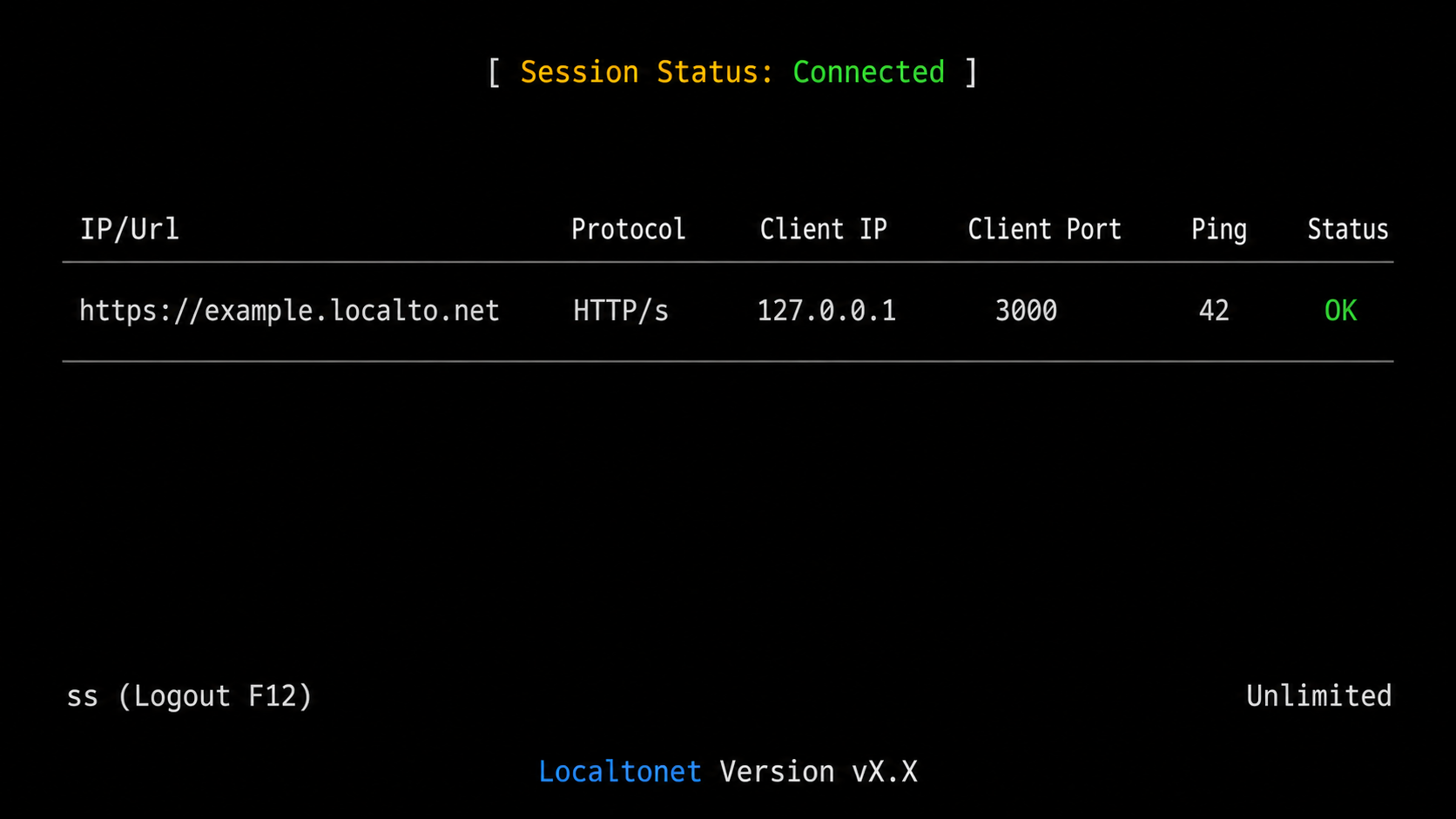
Verification should prove the whole path, not just the existence of a dashboard record. Test locally first, start the tunnel, and then test from a genuinely remote network. A browser on the same host may conceal DNS, firewall, proxy, or routing problems that an external user will encounter.
Confirm the local target again
Verify that the service is still running on the configured IP and port, or that the File Server path remains accessible to the client process.
Confirm client and tunnel state
Check that the correct device is connected and that the intended tunnel shows as running. A created but stopped tunnel will not accept remote traffic.
Test with the correct remote client
Use a browser for HTTP or Default File Server, an SFTP or WebDAV client for those subtypes, and the service's native client for TCP, UDP, TLS, combined, or proxy endpoints.
Validate authentication and authorization
Confirm that an authorized account can perform only its intended actions. Also test that an unauthenticated or underprivileged user is rejected.
Stop the tunnel after temporary use
Use Stop when a preview, support session, transfer, test, or temporary integration has finished. Stopping preserves the configuration while removing active availability.
Delete configurations that are no longer needed
Delete obsolete tunnels rather than leaving unused public configurations in the account. Revoke or rotate exposed credentials according to your incident process.
Two separate webhook systems
Localtonet has two webhook systems with different scopes. Platform-wide Token/Tunnel webhooks report connectivity state. They fire when a token or tunnel in a selected Token Group changes to Connected or Disconnected. The JSON body is a WebHookRequest containing Id, ActionDate, Type, and Status.
{
  "Id": "tunnel-id-or-auth-token",
  "ActionDate": "event timestamp",
  "Type": "Token or Tunnel",
  "Status": "Connected or Disconnected"
}
The values above describe the documented fields and permitted meanings, not a live payload or credential. See the public Token and Tunnel webhook documentation when implementing the receiver.
File Server webhooks are separate. They report file-level upload, delete, rename, and move events. They can apply an optional path filter and support HMAC signing. Do not parse a File Server event as a tunnel-connectivity notification, and do not expect a platform Token/Tunnel webhook to contain file-operation details.
Security guidance for publicly reachable services
Removing the need for inbound port forwarding reduces router configuration work, but it does not remove the security responsibility attached to a public endpoint. The underlying application still processes input from remote clients. Its authentication, authorization, patch level, protocol configuration, logging, and data handling remain critical.
| Service class | Primary risk | Recommended controls |
|---|---|---|
| Web application or API | Unauthenticated actions, debug interfaces, vulnerable dependencies, leaked data | Require application authentication, disable debug mode, validate input, limit privileges, patch dependencies, and remove test credentials |
| SSH or remote administration | Credential attacks and privileged system access | Use strong SSH authentication or hardened remote-access controls, disable unnecessary accounts, restrict privileges, and monitor login attempts |
| Remote desktop | Interactive takeover and credential compromise | Require strong account protection, limit authorized users, patch the host, apply lockout controls, and expose it only for the required period |
| Database, cache, or broker | Data theft, destructive commands, and lateral movement | Never use anonymous access, create a least-privilege account, use application-native encryption where available, restrict accessible data, and maintain backups |
| Game, voice, IoT, or custom UDP service | Protocol abuse, resource exhaustion, malformed datagrams, and application vulnerabilities | Patch the server, enable available authentication, limit administrative functions, monitor resources, and stop the tunnel outside the service window |
| File Server | Unauthorized reads, destructive writes, secret exposure, and unsafe sharing | Publish a narrow folder, configure permissions and path overrides, use protected expiring links, review blocked file types, and test backups and recovery |
| HTTP or SOCKS5 proxy | Unauthorized traffic, abuse complaints, data exposure, and network-policy violations | Protect proxy access, share credentials narrowly, monitor the exit device, follow provider policy, and stop unused endpoints |
| AI agent or MCP endpoint | Tool invocation, prompt-driven actions, secret disclosure, and excessive permissions | Authenticate clients, minimize tool permissions, isolate the agent, remove unnecessary secrets, validate actions, and keep high-impact operations behind approval |
Protect device authentication tokens
A device token identifies the client that runs tunnels. It should be handled like any other operational credential. Do not place it in a public repository, frontend bundle, article, ticket attachment, or shared recording. If a token is exposed, follow the current account process to replace or revoke it and review the configurations associated with that device.
Apply least privilege at every layer
Give remote users only the service and actions they need. A database account used for reporting should not be an administrator. A File Server share intended for downloads should not allow delete or move operations. An AI agent used to query documentation should not inherit unrestricted filesystem or command execution rights.
Use short exposure windows
Temporary access should have a defined owner and end time. Start the tunnel shortly before use, monitor the session, and stop it immediately afterward. Delete obsolete configurations and remove application accounts or share links that were created for the session.
Respect organizational and provider policy
The outbound connection model does not authorize users to ignore workplace controls, customer security requirements, ISP terms, or data-handling rules. Obtain approval before publishing a service from a managed network or device. If outbound Localtonet connectivity is blocked, work with the network owner rather than attempting to evade the restriction.
Troubleshooting connection failures
Diagnose the path in order: application, local reachability, Localtonet client, tunnel state, public endpoint, and remote application behavior. Changing multiple settings at once can hide the actual cause.
The public endpoint does not connect
- Confirm that the tunnel was started after it was created.
- Confirm that the selected device token belongs to the client that is currently connected.
- Check that the client device has outbound network connectivity permitted by local policy.
- Verify that the remote user copied both the public host and port for a raw protocol.
- Ensure the remote client is using the correct transport and application protocol.
The tunnel is running, but the application reports an error
- Test the local target from the Localtonet client device using the native application client.
- Check that the configured IP address and port match the service's current listening address.
- If the target is another LAN device, verify routing and the destination device's local firewall.
- Review the application's own logs for authentication, protocol negotiation, hostname, or permission failures.
- For HTTP applications, inspect redirects and public base-URL settings that may still reference localhost.
TCP works but UDP does not, or the reverse
Recheck the application's transport requirements. TCP and UDP are separate transports even when they use the same numeric port. Select the corresponding Localtonet family. Use combined UDP/TCP only where the application genuinely requires the supported combined configuration.
File Server cannot read or modify a folder
- Confirm that the configured path exists on the device running the client.
- Check operating-system permissions for the account under which the client runs.
- Review global File Server permissions and the most specific per-path override.
- Check blocked executable-extension policy, hidden-dotfile behavior, and available disk space.
- If an encrypted folder is locked, use the correct folder password. There is no administrator recovery override.
The tunnel disconnects unexpectedly
Check whether the client device slept, restarted, changed networks, lost power, or lost outbound connectivity. Also verify that the tunnel was not stopped in the dashboard. Platform Token/Tunnel webhooks can help an operations system observe Connected and Disconnected state changes, but they do not keep a tunnel alive by themselves.
A custom domain does not resolve
Compare the domain configuration with the current instructions in the Localtonet dashboard and documentation. DNS changes may require time to propagate. Do not rely on old nameserver values or record types copied from a previous article because the supplied evidence does not establish them as current requirements.
Frequently asked questions
Which protocols and connectivity families does Localtonet document?
The documented categories are HTTP/s, TCP, UDP, TLS, combined UDP/TCP, File Server, Proxy Server with HTTP and SOCKS5 modes, and VPN Manager. File Server has Default, SFTP, and WebDAV subtypes. Availability can vary by current product configuration or plan, so use the choices displayed in your dashboard.
Does creating a tunnel make it immediately available?
No. Creation saves the tunnel configuration. You must press Start, and the selected Localtonet client must be connected. The endpoint becomes unavailable if the tunnel stops or the client disconnects.
Can Localtonet work without inbound port forwarding or a public IP address?
Yes. The client initiates an outbound connection to a Localtonet relay, so the workflow does not require inbound router port forwarding or a public IP address. The network must still permit the client's outbound connection, and users must follow applicable security policy.
Is a TCP tunnel the same as VPN access?
No. A TCP tunnel publishes a configured TCP service through a public host and port. VPN Manager creates private mesh connectivity between participating devices and can bridge local LANs with granular firewall rules.
What is the difference between a proxy tunnel and a conventional tunnel?
A conventional HTTP, TCP, UDP, combined UDP/TCP, or TLS tunnel points to a local IP address and port. In HTTP or SOCKS5 proxy mode, the connected device acts as the proxy exit node. The proxy configuration does not forward to an ordinary local service target.
Which File Server subtype should I use?
Use Default for the browser-based manager and its rich file features, SFTP for standard SFTP clients and automation, or WebDAV when users need to mount the folder as a network drive. Do not assume that every Default manager feature is available through SFTP or WebDAV because that parity is not established by the current evidence.
Are all tunnel families encrypted in the same way?
This article does not make that universal claim. HTTP public addresses, raw TCP and UDP endpoints, TLS tunnels, proxies, and application-native encryption have different behavior. Use protocol-appropriate security and verify the current documentation for the selected tunnel family.
What is the difference between Localtonet's two webhook systems?
Platform Token/Tunnel webhooks report Connected and Disconnected state changes for tokens or tunnels in a selected Token Group. File Server webhooks report file operations such as upload, delete, rename, and move, and can use path filtering and HMAC signing.
Connect the right service with Localtonet
Verify your local target, choose the matching tunnel, File Server, proxy, or VPN Manager model, and keep the endpoint active only for as long as the workflow requires.
Get Started Free →

