

Build one controlled ingress while keeping AI workers, tools, queues, and model backends private
A distributed AI agent swarm can span coordinators, specialist workers, local LLM servers, tool runners, queues, databases, and observability systems. Publishing every component creates unnecessary attack surface and makes failures harder to isolate. In this guide, we design explicit trust boundaries, expose only the coordinator or callback endpoint through a Localtonet HTTP tunnel, and use VPN Manager when private components must communicate across machines or LANs. We also establish a practical method for tracing and debugging model, orchestration, tool, network, and tunnel failures.
📋 What's in this guide
A safer distributed AI agent architecture
An AI agent swarm is not one application merely because it pursues one objective. It is a distributed system whose components can fail, stall, disagree, duplicate work, or receive hostile input independently. A planner may choose the wrong tool. A worker may be healthy while its model backend is overloaded. A callback can arrive twice. A tool can complete after the coordinator has already timed out. Networking should make these boundaries visible rather than flattening every service into one public surface.
The safest default is a single controlled ingress. External clients, webhook providers, or remote orchestrators send requests to one coordinator, gateway, or dedicated callback receiver. That entry point validates the request, assigns an operation identifier, applies policy, and dispatches work to private components. Worker APIs, local LLM endpoints, queues, databases, browser automation processes, and administrative interfaces remain inaccessible from the public internet unless there is a specific, reviewed reason to expose one.
A typical request path looks like this:
External client or callback provider
                  |
                  v
       Public coordinator endpoint
                  |
                  v
       Authentication and validation
                  |
                  v
      Private queue or task dispatcher
          |                 |
          v                 v
   Specialist worker   Specialist worker
          |                 |
          v                 v
      Tool service      Local LLM backend
          \                 /
           v               v
        Results returned to coordinator
                  |
                  v
      Final response or status update
With Localtonet, the public coordinator can remain on a machine behind NAT or a firewall. Our client establishes an outbound connection to a Localtonet relay server, and an HTTP tunnel provides the public address for the selected local service. This avoids inbound router port forwarding, firewall changes, VPN setup, and the need for a public IP address. The tunnel is available only while the selected client device is connected and the tunnel is running.
Separate the control plane from the work plane
The coordinator belongs to the control plane. It accepts work, checks policy, decomposes tasks, chooses workers, records state, and aggregates results. Workers belong to the work plane. They execute bounded operations such as retrieval, code analysis, document processing, browser automation, or model inference.
This distinction prevents workers from becoming unreviewed public gateways. A worker should normally accept requests only from the coordinator, queue, or another explicitly authorized internal service. If a worker can invoke tools, its tool permissions should reflect its narrow role. A summarization worker does not need access to a deployment API, and a read-only retrieval worker should not receive database write credentials.
Do not confuse reachability with authorization
A tunnel makes a selected endpoint reachable. It does not remove the application's responsibility to authenticate callers, validate input, and authorize operations. The public coordinator should reject requests that are unauthenticated, malformed, too large, stale, replayed, or outside the caller's permissions.
An endpoint that accepts an arbitrary tool name and arbitrary arguments can become a remote execution boundary. Use a fixed allowlist of tools, strict schemas, caller authorization, argument constraints, execution time limits, and auditable results. Do not pass model-generated input directly to a shell, database, file path, browser session, or privileged API.
Define trust boundaries before connecting the swarm
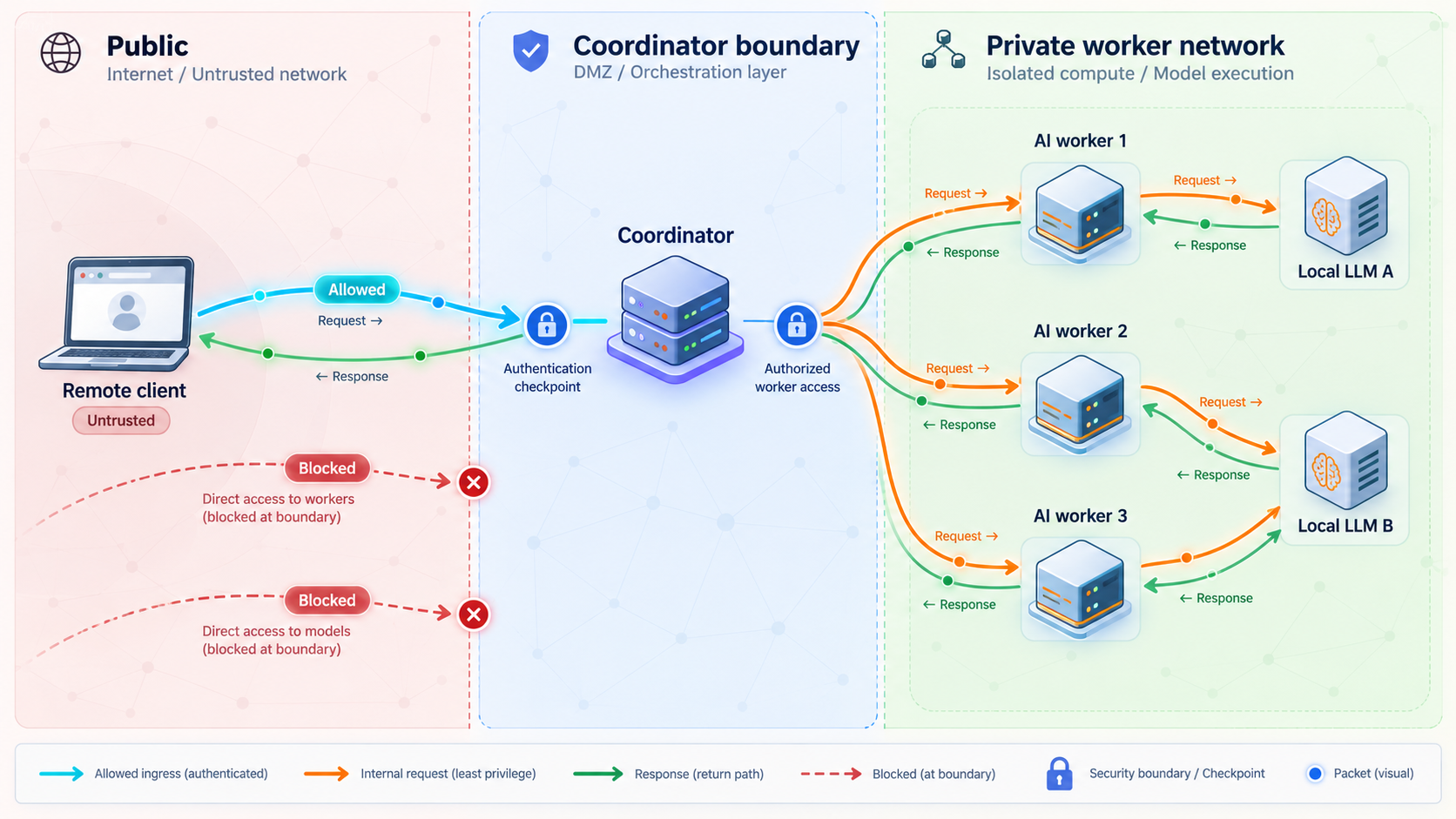
Begin with a data-flow inventory. List every component, who can call it, what data crosses the connection, and what happens if the component is compromised. This exercise determines which endpoint, if any, should be public.
| Component | Recommended reachability | Primary controls | Failure or exposure concern |
|---|---|---|---|
| Coordinator or callback receiver | Public only when external requests must reach it | Authentication, request validation, rate controls, deadlines, audit logs | Untrusted input enters the system here |
| Planner | Private | Structured output validation, task limits, policy checks | Can generate invalid, excessive, or unsafe plans |
| Specialist worker | Private | Service identity, narrow authorization, concurrency limits | May hold tool credentials or process sensitive data |
| Local LLM server | Private | Authorized callers, resource limits, bounded context size | Resource exhaustion and unintended data disclosure |
| Tool runner | Private | Allowlisted operations, schema validation, sandboxing where appropriate | Tool arguments can trigger real-world side effects |
| Queue or task broker | Private | Producer and consumer authorization, retention controls, dead-letter handling | Task theft, duplication, backlog growth, or replay |
| Database or state store | Private | Least-privilege credentials, query constraints, backup and recovery procedures | Persistent corruption or sensitive-data access |
| Observability interface | Private or separately protected | Access control, redaction, retention limits | Logs and traces can reveal prompts, tokens, or private content |
Assign identity at each hop
Network location alone is a weak identity signal. A request coming from a private address does not prove that it came from the intended worker. Each service should authenticate its callers using an identity method suitable for the application and deployment. Store credentials outside prompts and model-visible state. Rotate them according to your operational policy, and never place them in logs, traces, URLs, or error messages.
Authorization should describe permitted actions, not just permitted connections. For example, one worker may read selected records while another can create a draft but cannot publish it. A coordinator may enqueue a task but should not automatically inherit unrestricted access to every downstream database and administrative API.
Constrain data movement
Prompts and tool outputs can contain customer records, source code, documents, or secrets accidentally returned by a tool. Pass only the fields required for the next operation. Redact sensitive values before logging. Decide whether complete prompts, model responses, tool arguments, and tool results may be retained, and for how long.
Treat retrieved content and tool output as untrusted data. A document can contain instructions intended to manipulate an agent. Preserve the distinction between application policy, user instructions, retrieved context, and tool results. A worker should not elevate permissions merely because untrusted content asks it to.
Use private networking for distributed internal components
Components on one host can often communicate through loopback or an isolated local network. Components on separate machines or LANs need a deliberate private connectivity design. Localtonet VPN Manager provides a free private mesh VPN with granular firewall rules and can bridge local LANs. It is the appropriate Localtonet feature when swarm nodes require private network communication across locations.
Standard HTTP, TCP, UDP, TLS, and File Server tunnels are not VPN functionality. Use an HTTP tunnel for a selected public web endpoint. Use VPN Manager when multiple private nodes or LAN resources need controlled private connectivity. Apply granular firewall rules so that each node can reach only the required addresses and services.
A Localtonet HTTP tunnel can publish the coordinator or callback endpoint. VPN Manager can connect private nodes and LANs. A design may use either one or both, but publishing one endpoint does not require publishing every service behind it.
Make agent execution reliable before making it remote
Networking does not create reliability. It can reveal existing reliability problems by adding latency, disconnections, duplicate delivery, and partial completion. Build the local workflow around explicit contracts before introducing public callbacks or distributed workers.
Define a task envelope
Every task should carry enough metadata to identify, validate, schedule, trace, and safely repeat it. The exact schema depends on the application, but a useful conceptual envelope includes:
{
  "operation_id": "application-generated unique identifier",
  "task_id": "application-generated unique identifier",
  "parent_task_id": "optional parent identifier",
  "task_type": "allowlisted operation name",
  "created_at": "timestamp",
  "deadline": "timestamp",
  "attempt": 1,
  "input": {
    "validated_fields": "task-specific data"
  }
}
Do not treat this example as a Localtonet configuration. It is an application-level pattern. Generate identifiers in your application, validate them at every boundary, and preserve them when work moves between processes.
Propagate deadlines, not only timeout durations
A chain of independent timeouts can run much longer than the caller intended. If a coordinator has 30 seconds to complete a request but starts a worker with a fresh 30-second timeout after 25 seconds, the operation has already exceeded the original budget. Propagate an absolute deadline or calculate the remaining budget at each hop.
Set separate limits for connection establishment, model inference, tool execution, queue waiting, and the complete operation. When a deadline expires, stop issuing new side effects and attempt cancellation where the component supports it. Record whether cancellation was requested and whether the underlying operation actually stopped.
Retry selectively
Retries are appropriate for transient failures, not every failure. A temporary connection interruption or unavailable dependency may justify a bounded retry. Invalid arguments, denied authorization, unknown tools, and deterministic validation errors should normally fail immediately.
Use a maximum attempt count, delay between attempts, and randomization to avoid synchronized retry storms. Apply a total deadline so retries cannot continue indefinitely. Retry at one responsible layer where possible. If the client, coordinator, queue, worker, and tool wrapper all retry independently, one request can multiply into many executions.
Design idempotency around side effects
A caller can time out after a tool completes but before the result arrives. Retrying may repeat the side effect. Operations that send messages, create records, charge accounts, publish content, or modify infrastructure need an idempotency strategy.
Associate the requested side effect with a stable operation or idempotency key. Before executing, the tool service checks whether that key has already completed or is still in progress. If it completed, return the stored outcome rather than executing again. If the status is uncertain, route the task to reconciliation instead of assuming success or failure.
Isolate failure and resource consumption
Use separate concurrency limits for expensive models, browser workers, external APIs, and lightweight tasks. A flood of slow browser jobs should not prevent health checks or ordinary coordination traffic. Queues should have bounded capacity and a defined overload policy. Decide whether excess work is rejected, deferred, or redirected to a dead-letter path.
Protect local LLM backends from unbounded context, output size, parallel inference, and repeated retries. A model process that accepts a TCP connection may still be unable to serve useful inference. Health evaluation should therefore distinguish process reachability from readiness and real task completion.
Trace work across independently failing components
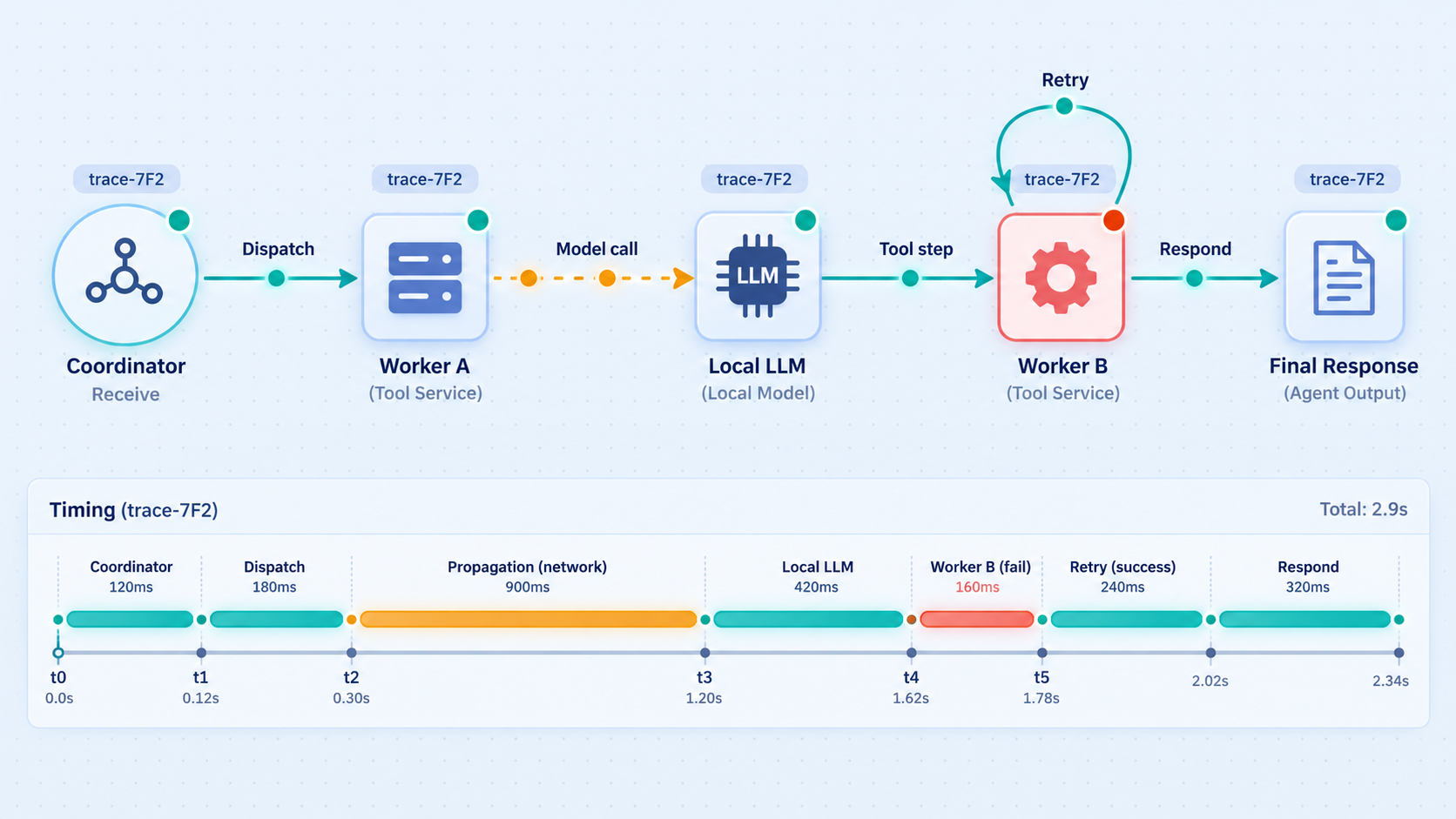
Distributed agent debugging becomes manageable when every log event can be tied to one operation. Assign a correlation identifier at ingress and propagate it through coordinator decisions, queue messages, worker calls, model requests, tool executions, and final responses. Add a separate task identifier when an operation fans out into multiple branches.
Record structured events rather than relying only on prose logs. Useful fields include the operation ID, task ID, component, event type, attempt number, start time, duration, status, dependency, and normalized error category. Record tool names and validation outcomes, but redact credentials and sensitive arguments.
Preserve causality during fan-out
When a coordinator creates five worker tasks, they should share the parent operation ID but receive distinct task IDs. If one worker triggers three tools, each tool call should reference the worker task. This parent-child structure lets an operator identify the slow branch, duplicate execution, or first failing dependency without reconstructing the flow from timestamps alone.
Separate user-facing errors from diagnostic details
Public responses should be useful but should not expose stack traces, internal addresses, credentials, file paths, model configuration, or raw dependency errors. Return a stable error category and correlation ID to the caller. Keep detailed diagnostics in protected logs.
Prerequisites and decisions
Before adding remote access, prepare a locally working architecture. This guide does not require a particular agent framework, programming language, model, queue, or database. Product-specific commands, ports, paths, and environment variables vary, so we do not invent them here. Use the values defined by your selected application and verify them locally.
You should have:
- A coordinator or callback receiver that serves HTTP locally.
- A known local IP address and port for that public-facing application endpoint.
- Authentication and authorization implemented by the application.
- Strict request schemas and payload-size limits.
- An allowlisted tool registry rather than arbitrary function dispatch.
- Private connectivity from the coordinator to each required worker, queue, model, and tool.
- Timeout, retry, cancellation, and idempotency rules.
- Structured logs with operation and task correlation identifiers.
- A Localtonet client installed on the device that can reach the coordinator.
- A device-specific Localtonet authentication token kept private.
If nodes on separate machines or LANs need private communication, plan a VPN Manager topology and granular firewall rules. Determine which node must initiate each connection and which exact private services it needs to reach. Do not grant broad network access merely because the nodes participate in the same swarm.
The authentication token identifies the client device that runs a tunnel. Tokens are device-specific and must not be guessed, embedded in examples, committed to source control, placed in prompts, or exposed in logs.
Build and verify the swarm locally first
A remote tunnel should be the last link added, not the first diagnostic tool applied to an unverified stack. Prove each local boundary in dependency order so that later failures have a smaller search area.
Start the coordinator without public access
Bind it according to your local deployment policy and confirm that the process starts without configuration, dependency, or credential errors. Record the exact local IP address and port that Localtonet will eventually target.
Verify the coordinator endpoint locally
Send a known valid request from the same device. Confirm the expected status and response. Then test missing authentication, malformed data, an unknown operation, an oversized request, and an expired deadline. Each should fail safely and predictably.
Verify every private dependency independently
From the coordinator's execution environment, test the queue, worker, local model, tool service, and state store separately. A successful process start is not enough. Run a minimal real operation against each dependency.
Run one deterministic end-to-end task
Choose a bounded task with a predictable result. Follow its operation ID through ingress, orchestration, worker execution, model or tool use, result storage, and the final response.
Exercise expected failure paths
Test an unavailable worker, model timeout, rejected tool argument, duplicate task, and late result. Confirm that retries remain bounded, side effects are not duplicated, and failures do not stall unrelated tasks.
Confirm private services are not publicly reachable
Review listening interfaces, firewall policy, container publication, and router configuration. The coordinator or callback receiver should be the only component selected for public exposure in this design.
Use realistic but non-sensitive test data
Test payloads should exercise normal validation and routing without containing production credentials, private customer records, or confidential documents. Include boundary conditions such as empty values, maximum accepted lengths, unusual Unicode, repeated requests, and delayed responses.
Establish a local baseline
Record normal response times and resource use for the coordinator, workers, tools, and models. The purpose is not to promise a benchmark. It is to identify obvious changes after distribution. If a model call already takes most of the operation deadline locally, adding remote network hops will not fix the budget.
Expose only the coordinator with a Localtonet HTTP tunnel
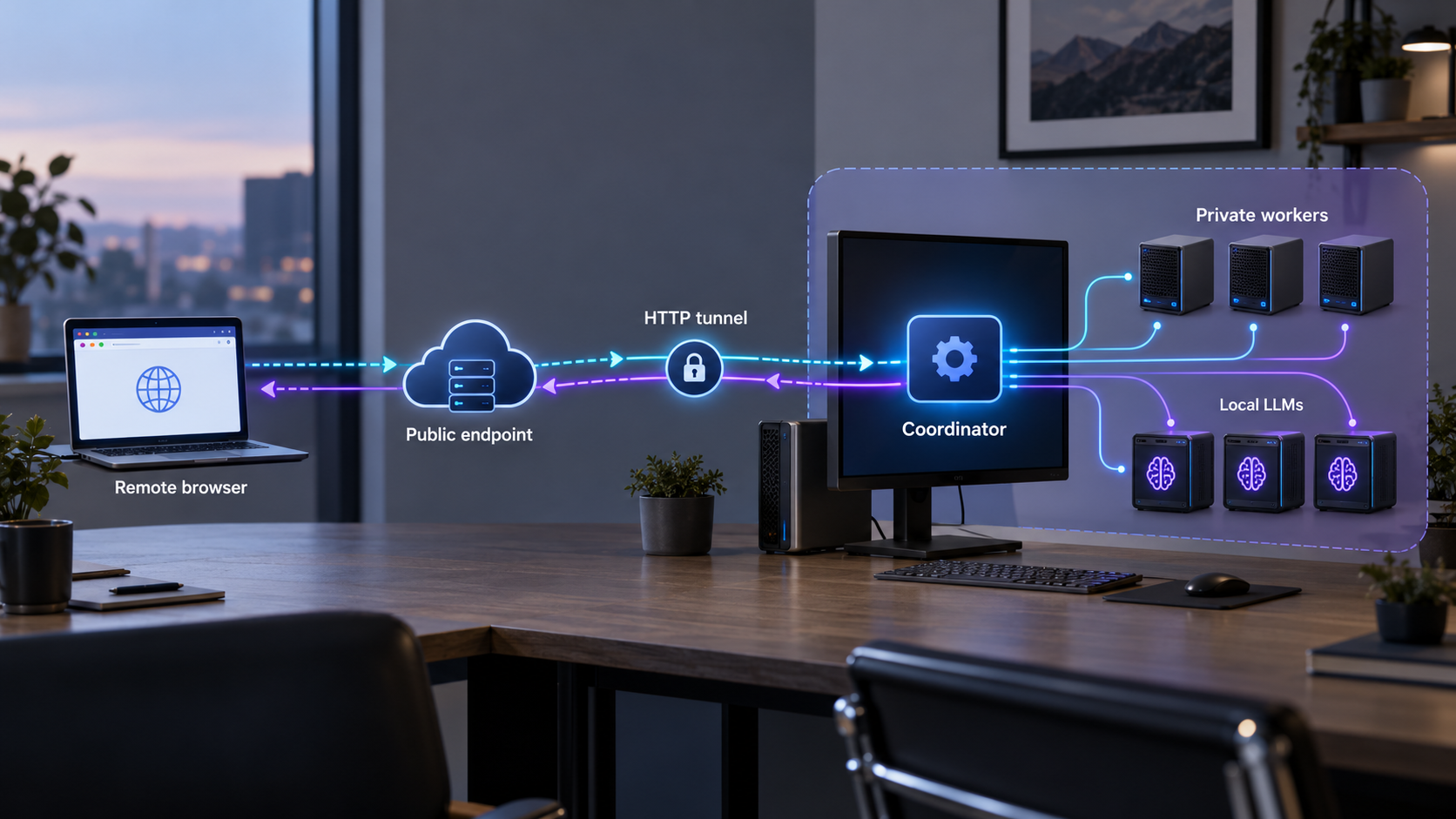
Once the complete path works locally, add a Localtonet HTTP tunnel for the selected coordinator or callback receiver. The Localtonet client must run on a device that can reach the service's local IP address and port. The client establishes the outbound connection to our relay, so inbound router port forwarding and a public IP address are not required.
The documented Localtonet workflow separates tunnel creation from tunnel startup. Creating a tunnel does not mean it is running. You must start it, and the public endpoint remains available only while the selected client device is connected and the tunnel is running.
Install and run the Localtonet client
Install the Localtonet application for the operating system on the device that can reach the coordinator. Keep the client running for as long as remote access is required. Current installation details should be taken from the Localtonet application and documentation rather than copied from an unverified command.
Authenticate or select the client device
Use the device-specific authentication token associated with the client that will run the tunnel. Treat the token as a secret and do not place it in application configuration that workers or models can inspect.
Select an available relay server
Choose from the relay servers or regions currently available in the dashboard. Availability can vary, so do not hardcode a server code from an article or another deployment.
Create the HTTP tunnel for the coordinator
Configure the tunnel to point to the coordinator's verified local IP address and port. HTTP process types can use a random subdomain, a custom subdomain where supported, or a custom domain. These process types serve the same local content at a public HTTPS address. Check current documentation before configuring custom-domain DNS because exact DNS requirements are not established in this guide.
Start the tunnel
Use the Start control after reviewing the selected device, relay, local target, and process type. Creating the configuration alone does not start connectivity.
Test the assigned public endpoint
Send an authenticated test request through the assigned public URL. Confirm that the same operation succeeds locally and remotely, and verify that its correlation ID appears throughout the complete internal path.
The current HTTP tunnel documentation is available in the Localtonet HTTP tunnel guide. Use it to confirm current interface details while preserving the architecture described here.
Choose the right public endpoint
If an external system only needs to deliver callbacks, expose a narrow callback receiver instead of the entire coordinator administration interface. If clients need to submit tasks, publish only the task API routes they require. Keep health diagnostics, metrics, model management, queue administration, trace viewers, and worker control endpoints private.
Add VPN Manager only when private nodes need it
If the coordinator, workers, models, or tools run on separate private networks, configure VPN Manager for the required private connectivity and apply granular firewall rules. Its purpose in this architecture is east-west connectivity between approved nodes or LAN resources, not public ingress.
Exact VPN topology, addresses, and firewall rules depend on the participating devices and services. Those values cannot be safely inferred from a generic architecture guide. Obtain current options from the dashboard, map each rule to a documented data flow, and test access in both allowed and denied directions.
Verify the external boundary
Test from a device that is not on the coordinator's local network. A successful local request does not prove that the public route is working. Confirm all of the following:
- The assigned public URL reaches the intended application.
- Unauthenticated requests are rejected by the application.
- Invalid methods and routes do not reveal administrative details.
- Request size and execution deadlines are enforced.
- The public request receives an operation or correlation identifier.
- Internal worker, model, queue, database, and observability endpoints remain private.
- Stopping the tunnel removes the intended public reachability.
Assume that unknown clients can send malformed or hostile requests. Require application authentication, validate every field, authorize every operation, constrain request size and execution time, protect secrets, and expose only the routes needed for the workflow.
A practical debugging sequence for distributed agent failures
Debug from the outside inward, then follow the correlation ID through the system. Avoid changing several layers at once. A model error, tool error, coordinator error, and tunnel error can produce similar symptoms for a user, but they require different evidence and remedies.
| Observed symptom | Layer to test first | Evidence to inspect | Likely next action |
|---|---|---|---|
| Public URL does not connect | Localtonet tunnel lifecycle | Client connection, selected device, tunnel running state, local target | Confirm the client is connected, the tunnel is started, and the target is correct |
| Public request returns an application rejection | Ingress validation and authorization | Status, correlation ID, schema failure, authentication decision | Correct the caller or application policy rather than the network |
| Request is accepted but never completes | Coordinator and queue | Dispatch event, queue time, worker receipt, deadline | Locate the last completed event and test that dependency |
| Worker starts but model output is missing | Model backend | Readiness, request duration, resource state, output validation | Test a minimal inference directly from the worker environment |
| Model requests a tool but execution fails | Tool contract | Tool name, argument schema, authorization, timeout, tool result | Compare generated arguments with the strict registered schema |
| Side effect happens twice | Retry and idempotency handling | Operation key, attempts, completion record, acknowledgement timing | Suppress duplicate execution and reconcile uncertain outcomes |
| Only remote workers fail | Private connectivity and firewall policy | Allowed path, service listener, name resolution, connection error | Verify the VPN Manager path and least-privilege rule |
| One slow worker delays every request | Orchestration and resource isolation | Branch durations, concurrency, queue depth, aggregation policy | Apply branch deadlines, isolation, and partial-result policy |
1. Prove the local service still works
Test the coordinator from the same machine using the exact local target configured for the tunnel. If this fails, stop investigating the public path. Check whether the process is running, listening at the expected address and port, and able to reach its dependencies.
2. Check the Localtonet lifecycle
Verify that the correct client device is connected and the tunnel is running. Confirm the selected local IP address and port. Remember that creating a tunnel is not equivalent to starting it, and a running configuration cannot forward traffic if its selected client is disconnected.
3. Compare local and public behavior
Send the same safe request locally and through the public URL. If local succeeds and public fails before the application logs the request, focus on tunnel state and target configuration. If both reach the application but receive different responses, inspect application handling of host information, public URLs, authentication, or request metadata without assuming the tunnel is the cause.
4. Find the last correlated event
Search for the operation ID. Determine whether ingress accepted it, the coordinator dispatched it, the queue delivered it, a worker began it, a model responded, and a tool completed. The first missing transition identifies the boundary to test.
5. Validate model output as data
A model can return invalid JSON, an unknown tool name, missing fields, incorrect types, or arguments outside allowed ranges. Capture the validation result and a safely redacted representation of the output. Do not loosen schemas automatically merely to make a failing task pass.
6. Test the selected tool directly
Replay the validated, non-sensitive tool request in a controlled environment using the same service identity as the worker. Confirm authorization, dependency access, deadline behavior, and the resulting side effect. If direct execution fails, the problem belongs to the tool path rather than the model.
7. Inspect retry history before replaying
Before manually retrying an operation, check whether a previous attempt may have completed. This is especially important when the caller timed out. Use the idempotency record, downstream transaction identifier, or application state to determine whether replay is safe.
8. Verify recovery
After correcting the fault, run the smallest representative task. Confirm that logs and metrics return to normal, queued work drains at a controlled rate, duplicate side effects do not appear, and unrelated workers remain healthy.
Operate the swarm with a small, reviewed exposure surface
Architecture can drift. A temporary debugging endpoint can become permanent, or a worker can begin listening on a public interface after a deployment change. Review the network inventory regularly and compare it with the intended data-flow diagram.
Use explicit startup and shutdown procedures
Start private dependencies before workers that require them, then start the coordinator, verify local readiness, and finally start the Localtonet tunnel. During shutdown, stop accepting new public work, allow or cancel in-flight operations according to policy, stop the tunnel, and then stop internal components.
Stopping or deleting a Localtonet tunnel removes that public path, but it does not terminate work already accepted by the application. The coordinator still needs a graceful shutdown strategy.
Monitor behavior, not only process state
Measure accepted and rejected ingress requests, queue waiting time, active tasks, worker saturation, model duration, tool duration, timeout count, retry count, duplicate suppression, dead-letter volume, and end-to-end completion. Avoid treating a successful TCP connection as proof that an AI workflow is healthy.
Plan for disconnected nodes
A Localtonet public tunnel depends on the selected client device being connected and the tunnel running. Private distributed components can also become unreachable. Decide whether the coordinator rejects new work, queues it temporarily, uses another approved worker, or returns a degraded result. Do not silently reroute sensitive tasks to a worker with different permissions.
Separate development exposure from production access
A development callback endpoint may permit interactive debugging and short-lived testing, while a production coordinator requires stronger operational controls. Keep credentials, data, logs, and tunnel configurations separate. Stop development tunnels when they are not needed.
Run recurring security checks
- Enumerate public URLs and confirm ownership and purpose.
- Verify that only intended coordinator or callback routes are exposed.
- Review tool allowlists and remove unused operations.
- Review worker credentials and reduce unnecessary permissions.
- Test denied VPN Manager paths as well as allowed paths.
- Search logs and traces for accidental secrets or sensitive payloads.
- Confirm that retries are bounded and side effects use idempotency controls.
- Test client disconnection, tunnel stop, worker failure, and model timeout scenarios.
- Review dead-letter and reconciliation queues so failed work does not accumulate unnoticed.
Localtonet platform-wide Token/Tunnel webhooks can report Connected or Disconnected changes for a token or tunnel in a selected Token Group. These events are useful for connectivity monitoring, but they are separate from application-level agent events. They do not replace task tracing, model health checks, or tool execution logs.
Frequently asked questions
Should every AI worker have its own public endpoint?
Usually not. Publish one coordinator or narrowly scoped callback receiver and keep workers, model servers, queues, tools, databases, and observability interfaces private. Create an additional public endpoint only when there is a documented requirement, separate authentication and authorization, and a clear operational owner.
When should I use a Localtonet HTTP tunnel instead of VPN Manager?
Use an HTTP tunnel when an external client or service must reach a selected local web endpoint, such as the coordinator or callback receiver. Use VPN Manager when private nodes or LAN resources need controlled private connectivity. A design can use an HTTP tunnel for north-south ingress and VPN Manager for east-west communication.
Does a Localtonet tunnel authenticate my agent API?
Do not assume that public reachability replaces application authorization. The coordinator should authenticate callers, authorize operations, validate schemas, limit payloads, enforce deadlines, and protect against replay according to the application's requirements.
Why does the public endpoint fail when the tunnel configuration exists?
Creating a tunnel does not start it. Confirm that the selected Localtonet client device is connected, the tunnel is running, and the configured local IP address and port match a service that works locally. The public endpoint is available only while the client is connected and the tunnel is running.
How can I distinguish a tunnel failure from an agent failure?
Test the coordinator locally first. Then check the Localtonet client and tunnel state. If the public request reaches the coordinator and receives a correlation ID, continue through coordinator, queue, worker, model, and tool events. A tunnel issue normally appears before application ingress, while an agent issue appears after the application accepts the request.
What should I log for each distributed agent task?
Log the operation ID, task ID, parent task ID where applicable, component, event type, attempt, timestamps, duration, status, dependency, and normalized error category. Record validation outcomes and allowlisted tool names, but redact credentials, private content, and sensitive tool arguments.
How should an agent swarm handle duplicate callbacks or retries?
Use stable operation and idempotency identifiers, store execution status, and return the recorded outcome for completed operations. Bound retries by attempt count and total deadline. If a previous side effect may have completed but its result is uncertain, reconcile the state instead of executing blindly again.
Can the coordinator and workers run on different LANs?
Yes, when the network design provides controlled private reachability. Localtonet VPN Manager can bridge local LANs and provides granular firewall rules. Permit only the required communication paths and verify current configuration options in the dashboard rather than assuming addresses or rules from a generic example.
Expose the coordinator, not the entire swarm
Start with a locally verified coordinator, keep workers and model backends private, and use a Localtonet HTTP tunnel for the one endpoint that genuinely requires public access. Add VPN Manager when distributed private nodes need controlled communication across machines or LANs.
Get Started Free →

