

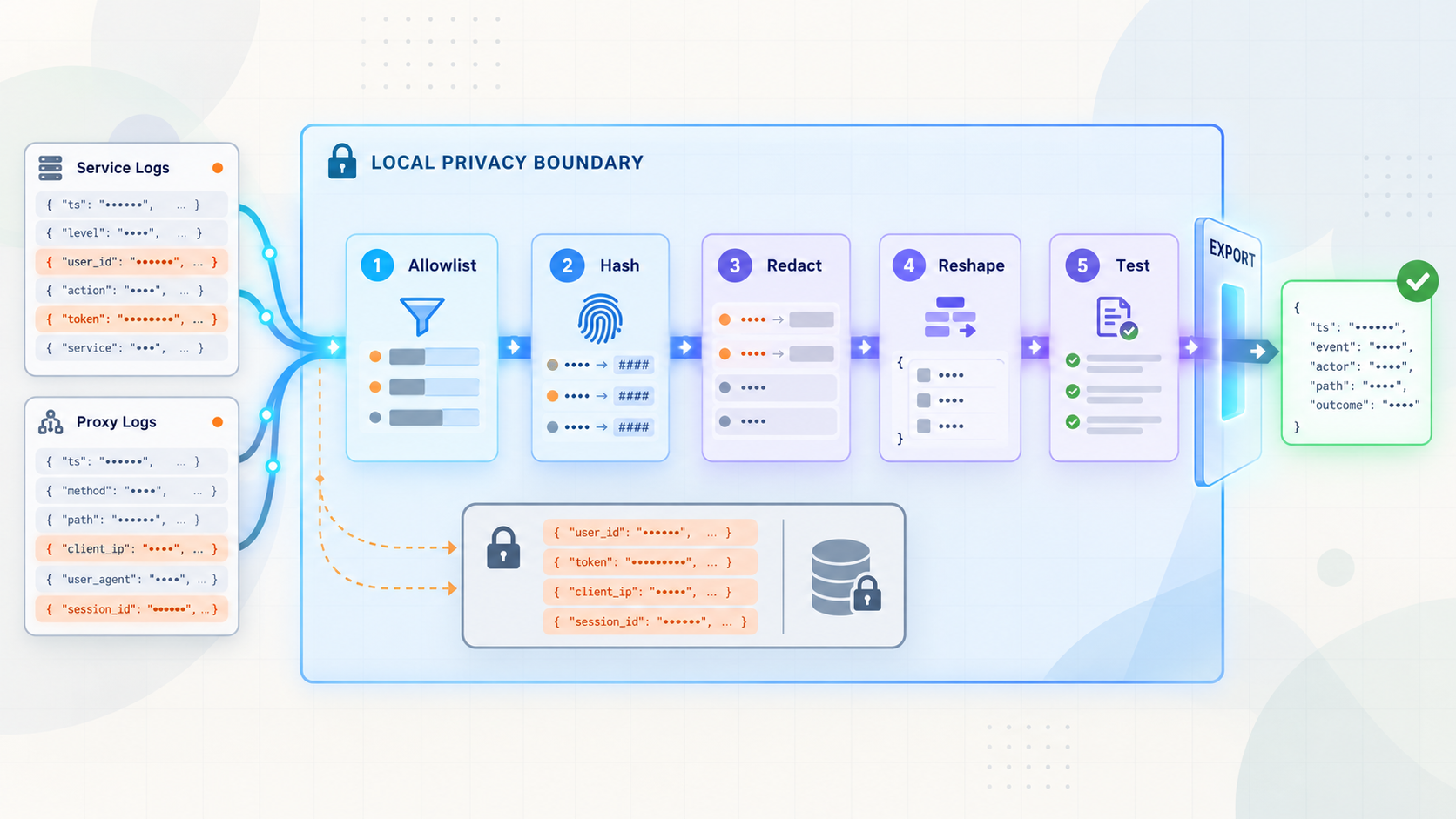
Keep operational visibility without exporting credentials, personal data, or unnecessary request details
HTTP access logs can quietly collect authorization headers, session identifiers, query-string secrets, client addresses, and application-specific identifiers. This guide shows how to sanitize those records on the service host before sending them to an analytics platform, SIEM, or object store. We will build a vendor-neutral pipeline that allowlists fields, pseudonymizes selected identifiers, removes credentials, normalizes records, tests transformations, and fails safely. We will then expose the already-protected local service through a Localtonet HTTP tunnel as a separate connectivity step.
📋 What's in this guide
Why tunnel and reverse-proxy logs need deliberate data minimization
Exposing a local HTTP service creates a legitimate need for observability. We may need to know whether requests succeed, which routes are slow, whether the service returns repeated server errors, and whether traffic volume changes unexpectedly. The mistake is assuming that collecting complete requests is necessary to answer those questions.
Applications, frameworks, web servers, and reverse proxies can all produce access logs. Depending on their configuration, a record may contain a timestamp, HTTP method, host, raw path, query string, response status, response size, processing duration, client address, user agent, referrer, headers, account identifiers, and correlation identifiers. Custom application logs may also contain request or response bodies. Some of these values are useful operational signals. Others can be credentials or personal data, and many are unnecessary for the intended analysis.
Query strings deserve particular attention. URLs frequently carry search terms, email addresses, document identifiers, password-reset tokens, signed download parameters, OAuth authorization data, invitation codes, or application keys. If a logger records the raw request target, those values can propagate into local files, collectors, export queues, dashboards, alerts, support tickets, and long-term archives.
Headers present a similar risk. An Authorization header can contain a bearer token or another credential. Cookies can contain session identifiers. Custom headers may contain API keys, signed assertions, internal tenant identifiers, or user information. Removing only fields whose names contain the word “password” is not a sufficient control.
A Localtonet HTTP tunnel makes the configured local web service reachable through a public HTTPS address. It does not remove the need for application authentication, authorization, input validation, or least-privilege access. Do not place credentials in URLs, and do not rely on log redaction to compensate for missing access controls.
Sanitizing data before export reduces how widely sensitive information can spread. An external destination cannot accidentally index or retain a value that was never sent to it. This also narrows the record schema, makes dashboards more consistent, and can reduce downstream ingestion and storage volume.
This article deliberately distinguishes two systems. The log pipeline belongs to the application, reverse proxy, or local collector. The Localtonet tunnel provides connectivity to the local service. We are not claiming that Localtonet includes a built-in transformation engine for application or reverse-proxy logs. The filtering workflow below runs under your control before records are exported.
Design a privacy-aware logging boundary
A useful design starts by drawing a clear boundary around the machine or private environment that runs the service. Raw events should remain inside that boundary long enough to be parsed and sanitized. Only the transformed representation should enter the exporter or leave for a remote analytics destination.
The safest logical flow is:
Application or reverse proxy
        |
        v
Local structured log source
        |
        v
Parser and schema validator
        |
        v
Allowlist, redact, hash, and reshape
        |
        +---- invalid record ----> local restricted quarantine or safe counter
        |
        v
Sanitized output queue
        |
        v
Remote analytics, SIEM, or storage
Avoid connecting the raw source directly to the remote exporter with the transformer running as an optional side branch. If that transformer stops, a permissive fallback could export unmodified records. Put transformation in the required path and define failure behavior explicitly.
Start from questions, not available fields
List the operational questions the logs must answer. Examples include: How many requests reached each route? What proportion returned 500-level responses? How long did requests take? Which application version handled them? Did a particular pseudonymous client encounter repeated failures?
Then define the smallest schema capable of answering those questions. If a dashboard needs a route name, status code, and duration, it usually does not need cookies, request bodies, complete URLs, email addresses, or an exact client IP address.
Prefer route templates over raw paths
A normalized route such as /users/{id} is generally safer and more useful for aggregation than a raw path such as /users/482913. The application framework often knows the matched route template after routing has completed. Capture that template directly when possible.
A generic sanitizer cannot reliably infer which path segments are identifiers. A segment might be a public category name, an internal account number, or a secret download token. If the source does not provide a trusted route template, omitting the path can be safer than exporting it. Any path-normalization rules should be application-specific and covered by tests.
Decide what to keep, transform, or remove
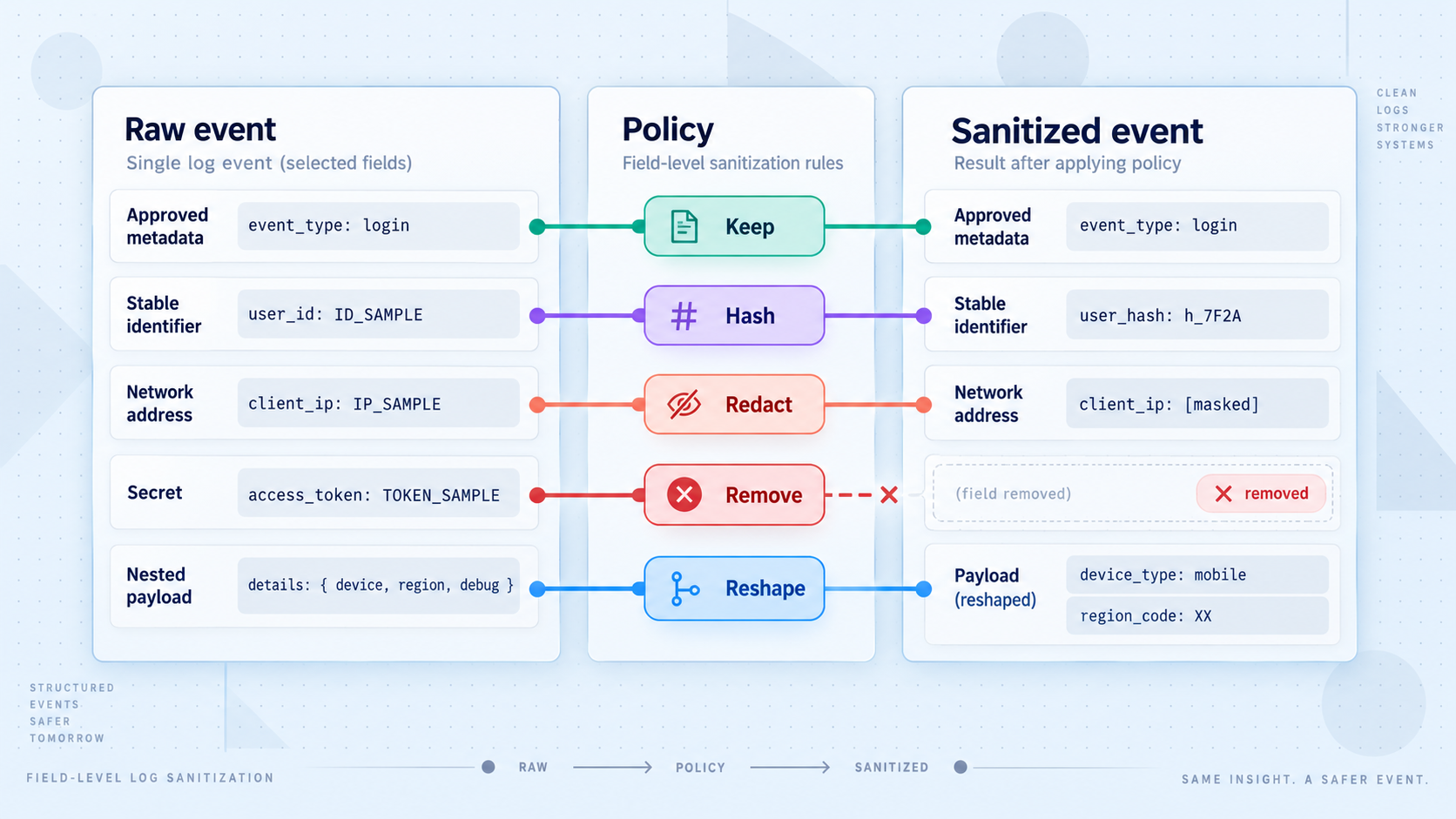
A written field policy keeps logging behavior reviewable. It should identify the purpose of each exported field, its transformation, its retention expectations, and who can access it. The policy should also cover nested objects because sensitive data often hides inside a generic request, context, or metadata structure.
| Input data | Recommended default | Reason |
|---|---|---|
| Timestamp | Keep in one normalized format | Needed for sequencing, windows, alerts, and incident investigation. |
| HTTP method | Keep from an allowed set | Useful for traffic analysis without normally identifying a user. |
| Matched route template | Keep when supplied by the application | Supports aggregation while avoiding identifiers embedded in raw paths. |
| Raw path and query string | Remove by default | May contain account IDs, search terms, tokens, signed parameters, or personal data. |
| Status code and duration | Keep after type and range validation | Supports reliability and performance monitoring. |
| Authorization, cookie, and API-key headers | Remove completely | These values can grant access and should not enter an observability destination. |
| Request and response bodies | Do not collect by default | Bodies can contain credentials, private messages, uploaded content, and regulated data. |
| Client IP address | Omit, reduce precision, or pseudonymize | The appropriate treatment depends on the operational purpose and applicable policy. |
| User or tenant identifier | Use keyed pseudonymization only if correlation is required | Preserves controlled grouping without exporting the original identifier. |
| User agent | Omit or classify locally | The full string can be highly specific; a coarse client category may be sufficient. |
| Error message | Use an approved error code or class | Free-form exceptions can contain request values, file paths, SQL fragments, or credentials. |
| Correlation identifier | Keep only if generated safely | It should be opaque, bounded in length, and unrelated to a credential or account ID. |
Why an allowlist is stronger than a denylist
A denylist begins with the whole input record and removes known dangerous fields. It can fail when developers add a new header, nest a value under another object, change a field name, or begin logging a body. The new data is exported until somebody notices and updates the rules.
An allowlist creates a fresh record containing only approved fields. Unknown fields are dropped automatically. This makes schema evolution safer because a newly introduced source field does not cross the export boundary without a deliberate policy update.
Redaction and pseudonymization solve different problems
Redaction replaces or removes a value so it cannot be recovered from the exported record. This is appropriate for credentials and data with no valid analytics purpose. Pseudonymization transforms a stable identifier into another stable value so records can still be correlated. It reduces direct exposure but does not make the data anonymous.
For identifiers that require correlation, use a keyed construction such as HMAC rather than a plain hash. Predictable identifiers, including email addresses and sequential account numbers, can often be guessed and compared against an unkeyed hash. An HMAC requires a secret key to reproduce the pseudonym.
A stable digest can link a person's activity across many events. Protect the transformed logs with access controls and retention limits. Store the HMAC key separately from exported data, restrict access to it, and plan key rotation according to your correlation and retention requirements.
Build a local structured-log transformer
The following example uses only the Python standard library. It reads newline-delimited JSON from standard input and emits sanitized newline-delimited JSON to standard output. It is a reference pipeline, not a Localtonet command or feature. Adapt the input field names to the structured format produced by your application or reverse proxy.
The sample accepts a deliberately narrow schema. It retains a normalized timestamp, method, trusted route template, status, duration, application name, environment, correlation ID, a reduced-precision IPv4 value, and an optional HMAC pseudonym for a user ID. It does not copy headers, cookies, URLs, query strings, bodies, free-form errors, or unknown metadata.
Make the source emit structured records
Configure the application or reverse proxy to emit one JSON object per line. Prefer a matched route template from the application. Do not enable request-body, response-body, cookie, authorization-header, or full-query logging merely to feed this pipeline.
Define the exported schema
Document each output field and the operational question it supports. Reject the assumption that all source fields should be retained.
Create the transformer
Save the example below as sanitize_logs.py. The LOG_HASH_KEY name belongs only to this sample and is not a Localtonet environment variable.
Run it between collection and export
Feed raw local records into the script and connect only its standard output to the exporter. Keep standard error local because it reports rejected line numbers without reproducing raw event content.
Validate the transformed stream
Test normal, malicious, malformed, oversized, and schema-changing inputs before enabling remote delivery. Confirm that prohibited values cannot appear in output or diagnostic messages.
#!/usr/bin/env python3
import hashlib
import hmac
import json
import os
import re
import sys
from datetime import datetime

ALLOWED_METHODS = {
    "GET", "HEAD", "POST", "PUT", "PATCH",
    "DELETE", "OPTIONS"
}

SAFE_NAME = re.compile(r"^[A-Za-z0-9._-]{1,64}$")
SAFE_ROUTE = re.compile(r"^/[A-Za-z0-9_./{}:-]{0,255}$")
SAFE_REQUEST_ID = re.compile(r"^[A-Za-z0-9._:-]{1,128}$")
MAX_INPUT_BYTES = 64 * 1024

hash_key_text = os.environ.get("LOG_HASH_KEY")
if not hash_key_text:
    raise SystemExit("LOG_HASH_KEY is required")

HASH_KEY = hash_key_text.encode("utf-8")

def normalized_timestamp(value):
    if not isinstance(value, str) or len(value) > 64:
        raise ValueError("invalid timestamp")

    candidate = value[:-1] + "+00:00" if value.endswith("Z") else value
    parsed = datetime.fromisoformat(candidate)

    if parsed.tzinfo is None:
        raise ValueError("timestamp must include a timezone")

    return parsed.isoformat()

def bounded_integer(value, minimum, maximum, field):
    if isinstance(value, bool) or not isinstance(value, int):
        raise ValueError(f"{field} must be an integer")

    if value < minimum or value > maximum:
        raise ValueError(f"{field} is outside the accepted range")

    return value

def safe_name(value, field):
    if not isinstance(value, str) or not SAFE_NAME.fullmatch(value):
        raise ValueError(f"invalid {field}")

    return value

def safe_route_template(value):
    if not isinstance(value, str) or not SAFE_ROUTE.fullmatch(value):
        raise ValueError("invalid route template")

    if "?" in value or "#" in value:
        raise ValueError("route template contains a query or fragment")

    return value

def safe_request_id(value):
    if not isinstance(value, str) or not SAFE_REQUEST_ID.fullmatch(value):
        raise ValueError("invalid request ID")

    return value

def pseudonymize(value):
    if not isinstance(value, str) or not value or len(value) > 256:
        raise ValueError("invalid identifier")

    digest = hmac.new(
        HASH_KEY,
        value.encode("utf-8"),
        hashlib.sha256
    ).hexdigest()

    return digest[:32]

def reduce_ipv4_precision(value):
    if value is None:
        return None

    if not isinstance(value, str):
        raise ValueError("invalid client address")

    parts = value.split(".")
    if len(parts) != 4:
        return None

    try:
        octets = [int(part) for part in parts]
    except ValueError:
        return None

    if any(octet < 0 or octet > 255 for octet in octets):
        return None

    return f"{octets[0]}.{octets[1]}.{octets[2]}.0"

def sanitize(event):
    if not isinstance(event, dict):
        raise ValueError("event must be an object")

    method = event.get("method")
    if not isinstance(method, str):
        raise ValueError("method must be a string")

    method = method.upper()
    if method not in ALLOWED_METHODS:
        raise ValueError("method is not allowed")

    output = {
        "timestamp": normalized_timestamp(event.get("timestamp")),
        "method": method,
        "route": safe_route_template(event.get("route_template")),
        "status": bounded_integer(event.get("status"), 100, 599, "status"),
        "duration_ms": bounded_integer(
            event.get("duration_ms"), 0, 86_400_000, "duration_ms"
        ),
        "service": safe_name(event.get("service"), "service"),
        "environment": safe_name(
            event.get("environment"), "environment"
        )
    }

    request_id = event.get("request_id")
    if request_id is not None:
        output["request_id"] = safe_request_id(request_id)

    client_network = reduce_ipv4_precision(event.get("client_ip"))
    if client_network is not None:
        output["client_network"] = client_network

    user_id = event.get("user_id")
    if user_id is not None:
        output["user_pseudonym"] = pseudonymize(user_id)

    output["server_error"] = output["status"] >= 500
    return output

def main():
    for line_number, raw_line in enumerate(sys.stdin.buffer, start=1):
        try:
            if len(raw_line) > MAX_INPUT_BYTES:
                raise ValueError("line exceeds the size limit")

            event = json.loads(raw_line)
            output = sanitize(event)

            sys.stdout.write(
                json.dumps(
                    output,
                    separators=(",", ":"),
                    ensure_ascii=True
                ) + "\n"
            )
            sys.stdout.flush()

        except Exception as exc:
            print(
                f"rejected log line {line_number}: "
                f"{type(exc).__name__}",
                file=sys.stderr
            )

if __name__ == "__main__":
    main()
Notice that the exception handler does not print the raw line or exception message. Parser errors and validation messages can include fragments of input, depending on the implementation. Diagnostics should identify the failure class and line number without turning the error channel into another secret-leakage path.
The script also applies a per-line size limit. This is not a substitute for resource controls around the process, but it prevents a single unexpectedly large record from being treated as an ordinary event. Choose limits based on the intentionally approved schema rather than the largest raw request your service can accept.
Replacing the final IPv4 octet with zero reduces precision but does not make a record anonymous. The sample omits non-IPv4 addresses rather than guessing an equivalent IPv6 policy. If IPv6 network-level analysis is required, define and test an explicit prefix policy with your privacy and security stakeholders.
Run the local transformation
For a development test, create a local NDJSON fixture. The values below are synthetic. The address belongs to a documentation range, and the credential-looking strings are intentionally fake.
{"timestamp":"2026-08-20T10:15:30Z","method":"post","route_template":"/api/orders/{id}","raw_url":"/api/orders/8472?access_token=FAKE-SECRET-123","status":201,"duration_ms":84,"service":"orders-api","environment":"development","request_id":"req_test_001","client_ip":"192.0.2.44","user_id":"customer-8472","headers":{"authorization":"Bearer FAKE-TOKEN","cookie":"session=FAKE-SESSION"},"body":{"card":"FAKE-CARD-DATA"}}
Save that line as sample.ndjson. Set a development-only test key and run the transformer:
export LOG_HASH_KEY='development-only-test-key'
python3 sanitize_logs.py < sample.ndjson > sanitized.ndjson
Inspect sanitized.ndjson. It should contain only the fields constructed in sanitize(). The raw URL, query parameter, headers, body, original user ID, full client address, and unknown nested objects should not be present.
Do not embed a production HMAC key in source code, shell history, container images, service definitions readable by unauthorized users, or exported configuration bundles. Supply it through the secret-management mechanism appropriate to your deployment. Key rotation changes pseudonyms, so decide whether rotation should intentionally break correlation between periods.
Test the transformation for leakage and schema drift
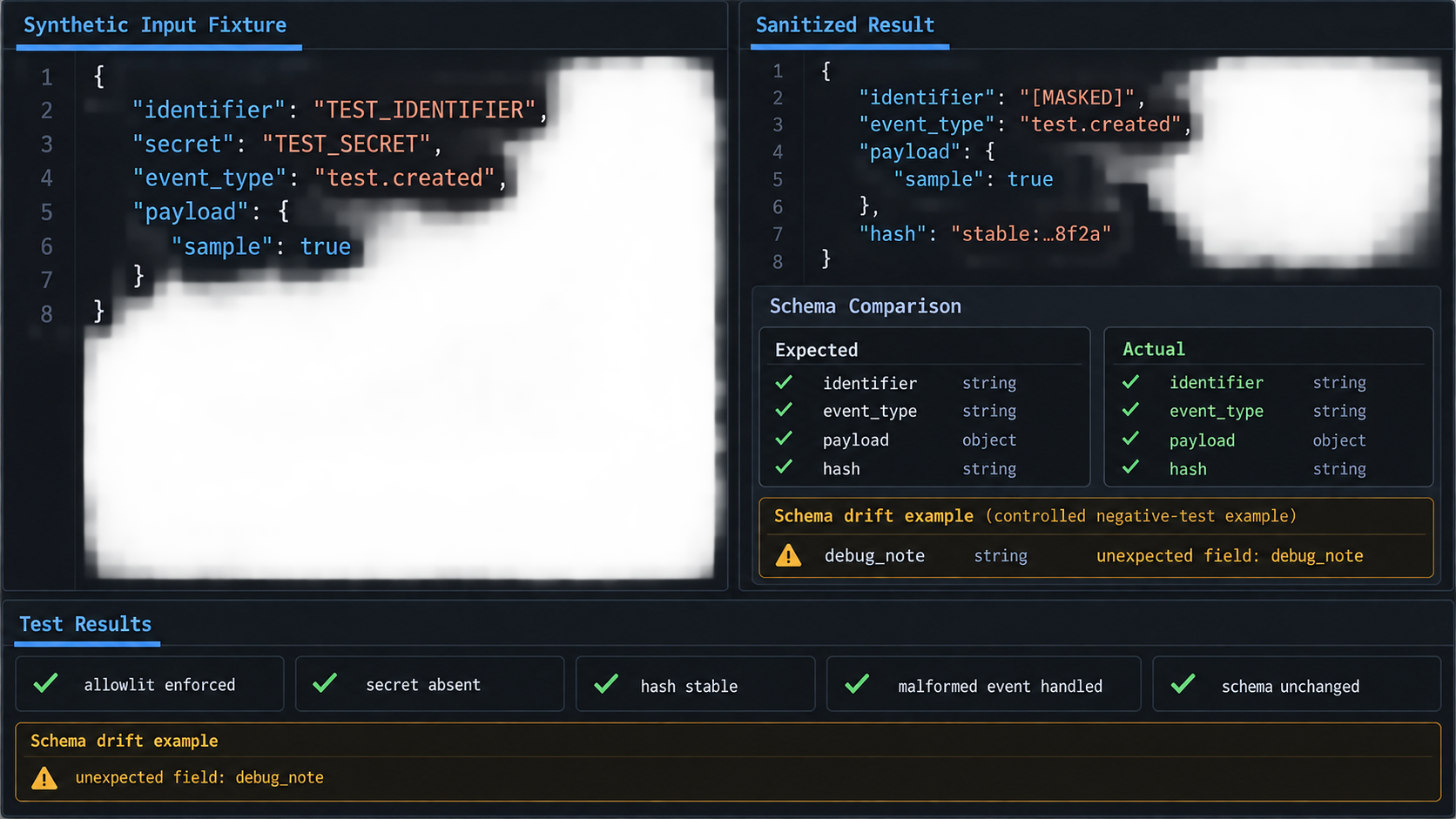
A transformation is a security control and should be tested as one. Happy-path tests prove only that ordinary records work. Leakage tests must place sensitive markers in every location where developers or middleware might add data.
Use canary values that are easy to detect
Build fixtures containing unique fake markers such as FAKE-AUTH-CANARY-91B7 and FAKE-COOKIE-CANARY-42D1. Put them in headers, cookies, query values, raw paths, bodies, user IDs, error messages, nested metadata, and unknown fields. After transformation, search the complete output stream and all local diagnostics for every marker.
Also test prohibited field names. Even if a fixture value is transformed, the accidental presence of fields such as authorization, cookie, raw_url, query, or body can reveal a future schema regression.
import os
import unittest

os.environ["LOG_HASH_KEY"] = "unit-test-key"

import sanitize_logs

class SanitizerTests(unittest.TestCase):
    def test_sensitive_fields_are_not_exported(self):
        event = {
            "timestamp": "2026-08-20T10:15:30Z",
            "method": "POST",
            "route_template": "/api/orders/{id}",
            "status": 201,
            "duration_ms": 84,
            "service": "orders-api",
            "environment": "test",
            "request_id": "req_test_001",
            "client_ip": "192.0.2.44",
            "user_id": "customer-8472",
            "raw_url": "/api/orders/8472?token=FAKE-QUERY-CANARY",
            "headers": {
                "authorization": "Bearer FAKE-AUTH-CANARY",
                "cookie": "session=FAKE-COOKIE-CANARY"
            },
            "body": "FAKE-BODY-CANARY",
            "error": "FAKE-ERROR-CANARY"
        }

        output = sanitize_logs.sanitize(event)
        serialized = str(output)

        for marker in (
            "FAKE-QUERY-CANARY",
            "FAKE-AUTH-CANARY",
            "FAKE-COOKIE-CANARY",
            "FAKE-BODY-CANARY",
            "FAKE-ERROR-CANARY",
            "customer-8472",
            "192.0.2.44"
        ):
            self.assertNotIn(marker, serialized)

        self.assertEqual(output["route"], "/api/orders/{id}")
        self.assertEqual(output["client_network"], "192.0.2.0")
        self.assertIn("user_pseudonym", output)

    def test_unknown_fields_are_dropped(self):
        event = {
            "timestamp": "2026-08-20T10:15:30+00:00",
            "method": "GET",
            "route_template": "/health",
            "status": 200,
            "duration_ms": 3,
            "service": "orders-api",
            "environment": "test",
            "new_sensitive_field": "FAKE-SCHEMA-DRIFT-CANARY"
        }

        output = sanitize_logs.sanitize(event)
        self.assertNotIn("new_sensitive_field", output)
        self.assertNotIn(
            "FAKE-SCHEMA-DRIFT-CANARY",
            str(output)
        )

    def test_raw_path_is_not_accepted_as_a_route_template(self):
        event = {
            "timestamp": "2026-08-20T10:15:30Z",
            "method": "GET",
            "route_template": "/reset?token=FAKE-TOKEN",
            "status": 200,
            "duration_ms": 12,
            "service": "accounts-api",
            "environment": "test"
        }

        with self.assertRaises(ValueError):
            sanitize_logs.sanitize(event)

if __name__ == "__main__":
    unittest.main()
Save the test as test_sanitize_logs.py in the same directory, then run:
python3 -m unittest test_sanitize_logs.pyTest the entire path, not only the function
Unit tests protect transformation logic, but production behavior also depends on process wiring. Run an end-to-end test from the actual local source through the collector, transformer, queue, and a non-production destination. Verify the exporter's own metadata and error handling. Some agents attach the source filename, host name, process environment, tags, or failed payloads outside the transformed JSON object.
Capture a sanitized sample from the final destination and compare its keys against an exact approved schema. Alert on unknown output keys. A strict downstream check provides another opportunity to catch drift before a new field becomes widely retained.
Operate the redaction pipeline safely
A correct transformation can still fail operationally. The process might crash, the source schema might change, a destination might become unavailable, or malformed input might arrive repeatedly. Safe operation requires explicit decisions for each failure state.
Fail closed for remote export
If sanitization fails, do not forward the original record as a fallback. Count the rejection and, when investigation requires preserving the event, place it in a restricted local quarantine with short retention and tightly controlled access. Quarantine is optional and should not become a permanent second log archive.
Never send rejected raw records to a general error stream that is itself exported. Likewise, avoid including raw events in alert notifications or support tickets.
Monitor the sanitizer without reproducing sensitive data
Useful operational metrics include accepted record count, rejected record count, oversized record count, processing latency, output queue depth, exporter failures, and the version of the active policy. These are aggregate values and do not require raw request content.
A sudden increase in rejected records can indicate an application deployment changed the schema. A flat output rate with continuing incoming requests can indicate a blocked transformer or exporter. Monitor both sides of the boundary so silence is not mistaken for a healthy service.
Version transformations and review changes
Keep the sanitizer and its tests in version control. Require review for additions to the output schema, especially fields derived from URLs, identifiers, headers, free-form messages, or nested objects. Record why a field is necessary and when that need should be reassessed.
Deploy schema changes to a non-production stream first. Compare accepted and rejected counts, examine only approved sanitized samples, and confirm downstream dashboards continue to work. If rollback is required, roll back to a previously reviewed policy rather than bypassing transformation.
Minimize local raw-log retention too
Sanitizing before export reduces remote exposure, but raw local files still require protection. Limit their retention to the shortest period justified by the workflow, restrict filesystem permissions, avoid copying them into backups by default, and ensure temporary files are handled deliberately. If the application can directly emit a minimal structured event, that is preferable to creating a highly detailed raw record and cleaning it later.
Combine transformation with application access controls, destination permissions, retention limits, secure key handling, change review, and incident procedures. The correct fields and retention periods depend on your service, users, jurisdiction, and organizational requirements.
Expose the sanitized local service with a Localtonet HTTP tunnel
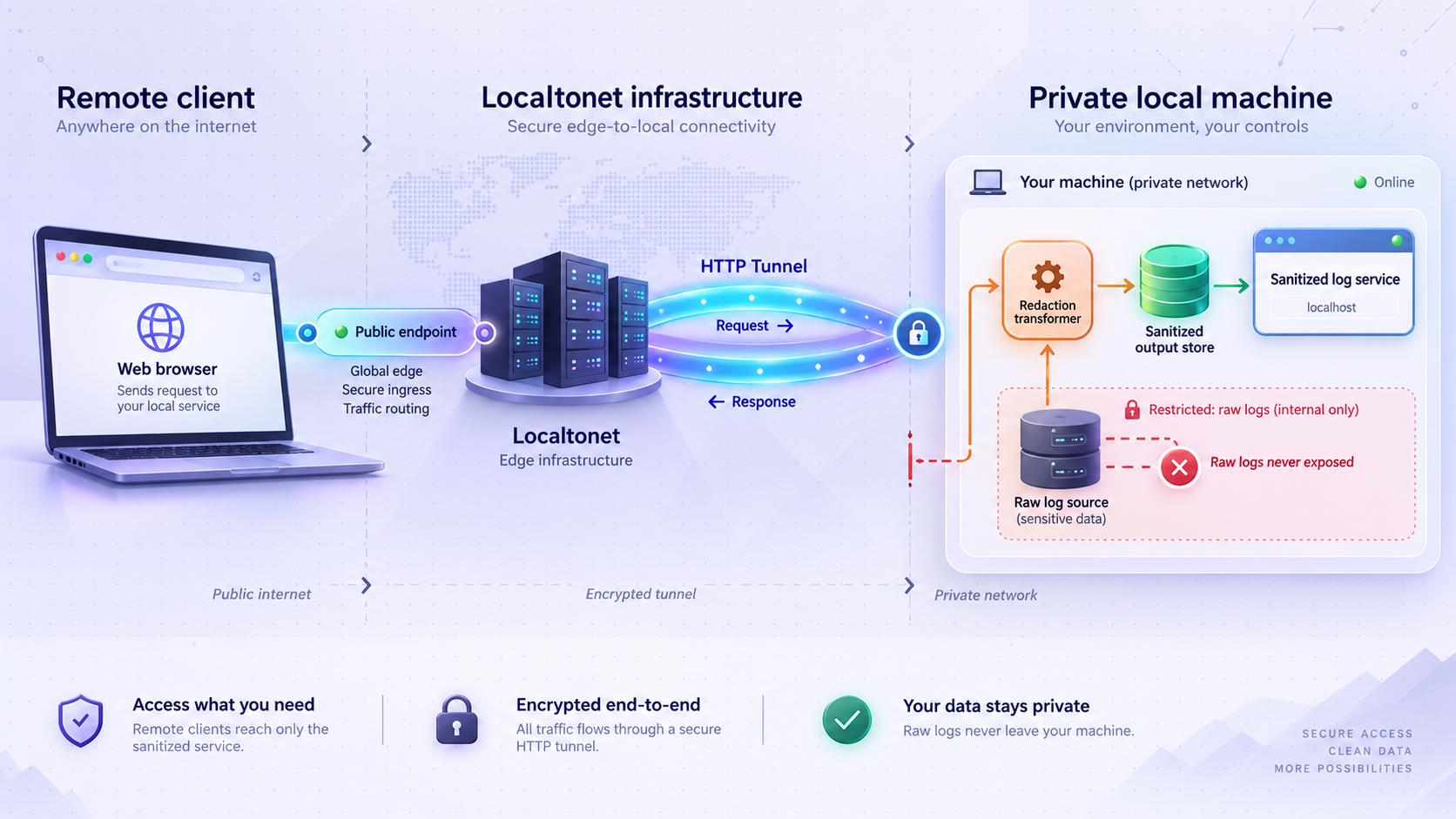
Once the service is running locally and its logging pipeline is operating safely, Localtonet can provide remote HTTP access without inbound router port forwarding, firewall changes, VPN setup, or a public IP address. Our client on the device establishes an outbound connection to a Localtonet relay server. The tunnel then provides a public address for the configured local target.
This connectivity step does not replace the sanitizer. Requests reach your application through the tunnel, while the application or reverse proxy continues to create and process its own logs locally. Keep the transformation between that local log source and any remote observability destination.
Install and run the Localtonet client
Run our client on the device that hosts the HTTP service or on a device that can reach it over the local network. Confirm the application itself is already running and locally reachable before creating the tunnel.
Authenticate or select the device
Use the device-specific authentication token provided for your client. Treat that token as a secret. Do not place it in application logs, examples, tickets, screenshots, or source control.
Select an available relay server
Choose an available server or region from the current Localtonet dashboard. Available values can vary, so obtain them from the product rather than hardcoding a server code from an old guide.
Create the HTTP tunnel configuration
Configure an HTTP tunnel pointing to the local IP address and port where the service listens. Use the actual address verified on the client device. Do not expose an administrative interface unless remote access to it is explicitly required and strongly protected.
Start the tunnel
Creating a tunnel does not make it active. Use the Start action and confirm that the selected client remains connected. The public address is available only while the tunnel is running and the selected device is connected.
Verify access and stop it when finished
Test the assigned public URL with an authorized request, confirm the application responds, and verify that the local pipeline emits only the sanitized event. Stop or delete the tunnel when remote access is no longer required.
For the current dashboard workflow, consult our Localtonet HTTP tunnel documentation. HTTP tunnels can use a generated subdomain, a selected subdomain where supported, or a custom domain. Exact custom-domain DNS instructions should be checked against the current documentation before making DNS changes.
The Localtonet HTTP tunnel should point to the web service that authorized users need to reach. Do not expose a raw-log directory, local collector administration port, quarantine location, or exporter control interface through the same tunnel. Keep observability components bound and restricted according to their operational purpose.
Verify the combined workflow
Send a controlled request through the public tunnel using a test account and a harmless marker. Confirm that the application returns the expected response. Then check the transformed output for the intended route, method, status, and duration fields.
Confirm that the public host, complete request URL, query values, credentials, cookies, original account identifier, and body were not exported unless a specific field was separately justified and transformed. Test an authentication failure and an application error as well because exceptional code paths often use different log statements.
Finally, stop the tunnel and verify that the public endpoint is no longer available. Remember that stopping connectivity does not automatically delete records already stored locally or remotely. Log retention and tunnel lifecycle are separate controls.
Troubleshoot common log-redaction failures
The transformer rejects every record
Compare the actual structured source schema with the fields expected by the script. Check timestamp timezone information, integer types, method values, route-template availability, and field names. Do not solve the problem by changing the transformer to copy unknown input wholesale. Update the explicit mapping and tests after reviewing the new schema.
Raw identifiers still appear inside the route
The source is probably sending a raw path rather than the matched application route template. Modify application-level logging to emit the route pattern after routing. If the framework cannot provide one, define tested application-specific normalization or omit the route. Do not assume that every numeric or UUID-looking segment is safe to replace without understanding routing behavior.
Secrets appear in transformer errors
Check all exception handlers and process supervisors. Avoid printing raw input, parser excerpts, environment variables, command lines, complete exception objects, or failed destination payloads. Inspect whether a collector automatically captures standard input or attaches rejected records to its own diagnostics.
Pseudonyms change unexpectedly
Stable HMAC output requires the same normalized input and the same key. Check for key rotation, whitespace, case differences, prefixes, encoding differences, or changes in identifier type. Define canonicalization carefully. Combining two distinct user identifiers through overly aggressive normalization can be as harmful as losing correlation.
The export destination receives duplicate records
Retries can create duplicates when delivery acknowledgment is uncertain. Include a safely generated request or event identifier when deduplication is required, but never reuse a credential as that identifier. Whether a destination supports deduplication is destination-specific, so verify its behavior rather than assuming exactly-once delivery.
The public URL works but no logs are exported
Treat service connectivity and observability as separate paths. First verify that the application or reverse proxy writes a local structured record. Then check transformer acceptance counts, standard-error rejection counts, output queue health, exporter connectivity, and destination ingestion. A functioning Localtonet tunnel proves that the service is reachable, not that a separate analytics destination is healthy.
The local service works but the tunnel does not
Confirm that the Localtonet client is connected, the tunnel is started, and the configured target IP address and port match the locally verified service. Ensure the client device can reach that target. If the application only accepts a particular host or enforces application-level authentication, verify those settings without disabling security controls.
Frequently asked questions
Does Localtonet redact application or reverse-proxy logs automatically?
This guide does not make that claim. The transformation pipeline described here runs locally under your control and processes logs created by your application, web server, or reverse proxy. The Localtonet HTTP tunnel is a separate connectivity layer that exposes the configured local service.
Should authorization headers and cookies be masked or removed?
Remove their values from exported operational logs. Partial masking can leave useful credential fragments or encourage downstream users to depend on sensitive fields. If authentication analysis is required, emit a separate approved result such as an authentication outcome or credential type, not the credential itself.
Is hashing a user ID enough to make logs anonymous?
No. A stable pseudonym can still link activity across events. Plain hashes are also vulnerable when source identifiers are predictable. Use keyed HMAC when correlation is justified, protect the key, restrict access to the resulting records, and continue treating the data as sensitive.
Can I safely keep the complete URL if I remove known secret parameters?
A parameter denylist is fragile because applications add new names and values can also appear in path segments. Prefer a trusted route template and omit the query string. If selected query information is operationally necessary, allowlist specific parameter names and export only a safe classification or validated value rather than reconstructing the complete URL.
What should happen when a log record cannot be transformed?
Fail closed for remote export. Record a safe aggregate rejection metric without including raw content. If investigation requires retaining the event, place it in a restricted local quarantine with short retention. Never forward the original record as an automatic fallback.
Should health checks and metrics requests be exported?
Export them only if they serve a defined operational purpose. High-volume routine checks can obscure user traffic and increase storage. If filtering them, match a trusted route classification or exact approved route rather than loosely searching raw URLs, and retain separate aggregate health monitoring where needed.
Does stopping a Localtonet tunnel stop log export?
Not necessarily. The tunnel and logging pipeline are separate processes. Stopping the tunnel ends public access through that tunnel, but the application may continue running and its exporter may continue sending queued or locally generated records. Manage tunnel lifecycle, application lifecycle, and log export independently.
What is the minimum useful HTTP access-log schema?
There is no universal minimum. A practical starting point is a normalized timestamp, method, matched route template, status code, duration, service, environment, and a safely generated correlation ID when needed. Add pseudonymous identifiers or reduced network information only when a documented operational question requires them.
Expose your sanitized local service with Localtonet
Build and test the local redaction boundary first, then use our HTTP tunnel to provide controlled remote connectivity without configuring inbound router port forwarding or requiring a public IP address.
Get Started Free →

