

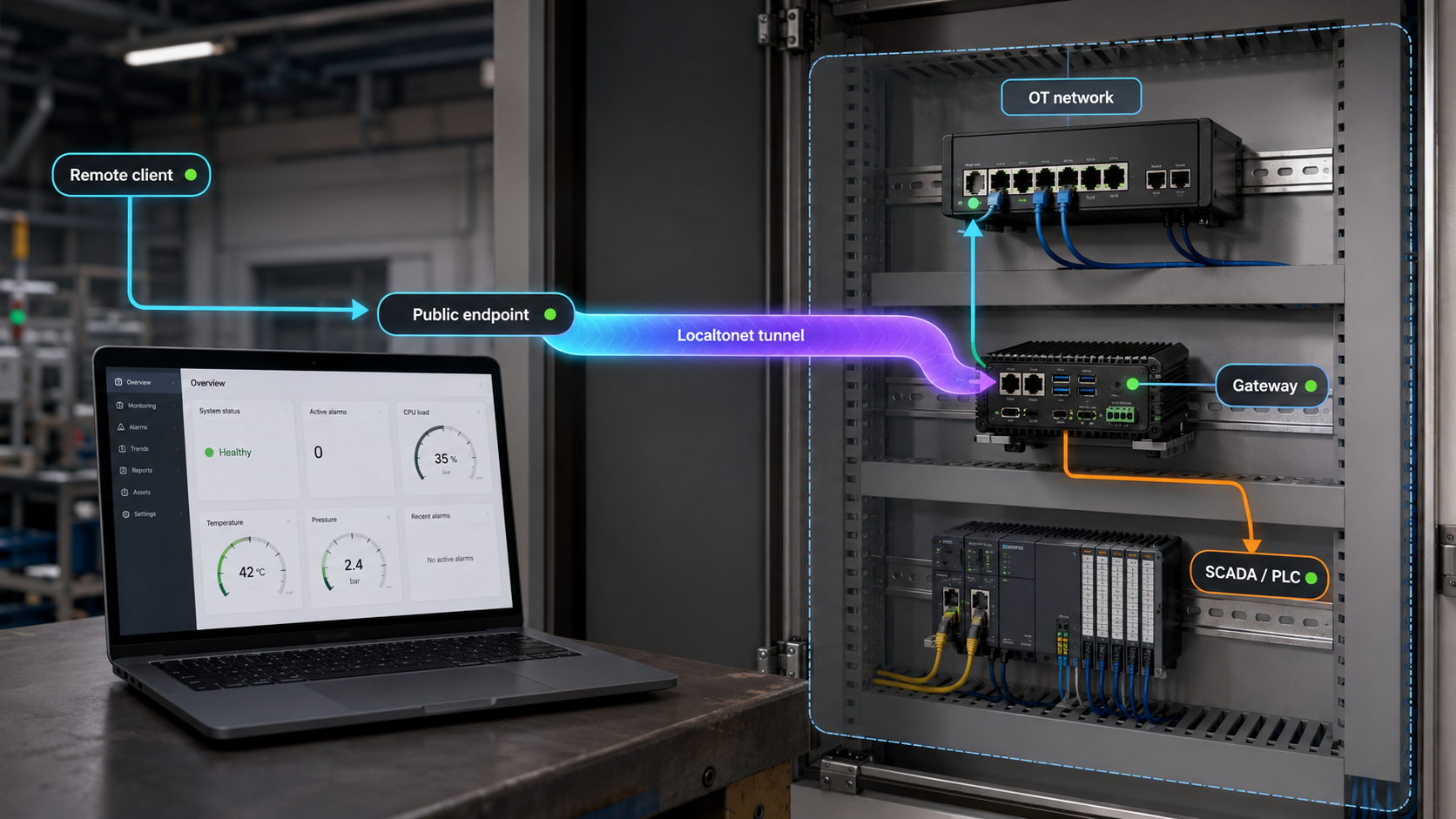
Publish one approved industrial service without opening an inbound firewall port
Remote troubleshooting does not always require network-wide VPN access, but an internet tunnel is not automatically a safe replacement for an approved OT remote-access architecture. This guide explains how to use Localtonet for narrowly scoped, explicitly authorized access to an HTTP-based SCADA or HMI interface, and why exposing raw Modbus TCP requires a separate and much stricter risk decision. It covers gateway placement, local validation, tunnel creation, identity controls, shutdown testing, troubleshooting, and routine operations. The objective is to expose only the required service during an approved access window, not to create general access to an OT network.
📋 What's in this guide
What this approach does and does not replace
Localtonet is a multi-protocol tunneling and proxy platform. The Localtonet client runs on a selected device and establishes an outbound connection to a Localtonet relay. An HTTP tunnel provides a public HTTPS URL, while a TCP tunnel provides a public host and port that forwards raw TCP traffic to a specific local IP address and port reachable from the client device.
This removes the need for inbound router port forwarding, inbound firewall changes, a public IP address, or a conventional VPN setup. It does not remove the need for authorization, network segmentation, change control, application authentication, monitoring, or vendor-supported configuration. OT egress must be explicitly reviewed and approved. Never assume that an industrial firewall permits the required outbound traffic, and never weaken a firewall broadly to make a tunnel work.
Standard Localtonet HTTP and TCP tunnels expose configured services. They are not VPN functionality and do not grant a remote engineer general network access. Localtonet has a separate VPN Manager product for private mesh VPN use cases, but that is not the architecture described here. Use a tunnel only when a risk assessment concludes that access to one identified service is appropriate.
A tunnel is available only while the selected Localtonet client device is connected and that individual tunnel is running. Creating a tunnel configuration does not start it. Starting the client application or installing it as an operating-system service also does not, by itself, mean that every dashboard configuration is running. The tunnel must be deliberately started and can later be stopped or deleted.
The distinction between HTTP and raw TCP is central to this guide. Localtonet SSO is an authentication layer for HTTP tunnels. It can protect a browser-based SCADA dashboard, HMI interface, internal web application, or web API. It does not apply to a raw TCP tunnel. A Modbus client connecting to a public TCP host and port will not encounter the HTTP SSO gateway.
Prerequisites for production OT access
Do not begin by installing software on an arbitrary plant-floor computer. Begin with the asset owner, control-system owner, network team, and OT security team. The urgency of an alarm or maintenance problem does not eliminate the need to understand how a remote action could affect safety, availability, product quality, or regulatory obligations.
| Prerequisite | What must be established | Why it matters |
|---|---|---|
| Written authorization | Named asset, service, users, purpose, owner, and approved time window | Prevents emergency access from becoming an undocumented permanent path. |
| Change control | Implementation plan, test plan, rollback plan, and responsible approvers | Remote access can change the availability and threat model of a production service. |
| Asset inventory | Verified target IP, port, protocol, model, firmware or software version, and service owner | A guessed address or port can expose the wrong device or an unintended management interface. |
| Recovery readiness | Current backups or another vendor-supported recovery method, plus known recovery ownership | Authorized activity can still cause a fault, configuration error, or service interruption. |
| Approved gateway design | A hardened gateway in an approved OT DMZ or another reviewed zone and conduit design | The gateway becomes part of the access path and must not accidentally bridge security zones. |
| Deny-by-default egress | Only explicitly approved outbound connectivity needed by the current Localtonet client | OT outbound access should be allowlisted and monitored rather than presumed open. |
| Target reachability | The gateway can reach only the intended service using the required route and firewall policy | Localtonet cannot forward to an address or port that the client device cannot reach. |
| Supported target setup | The web or industrial protocol service is enabled according to current vendor documentation | Controller and HMI behavior varies by model, firmware, license, and application configuration. |
| Credentials and roles | Named application accounts with the least privileges needed for the task | A tunnel does not replace the target application's authorization controls. |
| Maintenance window | Start time, stop time, communications plan, monitoring, and abort criteria | Production remote access needs an accountable beginning and end. |
Choose the gateway deliberately
The Localtonet client may run on a device that can reach the local target. In a production OT environment, use a dedicated, hardened gateway or an approved OT DMZ design rather than installing remote-access software directly on a PLC, HMI, engineering workstation, or SCADA server. Apply least privilege, remove unnecessary software and services, patch according to the site's OT process, protect local credentials, and send relevant host and network events to the site's monitoring process.
A dual-homed host is not automatically a security control. If a gateway has interfaces in two zones, incorrect IP forwarding, routing, bridging, firewall rules, or host configuration can create an unintended conduit between them. The design must explicitly define permitted source and destination flows, disable unnecessary forwarding, restrict routes, and verify that the host cannot be used for general IT-to-OT transit.
The intended path is an authorized remote user to a Localtonet public endpoint, through the outbound client connection, to a hardened gateway or approved OT DMZ, and then to one permitted service. The architecture must not provide public addressing to the controller or bridge an entire control network.
Protect the device AuthToken
A Localtonet AuthToken identifies the client device that will run the tunnel. It is a device-specific secret, not a physical-site identifier, inventory label, or value to include in documentation screenshots. Obtain it from the authenticated Localtonet dashboard, enter it only on the approved gateway, and protect the local account and files where it is stored. Revoke or replace the device token if the gateway is lost, compromised, reassigned, or decommissioned.
Design the service path before configuration
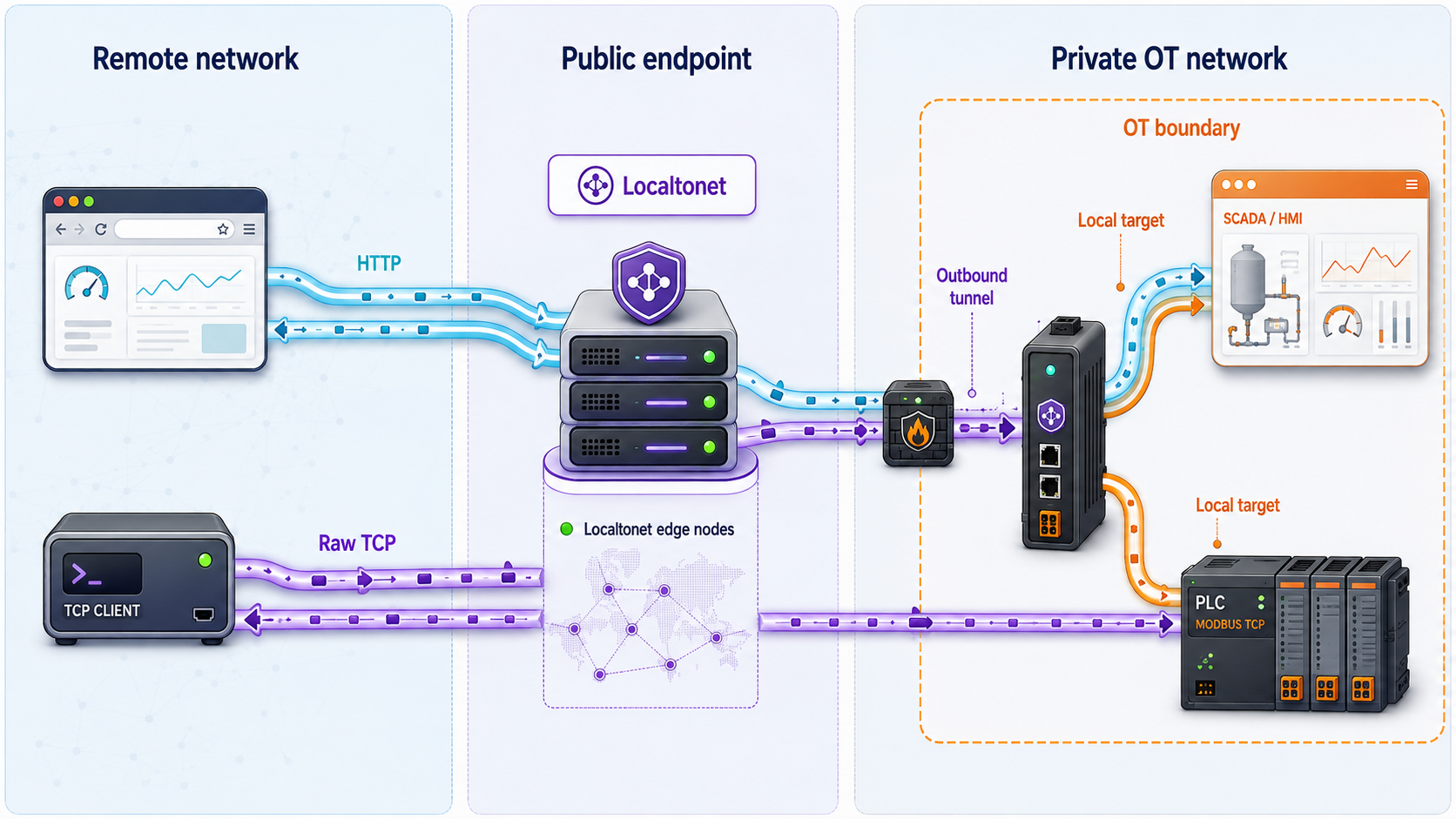
Document the complete path before creating a tunnel. For an HTTP dashboard, the remote user opens the assigned public HTTPS URL. Localtonet receives the HTTP request at the tunnel edge, applies configured HTTP SSO when enabled, and forwards the request through the connected client to the local web target.
For Modbus TCP or another raw TCP protocol, the remote client connects to the assigned public host and port. The traffic is forwarded to the configured local IP and port. There is no HTTP request in this path, so HTTP SSO cannot intercept it.
| Property | HTTP SCADA or HMI tunnel | Raw Modbus TCP tunnel |
|---|---|---|
| Public endpoint | Public HTTPS URL | Public host and TCP port |
| Local target | Reachable local IP and web-service port | Reachable local IP and protocol port |
| Localtonet SSO | Supported for HTTP tunnels | Not applicable |
| Application authentication | Keep the SCADA or HMI login and authorization enabled | Depends entirely on the backend protocol and target implementation |
| Read-only guarantee | Must be enforced by the application and assigned user role | Not enforced by the tunnel; Modbus operations can include writes |
| Recommended production posture | Use SSO, application credentials, least privilege, monitoring, and a limited access window | Avoid direct exposure unless formally approved with compensating controls and a documented risk assessment |
Understand the TLS boundary for HTTP
Localtonet HTTP Process Types provide a public HTTPS address, and TLS is terminated at the tunnel edge. That protects the browser-facing HTTPS connection to that edge. It does not prove that an HTTP backend is itself using TLS, and this article does not make claims about encryption properties on other tunnel legs that are not established by the supplied product documentation.
If the local SCADA or HMI service uses HTTPS, validate its certificate, hostname expectations, and compatibility from the gateway before exposure. If it uses plain HTTP, treat that local backend path according to the OT zone design and risk assessment. For raw TCP, the tunnel does not add authentication or read-only semantics to Modbus or any other backend protocol.
Validate the service locally before creating a tunnel
A public tunnel cannot fix an unavailable backend. Testing from an engineer's workstation elsewhere on the plant network is not enough because routing and firewall policy may differ. Perform the local test from the exact gateway device that will run the Localtonet client.
Confirm the approved target
Match the IP address, port, protocol, asset identity, and purpose against the approved asset inventory and change record. Stop if the observed device or service differs from the approved target.
Test the local network path from the gateway
Verify that routing and host or network firewalls permit the gateway to reach the target's specific service port. Do not broaden access to a subnet merely because one service is unreachable.
Test the real application protocol
Open the HTTP or HTTPS interface from a browser on the gateway, or use the organization's approved industrial protocol tool for a TCP service. A basic port check can show that a socket accepts connections, but it does not prove that the application works correctly.
Verify credentials and least privilege
Sign in with the account intended for remote work and confirm that its permissions match the maintenance task. For monitoring, use an application role that the product itself enforces as read-only where available.
Record the successful baseline
Record the tested local URL or host and port, application result, responsible tester, and time. This separates backend faults from later tunnel or public-access faults.
PLC, SCADA, and HMI capabilities vary by model, firmware, software release, module, licensing, and project configuration. Confirm whether a web server or Modbus TCP service is supported, how it is enabled, which ports it uses, and how many sessions it permits using current documentation from the equipment or application vendor.
Configure an HTTP tunnel for a SCADA or HMI dashboard
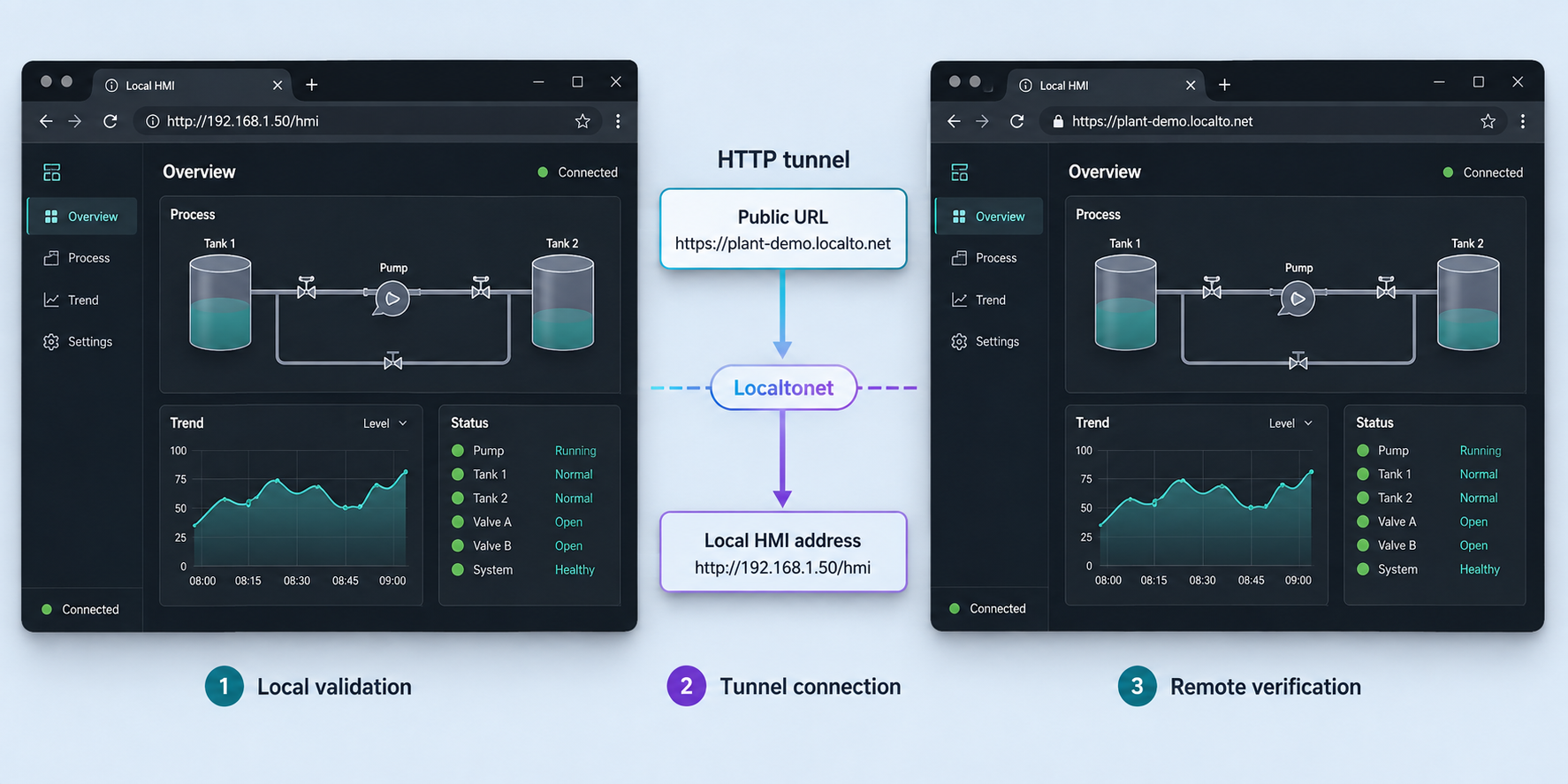
Use this workflow only for a genuine HTTP or HTTPS interface. Localtonet HTTP tunnels can use Random Sub Domain, Custom Sub Domain, or Custom Domain as the Process Type. All three serve the configured content at a public HTTPS address. Availability can vary, so use only the options presented for the current account and client configuration. Exact custom-domain DNS requirements must be checked against current documentation rather than guessed.
Complete the local validation above first. Then preserve the Localtonet setup sequence:
Install and run the Localtonet client
On the approved gateway, obtain the appropriate client from the Localtonet download page. Use the current installation path for that operating system and verify that the application starts under the intended least-privileged service account or operator context.
Authenticate the gateway with its device token
Enter the device-specific AuthToken in the client or start it with the documented --authtoken <YOUR_TOKEN> option. Never paste a real token into a ticket, shared script, article, or change record. Confirm in the dashboard that the intended device is connected.
Select an available relay server
In the HTTP tunnel configuration, select the connected AuthToken and choose a relay server or region from the values currently offered in the dashboard. Do not copy a server code from an old guide because available values can change.
Choose the HTTP Process Type
Select Random Sub Domain, Custom Sub Domain, or Custom Domain as appropriate for the approved design and currently available options. For a temporary maintenance session, avoid introducing custom DNS unless it is already approved and required.
Enter the verified local IP address and port
Use the exact target tested from the gateway. If the web service runs on another approved OT host, enter that host's reachable IP address rather than 127.0.0.1. Enter the actual configured application port instead of assuming a default.
Create the tunnel configuration
Save or create the HTTP tunnel after reviewing the selected device, relay, Process Type, local IP, and port. Creation defines the configuration but does not mean that the tunnel is running.
Start the tunnel explicitly
Use the Start button for the approved tunnel at the beginning of the maintenance window. Confirm that its status changes to running before attempting the public URL.
Add Localtonet SSO to the HTTP tunnel
Keep the SCADA or HMI application's own authentication enabled. Localtonet SSO is an additional gate in front of the HTTP tunnel, not a reason to remove local accounts, roles, audit trails, or session controls.
First configure one or more providers in the account settings. The documented choices include Google, GitHub, Microsoft, OpenID Connect, and Basic username/password authentication. Then open the specific HTTP tunnel settings and select which configured providers are active for that tunnel. One or multiple providers can be enabled. Optional domain or email checks can further limit who is accepted where those checks fit the organization's identity policy.
When a user visits the HTTP tunnel URL, Localtonet's authentication layer intercepts the request. Successful authentication allows the request to continue to the local service, while failed authentication denies access. The local application should then require its own approved credentials and enforce the user's operational role. See the Localtonet HTTP SSO documentation for the current provider configuration interface.
Verify that an unauthorized identity is rejected by Localtonet SSO, an authorized identity reaches the application login, and invalid application credentials are rejected by the SCADA or HMI itself. Reaching a dashboard after SSO must not silently grant an administrative application session.
Evaluate and configure raw Modbus TCP access
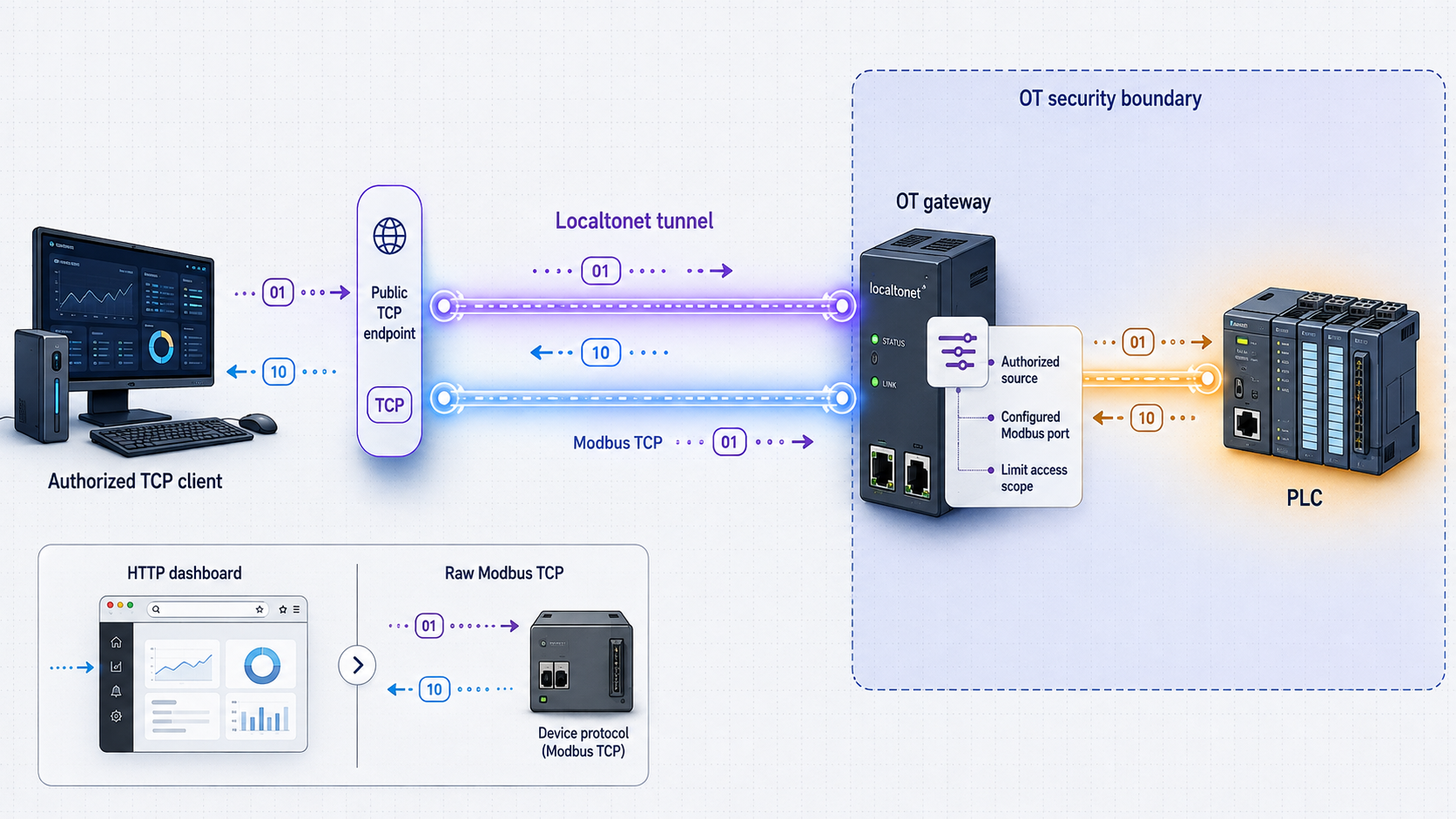
Traditional Modbus TCP commonly uses TCP port 502, but use the port actually documented and configured for the target. Modbus TCP generally does not provide native user authentication, and supported function codes can include write operations. A Localtonet TCP tunnel forwards traffic; it does not inspect Modbus function codes, convert the protocol to read-only, or authenticate an operator through HTTP SSO.
Possession or discovery of the assigned hostname and port must not be treated as proof of identity. Do not directly expose production Modbus TCP unless the asset owner and OT security team approve a documented risk assessment and compensating controls. Prefer a vendor-supported authenticated application, an intermediary that enforces authorization, or another approved remote-access architecture when raw protocol exposure cannot meet the site's requirements.
If the formal decision permits a raw TCP tunnel, constrain the change to a named target and short maintenance window. Confirm controller connection limits, expected client behavior, write risks, process-state safeguards, and monitoring with current product documentation and the system owner. Do not assume that an engineering tool, historian, controller, or gateway will tolerate additional concurrent sessions.
Install and authenticate the approved gateway
Install the current Localtonet client on the hardened gateway and authenticate it with that device's protected AuthToken. Confirm that the correct device appears connected before configuring a tunnel.
Select the connected device and current relay
In the raw port tunnel configuration, select TCP, choose the intended AuthToken, and select an available relay server or region from the dashboard. Do not hardcode an example server code.
Enter the approved local target
Enter the PLC, protocol gateway, or other approved endpoint's verified local IP address and TCP port. The target must already be reachable from the Localtonet gateway and must match the change record.
Create and review the TCP configuration
Create the tunnel, then independently review the device, protocol, target IP, and target port. A created tunnel remains a configuration until it is explicitly started.
Start it only for the approved window
Start the tunnel after the responsible operator confirms that monitoring and rollback readiness are in place. Record the assigned public host and port in the protected maintenance record, not in a public chat or reusable script.
Use an approved protocol client
Configure the authorized client with the assigned public hostname and port. Begin with the least disruptive vendor-supported test. This guide intentionally avoids a version-sensitive Python example because client APIs and argument names vary by package release.
If monitoring must be read-only, enforce that property in a component that actually understands identity and operations, such as the vendor application, controller configuration where supported, or an approved protocol-aware intermediary. A tunnel destination, public port, client-side convention, or operator instruction does not technically prevent Modbus writes.
Verify public access, shutdown, and rollback
Verification must cover both successful access and successful removal of access. Perform external tests from an authorized network that represents the remote engineer's real path. Do not test production access from an unapproved personal connection.
Confirm the expected public endpoint
Verify that the dashboard shows the intended tunnel as running and use only its assigned URL or host and port. Confirm that no unrelated tunnel was started.
Test from an authorized external network
For HTTP, verify the public HTTPS URL, SSO challenge, application login, expected page, and approved role. For TCP, use the approved client and least disruptive transaction defined in the change plan.
Observe the target and process
Have the responsible operator monitor application logs, controller state, alarms, network events, and process behavior. Stop immediately if the session produces unexpected writes, connection pressure, latency, or instability.
Stop the tunnel at the end of the task
Use the dashboard Stop control for the individual tunnel. Do not rely only on closing the engineer's browser or protocol client because that does not close the public listening endpoint.
Prove that public access has stopped
Repeat the external connection attempt and confirm that the endpoint no longer provides access. Also confirm in the dashboard that the tunnel is stopped.
Close or roll back the change
Record the result, stop time, participants, anomalies, and any target changes. Delete the tunnel if it is no longer approved, revoke the device token if exposure is suspected, and restore the previous gateway or firewall state according to the rollback plan.
Operate the gateway and tunnels safely
Define start and stop ownership
Assign named roles for requesting access, approving it, starting the tunnel, supervising the production task, and stopping the tunnel. A shared understanding that “someone will close it later” is not an operational control. Use a checklist that records the tunnel identifier, target, public endpoint, operator, start time, planned stop time, actual stop time, and shutdown-test result.
Separate client persistence from tunnel availability
Localtonet can run as an operating-system service on supported gateway platforms. This keeps the client application running after logout or reboot, but it must not be interpreted as approval for an individual tunnel to remain active. Tunnel creation, client connectivity, and tunnel running state are separate lifecycle conditions.
The following service commands are documented on the current Localtonet download page. Replace the placeholder only on the approved host and never save a real token in shared documentation.
Linux systemd service
sudo localtonet --install-service --authtoken <YOUR_TOKEN>
sudo localtonet --start-service --authtoken <YOUR_TOKEN>

systemctl status localtonet
journalctl -u localtonet -f
Windows service
localtonet --install-service --authtoken <YOUR_TOKEN>
localtonet --start-service --authtoken <YOUR_TOKEN>
Run the Windows service installation commands from an Administrator Command Prompt or PowerShell session. The current download documentation also lists --stop-service, --status-service, and --remove-service for service management. Use the approved platform-specific procedure and verify the service state after changes.
Check both states independently. The AuthToken identifies the connected device, while the dashboard controls whether a particular tunnel has been started. Conversely, a saved tunnel configuration cannot work when its selected client device is disconnected.
Protect and review access
- Limit dashboard access to authorized administrators and review it regularly.
- Keep AuthTokens out of source control, tickets, screenshots, shell history where practical, and shared automation.
- Revoke a token when its gateway is retired, lost, transferred, or suspected of compromise.
- Review HTTP SSO providers, allowed identities, and application accounts after personnel or vendor changes.
- Patch the gateway, Localtonet client, operating system, and target application through the approved OT maintenance process.
- Review whether each saved tunnel still has a documented owner and business purpose.
- Delete obsolete tunnels rather than retaining unused public endpoint configurations.
Prepare for incidents
The incident plan should identify who can stop a tunnel, disconnect or isolate the gateway, revoke its device token, disable an SSO identity, revoke application credentials, preserve relevant logs, and notify operations. If unexpected access or behavior is observed, stopping the tunnel is an immediate containment action, not a complete investigation or recovery process.
Decommission completely
When remote access is no longer required, stop and delete the tunnel, remove unnecessary SSO assignments, revoke the device token, uninstall or remove the Localtonet service where appropriate, remove temporary egress approvals, and update the asset and change records. Verify from an external network that the former endpoint no longer provides access.
Troubleshooting without weakening OT controls
Troubleshoot from the inside out. Do not solve a failed connection by opening broad outbound access, moving the gateway onto an unrestricted network, or exposing additional ports. Use the successful local baseline to determine whether the fault is at the target, gateway, client connection, tunnel state, identity layer, or public application path.
| Symptom | Likely area | Safe checks |
|---|---|---|
| The gateway cannot reach the target | Target service, route, local firewall, or OT segmentation | Retest the exact IP and port from the gateway. Confirm the service is running and compare routing and firewall policy with the approved design. |
| The service works on the target but not from the gateway | Bind address or network policy | Check whether the application listens only on loopback, a different interface, or a different port. Change it only through vendor-supported configuration and change control. |
| The Localtonet device is disconnected | Client process, token, host state, DNS, or approved egress | Confirm the client or service is running, verify the intended device token, inspect local service status and logs, and ask the network team to validate the explicit egress policy. |
| The device is connected but the endpoint is unavailable | Tunnel lifecycle or wrong configuration | Confirm that the specific tunnel was started and that it points to the selected device, relay, target IP, and target port. |
| SSO never appears | Wrong tunnel type or provider assignment | Confirm that this is an HTTP tunnel and that configured providers are enabled on that tunnel. SSO will not appear on a raw TCP endpoint. |
| SSO succeeds but the application rejects access | Application authentication or authorization | Verify the separate SCADA or HMI account, role, license, and session policy. Localtonet SSO does not create an application account. |
| An HTTP page redirects incorrectly or returns the wrong site | Host-header, base URL, virtual host, or application proxy awareness | Check the application's current vendor documentation for external URL, trusted proxy, virtual-host, and redirect settings. Do not disable security checks without review. |
| An HTTPS backend fails from the gateway | Backend TLS certificate or hostname mismatch | Test the local HTTPS endpoint from the gateway and validate its certificate, hostname, trust chain, and supported configuration before investigating the public URL. |
| Modbus connects but requests fail | Unit addressing, function support, target mode, or client compatibility | Use the same approved client and settings that passed local testing. Check current controller or gateway documentation rather than changing register addresses experimentally in production. |
| Existing PLC or HMI sessions become unstable | Connection or resource limits | Stop the tunnel, restore the known safe state, and check model-specific connection limits, licensing, and resource guidance with the vendor. |
| Access continues after the engineer closes the client | Tunnel still running | Stop the tunnel in the dashboard and perform the required external shutdown test. Closing one user session does not stop the public endpoint. |
A tunnel failure is not justification to expose a controller programming port, allow an entire subnet, disable application authentication, bypass certificate validation, or bridge IT and OT networks. Pause the maintenance activity and return to the approved design if the narrow service path cannot be made to work safely.
Frequently asked questions
Is a Localtonet tunnel a replacement for an approved OT VPN?
No. A standard Localtonet tunnel publishes a configured HTTP, TCP, UDP, TLS, combined UDP/TCP, or File Server target. It is not VPN functionality and should be evaluated as a narrowly scoped service conduit. Whether it is appropriate depends on the asset owner's risk assessment, segmentation design, authorization controls, monitoring, and applicable requirements.
Can Localtonet SSO protect a Modbus TCP tunnel?
No. Localtonet SSO is documented as a security layer for HTTP tunnels. A raw Modbus TCP connection does not use the HTTP authentication flow. Do not treat the TCP endpoint's hostname or port as a credential, and do not expose production Modbus TCP without formal approval and compensating controls.
Does a TCP tunnel make Modbus access read-only?
No. The tunnel forwards TCP traffic and does not enforce Modbus function-level authorization. Modbus operations can include writes. Read-only behavior must be enforced by a vendor-supported application, controller capability, or approved protocol-aware security component that actually controls permitted operations.
What encryption should I assume for an HTTP tunnel?
Localtonet HTTP Process Types provide a public HTTPS address, with TLS terminated at the tunnel edge. That statement should not be extended into an unsupported claim about every other leg of the path. Evaluate the backend separately. If the local service uses HTTPS, validate its certificate and hostname from the gateway. If it uses HTTP, assess that local path within the approved OT architecture.
What happens when the plant internet connection or Localtonet client goes offline?
The tunnel is unavailable when the selected client device is disconnected. Local control-system behavior should not depend on the remote-access path, but that independence must be confirmed by the system owner. After connectivity returns, verify the device and tunnel states rather than assuming a saved configuration is automatically running.
Can one gateway reach several PLCs or SCADA services?
A connected gateway can be used for tunnel targets that it can reach, but each additional service expands the approved conduit and risk. Create separate, clearly owned tunnel configurations for separately approved services. Do not turn the gateway into a general router, and verify that routes and firewall rules restrict it to the required destinations.
Can I use this with a serial-only legacy controller?
Not directly as a TCP target unless an approved device or application presents the serial service over a reachable network protocol. Serial gateway behavior, protocol conversion, authentication, write controls, and controller compatibility are product-specific. Use current documentation from the controller and gateway vendors and subject the design to the same OT security review.
Does this make an installation compliant with an OT security standard?
No single tunneling configuration establishes compliance. Compliance depends on the applicable requirements and the organization's complete architecture, risk management, identity controls, segmentation, logging, change process, incident response, evidence, and operating procedures. Have qualified security and compliance personnel review the specific deployment.
Prepare a controlled Localtonet maintenance path
After authorization and local validation, install Localtonet on the approved hardened gateway, expose only the required service, apply HTTP SSO and application authentication where appropriate, and prove that access ends when the tunnel is stopped.
Get Started Free →

